# Xstate > Actions are fire-and-forget effects. When a state machine transitions, it may execute actions. Actions occur in response to events, and are typically defined on transitions in the`actions: [...]`pro --- # Source: https://stately.ai/docs/actions.mdx # Actions (/docs/actions) Actions are fire-and-forget effects. When a state machine transitions, it may execute actions. Actions occur in response to events, and are typically defined on transitions in the `actions: [...]` property. Actions can also be defined for any transition that enters a state in the state's `entry: [...]` property, or for any transition that exits a state in the state's `exit: [...]` property. You can visualize your state machines and easily add actions in our drag-and-drop Stately editor. [Read more about actions in Stately’s editor](editor-actions-and-actors). Actions can also be on a state’s `entry` or `exit`, also as a single action or an array. ```ts import { setup } from 'xstate'; function trackResponse(response: string) { // ... } const feedbackMachine = setup({ actions: { track: (_, params: { response: string }) => { trackResponse(params.response); // Tracks { response: 'good' } }, showConfetti: () => { // ... } } }).createMachine({ // ... states: { // ... question: { on: { 'feedback.good': { actions: [ { type: 'track', params: { response: 'good' } } ] } }, exit: [ { type: 'exitAction' } ] } thanks: { entry: [ { type: 'showConfetti' } ], } } }); ``` Examples of actions: * Logging a message * Sending a message to another [actor](actors) * Updating context ## Entry and exit actions Entry actions are actions that occur on any transition that enters a state node. Exit actions are actions that occur on any transition that exits a state node. Entry and exit actions are defined using the `entry: [...]` and `exit: [...]` attributes on a state node. You can fire multiple entry and exit actions on a state. Top-level final states cannot have exit actions, since the machine is stopped and no further transitions can occur. ## Action objects Action objects have an action `type` and an optional `params` object: * The action `type` property describes the action. Actions with the same type have the same implementation. * The action `params` property hold parameterized values that are relevant to the action. ```ts import { setup } from 'xstate'; const feedbackMachine = setup({ actions: { track: (_, params: { response: string }) => { /* ... */ }, }, }).createMachine({ // ... states: { // ... question: { on: { 'feedback.good': { actions: [ // [!code highlight:6] { // Action type type: 'track', // Action params params: { response: 'good' }, }, ], }, }, }, }, }); ``` ## Dynamic action parameters You can dynamically pass parameters in the `params` property to action objects by using a function that returns the params. The function takes in an object that contains the current `context` and `event` as arguments. ```ts import { setup } from 'xstate'; const feedbackMachine = setup({ actions: { logInitialRating: (_, params: { initialRating: number }) => { // ... }, }, }).createMachine({ context: { initialRating: 3, }, entry: [ { type: 'logInitialRating', // [!code highlight:3] params: ({ context }) => ({ initialRating: context.initialRating, }), }, ], }); ``` This is a recommended approach for making actions more reusable, since you can define actions that do not rely on the machine’s `context` or `event` types. ```ts import { setup } from 'xstate'; // [!code highlight:3] function logInitialRating(_, params: { initialRating: number }) { console.log(`Initial rating: ${params.initialRating}`); } const feedbackMachine = setup({ actions: { logInitialRating }, }).createMachine({ context: { initialRating: 3 }, entry: [ { type: 'logInitialRating', // [!code highlight:3] params: ({ context }) => ({ initialRating: context.initialRating, }), }, ], }); ``` ## Inline actions You can declare actions as inline functions: ```ts import { createMachine } from 'xstate'; const feedbackMachine = createMachine({ entry: [ // [!code highlight:4] // Inline action ({ context, event }) => { console.log(/* ... */); }, ], }); ``` Inline actions are useful for prototyping and simple cases but we generally recommended using action objects. ## Implementing actions You can setup the implementations for named actions in the `actions` property of the `setup(...)` function ```ts import { setup } from 'xstate'; const feedbackMachine = setup({ // [!code highlight:6] actions: { track: (_, params: { msg: string }) => { // Action implementation // ... }, }, }).createMachine({ // Machine config entry: [{ type: 'track', params: { msg: 'entered' } }], }); ``` You can also provide action implementations to override existing actions in the `machine.provide(...)` method, which creates a new machine with the same config but with the provided implementations: ```ts import { createActor } from 'xstate'; const feedbackActor = createActor( // [!code highlight:9] feedbackMachine.provide({ actions: { track: ({ context, event }, params) => { // Different action implementation // (overrides previous implementation) // ... }, }, }), ); ``` ## Built-in actions XState provides a number of useful built-in actions that are a core part of the logic of your state machines, and not merely side-effects. Built-in actions, such as `assign(…)`, `sendTo(…)`, and `raise(…)`, are **not imperative**; they return a special [action object](#action-objects) (e.g. `{ type: 'xstate.assign', … }`) that are interpreted by the state machine. Do not call built-in action in custom action functions. ```ts import { createMachine, assign, enqueueActions } from 'xstate'; // ❌ This will have no effect const machine = createMachine({ context: { count: 0 }, // [!code highlight:5] entry: ({ context }) => { // This action creator only returns an action object // like { type: 'xstate.assign', ... } assign({ count: context.count + 1 }); }, }); // ✅ This will work as expected const machine = createMachine({ context: { count: 0 }, // [!code highlight:3] entry: assign({ count: ({ context }) => context.count + 1, }), }); // ✅ Imperative built-in actions are available in `enqueueActions(…)` const machine = createMachine({ context: { count: 0 }, // [!code highlight:5] entry: enqueueActions(({ context, enqueue }) => { enqueue.assign({ count: context.count + 1, }); }), }); ``` ## Assign action The `assign(...)` action is a special action that assigns data to the state context. The `assignments` argument in `assign(assignments)` is where assignments to context are specified. Assignments can be an object of key-value pairs where the keys are `context` keys and the values are either static values or expressions that return the new value: ```ts import { setup } from 'xstate'; const countMachine = setup({ types: { events: {} as { type: 'increment'; value: number }, }, }).createMachine({ context: { count: 0, }, on: { increment: { // [!code highlight:3] actions: assign({ count: ({ context, event }) => context.count + event.value, }), }, }, }); const countActor = createActor(countMachine); countActor.subscribe((state) => { console.log(state.context.count); }); countActor.start(); // logs 0 countActor.send({ type: 'increment', value: 3 }); // logs 3 countActor.send({ type: 'increment', value: 2 }); // logs 5 ``` For more dynamic assignments, the argument passed to `assign(...)` may also be a function that returns the partial or full `context` value: ```ts import { setup } from 'xstate'; const countMachine = setup({ types: { events: {} as { type: 'increment'; value: number }, }, }).createMachine({ context: { count: 0, }, on: { increment: { // [!code highlight:5] actions: assign(({ context, event }) => { return { count: context.count + event.value, }; }), }, }, }); ``` Do not mutate the `context` object. Instead, you should use the `assign(...)` action to update `context` immutably. If you mutate the `context` object, you may get unexpected behavior, such as mutating the `context` of other actors. You can create state machines with the `assign(...)` action in our drag-and-drop Stately editor. [Read more about built-in assign action in Stately’s editor](/docs/editor-actions-and-actors/#xstate-built-in-actions). ## Raise action The raise action is a special action that *raises* an event that is received by the same machine. Raising an event is how a machine can “send” an event to itself: ```ts import { createMachine, raise } from 'xstate'; const machine = createMachine({ // ... // [!code highlight:1] entry: raise({ type: 'someEvent', data: 'someData' }); }); ``` Internally, when an event is raised, it is placed into an “internal event queue”. After the current transition is finished, these events are processed in insertion order ([first-in first-out, or FIFO](https://en.wikipedia.org/wiki/FIFO_\(computing_and_electronics\))). External events are only processed once all events in the internal event queue are processed. Raised events can be dynamic: ```ts import { createMachine, raise } from 'xstate'; const machine = createMachine({ // ... // [!code highlight:4] entry: raise(({ context, event }) => ({ type: 'dynamicEvent', data: context.someValue, })), }); ``` Events can also be raised with a delay, which will not place them in the internal event queue, since they will not be immediately processed: ```ts import { createMachine, raise } from 'xstate'; const machine = createMachine({ // ... entry: raise( { type: 'someEvent' }, // [!code highlight:1] { delay: 1000 } ); }); ``` You can create state machines with the `raise(...)` action in our drag-and-drop Stately editor. [Read more about the built-in raise action in Stately’s editor](/docs/editor-actions-and-actors/#xstate-built-in-actions). ## Send-to action The `sendTo(...)` action is a special action that sends an event to a specific actor. ```ts import { createMachine, sendTo } from 'xstate'; const machine = createMachine({ on: { transmit: { // [!code highlight:1] actions: sendTo('someActor', { type: 'someEvent' }), }, }, }); ``` The event can be dynamic: ```ts import { createMachine, sendTo } from 'xstate'; const machine = createMachine({ on: { transmit: { // [!code highlight:3] actions: sendTo('someActor', ({ context, event }) => { return { type: 'someEvent', data: context.someData }; }), }, }, }); ``` The destination actor can be the actor ID or the actor reference itself: ```ts import { createMachine, sendTo, fromPromise } from 'xstate'; const machine = createMachine({ context: ({ spawn }) => ({ someActorRef: spawn(fromPromise(/* ... */)), }), on: { transmit: { // [!code highlight:3] actions: sendTo(({ context }) => context.someActorRef, { type: 'someEvent', }), }, }, }); ``` Other options, such as `delay` and `id`, can be passed as the 3rd argument: ```ts import { createMachine, sendTo } from 'xstate'; const machine = createMachine({ on: { transmit: { actions: sendTo( 'someActor', { type: 'someEvent' }, // [!code highlight:4] { id: 'transmission', delay: 1000, }, ), }, }, }); ``` Delayed actions can be cancelled by their `id`. See [`cancel(...)`](https://stately.ai/docs/actions#cancel-action). You can create state machines with the `sendTo(...)` action in our drag-and-drop Stately editor. [Read more about the built-in sendTo action in Stately’s editor](/docs/editor-actions-and-actors/#xstate-built-in-actions). ## Send-parent action The `sendParent(...)` action is a special action that sends an event to the parent actor, if it exists. It is recommended to use `sendTo(...)` by to pass actor refs (e.g. the parent actor ref) to other actors via [input](./input.ts) or events and storing those actor refs in `context` rather than using `sendParent(...)`. This avoids tight coupling between actors and can be more type-safe.
Example using input: ```ts import { createMachine, sendTo } from 'xstate'; const childMachine = createMachine({ context: ({ input }) => ({ parentRef: input.parentRef, }), on: { someEvent: { // [!code highlight:3] actions: sendTo(({ context }) => context.parentRef, { type: 'tellParentSomething', }), }, }, }); const parentMachine = createMachine({ // ... invoke: { id: 'child', src: childMachine, // [!code highlight:3] input: ({ self }) => ({ parentRef: self, }), }, on: { tellParentSomething: { actions: () => { console.log('Child actor told parent something'); }, }, }, }); const parentActor = createActor(parentMachine); parentActor.start(); ```
Example using input (TypeScript): ```ts import { ActorRef, createActor, log, sendTo, setup, Snapshot } from 'xstate'; // [!code highlight:5] type ChildEvent = { type: 'tellParentSomething'; data?: string; }; type ParentActor = ActorRef, ChildEvent>; const childMachine = setup({ types: { context: {} as { parentRef: ParentActor; }, input: {} as { parentRef: ParentActor; }, }, }).createMachine({ context: ({ input: { parentRef } }) => ({ parentRef }), // [!code highlight:4] entry: sendTo(({ context }) => context.parentRef, { type: 'tellParentSomething', data: 'Hi parent!', }), }); export const parent = setup({ actors: { child: childMachine }, }).createMachine({ // [!code highlight:6] invoke: { src: 'child', input: ({ self }) => ({ parentRef: self, }), }, on: { tellParentSomething: { actions: log(({ event: { data } }) => `Child actor says "${data}"`), }, }, }); createActor(parent).start(); ```
## Enqueue actions The `enqueueActions(...)` action creator is a higher-level action that enqueues actions to be executed sequentially, without actually executing any of the actions. It takes a callback that receives the `context`, `event` as well as `enqueue` and `check` functions: * The `enqueue(...)` function is used to enqueue an action. It takes an action object or action function: ```ts actions: enqueueActions(({ enqueue }) => { // Enqueue an action object enqueue({ type: 'greet', params: { message: 'hi' } }); // Enqueue an action function enqueue(() => console.log('Hello')); // Enqueue a simple action with no params enqueue('doSomething'); }); ``` * The `check(...)` function is used to conditionally enqueue an action. It takes a guard object or a guard function and returns a boolean that represents whether the guard evaluates to `true`: ```ts actions: enqueueActions(({ enqueue, check }) => { if (check({ type: 'everythingLooksGood' })) { enqueue('doSomething'); } }); ``` * There are also helper methods on `enqueue` for enqueueing built-in actions: * `enqueue.assign(...)`: Enqueues an `assign(...)` action * `enqueue.sendTo(...)`: Enqueues a `sendTo(...)` action * `enqueue.raise(...)`: Enqueues a `raise(...)` action * `enqueue.spawnChild(...)`: Enqueues a `spawnChild(...)` action * `enqueue.stopChild(...)`: Enqueues a `stopChild(...)` action * `enqueue.cancel(...)`: Enqueues a `cancel(...)` action Enqueued actions can be called conditionally, but they cannot be enqueued asynchronously. ```ts import { createMachine, enqueueActions } from 'xstate'; const machine = createMachine({ // ... entry: enqueueActions(({ context, event, enqueue, check }) => { // assign action enqueue.assign({ count: context.count + 1, }); // Conditional actions (replaces choose(...)) if (event.someOption) { enqueue.sendTo('someActor', { type: 'blah', thing: context.thing }); // other actions enqueue('namedAction'); // with params enqueue({ type: 'greet', params: { message: 'hello' } }); } else { // inline enqueue(() => console.log('hello')); // even built-in actions } // Use check(...) to conditionally enqueue actions based on a guard if (check({ type: 'someGuard' })) { // ... } // no return }), }); ``` You can use parameters with referenced enqueue actions: ```ts import { setup, enqueueActions } from 'xstate'; const machine = setup({ actions: { // [!code highlight:4] doThings: enqueueActions(({ enqueue }, params: { name: string }) => { enqueue({ type: 'greet', params: { name } }); // ... }), greet: (_, params: { name: string }) => { console.log(`Hello ${params.name}!`); }, }, }).createMachine({ // ... // [!code highlight:4] entry: { type: 'doThings', params: { name: 'World' }, }, }); ``` ## Log action The `log(...)` action is an easy way to log messages to the console. ```ts import { createMachine, log } from 'xstate'; const machine = createMachine({ on: { someEvent: { // [!code highlight:1] actions: log('some message'), }, }, }); ``` You can create state machines with the `log(...)` action in our drag-and-drop Stately editor. [Read more about the built-in log action in Stately’s editor](/docs/editor-actions-and-actors/#xstate-built-in-actions). ## Cancel action The `cancel(...)` action cancels a delayed `sendTo(...)` or `raise(...)` action by their IDs: ```ts import { createMachine, sendTo, cancel } from 'xstate'; const machine = createMachine({ on: { event: { actions: sendTo( 'someActor', { type: 'someEvent' }, { // [!code highlight:1] id: 'someId', delay: 1000, }, ), }, cancelEvent: { // [!code highlight:1] actions: cancel('someId'), }, }, }); ``` ## Stop child action The `stopChild(...)` action stops a child actor. Actors can only be stopped from their parent actor: ```ts import { createMachine, stopChild } from 'xstate'; const machine = createMachine({ context: ({ spawn }) => ({ spawnedRef: spawn(fromPromise(/* ... */), { id: 'spawnedId' }), }), on: { stopById: { // [!code highlight:1] actions: stopChild('spawnedId'), }, stopByRef: { // [!code highlight:1] actions: stopChild(({ context }) => context.spawnedRef), }, }, }); ``` ## Modeling If you only need to execute actions in response to events, you can create a [self-transition](/docs/transitions#self-transitions) that only has `actions: [ ... ]` defined. For example, a machine that only needs to assign to `context` in transitions may look like this: ```ts import { createMachine } from 'xstate'; const countMachine = createMachine({ context: { count: 0, }, // [!code highlight:12] on: { increment: { actions: assign({ count: ({ context, event }) => context.count + event.value, }), }, decrement: { actions: assign({ count: ({ context, event }) => context.count - event.value, }), }, }, }); ``` ## Shorthands For simple actions, you can specify an action string instead of an action object. Though we prefer using objects for consistency. ```ts import { createMachine } from 'xstate'; const feedbackMachine = createMachine({ // ... states: { // ... question: { on: { 'feedback.good': { // [!code highlight:1] actions: ['track'], }, }, }, }, }); ``` ## Actions and TypeScript **XState v5 requires TypeScript version 5.0 or greater.** For best results, use the latest TypeScript version. [Read more about XState and TypeScript](typescript) To strongly setup action types, use the `setup({ ... })` function and place the action implementations in the `actions: { ... }` object. The key is the action type and the value is the action function implementation. You should also strongly type the parameters of the action function, which are passed as the second argument to the action function. ```ts import { setup } from 'xstate'; const machine = setup({ // [!code highlight:8] actions: { track: (_, params: { response: string }) => { // ... }, increment: (_, params: { value: number }) => { // ... }, }, }).createMachine({ // ... entry: [ { type: 'track', params: { response: 'good' } }, { type: 'increment', params: { value: 1 } }, ], }); ``` If you are not using `setup({ ... })` (strongly recommended), you can strongly type the `actions` of your machine in the `types.actions` property of the machine config. ```ts import { createMachine } from 'xstate'; const machine = createMachine({ types: {} as { // [!code highlight:8] actions: | { type: 'track'; params: { response: string; }; } | { type: 'increment'; params: { value: number } }; }, // ... entry: [ { type: 'track', params: { response: 'good' } }, { type: 'increment', params: { value: 1 } }, ], }); ``` ## Actions cheatsheet ### Cheatsheet: entry and exit actions ```ts import { createMachine } from 'xstate'; const machine = createMachine({ // [!code highlight:3] // Entry action on root entry: [{ type: 'entryAction' }], exit: [{ type: 'exitAction' }], initial: 'start', states: { start: { // [!code highlight:2] entry: [{ type: 'startEntryAction' }], exit: [{ type: 'startExitAction' }], }, }, }); ``` ### Cheatsheet: transition actions ```ts import { createMachine } from 'xstate'; const machine = createMachine({ on: { someEvent: { actions: [ // [!code highlight:2] { type: 'doSomething' }, { type: 'doSomethingElse' }, ], }, }, }); ``` ### Cheatsheet: inline action functions ```ts import { createMachine } from 'xstate'; const machine = createMachine({ on: { someEvent: { actions: [ // [!code highlight:3] ({ context, event }) => { console.log(context, event); }, ], }, }, }); ``` ### Cheatsheet: setting up actions ```ts import { setup } from 'xstate'; const someAction = () => { //... }; const machine = setup({ actions: { someAction, }, }).createMachine({ entry: [ // [!code highlight:1] { type: 'someAction' }, ], // ... }); ``` ### Cheatsheet: providing actions ```ts import { setup } from 'xstate'; const someAction = () => { //... }; const machine = setup({ actions: { someAction, }, }).createMachine({ // ... }); const modifiedMachine = machine.provide({ someAction: () => { // Overridden action implementation }, }); ``` ### Cheatsheet: assign action #### With property assigners ```ts import { createMachine, assign } from 'xstate'; const countMachine = createMachine({ context: { count: 0, }, on: { increment: { // [!code highlight:5] actions: assign({ count: ({ context, event }) => { return context.count + event.value; }, }), }, }, }); ``` #### With function assigners ```ts import { createMachine, assign } from 'xstate'; const countMachine = createMachine({ context: { count: 0, }, on: { increment: { // [!code highlight:5] actions: assign(({ context, event }) => { return { count: context.count + event.value, }; }), }, }, }); ``` ### Cheatsheet: raise action ```ts import { createMachine, raise } from 'xstate'; const machine = createMachine({ on: { someEvent: { // [!code highlight:1] actions: raise({ type: 'anotherEvent' }), }, }, }); ``` ### Cheatsheet: send-to action ```ts import { createMachine, sendTo } from 'xstate'; const machine = createMachine({ on: { transmit: { // [!code highlight:1] actions: sendTo('someActor', { type: 'someEvent' }), }, }, }); ``` ### Cheatsheet: enqueue actions ```ts import { createMachine, enqueueActions } from 'xstate'; const machine = createMachine({ // [!code highlight:15] entry: enqueueActions(({ enqueue, check }) => { enqueue({ type: 'someAction' }); if (check({ type: 'someGuard' })) { enqueue({ type: 'anotherAction' }); } enqueue.assign({ count: 0, }); enqueue.sendTo('someActor', { type: 'someEvent' }); enqueue.raise({ type: 'anEvent' }); }), }); ``` --- # Source: https://stately.ai/docs/actor-model.mdx # The Actor model (/docs/actor-model) The [Actor model](https://en.wikipedia.org/wiki/Actor_model) in computer science is a mathematical model of concurrent computation in which an “actor” is the basic building block. The actor model allows developers to build reliable message-based systems by using actors to communicate. State machines and statecharts can model the logic of actors. These actors can communicate with each other, and with other actors, in the same way. When you run a state machine in XState, it becomes an actor. ### What defines an “actor”? Actors are independent “live” objects that can communicate with each other via asynchronous message passing. In XState, we refer to these messages as [*events*](transitions). * An actor has its own internal, encapsulated state that can only be updated by the actor itself. An actor may choose to update its internal state in response to a message it receives, but it cannot be updated by any other entity. * Actors communicate with other actors by sending and receiving events asynchronously. * Actors process one message at a time. They have an internal “mailbox” that acts like an event queue, processing events sequentially. * Internal actor state is not shared between actors. The only way for an actor to share any part of its internal state is by: * Sending events to other actors * Or emitting snapshots, which can be considered implicit events sent to subscribers. * Actors can create (spawn/invoke) new actors. You’ll find strong similarities to the actor model in software you may already be familiar with. The concept of objects encapsulating state and passing messages to each other may be familiar from Object-Oriented Programming. And actors are analagous to real-world physical concepts like cell biology, and communication in human relationships. ## State An actor has its own internal, encapsulated state that only the actor itself can update. An actor may update its internal state in response to a message it receives, but it cannot be updated by any other entity. Actors do not share state. The only way for an actor to share data is by sending events. [Read more about XState actors and state](actors). ## Communication with events Actors communicate with other actors by sending and receiving events asynchronously. Actors use an internal “mailbox” that acts like an event queue, processing events one at a time. [Read more about XState events and transitions](transitions). ## Spawning Actors can spawn new actors, which is useful in situations where an actor needs to delegate work to another actor. Spawning allows for a flexible and dynamic system where actors can be created and destroyed as needed to handle the workload efficiently. * [Read more about spawning actors in XState](spawn). * [Read about the difference between invoking and spawning actors in XState](actors.mdx#invoking-and-spawning-actors). ## The actor model in backend development The actor model is often used to coordinate backend systems. There are direct implementations of the Actor model, like [Akka](https://doc.akka.io/docs/akka/current/typed/guide/introduction.html) for the JVM. In [Erlang](https://www.erlang.org/docs), processes can be seen as actors, which can send and receive messages and spawn new processes. Erlang is used by massive distributed systems, like Discord and WhatsApp. In [Stately Sky](https://stately.ai/docs/stately-sky-getting-started), a state machine actor can be used to manage long-running backend processes like medical patient onboarding flows, inventory management, or multi-player collaborative experiences like whiteboard canvases or games. ## The actor model in frontend development The actor model is especially useful for coordinating the many moving parts of a front-end web application. **Your front-end app is always a distributed system**, and managing distributed systems is where the actor model shines. This is because in a browser environment **you never really have a “global source of truth”**, you instead have **many independent sources of state and events**: 3rd-party components, local component state, local storage, query parameters, routers, network I/O, DOM events and their listeners, etc. > \[…] there is no such thing as a single source of truth in any non-trivial application. All applications, even front-end apps, are distributed at some level. – via: [Redux is Half of a Pattern (2/2)](https://dev.to/davidkpiano/redux-is-half-of-a-pattern-2-2-4jo3) So even for simple web apps, with small app-specific state and a few known app-specific events, the actor model can be helpful. ## XState Actors in XState can: * **Accept messages** as [events](/docs/transitions/#event-objects) passed to their own internal logic, or for state machines as received by [transitions](transitions). * **Create more actors** within a state machine using `spawn` in an [`assign`](/docs/actions/#assign-action), or using the `spawnChild` action creator. For details, see [Spawn](spawn). * **Send more messages** as events using `self.send` in their own logic, or [action creators](actions) like [`sendTo`](/docs/actions/#send-to-action) or [`raise`](/docs/actions/#raise-action) in a state machine. Actors in XState have their own [actor logic](/docs/actors/#actor-logic) which they use to: * **Make local decisions** * **Determine how to respond to the next message received** * **Modify their own private state** (but only affect each other via messaging) Actors in XState exist in [systems](system) and can communicate with each other within and across those systems. ## Reference * [What is the actor model and when should I use it?](https://stately.ai/blog/what-is-the-actor-model) * [The Actor Model Explained in 5 Minutes](https://www.youtube.com/watch?v=ELwEdb_pD0k) * [Wikipedia: Actor model](https://en.wikipedia.org/wiki/Actor_model) --- # Source: https://stately.ai/docs/actors.mdx # Actors (/docs/actors) import { VideoIcon } from 'lucide-react'; When you run a state machine, it becomes an actor: a running process that can receive events, send events and change its behavior based on the events it receives, which can cause effects outside of the actor. In state machines, actors can be **invoked** or **spawned**. These are essentially the same, with the only difference being how the actor’s lifecycle is controlled. * An **invoked actor** is started when its parent machine enters the [state](states) it is invoked in, and stopped when that state is exited. * A **spawned actor** is started in a [transition](transitions) and stopped either with a [`stop(...)` action](/docs/actions/#stop-action) or when its parent machine is stopped. You can visualize your state machines and easily invoke actors in our drag-and-drop Stately editor. [Read more about actors in Stately’s editor](editor-actions-and-actors). }> Watch our [“XState: exploring actors” deep dive video on YouTube](https://www.youtube.com/watch?v=Rj7lOvDwcYs). ## Actor model In the actor model, actors are objects that can communicate with each other. They are independent “live” entities that communicate via asynchronous message passing. In XState, these messages are referred to as *[events](transitions)*. * An actor has its own internal, encapsulated state that can only be updated by the actor itself. An actor may choose to update its internal state in response to a message it receives, but it cannot be updated by any other entity. * Actors communicate with other actors by sending and receiving events asynchronously. * Actors process one message at a time. They have an internal “mailbox” that acts like an event queue, processing events sequentially. * Internal actor state is not shared between actors. The only way for an actor to share any part of its internal state is by: * Sending events to other actors * Or emitting snapshots, which can be considered implicit events sent to subscribers. * Actors can create (spawn/invoke) new actors. [Read more about the Actor model](actor-model) ## Actor logic Actor logic is the actor’s logical “model” (brain, blueprint, DNA, etc.) It describes how the actor should change behavior when receiving an event. You can create actor logic using **[actor logic creators](#actor-logic-creators)**. In XState, actor logic is defined by an object implementing the `ActorLogic` interface, containing methods like `.transition(...)`, `.getInitialSnapshot()`, `.getPersistedSnapshot()`, and more. This object tells an interpreter how to update an actor’s internal state when it receives an event and which effects to execute (if any). ## Creating actors You can create an actor, which is a “live” instance of some actor logic, via `createActor(actorLogic, options?)`. The `createActor(...)` function takes the following arguments: * `actorLogic`: the [actor logic](actors.mdx#actor-logic) to create an actor from * `options` (optional): actor options When you create an actor from actor logic via `createActor(actorLogic)`, you implicitly create an [actor system](system) where the created actor is the root actor. Any actors spawned from this root actor and its descendants are part of that actor system. The actor must be started by calling `actor.start()`, which will also start the actor system: ```ts import { createActor } from 'xstate'; import { someActorLogic } from './someActorLogic.ts'; const actor = createActor(someActorLogic); actor.subscribe((snapshot) => { console.log(snapshot); }); actor.start(); // Now the actor can receive events actor.send({ type: 'someEvent' }); ``` You can stop root actors by calling `actor.stop()`, which will also stop the actor system and all actors in that system: ```ts // Stops the root actor, actor system, and actors in the system actor.stop(); ``` ### Invoking and spawning actors An invoked actor represents a state-based actor, so it is stopped when the invoking state is exited. Invoked actors are used for a finite/known number of actors. A spawned actor represents multiple entities that can be started at any time and stopped at any time. Spawned actors are action-based and used for a dynamic or unknown number of actors. An example of the difference between invoking and spawning actors could occur in a todo app. When loading todos, a `loadTodos` actor would be an invoked actor; it represents a single state-based task. In comparison, each of the todos can themselves be spawned actors, and there can be a dynamic number of these actors. * [Read more about invoking actors](invoke) * [Read more about spawning actors](spawn) ## Actor snapshots When an actor receives an event, its internal state may change. An actor may emit a **snapshot** when a state transition occurs. You can read an actor’s snapshot synchronously via `actor.getSnapshot()`, or you can subscribe to snapshots via `actor.subscribe(observer)`. ```ts import { fromPromise, createActor } from 'xstate'; async function fetchCount() { return Promise.resolve(42); } const countLogic = fromPromise(async () => { const count = await fetchCount(); return count; }); const countActor = createActor(countLogic); countActor.start(); countActor.getSnapshot(); // logs undefined // After the promise resolves... countActor.getSnapshot(); // => { // output: 42, // status: 'done', // ... // } ``` ## Subscriptions You can subscribe to an actor’s snapshot values via `actor.subscribe(observer)`. The observer will receive the actor’s snapshot value when it is emitted. The observer can be: * A plain function that receives the latest snapshot, or * An observer object whose `.next(snapshot)` method receives the latest snapshot ```ts // Observer as a plain function const subscription = actor.subscribe((snapshot) => { console.log(snapshot); }); ``` ```ts // Observer as an object const subscription = actor.subscribe({ next(snapshot) { console.log(snapshot); }, error(err) { // ... }, complete() { // ... }, }); ``` The return value of `actor.subscribe(observer)` is a subscription object that has an `.unsubscribe()` method. You can call `subscription.unsubscribe()` to unsubscribe the observer: ```ts const subscription = actor.subscribe((snapshot) => { /* ... */ }); // Unsubscribe the observer subscription.unsubscribe(); ``` When the actor is stopped, all of its observers will automatically be unsubscribed. You can initialize actor logic at a specific persisted snapshot (state) by passing the state in the second `options` argument of `createActor(logic, options)`. If the state is compatible with the actor logic, this will create an actor that will be started at that persisted state: ```ts const persistedState = JSON.parse(localStorage.getItem('some-persisted-state')); const actor = createActor(someLogic, { // [!code highlight:1] snapshot: persistedState, }); actor.subscribe(() => { localStorage.setItem( 'some-persisted-state', JSON.stringify(actor.getPersistedSnapshot()), ); }); // Actor will start at persisted state actor.start(); ``` See [persistence](persistence) for more details. ## `waitFor` You can wait for an actor’s snapshot to satisfy a predicate using the `waitFor(actor, predicate, options?)` helper function. The `waitFor(...)` function returns a promise that is: * Resolved when the emitted snapshot satisfies the `predicate` function * Resolved immediately if the current snapshot already satisfies the `predicate` function * Rejected if an error is thrown or the `options.timeout` value is elapsed. ```ts import { waitFor } from 'xstate'; import { countActor } from './countActor.ts'; const snapshot = await waitFor( countActor, (snapshot) => { return snapshot.context.count >= 100; }, { timeout: 10_000, // 10 seconds (10,000 milliseconds) }, ); console.log(snapshot.output); // => 100 ``` ## Error handling You can subscribe to errors thrown by an actor using the `error` callback in the observer object passed to `actor.subscribe()`. This allows you to handle errors emitted by the actor logic. ```ts import { createActor } from 'xstate'; import { someMachine } from './someMachine'; const actor = createActor(someMachine); actor.subscribe({ next: (snapshot) => { // ... }, // [!code highlight:4] error: (err) => { // Handle the error here console.error(err); }, }); actor.start(); ``` ## Actor logic creators The types of actor logic you can create from XState are: * [State machine logic (`createMachine(...)`)](#createmachine) * [Promise logic (`fromPromise(...)`)](#frompromise) * [Transition function logic (`fromTransition(...)`)](#fromtransition) * [Observable logic (`fromObservable(...)`)](#fromobservable) * [Event observable logic (`fromEventObservable(...)`)](#fromeventobservable) * [Callback logic (`fromCallback(...)`)](#fromcallback) ### Actor logic capabilities | | Receive events | Send events | Spawn actors | Input | Output | | -------------------------------------------- | -------------- | ----------- | ------------ | ----- | ------ | | [State machine actors](state-machine-actors) | ✅ | ✅ | ✅ | ✅ | ✅ | | [Promise actors](promise-actors) | ❌ | ✅ | ❌ | ✅ | ✅ | | [Transition actors](transition-actors) | ✅ | ✅ | ❌ | ✅ | ❌ | | [Observable actors](observable-actors) | ❌ | ✅ | ❌ | ✅ | ❌ | | [Callback actors](callback-actors) | ✅ | ✅ | ❌ | ✅ | ❌ | ### State machine logic (`createMachine(...)`) You can describe actor logic as a [state machine](machines). Actors created from state machine actor logic can: * Receive events * Send events to other actors * Invoke/spawn child actors * Emit snapshots of its state * Output a value when the machine reaches its top-level final state ```ts const toggleMachine = createMachine({ id: 'toggle', initial: 'inactive', states: { inactive: {}, active: {}, }, }); const toggleActor = createActor(toggleMachine); toggleActor.subscribe((snapshot) => { // snapshot is the machine's state console.log('state', snapshot.value); console.log('context', snapshot.context); }); toggleActor.start(); // Logs 'inactive' toggleActor.send({ type: 'toggle' }); // Logs 'active' ``` Learn more about [state machine actors.](state-machine-actors) ### Promise logic (`fromPromise(...)`) Promise actor logic is described by an async process that resolves or rejects after some time. Actors created from promise logic (“promise actors”) can: * Emit the resolved value of the promise * Output the resolved value of the promise Sending events to promise actors will have no effect. ```ts const promiseLogic = fromPromise(() => { return fetch('https://example.com/...').then((data) => data.json()); }); const promiseActor = createActor(promiseLogic); promiseActor.subscribe((snapshot) => { console.log(snapshot); }); promiseActor.start(); // => { // output: undefined, // status: 'active' // ... // } // After promise resolves // => { // output: { ... }, // status: 'done', // ... // } ``` Learn more about [promise actors.](promise-actors) ### Transition function logic (`fromTransition(...)`) Transition actor logic is described by a [transition function](migration.mdx#use-actor-logic-creators-for-invokesrc-instead-of-functions), similar to a [reducer](cheatsheet#creating-transition-logic). Transition functions take the current `state` and received `event` object as arguments, and return the next state. Actors created from transition logic (“transition actors”) can: * Receive events * Emit snapshots of its state ```ts const transitionLogic = fromTransition( (state, event) => { if (event.type === 'increment') { return { ...state, count: state.count + 1, }; } return state; }, { count: 0 }, ); const transitionActor = createActor(transitionLogic); transitionActor.subscribe((snapshot) => { console.log(snapshot); }); transitionActor.start(); // => { // status: 'active', // context: { count: 0 }, // ... // } transitionActor.send({ type: 'increment' }); // => { // status: 'active', // context: { count: 1 }, // ... // } ``` Learn more about [transition actors.](transition-actors) ### Observable logic (`fromObservable(...)`) Observable actor logic is described by an [observable stream of values](#fromObservable). Actors created from observable logic (“observable actors”) can: * Emit snapshots of the observable’s emitted value Sending events to observable actors will have no effect. ```ts import { interval } from 'rxjs'; const secondLogic = fromObservable(() => interval(1000)); const secondActor = createActor(secondLogic); secondActor.subscribe((snapshot) => { console.log(snapshot.context); }); secondActor.start(); // At every second: // Logs 0 // Logs 1 // Logs 2 // ... ``` Learn more about [observable actors.](observable-actors) ### Event observable logic (`fromEventObservable(...)`) Event observable actor logic is described by an observable stream of [event objects](transitions.mdx#event-objects). Actors created from event observable logic (“event observable actors”) can: * Implicitly send events to its parent actor * Emit snapshots of its emitted event objects Sending events to event observable actors will have no effect. ```ts import { setup, fromEventObservable } from 'xstate'; import { fromEvent } from 'rxjs'; const mouseClickLogic = fromEventObservable( () => fromEvent(document.body, 'click') as Subscribable, ); const canvasMachine = setup({ actors: { mouseClickLogic, }, }).createMachine({ invoke: { // Will send mouse click events to the canvas actor src: 'mouseClickLogic', }, }); const canvasActor = createActor(canvasMachine); canvasActor.start(); ``` Learn more about [observable actors.](observable-actors) ### Callback logic (`fromCallback(...)`) Callback actor logic is described by a callback function that receives a single object argument that includes a `sendBack(event)` function and a `receive(event => ...)` function. Actors created from callback logic (“callback actors”) can: * Receive events via the `receive` function * Send events to the parent actor via the `sendBack` function ```ts const callbackLogic = fromCallback(({ sendBack, receive }) => { let lockStatus = 'unlocked'; const handler = (event) => { if (lockStatus === 'locked') { return; } sendBack(event); }; receive((event) => { if (event.type === 'lock') { lockStatus = 'locked'; } else if (event.type === 'unlock') { lockStatus = 'unlocked'; } }); document.body.addEventListener('click', handler); return () => { document.body.removeEventListener('click', handler); }; }); ``` Callback actors are a bit different from other actors in that they do not do the following: * Do not work with `onDone` * Do not produce a snapshot using `.getSnapshot()` * Do not emit values when used with `.subscribe()` You may choose to use `sendBack` to report caught errors to the parent actor. This is especially helpful for handling promise rejections within a callback function, which will not be caught by [`onError`](invoke.mdx#onerror). Callback functions cannot be `async` functions. But it is possible to execute a Promise within a callback function. ```ts import { setup, fromCallback } from 'xstate'; const someCallback = fromCallback(({ sendBack }) => { // [!code highlight:3] somePromise() .then((data) => sendBack({ type: 'done', data })) .catch((error) => sendBack({ type: 'error', data: error })); return () => { /* cleanup function */ }; }); const machine = setup({ actors: { someCallback, }, }).createMachine({ initial: 'running', states: { running: { invoke: { src: 'someCallback', }, // [!code highlight:4] on: { error: { actions: ({ event }) => console.error(event.data), }, }, }, }, }); ``` Learn more about [callback actors.](callback-actors) ## Actors as promises You can create a promise from any actor by using the `toPromise(actor)` function. The promise will resolve with the actor snapshot's `.output` when the actor is done (`snapshot.status === 'done'`) or reject with the actor snapshot's `.error` when the actor is errored (`snapshot.status === 'error'`). ```ts import { createMachine, createActor, toPromise } from 'xstate'; const machine = createMachine({ // ... states: { // ... done: { type: 'final' }, }, output: { count: 42, }, }); const actor = createActor(machine); actor.start(); // [!code highlight:3] // Creates a promise that resolves with the actor's output // or rejects with the actor's error const output = await toPromise(actor); console.log(output); // => { count: 42 } ``` If the actor is already done, the promise will resolve with the actor's `snapshot.output` immediately. If the actor is already errored, the promise will reject with the actor's `snapshot.error` immediately. ## Higher-level actor logic Higher-level actor logic enhances existing actor logic with additional functionality. For example, you can create actor logic that logs or persists actor state: ```ts import { fromTransition, type AnyActorLogic } from 'xstate'; const toggleLogic = fromTransition((state, event) => { if (event.type === 'toggle') { return state === 'paused' ? 'playing' : 'paused'; } return state; }, 'paused'); // [!code highlight:13] function withLogging(actorLogic: T) { const enhancedLogic = { ...actorLogic, transition: (state, event, actorCtx) => { console.log('State:', state); return actorLogic.transition(state, event, actorCtx); }, } satisfies T; return enhancedLogic; } const loggingToggleLogic = withLogging(toggleLogic); ``` ## Custom actor logic Custom actor logic can be defined with an object that implements the `ActorLogic` interface. For example, here is a custom actor logic object with a `transition` function that operates as a simple reducer: ```ts import { createActor, EventObject, ActorLogic, Snapshot } from 'xstate'; const countLogic: ActorLogic< Snapshot & { context: number }, EventObject > = { transition: (state, event) => { if (event.type === 'INC') { return { ...state, context: state.context + 1, }; } else if (event.type === 'DEC') { return { ...state, context: state.context - 1, }; } return state; }, getInitialSnapshot: () => ({ status: 'active', output: undefined, error: undefined, context: 0, }), getPersistedSnapshot: (s) => s, }; const actor = createActor(countLogic); actor.subscribe((state) => { console.log(state.context); }); actor.start(); // => 0 actor.send({ type: 'INC' }); // => 1 actor.send({ type: 'INC' }); // => 2 ``` For further examples, see implementations of `ActorLogic` in the source code, like the `fromTransition` actor logic creator, or the examples in the tests. ## Empty actors Actor that does nothing and only has a single emitted snapshot: `undefined` In XState, an empty actor is an actor that does nothing and only has a single emitted snapshot: `undefined`. This is useful for testing, such as stubbing out an actor that is not yet implemented. It can also be useful in framework integrations, such as `@xstate/react`, where an actor may not be available yet: ```ts import { createEmptyActor, AnyActorRef } from 'xstate'; import { useSelector } from '@xstate/react'; const emptyActor = createEmptyActor(); function Component(props: { actor?: AnyActorRef }) { const data = useSelector( props.actor ?? emptyActor, (snapshot) => snapshot.context.data, ); // data is `undefined` if `props.actor` is undefined // Otherwise, it is the data from the actor // ... } ``` ## Actors and TypeScript **XState v5 requires TypeScript version 5.0 or greater.** For best results, use the latest TypeScript version. [Read more about XState and TypeScript](typescript) You can strongly type the `actors` of your machine in the `types.actors` property of the machine config. ```ts const fetcher = fromPromise( async ({ input }: { input: { userId: string } }) => { const user = await fetchUser(input.userId); return user; }, ); const machine = setup({ types: { children: {} as { fetch1: 'fetcher'; fetch2: 'fetcher'; } } // [!code highlight:1] actors: { fetcher } }).createMachine({ invoke: { // [!code highlight:8] src: 'fetchData', // strongly typed id: 'fetch2', // strongly typed onDone: { actions: ({ event }) => { event.output; // strongly typed as { result: string } }, }, input: { userId: '42' }, // strongly typed }, }); ``` ## Testing The general strategy for testing actors is to send events and assert that the actor reaches an expected state, which can be observed either by: * Subscribing to its emitted snapshots via `actor.subscribe(...)` * Or reading the latest snapshot via `actor.getSnapshot()`. ```ts test('some actor', async () => { const actor = createActor( fromTransition( (state, event) => { if (event.type === 'inc') { return { count: state.count + 1 }; } return state; }, { count: 0 }, ), ); // Start the actor actor.start(); // Send event(s) actor.send({ type: 'inc' }); actor.send({ type: 'inc' }); actor.send({ type: 'inc' }); // Assert the expected result expect(actor.getSnapshot().context).toEqual({ count: 3 }); }); ``` ## Actors cheatsheet ### Cheatsheet: create an actor ```ts import { createActor } from 'xstate'; import { someActorLogic } from './someActorLogic.ts'; // Create an actor from the actor logic const actor = createActor(someActorLogic); // Subscribe to an actor’s snapshot values and log them actor.subscribe((snapshot) => { console.log(snapshot); }); // Start the actor system actor.start(); // Now the actor can receive events actor.send({ type: 'someEvent' }); // Stops the root actor, actor system, and actors in the system actor.stop(); ``` ### Cheatsheet: state machine logic ```ts import { createMachine, createActor } from 'xstate'; const toggleMachine = createMachine({ id: 'toggle', initial: 'inactive', states: { inactive: {}, active: {}, }, }); const toggleActor = createActor(toggleMachine); toggleActor.subscribe((snapshot) => { // snapshot is the machine’s state console.log('state', snapshot.value); console.log('context', snapshot.context); }); toggleActor.start(); // Logs 'inactive' toggleActor.send({ type: 'toggle' }); // Logs 'active' ``` ### Cheatsheet: promise logic ```ts import { fromPromise, createActor } from 'xstate'; const promiseLogic = fromPromise(() => { return fetch('https://example.com/...').then((data) => data.json()); }); const promiseActor = createActor(promiseLogic); promiseActor.subscribe((snapshot) => { console.log(snapshot); }); promiseActor.start(); ``` ### Cheatsheet: transition function logic ```ts import { fromTransition, createActor } from 'xstate'; const transitionLogic = fromTransition( (state, event) => { if (event.type === 'increment') { return { ...state, count: state.count + 1, }; } return state; }, { count: 0 }, ); const transitionActor = createActor(transitionLogic); transitionActor.subscribe((snapshot) => { console.log(snapshot); }); transitionActor.start(); // => { // status: 'active', // context: { count: 0 }, // ... // } transitionActor.send({ type: 'increment' }); // => { // status: 'active', // context: { count: 1 }, // ... // } ``` ### Cheatsheet: observable logic ```ts import { fromObservable, createActor } from 'xstate'; import { interval } from 'rxjs'; const secondLogic = fromObservable(() => interval(1000)); const secondActor = createActor(secondLogic); secondActor.subscribe((snapshot) => { console.log(snapshot.context); }); secondActor.start(); // At every second: // Logs 0 // Logs 1 // Logs 2 // ... ``` ### Cheatsheet: event observable logic ```ts import { setup, fromEventObservable, createActor } from 'xstate'; import { fromEvent } from 'rxjs'; const mouseClickLogic = fromEventObservable( () => fromEvent(document.body, 'click') as Subscribable, ); const canvasMachine = setup({ actors: { mouseClickLogic, }, }).createMachine({ invoke: { // Will send mouse click events to the canvas actor src: 'mouseClickLogic', }, }); const canvasActor = createActor(canvasMachine); canvasActor.start(); ``` ### Cheatsheet: callback logic ```ts import { fromCallback, createActor } from 'xstate'; const callbackLogic = fromCallback(({ sendBack, receive }) => { let lockStatus = 'unlocked'; const handler = (event) => { if (lockStatus === 'locked') { return; } sendBack(event); }; receive((event) => { if (event.type === 'lock') { lockStatus = 'locked'; } else if (event.type === 'unlock') { lockStatus = 'unlocked'; } }); document.body.addEventListener('click', handler); return () => { document.body.removeEventListener('click', handler); }; }); ``` --- # Source: https://stately.ai/docs/agents/agents.mdx # AI Agents (/docs/agents/agents) Stately Agent is still under development. An AI agent is an autonomous entity that observes an environment, decides what to do (based on its internal policy), and performs actions towards achieving its goals. In terms of the actor model, an agent can be considered an actor that can: * **Receive events**, such as an instruction on what to do next, which goal to accomplish, or an observation of the environment * **Send events**, which would cause actions to be performed on the environment * **Store state**, which can be used to remember contextual information about the environment * **Spawn other agents**, which can be used to create a hierarchy of agents that can work together and coordinate their actions to achieve a goal The [Stately Agent (`@statelyai/agent`)](https://github.com/statelyai/agent) package makes it simple to create agents and agent behavior based on the actor model and state machines. These agents can do much more than generate text and execute function calls; Stately Agent is a framework for: * **Storing message history** between the user and assistant when using the generative text features * **Making observations** of an environment, recording the transitions (previous state, event, next state) so it can understand the environment * **Receiving feedback** on decisions it makes, so it can retrieve and corrolate feedback so that it can make more informed decisions * **Making plans** in its decision-making progress, so that it not only predicts the very next decision to make, but a sequence of decisions that ideally reaches the goal * **Short-term and long-term memory** for remembering message history, observations, feedback, and plans that it makes. ## Installation Install the following dependencies: * `@statelyai/agent@beta` – Stately.ai Agent, currently in beta * `@ai-sdk/openai` – The Vercel AI SDK for OpenAI, which provides access to the OpenAI API * `xstate` – Library for managing state machines and statecharts * `zod` – Library for type-safe schema validation ```bash npm install @statelyai/agent @ai-sdk/openai xstate zod ``` ```bash pnpm install @statelyai/agent @ai-sdk/openai xstate zod ``` ```bash yarn add @statelyai/agent @ai-sdk/openai xstate zod ``` ## Quick start 1. Add your provider's API key to your `.env` file. ```bash OPENAI_API_KEY="sk-abCDE..." ``` 2. Create an agent. ```ts import { openai } from '@ai-sdk/openai'; import { createAgent } from '@statelyai/agent'; const agent = createAgent({ name: 'todo', model: openai('gpt-4-turbo'), events: {}, }); ``` 3. Add event schemas using Zod. These are the events that the agent is allowed to "cause" (i.e. send to the actor) ```ts import { openai } from '@ai-sdk/openai'; import { createAgent } from '@statelyai/agent'; import { z } from 'zod'; const agent = createAgent({ model: openai('gpt-4-turbo'), name: 'todo', // [!code highlight:18] events: { 'todo.add': z.object({ todo: z .object({ title: z.string().describe('The title of the todo'), content: z.string().describe('The content of the todo'), completed: z .boolean() .describe('The completed value of the todo') .optional(), }) .describe('Adds a new todo'), }), 'todo.toggle': z.object({ todoId: z.string().describe('The ID of the todo to toggle'), completed: z.boolean().describe('The new completed value').optional(), }), }, }); ``` 3. Interact with a [state machine actor](./state-machine-actors) that accepts those events. ```ts import { setup, createActor } from 'xstate'; // [!code highlight:1] import { agent } from './agent'; const todoMachine = setup({ types: { // [!code highlight:2] // Add the event types that the agent understands events: agent.types.events, }, // ... }).createMachine({ // ... }); const todoActor = createActor(todoMachine); // [!code highlight:1] agent.interact(todoMachine); todoActor.start(); ``` ## Creating an agent You can create an agent using the `createAgent(settings)` function. There are required settings: * `name` - The name of the agent, used for logging and agent learning purposes * `model` - The [AI SDK language model](https://sdk.vercel.ai/docs/foundations/providers-and-models) to use for generating text and making tool calls * `events` - A mapping of event types to [Zod](https://zod.dev/) event schemas that the agent can trigger (i.e. events it can send to some live environment that it is interacting with) ```ts import { createAgent } from '@statelyai/agent'; import { openai } from '@ai-sdk/openai'; import { z } from 'zod'; const agent = createAgent({ name: 'barista', model: openai('gpt-4-turbo'), events: { 'barista.makeDrink': z .object({ drink: z.enum(['espresso', 'latte', 'cappuccino']), }) .describe('Makes a drink'), // ... }, }); ``` You can specify additional settings to customize the agent's behavior: * `description` - A description of the agent, used for logging and agent learning purposes, as well as for agents that call other agents (multi-agent systems) * `planner` - An async function that takes the `agent` and planner `input` and resolves with an `AgentPlan` that potentially includes the `steps` and the `nextEvent` to execute to achieve the `input.goal`. This function is used to determine what the agent should do next when making a decision based on the current state (`input.state`) and goal (`input.goal`). * `logic` - The agent logic function that is used to determine what an agent does when it receives an agent event, such as `"agent.feedback"`, `"agent.observe"`, `"agent.message"`, or `"agent.plan"`. ## Making decisions The most important feature of a Stately agent is the ability to make decisions based on the current state and goal. This is done using the `agent.decide(input)` async function, which takes an `input` object that contains the current state, state machine, and goal, and resolves with an `AgentPlan`. For example, suppose you have the following `baristaMachine` state machine: ```ts import { createMachine } from 'xstate'; export const baristaMachine = createMachine({ initial: 'idle', states: { idle: { on: { 'barista.makeDrink': 'makingDrink', }, }, makingDrink: { on: { 'barista.drinkMade': 'idle', }, }, }, }); ``` You can then use the `agent.decide(input)` function to determine what the agent should do next: ```ts import { createAgent } from '@statelyai/agent'; import { baristaMachine } from './baristaMachine'; const agent = createAgent({ name: 'barista', model: openai('gpt-4-turbo'), events: { 'barista.makeDrink': z .object({ drink: z.enum(['espresso', 'latte', 'cappuccino']), }) .describe('Makes a drink'), }, }); async function handleOrder(order, state) { const resolvedState = baristaMachine.resolveState(state); // [!code highlight:5] const plan = await agent.decide({ state: resolvedState, machine: baristaMachine, goal: `A customer made this order: ${order}`, }); return plan; } handleOrder('I want a latte please', { value: 'idle' }); // Resolves with an `AgentPlan` that includes: // { // // ... // nextEvent: { type: 'barista.makeDrink', drink: 'latte' }, // } ``` ## Agent memory Stately agents can have two types of memory: **short-term (local) memory** and **long-term memory**. * **Short-term (local) memory** is memory that can be synchronously retrieved, but might not be persisted. * **Long-term memory** is memory that is asynchronously retrieved from persistent storage, such as a database. Agents remember four kinds of things in their memory: * **Messages** between the user and the assistant * **Observations** of state transitions (previous state, event, current state) that occur in the environment that the agent is observing * **Feedback** * **Plans** ## Messages ### `agent.getMessages()` Returns chat messages that occur between the user and the assistant from short-term memory. ### `agent.addMessage(message)` If you want to manually add a message between the assistant and user to agent memory, you can call `agent.addMessage(message)` to do so. This is automatically called when calling `agent.generateText(…)`, `agent.streamText(…)`, or the `fromText(…)` and `fromTextStream(…)` actor logic creators. You should avoid calling this manually. ## Observations ### `agent.getObservations()` Returns observations that the agent observes from short-term memory. ### `agent.addObservation(observation)` You can add an observation (`{ prevState, event, state, … }`) to an agent's memory by calling `agent.addObservation(observation)`. This function returns an `AgentObservation` object that includes the provided observation details as well as an observation `id` so that the observation can be referenced in feedback, if applicable. ```ts const observation = agent.addObservation({ prevState: { value: 'idle', context: {} }, event: { type: 'grindBeans' }, state: { value: 'grindingBeans', context: {} }, }); ``` ## Feedback ### `agent.getFeedback()` Returns feedback that is given to the agent from short-term memory. ### `agent.addFeedback(feedback)` ```ts const observation = agent.addObservation({ // ... }); const feedback = agent.addFeedback({ observationId: observation.id, goal: 'Make an iced coffee', attributes: { feedback: 'Water should not be boiled for an iced coffee', score: -10, }, }); ``` ## Plans ### `agent.getPlans()` Returns plans that the agent has made from short-term memory. ### `agent.addPlan(plan)` TODO ## Interacting with state machines An agent can interact with existing state machine actors to determine what to do next. While the state machine actor is running, the agent will do the following cycle: 1. The agent **observes state changes** * The observation is remembered in the agent's state 2. The agent **determines** if it needs to make a decision based on the current state 3. If it does, the agent **makes a decision** in the form of an `AgentPlan`. 4. If an `AgentPlan` is formed, the agent triggers the next event (`plan.nextEvent`) on the state machine actor. * The plan is remembered in the agent's state. 4. The agent goes back to step 1, and the cycle continues. ```ts import { createAgent } from '@statelyai/agent'; import { createActor } from 'xstate'; import { jokeMachine } from './jokeMachine'; const agent = createAgent({ name: 'joke-teller', model: openai('gpt-4'), events: { 'agent.tellJoke': z.object({ joke: z.string().describe('The joke text'), }), 'agent.rateJoke': z.object({ rating: z.number().min(1).max(10), explanation: z.string(), }), // ... }, }); const jokeActor = createActor(jokeMachine).start(); agent.interact(jokeActor, (observed) => { if (observed.state.matches('tellingJoke')) { return { goal: `Tell a joke about ${observed.state.context.topic}` }; } if (observed.state.matches('ratingJoke')) { return { goal: `Rate this joke: ${observed.state.context.joke}` }; } }); ``` ## State machine agents You can invoke Stately agents as part of a state machine, ensuring that it will follow the state machine's transitions as specified and trigger the appropriate events. This is done by using any of the following [actor logic creators](./actors): ### `fromDecision(agent)` Returns [promise actor logic](TODO) that resolves with the **agent plan** that should accomplish the goal (`input.goal`), if it is able to create one. When invoked/spawned, this actor will also add the user and assistant messages to agent memory, as well as the plan that it created. ### `fromText(agent)` Returns [promise actor logic](TODO) that resolves with the generated text result from the [Vercel AI SDK](https://sdk.vercel.ai/docs/reference/ai-sdk-core/generate-text#generatetext). When invoked/spawned, this actor will also add the user and assistant messages to agent memory. ```ts import { createAgent, fromText } from '@statelyai/agent'; import { setup } from 'xstate'; const agent = createAgent(/* ... */); const machine = setup({ actors: { assistant: fromText(agent), }, }).createMachine({ initial: 'greeting', context: (x) => ({ time: x.input.time, }), states: { greeting: { invoke: { src: 'assistant', input: ({ context }) => ({ context: { time: context.time, }, goal: 'Produce a greeting depending on the time of day.', }), onDone: { target: 'greeted', actions: ({ event }) => { console.log(event.output.text); }, }, }, }, greeted: { type: 'final', }, }, }); const actor = createActor(machine, { input: { time: Date.now() }, }); actor.start(); ``` ### `fromTextStream(agent)` Returns [observable actor logic](TODO) that streams the text from the [Vercel AI SDK](https://sdk.vercel.ai/docs/reference/ai-sdk-core/stream-text). When invoked/spawned, this actor will also add the user and assistant messages to agent memory. TODO: example ## Observability * Can observe observations, plans, messages, and feedback via `agent.on('message', (message) => {})` * Can manually add feedback observations via `agent.addFeedback(…)` ## Generating text You can use the `agent.generateText(input)` method to generate text from an input. This extends the `generateText(…)` function from the [Vercel AI SDK](https://sdk.vercel.ai/docs/reference/ai-sdk-core/generate-text#generatetext) by: * Adding the user and assistant messages to agent memory * Providing the ability to retrieve previous observations, feedback, plans and messages from agent memory ## Streaming text You can use the `agent.streamText(input)` method to stream text from an input. This extends the `streamText(…)` function from the [Vercel AI SDK](https://sdk.vercel.ai/docs/reference/ai-sdk-core/generate-text#generatetext) by: * Adding the user and assistant messages to agent memory * Providing the ability to retrieve previous observations, feedback, plans and messages from agent memory ## Agent logic Agent logic is [actor logic](TODO) that has the specific purpose of performing LLM tasks for the agent. Agent logic goes beyond just being a wrapper and provides the ability to use the agent's state machine to intelligently determine which action to take next. Agent logic is most powerful when used with a state-machine-powered agent, but you can also create standalone actors from agent logic, which is useful for testing and simple tasks. ## Examples See the current examples in the [examples directory](https://github.com/statelyai/agent/tree/main/examples). --- # Source: https://stately.ai/docs/xstate-store/angular.mdx # @xstate/store-angular (/docs/xstate-store/angular) The `@xstate/store-angular` package provides Angular bindings for [XState Store](/docs/xstate-store). It includes utilities for subscribing to store state as Angular signals. This package re-exports all of `@xstate/store`, so you only need to install `@xstate/store-angular`. ## Installation ```bash npm install @xstate/store-angular ``` ```bash pnpm install @xstate/store-angular ``` ```bash yarn add @xstate/store-angular ``` ## Quick start ```ts import { Component } from '@angular/core'; import { createStore, injectStore } from '@xstate/store-angular'; const store = createStore({ context: { count: 0 }, on: { inc: (context, event: { by?: number }) => ({ count: context.count + (event.by ?? 1), }), }, }); @Component({ selector: 'app-counter', standalone: true, template: `

Count: {{ count() }}

`, }) export class CounterComponent { store = store; count = injectStore(store, (state) => state.context.count); } ``` ## API ### `injectStore(store, selector?, compare?)` Creates an Angular signal that subscribes to a store and returns a selected value. ```ts import { Component } from '@angular/core'; import { injectStore } from '@xstate/store-angular'; @Component({ selector: 'app-counter', template: `
Count: {{ count() }}
`, }) export class CounterComponent { // Select specific value count = injectStore(store, (state) => state.context.count); // With custom comparison function user = injectStore( store, (state) => state.context.user, (prev, next) => prev.id === next.id ); // Without selector (returns full snapshot) snapshot = injectStore(store); } ``` **Parameters:** * `store` - The store to subscribe to * `selector` - Optional function to select a value from the store snapshot. If not provided, returns the full snapshot. * `compare` - Optional comparison function (defaults to strict equality `===`) **Returns:** A readonly Angular signal containing the selected value Remember to call the signal as a function (e.g., `count()`) in your template to access its value. This is how Angular's signal-based reactivity works. ## Full documentation For complete XState Store documentation including context, transitions, effects, atoms, and more, see the [XState Store docs](/docs/xstate-store). --- # Source: https://stately.ai/docs/annotations.mdx # Notes (/docs/annotations) import { PlusSquare } from 'lucide-react'; You can use notes to annotate your machine, positioned anywhere inside your machine. Notes are useful for information or comments you want to add to your machine that are only visible inside Stately Studio and not included when you export as code. Notes are formatted with Markdown so you can add links, images, and other formatting to your annotations. Unlike [**descriptions**](descriptions), notes don’t need to be connected to a state or transition and can be added or positioned anywhere inside your machine. ## Add notes to your machine You can add notes anywhere on your machine from **Design** and **Simulate** mode, but you can only edit them in **Design** mode. Notes are unrelated to a state or transition. Still, their layout position is connected to the closest root or parent state when you create them, which helps give your notes enough space in the auto layout. * Use the plus icon button in the canvas tools and choose **Note**. * Right-click anywhere on the canvas and choose **Add note**. ### Edit and delete notes * Double-click or use the Enter key to edit the contents of a note. * Use the Backspace key to delete the selected note. --- # Source: https://stately.ai/docs/assets.mdx # Assets in Stately’s editor (/docs/assets) import { Plus, Paperclip, Star, Info } from 'lucide-react'; # Assets You can drag and drop assets on any state or upload them using the plus menu and **Asset** on any selected state. Assets are a premium feature of Stately Studio. You can try Stately Studio’s premium plans with a free trial. [Check out the features on our Pro plan](studio-pro-plan), [Team plan](studio-team-plan), [Enterprise plan](studio-enterprise-plan) or [upgrade your existing plan](https://stately.ai/registry/billing). Assets are valuable when you want to include use cases, features, workflows, and more to your state machines. One of our most frequent requests is from teams who want to tie their logic to real-life user interfaces, and assets provide a way to connect user interface design to logic in a way your whole team can understand. You can now [embed Figma frames](figma) that stay in sync with your Figma files. ## Order of assets The first asset, indicated by the star icon, is the asset shown on the canvas. Further assets are accessible from the state **Details** panel, where you can also drag to reorder the assets and choose their [displayed size](#asset-sizes). ## Asset sizes Once your asset is uploaded to your state, you can choose the display size from the **Size** menu that shows on hover over the asset, or from the dropdown menu in the state **Details** panel: * small **sm** * medium **md** * large **lg** * extra large **xl** You can also add images from any URL using markdown in [state and transition descriptions](descriptions). --- # Source: https://stately.ai/docs/autolayout.mdx # Autolayout (/docs/autolayout) import { Wand } from 'lucide-react'; Autolayout chooses an optimal layout for your machine to make it easier to read and understand. When you import a machine, autolayout will be applied automatically. Otherwise, you can autolayout your machine anytime using the **Autolayout** button. ## Autolayout from the editor menu 1. Open the editor menu from the Stately icon in the top left of Stately Studio. 2. Choose **Autolayout** to lay out your machine. ## Autolayout from the context menu 1. Right-click anywhere on the canvas to open the context menu. 2. Choose **Autolayout** to lay out your machine. ## Autolayout from the zoom menu 1. Select the current zoom level from the bottom right of Stately Studio to open the zoom menu. 2. Choose **Autolayout** to lay out your machine. --- # Source: https://stately.ai/docs/callback-actors.mdx # Callback Actors (/docs/callback-actors) Callback actors are actors whose logic is represented by a function that can "callback" to the parent actor by sending events (via `sendBack(...)`). It can also `receive(...)` events from other actors. ## Callback actor capabilities | | Capability | Notes | | - | -------------- | --------------------------------------------------------------------------------------------------------------------------------------------------- | | ✅ | Receive events | Callback actors can receive events via the `receive(event => {...})` function. | | ✅ | Send events | Callback actors can send events to its parent via `sendBack(event)`, or to other actors it has reference to, such as those provided in its `input`. | | ❌ | Spawn actors | Callback actors currently cannot spawn new actors. | | ✅ | Input | You can provide `input` to callback actors. | | ❌ | Output | Callback actors currently do not produce output – they are active indefinitely until they are stopped or an error occurs. | ## Callback actor logic You can define callback actor logic using the `fromCallback(...)` actor logic creator, which takes a callback function and returns actor logic that can be used to create callback actors. ```ts import { createActor, createMachine, fromCallback, sendTo, setup, } from 'xstate'; const resizeLogic = fromCallback(({ sendBack, receive }) => { const resizeHandler = (event) => { sendBack(event); }; window.addEventListener('resize', resizeHandler); const removeListener = () => { window.removeEventListener('resize', resizeHandler); }; receive((event) => { if (event.type === 'stopListening') { console.log('Stopping listening'); removeListener(); } }); // Cleanup function return () => { console.log('Cleaning up'); removeListener(); }; }); const machine = setup({ actors: { resizeLogic, }, }).createMachine({ invoke: { id: 'resize', src: 'resizeLogic', }, on: { stop: { actions: sendTo('resize', { type: 'stopListening' }), }, }, }); const actor = createActor(machine); actor.start(); actor.send({ type: 'stop' }); // logs "Stopping listening" from callback actor actor.stop(); // logs "Cleaning up" from callback actor ``` ## Callback actor input You can pass `input` when creating callback actors, which is passed to the callback actor logic in the `input` property of the first argument. ```ts import { fromCallback, createActor, setup, type EventObject } from 'xstate'; const resizeLogic = fromCallback( ({ sendBack, receive, input, // Typed as { defaultSize: number } }) => { input.defaultSize; // 100 // ... }, ); const machine = setup({ actors: { resizeLogic, }, }).createMachine({ // ... invoke: { src: 'resizeLogic', input: { defaultSize: 100, }, }, }); ``` --- # Source: https://stately.ai/docs/canvas-view-controls.mdx # Canvas controls (/docs/canvas-view-controls) import { Sparkles, MousePointer2, Hand, PlusSquare, Undo, Redo, Scan, Check, ListTree } from 'lucide-react'; We’ve recently added a canvas tools panel to help you with common tasks while designing and simulating state machines. * [Generate with AI](generate-flow). * Pointer mode, for dragging and selecting items on the canvas. * Hand mode, for panning around the canvas. * Quick add menu, for adding a [state](editor-states-and-transitions) or a [note](annotations). {/*

*/} Canvas tools in Stately Studio, including a sparkles AI icon, pointer icon, hand icon, and plus icon which is focused and has an open menu for adding a state or a note. ## View controls You spend a lot of time on the canvas while designing and simulating state machines, so we’ve added view controls to help you navigate around your machines. ## Show/hide UI (user interface) You can show and hide most of the editor’s user interface to help you focus on your machine. 1. Open the editor menu from the Stately icon in the top left of Stately Studio. 2. From the **View** submenu, toggle **Show/hide UI** to show and hide the UI. You can also use the Command/Ctrl + . keyboard shortcut to show and hide the UI. We’ve got [keyboard shortcuts](keyboard-shortcuts) for many of the view controls. Below is a preview of a machine *with* the UI hidden. {/*

*/} Starter machine in Stately Studio. The only panel visible is the top left corner with the Stately logo and the machine name. Below is a preview of a machine *without* the UI hidden. {/*

*/} Starter machine in Stately Studio. All the panels are visible, including the top bar, view options, left sidebar, and right tool menu. ## View controls * Undo * Redo * Center in view: Center currently selected item or entire machine in view. * Zoom in %: Current zoom level. Press to open the zoom menu. [Find out more about light mode, dark mode, and translucency in user preferences](user-preferences). ## Zoom to selection You can use **Zoom to selection** from right-click on any transition or state on the canvas or in the **Structure** panel. --- # Source: https://stately.ai/docs/cheatsheet.mdx # Cheatsheet (/docs/cheatsheet) Use this cheatsheet to quickly look up the syntax for XState v5. ## Installing XState ```bash npm install xstate ``` ```bash pnpm install xstate ``` ```bash yarn add xstate ``` [Read more on installing XState](installation). ## Creating a state machine ```ts import { setup, createActor, assign } from 'xstate'; const machine = setup({ /* ... */ }).createMachine({ id: 'toggle', initial: 'active', context: { count: 0 }, states: { active: { entry: assign({ count: ({ context }) => context.count + 1, }), on: { toggle: { target: 'inactive' }, }, }, inactive: { on: { toggle: { target: 'active' }, }, }, }, }); const actor = createActor(machine); actor.subscribe((snapshot) => { console.log(snapshot.value); }); actor.start(); // logs 'active' with context { count: 1 } actor.send({ type: 'toggle' }); // logs 'inactive' with context { count: 1 } actor.send({ type: 'toggle' }); // logs 'active' with context { count: 2 } actor.send({ type: 'toggle' }); // logs 'inactive' with context { count: 2 } ``` [Read more about the actor model](actor-model). ## Creating promise logic ```ts import { fromPromise, createActor } from 'xstate'; const promiseLogic = fromPromise(async () => { const response = await fetch('https://dog.ceo/api/breeds/image/random'); const dog = await response.json(); return dog; }); const actor = createActor(promiseLogic); actor.subscribe((snapshot) => { console.log(snapshot); }); actor.start(); // logs: { // message: "https://images.dog.ceo/breeds/kuvasz/n02104029_110.jpg", // status: "success" // } ``` [Read more about promise actor logic](/docs/actors#actors-as-promises). ## Creating transition logic A transition function is just like a reducer. ```ts import { fromTransition, createActor } from 'xstate'; const transitionLogic = fromTransition( (state, event) => { switch (event.type) { case 'inc': return { ...state, count: state.count + 1, }; default: return state; } }, { count: 0 }, // initial state ); const actor = createActor(transitionLogic); actor.subscribe((snapshot) => { console.log(snapshot); }); actor.start(); // logs { count: 0 } actor.send({ type: 'inc' }); // logs { count: 1 } actor.send({ type: 'inc' }); // logs { count: 2 } ``` [Read more about transition actors](/docs/actors#fromtransition). ## Creating observable logic ```ts import { fromObservable, createActor } from 'xstate'; import { interval } from 'rxjs'; const observableLogic = fromObservable(() => interval(1000)); const actor = createActor(observableLogic); actor.subscribe((snapshot) => { console.log(snapshot); }); actor.start(); // logs 0, 1, 2, 3, 4, 5, ... // every second ``` [Read more about observable actors](/docs/actors#fromobservable). ## Creating callback logic ```ts import { fromCallback, createActor } from 'xstate'; const callbackLogic = fromCallback(({ sendBack, receive }) => { const i = setTimeout(() => { sendBack({ type: 'timeout' }); }, 1000); receive((event) => { if (event.type === 'cancel') { console.log('canceled'); clearTimeout(i); } }); return () => { clearTimeout(i); }; }); const actor = createActor(callbackLogic); actor.start(); actor.send({ type: 'cancel' }); // logs 'canceled' ``` [Read more about callback actors](/docs/actors#fromcallback). ## Parent states ```ts import { setup, createActor } from 'xstate'; const machine = setup({ /* ... */ }).createMachine({ id: 'parent', initial: 'active', states: { active: { initial: 'one', states: { one: { on: { NEXT: { target: 'two' }, }, }, two: {}, }, on: { NEXT: { target: 'inactive' }, }, }, inactive: {}, }, }); const actor = createActor(machine); actor.subscribe((snapshot) => { console.log(snapshot.value); }); actor.start(); // logs { active: 'one' } actor.send({ type: 'NEXT' }); // logs { active: 'two' } actor.send({ type: 'NEXT' }); // logs 'inactive' ``` [Read more about parent states](parent-states). ## Actions ```ts import { setup, createActor } from 'xstate'; const machine = setup({ actions: { activate: () => { /* ... */ }, deactivate: () => { /* ... */ }, notify: (_, params: { message: string }) => { /* ... */ }, }, }).createMachine({ id: 'toggle', initial: 'active', states: { active: { // [!code highlight:1] entry: { type: 'activate' }, // [!code highlight:1] exit: { type: 'deactivate' }, on: { toggle: { target: 'inactive', // [!code highlight:1] actions: [{ type: 'notify' }], }, }, }, inactive: { on: { toggle: { target: 'active', // [!code highlight:9] actions: [ // action with params { type: 'notify', params: { message: 'Some notification', }, }, ], }, }, }, }, }); const actor = createActor( machine.provide({ actions: { notify: (_, params) => { console.log(params.message ?? 'Default message'); }, activate: () => { console.log('Activating'); }, deactivate: () => { console.log('Deactivating'); }, }, }), ); actor.start(); // logs 'Activating' actor.send({ type: 'toggle' }); // logs 'Deactivating' // logs 'Default message' actor.send({ type: 'toggle' }); // logs 'Some notification' // logs 'Activating' ``` [Read more about actions](actions). ## Guards ```ts import { setup, createActor } from 'xstate'; const machine = setup({ // [!code highlight:9] guards: { canBeToggled: ({ context }) => context.canActivate, isAfterTime: (_, params) => { const { time } = params; const [hour, minute] = time.split(':'); const now = new Date(); return now.getHours() > hour && now.getMinutes() > minute; }, }, actions: { notifyNotAllowed: () => { console.log('Cannot be toggled'); }, }, }).createMachine({ id: 'toggle', initial: 'active', context: { canActivate: false, }, states: { inactive: { on: { toggle: [ { target: 'active', // [!code highlight:1] guard: 'canBeToggled', }, { actions: 'notifyNotAllowed', }, ], }, }, active: { on: { toggle: { // Guard with params // [!code highlight:1] guard: { type: 'isAfterTime', params: { time: '16:00' } }, target: 'inactive', }, }, // ... }, }, }); const actor = createActor(machine); actor.start(); // logs 'Cannot be toggled' ``` [Read more about guards](guards). ## Invoking actors ```ts import { setup, fromPromise, createActor, assign } from 'xstate'; const loadUserLogic = fromPromise(async () => { const response = await fetch('https://jsonplaceholder.typicode.com/users/1'); const user = await response.json(); return user; }); const machine = setup({ // [!code highlight:1] actors: { loadUserLogic }, }).createMachine({ id: 'toggle', initial: 'loading', context: { user: undefined, }, states: { loading: { // [!code highlight:16] invoke: { id: 'loadUser', src: 'loadUserLogic', onDone: { target: 'doSomethingWithUser', actions: assign({ user: ({ event }) => event.output, }), }, onError: { target: 'failure', actions: ({ event }) => { console.log(event.error); }, }, }, }, doSomethingWithUser: { // ... }, failure: { // ... }, }, }); const actor = createActor(machine); actor.subscribe((snapshot) => { console.log(snapshot.context.user); }); actor.start(); // eventually logs: // { id: 1, name: 'Leanne Graham', ... } ``` [Read more about invoking actors](invoke). ## Spawning actors ```ts import { setup, fromPromise, createActor, assign } from 'xstate'; const loadUserLogic = fromPromise(async () => { const response = await fetch('https://jsonplaceholder.typicode.com/users/1'); const user = await response.json(); return user; }); const machine = setup({ actors: { loadUserLogic, }, }).createMachine({ context: { userRef: undefined, }, on: { loadUser: { actions: assign({ // [!code highlight:1] userRef: ({ spawn }) => spawn('loadUserLogic'), }), }, }, }); const actor = createActor(machine); actor.subscribe((snapshot) => { const { userRef } = snapshot.context; console.log(userRef?.getSnapshot()); }); actor.start(); actor.send({ type: 'loadUser' }); // eventually logs: // { id: 1, name: 'Leanne Graham', ... } ``` [Read more about spawning actors](spawn). ## Input and output ```ts import { setup, createActor } from 'xstate'; const greetMachine = setup({ types: { context: {} as { message: string }, input: {} as { name: string }, }, }).createMachine({ // [!code highlight:3] context: ({ input }) => ({ message: `Hello, ${input.name}`, }), entry: ({ context }) => { console.log(context.message); }, }); const actor = createActor(greetMachine, { // [!code highlight:3] input: { name: 'David', }, }); actor.start(); // logs 'Hello, David' ``` [Read more about input](input). ## Invoking actors with input ```ts import { setup, createActor, fromPromise } from 'xstate'; const loadUserLogic = fromPromise(async ({ input }) => { const response = await fetch( `https://jsonplaceholder.typicode.com/users/${input.id}`, ); const user = await response.json(); return user; }); const machine = setup({ actors: { loadUserLogic, }, }).createMachine({ initial: 'loading user', states: { 'loading user': { invoke: { id: 'loadUser', src: 'loadUserLogic', // [!code highlight:3] input: { id: 3, }, onDone: { actions: ({ event }) => { console.log(event.output); }, }, }, }, }, }); const actor = createActor(machine); actor.start(); // eventually logs: // { id: 3, name: 'Clementine Bauch', ... } ``` [Read more about invoking actors with input](input.mdx#invoking-actors-with-input). ## Types ```ts import { setup, fromPromise } from 'xstate'; const promiseLogic = fromPromise(async () => { /* ... */ }); const machine = setup({ types: { context: {} as { count: number; }; events: {} as | { type: 'inc'; } | { type: 'dec' } | { type: 'incBy'; amount: number }; actions: {} as | { type: 'notify'; params: { message: string } } | { type: 'handleChange' }; guards: {} as | { type: 'canBeToggled' } | { type: 'isAfterTime'; params: { time: string } }; children: {} as { promise1: 'someSrc'; promise2: 'someSrc'; }; delays: 'shortTimeout' | 'longTimeout'; tags: 'tag1' | 'tag2'; input: number; output: string; }, actors: { promiseLogic } }).createMachine({ // ... }); ``` --- # Source: https://stately.ai/docs/colors.mdx # Colors (/docs/colors) import { Info, Star } from 'lucide-react'; You can highlight your machine’s state and event nodes with colors. You can use colors however you like; some ideas include: * Color coding groups or types of states or events * Emphasizing success or error states * Making your machines match your brand Colors are a premium feature of Stately Studio. [Check out the features on our Pro plan](studio-pro-plan), [Team plan](studio-team-plan), [Enterprise plan](studio-enterprise-plan) or [upgrade your existing plan](https://stately.ai/registry/billing). A note on accessibility: not everyone perceives color the same way, and as many as 8% of men and 0.5% of women are [color blind](https://www.nei.nih.gov/learn-about-eye-health/eye-conditions-and-diseases/color-blindness). Ensure your statecharts are inclusive by using color to emphasize or decorate your machines and [do not use color as the only way to convey information](https://www.w3.org/WAI/WCAG21/Understanding/use-of-color.html). ## Change the color of a state or event All states and events have a default color. In dark mode, the default color is grey. In light mode, the default color is white. When you hover over the color options, a preview of the color will be shown on the selected state or event. Colors are faded out in Simulate mode to make the current state and possible events easier to distinguish. ### On the canvas 1. Select the state or event whose color you want to change. 2. Choose the circular color swatch in the center of the Edit menu to open the **Color state** or **Color event** options. 3. Choose your desired color from the available color options. ### Use the details panel 1. Select the state or event whose color you want to change. 2. Open the **Details** panel from the right tool menu. 3. Choose the circular color swatch in the top right of the **Details** panel to open the **Color state** or **Color event** options. 4. Choose your desired color from the available color options. ## Available colors * Default: grey in dark mode, white in light mode * Purple * Pink * Red * Orange * Yellow * Green * Blue --- # Source: https://stately.ai/docs/context.mdx # Context (/docs/context) In XState, `context` is how you store data in a state machine [actor](actors). The `context` property is available in all states and used to store data relevant to an actor. The `context` object is immutable, so you cannot directly modify it. Instead, for state machine logic, you can use the `assign(...)` action to update `context`. The `context` property is *optional*; if the state machine only specifies [finite states](finite-states) and no external contextual data, it may not need `context`. ```ts import { createMachine, createActor } from 'xstate'; const feedbackMachine = createMachine({ // Initialize the state machine with context context: { feedback: 'Some feedback', }, }); const feedbackActor = createActor(feedbackMachine); feedbackActor.subscribe((state) => { console.log(state.context.feedback); }); feedbackActor.start(); // logs 'Some feedback' ``` ## Initial context Set the initial context of a machine in the `context` property of the machine config: ```ts import { createMachine } from 'xstate'; const feedbackMachine = createMachine({ context: { feedback: 'Some feedback', rating: 5, // other properties }, }); ``` The object you pass to `context` will be the initial `context` value for any actor created from this machine. Do not mutate the `context` object. Instead, you should use the `assign(...)` action to update `context` immutably. If you mutate the `context` object, you may get unexpected behavior, such as mutating the `context` of other actors. ### Lazy initial context Context can be initialized lazily by passing a function that returns the initial `context` value: ```ts const feedbackMachine = createMachine({ context: () => ({ feedback: 'Some feedback', createdAt: Date.now(), }), }); const feedbackActor = createActor(feedbackMachine).start(); console.log(feedbackActor.getSnapshot().context.createdAt); // logs the current timestamp ``` Lazy initial context is evaluated per actor, so each actor will have its own `context` object. ### Input You can provide input data to a machine’s initial `context` by passing an `input` property to the `createActor(machine, { input })` function and using the `input` property from the first argument in the `context` function: ```ts import { setup, createActor } from 'xstate'; const feedbackMachine = setup({ types: { context: {} as { feedback: string; rating: number; }, // [!code highlight:3] input: {} as { defaultRating: number; }, }, }).createMachine({ // [!code highlight:1] context: ({ input }) => ({ feedback: '', // [!code highlight:1] rating: input.defaultRating, }), }); const feedbackActor = createActor(feedbackMachine, { // [!code highlight:3] input: { defaultRating: 5, }, }).start(); console.log(feedbackActor.getSnapshot().context.rating); // logs 5 ``` Learn more about [input](input). ## Updating context with `assign(...)` Use the `assign(...)` action in a transition to update context: ```ts import { createMachine, assign, createActor } from 'xstate'; const feedbackMachine = createMachine({ context: { feedback: 'Some feedback', }, on: { 'feedback.update': { actions: assign({ feedback: ({ event }) => event.feedback, }), }, }, }); const feedbackActor = createActor(feedbackMachine); feedbackActor.subscribe((state) => { console.log(state.context.feedback); }); feedbackActor.start(); // logs 'Some feedback' feedbackActor.send({ type: 'feedback.update', feedback: 'Some other feedback', }); // logs 'Some other feedback' ``` ## Context and TypeScript **XState v5 requires TypeScript version 5.0 or greater.** For best results, use the latest TypeScript version. [Read more about XState and TypeScript](typescript) You can strongly type the `context` of your machine in the `types.context` property of the actor setup.. ```ts import { setup } from 'xstate'; const machine = setup({ types: {} as { // [!code highlight:4] context: { feedback: string; rating: number; }; }, }).createMachine({ // Initial context context: { feedback: '', rating: 5, }, entry: ({ context }) => { context.feedback; // string context.rating; // number }, }); ``` ## Context cheatsheet Use our XState context cheatsheet below to get started quickly. ### Cheatsheet: initial context ```ts import { createMachine } from 'xstate'; const machine = createMachine({ context: { feedback: '', }, }); ``` ### Cheatsheet: lazy initial context ```ts import { createMachine } from 'xstate'; const machine = createMachine({ context: () => ({ feedback: '', createdAt: Date.now(), }), }); ``` ### Cheatsheet: updating context with `assign(...)` ```ts import { createMachine, assign } from 'xstate'; const machine = createMachine({ context: { feedback: '', }, on: { 'feedback.update': { actions: assign({ feedback: ({ event }) => event.feedback, }), }, }, }); ``` ### Cheatsheet: input ```ts import { setup, createActor } from 'xstate'; const feedbackMachine = setup({ types: { context: {} as { feedback: string; rating: number; }, // [!code highlight:3] input: {} as { defaultRating: number; }, }, }).createMachine({ // [!code highlight:1] context: ({ input }) => ({ feedback: '', // [!code highlight:1] rating: input.defaultRating, }), }); const feedbackActor = createActor(feedbackMachine, { // [!code highlight:3] input: { defaultRating: 5, }, }).start(); ``` --- # Source: https://stately.ai/docs/delayed-transitions.mdx # Delayed (after) transitions (/docs/delayed-transitions) **Delayed transitions** are transitions that are triggered after a set amount of time. Delayed transitions are useful for building timeouts and intervals into your application logic. If another event occurs before the end of the timer, the transition doesn’t complete. Delayed transitions are defined on the `after` property of a state node, either as a number (measured in milliseconds) or as a string that references a delay defined in the `delays` setup object. You can easily visualize and simulate delayed transitions in Stately’s editor. [Read more about delayed transitions in Stately’s editor](/docs/editor-states-and-transitions/#delayed-after-transitions). ```ts import { createMachine } from 'xstate'; const pushTheButtonGame = createMachine({ initial: 'waitingForButtonPush', states: { waitingForButtonPush: { // [!code highlight:6] after: { 5000: { target: 'timedOut', actions: 'logThatYouGotTimedOut', }, }, on: { PUSH_BUTTON: { actions: 'logSuccess', target: 'success', }, }, }, success: {}, timedOut: {}, }, }); ``` Watch our [“Delayed (after) transitions” video on YouTube](https://www.youtube.com/watch?v=5RE_eazRhrw\&list=PLvWgkXBB3dd4I_l-djWVU2UGPyBgKfnTQ\&index=12) (1m17s). ## Delays You can define delays in a few ways: [inlined](#inlined-delays), [referenced](#referenced-delays), and as an expression. ## Inlined delays You can define an inlined delay by specifying the delay time (in milliseconds) directly: ```ts import { createMachine } from 'xstate'; const machine = createMachine({ initial: 'idle', states: { idle: { after: { 1000: { target: 'nextState' }, }, }, nextState: {}, }, }); ``` This will transition to the `nextState` state after 1000ms. ## Referenced delays You can also define referenced delays by specifying a string delay key, and providing the actual delay time separately. For example: ```ts import { setup } from 'xstate'; const machine = setup({ // [!code highlight:3] delays: { timeout: 1000, }, }).createMachine({ initial: 'idle', states: { idle: { after: { // [!code highlight:1] timeout: { target: 'nextState' }, }, }, nextState: {}, }, }); ``` ## Dynamic delays Delays can also be dynamically defined as a function that returns the delay time in milliseconds: ```ts import { setup, assign } from 'xstate'; const machine = setup({ types: { context: {} as { attempts: number; }, }, // [!code highlight:5] delays: { timeout: ({ context }) => { return context.attempts * 1000; }, }, }).createMachine({ initial: 'attempting', states: { attempting: { after: { // [!code highlight:4] timeout: { actions: assign({ attempts: ({ context }) => context.attempts + 1 }), target: 'attempting', }, }, }, // ... }, }); ``` ## Lifecycle Delayed transition timers are canceled when the state is exited. ## Testing * Simulated clock ## Delayed transitions and TypeScript **XState v5 requires TypeScript version 5.0 or greater.** For best results, use the latest TypeScript version. [Read more about XState and TypeScript](typescript) You can strongly type the `delays` of your machine by setting up the the delays in the `setup()` function: ```ts import { setup } from 'xstate'; const machine = setup({ // [!code highlight:5] delays: { shortTimeout: 1000, longTimeout: 5000, eventually: 10_000, }, }).createMachine({ after: { shortTimeout: { /* ... */ }, }, }); ``` ## Delayed transitions cheatsheet Use our XState delayed transitions cheatsheet below to get started quickly. ```ts import { createMachine } from 'xstate'; createMachine({ after: { DELAY: { /* ... */ }, }, }).provide({ delays: { DELAY: 1000, // or expression }, }); ``` --- # Source: https://stately.ai/docs/descriptions.mdx # Descriptions (/docs/descriptions) import { AlignLeft, Info, Plus } from 'lucide-react'; You can add descriptions to state and event nodes to describe their purpose and share related notes with your team. Descriptions support markdown formatting, including links and images. You can only add one description for each state or event. The machine object will include your descriptions in the state or event’s `description` when you export your statecharts to JSON. In the video player above, the text “The video player should be in full-screen mode” is a description of the *Opened* event. ## Add a description to a state, event, or transition Use the plus icon button and choose **Description** from the menu to add a description block to your selected state, event, or transition. You can also add descriptions from the **Details** panel in the right tool menu. ## Delete a description from a state, event, or transition Select the state, event, or transition whose description you want to delete, open the **Details** panel, and delete the contents of the description text area. --- # Source: https://stately.ai/docs/design-mode.mdx # Design mode (/docs/design-mode) import { ClipboardCheck, Code, Database, History, Info, ListTree, Play, UploadCloud, HelpCircle } from 'lucide-react'; Design your state machine flows in Design Mode. You can add new [states](states) by double-clicking anywhere on the canvas, and add [transitions and events](transitions) from the handles on each side of the states. {/*

*/} Numbered screenshot of Stately editor’s Design mode features. Described by list below. 1. **Editor menu**: access common Stately shortcuts and view options. 2. **Left drawer switch**: open and close the left drawer which contains the machines list. 3. Current [project](projects). 4. Current machine. 5. **Code** panel. 6. **Structure** panel. 7. **Share** button: Open the share options. 8. [**Simulate**](simulate-mode). 9. [**Deploy**](stately-sky-getting-started). 10. **Details** panel for the currently selected machine, state, or transition. 11. **Events** schema panel. 12. [**Context**](context) schema panel. 13. [**Tests**](/docs/generate-test-paths) panel. 14. Canvas: where your state machine is designed and displayed. 15. [Canvas tools](canvas-view-controls). 16. Current [version](versions) displayed on the canvas. 17. [Project visibility](projects). 18. [Canvas view controls](canvas-view-controls). 19. Help button: open and close the help drawer. --- # Source: https://stately.ai/docs/developer-tools.mdx # Developer tools (/docs/developer-tools) The XState developer tools currently only work for XState version 4. Typegen is not supported in XState version 5. Find more about our [XState CLI (Command Line Interface)](#xstate-cli-command-line-interface) below. We plan to make extensions for more IDEs (Integrated Development Environments) in the future. [Read about our XState VS Code extension on its own page](xstate-vscode-extension). ## XState CLI (Command Line Interface) The [@xstate/cli (Command Line Interface) package](https://github.com/statelyai/xstate-tools/tree/master/apps/cli) contains commands for running typegen. The package is small right now, but we plan to add more features. ### Installation Run `npm install @xstate/cli`. ### Commands #### `xstate typegen ` Use the following command to run the typegen against a glob. `xstate typegen "src/**/*.ts?(x)"` Running typegen will scan every targeted file and generate a typegen file to accompany it. It will also import the typegen into your file, as described in [our typegen documentation](typegen). Ensure you wrap your glob in quotes for correct execution. If you don’t wrap the glob in quotes, it will be interpreted as a list of files, not a glob, which will give unexpected results. #### Options `xstate typegen "src/**/*.ts?(x)" --watch` Runs the task on a watch, monitoring for changed files and running the typegen script against them. --- # Source: https://stately.ai/docs/discover.mdx # Discover (/docs/discover) import { GitFork, MoreHorizontal } from 'lucide-react'; Are you seeking inspiration for your machine? Or do you want to learn how somebody else models their machines? The [Discover page](https://stately.ai/registry/discover) lists all the public machines created in Stately Studio. {/*

*/} Stately Studio Discover page showing the search results for “auth”, filtered by editor machines under 10 states, showing 173 results. With the search feature, you can quickly filter your results by the number of states in a machine and whether the machine’s creator used [Stately Studio’s editor](https://stately.ai/editor) or our older [Viz](https://stately.ai/viz) tool. Each machine listed details its creator, number of states, and a link to view and edit the machine in the editor. ## Export and fork public machines When viewing somebody else’s machine, you can’t make changes. You can fork the machine to create an editable copy inside your **My Projects**. ### Export a public machine Choose **Export code** from the triple dot contextual menu alongside the machine name in the machines list. Read [more about exporting your machines as code](export-as-code). ### Fork a public machine You must be signed into the Stately Studio to fork a machine. Choose **Fork to project** from the triple dot contextual menu alongside the machine name in the machines list. --- # Source: https://stately.ai/docs.mdx # Stately + XState docs (/docs) import { LayoutIcon, BookOpenTextIcon, CodeIcon, RocketIcon } from 'lucide-react'; import { Cards, Card } from 'fumadocs-ui/components/card'; ## Welcome to the Stately and XState docs [Stately.ai](studio) is a visual software modeling platform for modeling your app & business logic as state machines/statecharts and actors, and scales to any level of complexity.
XState is a best-in-class open source library for orchestrating and managing complex application logic in JavaScript and TypeScript apps.
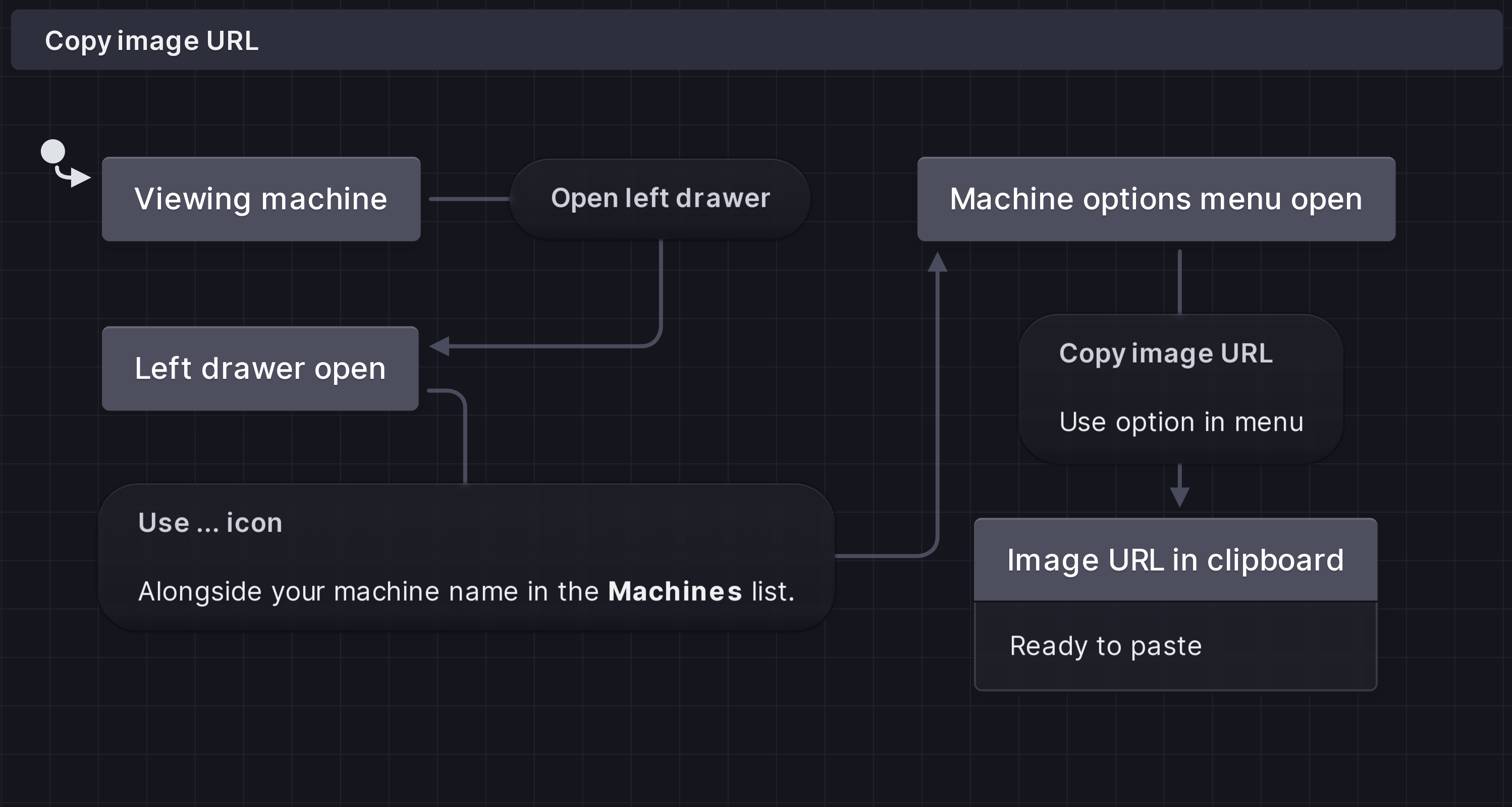
## Quick start Install XState: ```bash npm install xstate ``` Create a state machine: ```ts import { createMachine, createActor } from 'xstate'; const toggleMachine = createMachine({ id: 'toggle', initial: 'inactive', states: { inactive: { on: { toggle: 'active' } }, active: { on: { toggle: 'inactive' } }, }, }); const toggleActor = createActor(toggleMachine); toggleActor.start(); toggleActor.send({ type: 'toggle' }); console.log(toggleActor.getSnapshot().value); // 'active' toggleActor.send({ type: 'toggle' }); console.log(toggleActor.getSnapshot().value); // 'inactive' ``` [Read the full quick start guide](/docs/quick-start) to learn more. Get started}> Jump straight into learning how to use Stately Studio editor, starting with states. Stately Studio overview}> Find out more about Stately Studio's visual editor and collaborating with your team using Stately Studio's premium features. Learn state machines and statecharts}> With our no-code introduction. Learn XState}> Get started with our JavaScript and TypeScript library for state machines and statecharts. ## Stately Studio or XState? Stately Studio and XState are most powerful when used together. Use Stately Studio's visual editor to collaboratively model your app logic and use XState to integrate that logic into your codebase. You can also use XState in your codebase without Stately Studio, and you're welcome to use Stately Studio if you're not yet familiar with XState. ## Who is Stately? The Stately team including Gavin, Farzad, David, Mateusz, Jenny, Laura, Anders, Nick, and Kevin, all standing in front of garage doors, laughing and smiling at each other. We're [Stately](https://stately.ai), a small team founded by [David Khourshid](https://twitter.com/davidkpiano), the creator of XState. Stately is building Stately Studio, where you can visualize your application logic and collaborate with your whole team. --- # Source: https://stately.ai/docs/editor-actions-and-actors.mdx # Actions and actors in Stately’s editor (/docs/editor-actions-and-actors) import { Code, Info, Plus, Zap, Edit, Trash, Backspace, MoreHorizontal, PlayCircle } from 'lucide-react'; # Actions and actors While the state machine is running, it can execute effects called actions. Actions are executed when a transition is triggered. Actions are “fire-and-forget effects”; once the machine has fired the action, it continues processing the transition and forgets the action. You can also fire actions when a state is entered or exited. [Read more about actions](/docs/actions). State machines can invoke actors as longer-running processes that can receive events, send events, and change their behavior based on the events they receive. You can invoke actors on entry to a state and stop on exit. [Read more about actors](actors). ## Add actions * Select a state or transition and use **Action**. * Select a state and use **Entry action** or **Exit action**. * Select a state or transition, open the **Details** panel from the right tool menu, and use the **Effect** or **Action** button and choose **Add entry action**, **Add exit action**, or **Add action**. Use the edit icon button to open the **Sources** panel and add custom implementation code. Actions are created as custom actions by default, but you can also use [XState built-in actions](#xstate-built-in-actions). To remove an action, use the Backspace key, *right-click* and choose **Delete**, or use the delete icon button in the **Details** panel. ### Add action parameters You can add action parameters by selecting the action and using add **parameter**. ## Add invoked actors You can invoke multiple actors on a single state. Top-level final states cannot have invoked actors. [Read more about invoking actors](invoke). In the video player above, the *startVideo* actor is invoked when the video player is in the *Opened* state. ### Invoke actors on a state * Select a state and use **Invoke**. * Select a state, open the state **Details** panel from the right tool menu, and use the **Effect** button and choose **Add invoked actor**. Use the edit icon button to open the **Sources** panel and enter the actor’s source logic. Provide your actor with an ID so it can be used with the [`sendTo` or `stop` actions](#xstate-built-in-actions) to stop and send events to the actor. You can add actor input by selecting the actor and using add **input property**. To remove an actor, use the Backspace key, *right-click* and choose **Delete**, or use the delete icon button in the **Details** panel. #### Invoke done and invoke error events **Invoke done events** and **invoke error events** transition from a state once its invocation has been completed or returns an error. The source state must have an invoked actor to create an invoke done or invoke error event. * Select the state with an invoked actor and create a new transition from that state. The first new transition will be created as an invoke done event. * Subsequent new transitions will be created as invoke error events. To change an invoke done or invoke error event back into a regular transition, Use the triple dot menu or *right-click* the transition, and from **Event type**, choose **Always**. ### XState built-in actions You can use the following built-in XState actions from the logic templates in the **[Sources](sources)** panel, which will be formatted in your [exported code](export-as-code). The options are: * [assign](/docs/actions/#assign-action): assigns data to the state context. * [raise](/docs/actions/#raise-action): raises an event that is received by the same machine. * [log](/docs/actions/#log-action): an easy way to log messages to the console. * [sendTo](/docs/actions/#send-to-action): sends an event to a specific actor. * [stop](/docs/actions/#stop-action): stops a child actor. * [Read more about actions in XState](actions). * [Read more about actors in XState](actors). ### Spawning actors in Stately’s editor *Coming soon* --- # Source: https://stately.ai/docs/editor-context-and-meta.mdx # Context and meta in Stately’s editor (/docs/editor-context-and-meta) * Coming soon… setting initial context values * Coming soon… updating context with assign * Coming soon… JS/TS export --- # Source: https://stately.ai/docs/editor-states-and-transitions.mdx # States and transitions in Stately’s editor (/docs/editor-states-and-transitions) import { MoreHorizontal, Plus, Info, AlertTriangle, Star, Code, PlayCircle } from 'lucide-react'; # States and transitions State machines help us model how a process goes from state to state when an event occurs. At their most basic, state machines are made up of these states, events, and the transitions between them. Want to learn more about the concepts of state machines? [Check out our introduction to state machines and statecharts](state-machines-and-statecharts). ## States In Stately’s editor, the rounded rectangle boxes are states. There are a few different types of states: * **Normal** states don’t have any special properties. * [**Initial states**](#initial-states) are the first states the machine enters when it starts. * [**Final states**](#final-states) are the last states the machine enters before it stops. * [**Parent states**](#parent-and-child-states) can contain more states, known as child states. * [**Parallel states**](#parallel-states) are parent states that have multiple child states that are all active at the same time. * [**History states**](#history-states) are parent states that remember which child state was active when the parent state was exited and re-enter that child state when the parent state is re-entered. You can invoke other state machines or actors on a state, or trigger an action when a state is entered or exited. [Read more about actions and actors in Stately’s editor](editor-actions-and-actors). In Stately’s editor, you can also add [descriptions](descriptions), [colors](colors), and [tags](tags) to states. ### Create a state * Double-click anywhere on the canvas to create a new state there. * Select an existing state and use **child state** to add a new state inside. #### Delete a state * Use the triple dot menu or *right-click* on a selected state, and choose **Delete** to delete the selected state. * Use the Backspace key to delete the selected state. ### Parent and child states States can contain more states, also known as child states. These child states are only active when the parent state is active. [Read more about parent and child states](parent-states). To add a child state: * Select an existing state and use **child state** to add a new state inside. * If a state already contains child states, you can double-click inside the parent state to create another child state. * Copy a state or group of states and transitions, and paste them onto their new parent state. * Reparent a child state by selecting the child and choosing a new parent state from inside the state **Details** panel. ### Initial states When a state machine starts, it enters the **initial state** first. In Stately’s editor, the filled circle with an arrow icon represents the initial state. Machines can only have one top-level initial state. Each parent state has its own initial state. If you have unreachable states, it might be because there is no initial state. [Read more about initial states](initial-states). To set a state as the initial state: * Use the triple dot menu or *right-click* a state and choose Mark as initial state. * Select the parent state, open the state **Details** panel, and choose the desired initial state from the **Initial state** menu. ### Final states When a machine reaches the final state, it can no longer receive any events, and anything running inside it is canceled and cleaned up. To turn a state into a final state: * Use the triple dot menu or *right-click* a state, and from **State type**, choose **Final state**. * Select the state, open the state **Details** panel, and choose the **Final** state option. If you want your machine to transition from a parent state when its final child state is reached, use a [state done event](#state-done-event). ### Parallel states In statecharts, a parallel state is a state that has multiple child states (also known as **regions**) that are all active at the same time. [Read more about parallel states](parallel-states). A dashed line borders each region. To turn a parent state into a parallel state: * Use the triple dot menu or *right-click* a parent state, and from **State type**, choose **Parallel state**. * Select the parent state, open the state **Details** panel, and choose the **Parallel** state option. ### History states A history state remembers the last child state that was active before its parent state was exited. When a transition from outside the parent state targets a history state, the remembered child state is entered. [Read more about history states](history-states). * Use the triple dot menu or *right-click* a state, and from **State type**, choose **History state**. * Select the parent state, open the state **Details** panel, and choose the **History** state option. ### Unreachable states A warning icon indicates an unreachable state. The state is unreachable because it isn’t connected to the [initial state](#initial-states) by a [transition](#transitions-and-events). ## Transitions and events A machine moves from state to state through transitions. Transitions are caused by events; when an event happens, the machine transitions to the next state. In Stately’s editor, the arrows are transitions, and the rounded rectangles on the arrow’s lines are events. Each transition has a *source* state, which comes before the transition, and a *target* state, which comes after the transition. The transition’s arrow starts from the source state and points to the target state. There are a few different types of transitions: * **Normal** transitions are triggered by an event. * [**Guarded transitions**](#add-guards) are triggered by an event, but only if a specified condition is met. * [**Delayed transitions**](#delayed-after-transitions) (also known as *after* transitions) are triggered by an internal XState event, but only after a specified time interval. * [**Eventless transitions**](#eventless-always-transitions) (also known as *always* transitions) are triggered by a timer or other condition, and don’t have an event. ### Create a transition and event * Click a handle on any state to create a transition, event, and target state. * Drag from a source state’s handle to the target state’s handle to connect them with a transition and event. #### Delete a transition Deleting a state will also delete any transitions with that state as a source. * Use the triple dot menu or *right-click* on a selected transition, and choose **Delete** to delete the selected transition. * Use the Backspace key to delete the selected transition. ### Changing transition source and target * Use the triple dot menu or *right-click* the transition and choose **Switch source and target**. * Drag the transition handle from one state to a different state. * Select a transition, open the transition **Details** panel from the right tool menu, and choose a new source or target state from the dropdown menus. ### Delayed (after) transitions **Delayed transitions** are transitions that only happen after a set amount of time. If another event occurs before the end of the timer, the transition doesn’t complete. [Read more about delayed transitions](delayed-transitions). In Stately’s editor, delayed transitions are labeled “after.” Delayed transitions have a default time interval of 500ms (0.5 seconds). To make a transition into a delayed transition: * Use the triple dot menu or *right-click* a transition, and from **Event type**, choose **After**. * Select an event, open the transition **Details** panel from the right tool menu, and choose **After** from the **Trigger** dropdown menus. Your delay time interval will be displayed in a human-readable format on hover. For example, 15000ms will be displayed as 15 seconds. To set the delay interval: * Use the text input on the delayed transition to specify the interval in milliseconds (ms). * Select the transition delayed transition, open the transition **Details** panel from the right tool menu, and specify the interval in milliseconds (ms) in the **Delay** text input. To make a delayed transition into a regular transition, use the triple dot menu or *right-click* a transition, and from **Event type**, choose **Event**. ### Eventless (always) transitions **Eventless transitions** are transitions that are *always* taken when the transition is enabled. In Stately’s editor, eventless transitions are labeled “always.” [Read more about eventless transitions](eventless-transitions). To make a transition into an eventless transition: * Use the triple dot menu or *right-click* a transition, and from **Event type**, choose **Always**. * Select an event, open the transition **Details** panel from the right tool menu, and choose **Always** from the **Trigger** dropdown menus. To make an eventless transition into a regular transition, use the triple dot menu or *right-click* a transition, and from **Event type**, choose **Event**. ### State done event Use a state done event to transition from a parent state when its final child state is reached. [Read more about state done events](state-done-events). To turn an event into a state done event: * Use the triple dot menu or *right-click* an event, and from **Event type**, choose **State Done event**. To make a state done event into a regular transition, use the triple dot menu or *right-click* a transition, and from **Event type**, choose **Event**. ### Self-transitions A **self-transition** is when a state transitions back to itself, and is useful for changing context and/or executing actions without changing the finite state. You can also use self-transitions to restart a state. [Read more about self-transitions](/docs/transitions/#self-transitions). To create a self-transition: * Use the triple dot menu or *right-click* an existing event, and choose **Make self transition**. The transition will be connected back to the source state. * Select an existing event, open the transition **Details** panel from the right tool menu, and choose the same state from the source and target dropdown menus. ## Add guards A **guarded transition** is a transition that is only enabled if its condition is evaluated to be `true`. [Read more about guarded transitions](guards). In Stately’s editor, guards are numbered in the order they are checked and labeled with “if” or “else if” along with their condition. Multiple guards on the same events are connected with a dotted line. To add a guard: * Select a transition and use the **Add guard** to add a new guard to the transition. Use the text input to add the guard’s condition. * Use the triple dot menu or *right-click* a transition and use **Add guard** to add a guard to the transition. Use the text input to add the guard’s condition. * Select an existing transition, open the transition **Details** panel from the right tool menu, and enter the guard’s condition into the **Guard** text input. To reorder guards: * Use the triple dot menu or *right-click* the guarded transition, and from the **Reorder guards** menu, choose **Move up** or **Move down**. To delete a guard, remove its condition from the text input. You can add implementation code to your guards from the **[Sources](sources)** panel. --- # Source: https://stately.ai/docs/editor-tags.mdx # Tags in Stately’s editor (/docs/editor-tags) import { Plus, Info, PlusSquare } from 'lucide-react'; # Tags You can add tags to states in Stately’s editor: * Select the state you want to tag and use **tag**. Use the text input to enter the tag’s name. * Select the state you want to tag, open the state **Details** panel, and **tag** button. Use the text input to enter the tag’s name. * Use the plus icon button alongside your recent tag to add more tags. --- # Source: https://stately.ai/docs/embed.mdx # Embed machines using their embed URL (/docs/embed) You can embed your machines anywhere that supports [` ``` In the future, we plan to provide configurable embeds with copy-and-paste code. If you want us to prioritize improving embed mode, please [upvote it on our feedback page](https://github.com/statelyai/feedback/issues/94). ## URL parameters, including color mode The embed URL has some of the same parameters as the [machine URL](url). * **machineId**: the unique ID for the machine. For example, `machineId=491a4c60-5300-4e22-92cf-8a32a8ffffca` * **mode**: the current machine mode. For example, `mode=Design` or `mode=Simulate` * **colorMode**: the color mode for the embedded machine. For example, `colorMode=light` or `colorMode=dark` By default, the color mode will be the same as your chosen Stately Studio color mode. Add `&colorMode=light` or `&colorMode=dark` to the URL to force that color mode. --- # Source: https://stately.ai/docs/event-emitter.mdx # Event emitter (/docs/event-emitter) *Since XState version 5.9.0* State machines and other types of actor logic in XState have the ability to emit events. This allows external event handlers to be notified of specific events. With state machines, you can emit events using the `emit(event)` action creator. ```ts import { setup, emit } from 'xstate'; const machine = setup({ actions: { // [!code highlight:1] emitEvent: emit({ type: 'notification' }), }, }).createMachine({ // ... on: { someEvent: { // [!code highlight:1] actions: { type: 'emitEvent' }, }, }, }); const actor = createActor(machine); // [!code highlight:3] actor.on('notification', (event) => { console.log('Notification received!', event); }); actor.start(); actor.send({ type: 'someEvent' }); // Logs: // "Notification received!" // { type: "notification" } ``` ## Emitting events from actor logic For promise actors, transition actors, observable actors, and callback actors, you can use the `emit` method from the arguments to emit events. **Promise actors** ```ts import { fromPromise } from 'xstate'; // [!code highlight:1] const logic = fromPromise(async ({ emit }) => { // ... // [!code highlight:4] emit({ type: 'emitted', msg: 'hello', }); // ... }); ``` **Transition actors** ```ts import { fromTransition } from 'xstate'; // [!code highlight:1] const logic = fromTransition((state, event, { emit }) => { // ... // [!code highlight:4] emit({ type: 'emitted', msg: 'hello', }); // ... return state; }, {}); ``` **Observable actors** ```ts import { fromObservable } from 'xstate'; // [!code highlight:1] const logic = fromObservable(({ emit }) => { // ... // [!code highlight:4] emit({ type: 'emitted', msg: 'hello', }); // ... }); ``` **Callback actors** ```ts import { fromCallback } from 'xstate'; // [!code highlight:1] const logic = fromCallback(({ emit }) => { // ... // [!code highlight:4] emit({ type: 'emitted', msg: 'hello', }); // ... }); ``` ## Emit action creator The emit action is a special action that *emits* an event to any external event handlers from state machine logic. The emitted event can be statically or dynamically defined: ```ts import { setup, emit } from 'xstate'; const machine = setup({ actions: { // [!code highlight:5] // Emitting a statically-defined event emitStaticEvent: emit({ type: 'someStaticEvent', data: 42, }), // [!code highlight:5] // Emitting a dynamically-defined event based on context emitDynamicEvent: emit(({ context }) => ({ type: 'someDynamicEvent', data: context.someData, })), }, }).createMachine({ // ... on: { someEvent: { actions: [{ type: 'emitStaticEvent' }, { type: 'emitDynamicEvent' }], }, }, }); ``` ## Event handlers You can attach event handlers to the actor to listen for emitted events by using `actor.on(event, handler)`: ```ts const someActor = createActor(someMachine); // [!code highlight:4] someActor.on('someEvent', (emittedEvent) => { // Handle the emitted event console.log(emittedEvent); }); someActor.start(); ``` The `actor.on(…)` method returns a subscription object. You can call `.unsubscribe()` on it to remove the handler: ```ts const someActor = createActor(someMachine); // [!code highlight:4] const subscription = someActor.on('someEvent', (emittedEvent) => { // Handle the emitted event console.log(emittedEvent); }); someActor.start(); // ... // [!code highlight:2] // Stop listening for events subscription.unsubscribe(); ``` ## Wildcard event handlers You can listen for *any* emitted event by listening for the wildcard `'*'`: ```ts const someActor = createActor(someMachine); actor.on('*', (emitted) => { console.log(emitted); // Any emitted event }); ``` The `emitted` event will be typed as the union of all possible events that can be emitted from the machine. ## TypeScript You can strongly type emitted events by defining the emitted event types in the `types.emitted` property of the `setup(…)` function: ```ts import { setup, emit, createActor } from 'xstate'; const machine = setup({ types: { // [!code highlight:3] emitted: {} as | { type: 'notification'; message: string } | { type: 'error'; error: Error }, // ... }, }).createMachine({ // ... on: { someEvent: { actions: [ // [!code highlight:2] // Strongly typed emitted event emit({ type: 'notification', message: 'Hello' }), ], }, }, }); const actor = createActor(machine); // [!code highlight:4] // Strongly typed event handler actor.on('notification', (event) => { console.log(event.message); // string }); ``` --- # Source: https://stately.ai/docs/eventless-transitions.mdx # Eventless (always) transitions (/docs/eventless-transitions) **Eventless transitions** are transitions that happen without an explicit event. These transitions are *always* taken when the transition is enabled. Eventless transitions are specified on the `always` state property and often referred to as “always” transitions. You can easily visualize and simulated eventless transitions in Stately’s editor. [Read more about eventless transitions in Stately’s editor](/docs/editor-states-and-transitions/#eventless-always-transitions). ```ts import { createMachine } from 'xstate'; const machine = createMachine({ states: { form: { initial: 'valid', states: { valid: {}, invalid: {}, }, // [!code highlight:4] always: { guard: 'isValid', target: 'valid', }, }, }, }); ``` ## Eventless transitions and guards Eventless transitions are taken immediately after normal transitions are taken. They are only taken if enabled, for example, if their [guards](guards) are true. This makes eventless transitions helpful in doing things when some condition is true. ## Avoid infinite loops Since unguarded “always” transitions always run, you should be careful not to create an infinite loop. XState will help guard against most infinite loop scenarios. Eventless transitions with no `target` nor `guard` will cause an infinite loop. Transitions using `guard` and `actions` may run into an infinite loop if its `guard` keeps returning true. You should define eventless transitions either with: * `target` * `guard` + `target` * `guard` + `actions` * `guard` + `target` + `actions` If `target` is declared, the value should differ from the current state node. ## When to use Eventless transitions can be helpful when a state change is necessary, but there is no specific trigger for that change. ```ts import { createMachine } from 'xstate'; const machine = createMachine({ id: 'kettle', initial: 'lukewarm', context: { temperature: 80, }, states: { lukewarm: { on: { boil: { target: 'heating' }, }, }, heating: { always: { guard: ({ context }) => context.temperature > 100, target: 'boiling', }, }, boiling: { entry: ['turnOffLight'], always: { guard: ({ context }) => context.temperature <= 100, target: 'heating', }, }, }, on: { 'temp.update': { actions: ['updateTemperature'], }, }, }); ``` ## Eventless transitions and TypeScript **XState v5 requires TypeScript version 5.0 or greater.** For best results, use the latest TypeScript version. [Read more about XState and TypeScript](typescript) Eventless transitions can potentially be enabled by any event, so the `event` type is the union of all possible events. ```ts import { createMachine } from 'xstate'; const machine = createMachine({ types: {} as { events: { type: 'greet'; message: string } | { type: 'submit' }; }, // ... always: { actions: ({ event }) => { event.type; // 'greet' | 'submit' }, guard: ({ event }) => { event.type; // 'greet' | 'submit' return true; }, }, }); ``` ## Eventless transitions cheatsheet ### Cheatsheet: root eventless (always) transition ```ts import { createMachine } from 'xstate'; const machine = createMachine({ always: { guard: 'isValid', actions: ['doSomething'], }, // ... }); ``` ### Cheatsheet: state eventless (always) transition ```ts import { createMachine } from 'xstate'; const machine = createMachine({ initial: 'start', states: { start: { always: { guard: 'isValid', target: 'otherState', }, }, otherState: { /* ... */ }, }, }); ``` --- # Source: https://stately.ai/docs/examples.mdx # XState examples (/docs/examples) XState v5 examples are also available in the [`/examples` directory](https://github.com/statelyai/xstate/tree/main/examples). Many of the examples have a CodeSandbox link where you can run the example in your browser. ## Simple fetch example A simple fetch example built with: * XState v5 * Parcel * [Simple fetch example on GitHub](https://github.com/statelyai/xstate/tree/main/examples/fetch) * [Simple fetch example on CodeSandbox](https://codesandbox.io/p/sandbox/github/statelyai/xstate/tree/main/examples/fetch) ## 7GUIs counter (React) An implementation of the [7GUIs counter](https://eugenkiss.github.io/7guis/tasks/#counter) built with: * XState v5 * React * TypeScript * Vite * [7GUIs counter (React) on GitHub](https://github.com/statelyai/xstate/tree/main/examples/7guis-counter-react) * [7GUIs counter (React) on CodeSandbox](https://codesandbox.io/p/sandbox/github/statelyai/xstate/tree/main/examples/react-7guis-counter) ## 7GUIs temperature (React) This is an implementation of the [7GUIs temperature converter](https://eugenkiss.github.io/7guis/tasks#temp) built with: * XState v5 * React * TypeScript * Vite * [7GUIs temperature (React) on GitHub](https://github.com/statelyai/xstate/tree/main/examples/7guis-temperature-react) * [7GUIs temperature (React) on CodeSandbox](https://codesandbox.io/p/sandbox/github/statelyai/xstate/tree/main/examples/react-7guis-temperature) ## Simple list (React) A React list built with: * XState v5 * React * TypeScript * Vite * [Simple list (React) on GitHub](https://github.com/statelyai/xstate/tree/main/examples/friends-list-react) * [Simple list (React) on CodeSandbox](https://codesandbox.io/p/sandbox/github/statelyai/xstate/tree/main/examples/react-list) ## Stopwatch A simple stopwatch built with: * XState v5 * TypeScript * Vite * [Stopwatch on GitHub](https://github.com/statelyai/xstate/tree/main/examples/stopwatch) * [Stopwatch on CodeSandbox](https://codesandbox.io/p/sandbox/github/statelyai/xstate/tree/main/examples/stopwatch) ## Tic-tac-toe game (React) An implementation of tic-tac-toe built with: * XState v5 * React * TypeScript * Vite * [Tic-tac-toe game (React) on GitHub](https://github.com/statelyai/xstate/tree/main/examples/tic-tac-toe-react) * [Tic-tac-toe game (React) on CodeSandbox](https://codesandbox.io/p/sandbox/github/statelyai/xstate/tree/main/examples/react-tic-tac-toe) ## Tiles game (React) A simple tiles game built with: * XState v5 * React * TypeScript * Vite * [Tiles game (React) on GitHub](https://github.com/statelyai/xstate/tree/main/examples/tiles) * [Tiles game (React) on CodeSandbox](https://codesandbox.io/p/sandbox/github/statelyai/xstate/tree/main/examples/tiles) ## TodoMVC (React) An implementation of [TodoMVC](https://todomvc.com/) built with: * XState v5 * React * TypeScript * Vite * [TodoMVC (React) on GitHub](https://github.com/statelyai/xstate/tree/main/examples/todomvc-react) * [TodoMVC (React) on CodeSandbox](https://codesandbox.io/p/sandbox/github/statelyai/xstate/tree/main/examples/todomvc-react) ## Toggle A simple toggle built with: * XState v5 * TypeScript * Vite * [Toggle on GitHub](https://github.com/statelyai/xstate/tree/main/examples/toggle) * [Toggle on CodeSandbox](https://codesandbox.io/p/sandbox/github/statelyai/xstate/tree/main/examples/toggle) ## Hello world workflow Serverless hello world workflow from the [CNCF Serverless Workflow examples](https://github.com/serverlessworkflow/specification/tree/main/examples#Hello-World-Example) built with: * XState v5 [Hello world workflow on GitHub](https://github.com/statelyai/xstate/tree/main/examples/workflow-hello) ## Greeting workflow Serverless greeting workflow from the [CNCF Serverless Workflow examples](https://github.com/serverlessworkflow/specification/tree/main/examples#Greeting-Example) built with: * XState v5 [Greeting workflow on GitHub](https://github.com/statelyai/xstate/tree/main/examples/workflow-greeting) ## Event-based greeting workflow Serverless event-based greeting workflow from the [CNCF Serverless Workflow examples](https://github.com/serverlessworkflow/specification/tree/main/examples#Event-Based-Greeting-Example) built with: * XState v5 [Event-based greeting workflow on GitHub](https://github.com/statelyai/xstate/tree/main/examples/workflow-event-greeting) ## Solving math problems Serverless math solving problem workflow from the [CNCF Serverless Workflow examples](https://github.com/serverlessworkflow/specification/tree/main/examples#Solving-Math-Problems-Example) built with: * XState v5 [Solving math problems on GitHub](https://github.com/statelyai/xstate/tree/main/examples/workflow-math-problem) ## Parallel execution workflow Serverless parallel execution workflow from the [CNCF Serverless Workflow examples](https://github.com/serverlessworkflow/specification/tree/main/examples#Parallel-Execution-Example) built with: * XState v5 [Parallel execution workflow on GitHub](https://github.com/statelyai/xstate/tree/main/examples/workflow-parallel) ## Async function invocation workflow Serverless async function invocation workflow from the [CNCF Serverless Workflow examples](https://github.com/serverlessworkflow/specification/tree/main/examples#Async-Function-Invocation-Example) built with: * XState v5 [Async function invocation workflow on GitHub](https://github.com/statelyai/xstate/tree/main/examples/workflow-async-function) ## Async subflow invocation workflow Serverless async subflow invocation workflow from the [CNCF Serverless Workflow examples](https://github.com/serverlessworkflow/specification/tree/main/examples#Async-SubFlow-Invocation-Example) built with: * XState v5 [Async subflow invocation workflow on GitHub](https://github.com/statelyai/xstate/tree/main/examples/workflow-async-subflow) ## Event-based transitions (event-based switch) workflow Serverless event-based transitions workflow from the [CNCF Serverless Workflow examples](https://github.com/serverlessworkflow/specification/tree/main/examples#Event-Based-Transitions-Example) built with: * XState v5 [Event-based transitions workflow on GitHub](https://github.com/statelyai/xstate/tree/main/examples/workflow-event-based) ## Applicant request decision workflow Serverless applicant request decision workflow from the [CNCF Serverless Workflow examples](https://github.com/serverlessworkflow/specification/tree/main/examples#Applicant-Request-Decision-Example) built with: * XState v5 [Applicant request decision workflow on GitHub](https://github.com/statelyai/xstate/tree/main/examples/workflow-applicant-request) ## Provision orders (error handling) workflow Serverless provision orders (error handling) workflow from the [CNCF Serverless Workflow examples](https://github.com/serverlessworkflow/specification/tree/main/examples#Provision-Orders-Example) built with: * XState v5 [Provision orders (error handling) workflow on GitHub](https://github.com/statelyai/xstate/tree/main/examples/workflow-provision-orders) ## Monitor job for completion (polling) workflow Serverless monitor job for completion (polling) workflow from the [CNCF Serverless Workflow examples](https://github.com/serverlessworkflow/specification/tree/main/examples#Monitor-Job-Example) built with: * XState v5 [Monitor job for completion (polling) workflow on GitHub](https://github.com/statelyai/xstate/tree/main/examples/workflow-monitor-job) ## Send CloudEvent on workflow completion Serverless send CloudEvent on workflow completion workflow from the [CNCF Serverless Workflow examples](https://github.com/serverlessworkflow/specification/tree/main/examples#Send-CloudEvent-On-Workflow-Completion-Example) built with: * XState v5 [Send CloudEvent on workflow completion on GitHub](https://github.com/statelyai/xstate/tree/main/examples/workflow-send-cloudevent) ## Monitor patient vital signs workflow Serverless monitor patient vital signs workflow from the [CNCF Serverless Workflow examples](https://github.com/serverlessworkflow/specification/tree/main/examples#Monitor-Patient-Vital-Signs-Example) built with: * XState v5 [Monitor patient vital signs workflow on GitHub](https://github.com/statelyai/xstate/tree/main/examples/workflow-monitor-patient) ## Finalize college application workflow Serverless finalize college application workflow from the [CNCF Serverless Workflow examples](https://github.com/serverlessworkflow/specification/tree/main/examples#Finalize-College-Application-Example) built with: * XState v5 [Finalize college application workflow on GitHub](https://github.com/statelyai/xstate/tree/main/examples/workflow-finalize-college-app) ## Perform customer credit check workflow Serverless perform customer credit check workflow from the [CNCF Serverless Workflow examples](https://github.com/serverlessworkflow/specification/tree/main/examples#Perform-Customer-Credit-Check-Example) built with: * XState v5 [Perform customer credit check workflow on GitHub](https://github.com/statelyai/xstate/tree/main/examples/workflow-credit-check) ## Handle car auction bids (scheduled start) workflow Serverless handle car auction bids (scheduled start) workflow from the [CNCF Serverless Workflow examples](https://github.com/serverlessworkflow/specification/tree/main/examples#Handle-Car-Auction-Bids-Example) built with: * XState v5 [Handle car auction bids (scheduled start) workflow on GitHub](https://github.com/statelyai/xstate/tree/main/examples/workflow-car-auction-bids) ## Check inbox periodically (cron-based workflow start) Serverless check inbox periodically (cron-based workflow start) from the [CNCF Serverless Workflow examples](https://github.com/serverlessworkflow/specification/tree/main/examples#Check-Inbox-Periodically) built with: * XState v5 [Check inbox periodically (cron-based workflow start) on GitHub](https://github.com/statelyai/xstate/tree/main/examples/workflow-check-inbox) ## Event-based service workflow Serverless event-based service workflow from the [CNCF Serverless Workflow examples](https://github.com/serverlessworkflow/specification/tree/main/examples#Event-Based-Service-Invocation) built with: * XState v5 [Event-based service workflow on GitHub](https://github.com/statelyai/xstate/tree/main/examples/workflow-event-based-service) ## Reusing function and event definitions workflow Serverless reusing function and event definitions workflow from the [CNCF Serverless Workflow examples](https://github.com/serverlessworkflow/specification/tree/main/examples#Reusing-Function-And-Event-Definitions) built with: * XState v5 [Reusing function and event definitions workflow on GitHub](https://github.com/statelyai/xstate/tree/main/examples/workflow-reusing-functions) ## New patient onboarding (error checking and retries) workflow Serverless new patient onboarding (error checking and retries) workflow from the [CNCF Serverless Workflow examples](https://github.com/serverlessworkflow/specification/tree/main/examples#new-patient-onboarding). [New patient onboarding (error checking and retries) workflow on GitHub](https://github.com/statelyai/xstate/tree/main/examples/workflow-new-patient-onboarding) ## Purchase order deadline (ExecTimeout) workflow Serverless purchase order deadline (ExecTimeout) workflow from the [CNCF Serverless Workflow examples](https://github.com/serverlessworkflow/specification/tree/main/examples#purchase-order-deadline) built with: * XState v5 [Purchase order deadline (ExecTimeout) workflow on GitHub](https://github.com/statelyai/xstate/tree/main/examples/workflow-purchase-order-deadline) ## Accumulate room readings and create timely reports (ExecTimeout and KeepActive) workflow Serverless accumulate room readings and create timely reports (ExecTimeout and KeepActive) workflow from the [CNCF Serverless Workflow examples](https://github.com/serverlessworkflow/specification/tree/main/examples#accumulate-room-readings) built with: * XState v5 [Accumulate room readings and create timely reports (ExecTimeout and KeepActive) workflow on GitHub](https://github.com/statelyai/xstate/tree/main/examples/workflow-accumulate-room-readings) ## Car vitals checks (SubFlow Repeat) workflow Store a single bid when the car auction is active. Serverless car vitals checks (SubFlow Repeat) workflow from the [CNCF Serverless Workflow examples](https://github.com/serverlessworkflow/specification/tree/main/examples#handle-car-auction-bids-example) built with: * XState v5 [Car vitals checks (SubFlow Repeat) workflow on GitHub](https://github.com/statelyai/xstate/tree/main/examples/workflow-car-vitals) ## Book lending workflow Serverless book lending workflow from the [CNCF Serverless Workflow examples](https://github.com/serverlessworkflow/specification/tree/main/examples#book-lending) built with: * XState v5 [Book lending workflow on GitHub](https://github.com/statelyai/xstate/tree/main/examples/workflow-book-lending) ## Filling a glass of water workflow Serverless filling a glass of water workflow from the [CNCF Serverless Workflow examples](https://github.com/serverlessworkflow/specification/tree/main/examples#Filling-a-glass-of-water) built with: * XState v5 [Filling a glass of water workflow on GitHub](https://github.com/statelyai/xstate/tree/main/examples/workflow-filling-water) ## More examples coming soon If you have any examples you want us to make, please [add a request to our feedback board](https://feedback.stately.ai/examples) or upvote an existing suggestion. If you have an example you want to share, [contribute your example to the XState repository](https://github.com/statelyai/xstate/tree/main/examples#contributing-an-example). --- # Source: https://stately.ai/docs/export-as-code.mdx # Export as code (/docs/export-as-code) import { Code, MoreHorizontal, Copy } from 'lucide-react'; Exporting as code is useful if you want to use your machine with [XState](xstate) inside your codebase or if you want to duplicate your machine without using **Fork**. You can now [generate a React app from your machine](generate-react). Every feature of your state machine will be included in the code, except for [colors](colors) and [notes](annotations). Your last used export settings will be remembered next time you open the **Code** panel. ## Export formats You can export as code from **Code** panel or the menu alongside the machine name in the machines list. Use the **XState version 5 beta** toggle to choose between code supported by XState version 4 and XState version 5. Copy the code to your clipboard with the copy button. * JSON code for use with XState * JavaScript code for use with XState * TypeScript code for use with XState * Markdown (*beta*) for use in documentation ([available on premium plans](studio-pro-plan)) * Stories (*beta*) for use in requirements and documentation ([available on premium plans](studio-pro-plan)) * [Mermaid](https://mermaid.js.org) code and diagrams for use in GitHub, GitLab, and anywhere Mermaid is supported You can also [import from code](import-from-code) from **Code** panel or the menu alongside the machine name in the machines list. ### Export to CodeSandbox and StackBlitz You can export your machines to CodeSandbox and StackBlitz from the **Code** panel. The machine will be exported in your chosen format as a basic JavaScript app that uses XState to run the machine. Wrap your Mermaid code in a fenced code block with the `mermaid` language identifier to [share your diagram on GitHub](https://docs.github.com/en/get-started/writing-on-github/working-with-advanced-formatting/creating-diagrams#creating-mermaid-diagrams) and [share your diagram on GitLab](https://handbook.gitlab.com/handbook/tools-and-tips/mermaid/). --- # Source: https://stately.ai/docs/figma.mdx # Embed Figma (/docs/figma) import { Plus, Paperclip, Star, Info, Settings } from 'lucide-react'; You can embed Figma frames in your states to keep your design and code in sync. Embedded Figma frames will stay up to date with the latest changes in your Figma files. Figma frames are a special type of [asset](assets). [In Nick’s blog post, read about how you can improve your team workflows with Stately and Figma](../../blog/2024-01-24-embed-figma/). Embedding Figma frames is a premium feature of Stately Studio. You can try Stately Studio’s premium plans with a free trial. [Check out the features on our Pro plan](studio-pro-plan), [Team plan](studio-team-plan), [Enterprise plan](studio-enterprise-plan) or [upgrade your existing plan](https://stately.ai/registry/billing). ## How to embed Figma frames 1. [Generate a Figma personal access token and add it to your user Settings in Stately Studio](#figma-personal-access-token). 2. In Figma, right-click the frame you want to embed and select **Copy/Paste as** > **Copy link**. 3. Use the plus menu and **Embed Figma** on any selected state. 4. Paste the Figma link into the **Figma URL** field and click **Add Figma Asset**. As Figma frames are a special type of [asset](assets), you can [change the display size of your Figma frame like any other asset](/docs/assets/#asset-sizes) and [change the order of your state’s assets](/docs/assets/#order-of-assets) to choose which asset is displayed on the state. ### Syncing Figma frames Your embedded Figma frame will stay up to date with the latest changes in your Figma file unless: * [you lock your machine](#locked-machines-with-figma-frames) * [you revoke your Figma personal access token](#revoking-your-figma-personal-access-token) * [your Figma personal access token expires](#revoking-your-figma-personal-access-token) Refresh the page in the Stately Studio to see the latest changes from your embedded Figma frame. ## Locked machines with Figma frames When your machine is [locked](lock-machines), updates to your Figma frames will not be synced to your machine. You can unlock your machine to sync your Figma frames again. ## Figma personal access token You need a Figma [personal access token](https://help.figma.com/hc/en-us/articles/8085703771159-Manage-personal-access-tokens) to embed Figma frames. You can create a personal access token in [your Figma account settings](https://stately.ai/registry/user/my-settings?tab=Figma) under **Personal access tokens**. To ensure Embed Figma works correctly, you must grant the following permissions to your personal access token: * **File content**: Allow **Read-only** access so Stately Studio can sync your embedded Figma frames to your machines. You can update your Figma personal access token from your user **Settings** in Stately Studio anytime. ### Revoking your Figma personal access token If you need to revoke your Figma personal access token, you can do so from your Figma account settings. When you revoke your Figma personal access token or your token expires, Stately Studio will no longer be able to sync your embedded Figma frames to your machines. The last synced version of your embedded Figma frames will remain in your machines for 14 days. After 14 days, Figma will entirely revoke access to the frame. --- # Source: https://stately.ai/docs/final-states.mdx # Final states (/docs/final-states) A final state is a state that represents the completion or successful termination of a machine. It is defined by the `type: 'final'` property on a state node: ```ts import { createMachine, createActor } from 'xstate'; const feedbackMachine = createMachine({ initial: 'prompt', states: { prompt: { /* ... */ }, thanks: { /* ... */ }, // [!code highlight:3] closed: { type: 'final', }, // ... }, on: { 'feedback.close': { target: '.closed', }, }, }); ``` When a machine reaches the final state, it can no longer receive any events, and anything running inside it is canceled and cleaned up. The box with a surrounding border icon represents the final state. A machine can have multiple final states or no final states. * A state machine can have zero or more final states. Some machines may run indefinitely and not need to terminate. * Final states can have `output` data, which is sent to the parent machine when the machine terminates. * When a machine reaches a top-level final state, it terminates. * Final states cannot have transitions ## Top-level final states A top-level final state is a final state that is a direct child state of the machine. When the machine reaches a top-level final state, the machine will terminate. When a machine terminates, it can no longer receive events nor transition. ## Child final states When a child final state of a [parent (compound) state](./parent-states) is reached, that parent state is considered "done". The `onDone` transition of that parent state is automatically taken. ```ts import { createMachine } from 'xstate'; const coffeeMachine = createMachine({ initial: 'preparation', states: { preparation: { initial: 'weighing', states: { weighing: { on: { weighed: { target: 'grinding', }, }, }, grinding: { on: { ground: 'ready', }, }, // [!code highlight:4] ready: { // Child final state of parent state 'preparation' type: 'final', }, }, // [!code highlight:4] // Transition will be taken when child final state is reached onDone: { target: 'brewing', }, }, brewing: { // ... }, }, }); ``` ## Final states in parallel states When all regions of a parallel state are "done", the parallel state is considered "done". The `onDone` transition of the parallel state is taken. In this example, the `preparation` state is a parallel state with two regions: `beans` and `water`. When both regions are done, the `preparation` state is done, and the `brewing` state is entered. ```ts import { createMachine, createActor } from 'xstate'; const coffeeMachine = createMachine({ initial: 'preparation', states: { preparation: { type: 'parallel', states: { beans: { initial: 'grinding', states: { grinding: { on: { grindingComplete: 'ground', }, }, // [!code highlight:3] ground: { type: 'final', }, }, }, water: { initial: 'heating', states: { heating: { always: { guard: 'waterBoiling', target: 'heated', }, }, // [!code highlight:3] heated: { type: 'final', }, }, }, }, // [!code highlight:1] onDone: 'brewing', }, brewing: {}, }, }); ``` ## Output When a machine reaches its top-level final state, it can produce output data. You can specify this output data in the `.output` property of the machine config: ```ts import { createMachine, createActor } from 'xstate'; const currencyMachine = createMachine({ // ... states: { converting: { // ... }, converted: { type: 'final', }, }, // [!code highlight:4] output: ({ context }) => ({ amount: context.amount, currency: context.currency, }), }); const currencyActor = createActor(currencyMachine, { input: { amount: 10, fromCurrency: 'USD', toCurrency: 'EUR', }, }); currencyActor.subscribe({ complete() { console.log(currencyActor.getSnapshot().output); // logs e.g. { amount: 12, currency: 'EUR' } }, }); ``` The `.output` property can also be a static value: ```ts import { createMachine, createActor } from 'xstate'; const processMachine = createMachine({ // ... output: { message: 'Process completed.', }, }); ``` ## Final states cheatsheet ```ts import { createMachine } from 'xstate'; const feedbackMachine = createMachine({ initial: 'prompt', states: { prompt: { /* ... */ }, thanks: { /* ... */ }, // [!code highlight:3] closed: { type: 'final', }, // ... }, on: { 'feedback.close': { target: '.closed', }, }, }); ``` ## Cheatsheet: final states in parallel states ```ts import { createMachine } from 'xstate'; const coffeeMachine = createMachine({ initial: 'preparation', states: { preparation: { type: 'parallel', states: { beans: { initial: 'grinding', states: { grinding: { on: { grindingComplete: 'ground', }, }, // [!code highlight:3] ground: { type: 'final', }, }, }, water: { initial: 'heating', states: { heating: { always: { guard: 'waterBoiling', target: 'heated', }, }, // [!code highlight:3] heated: { type: 'final', }, }, }, }, // [!code highlight:1] onDone: 'brewing', }, brewing: {}, }, }); ``` --- # Source: https://stately.ai/docs/finite-states.mdx # Finite states (/docs/finite-states) A finite state is one of the possible states that a state machine can be in at any given time. It's called "finite" because state machines have a known limited number of possible states. A state represents how a machine "behaves" when in that state; its status or mode. For example in a feedback form, you can be in a state where you are filling out the form, or a state where the form is being submitted. You cannot be filling out the form and submitting it at the same time; this is an "impossible state." State machines always start at an [initial state](initial-states), and may end at a [final state](final-states). The state machine is always in a finite state. You can easily visualize and simulate intial and final states in Stately's editor. [Read more about states in Stately's editor](/docs/editor-states-and-transitions). ```ts import { createMachine } from 'xstate'; const feedbackMachine = createMachine({ id: 'feedback', // Initial state initial: 'prompt', // Finite states states: { prompt: { /* ... */ }, form: { /* ... */ }, thanks: { /* ... */ }, closed: { /* ... */ }, }, }); ``` You can combine finite states with [context](context), which make up the overall state of a machine: ```ts import { createMachine, createActor } from 'xstate'; const feedbackMachine = createMachine({ id: 'feedback', context: { name: '', email: '', feedback: '', }, initial: 'prompt', states: { prompt: { /* ... */ }, }, }); const feedbackActor = createActor(feedbackMachine).start(); // Finite state console.log(feedbackActor.getSnapshot().value); // logs 'prompt' // Context ("extended state") console.log(feedbackActor.getSnapshot().context); // logs { name: '', email: '', feedback: '' } ``` ## Initial state The initial state is the state that the machine starts in. It is defined by the `initial` property on the machine config: ```ts import { createMachine } from 'xstate'; const feedbackMachine = createMachine({ id: 'feedback', // [!code highlight:2] // Initial state initial: 'prompt', // Finite states states: { // [!code highlight:1] prompt: { /* ... */ }, // ... }, }); ``` [Read more about initial states](initial-states). ## State nodes In XState, a **state node** is a finite state "nodes" that comprise the entire statechart tree. State nodes are defined on the `states` property of other state nodes, including the root machine config (which itself is a state node): ```ts import { createMachine } from 'xstate'; // The machine is the root state node const feedbackMachine = createMachine({ id: 'feedback', initial: 'prompt', // State nodes states: { // State node prompt: { /* ... */ }, // State node form: { /* ... */ }, // State node thanks: { /* ... */ }, // State node closed: { /* ... */ }, }, }); ``` ## Tags State nodes can have **tags**, which are string terms that help group or categorize the state node. For example, you can signify which state nodes represent states in which data is being loaded by using a "loading" tag, and determine if a state contains those tagged state nodes with `state.hasTag(tag)`: ```ts import { createMachine, createActor } from 'xstate'; const feedbackMachine = createMachine({ id: 'feedback', initial: 'prompt', states: { prompt: { tags: ['visible'], // ... }, form: { tags: ['visible'], // ... }, thanks: { tags: ['visible', 'confetti'], // ... }, closed: { tags: ['hidden'], }, }, }); const feedbackActor = createActor(feedbackMachine).start(); console.log(feedbackActor.getSnapshot().hasTag('visible')); // logs true ``` Read more about [tags](tags). ## Meta Meta data is static data that describes relevant properties of a state node. You can specify meta data on the `.meta` property of any state node. This can be useful for displaying information about a state node in a UI, or for generating documentation. The `state.meta` property collects the `.meta` data from all active state nodes and places them in an object with the state node's ID as the key and the `.meta` data as the value: ```ts import { createMachine, createActor } from 'xstate'; const feedbackMachine = createMachine({ id: 'feedback', initial: 'prompt', meta: { title: 'Feedback', }, states: { prompt: { meta: { content: 'How was your experience?', }, }, form: { meta: { content: 'Please fill out the form below.', }, }, thanks: { meta: { content: 'Thank you for your feedback!', }, }, closed: {}, }, }); const feedbackActor = createActor(feedbackMachine).start(); console.log(feedbackActor.getSnapshot().meta); // logs the object: // { // feedback: { // title: 'Feedback', // }, // 'feedback.prompt': { // content: 'How was your experience?', // } // } ``` ## Transitions Transitions are how you move from one finite state to another. They are defined by the `on` property on a state node: ```ts import { createMachine, createActor } from 'xstate'; const feedbackMachine = createMachine({ initial: 'prompt', states: { prompt: { on: { 'feedback.good': { target: 'thanks', }, }, }, thanks: { /* ... */ }, // ... }, }); const feedbackActor = createActor(feedbackMachine).start(); console.log(feedbackActor.getSnapshot().value); // logs 'prompt' feedbackActor.send({ type: 'feedback.good' }); console.log(feedbackActor.getSnapshot().value); // logs 'thanks' ``` Read more about [events and transitions](transitions). ## Targets A transition's `target` property defines where the machine should go when the transition is taken. Normally, it targets a sibling state node: ```ts import { createMachine, createActor } from 'xstate'; const feedbackMachine = createMachine({ initial: 'prompt', states: { prompt: { on: { 'feedback.good': { // [!code highlight:2] // Targets the sibling `thanks` state node target: 'thanks', }, }, }, thanks: { /* ... */ }, // ... }, }); ``` The `target` can also target a descendant of a sibling state node: ```ts import { createMachine, createActor } from 'xstate'; const feedbackMachine = createMachine({ initial: 'prompt', states: { prompt: { on: { 'feedback.good': { // [!code highlight:2] // Targets the sibling `thanks.happy` state node target: 'thanks.happy', }, }, }, thanks: { initial: 'normal', states: { normal: {}, // [!code highlight:1] happy: {}, }, }, // ... }, }); ``` When the target state node is a descendant of the source state node, the source state node key can be omitted: ```ts import { createMachine, createActor } from 'xstate'; const feedbackMachine = createMachine({ // ... states: { closed: { initial: 'normal', states: { normal: {}, keypress: {}, }, }, }, on: { 'feedback.close': { // [!code highlight:2] // Targets the descendant `closed` state node target: '.closed', }, 'key.escape': { // [!code highlight:2] // Targets the descendant `closed.keypress` state node target: '.closed.keypress', }, }, }); ``` When the state node doesn't change; i.e., the source and target state nodes are the same, the `target` property can be omitted: ```ts import { createMachine, createActor } from 'xstate'; const feedbackMachine = createMachine({ // ... states: { form: { on: { 'feedback.update': { // [!code highlight:2] // No target defined – stay on the `form` state node // Equivalent to `target: '.form'` or `target: undefined` actions: 'updateForm', }, }, }, }, }); ``` State nodes can also be targeted by their `id` by prefixing the `target` with a `#` followed by the state node's `id`: ```ts import { createMachine, createActor } from 'xstate'; const feedbackMachine = createMachine({ initial: 'prompt', states: { // [!code highlight:3] closed: { id: 'finished', }, // ... }, on: { 'feedback.close': { // [!code highlight:1] target: '#finished', }, }, }); ``` ## Identifying state nodes States can be identified with a unique ID: `id: 'myState'`. This is useful for targeting a state from any other state, even if they have different parent states: ```ts import { createMachine, createActor } from 'xstate'; const feedbackMachine = createMachine({ initial: 'prompt', states: { // ... closed: { // [!code highlight:1] id: 'finished', type: 'final', }, // ... }, on: { 'feedback.close': { // [!code highlight:2] // Target the `.closed` state by its ID target: '#finished', }, }, }); ``` State IDs do not affect the `state.value`. In the above example, the `state.value` would still be `closed` even though the state node is identified as `#finished`. ## Other state types In statecharts, there are other types of states: * [Parent states (also known as compound states)](parent-states) * [Parallel states](parallel-states) * [History states](history-states) * [Final states](final-states) ## Modeling states When designing finite states for your state machine, follow these guidelines to create maintainable and effective state machines: ### Start simple and shallow * **Begin with minimal states**: Don't create multiple finite states until it becomes apparent that the behavior of your logic differs depending on some finite state it can be in. * **Avoid premature optimization**: Start with basic states and add complexity only when necessary. * **Prefer flat structures initially**: Deep nesting can be added later when patterns emerge. ### Identify distinct behaviors * **Different behavior = different state**: Create separate states when the application behaves differently in response to the same event. * **Same behavior = same state**: If multiple "states" handle events identically, they should probably be a single state. * **Question impossible states**: Ask "can this combination of conditions exist?" If not, model them as separate states. ### Name states clearly * **Use descriptive names**: State names should clearly describe what the machine is doing or what mode it's in. * **Avoid technical jargon**: Use domain-specific language that stakeholders understand. * **Be consistent**: Use consistent naming conventions across your state machines. ```ts import { createMachine } from 'xstate'; // ❌ Poor naming const machine = createMachine({ initial: 'state1', states: { state1: {}, // What does this represent? state2: {}, // What does this represent? error: {}, // Too generic }, }); // ✅ Good naming const authMachine = createMachine({ initial: 'signedOut', states: { signedOut: {}, signingIn: {}, signedIn: {}, authenticationFailed: {}, // Specific error state }, }); ``` ### Model user workflows * **Follow the user journey**: States should reflect the natural progression of user actions. * **Consider all paths**: Include happy paths, error states, and edge cases. * **Account for loading states**: Async operations often need intermediate states. ```ts import { createMachine } from 'xstate'; const checkoutMachine = createMachine({ initial: 'cart', states: { cart: { on: { PROCEED: { target: 'shippingInfo' }, }, }, shippingInfo: { on: { CONTINUE: { target: 'paymentInfo' }, BACK: { target: 'cart' }, }, }, paymentInfo: { on: { SUBMIT: { target: 'processing' }, BACK: { target: 'shippingInfo' }, }, }, processing: { on: { SUCCESS: { target: 'confirmed' }, FAILURE: { target: 'paymentFailed' }, }, }, paymentFailed: { on: { RETRY: { target: 'paymentInfo' }, }, }, confirmed: { type: 'final', }, }, }); ``` ### Consider temporal aspects * **Time-sensitive states**: Model states that exist for specific durations. * **Expiration handling**: Include states for handling timeouts and expirations. * **Scheduled transitions**: Use delayed transitions for time-based state changes. ### Group related functionality * **Use tags for categorization**: Group states by common characteristics. * **Consider parent states**: When multiple states share common transitions, consider grouping them under a parent state. * **Separate concerns**: Keep different domains or features in separate states. ```ts import { createMachine } from 'xstate'; const appMachine = createMachine({ initial: 'loading', states: { loading: { tags: ['busy'], on: { LOADED: { target: 'idle' }, ERROR: { target: 'error' }, }, }, idle: { tags: ['interactive'], on: { START_WORK: { target: 'working' }, }, }, working: { tags: ['busy', 'interactive'], on: { COMPLETE: { target: 'idle' }, CANCEL: { target: 'idle' }, }, }, error: { tags: ['error'], on: { RETRY: { target: 'loading' }, }, }, }, }); ``` ### Handle edge cases * **Invalid states**: Model states for handling invalid or unexpected conditions. * **Recovery states**: Provide ways to recover from error states. * **Fallback behavior**: Include default states for unhandled scenarios. ### Validate state transitions * **Ensure all transitions make sense**: Every state transition should represent a valid business logic change. * **Avoid circular dependencies**: Be careful of states that can endlessly transition between each other without purpose. * **Consider guards**: Use guards to prevent invalid transitions even when events are received. ### Document state purpose * **Use descriptions**: Add `.description` properties to explain complex states. * **Include meta data**: Store relevant information about what each state represents. * **Comment complex logic**: Explain why certain states exist and what they accomplish. ```ts import { createMachine } from 'xstate'; const feedbackMachine = createMachine({ initial: 'prompt', states: { prompt: { description: 'Waiting for user to indicate their satisfaction level', meta: { analytics: 'feedback_prompt_shown', }, }, collectingDetails: { description: 'User provided negative feedback, collecting detailed information', meta: { analytics: 'detailed_feedback_form_shown', }, }, }, }); ``` ## Finite states and TypeScript **XState v5 requires TypeScript version 5.0 or greater.** For best results, use the latest TypeScript version. [Read more about XState and TypeScript](typescript) You can strongly type the finite states of your machine using the `setup(...)` function, which provides excellent TypeScript inference and autocompletion: ```ts import { setup, createActor } from 'xstate'; const feedbackMachine = setup({ types: { context: {} as { feedback: string; rating: number }, events: {} as | { type: 'feedback.good' } | { type: 'feedback.bad' } | { type: 'feedback.submit' }, }, }).createMachine({ id: 'feedback', initial: 'prompt', context: { feedback: '', rating: 0, }, states: { prompt: { on: { 'feedback.good': { target: 'thanks' }, 'feedback.bad': { target: 'form' }, }, }, form: { on: { 'feedback.submit': { target: 'thanks' }, }, }, thanks: { type: 'final', }, }, }); const feedbackActor = createActor(feedbackMachine).start(); // ✅ Type-safe and autocompletes const currentState = feedbackActor.getSnapshot(); // ✅ `state.matches(...)` is type-safe with autocompletion if (currentState.matches('prompt')) { // TypeScript knows we're in the 'prompt' state } // ✅ All state values have autocompletion const isFormState = currentState.matches('form'); const isThanksState = currentState.matches('thanks'); // ✅ `state.value` is also strongly typed const stateValue = currentState.value; // 'prompt' | 'form' | 'thanks' ``` When using `setup(...).createMachine(...)`, TypeScript provides: * **Type-safe state matching**: `state.matches(...)` with autocompletion for all possible state values * **Strongly-typed state values**: `state.value` is typed as a union of all possible state names * **Type-safe context**: Full type inference for `state.context` * **Type-safe events**: `actor.send(...)` only accepts defined event types ## Finite states cheatsheet ### Cheatsheet: create finite states ```ts import { createMachine } from 'xstate'; const machine = createMachine({ id: 'feedback', initial: 'prompt', states: { prompt: {}, form: {}, thanks: {}, closed: {}, }, }); ``` ### Cheatsheet: finite states with transitions ```ts import { createMachine } from 'xstate'; const machine = createMachine({ initial: 'prompt', states: { prompt: { on: { 'feedback.good': { target: 'thanks' }, 'feedback.bad': { target: 'form' }, }, }, form: { on: { 'feedback.submit': { target: 'thanks' }, }, }, thanks: {}, }, }); ``` ### Cheatsheet: read current state ```ts import { createActor } from 'xstate'; const actor = createActor(machine).start(); const state = actor.getSnapshot(); // Read state value console.log(state.value); // e.g., 'prompt' // Check if in specific state const isPromptState = state.matches('prompt'); // Check multiple states const isFormOrThanks = state.matches('form') || state.matches('thanks'); ``` ### Cheatsheet: states with tags ```ts import { createMachine } from 'xstate'; const machine = createMachine({ initial: 'prompt', states: { prompt: { tags: ['visible', 'interactive'], }, form: { tags: ['visible', 'interactive'], }, thanks: { tags: ['visible', 'success'], }, closed: { tags: ['hidden'], }, }, }); // Check tags const state = actor.getSnapshot(); const isVisible = state.hasTag('visible'); const isInteractive = state.hasTag('interactive'); ``` ### Cheatsheet: states with meta data ```ts import { createMachine } from 'xstate'; const machine = createMachine({ initial: 'prompt', states: { prompt: { meta: { title: 'How was your experience?', component: 'PromptView', }, }, form: { meta: { title: 'Tell us more', component: 'FormView', }, }, }, }); // Read meta data const state = actor.getSnapshot(); console.log(state.getMeta()); ``` ### Cheatsheet: target states by ID ```ts import { createMachine } from 'xstate'; const machine = createMachine({ initial: 'start', states: { start: { on: { FINISH: { target: '#completed' }, }, }, process: { states: { step1: {}, step2: {}, }, }, done: { id: 'completed', type: 'final', }, }, }); ``` ### Cheatsheet: strongly-typed finite states ```ts import { setup } from 'xstate'; const machine = setup({ types: { context: {} as { count: number }, events: {} as { type: 'increment' } | { type: 'decrement' }, }, }).createMachine({ initial: 'idle', context: { count: 0 }, states: { idle: { on: { increment: { target: 'active' }, }, }, active: { on: { decrement: { target: 'idle' }, }, }, }, }); // Type-safe state matching const state = actor.getSnapshot(); const isIdle = state.matches('idle'); // ✅ Autocompletes const stateValue = state.value; // ✅ 'idle' | 'active' ``` --- # Source: https://stately.ai/docs/function-actors.mdx # Function Actors (/docs/function-actors) --- # Source: https://stately.ai/docs/generate-flow.mdx # Generate with AI (/docs/generate-flow) import { Sparkles, History } from 'lucide-react'; **Generate with AI** is an experimental feature that helps you auto-create machines from text descriptions. You can generate a flow for a new machine or use the flow description to describe how you want to modify your current flow. Community users can try generate flow with a limited number of generations each month. [Upgrade your existing plan](https://stately.ai/registry/billing) to get many more generations. **Generate with AI** is a premium feature of Stately Studio. You can try Stately Studio’s premium plans with a free trial. [Check out the features on our Pro plan](studio-pro-plan), [Team plan](studio-team-plan), [Enterprise plan](studio-enterprise-plan) or [upgrade your existing plan](https://stately.ai/registry/billing). You have a limited number of generations available to use each month. The number of available generations is reset at the beginning of each calendar month. There are many reasons you might want to generate your flows, including: * You have a complex machine in mind and want to get started quickly * You want an example of a state machine for a particular flow * You’re new and want to get an idea of how you can model state machines ## Generate a new flow Generating a new flow will overwrite your current machine with an all-new flow created from your text description. 1. Choose **Generate with AI** when creating a new machine or use the sparkles icon button in the canvas tools to open the generate flow dialog. 2. Enter a text description of the flow you want to generate in as much detail as possible, and use the **Generate** button to generate your flow. When you generate an all-new flow, only your prompt text is sent to OpenAI. ## Generate from current flow 1. Use the sparkles icon button in the canvas tools to open the generate flow dialog. 2. Ensure **Generate from current flow** is selected to modify your current machine. 3. Enter a text description of the flow you want to generate in as much detail as possible, and use the **Generate** button to generate your flow. When you use **Generate from current flow**, we share your machine definition with OpenAI to help build the response. ## View history You can view a history of text descriptions used to generate flows for the current machine. Use the **View history** button inside the **Generate flow** dialog to find your **Prompt history**. * Use **Open flow** to preview the [version](versions) of the machine generated from the selected prompt. * Use **Copy to prompt** to copy the selected prompt into the text description area of the **Generate flow** dialog. A new [version](versions) is auto-saved every time you generate a flow. Use the **Versions** panel and switch the **Show auto-saved versions** toggle on to browse auto-saved versions of your current machine. --- # Source: https://stately.ai/docs/generate-react.mdx # Generate React app (/docs/generate-react) import { Code } from 'lucide-react'; **Generate React app** is an experimental feature that helps you generate a basic React app from your state machine. In the **Code** panel, use **Generate React app** to generate the files required to run a React app using your state machine. You can copy the code from the generated files, or use **Open Sandbox** to open your generated React app in CodeSandbox. You can also [use the **Enhance app** button](#enhance-app) to generate a React UI using Stately AI. Generate React app generates code for use with [XState V5](xstate). [Read about how to migrate from XState V4 to V5](migration). Community users can try **Generate React app** with a limited number of generations each month. [Upgrade your existing plan](https://stately.ai/registry/billing). **Generate React app** is a premium feature of Stately Studio. You can try Stately Studio’s premium plans with a free trial. [Check out the features on our Pro plan](studio-pro-plan), [Team plan](studio-team-plan), [Enterprise plan](studio-enterprise-plan) or [upgrade your existing plan](https://stately.ai/registry/billing). You have a limited number of generations available to use each month. The number of available generations is reset at the beginning of each calendar month. ## Enhance app Use the **Enhance app** button to generate an enhanced user interface after generating your React app. Once generated, the dropdown menu in the top right of the modal gives you options to preview three different versions of your enhanced app, as well as the default app generated before the enhancement. When you use **Enhance app**, your state machine and generated React app are sent to OpenAI to generate the enhanced app. --- # Source: https://stately.ai/docs/generate-test-paths.mdx # Generate test paths (/docs/generate-test-paths) import { ClipboardCheck } from 'lucide-react'; You can generate test path code for your state machines from the **Tests** panel, which you can use to implement tests in your code. Both setup code and test code for each path are generated. This feature is in beta and [we’d love your feedback](https://feedback.stately.ai). **Generate test paths** is a premium feature of Stately Studio. You can try Stately Studio’s premium plans with a free trial. [Check out the features on our Pro plan](studio-pro-plan), [Team plan](studio-team-plan), [Enterprise plan](studio-enterprise-plan) or [upgrade your existing plan](https://stately.ai/registry/billing). ## Path generation strategy You can choose between two path generation strategies: * **Shortest path**: Generate paths that cover the shortest possible paths through your state machine and minimize the number of actions required to test functionality. * **Simplest path**: Generate paths that cover the simple paths, without repeated states, through your state machine and help verify that basic functionality is working as expected. ## Testing frameworks Generate test paths currently supports [Playwright](https://playwright.dev/) and custom testing framework formats. We plan to add more testing frameworks (including Puppeteer, Cypress, and even other languages) in the future. ## Options * **Reduce duplicate paths** generates fewer paths that also cover other paths. * **Prefer transition coverage** generates paths that cover all transitions in your state machine. * **Highlight paths** enables highlighting the paths on the canvas when you hover over its test path description. * **AI-generated test titles** (experimental) generates more readable test titles based on your state machine. AI-generated test titles send your state machine to OpenAI to generate the titles. --- # Source: https://stately.ai/docs/glossary.mdx # Glossary (/docs/glossary) This glossary is an alphabetical guide to the most common terms in statecharts and state machines. Looking for more detailed information on these concepts? [Read the introduction to state machines and statecharts](state-machines-and-statecharts). ## Actions An [action](actions) is an effect that is executed during a state transition. Actions are “fire-and-forget effects”; once the machine has fired the action, it moves on and forgets the action. ## Actors When you run a state machine, it becomes an [actor](actors), which is a running process that can receive events, send events, and change its behavior based on the events it receives, which can cause effects outside of the actor. ## After transitions See [delayed transitions](#delayed-transitions). ## Always transitions See [eventless transitions](#eventless-transitions). ## Compound states See [parent and child states](#parent-and-child-states). ## Context [Context](context) is the place that contextual data is stored in a state machine actor. ## Delayed transitions [Delayed transitions](delayed-transitions) are transitions that only happen after a specified interval of time. If another event happens before the end of the timer, the transition doesn’t complete. Delayed transitions are labeled “after” and often referred to as “after” transitions. ## Eventless transitions [Eventless transitions](eventless-transitions) are transitions without events. These transitions are *always* taken after any transition in their state is enabled. No event is necessary to trigger the transition. Eventless transitions are labeled “always” and often referred to as “always” transitions. ## Final state When a machine reaches the [final state](final-states), it can no longer receive any events, and anything running inside it is canceled and cleaned up. A machine can have multiple final states or no final states. ## Guards A [guard](guards) is a condition that the machine checks when it goes through an event. If the condition is true, the machine follows the transition to the next state. If the condition is false, the machine follows the rest of the conditions to the next state. Any transition can be a guarded transition. ## History state A [history state](history-states) returns the parent state to its most recently active child state. ## Initial state When a state machine starts, it enters the [**initial state**](initial-states) first. A machine can only have one top-level initial state. ## Invoked actors An [invoked actor](actors) is an actor that can execute its own actions and communicate with the machine. These invoked actors are started in a state and stopped when the state is exited. ## Parallel states A [parallel state](parallel-states) is a state separated into multiple regions of child states, where each region is active simultaneously. ## Parent and child states States can contain more states, also known as [child states](parent-states). These child states are only active when the parent state is active. Child states are nested inside their parent states. Parent states are also known as compound states. ## States A [state](states) describes the status of the machine. A state can be as simple as *active* and *inactive*. These states are finite; the machine can only move through the pre-defined states. A state machine can only be in one state at a time. ## Statecharts [Statecharts](state-machines-and-statecharts) are a visual extension to state machines enabling you to model more complex logic, including hierarchy, concurrency, and communication. ## State machines A [state machine](state-machines-and-statecharts) is a model that describes how the state of a process transitions to another state when an event occurs. State machines make building reliable software easier because they prevent impossible states and undesired transitions. When you run a state machine, it becomes an [actor](actors). ## Transitions and events A machine moves from state to state through [transitions](transitions). Transitions are caused by events; when an event happens, the machine transitions to the next state. Transitions are “deterministic”; each combination of state and event always points to the same next state. --- # Source: https://stately.ai/docs/graph.mdx # Graph & Paths (/docs/graph) The graph utilities are now included in the main `xstate` package. Import from `xstate/graph` instead of the deprecated `@xstate/graph` package. State machines can be represented as directed graphs, where states are nodes and transitions are edges. XState provides utilities to traverse these graphs and generate **paths**: sequences of events that transition a machine from one state to another. ## Why use path generation? Path generation is useful for: * **Model-based testing** - automatically generate test cases that cover all reachable states and transitions * **Visualization** - understand the structure and flow of complex machines * **Validation** - verify all states are reachable and all transitions are exercised * **Documentation** - generate human-readable sequences of user flows ## Quick start ```ts import { createMachine } from 'xstate'; import { getShortestPaths, getSimplePaths } from 'xstate/graph'; const machine = createMachine({ initial: 'a', states: { a: { on: { NEXT: 'b', SKIP: 'c' } }, b: { on: { NEXT: 'c' } }, c: { type: 'final' } } }); const shortestPaths = getShortestPaths(machine); // - a // - a -> b // - a -> c (via SKIP, not through b) const simplePaths = getSimplePaths(machine); // - a // - a -> b // - a -> b -> c // - a -> c (via SKIP) ``` ## Core concepts ### Paths and steps A **path** represents a sequence of transitions from one state to another. Each path contains: * `state` - the final state reached by this path * `steps` - array of steps taken to reach that state A **step** represents a single transition: * `state` - the state before this transition * `event` - the event that triggered the transition ```ts // Example path structure { // The final state reached by this path state: { value: 'thanks', context: {} }, // The steps taken to reach this state steps: [ { state: { value: 'question' }, event: { type: 'CLICK_BAD' } }, { state: { value: 'form' }, event: { type: 'SUBMIT' } } ] } ``` ### Shortest vs simple paths **Shortest paths** use Dijkstra's algorithm to find the minimum number of transitions to reach each state. Use shortest paths when you want: * One efficient path to each state * Minimal test cases for state coverage * Quick traversal verification **Simple paths** use depth-first search to find all possible non-cyclic paths. Use simple paths when you want: * Complete transition coverage * All possible user flows * Exhaustive testing ## `getShortestPaths(logic, options?)` Returns the shortest path from the initial state to every reachable state. ```ts import { createMachine } from 'xstate'; import { getShortestPaths } from 'xstate/graph'; const feedbackMachine = createMachine({ id: 'feedback', initial: 'question', states: { question: { on: { CLICK_GOOD: { target: 'thanks' }, CLICK_BAD: { target: 'form' }, CLOSE: { target: 'closed' } } }, form: { on: { SUBMIT: { target: 'thanks' }, CLOSE: { target: 'closed' } } }, thanks: { on: { CLOSE: { target: 'closed' } } }, closed: { type: 'final' } } }); const paths = getShortestPaths(feedbackMachine); // Returns array of paths: // [ // { state: 'question', steps: [] }, // { state: 'thanks', steps: [{ state: 'question', event: { type: 'CLICK_GOOD' } }] }, // { state: 'form', steps: [{ state: 'question', event: { type: 'CLICK_BAD' } }] }, // { state: 'closed', steps: [{ state: 'question', event: { type: 'CLOSE' } }] } // ] ``` Notice that reaching `closed` from `thanks` (2 steps) is not included because there's a shorter path directly from `question` (1 step). ## `getSimplePaths(logic, options?)` Returns all simple (non-cyclic) paths from the initial state to every reachable state. ```ts import { getSimplePaths } from 'xstate/graph'; const paths = getSimplePaths(feedbackMachine); // Returns many more paths, including: // - question → thanks (via CLICK_GOOD) // - question → form → thanks (via CLICK_BAD, SUBMIT) // - question → thanks → closed (via CLICK_GOOD, CLOSE) // - question → form → thanks → closed (via CLICK_BAD, SUBMIT, CLOSE) // - question → form → closed (via CLICK_BAD, CLOSE) // - question → closed (via CLOSE) // ... and more ``` Simple paths provide complete transition coverage - every valid sequence through the machine. ## `getPathsFromEvents(logic, events, options?)` Traces a specific sequence of events and returns the resulting path. Useful for validating that a specific user flow works as expected. ```ts import { getPathsFromEvents } from 'xstate/graph'; const path = getPathsFromEvents(feedbackMachine, [ { type: 'CLICK_BAD' }, { type: 'SUBMIT' }, { type: 'CLOSE' } ]); // Returns: // { // state: { value: 'closed' }, // , // steps: [ // { state: { value: 'question' }, event: { type: 'CLICK_BAD' } }, // { state: { value: 'form' }, event: { type: 'SUBMIT' } }, // { state: { value: 'thanks' }, event: { type: 'CLOSE' } } // ] // } ``` ## Traversal options All path functions accept an options object to customize traversal: ### `events` Specify event payloads for events that require data. By default, events are traversed with just their type. ```ts import { setup, assign } from 'xstate'; import { getShortestPaths } from 'xstate/graph'; const counterMachine = setup({ types: { events: {} as { type: 'INC'; value: number } } }).createMachine({ id: 'counter', initial: 'active', context: { count: 0 }, states: { active: { on: { INC: { actions: assign({ count: ({ context, event }) => context.count + event.value }) } } } } }); const paths = getShortestPaths(counterMachine, { events: [ { type: 'INC', value: 1 }, { type: 'INC', value: 5 }, { type: 'INC', value: 10 } ] }); ``` You can also provide a function that returns events based on the current state: ```ts const paths = getShortestPaths(counterMachine, { events: (state) => { // Generate different events based on context if (state.context.count < 10) { return [{ type: 'INC', value: 1 }]; } return [{ type: 'INC', value: 10 }]; } }); ``` ### `toState` Filter paths to only those reaching states matching a condition: ```ts const paths = getShortestPaths(feedbackMachine, { toState: (state) => state.value === 'closed' }); // Only returns paths ending in 'closed' state ``` ### `fromState` Start traversal from a specific state instead of the initial state: ```ts import { createActor } from 'xstate'; const actor = createActor(feedbackMachine).start(); actor.send({ type: 'CLICK_BAD' }); const paths = getShortestPaths(feedbackMachine, { fromState: actor.getSnapshot() }); // Paths starting from 'form' state ``` ### `stopWhen` Stop traversing when a condition is met: ```ts const paths = getShortestPaths(counterMachine, { events: [{ type: 'INC', value: 1 }], stopWhen: (state) => state.context.count >= 5 }); // Stops exploring paths once count reaches 5 ``` ### `limit` Maximum number of states to traverse (prevents infinite loops with context): ```ts const paths = getShortestPaths(counterMachine, { events: [{ type: 'INC', value: 1 }], limit: 100 // Stop after 100 unique states }); ``` ### `serializeState` and `serializeEvent` Customize how states and events are serialized for comparison. By default, states are serialized as JSON strings of their value and context. ```ts const paths = getShortestPaths(machine, { serializeState: (state) => { // Only consider state value, ignore context return JSON.stringify(state.value); }, serializeEvent: (event) => { // Custom event serialization return event.type; } }); ``` ## Working with context When machines have dynamic context, the state space can become infinite. Use `stopWhen` or `limit` to bound the traversal: ```ts import { setup, assign } from 'xstate'; import { getShortestPaths } from 'xstate/graph'; const counterMachine = setup({ types: { events: {} as { type: 'INC'; value: number } | { type: 'DEC'; value: number } } }).createMachine({ id: 'counter', initial: 'counting', context: { count: 0 }, states: { counting: { always: { target: 'done', guard: ({ context }) => context.count >= 10 }, on: { INC: { actions: assign({ count: ({ context, event }) => context.count + event.value }) }, DEC: { actions: assign({ count: ({ context, event }) => context.count - event.value }) } } }, done: { type: 'final' } } }); const paths = getShortestPaths(counterMachine, { events: [ { type: 'INC', value: 1 }, { type: 'INC', value: 5 }, { type: 'DEC', value: 1 } ], // Bound the state space stopWhen: (state) => state.context.count > 15 || state.context.count < -5 }); ``` ## `getAdjacencyMap(logic, options?)` Returns a map representing the state machine as a graph, with states as keys and their transitions as values. ```ts import { getAdjacencyMap } from 'xstate/graph'; const adjacencyMap = getAdjacencyMap(feedbackMachine); // Structure: // { // '"question"': { // state: { value: 'question', ... }, // transitions: { // '{"type":"CLICK_GOOD"}': { event: {...}, state: {...} }, // '{"type":"CLICK_BAD"}': { event: {...}, state: {...} }, // '{"type":"CLOSE"}': { event: {...}, state: {...} } // } // }, // '"form"': { ... }, // ... // } ``` ## `toDirectedGraph(machine)` Converts a machine to a directed graph structure for visualization: ```ts import { toDirectedGraph } from 'xstate/graph'; const digraph = toDirectedGraph(feedbackMachine); // Structure: // { // id: 'feedback', // stateNode: StateNode, // children: [ // { id: 'feedback.question', children: [], edges: [...] }, // { id: 'feedback.form', children: [], edges: [...] }, // ... // ], // edges: [ // { source: StateNode, target: StateNode, transition: {...} }, // ... // ] // } ``` ## Model-based testing Path generation enables model-based testing - generating test cases directly from your state machine. Use `createTestModel` to wrap your machine with testing utilities: ```ts import { createMachine } from 'xstate'; import { createTestModel } from 'xstate/graph'; const toggleMachine = createMachine({ id: 'toggle', initial: 'inactive', states: { inactive: { on: { TOGGLE: 'active' } }, active: { on: { TOGGLE: 'inactive' } } } }); const model = createTestModel(toggleMachine); // Get paths for testing const paths = model.getShortestPaths(); // Use with your test framework describe('toggle', () => { for (const path of paths) { it(`reaches ${JSON.stringify(path.state.value)}`, async () => { await path.test({ events: { TOGGLE: async () => { // Execute the toggle action in your app await page.click('#toggle-button'); } }, states: { inactive: async (state) => { // Assert the app is in inactive state await expect(page.locator('#status')).toHaveText('Inactive'); }, active: async (state) => { await expect(page.locator('#status')).toHaveText('Active'); } } }); }); } }); ``` ### TestModel methods * `model.getShortestPaths(options?)` - get shortest paths * `model.getSimplePaths(options?)` - get all simple paths * `model.getPaths(pathGenerator)` - use custom path generator ### Path testing Each path returned by `TestModel` has a `test` method that: 1. Starts from the initial state 2. Executes each event in the path using your event handlers 3. Verifies each state using your state assertions ```ts path.test({ events: { // Map event types to async functions that execute the event CLICK_GOOD: async () => await page.click('.good-button'), SUBMIT: async () => await page.click('button[type="submit"]') }, states: { // Map state values to async assertions question: async () => await expect(page.locator('.question')).toBeVisible(), form: async () => await expect(page.locator('form')).toBeVisible(), thanks: async () => await expect(page.locator('.thanks')).toBeVisible() } }); ``` You can [generate test paths from your state machines in Stately Studio](generate-test-paths.mdx), with support for Playwright, Vitest, and custom formats. ## Path deduplication When using simple paths, you may get many paths where shorter paths are prefixes of longer ones. The `deduplicatePaths` utility removes redundant paths: ```ts import { getSimplePaths, deduplicatePaths } from 'xstate/graph'; const allPaths = getSimplePaths(machine); const uniquePaths = deduplicatePaths(allPaths); // Removes paths that are prefixes of longer paths // e.g., [A→B] is removed if [A→B→C] exists ``` ## Example: Complete test generation ```ts import { createMachine } from 'xstate'; import { createTestModel } from 'xstate/graph'; import { test, expect } from 'vitest'; const authMachine = createMachine({ id: 'auth', initial: 'loggedOut', states: { loggedOut: { on: { LOGIN: 'loggingIn' } }, loggingIn: { on: { SUCCESS: 'loggedIn', FAILURE: 'loggedOut' } }, loggedIn: { on: { LOGOUT: 'loggedOut' } } } }); const model = createTestModel(authMachine); describe('auth flows', () => { const paths = model.getShortestPaths({ toState: (state) => state.matches('loggedIn') }); for (const path of paths) { test(path.description, async () => { // Setup const app = await setupApp(); await path.test({ events: { LOGIN: async () => { await app.fillLoginForm('user', 'pass'); await app.submit(); }, SUCCESS: async () => { await app.mockAuthSuccess(); }, LOGOUT: async () => { await app.clickLogout(); } }, states: { loggedOut: async () => { expect(app.isLoggedIn()).toBe(false); }, loggingIn: async () => { expect(app.isLoading()).toBe(true); }, loggedIn: async () => { expect(app.isLoggedIn()).toBe(true); } } }); }); } }); ``` --- # Source: https://stately.ai/docs/guards.mdx # Guards (/docs/guards) A **guard** is a condition function that the machine checks when it goes through an event. If the condition is `true`, the machine follows the transition to the next state. If the condition is `false`, the machine follows the rest of the conditions to the next state. A **guarded transition** is a transition that is enabled only if its `guard` evaluates to `true`. The guard determines whether or not the transition can be enabled. Any transition can be a guarded transition. You can easily visualize and simulate guarded transitions in Stately’s editor. [Read more about guards in Stately’s editor](/docs/editor-states-and-transitions/#add-guards). Guards should be pure, synchronous functions that return either `true` or `false`. ```ts import { createMachine } from 'xstate'; const feedbackMachine = createMachine( { // ... states: { form: { on: { 'feedback.submit': { // [!code highlight:1] guard: 'isValid', target: 'submitting', }, }, }, submitting: { // ... }, }, }, { // [!code highlight:5] guards: { isValid: ({ context }) => { return context.feedback.length > 0; }, }, }, ); ``` ## Multiple guarded transitions If you want to have a single event transition to different states in certain situations, you can supply an array of guarded transitions. Each transition will be tested in order, and the first transition whose `guard` evaluates to `true` will be taken. You can specify a default transition to be taken as the last transition in the array. If none of the guards evaluate to `true`, the default transition will be taken. ```ts import { createMachine } from 'xstate'; const feedbackMachine = createMachine({ // ... prompt: { on: { // [!code highlight:15] 'feedback.provide': [ // Taken if 'sentimentGood' guard evaluates to `true` { guard: 'sentimentGood', target: 'thanks', }, // Taken if none of the above guarded transitions are taken // and if 'sentimentBad' guard evaluates to `true` { guard: 'sentimentBad', target: 'form', }, // Default transition { target: 'form' }, ], }, }, }); ``` ## Inline guards You can define guards as an inline function. This is useful for quickly prototyping logic but we generally recommended using serialized guards (strings or objects) for better reusability and visualization. ```ts on: { event: { guard: ({ context, event }) => true, target: 'someState' } } ``` ## Guard object A guard can be defined as an object with a `type`, which is the type of guard that references the provided guard implementation, and optional `params`, which can be read by the implemented guard: ```ts import { createMachine } from 'xstate'; const feedbackMachine = createMachine( { // ... states: { // ... form: { on: { submit: { // [!code highlight:1] guard: { type: 'isValid', params: { maxLength: 50 } }, target: 'submitting', }, }, }, // ... }, }, { // [!code highlight:8] guards: { isValid: ({ context }, params) => { return ( context.feedback.length > 0 && context.feedback.length <= params.maxLength ); }, }, }, ); ``` Guards can later be provided or overridden by providing custom guard implementations in the `.provide()` method: ```ts import { createActor } from 'xstate'; const feedbackActor = createActor( // [!code highlight:11] feedbackMachine.provide({ guards: { isValid: ({ context }, params) => { return ( context.feedback.length > 0 && context.feedback.length <= params.maxLength && isNotSpam(context.feedback) ); }, }, }), ).start(); ``` ## Higher-level guards XState provides higher-level guards, which are guards that compose other guards. There are three higher-level guards – `and`, `or`, and `not`: * `and([...])` - evaluates to `true` if all guards in `and([...guards])` evaluate to `true` * `or([...])` - evaluates to `true` if *any* guards in `or([...guards])` evaluate to `true` * `not(...)` - evaluates to `true` if the guard in `not(guard)` evaluates to `false` ```ts import { and } from 'xstate'; // ... on: { event: { guard: and(['isValid', 'isAuthorized']); } } ``` Higher-level guards can be combined: ```ts import { and, or } from 'xstate'; // ... on: { event: { guard: and(['isValid', or(['isAuthorized', 'isGuest'])]); } } ``` ## In-state guards You can use the `stateIn(stateValue)` guard to check if the current state matches the provided `stateValue`. This is most useful for [parallel states](parallel-states). ```ts import { stateIn } from 'xstate'; // ... on: { event: { guard: stateIn('#state1'); }, anotherEvent: { guard: stateIn({ form: 'submitting' }) } } ``` In-state guards match the state of the entire machine, not the state node. There usually isn’t a need to use in-state guards for regular states. Try to model transitions in your state machines so that you don't need to use in-state guards first. ## Shorthands It is recommended to define guards as guard objects, e.g. `{ type: 'someGuard', params: { ... } }`. However, if a guard has no params, you can specify it as a string: ```ts on: { someEvent: { // Equivalent to: // guard: { type: 'someGuard' } // [!code highlight:1] guard: 'someGuard'; } } ``` ## Guards and TypeScript **XState v5 requires TypeScript version 5.0 or greater.** For best results, use the latest TypeScript version. [Read more about XState and TypeScript](typescript) You can strongly type the `guards` of your machine by setting up their implementations in `setup({ guards: { … } })`. You can provide the `params` type in the 2nd argument of the guard function: ```ts import { setup } from 'xstate'; const machine = setup({ // [!code highlight:5] guards: { isGreaterThan: (_, params: { count: number; min: number }) => { return params.count > params.min; }, }, }).createMachine({ // ... on: { someEvent: { guard: { type: 'isGreaterThan', // Strongly-typed params params: ({ event }) => ({ count: event.count, min: 10, }), }, // ... }, }, }); ``` ## Guards cheatsheet ```ts import { createMachine } from 'xstate'; const feedbackMachine = createMachine( { // ... states: { form: { on: { 'feedback.submit': { // [!code highlight:1] guard: 'isValid', target: 'submitting', }, }, }, submitting: { // ... }, }, }, { // [!code highlight:5] guards: { isValid: ({ context }) => { return context.feedback.length > 0; }, }, }, ); ``` ### Cheatsheet: multiple guarded transitions ```ts import { createMachine } from 'xstate'; const feedbackMachine = createMachine({ // ... prompt: { on: { // [!code highlight:15] 'feedback.provide': [ // Taken if 'sentimentGood' guard evaluates to `true` { guard: 'sentimentGood', target: 'thanks', }, // Taken if none of the above guarded transitions are taken // and if 'sentimentBad' guard evaluates to `true` { guard: 'sentimentBad', target: 'form', }, // Default transition { target: 'form' }, ], }, }, }); ``` ### Cheatsheet: Higher-level guards ```ts import { createMachine, and } from 'xstate'; const loginMachine = createMachine({ on: { event: { guard: and(['isValid', 'isAuthorized']); } } }); ``` ### Cheatsheet: Combined higher-level guards ```ts import { createMachine, and, or } from 'xstate'; const loginMachine = createMachine({ on: { event: { guard: and(['isValid', or(['isAuthorized', 'isGuest'])]); } } }); ``` --- # Source: https://stately.ai/docs/history-states.mdx # History states (/docs/history-states) A history state is a special type of state (a *pseudostate*) that remembers the last [child state](parent-states) that was active before its parent state is exited. When a transition from outside the parent state targets a history state, the remembered child state is entered. This allows machines to "remember" where they left off when exiting and reentering a parent state. * If no child state remembered, history goes to `.target` state, if it is specified * Otherwise, go to [initial state](initial-states) A history state returns the parent state to its most recently active child state. The box with an **H** inside represents the history state. The history state can be deep or shallow: * A shallow history state remembers the immediate child’s state. * A deep history state remembers the deepest active state or states inside its child states. ```ts import { createMachine } from 'xstate'; const checkoutMachine = createMachine({ // ... states: { payment: { initial: 'card', states: { card: {}, paypal: {}, // [!code highlight:1] hist: { type: 'history' }, }, }, address: { on: { back: { target: 'payment.hist', }, }, }, }, }); ``` ## Shallow vs. deep history * Shallow history states only remember the last active direct child state. * Deep history states remember all active descendant states. ## History target * Normally, history states target the most recent child state of its parent state * If the history state is entered but the parent state was never visited, the parent's initial state is entered. * However, you can add a `target: 'childKey'` to specify the default child state that should be entered ## History states cheatsheet ### Cheatsheet: create a history state (shallow by default) ```ts import { createMachine } from 'xstate'; const machine = createMachine({ // ... states: { hist: { type: 'history' }, firstState: {}, someState: {}, anotherState: {}, }, }); ``` ### Cheatsheet: create a deep history state ```ts import { createMachine } from 'xstate'; const machine = createMachine({ // ... states: { hist: { type: 'history', history: 'deep', }, firstState: {}, someState: {}, anotherState: {}, }, }); ``` ### Cheatsheet: create a history state with a target ```ts import { createMachine } from 'xstate'; const machine = createMachine({ // ... initialState: 'firstState', states: { hist: { type: 'history', target: 'someState', }, firstState: {}, someState: {}, anotherState: {}, }, }); ``` --- # Source: https://stately.ai/docs/image.mdx # Share machine images using their image URL (/docs/image) import { LinkIcon, MoreHorizontal } from 'lucide-react'; You can share an image of your machine anywhere that supports images. You can use the image URL for live-updating images where the machine is always updated with your latest changes. Machine images can be helpful in documentation, including GitHub pull requests. The machine below demonstrates the copy image URL flow. Your machine image will only be available if: * the project visibility is **public** or **unlisted** Machine images are not available for private machines. Read [how to change a project’s visibility settings](projects.mdx#change-a-projects-visibility). You can also [embed your machine](embed) for a focused non-editable view of your machine in Stately Studio’s editor. ## Copy the image URL Use the **Copy image URL** option from the triple dot icon alongside your machine name. ## Color mode By default, the image’s color mode will be the same as your chosen Stately Studio color mode. Add `.light.png` or `.dark.png` to the URL to force that color mode. ## Examples The examples below show how you can use the image URL. ### Markdown ```md ![State machine for the copy image URL flow in light mode.](https://stately.ai/registry/machines/1b050e43-c8a5-4e28-b881-71eadcc5b8a1.light.png) ``` ### HTML ```html State machine for the copy image URL flow in dark mode. ``` --- # Source: https://stately.ai/docs/immer.mdx # Usage with Immer (/docs/immer) [Immer](https://immerjs.github.io/immer/) is a library that makes it more convenient to work with updating data immutably. It can be used with XState to immutably update `context` in assignments. It is recommended to use Immer directly with XState instead of the `@xstate/immer` package, which is deprecated. ## Installation Install the latest versions of `xstate` and `immer` from npm: ```bash npm install xstate immer ``` ```bash pnpm install xstate immer ``` ```bash yarn add xstate immer ``` See [the Immer installation docs](https://immerjs.github.io/immer/installation) for more information. ## Immer usage XState already allows you to immutably update `context` partially or completely in [assign actions](/docs/actions#assign-action). However, for more complex scenarios, you may want to use Immer to update `context` in a less verbose way. ```ts import { createMachine, assign } from 'xstate'; // [!code highlight:1] import { produce } from 'immer'; const machine = createMachine({ id: 'todos', context: { todos: [], filter: 'all', }, // ... on: { 'todo.complete': { // [!code highlight:8] // Using Immer to update a single context property actions: assign({ todos: ({ context, event }) => produce(context.todos, (draftTodos) => { const todo = draftTodos.find((t) => t.id === event.todo.id); todo.completed = true; }), }), }, 'todos.add': { // [!code highlight:14] // Using Immer to update multiple context properties actions: assign(({ context, event }) => produce(context, (draftContext) => { draftContext.todos.push({ id: event.todo.id, description: event.todo.description, completed: false, }); if (draftContext.filter === 'all') { draftContext.filter = 'active'; } }), ), }, }, }); ``` --- # Source: https://stately.ai/docs/import-from-code.mdx # Import from code (/docs/import-from-code) import { Code, FilePlus2, Import } from 'lucide-react'; Importing from code is helpful if you’ve already built machines while working with [XState](xstate), or have created a machine using our older [Stately Viz](https://stately.ai/viz) but haven’t yet tried Stately Studio’s editor. Watch our [“Import from code” video on YouTube](https://www.youtube.com/watch?v=DAoIFaugDLo) (2m24s). ## Import state machines Your state machine code should be formatted as a [`createMachine()` factory function](/docs/actors#createmachine) before import. The importer has basic validation in case your machine has basic errors, including reminding you if the `createMachine` definition is missing. [Check out an importable machine code example at the end of this page](#machine-code-example). **Caution**: importing code will overwrite your current or selected machine unless you create a new machine from the machines list inside a project. The Stately editor now supports importing multiple machines from code. ### Create a new machine inside a project using imported code Create a **New machine** from the machines list inside a project, then use the **Import** button to import code into the new machine. ### Import code to overwrite your machine Use **Import** button in the **Code** panel, or **Machine** > **Import** from the editor menu to overwrite your current machine. ## Machine code example Below is an example of a `createMachine()` factory function which you can import as a machine without any errors: ```js createMachine({ id: 'Video', initial: 'Closed', description: 'Video player', states: { Closed: { on: { PLAY: { target: 'Opened', }, }, }, Opened: { invoke: { src: 'startVideo', }, initial: 'Playing', description: 'Fullscreen mode', states: { Playing: { on: { PAUSE: { target: 'Paused', }, }, }, Paused: { on: { PLAY: { target: 'Playing', }, }, }, Stopped: { type: 'final', after: { 5000: { target: '#Video.Closed', actions: [], internal: false, }, }, }, }, on: { STOP: { target: '.Stopped', }, }, }, }, context: {}, predictableActionArguments: true, preserveActionOrder: true, }); ``` --- # Source: https://stately.ai/docs/import-from-github.mdx # Connect GitHub repo (/docs/import-from-github) import { Code, Github, Settings } from 'lucide-react'; You can connect a GitHub repo to a new project in Stately Studio, keeping updates between GitHub and Stately Studio in sync. Connecting a GitHub repo allows you to import your existing machines from GitHub and push changes to your machines back to your repo as pull requests. Connect GitHub repo is a premium feature of Stately Studio. You can try Stately Studio’s premium plans with a free trial. [Check out the features on our Pro plan](studio-pro-plan), [Team plan](studio-team-plan), [Enterprise plan](studio-enterprise-plan) or [upgrade your existing plan](https://stately.ai/registry/billing). While this feature is in beta, it works best when connecting less than 100 files. For larger repos, we recommend creating single-file PRs. Read about that feature [here](../../blog/2024-02-16-changelog#make-github-pull-requests-for-single-files-from-inside-stately-studio). ## Connect GitHub repo Use the **Connect GitHub repo** button found in the Projects dashboard to start connecting a GitHub repo. There are three steps to setting up your GitHub repo as a connected project: 1. Select the repo. You can choose the repos based on your GitHub permissions. 2. Select the branch. You can choose any branch in your repo. 3. Choose the files you want to sync. You can sync any JavaScript or TypeScript files, but only XState machines will be imported. Choose the XState version for your synced machines from the dropdown menu in the **Code** panel. ### Auto-sync Enabling **auto-sync** will automatically fetch the latest changes from your connected repository every time you open or refresh the project in the Studio. Disable auto-sync from the GitHub options from the repository name in the footer of the left drawer. ### Path for new files You can choose a **Path for new files** for when you create new machines in this connected project. These machines will be added at this relative path from the root of your repo. The default path is **src/stately-studio** and will be created in your repo the first time you add new machines to a pull request. ### Create pull request Open the GitHub options from the repository name in the footer of the left drawer. You can create pull requests from the GitHub options for any changes made to your machine. #### Update pull request If you have already created a pull request for your machine, you can update the pull request with any changes you have made in the Studio. Open the GitHub options from the repository name in the footer of the left drawer and choose **Update pull request**. ### Sync multiple branches You can sync multiple branches in your GitHub repo to the same project in Stately Studio. Open the GitHub branch options from the branch name in the footer of the left drawer to choose additional branches. ### Sync new machines created in Stately Studio Creating a new machine in Stately Studio in a connected project will flag the machine in your Machines list as **Not synced with GitHub**. You can sync the machine with your GitHub repo by [creating a pull request from the GitHub options](#create-pull-request) from the repository name in the footer of the left drawer. Your new machine will be added to your repo at the [**Path for new files**](#path-for-new-files) you have chosen. ### Sync changes to machines from GitHub If you have [auto-sync enabled](#auto-sync), any changes made to your GitHub repo will be synced to your project in Stately Studio when you open or refresh the project in the Studio. If you don’t have auto-sync enabled, you can sync any changes made to your GitHub repo using **Sync now** in the GitHub options from the repository name in the footer of the left drawer. ## GitHub permissions Importing your GitHub repos with **Connect GitHub repo** or importing a machine with a GitHub URL will prompt you to give our GitHub integration access to your GitHub repositories. You can choose from **Automatic setup** or **Personal access token**. ### Automatic setup Automatic setup will enable access to all the repositories your GitHub user can access. You can [provide your own personal access token](#personal-access-token) if you need more granular control. ### GitHub personal access token For more granular control, you can provide a [personal access token](https://docs.github.com/en/authentication/keeping-your-account-and-data-secure/managing-your-personal-access-tokens). You can create a personal access token in your GitHub account settings under [Developer Settings](https://github.com/settings/tokens). To ensure GitHub Sync works correctly, you must grant the following permissions to your personal access token: * **Contents**: Allow **Read and write** access so Stately Studio can import your machines and create files for machines added in the Studio. * **Pull requests**: Allow **Read and write** access so Stately Studio can create pull requests for you (optional). You can update your personal access token from your user **Settings** in Stately Studio anytime. ## Import machine from a GitHub URL If you want to quickly import a machine, or multiple machines, from a GitHub file without syncing, you can import from a GitHub URL. 1. Open a file containing one or more machines on GitHub. 2. Modify the URL in the browser’s address bar to replace the `.com` with `.stately.ai`. 3. The editor will then display your imported machine. 4. **Save** the machine to enable editing and easily find your machine in your projects later. Importing from a GitHub URL works with files in any branch in your private repositories, public repositories, and files in pull requests. ### Pull requests Once you’ve made changes to your imported machine, you can use the **Create pull request** button to create a PR back to the source GitHub repository. If you want to make a pull request from your imported machine, you’ll need to provide a [GitHub personal access token](#github-personal-access-token). ### Bookmarklet Use the bookmarklet below to import single file machines from GitHub with one click. 1. Add a new bookmark to your browser 2. Set the bookmark’s web address to the following: `javascript:(function(){ location.href = 'https://github.stately.ai/' + window.location.pathname;})();` 3. Click the bookmarklet when viewing a GitHub file containing one or more machines to import that machine to Stately Studio. Or drag the following bookmarklet link to your bookmarks: GitHub → Stately ### Example When your machine is hosted at GitHub: `https://github.com/username/repo/blob/main/apps/superMachine.ts`, update the URL to `https://github.stately.ai/username/repo/blob/main/apps/superMachine.ts` and Stately Studio will start the import. Read more in [our blog post about importing a machine from a GitHub URL](https://stately.ai/blog/2023-02-06-github-import-machines). --- # Source: https://stately.ai/docs/initial-states.mdx # Initial states (/docs/initial-states) When a state machine starts, it enters the **initial state** first. A machine can only have one top-level initial state; if there were multiple initial states, the machine wouldn’t know where to start! In XState, the initial state is defined by the `initial` property on the machine config: ```ts const feedbackMachine = createMachine({ id: 'feedback', // [!code highlight:2] // Initial state initial: 'prompt', // Finite states states: { // [!code highlight:1] prompt: { /* ... */ }, // ... }, }); ``` In our video player, paused is the initial state because the video player is paused by default and requires user interaction to start playing. Watch our [“What are initial states?” video on YouTube](https://www.youtube.com/watch?v=goCpmgyrjL0\&list=PLvWgkXBB3dd4I_l-djWVU2UGPyBgKfnTQ\&index=3) (1m17s). ## Specifying an initial state Typically, a state machine will have multiple [finite states](finite-states) that it can be in. The `initial` property on the machine config specifies the initial state that the machine should start in. [Parent states](parent-states) also must specify an initial state in their `initial` property. The following `trafficLightMachine` will start in the `'green'` state, as it is specified in the `initial` property of the machine config. When the machine reaches the `'red'` parent state, it will also be in the `'red.walk'` state, as it is specified in the `initial` property of the `'red'` state. ```ts import { createMachine } from 'xstate'; const trafficLightMachine = createMachine({ // [!code highlight:1] initial: 'green', states: { green: { /* ... */ }, yellow: { /* ... */ }, red: { // [!code highlight:1] initial: 'walk', states: { walk: { /* ... */ }, wait: { /* ... */ }, stop: { /* ... */ }, }, }, }, }); const trafficLightActor = createActor(trafficLightMachine); trafficLightActor.subscribe((state) => { console.log(state.value); }); trafficLightActor.start(); // logs 'green' ``` --- # Source: https://stately.ai/docs/input.mdx # Input (/docs/input) Input refers to the data provided to a state machine that influences its behavior. In [XState](xstate), you provide input when creating an [actor](actors) using the second argument of the `createActor(machine, { input })` function: ```ts import { createActor, setup } from 'xstate'; const feedbackMachine = setup({ types: { context: {} as { userId: string; feedback: string; rating: number; }, // [!code highlight:4] input: {} as { userId: string; defaultRating: number; }, }, }).createMachine({ // [!code highlight:1] context: ({ input }) => ({ // [!code highlight:1] userId: input.userId, feedback: '', // [!code highlight:1] rating: input.defaultRating, }), // ... }); const feedbackActor = createActor(feedbackMachine, { // [!code highlight:4] input: { userId: '123', defaultRating: 5, }, }); ``` Input is coming to Stately Studio’s editor soon. ## Creating actors with input You can pass `input` to any kind of actor by reading this input from the `input` property of the first argument to actor logic creators, such as `fromPromise()`, `fromTransition()`, `fromObservable()`, and other actor logic creators. **Input with `fromPromise()`:** ```ts import { createActor, fromPromise } from 'xstate'; const userFetcher = fromPromise(({ input }: { input: { userId: string } }) => { return fetch(`/users/${input.userId}`).then((res) => res.json()); }); const userFetcherActor = createActor(userFetcher, { // [!code highlight:3] input: { userId: '123', }, }).start(); userFetcherActor.onDone((data) => { console.log(data); // logs the user data for userId 123 }); ``` **Input with `fromTransition()`:** ```ts import { createActor, fromTransition } from 'xstate'; const counter = fromTransition((state, event)) => { if (event.type === 'INCREMENT') { return { count: state.count + 1 }; } return state; }, ({ input }: { input: { startingCount?: number } }) => ({ count: input.startingCount ?? 0, }); const counterActor = createActor(counter, { // [!code highlight:23] input: { startingCount: 10, } }); ``` **Input with `fromObservable()`:** ```ts import { createActor, fromObservable } from 'xstate'; import { interval } from 'rxjs'; const intervalLogic = fromObservable( ({ input }: { input: { interval: number } }) => { return interval(input.interval); }, ); const intervalActor = createActor(intervalLogic, { // highlight-start input: { interval: 1000, }, }); intervalActor.start(); ``` ## Initial event input When an actor is started, it will automatically send a special event named `xstate.init` to itself. If `input` is provided to the `createActor(logic, { input })` function, it will be included in the `xstate.init` event: ```ts import { createActor, createMachine } from 'xstate'; const feedbackMachine = createMachine({ // [!code highlight:4] entry: ({ event }) => { console.log(event.input); // logs { userId: '123', defaultRating: 5 } }, // ... }); const feedbackActor = createActor(feedbackMachine, { input: { userId: '123', defaultRating: 5, }, }).start(); ``` ## Invoking actors with input You can provide input to invoked actors via the `input` property of the `invoke` configuration: ```ts import { createActor, setup } from 'xstate'; const feedbackMachine = setup({ actors: { liveFeedback: fromPromise(({ input }: { input: { domain: string } }) => { return fetch(`https://${input.domain}/feedback`).then((res) => res.json(), ); }), }, }).createMachine({ invoke: { src: 'liveFeedback', // [!code highlight:3] input: { domain: 'stately.ai', }, }, }); ``` The `invoke.input` property can be a static input value or a function that returns the input value. The function will be called with an object that contains the current `context` and `event`: ```ts import { createActor, setup } from 'xstate'; const feedbackMachine = setup({ actors: { // [!code highlight:3] fetchUser: fromPromise(({ input }) => { return fetch(`/users/${input.userId}`).then((res) => res.json()); }), }, }).createMachine({ context: { userId: '', feedback: '', rating: 0, }, invoke: { src: 'fetchUser', // [!code highlight:1] input: ({ context }) => ({ userId: context.userId }), }, // ... }); ``` ## Spawning actors with input You can provide input to spawned actors via the `input` property of the `spawn` configuration: ```ts import { createActor, setup, type AnyActorRef } from 'xstate'; const feedbackMachine = setup({ types: { context: {} as { userId: string; feedback: string; rating: number; emailRef: AnyActorRef; }, }, actors: { // [!code highlight:6] emailUser: fromPromise(({ input }: { input: { userId: string } }) => { return fetch(`/users/${input.userId}`, { method: 'POST', // ... }); }), }, }).createMachine({ context: { userId: '', feedback: '', rating: 0, emailRef: null, }, // ... on: { 'feedback.submit': { actions: assign({ emailRef: ({ context, spawn }) => { return spawn('emailUser', { // [!code highlight:1] input: { userId: context.userId }, }); }, }), }, }, // ... }); ``` ## Use-cases Input is useful for creating reusable machines that can be configured with different input values. * Replaces the old way of writing a factory function for machines: ```ts // Old way: using a factory function const createFeedbackMachine = (userId, defaultRating) => { return createMachine({ context: { userId, feedback: '', rating: defaultRating, }, // ... }); }; const feedbackMachine1 = createFeedbackMachine('123', 5); const feedbackActor1 = createActor(feedbackMachine1).start(); // New way: using input const feedbackMachine = createMachine({ context: ({ input }) => ({ userId: input.userId, feedback: '', rating: input.defaultRating, }), // ... }); const feedbackActor = createActor(feedbackMachine, { input: { userId: '123', defaultRating: 5, }, }); ``` ### Passing new data to an actor Changing the input will not cause the actor to be restarted. You need to send an event to the actor to pass the new data to the actor: ```tsx const Component = (props) => { const feedbackActor = useActor(feedbackMachine, { input: { userId: props.userId, defaultRating: props.defaultRating, }, }); useEffect(() => { feedbackActor.send({ type: 'userId.change', userId: props.userId, }); }, [props.userId]); // ... }; ``` ## Input and TypeScript **XState v5 requires TypeScript version 5.0 or greater.** For best results, use the latest TypeScript version. [Read more about XState and TypeScript](typescript) You can strongly type the `input` of your machine in the `types.input` property of the machine setup. ```ts import { createActor, setup } from 'xstate'; const machine = setup({ types: { // [!code highlight:4] input: {} as { userId: string; defaultRating: number; }; context: {} as { userId: string; feedback: string; rating: number; }; }, }).createMachine({ context: ({ input }) => ({ userId: input.userId, feedback: '', rating: input.defaultRating, }), }); const actor = createActor(machine, { input: { userId: '123', defaultRating: 5, }, }); ``` ## Input cheatsheet Use our XState input cheatsheet below to get started quickly. ### Cheatsheet: providing input ```ts const feedbackActor = createActor(feedbackMachine, { input: { userId: '123', defaultRating: 5, }, }); ``` ### Cheatsheet: providing input to invoked actors ```ts const feedbackMachine = createMachine({ invoke: { src: 'liveFeedback', input: { domain: 'stately.ai', }, }, }); ``` ### Cheatsheet: providing dynamic input to invoked actors ```ts const feedbackMachine = createMachine({ context: { userId: 'some-user-id', }, invoke: { src: 'fetchUser', input: ({ context }) => ({ userId: context.userId }), }, }); ``` ### Cheatsheet: providing dynamic input from event properties to invoked actors ```ts const feedbackMachine = createMachine({ types: { events: | { type: 'messageSent', message: string } | { type: 'incremented', count: number }, }, invoke: { src: 'fetchUser', input: ({ event }) => { // [!code highlight:1] assertEvent(event, 'messageSent'); return { message: event.message, }; }, }, }); ``` ### Cheatsheet: providing input to spawned actors ```ts const feedbackMachine = createMachine({ context: { userId: '', }, // ... on: { 'feedback.submit': { actions: assign({ emailRef: ({ context, spawn }) => { return spawn('emailUser', { input: { userId: context.userId }, }); }, }), }, }, // ... }); ``` --- # Source: https://stately.ai/docs/inspection.mdx # Inspection (/docs/inspection) The Inspect API is a way to inspect the state transitions of your state machines and every aspect of actors in an actor system. Including: * Actor lifecycle * Actor event communication * Actor snapshot updates * State transition microsteps [We’ve recently released Stately Inspector](../../blog/2024-01-15-stately-inspector/), a universal tool that enables you to visually inspect the state of any application, frontend or backend, with the visualization of Stately’s editor. [Learn more about Stately Inspector](inspector) The Inspect API lets you attach an “inspector,” an observer that observes inspection events, to the root of an actor system: ```tsx const actor = createActor(machine, { inspect: (inspectionEvent) => { // type: '@xstate.actor' or // type: '@xstate.snapshot' or // type: '@xstate.event' or // type: '@xstate.microstep' console.log(inspectionEvent); }, }); ``` The inspector will receive inspection events for every actor in the system, giving you granular visibility into everything happening, from how an individual actor is changing to how actors communicate with each other. ## Inspection events Inspection events are event objects that have a `type` property that indicates the type of inspection event. There are four types of inspection events: * `@xstate.actor` for [Actor inspection events](#actor-inspection-events) * `@xstate.event` for [Event inspection events](#event-inspection-events) * `@xstate.snapshot` for [Snapshot inspection events](#snapshot-inspection-events) * `@xstate.microstep` for [Microstep inspection events](#microstep-inspection-events) ## Actor inspection events The actor inspection event (`@xstate.actor`) is emitted when an actor in the system is created. It contains the following properties: * `type` - the type of inspection event, always `'@xstate.actor'` * `actorRef` - the reference to the actor * `rootId` - the session ID of the root actor of the system Example of an actor inspection event: ```js { type: '@xstate.actor', actorRef: {/* Actor reference */}, rootId: 'x:0', } ``` ## Event inspection events The event inspection event (`@xstate.event`) is emitted when an event is sent to an actor. It contains the following properties: * `type` - the type of inspection event, always `'@xstate.event'` * `actorRef` - the reference to the target actor of the event * `rootId` - the session ID of the root actor of the system * `event` - the event object that was sent * `sourceRef` - the reference to the source actor that sent the event, or `undefined` if the source is not known or an event was sent directly to the actor Example of an event inspection event: ```js { type: '@xstate.event', actorRef: {/* Actor reference */}, rootId: 'x:0', event: { type: 'someEvent', message: 'hello' }, sourceRef: {/* Actor reference */}, } ``` ## Snapshot inspection events The snapshot inspection event (`@xstate.snapshot`) is emitted when an actor's snapshot is updated. It contains the following properties: * `type` - the type of inspection event, always `'@xstate.snapshot'` * `actorRef` - the reference to the actor * `rootId` - the session ID of the root actor of the system * `snapshot` - the most recent snapshot of the actor * `event` - the event that caused the snapshot to be updated Example of a snapshot inspection event: ```js { type: '@xstate.snapshot', actorRef: {/* Actor reference */}, rootId: 'x:0', snapshot: { status: 'active', context: { count: 31 }, // ... }, event: { type: 'increment' } } ``` ## Microstep inspection events The microstep inspection event (`@xstate.microstep`) is emitted for each individual state transition, including intermediate "microsteps", that occurs during the processing of an event. This is particularly useful for observing eventless transitions (like `always` transitions) and understanding the step-by-step progression through multiple states. It contains the following properties: * `type: '@xstate.microstep'` * `value` - the current state value after this microstep * `event` - the event that triggered this microstep * `transitions` - an array of transition objects that occurred in this microstep Each transition object in the `transitions` array contains: * `eventType` - the event type that triggered the transition (empty string for eventless transitions) * `target` - an array of target state paths Example of a microstep inspection event: ```json5 { type: '@xstate.microstep', value: 'c', event: { type: 'EV', }, transitions: [ { eventType: 'EV', target: ['(machine).b'], }, { eventType: '', target: ['(machine).c'], }, ], } ```
Example of microstep events Here's an example of microstep events: ```tsx const machine = createMachine({ initial: 'a', states: { a: { on: { EV: 'b', }, }, b: { always: 'c', // This will trigger automatically after entering state 'b' }, c: {}, }, }); const events = []; const actorRef = createActor(machine, { inspect: (ev) => events.push(ev), }).start(); actorRef.send({ type: 'EV' }); ``` The microstep events will look like this: ```json5 // First microstep: EV transition to state 'b' { type: '@xstate.microstep', value: 'b', event: { type: 'EV' }, transitions: [ { eventType: 'EV', target: ['(machine).b'] } ] }, // Second microstep: always transition to state 'c' { type: '@xstate.microstep', value: 'c', event: { type: 'EV' }, transitions: [ { eventType: '', // Empty string indicates eventless transition target: ['(machine).c'] } ] } ```
--- # Source: https://stately.ai/docs/inspector.mdx # Inspector (/docs/inspector) # Stately Inspector Stately Inspector is a tool that allows you to inspect your application’s state visually. It primarily works with frontend applications using XState but can also work with backend code and code that uses any state management solution. [Read about our recent release of Stately Inspector on our blog](../blog/2024-01-15-introducing-stately-inspector/). ## Install Stately Inspector To inspect applications with Stately Inspector, install [Stately Inspect](https://github.com/statelyai/inspect) from npm via `@statelyai/inspect`: ```bash npm install @statelyai/inspect ``` Then import the relevant inspector creator into your app. The creator is used to create an inspector (e.g., a browser or WebSocket inspector) that you can use to either connect to XState actors and/or manually send inspection events to Stately Inspector: ```ts import { createActor } from 'xstate'; // [!code highlight:1] import { createBrowserInspector } from '@statelyai/inspect'; import { machine } from './machine'; // [!code highlight:1] const { inspect } = createBrowserInspector(); // ... const actor = createActor(machine, { // [!code highlight:1] inspect, // ... other actor options }); actor.start(); ``` When you run your app, a new tab or popup window will open with the Inspector. When using the browser inspector, ensure that the popup window is not blocked by your browser’s popup blocker. ## Inspector options You can pass the following options to the browser inspector: * `filter` - a function that takes an inspection event and returns `true` if the event should be sent to the Stately Inspector. * `serialize` - a function that takes an inspection event and allows you to serialize it before sending it to the Stately Inspector. * `autoStart` - whether to automatically start the inspector. Defaults to `true`. * If `autoStart: false`, you can start the inspector by calling `inspector.start()`. * `url` - the URL of the Stately Inspector to open. Defaults to `https://stately.ai/inspector`. * `iframe` - the ` ``` In the future, we plan to provide configurable embeds with copy-and-paste code. If you want us to prioritize improving embed mode, please [upvote it on our feedback page](https://github.com/statelyai/feedback/issues/94). ## URL parameters, including color mode The embed URL has some of the same parameters as the [machine URL](url). * **machineId**: the unique ID for the machine. For example, `machineId=491a4c60-5300-4e22-92cf-8a32a8ffffca` * **mode**: the current machine mode. For example, `mode=Design` or `mode=Simulate` * **colorMode**: the color mode for the embedded machine. For example, `colorMode=light` or `colorMode=dark` By default, the color mode will be the same as your chosen Stately Studio color mode. Add `&colorMode=light` or `&colorMode=dark` to the URL to force that color mode. # Event emitter (/docs/event-emitter) *Since XState version 5.9.0* State machines and other types of actor logic in XState have the ability to emit events. This allows external event handlers to be notified of specific events. With state machines, you can emit events using the `emit(event)` action creator. ```ts import { setup, emit } from 'xstate'; const machine = setup({ actions: { // [!code highlight:1] emitEvent: emit({ type: 'notification' }), }, }).createMachine({ // ... on: { someEvent: { // [!code highlight:1] actions: { type: 'emitEvent' }, }, }, }); const actor = createActor(machine); // [!code highlight:3] actor.on('notification', (event) => { console.log('Notification received!', event); }); actor.start(); actor.send({ type: 'someEvent' }); // Logs: // "Notification received!" // { type: "notification" } ``` ## Emitting events from actor logic For promise actors, transition actors, observable actors, and callback actors, you can use the `emit` method from the arguments to emit events. **Promise actors** ```ts import { fromPromise } from 'xstate'; // [!code highlight:1] const logic = fromPromise(async ({ emit }) => { // ... // [!code highlight:4] emit({ type: 'emitted', msg: 'hello', }); // ... }); ``` **Transition actors** ```ts import { fromTransition } from 'xstate'; // [!code highlight:1] const logic = fromTransition((state, event, { emit }) => { // ... // [!code highlight:4] emit({ type: 'emitted', msg: 'hello', }); // ... return state; }, {}); ``` **Observable actors** ```ts import { fromObservable } from 'xstate'; // [!code highlight:1] const logic = fromObservable(({ emit }) => { // ... // [!code highlight:4] emit({ type: 'emitted', msg: 'hello', }); // ... }); ``` **Callback actors** ```ts import { fromCallback } from 'xstate'; // [!code highlight:1] const logic = fromCallback(({ emit }) => { // ... // [!code highlight:4] emit({ type: 'emitted', msg: 'hello', }); // ... }); ``` ## Emit action creator The emit action is a special action that *emits* an event to any external event handlers from state machine logic. The emitted event can be statically or dynamically defined: ```ts import { setup, emit } from 'xstate'; const machine = setup({ actions: { // [!code highlight:5] // Emitting a statically-defined event emitStaticEvent: emit({ type: 'someStaticEvent', data: 42, }), // [!code highlight:5] // Emitting a dynamically-defined event based on context emitDynamicEvent: emit(({ context }) => ({ type: 'someDynamicEvent', data: context.someData, })), }, }).createMachine({ // ... on: { someEvent: { actions: [{ type: 'emitStaticEvent' }, { type: 'emitDynamicEvent' }], }, }, }); ``` ## Event handlers You can attach event handlers to the actor to listen for emitted events by using `actor.on(event, handler)`: ```ts const someActor = createActor(someMachine); // [!code highlight:4] someActor.on('someEvent', (emittedEvent) => { // Handle the emitted event console.log(emittedEvent); }); someActor.start(); ``` The `actor.on(…)` method returns a subscription object. You can call `.unsubscribe()` on it to remove the handler: ```ts const someActor = createActor(someMachine); // [!code highlight:4] const subscription = someActor.on('someEvent', (emittedEvent) => { // Handle the emitted event console.log(emittedEvent); }); someActor.start(); // ... // [!code highlight:2] // Stop listening for events subscription.unsubscribe(); ``` ## Wildcard event handlers You can listen for *any* emitted event by listening for the wildcard `'*'`: ```ts const someActor = createActor(someMachine); actor.on('*', (emitted) => { console.log(emitted); // Any emitted event }); ``` The `emitted` event will be typed as the union of all possible events that can be emitted from the machine. ## TypeScript You can strongly type emitted events by defining the emitted event types in the `types.emitted` property of the `setup(…)` function: ```ts import { setup, emit, createActor } from 'xstate'; const machine = setup({ types: { // [!code highlight:3] emitted: {} as | { type: 'notification'; message: string } | { type: 'error'; error: Error }, // ... }, }).createMachine({ // ... on: { someEvent: { actions: [ // [!code highlight:2] // Strongly typed emitted event emit({ type: 'notification', message: 'Hello' }), ], }, }, }); const actor = createActor(machine); // [!code highlight:4] // Strongly typed event handler actor.on('notification', (event) => { console.log(event.message); // string }); ``` # Eventless (always) transitions (/docs/eventless-transitions) **Eventless transitions** are transitions that happen without an explicit event. These transitions are *always* taken when the transition is enabled. Eventless transitions are specified on the `always` state property and often referred to as “always” transitions. You can easily visualize and simulated eventless transitions in Stately’s editor. [Read more about eventless transitions in Stately’s editor](/docs/editor-states-and-transitions/#eventless-always-transitions). ```ts import { createMachine } from 'xstate'; const machine = createMachine({ states: { form: { initial: 'valid', states: { valid: {}, invalid: {}, }, // [!code highlight:4] always: { guard: 'isValid', target: 'valid', }, }, }, }); ``` ## Eventless transitions and guards Eventless transitions are taken immediately after normal transitions are taken. They are only taken if enabled, for example, if their [guards](guards) are true. This makes eventless transitions helpful in doing things when some condition is true. ## Avoid infinite loops Since unguarded “always” transitions always run, you should be careful not to create an infinite loop. XState will help guard against most infinite loop scenarios. Eventless transitions with no `target` nor `guard` will cause an infinite loop. Transitions using `guard` and `actions` may run into an infinite loop if its `guard` keeps returning true. You should define eventless transitions either with: * `target` * `guard` + `target` * `guard` + `actions` * `guard` + `target` + `actions` If `target` is declared, the value should differ from the current state node. ## When to use Eventless transitions can be helpful when a state change is necessary, but there is no specific trigger for that change. ```ts import { createMachine } from 'xstate'; const machine = createMachine({ id: 'kettle', initial: 'lukewarm', context: { temperature: 80, }, states: { lukewarm: { on: { boil: { target: 'heating' }, }, }, heating: { always: { guard: ({ context }) => context.temperature > 100, target: 'boiling', }, }, boiling: { entry: ['turnOffLight'], always: { guard: ({ context }) => context.temperature <= 100, target: 'heating', }, }, }, on: { 'temp.update': { actions: ['updateTemperature'], }, }, }); ``` ## Eventless transitions and TypeScript **XState v5 requires TypeScript version 5.0 or greater.** For best results, use the latest TypeScript version. [Read more about XState and TypeScript](typescript) Eventless transitions can potentially be enabled by any event, so the `event` type is the union of all possible events. ```ts import { createMachine } from 'xstate'; const machine = createMachine({ types: {} as { events: { type: 'greet'; message: string } | { type: 'submit' }; }, // ... always: { actions: ({ event }) => { event.type; // 'greet' | 'submit' }, guard: ({ event }) => { event.type; // 'greet' | 'submit' return true; }, }, }); ``` ## Eventless transitions cheatsheet ### Cheatsheet: root eventless (always) transition ```ts import { createMachine } from 'xstate'; const machine = createMachine({ always: { guard: 'isValid', actions: ['doSomething'], }, // ... }); ``` ### Cheatsheet: state eventless (always) transition ```ts import { createMachine } from 'xstate'; const machine = createMachine({ initial: 'start', states: { start: { always: { guard: 'isValid', target: 'otherState', }, }, otherState: { /* ... */ }, }, }); ``` # XState examples (/docs/examples) XState v5 examples are also available in the [`/examples` directory](https://github.com/statelyai/xstate/tree/main/examples). Many of the examples have a CodeSandbox link where you can run the example in your browser. ## Simple fetch example A simple fetch example built with: * XState v5 * Parcel * [Simple fetch example on GitHub](https://github.com/statelyai/xstate/tree/main/examples/fetch) * [Simple fetch example on CodeSandbox](https://codesandbox.io/p/sandbox/github/statelyai/xstate/tree/main/examples/fetch) ## 7GUIs counter (React) An implementation of the [7GUIs counter](https://eugenkiss.github.io/7guis/tasks/#counter) built with: * XState v5 * React * TypeScript * Vite * [7GUIs counter (React) on GitHub](https://github.com/statelyai/xstate/tree/main/examples/7guis-counter-react) * [7GUIs counter (React) on CodeSandbox](https://codesandbox.io/p/sandbox/github/statelyai/xstate/tree/main/examples/react-7guis-counter) ## 7GUIs temperature (React) This is an implementation of the [7GUIs temperature converter](https://eugenkiss.github.io/7guis/tasks#temp) built with: * XState v5 * React * TypeScript * Vite * [7GUIs temperature (React) on GitHub](https://github.com/statelyai/xstate/tree/main/examples/7guis-temperature-react) * [7GUIs temperature (React) on CodeSandbox](https://codesandbox.io/p/sandbox/github/statelyai/xstate/tree/main/examples/react-7guis-temperature) ## Simple list (React) A React list built with: * XState v5 * React * TypeScript * Vite * [Simple list (React) on GitHub](https://github.com/statelyai/xstate/tree/main/examples/friends-list-react) * [Simple list (React) on CodeSandbox](https://codesandbox.io/p/sandbox/github/statelyai/xstate/tree/main/examples/react-list) ## Stopwatch A simple stopwatch built with: * XState v5 * TypeScript * Vite * [Stopwatch on GitHub](https://github.com/statelyai/xstate/tree/main/examples/stopwatch) * [Stopwatch on CodeSandbox](https://codesandbox.io/p/sandbox/github/statelyai/xstate/tree/main/examples/stopwatch) ## Tic-tac-toe game (React) An implementation of tic-tac-toe built with: * XState v5 * React * TypeScript * Vite * [Tic-tac-toe game (React) on GitHub](https://github.com/statelyai/xstate/tree/main/examples/tic-tac-toe-react) * [Tic-tac-toe game (React) on CodeSandbox](https://codesandbox.io/p/sandbox/github/statelyai/xstate/tree/main/examples/react-tic-tac-toe) ## Tiles game (React) A simple tiles game built with: * XState v5 * React * TypeScript * Vite * [Tiles game (React) on GitHub](https://github.com/statelyai/xstate/tree/main/examples/tiles) * [Tiles game (React) on CodeSandbox](https://codesandbox.io/p/sandbox/github/statelyai/xstate/tree/main/examples/tiles) ## TodoMVC (React) An implementation of [TodoMVC](https://todomvc.com/) built with: * XState v5 * React * TypeScript * Vite * [TodoMVC (React) on GitHub](https://github.com/statelyai/xstate/tree/main/examples/todomvc-react) * [TodoMVC (React) on CodeSandbox](https://codesandbox.io/p/sandbox/github/statelyai/xstate/tree/main/examples/todomvc-react) ## Toggle A simple toggle built with: * XState v5 * TypeScript * Vite * [Toggle on GitHub](https://github.com/statelyai/xstate/tree/main/examples/toggle) * [Toggle on CodeSandbox](https://codesandbox.io/p/sandbox/github/statelyai/xstate/tree/main/examples/toggle) ## Hello world workflow Serverless hello world workflow from the [CNCF Serverless Workflow examples](https://github.com/serverlessworkflow/specification/tree/main/examples#Hello-World-Example) built with: * XState v5 [Hello world workflow on GitHub](https://github.com/statelyai/xstate/tree/main/examples/workflow-hello) ## Greeting workflow Serverless greeting workflow from the [CNCF Serverless Workflow examples](https://github.com/serverlessworkflow/specification/tree/main/examples#Greeting-Example) built with: * XState v5 [Greeting workflow on GitHub](https://github.com/statelyai/xstate/tree/main/examples/workflow-greeting) ## Event-based greeting workflow Serverless event-based greeting workflow from the [CNCF Serverless Workflow examples](https://github.com/serverlessworkflow/specification/tree/main/examples#Event-Based-Greeting-Example) built with: * XState v5 [Event-based greeting workflow on GitHub](https://github.com/statelyai/xstate/tree/main/examples/workflow-event-greeting) ## Solving math problems Serverless math solving problem workflow from the [CNCF Serverless Workflow examples](https://github.com/serverlessworkflow/specification/tree/main/examples#Solving-Math-Problems-Example) built with: * XState v5 [Solving math problems on GitHub](https://github.com/statelyai/xstate/tree/main/examples/workflow-math-problem) ## Parallel execution workflow Serverless parallel execution workflow from the [CNCF Serverless Workflow examples](https://github.com/serverlessworkflow/specification/tree/main/examples#Parallel-Execution-Example) built with: * XState v5 [Parallel execution workflow on GitHub](https://github.com/statelyai/xstate/tree/main/examples/workflow-parallel) ## Async function invocation workflow Serverless async function invocation workflow from the [CNCF Serverless Workflow examples](https://github.com/serverlessworkflow/specification/tree/main/examples#Async-Function-Invocation-Example) built with: * XState v5 [Async function invocation workflow on GitHub](https://github.com/statelyai/xstate/tree/main/examples/workflow-async-function) ## Async subflow invocation workflow Serverless async subflow invocation workflow from the [CNCF Serverless Workflow examples](https://github.com/serverlessworkflow/specification/tree/main/examples#Async-SubFlow-Invocation-Example) built with: * XState v5 [Async subflow invocation workflow on GitHub](https://github.com/statelyai/xstate/tree/main/examples/workflow-async-subflow) ## Event-based transitions (event-based switch) workflow Serverless event-based transitions workflow from the [CNCF Serverless Workflow examples](https://github.com/serverlessworkflow/specification/tree/main/examples#Event-Based-Transitions-Example) built with: * XState v5 [Event-based transitions workflow on GitHub](https://github.com/statelyai/xstate/tree/main/examples/workflow-event-based) ## Applicant request decision workflow Serverless applicant request decision workflow from the [CNCF Serverless Workflow examples](https://github.com/serverlessworkflow/specification/tree/main/examples#Applicant-Request-Decision-Example) built with: * XState v5 [Applicant request decision workflow on GitHub](https://github.com/statelyai/xstate/tree/main/examples/workflow-applicant-request) ## Provision orders (error handling) workflow Serverless provision orders (error handling) workflow from the [CNCF Serverless Workflow examples](https://github.com/serverlessworkflow/specification/tree/main/examples#Provision-Orders-Example) built with: * XState v5 [Provision orders (error handling) workflow on GitHub](https://github.com/statelyai/xstate/tree/main/examples/workflow-provision-orders) ## Monitor job for completion (polling) workflow Serverless monitor job for completion (polling) workflow from the [CNCF Serverless Workflow examples](https://github.com/serverlessworkflow/specification/tree/main/examples#Monitor-Job-Example) built with: * XState v5 [Monitor job for completion (polling) workflow on GitHub](https://github.com/statelyai/xstate/tree/main/examples/workflow-monitor-job) ## Send CloudEvent on workflow completion Serverless send CloudEvent on workflow completion workflow from the [CNCF Serverless Workflow examples](https://github.com/serverlessworkflow/specification/tree/main/examples#Send-CloudEvent-On-Workflow-Completion-Example) built with: * XState v5 [Send CloudEvent on workflow completion on GitHub](https://github.com/statelyai/xstate/tree/main/examples/workflow-send-cloudevent) ## Monitor patient vital signs workflow Serverless monitor patient vital signs workflow from the [CNCF Serverless Workflow examples](https://github.com/serverlessworkflow/specification/tree/main/examples#Monitor-Patient-Vital-Signs-Example) built with: * XState v5 [Monitor patient vital signs workflow on GitHub](https://github.com/statelyai/xstate/tree/main/examples/workflow-monitor-patient) ## Finalize college application workflow Serverless finalize college application workflow from the [CNCF Serverless Workflow examples](https://github.com/serverlessworkflow/specification/tree/main/examples#Finalize-College-Application-Example) built with: * XState v5 [Finalize college application workflow on GitHub](https://github.com/statelyai/xstate/tree/main/examples/workflow-finalize-college-app) ## Perform customer credit check workflow Serverless perform customer credit check workflow from the [CNCF Serverless Workflow examples](https://github.com/serverlessworkflow/specification/tree/main/examples#Perform-Customer-Credit-Check-Example) built with: * XState v5 [Perform customer credit check workflow on GitHub](https://github.com/statelyai/xstate/tree/main/examples/workflow-credit-check) ## Handle car auction bids (scheduled start) workflow Serverless handle car auction bids (scheduled start) workflow from the [CNCF Serverless Workflow examples](https://github.com/serverlessworkflow/specification/tree/main/examples#Handle-Car-Auction-Bids-Example) built with: * XState v5 [Handle car auction bids (scheduled start) workflow on GitHub](https://github.com/statelyai/xstate/tree/main/examples/workflow-car-auction-bids) ## Check inbox periodically (cron-based workflow start) Serverless check inbox periodically (cron-based workflow start) from the [CNCF Serverless Workflow examples](https://github.com/serverlessworkflow/specification/tree/main/examples#Check-Inbox-Periodically) built with: * XState v5 [Check inbox periodically (cron-based workflow start) on GitHub](https://github.com/statelyai/xstate/tree/main/examples/workflow-check-inbox) ## Event-based service workflow Serverless event-based service workflow from the [CNCF Serverless Workflow examples](https://github.com/serverlessworkflow/specification/tree/main/examples#Event-Based-Service-Invocation) built with: * XState v5 [Event-based service workflow on GitHub](https://github.com/statelyai/xstate/tree/main/examples/workflow-event-based-service) ## Reusing function and event definitions workflow Serverless reusing function and event definitions workflow from the [CNCF Serverless Workflow examples](https://github.com/serverlessworkflow/specification/tree/main/examples#Reusing-Function-And-Event-Definitions) built with: * XState v5 [Reusing function and event definitions workflow on GitHub](https://github.com/statelyai/xstate/tree/main/examples/workflow-reusing-functions) ## New patient onboarding (error checking and retries) workflow Serverless new patient onboarding (error checking and retries) workflow from the [CNCF Serverless Workflow examples](https://github.com/serverlessworkflow/specification/tree/main/examples#new-patient-onboarding). [New patient onboarding (error checking and retries) workflow on GitHub](https://github.com/statelyai/xstate/tree/main/examples/workflow-new-patient-onboarding) ## Purchase order deadline (ExecTimeout) workflow Serverless purchase order deadline (ExecTimeout) workflow from the [CNCF Serverless Workflow examples](https://github.com/serverlessworkflow/specification/tree/main/examples#purchase-order-deadline) built with: * XState v5 [Purchase order deadline (ExecTimeout) workflow on GitHub](https://github.com/statelyai/xstate/tree/main/examples/workflow-purchase-order-deadline) ## Accumulate room readings and create timely reports (ExecTimeout and KeepActive) workflow Serverless accumulate room readings and create timely reports (ExecTimeout and KeepActive) workflow from the [CNCF Serverless Workflow examples](https://github.com/serverlessworkflow/specification/tree/main/examples#accumulate-room-readings) built with: * XState v5 [Accumulate room readings and create timely reports (ExecTimeout and KeepActive) workflow on GitHub](https://github.com/statelyai/xstate/tree/main/examples/workflow-accumulate-room-readings) ## Car vitals checks (SubFlow Repeat) workflow Store a single bid when the car auction is active. Serverless car vitals checks (SubFlow Repeat) workflow from the [CNCF Serverless Workflow examples](https://github.com/serverlessworkflow/specification/tree/main/examples#handle-car-auction-bids-example) built with: * XState v5 [Car vitals checks (SubFlow Repeat) workflow on GitHub](https://github.com/statelyai/xstate/tree/main/examples/workflow-car-vitals) ## Book lending workflow Serverless book lending workflow from the [CNCF Serverless Workflow examples](https://github.com/serverlessworkflow/specification/tree/main/examples#book-lending) built with: * XState v5 [Book lending workflow on GitHub](https://github.com/statelyai/xstate/tree/main/examples/workflow-book-lending) ## Filling a glass of water workflow Serverless filling a glass of water workflow from the [CNCF Serverless Workflow examples](https://github.com/serverlessworkflow/specification/tree/main/examples#Filling-a-glass-of-water) built with: * XState v5 [Filling a glass of water workflow on GitHub](https://github.com/statelyai/xstate/tree/main/examples/workflow-filling-water) ## More examples coming soon If you have any examples you want us to make, please [add a request to our feedback board](https://feedback.stately.ai/examples) or upvote an existing suggestion. If you have an example you want to share, [contribute your example to the XState repository](https://github.com/statelyai/xstate/tree/main/examples#contributing-an-example). # Export as code (/docs/export-as-code) import { Code, MoreHorizontal, Copy } from 'lucide-react'; Exporting as code is useful if you want to use your machine with [XState](xstate) inside your codebase or if you want to duplicate your machine without using **Fork**. You can now [generate a React app from your machine](generate-react). Every feature of your state machine will be included in the code, except for [colors](colors) and [notes](annotations). Your last used export settings will be remembered next time you open the **Code** panel. ## Export formats You can export as code from **Code** panel or the menu alongside the machine name in the machines list. Use the **XState version 5 beta** toggle to choose between code supported by XState version 4 and XState version 5. Copy the code to your clipboard with the copy button. * JSON code for use with XState * JavaScript code for use with XState * TypeScript code for use with XState * Markdown (*beta*) for use in documentation ([available on premium plans](studio-pro-plan)) * Stories (*beta*) for use in requirements and documentation ([available on premium plans](studio-pro-plan)) * [Mermaid](https://mermaid.js.org) code and diagrams for use in GitHub, GitLab, and anywhere Mermaid is supported You can also [import from code](import-from-code) from **Code** panel or the menu alongside the machine name in the machines list. ### Export to CodeSandbox and StackBlitz You can export your machines to CodeSandbox and StackBlitz from the **Code** panel. The machine will be exported in your chosen format as a basic JavaScript app that uses XState to run the machine. Wrap your Mermaid code in a fenced code block with the `mermaid` language identifier to [share your diagram on GitHub](https://docs.github.com/en/get-started/writing-on-github/working-with-advanced-formatting/creating-diagrams#creating-mermaid-diagrams) and [share your diagram on GitLab](https://handbook.gitlab.com/handbook/tools-and-tips/mermaid/). # Embed Figma (/docs/figma) import { Plus, Paperclip, Star, Info, Settings } from 'lucide-react'; You can embed Figma frames in your states to keep your design and code in sync. Embedded Figma frames will stay up to date with the latest changes in your Figma files. Figma frames are a special type of [asset](assets). [In Nick’s blog post, read about how you can improve your team workflows with Stately and Figma](../../blog/2024-01-24-embed-figma/). Embedding Figma frames is a premium feature of Stately Studio. You can try Stately Studio’s premium plans with a free trial. [Check out the features on our Pro plan](studio-pro-plan), [Team plan](studio-team-plan), [Enterprise plan](studio-enterprise-plan) or [upgrade your existing plan](https://stately.ai/registry/billing). ## How to embed Figma frames 1. [Generate a Figma personal access token and add it to your user Settings in Stately Studio](#figma-personal-access-token). 2. In Figma, right-click the frame you want to embed and select **Copy/Paste as** > **Copy link**. 3. Use the plus menu and **Embed Figma** on any selected state. 4. Paste the Figma link into the **Figma URL** field and click **Add Figma Asset**. As Figma frames are a special type of [asset](assets), you can [change the display size of your Figma frame like any other asset](/docs/assets/#asset-sizes) and [change the order of your state’s assets](/docs/assets/#order-of-assets) to choose which asset is displayed on the state. ### Syncing Figma frames Your embedded Figma frame will stay up to date with the latest changes in your Figma file unless: * [you lock your machine](#locked-machines-with-figma-frames) * [you revoke your Figma personal access token](#revoking-your-figma-personal-access-token) * [your Figma personal access token expires](#revoking-your-figma-personal-access-token) Refresh the page in the Stately Studio to see the latest changes from your embedded Figma frame. ## Locked machines with Figma frames When your machine is [locked](lock-machines), updates to your Figma frames will not be synced to your machine. You can unlock your machine to sync your Figma frames again. ## Figma personal access token You need a Figma [personal access token](https://help.figma.com/hc/en-us/articles/8085703771159-Manage-personal-access-tokens) to embed Figma frames. You can create a personal access token in [your Figma account settings](https://stately.ai/registry/user/my-settings?tab=Figma) under **Personal access tokens**. To ensure Embed Figma works correctly, you must grant the following permissions to your personal access token: * **File content**: Allow **Read-only** access so Stately Studio can sync your embedded Figma frames to your machines. You can update your Figma personal access token from your user **Settings** in Stately Studio anytime. ### Revoking your Figma personal access token If you need to revoke your Figma personal access token, you can do so from your Figma account settings. When you revoke your Figma personal access token or your token expires, Stately Studio will no longer be able to sync your embedded Figma frames to your machines. The last synced version of your embedded Figma frames will remain in your machines for 14 days. After 14 days, Figma will entirely revoke access to the frame. # Final states (/docs/final-states) A final state is a state that represents the completion or successful termination of a machine. It is defined by the `type: 'final'` property on a state node: ```ts import { createMachine, createActor } from 'xstate'; const feedbackMachine = createMachine({ initial: 'prompt', states: { prompt: { /* ... */ }, thanks: { /* ... */ }, // [!code highlight:3] closed: { type: 'final', }, // ... }, on: { 'feedback.close': { target: '.closed', }, }, }); ``` When a machine reaches the final state, it can no longer receive any events, and anything running inside it is canceled and cleaned up. The box with a surrounding border icon represents the final state. A machine can have multiple final states or no final states. * A state machine can have zero or more final states. Some machines may run indefinitely and not need to terminate. * Final states can have `output` data, which is sent to the parent machine when the machine terminates. * When a machine reaches a top-level final state, it terminates. * Final states cannot have transitions ## Top-level final states A top-level final state is a final state that is a direct child state of the machine. When the machine reaches a top-level final state, the machine will terminate. When a machine terminates, it can no longer receive events nor transition. ## Child final states When a child final state of a [parent (compound) state](./parent-states) is reached, that parent state is considered "done". The `onDone` transition of that parent state is automatically taken. ```ts import { createMachine } from 'xstate'; const coffeeMachine = createMachine({ initial: 'preparation', states: { preparation: { initial: 'weighing', states: { weighing: { on: { weighed: { target: 'grinding', }, }, }, grinding: { on: { ground: 'ready', }, }, // [!code highlight:4] ready: { // Child final state of parent state 'preparation' type: 'final', }, }, // [!code highlight:4] // Transition will be taken when child final state is reached onDone: { target: 'brewing', }, }, brewing: { // ... }, }, }); ``` ## Final states in parallel states When all regions of a parallel state are "done", the parallel state is considered "done". The `onDone` transition of the parallel state is taken. In this example, the `preparation` state is a parallel state with two regions: `beans` and `water`. When both regions are done, the `preparation` state is done, and the `brewing` state is entered. ```ts import { createMachine, createActor } from 'xstate'; const coffeeMachine = createMachine({ initial: 'preparation', states: { preparation: { type: 'parallel', states: { beans: { initial: 'grinding', states: { grinding: { on: { grindingComplete: 'ground', }, }, // [!code highlight:3] ground: { type: 'final', }, }, }, water: { initial: 'heating', states: { heating: { always: { guard: 'waterBoiling', target: 'heated', }, }, // [!code highlight:3] heated: { type: 'final', }, }, }, }, // [!code highlight:1] onDone: 'brewing', }, brewing: {}, }, }); ``` ## Output When a machine reaches its top-level final state, it can produce output data. You can specify this output data in the `.output` property of the machine config: ```ts import { createMachine, createActor } from 'xstate'; const currencyMachine = createMachine({ // ... states: { converting: { // ... }, converted: { type: 'final', }, }, // [!code highlight:4] output: ({ context }) => ({ amount: context.amount, currency: context.currency, }), }); const currencyActor = createActor(currencyMachine, { input: { amount: 10, fromCurrency: 'USD', toCurrency: 'EUR', }, }); currencyActor.subscribe({ complete() { console.log(currencyActor.getSnapshot().output); // logs e.g. { amount: 12, currency: 'EUR' } }, }); ``` The `.output` property can also be a static value: ```ts import { createMachine, createActor } from 'xstate'; const processMachine = createMachine({ // ... output: { message: 'Process completed.', }, }); ``` ## Final states cheatsheet ```ts import { createMachine } from 'xstate'; const feedbackMachine = createMachine({ initial: 'prompt', states: { prompt: { /* ... */ }, thanks: { /* ... */ }, // [!code highlight:3] closed: { type: 'final', }, // ... }, on: { 'feedback.close': { target: '.closed', }, }, }); ``` ## Cheatsheet: final states in parallel states ```ts import { createMachine } from 'xstate'; const coffeeMachine = createMachine({ initial: 'preparation', states: { preparation: { type: 'parallel', states: { beans: { initial: 'grinding', states: { grinding: { on: { grindingComplete: 'ground', }, }, // [!code highlight:3] ground: { type: 'final', }, }, }, water: { initial: 'heating', states: { heating: { always: { guard: 'waterBoiling', target: 'heated', }, }, // [!code highlight:3] heated: { type: 'final', }, }, }, }, // [!code highlight:1] onDone: 'brewing', }, brewing: {}, }, }); ``` # Finite states (/docs/finite-states) A finite state is one of the possible states that a state machine can be in at any given time. It's called "finite" because state machines have a known limited number of possible states. A state represents how a machine "behaves" when in that state; its status or mode. For example in a feedback form, you can be in a state where you are filling out the form, or a state where the form is being submitted. You cannot be filling out the form and submitting it at the same time; this is an "impossible state." State machines always start at an [initial state](initial-states), and may end at a [final state](final-states). The state machine is always in a finite state. You can easily visualize and simulate intial and final states in Stately's editor. [Read more about states in Stately's editor](/docs/editor-states-and-transitions). ```ts import { createMachine } from 'xstate'; const feedbackMachine = createMachine({ id: 'feedback', // Initial state initial: 'prompt', // Finite states states: { prompt: { /* ... */ }, form: { /* ... */ }, thanks: { /* ... */ }, closed: { /* ... */ }, }, }); ``` You can combine finite states with [context](context), which make up the overall state of a machine: ```ts import { createMachine, createActor } from 'xstate'; const feedbackMachine = createMachine({ id: 'feedback', context: { name: '', email: '', feedback: '', }, initial: 'prompt', states: { prompt: { /* ... */ }, }, }); const feedbackActor = createActor(feedbackMachine).start(); // Finite state console.log(feedbackActor.getSnapshot().value); // logs 'prompt' // Context ("extended state") console.log(feedbackActor.getSnapshot().context); // logs { name: '', email: '', feedback: '' } ``` ## Initial state The initial state is the state that the machine starts in. It is defined by the `initial` property on the machine config: ```ts import { createMachine } from 'xstate'; const feedbackMachine = createMachine({ id: 'feedback', // [!code highlight:2] // Initial state initial: 'prompt', // Finite states states: { // [!code highlight:1] prompt: { /* ... */ }, // ... }, }); ``` [Read more about initial states](initial-states). ## State nodes In XState, a **state node** is a finite state "nodes" that comprise the entire statechart tree. State nodes are defined on the `states` property of other state nodes, including the root machine config (which itself is a state node): ```ts import { createMachine } from 'xstate'; // The machine is the root state node const feedbackMachine = createMachine({ id: 'feedback', initial: 'prompt', // State nodes states: { // State node prompt: { /* ... */ }, // State node form: { /* ... */ }, // State node thanks: { /* ... */ }, // State node closed: { /* ... */ }, }, }); ``` ## Tags State nodes can have **tags**, which are string terms that help group or categorize the state node. For example, you can signify which state nodes represent states in which data is being loaded by using a "loading" tag, and determine if a state contains those tagged state nodes with `state.hasTag(tag)`: ```ts import { createMachine, createActor } from 'xstate'; const feedbackMachine = createMachine({ id: 'feedback', initial: 'prompt', states: { prompt: { tags: ['visible'], // ... }, form: { tags: ['visible'], // ... }, thanks: { tags: ['visible', 'confetti'], // ... }, closed: { tags: ['hidden'], }, }, }); const feedbackActor = createActor(feedbackMachine).start(); console.log(feedbackActor.getSnapshot().hasTag('visible')); // logs true ``` Read more about [tags](tags). ## Meta Meta data is static data that describes relevant properties of a state node. You can specify meta data on the `.meta` property of any state node. This can be useful for displaying information about a state node in a UI, or for generating documentation. The `state.meta` property collects the `.meta` data from all active state nodes and places them in an object with the state node's ID as the key and the `.meta` data as the value: ```ts import { createMachine, createActor } from 'xstate'; const feedbackMachine = createMachine({ id: 'feedback', initial: 'prompt', meta: { title: 'Feedback', }, states: { prompt: { meta: { content: 'How was your experience?', }, }, form: { meta: { content: 'Please fill out the form below.', }, }, thanks: { meta: { content: 'Thank you for your feedback!', }, }, closed: {}, }, }); const feedbackActor = createActor(feedbackMachine).start(); console.log(feedbackActor.getSnapshot().meta); // logs the object: // { // feedback: { // title: 'Feedback', // }, // 'feedback.prompt': { // content: 'How was your experience?', // } // } ``` ## Transitions Transitions are how you move from one finite state to another. They are defined by the `on` property on a state node: ```ts import { createMachine, createActor } from 'xstate'; const feedbackMachine = createMachine({ initial: 'prompt', states: { prompt: { on: { 'feedback.good': { target: 'thanks', }, }, }, thanks: { /* ... */ }, // ... }, }); const feedbackActor = createActor(feedbackMachine).start(); console.log(feedbackActor.getSnapshot().value); // logs 'prompt' feedbackActor.send({ type: 'feedback.good' }); console.log(feedbackActor.getSnapshot().value); // logs 'thanks' ``` Read more about [events and transitions](transitions). ## Targets A transition's `target` property defines where the machine should go when the transition is taken. Normally, it targets a sibling state node: ```ts import { createMachine, createActor } from 'xstate'; const feedbackMachine = createMachine({ initial: 'prompt', states: { prompt: { on: { 'feedback.good': { // [!code highlight:2] // Targets the sibling `thanks` state node target: 'thanks', }, }, }, thanks: { /* ... */ }, // ... }, }); ``` The `target` can also target a descendant of a sibling state node: ```ts import { createMachine, createActor } from 'xstate'; const feedbackMachine = createMachine({ initial: 'prompt', states: { prompt: { on: { 'feedback.good': { // [!code highlight:2] // Targets the sibling `thanks.happy` state node target: 'thanks.happy', }, }, }, thanks: { initial: 'normal', states: { normal: {}, // [!code highlight:1] happy: {}, }, }, // ... }, }); ``` When the target state node is a descendant of the source state node, the source state node key can be omitted: ```ts import { createMachine, createActor } from 'xstate'; const feedbackMachine = createMachine({ // ... states: { closed: { initial: 'normal', states: { normal: {}, keypress: {}, }, }, }, on: { 'feedback.close': { // [!code highlight:2] // Targets the descendant `closed` state node target: '.closed', }, 'key.escape': { // [!code highlight:2] // Targets the descendant `closed.keypress` state node target: '.closed.keypress', }, }, }); ``` When the state node doesn't change; i.e., the source and target state nodes are the same, the `target` property can be omitted: ```ts import { createMachine, createActor } from 'xstate'; const feedbackMachine = createMachine({ // ... states: { form: { on: { 'feedback.update': { // [!code highlight:2] // No target defined – stay on the `form` state node // Equivalent to `target: '.form'` or `target: undefined` actions: 'updateForm', }, }, }, }, }); ``` State nodes can also be targeted by their `id` by prefixing the `target` with a `#` followed by the state node's `id`: ```ts import { createMachine, createActor } from 'xstate'; const feedbackMachine = createMachine({ initial: 'prompt', states: { // [!code highlight:3] closed: { id: 'finished', }, // ... }, on: { 'feedback.close': { // [!code highlight:1] target: '#finished', }, }, }); ``` ## Identifying state nodes States can be identified with a unique ID: `id: 'myState'`. This is useful for targeting a state from any other state, even if they have different parent states: ```ts import { createMachine, createActor } from 'xstate'; const feedbackMachine = createMachine({ initial: 'prompt', states: { // ... closed: { // [!code highlight:1] id: 'finished', type: 'final', }, // ... }, on: { 'feedback.close': { // [!code highlight:2] // Target the `.closed` state by its ID target: '#finished', }, }, }); ``` State IDs do not affect the `state.value`. In the above example, the `state.value` would still be `closed` even though the state node is identified as `#finished`. ## Other state types In statecharts, there are other types of states: * [Parent states (also known as compound states)](parent-states) * [Parallel states](parallel-states) * [History states](history-states) * [Final states](final-states) ## Modeling states When designing finite states for your state machine, follow these guidelines to create maintainable and effective state machines: ### Start simple and shallow * **Begin with minimal states**: Don't create multiple finite states until it becomes apparent that the behavior of your logic differs depending on some finite state it can be in. * **Avoid premature optimization**: Start with basic states and add complexity only when necessary. * **Prefer flat structures initially**: Deep nesting can be added later when patterns emerge. ### Identify distinct behaviors * **Different behavior = different state**: Create separate states when the application behaves differently in response to the same event. * **Same behavior = same state**: If multiple "states" handle events identically, they should probably be a single state. * **Question impossible states**: Ask "can this combination of conditions exist?" If not, model them as separate states. ### Name states clearly * **Use descriptive names**: State names should clearly describe what the machine is doing or what mode it's in. * **Avoid technical jargon**: Use domain-specific language that stakeholders understand. * **Be consistent**: Use consistent naming conventions across your state machines. ```ts import { createMachine } from 'xstate'; // ❌ Poor naming const machine = createMachine({ initial: 'state1', states: { state1: {}, // What does this represent? state2: {}, // What does this represent? error: {}, // Too generic }, }); // ✅ Good naming const authMachine = createMachine({ initial: 'signedOut', states: { signedOut: {}, signingIn: {}, signedIn: {}, authenticationFailed: {}, // Specific error state }, }); ``` ### Model user workflows * **Follow the user journey**: States should reflect the natural progression of user actions. * **Consider all paths**: Include happy paths, error states, and edge cases. * **Account for loading states**: Async operations often need intermediate states. ```ts import { createMachine } from 'xstate'; const checkoutMachine = createMachine({ initial: 'cart', states: { cart: { on: { PROCEED: { target: 'shippingInfo' }, }, }, shippingInfo: { on: { CONTINUE: { target: 'paymentInfo' }, BACK: { target: 'cart' }, }, }, paymentInfo: { on: { SUBMIT: { target: 'processing' }, BACK: { target: 'shippingInfo' }, }, }, processing: { on: { SUCCESS: { target: 'confirmed' }, FAILURE: { target: 'paymentFailed' }, }, }, paymentFailed: { on: { RETRY: { target: 'paymentInfo' }, }, }, confirmed: { type: 'final', }, }, }); ``` ### Consider temporal aspects * **Time-sensitive states**: Model states that exist for specific durations. * **Expiration handling**: Include states for handling timeouts and expirations. * **Scheduled transitions**: Use delayed transitions for time-based state changes. ### Group related functionality * **Use tags for categorization**: Group states by common characteristics. * **Consider parent states**: When multiple states share common transitions, consider grouping them under a parent state. * **Separate concerns**: Keep different domains or features in separate states. ```ts import { createMachine } from 'xstate'; const appMachine = createMachine({ initial: 'loading', states: { loading: { tags: ['busy'], on: { LOADED: { target: 'idle' }, ERROR: { target: 'error' }, }, }, idle: { tags: ['interactive'], on: { START_WORK: { target: 'working' }, }, }, working: { tags: ['busy', 'interactive'], on: { COMPLETE: { target: 'idle' }, CANCEL: { target: 'idle' }, }, }, error: { tags: ['error'], on: { RETRY: { target: 'loading' }, }, }, }, }); ``` ### Handle edge cases * **Invalid states**: Model states for handling invalid or unexpected conditions. * **Recovery states**: Provide ways to recover from error states. * **Fallback behavior**: Include default states for unhandled scenarios. ### Validate state transitions * **Ensure all transitions make sense**: Every state transition should represent a valid business logic change. * **Avoid circular dependencies**: Be careful of states that can endlessly transition between each other without purpose. * **Consider guards**: Use guards to prevent invalid transitions even when events are received. ### Document state purpose * **Use descriptions**: Add `.description` properties to explain complex states. * **Include meta data**: Store relevant information about what each state represents. * **Comment complex logic**: Explain why certain states exist and what they accomplish. ```ts import { createMachine } from 'xstate'; const feedbackMachine = createMachine({ initial: 'prompt', states: { prompt: { description: 'Waiting for user to indicate their satisfaction level', meta: { analytics: 'feedback_prompt_shown', }, }, collectingDetails: { description: 'User provided negative feedback, collecting detailed information', meta: { analytics: 'detailed_feedback_form_shown', }, }, }, }); ``` ## Finite states and TypeScript **XState v5 requires TypeScript version 5.0 or greater.** For best results, use the latest TypeScript version. [Read more about XState and TypeScript](typescript) You can strongly type the finite states of your machine using the `setup(...)` function, which provides excellent TypeScript inference and autocompletion: ```ts import { setup, createActor } from 'xstate'; const feedbackMachine = setup({ types: { context: {} as { feedback: string; rating: number }, events: {} as | { type: 'feedback.good' } | { type: 'feedback.bad' } | { type: 'feedback.submit' }, }, }).createMachine({ id: 'feedback', initial: 'prompt', context: { feedback: '', rating: 0, }, states: { prompt: { on: { 'feedback.good': { target: 'thanks' }, 'feedback.bad': { target: 'form' }, }, }, form: { on: { 'feedback.submit': { target: 'thanks' }, }, }, thanks: { type: 'final', }, }, }); const feedbackActor = createActor(feedbackMachine).start(); // ✅ Type-safe and autocompletes const currentState = feedbackActor.getSnapshot(); // ✅ `state.matches(...)` is type-safe with autocompletion if (currentState.matches('prompt')) { // TypeScript knows we're in the 'prompt' state } // ✅ All state values have autocompletion const isFormState = currentState.matches('form'); const isThanksState = currentState.matches('thanks'); // ✅ `state.value` is also strongly typed const stateValue = currentState.value; // 'prompt' | 'form' | 'thanks' ``` When using `setup(...).createMachine(...)`, TypeScript provides: * **Type-safe state matching**: `state.matches(...)` with autocompletion for all possible state values * **Strongly-typed state values**: `state.value` is typed as a union of all possible state names * **Type-safe context**: Full type inference for `state.context` * **Type-safe events**: `actor.send(...)` only accepts defined event types ## Finite states cheatsheet ### Cheatsheet: create finite states ```ts import { createMachine } from 'xstate'; const machine = createMachine({ id: 'feedback', initial: 'prompt', states: { prompt: {}, form: {}, thanks: {}, closed: {}, }, }); ``` ### Cheatsheet: finite states with transitions ```ts import { createMachine } from 'xstate'; const machine = createMachine({ initial: 'prompt', states: { prompt: { on: { 'feedback.good': { target: 'thanks' }, 'feedback.bad': { target: 'form' }, }, }, form: { on: { 'feedback.submit': { target: 'thanks' }, }, }, thanks: {}, }, }); ``` ### Cheatsheet: read current state ```ts import { createActor } from 'xstate'; const actor = createActor(machine).start(); const state = actor.getSnapshot(); // Read state value console.log(state.value); // e.g., 'prompt' // Check if in specific state const isPromptState = state.matches('prompt'); // Check multiple states const isFormOrThanks = state.matches('form') || state.matches('thanks'); ``` ### Cheatsheet: states with tags ```ts import { createMachine } from 'xstate'; const machine = createMachine({ initial: 'prompt', states: { prompt: { tags: ['visible', 'interactive'], }, form: { tags: ['visible', 'interactive'], }, thanks: { tags: ['visible', 'success'], }, closed: { tags: ['hidden'], }, }, }); // Check tags const state = actor.getSnapshot(); const isVisible = state.hasTag('visible'); const isInteractive = state.hasTag('interactive'); ``` ### Cheatsheet: states with meta data ```ts import { createMachine } from 'xstate'; const machine = createMachine({ initial: 'prompt', states: { prompt: { meta: { title: 'How was your experience?', component: 'PromptView', }, }, form: { meta: { title: 'Tell us more', component: 'FormView', }, }, }, }); // Read meta data const state = actor.getSnapshot(); console.log(state.getMeta()); ``` ### Cheatsheet: target states by ID ```ts import { createMachine } from 'xstate'; const machine = createMachine({ initial: 'start', states: { start: { on: { FINISH: { target: '#completed' }, }, }, process: { states: { step1: {}, step2: {}, }, }, done: { id: 'completed', type: 'final', }, }, }); ``` ### Cheatsheet: strongly-typed finite states ```ts import { setup } from 'xstate'; const machine = setup({ types: { context: {} as { count: number }, events: {} as { type: 'increment' } | { type: 'decrement' }, }, }).createMachine({ initial: 'idle', context: { count: 0 }, states: { idle: { on: { increment: { target: 'active' }, }, }, active: { on: { decrement: { target: 'idle' }, }, }, }, }); // Type-safe state matching const state = actor.getSnapshot(); const isIdle = state.matches('idle'); // ✅ Autocompletes const stateValue = state.value; // ✅ 'idle' | 'active' ``` # Function Actors (/docs/function-actors) # Generate with AI (/docs/generate-flow) import { Sparkles, History } from 'lucide-react'; **Generate with AI** is an experimental feature that helps you auto-create machines from text descriptions. You can generate a flow for a new machine or use the flow description to describe how you want to modify your current flow. Community users can try generate flow with a limited number of generations each month. [Upgrade your existing plan](https://stately.ai/registry/billing) to get many more generations. **Generate with AI** is a premium feature of Stately Studio. You can try Stately Studio’s premium plans with a free trial. [Check out the features on our Pro plan](studio-pro-plan), [Team plan](studio-team-plan), [Enterprise plan](studio-enterprise-plan) or [upgrade your existing plan](https://stately.ai/registry/billing). You have a limited number of generations available to use each month. The number of available generations is reset at the beginning of each calendar month. There are many reasons you might want to generate your flows, including: * You have a complex machine in mind and want to get started quickly * You want an example of a state machine for a particular flow * You’re new and want to get an idea of how you can model state machines ## Generate a new flow Generating a new flow will overwrite your current machine with an all-new flow created from your text description. 1. Choose **Generate with AI** when creating a new machine or use the sparkles icon button in the canvas tools to open the generate flow dialog. 2. Enter a text description of the flow you want to generate in as much detail as possible, and use the **Generate** button to generate your flow. When you generate an all-new flow, only your prompt text is sent to OpenAI. ## Generate from current flow 1. Use the sparkles icon button in the canvas tools to open the generate flow dialog. 2. Ensure **Generate from current flow** is selected to modify your current machine. 3. Enter a text description of the flow you want to generate in as much detail as possible, and use the **Generate** button to generate your flow. When you use **Generate from current flow**, we share your machine definition with OpenAI to help build the response. ## View history You can view a history of text descriptions used to generate flows for the current machine. Use the **View history** button inside the **Generate flow** dialog to find your **Prompt history**. * Use **Open flow** to preview the [version](versions) of the machine generated from the selected prompt. * Use **Copy to prompt** to copy the selected prompt into the text description area of the **Generate flow** dialog. A new [version](versions) is auto-saved every time you generate a flow. Use the **Versions** panel and switch the **Show auto-saved versions** toggle on to browse auto-saved versions of your current machine. # Generate React app (/docs/generate-react) import { Code } from 'lucide-react'; **Generate React app** is an experimental feature that helps you generate a basic React app from your state machine. In the **Code** panel, use **Generate React app** to generate the files required to run a React app using your state machine. You can copy the code from the generated files, or use **Open Sandbox** to open your generated React app in CodeSandbox. You can also [use the **Enhance app** button](#enhance-app) to generate a React UI using Stately AI. Generate React app generates code for use with [XState V5](xstate). [Read about how to migrate from XState V4 to V5](migration). Community users can try **Generate React app** with a limited number of generations each month. [Upgrade your existing plan](https://stately.ai/registry/billing). **Generate React app** is a premium feature of Stately Studio. You can try Stately Studio’s premium plans with a free trial. [Check out the features on our Pro plan](studio-pro-plan), [Team plan](studio-team-plan), [Enterprise plan](studio-enterprise-plan) or [upgrade your existing plan](https://stately.ai/registry/billing). You have a limited number of generations available to use each month. The number of available generations is reset at the beginning of each calendar month. ## Enhance app Use the **Enhance app** button to generate an enhanced user interface after generating your React app. Once generated, the dropdown menu in the top right of the modal gives you options to preview three different versions of your enhanced app, as well as the default app generated before the enhancement. When you use **Enhance app**, your state machine and generated React app are sent to OpenAI to generate the enhanced app. # Generate test paths (/docs/generate-test-paths) import { ClipboardCheck } from 'lucide-react'; You can generate test path code for your state machines from the **Tests** panel, which you can use to implement tests in your code. Both setup code and test code for each path are generated. This feature is in beta and [we’d love your feedback](https://feedback.stately.ai). **Generate test paths** is a premium feature of Stately Studio. You can try Stately Studio’s premium plans with a free trial. [Check out the features on our Pro plan](studio-pro-plan), [Team plan](studio-team-plan), [Enterprise plan](studio-enterprise-plan) or [upgrade your existing plan](https://stately.ai/registry/billing). ## Path generation strategy You can choose between two path generation strategies: * **Shortest path**: Generate paths that cover the shortest possible paths through your state machine and minimize the number of actions required to test functionality. * **Simplest path**: Generate paths that cover the simple paths, without repeated states, through your state machine and help verify that basic functionality is working as expected. ## Testing frameworks Generate test paths currently supports [Playwright](https://playwright.dev/) and custom testing framework formats. We plan to add more testing frameworks (including Puppeteer, Cypress, and even other languages) in the future. ## Options * **Reduce duplicate paths** generates fewer paths that also cover other paths. * **Prefer transition coverage** generates paths that cover all transitions in your state machine. * **Highlight paths** enables highlighting the paths on the canvas when you hover over its test path description. * **AI-generated test titles** (experimental) generates more readable test titles based on your state machine. AI-generated test titles send your state machine to OpenAI to generate the titles. # Glossary (/docs/glossary) This glossary is an alphabetical guide to the most common terms in statecharts and state machines. Looking for more detailed information on these concepts? [Read the introduction to state machines and statecharts](state-machines-and-statecharts). ## Actions An [action](actions) is an effect that is executed during a state transition. Actions are “fire-and-forget effects”; once the machine has fired the action, it moves on and forgets the action. ## Actors When you run a state machine, it becomes an [actor](actors), which is a running process that can receive events, send events, and change its behavior based on the events it receives, which can cause effects outside of the actor. ## After transitions See [delayed transitions](#delayed-transitions). ## Always transitions See [eventless transitions](#eventless-transitions). ## Compound states See [parent and child states](#parent-and-child-states). ## Context [Context](context) is the place that contextual data is stored in a state machine actor. ## Delayed transitions [Delayed transitions](delayed-transitions) are transitions that only happen after a specified interval of time. If another event happens before the end of the timer, the transition doesn’t complete. Delayed transitions are labeled “after” and often referred to as “after” transitions. ## Eventless transitions [Eventless transitions](eventless-transitions) are transitions without events. These transitions are *always* taken after any transition in their state is enabled. No event is necessary to trigger the transition. Eventless transitions are labeled “always” and often referred to as “always” transitions. ## Final state When a machine reaches the [final state](final-states), it can no longer receive any events, and anything running inside it is canceled and cleaned up. A machine can have multiple final states or no final states. ## Guards A [guard](guards) is a condition that the machine checks when it goes through an event. If the condition is true, the machine follows the transition to the next state. If the condition is false, the machine follows the rest of the conditions to the next state. Any transition can be a guarded transition. ## History state A [history state](history-states) returns the parent state to its most recently active child state. ## Initial state When a state machine starts, it enters the [**initial state**](initial-states) first. A machine can only have one top-level initial state. ## Invoked actors An [invoked actor](actors) is an actor that can execute its own actions and communicate with the machine. These invoked actors are started in a state and stopped when the state is exited. ## Parallel states A [parallel state](parallel-states) is a state separated into multiple regions of child states, where each region is active simultaneously. ## Parent and child states States can contain more states, also known as [child states](parent-states). These child states are only active when the parent state is active. Child states are nested inside their parent states. Parent states are also known as compound states. ## States A [state](states) describes the status of the machine. A state can be as simple as *active* and *inactive*. These states are finite; the machine can only move through the pre-defined states. A state machine can only be in one state at a time. ## Statecharts [Statecharts](state-machines-and-statecharts) are a visual extension to state machines enabling you to model more complex logic, including hierarchy, concurrency, and communication. ## State machines A [state machine](state-machines-and-statecharts) is a model that describes how the state of a process transitions to another state when an event occurs. State machines make building reliable software easier because they prevent impossible states and undesired transitions. When you run a state machine, it becomes an [actor](actors). ## Transitions and events A machine moves from state to state through [transitions](transitions). Transitions are caused by events; when an event happens, the machine transitions to the next state. Transitions are “deterministic”; each combination of state and event always points to the same next state. # Graph & Paths (/docs/graph) The graph utilities are now included in the main `xstate` package. Import from `xstate/graph` instead of the deprecated `@xstate/graph` package. State machines can be represented as directed graphs, where states are nodes and transitions are edges. XState provides utilities to traverse these graphs and generate **paths**: sequences of events that transition a machine from one state to another. ## Why use path generation? Path generation is useful for: * **Model-based testing** - automatically generate test cases that cover all reachable states and transitions * **Visualization** - understand the structure and flow of complex machines * **Validation** - verify all states are reachable and all transitions are exercised * **Documentation** - generate human-readable sequences of user flows ## Quick start ```ts import { createMachine } from 'xstate'; import { getShortestPaths, getSimplePaths } from 'xstate/graph'; const machine = createMachine({ initial: 'a', states: { a: { on: { NEXT: 'b', SKIP: 'c' } }, b: { on: { NEXT: 'c' } }, c: { type: 'final' } } }); const shortestPaths = getShortestPaths(machine); // - a // - a -> b // - a -> c (via SKIP, not through b) const simplePaths = getSimplePaths(machine); // - a // - a -> b // - a -> b -> c // - a -> c (via SKIP) ``` ## Core concepts ### Paths and steps A **path** represents a sequence of transitions from one state to another. Each path contains: * `state` - the final state reached by this path * `steps` - array of steps taken to reach that state A **step** represents a single transition: * `state` - the state before this transition * `event` - the event that triggered the transition ```ts // Example path structure { // The final state reached by this path state: { value: 'thanks', context: {} }, // The steps taken to reach this state steps: [ { state: { value: 'question' }, event: { type: 'CLICK_BAD' } }, { state: { value: 'form' }, event: { type: 'SUBMIT' } } ] } ``` ### Shortest vs simple paths **Shortest paths** use Dijkstra's algorithm to find the minimum number of transitions to reach each state. Use shortest paths when you want: * One efficient path to each state * Minimal test cases for state coverage * Quick traversal verification **Simple paths** use depth-first search to find all possible non-cyclic paths. Use simple paths when you want: * Complete transition coverage * All possible user flows * Exhaustive testing ## `getShortestPaths(logic, options?)` Returns the shortest path from the initial state to every reachable state. ```ts import { createMachine } from 'xstate'; import { getShortestPaths } from 'xstate/graph'; const feedbackMachine = createMachine({ id: 'feedback', initial: 'question', states: { question: { on: { CLICK_GOOD: { target: 'thanks' }, CLICK_BAD: { target: 'form' }, CLOSE: { target: 'closed' } } }, form: { on: { SUBMIT: { target: 'thanks' }, CLOSE: { target: 'closed' } } }, thanks: { on: { CLOSE: { target: 'closed' } } }, closed: { type: 'final' } } }); const paths = getShortestPaths(feedbackMachine); // Returns array of paths: // [ // { state: 'question', steps: [] }, // { state: 'thanks', steps: [{ state: 'question', event: { type: 'CLICK_GOOD' } }] }, // { state: 'form', steps: [{ state: 'question', event: { type: 'CLICK_BAD' } }] }, // { state: 'closed', steps: [{ state: 'question', event: { type: 'CLOSE' } }] } // ] ``` Notice that reaching `closed` from `thanks` (2 steps) is not included because there's a shorter path directly from `question` (1 step). ## `getSimplePaths(logic, options?)` Returns all simple (non-cyclic) paths from the initial state to every reachable state. ```ts import { getSimplePaths } from 'xstate/graph'; const paths = getSimplePaths(feedbackMachine); // Returns many more paths, including: // - question → thanks (via CLICK_GOOD) // - question → form → thanks (via CLICK_BAD, SUBMIT) // - question → thanks → closed (via CLICK_GOOD, CLOSE) // - question → form → thanks → closed (via CLICK_BAD, SUBMIT, CLOSE) // - question → form → closed (via CLICK_BAD, CLOSE) // - question → closed (via CLOSE) // ... and more ``` Simple paths provide complete transition coverage - every valid sequence through the machine. ## `getPathsFromEvents(logic, events, options?)` Traces a specific sequence of events and returns the resulting path. Useful for validating that a specific user flow works as expected. ```ts import { getPathsFromEvents } from 'xstate/graph'; const path = getPathsFromEvents(feedbackMachine, [ { type: 'CLICK_BAD' }, { type: 'SUBMIT' }, { type: 'CLOSE' } ]); // Returns: // { // state: { value: 'closed' }, // , // steps: [ // { state: { value: 'question' }, event: { type: 'CLICK_BAD' } }, // { state: { value: 'form' }, event: { type: 'SUBMIT' } }, // { state: { value: 'thanks' }, event: { type: 'CLOSE' } } // ] // } ``` ## Traversal options All path functions accept an options object to customize traversal: ### `events` Specify event payloads for events that require data. By default, events are traversed with just their type. ```ts import { setup, assign } from 'xstate'; import { getShortestPaths } from 'xstate/graph'; const counterMachine = setup({ types: { events: {} as { type: 'INC'; value: number } } }).createMachine({ id: 'counter', initial: 'active', context: { count: 0 }, states: { active: { on: { INC: { actions: assign({ count: ({ context, event }) => context.count + event.value }) } } } } }); const paths = getShortestPaths(counterMachine, { events: [ { type: 'INC', value: 1 }, { type: 'INC', value: 5 }, { type: 'INC', value: 10 } ] }); ``` You can also provide a function that returns events based on the current state: ```ts const paths = getShortestPaths(counterMachine, { events: (state) => { // Generate different events based on context if (state.context.count < 10) { return [{ type: 'INC', value: 1 }]; } return [{ type: 'INC', value: 10 }]; } }); ``` ### `toState` Filter paths to only those reaching states matching a condition: ```ts const paths = getShortestPaths(feedbackMachine, { toState: (state) => state.value === 'closed' }); // Only returns paths ending in 'closed' state ``` ### `fromState` Start traversal from a specific state instead of the initial state: ```ts import { createActor } from 'xstate'; const actor = createActor(feedbackMachine).start(); actor.send({ type: 'CLICK_BAD' }); const paths = getShortestPaths(feedbackMachine, { fromState: actor.getSnapshot() }); // Paths starting from 'form' state ``` ### `stopWhen` Stop traversing when a condition is met: ```ts const paths = getShortestPaths(counterMachine, { events: [{ type: 'INC', value: 1 }], stopWhen: (state) => state.context.count >= 5 }); // Stops exploring paths once count reaches 5 ``` ### `limit` Maximum number of states to traverse (prevents infinite loops with context): ```ts const paths = getShortestPaths(counterMachine, { events: [{ type: 'INC', value: 1 }], limit: 100 // Stop after 100 unique states }); ``` ### `serializeState` and `serializeEvent` Customize how states and events are serialized for comparison. By default, states are serialized as JSON strings of their value and context. ```ts const paths = getShortestPaths(machine, { serializeState: (state) => { // Only consider state value, ignore context return JSON.stringify(state.value); }, serializeEvent: (event) => { // Custom event serialization return event.type; } }); ``` ## Working with context When machines have dynamic context, the state space can become infinite. Use `stopWhen` or `limit` to bound the traversal: ```ts import { setup, assign } from 'xstate'; import { getShortestPaths } from 'xstate/graph'; const counterMachine = setup({ types: { events: {} as { type: 'INC'; value: number } | { type: 'DEC'; value: number } } }).createMachine({ id: 'counter', initial: 'counting', context: { count: 0 }, states: { counting: { always: { target: 'done', guard: ({ context }) => context.count >= 10 }, on: { INC: { actions: assign({ count: ({ context, event }) => context.count + event.value }) }, DEC: { actions: assign({ count: ({ context, event }) => context.count - event.value }) } } }, done: { type: 'final' } } }); const paths = getShortestPaths(counterMachine, { events: [ { type: 'INC', value: 1 }, { type: 'INC', value: 5 }, { type: 'DEC', value: 1 } ], // Bound the state space stopWhen: (state) => state.context.count > 15 || state.context.count < -5 }); ``` ## `getAdjacencyMap(logic, options?)` Returns a map representing the state machine as a graph, with states as keys and their transitions as values. ```ts import { getAdjacencyMap } from 'xstate/graph'; const adjacencyMap = getAdjacencyMap(feedbackMachine); // Structure: // { // '"question"': { // state: { value: 'question', ... }, // transitions: { // '{"type":"CLICK_GOOD"}': { event: {...}, state: {...} }, // '{"type":"CLICK_BAD"}': { event: {...}, state: {...} }, // '{"type":"CLOSE"}': { event: {...}, state: {...} } // } // }, // '"form"': { ... }, // ... // } ``` ## `toDirectedGraph(machine)` Converts a machine to a directed graph structure for visualization: ```ts import { toDirectedGraph } from 'xstate/graph'; const digraph = toDirectedGraph(feedbackMachine); // Structure: // { // id: 'feedback', // stateNode: StateNode, // children: [ // { id: 'feedback.question', children: [], edges: [...] }, // { id: 'feedback.form', children: [], edges: [...] }, // ... // ], // edges: [ // { source: StateNode, target: StateNode, transition: {...} }, // ... // ] // } ``` ## Model-based testing Path generation enables model-based testing - generating test cases directly from your state machine. Use `createTestModel` to wrap your machine with testing utilities: ```ts import { createMachine } from 'xstate'; import { createTestModel } from 'xstate/graph'; const toggleMachine = createMachine({ id: 'toggle', initial: 'inactive', states: { inactive: { on: { TOGGLE: 'active' } }, active: { on: { TOGGLE: 'inactive' } } } }); const model = createTestModel(toggleMachine); // Get paths for testing const paths = model.getShortestPaths(); // Use with your test framework describe('toggle', () => { for (const path of paths) { it(`reaches ${JSON.stringify(path.state.value)}`, async () => { await path.test({ events: { TOGGLE: async () => { // Execute the toggle action in your app await page.click('#toggle-button'); } }, states: { inactive: async (state) => { // Assert the app is in inactive state await expect(page.locator('#status')).toHaveText('Inactive'); }, active: async (state) => { await expect(page.locator('#status')).toHaveText('Active'); } } }); }); } }); ``` ### TestModel methods * `model.getShortestPaths(options?)` - get shortest paths * `model.getSimplePaths(options?)` - get all simple paths * `model.getPaths(pathGenerator)` - use custom path generator ### Path testing Each path returned by `TestModel` has a `test` method that: 1. Starts from the initial state 2. Executes each event in the path using your event handlers 3. Verifies each state using your state assertions ```ts path.test({ events: { // Map event types to async functions that execute the event CLICK_GOOD: async () => await page.click('.good-button'), SUBMIT: async () => await page.click('button[type="submit"]') }, states: { // Map state values to async assertions question: async () => await expect(page.locator('.question')).toBeVisible(), form: async () => await expect(page.locator('form')).toBeVisible(), thanks: async () => await expect(page.locator('.thanks')).toBeVisible() } }); ``` You can [generate test paths from your state machines in Stately Studio](generate-test-paths.mdx), with support for Playwright, Vitest, and custom formats. ## Path deduplication When using simple paths, you may get many paths where shorter paths are prefixes of longer ones. The `deduplicatePaths` utility removes redundant paths: ```ts import { getSimplePaths, deduplicatePaths } from 'xstate/graph'; const allPaths = getSimplePaths(machine); const uniquePaths = deduplicatePaths(allPaths); // Removes paths that are prefixes of longer paths // e.g., [A→B] is removed if [A→B→C] exists ``` ## Example: Complete test generation ```ts import { createMachine } from 'xstate'; import { createTestModel } from 'xstate/graph'; import { test, expect } from 'vitest'; const authMachine = createMachine({ id: 'auth', initial: 'loggedOut', states: { loggedOut: { on: { LOGIN: 'loggingIn' } }, loggingIn: { on: { SUCCESS: 'loggedIn', FAILURE: 'loggedOut' } }, loggedIn: { on: { LOGOUT: 'loggedOut' } } } }); const model = createTestModel(authMachine); describe('auth flows', () => { const paths = model.getShortestPaths({ toState: (state) => state.matches('loggedIn') }); for (const path of paths) { test(path.description, async () => { // Setup const app = await setupApp(); await path.test({ events: { LOGIN: async () => { await app.fillLoginForm('user', 'pass'); await app.submit(); }, SUCCESS: async () => { await app.mockAuthSuccess(); }, LOGOUT: async () => { await app.clickLogout(); } }, states: { loggedOut: async () => { expect(app.isLoggedIn()).toBe(false); }, loggingIn: async () => { expect(app.isLoading()).toBe(true); }, loggedIn: async () => { expect(app.isLoggedIn()).toBe(true); } } }); }); } }); ``` # Guards (/docs/guards) A **guard** is a condition function that the machine checks when it goes through an event. If the condition is `true`, the machine follows the transition to the next state. If the condition is `false`, the machine follows the rest of the conditions to the next state. A **guarded transition** is a transition that is enabled only if its `guard` evaluates to `true`. The guard determines whether or not the transition can be enabled. Any transition can be a guarded transition. You can easily visualize and simulate guarded transitions in Stately’s editor. [Read more about guards in Stately’s editor](/docs/editor-states-and-transitions/#add-guards). Guards should be pure, synchronous functions that return either `true` or `false`. ```ts import { createMachine } from 'xstate'; const feedbackMachine = createMachine( { // ... states: { form: { on: { 'feedback.submit': { // [!code highlight:1] guard: 'isValid', target: 'submitting', }, }, }, submitting: { // ... }, }, }, { // [!code highlight:5] guards: { isValid: ({ context }) => { return context.feedback.length > 0; }, }, }, ); ``` ## Multiple guarded transitions If you want to have a single event transition to different states in certain situations, you can supply an array of guarded transitions. Each transition will be tested in order, and the first transition whose `guard` evaluates to `true` will be taken. You can specify a default transition to be taken as the last transition in the array. If none of the guards evaluate to `true`, the default transition will be taken. ```ts import { createMachine } from 'xstate'; const feedbackMachine = createMachine({ // ... prompt: { on: { // [!code highlight:15] 'feedback.provide': [ // Taken if 'sentimentGood' guard evaluates to `true` { guard: 'sentimentGood', target: 'thanks', }, // Taken if none of the above guarded transitions are taken // and if 'sentimentBad' guard evaluates to `true` { guard: 'sentimentBad', target: 'form', }, // Default transition { target: 'form' }, ], }, }, }); ``` ## Inline guards You can define guards as an inline function. This is useful for quickly prototyping logic but we generally recommended using serialized guards (strings or objects) for better reusability and visualization. ```ts on: { event: { guard: ({ context, event }) => true, target: 'someState' } } ``` ## Guard object A guard can be defined as an object with a `type`, which is the type of guard that references the provided guard implementation, and optional `params`, which can be read by the implemented guard: ```ts import { createMachine } from 'xstate'; const feedbackMachine = createMachine( { // ... states: { // ... form: { on: { submit: { // [!code highlight:1] guard: { type: 'isValid', params: { maxLength: 50 } }, target: 'submitting', }, }, }, // ... }, }, { // [!code highlight:8] guards: { isValid: ({ context }, params) => { return ( context.feedback.length > 0 && context.feedback.length <= params.maxLength ); }, }, }, ); ``` Guards can later be provided or overridden by providing custom guard implementations in the `.provide()` method: ```ts import { createActor } from 'xstate'; const feedbackActor = createActor( // [!code highlight:11] feedbackMachine.provide({ guards: { isValid: ({ context }, params) => { return ( context.feedback.length > 0 && context.feedback.length <= params.maxLength && isNotSpam(context.feedback) ); }, }, }), ).start(); ``` ## Higher-level guards XState provides higher-level guards, which are guards that compose other guards. There are three higher-level guards – `and`, `or`, and `not`: * `and([...])` - evaluates to `true` if all guards in `and([...guards])` evaluate to `true` * `or([...])` - evaluates to `true` if *any* guards in `or([...guards])` evaluate to `true` * `not(...)` - evaluates to `true` if the guard in `not(guard)` evaluates to `false` ```ts import { and } from 'xstate'; // ... on: { event: { guard: and(['isValid', 'isAuthorized']); } } ``` Higher-level guards can be combined: ```ts import { and, or } from 'xstate'; // ... on: { event: { guard: and(['isValid', or(['isAuthorized', 'isGuest'])]); } } ``` ## In-state guards You can use the `stateIn(stateValue)` guard to check if the current state matches the provided `stateValue`. This is most useful for [parallel states](parallel-states). ```ts import { stateIn } from 'xstate'; // ... on: { event: { guard: stateIn('#state1'); }, anotherEvent: { guard: stateIn({ form: 'submitting' }) } } ``` In-state guards match the state of the entire machine, not the state node. There usually isn’t a need to use in-state guards for regular states. Try to model transitions in your state machines so that you don't need to use in-state guards first. ## Shorthands It is recommended to define guards as guard objects, e.g. `{ type: 'someGuard', params: { ... } }`. However, if a guard has no params, you can specify it as a string: ```ts on: { someEvent: { // Equivalent to: // guard: { type: 'someGuard' } // [!code highlight:1] guard: 'someGuard'; } } ``` ## Guards and TypeScript **XState v5 requires TypeScript version 5.0 or greater.** For best results, use the latest TypeScript version. [Read more about XState and TypeScript](typescript) You can strongly type the `guards` of your machine by setting up their implementations in `setup({ guards: { … } })`. You can provide the `params` type in the 2nd argument of the guard function: ```ts import { setup } from 'xstate'; const machine = setup({ // [!code highlight:5] guards: { isGreaterThan: (_, params: { count: number; min: number }) => { return params.count > params.min; }, }, }).createMachine({ // ... on: { someEvent: { guard: { type: 'isGreaterThan', // Strongly-typed params params: ({ event }) => ({ count: event.count, min: 10, }), }, // ... }, }, }); ``` ## Guards cheatsheet ```ts import { createMachine } from 'xstate'; const feedbackMachine = createMachine( { // ... states: { form: { on: { 'feedback.submit': { // [!code highlight:1] guard: 'isValid', target: 'submitting', }, }, }, submitting: { // ... }, }, }, { // [!code highlight:5] guards: { isValid: ({ context }) => { return context.feedback.length > 0; }, }, }, ); ``` ### Cheatsheet: multiple guarded transitions ```ts import { createMachine } from 'xstate'; const feedbackMachine = createMachine({ // ... prompt: { on: { // [!code highlight:15] 'feedback.provide': [ // Taken if 'sentimentGood' guard evaluates to `true` { guard: 'sentimentGood', target: 'thanks', }, // Taken if none of the above guarded transitions are taken // and if 'sentimentBad' guard evaluates to `true` { guard: 'sentimentBad', target: 'form', }, // Default transition { target: 'form' }, ], }, }, }); ``` ### Cheatsheet: Higher-level guards ```ts import { createMachine, and } from 'xstate'; const loginMachine = createMachine({ on: { event: { guard: and(['isValid', 'isAuthorized']); } } }); ``` ### Cheatsheet: Combined higher-level guards ```ts import { createMachine, and, or } from 'xstate'; const loginMachine = createMachine({ on: { event: { guard: and(['isValid', or(['isAuthorized', 'isGuest'])]); } } }); ``` # History states (/docs/history-states) A history state is a special type of state (a *pseudostate*) that remembers the last [child state](parent-states) that was active before its parent state is exited. When a transition from outside the parent state targets a history state, the remembered child state is entered. This allows machines to "remember" where they left off when exiting and reentering a parent state. * If no child state remembered, history goes to `.target` state, if it is specified * Otherwise, go to [initial state](initial-states) A history state returns the parent state to its most recently active child state. The box with an **H** inside represents the history state. The history state can be deep or shallow: * A shallow history state remembers the immediate child’s state. * A deep history state remembers the deepest active state or states inside its child states. ```ts import { createMachine } from 'xstate'; const checkoutMachine = createMachine({ // ... states: { payment: { initial: 'card', states: { card: {}, paypal: {}, // [!code highlight:1] hist: { type: 'history' }, }, }, address: { on: { back: { target: 'payment.hist', }, }, }, }, }); ``` ## Shallow vs. deep history * Shallow history states only remember the last active direct child state. * Deep history states remember all active descendant states. ## History target * Normally, history states target the most recent child state of its parent state * If the history state is entered but the parent state was never visited, the parent's initial state is entered. * However, you can add a `target: 'childKey'` to specify the default child state that should be entered ## History states cheatsheet ### Cheatsheet: create a history state (shallow by default) ```ts import { createMachine } from 'xstate'; const machine = createMachine({ // ... states: { hist: { type: 'history' }, firstState: {}, someState: {}, anotherState: {}, }, }); ``` ### Cheatsheet: create a deep history state ```ts import { createMachine } from 'xstate'; const machine = createMachine({ // ... states: { hist: { type: 'history', history: 'deep', }, firstState: {}, someState: {}, anotherState: {}, }, }); ``` ### Cheatsheet: create a history state with a target ```ts import { createMachine } from 'xstate'; const machine = createMachine({ // ... initialState: 'firstState', states: { hist: { type: 'history', target: 'someState', }, firstState: {}, someState: {}, anotherState: {}, }, }); ``` # Share machine images using their image URL (/docs/image) import { LinkIcon, MoreHorizontal } from 'lucide-react'; You can share an image of your machine anywhere that supports images. You can use the image URL for live-updating images where the machine is always updated with your latest changes. Machine images can be helpful in documentation, including GitHub pull requests. The machine below demonstrates the copy image URL flow. Your machine image will only be available if: * the project visibility is **public** or **unlisted** Machine images are not available for private machines. Read [how to change a project’s visibility settings](projects.mdx#change-a-projects-visibility). You can also [embed your machine](embed) for a focused non-editable view of your machine in Stately Studio’s editor. ## Copy the image URL Use the **Copy image URL** option from the triple dot icon alongside your machine name. ## Color mode By default, the image’s color mode will be the same as your chosen Stately Studio color mode. Add `.light.png` or `.dark.png` to the URL to force that color mode. ## Examples The examples below show how you can use the image URL. ### Markdown ```md ![State machine for the copy image URL flow in light mode.](https://stately.ai/registry/machines/1b050e43-c8a5-4e28-b881-71eadcc5b8a1.light.png) ``` ### HTML ```html State machine for the copy image URL flow in dark mode. ``` # Usage with Immer (/docs/immer) [Immer](https://immerjs.github.io/immer/) is a library that makes it more convenient to work with updating data immutably. It can be used with XState to immutably update `context` in assignments. It is recommended to use Immer directly with XState instead of the `@xstate/immer` package, which is deprecated. ## Installation Install the latest versions of `xstate` and `immer` from npm: ```bash npm install xstate immer ``` ```bash pnpm install xstate immer ``` ```bash yarn add xstate immer ``` See [the Immer installation docs](https://immerjs.github.io/immer/installation) for more information. ## Immer usage XState already allows you to immutably update `context` partially or completely in [assign actions](/docs/actions#assign-action). However, for more complex scenarios, you may want to use Immer to update `context` in a less verbose way. ```ts import { createMachine, assign } from 'xstate'; // [!code highlight:1] import { produce } from 'immer'; const machine = createMachine({ id: 'todos', context: { todos: [], filter: 'all', }, // ... on: { 'todo.complete': { // [!code highlight:8] // Using Immer to update a single context property actions: assign({ todos: ({ context, event }) => produce(context.todos, (draftTodos) => { const todo = draftTodos.find((t) => t.id === event.todo.id); todo.completed = true; }), }), }, 'todos.add': { // [!code highlight:14] // Using Immer to update multiple context properties actions: assign(({ context, event }) => produce(context, (draftContext) => { draftContext.todos.push({ id: event.todo.id, description: event.todo.description, completed: false, }); if (draftContext.filter === 'all') { draftContext.filter = 'active'; } }), ), }, }, }); ``` # Import from code (/docs/import-from-code) import { Code, FilePlus2, Import } from 'lucide-react'; Importing from code is helpful if you’ve already built machines while working with [XState](xstate), or have created a machine using our older [Stately Viz](https://stately.ai/viz) but haven’t yet tried Stately Studio’s editor. Watch our [“Import from code” video on YouTube](https://www.youtube.com/watch?v=DAoIFaugDLo) (2m24s). ## Import state machines Your state machine code should be formatted as a [`createMachine()` factory function](/docs/actors#createmachine) before import. The importer has basic validation in case your machine has basic errors, including reminding you if the `createMachine` definition is missing. [Check out an importable machine code example at the end of this page](#machine-code-example). **Caution**: importing code will overwrite your current or selected machine unless you create a new machine from the machines list inside a project. The Stately editor now supports importing multiple machines from code. ### Create a new machine inside a project using imported code Create a **New machine** from the machines list inside a project, then use the **Import** button to import code into the new machine. ### Import code to overwrite your machine Use **Import** button in the **Code** panel, or **Machine** > **Import** from the editor menu to overwrite your current machine. ## Machine code example Below is an example of a `createMachine()` factory function which you can import as a machine without any errors: ```js createMachine({ id: 'Video', initial: 'Closed', description: 'Video player', states: { Closed: { on: { PLAY: { target: 'Opened', }, }, }, Opened: { invoke: { src: 'startVideo', }, initial: 'Playing', description: 'Fullscreen mode', states: { Playing: { on: { PAUSE: { target: 'Paused', }, }, }, Paused: { on: { PLAY: { target: 'Playing', }, }, }, Stopped: { type: 'final', after: { 5000: { target: '#Video.Closed', actions: [], internal: false, }, }, }, }, on: { STOP: { target: '.Stopped', }, }, }, }, context: {}, predictableActionArguments: true, preserveActionOrder: true, }); ``` # Connect GitHub repo (/docs/import-from-github) import { Code, Github, Settings } from 'lucide-react'; You can connect a GitHub repo to a new project in Stately Studio, keeping updates between GitHub and Stately Studio in sync. Connecting a GitHub repo allows you to import your existing machines from GitHub and push changes to your machines back to your repo as pull requests. Connect GitHub repo is a premium feature of Stately Studio. You can try Stately Studio’s premium plans with a free trial. [Check out the features on our Pro plan](studio-pro-plan), [Team plan](studio-team-plan), [Enterprise plan](studio-enterprise-plan) or [upgrade your existing plan](https://stately.ai/registry/billing). While this feature is in beta, it works best when connecting less than 100 files. For larger repos, we recommend creating single-file PRs. Read about that feature [here](../../blog/2024-02-16-changelog#make-github-pull-requests-for-single-files-from-inside-stately-studio). ## Connect GitHub repo Use the **Connect GitHub repo** button found in the Projects dashboard to start connecting a GitHub repo. There are three steps to setting up your GitHub repo as a connected project: 1. Select the repo. You can choose the repos based on your GitHub permissions. 2. Select the branch. You can choose any branch in your repo. 3. Choose the files you want to sync. You can sync any JavaScript or TypeScript files, but only XState machines will be imported. Choose the XState version for your synced machines from the dropdown menu in the **Code** panel. ### Auto-sync Enabling **auto-sync** will automatically fetch the latest changes from your connected repository every time you open or refresh the project in the Studio. Disable auto-sync from the GitHub options from the repository name in the footer of the left drawer. ### Path for new files You can choose a **Path for new files** for when you create new machines in this connected project. These machines will be added at this relative path from the root of your repo. The default path is **src/stately-studio** and will be created in your repo the first time you add new machines to a pull request. ### Create pull request Open the GitHub options from the repository name in the footer of the left drawer. You can create pull requests from the GitHub options for any changes made to your machine. #### Update pull request If you have already created a pull request for your machine, you can update the pull request with any changes you have made in the Studio. Open the GitHub options from the repository name in the footer of the left drawer and choose **Update pull request**. ### Sync multiple branches You can sync multiple branches in your GitHub repo to the same project in Stately Studio. Open the GitHub branch options from the branch name in the footer of the left drawer to choose additional branches. ### Sync new machines created in Stately Studio Creating a new machine in Stately Studio in a connected project will flag the machine in your Machines list as **Not synced with GitHub**. You can sync the machine with your GitHub repo by [creating a pull request from the GitHub options](#create-pull-request) from the repository name in the footer of the left drawer. Your new machine will be added to your repo at the [**Path for new files**](#path-for-new-files) you have chosen. ### Sync changes to machines from GitHub If you have [auto-sync enabled](#auto-sync), any changes made to your GitHub repo will be synced to your project in Stately Studio when you open or refresh the project in the Studio. If you don’t have auto-sync enabled, you can sync any changes made to your GitHub repo using **Sync now** in the GitHub options from the repository name in the footer of the left drawer. ## GitHub permissions Importing your GitHub repos with **Connect GitHub repo** or importing a machine with a GitHub URL will prompt you to give our GitHub integration access to your GitHub repositories. You can choose from **Automatic setup** or **Personal access token**. ### Automatic setup Automatic setup will enable access to all the repositories your GitHub user can access. You can [provide your own personal access token](#personal-access-token) if you need more granular control. ### GitHub personal access token For more granular control, you can provide a [personal access token](https://docs.github.com/en/authentication/keeping-your-account-and-data-secure/managing-your-personal-access-tokens). You can create a personal access token in your GitHub account settings under [Developer Settings](https://github.com/settings/tokens). To ensure GitHub Sync works correctly, you must grant the following permissions to your personal access token: * **Contents**: Allow **Read and write** access so Stately Studio can import your machines and create files for machines added in the Studio. * **Pull requests**: Allow **Read and write** access so Stately Studio can create pull requests for you (optional). You can update your personal access token from your user **Settings** in Stately Studio anytime. ## Import machine from a GitHub URL If you want to quickly import a machine, or multiple machines, from a GitHub file without syncing, you can import from a GitHub URL. 1. Open a file containing one or more machines on GitHub. 2. Modify the URL in the browser’s address bar to replace the `.com` with `.stately.ai`. 3. The editor will then display your imported machine. 4. **Save** the machine to enable editing and easily find your machine in your projects later. Importing from a GitHub URL works with files in any branch in your private repositories, public repositories, and files in pull requests. ### Pull requests Once you’ve made changes to your imported machine, you can use the **Create pull request** button to create a PR back to the source GitHub repository. If you want to make a pull request from your imported machine, you’ll need to provide a [GitHub personal access token](#github-personal-access-token). ### Bookmarklet Use the bookmarklet below to import single file machines from GitHub with one click. 1. Add a new bookmark to your browser 2. Set the bookmark’s web address to the following: `javascript:(function(){ location.href = 'https://github.stately.ai/' + window.location.pathname;})();` 3. Click the bookmarklet when viewing a GitHub file containing one or more machines to import that machine to Stately Studio. Or drag the following bookmarklet link to your bookmarks: GitHub → Stately ### Example When your machine is hosted at GitHub: `https://github.com/username/repo/blob/main/apps/superMachine.ts`, update the URL to `https://github.stately.ai/username/repo/blob/main/apps/superMachine.ts` and Stately Studio will start the import. Read more in [our blog post about importing a machine from a GitHub URL](https://stately.ai/blog/2023-02-06-github-import-machines). # Stately + XState docs (/docs) import { LayoutIcon, BookOpenTextIcon, CodeIcon, RocketIcon } from 'lucide-react'; import { Cards, Card } from 'fumadocs-ui/components/card'; ## Welcome to the Stately and XState docs [Stately.ai](studio) is a visual software modeling platform for modeling your app & business logic as state machines/statecharts and actors, and scales to any level of complexity.
XState is a best-in-class open source library for orchestrating and managing complex application logic in JavaScript and TypeScript apps.
## Quick start Install XState: ```bash npm install xstate ``` Create a state machine: ```ts import { createMachine, createActor } from 'xstate'; const toggleMachine = createMachine({ id: 'toggle', initial: 'inactive', states: { inactive: { on: { toggle: 'active' } }, active: { on: { toggle: 'inactive' } }, }, }); const toggleActor = createActor(toggleMachine); toggleActor.start(); toggleActor.send({ type: 'toggle' }); console.log(toggleActor.getSnapshot().value); // 'active' toggleActor.send({ type: 'toggle' }); console.log(toggleActor.getSnapshot().value); // 'inactive' ``` [Read the full quick start guide](/docs/quick-start) to learn more. Get started}> Jump straight into learning how to use Stately Studio editor, starting with states. Stately Studio overview}> Find out more about Stately Studio's visual editor and collaborating with your team using Stately Studio's premium features. Learn state machines and statecharts}> With our no-code introduction. Learn XState}> Get started with our JavaScript and TypeScript library for state machines and statecharts. ## Stately Studio or XState? Stately Studio and XState are most powerful when used together. Use Stately Studio's visual editor to collaboratively model your app logic and use XState to integrate that logic into your codebase. You can also use XState in your codebase without Stately Studio, and you're welcome to use Stately Studio if you're not yet familiar with XState. ## Who is Stately? The Stately team including Gavin, Farzad, David, Mateusz, Jenny, Laura, Anders, Nick, and Kevin, all standing in front of garage doors, laughing and smiling at each other. We're [Stately](https://stately.ai), a small team founded by [David Khourshid](https://twitter.com/davidkpiano), the creator of XState. Stately is building Stately Studio, where you can visualize your application logic and collaborate with your whole team. # Initial states (/docs/initial-states) When a state machine starts, it enters the **initial state** first. A machine can only have one top-level initial state; if there were multiple initial states, the machine wouldn’t know where to start! In XState, the initial state is defined by the `initial` property on the machine config: ```ts const feedbackMachine = createMachine({ id: 'feedback', // [!code highlight:2] // Initial state initial: 'prompt', // Finite states states: { // [!code highlight:1] prompt: { /* ... */ }, // ... }, }); ``` In our video player, paused is the initial state because the video player is paused by default and requires user interaction to start playing. Watch our [“What are initial states?” video on YouTube](https://www.youtube.com/watch?v=goCpmgyrjL0\&list=PLvWgkXBB3dd4I_l-djWVU2UGPyBgKfnTQ\&index=3) (1m17s). ## Specifying an initial state Typically, a state machine will have multiple [finite states](finite-states) that it can be in. The `initial` property on the machine config specifies the initial state that the machine should start in. [Parent states](parent-states) also must specify an initial state in their `initial` property. The following `trafficLightMachine` will start in the `'green'` state, as it is specified in the `initial` property of the machine config. When the machine reaches the `'red'` parent state, it will also be in the `'red.walk'` state, as it is specified in the `initial` property of the `'red'` state. ```ts import { createMachine } from 'xstate'; const trafficLightMachine = createMachine({ // [!code highlight:1] initial: 'green', states: { green: { /* ... */ }, yellow: { /* ... */ }, red: { // [!code highlight:1] initial: 'walk', states: { walk: { /* ... */ }, wait: { /* ... */ }, stop: { /* ... */ }, }, }, }, }); const trafficLightActor = createActor(trafficLightMachine); trafficLightActor.subscribe((state) => { console.log(state.value); }); trafficLightActor.start(); // logs 'green' ``` # Input (/docs/input) Input refers to the data provided to a state machine that influences its behavior. In [XState](xstate), you provide input when creating an [actor](actors) using the second argument of the `createActor(machine, { input })` function: ```ts import { createActor, setup } from 'xstate'; const feedbackMachine = setup({ types: { context: {} as { userId: string; feedback: string; rating: number; }, // [!code highlight:4] input: {} as { userId: string; defaultRating: number; }, }, }).createMachine({ // [!code highlight:1] context: ({ input }) => ({ // [!code highlight:1] userId: input.userId, feedback: '', // [!code highlight:1] rating: input.defaultRating, }), // ... }); const feedbackActor = createActor(feedbackMachine, { // [!code highlight:4] input: { userId: '123', defaultRating: 5, }, }); ``` Input is coming to Stately Studio’s editor soon. ## Creating actors with input You can pass `input` to any kind of actor by reading this input from the `input` property of the first argument to actor logic creators, such as `fromPromise()`, `fromTransition()`, `fromObservable()`, and other actor logic creators. **Input with `fromPromise()`:** ```ts import { createActor, fromPromise } from 'xstate'; const userFetcher = fromPromise(({ input }: { input: { userId: string } }) => { return fetch(`/users/${input.userId}`).then((res) => res.json()); }); const userFetcherActor = createActor(userFetcher, { // [!code highlight:3] input: { userId: '123', }, }).start(); userFetcherActor.onDone((data) => { console.log(data); // logs the user data for userId 123 }); ``` **Input with `fromTransition()`:** ```ts import { createActor, fromTransition } from 'xstate'; const counter = fromTransition((state, event)) => { if (event.type === 'INCREMENT') { return { count: state.count + 1 }; } return state; }, ({ input }: { input: { startingCount?: number } }) => ({ count: input.startingCount ?? 0, }); const counterActor = createActor(counter, { // [!code highlight:23] input: { startingCount: 10, } }); ``` **Input with `fromObservable()`:** ```ts import { createActor, fromObservable } from 'xstate'; import { interval } from 'rxjs'; const intervalLogic = fromObservable( ({ input }: { input: { interval: number } }) => { return interval(input.interval); }, ); const intervalActor = createActor(intervalLogic, { // highlight-start input: { interval: 1000, }, }); intervalActor.start(); ``` ## Initial event input When an actor is started, it will automatically send a special event named `xstate.init` to itself. If `input` is provided to the `createActor(logic, { input })` function, it will be included in the `xstate.init` event: ```ts import { createActor, createMachine } from 'xstate'; const feedbackMachine = createMachine({ // [!code highlight:4] entry: ({ event }) => { console.log(event.input); // logs { userId: '123', defaultRating: 5 } }, // ... }); const feedbackActor = createActor(feedbackMachine, { input: { userId: '123', defaultRating: 5, }, }).start(); ``` ## Invoking actors with input You can provide input to invoked actors via the `input` property of the `invoke` configuration: ```ts import { createActor, setup } from 'xstate'; const feedbackMachine = setup({ actors: { liveFeedback: fromPromise(({ input }: { input: { domain: string } }) => { return fetch(`https://${input.domain}/feedback`).then((res) => res.json(), ); }), }, }).createMachine({ invoke: { src: 'liveFeedback', // [!code highlight:3] input: { domain: 'stately.ai', }, }, }); ``` The `invoke.input` property can be a static input value or a function that returns the input value. The function will be called with an object that contains the current `context` and `event`: ```ts import { createActor, setup } from 'xstate'; const feedbackMachine = setup({ actors: { // [!code highlight:3] fetchUser: fromPromise(({ input }) => { return fetch(`/users/${input.userId}`).then((res) => res.json()); }), }, }).createMachine({ context: { userId: '', feedback: '', rating: 0, }, invoke: { src: 'fetchUser', // [!code highlight:1] input: ({ context }) => ({ userId: context.userId }), }, // ... }); ``` ## Spawning actors with input You can provide input to spawned actors via the `input` property of the `spawn` configuration: ```ts import { createActor, setup, type AnyActorRef } from 'xstate'; const feedbackMachine = setup({ types: { context: {} as { userId: string; feedback: string; rating: number; emailRef: AnyActorRef; }, }, actors: { // [!code highlight:6] emailUser: fromPromise(({ input }: { input: { userId: string } }) => { return fetch(`/users/${input.userId}`, { method: 'POST', // ... }); }), }, }).createMachine({ context: { userId: '', feedback: '', rating: 0, emailRef: null, }, // ... on: { 'feedback.submit': { actions: assign({ emailRef: ({ context, spawn }) => { return spawn('emailUser', { // [!code highlight:1] input: { userId: context.userId }, }); }, }), }, }, // ... }); ``` ## Use-cases Input is useful for creating reusable machines that can be configured with different input values. * Replaces the old way of writing a factory function for machines: ```ts // Old way: using a factory function const createFeedbackMachine = (userId, defaultRating) => { return createMachine({ context: { userId, feedback: '', rating: defaultRating, }, // ... }); }; const feedbackMachine1 = createFeedbackMachine('123', 5); const feedbackActor1 = createActor(feedbackMachine1).start(); // New way: using input const feedbackMachine = createMachine({ context: ({ input }) => ({ userId: input.userId, feedback: '', rating: input.defaultRating, }), // ... }); const feedbackActor = createActor(feedbackMachine, { input: { userId: '123', defaultRating: 5, }, }); ``` ### Passing new data to an actor Changing the input will not cause the actor to be restarted. You need to send an event to the actor to pass the new data to the actor: ```tsx const Component = (props) => { const feedbackActor = useActor(feedbackMachine, { input: { userId: props.userId, defaultRating: props.defaultRating, }, }); useEffect(() => { feedbackActor.send({ type: 'userId.change', userId: props.userId, }); }, [props.userId]); // ... }; ``` ## Input and TypeScript **XState v5 requires TypeScript version 5.0 or greater.** For best results, use the latest TypeScript version. [Read more about XState and TypeScript](typescript) You can strongly type the `input` of your machine in the `types.input` property of the machine setup. ```ts import { createActor, setup } from 'xstate'; const machine = setup({ types: { // [!code highlight:4] input: {} as { userId: string; defaultRating: number; }; context: {} as { userId: string; feedback: string; rating: number; }; }, }).createMachine({ context: ({ input }) => ({ userId: input.userId, feedback: '', rating: input.defaultRating, }), }); const actor = createActor(machine, { input: { userId: '123', defaultRating: 5, }, }); ``` ## Input cheatsheet Use our XState input cheatsheet below to get started quickly. ### Cheatsheet: providing input ```ts const feedbackActor = createActor(feedbackMachine, { input: { userId: '123', defaultRating: 5, }, }); ``` ### Cheatsheet: providing input to invoked actors ```ts const feedbackMachine = createMachine({ invoke: { src: 'liveFeedback', input: { domain: 'stately.ai', }, }, }); ``` ### Cheatsheet: providing dynamic input to invoked actors ```ts const feedbackMachine = createMachine({ context: { userId: 'some-user-id', }, invoke: { src: 'fetchUser', input: ({ context }) => ({ userId: context.userId }), }, }); ``` ### Cheatsheet: providing dynamic input from event properties to invoked actors ```ts const feedbackMachine = createMachine({ types: { events: | { type: 'messageSent', message: string } | { type: 'incremented', count: number }, }, invoke: { src: 'fetchUser', input: ({ event }) => { // [!code highlight:1] assertEvent(event, 'messageSent'); return { message: event.message, }; }, }, }); ``` ### Cheatsheet: providing input to spawned actors ```ts const feedbackMachine = createMachine({ context: { userId: '', }, // ... on: { 'feedback.submit': { actions: assign({ emailRef: ({ context, spawn }) => { return spawn('emailUser', { input: { userId: context.userId }, }); }, }), }, }, // ... }); ``` # Inspection (/docs/inspection) The Inspect API is a way to inspect the state transitions of your state machines and every aspect of actors in an actor system. Including: * Actor lifecycle * Actor event communication * Actor snapshot updates * State transition microsteps [We’ve recently released Stately Inspector](../../blog/2024-01-15-stately-inspector/), a universal tool that enables you to visually inspect the state of any application, frontend or backend, with the visualization of Stately’s editor. [Learn more about Stately Inspector](inspector) The Inspect API lets you attach an “inspector,” an observer that observes inspection events, to the root of an actor system: ```tsx const actor = createActor(machine, { inspect: (inspectionEvent) => { // type: '@xstate.actor' or // type: '@xstate.snapshot' or // type: '@xstate.event' or // type: '@xstate.microstep' console.log(inspectionEvent); }, }); ``` The inspector will receive inspection events for every actor in the system, giving you granular visibility into everything happening, from how an individual actor is changing to how actors communicate with each other. ## Inspection events Inspection events are event objects that have a `type` property that indicates the type of inspection event. There are four types of inspection events: * `@xstate.actor` for [Actor inspection events](#actor-inspection-events) * `@xstate.event` for [Event inspection events](#event-inspection-events) * `@xstate.snapshot` for [Snapshot inspection events](#snapshot-inspection-events) * `@xstate.microstep` for [Microstep inspection events](#microstep-inspection-events) ## Actor inspection events The actor inspection event (`@xstate.actor`) is emitted when an actor in the system is created. It contains the following properties: * `type` - the type of inspection event, always `'@xstate.actor'` * `actorRef` - the reference to the actor * `rootId` - the session ID of the root actor of the system Example of an actor inspection event: ```js { type: '@xstate.actor', actorRef: {/* Actor reference */}, rootId: 'x:0', } ``` ## Event inspection events The event inspection event (`@xstate.event`) is emitted when an event is sent to an actor. It contains the following properties: * `type` - the type of inspection event, always `'@xstate.event'` * `actorRef` - the reference to the target actor of the event * `rootId` - the session ID of the root actor of the system * `event` - the event object that was sent * `sourceRef` - the reference to the source actor that sent the event, or `undefined` if the source is not known or an event was sent directly to the actor Example of an event inspection event: ```js { type: '@xstate.event', actorRef: {/* Actor reference */}, rootId: 'x:0', event: { type: 'someEvent', message: 'hello' }, sourceRef: {/* Actor reference */}, } ``` ## Snapshot inspection events The snapshot inspection event (`@xstate.snapshot`) is emitted when an actor's snapshot is updated. It contains the following properties: * `type` - the type of inspection event, always `'@xstate.snapshot'` * `actorRef` - the reference to the actor * `rootId` - the session ID of the root actor of the system * `snapshot` - the most recent snapshot of the actor * `event` - the event that caused the snapshot to be updated Example of a snapshot inspection event: ```js { type: '@xstate.snapshot', actorRef: {/* Actor reference */}, rootId: 'x:0', snapshot: { status: 'active', context: { count: 31 }, // ... }, event: { type: 'increment' } } ``` ## Microstep inspection events The microstep inspection event (`@xstate.microstep`) is emitted for each individual state transition, including intermediate "microsteps", that occurs during the processing of an event. This is particularly useful for observing eventless transitions (like `always` transitions) and understanding the step-by-step progression through multiple states. It contains the following properties: * `type: '@xstate.microstep'` * `value` - the current state value after this microstep * `event` - the event that triggered this microstep * `transitions` - an array of transition objects that occurred in this microstep Each transition object in the `transitions` array contains: * `eventType` - the event type that triggered the transition (empty string for eventless transitions) * `target` - an array of target state paths Example of a microstep inspection event: ```json5 { type: '@xstate.microstep', value: 'c', event: { type: 'EV', }, transitions: [ { eventType: 'EV', target: ['(machine).b'], }, { eventType: '', target: ['(machine).c'], }, ], } ```
Example of microstep events Here's an example of microstep events: ```tsx const machine = createMachine({ initial: 'a', states: { a: { on: { EV: 'b', }, }, b: { always: 'c', // This will trigger automatically after entering state 'b' }, c: {}, }, }); const events = []; const actorRef = createActor(machine, { inspect: (ev) => events.push(ev), }).start(); actorRef.send({ type: 'EV' }); ``` The microstep events will look like this: ```json5 // First microstep: EV transition to state 'b' { type: '@xstate.microstep', value: 'b', event: { type: 'EV' }, transitions: [ { eventType: 'EV', target: ['(machine).b'] } ] }, // Second microstep: always transition to state 'c' { type: '@xstate.microstep', value: 'c', event: { type: 'EV' }, transitions: [ { eventType: '', // Empty string indicates eventless transition target: ['(machine).c'] } ] } ```
# Inspector (/docs/inspector) # Stately Inspector Stately Inspector is a tool that allows you to inspect your application’s state visually. It primarily works with frontend applications using XState but can also work with backend code and code that uses any state management solution. [Read about our recent release of Stately Inspector on our blog](../blog/2024-01-15-introducing-stately-inspector/). ## Install Stately Inspector To inspect applications with Stately Inspector, install [Stately Inspect](https://github.com/statelyai/inspect) from npm via `@statelyai/inspect`: ```bash npm install @statelyai/inspect ``` Then import the relevant inspector creator into your app. The creator is used to create an inspector (e.g., a browser or WebSocket inspector) that you can use to either connect to XState actors and/or manually send inspection events to Stately Inspector: ```ts import { createActor } from 'xstate'; // [!code highlight:1] import { createBrowserInspector } from '@statelyai/inspect'; import { machine } from './machine'; // [!code highlight:1] const { inspect } = createBrowserInspector(); // ... const actor = createActor(machine, { // [!code highlight:1] inspect, // ... other actor options }); actor.start(); ``` When you run your app, a new tab or popup window will open with the Inspector. When using the browser inspector, ensure that the popup window is not blocked by your browser’s popup blocker. ## Inspector options You can pass the following options to the browser inspector: * `filter` - a function that takes an inspection event and returns `true` if the event should be sent to the Stately Inspector. * `serialize` - a function that takes an inspection event and allows you to serialize it before sending it to the Stately Inspector. * `autoStart` - whether to automatically start the inspector. Defaults to `true`. * If `autoStart: false`, you can start the inspector by calling `inspector.start()`. * `url` - the URL of the Stately Inspector to open. Defaults to `https://stately.ai/inspector`. * `iframe` - the `