# Tavily
> ## Documentation Index
---
# Source: https://docs.tavily.com/documentation/partnerships/IBM.md
> ## Documentation Index
> Fetch the complete documentation index at: https://docs.tavily.com/llms.txt
> Use this file to discover all available pages before exploring further.
# IBM watsonx Orchestrate
> Integrate Tavily's AI-powered research capabilities with IBM watsonx Orchestrate
## Overview
Tavily offers two services on IBM watsonx Orchestrate:
* **Tavily Research Agent** — An AI-powered research agent that conducts comprehensive web research using coordinated parallel sub-agents to deliver detailed, citation-backed reports on complex topics.
* **Tavily Search API** — Real-time web search optimized for AI agents and LLMs.
Both services are available through the IBM Cloud catalog and can be procured using IBM credits.
## Setup Guide
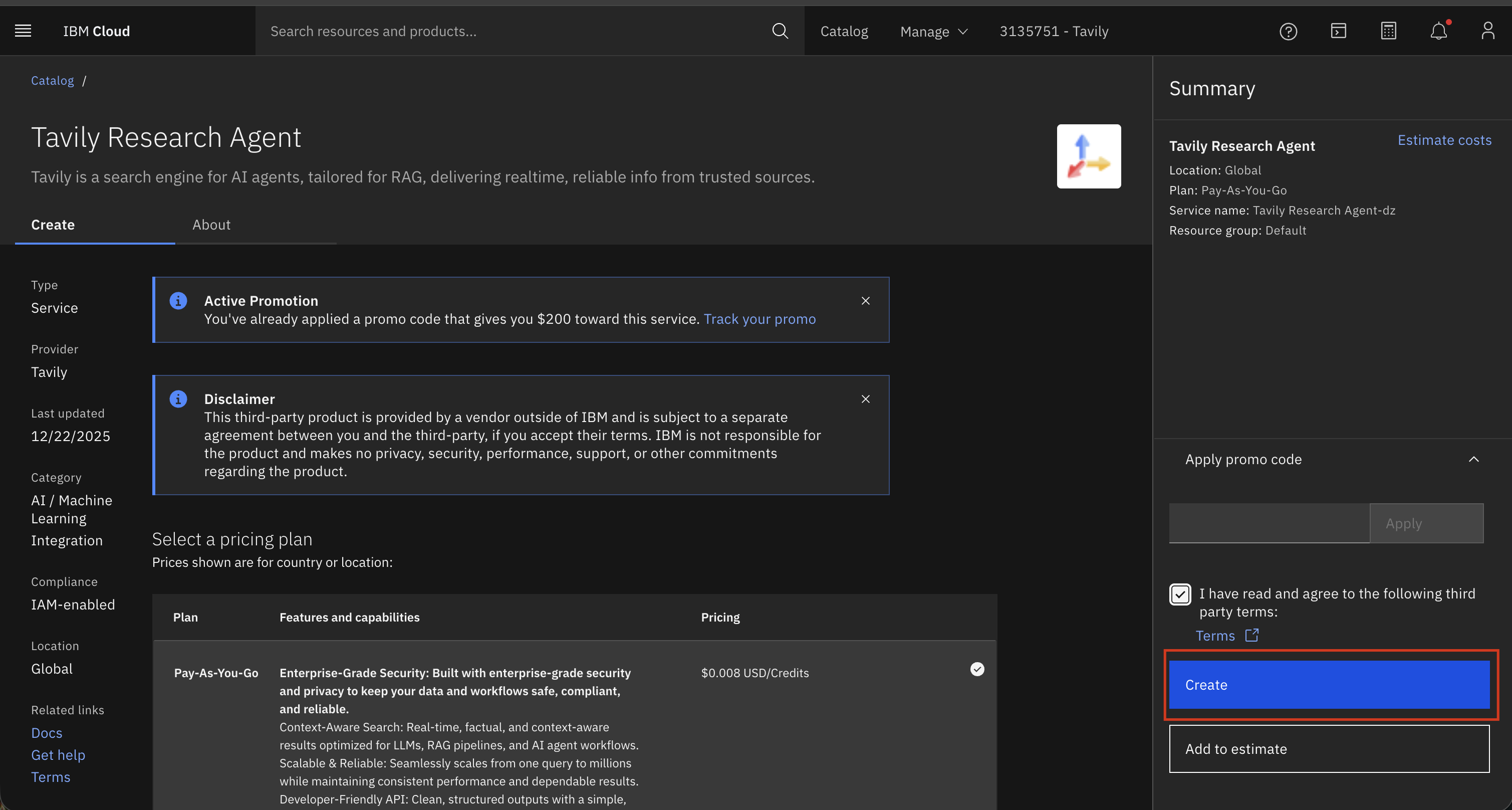
### Step 1: Create a Tavily Instance on IBM Cloud
1. Navigate to [IBM Cloud](https://cloud.ibm.com/)
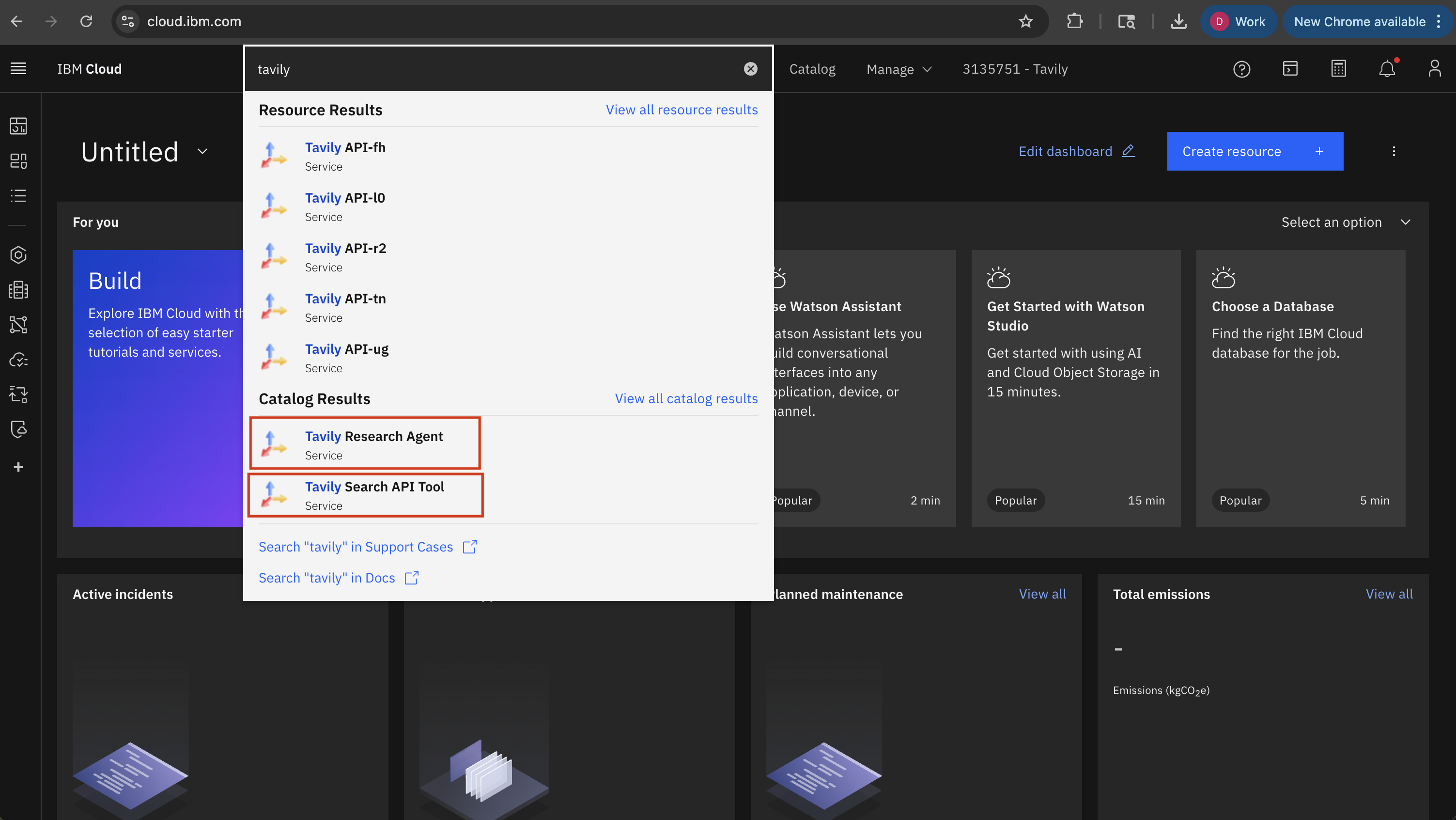
2. In the search bar, type "Tavily" to find the available services
3. Select either **Tavily Search API** or **Tavily Research Agent** depending on your needs
4. Click **Create** to provision a new instance
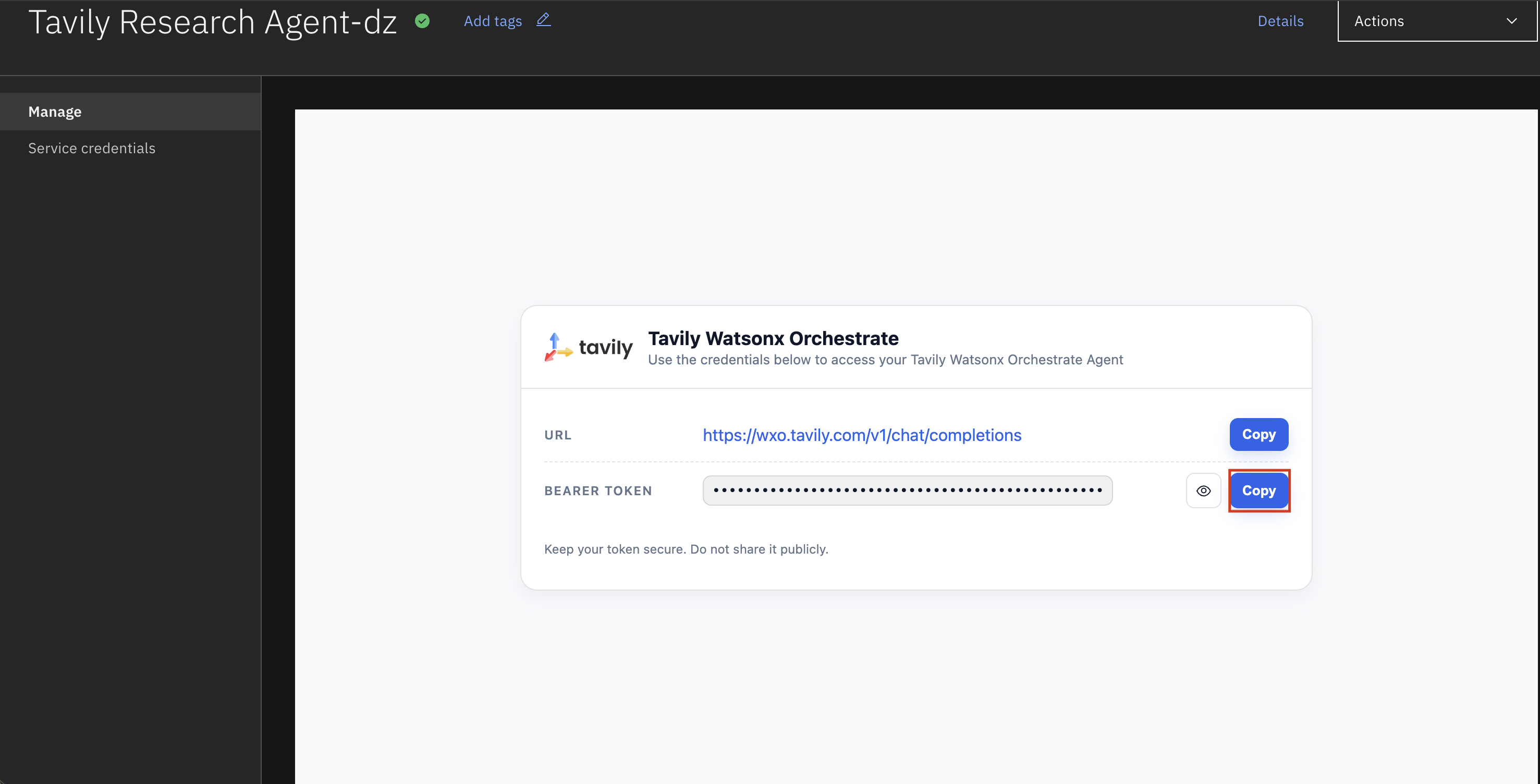
### Step 2: Copy Your Bearer Token
Once your instance is created, copy the bearer token from the credentials section. You'll need this to connect the agent in watsonx Orchestrate.
### Step 3: Add Tavily to watsonx Orchestrate
1. Navigate to [watsonx Orchestrate](https://dl.watson-orchestrate.ibm.com/chat)
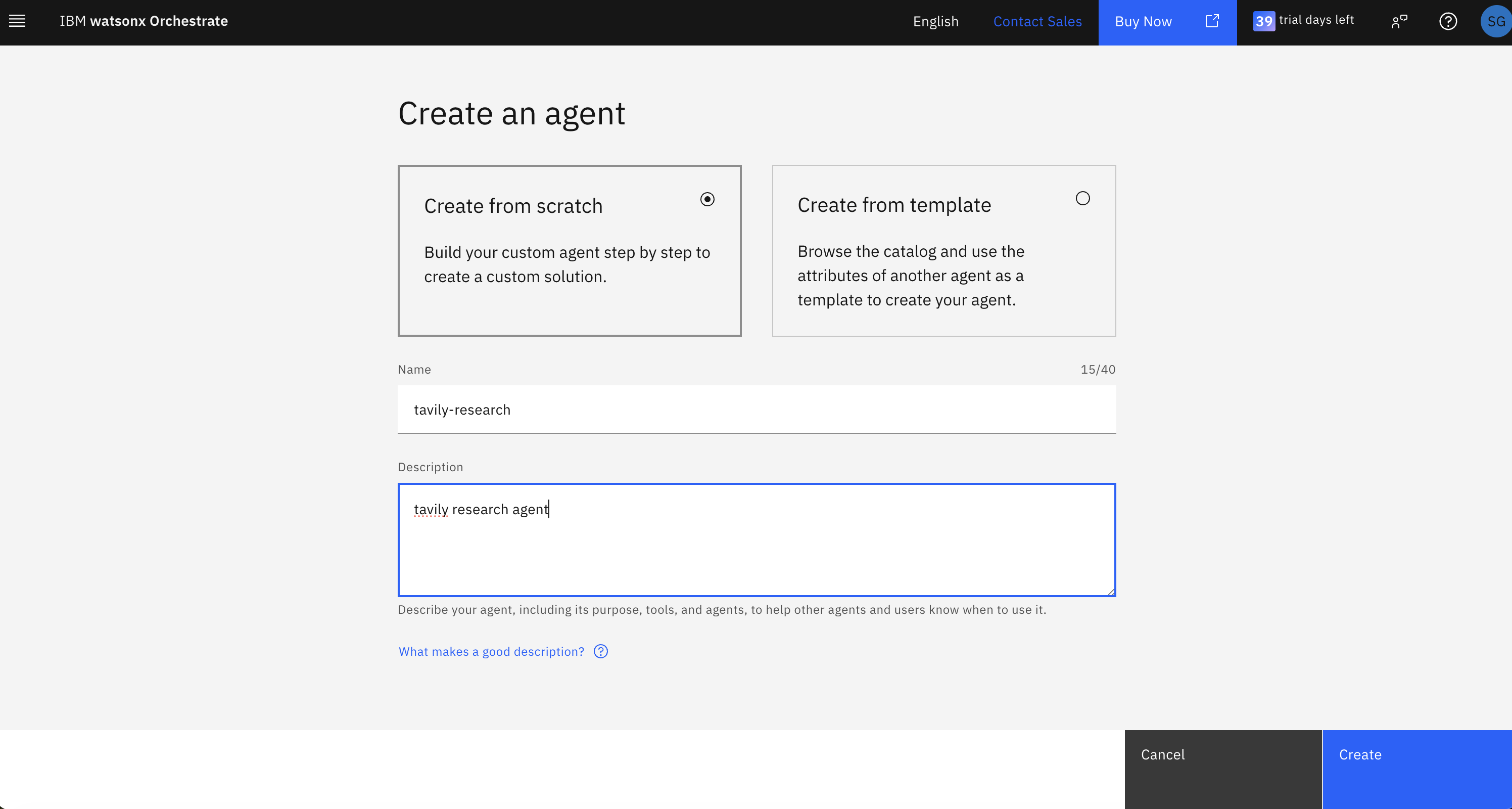
2. Create a new agent
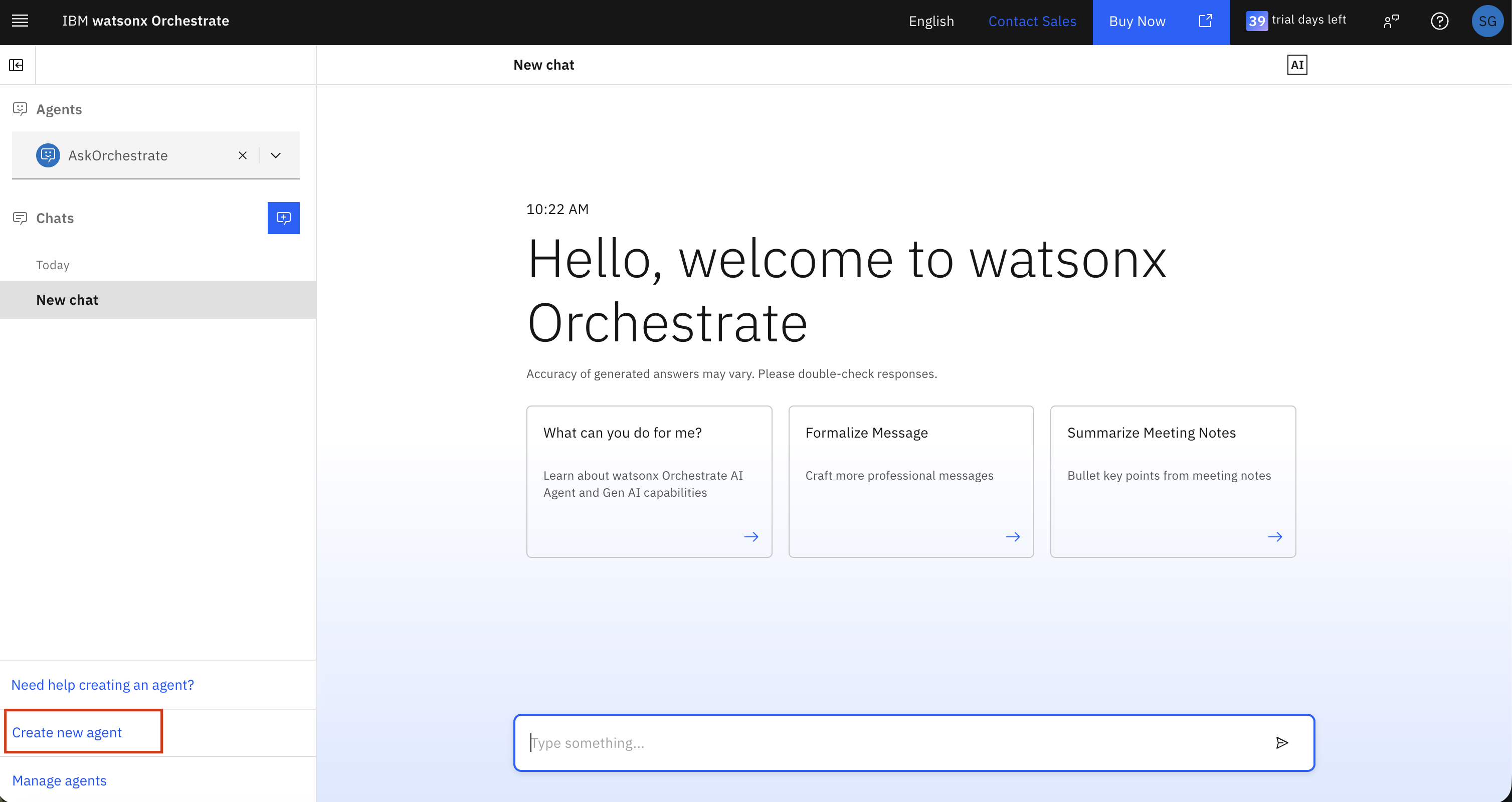
3. Name your agent
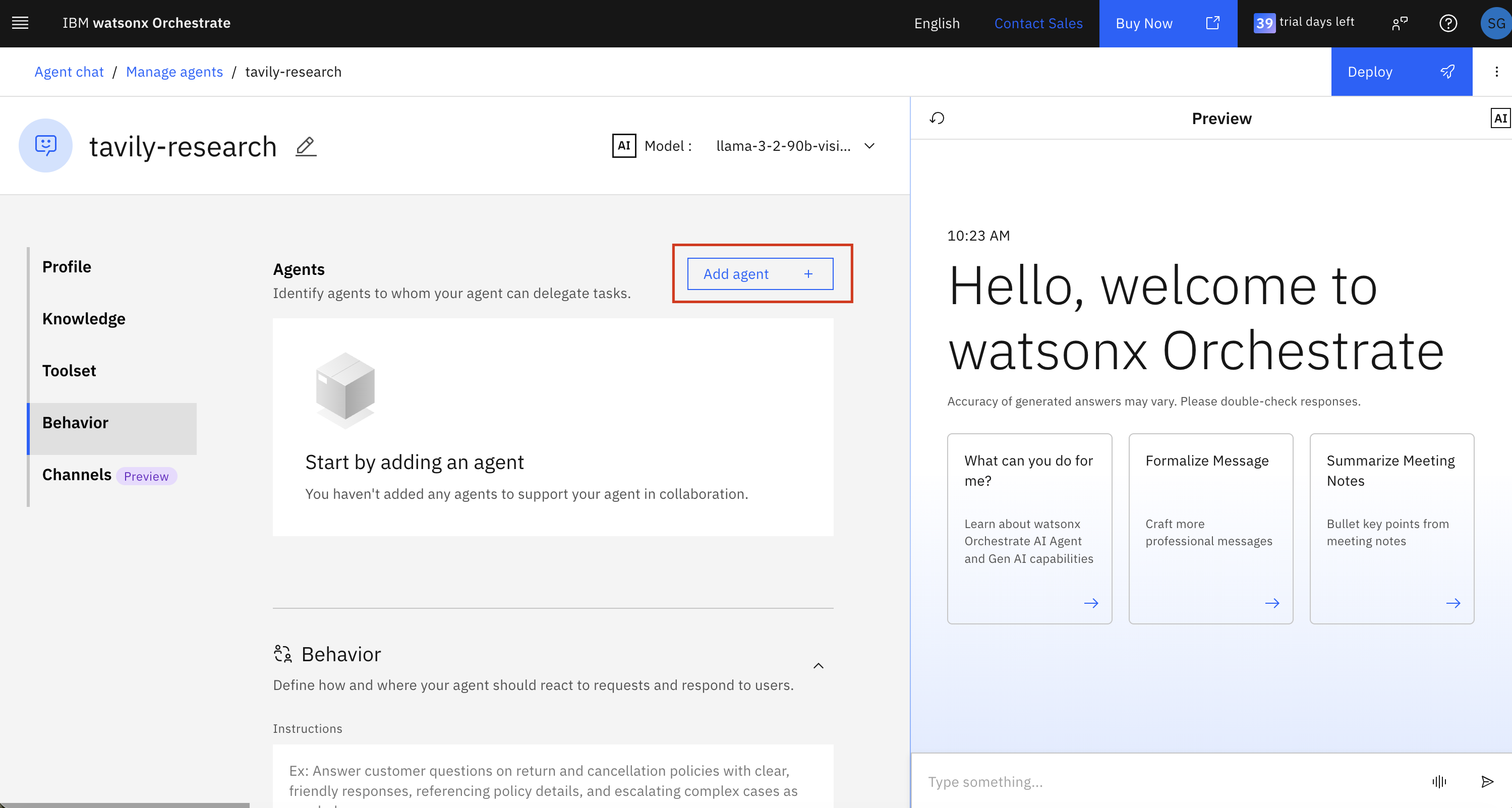
4. Add a collaborator agent
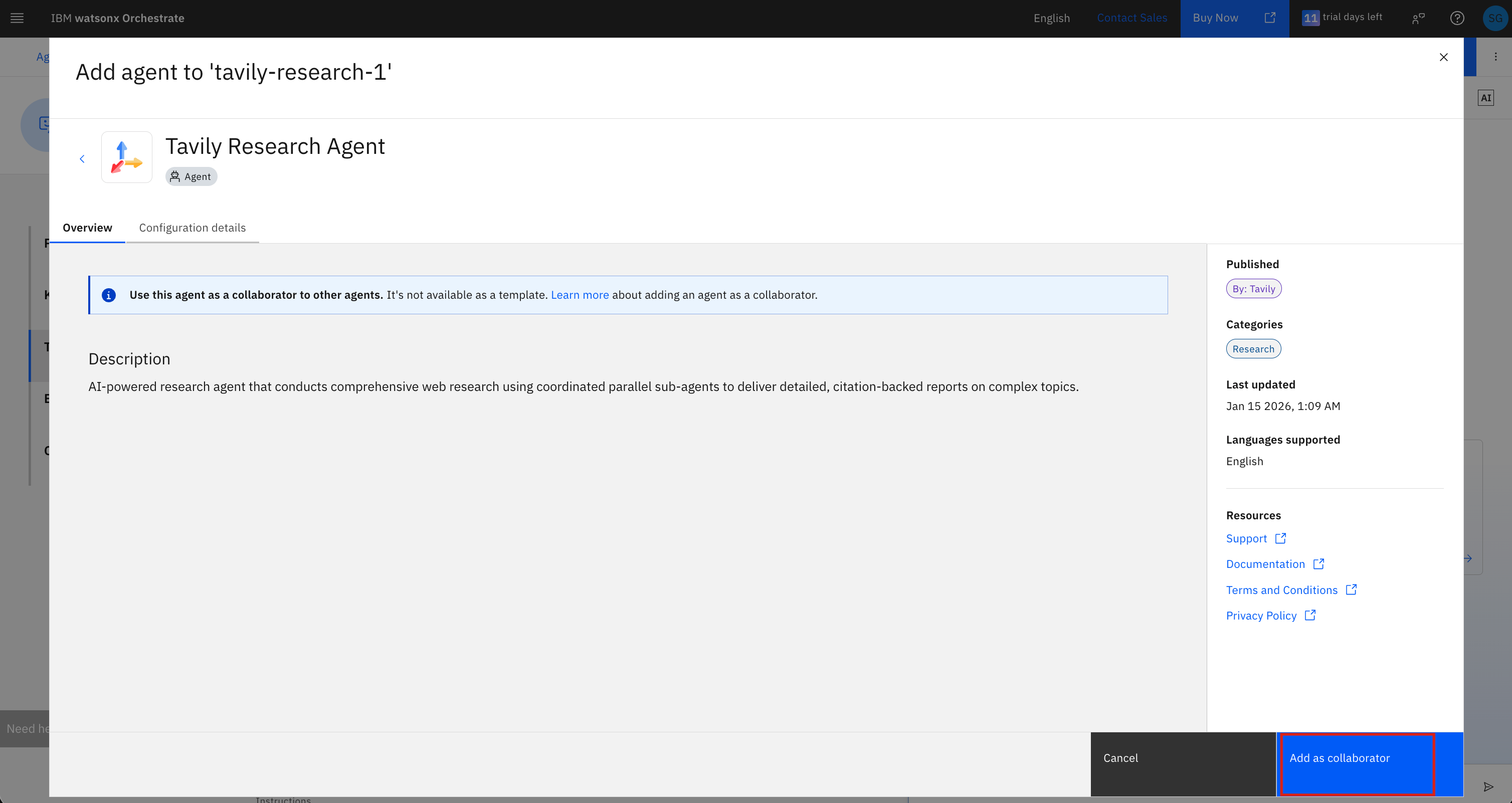
5. Select **Tavily Research Agent** from the partner agents list
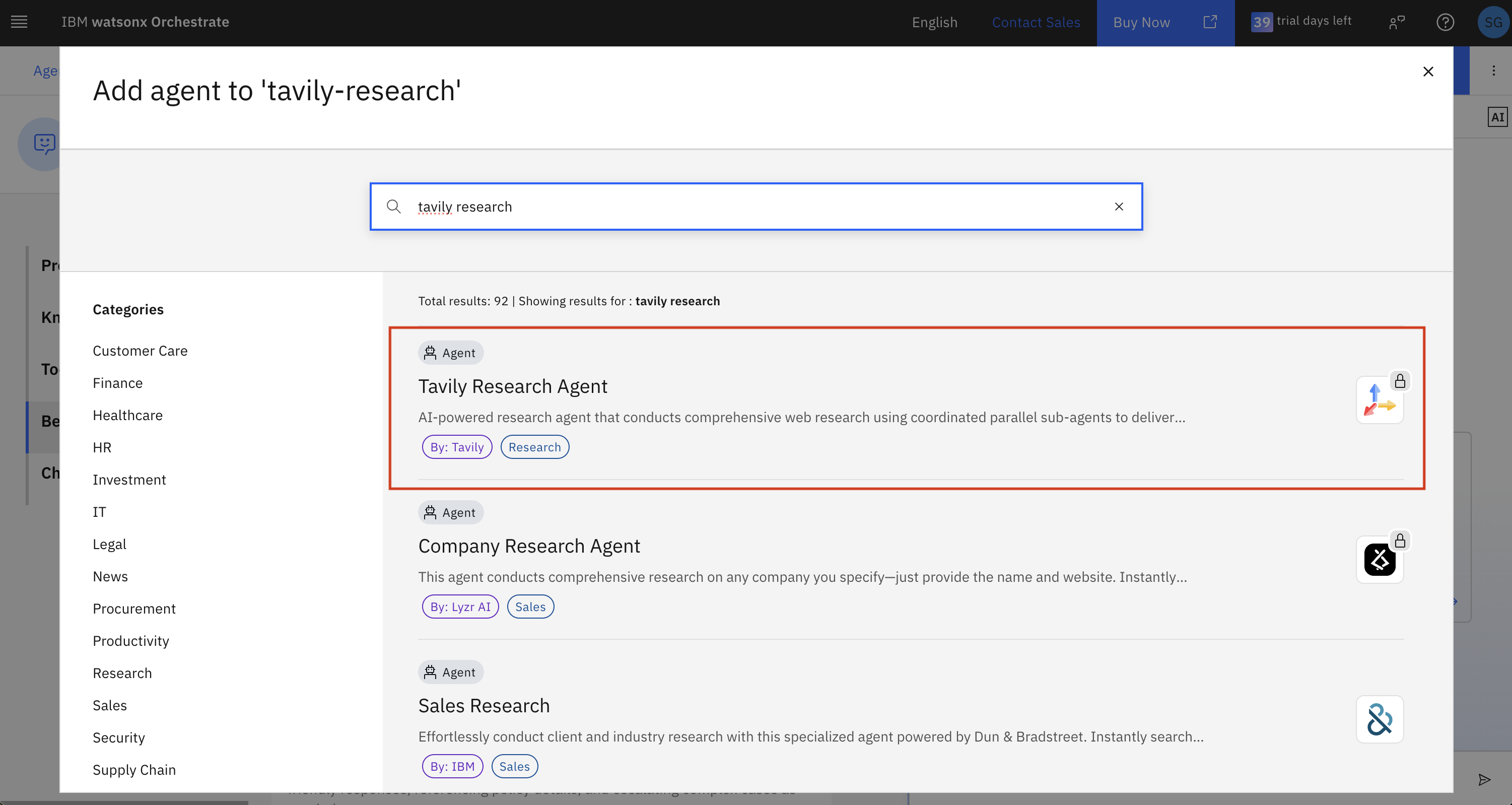
6. Review the agent details and click **Add as collaborator**
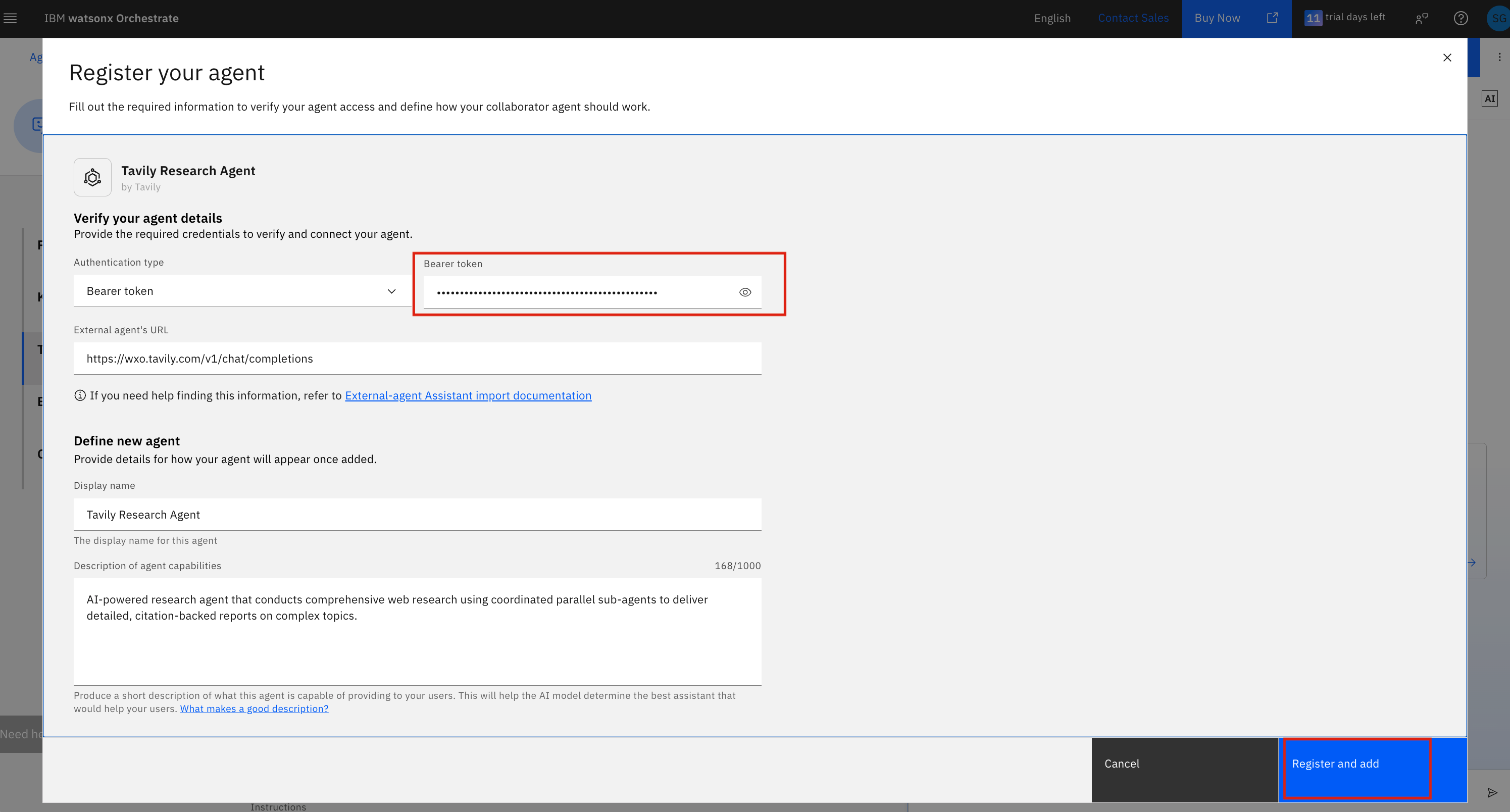
7. Enter your bearer token (from Step 2) in the **Bearer token** field and click **Register and add**
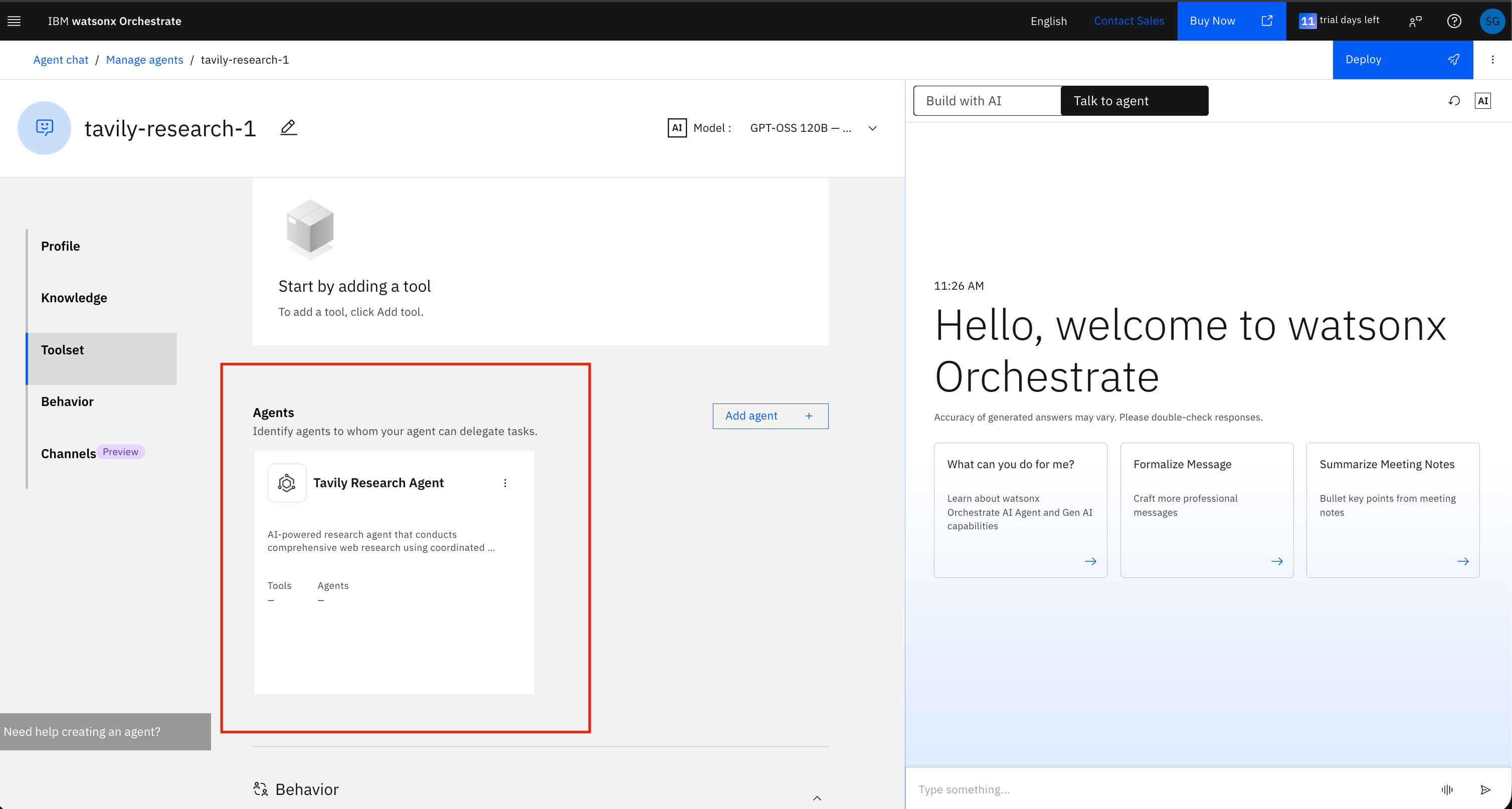
8. The Tavily Research Agent will now appear in your agent's **Toolset** under the Agents section
### Step 4: Try It Out
Ask a question in the chat that requires real-time web research, and watsonx Orchestrate will automatically hand off to the Tavily Research Agent.
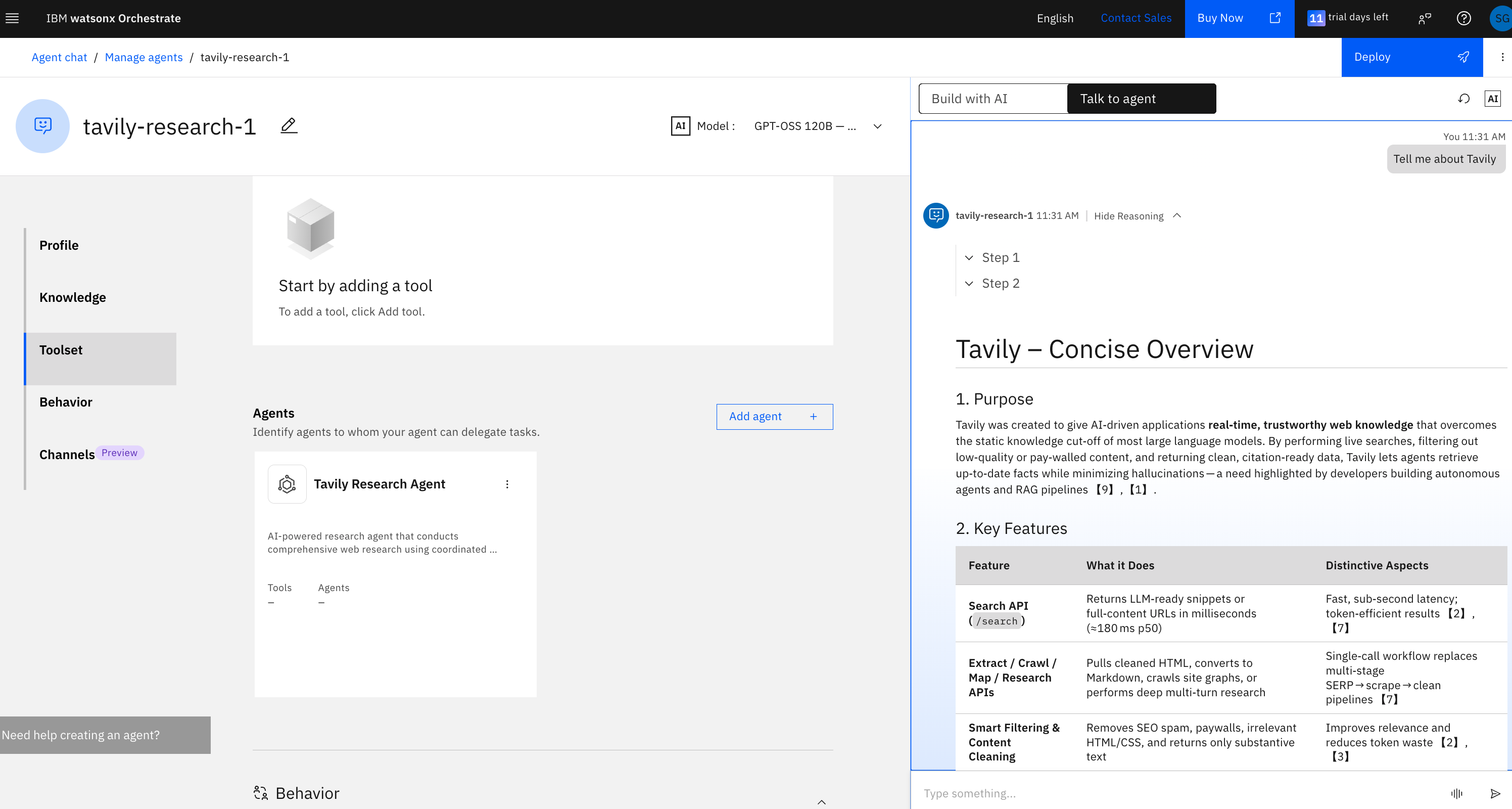
Your Tavily Research Agent is now ready to use within watsonx Orchestrate.
## Resources
* [IBM watsonx Orchestrate Documentation](https://www.ibm.com/docs/en/watsonx/watson-orchestrate/base?topic=agents-adding-orchestration#adding-a-collaborator-agent)
* [Partner Agents Catalog](https://www.ibm.com/docs/en/watsonx/watson-orchestrate/base?topic=catalog-partner-agents)
---
# Source: https://docs.tavily.com/documentation/about.md
> ## Documentation Index
> Fetch the complete documentation index at: https://docs.tavily.com/llms.txt
> Use this file to discover all available pages before exploring further.
# About
> Welcome to Tavily!
Looking for a step-by-step tutorial to get started in under 5 minutes? Head to our [Quickstart guide](/guides/quickstart) and start coding!
## Who are we?
We're a team of AI researchers and developers passionate about helping you build the next generation of AI assistants.
Our mission is to empower individuals and organizations with accurate, unbiased, and factual information.
## What is the Tavily Search Engine?
Building an AI agent that leverages realtime online information is not a simple task. Scraping doesn't scale and requires expertise to refine, current search engine APIs don't provide explicit information to queries but simply potential related articles (which are not always related), and are not very customziable for AI agent needs. This is why we're excited to introduce the first search engine for AI agents - [Tavily](https://app.tavily.com).
Tavily is a search engine optimized for LLMs, aimed at efficient, quick and persistent search results. Unlike other search APIs such as Serp or Google, Tavily focuses on optimizing search for AI developers and autonomous AI agents. We take care of all the burden of searching, scraping, filtering and extracting the most relevant information from online sources. All in a single API call!
To try the API in action, you can now use our hosted version on our [API Playground](https://app.tavily.com/playground).
If you're an AI developer looking to integrate your application with our API, or seek increased API limits, [please reach out!](mailto:support@tavily.com)
## Why choose Tavily?
Tavily shines where others fail, with a Search API optimized for LLMs.
Tailored just for LLM Agents, we ensure the search results are optimized for RAG. We take care of all the burden in searching, scraping, filtering and extracting information from online sources. All in a single API call! Simply pass the returned search results as context to your LLM.
Beyond just fetching results, the Tavily Search API offers precision. With customizable search depths, domain management, and parsing HTML content controls, you're in the driver's seat.
Committed to speed and efficiency, our API guarantees real-time and trusted information. Our team works hard to improve Tavily's performance over time.
We appreciate the essence of adaptability. That's why integrating our API with your existing setup is a breeze. You can choose our [Python library](https://pypi.org/project/tavily-python/), [JavaScript package](https://www.npmjs.com/package/@tavily/core) or a simple API call. You can also use Tavily through any of our supported partners such as [LangChain](/integrations/langchain) and [LlamaIndex](/integrations/llamaindex).
Our detailed documentation ensures you're never left in the dark. From setup basics to nuanced features, we've got you covered.
## How does the Search API work?
Traditional search APIs such as Google, Serp and Bing retrieve search results based on a user query. However, the results are sometimes irrelevant to the goal of the search, and return simple URLs and snippets of content which are not always relevant. Because of this, any developer would need to then scrape the sites to extract relevant content, filter irrelevant information, optimize the content to fit LLM context limits, and more. This task is a burden and requires a lot of time and effort to complete. The Tavily Search API takes care of all of this for you in a single API call.
The Tavily Search API aggregates up to 20 sites per a single API call, and uses proprietary AI to score, filter and rank the top most relevant sources and content to your task, query or goal.
In addition, Tavily allows developers to add custom fields such as context and limit response tokens to enable the optimal search experience for LLMs.
Tavily can also help your AI agent make better decisions by including a short answer for cross-agent communication.
With LLM hallucinations, it's crucial to optimize for RAG with the right context and information. This is where Tavily comes in, delivering accurate and precise information for your RAG applications.
## Getting started
[Sign up](https://app.tavily.com) for Tavily to get your API key. You get **1,000 free API Credits every month**. No credit card required.
You get 1,000 free API Credits every month. **No credit card required.**
Head to our [API Playground](https://app.tavily.com/playground) to familiarize yourself with our API.
To get started with Tavily's APIs and SDKs using code, head to our [Quickstart Guide](/guides/quickstart) and follow the steps.
Got questions? Stumbled upon an issue? Simply intrigued? Don't hesitate! Our support team is always on standby, eager to assist. Join us, dive deep, and redefine your search experience! [Contact us!](mailto:support@tavily.com)
---
# Source: https://docs.tavily.com/documentation/integrations/agent-builder.md
> ## Documentation Index
> Fetch the complete documentation index at: https://docs.tavily.com/llms.txt
> Use this file to discover all available pages before exploring further.
# OpenAI Agent Builder
> Integrate OpenAI’s Agent Builder with Tavily’s MCP server to empower your AI agents with real-time web access.
## Getting Started
Before you begin, make sure you have:
* A [Tavily API key](https://app.tavily.com/home) (sign up for free if you don't have one)
* An OpenAI account with [organization verification](https://help.openai.com/en/articles/10910291-api-organization-verification)
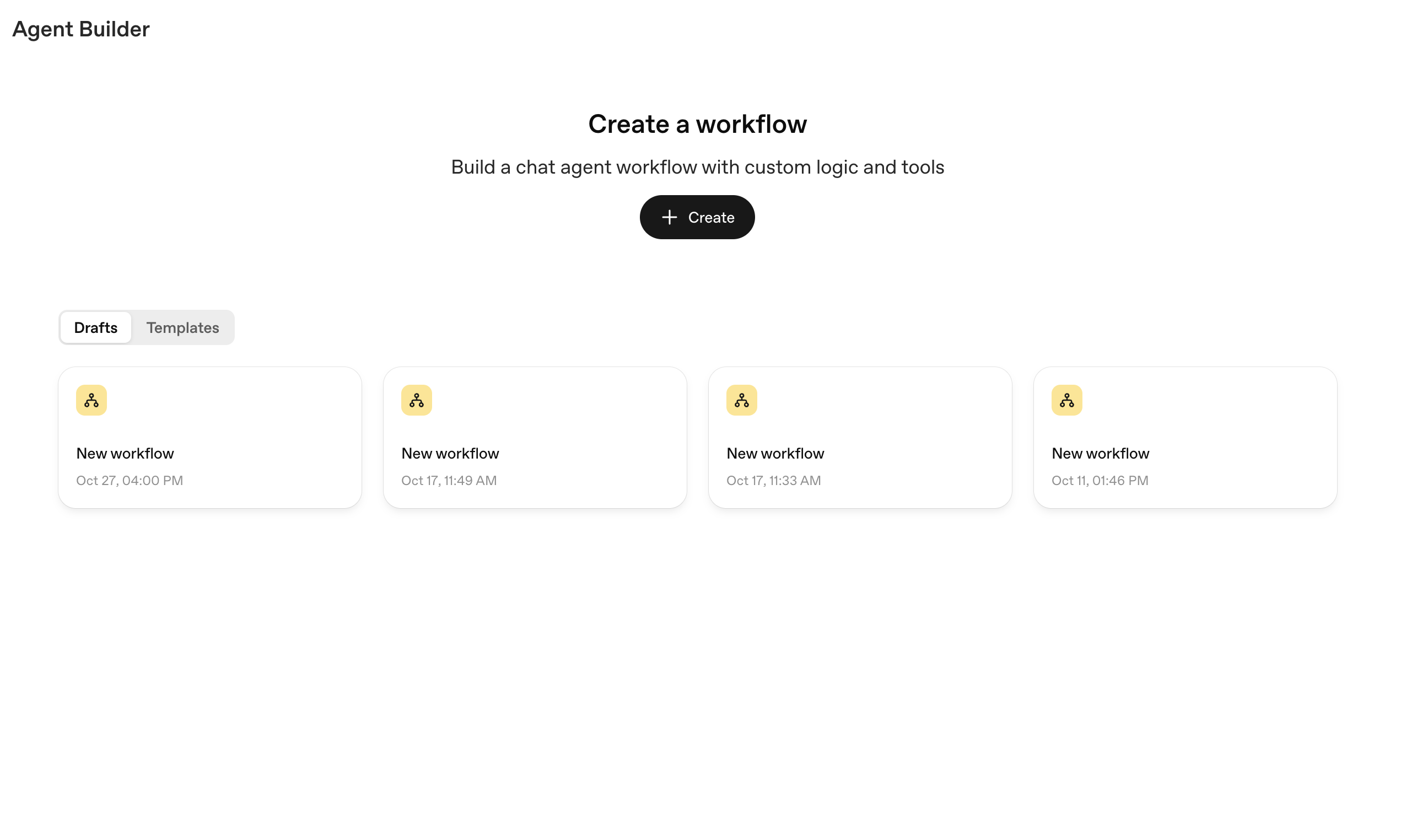
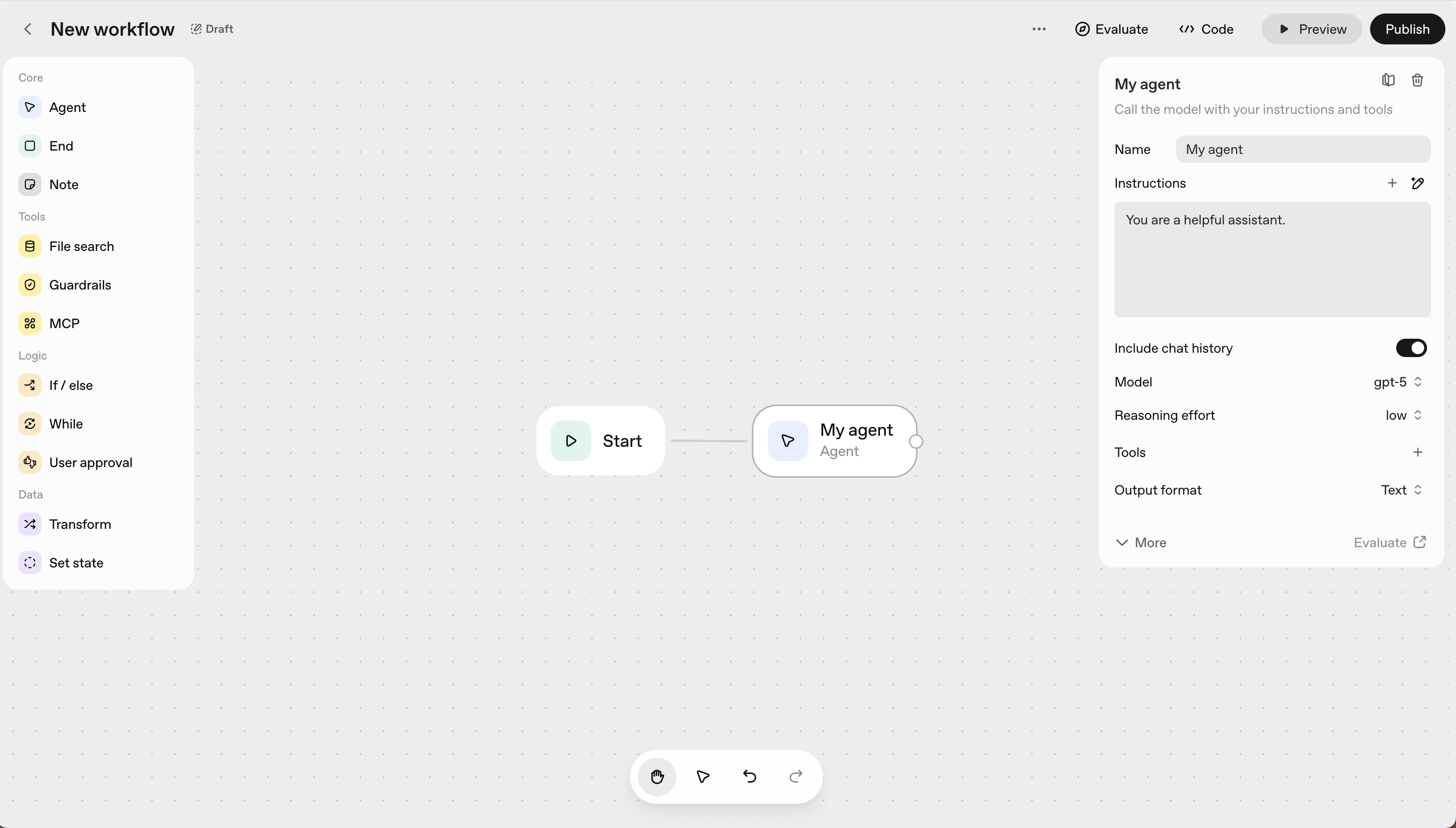
Navigate to [Agent Builder](https://platform.openai.com/agent-builder) and click **Create New Workflow** to begin building your AI agent.
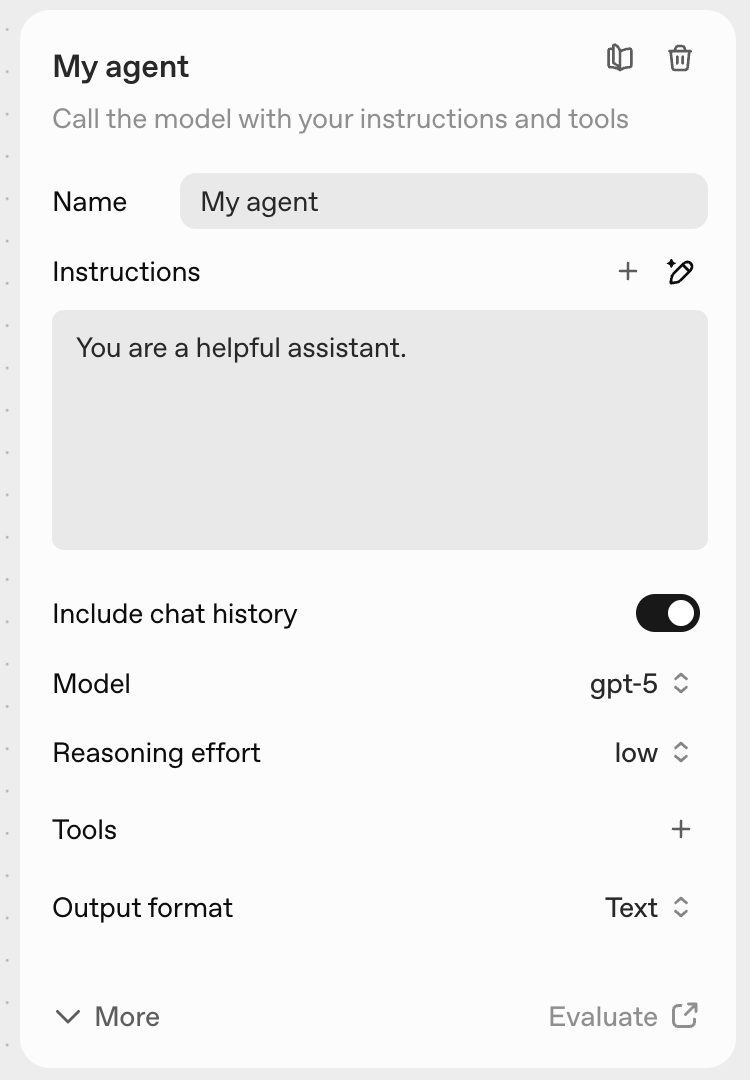
Click on the agent node in your workflow canvas to open the configuration panel.
In the configuration panel, locate and click on **Tools** in the sidebar to add external capabilities to your agent.
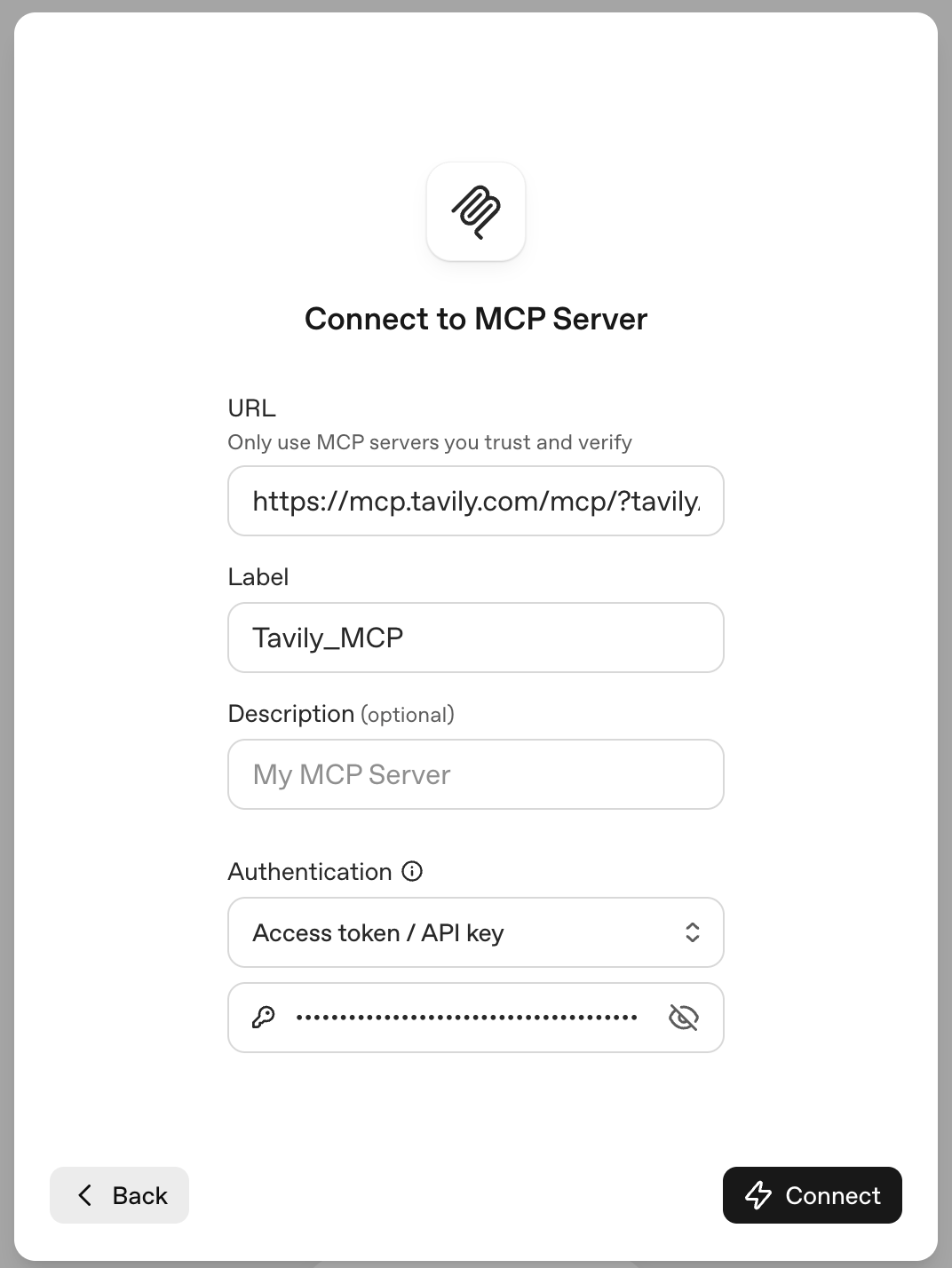
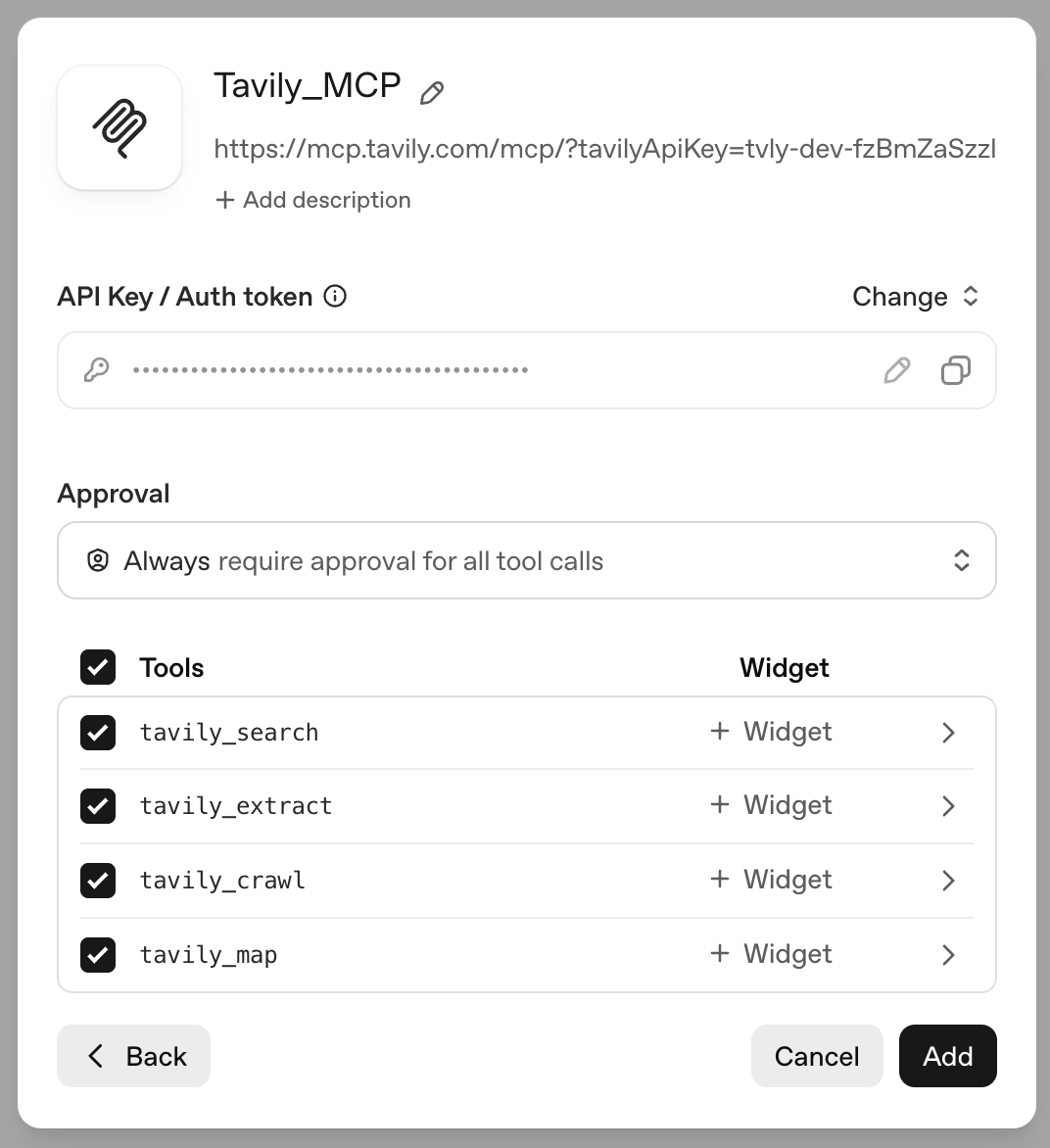
In the MCP configuration section, paste the Tavily MCP server URL:
```bash theme={null}
https://mcp.tavily.com/mcp/?tavilyApiKey=YOUR_API_KEY
```
Remember to replace `YOUR_API_KEY` with your actual Tavily API key.
{" "}
Need an API key? Get one instantly from your [Tavily
dashboard](https://app.tavily.com/home)
Click **Connect** to establish the connection to Tavily.
Once connected, you'll see Tavily's suite of tools available:
* **tavily\_search** - Execute a search query.
* **tavily\_extract** - Extract web page content from one or more specified URLs.
* **tavily\_map** - Traverses websites like a graph and can explore hundreds of paths in parallel with intelligent discovery to generate comprehensive site maps.
* **tavily\_crawl** - Traversal tool that can explore hundreds of paths in parallel with built-in extraction and intelligent discovery.
Select the tools you want to activate for this agent, then click **Add** to integrate them.
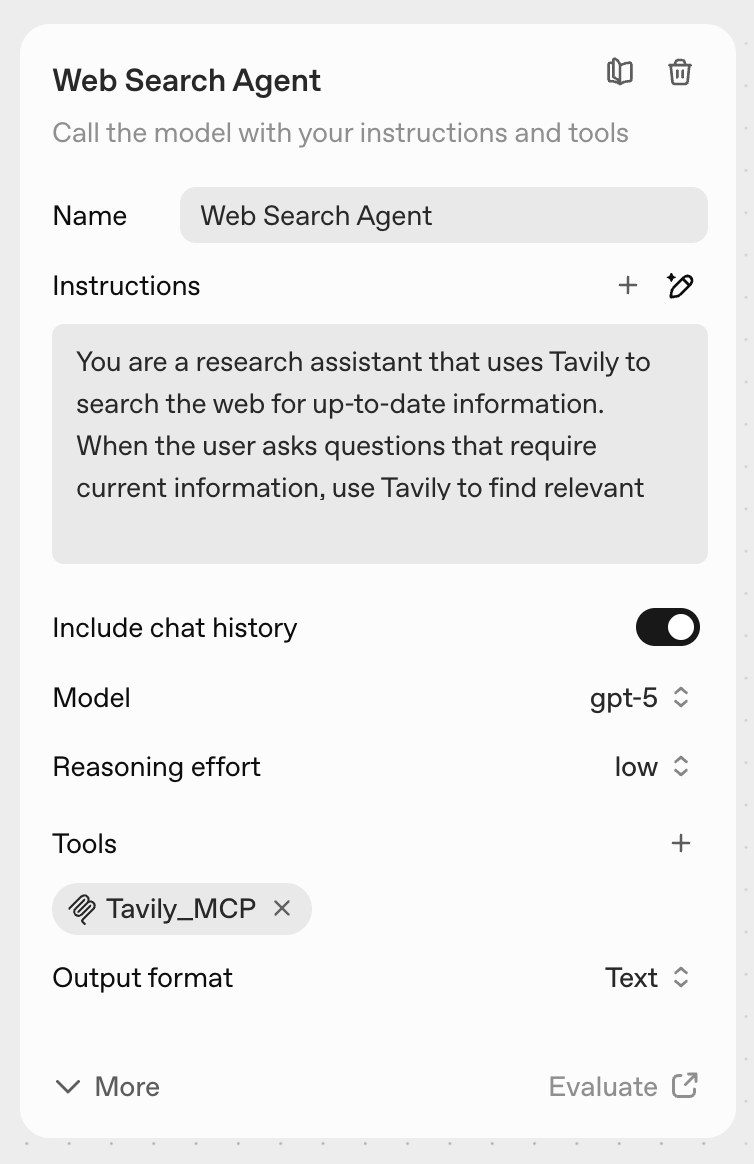
Now configure your agent:
* **Name**: Choose a descriptive name for your agent
* **Instructions**: Define the agent's role and how it should use Tavily's tools
* **Reasoning**: Set the appropriate reasoning effort level
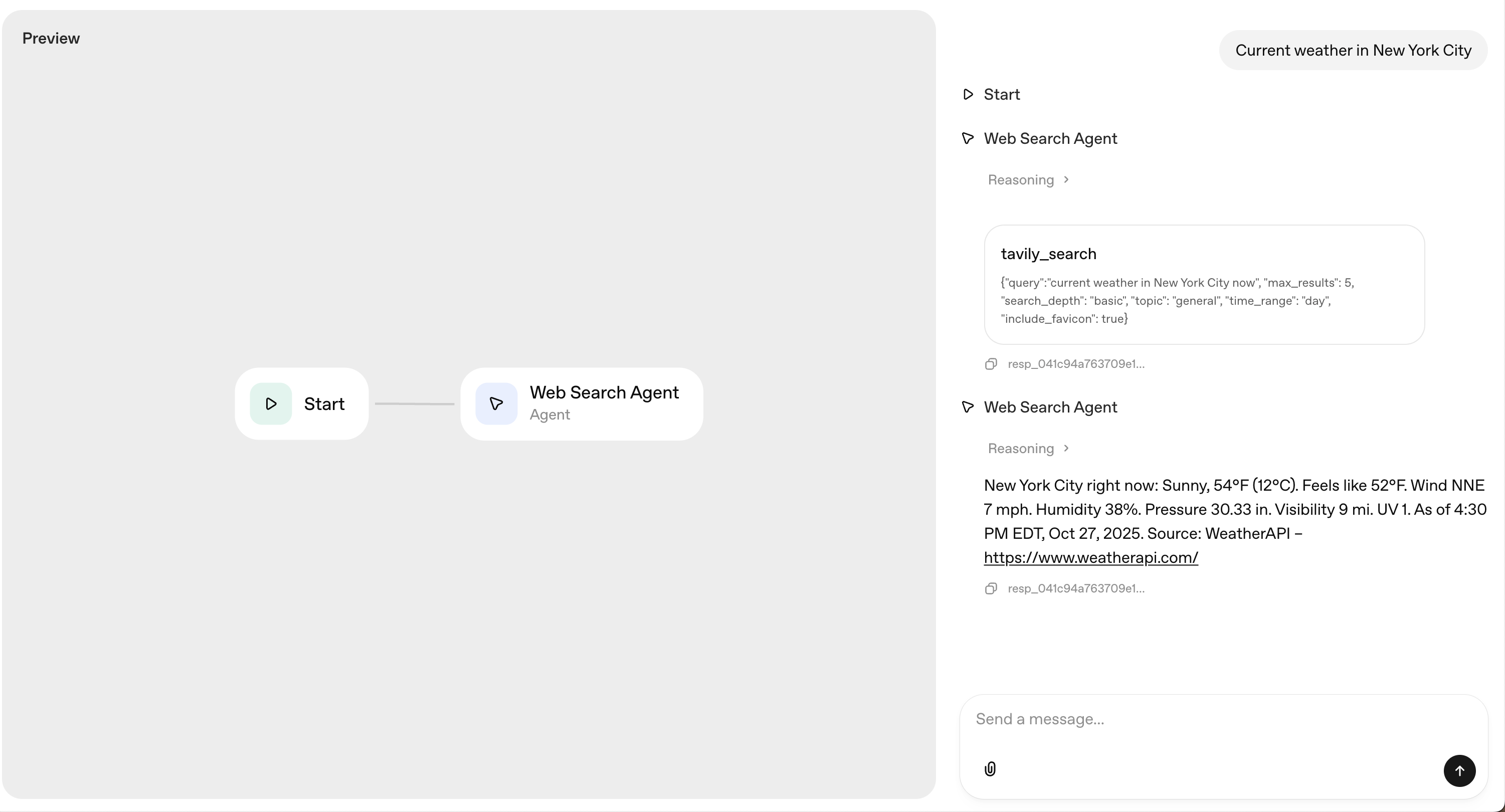
* Click **Preview** to test the configuration
**Sample instructions:**
```
You are a research assistant that uses Tavily to search the web for up-to-date information.
When the user asks questions that require current information, use Tavily to find relevant and recent sources.
```
Test your agent with queries that require real-time information to verify everything is working as expected.
## Real-World Applications
### Market Research Agents
Build agents that continuously monitor industry trends, competitor activities, and market sentiment by searching for and analyzing relevant business information.
### Content Curation Systems
Create agents that automatically find, extract, and summarize content from multiple sources based on your specific criteria and preferences.
### Competitive Intelligence
Develop agents that crawl competitor websites, map their content strategies, and extract pricing, features, and positioning information.
### News & Event Monitors
Build agents that track breaking news on specific topics by leveraging Tavily's news search mode, providing real-time updates with citations.
---
# Source: https://docs.tavily.com/documentation/agent-skills.md
> ## Documentation Index
> Fetch the complete documentation index at: https://docs.tavily.com/llms.txt
> Use this file to discover all available pages before exploring further.
# Tavily Agent Skills
> Official skills that define best practices for working with the Tavily API. Useful for AI agents like Claude Code, Codex, or Cursor.
`/tavily-ai/skills`
Sign up at tavily.com
## Why Use These Skills?
These official skills define best practices for working with the Tavily API, going beyond just using the endpoints. They give AI agents low-level control to build custom web tooling directly in your development environment.
These skills bring Tavily's services (search, extract, crawl, research) right where you work. The real-time context these tools provide significantly enhances your agent's capabilities for development tasks.
Most importantly, the **tavily-best-practices** skill turns your AI agent into a true Tavily expert. Instead of reading API docs, just ask your agent how to integrate Tavily into your project. All API best practices are baked in, dramatically accelerating your build process.
## What You Can Build
Copy-paste these prompts into your AI agent and start building:
Build a chatbot that can answer questions about current events and up-to-date information.
**Try these prompts:**
```
/tavily-best-practices Build a chatbot that integrates Tavily search to answer questions with up-to-date web information
```
```
/tavily-best-practices Add Tavily search to my internal company chatbot so it can answer questions about our competitors
```
Create a live news dashboard that tracks topics and analyzes sentiment.
**Try these prompts:**
```
/tavily-best-practices Build a website that refreshes daily with Tesla news and gives a sentiment score on each article
```
```
/tavily-best-practices Create a news monitoring dashboard that tracks AI industry news and sends daily Slack summaries
```
Build tools that automatically enrich leads with company data from the web.
**Try these prompts:**
```
/tavily-best-practices Build a lead enrichment tool that uses Tavily to find company information from their website
```
```
/tavily-best-practices Create a script that takes a list of company URLs and extracts key business information
```
Build an autonomous agent that monitors competitors and surfaces insights.
**Try these prompts:**
```
/tavily-best-practices Build a market research tool that crawls competitor documentation and pricing pages
```
```
/tavily-best-practices Create an agent that monitors competitor product launches and generates weekly reports
```
The `/tavily-best-practices` skill is your fastest path to production. Describe what you want to build and your agent generates working code with best practices baked in.
## Installation
### Prerequisites
* [Tavily API key](https://app.tavily.com/home) - Sign up for free
* An AI agent that supports skills (Claude Code, Codex, Cursor, etc.)
### Step 1: Configure Your API Key
Add your Tavily API key to your agent's environment. For Claude Code, add it to your settings file:
```bash macOS theme={null}
# Open your Claude settings file
open -e "$HOME/.claude/settings.json"
# Or with VS Code
code "$HOME/.claude/settings.json"
```
```bash Linux theme={null}
# Open your Claude settings file
nano "$HOME/.claude/settings.json"
# Or with VS Code
code "$HOME/.claude/settings.json"
```
```bash Windows theme={null}
code %USERPROFILE%\.claude\settings.json
```
Add the following configuration:
```json theme={null}
{
"env": {
"TAVILY_API_KEY": "tvly-YOUR_API_KEY"
}
}
```
Replace `tvly-YOUR_API_KEY` with your actual Tavily API key from [app.tavily.com](https://app.tavily.com/home)
### Step 2: Install the Skills
Run this command in your terminal:
```bash theme={null}
npx skills add tavily-ai/skills
```
### Step 3: Restart Your Agent
After installation, restart your AI agent to load the skills.
## Available Skills
Build production-ready Tavily integrations with best practices baked in. Reference documentation for implementing web search, content extraction, crawling, and research in agentic workflows, RAG systems, or autonomous agents.
**Invoke explicitly:**
```
/tavily-best-practices
```
**Example prompts:**
* "Add Tavily search to my internal company chatbot so it can answer questions about our competitors"
* "Build a lead enrichment tool that uses Tavily to find company information from their website"
* "Create a news monitoring agent that tracks mentions of our brand using Tavily search"
* "Implement a RAG pipeline that uses Tavily extract to pull content from industry reports"
Search the web using Tavily's LLM-optimized search API. Returns relevant results with content snippets, scores, and metadata.
**Invoke explicitly:**
```
/search
```
**Example prompts:**
* "Search for the latest news on AI regulations"
* "/search current React best practices"
* "Search for Python async patterns"
Get AI-synthesized research on any topic with citations. Supports structured JSON output for integration into pipelines.
**Invoke explicitly:**
```
/research
```
**Example prompts:**
* "Research the latest developments in quantum computing"
* "/research AI agent frameworks and save to report.json"
* "Research the competitive landscape for AI coding assistants"
Crawl any website and save pages as local markdown files. Ideal for downloading documentation, knowledge bases, or web content for offline access or analysis.
**Invoke explicitly:**
```
/crawl
```
**Example prompts:**
* "Crawl the Stripe API docs and save them locally"
* "/crawl [https://docs.example.com](https://docs.example.com)"
* "Download the Next.js documentation for offline reference"
Extract content from specific URLs using Tavily's extraction API. Returns clean markdown/text from web pages.
**Invoke explicitly:**
```
/extract
```
**Example prompts:**
* "Extract the content from this article URL"
* "/extract [https://example.com/blog/post](https://example.com/blog/post)"
* "Extract content from these three documentation pages"
## Usage Examples
### Automatic Skill Invocation
Your AI agent will automatically use Tavily skills when appropriate. Simply describe what you need:
```
Research the latest developments in AI agents and summarize the key trends
```
```
Search for the latest news on AI regulations
```
```
Crawl the Stripe API docs and save them locally
```
### Explicit Skill Invocation
You can also invoke skills directly using slash commands:
```
/research AI agent frameworks and save to report.json
```
```
/search current React best practices
```
```
/crawl https://docs.example.com
```
```
/extract https://example.com/blog/post
```
```
/tavily-best-practices
```
## Claude Code Plugin
If you're using Claude Code specifically, you can also install the skills as a plugin.
### Step 1: Configure Your API Key
Add your Tavily API key to your Claude Code settings file:
```bash theme={null}
code ~/.claude/settings.json
```
Add the following configuration:
```json theme={null}
{
"env": {
"TAVILY_API_KEY": "tvly-YOUR_API_KEY"
}
}
```
### Step 2: Install the Skills
Run these commands inside Claude Code:
```
/plugin marketplace add tavily-ai/skills
```
```
/plugin install tavily@skills
```
### Step 3: Restart Claude Code
Clear your session and restart to load the plugin:
```
/clear
```
Then press `Ctrl+C` to restart.
---
# Source: https://docs.tavily.com/documentation/integrations/agno.md
> ## Documentation Index
> Fetch the complete documentation index at: https://docs.tavily.com/llms.txt
> Use this file to discover all available pages before exploring further.
# Agno
> Tavily is now available for integration through Agno.
## Introduction
Integrate [Tavily with Agno](https://docs.agno.com/tools/toolkits/search/tavily#tavily) to enhance your AI agents with powerful web search capabilities. Agno provides a lightweight library for building agents with memory, knowledge, tools, and reasoning, making it easy to incorporate real-time web search and data extraction into your AI applications.
## Step-by-Step Integration Guide
### Step 1: Install Required Packages
Install the necessary Python packages:
```bash theme={null}
pip install agno tavily-python
```
### Step 2: Set Up API Keys
* **Tavily API Key:** [Get your Tavily API key here](https://app.tavily.com/home)
* **OpenAI API Key:** [Get your OpenAI API key here](https://platform.openai.com/account/api-keys)
Set these as environment variables in your terminal or add them to your environment configuration file:
```bash theme={null}
export TAVILY_API_KEY=your_tavily_api_key
export OPENAI_API_KEY=your_openai_api_key
```
### Step 3: Initialize Agno Agent with Tavily Tools
```python theme={null}
from agno.agent import Agent
from agno.tools.tavily import TavilyTools
import os
# Initialize the agent with Tavily tools
agent = Agent(
tools=[TavilyTools(
search=True, # Enable search functionality
max_tokens=8000, # Increase max tokens for more detailed results
search_depth="advanced", # Use advanced search for comprehensive results
format="markdown" # Format results as markdown
)],
show_tool_calls=True
)
```
### Step 4: Example Use Cases
```python theme={null}
# Example 1: Basic search with default parameters
agent.print_response("Latest developments in quantum computing", markdown=True)
# Example 2: Market research with multiple parameters
agent.print_response(
"Analyze the competitive landscape of AI-powered customer service solutions in 2024, "
"focusing on market leaders and emerging trends",
markdown=True
)
# Example 3: Technical documentation search
agent.print_response(
"Find the latest documentation and tutorials about Python async programming, "
"focusing on asyncio and FastAPI",
markdown=True
)
# Example 4: News aggregation
agent.print_response(
"Gather the latest news about artificial intelligence from tech news websites "
"published in the last week",
markdown=True
)
```
## Additional Use Cases
1. **Content Curation**: Gather and organize information from multiple sources
2. **Real-time Data Integration**: Keep your AI agents up-to-date with the latest information
3. **Technical Documentation**: Search and analyze technical documentation
4. **Market Analysis**: Conduct comprehensive market research and analysis
---
# Source: https://docs.tavily.com/documentation/integrations/anthropic.md
> ## Documentation Index
> Fetch the complete documentation index at: https://docs.tavily.com/llms.txt
> Use this file to discover all available pages before exploring further.
# Anthropic
> Integrate Tavily with Anthropic Claude to enhance your AI applications with real-time web search capabilities.
## Installation
Install the required packages:
```bash theme={null}
pip install anthropic tavily-python
```
## Setup
Set up your API keys:
```python theme={null}
import os
# Set your API keys
os.environ["OPENAI_API_KEY"] = "your-openai-api-key"
os.environ["TAVILY_API_KEY"] = "your-tavily-api-key"
```
## Using Tavily with Anthropic tool calling
```python theme={null}
import json
from anthropic import Anthropic
from tavily import TavilyClient
# Initialize clients
client = Anthropic(api_key=os.environ["ANTHROPIC_API_KEY"])
tavily_client = TavilyClient(api_key=os.environ["TAVILY_API_KEY"])
MODEL_NAME = "claude-sonnet-4-20250514"
```
## Implementation
### System prompt
Define a system prompt to guide Claude's behavior:
```python theme={null}
SYSTEM_PROMPT = (
"You are a research assistant. Use the tavily_search tool when needed. "
"After tools run and tool results are provided back to you, produce a concise, well-structured summary "
"with a short bullet list of key points and a 'Sources' section listing the URLs. "
)
```
### Tool schema
Define the Tavily search tool for Claude with enhanced parameters:
```python theme={null}
tools = [
{
"name": "tavily_search",
"description": "Search the web using Tavily. Return relevant links & summaries.",
"input_schema": {
"type": "object",
"properties": {
"query": {"type": "string", "description": "Search query string."},
"max_results": {"type": "integer", "default": 5},
"search_depth": {"type": "string", "enum": ["basic", "advanced"]},
},
"required": ["query"]
}
}
]
```
Scroll to the bottom to find the full json schema for search, extract, map and crawl
### Tool execution
Create optimized functions to handle Tavily searches:
```python theme={null}
def tavily_search(**kwargs):
return tavily_client.search(**kwargs)
def process_tool_call(name, args):
if name == "tavily_search":
return tavily_search(**args)
raise ValueError(f"Unknown tool: {name}")
```
### Main chat function
The main function that handles the two-step conversation with Claude:
```python theme={null}
def chat_with_claude(user_message: str):
print(f"\n{'='*50}\nUser Message: {user_message}\n{'='*50}")
# ---- Call 1: allow tools so Claude can ask for searches ----
initial_response = client.messages.create(
model=MODEL_NAME,
max_tokens=4096,
system=SYSTEM_PROMPT,
messages=[{"role": "user", "content": [{"type": "text", "text": user_message}]}],
tools=tools,
)
print("\nInitial Response stop_reason:", initial_response.stop_reason)
print("Initial content:", initial_response.content)
# If Claude already answered in text, return it
if initial_response.stop_reason != "tool_use":
final_text = next((b.text for b in initial_response.content if getattr(b, "type", None) == "text"), None)
print("\nFinal Response:", final_text)
return final_text
# ---- Execute ALL tool_use blocks from Call 1 ----
tool_result_blocks = []
for block in initial_response.content:
if getattr(block, "type", None) == "tool_use":
result = process_tool_call(block.name, block.input)
tool_result_blocks.append({
"type": "tool_result",
"tool_use_id": block.id,
"content": [{"type": "text", "text": json.dumps(result)}],
})
# ---- Call 2: NO tools; ask for the final summary from tool results ----
final_response = client.messages.create(
model=MODEL_NAME,
max_tokens=4096,
system=SYSTEM_PROMPT,
messages=[
{"role": "user", "content": [{"type": "text", "text": user_message}]},
{"role": "assistant", "content": initial_response.content}, # Claude's tool requests
{"role": "user", "content": tool_result_blocks}, # Your tool results
{"role": "user", "content": [{"type": "text", "text":
"Please synthesize the final answer now based on the tool results above. "
"Include 3–7 bullets and a 'Sources' section with URLs."}]},
],
)
final_text = next((b.text for b in final_response.content if getattr(b, "type", None) == "text"), None)
print("\nFinal Response:", final_text)
return final_text
```
### Usage example
```python theme={null}
# Example usage
chat_with_claude("What is trending now in the agents space in 2025?")
```
```python theme={null}
import os
import json
from anthropic import Anthropic
from tavily import TavilyClient
client = Anthropic(api_key=os.environ["ANTHROPIC_API_KEY"])
tavily_client = TavilyClient(api_key=os.environ["TAVILY_API_KEY"])
MODEL_NAME = "claude-sonnet-4-20250514"
SYSTEM_PROMPT = (
"You are a research assistant. Use the tavily_search tool when needed. "
"After tools run and tool results are provided back to you, produce a concise, well-structured summary "
"with a short bullet list of key points and a 'Sources' section listing the URLs. "
)
# ---- Define your client-side tool schema for Anthropic ----
tools = [
{
"name": "tavily_search",
"description": "Search the web using Tavily. Return relevant links & summaries.",
"input_schema": {
"type": "object",
"properties": {
"query": {"type": "string", "description": "Search query string."},
"max_results": {"type": "integer", "default": 5},
"search_depth": {"type": "string", "enum": ["basic", "advanced"]},
},
"required": ["query"]
}
}
]
# ---- Your local tool executor ----
def tavily_search(**kwargs):
return tavily_client.search(**kwargs)
def process_tool_call(name, args):
if name == "tavily_search":
return tavily_search(**args)
raise ValueError(f"Unknown tool: {name}")
def chat_with_claude(user_message: str):
print(f"\n{'='*50}\nUser Message: {user_message}\n{'='*50}")
# ---- Call 1: allow tools so Claude can ask for searches ----
initial_response = client.messages.create(
model=MODEL_NAME,
max_tokens=4096,
system=SYSTEM_PROMPT,
messages=[{"role": "user", "content": [{"type": "text", "text": user_message}]}],
tools=tools,
)
print("\nInitial Response stop_reason:", initial_response.stop_reason)
print("Initial content:", initial_response.content)
# If Claude already answered in text, return it
if initial_response.stop_reason != "tool_use":
final_text = next((b.text for b in initial_response.content if getattr(b, "type", None) == "text"), None)
print("\nFinal Response:", final_text)
return final_text
# ---- Execute ALL tool_use blocks from Call 1 ----
tool_result_blocks = []
for block in initial_response.content:
if getattr(block, "type", None) == "tool_use":
result = process_tool_call(block.name, block.input)
tool_result_blocks.append({
"type": "tool_result",
"tool_use_id": block.id,
"content": [{"type": "text", "text": json.dumps(result)}],
})
# ---- Call 2: NO tools; ask for the final summary from tool results ----
final_response = client.messages.create(
model=MODEL_NAME,
max_tokens=4096,
system=SYSTEM_PROMPT,
messages=[
{"role": "user", "content": [{"type": "text", "text": user_message}]},
{"role": "assistant", "content": initial_response.content}, # Claude's tool requests
{"role": "user", "content": tool_result_blocks}, # Your tool results
{"role": "user", "content": [{"type": "text", "text":
"Please synthesize the final answer now based on the tool results above. "
"Include 3–7 bullets and a 'Sources' section with URLs."}]},
],
)
final_text = next((b.text for b in final_response.content if getattr(b, "type", None) == "text"), None)
print("\nFinal Response:", final_text)
return final_text
# Example usage
chat_with_claude("What is trending now in the agents space in 2025?")
```
## Tavily endpoints schema for Anthropic tool definition
> **Note:** When using these schemas, you can customize which parameters are exposed to the model based on your specific use case. For example, if you are building a finance application, you might set `topic`: `"finance"` for all queries without exposing the `topic` parameter. This way, the LLM can focus on deciding other parameters, such as `time_range`, `country`, and so on, based on the user's request. Feel free to modify these schemas as needed and only pass the parameters that are relevant to your application.
> **API Format:** The schemas below are for Anthropic's tool format. Each tool uses the `input_schema` structure with `type`, `properties`, and `required` fields.
```python theme={null}
tools = [
{
"name": "tavily_search",
"description": "A powerful web search tool that provides comprehensive, real-time results using Tavily's AI search engine. Returns relevant web content with customizable parameters for result count, content type, and domain filtering. Ideal for gathering current information, news, and detailed web content analysis.",
"input_schema": {
"type": "object",
"required": ["query"],
"properties": {
"query": {
"type": "string",
"description": "Search query"
},
"auto_parameters": {
"type": "boolean",
"default": False,
"description": "Auto-tune parameters based on the query. Explicit values you pass still win."
},
"topic": {
"type": "string",
"enum": ["general", "news","finance"],
"default": "general",
"description": "The category of the search. This will determine which of our agents will be used for the search"
},
"search_depth": {
"type": "string",
"enum": ["basic", "advanced"],
"default": "basic",
"description": "The depth of the search. It can be 'basic' or 'advanced'"
},
"chunks_per_source": {
"type": "integer",
"minimum": 1,
"maximum": 3,
"default": 3,
"description": "Chunks are short content snippets (maximum 500 characters each) pulled directly from the source."
},
"max_results": {
"type": "integer",
"minimum": 0,
"maximum": 20,
"default": 5,
"description": "The maximum number of search results to return"
},
"time_range": {
"type": "string",
"enum": ["day", "week", "month", "year"],
"description": "The time range back from the current date to include in the search results. This feature is available for both 'general' and 'news' search topics"
},
"start_date": {
"type": "string",
"format": "date",
"description": "Will return all results after the specified start date. Required to be written in the format YYYY-MM-DD."
},
"end_date": {
"type": "string",
"format": "date",
"description": "Will return all results before the specified end date. Required to be written in the format YYYY-MM-DD"
},
"include_answer": {
"description": "Include an LLM-generated answer. 'basic' is brief; 'advanced' is more detailed.",
"oneOf": [
{"type": "boolean"},
{"type": "string", "enum": ["basic", "advanced"]}
],
"default": False
},
"include_raw_content": {
"description": "Include the cleaned and parsed HTML content of each search result",
"oneOf": [
{"type": "boolean"},
{"type": "string", "enum": ["markdown", "text"]}
],
"default": False
},
"include_images": {
"type": "boolean",
"default": False,
"description": "Include a list of query-related images in the response"
},
"include_image_descriptions": {
"type": "boolean",
"default": False,
"description": "Include a list of query-related images and their descriptions in the response"
},
"include_favicon": {
"type": "boolean",
"default": False,
"description": "Whether to include the favicon URL for each result"
},
"include_usage": {
"type": "boolean",
"default": False,
"description": "Whether to include credit usage information in the response"
},
"include_domains": {
"type": "array",
"items": {"type": "string"},
"maxItems": 300,
"description": "A list of domains to specifically include in the search results, if the user asks to search on specific sites set this to the domain of the site"
},
"exclude_domains": {
"type": "array",
"items": {"type": "string"},
"maxItems": 150,
"description": "List of domains to specifically exclude, if the user asks to exclude a domain set this to the domain of the site"
},
"country": {
"type": "string",
"enum": ["afghanistan", "albania", "algeria", "andorra", "angola", "argentina", "armenia", "australia", "austria", "azerbaijan", "bahamas", "bahrain", "bangladesh", "barbados", "belarus", "belgium", "belize", "benin", "bhutan", "bolivia", "bosnia and herzegovina", "botswana", "brazil", "brunei", "bulgaria", "burkina faso", "burundi", "cambodia", "cameroon", "canada", "cape verde", "central african republic", "chad", "chile", "china", "colombia", "comoros", "congo", "costa rica", "croatia", "cuba", "cyprus", "czech republic", "denmark", "djibouti", "dominican republic", "ecuador", "egypt", "el salvador", "equatorial guinea", "eritrea", "estonia", "ethiopia", "fiji", "finland", "france", "gabon", "gambia", "georgia", "germany", "ghana", "greece", "guatemala", "guinea", "haiti", "honduras", "hungary", "iceland", "india", "indonesia", "iran", "iraq", "ireland", "israel", "italy", "jamaica", "japan", "jordan", "kazakhstan", "kenya", "kuwait", "kyrgyzstan", "latvia", "lebanon", "lesotho", "liberia", "libya", "liechtenstein", "lithuania", "luxembourg", "madagascar", "malawi", "malaysia", "maldives", "mali", "malta", "mauritania", "mauritius", "mexico", "moldova", "monaco", "mongolia", "montenegro", "morocco", "mozambique", "myanmar", "namibia", "nepal", "netherlands", "new zealand", "nicaragua", "niger", "nigeria", "north korea", "north macedonia", "norway", "oman", "pakistan", "panama", "papua new guinea", "paraguay", "peru", "philippines", "poland", "portugal", "qatar", "romania", "russia", "rwanda", "saudi arabia", "senegal", "serbia", "singapore", "slovakia", "slovenia", "somalia", "south africa", "south korea", "south sudan", "spain", "sri lanka", "sudan", "sweden", "switzerland", "syria", "taiwan", "tajikistan", "tanzania", "thailand", "togo", "trinidad and tobago", "tunisia", "turkey", "turkmenistan", "uganda", "ukraine", "united arab emirates", "united kingdom", "united states", "uruguay", "uzbekistan", "venezuela", "vietnam", "yemen", "zambia", "zimbabwe"],
"description": "Boost search results from a specific country. This will prioritize content from the selected country in the search results. Available only if topic is general. Country names MUST be written in lowercase, plain English, with spaces and no underscores."
}
}
}
}
]
```
```python theme={null}
tools = [
{
"name": "tavily_extract",
"description": "A powerful web content extraction tool that retrieves and processes raw content from specified URLs, ideal for data collection, content analysis, and research tasks.",
"input_schema": {
"type": "object",
"required": ["urls"],
"properties": {
"urls": {
"type": "string",
"description": "List of URLs to extract content from"
},
"include_images": {
"type": "boolean",
"default": False,
"description": "Include a list of images extracted from the urls in the response"
},
"include_favicon": {
"type": "boolean",
"default": False,
"description": "Whether to include the favicon URL for each result"
},
"include_usage": {
"type": "boolean",
"default": False,
"description": "Whether to include credit usage information in the response"
},
"extract_depth": {
"type": "string",
"enum": ["basic", "advanced"],
"default": "basic",
"description": "Depth of extraction - 'basic' or 'advanced', if urls are linkedin use 'advanced' or if explicitly told to use advanced"
},
"timeout": {
"type": "number",
"enum": ["basic", "advanced"],
"minimum": 0,
"maximum": 60,
"default": None,
"description": "Maximum time in seconds to wait for the URL extraction before timing out. Must be between 1.0 and 60.0 seconds. If not specified, default timeouts are applied based on extract_depth: 10 seconds for basic extraction and 30 seconds for advanced extraction"
},
"format": {
"type": "string",
"enum": ["markdown", "text"],
"default": "markdown",
"description": "The format of the extracted web page content. markdown returns content in markdown format. text returns plain text and may increase latency."
}
}
}
}
]
```
```python theme={null}
tools = [
{
"name": "tavily_map",
"description": "A powerful web mapping tool that creates a structured map of website URLs, allowing you to discover and analyze site structure, content organization, and navigation paths. Perfect for site audits, content discovery, and understanding website architecture.",
"input_schema": {
"type": "object",
"required": ["url"],
"properties": {
"url": {
"type": "string",
"description": "The root URL to begin the mapping"
},
"instructions": {
"type": "string",
"description": "Natural language instructions for the crawler"
},
"max_depth": {
"type": "integer",
"minimum": 1,
"maximum": 5,
"default": 1,
"description": "Max depth of the mapping. Defines how far from the base URL the crawler can explore"
},
"max_breadth": {
"type": "integer",
"minimum": 1,
"default": 20,
"description": "Max number of links to follow per level of the tree (i.e., per page)"
},
"limit": {
"type": "integer",
"minimum": 1,
"default": 50,
"description": "Total number of links the crawler will process before stopping"
},
"select_paths": {
"type": "array",
"items": {"type": "string"},
"description": "Regex patterns to select only URLs with specific path patterns (e.g., /docs/.*, /api/v1.*)"
},
"select_domains": {
"type": "array",
"items": {"type": "string"},
"description": "Regex patterns to select crawling to specific domains or subdomains (e.g., ^docs\\.example\\.com$)"
},
"exclude_paths": {
"type": "array",
"items": {"type": "string"},
"description": "Regex patterns to exclude URLs with specific path patterns (e.g., /admin/.*)."
},
"exclude_domains": {
"type": "array",
"items": {"type": "string"},
"description": "Regex patterns to exclude specific domains or subdomains"
},
"allow_external": {
"type": "boolean",
"default": True,
"description": "Whether to allow following links that go to external domains"
},
"categories": {
"type": "array",
"items": {
"type": "string",
"enum": ["Documentation", "Blog", "Careers","About","Pricing","Community","Developers","Contact","Media"]
},
"description": "Filter URLs using predefined categories like documentation, blog, api, etc"
},
"include_usage": {
"type": "boolean",
"default": False,
"description": "Whether to include credit usage information in the response"
}
}
}
}
]
```
```python theme={null}
tools = [
{
"name": "tavily_crawl",
"description": "A powerful web crawler that initiates a structured web crawl starting from a specified base URL. The crawler expands from that point like a tree, following internal links across pages. You can control how deep and wide it goes, and guide it to focus on specific sections of the site.",
"input_schema": {
"type": "object",
"required": ["url"],
"properties": {
"url": {
"type": "string",
"description": "The root URL to begin the crawl"
},
"instructions": {
"type": "string",
"description": "Natural language instructions for the crawler"
},
"max_depth": {
"type": "integer",
"minimum": 1,
"maximum: 5,
"default": 1,
"description": "Max depth of the crawl. Defines how far from the base URL the crawler can explore."
},
"max_breadth": {
"type": "integer",
"minimum": 1,
"default": 20,
"description": "Max number of links to follow per level of the tree (i.e., per page)"
},
"limit": {
"type": "integer",
"minimum": 1,
"default": 50,
"description": "Total number of links the crawler will process before stopping"
},
"select_paths": {
"type": "array",
"items": {"type": "string"},
"description": "Regex patterns to select only URLs with specific path patterns (e.g., /docs/.*, /api/v1.*)"
},
"select_domains": {
"type": "array",
"items": {"type": "string"},
"description": "Regex patterns to select crawling to specific domains or subdomains (e.g., ^docs\\.example\\.com$)"
},
"exclude_paths": {
"type": "array",
"items": {"type": "string"},
"description": "Regex patterns to exclude paths (e.g., /private/.*, /admin/.*)"
},
"exclude_domains": {
"type": "array",
"items": {"type": "string"},
"description": "Regex patterns to exclude domains/subdomains (e.g., ^private\\.example\\.com$)"
},
"allow_external": {
"type": "boolean",
"default": True,
"description": "Whether to allow following links that go to external domains"
},
"include_images": {
"type": "boolean",
"default": False,
"description": "Include images discovered during the crawl"
},
"categories": {
"type": "array",
"items": {
"type": "string",
"enum": ["Careers", "Blog", "Documentation", "About", "Pricing", "Community", "Developers", "Contact", "Media"]
},
"description": "Filter URLs using predefined categories like documentation, blog, api, etc"
},
"extract_depth": {
"type": "string",
"enum": ["basic", "advanced"],
"default": "basic",
"description": "Advanced extraction retrieves more data, including tables and embedded content, with higher success but may increase latency"
},
"format": {
"type": "string",
"enum": ["markdown", "text"],
"default": "markdown",
"description": "The format of the extracted web page content. markdown returns content in markdown format. text returns plain text and may increase latency."
},
"include_favicon": {
"type": "boolean",
"default": False,
"description": "Whether to include the favicon URL for each result"
},
"include_usage": {
"type": "boolean",
"default": False,
"description": "Whether to include credit usage information in the response"
}
}
}
}
]
```
For more information about Tavily's capabilities, check out our [API documentation](/documentation/api-reference/introduction) and [best practices](/documentation/best-practices/best-practices-search).
---
# Source: https://docs.tavily.com/documentation/api-credits.md
> ## Documentation Index
> Fetch the complete documentation index at: https://docs.tavily.com/llms.txt
> Use this file to discover all available pages before exploring further.
# Credits & Pricing
> Learn how to get and manage your Tavily API Credits.
## Free API Credits
You get 1,000 free API Credits every month. **No credit card required.**
## Pricing Overview
Tavily operates on a simple, credit-based model:
* **Free**: 1,000 credits/month
* **Pay-as-you-go**: \$0.008 per credit (allows you to be charged per credit once your plan’s credit limit is reached).
* **Monthly plans**: \$0.0075 - \$0.005 per credit
* **Enterprise**: Custom pricing and volume
|
**Plan**
| **Credits per month** | **Monthly price** | **Price per credit** |
| -------------------------------- | --------------------- | ----------------- | -------------------- |
| **Researcher** | 1,000 | Free | - |
| **Project** | 4,000 | \$30 | \$0.0075 |
| **Bootstrap** | 15,000 | \$100 | \$0.0067 |
| **Startup** | 38,000 | \$220 | \$0.0058 |
| **Growth** | 100,000 | \$500 | \$0.005 |
| **Pay as you go** | Per usage | \$0.008 / Credit | \$0.008 |
| **Enterprise** | Custom | Custom | Custom |
Head to [billing](https://app.tavily.com/billing) to explore our different options and manage your plan.
## API Credits Costs
### Tavily Search
Your [search depth](/api-reference/endpoint/search#body-search-depth) determines the cost of your request.
* **Basic Search (`basic`):**
Each request costs **1 API credit**.
* **Advanced Search (`advanced`):**
Each request costs **2 API credits**.
### Tavily Extract
The number of successful URL extractions and your [extraction depth](/api-reference/endpoint/extract#body-extract-depth) determines the cost of your request. You never get charged if a URL extraction fails.
* **Basic Extract (`basic`):**
Every 5 successful URL extractions cost **1 API credit**
* **Advanced Extract (`advanced`):**
Every 5 successful URL extractions cost **2 API credits**
### Tavily Map
The number of pages mapped and whether or not natural-language [instructions](/documentation/api-reference/endpoint/map#instructions) are specified determines the cost of your request. You never get charged if a map request fails.
* **Regular Mapping:**
Every 10 successful pages returned cost **1 API credit**
* **Map with (`instructions`):**
Every 10 successful pages returned cost **2 API credits**
### Tavily Crawl
Tavily Crawl combines both mapping and extraction operations, so the cost is the sum of both:
* **Crawl Cost = Mapping Cost + Extraction Cost**
For example:
* If you crawl 10 pages with basic extraction depth, you'll be charged **1 credit for mapping** (10 pages) + **2 credits for extraction** (10 successful extractions ÷ 5) = **3 total credits**
* If you crawl 10 pages with advanced extraction depth, you'll be charged **1 credit for mapping** + **4 credits for extraction** = **5 total credits**
### Tavily Research
Tavily Research follows a dynamic
pricing model with minimum and maximum credit consumption boundaries associated
with each request. The minimum and maximum boundaries differ based on if the
request uses `model=mini` or `model=pro`.
| Request Cost Boundaries | model=pro | model=mini |
| ----------------------- | ----------- | ----------- |
| Per-request minimum | 15 credits | 4 credits |
| Per-request maximum | 250 credits | 110 credits |
---
# Source: https://docs.tavily.com/documentation/best-practices/api-key-management.md
> ## Documentation Index
> Fetch the complete documentation index at: https://docs.tavily.com/llms.txt
> Use this file to discover all available pages before exploring further.
# API Key Management
> Learn how to handle API key leaks and best practices for key rotation.
## What to do if your API key leaks
If you suspect or know that your API key has been leaked (e.g., committed to a public repository, shared in a screenshot, or exposed in client-side code), **immediate action is required** to protect your account and quota.
Follow these steps immediately:
1. **Log in to your account**: Go to the [Tavily Dashboard](https://app.tavily.com).
2. **Revoke the leaked key**: Navigate to the API Keys section. Identify the compromised key and delete or revoke it immediately. This will stop any unauthorized usage.
3. **Generate a new key**: Create a new API key to replace the compromised one.
4. **Update your applications**: Replace the old key with the new one in your environment variables, secrets management systems, and application code.
If you notice any unusual activity or usage spikes associated with the leaked key before you revoked it, please contact [support@tavily.com](mailto:support@tavily.com) for assistance.
## Rotating your API keys
As a general security best practice, we recommend rotating your API keys periodically (e.g., every 90 days). This minimizes the impact if a key is ever compromised without your knowledge.
### How to rotate your keys safely
To rotate your keys without downtime:
1. **Generate a new key**: Create a new API key in the [Tavily Dashboard](https://app.tavily.com) while keeping the old one active.
2. **Update your application**: Deploy your application with the new API key.
3. **Verify functionality**: Ensure your application is working correctly with the new key.
4. **Revoke the old key**: Once you are confirmed that the new key is in use and everything is functioning as expected, delete the old API key from the dashboard.
Never hardcode API keys in your source code. Always use environment variables or a secure secrets manager to store your credentials.
---
# Source: https://docs.tavily.com/documentation/best-practices/best-practices-crawl.md
> ## Documentation Index
> Fetch the complete documentation index at: https://docs.tavily.com/llms.txt
> Use this file to discover all available pages before exploring further.
# Best Practices for Crawl
> Learn how to optimize crawl parameters, focus your crawls, and efficiently extract content from websites.
## Crawl vs Map
Understanding when to use each API:
| Feature | Crawl | Map |
| ---------------------- | ---------------------------- | ------------------------ |
| **Content extraction** | Full content | URLs only |
| **Use case** | Deep content analysis | Site structure discovery |
| **Speed** | Slower (extracts content) | Faster (URLs only) |
| **Best for** | RAG, analysis, documentation | Sitemap generation |
### Use Crawl when you need:
* Full content extraction from pages
* Deep content analysis
* Processing of paginated or nested content
* Extraction of specific content patterns
* Integration with RAG systems
### Use Map when you need:
* Quick site structure discovery
* URL collection without content extraction
* Sitemap generation
* Path pattern matching
* Domain structure analysis
## Crawl Parameters
### Instructions
Guide the crawl with natural language to focus on relevant content:
```json theme={null}
{
"url": "example.com",
"max_depth": 2,
"instructions": "Find all documentation pages about Python"
}
```
**When to use instructions:**
* To focus crawling on specific topics or content types
* When you need semantic filtering of pages
* For agentic use cases where relevance is critical
### Chunks per Source
Control the amount of content returned per page to prevent context window explosion:
```json theme={null}
{
"url": "example.com",
"instructions": "Find all documentation about authentication",
"chunks_per_source": 3
}
```
**Key benefits:**
* Returns only relevant content snippets (max 500 characters each) instead of full page content
* Prevents context window from exploding in agentic use cases
* Chunks appear in `raw_content` as: ` [...] [...] `
> `chunks_per_source` is only available when instructions are provided.
### Depth and breadth
| Parameter | Description | Impact |
| ------------- | ----------------------------------------------- | -------------------------- |
| `max_depth` | How many levels deep to crawl from starting URL | Exponential latency growth |
| `max_breadth` | Maximum links to follow per page | Horizontal spread |
| `limit` | Total maximum pages to crawl | Hard cap on pages |
**Performance tip:** Each level of depth increases crawl time exponentially. Start with `max_depth=1` and increase as needed.
```json theme={null}
// Conservative crawl
{
"url": "example.com",
"max_depth": 1,
"max_breadth": 20,
"limit": 20
}
// Comprehensive crawl
{
"url": "example.com",
"max_depth": 3,
"max_breadth": 100,
"limit": 500
}
```
## Filtering and Focusing
### Path patterns
Use regex patterns to include or exclude specific paths:
```json theme={null}
// Target specific sections
{
"url": "example.com",
"select_paths": ["/blog/.*", "/docs/.*", "/guides/.*"],
"exclude_paths": ["/private/.*", "/admin/.*", "/test/.*"]
}
// Paginated content
{
"url": "example.com/blog",
"max_depth": 2,
"select_paths": ["/blog/.*", "/blog/page/.*"],
"exclude_paths": ["/blog/tag/.*"]
}
```
### Domain filtering
Control which domains to crawl:
```json theme={null}
// Stay within subdomain
{
"url": "docs.example.com",
"select_domains": ["^docs.example.com$"],
"max_depth": 2
}
// Exclude specific domains
{
"url": "example.com",
"exclude_domains": ["^ads.example.com$", "^tracking.example.com$"],
"max_depth": 2
}
```
### Extract depth
Controls extraction quality vs. speed.
| Depth | When to use |
| ----------------- | -------------------------------------- |
| `basic` (default) | Simple content, faster processing |
| `advanced` | Complex pages, tables, structured data |
```json theme={null}
{
"url": "docs.example.com",
"max_depth": 2,
"extract_depth": "advanced",
"select_paths": ["/docs/.*"]
}
```
## Use Cases
### 1. Deep or Unlinked Content
Many sites have content that's difficult to access through standard means:
* Deeply nested pages not in main navigation
* Paginated archives (old blog posts, changelogs)
* Internal search-only content
**Best Practice:**
```json theme={null}
{
"url": "example.com",
"max_depth": 3,
"max_breadth": 50,
"limit": 200,
"select_paths": ["/blog/.*", "/changelog/.*"],
"exclude_paths": ["/private/.*", "/admin/.*"]
}
```
### 2. Structured but Nonstandard Layouts
For content that's structured but not marked up in schema.org:
* Documentation
* Changelogs
* FAQs
**Best Practice:**
```json theme={null}
{
"url": "docs.example.com",
"max_depth": 2,
"extract_depth": "advanced",
"select_paths": ["/docs/.*"]
}
```
### 3. Multi-modal Information Needs
When you need to combine information from multiple sections:
* Cross-referencing content
* Finding related information
* Building comprehensive knowledge bases
**Best Practice:**
```json theme={null}
{
"url": "example.com",
"max_depth": 2,
"instructions": "Find all documentation pages that link to API reference docs",
"extract_depth": "advanced"
}
```
### 4. Rapidly Changing Content
For content that updates frequently:
* API documentation
* Product announcements
* News sections
**Best Practice:**
```json theme={null}
{
"url": "api.example.com",
"max_depth": 1,
"max_breadth": 100
}
```
### 5. Behind Auth / Paywalls
For content requiring authentication:
* Internal knowledge bases
* Customer help centers
* Gated documentation
**Best Practice:**
```json theme={null}
{
"url": "help.example.com",
"max_depth": 2,
"select_domains": ["^help.example.com$"],
"exclude_domains": ["^public.example.com$"]
}
```
### 6. Complete Coverage / Auditing
For comprehensive content analysis:
* Legal compliance checks
* Security audits
* Policy verification
**Best Practice:**
```json theme={null}
{
"url": "example.com",
"max_depth": 3,
"max_breadth": 100,
"limit": 1000,
"extract_depth": "advanced",
"instructions": "Find all mentions of GDPR and data protection policies"
}
```
### 7. Semantic Search or RAG Integration
For feeding content into LLMs or search systems:
* RAG systems
* Enterprise search
* Knowledge bases
**Best Practice:**
```json theme={null}
{
"url": "docs.example.com",
"max_depth": 2,
"extract_depth": "advanced",
"include_images": true
}
```
### 8. Known URL Patterns
When you have specific paths to crawl:
* Sitemap-based crawling
* Section-specific extraction
* Pattern-based content collection
**Best Practice:**
```json theme={null}
{
"url": "example.com",
"max_depth": 1,
"select_paths": ["/docs/.*", "/api/.*", "/guides/.*"],
"exclude_paths": ["/private/.*", "/admin/.*"]
}
```
## Performance Optimization
### Depth vs. Performance
* Each level of depth increases crawl time exponentially
* Start with max\_depth: 1 and increase as needed
* Use max\_breadth to control horizontal expansion
* Set appropriate limit to prevent excessive crawling
### Rate Limiting
* Respect site's robots.txt
* Implement appropriate delays between requests
* Monitor API usage and limits
* Use appropriate error handling for rate limits
## Integration with Map
Consider using Map before Crawl to:
1. Discover site structure
2. Identify relevant paths
3. Plan crawl strategy
4. Validate URL patterns
**Example workflow:**
1. Use Map to get site structure
2. Analyze paths and patterns
3. Configure Crawl with discovered paths
4. Execute focused crawl
**Benefits:**
* Discover site structure before crawling
* Identify relevant path patterns
* Avoid unnecessary crawling
* Validate URL patterns work correctly
## Common Pitfalls
### Excessive depth
* **Problem:** Setting `max_depth=4` or higher
* **Impact:** Exponential crawl time, unnecessary pages
* **Solution:** Start with 1-2 levels, increase only if needed
### Unfocused crawling
* **Problem:** No `instructions` provided, crawling entire site
* **Impact:** Wasted resources, irrelevant content, context explosion
* **Solution:** Use instructions to focus the crawl semantically
### Missing limits
* **Problem:** No `limit` parameter set
* **Impact:** Runaway crawls, unexpected costs
* **Solution:** Always set a reasonable `limit` value
### Ignoring failed results
* **Problem:** Not checking which pages failed extraction
* **Impact:** Incomplete data, missed content
* **Solution:** Monitor failed results and adjust parameters
## Summary
* Use instructions and chunks\_per\_source for focused, relevant results in agentic use cases
* Start with conservative parameters (`max_depth=1, max_breadth=20`)
* Use path patterns to focus crawling on relevant content
* Choose appropriate extract\_depth based on content complexity
* Set reasonable limits to prevent excessive crawling
* Monitor failed results and adjust patterns accordingly
* Use Map first to understand site structure
* Implement error handling for rate limits and failures
* Respect robots.txt and site policies
* Optimize for your use case (speed vs. completeness)
* Process results incrementally rather than waiting for full crawl
> Crawling is powerful but resource-intensive. Focus your crawls, start small, monitor results, and scale gradually based on actual needs.
---
# Source: https://docs.tavily.com/documentation/best-practices/best-practices-extract.md
> ## Documentation Index
> Fetch the complete documentation index at: https://docs.tavily.com/llms.txt
> Use this file to discover all available pages before exploring further.
# Best Practices for Extract
> Learn how to optimize content extraction, choose the right approach, and configure parameters for better performance.
## Extract Parameters
### Query
Use query to rerank extracted content chunks based on relevance:
```python theme={null}
await tavily_client.extract(
urls=["https://example.com/article"],
query="machine learning applications in healthcare"
)
```
**When to use query:**
* To extract only relevant portions of long documents
* When you need focused content instead of full page extraction
* For targeted information retrieval from specific URLs
> When `query` is provided, chunks are reranked based on relevance to the query.
### Chunks Per Source
Control the amount of content returned per URL to prevent context window explosion:
```python theme={null}
await tavily_client.extract(
urls=["https://example.com/article"],
query="machine learning applications in healthcare",
chunks_per_source=3
)
```
**Key benefits:**
* Returns only relevant content snippets (max 500 characters each) instead of full page content
* Prevents context window from exploding
* Chunks appear in `raw_content` as: ` [...] [...] `
* Must be between 1 and 5 chunks per source
> `chunks_per_source` is only available when `query` is provided.
**Example with multiple URLs:**
```python theme={null}
await tavily_client.extract(
urls=[
"https://example.com/ml-healthcare",
"https://example.com/ai-diagnostics",
"https://example.com/medical-ai"
],
query="AI diagnostic tools accuracy",
chunks_per_source=2
)
```
This returns the 2 most relevant chunks from each URL, giving you focused, relevant content without overwhelming your context window.
## Extraction Approaches
### Search with include\_raw\_content
Enable include\_raw\_content=true in Search API calls to retrieve both search results and extracted content simultaneously.
```python theme={null}
response = await tavily_client.search(
query="AI healthcare applications",
include_raw_content=True,
max_results=5
)
```
**When to use:**
* Quick prototyping
* Simple queries where search results are likely relevant
* Single API call convenience
### Direct Extract API
Use the Extract API when you want control over which specific URLs to extract from.
```python theme={null}
await tavily_client.extract(
urls=["https://example.com/article1", "https://example.com/article2"],
query="machine learning applications",
chunks_per_source=3
)
```
**When to use:**
* You already have specific URLs to extract from
* You want to filter or curate URLs before extraction
* You need targeted extraction with query and chunks\_per\_source
**Key difference:** The main distinction is control, with Extract you choose exactly which URLs to extract from, while Search with `include_raw_content` extracts from all search results.
## Extract Depth
The `extract_depth` parameter controls extraction comprehensiveness:
| Depth | Use case |
| ----------------- | --------------------------------------------- |
| `basic` (default) | Simple text extraction, faster processing |
| `advanced` | Complex pages, tables, structured data, media |
### Using `extract_depth=advanced`
Best for content requiring detailed extraction:
```python theme={null}
await tavily_client.extract(
url="https://example.com/complex-page",
extract_depth="advanced"
)
```
**When to use advanced:**
* Dynamic content or JavaScript-rendered pages
* Tables and structured information
* Embedded media and rich content
* Higher extraction success rates needed
`extract_depth=advanced` provides better accuracy but increases latency and
cost. Use `basic` for simple content.
## Advanced Filtering Strategies
Beyond query-based filtering, consider these approaches for curating URLs before extraction:
| Strategy | When to use |
| ------------ | ---------------------------------------------- |
| Re-ranking | Use dedicated re-ranking models for precision |
| LLM-based | Let an LLM assess relevance before extraction |
| Clustering | Group similar documents, extract from clusters |
| Domain-based | Filter by trusted domains before extracting |
| Score-based | Filter search results by relevance score |
### Example: Score-based filtering
```python theme={null}
import asyncio
from tavily import AsyncTavilyClient
tavily_client = AsyncTavilyClient(api_key="tvly-YOUR_API_KEY")
async def filtered_extraction():
# Search first
response = await tavily_client.search(
query="AI healthcare applications",
search_depth="advanced",
max_results=20
)
# Filter by relevance score (>0.5)
relevant_urls = [
result['url'] for result in response.get('results', [])
if result.get('score', 0) > 0.5
]
# Extract from filtered URLs with targeted query
extracted_data = await tavily_client.extract(
urls=relevant_urls,
query="machine learning diagnostic tools",
chunks_per_source=3,
extract_depth="advanced"
)
return extracted_data
asyncio.run(filtered_extraction())
```
## Integration with Search
### Optimal workflow
* **Search** to discover relevant URLs
* **Filter** by relevance score, domain, or content snippet
* **Re-rank** if needed using specialized models
* **Extract** from top-ranked sources with query and chunks\_per\_source
* **Validate** extracted content quality
* **Process** for your RAG or AI application
### Example end-to-end pipeline
```python theme={null}
async def content_pipeline(topic):
# 1. Search with sub-queries
queries = generate_subqueries(topic)
responses = await asyncio.gather(
*[tavily_client.search(**q) for q in queries]
)
# 2. Filter and aggregate
urls = []
for response in responses:
urls.extend([
r['url'] for r in response['results']
if r['score'] > 0.5
])
# 3. Deduplicate
urls = list(set(urls))[:20] # Top 20 unique URLs
# 4. Extract with error handling
extracted = await asyncio.gather(
*(tavily_client.extract(url, extract_depth="advanced") for url in urls),
return_exceptions=True
)
# 5. Filter successful extractions
return [e for e in extracted if not isinstance(e, Exception)]
```
## Summary
1. **Use query and chunks\_per\_source** for targeted, focused extraction
2. **Choose Extract API** when you need control over which URLs to extract from
3. **Filter URLs** before extraction using scores, re-ranking, or domain trust
4. **Choose appropriate extract\_depth** based on content complexity
5. **Process URLs concurrently** with async operations for better performance
6. **Implement error handling** to manage failed extractions gracefully
7. **Validate extracted content** before downstream processing
8. **Optimize costs** by extracting only necessary content with chunks\_per\_source
> Start with query and chunks\_per\_source for targeted extraction. Filter URLs strategically, extract with appropriate depth, and handle errors gracefully for production-ready pipelines.
---
# Source: https://docs.tavily.com/documentation/best-practices/best-practices-research.md
> ## Documentation Index
> Fetch the complete documentation index at: https://docs.tavily.com/llms.txt
> Use this file to discover all available pages before exploring further.
# Best Practices for Research
> Learn how to write effective prompts, choose the right model, and configure output formats for better research results.
## Prompting
Define a **clear goal** with all **details** and **direction**.
* **Be specific when you can.** If you already know important details, include them.
(E.g. Target market or industry, key competitors, customer segments, geography, or constraints)
* **Only stay open-ended if you don't know details and want discovery.** If you're exploring broadly, make that explicit (e.g., "tell me about the most impactful AI innovations in healthcare in 2025").
* **Avoid contradictions.** Don't include conflicting information, constraints, or goals in your prompt.
* **Share what's already known.** Include prior assumptions, existing decisions, or baseline knowledge—so the research doesn't repeat what you already have.
* **Keep the prompt clean and directed.** Use a clear task statement + essential context + desired output format. Avoid messy background dumps.
### Example Queries
```text theme={null}
"Research the company ____ and it's 2026 outlook. Provide a brief
overview of the company, its products, services, and market position."
```
```text theme={null}
"Conduct a competitive analysis of ____ in 2026. Identify their main competitors,
compare market positioning, and analyze key differentiators."
```
```text theme={null}
"We're evaluating Notion as a potential partner. We already know they primarily
serve SMB and mid-market teams, expanded their AI features significantly in 2025,
and most often compete with Confluence and ClickUp. Research Notion's 2026 outlook,
including market position, growth risks, and where a partnership could be most
valuable. Include citations."
```
## Model
| Model | Best For |
| ------ | -------------------------------------------------------------------- |
| `pro` | Comprehensive, multi-agent research for complex, multi-domain topics |
| `mini` | Targeted, efficient research for narrow or well-scoped questions |
| `auto` | When you're unsure how complex research will be |
### Pro
Provides comprehensive, multi-agent research suited for complex topics that span multiple subtopics or domains. Use when you want deeper analysis, more thorough reports, or maximum accuracy.
```json theme={null}
{
"input": "Analyze the competitive landscape for ____ in the SMB market, including key competitors, positioning, pricing models, customer segments, recent product moves, and where ____ has defensible advantages or risks over the next 2–3 years.",
"model": "pro"
}
```
### Mini
Optimized for targeted, efficient research. Works best for narrow or well-scoped questions where you still benefit from agentic searching and synthesis, but don't need extensive depth.
```json theme={null}
{
"input": "What are the top 5 competitors to ____ in the SMB market, and how do they differentiate?",
"model": "mini"
}
```
## Structured Output vs. Report
* **Structured Output** - Best for data enrichment, pipelines, or powering UIs with specific fields.
* **Report** — Best for reading, sharing, or displaying verbatim (e.g., chat interfaces, briefs, newsletters).
### Formatting Your Schema
* **Write clear field descriptions.** In 1–3 sentences, say exactly what the field should contain and what to look for. This makes it easier for our models to interpret what you're looking for.
* **Match the structure you actually need.** Use the right types (arrays, objects, enums) instead of packing multiple values into one string (e.g., `competitors: string[]`, not `"A, B, C"`).
* **Avoid duplicate or overlapping fields.** Keep each field unique and specific - contradictions or redundancy can confuse our models.
## Streaming vs. Polling
Best for user interfaces where you want real-time updates.
Best for background processes where you check status periodically.
See streaming in action with the [live demo](https://chat-research.tavily.com/).
---
# Source: https://docs.tavily.com/documentation/best-practices/best-practices-search.md
> ## Documentation Index
> Fetch the complete documentation index at: https://docs.tavily.com/llms.txt
> Use this file to discover all available pages before exploring further.
# Best Practices for Search
> Learn how to optimize your queries, refine search filters, and leverage advanced parameters for better performance.
## Query Optimization
### Keep your query under 400 characters
Keep queries concise—under **400 characters**. Think of it as a query for an agent performing web search, not long-form prompts.
### Break complex queries into sub-queries
For complex or multi-topic queries, send separate focused requests:
```json theme={null}
// Instead of one massive query, break it down:
{ "query": "Competitors of company ABC." }
{ "query": "Financial performance of company ABC." }
{ "query": "Recent developments of company ABC." }
```
## Search Depth
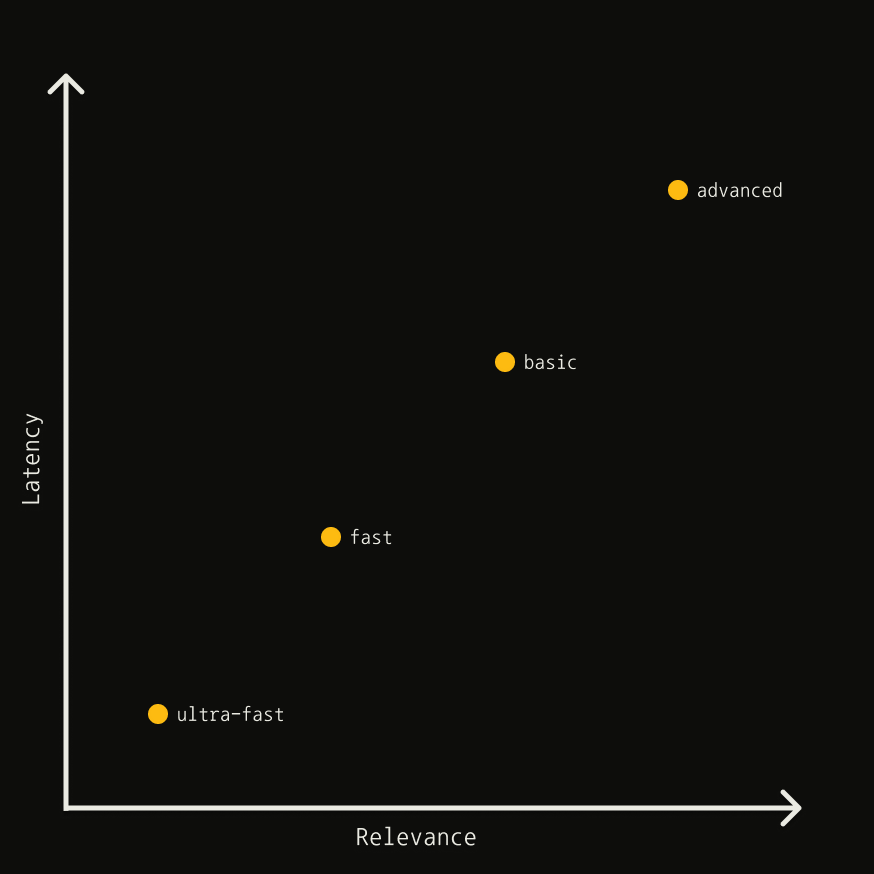
The `search_depth` parameter controls the tradeoff between latency and relevance:
*This chart is a heuristic and is not to scale.*
| Depth | Latency | Relevance | Content Type |
| ------------ | ------- | --------- | ------------ |
| `ultra-fast` | Lowest | Lower | Content |
| `fast` | Low | Good | Chunks |
| `basic` | Medium | High | Content |
| `advanced` | Higher | Highest | Chunks |
### Content types
| Type | Description |
| ----------- | --------------------------------------------------------- |
| **Content** | NLP-based summary of the page, providing general context |
| **Chunks** | Short snippets reranked by relevance to your search query |
Use **chunks** when you need highly targeted information aligned with your query. Use **content** when a general page summary is sufficient.
### Fast + Ultra-Fast
| Depth | When to use |
| ------------ | ----------------------------------------------------------------------------------------------------------------------------------------------------------------------- |
| `ultra-fast` | When latency is absolutely crucial. Delivers near-instant results, prioritizing speed over relevance. Ideal for real-time applications where response time is critical. |
| `fast` | When latency is more important than relevance, but you want results in reranked chunks format. Good for applications that need quick, targeted snippets. |
| `basic` | A solid balance between relevance and latency. Best for general-purpose searches where you need quality results without the overhead of advanced processing. |
| `advanced` | When you need the highest relevance and are willing to trade off latency. Best for queries seeking specific, detailed information. |
### Using `search_depth=advanced`
Best for queries seeking specific information:
```json theme={null}
{
"query": "How many countries use Monday.com?",
"search_depth": "advanced",
"chunks_per_source": 3,
"include_raw_content": true
}
```
## Filtering Results
### By date
| Parameter | Description |
| ------------------------- | ------------------------------------------------------- |
| `time_range` | Filter by relative time: `day`, `week`, `month`, `year` |
| `start_date` / `end_date` | Filter by specific date range (format: `YYYY-MM-DD`) |
```json theme={null}
{ "query": "latest ML trends", "time_range": "month" }
{ "query": "AI news", "start_date": "2025-01-01", "end_date": "2025-02-01" }
```
### By topic
Use `topic` to filter by content type. Set to `news` for news sources (includes `published_date` metadata):
```json theme={null}
{ "query": "What happened today in NY?", "topic": "news" }
```
### By domain
| Parameter | Description |
| ----------------- | ------------------------------------- |
| `include_domains` | Limit to specific domains |
| `exclude_domains` | Filter out specific domains |
| `country` | Boost results from a specific country |
```json theme={null}
// Restrict to LinkedIn profiles
{ "query": "CEO background at Google", "include_domains": ["linkedin.com/in"] }
// Exclude irrelevant domains
{ "query": "US economy trends", "exclude_domains": ["espn.com", "vogue.com"] }
// Boost results from a country
{ "query": "tech startup funding", "country": "united states" }
// Wildcard: limit to .com, exclude specific site
{ "query": "AI news", "include_domains": ["*.com"], "exclude_domains": ["example.com"] }
```
Keep domain lists short and relevant for best results.
## Response Content
### `max_results`
Limits results returned (default: `5`). Setting too high may return lower-quality results.
### `include_raw_content`
Returns full extracted page content. For comprehensive extraction, consider a two-step process:
1. Search to retrieve relevant URLs
2. Use [Extract API](/documentation/best-practices/best-practices-extract#2-two-step-process-search-then-extract) to get content
### `auto_parameters`
Tavily automatically configures parameters based on query intent. Your explicit values override automatic ones.
```json theme={null}
{
"query": "impact of AI in education policy",
"auto_parameters": true,
"search_depth": "basic" // Override to control cost
}
```
`auto_parameters` may set `search_depth` to `advanced` (2 credits). Set it
manually to control cost.
## Async & Performance
Use async calls for concurrent requests:
```python theme={null}
import asyncio
from tavily import AsyncTavilyClient
tavily_client = AsyncTavilyClient("tvly-YOUR_API_KEY")
async def fetch_and_gather():
queries = ["latest AI trends", "future of quantum computing"]
responses = await asyncio.gather(
*(tavily_client.search(q) for q in queries),
return_exceptions=True
)
for response in responses:
if isinstance(response, Exception):
print(f"Failed: {response}")
else:
print(response)
asyncio.run(fetch_and_gather())
```
## Post-Processing
### Using metadata
Leverage response metadata to refine results:
| Field | Use case |
| ------------- | ---------------------------------- |
| `score` | Filter/rank by relevance score |
| `title` | Keyword filtering on headlines |
| `content` | Quick relevance check |
| `raw_content` | Deep analysis and regex extraction |
### Score-based filtering
The `score` indicates relevance between query and content. Higher is better, but the ideal threshold depends on your use case.
```python theme={null}
# Filter results with score > 0.7
filtered = [r for r in results if r['score'] > 0.7]
```
### Regex extraction
Extract structured data from `raw_content`:
```python theme={null}
import re
# Extract location
text = "Company: Tavily, Location: New York"
match = re.search(r"Location: (\w+)", text)
location = match.group(1) if match else None # "New York"
# Extract all emails
text = "Contact: john@example.com, support@tavily.com"
emails = re.findall(r"[a-zA-Z0-9._%+-]+@[a-zA-Z0-9.-]+\.[a-zA-Z]{2,}", text)
```
---
# Source: https://docs.tavily.com/changelog.md
> ## Documentation Index
> Fetch the complete documentation index at: https://docs.tavily.com/llms.txt
> Use this file to discover all available pages before exploring further.
# Changelog
Track API usage by project with the new X-Project-ID header
You can now attach a Project ID to your API requests to organize and track usage by project. This is useful when a single API key is used across multiple projects or applications.
HTTP Header: Add X-Project-ID: your-project-id to any API request
Python SDK: Pass project\_id="your-project-id" when instantiating the client, or set the TAVILY\_PROJECT environment variable
JavaScript SDK: Pass projectId: "your-project-id" when instantiating the client, or set the TAVILY\_PROJECT environment variable
An API key can be associated with multiple projects
Filter requests by project in the /logs endpoint and platform usage dashboard to keep track of where requests originate from
You can now include credit usage information in the API response for the Search, Extract, Crawl, and Map endpoints.
Set the include\_usage parameter to true to receive credit usage information in the API response.
Type:boolean
Default:false
When enabled, the response includes a usage object with credits information, making it easy to track API credit consumption for each request.
Note: The value may be 0 if the total successful calls have not yet reached the minimum threshold. See our Credits & Pricing documentation for details.
You can now specify a custom timeout for the Crawl and Map endpoints to control how long to wait for the operation before timing out.
Type:float
Range: Between 10 and 150 seconds
Default: 150 seconds
This gives you fine-grained control over crawl and map operation timeouts, allowing you to balance between reliability and speed based on your specific use case.
Role options: Owner, Admin, Member
You can now assign roles to team members, giving you more control over access and permissions. Each team has one owner, while there can be multiple admins and multiple members.
The key distinction between roles is in their permissions for Billing and Settings:
You can now specify a custom timeout for the Extract endpoint to control how long to wait for URL extraction before timing out.
Type:number (float)
Range: Between 1.0 and 60.0 seconds
Default behavior: If not specified, automatic timeouts are applied based on extract\_depth: 10 seconds for basic extraction and 30 seconds for advanced extraction.
This gives you fine-grained control over extraction timeouts, allowing you to balance between reliability and speed based on your specific use case.
The usage dashboard provides the following features to paid users/teams:
The Usage Graph offers a breakdown of daily usage across all Tavily endpoints with historical data to enable month over month usage and spend comparison.
The Logs Table offers granular insight into each API request to ensure visibility and traceability with every Tavily interaction.
You can now include the favicon URL for each result in the Search, Extract, and Crawl endpoints.
Set the include\_favicon parameter to true to receive the favicon URL (if available) for each result in the API response.
This makes it easy to display website icons alongside your search, extraction, or crawl results, improving the visual context and user experience in your application.
When auto\_parameters is enabled, Tavily automatically configures search parameters based on your query's content and intent. You can still set other parameters manually, and your explicit values will override the automatic ones.
The parameters include\_answer, include\_raw\_content, and max\_results must always be set manually, as they directly affect response size.
Note:search\_depth may be automatically set to advanced when it's likely to improve results. This uses 2 API credits per request. To avoid the extra cost, you can explicitly set search\_depth to basic.
Easily check your API usage and plan limits. Just GET [https://api.tavily.com/usage](https://api.tavily.com/usage) with your API key to monitor your account in real time.
Integrate Tavily with n8n to enhance your workflows with real-time web search and content extraction—without writing code. With Tavily's powerful search and extraction capabilities, you can seamlessly integrate up-to-date online information into your n8n automations.
With Tavily's powerful search and content extraction capabilities, you can seamlessly integrate real-time online information into your Make workflows and automations.
The depth of the search. advanced search is tailored to retrieve the most relevant sources and content snippets for your query, while basic search provides generic content snippets from each source.
A basic search costs 1 API Credit, while an advanced search costs 2 API Credits.
Available options:basic, advanced
chunks\_per\_source
Chunks are short content snippets (maximum 500 characters each) pulled directly from the source.
Use chunks\_per\_source to define the maximum number of relevant chunks returned per source and to control the content length.
Chunks will appear in the content field as: \ \[...] \ \[...] \.
Tavily Crawl enables you to traverse a website like a graph, starting from a base URL and automatically discovering and extracting content from multiple linked pages. With Tavily Crawl, you can:
Specify the starting URL and let the crawler intelligently follow links to map out the site structure.
Control the depth and breadth of the crawl, allowing you to focus on specific sections or perform comprehensive site-wide analysis.
Apply filters and custom instructions to target only the most relevant pages or content types.
Aggregate extracted content for further analysis, reporting, or integration into your workflows.
Seamlessly integrate with your automation tools or use the API directly for flexible, programmatic access.
Tavily Crawl is ideal for use cases such as large-scale content aggregation, competitive research, knowledge base creation, and more.
For full details and API usage examples, see the Tavily Crawl API reference.
---
# Source: https://docs.tavily.com/examples/use-cases/chat.md
> ## Documentation Index
> Fetch the complete documentation index at: https://docs.tavily.com/llms.txt
> Use this file to discover all available pages before exploring further.
# Chat
> Build a conversational chat agent with real-time web search, crawl, and extract capabilities using Tavily's API
## Try Our Chatbot
### Step 1: Get Your API Key
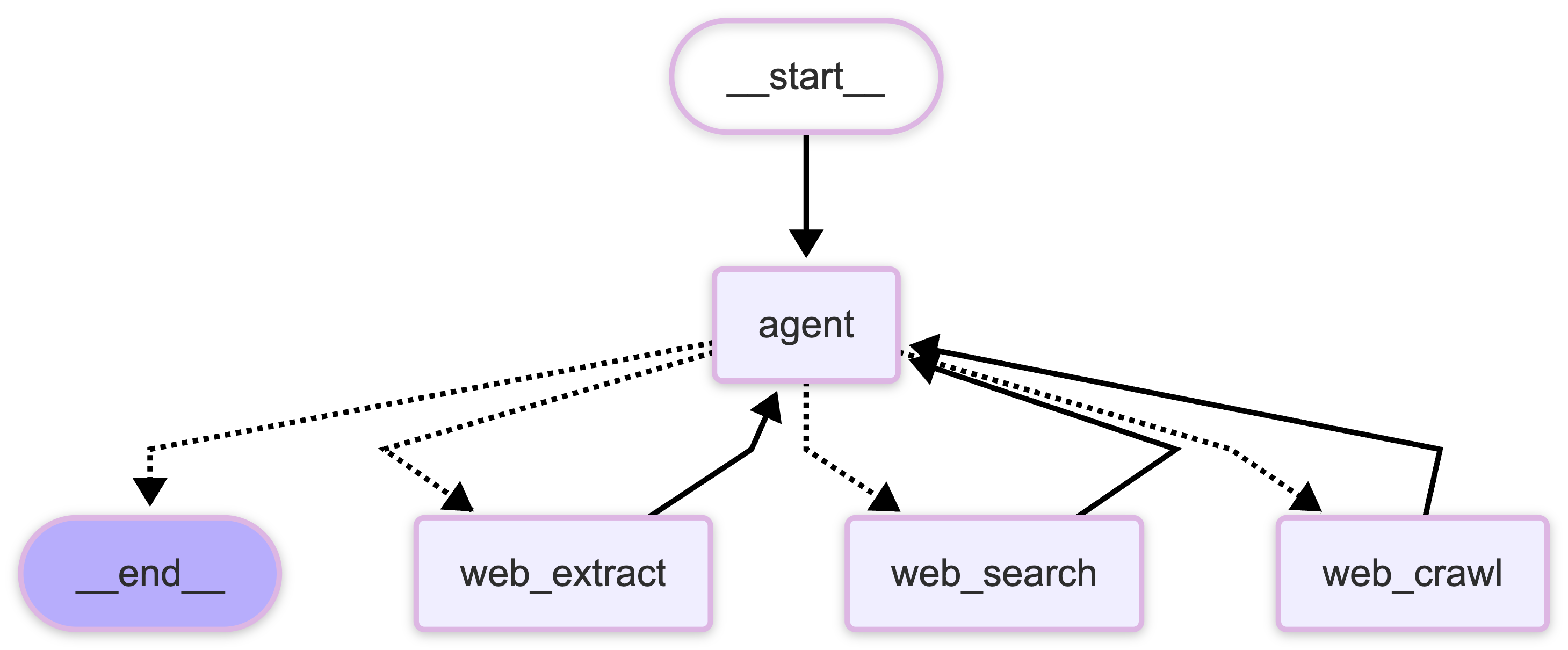
### Step 2: Chat with Tavily
### Step 3: Read The Open Source Code
## Features
1. **Fast Results**: Tavily's API delivers quick responses essential for real-time chat experiences.
2. **Intelligent Parameter Selection**: Dynamically select API parameters based on conversation context using LangChain integration. Specifically designed for agentic systems. All you need is a natural language input, no need to configure structured JSON for our API.
3. **Content Snippets**: Tavily provides compact summaries of search results in the `content` field, best for maintaining small context sizes in low latency, multi-turn applications.
4. **Source Attribution**: All search, extract, and crawl results include URLs, enabling easy implementation of citations for transparency and credibility in responses.
## How Does It Work?
The chatbot uses a simple ReAct architecture to manage conversation flow and decision-making. Here's how the core components work together:
The workflow consists of several key components:
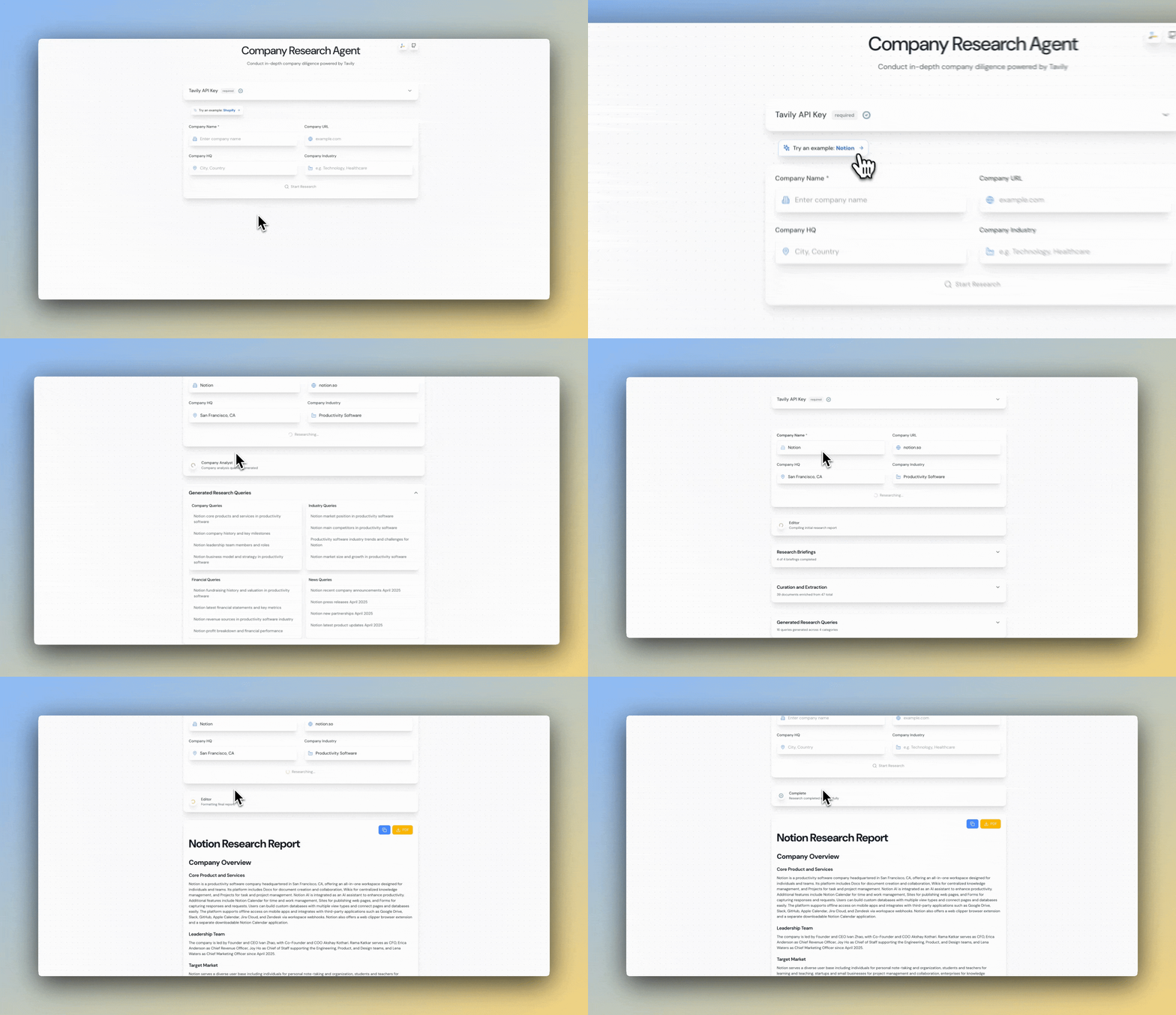
The chatbot uses LangGraph MemorySaver to manage conversation flow. The graph structure conrtols how messages are processed and routed.
This code snippet is not meant to run standalone. View the full implementation in our [github repository](https://github.com/tavily-ai/tavily-chat).
```python theme={null}
class WebAgent:
def __init__(
self,
):
self.llm = ChatOpenAI(
model="gpt-4.1-nano", api_key=os.getenv("OPENAI_API_KEY")
).with_config({"tags": ["streaming"]})
# Define the LangChain search tool
self.search = TavilySearch(
max_results=10, topic="general", api_key=os.getenv("TAVILY_API_KEY")
)
# Define the LangChain extract tool
self.extract = TavilyExtract(
extract_depth="advanced", api_key=os.getenv("TAVILY_API_KEY")
)
# Define the LangChain crawl tool
self.crawl = TavilyCrawl(api_key=os.getenv("TAVILY_API_KEY"))
self.prompt = PROMPT
self.checkpointer = MemorySaver()
def build_graph(self):
"""
Build and compile the LangGraph workflow.
"""
return create_react_agent(
prompt=self.prompt,
model=self.llm,
tools=[self.search, self.extract, self.crawl],
checkpointer=self.checkpointer,
)
```
The router decides whether to use base knowledge or perform a Tavily web search, extract, or crawl based on:
* Question complexity
* Need for current information
* Available conversation context
The chatbot maintains conversation history using a memory system that:
* Preserves context across multiple exchanges
* Stores relevant search results for future reference
* Manages system prompts and initialization
When Tavily access is needed, the chatbot:
* Performs targeted web search, extract, or crawl using the LangChain integration
* Includes source citations
Users receive real-time updates on:
* Search progress
* Response generation
* Source processing
---
# Source: https://docs.tavily.com/examples/use-cases/company-research.md
> ## Documentation Index
> Fetch the complete documentation index at: https://docs.tavily.com/llms.txt
> Use this file to discover all available pages before exploring further.
# Company Research
> Perform in-depth company research with Tavily Search and Extract.
## Try Our Company Researcher
### Step 1: Get Your API Key
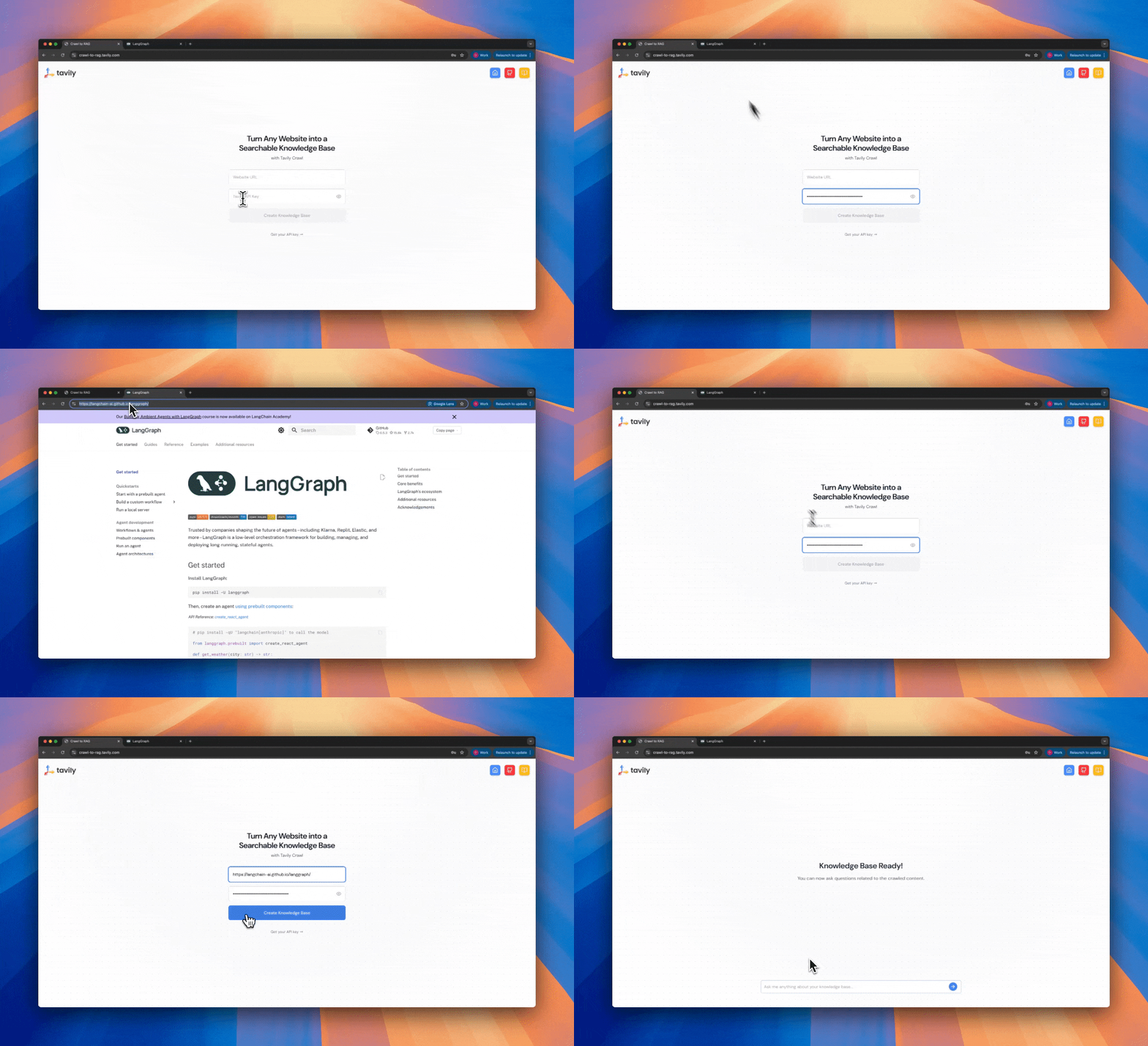
### Step 2: Try the Company Researcher
### Step 3: Read The Open Source Code
## Why Use Tavily for company research?
This is one of the most popular use cases for Tavily. Our powerful APIs can easily be integrated with agentic workflows to perform in-depth, accurate company research.
Tavily offers several advantages for conducting in-depth company research:
1. **Comprehensive Data Gathering**: Tavily's advanced search algorithms pull relevant information from a wide range of online sources, providing a robust foundation for in-depth company research.
2. **Flexible Agentic Search**: When Tavily is integrated into agentic workflows, such as those powered by frameworks like LangGraph, it allows AI agents to dynamically tailor their search strategies. The agents can decide to perform either a news or general search depending on the context, retrieve raw content for more in-depth analysis, or simply pull summaries when high-level insights are sufficient. This adaptability ensures that the research process is optimized according to the specific requirements of the task and the nature of the data available, bringing a new level of autonomy and intelligence to the research process.
3. **Real-time Data Retrieval**: Tavily ensures that the data used for research is up-to-date by querying live sources. This is crucial for company research where timely information can impact the accuracy and relevance of the analysis.
4. **Efficient and Scalable**: Tavily handles multiple queries simultaneously, making it capable of processing large datasets quickly. This efficiency reduces the time needed for comprehensive research, allowing for faster decision-making.
---
# Source: https://docs.tavily.com/documentation/integrations/composio.md
> ## Documentation Index
> Fetch the complete documentation index at: https://docs.tavily.com/llms.txt
> Use this file to discover all available pages before exploring further.
# Composio
> Tavily is now available for integration through Composio.
## Introduction
Integrate Tavily with Composio to enhance your AI workflows with powerful web search capabilities. Composio provides a platform to connect your AI agents to external tools like Tavily, making it easy to incorporate real-time web search and data extraction into your applications.
## Step-by-Step Integration Guide
### Step 1: Install Required Packages
Install the necessary Python packages:
```bash theme={null}
pip install composio composio-openai openai python-dotenv
```
### Step 2: Set Up API Keys
* **OpenAI API Key:** [Get your OpenAI API key here](https://platform.openai.com/account/api-keys)
* **Composio API Key:** [Get your Composio API key here](https://app.composio.dev/dashboard)
Set these as environment variables in your terminal or add them to your environment configuration file:
```bash theme={null}
export OPENAI_API_KEY=your_openai_api_key
export COMPOSIO_API_KEY=your_composio_api_key
```
### Step 3: Connect Tavily to Composio
```python theme={null}
from composio import Composio
from dotenv import load_dotenv
load_dotenv()
composio = Composio()
# Use composio managed auth
auth_config = composio.auth_configs.create(
toolkit="tavily",
options={
"type": "use_custom_auth",
"auth_scheme": "API_KEY",
"credentials": {}
}
)
print(auth_config)
auth_config_id = auth_config.id
user_id = "your-user-id"
connection_request = composio.connected_accounts.link(user_id, auth_config_id)
print(connection_request.redirect_url)
```
### Step 4: Example Use Case
```python theme={null}
from composio import Composio
from composio_openai import OpenAIProvider
from openai import OpenAI
import os
from dotenv import load_dotenv
load_dotenv()
# Initialize OpenAI client with API key
client = OpenAI()
# Initialize Composio toolset
composio = Composio(
api_key=os.getenv("COMPOSIO_API_KEY"),
provider=OpenAIProvider()
)
user_id = "your-user-id"
# Get the Tavily tool with all available parameters
tools = composio.tools.get(user_id,
toolkits=['TAVILY']
)
# Define the market research task with specific parameters
task = {
"query": "Analyze the competitive landscape of AI-powered customer service solutions in 2024",
"search_depth": "advanced",
"include_answer": True,
"max_results": 10,
# Focus on relevant industry sources
"include_domains": [
"techcrunch.com",
"venturebeat.com",
"forbes.com",
"gartner.com",
"marketsandmarkets.com"
],
}
# Send request to LLM
messages = [{"role": "user", "content": str(task)}]
response = client.chat.completions.create(
model="gpt-4.1",
messages=messages,
tools=tools,
tool_choice="auto"
)
# Handle tool call via Composio
execution_result = None
response_message = response.choices[0].message
if response_message.tool_calls:
execution_result = composio.provider.handle_tool_calls(user_id,response)
print("Execution Result:", execution_result)
messages.append(response_message)
# Add tool response messages
for tool_call, result in zip(response_message.tool_calls, execution_result):
messages.append({
"role": "tool",
"content": str(result["data"]),
"tool_call_id": tool_call.id
})
# Get final response from LLM
final_response = client.chat.completions.create(
model="gpt-4.1",
messages=messages
)
print("\nMarket Research Summary:")
print(final_response.choices[0].message.content)
else:
print("LLM responded directly (no tool used):", response_message.content)
```
## Additional Use Cases
1. **Research Automation**: Automate the collection and summarization of research data
2. **Content Curation**: Gather and organize information from multiple sources
3. **Real-time Data Integration**: Keeping your AI models up-to-date with the latest information.
---
# Source: https://docs.tavily.com/examples/quick-tutorials/cookbook.md
> ## Documentation Index
> Fetch the complete documentation index at: https://docs.tavily.com/llms.txt
> Use this file to discover all available pages before exploring further.
# Cookbook
> A collection of guided examples and code snippets for using Tavily.
## Fundamentals
Search, Extract, and Crawl the Web
Build a Web Research Agent
Combine Internal Data with Web Data
## Search
Track product updates from any company
## Research
Asynchronous polling for background research requests
Stream real-time progress and answers during research
Get results in custom schema formats
Refine user prompts through multi-turn clarification before research
Combine Tavily research with your internal data
## Crawl
Crawl websites and turn content into a searchable knowledge base
Intelligent web research agent that autonomously gathers and synthesizes
information
Collect data from websites and export the results as organized PDF files
---
# Source: https://docs.tavily.com/examples/use-cases/crawl-to-rag.md
> ## Documentation Index
> Fetch the complete documentation index at: https://docs.tavily.com/llms.txt
> Use this file to discover all available pages before exploring further.
# Crawl to RAG
> Turn Any Website into a Searchable Knowledge Base using Tavily and MongoDB.
## The system operates through a two-step process:
### 1. Website Crawling & Vectorization:
Use Tavily's crawling endpoint to extract and sitemap content from a webpage URL, then embed it into a MongoDB Atlas vector index for retrieval.
### 2. Intelligent Q\&A Interface:
Query your crawled data through a conversational agent that provides citation-backed answers while maintaining conversation history and context. The agent intelligently distinguishes between informational questions (requiring vector search) and conversational queries (using general knowledge).
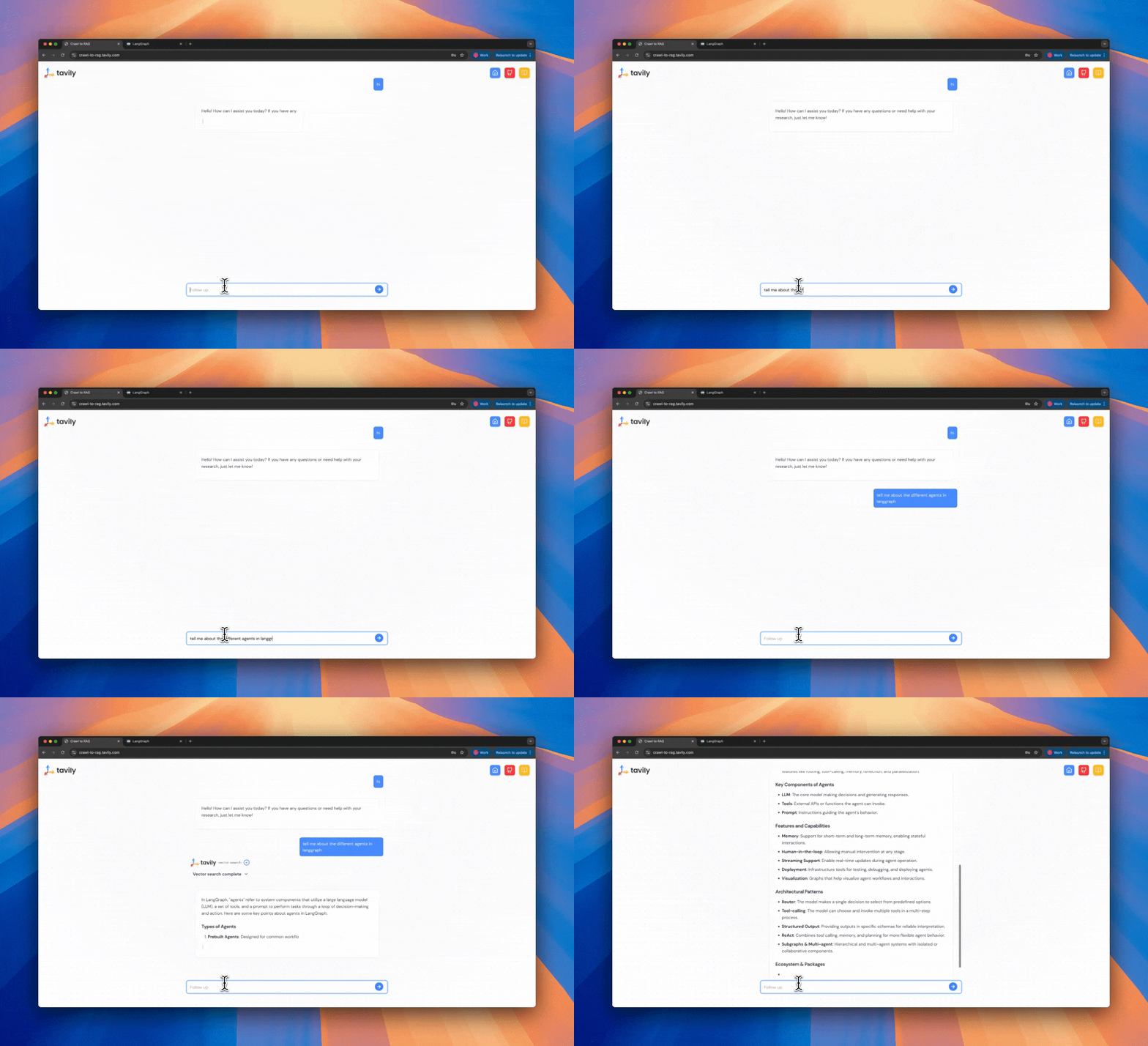
## Try Our Crawl to RAG Use Case
### Step 1: Get Your API Key
### Step 2: Chat with Tavily
### Step 3: Read The Open Source Code
## Features
1. **Advanced Web Crawling**: Deep website content extraction using Tavily's crawling API
2. **Vector Search**: MongoDB Atlas vector search with OpenAI embeddings for semantic content retrieval
3. **Smart Question Routing**: Automatic detection of informational vs. conversational queries
4. **Persistent Memory**: Conversation history and context preservation using LangGraph-MongoDB checkpointing
5. **Session Management**: Thread-based conversational persistance and vector store management
---
# Source: https://docs.tavily.com/documentation/api-reference/endpoint/crawl.md
> ## Documentation Index
> Fetch the complete documentation index at: https://docs.tavily.com/llms.txt
> Use this file to discover all available pages before exploring further.
# Tavily Crawl
> Tavily Crawl is a graph-based website traversal tool that can explore hundreds of paths in parallel with built-in extraction and intelligent discovery.
## OpenAPI
````yaml POST /crawl
openapi: 3.0.3
info:
title: Tavily Search and Extract API
description: >-
Our REST API provides seamless access to Tavily Search, a powerful search
engine for LLM agents, and Tavily Extract, an advanced web scraping solution
optimized for LLMs.
version: 1.0.0
servers:
- url: https://api.tavily.com/
security: []
tags:
- name: Search
- name: Extract
- name: Crawl
- name: Map
- name: Research
- name: Usage
paths:
/crawl:
post:
summary: Initiate a web crawl from a base URL
description: >-
Tavily Crawl is a graph-based website traversal tool that can explore
hundreds of paths in parallel with built-in extraction and intelligent
discovery.
requestBody:
description: Parameters for the Tavily Crawl request.
required: true
content:
application/json:
schema:
type: object
properties:
url:
type: string
description: The root URL to begin the crawl.
example: docs.tavily.com
instructions:
type: string
description: >-
Natural language instructions for the crawler. When
specified, the mapping cost increases to 2 API credits per
10 successful pages instead of 1 API credit per 10 pages.
example: Find all pages about the Python SDK
chunks_per_source:
type: integer
description: >-
Chunks are short content snippets (maximum 500 characters
each) pulled directly from the source. Use
`chunks_per_source` to define the maximum number of relevant
chunks returned per source and to control the `raw_content`
length. Chunks will appear in the `raw_content` field as:
` [...] [...] `. Available only
when `instructions` are provided. Must be between 1 and 5.
minimum: 1
maximum: 5
default: 3
max_depth:
type: integer
description: >-
Max depth of the crawl. Defines how far from the base URL
the crawler can explore.
default: 1
minimum: 1
maximum: 5
max_breadth:
type: integer
description: >-
Max number of links to follow per level of the tree (i.e.,
per page).
default: 20
minimum: 1
maximum: 500
limit:
type: integer
description: >-
Total number of links the crawler will process before
stopping.
default: 50
minimum: 1
select_paths:
type: array
description: >-
Regex patterns to select only URLs with specific path
patterns (e.g., `/docs/.*`, `/api/v1.*`).
items:
type: string
default: null
select_domains:
type: array
description: >-
Regex patterns to select crawling to specific domains or
subdomains (e.g., `^docs\.example\.com$`).
items:
type: string
default: null
exclude_paths:
type: array
description: >-
Regex patterns to exclude URLs with specific path patterns
(e.g., `/private/.*`, `/admin/.*`).
items:
type: string
default: null
exclude_domains:
type: array
description: >-
Regex patterns to exclude specific domains or subdomains
from crawling (e.g., `^private\.example\.com$`).
items:
type: string
default: null
allow_external:
type: boolean
description: >-
Whether to include external domain links in the final
results list.
default: true
include_images:
type: boolean
description: Whether to include images in the crawl results.
default: false
extract_depth:
type: string
description: >-
Advanced extraction retrieves more data, including tables
and embedded content, with higher success but may increase
latency. `basic` extraction costs 1 credit per 5 successful
extractions, while `advanced` extraction costs 2 credits per
5 successful extractions.
enum:
- basic
- advanced
default: basic
format:
type: string
description: >-
The format of the extracted web page content. `markdown`
returns content in markdown format. `text` returns plain
text and may increase latency.
enum:
- markdown
- text
default: markdown
include_favicon:
type: boolean
description: Whether to include the favicon URL for each result.
default: false
timeout:
type: number
format: float
description: >-
Maximum time in seconds to wait for the crawl operation
before timing out. Must be between 10 and 150 seconds.
minimum: 10
maximum: 150
default: 150
include_usage:
type: boolean
description: >-
Whether to include credit usage information in the response.
`NOTE:`The value may be 0 if the total use of /extract and
/map have not yet reached minimum requirements. See our
[Credits & Pricing
documentation](https://docs.tavily.com/documentation/api-credits)
for details.
default: false
required:
- url
responses:
'200':
description: Crawl results returned successfully
content:
application/json:
schema:
type: object
properties:
base_url:
type: string
description: The base URL that was crawled.
example: docs.tavily.com
results:
type: array
description: A list of extracted content from the crawled URLs.
items:
type: object
properties:
url:
type: string
description: The URL that was crawled.
example: https://docs.tavily.com
raw_content:
type: string
description: >-
The full content extracted from the page. When
`query` is provided, contains the top-ranked chunks
joined by `[...]` separator.
favicon:
type: string
description: The favicon URL for the result.
example: >-
https://mintlify.s3-us-west-1.amazonaws.com/tavilyai/_generated/favicon/apple-touch-icon.png?v=3
example:
- url: https://docs.tavily.com/welcome
raw_content: >-
Welcome - Tavily Docs
[Tavily Docs home page](https://tavily.com/)
Search or ask...
Ctrl K
- [Support](mailto:support@tavily.com)
- [Get an API key](https://app.tavily.com)
Search...
Navigation
[Home](/welcome)[Documentation](/documentation/about)[SDKs](/sdk/python/quick-start)[Examples](/examples/use-cases/data-enrichment)[FAQ](/faq/faq)
Explore our docs
Your journey to state-of-the-art web search starts
right here.
[## Quickstart
Start searching with Tavily in
minutes](documentation/quickstart)[## API Reference
Start using Tavily's powerful
APIs](documentation/api-reference/endpoint/search)[##
API Credits Overview
Learn how to get and manage your Tavily API
Credits](documentation/api-credits)[## Rate Limits
Learn about Tavily's API rate limits for both
development and production
environments](documentation/rate-limits)[## Python
Get started with our Python SDK,
`tavily-python`](sdk/python/quick-start)[## Playground
Explore Tavily's APIs with our interactive
playground](https://app.tavily.com/playground)
favicon: >-
https://mintlify.s3-us-west-1.amazonaws.com/tavilyai/_generated/favicon/apple-touch-icon.png?v=3
- url: https://docs.tavily.com/documentation/api-credits
raw_content: >-
Credits & Pricing - Tavily Docs
[Tavily Docs home page](https://tavily.com/)
Search or ask...
Ctrl K
- [Support](mailto:support@tavily.com)
- [Get an API key](https://app.tavily.com)
Search...
Navigation
Overview
Credits & Pricing
[Home](/welcome)[Documentation](/documentation/about)[SDKs](/sdk/python/quick-start)[Examples](/examples/use-cases/data-enrichment)[FAQ](/faq/faq)
- [API Playground](https://app.tavily.com/playground)
- [Community](https://community.tavily.com)
- [Blog](https://blog.tavily.com)
##### Overview
- [About](/documentation/about)
- [Quickstart](/documentation/quickstart)
- [Credits & Pricing](/documentation/api-credits)
- [Rate Limits](/documentation/rate-limits)
##### API Reference
-
[Introduction](/documentation/api-reference/introduction)
- [POST
Tavily Search](/documentation/api-reference/endpoint/search)
- [POST
Tavily Extract](/documentation/api-reference/endpoint/extract)
- [POST
Tavily Crawl](/documentation/api-reference/endpoint/crawl)
- [POST
Tavily Map](/documentation/api-reference/endpoint/map)
##### Best Practices
- [Best Practices for
Search](/documentation/best-practices/best-practices-search)
- [Best Practices for
Extract](/documentation/best-practices/best-practices-extract)
##### Tavily MCP Server
- [Tavily MCP Server](/documentation/mcp)
##### Integrations
- [LangChain](/documentation/integrations/langchain)
- [LlamaIndex](/documentation/integrations/llamaindex)
- [Zapier](/documentation/integrations/zapier)
- [Dify](/documentation/integrations/dify)
- [Composio](/documentation/integrations/composio)
- [Make](/documentation/integrations/make)
- [Agno](/documentation/integrations/agno)
- [Pydantic
AI](/documentation/integrations/pydantic-ai)
- [FlowiseAI](/documentation/integrations/flowise)
##### Legal
- [Security & Compliance](https://trust.tavily.com)
- [Privacy Policy](https://tavily.com/privacy)
##### Help
- [Help Center](https://help.tavily.com)
##### Tavily Search Crawler
- [Tavily Search
Crawler](/documentation/search-crawler)
Overview
# Credits & Pricing
Learn how to get and manage your Tavily API Credits.
## [](#free-api-credits) Free API Credits
[## Get your free API key
You get 1,000 free API Credits every month.
**No credit card required.**](https://app.tavily.com)
## [](#pricing-overview) Pricing Overview
Tavily operates on a simple, credit-based model:
- **Free**: 1,000 credits/month
- **Pay-as-you-go**: $0.008 per credit (allows you to
be charged per credit once your plan's credit limit is
reached).
- **Monthly plans**: $0.0075 - $0.005 per credit
- **Enterprise**: Custom pricing and volume
| **Plan** | **Credits per month** | **Monthly price**
| **Price per credit** |
| --- | --- | --- | --- |
| **Researcher** | 1,000 | Free | - |
| **Project** | 4,000 | $30 | $0.0075 |
| **Bootstrap** | 15,000 | $100 | $0.0067 |
| **Startup** | 38,000 | $220 | $0.0058 |
| **Growth** | 100,000 | $500 | $0.005 |
| **Pay as you go** | Per usage | $0.008 / Credit |
$0.008 |
| **Enterprise** | Custom | Custom | Custom |
Head to [my plan](https://app.tavily.com/account/plan)
to explore our different options and manage your plan.
## [](#api-credits-costs) API Credits Costs
### [](#tavily-search) Tavily Search
Your [search
depth](/api-reference/endpoint/search#body-search-depth)
determines the cost of your request.
- **Basic Search (`basic`):**
Each request costs **1 API credit**.
- **Advanced Search (`advanced`):**
Each request costs **2 API credits**.
### [](#tavily-extract) Tavily Extract
The number of successful URL extractions and your
[extraction
depth](/api-reference/endpoint/extract#body-extract-depth)
determines the cost of your request. You never get
charged if a URL extraction fails.
- **Basic Extract (`basic`):**
Every 5 successful URL extractions cost **1 API credit**
- **Advanced Extract (`advanced`):**
Every 5 successful URL extractions cost **2 API credits**
[Quickstart](/documentation/quickstart)[Rate
Limits](/documentation/rate-limits)
[x](https://x.com/tavilyai)[github](https://github.com/tavily-ai)[linkedin](https://linkedin.com/company/tavily)[website](https://tavily.com)
[Powered by
Mintlify](https://mintlify.com/preview-request?utm_campaign=poweredBy&utm_medium=docs&utm_source=docs.tavily.com)
On this page
- [Free API Credits](#free-api-credits)
- [Pricing Overview](#pricing-overview)
- [API Credits Costs](#api-credits-costs)
- [Tavily Search](#tavily-search)
- [Tavily Extract](#tavily-extract)
favicon: >-
https://mintlify.s3-us-west-1.amazonaws.com/tavilyai/_generated/favicon/apple-touch-icon.png?v=3
- url: https://docs.tavily.com/documentation/about
raw_content: >-
Who are we?
-----------
We're a team of AI researchers and developers
passionate about helping you build the next generation
of AI assistants. Our mission is to empower
individuals and organizations with accurate, unbiased,
and factual information.
What is the Tavily Search Engine?
---------------------------------
Building an AI agent that leverages realtime online
information is not a simple task. Scraping doesn't
scale and requires expertise to refine, current search
engine APIs don't provide explicit information to
queries but simply potential related articles (which
are not always related), and are not very customziable
for AI agent needs. This is why we're excited to
introduce the first search engine for AI agents -
[Tavily](https://app.tavily.com/).
Tavily is a search engine optimized for LLMs, aimed at
efficient, quick and persistent search results. Unlike
other search APIs such as Serp or Google, Tavily
focuses on optimizing search for AI developers and
autonomous AI agents. We take care of all the burden
of searching, scraping, filtering and extracting the
most relevant information from online sources. All in
a single API call!
To try the API in action, you can now use our hosted
version on our [API
Playground](https://app.tavily.com/playground).
Why choose Tavily?
------------------
Tavily shines where others fail, with a Search API
optimized for LLMs.
How does the Search API work?
-----------------------------
Traditional search APIs such as Google, Serp and Bing
retrieve search results based on a user query.
However, the results are sometimes irrelevant to the
goal of the search, and return simple URLs and
snippets of content which are not always relevant.
Because of this, any developer would need to then
scrape the sites to extract relevant content, filter
irrelevant information, optimize the content to fit
LLM context limits, and more. This task is a burden
and requires a lot of time and effort to complete. The
Tavily Search API takes care of all of this for you in
a single API call.
The Tavily Search API aggregates up to 20 sites per a
single API call, and uses proprietary AI to score,
filter and rank the top most relevant sources and
content to your task, query or goal. In addition,
Tavily allows developers to add custom fields such as
context and limit response tokens to enable the
optimal search experience for LLMs.
Tavily can also help your AI agent make better
decisions by including a short answer for cross-agent
communication.
Getting started
---------------
[Sign up](https://app.tavily.com/) for Tavily to get
your API key. You get **1,000 free API Credits every
month**. No credit card required.
[Get your free API key --------------------- You get
1,000 free API Credits every month. **No credit card
required.**](https://app.tavily.com/)Head to our [API
Playground](https://app.tavily.com/playground) to
familiarize yourself with our API.
To get started with Tavily's APIs and SDKs using code,
head to our [Quickstart
Guide](https://docs.tavily.com/guides/quickstart) and
follow the steps.
favicon: >-
https://mintlify.s3-us-west-1.amazonaws.com/tavilyai/_generated/favicon/apple-touch-icon.png?v=3
response_time:
type: number
format: float
description: Time in seconds it took to complete the request.
example: 1.23
usage:
type: object
description: Credit usage details for the request.
example:
credits: 1
request_id:
type: string
description: >-
A unique request identifier you can share with customer
support to help resolve issues with specific requests.
example: 123e4567-e89b-12d3-a456-426614174111
'400':
description: Bad Request - Your request is invalid.
content:
application/json:
schema:
type: object
properties:
detail:
type: object
properties:
error:
type: string
example:
detail:
error: '[400] No starting url provided'
'401':
description: Unauthorized - Your API key is wrong or missing.
content:
application/json:
schema:
type: object
properties:
detail:
type: object
properties:
error:
type: string
example:
detail:
error: 'Unauthorized: missing or invalid API key.'
'403':
description: Forbidden - URL is not supported.
content:
application/json:
schema:
type: object
properties:
detail:
type: object
properties:
error:
type: string
example:
detail:
error: '[403] URL is not supported'
'429':
description: Too many requests - Rate limit exceeded
content:
application/json:
schema:
type: object
properties:
detail:
type: object
properties:
error:
type: string
example:
detail:
error: >-
Your request has been blocked due to excessive requests.
Please reduce rate of requests.
'432':
description: Key limit or Plan Limit exceeded
content:
application/json:
schema:
type: object
properties:
detail:
type: object
properties:
error:
type: string
example:
detail:
error: >-
This request exceeds your plan's set usage limit. Please
upgrade your plan or contact support@tavily.com
'433':
description: PayGo limit exceeded
content:
application/json:
schema:
type: object
properties:
detail:
type: object
properties:
error:
type: string
example:
detail:
error: >-
This request exceeds the pay-as-you-go limit. You can
increase your limit on the Tavily dashboard.
'500':
description: Internal Server Error - We had a problem with our server.
content:
application/json:
schema:
type: object
properties:
detail:
type: object
properties:
error:
type: string
example:
detail:
error: '[500] Internal server error'
security:
- bearerAuth: []
components:
securitySchemes:
bearerAuth:
type: http
scheme: bearer
bearerFormat: JWT
description: >-
Bearer authentication header in the form Bearer , where
is your Tavily API key (e.g., Bearer tvly-YOUR_API_KEY).
````
---
# Source: https://docs.tavily.com/documentation/integrations/crewai.md
> ## Documentation Index
> Fetch the complete documentation index at: https://docs.tavily.com/llms.txt
> Use this file to discover all available pages before exploring further.
# CrewAI
> Integrate Tavily with CrewAI to build powerful AI agents that can search the web.
## Introduction
This guide shows you how to integrate Tavily with CrewAI to create sophisticated AI agents that can search the web and extract content. By combining CrewAI's multi-agent framework with Tavily's real-time web search capabilities, you can build AI systems that research, analyze, and process web information autonomously.
## Prerequisites
Before you begin, make sure you have:
* An OpenAI API key from [OpenAI Platform](https://platform.openai.com/)
* A Tavily API key from [Tavily Dashboard](https://app.tavily.com/sign-in)
## Installation
Install the required packages:
> **Note:** The stable python versions to use with CrewAI are `Python >=3.10 and Python <3.13` .
```bash theme={null}
pip install 'crewai[tools]'
pip install pydantic
```
## Setup
Set up your API keys:
```python theme={null}
import os
# Set your API keys
os.environ["OPENAI_API_KEY"] = "your-openai-api-key"
os.environ["TAVILY_API_KEY"] = "your-tavily-api-key"
```
## Using Tavily Search with CrewAI
CrewAI provides built-in Tavily tools that make it easy to integrate web search capabilities into your AI agents. The `TavilySearchTool` allows your agents to search the web for real-time information.
```python theme={null}
import os
from crewai import Agent, Task, Crew
from crewai_tools import TavilySearchTool
```
```python theme={null}
# Initialize the Tavily search tool
tavily_tool = TavilySearchTool()
```
```python theme={null}
# Create an agent that uses the tool
researcher = Agent(
role='News Researcher',
goal='Find trending information about AI agents',
backstory='An expert News researcher specializing in technology, focused on AI.',
tools=[tavily_tool],
verbose=True
)
```
```python theme={null}
# Create a task for the agent
research_task = Task(
description='Search for the top 3 Agentic AI trends in 2025.',
expected_output='A JSON report summarizing the top 3 AI trends found.',
agent=researcher
)
```
```python theme={null}
# Form the crew and execute the task
crew = Crew(
agents=[researcher],
tasks=[research_task],
verbose=True
)
result = crew.kickoff()
print(result)
```
### Customizing search tool parameters
**Example:**
```python theme={null}
from crewai_tools import TavilySearchTool
# You can configure the tool with specific parameters
tavily_search_tool = TavilySearchTool(
search_depth="advanced",
max_results=10,
include_answer=True
)
```
You can customize the search tool by passing parameters to configure its behavior.Below are available parameters in crewai integration:
**Available Parameters:**
* `query` (str): Required. The search query string.
* `search_depth` (Literal\["basic", "advanced"], optional): The depth of the search. Defaults to "basic".
* `topic` (Literal\["general", "news", "finance"], optional): The topic to focus the search on. Defaults to "general".
* `time_range` (Literal\["day", "week", "month", "year"], optional): The time range for the search. Defaults to None.
* `max_results` (int, optional): The maximum number of search results to return. Defaults to 5.
* `include_domains` (Sequence\[str], optional): A list of domains to prioritize in the search. Defaults to None.
* `exclude_domains` (Sequence\[str], optional): A list of domains to exclude from the search. Defaults to None.
* `include_answer` (Union\[bool, Literal\["basic", "advanced"]], optional): Whether to include a direct answer synthesized from the search results. Defaults to False.
* `include_raw_content` (bool, optional): Whether to include the raw HTML content of the searched pages. Defaults to False.
* `include_images` (bool, optional): Whether to include image results. Defaults to False.
* `timeout` (int, optional): The request timeout in seconds. Defaults to 60.
> **Explore More Parameters**: For a complete list of available parameters and their descriptions, visit our [API documentation](/documentation/api-reference/endpoint/search) to discover all the customization options available for search operations.
```python theme={null}
import os
from crewai import Agent, Task, Crew
from crewai_tools import TavilySearchTool
# Set up environment variables
os.environ["OPENAI_API_KEY"] = "your-openai-api-key"
os.environ["TAVILY_API_KEY"] = "your-tavily-api-key"
# Initialize the tool
tavily_tool = TavilySearchTool()
# Create an agent that uses the tool
researcher = Agent(
role='News Researcher',
goal='Find trending information about AI agents',
backstory='An expert News researcher specializing in technology, focused on AI.',
tools=[tavily_tool],
verbose=True
)
# Create a task for the agent
research_task = Task(
description='Search for the top 3 Agentic AI trends in 2025.',
expected_output='A JSON report summarizing the top 3 AI trends found.',
agent=researcher
)
# Form the crew and kick it off
crew = Crew(
agents=[researcher],
tasks=[research_task],
verbose=True
)
result = crew.kickoff()
print(result)
```
## Using Tavily Extract with CrewAI
The `TavilyExtractorTool` allows your CrewAI agents to extract and process content from specific web pages. This is particularly useful for content analysis, data collection, and research tasks.
```python theme={null}
import os
from crewai import Agent, Task, Crew
from crewai_tools import TavilyExtractorTool
```
```python theme={null}
# Initialize the Tavily extractor tool
tavily_tool = TavilyExtractorTool()
```
```python theme={null}
# Create an agent that uses the tool
extractor_agent = Agent(
role='Web Page Content Extractor',
goal='Extract key information from the given web pages',
backstory='You are an expert at extracting relevant content from websites using the Tavily Extract.',
tools=[tavily_tool],
verbose=True
)
```
```python theme={null}
# Define a task for the agent
extract_task = Task(
description='Extract the main content from the URL https://en.wikipedia.org/wiki/Lionel_Messi .',
expected_output='A JSON string containing the extracted content from the URL.',
agent=extractor_agent
)
```
```python theme={null}
# Create and run the crew
crew = Crew(
agents=[extractor_agent],
tasks=[extract_task],
verbose=False
)
result = crew.kickoff()
print(result)
```
### Customizing extract tool parameters
**Example:**
```python theme={null}
from crewai_tools import TavilyExtractorTool
# You can configure the tool with specific parameters
tavily_extract_tool = TavilyExtractorTool(
extract_depth="advanced",
include_images=True,
timeout=45
)
```
You can customize the extract tool by passing parameters to configure its behavior. Below are available parameters in crewai integration:
**Available Parameters:**
* `urls` (Union\[List\[str], str]): Required. A single URL string or a list of URL strings to extract data from.
* `include_images` (Optional\[bool]): Whether to include images in the extraction results. Defaults to False.
* `extract_depth` (Literal\["basic", "advanced"]): The depth of extraction. Use "basic" for faster, surface-level extraction or "advanced" for more comprehensive extraction. Defaults to "basic".
* `timeout` (int): The maximum time in seconds to wait for the extraction request to complete. Defaults to 60.
> **Explore More Parameters**: For a complete list of available parameters and their descriptions, visit our [API documentation](/documentation/api-reference/endpoint/extract) to discover all the customization options available for extract operations.
```python theme={null}
import os
from crewai import Agent, Task, Crew
from crewai_tools import TavilyExtractorTool
# Set up environment variables
os.environ["OPENAI_API_KEY"] = "your-openai-api-key"
os.environ["TAVILY_API_KEY"] = "your-tavily-api-key"
# Initialize the Tavily extractor tool
tavily_tool = TavilyExtractorTool()
# Create an agent that uses the tool
extractor_agent = Agent(
role='Web Page Content Extractor',
goal='Extract key information from the given web pages',
backstory='You are an expert at extracting relevant content from websites using the Tavily Extract.',
tools=[tavily_tool],
verbose=True
)
# Define a task for the agent
extract_task = Task(
description='Extract the main content from the URL https://en.wikipedia.org/wiki/Lionel_Messi .',
expected_output='A JSON string containing the extracted content from the URL.',
agent=extractor_agent
)
# Create and execute the crew
crew = Crew(
agents=[extractor_agent],
tasks=[extract_task],
verbose=True
)
# Run the extraction
result = crew.kickoff()
print("Extraction Results:")
print(result)
```
For more information about Tavily's capabilities, check out our [API documentation](/documentation/api-reference/introduction) and [best practices](/documentation/best-practices/best-practices-search).
---
# Source: https://docs.tavily.com/examples/use-cases/data-enrichment.md
> ## Documentation Index
> Fetch the complete documentation index at: https://docs.tavily.com/llms.txt
> Use this file to discover all available pages before exploring further.
# Data Enrichment
> Enhance datasets with Tavily's APIs.
#### Fill in spreadsheet columns
#### Enrich your spreadsheet
#### Export as CSV
## Try Our Data Enrichment Agent
### Step 1: Get Your API Key
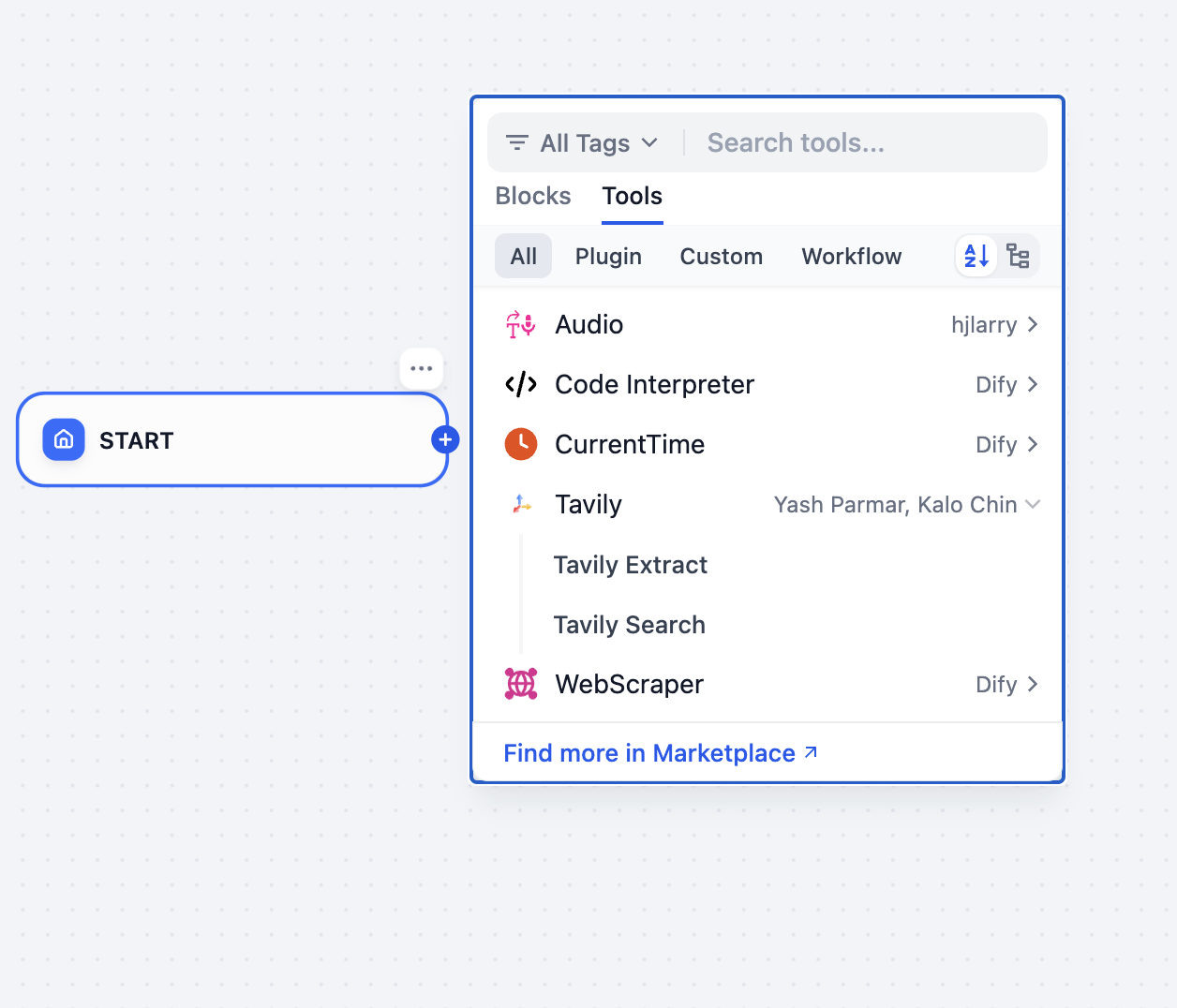
### Step 2: Try the Data Enrichment Agent
### Step 3: Read The Open Source Code
---
# Source: https://docs.tavily.com/documentation/integrations/dify.md
> ## Documentation Index
> Fetch the complete documentation index at: https://docs.tavily.com/llms.txt
> Use this file to discover all available pages before exploring further.
# Dify
> Tavily is now available for no-code integration through Dify.
## Introduction
Integrate Tavily with Dify to enhance your AI workflows without writing any code. Dify is a no-code platform that allows you to build and deploy AI applications using various tools, including the **Tavily Search API** and **Tavily Extract API**. This integration enables access to real-time web data, improving the capabilities of your AI applications.
## How to set up Tavily with Dify
Follow these steps to integrate Tavily with Dify:
Go to [Dify](https://dify.ai/) and log in to your account.
Go to the [Tavily Dashboard](https://app.tavily.com/home) to obtain your **API key**.
Install the **Tavily tool** from the [Plugin Marketplace](https://marketplace.dify.ai/plugins/langgenius/tavily) to enable integration with your Dify workflows.
In **Dify**, navigate to **Tools > Tavily > To Authorize** and enter your **Tavily API key** to connect your Dify instance to Tavily.
## Using the Tavily tool in Dify
Tavily can be utilized in various Dify application types:
### Chatflow / Workflow Applications
Dify’s Chatflow and Workflow applications support Tavily tool nodes, which include:
* **Tavily Search API** – Perform dynamic web searches and retrieve up-to-date information.
* **Tavily Extract API** – Extract raw content from web pages.
These nodes allow you to automate tasks such as research, content curation, and real-time data integration into your workflows.
### Agent Applications
In Agent applications, you can integrate the Tavily tool to access web data in real time. Use this to:
* Retrieve structured and relevant search results.
* Extract raw content for further processing.
* Provide accurate, context-aware answers to user queries.
## Example use case: automated deep research
Use **Tavily Search API** within **Dify** to conduct automated, multi-step searches, iterating through multiple queries to gather, refine, and summarize insights for comprehensive reports.
For a detailed walkthrough, check out this blog post:
[DeepResearch: Building a Research Automation App with Dify](https://dify.ai/blog/deepresearch-building-a-research-automation-app-with-dify)
## Best practices for using Tavily in Dify
* **Design Concise Queries** – Use focused queries to maximize the relevance of search results.
* **Utilize Domain Filtering** – Use the `include_domains` parameter to narrow search results to specific domains.
* **Enable an Agentic Workflow** – Leverage an LLM to dynamically generate and refine queries for Tavily.
***
---
# Source: https://docs.tavily.com/documentation/api-reference/endpoint/extract.md
> ## Documentation Index
> Fetch the complete documentation index at: https://docs.tavily.com/llms.txt
> Use this file to discover all available pages before exploring further.
# Tavily Extract
> Extract web page content from one or more specified URLs using Tavily Extract.
## OpenAPI
````yaml POST /extract
openapi: 3.0.3
info:
title: Tavily Search and Extract API
description: >-
Our REST API provides seamless access to Tavily Search, a powerful search
engine for LLM agents, and Tavily Extract, an advanced web scraping solution
optimized for LLMs.
version: 1.0.0
servers:
- url: https://api.tavily.com/
security: []
tags:
- name: Search
- name: Extract
- name: Crawl
- name: Map
- name: Research
- name: Usage
paths:
/extract:
post:
summary: Retrieve raw web content from specified URLs
description: >-
Extract web page content from one or more specified URLs using Tavily
Extract.
requestBody:
description: Parameters for the Tavily Extract request.
required: true
content:
application/json:
schema:
type: object
properties:
urls:
oneOf:
- type: string
description: The URL to extract content from.
example: https://en.wikipedia.org/wiki/Artificial_intelligence
- type: array
items:
type: string
description: A list of URLs to extract content from.
example:
- https://en.wikipedia.org/wiki/Artificial_intelligence
- https://en.wikipedia.org/wiki/Machine_learning
- https://en.wikipedia.org/wiki/Data_science
query:
type: string
description: >-
User intent for reranking extracted content chunks. When
provided, chunks are reranked based on relevance to this
query.
chunks_per_source:
type: integer
description: >-
Chunks are short content snippets (maximum 500 characters
each) pulled directly from the source. Use
`chunks_per_source` to define the maximum number of relevant
chunks returned per source and to control the `raw_content`
length. Chunks will appear in the `raw_content` field as:
` [...] [...] `. Available only
when `query` is provided. Must be between 1 and 5.
minimum: 1
maximum: 5
default: 3
extract_depth:
type: string
description: >-
The depth of the extraction process. `advanced` extraction
retrieves more data, including tables and embedded content,
with higher success but may increase latency.`basic`
extraction costs 1 credit per 5 successful URL extractions,
while `advanced` extraction costs 2 credits per 5 successful
URL extractions.
enum:
- basic
- advanced
default: basic
include_images:
type: boolean
description: >-
Include a list of images extracted from the URLs in the
response. Default is false.
default: false
include_favicon:
type: boolean
description: Whether to include the favicon URL for each result.
default: false
format:
type: string
description: >-
The format of the extracted web page content. `markdown`
returns content in markdown format. `text` returns plain
text and may increase latency.
enum:
- markdown
- text
default: markdown
timeout:
type: number
format: float
description: >-
Maximum time in seconds to wait for the URL extraction
before timing out. Must be between 1.0 and 60.0 seconds. If
not specified, default timeouts are applied based on
extract_depth: 10 seconds for basic extraction and 30
seconds for advanced extraction.
minimum: 1
maximum: 60
default: None
include_usage:
type: boolean
description: >-
Whether to include credit usage information in the response.
`NOTE:`The value may be 0 if the total successful URL
extractions has not yet reached 5 calls. See our [Credits &
Pricing
documentation](https://docs.tavily.com/documentation/api-credits)
for details.
default: false
required:
- urls
responses:
'200':
description: Extraction results returned successfully
content:
application/json:
schema:
type: object
properties:
results:
type: array
description: A list of extracted content from the provided URLs.
items:
type: object
properties:
url:
type: string
description: The URL from which the content was extracted.
example: >-
https://en.wikipedia.org/wiki/Artificial_intelligence
raw_content:
type: string
description: >-
The full content extracted from the page. When
`query` is provided, contains the top-ranked chunks
joined by `[...]` separator.
example: >-
"Jump to content\nMain
menu\nSearch\nAppearance\nDonate\nCreate
account\nLog in\nPersonal tools\n Photograph
your local culture, help Wikipedia and win!\nToggle
the table of contents\nArtificial intelligence\n161
languages\nArticle\nTalk\nRead\nView source\nView
history\nTools\nFrom Wikipedia, the free
encyclopedia\n\"AI\" redirects here. For other uses,
see AI (disambiguation) and Artificial intelligence
(disambiguation).\nPart of a series on\nArtificial
intelligence (AI)\nshow\nMajor
goals\nshow\nApproaches\nshow\nApplications\nshow\nPhilosophy\nshow\nHistory\nshow\nGlossary\nvte\nArtificial
intelligence (AI), in its broadest sense, is
intelligence exhibited by machines, particularly
computer systems. It is a field of research in
computer science that develops and studies methods
and software that enable machines to perceive their
environment and use learning and intelligence to
take actions that maximize their chances of
achieving defined goals.[1] Such machines may be
called AIs.\nHigh-profile applications of AI include
advanced web search engines (e.g., Google Search);
recommendation systems (used by YouTube, Amazon, and
Netflix); virtual assistants (e.g., Google
Assistant, Siri, and Alexa); autonomous vehicles
(e.g., Waymo); generative and creative tools (e.g.,
ChatGPT and AI art); and superhuman play and
analysis in strategy games (e.g., chess and
Go)...................
images:
type: array
example: []
description: >-
This is only available if `include_images` is set to
`true`. A list of image URLs extracted from the
page.
items:
type: string
favicon:
type: string
description: The favicon URL for the result.
example: >-
https://en.wikipedia.org/static/favicon/wikipedia.ico
failed_results:
type: array
example: []
description: A list of URLs that could not be processed.
items:
type: object
properties:
url:
type: string
description: The URL that failed to be processed.
error:
type: string
description: >-
An error message describing why the URL couldn't be
processed.
response_time:
type: number
format: float
description: Time in seconds it took to complete the request.
example: 0.02
usage:
type: object
description: Credit usage details for the request.
example:
credits: 1
request_id:
type: string
description: >-
A unique request identifier you can share with customer
support to help resolve issues with specific requests.
example: 123e4567-e89b-12d3-a456-426614174111
'400':
description: Bad Request
content:
application/json:
schema:
type: object
properties:
detail:
type: object
properties:
error:
type: string
example:
detail:
error: <400 Bad Request, (e.g Max 20 URLs are allowed.)>
'401':
description: Unauthorized - Your API key is wrong or missing.
content:
application/json:
schema:
type: object
properties:
detail:
type: object
properties:
error:
type: string
example:
detail:
error: 'Unauthorized: missing or invalid API key.'
'429':
description: Too many requests - Rate limit exceeded
content:
application/json:
schema:
type: object
properties:
detail:
type: object
properties:
error:
type: string
example:
detail:
error: >-
Your request has been blocked due to excessive requests.
Please reduce rate of requests.
'432':
description: Key limit or Plan Limit exceeded
content:
application/json:
schema:
type: object
properties:
detail:
type: object
properties:
error:
type: string
example:
detail:
error: >-
<432 Custom Forbidden Error (e.g This request exceeds your
plan's set usage limit. Please upgrade your plan or contact
support@tavily.com)>
'433':
description: PayGo limit exceeded
content:
application/json:
schema:
type: object
properties:
detail:
type: object
properties:
error:
type: string
example:
detail:
error: >-
This request exceeds the pay-as-you-go limit. You can
increase your limit on the Tavily dashboard.
'500':
description: Internal Server Error - We had a problem with our server.
content:
application/json:
schema:
type: object
properties:
detail:
type: object
properties:
error:
type: string
example:
detail:
error: Internal Server Error
security:
- bearerAuth: []
components:
securitySchemes:
bearerAuth:
type: http
scheme: bearer
bearerFormat: JWT
description: >-
Bearer authentication header in the form Bearer , where
is your Tavily API key (e.g., Bearer tvly-YOUR_API_KEY).
````
---
# Source: https://docs.tavily.com/faq/faq.md
> ## Documentation Index
> Fetch the complete documentation index at: https://docs.tavily.com/llms.txt
> Use this file to discover all available pages before exploring further.
# Frequently Asked Questions
Tavily allows your AI agent to access the web, securely, and at scale. Supercharge your AI agent with real-time search, scraping, and structured data retrieval in a single API call. Tavily simplifies the process of integrating dynamic web information into AI-driven solutions.
Tavily offers three different endpoints:
* **Tavily Search API** - A search engine designed for AI agents, combining search and scraping capabilities.
* **Tavily Extract API** - Scrape up to 20 URLs in a single API call.
* **Tavily Crawl API** - Map and crawl domains efficiently.
Tavily Search API is a specialized search engine designed for LLMs and AI agents. It provides real-time, customizable, and RAG-ready search results and extracted content, enabling AI applications to retrieve and process data efficiently.
**Traditional Search APIs:** Unlike Bing, Google, or SerpAPI, Tavily dynamically searches the web, reviews multiple sources, and extracts the most relevant content, delivering concise, ready-to-use information optimized for AI applications.
**AI Answer Engine APIs:** Unlike Perplexity Sonar API or OpenAI Web Search API, Tavily focuses on delivering high-quality, customizable search results. Developers control search depth, domain targeting, and content extraction. LLM-generated answers are optional, making Tavily a flexible, search-first solution adaptable to different use cases.
#### Features & Benefits
* **Built for AI** – Designed for AI workflows like Retrieval-Augmented Generation (RAG) with structured and customizable search.
* **Customizable** – Control search depth, target specific domains, extract full page content, and get an LLM-generated response in one API call.
* **Real-time & Reliable** – Delivers up-to-date and real-time results.
* **Easy Integration** – Simple API setup with support for Python, JavaScript, LangChain, and LlamaIndex.
* **Secure & Scalable** – SOC 2 certified, zero data retention, and built to handle high-volume workloads.
Tavily uses advanced algorithms and NLP techniques to gather data from trusted, authoritative sources. Users can also prioritize preferred sources to enhance relevance.
Tavily prioritizes speed and typically returns results within seconds. Complex queries involving extensive data retrieval may take slightly longer.
#### Pricing & Plans
Yes! Tavily offers a free plan with limited monthly API calls, allowing you to test its capabilities before committing to a paid plan. No credit card is required.
* **Free**: 1,000 credits/month
* **Pay-as-you-go**: \$0.008 per credit
* **Monthly plans**: \$0.0075 - \$0.005 per credit
* **Enterprise**: Custom pricing and volume
Your API credits reset on the first day of each month, regardless of the billing date. This ensures you start each month with a clean slate of credits to use for your searches.
When upgrading or downgrading your plan, charges are typically **prorated**.
This means:
* **Upgrading**: If you upgrade mid-cycle, you'll only pay the difference for the remaining days in your billing period.
* **Downgrading**: Downgrades take effect at the start of the next billing cycle, and you will continue on your current plan until the cycle ends.
Yes! Tavily offers free access for students. Contact [support@tavily.com](mailto:support@tavily.com) for eligibility details.
#### Integration & Usage
Tavily supports Python, Node.js, and cURL. The API is simple to set up—just sign up, [get your API key](https://app.tavily.com/home), and integrate it within minutes. Visit our [SDKs](/sdk) and [API Reference](/documentation/api-reference/introduction) for more guidance and information.
GPT Researcher is an open-source, autonomous research agent powered by Tavily’s Search API. It automates the research process by retrieving, filtering, and synthesizing data from over 20 web sources per task.
#### Support & Privacy
* **Paid Subscriptions** – Email support via [support@tavily.com](mailto:support@tavily.com).
* **Enterprise Plan** – White-glove support including:
* Personal Slack channel
* Dedicated account manager
* AI engineer for technical assistance and optimizations
* Uptime and support SLAs
Tavily's privacy policy is available [here](https://tavily.com/privacy), outlining how data is handled and ensuring compliance with global regulations.
The [Tavily Help Center](https://help.tavily.com/) is a comprehensive knowledge base with detailed guides on how to use Tavily. You can search for the information you need, explore tutorials, and find answers to common questions.
#### Getting Started
1. [Sign up for an account](https://tavily.com/)
2. [Get your API key](https://app.tavily.com/home)
3. Integrate it into your application using our Python or Node.js SDK.
4. Start retrieving real-time search results!
---
# Source: https://docs.tavily.com/documentation/integrations/flowise.md
> ## Documentation Index
> Fetch the complete documentation index at: https://docs.tavily.com/llms.txt
> Use this file to discover all available pages before exploring further.
# FlowiseAI
> Tavily is now available for integration through Flowise.
## Introduction
Integrate [Tavily with FlowiseAI](https://docs.flowiseai.com/integrations/langchain/tools/tavily-ai) to enhance your AI workflows with powerful web search capabilities. Flowise provides a no-code platform for building AI applications, and the Tavily integration offers real-time, accurate search results tailored for LLMs and RAG (Retrieval-Augmented Generation) systems.
Set up Tavily in Flowise to create chatflows or agent flows that can automate research, track news, or feed relevant data into your connected applications.
## How to set up Tavily with Flowise
Follow these steps to integrate Tavily with Flowise:
[Login](https://flowiseai.com/) to your Flowise account.
Create a new flow in Flowise:
Click "Create New Flow"
Select either "Chat Flow" or "Agent Flow" as the type
Name your flow (e.g., "Research Assistant")
Add the Tavily node to your flow:
For Chat Flow:
Click on the (+) button
Navigate to LangChain > Tools > Tavily API
Drag the Tavily node into your flow
For Agent Flow:
Click on the (+) button
Navigate to Tools > Tavily API
Drag the Tavily node into your flow
Configure the Tavily node with your credentials and parameters:
Enter your Tavily API key in the credentials section
Configure additional parameters, for example:
Search Depth: Choose between 'basic' or 'advanced'
Max Results: Set the number of results to return
Include Domains: Specify domains to include in search
Exclude Domains: Specify domains to exclude from search
Connect the Tavily node to other nodes in your flow:
Connect to any node that accepts tool inputs
Connect to an LLM node for query processing
Connect to a Response node to format results
## Using Tavily in Flowise
Tavily can be utilized in various Flowise application types:
### Chatflow Applications
Flowise's Chatflow applications support Tavily tool node. This node allows you to automate tasks such as research, content curation, and real-time data integration into your workflows.
### Agent Applications
In Agent applications, you can integrate the Tavily tool to access web data in real time. Use this to:
* Retrieve structured and relevant search results
* Extract raw content for further processing
* Provide accurate, context-aware answers to user queries
---
# Source: https://docs.tavily.com/documentation/integrations/google-adk.md
> ## Documentation Index
> Fetch the complete documentation index at: https://docs.tavily.com/llms.txt
> Use this file to discover all available pages before exploring further.
# Google ADK
> Connect your Google ADK agent to Tavily's AI-focused search, extraction, and crawling platform for real-time web intelligence.
## Introduction
The Tavily MCP Server connects your ADK agent to Tavily's AI-focused search, extraction, and crawling platform. This gives your agent the ability to perform real-time web searches, intelligently extract specific data from web pages, and crawl or create structured maps of websites.
## Prerequisites
Before you begin, make sure you have:
* Python 3.9 or later
* pip for installing packages
* A [Tavily API key](https://app.tavily.com/home) (sign up for free if you don't have one)
* A [Gemini API key](https://aistudio.google.com/app/apikey) for Google AI Studio
## Installation
Install ADK by running:
```bash theme={null}
pip install google-adk mcp
```
## Building Your Agent
### Step 1: Create an Agent Project
Run the `adk create` command to start a new agent project:
```bash theme={null}
adk create my_agent
```
This creates a new directory with the following structure:
```
my_agent/
agent.py # main agent code
.env # API keys or project IDs
__init__.py
```
### Step 2: Update Your Agent Code
Edit the `my_agent/agent.py` file to integrate Tavily. Choose either **Remote MCP Server** or **Local MCP Server**:
```python Remote MCP Server theme={null}
from google.adk.agents import Agent
from google.adk.tools.mcp_tool.mcp_session_manager import StreamableHTTPServerParams
from google.adk.tools.mcp_tool.mcp_toolset import MCPToolset
import os
# Get API key from environment
TAVILY_API_KEY = os.getenv("TAVILY_API_KEY")
root_agent = Agent(
model="gemini-2.5-pro",
name="tavily_agent",
instruction="You are a helpful assistant that uses Tavily to search the web, extract content, and explore websites. Use Tavily's tools to provide up-to-date information to users.",
tools=[
MCPToolset(
connection_params=StreamableHTTPServerParams(
url="https://mcp.tavily.com/mcp/",
headers={
"Authorization": f"Bearer {TAVILY_API_KEY}",
},
),
)
],
)
```
```python Local MCP Server theme={null}
from google.adk.agents import Agent
from google.adk.tools.mcp_tool.mcp_session_manager import StdioConnectionParams
from google.adk.tools.mcp_tool.mcp_toolset import MCPToolset
from mcp import StdioServerParameters
import os
# Get API key from environment
TAVILY_API_KEY = os.getenv("TAVILY_API_KEY")
root_agent = Agent(
model="gemini-2.5-pro",
name="tavily_agent",
instruction="You are a helpful assistant that uses Tavily to search the web, extract content, and explore websites.",
tools=[
MCPToolset(
connection_params=StdioConnectionParams(
server_params=StdioServerParameters(
command="npx",
args=[
"-y",
"tavily-mcp@latest",
],
env={
"TAVILY_API_KEY": TAVILY_API_KEY,
}
),
timeout=30,
),
)
],
)
```
### Step 3: Set Your API Keys
Update the `my_agent/.env` file with your API keys:
```bash theme={null}
echo 'GOOGLE_API_KEY="YOUR_GEMINI_API_KEY"' >> my_agent/.env
echo 'TAVILY_API_KEY="YOUR_TAVILY_API_KEY"' >> my_agent/.env
```
Or manually edit the `.env` file:
```
GOOGLE_API_KEY="your_gemini_api_key_here"
TAVILY_API_KEY="your_tavily_api_key_here"
```
### Step 4: Run Your Agent
You can run your ADK agent in two ways:
#### Run with Command-Line Interface
Run your agent using the `adk run` command:
```bash theme={null}
adk run my_agent
```
This starts an interactive command-line interface where you can chat with your agent and test Tavily's capabilities.
#### Run with Web Interface
Start the ADK web interface for a visual testing experience:
```bash theme={null}
adk web --port 8000
```
**Note:** Run this command from the parent directory that contains your `my_agent/` folder. For example, if your agent is inside `agents/my_agent/`, run `adk web` from the `agents/` directory.
This starts a web server with a chat interface. Access it at `http://localhost:8000`, select your agent from the dropdown, and start chatting.
## Example Usage
Once your agent is set up and running, you can interact with it through the command-line interface or web interface. Here's a simple example:
**User Query:**
```
Find all documentation pages on tavily.com and provide instructions on how to get started with Tavily
```
The agent automatically combines multiple Tavily tools to provide comprehensive answers, making it easy to explore websites and gather information without manual navigation.
## Available Tools
Once connected, your agent gains access to Tavily's powerful web intelligence tools:
### tavily-search
Execute a search query to find relevant information across the web.
### tavily-extract
Extract structured data from any web page. Extract text, links, and images from single pages or batch process multiple URLs efficiently.
### tavily-map
Traverses websites like a graph and can explore hundreds of paths in parallel with intelligent discovery to generate comprehensive site maps.
### tavily-crawl
Traversal tool that can explore hundreds of paths in parallel with built-in extraction and intelligent discovery.
---
# Source: https://docs.tavily.com/examples/open-sources/gpt-researcher.md
# GPT Researcher
## Multi Agent Frameworks
We are strong advocates for the future of AI agents, envisioning a world where autonomous agents communicate and collaborate as a cohesive team to undertake and complete complex tasks.
We hold the belief that research is a pivotal element in successfully tackling these complex tasks, ensuring superior outcomes.
Consider the scenario of developing a coding agent responsible for coding tasks using the latest API documentation and best practices. It would be wise to integrate an agent specializing in research to curate the most recent and relevant documentation, before crafting a technical design that would subsequently be handed off to the coding assistant tasked with generating the code. This approach is applicable across various sectors, including finance, business analysis, healthcare, marketing, and legal, among others.
One multi-agent framework that we're excited about is [LangGraph](https://langchain-ai.github.io/langgraph/), built by the team at [Langchain](https://www.langchain.com/). LangGraph is a Python library for building stateful, multi-actor applications with LLMs. It extends the [LangChain Expression Language](https://python.langchain.com/docs/concepts/lcel/) with the ability to coordinate multiple chains (or actors) across multiple steps of computation.
What's great about LangGraph is that it follows a DAG architecture, enabling each specialized agent to communicate with one another, and subsequently trigger actions among other agents within the graph.
We've added an example for leveraging [GPT Researcher with LangGraph](https://github.com/assafelovic/gpt-researcher/tree/master/multi_agents) which can be found in `/multi_agents`.
The example demonstrates a generic use case for an editorial agent team that works together to complete a research report on a given task.
### The Multi Agent Team
The research team is made up of 7 AI agents:
1. Chief Editor - Oversees the research process and manages the team. This is the "master" agent that coordinates the other agents using Langgraph.
2. Researcher (gpt-researcher) - A specialized autonomous agent that conducts in depth research on a given topic.
3. Editor - Responsible for planning the research outline and structure.
4. Reviewer - Validates the correctness of the research results given a set of criteria.
5. Revisor - Revises the research results based on the feedback from the reviewer.
6. Writer - Responsible for compiling and writing the final report.
7. Publisher - Responsible for publishing the final report in various formats.
### How it works
Generally, the process is based on the following stages:
1. Planning stage
2. Data collection and analysis
3. Writing and submission
4. Review and revision
5. Publication
### Architecture
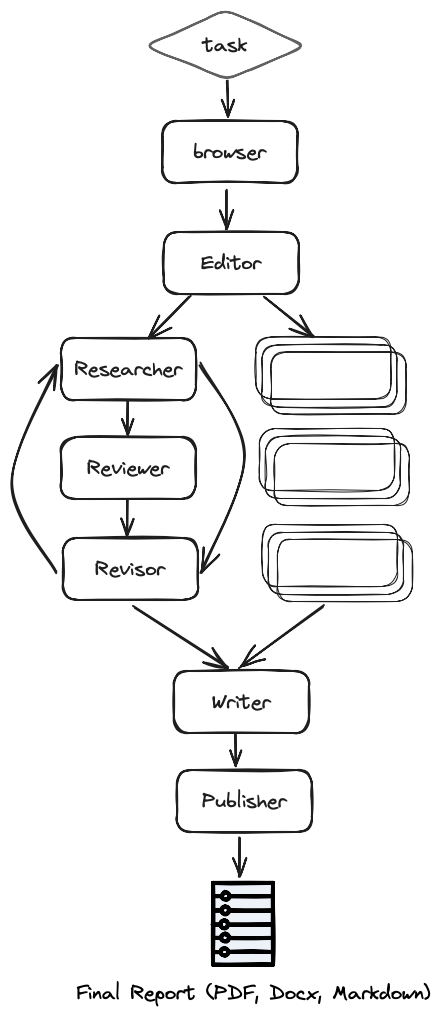
### Steps
More specifically (as seen in the architecture diagram) the process is as follows:
1. Browser (gpt-researcher) - Browses the internet for initial research based on the given research task.
2. Editor - Plans the report outline and structure based on the initial research.
3. For each outline topic (in parallel):
4. Researcher (gpt-researcher) - Runs an in depth research on the subtopics and writes a draft.
5. Reviewer - Validates the correctness of the draft given a set of criteria and provides feedback.
6. Revisor - Revises the draft until it is satisfactory based on the reviewer feedback.
7. Writer - Compiles and writes the final report including an introduction, conclusion and references section from the given research findings.
8. Publisher - Publishes the final report to multi formats such as PDF, Docx, Markdown, etc.
### How to run
1. Install required packages:
```python theme={null}
pip install -r requirements.txt
```
2. Run the application:
```python theme={null}
python main.py
```
### Usage
To change the research query and customize the report, edit the `task.json` file in the main directory.
## Customization
The config.py enables you to customize GPT Researcher to your specific needs and preferences.
Thanks to our amazing community and contributions, GPT Researcher supports multiple LLMs and Retrievers. In addition, GPT Researcher can be tailored to various report formats (such as APA), word count, research iterations depth, etc.
GPT Researcher defaults to our recommended suite of integrations: [OpenAI](https://platform.openai.com/docs/overview) for LLM calls and [Tavily API](https://app.tavily.com/home) for retrieving realtime online information.
As seen below, OpenAI still stands as the superior LLM. We assume it will stay this way for some time, and that prices will only continue to decrease, while performance and speed increase over time.
It may not come as a surprise that our default search engine is Tavily. We're aimed at building our search engine to tailor the exact needs of searching and aggregating for the most factual and unbiased information for research tasks. We highly recommend using it with GPT Researcher, and more generally with LLM applications that are built with RAG.
Here is an example of the default config.py file found in `/gpt_researcher/config/`:
```python theme={null}
def __init__(self, config_file: str = None):
self.config_file = config_file
self.retriever = "tavily"
self.llm_provider = "openai"
self.fast_llm_model = "gpt-3.5-turbo"
self.smart_llm_model = "gpt-4o"
self.fast_token_limit = 2000
self.smart_token_limit = 4000
self.browse_chunk_max_length = 8192
self.summary_token_limit = 700
self.temperature = 0.6
self.user_agent = "Mozilla/5.0 (Windows NT 10.0; Win64; x64) AppleWebKit/537.36 (KHTML, like Gecko)" \
" Chrome/119.0.0.0 Safari/537.36 Edg/119.0.0.0"
self.memory_backend = "local"
self.total_words = 1000
self.report_format = "apa"
self.max_iterations = 1
self.load_config_file()
```
Please note that you can also include your own external JSON file by adding the path in the config\_file param.
To learn more about additional LLM support you can check out the [Langchain supported LLMs documentation](https://python.langchain.com/docs/integrations/llms/). Simply pass different provider names in the `llm_provider` config param.
You can also change the search engine by modifying the retriever param to others such as `duckduckgo`, `googleAPI`, `googleSerp`, `searx` and more.
Please note that you might need to sign up and obtain an API key for any of the other supported retrievers and LLM providers.
## Agent Example
If you're interested in using GPT Researcher as a standalone agent, you can easily import it into any existing Python project. Below, is an example of calling the agent to generate a research report:
```python theme={null}
from gpt_researcher import GPTResearcher
import asyncio
# It is best to define global constants at the top of your script
QUERY = "What happened in the latest burning man floods?"
REPORT_TYPE = "research_report"
async def fetch_report(query, report_type):
"""
Fetch a research report based on the provided query and report type.
"""
researcher = GPTResearcher(query=query, report_type=report_type, config_path=None)
await researcher.conduct_research()
report = await researcher.write_report()
return report
async def generate_research_report():
"""
This is a sample script that executes an async main function to run a research report.
"""
report = await fetch_report(QUERY, REPORT_TYPE)
print(report)
if __name__ == "__main__":
asyncio.run(generate_research_report())
```
You can further enhance this example to use the returned report as context for generating valuable content such as news article, marketing content, email templates, newsletters, etc.
You can also use GPT Researcher to gather information about code documentation, business analysis, financial information and more. All of which can be used to complete much more complex tasks that require factual and high quality realtime information.
## Getting Started
**Step 0** - Install Python 3.11 or later. [See here](https://www.tutorialsteacher.com/python/install-python) for a step-by-step guide.
**Step 1** - Download the project and navigate to its directory
```python theme={null}
$ git clone https://github.com/assafelovic/gpt-researcher.git
$ cd gpt-researcher
```
**Step 2** - Set up API keys using two methods: exporting them directly or storing them in a `.env` file.
For Linux/Temporary Windows Setup, use the export method:
```python theme={null}
export OPENAI_API_KEY={Your OpenAI API Key here}
export TAVILY_API_KEY={Your Tavily API Key here}
```
For a more permanent setup, create a `.env` file in the current gpt-researcher folder and input the keys as follows:
```python theme={null}
OPENAI_API_KEY={Your OpenAI API Key here}
TAVILY_API_KEY={Your Tavily API Key here}
```
For LLM, we recommend [OpenAI GPT](https://platform.openai.com/docs/guides/text-generation), but you can use any other LLM model (including open sources), simply change the llm model and provider in config/config.py.
For search engine, we recommend [Tavily Search API](https://app.tavily.com/home), but you can also refer to other search engines of your choice by changing the search provider in config/config.py to `duckduckgo`, `googleAPI`, `googleSerp`, `searx`, or `bing`. Then add the corresponding env API key as seen in the config.py file.
### Quickstart
**Step 1** - Install dependencies
```python theme={null}
$ pip install -r requirements.txt
```
**Step 2** - Run the agent with FastAPI
```python theme={null}
$ uvicorn main:app --reload
```
**Step 3** - Go to [http://localhost:8000](http://localhost:8000) on any browser and enjoy researching!
### Using Virtual Environment or Poetry
Select either based on your familiarity with each:
### Virtual Environment
Establishing the Virtual Environment with Activate/Deactivate configuration
Create a virtual environment using the `venv` package with the environment name ``, for example, `env`. Execute the following command in the PowerShell/CMD terminal:
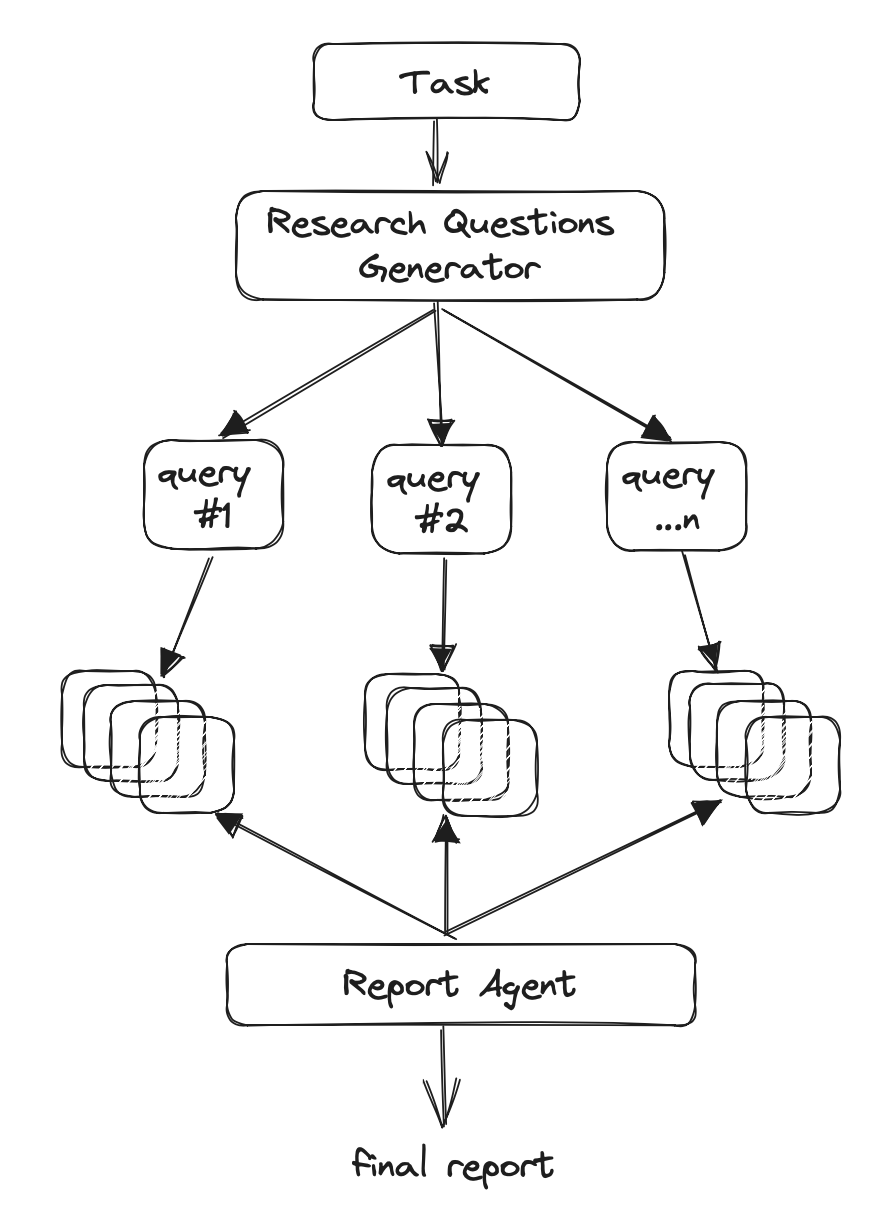
```python theme={null}
python -m venv env
```
To activate the virtual environment, use the following activation script in PowerShell/CMD terminal:
```python theme={null}
.\env\Scripts\activate
```
To deactivate the virtual environment, run the following deactivation script in PowerShell/CMD terminal:
```python theme={null}
deactivate
```
Install the dependencies for a Virtual environment
After activating the `env` environment, install dependencies using the `requirements.txt` file with the following command:
```python theme={null}
python -m pip install -r requirements.txt
```
### Poetry
Establishing the Poetry dependencies and virtual environment with Poetry version `~1.7.1`
Install project dependencies and simultaneously create a virtual environment for the specified project. By executing this command, Poetry reads the project's "pyproject.toml" file to determine the required dependencies and their versions, ensuring a consistent and isolated development environment. The virtual environment allows for a clean separation of project-specific dependencies, preventing conflicts with system-wide packages and enabling more straightforward dependency management throughout the project's lifecycle.
```python theme={null}
poetry install
```
Activate the virtual environment associated with a Poetry project
By running this command, the user enters a shell session within the isolated environment associated with the project, providing a dedicated space for development and execution. This virtual environment ensures that the project dependencies are encapsulated, avoiding conflicts with system-wide packages. Activating the Poetry shell is essential for seamlessly working on a project, as it ensures that the correct versions of dependencies are used and provides a controlled environment conducive to efficient development and testing.
```python theme={null}
poetry shell
```
### Run the app
Launch the FastAPI application agent on a Virtual Environment or Poetry setup by executing the following command:
```python theme={null}
python -m uvicorn main:app --reload
```
Visit [http://localhost:8000](http://localhost:8000) in any web browser and explore your research!
### Try it with Docker
**Step 1** - Install Docker
Follow the instructions [here](https://docs.docker.com/engine/install/)
**Step 2** - Create `.env` file with your OpenAI Key or simply export it
```python theme={null}
$ export OPENAI_API_KEY={Your API Key here}
$ export TAVILY_API_KEY={Your Tavily API Key here}
```
**Step 3** - Run the application
```python theme={null}
$ docker-compose up
```
**Step 4** - Go to [http://localhost:8000](http://localhost:8000) on any browser and enjoy researching!
## Introduction
[GPT Researcher](https://gptr.dev/) is an autonomous agent designed for comprehensive online research on a variety of tasks.
The agent can produce detailed, factual and unbiased research reports, with customization options for focusing on relevant resources, outlines, and lessons. Inspired by the recent [Plan-and-Solve](https://arxiv.org/abs/2305.04091) and [RAG](https://arxiv.org/abs/2005.11401) papers, GPT Researcher addresses issues of speed, determinism and reliability, offering a more stable performance and increased speed through parallelized agent work, as opposed to synchronous operations.
### Why GPT Researcher?
1. To form objective conclusions for manual research tasks can take time, sometimes weeks to find the right resources and information.
2. Current LLMs are trained on past and outdated information, with heavy risks of hallucinations, making them almost irrelevant for research tasks.
3. Solutions that enable web search (such as ChatGPT + Web Plugin), only consider limited resources and content that in some cases result in superficial conclusions or biased answers.
4. Using only a selection of resources can create bias in determining the right conclusions for research questions or tasks.
### Architecture
The main idea is to run "planner" and "execution" agents, whereas the planner generates questions to research, and the execution agents seek the most related information based on each generated research question. Finally, the planner filters and aggregates all related information and creates a research report.
The agents leverage both gpt3.5-turbo and gpt-4-turbo (128K context) to complete a research task. We optimize for costs using each only when necessary. The average research task takes around 3 minutes to complete, and costs \~\$0.1.
More specifically:
1. Create a domain specific agent based on research query or task.
2. Generate a set of research questions that together form an objective opinion on any given task.
3. For each research question, trigger a crawler agent that scrapes online resources for information relevant to the given task.
4. For each scraped resources, summarize based on relevant information and keep track of its sources.
5. Finally, filter and aggregate all summarized sources and generate a final research report.
### Demo
### Tutorials
1. [How it Works](https://medium.com/better-programming/how-i-built-an-autonomous-ai-agent-for-online-research-93435a97c6c)
2. [How to Install](https://www.loom.com/share/04ebffb6ed2a4520a27c3e3addcdde20?sid=da1848e8-b1f1-42d1-93c3-5b0b9c3b24ea)
3. [Live Demo](https://www.loom.com/share/6a3385db4e8747a1913dd85a7834846f?sid=a740fd5b-2aa3-457e-8fb7-86976f59f9b8)
4. [Home Page](https://gptr.dev/)
### Features
1. 📝 Generate research, outlines, resources and lessons reports
2. 📜 Can generate long and detailed research reports (over 2K words)
3. 🌐 Aggregates over 20 web sources per research to form objective and factual conclusions
4. 🖥️ Includes an easy-to-use web interface (HTML/CSS/JS)
5. 🔍 Scrapes web sources with javascript support
6. 📂 Keeps track and context of visited and used web sources
7. 📄 Export research reports to PDF, Word and more...
### Disclaimer
This project, GPT Researcher, is an experimental application and is provided "as-is" without any warranty, express or implied. We are sharing codes for academic purposes under the MIT license. Nothing herein is academic advice, and NOT a recommendation to use in academic or research papers.
Our view on unbiased research claims:
The whole point of our scraping system is to reduce incorrect fact. How? The more sites we scrape the less chances of incorrect data. We are scraping 20 per research, the chances that they are all wrong is extremely low.
We do not aim to eliminate biases; we aim to reduce it as much as possible. We are here as a community to figure out the most effective human/llm interactions.
In research, people also tend towards biases as most have already opinions on the topics they research about. This tool scrapes many opinions and will evenly explain diverse views that a biased person would never have read.
Please note that the use of the GPT-4 language model can be expensive due to its token usage. By utilizing this project, you acknowledge that you are responsible for monitoring and managing your own token usage and the associated costs. It is highly recommended to check your OpenAI API usage regularly and set up any necessary limits or alerts to prevent unexpected charges.
## PIP Package
🌟 Exciting News! Now, you can integrate gpt-researcher with your apps seamlessly!
### Steps to Install GPT Researcher 🛠️
Follow these easy steps to get started:
0. Pre-requisite: Ensure Python 3.10+ is installed on your machine 💻
1. Install gpt-researcher: Grab the official package from [PyPi](https://pypi.org/project/gpt-researcher/).
```python theme={null}
pip install gpt-researcher
```
2. Environment Variables: Create a .env file with your OpenAI API key or simply export it
```python theme={null}
export OPENAI_API_KEY={Your OpenAI API Key here}
export TAVILY_API_KEY={Your Tavily API Key here}
```
3. Start using GPT Researcher in your own codebase
### Example Usage 📝
```python theme={null}
from gpt_researcher import GPTResearcher
import asyncio
from gpt_researcher import GPTResearcher
import asyncio
async def get_report(query: str, report_type: str) -> str:
researcher = GPTResearcher(query, report_type)
research_result = await researcher.conduct_research()
report = await researcher.write_report()
return report
if __name__ == "__main__":
query = "what team may win the NBA finals?"
report_type = "research_report"
report = asyncio.run(get_report(query, report_type))
print(report)
```
### Specific Examples 🌐
Example 1: Research Report 📚
```python theme={null}
query = "Latest developments in renewable energy technologies"
report_type = "research_report"
```
Example 2: Resource Report 📋
```python theme={null}
query = "List of top AI conferences in 2023"
report_type = "resource_report"
```
Example 3: Outline Report 📝
```python theme={null}
query = "Outline for an article on the impact of AI in education"
report_type = "outline_report"
```
### Integration with Web Frameworks 🌍
FastAPI Example:
```python theme={null}
from fastapi import FastAPI
from gpt_researcher import GPTResearcher
import asyncio
app = FastAPI()
@app.get("/report/{report_type}")
async def get_report(query: str, report_type: str) -> dict:
researcher = GPTResearcher(query, report_type)
research_result = await researcher.conduct_research()
report = await researcher.write_report()
return {"report": report}
# Run the server
# uvicorn main:app --reload
```
Flask Example
Pre-requisite: Install flask with the async extra.
```python theme={null}
pip install 'flask[async]'
```
```python theme={null}
from flask import Flask, request
from gpt_researcher import GPTResearcher
app = Flask(__name__)
@app.route('/report/', methods=['GET'])
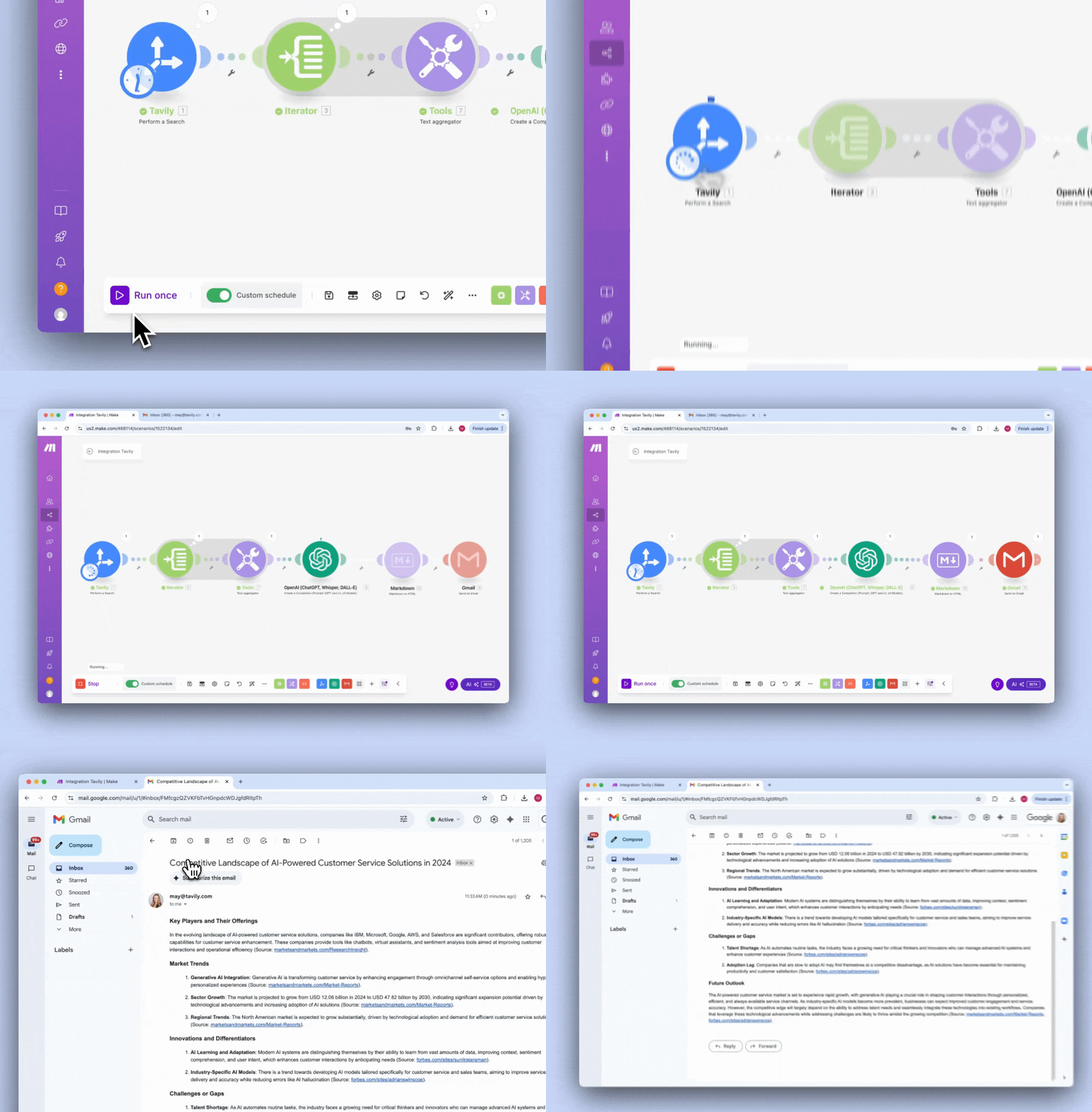
async def get_report(report_type):
query = request.args.get('query')
researcher = GPTResearcher(query, report_type)
research_result = await researcher.conduct_research()
report = await researcher.write_report()
return report
# Run the server
# flask run
```
Run the server:
```python theme={null}
flask run
```
Example Request:
```python theme={null}
curl -X GET "http://localhost:5000/report/research_report?query=what team may win the nba finals?"
```
Note: The above code snippets are just examples. You can customize them as per your requirements.
## Roadmap
We're constantly working on additional features and improvements to our products and services. We're also working on new products and services to help you build better AI applications using [GPT Researcher](https://gptr.dev/).
Our vision is to build the #1 autonomous research agent for AI developers and researchers, and we're excited to have you join us on this journey!
The roadmap is prioritized based on the following goals: Performance, Quality, Modularity and Conversational flexibility. The roadmap is public and can be found [here](https://trello.com/b/3O7KBePw/gpt-researcher-roadmap).
## Tailored Research
The GPT Researcher package allows you to tailor the research to your needs such as researching on specific sources or local documents, and even specify the agent prompt instruction upon which the research is conducted.
### Research on Specific Sources 📚
You can specify the sources you want the GPT Researcher to research on by providing a list of URLs. The GPT Researcher will then conduct research on the provided sources.
```python theme={null}
from gpt_researcher import GPTResearcher
import asyncio
async def get_report(query: str, report_type: str, sources: list) -> str:
researcher = GPTResearcher(query=query, report_type=report_type, source_urls=sources)
await researcher.conduct_research()
report = await researcher.write_report()
return report
if __name__ == "__main__":
query = "What are the latest advancements in AI?"
report_type = "research_report"
sources = ["https://en.wikipedia.org/wiki/Artificial_intelligence", "https://www.ibm.com/watson/ai"]
report = asyncio.run(get_report(query, report_type, sources))
print(report)
```
### Specify Agent Prompt 📝
You can specify the agent prompt instruction upon which the research is conducted. This allows you to guide the research in a specific direction and tailor the report layout. Simplay pass the prompt as the `query` argument to the `GPTResearcher` class and the "custom\_report" `report_type`.
```python theme={null}
from gpt_researcher import GPTResearcher
import asyncio
async def get_report(prompt: str, report_type: str) -> str:
researcher = GPTResearcher(query=prompt, report_type=report_type)
await researcher.conduct_research()
report = await researcher.write_report()
return report
if __name__ == "__main__":
report_type = "custom_report"
prompt = "Research the latest advancements in AI and provide a detailed report in APA format including sources."
report = asyncio.run(get_report(prompt=prompt, report_type=report_type))
print(report)
```
### Research on Local Documents 📄
TBD!
## Troubleshooting
We're constantly working to provide a more stable version. If you're running into any issues, please first check out the resolved issues or ask us via our [Discord community](https://discord.com/invite/2pFkc83fRq).
### Model: gpt-4 does not exist
This relates to not having permission to use gpt-4 yet. Based on OpenAI, it will be [widely available for all by end of July](https://help.openai.com/en/articles/7102672-how-can-i-access-gpt-4-gpt-4-turbo-gpt-4o-and-gpt-4o-mini).
### Cannot load library 'gobject-2.0-0'
The issue relates to the library WeasyPrint (which is used to generate PDFs from the research report). Please follow this guide to resolve it: [https://doc.courtbouillon.org/weasyprint/stable/first\_steps.html](https://doc.courtbouillon.org/weasyprint/stable/first_steps.html), or you can install this package manually.
In case of MacOS you can install this lib using `brew install glib gobject-introspection`
In case of Linux you can install this lib using `sudo apt install libglib2.0-dev`
### Cannot load library 'pango'
In case of MacOS you can install this lib using `brew install pango`
In case of Linux you can install this lib using `sudo apt install libpango-1.0-0`
### Workaround for Mac M chip users
If the above solutions don't work, you can try the following:
1. Install a fresh version of Python 3.11 pointed to brew: `brew install python@3.11`
2. Install the required libraries: `brew install pango glib gobject-introspection`
3. Install the required GPT Researcher Python packages: `pip3.11 install -r requirements.txt`
4. Run the app with Python 3.11 (using brew): `python3.11 -m uvicorn main:app --reload`
### Error processing the url
We're using [Selenium](https://www.selenium.dev/) for site scraping. Some sites fail to be scraped. In these cases, restart and try running again.
### Chrome version issues
Many users have an issue with their chromedriver because the latest chrome browser version doesn't have a compatible chrome driver yet.
To downgrade your Chrome web browser using [slimjet](https://www.slimjet.com/chrome/google-chrome-old-version.php), follow these steps. First, visit the website and scroll down to find the list of available older Chrome versions. Choose the version you wish to install making sure it's compatible with your operating system. Once you've selected the desired version, click on the corresponding link to download the installer. Before proceeding with the installation, it's crucial to uninstall your current version of Chrome to avoid conflicts.
It's important to check if the version you downgrade to, has a chromedriver available in the official [chrome driver website](https://developer.chrome.com/docs/chromedriver/downloads).
---
> To find navigation and other pages in this documentation, fetch the llms.txt file at: https://docs.tavily.com/llms.txt
---
# Source: https://docs.tavily.com/documentation/api-reference/introduction.md
> ## Documentation Index
> Fetch the complete documentation index at: https://docs.tavily.com/llms.txt
> Use this file to discover all available pages before exploring further.
# Introduction
> Easily integrate our APIs with your services.
Looking for the Python or JavaScript SDK Reference? Head to our [SDKs](/sdk)
page to see how to natively integrate Tavily in your project.
## Base URL
The base URL for all requests to the Tavily API is:
```plaintext theme={null}
https://api.tavily.com
```
## Authentication
All Tavily endpoints are authenticated using API keys.
[Get your free API key](https://app.tavily.com).
```bash theme={null}
curl -X POST https://api.tavily.com/search \
-H "Content-Type: application/json" \
-H "Authorization: Bearer tvly-YOUR_API_KEY" \
-d '{"query": "Who is Leo Messi?"}'
```
## Endpoints
**`/search`**
Tavily's powerful web search API.
**`/extract`**
Tavily's powerful content extraction API.
`/crawl` , `/map`
Tavily's intelligent sitegraph navigation and extraction tools.
**`/research`**
Tavily's comprehensive research API for in-depth analysis.
## Project Tracking
You can optionally attach a Project ID to your API requests to organize and track usage by project. This is useful when a single API key is used across multiple projects or applications.
To attach a project to your request, add the `X-Project-ID` header:
```bash theme={null}
curl -X POST https://api.tavily.com/search \
-H "Content-Type: application/json" \
-H "Authorization: Bearer tvly-YOUR_API_KEY" \
-H "X-Project-ID: your-project-id" \
-d '{"query": "Who is Leo Messi?"}'
```
**Key features:**
* An API key can be associated with multiple projects
* Filter requests by project in the [/logs endpoint](/documentation/api-reference/endpoint/usage) and platform usage dashboard
* Helps organize and track where requests originate from
When using the SDKs, you can specify a project using the `project_id` parameter when instantiating the client, or by setting the `TAVILY_PROJECT` environment variable.
---
# Source: https://docs.tavily.com/documentation/integrations/langchain.md
> ## Documentation Index
> Fetch the complete documentation index at: https://docs.tavily.com/llms.txt
> Use this file to discover all available pages before exploring further.
# LangChain
> We're excited to partner with Langchain as their recommended search tool!
> **Warning**: The [`langchain_community.tools.tavily_search.tool`](https://python.langchain.com/docs/integrations/tools/tavily_search/) is deprecated. While it remains functional for now, we strongly recommend migrating to the new `langchain-tavily` Python package which supports [Search](#tavily-search), [Extract](#tavily-extract), [Map](#tavily-mapcrawl), and [Crawl](#tavily-mapcrawl) functionality and receives continuous updates with the latest features.
The [langchain-tavily](https://pypi.org/project/langchain-tavily/) Python package is the official LangChain integration of Tavily, including [Search](#tavily-search), [Extract](#tavily-extract), [Map](#tavily-mapcrawl), and [Crawl](#tavily-mapcrawl) functionality.
## Installation
```bash theme={null}
pip install -U langchain-tavily
```
### Credentials
We also need to set our Tavily API key. You can get an API key by visiting [this site](https://app.tavily.com/sign-in) and creating an account.
```bash theme={null}
import getpass
import os
if not os.environ.get("TAVILY_API_KEY"):
os.environ["TAVILY_API_KEY"] = getpass.getpass("Tavily API key:\n")
```
## Tavily Search
Here we show how to instantiate the Tavily search tool. This tool allows you to complete search queries using Tavily's Search API endpoint.
### Available Parameters
The Tavily Search API accepts various parameters to customize the search:
* `max_results` (optional, int): Maximum number of search results to return. Default is 5.
* `topic` (optional, str): Category of the search. Can be "general", "news", or "finance". Default is "general".
* `include_answer` (optional, bool): Include an answer to original query in results. Default is False.
* `include_raw_content` (optional, bool): Include cleaned and parsed HTML of each search result. Default is False.
* `include_images` (optional, bool): Include a list of query related images in the response. Default is False.
* `include_image_descriptions` (optional, bool): Include descriptive text for each image. Default is False.
* `search_depth` (optional, str): Depth of the search, either "basic" or "advanced". Default is "basic".
* `time_range` (optional, str): The time range back from the current date ( publish date ) to filter results - "day", "week", "month", or "year". Default is None.
* `start_date` (optional, str): Will return all results after the specified start date ( publish date ). Required to be written in the format YYYY-MM-DD. Default is None.
* `end_date` (optional, str): Will return all results before the specified end date. Required to be written in the format YYYY-MM-DD. Default is None.
* `include_domains` (optional, List\[str]): List of domains to specifically include. Maximum 300 domains. Default is None.
* `exclude_domains` (optional, List\[str]): List of domains to specifically exclude. Maximum 150 domains. Default is None.
* `include_usage` (optional, bool): Whether to include credit usage information in the response. Default is False.
For a comprehensive overview of the available parameters, refer to the [Tavily Search API documentation](https://docs.tavily.com/documentation/api-reference/endpoint/search)
### Instantiation
```python theme={null}
from langchain_tavily import TavilySearch
tool = TavilySearch(
max_results=5,
topic="general",
# include_answer=False,
# include_raw_content=False,
# include_images=False,
# include_image_descriptions=False,
# search_depth="basic",
# time_range="day",
# start_date=None,
# end_date=None,
# include_domains=None,
# exclude_domains=None,
# include_usage= False
)
```
### Invoke directly with args
The Tavily search tool accepts the following arguments during invocation:
* `query` (required): A natural language search query
* The following arguments can also be set during invocation: `include_images`, `search_depth`, `time_range`, `include_domains`, `exclude_domains`, `start_date`, `end_date`
* For reliability and performance reasons, certain parameters that affect response size cannot be modified during invocation: `include_answer` and `include_raw_content`. These limitations prevent unexpected context window issues and ensure consistent results.
NOTE: The optional arguments are available for agents to dynamically set. If you set an argument during instantiation and then invoke the tool with a different value, the tool will use the value you passed during invocation.
### Direct Tool Invocation
```python theme={null}
# Basic usage
result = tavily_search.invoke({"query": "What happened at the last wimbledon"})
```
Example output:
```python theme={null}
{
'query': 'What happened at the last wimbledon',
'follow_up_questions': None,
'answer': None,
'images': [],
'results': [
{'url': 'https://en.wikipedia.org/wiki/Wimbledon_Championships',
'title': 'Wimbledon Championships - Wikipedia',
'content': 'Due to the COVID-19 pandemic, Wimbledon 2020 was cancelled ...',
'score': 0.62365627198,
'raw_content': None},
{'url': 'https://www.cbsnews.com/news/wimbledon-men-final-carlos-alcaraz-novak-djokovic/',
'title': "Carlos Alcaraz beats Novak Djokovic at Wimbledon men's final to ...",
'content': 'In attendance on Sunday was Catherine, the Princess of Wales ...',
'score': 0.5154731446,
'raw_content': None}
],
'response_time': 2.3
}
```
### Use with Agent
```python theme={null}
# !pip install -qU langchain langchain-openai langchain-tavily
from langchain.agents import create_agent
from langchain_openai import ChatOpenAI
from langchain_tavily import TavilySearch
# Initialize the Tavily Search tool
tavily_search = TavilySearch(max_results=5, topic="general")
# Initialize the agent with the search tool
agent = create_agent(
model=ChatOpenAI(model="gpt-5"),
tools=[tavily_search],
system_prompt="You are a helpful research assistant. Use web search to find accurate, up-to-date information."
)
# Use the agent
response = agent.invoke({
"messages": [{"role": "user", "content": "What is the most popular sport in the world? Include only Wikipedia sources."}]
})
```
> **Tip**: For more relevant and time-aware results, inject today's date into your system prompt. This helps the agent understand the current context when searching for recent information. For example: `f"You are a helpful research assistant. Today's date is {datetime.today().strftime('%B %d, %Y')}. Use web search to find accurate, up-to-date information."`
## Tavily Extract
Here we show how to instantiate the Tavily extract tool. This tool allows you to extract content from URLs using Tavily's Extract API endpoint.
### Available Parameters
The Tavily Extract API accepts various parameters:
* `extract_depth` (optional, str): The depth of the extraction, either "basic" or "advanced". Default is "basic".
* `include_images` (optional, bool): Whether to include images in the extraction. Default is False.
For a comprehensive overview of the available parameters, refer to the [Tavily Extract API documentation](https://docs.tavily.com/documentation/api-reference/endpoint/extract)
### Instantiation
```python theme={null}
from langchain_tavily import TavilyExtract
tool = TavilyExtract(
extract_depth="basic",
# include_images=False
)
```
### Invoke directly with args
The Tavily extract tool accepts the following arguments during invocation:
* `urls` (required): A list of URLs to extract content from.
* Both `extract_depth` and `include_images` can also be set during invocation
NOTE: The optional arguments are available for agents to dynamically set. If you set an argument during instantiation and then invoke the tool with a different value, the tool will use the value you passed during invocation.
### Direct Tool Invocation
```python theme={null}
# Extract content from a URL
result = tavily_extract.invoke({
"urls": ["https://en.wikipedia.org/wiki/Lionel_Messi"]
})
```
Example output:
```python theme={null}
{
'results': [{
'url': 'https://en.wikipedia.org/wiki/Lionel_Messi',
'raw_content': 'Lionel Messi\nLionel Andrés "Leo" Messi...',
'images': []
}],
'failed_results': [],
'response_time': 0.79
}
```
## Tavily Map/Crawl
Tavily provides two complementary tools for website exploration: **Map** and **Crawl**. The `map` tool discovers and lists URLs from a website, providing a structural overview without extracting content. The `crawl` tool then extracts the full content from these discovered URLs, making it ideal for data extraction, documentation indexing, and building knowledge bases.
### Tavily Map
The Map tool discovers all internal links starting from a base URL, perfect for understanding site structure or planning content extraction.
#### Available Parameters
* `url` (required, str): The root URL to begin mapping.
* `instructions` (optional, str): Natural language instructions guiding the mapping process.
For a comprehensive overview, refer to the [Tavily Map API documentation](https://docs.tavily.com/documentation/api-reference/endpoint/map)
#### Instantiation
```python theme={null}
from langchain_tavily import TavilyMap
tool = TavilyMap()
```
#### Direct Tool Invocation
```python theme={null}
# Map a website structure
result = tavily_map.invoke({
"url": "https://docs.example.com",
"instructions": "Find all documentation and tutorial pages"
})
```
Example output:
```python theme={null}
{
'base_url': 'https://docs.example.com',
'results': [
'https://docs.example.com',
'https://docs.example.com/api',
'https://docs.example.com/tutorials',
'https://docs.example.com/api/endpoints',
'https://docs.example.com/tutorials/getting-started'
],
'request_id': 'req_abc123',
'response_time': 2.1
}
```
### Tavily Crawl
The Crawl tool extracts full content from URLs. It works perfectly with mapped URLs or can be used standalone to crawl from a starting point.
#### Available Parameters
* `url` (required, str): The root URL to begin the crawl.
* `instructions` (optional, str): Natural language instructions guiding content extraction.
For a comprehensive overview, refer to the [Tavily Crawl API documentation](https://docs.tavily.com/documentation/api-reference/endpoint/crawl)
#### Instantiation
```python theme={null}
from langchain_tavily import TavilyCrawl
tool = TavilyCrawl()
```
#### Direct Tool Invocation
```python theme={null}
# Crawl and extract content
result = tavily_crawl.invoke({
"url": "https://docs.example.com",
"instructions": "Extract API documentation and code examples"
})
```
Example output:
```python theme={null}
{
'base_url': 'https://docs.example.com',
'results': [
{
'url': 'https://docs.example.com',
'raw_content': '# Documentation\nWelcome to our API documentation...'
},
{
'url': 'https://docs.example.com/api',
'raw_content': '# API Reference\nComplete API reference guide...'
}
],
'response_time': 4.5,
'request_id': 'req_abc123'
}
```
## Tavily Research
Here we show how to instantiate the Tavily research tool. This tool allows you to create comprehensive research tasks using Tavily's Research API endpoint, with optional structured output.
### Available Parameters
* `input` (required, str): The research task or question to investigate.
* `model` (optional, str): The research model to use, one of `"mini"`, `"pro"`, or `"auto"`. Default is `"auto"`.
* `output_schema` (optional, dict): A JSON Schema object that defines the structure of the research output. Must include a `properties` field and may optionally include a `required` field.
* `stream` (optional, bool): Whether to stream the research results as they are generated. When `True`, returns a streaming response. Default is `False`.
* `citation_format` (optional, str): The format for citations in the research report, one of `"numbered"`, `"mla"`, `"apa"`, or `"chicago"`. Default is `"numbered"`.
### Instantiation
```python theme={null}
from langchain_tavily import TavilyResearch
tavily_research = TavilyResearch(
# model="auto",
# citation_format="numbered",
# stream=False,
)
```
### Invoke directly with args
The Tavily research tool accepts the following arguments during invocation:
* `input` (required): A natural language research task or question.
* The following arguments can also be set during invocation: `model`, `output_schema`, `stream`, and `citation_format`.
NOTE: The optional arguments are available for agents to dynamically set. If you set an argument during instantiation and then invoke the tool with a different value, the tool will use the value you passed during invocation.
### Direct Tool Invocation
```python theme={null}
# Create a research task with a structured output schema
result = tavily_research.invoke({
"input": "Research the latest developments in AI and summarize key trends.",
"model": "mini",
"citation_format": "apa",
})
```
Example non-streaming response:
```python theme={null}
{
"request_id": "test-request-123",
"created_at": "2024-01-01T00:00:00Z",
"status": "pending",
"input": "Research the latest developments in AI and summarize key trends.",
"model": "mini"
}
```
If `stream=True` is set (either in the constructor or at invocation time), `invoke` returns a generator (for sync clients) or async generator (for async clients) that yields the research output as it is generated.
## Tavily Get Research
The Tavily Get Research tool retrieves the results of a previously created research task using its `request_id`.
### Available Parameters
* `request_id` (required, str): The unique identifier of the research task to retrieve.
### Instantiation
```python theme={null}
from langchain_tavily import TavilyGetResearch
tavily_get_research = TavilyGetResearch()
```
### Direct Tool Invocation
```python theme={null}
# Retrieve results for a completed research task
result = tavily_get_research.invoke({
"request_id": "test-request-123"
})
```
Example response:
```python theme={null}
{
"request_id": "test-request-123",
"created_at": "2024-01-01T00:00:00Z",
"completed_at": "2024-01-01T00:05:00Z",
"status": "completed",
"content": "This is a comprehensive research report on AI developments...",
"sources": [
{
"title": "AI Research Paper",
"url": "https://example.com/ai-paper",
}
]
}
```
---
# Source: https://docs.tavily.com/documentation/integrations/langflow.md
> ## Documentation Index
> Fetch the complete documentation index at: https://docs.tavily.com/llms.txt
> Use this file to discover all available pages before exploring further.
# Langflow
> Integrate Tavily with Langflow, an open-source visual framework for building multi-agent and RAG applications.
## Introduction
Integrate [Tavily with Langflow](https://blog.langflow.org/web-search-in-your-ai-agents-a-langflow-tutorial/) to create powerful AI workflows using a visual interface. Langflow is an open-source tool that provides a visual builder for creating AI agents and workflows, making it easy to incorporate Tavily's search and extraction capabilities into your applications.
## Installation
Langflow works with Python 3.10 to 3.13. You can install it using either UV (recommended) or pip:
```bash theme={null}
# Using UV (recommended)
uv pip install langflow
# Using pip
pip install langflow
```
## Setting Up Tavily Components in Langflow
### Step 1: Launch Langflow
After installation, start Langflow:
```bash theme={null}
langflow run
```
This will start the Langflow server locally at `http://localhost:7860`.
### Step 2: Using Tavily Components
Langflow provides two main Tavily components in the **Tools** section of the components library:
1. **Tavily Search API**: Perform web searches and retrieve relevant information
* Located under Tools > Tavily Search API
* **Configuration Options**: Select the component and go to "Controls" to access all available settings. Here are some key examples:
* Max Results: Number of results to return
* Search Depth: "basic" or "advanced"
* *Note: Additional parameters are available in the Controls panel*
2. **Tavily Extract API**: Extract content from web pages
* Located under Tools > Tavily Extract API
* **Configuration Options**: Select the component and go to "Controls" to access all available settings. Here are some key examples:
* Extract Depth: "basic" or "advanced"
* *Note: Additional parameters are available in the Controls panel*
### Step 3: Configure Your Tavily API Key
To use Tavily components, you need to enter your [Tavily API key](https://app.tavily.com/home) under "Tavily API Key"
## Example Workflows
### Basic Search Workflow
1. Add a Tavily Search component to your flow
2. Connect it to a prompt template
3. Configure the search parameters
4. Add an LLM component to process the results
5. Connect to an output component
### Content Extraction Workflow
1. Add a Tavily Extract component
2. Connect it to a URL input
3. Configure extraction parameters
4. Add processing components as needed
5. Connect to your desired output
## Example Use Cases
1. **Research Assistant**
* Combine Tavily Search with LLMs for comprehensive research
* Extract and summarize information from multiple sources
2. **Content Aggregation**
* Use Tavily Extract to gather content from specific websites
* Process and format the extracted content
3. **Market Intelligence**
* Create workflows for competitive analysis
* Monitor industry trends and news
4. **Documentation Search**
* Build custom documentation search interfaces
* Extract and format technical documentation
## Additional Resources
* [Langflow GitHub Repository](https://github.com/langflow-ai/langflow)
* [Langflow Documentation](https://docs.langflow.org)
---
# Source: https://docs.tavily.com/documentation/integrations/llamaindex.md
> ## Documentation Index
> Fetch the complete documentation index at: https://docs.tavily.com/llms.txt
> Use this file to discover all available pages before exploring further.
# LlamaIndex
> Search the web from LlamaIndex with Tavily.
This tool has a more extensive example use case documented in a Jupyter notebook [here](https://github.com/run-llama/llama_index/blob/main/llama-index-integrations/tools/llama-index-tools-tavily-research/examples/tavily.ipynb).
## Install Tavily and LlamaIndex
The following dependencies are required to properly run the integration:
```bash theme={null}
pip install llama-index-tools-tavily-research llama-index llama-hub tavily-python
```
## Usage
You can use access Tavily in LlamaIndex through the `TavilyToolSpec`.
Here is a simple use case that performs a web search with Tavily and generates an answer to the user's search query:
```python theme={null}
from llama_index.tools.tavily_research.base import TavilyToolSpec
from llama_index.agent.openai import OpenAIAgent
tavily_tool = TavilyToolSpec(
api_key='tvly-YOUR_API_KEY',
)
agent = OpenAIAgent.from_tools(tavily_tool.to_tool_list())
agent.chat('What happened in the latest Burning Man festival?')
```
`search`: Search for relevant dynamic data based on a query. Returns a list of urls and their relevant content.
This loader is designed to be used as a way to load data as a Tool in an Agent. See [here](https://github.com/emptycrown/llama-hub/tree/main) for examples.
---
# Source: https://docs.tavily.com/documentation/integrations/make.md
> ## Documentation Index
> Fetch the complete documentation index at: https://docs.tavily.com/llms.txt
> Use this file to discover all available pages before exploring further.
# Make
> Tavily is now available for no-code integration through Make.
## Introduction
Integrate [Tavily with Make](https://www.make.com/en/integrations/tavily) to enhance your business processes without writing a single line of code. With Tavily's powerful search and content extraction capabilities, you can seamlessly integrate real-time online information into your Make workflows and automations.
## How to set up Tavily with Make
Create a new scenario and select a trigger module that will start your workflow.
Add Tavily as an action module in your scenario and choose between **Perform a Search** or **Extract Raw Content**:
Connection: Connect your Tavily account by entering your [Tavily API key](https://app.tavily.com/home).
Configuration: Set up your parameters:
For Search:
Enter your search `query` (can be manually entered or populated from another module's output)
Select a `topic` (`general` or `news`)
Choose whether to include raw content or generate an answer
Specify domains to include or exclude
Set search depth and other optional parameters
For Extract:
Enter the URL(s) to extract content from (can be a single URL or multiple URLs from another module's output)
Choose extraction type (`basic` or `advanced`)
Test: Run a test to verify your configuration.
Utilize the search results in your workflow:
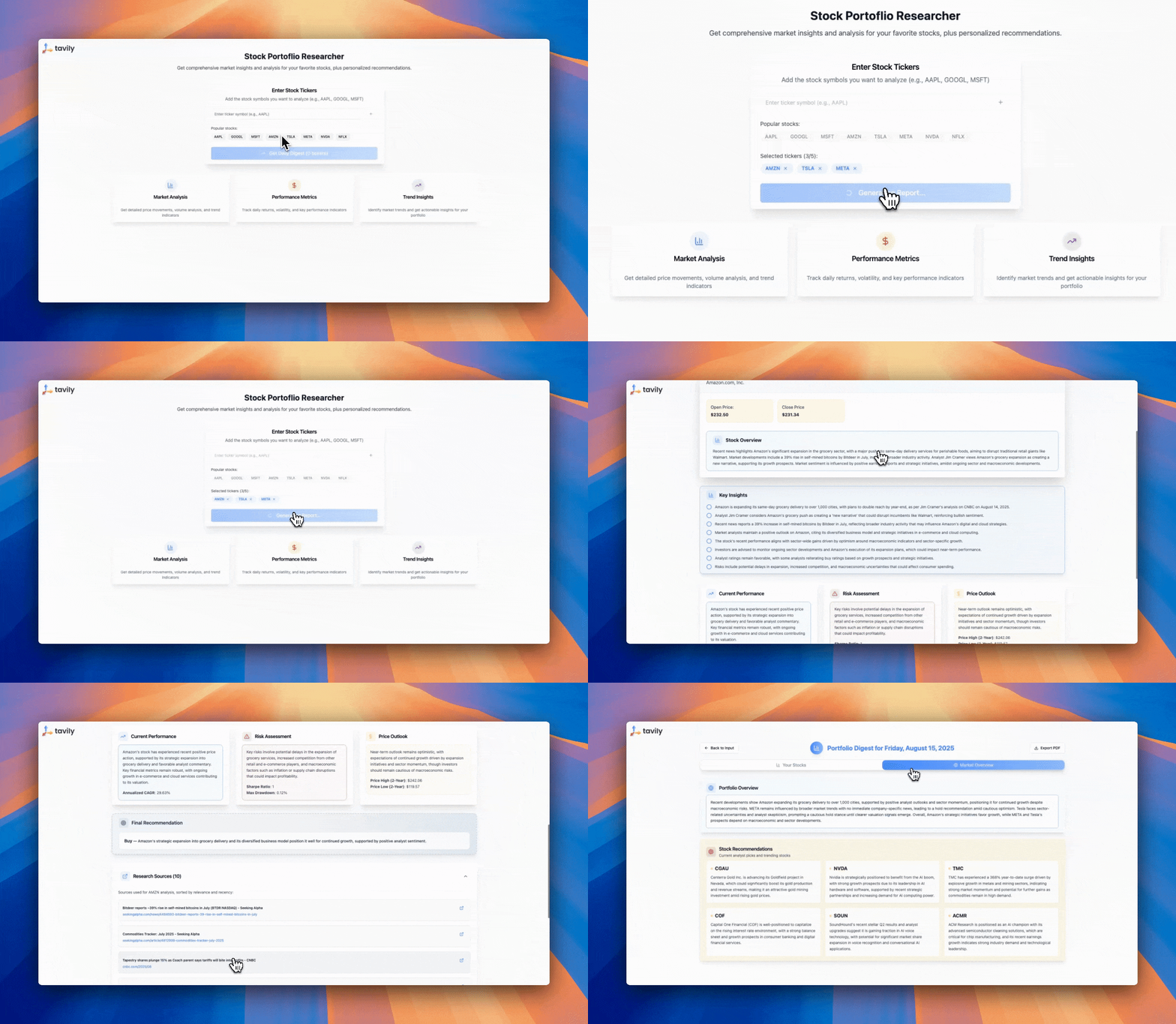
Process data through additional modules
Send information to your CRM or database
Generate reports or notifications
Feed data into AI models for further processing
## Use cases for Tavily in Make
Leverage Tavily's capabilities to create powerful automated workflows:
* **Competitive Intelligence**: Automatically gather and analyze competitor information
* **Market Research**: Track industry trends and market developments
* **Content Curation**: Collect and organize relevant content for your business
* **Lead Enrichment**: Enhance lead data with real-time information
* **News Monitoring**: Stay updated with the latest developments in your field
## Detailed example - automated market research
Create an automated workflow that performs market research and delivers insights to your team.
Trigger: Schedule the scenario to run daily or weekly
Generate Search Queries: Use an AI module to create relevant search queries
Execute Searches: Use Tavily to perform multiple searches with the generated queries
Process Results: Filter and organize the search results
Generate Report: Use an AI module to create a comprehensive report
Deliver Insights: Send the report via email or to your team's communication platform
## Best practices
To optimize your Tavily integration in Make:
* Use the Iterator module to process multiple search results efficiently
* Use filters to process only relevant results
* Use the Aggregator module to combine multiple search results
---
# Source: https://docs.tavily.com/documentation/api-reference/endpoint/map.md
> ## Documentation Index
> Fetch the complete documentation index at: https://docs.tavily.com/llms.txt
> Use this file to discover all available pages before exploring further.
# Tavily Map
> Tavily Map traverses websites like a graph and can explore hundreds of paths in parallel with intelligent discovery to generate comprehensive site maps.
## OpenAPI
````yaml POST /map
openapi: 3.0.3
info:
title: Tavily Search and Extract API
description: >-
Our REST API provides seamless access to Tavily Search, a powerful search
engine for LLM agents, and Tavily Extract, an advanced web scraping solution
optimized for LLMs.
version: 1.0.0
servers:
- url: https://api.tavily.com/
security: []
tags:
- name: Search
- name: Extract
- name: Crawl
- name: Map
- name: Research
- name: Usage
paths:
/map:
post:
summary: Initiate a web mapping from a base URL
description: >-
Tavily Map traverses websites like a graph and can explore hundreds of
paths in parallel with intelligent discovery to generate comprehensive
site maps.
requestBody:
description: Parameters for the Tavily Map request.
required: true
content:
application/json:
schema:
type: object
properties:
url:
type: string
description: The root URL to begin the mapping.
example: docs.tavily.com
instructions:
type: string
description: >-
Natural language instructions for the crawler. When
specified, the cost increases to 2 API credits per 10
successful pages instead of 1 API credit per 10 pages.
example: Find all pages about the Python SDK
default: null
max_depth:
type: integer
description: >-
Max depth of the mapping. Defines how far from the base URL
the crawler can explore.
default: 1
minimum: 1
maximum: 5
max_breadth:
type: integer
description: >-
Max number of links to follow per level of the tree (i.e.,
per page).
default: 20
minimum: 1
maximum: 500
limit:
type: integer
description: >-
Total number of links the crawler will process before
stopping.
default: 50
minimum: 1
select_paths:
type: array
description: >-
Regex patterns to select only URLs with specific path
patterns (e.g., `/docs/.*`, `/api/v1.*`).
items:
type: string
default: null
select_domains:
type: array
description: >-
Regex patterns to select crawling to specific domains or
subdomains (e.g., `^docs\.example\.com$`).
items:
type: string
default: null
exclude_paths:
type: array
description: >-
Regex patterns to exclude URLs with specific path patterns
(e.g., `/private/.*`, `/admin/.*`).
items:
type: string
default: null
exclude_domains:
type: array
description: >-
Regex patterns to exclude specific domains or subdomains
from crawling (e.g., `^private\.example\.com$`).
items:
type: string
default: null
allow_external:
type: boolean
description: >-
Whether to include external domain links in the final
results list.
default: true
timeout:
type: number
format: float
description: >-
Maximum time in seconds to wait for the map operation before
timing out. Must be between 10 and 150 seconds.
minimum: 10
maximum: 150
default: 150
include_usage:
type: boolean
description: >-
Whether to include credit usage information in the
response.`NOTE:`The value may be 0 if the total successful
pages mapped has not yet reached 10 calls. See our [Credits
& Pricing
documentation](https://docs.tavily.com/documentation/api-credits)
for details.
default: false
required:
- url
responses:
'200':
description: Map results returned successfully
content:
application/json:
schema:
type: object
properties:
base_url:
type: string
description: The base URL that was mapped.
example: docs.tavily.com
results:
type: array
description: A list of URLs that were discovered during the mapping.
items:
type: string
example: docs.tavily.com
example:
- https://docs.tavily.com/welcome
- https://docs.tavily.com/documentation/api-credits
- https://docs.tavily.com/documentation/about
response_time:
type: number
format: float
description: Time in seconds it took to complete the request.
example: 1.23
usage:
type: object
description: Credit usage details for the request.
example:
credits: 1
request_id:
type: string
description: >-
A unique request identifier you can share with customer
support to help resolve issues with specific requests.
example: 123e4567-e89b-12d3-a456-426614174111
'400':
description: Bad Request - Your request is invalid.
content:
application/json:
schema:
type: object
properties:
detail:
type: object
properties:
error:
type: string
example:
detail:
error: '[400] No starting url provided'
'401':
description: Unauthorized - Your API key is wrong or missing.
content:
application/json:
schema:
type: object
properties:
detail:
type: object
properties:
error:
type: string
example:
detail:
error: 'Unauthorized: missing or invalid API key.'
'403':
description: Forbidden - URL is not supported.
content:
application/json:
schema:
type: object
properties:
detail:
type: object
properties:
error:
type: string
example:
detail:
error: '[403] URL is not supported'
'429':
description: Too many requests - Rate limit exceeded
content:
application/json:
schema:
type: object
properties:
detail:
type: object
properties:
error:
type: string
example:
detail:
error: >-
Your request has been blocked due to excessive requests.
Please reduce rate of requests.
'432':
description: Key limit or Plan Limit exceeded
content:
application/json:
schema:
type: object
properties:
detail:
type: object
properties:
error:
type: string
example:
detail:
error: >-
This request exceeds your plan's set usage limit. Please
upgrade your plan or contact support@tavily.com
'433':
description: PayGo limit exceeded
content:
application/json:
schema:
type: object
properties:
detail:
type: object
properties:
error:
type: string
example:
detail:
error: >-
This request exceeds the pay-as-you-go limit. You can
increase your limit on the Tavily dashboard.
'500':
description: Internal Server Error - We had a problem with our server.
content:
application/json:
schema:
type: object
properties:
detail:
type: object
properties:
error:
type: string
example:
detail:
error: '[500] Internal server error'
security:
- bearerAuth: []
components:
securitySchemes:
bearerAuth:
type: http
scheme: bearer
bearerFormat: JWT
description: >-
Bearer authentication header in the form Bearer , where
is your Tavily API key (e.g., Bearer tvly-YOUR_API_KEY).
````
---
# Source: https://docs.tavily.com/examples/use-cases/market-researcher.md
> ## Documentation Index
> Fetch the complete documentation index at: https://docs.tavily.com/llms.txt
> Use this file to discover all available pages before exploring further.
# Market Researcher
> Get comprehensive market insights and analysis for stocks in your portfolio
## Try Our Market Researcher
### Step 1: Get Your API Key
### Step 2: Try the Market Researcher
### Step 3: Read The Open Source Code
## Features
1. **Real-time Financial Research**: Real‑time financial news and market data aggregation performed in real-time.
2. **Full Portfolio Coverage**: Input all your the stocks in your portfolio and get an analysis with comparative insights.
3. **Report Generation**: Automated report generation with source citations, so all news and claims are backed by sources.
4. **Efficient and Scalable**: Tavily handles multiple queries simultaneously, making it capable of processing large datasets quickly. This efficiency reduces the time needed for comprehensive research, allowing for faster decision-making.
## How Does It Work?
We use the Tavily 'news' and Tavily 'finance' parameters to make two separate search calls for each ticker retrieving the most relevant and up to date financial news data and metrics. All the searches are parallelized to maximize speed.
---
# Source: https://docs.tavily.com/documentation/mcp.md
> ## Documentation Index
> Fetch the complete documentation index at: https://docs.tavily.com/llms.txt
> Use this file to discover all available pages before exploring further.
# Tavily MCP Server
> Tavily MCP Server allows you to use the Tavily API in your MCP clients.
`/tavily-ai/tavily-mcp`
`@tavily/mcp`
**Compatible with both [Cursor](https://cursor.sh) and [Claude Desktop](https://claude.ai/download)!**
Tavily MCP is also compatible with any MCP client.
**Check out our
[tutorial](https://medium.com/@dustin_36183/building-a-knowledge-graph-assistant-combining-tavily-and-neo4j-mcp-servers-with-claude-db92de075df9)
on combining Tavily MCP with Neo4j MCP server!**
The Model Context Protocol (MCP) is an open standard that enables AI systems to interact seamlessly with various data sources and tools, facilitating secure, two-way connections.
Developed by Anthropic, the Model Context Protocol (MCP) enables AI assistants like Claude to seamlessly integrate with Tavily's advanced search and data extraction capabilities. This integration provides AI models with real-time access to web information, complete with sophisticated filtering options and domain-specific search features.
The Tavily MCP server provides:
* Seamless interaction with the tavily-search and tavily-extract tools
* Real-time web search capabilities through the tavily-search tool
* Intelligent data extraction from web pages via the tavily-extract tool
## Remote MCP Server
The easiest way to take advantage of Tavily MCP is by using the remote URL. This provides a seamless experience without requiring local installation or configuration.
Simply use the remote MCP server URL with your Tavily API key:
```
https://mcp.tavily.com/mcp/?tavilyApiKey=
```
Get your Tavily API key from [tavily.com](https://www.tavily.com/).
### Connect to Cursor
[](https://cursor.com/en-US/install-mcp?name=tavily-remote-mcp\&config=eyJjb21tYW5kIjoibnB4IC15IG1jcC1yZW1vdGUgaHR0cHM6Ly9tY3AudGF2aWx5LmNvbS9tY3AvP3RhdmlseUFwaUtleT08eW91ci1hcGkta2V5PiIsImVudiI6e319)
Click the ⬆️ Add to Cursor ⬆️ button, this will do most of the work for you but you will still need to edit the configuration to add your API-KEY. You can get a Tavily API key [here](https://www.tavily.com/).
once you click the button you should be redirect to Cursor ...
You will then be redirected to your `mcp.json` file where you have to add `your-api-key`.
```json theme={null}
{
"mcpServers": {
"tavily-remote-mcp": {
"command": "npx -y mcp-remote https://mcp.tavily.com/mcp/?tavilyApiKey=",
"env": {}
}
}
}
```
### Connect to Claude Desktop
Claude desktop now supports adding `integrations` which is currently in beta. An integration in this case is the Tavily Remote MCP, below I will explain how to add the MCP as an `integration` in Claude desktop.
Open claude desktop, click the button with the two sliders and then navigate to add integrations. Name the integration and insert the Tavily remote MCP url with your API key. You can get a Tavily API key [here](https://www.tavily.com/). Click `Add` to confirm.
### OpenAI
Allow models to use remote MCP servers to perform tasks.
* You first need to export your OPENAI\_API\_KEY
* You must also add your Tavily API-key to ``, you can get a Tavily API key [here](https://www.tavily.com/)
```python theme={null}
from openai import OpenAI
client = OpenAI()
resp = client.responses.create(
model="gpt-4.1",
tools=[
{
"type": "mcp",
"server_label": "tavily",
"server_url": "https://mcp.tavily.com/mcp/?tavilyApiKey=",
"require_approval": "never",
},
],
input="Do you have access to the tavily mcp server?",
)
print(resp.output_text)
```
### Clients that don't support remote MCPs
mcp-remote is a lightweight bridge that lets MCP clients that can only talk to local (stdio) servers securely connect to remote MCP servers over HTTP + SSE with OAuth-based auth, so you can host and update your server in the cloud while existing clients keep working. It serves as an experimental stop-gap until popular MCP clients natively support remote, authorized servers.
```json theme={null}
{
"tavily-remote": {
"command": "npx",
"args": [
"-y",
"mcp-remote",
"https://mcp.tavily.com/mcp/?tavilyApiKey="
]
}
}
```
### OAuth Authentication
The Tavily Remote MCP server supports secure OAuth authentication, allowing you to connect and authorize seamlessly with compatible clients.
Open the MCP Inspector and click "Open Auth Settings". Select the OAuth flow and complete these steps:
1. Metadata discovery
2. Client registration
3. Preparing authorization
4. Request authorization and obtain the authorization code
5. Token request
6. Authentication complete
Once finished, you will receive an access token that lets you securely make authenticated requests to the Tavily Remote MCP server.
You can configure your MCP client to use OAuth without including your Tavily API key in the URL. For example, in Cursor's `mcp.json`:
```json theme={null}
{
"mcpServers": {
"tavily-remote-mcp": {
"command": "npx mcp-remote https://mcp.tavily.com/mcp",
"env": {}
}
}
}
```
If you need to clear stored OAuth credentials and reauthenticate, run:
```bash theme={null}
rm -rf ~/.mcp-auth
```
After successful OAuth authentication, your default API key (if set) will be used for all operations; otherwise, the first available key will be used. OAuth authentication is optional—you can still use API key authentication at any time by including your Tavily API key in the URL query parameter (`?tavilyApiKey=...`) or by setting it in the Authorization header.
Alternatively, you can also run the MCP server locally.
## Local Installation
### Prerequisites
* [Tavily API key](https://app.tavily.com/home)
* If you don't have a Tavily API key, you can sign up for a free account [here](https://app.tavily.com/home)
* [Claude Desktop](https://claude.ai/download) or [Cursor](https://cursor.sh)
* [Node.js](https://nodejs.org/) (v20 or higher)
* You can verify your Node.js installation by running:
```bash theme={null}
node --version
```
Only needed if using Git installation method:
* On macOS: `brew install git`
* On Linux:
* Debian/Ubuntu: `sudo apt install git`
* RedHat/CentOS: `sudo yum install git`
* On Windows: Download [Git for Windows](https://git-scm.com/download/win)
```bash NPX theme={null}
npx -y tavily-mcp@0.1.3
```
```bash Git theme={null}
git clone https://github.com/tavily-ai/tavily-mcp.git
cd tavily-mcp
npm install
npm run build
```
Although you can launch a server on its own, it's not particularly helpful in
isolation. Instead, you should integrate it into an MCP client.
### Configuring MCP Clients
> **Note**: Requires Cursor version 0.45.6 or higher
To set up the Tavily MCP server in Cursor:
1. Open Cursor Settings
2. Navigate to Features > MCP Servers
3. Click on the "+ Add New MCP Server" button
4. Fill out the following information:
* **Name**: Enter a nickname for the server (e.g., "tavily-mcp")
* **Type**: Select "command" as the type
* **Command**: Enter the command to run the server:
```bash theme={null}
env TAVILY_API_KEY=tvly-YOUR_API_KEY npx -y tavily-mcp@0.1.3
```
Replace `tvly-YOUR_API_KEY` with your Tavily API key from [app.tavily.com/home](https://app.tavily.com/home)
```bash macOS theme={null}
# Create the config file if it doesn't exist
touch "$HOME/Library/Application Support/Claude/claude_desktop_config.json"
# Opens the config file in TextEdit
open -e "$HOME/Library/Application Support/Claude/claude_desktop_config.json"
# Alternative method using Visual Studio Code
code "$HOME/Library/Application Support/Claude/claude_desktop_config.json"
```
```bash Windows theme={null}
code %APPDATA%\Claude\claude_desktop_config.json
```
Add this configuration (replace `tvly-YOUR_API_KEY-here` with your [Tavily API key](https://tavily.com/api-keys)):
```json Configuration theme={null}
{
"mcpServers": {
"tavily-mcp": {
"command": "npx",
"args": ["-y", "tavily-mcp@0.1.2"],
"env": {
"TAVILY_API_KEY": "tvly-YOUR_API_KEY-here"
}
}
}
}
```
## Usage Examples
1. **General Web Search**:
```
Can you search for recent developments in quantum computing?
```
2. **News Search**:
```
Search for news articles about AI startups from the last 7 days.
```
3. **Domain-Specific Search**:
```
Search for climate change research on nature.com and sciencedirect.com
```
**Extract Article Content**: `Extract the main content from this article:
https://example.com/article`
```
Search for news articles about AI startups from the last 7 days and extract the main content from each article to generate a detailed report.
```
## Troubleshooting
If you encounter server connection issues, run these commands to verify your environment:
```bash theme={null}
npm --version
node --version
```
Make sure to also check your configuration syntax for any errors.
If experiencing problems with npx, locate your executable:
```bash theme={null}
which npx
```
Once you have the path, update your configuration to use the full path to the npx executable.
When troubleshooting API key problems, verify that your key is:
* Properly formatted with the `tvly-` prefix
* Valid and active in your Tavily dashboard
* Correctly configured in your environment variables
You can test your API key validity by making a simple test request through the [Tavily Playground](https://app.tavily.com/playground)
## Acknowledgments
For the MCP specification
For Claude Desktop
---
# Source: https://docs.tavily.com/examples/use-cases/meeting-prep.md
> ## Documentation Index
> Fetch the complete documentation index at: https://docs.tavily.com/llms.txt
> Use this file to discover all available pages before exploring further.
# Meeting Prep
> Build an intelligent meeting preparation agent with real-time web research capabilities using Tavily's API and Google Calendar integration
## Introduction
This repository demonstrates how to build a meeting preparation agent with real-time web access, leveraging Tavily's advanced search capabilities. This agent will connect to your Google Calendar via MCP, extract meeting information, and use Tavily search for profile research on the meeting attendees and general information on the companies you are meeting with.
## Try Our Meeting Prep Agent
### Step 1: Get Your API Key
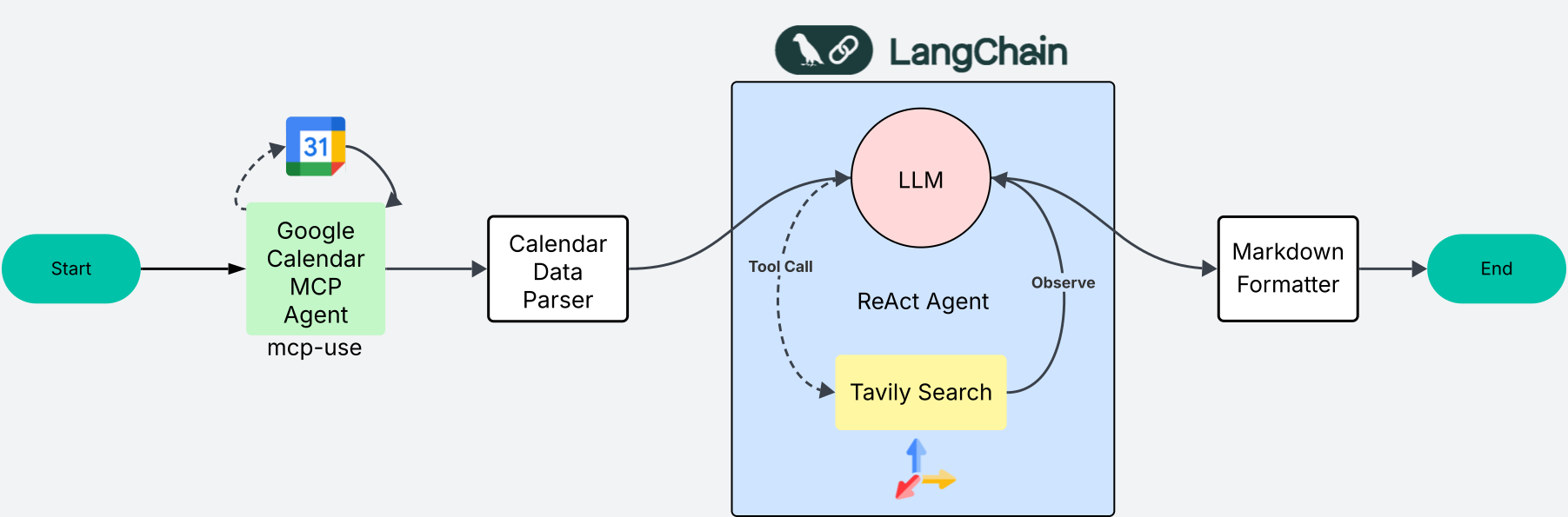
### Step 2: Read The Open Source Code and Clone the App
## System Diagram
## Features
1. **Real-time Web Search**: Instantly fetches up-to-date information using Tavily's search API.
2. **Agentic Reasoning**: Combines MCP and ReAct agent flows for smarter, context-aware responses.
3. **Streaming Substeps**: See agentic reasoning and substeps streamed live for transparency.
4. **Citations**: All web search results are cited for easy verification.
5. **Google Calendar Integration**: (via mcp-use) Access and analyze your meeting data.
6. **Async FastAPI Backend**: High-performance, async-ready backend for fast responses.
7. **Modern React Frontend**: Interactive UI for dynamic user interactions.
---
# Source: https://docs.tavily.com/documentation/integrations/n8n.md
> ## Documentation Index
> Fetch the complete documentation index at: https://docs.tavily.com/llms.txt
> Use this file to discover all available pages before exploring further.
# n8n
> Tavily is now available for no-code integration through n8n.
## Introduction
Integrate Tavily with n8n to enhance your workflows with real-time web search and content extraction—without writing code. With Tavily's powerful search and extraction capabilities, you can seamlessly integrate up-to-date online information into your n8n automations.
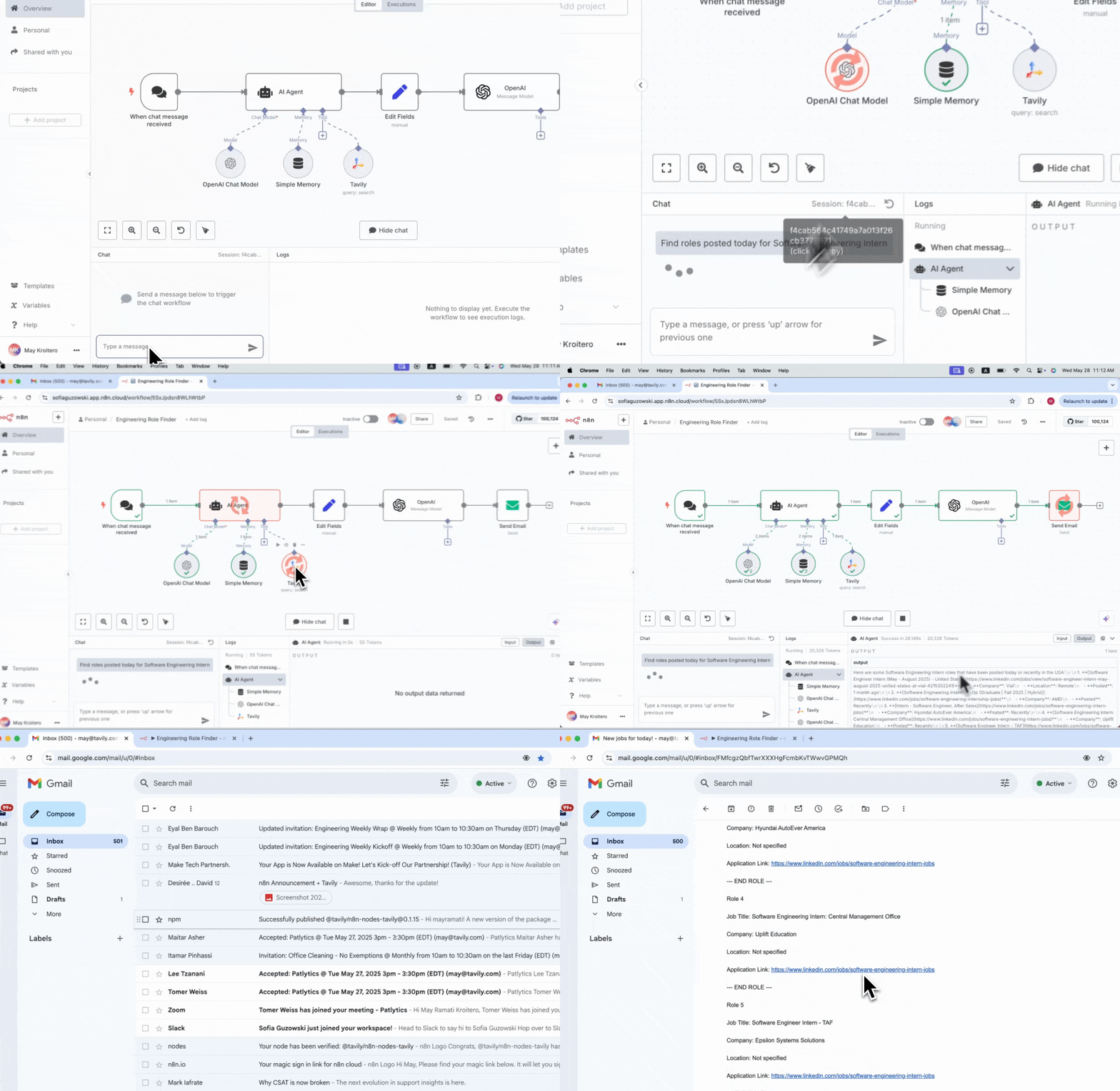
## How to set up Tavily with n8n
Log in to your n8n account or self-hosted instance.
Create a new workflow and select a trigger node to start your automation.
Option 1: Add Tavily as a Node
In the node library, search for Tavily. Add it to your workflow and choose between Search or Extract actions.
Option 2: Add Tavily as a Tool to an AI Agent
If you are building an AI agent workflow, you can add Tavily as a tool to your agent. This allows your agent to use Tavily for web search or content extraction as part of its reasoning process.
Connection: Connect your Tavily account by entering your Tavily API key.
Configuration: Set up your parameters:
For Search:
Enter your search query (can be manually entered or populated from another node's output)
Select a topic ("general" or "news")
Choose whether to include raw content or generate an answer
Specify domains to include or exclude
Set search depth and other optional parameters
For Extract:
Enter the URL(s) to extract content from (can be a single URL or multiple URLs from another node's output)
Choose extraction type ("basic" or "advanced")
Test: Run a test to verify your configuration.
Utilize the search or extraction results in your workflow:
Process data through additional nodes
Send information to your CRM, database, or email
Generate reports or notifications
Feed data into AI models for further processing
## Use cases for Tavily in n8n
Leverage Tavily's capabilities to create powerful automated workflows:
* **Job Search Automation**: Find and summarize new job postings, then send results to your inbox
* **Competitive Intelligence**: Automatically gather and analyze competitor information
* **Market Research**: Track industry trends and market developments
* **Content Curation**: Collect and organize relevant content for your business
* **Lead Enrichment**: Enhance lead data with real-time information
* **News Monitoring**: Stay updated with the latest developments in your field
## Detailed example – Automated job search
Create an automated workflow that uses an AI agent with Tavily as a tool for web search to find new "Software Engineering Intern Roles" on the web, summarizes the results, and sends them to your email.
Trigger: Schedule the workflow to run daily or weekly
AI Agent: Add an AI agent node to your workflow
Add Tavily as a Tool: In the AI agent configuration, add Tavily as a tool for web search
Search: The AI agent uses Tavily to find new "Software Engineering Intern Roles"
Summarize: The AI agent summarizes the search results using its LLM capabilities
Email: Use the Email node to send the summarized results to your inbox
## Best practices
To optimize your Tavily integration in n8n:
* Use the SplitInBatches node to process multiple search results efficiently
* Use filters to process only relevant results
* Use the Merge node to combine multiple search results
---
# Source: https://docs.tavily.com/documentation/integrations/openai.md
> ## Documentation Index
> Fetch the complete documentation index at: https://docs.tavily.com/llms.txt
> Use this file to discover all available pages before exploring further.
# OpenAI
> Integrate Tavily with OpenAI to enhance your AI applications with real-time web search capabilities.
## Introduction
This guide shows you how to integrate Tavily with OpenAI to create more powerful and informed AI applications. By combining OpenAI's language models with Tavily's real-time web search capabilities, you can build AI systems and agentic AI applications that access current information and provide up-to-date responses.
## Prerequisites
Before you begin, make sure you have:
* An OpenAI API key from [OpenAI Platform](https://platform.openai.com/)
* A Tavily API key from [Tavily Dashboard](https://app.tavily.com/sign-in)
## Installation
Install the required packages:
```bash theme={null}
pip install openai tavily-python
```
## Setup
Set up your API keys:
```python theme={null}
import os
# Set your API keys
os.environ["OPENAI_API_KEY"] = "your-openai-api-key"
os.environ["TAVILY_API_KEY"] = "your-tavily-api-key"
```
## Using Tavily with OpenAI agents SDK
```bash theme={null}
pip install -U openai-agents
```
```python theme={null}
import os
import asyncio
from agents import Agent, Runner, function_tool
from tavily import TavilyClient
tavily_client = TavilyClient(api_key=os.environ["TAVILY_API_KEY"])
```
```python theme={null}
@function_tool
def tavily_search(query: str) -> str:
"""
Perform a web search using Tavily and return a summarized result.
"""
response = tavily_client.search(query,search_depth='advanced',max_results='5')
results = response.get("results", [])
return results or "No results found."
```
> **Note:** You can enhance the function by adding more parameters like `topic="news"`, `include_domains=["example.com"]`, `time_range="week"`, etc. to customize your search results.
> You can set `auto_parameters=True` to have Tavily automatically configure search parameters based on the content and intent of your query. You can still set other parameters manually, and any explicit values you provide will override the automatic ones.
```python theme={null}
async def main():
agent = Agent(
name="Web Research Agent",
instructions="Use tavily_search when you need up-to-date info.",
tools=[tavily_search],
)
out = await Runner.run(agent, "Latest developments about quantum computing from 2025")
print(out.final_output)
```
```python theme={null}
asyncio.run(main())
```
```python theme={null}
import os
import asyncio
from agents import Agent, Runner, function_tool
from tavily import TavilyClient
tavily_client = TavilyClient(api_key=os.environ["TAVILY_API_KEY"])
@function_tool
def tavily_search(query: str) -> str:
"""
Perform a web search using Tavily and return a summarized result.
"""
response = tavily_client.search(query,search_depth='advanced',max_results='5')
results = response.get("results", [])
return results or "No results found."
async def main():
agent = Agent(
name="Web Research Agent",
instructions="Use tavily_search when you need up-to-date info.",
tools=[tavily_search],
)
out = await Runner.run(agent, "Latest developments about quantum computing from 2025")
print(out.final_output)
asyncio.run(main())
```
## Using Tavily with OpenAI Chat Completions API function calling
```python theme={null}
import os
import json
from tavily import TavilyClient
from openai import OpenAI
# Load your API keys from environment variables
tavily_client = TavilyClient(api_key=os.environ["TAVILY_API_KEY"])
openai_client = OpenAI(api_key=os.environ["OPENAI_API_KEY"])
```
### Function definition
Define a function that OpenAI can call to perform searches:
```python theme={null}
def tavily_search(**kwargs):
# Pass ALL supported kwargs straight to Tavily
results = tavily_client.search(**kwargs)
return results
```
```python theme={null}
# --- define tools ---
tools = [
{
"type": "function",
"function": {
"name": "tavily_search",
"description": "Search the web with Tavily for up-to-date information",
"parameters": {
"type": "object",
"properties": {
"query": {"type": "string", "description": "The search query"},
"max_results": {"type": "integer", "default": 5},
},
"required": ["query"],
},
},
}
]
```
Scroll to the bottom to find the full json schema for search, extract, map and crawl
```python theme={null}
# --- conversation ---
messages = [
{"role": "system", "content": "You are a helpful assistant that uses Tavily search when needed."},
{"role": "user", "content": "What are the top trends in 2025 about AI agents?"}
]
```
```python theme={null}
#Ask the model; let it decide whether to call the tool
response = openai_client.chat.completions.create(
model="gpt-4o-mini",
messages=messages,
tools=tools,
)
```
```python theme={null}
assistant_msg = response.choices[0].message
# keep the assistant msg that requested tool(s)
messages.append(assistant_msg)
```
```python theme={null}
if getattr(assistant_msg, "tool_calls", None):
for tc in assistant_msg.tool_calls:
args = tc.function.arguments
if isinstance(args, str):
args = json.loads(args)
elif not isinstance(args, dict):
args = json.loads(str(args))
if tc.function.name == "tavily_search":
# forward ALL args
results = tavily_search(**args)
messages.append({
"role": "tool",
"tool_call_id": tc.id,
"name": "tavily_search",
"content": json.dumps(results),
})
else:
print("\nNo tool call requested by the model.")
```
```python theme={null}
# Ask the model again for the final grounded answer
final = openai_client.chat.completions.create(
model="gpt-4o-mini",
messages=messages,
)
final_msg = final.choices[0].message
print("\nFINAL ANSWER:\n", final_msg.content or "(no content)")
```
```python theme={null}
import os
import json
from tavily import TavilyClient
from openai import OpenAI
# --- setup ---
tavily_client = TavilyClient(api_key=os.environ["TAVILY_API_KEY"])
openai_client = OpenAI(api_key=os.environ["OPENAI_API_KEY"])
def tavily_search(**kwargs):
# Pass ALL supported kwargs straight to Tavily
results = tavily_client.search(**kwargs)
return results
# --- define tools ---
tools = [
{
"type": "function",
"function": {
"name": "tavily_search",
"description": "Search the web with Tavily for up-to-date information",
"parameters": {
"type": "object",
"properties": {
"query": {"type": "string", "description": "The search query"},
"max_results": {"type": "integer", "default": 5},
},
"required": ["query"],
},
},
}
]
# --- conversation ---
messages = [
{"role": "system", "content": "You are a helpful assistant that uses Tavily search when needed."},
{"role": "user", "content": "What are the top trends in 2025 about AI agents?"}
]
#Ask the model; let it decide whether to call the tool
response = openai_client.chat.completions.create(
model="gpt-4o-mini",
messages=messages,
tools=tools,
)
assistant_msg = response.choices[0].message
messages.append(assistant_msg) # keep the assistant msg that requested tool(s)
if getattr(assistant_msg, "tool_calls", None):
for tc in assistant_msg.tool_calls:
args = tc.function.arguments
if isinstance(args, str):
args = json.loads(args)
elif not isinstance(args, dict):
args = json.loads(str(args))
if tc.function.name == "tavily_search":
# forward ALL args
results = tavily_search(**args)
messages.append({
"role": "tool",
"tool_call_id": tc.id,
"name": "tavily_search",
"content": json.dumps(results),
})
else:
print("\nNo tool call requested by the model.")
# Ask the model again for the final grounded answer
final = openai_client.chat.completions.create(
model="gpt-4o-mini",
messages=messages,
)
final_msg = final.choices[0].message
print("\nFINAL ANSWER:\n", final_msg.content or "(no content)")
```
## Using Tavily with OpenAI Responses API function calling
```python theme={null}
import os
import json
from tavily import TavilyClient
from openai import OpenAI
# --- setup ---
tavily_client = TavilyClient(api_key=os.environ["TAVILY_API_KEY"])
openai_client = OpenAI(api_key=os.environ["OPENAI_API_KEY"])
```
### Function definition
Define a function that OpenAI can call to perform searches:
```python theme={null}
# --- Function that will be called when AI requests a search ---
def tavily_search(**kwargs):
"""
Execute a Tavily web search with the given parameters.
This function is called by the AI when it needs to search the web.
"""
results = tavily_client.search(**kwargs)
return results
```
```python theme={null}
# Define the tool for Tavily web search
# This tells the AI what function it can call and what parameters it needs
tools = [{
"type": "function",
"name": "tavily_search",
"description": "Search the web using Tavily. Provide relevant links in your answer.",
"parameters": {
"type": "object",
"properties": {
"query": {
"type": "string",
"description": "Search query for Tavily."
},
"max_results": {
"type": "integer",
"description": "Max number of results to return",
"default": 5
}
},
"required": ["query", "max_results"],
"additionalProperties": False
},
"strict": True
}]
```
Scroll to the bottom to find the full json schema for search, extract, map and crawl
```python theme={null}
# --- Step 1: Create initial conversation ---
# This sets up the conversation context for the AI
input_list = [
{"role": "system", "content": "You are a helpful assistant that uses Tavily search when needed."},
{"role": "user", "content": "What are the top trends in 2025 about AI agents?"}
]
# --- Step 2: First API call - AI decides to search ---
# The AI will analyze the user's question and decide if it needs to search the web
response = openai_client.responses.create(
model="gpt-4o-mini",
tools=tools,
input=input_list,
)
# --- Step 3: Process the AI's response ---
# Add the AI's response (including any function calls) to our conversation
input_list += response.output
```
```python theme={null}
# --- Step 4: Execute any function calls the AI made ---
for item in response.output:
if item.type == "function_call":
if item.name == "tavily_search":
# Parse the arguments the AI provided for the search
parsed_args = json.loads(item.arguments)
# Execute the actual Tavily search
results = tavily_search(**parsed_args)
# Add the search results back to the conversation
# This tells the AI what it found when it searched
function_output = {
"type": "function_call_output",
"call_id": item.call_id,
"output": json.dumps({
"results": results
})
}
input_list.append(function_output)
```
```python theme={null}
# --- Step 5: Second API call - AI provides final answer ---
# Now the AI has the search results and can provide an informed response
response = openai_client.responses.create(
model="gpt-4o-mini",
instructions="Based on the Tavily search results provided, give me a comprehensive summary with citations.",
input=input_list,
)
# --- Display the final result ---
print("AI Response:")
print(response.output_text)
```
```python theme={null}
import os
import json
from tavily import TavilyClient
from openai import OpenAI
# --- Setup: Initialize API clients ---
tavily_client = TavilyClient(api_key=os.environ["TAVILY_API_KEY"])
openai_client = OpenAI(api_key=os.environ["OPENAI_API_KEY"])
# --- Function that will be called when AI requests a search ---
def tavily_search(**kwargs):
"""
Execute a Tavily web search with the given parameters.
This function is called by the AI when it needs to search the web.
"""
results = tavily_client.search(**kwargs)
return results
# --- Define the search tool for OpenAI to use ---
# This tells the AI what function it can call and what parameters it needs
tools = [{
"type": "function",
"name": "tavily_search",
"description": "Search the web using Tavily. Provide relevant links in your answer.",
"parameters": {
"type": "object",
"properties": {
"query": {
"type": "string",
"description": "Search query for Tavily."
},
"max_results": {
"type": "integer",
"description": "Max number of results to return",
"default": 5
}
},
"required": ["query", "max_results"],
"additionalProperties": False
},
"strict": True
}]
# --- Step 1: Create initial conversation ---
# This sets up the conversation context for the AI
input_list = [
{"role": "system", "content": "You are a helpful assistant that uses Tavily search when needed."},
{"role": "user", "content": "What are the top trends in 2025 about AI agents?"}
]
# --- Step 2: First API call - AI decides to search ---
# The AI will analyze the user's question and decide if it needs to search the web
response = openai_client.responses.create(
model="gpt-4o-mini",
tools=tools,
input=input_list,
)
# --- Step 3: Process the AI's response ---
# Add the AI's response (including any function calls) to our conversation
input_list += response.output
# --- Step 4: Execute any function calls the AI made ---
for item in response.output:
if item.type == "function_call":
if item.name == "tavily_search":
# Parse the arguments the AI provided for the search
parsed_args = json.loads(item.arguments)
# Execute the actual Tavily search
results = tavily_search(**parsed_args)
# Add the search results back to the conversation
# This tells the AI what it found when it searched
function_output = {
"type": "function_call_output",
"call_id": item.call_id,
"output": json.dumps({
"results": results
})
}
input_list.append(function_output)
# --- Step 5: Second API call - AI provides final answer ---
# Now the AI has the search results and can provide an informed response
response = openai_client.responses.create(
model="gpt-4o-mini",
instructions="Based on the Tavily search results provided, give me a comprehensive summary with citations.",
input=input_list,
)
# --- Display the final result ---
print("AI Response:")
print(response.output_text)
```
## Tavily endpoints schema for OpenAI Responses API tool definition
> **Note:** When using these schemas, you can customize which parameters are exposed to the model based on your specific use case. For example, if you are building a finance application, you might set `topic`: `"finance"` for all queries without exposing the `topic` parameter. This way, the LLM can focus on deciding other parameters, such as `time_range`, `country`, and so on, based on the user’s request. Feel free to modify these schemas as needed and only pass the parameters that are relevant to your application.
> **API Format:** The schemas below are for OpenAI Responses API. For Chat Completions API, wrap the parameters in a `"function"` object: `{"type": "function", "function": {"name": "...", "parameters": {...}}}`.
```python theme={null}
tools = [
{
"type": "function",
"name": "tavily_search",
"description": "A powerful web search tool that provides comprehensive, real-time results using Tavily's AI search engine. Returns relevant web content with customizable parameters for result count, content type, and domain filtering. Ideal for gathering current information, news, and detailed web content analysis.",
"parameters": {
"type": "object",
"additionalProperties": False,
"required": ["query"],
"properties": {
"query": {
"type": "string",
"description": "Search query"
},
"auto_parameters": {
"type": "boolean",
"default": False,
"description": "Auto-tune parameters based on the query. Explicit values you pass still win."
},
"topic": {
"type": "string",
"enum": ["general", "news","finance"],
"default": "general",
"description": "The category of the search. This will determine which of our agents will be used for the search"
},
"search_depth": {
"type": "string",
"enum": ["basic", "advanced"],
"default": "basic",
"description": "The depth of the search. It can be 'basic' or 'advanced'"
},
"chunks_per_source": {
"type": "integer",
"minimum": 1,
"maximum": 3,
"default": 3,
"description": "Chunks are short content snippets (maximum 500 characters each) pulled directly from the source."
},
"max_results": {
"type": "integer",
"minimum": 0,
"maximum": 20,
"default": 5,
"description": "The maximum number of search results to return"
},
"time_range": {
"type": "string",
"enum": ["day", "week", "month", "year"],
"description": "The time range back from the current date to include in the search results. This feature is available for both 'general' and 'news' search topics"
},
"start_date": {
"type": "string",
"format": "date",
"description": "Will return all results after the specified start date. Required to be written in the format YYYY-MM-DD."
},
"end_date": {
"type": "string",
"format": "date",
"description": "Will return all results before the specified end date. Required to be written in the format YYYY-MM-DD"
},
"include_answer": {
"description": "Include an LLM-generated answer. 'basic' is brief; 'advanced' is more detailed.",
"oneOf": [
{"type": "boolean"},
{"type": "string", "enum": ["basic", "advanced"]}
],
"default": False
},
"include_raw_content": {
"description": "Include the cleaned and parsed HTML content of each search result",
"oneOf": [
{"type": "boolean"},
{"type": "string", "enum": ["markdown", "text"]}
],
"default": False
},
"include_images": {
"type": "boolean",
"default": False,
"description": "Include a list of query-related images in the response"
},
"include_image_descriptions": {
"type": "boolean",
"default": False,
"description": "Include a list of query-related images and their descriptions in the response"
},
"include_favicon": {
"type": "boolean",
"default": False,
"description": "Whether to include the favicon URL for each result"
},
"include_usage": {
"type": "boolean",
"default": False,
"description": "Whether to include credit usage information in the response"
},
"include_domains": {
"type": "array",
"items": {"type": "string"},
"maxItems": 300,
"description": "A list of domains to specifically include in the search results, if the user asks to search on specific sites set this to the domain of the site"
},
"exclude_domains": {
"type": "array",
"items": {"type": "string"},
"maxItems": 150,
"description": "List of domains to specifically exclude, if the user asks to exclude a domain set this to the domain of the site"
},
"country": {
"type": "string",
"enum": ["afghanistan", "albania", "algeria", "andorra", "angola", "argentina", "armenia", "australia", "austria", "azerbaijan", "bahamas", "bahrain", "bangladesh", "barbados", "belarus", "belgium", "belize", "benin", "bhutan", "bolivia", "bosnia and herzegovina", "botswana", "brazil", "brunei", "bulgaria", "burkina faso", "burundi", "cambodia", "cameroon", "canada", "cape verde", "central african republic", "chad", "chile", "china", "colombia", "comoros", "congo", "costa rica", "croatia", "cuba", "cyprus", "czech republic", "denmark", "djibouti", "dominican republic", "ecuador", "egypt", "el salvador", "equatorial guinea", "eritrea", "estonia", "ethiopia", "fiji", "finland", "france", "gabon", "gambia", "georgia", "germany", "ghana", "greece", "guatemala", "guinea", "haiti", "honduras", "hungary", "iceland", "india", "indonesia", "iran", "iraq", "ireland", "israel", "italy", "jamaica", "japan", "jordan", "kazakhstan", "kenya", "kuwait", "kyrgyzstan", "latvia", "lebanon", "lesotho", "liberia", "libya", "liechtenstein", "lithuania", "luxembourg", "madagascar", "malawi", "malaysia", "maldives", "mali", "malta", "mauritania", "mauritius", "mexico", "moldova", "monaco", "mongolia", "montenegro", "morocco", "mozambique", "myanmar", "namibia", "nepal", "netherlands", "new zealand", "nicaragua", "niger", "nigeria", "north korea", "north macedonia", "norway", "oman", "pakistan", "panama", "papua new guinea", "paraguay", "peru", "philippines", "poland", "portugal", "qatar", "romania", "russia", "rwanda", "saudi arabia", "senegal", "serbia", "singapore", "slovakia", "slovenia", "somalia", "south africa", "south korea", "south sudan", "spain", "sri lanka", "sudan", "sweden", "switzerland", "syria", "taiwan", "tajikistan", "tanzania", "thailand", "togo", "trinidad and tobago", "tunisia", "turkey", "turkmenistan", "uganda", "ukraine", "united arab emirates", "united kingdom", "united states", "uruguay", "uzbekistan", "venezuela", "vietnam", "yemen", "zambia", "zimbabwe"],
"description": "Boost search results from a specific country. This will prioritize content from the selected country in the search results. Available only if topic is general. Country names MUST be written in lowercase, plain English, with spaces and no underscores."
}
}
}
}
]
```
```python theme={null}
tools = [
{
"type": "function",
"name": "tavily_extract",
"description": "A powerful web content extraction tool that retrieves and processes raw content from specified URLs, ideal for data collection, content analysis, and research tasks.",
"parameters": {
"type": "object",
"additionalProperties": False,
"required": ["urls"],
"properties": {
"urls": {
"type": "string",
"description": "List of URLs to extract content from"
},
"include_images": {
"type": "boolean",
"default": False,
"description": "Include a list of images extracted from the urls in the response"
},
"include_favicon": {
"type": "boolean",
"default": False,
"description": "Whether to include the favicon URL for each result"
},
"include_usage": {
"type": "boolean",
"default": False,
"description": "Whether to include credit usage information in the response"
},
"extract_depth": {
"type": "string",
"enum": ["basic", "advanced"],
"default": "basic",
"description": "Depth of extraction - 'basic' or 'advanced', if urls are linkedin use 'advanced' or if explicitly told to use advanced"
},
"timeout": {
"type": "number",
"enum": ["basic", "advanced"],
"minimum": 0,
"maximum": 60,
"default": None,
"description": "Maximum time in seconds to wait for the URL extraction before timing out. Must be between 1.0 and 60.0 seconds. If not specified, default timeouts are applied based on extract_depth: 10 seconds for basic extraction and 30 seconds for advanced extraction"
},
"format": {
"type": "string",
"enum": ["markdown", "text"],
"default": "markdown",
"description": "The format of the extracted web page content. markdown returns content in markdown format. text returns plain text and may increase latency."
}
}
}
}
]
```
```python theme={null}
tools = [
{
"type": "function",
"name": "tavily_map",
"description": "A powerful web mapping tool that creates a structured map of website URLs, allowing you to discover and analyze site structure, content organization, and navigation paths. Perfect for site audits, content discovery, and understanding website architecture.",
"parameters": {
"type": "object",
"additionalProperties": False,
"required": ["url"],
"properties": {
"url": {
"type": "string",
"description": "The root URL to begin the mapping"
},
"instructions": {
"type": "string",
"description": "Natural language instructions for the crawler"
},
"max_depth": {
"type": "integer",
"minimum": 1,
"maximum": 5,
"default": 1,
"description": "Max depth of the mapping. Defines how far from the base URL the crawler can explore"
},
"max_breadth": {
"type": "integer",
"minimum": 1,
"default": 20,
"description": "Max number of links to follow per level of the tree (i.e., per page)"
},
"limit": {
"type": "integer",
"minimum": 1,
"default": 50,
"description": "Total number of links the crawler will process before stopping"
},
"select_paths": {
"type": "array",
"items": {"type": "string"},
"description": "Regex patterns to select only URLs with specific path patterns (e.g., /docs/.*, /api/v1.*)"
},
"select_domains": {
"type": "array",
"items": {"type": "string"},
"description": "Regex patterns to select crawling to specific domains or subdomains (e.g., ^docs\\.example\\.com$)"
},
"exclude_paths": {
"type": "array",
"items": {"type": "string"},
"description": "Regex patterns to exclude URLs with specific path patterns (e.g., /admin/.*)."
},
"exclude_domains": {
"type": "array",
"items": {"type": "string"},
"description": "Regex patterns to exclude specific domains or subdomains"
},
"allow_external": {
"type": "boolean",
"default": True,
"description": "Whether to allow following links that go to external domains"
},
"include_usage": {
"type": "boolean",
"default": False,
"description": "Whether to include credit usage information in the response"
}
}
}
}
]
```
```python theme={null}
tools = [
{
"type": "function",
"name": "tavily_crawl",
"description": "A powerful web crawler that initiates a structured web crawl starting from a specified base URL. The crawler expands from that point like a tree, following internal links across pages. You can control how deep and wide it goes, and guide it to focus on specific sections of the site.",
"parameters": {
"type": "object",
"additionalProperties": False,
"required": ["url"],
"properties": {
"url": {
"type": "string",
"description": "The root URL to begin the crawl"
},
"instructions": {
"type": "string",
"description": "Natural language instructions for the crawler"
},
"max_depth": {
"type": "integer",
"minimum": 1,
"maximum": 5,
"default": 1,
"description": "Max depth of the crawl. Defines how far from the base URL the crawler can explore."
},
"max_breadth": {
"type": "integer",
"minimum": 1,
"default": 20,
"description": "Max number of links to follow per level of the tree (i.e., per page)"
},
"limit": {
"type": "integer",
"minimum": 1,
"default": 50,
"description": "Total number of links the crawler will process before stopping"
},
"select_paths": {
"type": "array",
"items": {"type": "string"},
"description": "Regex patterns to select only URLs with specific path patterns (e.g., /docs/.*, /api/v1.*)"
},
"select_domains": {
"type": "array",
"items": {"type": "string"},
"description": "Regex patterns to select crawling to specific domains or subdomains (e.g., ^docs\\.example\\.com$)"
},
"exclude_paths": {
"type": "array",
"items": {"type": "string"},
"description": "Regex patterns to exclude paths (e.g., /private/.*, /admin/.*)"
},
"exclude_domains": {
"type": "array",
"items": {"type": "string"},
"description": "Regex patterns to exclude domains/subdomains (e.g., ^private\\.example\\.com$)"
},
"allow_external": {
"type": "boolean",
"default": True,
"description": "Whether to allow following links that go to external domains"
},
"include_images": {
"type": "boolean",
"default": False,
"description": "Include images discovered during the crawl"
},
"extract_depth": {
"type": "string",
"enum": ["basic", "advanced"],
"default": "basic",
"description": "Advanced extraction retrieves more data, including tables and embedded content, with higher success but may increase latency"
},
"format": {
"type": "string",
"enum": ["markdown", "text"],
"default": "markdown",
"description": "The format of the extracted web page content. markdown returns content in markdown format. text returns plain text and may increase latency."
},
"include_favicon": {
"type": "boolean",
"default": False,
"description": "Whether to include the favicon URL for each result"
},
"include_usage": {
"type": "boolean",
"default": False,
"description": "Whether to include credit usage information in the response"
}
}
}
}
]
```
For more information about Tavily's capabilities, check out our [API documentation](/documentation/api-reference/introduction) and [best practices](/documentation/best-practices/best-practices-search).
---
# Source: https://docs.tavily.com/examples/quick-tutorials/product-news-tracker.md
# Product News Tracker
> Stay informed with real-time product news using Tavily's APIs.
## What will you learn?
In this use case, you'll discover how to gather a company's product news and updates using Tavily's Search API. This tutorial outlines how to get started with the Tavily Python SDK, how to properly configure search parameters for optimal results, and how to effectively interact with Tavily’s Search API to retrieve the latest product updates for a specified company.
## How does it work?
### Self-Reported News
Our system gathers official updates including **blog posts**, **product announcements**, and **company news** by utilizing the `include_domain` parameter. This allows us to focus specifically on content from:
* A company's official website
This domain-filtered approach ensures efficient credit usage while maintaining search accuracy.
### Third-Party Coverage
To capture external perspectives, we employ specialized news search parameters:
* Set `topic = news` to focus on reputable news sources
* Utilize `time_range = month` for current coverage
For the functionality discussed in this tutorial, `search_depth = basic` will
be sufficient to acheive the intended results.
## Getting Started
> We have prepared a [Jupyter Notebook](https://github.com/tavily-ai/tavily-tutorials/blob/main/product-news-tracker.ipynb) outlining the contents of this tutorial
First create an account and get your free API key.
Next, use the Tavily Python SDK to create the workflow.
```python Shell theme={null}
%pip install -q tavily-python python-dotenv ipykernel
```
```python Python theme={null}
import getpass
import os
if not os.environ.get("TAVILY_API_KEY"):
os.environ["TAVILY_API_KEY"] = getpass.getpass("TAVILY_API_KEY:\n")
TAVILY_API_KEY = os.getenv("TAVILY_API_KEY")
```
```python Python theme={null}
from tavily import TavilyClient
tavily_client = TavilyClient()
```
```python Python theme={null}
def search_product_updates(company_name: str, domains: list):
all_results = []
# Search for self-reported news
company_results = tavily_client.search(
query=f"{company_name} product news, updates, releases, and announcements",
search_depth="basic",
max_results=10,
include_domains=domains
)
for result in company_results["results"]:
result["search_type"] = "Self-reported News"
all_results.append(result)
# Search for third-party coverage
news_results = tavily_client.search(
query=f"{company_name} product news, updates, releases, and announcements",
search_depth="basic",
max_results=10,
time_range="month",
topic="news"
)
for result in news_results["results"]:
result["search_type"] = "Third-party Coverage"
all_results.append(result)
return all_results
```
```python Python theme={null}
product_updates = search_product_updates(
"OpenAI", ["openai.com"]
)
product_updates
```
```json Shell theme={null}
[
{
"title": "OpenAI launches new tools to help businesses build AI agents - TechCrunch",
"url": "https://techcrunch.com/2025/03/11/openai-launches-new-tools-to-help-businesses-build-ai-agents/",
"score": 0.70847535,
"published_date": "Tue, 11 Mar 2025 17:00:00 GMT",
"content": "OpenAI launches new tools to help businesses build AI agents | TechCrunch OpenAI launches new tools to help businesses build AI agents | TechCrunch On Tuesday, OpenAI released new tools designed to help developers and enterprises build AI agents – automated systems that can independently accomplish tasks – using the company’s own AI models and frameworks. The tools are part of OpenAI’s new Responses API, which lets businesses develop custom AI agents that can perform web searches, scan through company files, and navigate websites, much like OpenAI’s Operator product. Using the Responses API, developers can tap the same AI models (in preview) under the hood of OpenAI’s ChatGPT Search web search tool: GPT-4o search and GPT-4o mini search.",
"search_type": "Third-party Coverage"
},
{
"title": "New embedding models and API updates - Announcements - OpenAI Developer ...",
"url": "https://community.openai.com/t/new-embedding-models-and-api-updates/610540",
"score": 0.752468,
"content": "We are releasing new models, reducing prices for GPT-3.5 Turbo, and introducing new ways for developers to manage API keys and understand API usage. The new models include: Two new embedding models An updated GPT-4 Turbo preview model An updated GPT-3.5 Turbo model An updated text moderation model By default, data sent to the OpenAI API will not be used to train or improve OpenAI models. All",
"search_type": "Self-reported News"
},
...
]
```
---
> To find navigation and other pages in this documentation, fetch the llms.txt file at: https://docs.tavily.com/llms.txt
---
# Source: https://docs.tavily.com/examples/open-sources/projects.md
> ## Documentation Index
> Fetch the complete documentation index at: https://docs.tavily.com/llms.txt
> Use this file to discover all available pages before exploring further.
# Projects
> Explore our collection of popular open source projects that showcase Tavily's use cases and capabilities.
export const GitHubRepoCard = ({repoData, repoUrl, isLoading}) => {
if (isLoading) {
return
;
};
---
# Source: https://docs.tavily.com/documentation/integrations/pydantic-ai.md
> ## Documentation Index
> Fetch the complete documentation index at: https://docs.tavily.com/llms.txt
> Use this file to discover all available pages before exploring further.
# Pydantic AI
> Tavily is now available for integration through Pydantic AI.
## Introduction
Integrate[Tavily with Pydantic AI](https://ai.pydantic.dev/common-tools/#tavily-search-tool) to enhance your AI agents with powerful web search capabilities. Pydantic AI provides a framework for building AI agents with tools, making it easy to incorporate real-time web search and data extraction into your applications.
## Step-by-Step Integration Guide
### Step 1: Install Required Packages
Install the necessary Python packages:
```bash theme={null}
pip install "pydantic-ai-slim[tavily]"
```
### Step 2: Set Up API Keys
* **Tavily API Key:** [Get your Tavily API key here](https://app.tavily.com/home)
Set this as an environment variable in your terminal or add it to your environment configuration file:
```bash theme={null}
export TAVILY_API_KEY=your_tavily_api_key
```
### Step 3: Initialize Pydantic AI Agent with Tavily Tools
```python theme={null}
import os
from pydantic_ai.agent import Agent
from pydantic_ai.common_tools.tavily import tavily_search_tool
# Get API key from environment
api_key = os.getenv('TAVILY_API_KEY')
assert api_key is not None
# Initialize the agent with Tavily tools
agent = Agent(
'openai:o3-mini',
tools=[tavily_search_tool(api_key)],
system_prompt='Search Tavily for the given query and return the results.'
)
```
### Step 4: Example Use Cases
```python theme={null}
# Example 1: Basic search for news
result = agent.run_sync('Tell me the top news in the GenAI world, give me links.')
print(result.output)
```
Example Response:
```markdown theme={null}
Here are some of the top recent news articles related to GenAI:
1. How CLEAR users can improve risk analysis with GenAI – Thomson Reuters
Read more: https://legal.thomsonreuters.com/blog/how-clear-users-can-improve-risk-analysis-with-genai/
(This article discusses how CLEAR's new GenAI-powered tool streamlines risk analysis by quickly summarizing key information from various public data sources.)
2. TELUS Digital Survey Reveals Enterprise Employees Are Entering Sensitive Data Into AI Assistants More Than You Think – FT.com
Read more: https://markets.ft.com/data/announce/detail?dockey=600-202502260645BIZWIRE_USPRX____20250226_BW490609-1
(This news piece highlights findings from a TELUS Digital survey showing that many enterprise employees use public GenAI tools and sometimes even enter sensitive data.)
3. The Essential Guide to Generative AI – Virtualization Review
Read more: https://virtualizationreview.com/Whitepapers/2025/02/SNOWFLAKE-The-Essential-Guide-to-Generative-AI.aspx
(This guide provides insights into how GenAI is revolutionizing enterprise strategies and productivity, with input from industry leaders.)
```
## Additional Use Cases
1. **Content Curation**: Gather and organize information from multiple sources
2. **Real-time Data Integration**: Keep your AI agents up-to-date with the latest information
3. **Technical Documentation**: Search and analyze technical documentation
4. **Market Analysis**: Conduct comprehensive market research and analysis
---
# Source: https://docs.tavily.com/sdk/python/quick-start.md
# Source: https://docs.tavily.com/sdk/javascript/quick-start.md
> ## Documentation Index
> Fetch the complete documentation index at: https://docs.tavily.com/llms.txt
> Use this file to discover all available pages before exploring further.
# Quickstart
> Integrate Tavily's powerful APIs natively in your JavaScript/TypeScript projects.
Looking for the JavaScript SDK Reference? Head to our [JavaScript SDK
Reference](/sdk/javascript/reference) and learn how to use `tavily-js`.
{" "}
## Introduction
Tavily's JavaScript SDK allows for easy interaction with the Tavily API, offering the full range of our search and extract functionalities directly from your JavaScript and TypeScript programs. Easily integrate smart search and content extraction capabilities into your applications, harnessing Tavily's powerful search and extract features.
`/tavily-ai/tavily-js`
`@tavily/core`
## Quickstart
Get started with our JavaScript SDK in less than 5 minutes!
You get 1,000 free API Credits every month. **No credit card required.**
### Installation
You can install the Tavily JavaScript SDK using the following:
```bash theme={null}
npm i @tavily/core
```
### Usage
With Tavily's Python SDK, you can search the web in only 4 lines of code:
```javascript theme={null}
const { tavily } = require("@tavily/core");
const tvly = tavily({ apiKey: "tvly-YOUR_API_KEY" });
const response = await tvly.search("Who is Leo Messi?");
console.log(response);
```
You can also easily extract content from URLs:
```javascript theme={null}
const { tavily } = require("@tavily/core");
const tvly = tavily({ apiKey: "tvly-YOUR_API_KEY" });
const response = await tvly.extract(
"https://en.wikipedia.org/wiki/Lionel_Messi"
);
console.log(response);
```
Tavily also allows you to perform a smart crawl starting at a given URL.
Our agent-first crawl endpoint is currently in. Please repost any issues you encounter on our [community page](https://community.tavily.com).
```javascript theme={null}
const { tavily } = require("@tavily/core")
const tvly = tavily({ apiKey: "tvly-YOUR_API_KEY" });
const response = await client.crawl("https://docs.tavily.com", { instructions: "Find all pages on the Python SDK" });
console.log(response);
```
## Features
Our JavaScript SDK supports the full feature range of our [REST API](/documentation/api-reference/introduction). Our JavaScript client is asynchronous by default.
* The `search` function lets you harness the full power of Tavily Search.
* The `extract` function allows you to easily retrieve web content with Tavily Extract.
* The `crawl` and `map`functions allow you to intelligently traverse websites and extract content.
---
# Source: https://docs.tavily.com/documentation/quickstart.md
> ## Documentation Index
> Fetch the complete documentation index at: https://docs.tavily.com/llms.txt
> Use this file to discover all available pages before exploring further.
# Quickstart
> Start searching with Tavily in under 5 minutes.
## Get your free Tavily API key
Head to the [Tavily Platform](https://app.tavily.com) and sign in (or create an account). Then, copy one of your API keys from your dashboard.
You get 1,000 free API Credits every month. **No credit card required.**
## Install Tavily
Install the Tavily SDK in your language of choice.
```bash Python theme={null}
pip install tavily-python
```
```bash JavaScript theme={null}
npm i @tavily/core
```
## Start searching with Tavily
Run your first Tavily Search in 4 lines of code. Simply replace the API key in this snippet with your own.
```python Python theme={null}
from tavily import TavilyClient
tavily_client = TavilyClient(api_key="tvly-YOUR_API_KEY")
response = tavily_client.search("Who is Leo Messi?")
print(response)
```
```js JavaScript theme={null}
const { tavily } = require("@tavily/core");
const tvly = tavily({ apiKey: "tvly-YOUR_API_KEY" });
const response = await tvly.search("Who is Leo Messi?");
console.log(response);
```
```bash cURL theme={null}
curl -X POST https://api.tavily.com/search \
-H "Content-Type: application/json" \
-H "Authorization: Bearer tvly-YOUR_API_KEY" \
-d '{"query": "Who is Leo Messi?"}'
```
## Next steps
That's all it takes to start using Tavily's basic features!
If you want to learn how to implement more complex workflows in Python, check out our intermediate-level [Getting Started notebook](https://colab.research.google.com/drive/1dWGtS3u4ocCLebuaa8Ivz7BkZ_40IgH1).
Or, dive deep into our API and read about the different parameters on our [API Reference](/documentation/api-reference/introduction) page, and learn how to integrate natively with one of our [SDKs](/sdk).
---
# Source: https://docs.tavily.com/documentation/rate-limits.md
> ## Documentation Index
> Fetch the complete documentation index at: https://docs.tavily.com/llms.txt
> Use this file to discover all available pages before exploring further.
# Rate Limits
> Learn about Tavily's API rate limits for both development and production environments.
We offer two types of rate limits based on the environment associated with your API key.
Create your Development or Production API keys.
Environment
Requests per minute (RPM)
Development
100
Production
1,000
## Crawl Endpoint Rate Limits
The crawl endpoint has a separate rate limit that applies to both development and production keys:
Environment
Requests per minute (RPM)
Development
100
Production
100
1. Access to production keys requires either an active **Paid Plan** or **PAYGO** enabled. More information can be found [here](/guides/api-credits).
2. When using the REST API, ensure you include your API key in the header to apply the correct rate limits.
---
# Source: https://docs.tavily.com/sdk/python/reference.md
# Source: https://docs.tavily.com/sdk/javascript/reference.md
> ## Documentation Index
> Fetch the complete documentation index at: https://docs.tavily.com/llms.txt
> Use this file to discover all available pages before exploring further.
# SDK Reference
> Integrate Tavily's powerful APIs natively in your JavaScript/TypeScript projects.
## Instantiating a client
To interact with Tavily in JavaScript, you must instatiate a client with your API key. Our client is asynchronous by default.
Once you have instantiated a client, call one of our supported methods (detailed below) to access the API.
```javascript theme={null}
const { tavily } = require("@tavily/core");
client = tavily({ apiKey: "tvly-YOUR_API_KEY" });
```
### Proxies
If you would like to specify a proxy to be used when making requests, you can do so by passing in a proxy parameter on client instantiation.
Proxy configuration is available in both the synchronous and asynchronous clients.
```javascript theme={null}
const { tavily } = require("@tavily/core");
const proxies = {
http: "",
https: "",
};
client = tavily({ apiKey: "tvly-YOUR_API_KEY", proxies });
```
Alternatively, you can specify which proxies to use by setting the `TAVILY_HTTP_PROXY` and `TAVILY_HTTPS_PROXY` variables in your environment file.
### Project Tracking
You can attach a Project ID to your client to organize and track API usage by project. This is useful when a single API key is used across multiple projects.
```javascript theme={null}
const { tavily } = require("@tavily/core");
const client = tavily({
apiKey: "tvly-YOUR_API_KEY",
projectId: "your-project-id"
});
```
Alternatively, you can set the `TAVILY_PROJECT` environment variable:
```javascript theme={null}
process.env.TAVILY_PROJECT = "your-project-id";
const client = tavily({ apiKey: "tvly-YOUR_API_KEY" });
```
All requests made with this client will include the Project ID, allowing you to filter by project in the /logs endpoint and platform usage dashboard.
## Tavily Search
**NEW!** Try our interactive [API
Playground](https://app.tavily.com/playground) to see each parameter in
action, and generate ready-to-use JavaScript snippets.
You can access Tavily Search in JavaScript through the client's `search` function.
### Parameters
| Parameter | Type | Description | Default |
| :------------------------- | :-------------------- | :-------------------------------------------------------------------------------------------------------------------------------------------------------------------------------------------------------------------------------------------------------------------------------------------------------------------------------------------------------------------------------------------------------------------------------------------------------------------------------------------------------------------------------------------------------------------------------------------------- | :---------- |
| `query` **(required)** | `string` | The query to run a search on. | — |
| `auto_parameters` | `boolean` | When `auto_parameters` is enabled, Tavily automatically configures search parameters based on your query's content and intent. You can still set other parameters manually, and your explicit values will override the automatic ones. The parameters `include_answer`, `include_raw_content`, and `max_results` must always be set manually, as they directly affect response size. Note: `search_depth` may be automatically set to advanced when it's likely to improve results. This uses 2 API credits per request. To avoid the extra cost, you can explicitly set `search_depth` to `basic`. | `false` |
| `searchDepth` | `string` | The depth of the search. It can be `"basic"` or `"advanced"`. `"advanced"` search is tailored to retrieve the most relevant sources and `content` snippets for your query, while `"basic"` search provides generic content snippets from each source. | `"basic"` |
| `topic` | `string` | The category of the search. Determines which agent will be used. Supported values are `"general"` , `"news"` and `"finance"`. | `"general"` |
| `timeRange` | `string` | The time range back from the current date based on publish date or last updated date. Accepted values include `"day"`, `"week"`, `"month"`, `"year"` or shorthand values `"d"`, `"w"`, `"m"`, `"y"`. | — |
| `startDate` | `string` | Will return all results after the specified start date based on publish date or last updated date. Required to be written in the format YYYY-MM-DD | — |
| `endDate` | `string` | Will return all results before the specified end date based on publish date or last updated date. Required to be written in the format YYYY-MM-DD. | — |
| `maxResults` | `number` | The maximum number of search results to return. It must be between `0` and `20`. | `5` |
| `chunksPerSource` | `number` | Chunks are short content snippets (maximum 500 characters each) pulled directly from the source. Use `chunksPerSource` to define the maximum number of relevant chunks returned per source and to control the `content` length. Chunks will appear in the `content` field as: ` [...] [...] `. Available only when `searchDepth` is `"advanced"`. | `3` |
| `includeImages` | `boolean` | Include a list of query-related images in the response. | `false` |
| `includeImageDescriptions` | `boolean` | Include a list of query-related images and their descriptions in the response. | `false` |
| `includeAnswer` | `boolean` or `string` | Include an answer to the query generated by an LLM based on search results. A `"basic"` (or `true`) answer is quick but less detailed; an `"advanced"` answer is more detailed. | `false` |
| `includeRawContent` | `boolean` or `string` | Include the cleaned and parsed HTML content of each search result. `"markdown"` or `True` returns search result content in markdown format. `"text"` returns the plain text from the results and may increase latency. | `False` |
| `includeDomains` | `string[]` | A list of domains to specifically include in the search results. Maximum 300 domains. | `[]` |
| `excludeDomains` | `string[]` | A list of domains to specifically exclude from the search results. Maximum 150 domains. | `[]` |
| `country` | `string` | Boost search results from a specific country. This will prioritize content from the selected country in the search results. Available only if topic is `general`. | — |
| `timeout` | `number` | A timeout to be used in requests to the Tavily API. | `60` |
| `includeFavicon` | `boolean` | Whether to include the favicon URL for each result. | `false` |
| `includeUsage` | `boolean` | Whether to include credit usage information in the response. | `false` |
### Response format
The response object you receive will be in the following format:
| Key | Type | Description |
| :------------------- | :---------------------------- | :----------------------------------------------------------------------------------------------------------------------------------------------------------------------------------- |
| `results` | `Result[]` | A list of sorted search results ranked by relevancy. |
| `query` | `string` | Your search query. |
| `responseTime` | `number` | Your search result response time. |
| `requestId` | `string` | A unique request identifier you can share with customer support to help resolve issues with specific requests. |
| `answer` (optional) | `string` | The answer to your search query, generated by an LLM based on Tavily's search results. This is only available if `includeAnswer` is set to `true`. |
| `images` (optional) | `string[]` or `ImageResult[]` | This is only available if `includeImages` is set to `true`. A list of query-related image URLs. If `includeImageDescriptions` is set to `true`, each entry will be an `ImageResult`. |
| `favicon` (optional) | `string` | The favicon URL for the search result. |
### Results
Each result in the `results` list will be in the following `Result` format:
| Key | Type | Description |
| :------------------------- | :------- | :------------------------------------------------------------------------------------------------------------------------------------------------------ |
| `title` | `string` | The title of the search result. |
| `url` | `string` | The URL of the search result. |
| `content` | `string` | The most query-related content from the scraped URL. Tavily uses proprietary AI to extract the most relevant content based on context quality and size. |
| `score` | `float` | The relevance score of the search result. |
| `rawContent` (optional) | `string` | The parsed and cleaned HTML content of the site. This is only available if `includeRawContent` is set to `true`. |
| `publishedDate` (optional) | `string` | The publication date of the source. This is only available if the search `topic` is set to `news`. |
| `favicon` (optional) | `string` | "The favicon URL for the result. |
#### Image Results
Each image in the `images` list will be in the following `ImageResult` format:
| Key | Type | Description |
| :----------------------- | :------- | :---------------------------------------------------------------------------------------------------------------- |
| `url` | `string` | The URL of the image. |
| `description` (optional) | `string` | This is only available if `includeImageDescriptions` is set to `true`. An LLM-generated description of the image. |
### Example
```javascript theme={null}
const { tavily } = require("@tavily/core");
// Step 1. Instantiating your Tavily client
const tvly = tavily({ apiKey: "tvly-YOUR_API_KEY" });
// Step 2. Executing a simple search query
const response = await tvly.search("Who is Leo Messi?");
// Step 3. That's it! You've done a Tavily Search!
console.log(response);
```
```json theme={null}
{
"query": "Who is Leo Messi?",
"images": [
{
"url": "Image 1 URL",
"description": "Image 1 Description"
},
{
"url": "Image 2 URL",
"description": "Image 2 Description"
},
{
"url": "Image 3 URL",
"description": "Image 3 Description"
},
{
"url": "Image 4 URL",
"description": "Image 4 Description"
},
{
"url": "Image 5 URL",
"description": "Image 5 Description"
}
],
"results": [
{
"title": "Source 1 Title",
"url": "Source 1 URL",
"content": "Source 1 Content",
"score": 0.99,
"favicon": "https://source1.com/favicon.ico"
},
{
"title": "Source 2 Title",
"url": "Source 2 URL",
"content": "Source 2 Content",
"score": 0.97,
"favicon": "https://source2.com/favicon.ico"
}
],
"responseTime": 1.09,
"requestId": "123e4567-e89b-12d3-a456-426614174111"
}
```
## Tavily Extract
You can access Tavily Extract in JavaScript through the client's `extract` function.
### Parameters
| Parameter | Type | Description | Default |
| :-------------------- | :--------- | :------------------------------------------------------------------------------------------------------------------------------------------------------------------------------------------------------------------------------------------------------------------------------------------------------------------------------------------------------------------------------------------------- | :----------- |
| `urls` **(required)** | `string[]` | The URLs you want to extract. The list must not contain more than 20 URLs. | — |
| `includeImages` | `boolean` | Include a list of images extracted from the URLs in the response. | `false` |
| `extractDepth` | `string` | The depth of the extraction process. You may experience higher latency with `"advanced"` extraction, but it offers a higher success rate and retrieves more data from the URL (e.g., tables, embedded content). `"basic"` extraction costs 1 API Credit per 5 successful URL extractions, while `"advanced"` extraction costs 2 API Credits per 5 successful URL extractions. | `"basic"` |
| `format` | `str` | The format of the extracted web page content. `"markdown"` returns content in markdown format. `"text"` returns plain text and may increase latency. | `"markdown"` |
| `timeout` | `number` | A timeout to be used in requests to the Tavily API. Maximum time in seconds to wait for the URL extraction before timing out. Must be between 1.0 and 60.0 seconds. If not specified, default timeouts are applied based on extract\_depth: 10 seconds for basic extraction and 30 seconds for advanced extraction. | `None` |
| `includeFavicon` | `boolean` | Whether to include the favicon URL for each result. | `false` |
| `includeUsage` | `boolean` | Whether to include credit usage information in the response.`NOTE:`The value may be 0 if the total successful URL extractions has not yet reached 5 calls. See our [Credits & Pricing documentation](https://docs.tavily.com/documentation/api-credits) for details. | `false` |
| `query` | `string` | User intent for reranking extracted content chunks. When provided, chunks are reranked based on relevance to this query. | — |
| `chunksPerSource` | `number` | Chunks are short content snippets (maximum 500 characters each) pulled directly from the source. Use `chunksPerSource` to define the maximum number of relevant chunks returned per source and to control the `rawContent` length. Chunks will appear in the `rawContent` field as: ` [...] [...] `. Available only when `query` is provided. Must be between 1 and 5. | `3` |
### Response format
The response object you receive will be in the following format:
| Key | Type | Description |
| :--------------- | :------------------- | :------------------------------------------------------------------------------------------------------------- |
| `results` | `SuccessfulResult[]` | A list of extracted content. |
| `failed_results` | `FailedResult[]` | A list of URLs that could not be processed. |
| `response_time` | `number` | The search result response time. |
| `requestId` | `string` | A unique request identifier you can share with customer support to help resolve issues with specific requests. |
#### Successful Results
Each successful result in the `results` list will be in the following `SuccessfulResult` format:
| Key | Type | Description |
| :------------------- | :--------- | :--------------------------------------------------------------------------------------------------------------- |
| `url` | `string` | The URL of the webpage. |
| `raw_content` | `string` | The raw content extracted. When `query` is provided, contains the top-ranked chunks joined by `[...]` separator. |
| `images` (optional) | `string[]` | This is only available if `includeImages` is set to `true`. A list of extracted image URLs. |
| `favicon` (optional) | `string` | The favicon URL for the result. |
#### Failed Results
Each failed result in the `results` list will be in the following `FailedResult` format:
| Key | Type | Description |
| :------ | :------- | :--------------------------------------------------------- |
| `url` | `string` | The URL that failed. |
| `error` | `string` | An error message describing why it could not be processed. |
### Example
```python theme={null}
from tavily import TavilyClient
# Step 1. Instantiating your TavilyClient
tavily_client = TavilyClient(api_key="tvly-YOUR_API_KEY")
# Step 2. Defining the list of URLs to extract content from
urls = [
"https://en.wikipedia.org/wiki/Artificial_intelligence",
"https://en.wikipedia.org/wiki/Machine_learning",
"https://en.wikipedia.org/wiki/Data_science",
]
# Step 3. Executing the extract request
response = tavily_client.extract(urls=urls, include_images=True)
# Step 4. Printing the extracted raw content
print(response)
```
```javascript theme={null}
{
"results": [
{
"url": "https://en.wikipedia.org/wiki/Artificial_intelligence",
"rawContent": "URL 1 raw content",
"images": [
"Image 1 URL",
"Image 2 URL"
],
"favicon": "https://en.wikipedia.org/favicon.ico"
},
{
"url": "https://en.wikipedia.org/wiki/Machine_learning",
"rawContent": "URL 2 raw content",
"images": [
"Image 3 URL",
"Image 4 URL"
],
"favicon": "https://en.wikipedia.org/favicon.ico"
},
{
"url": "https://en.wikipedia.org/wiki/Data_science",
"rawContent": "URL 3 raw content",
"images": [
"Image 5 URL",
"Image 6 URL"
],
"favicon": "https://en.wikipedia.org/favicon.ico"
}
],
"failedResults": [],
"responseTime": 1.23,
"requestId": "123e4567-e89b-12d3-a456-426614174111"
}
```
## Tavily Crawl
You can access Tavily Crawl in JavaScript through the client's `crawl` function.
### Parameters
| Parameter | Type | Description | Default |
| :------------------- | :--------- | :-------------------------------------------------------------------------------------------------------------------------------------------------------------------------------------------------------------------------------------------------------------------------------------------------------------------------------------------------------- | :----------- |
| `url` **(required)** | `string` | The root URL to begin the crawl. | — |
| `maxDepth` | `number` | Max depth of the crawl. Defines how far from the base URL the crawler can explore. | `1` |
| `maxBreadth` | `number` | Max number of links to follow **per level** of the tree (i.e., per page). | `20` |
| `limit` | `number` | Total number of links the crawler will process before stopping. | `50` |
| `instructions` | `string` | Natural language instructions for the crawler. | — |
| `selectPaths` | `string[]` | **Regex patterns** to select only URLs with specific path patterns (e.g., `"/docs/.*"`, `"/api/v1.*"`). | `[]` |
| `selectDomains` | `string[]` | **Regex patterns** to select crawling to specific domains or subdomains (e.g., `"^docs\.example\.com$"`). | `[]` |
| `excludePaths` | `string[]` | **Regex patterns** to exclude URLs with specific path patterns (e.g., `"/admin/.*"`, `"/private/.*"`). | `[]` |
| `excludeDomains` | `string[]` | **Regex patterns** to exclude specific domains or subdomains from crawling (e.g., `"^admin\.example\.com$"`). | `[]` |
| `allowExternal` | `boolean` | Whether to return links from external domains in crawl output. | `true` |
| `includeImages` | `boolean` | Whether to extract image URLs from the crawled pages. | `false` |
| `extractDepth` | `string` | Advanced extraction retrieves more data, including tables and embedded content, with higher success but may increase latency. Options: `"basic"` or `"advanced"`. | `"basic"` |
| `format` | `str` | The format of the extracted web page content. `"markdown"` returns content in markdown format. `"text"` returns plain text and may increase latency. | `"markdown"` |
| `timeout` | `number` | Maximum time in seconds to wait for the crawl operation before timing out. Must be between 10 and 150 seconds. | `150` |
| `includeFavicon` | `boolean` | Whether to include the favicon URL for each result. | `false` |
| `includeUsage` | `boolean` | Whether to include credit usage information in the response.`NOTE:`The value may be 0 if the total use of /extract and /map calls has not yet reached minimum needed. See our [Credits & Pricing documentation](https://docs.tavily.com/documentation/api-credits) for details. | `false` |
| `chunksPerSource` | `number` | Chunks are short content snippets (maximum 500 characters each) pulled directly from the source. Use `chunksPerSource` to define the maximum number of relevant chunks returned per source and to control the `rawContent` length. Chunks will appear in the `rawContent` field as: ` [...] [...] `. Must be between 1 and 5. | `3` |
### Response format
The response object you receive will be in the following format:
| Key | Type | Description |
| :------------- | :--------- | :------------------------------------------------------------------------------------------------------------- |
| `baseUrl` | `string` | The URL you started the crawl from. |
| `results` | `Result[]` | A list of crawled pages. |
| `responseTime` | `number` | The crawl response time. |
| `requestId` | `string` | A unique request identifier you can share with customer support to help resolve issues with specific requests. |
#### Results
Each successful result in the `results` list will be in the following `Result` format:
| Key | Type | Description |
| :------------------- | :--------- | :---------------------------------- |
| `url` | `string` | The URL of the webpage. |
| `rawContent` | `string` | The raw content extracted. |
| `images` | `string[]` | Image URLs extracted from the page. |
| `favicon` (optional) | `string` | The favicon URL for the result. |
### Example
```javascript theme={null}
const { tavily } = require("@tavily/core");
// Step 1. Instantiating your Tavily client
const tvly = tavily({ apiKey: "tvly-YOUR_API_KEY" });
// Step 2. Defining the starting URL of the crawl
const url = "https://docs.tavily.com";
// Step 3. Executing the crawl with some guidance parameters
const response = await client.crawl(url, { instructions: "Find all info on the Python SDK" });
// Step 4. Printing the crawled results
console.log(response);
```
````javascript theme={null}
{
responseTime: 9.09,
baseUrl: "https://docs.tavily.com",
results: [
{
"url": "https://docs.tavily.com/sdk/python/reference",
"raw_content": "SDK Reference - Tavily Docs\n\n[Tavily Docs home page](https://tavily.com/)\n\nSearch or ask...\n\nCtrl K\n\n- [Support](mailto:support@tavily.com)\n- [Get an API key](https://app.tavily.com)\n- [Get an API key](https://app.tavily.com)\n\nSearch...\n\nNavigation\n\nPython\n\nSDK Reference\n\n[Home](/welcome)[Documentation](/documentation/about)[SDKs](/sdk/python/quick-start)[Examples](/examples/use-cases/data-enrichment)[FAQ](/faq/faq)\n\n- [API Playground](https://app.tavily.com/playground)\n- [Community](https://community.tavily.com)\n- [Blog](https://blog.tavily.com)\n\n##### Python\n\n- [Quickstart](/sdk/python/quick-start)\n- [SDK Reference](/sdk/python/reference)\n\n##### JavaScript\n\n- [Quickstart](/sdk/javascript/quick-start)\n- [SDK Reference](/sdk/javascript/reference)\n\nPython\n\n# SDK Reference\n\nIntegrate Tavily's powerful APIs natively in your Python apps.\n\n## [](#instantiating-a-client) Instantiating a client\n\nTo interact with Tavily in Python, you must instatiate a client with your API key. For greater flexibility, we provide both a synchronous and an asynchronous client class.\n\nOnce you have instantiated a client, call one of our supported methods (detailed below) to access the API.\n\n### [](#synchronous-client) Synchronous Client\n\nCopy\n\n```\nfrom tavily import TavilyClient\n\nclient = TavilyClient(\"tvly-YOUR_API_KEY\")\n\n```\n\n### [](#asynchronous-client) Asynchronous Client\n\nCopy\n\n```\nfrom tavily import AsyncTavilyClient\n\nclient = AsyncTavilyClient(\"tvly-YOUR_API_KEY\")\n\n```\n\n### [](#proxies) Proxies\n\nIf you would like to specify a proxy to be used when making requests, you can do so by passing in a proxy parameter on client instantiation.\n\nProxy configuration is available in both the synchronous and asynchronous clients.\n\nCopy\n\n```\nfrom tavily import TavilyClient\n\nproxies = {\n \"http\": \"\",\n \"https\": \"\",\n}\n\nclient = TavilyClient(\"tvly-YOUR_API_KEY\", proxies=proxies)\n\n```\n\nAlternatively, you can specify which proxies to use by setting the `TAVILY_HTTP_PROXY` and `TAVILY_HTTPS_PROXY` variables in your environment file.\n\n## [](#tavily-search) Tavily Search\n\n**NEW!** Try our interactive [API\nPlayground](https://app.tavily.com/playground) to see each parameter in\naction, and generate ready-to-use Python snippets.\n\nYou can access Tavily Search in Python through the client's `search` function.\n\n### [](#parameters) Parameters\n\n| Parameter | Type | Description | Default | |\n| --- | --- | --- | --- | --- |\n| `query` **(required)** | `str` | The query to run a search on. | — | |\n| `search_depth` | `str` | The depth of the search. It can be `\"basic\"` or `\"advanced\"`. `\"advanced\"` search is tailored to retrieve the most relevant sources and `content` snippets for your query, while `\"basic\"` search provides generic content snippets from each source. | `\"basic\"` | |\n| `topic` | `str` | The category of the search. Determines which agent will be used. Supported values are `\"general\"` and `\"news\"`. | `\"general\"` | |\n| `days` | `int` | The number of days back from the current date to include in the results. Available only when using the `\"news\"` topic. | `7` | |\n| `time_range` | `str` | The time range back from the current date. Accepted values include `\"day\"`, `\"week\"`, `\"month\"`, `\"year\"` or shorthand values `\"d\"`, `\"w\"`, `\"m\"`, `\"y\"`. | — | |\n| `max_results` | `int` | The maximum number of search results to return. It must be between `0` and `20`. | `5` | |\n| `chunks_per_source` | `int` | The number of `content` chunks to retrieve from each source. Each chunk's length is maximum 500 characters. It must be between `1` and `3`. Available only when `search_depth` is `advanced`. | `3` | |\n| `include_images` | `bool` | Include a list of query-related images in the response. | `False` | |\n| `include_image_descriptions` | `bool` | Include a list of query-related images and their descriptions in the response. | `False` | |\n| `include_answer` | `bool` or `str` | Include an answer to the query generated by an LLM based on search results. A `\"basic\"` (or `True`) answer is quick but less detailed; an `\"advanced\"` answer is more detailed. | `False` | |\n| `include_raw_content` | `bool` | Include the cleaned and parsed HTML content of each search result. | `False` | |\n| `include_domains` | `list[str]` | A list of domains to specifically include in the search results. | `[]` | |\n| `exclude_domains` | `list[str]` | A list of domains to specifically exclude from the search results. | `[]` | |\n| `timeout` | `int` | A timeout to be used in requests to the Tavily API. | `60` | |\n\n### [](#response-format) Response format\n\nThe response object you receive will be in the following format:\n\n| Key | Type | Description |\n| --- | --- | --- |\n| `results` | `list[Result]` | A list of sorted search results ranked by relevancy. |\n| `query` | `str` | Your search query. |\n| `response_time` | `float` | Your search result response time. |\n| `answer` (optional) | `str` | The answer to your search query, generated by an LLM based on Tavily's search results. This is only available if `include_answer` is set to `True`. |\n| `images` (optional) | `list[str]` or `list[ImageResult]` | This is only available if `include_images` is set to `True`. A list of query-related image URLs. If `include_image_descriptions` is set to `True`, each entry will be an `ImageResult`. |\n\n### [](#results) Results\n\n| `Key` | `Type` | Description |\n| --- | --- | --- |\n| `title` | `str` | The title of the search result. |\n| `url` | `str` | The URL of the search result. |\n| `content` | `str` | The most query-related content from the scraped URL. Tavily uses proprietary AI to extract the most relevant content based on context quality and size. |\n| `score` | `float` | The relevance score of the search result. |\n| `raw_content` (optional) | `str` | The parsed and cleaned HTML content of the site. This is only available if `include_raw_content` is set to `True`. |\n| `published_date` (optional) | `str` | The publication date of the source. This is only available if the search `topic` is set to `\"news\"`. |\n\n#### [](#image-results) Image Results\n\nIf `includeImageDescriptions` is set to `true`, each image in the `images` list will be in the following `ImageResult` format:\n\n| Key | Type | Description |\n| --- | --- | --- |\n| `url` | `string` | The URL of the image. |\n| `description` | `string` | An LLM-generated description of the image. |\n\n### [](#example) Example\n\nRequest\n\nCopy\n\n```\nfrom tavily import TavilyClient\n\n# Step 1. Instantiating your TavilyClient\ntavily_client = TavilyClient(api_key=\"tvly-YOUR_API_KEY\")\n\n# Step 2. Executing the search request\nresponse = tavily_client.search(\"Who is Leo Messi?\", include_images=True, include_image_descriptions=True)\n\n# Step 3. Printing the search results\nprint(response)\n\n```\n\nResponse\n\nCopy\n\n```\n{\n \"query\": \"Who is Leo Messi?\",\n \"images\": [\n {\n \"url\": \"Image 1 URL\",\n \"description\": \"Image 1 Description\",\n },\n {\n \"url\": \"Image 2 URL\",\n \"description\": \"Image 2 Description\",\n },\n {\n \"url\": \"Image 3 URL\",\n \"description\": \"Image 3 Description\",\n },\n {\n \"url\": \"Image 4 URL\",\n \"description\": \"Image 4 Description\",\n },\n {\n \"url\": \"Image 5 URL\",\n \"description\": \"Image 5 Description\",\n }\n ],\n \"results\": [\n {\n \"title\": \"Source 1 Title\",\n \"url\": \"Source 1 URL\",\n \"content\": \"Source 1 Content\",\n \"score\": 0.99\n },\n {\n \"title\": \"Source 2 Title\",\n \"url\": \"Source 2 URL\",\n \"content\": \"Source 2 Content\",\n \"score\": 0.97\n }\n ],\n \"response_time\": 1.09\n}\n\n```\n\n## [](#tavily-extract) Tavily Extract\n\nYou can access Tavily Extract in Python through the client's `extract` function.\n\n### [](#parameters-2) Parameters\n\n| Parameter | Type | Description | Default | |\n| --- | --- | --- | --- | --- |\n| `urls` **(required)** | `str` or `list[str]` | The URL (or URLs) you want to extract. If a list is provided, it must not contain more than 20 URLs. | — | |\n| `include_images` | `bool` | Include a list of images extracted from the URLs in the response. | `False` | |\n| `extract_depth` | `str` | The depth of the extraction process. You may experience higher latency with `\"advanced\"` extraction, but it offers a higher success rate and retrieves more data from the URL (e.g., tables, embedded content). `\"basic\"` extraction costs 1 API Credit per 5 successful URL extractions, while `advanced` extraction costs 2 API Credits per 5 successful URL extractions. | `\"basic\"` | |\n| `timeout` | `int` | A timeout to be used in requests to the Tavily API. | `60` | |\n\n### [](#response-format-2) Response format\n\nThe response object you receive will be in the following format:\n\n| Key | Type | Description |\n| --- | --- | --- |\n| `results` | `list[SuccessfulResult]` | A list of extracted content. |\n| `failed_results` | `list[FailedResult]` | A list of URLs that could not be processed. |\n| `response_time` | `float` | The search result response time. |\n\n#### [](#successful-results) Successful Results\n\nEach successful result in the `results` list will be in the following `SuccessfulResult` format:\n\n| Key | Type | Description |\n| --- | --- | --- |\n| `url` | `str` | The URL of the webpage. |\n| `raw_content` | `str` | The raw content extracted. |\n| `images` (optional) | `list[str]` | This is only available if `include_images` is set to `True`. A list of extracted image URLs. |\n\n#### [](#failed-results) Failed Results\n\nEach failed result in the `results` list will be in the following `FailedResult` format:\n\n| Key | Type | Description |\n| --- | --- | --- |\n| `url` | `str` | The URL that failed. |\n| `error` | `str` | An error message describing why it could not be processed. |\n\n### [](#example-2) Example\n\nRequest\n\nCopy\n\n```\nfrom tavily import TavilyClient\n\n# Step 1. Instantiating your TavilyClient\ntavily_client = TavilyClient(api_key=\"tvly-YOUR_API_KEY\")\n\n# Step 2. Defining the list of URLs to extract content from\nurls = [\n \"https://en.wikipedia.org/wiki/Artificial_intelligence\",\n \"https://en.wikipedia.org/wiki/Machine_learning\",\n \"https://en.wikipedia.org/wiki/Data_science\",\n]\n\n# Step 3. Executing the extract request\nresponse = tavily_client.extract(urls=urls, include_images=True)\n\n# Step 4. Printing the extracted raw content\nprint(response)\n\n```\n\nResponse\n\nCopy\n\n```\n{\n \"results\": [\n {\n \"url\": \"https://en.wikipedia.org/wiki/Artificial_intelligence\",\n \"raw_content\": \"URL 1 raw content\",\n \"images\": [\n \"Image 1 URL\",\n \"Image 2 URL\"\n ]\n },\n {\n \"url\": \"https://en.wikipedia.org/wiki/Machine_learning\",\n \"raw_content\": \"URL 2 raw content\",\n \"images\": [\n \"Image 3 URL\",\n \"Image 4 URL\"\n ]\n },\n {\n \"url\": \"https://en.wikipedia.org/wiki/Data_science\",\n \"raw_content\": \"URL 3 raw content\",\n \"images\": [\n \"Image 5 URL\",\n \"Image 6 URL\"\n ]\n }\n ],\n \"failed_results\": [],\n \"response_time\": 1.23\n}\n\n```\n\n## [](#tavily-crawl) Tavily Crawl\n\nYou can access Tavily Crawl in Python through the `crawl` function.\n\n### [](#parameters-3) Parameters\n\n| Parameter | Type | Description | Default |\n| --- | --- | --- | --- |\n| `url` **(required)** | `str` | The root URL to begin the crawl. | — |\n| `max_depth` | `int` | Max depth of the crawl. Defines how far from the base URL the crawler can explore. | `1` |\n| `max_breadth` | `int` | Max number of links to follow **per level** of the tree (i.e., per page). | `20` |\n| `limit` | `int` | Total number of links the crawler will process before stopping. | `50` |\n| `query` | `str` | Natural language instructions for the crawler. | — |\n| `select_paths` | `list[str]` | **Regex patterns** to select only URLs with specific path patterns (e.g., `\"/docs/.*\"`, `\"/api/v1.*\"`). | `None` |\n| `select_domains` | `list[str]` | **Regex patterns** to select crawling to specific domains or subdomains (e.g., `\"^docs\\.example\\.com$\"`). | `None` |\n| `allow_external` | `bool` | Whether to allow following links that go to external domains. | `False` |\n| `include_images` | `bool` | Whether to extract image URLs from the crawled pages. | `False` |\n| `extract_depth` | `str` | Advanced extraction retrieves more data, including tables and embedded content, with higher success but may increase latency. Options: `\"basic\"` or `\"advanced\"`. | `\"basic\"` |\n\n### [](#response-format-3) Response format\n\nThe response object you receive will be in the following format:\n\n| Key | Type | Description |\n| --- | --- | --- |\n| `base_url` | `str` | The URL you started the crawl from. |\n| `results` | `list[Result]` | A list of crawled pages. |\n| `response_time` | `float` | The crawl response time. |\n\n#### [](#results-2) Results\n\nEach successful result in the `results` list will be in the following `Result` format:\n\n| Key | Type | Description |\n| --- | --- | --- |\n| `url` | `str` | The URL of the webpage. |\n| `raw_content` | `str` | The raw content extracted. |\n| `images` | `list[str]` | Image URLs extracted from the page. |\n\n### [](#example-3) Example\n\nRequest\n\nCopy\n\n```\nfrom tavily import TavilyClient\n\n# Step 1. Instantiating your TavilyClient\ntavily_client = TavilyClient(api_key=\"tvly-YOUR_API_KEY\")\n\n# Step 2. Defining the starting URL of the crawl\nurl = \"https://docs.tavily.com\"\n\n# Step 3. Executing the crawl with some guidance parameters\nresponse = tavily_client.crawl(url, query=\"Python SDK\")\n\n# Step 4. Printing the crawled results\nprint(response)\n\n```\n\nResponse\n\nCopy\n\n```\n{\n \"base_url\": \"https://docs.tavily.com\",\n \"results\": [\n {\n \"url\": \"https://docs.tavily.com/sdk/python/reference\",\n \"raw_content\": \"SDK Reference - Tavily Docs\\n\\n[Tavily Docs home page](https://tavily.com/)\\n\\nSearch or ask...\\n\\nCtrl K\\n\\n- [Support](mailto:support@tavily.com)\\n- [Get an API key](https://app.tavily.com)\\n- [Get an API key](https://app.tavily.com)\\n\\nSearch...\\n\\nNavigation\\n\\nPython\\n\\nSDK Reference\\n\\n[Home](/welcome)[Documentation](/documentation/about)[SDKs](/sdk/python/quick-start)[Examples](/examples/use-cases/data-enrichment)[FAQ](/faq/faq)\\n\\n- [API Playground](https://app.tavily.com/playground)\\n- [Community](https://community.tavily.com)\\n- [Blog](https://blog.tavily.com)\\n\\n##### Python\\n\\n- [Quickstart](/sdk/python/quick-start)\\n- [SDK Reference](/sdk/python/reference)\\n\\n##### JavaScript\\n\\n- [Quickstart](/sdk/javascript/quick-start)\\n- [SDK Reference](/sdk/javascript/reference)\\n\\nPython\\n\\n# SDK Reference\\n\\nIntegrate Tavily's powerful APIs natively in your Python apps.\\n\\n## [\\u200b](#instantiating-a-client) Instantiating a client\\n\\nTo interact with Tavily in Python, you must instatiate a client with your API key. For greater flexibility, we provide both a synchronous and an asynchronous client class.\\n\\nOnce you have instantiated a client, call one of our supported methods (detailed below) to access the API.\\n\\n### [\\u200b](#synchronous-client) Synchronous Client\\n\\nCopy\\n\\n```\\nfrom tavily import TavilyClient\\n\\nclient = TavilyClient(\\\"tvly-YOUR_API_KEY\\\", proxies=proxies)\\n\\n```\\n\\n### [\\u200b](#asynchronous-client) Asynchronous Client\\n\\nCopy\\n\\n```\\nfrom tavily import AsyncTavilyClient\\n\\nclient = AsyncTavilyClient(\\\"tvly-YOUR_API_KEY\\\", proxies=proxies)\\n\\n```\\n\\n### [\\u200b](#proxies) Proxies\\n\\nIf you would like to specify a proxy to be used when making requests, you can do so by passing in a proxy parameter on client instantiation.\\n\\nProxy configuration is available in both the synchronous and asynchronous clients.\\n\\nCopy\\n\\n```\\nfrom tavily import TavilyClient\\n\\nproxies = {\\n \\\"http\\\": \\\"\\\",\\n \\\"https\\\": \\\"\\\",\\n}\\n\\nclient = TavilyClient(\\\"tvly-YOUR_API_KEY\\\", proxies=proxies)\\n\\n```\\n\\nAlternatively, you can specify which proxies to use by setting the `TAVILY_HTTP_PROXY` and `TAVILY_HTTPS_PROXY` variables in your environment file.\\n\\n## [\\u200b](#tavily-search) Tavily Search\\n\\n**NEW!** Try our interactive [API\\nPlayground](https://app.tavily.com/playground) to see each parameter in\\naction, and generate ready-to-use Python snippets.\\n\\nYou can access Tavily Search in Python through the client's `search` function.\\n\\n### [\\u200b](#parameters) Parameters\\n\\n| Parameter | Type | Description | Default | |\\n| --- | --- | --- | --- | --- |\\n| `query` **(required)** | `str` | The query to run a search on. | | |\\n| `search_depth` | `str` | The depth of the search. It can be `\\\"basic\\\"` or `\\\"advanced\\\"`. `\\\"advanced\\\"` search is tailored to retrieve the most relevant sources and `content` snippets for your query, while `\\\"basic\\\"` search provides generic content snippets from each source. | `\\\"basic\\\"` | |\\n| `topic` | `str` | The category of the search. Determines which agent will be used. Supported values are `\\\"general\\\"` and `\\\"news\\\"`. | `\\\"general\\\"` | |\\n| `days` | `int` | The number of days back from the current date to include in the results. Available only when using the `\\\"news\\\"` topic. | `7` | |\\n| `time_range` | `str` | The time range back from the current date. Accepted values include `\\\"day\\\"`, `\\\"week\\\"`, `\\\"month\\\"`, `\\\"year\\\"` or shorthand values `\\\"d\\\"`, `\\\"w\\\"`, `\\\"m\\\"`, `\\\"y\\\"`. | | |\\n| `max_results` | `int` | The maximum number of search results to return. It must be between `0` and `20`. | `5` | |\\n| `chunks_per_source` | `int` | The number of `content` chunks to retrieve from each source. Each chunk's length is maximum 500 characters. It must be between `1` and `3`. Available only when `search_depth` is `advanced`. | `3` | |\\n| `include_images` | `bool` | Include a list of query-related images in the response. | `False` | |\\n| `include_image_descriptions` | `bool` | Include a list of query-related images and their descriptions in the response. | `False` | |\\n| `include_answer` | `bool` or `str` | Include an answer to the query generated by an LLM based on search results. A `\\\"basic\\\"` (or `True`) answer is quick but less detailed; an `\\\"advanced\\\"` answer is more detailed. | `False` | |\\n| `include_raw_content` | `bool` | Include the cleaned and parsed HTML content of each search result. | `False` | |\\n| `include_domains` | `list[str]` | A list of domains to specifically include in the search results. Maximum 300 domains. | `[]` | |\\n| `exclude_domains` | `list[str]` | A list of domains to specifically exclude from the search results. Maximum 150 domains. | `[]` | |\\n| `timeout` | `int` | A timeout to be used in requests to the Tavily API. | `60` | |\\n\\n### [\\u200b](#response-format) Response format\\n\\nThe response object you receive will be in the following format:\\n\\n| Key | Type | Description |\\n| --- | --- | --- |\\n| `results` | `list[Result]` | A list of sorted search results ranked by relevancy. |\\n| `query` | `str` | Your search query. |\\n| `response_time` | `float` | Your search result response time. |\\n| `answer` (optional) | `str` | The answer to your search query, generated by an LLM based on Tavily's search results. This is only available if `include_answer` is set to `True`. |\\n| `images` (optional) | `list[str]` or `list[ImageResult]` | This is only available if `include_images` is set to `True`. A list of query-related image URLs. If `include_image_descriptions` is set to `True`, each entry will be an `ImageResult`. |\\n\\n### [\\u200b](#results) Results\\n\\n| `Key` | `Type` | Description |\\n| --- | --- | --- |\\n| `title` | `str` | The title of the search result. |\\n| `url` | `str` | The URL of the search result. |\\n| `content` | `str` | The most query-related content from the scraped URL. Tavily uses proprietary AI to extract the most relevant content based on context quality and size. |\\n| `score` | `float` | The relevance score of the search result. |\\n| `raw_content` (optional) | `str` | The parsed and cleaned HTML content of the site. This is only available if `include_raw_content` is set to `True`. |\\n| `published_date` (optional) | `str` | The publication date of the source. This is only available if the search `topic` is set to `\\\"news\\\"`. |\\n\\n#### [\\u200b](#image-results) Image Results\\n\\nIf `includeImageDescriptions` is set to `true`, each image in the `images` list will be in the following `ImageResult` format:\\n\\n| Key | Type | Description |\\n| --- | --- | --- |\\n| `url` | `string` | The URL of the image. |\\n| `description` | `string` | An LLM-generated description of the image. |\\n\\n### [\\u200b](#example) Example\\n\\nRequest\\n\\nCopy\\n\\n```\\nfrom tavily import TavilyClient\\n\\n# Step 1. Instantiating your TavilyClient\\ntavily_client = TavilyClient(api_key=\\\"tvly-YOUR_API_KEY\\\")\\n\\n# Step 2. Executing the search request\\nresponse = tavily_client.search(\\\"Who is Leo Messi?\\\", include_images=True, include_image_descriptions=True)\\n\\n# Step 3. Printing the search results\\nprint(response)\\n\\n```\\n\\nResponse\\n\\nCopy\\n\\n```\\n{\\n \\\"query\\\": \\\"Who is Leo Messi?\\\",\\n \\\"images\\\": [\\n {\\n \\\"url\\\": \\\"Image 1 URL\\\",\\n \\\"description\\\": \\\"Image 1 Description\\\",\\n },\\n {\\n \\\"url\\\": \\\"Image 2 URL\\\",\\n \\\"description\\\": \\\"Image 2 Description\\\",\\n },\\n {\\n \\\"url\\\": \\\"Image 3 URL\\\",\\n \\\"description\\\": \\\"Image 3 Description\\\",\\n },\\n {\\n \\\"url\\\": \\\"Image 4 URL\\\",\\n \\\"description\\\": \\\"Image 4 Description\\\",\\n },\\n {\\n \\\"url\\\": \\\"Image 5 URL\\\",\\n \\\"description\\\": \\\"Image 5 Description\\\",\\n }\\n ],\\n \\\"results\\\": [\\n {\\n \\\"title\\\": \\\"Source 1 Title\\\",\\n \\\"url\\\": \\\"Source 1 URL\\\",\\n \\\"content\\\": \\\"Source 1 Content\\\",\\n \\\"score\\\": 0.99\\n },\\n {\\n \\\"title\\\": \\\"Source 2 Title\\\",\\n \\\"url\\\": \\\"Source 2 URL\\\",\\n \\\"content\\\": \\\"Source 2 Content\\\",\\n \\\"score\\\": 0.97\\n }\\n ],\\n \\\"response_time\\\": 1.09\\n}\\n\\n```\\n\\n## [\\u200b](#tavily-extract) Tavily Extract\\n\\nYou can access Tavily Extract in Python through the client's `extract` function.\\n\\n### [\\u200b](#parameters-2) Parameters\\n\\n| Parameter | Type | Description | Default | |\\n| --- | --- | --- | --- | --- |\\n| `urls` **(required)** | `str` or `list[str]` | The URL (or URLs) you want to extract. If a list is provided, it must not contain more than 20 URLs. | | |\\n| `include_images` | `bool` | Include a list of images extracted from the URLs in the response. | `False` | |\\n| `extract_depth` | `str` | The depth of the extraction process. You may experience higher latency with `\\\"advanced\\\"` extraction, but it offers a higher success rate and retrieves more data from the URL (e.g., tables, embedded content). `\\\"basic\\\"` extraction costs 1 API Credit per 5 successful URL extractions, while `advanced` extraction costs 2 API Credits per 5 successful URL extractions. | `\\\"basic\\\"` | |\\n| `timeout` | `int` | A timeout to be used in requests to the Tavily API. | `60` | |\\n\\n### [\\u200b](#response-format-2) Response format\\n\\nThe response object you receive will be in the following format:\\n\\n| Key | Type | Description |\\n| --- | --- | --- |\\n| `results` | `list[SuccessfulResult]` | A list of extracted content. |\\n| `failed_results` | `list[FailedResult]` | A list of URLs that could not be processed. |\\n| `response_time` | `float` | The search result response time. |\\n\\n#### [\\u200b](#successful-results) Successful Results\\n\\nEach successful result in the `results` list will be in the following `SuccessfulResult` format:\\n\\n| Key | Type | Description |\\n| --- | --- | --- |\\n| `url` | `str` | The URL of the webpage. |\\n| `raw_content` | `str` | The raw content extracted. |\\n| `images` (optional) | `list[str]` | This is only available if `include_images` is set to `True`. A list of extracted image URLs. |\\n\\n#### [\\u200b](#failed-results) Failed Results\\n\\nEach failed result in the `results` list will be in the following `FailedResult` format:\\n\\n| Key | Type | Description |\\n| --- | --- | --- |\\n| `url` | `str` | The URL that failed. |\\n| `error` | `str` | An error message describing why it could not be processed. |\\n\\n### [\\u200b](#example-2) Example\\n\\nRequest\\n\\nCopy\\n\\n```\\nfrom tavily import TavilyClient\\n\\n# Step 1. Instantiating your TavilyClient\\ntavily_client = TavilyClient(api_key=\\\"tvly-YOUR_API_KEY\\\")\\n\\n# Step 2. Defining the list of URLs to extract content from\\nurls = [\\n \\\"https://en.wikipedia.org/wiki/Artificial_intelligence\\\",\\n \\\"https://en.wikipedia.org/wiki/Machine_learning\\\",\\n \\\"https://en.wikipedia.org/wiki/Data_science\\\",\\n]\\n\\n# Step 3. Executing the extract request\\nresponse = tavily_client.extract(urls=urls, include_images=True)\\n\\n# Step 4. Printing the extracted raw content\\nprint(response)\\n\\n```\\n\\nResponse\\n\\nCopy\\n\\n```\\n{\\n \"results\": [\\n {\\n \\\"url\\\": \\\"https://en.wikipedia.org/wiki/Artificial_intelligence\\\",\\n \\\"raw_content\\\": \\\"URL 1 raw content\\\",\\n \\\"images\\\": [\\n \\\"Image 1 URL\\\",\\n \\\"Image 2 URL\\\"\\n ]\\n },\\n {\\n \\\"url\\\": \\\"https://en.wikipedia.org/wiki/Machine_learning\\\",\\n \\\"raw_content\\\": \\\"URL 2 raw content\\\",\\n \\\"images\\\": [\\n \\\"Image 3 URL\\\",\\n \\\"Image 4 URL\\\"\\n ]\\n },\\n {\\n \\\"url\\\": \\\"https://en.wikipedia.org/wiki/Data_science\\\",\\n \\\"raw_content\\\": \\\"URL 3 raw content\\\",\\n \\\"images\\\": [\\n \\\"Image 5 URL\\\",\\n \\\"Image 6 URL\\\"\\n ]\\n }\\n ],\\n \"failed_results\": [],\\n \"response_time\": 1.23\\n}\\n\\n```\\n\\n## [\\u200b](#tavily-crawl) Tavily Crawl\\n\\nYou can access Tavily Crawl in Python through the `crawl` function.\\n\\n### [\\u200b](#parameters-3) Parameters\\n\\n| Parameter | Type | Description | Default |\n| --- | --- | --- | --- |\n| `url` **(required)** | `str` | The root URL to begin the crawl. | — |\n| `max_depth` | `int` | Max depth of the crawl. Defines how far from the base URL the crawler can explore. | `1` |\n| `max_breadth` | `int` | Max number of links to follow **per level** of the tree (i.e., per page). | `20` |\n| `limit` | `int` | Total number of links the crawler will process before stopping. | `50` |\n| `query` | `str` | Natural language instructions for the crawler. | — |\n| `select_paths` | `list[str]` | **Regex patterns** to select only URLs with specific path patterns (e.g., `\"/docs/.*\"`, `\"/api/v1.*\"`). | `None` |\n| `select_domains` | `list[str]` | **Regex patterns** to select crawling to specific domains or subdomains (e.g., `\"^docs\\.example\\.com$\"`). | `None` |\n| `allow_external` | `bool` | Whether to allow following links that go to external domains. | `False` |\n| `include_images` | `bool` | Whether to extract image URLs from the crawled pages. | `False` |\n| `extract_depth` | `str` | Advanced extraction retrieves more data, including tables and embedded content, with higher success but may increase latency. Options: `\"basic\"` or `\"advanced\"`. | `\"basic\"` |\n\n### [\\u200b](#response-format-3) Response format\\n\\nThe response object you receive will be in the following format:\\n\\n| Key | Type | Description |\\n| --- | --- | --- |\\n| `base_url` | `str` | The URL you started the crawl from. |\\n| `results` | `list[Result]` | A list of crawled pages. |\\n| `response_time` | `float` | The crawl response time. |\\n\\n#### [\\u200b](#results-2) Results\\n\\nEach successful result in the `results` list will be in the following `Result` format:\\n\\n| Key | Type | Description |\\n| --- | --- | --- |\\n| `url` | `str` | The URL of the webpage. |\\n| `raw_content` | `str` | The raw content extracted. |\\n| `images` | `list[str]` | Image URLs extracted from the page. |\\n\\n### [\\u200b](#example-3) Example\\n\\nRequest\\n\\nCopy\\n\\n```\\nfrom tavily import TavilyClient\\n\\n# Step 1. Instantiating your TavilyClient\\ntavily_client = TavilyClient(api_key=\\\"tvly-YOUR_API_KEY\\\")\\n\\n# Step 2. Defining the starting URL of the crawl\\nurl = \\\"https://docs.tavily.com\\\"\\n\\n# Step 3. Executing the crawl with some guidance parameters\\nresponse = tavily_client.crawl(url, query=\\\"Python SDK\\\")\\n\\n# Step 4. Printing the crawled results\\nprint(response)\\n\\n```\\n\\nResponse\\n\\nCopy\\n\\n```\\n{\\n \"base_url\": \"https://docs.tavily.com\",\\n \"results\": [\\n {\\n \"url\": \"https://docs.tavily.com/sdk/python/reference\",\\n \"raw_content\": \"SDK Reference - Tavily Docs\\n\\n[Tavily Docs home page](https://tavily.com/)\\n\\nSearch or ask...\\n\\nCtrl K\\n\\n- [Support](mailto:support@tavily.com)\\n- [Get an API key](https://app.tavily.com)\\n- [Get an API key](https://app.tavily.com)\\n\\nSearch...\\n\\nNavigation\\n\\nPython\\n\\nSDK Reference\\n\\n[Home](/welcome)[Documentation](/documentation/about)[SDKs](/sdk/python/quick-start)[Examples](/examples/use-cases/data-enrichment)[FAQ](/faq/faq)\\n\\n- [API Playground](https://app.tavily.com/playground)\\n- [Community](https://community.tavily.com)\\n- [Blog](https://blog.tavily.com)\\n\\n##### Python\\n\\n- [Quickstart](/sdk/python/quick-start)\\n- [SDK Reference](/sdk/python/reference)\\n\\n##### JavaScript\\n\\n- [Quickstart](/sdk/javascript/quick-start)\\n- [SDK Reference](/sdk/javascript/reference)\\n\\nPython\\n\\n# SDK Reference\\n\\nIntegrate Tavily's powerful APIs natively in your Python apps.\\n\\n## [\\u200b](#instantiating-a-client) Instantiating a client\\n\\nTo interact with Tavily in Python, you must instatiate a client with your API key. For greater flexibility, we provide both a synchronous and an asynchronous client class.\\n\\nOnce you have instantiated a client, call one of our supported methods (detailed below) to access the API.\\n\\n### [\\u200b](#synchronous-client) Synchronous Client\\n\\nCopy\\n\\n```\\nfrom tavily import TavilyClient\\n\\nclient = TavilyClient(\\\"tvly-YOUR_API_KEY\\\", proxies=proxies)\\n\\n```\\n\\n### [\\u200b](#asynchronous-client) Asynchronous Client\\n\\nCopy\\n\\n```\\nfrom tavily import AsyncTavilyClient\\n\\nclient = AsyncTavilyClient(\\\"tvly-YOUR_API_KEY\\\", proxies=proxies)\\n\\n```\\n\\n### [\\u200b](#proxies) Proxies\\n\\nIf you would like to specify a proxy to be used when making requests, you can do so by passing in a proxy parameter on client instantiation.\\n\\nProxy configuration is available in both the synchronous and asynchronous clients.\\n\\nCopy\\n\\n```\\nfrom tavily import TavilyClient\\n\\nproxies = {\\n \\\"http\\\": \\\"\\\",\\n \\\"https\\\": \\\"\\\",\\n}\\n\\nclient = TavilyClient(\\\"tvly-YOUR_API_KEY\\\", proxies=proxies)\\n\\n```\\n\\nAlternatively, you can specify which proxies to use by setting the `TAVILY_HTTP_PROXY` and `TAVILY_HTTPS_PROXY` variables in your environment file.\\n\\n## [\\u200b](#tavily-search) Tavily Search\\n\\n**NEW!** Try our interactive [API\\nPlayground](https://app.tavily.com/playground) to see each parameter in\\naction, and generate ready-to-use Python snippets.\\n\\nYou can access Tavily Search in Python through the client's `search` function.\\n\\n### [\\u200b](#parameters) Parameters\\n\\n| Parameter | Type | Description | Default | |\\n| --- | --- | --- | --- | --- |\\n| `query` **(required)** | `str` | The query to run a search on. | | |\\n| `search_depth` | `str` | The depth of the search. It can be `\\\"basic\\\"` or `\\\"advanced\\\"`. `\\\"advanced\\\"` search is tailored to retrieve the most relevant sources and `content` snippets for your query, while `\\\"basic\\\"` search provides generic content snippets from each source. | `\\\"basic\\\"` | |\\n| `topic` | `str` | The category of the search. Determines which agent will be used. Supported values are `\\\"general\\\"` and `\\\"news\\\"`. | `\\\"general\\\"` | |\\n| `days` | `int` | The number of days back from the current date to include in the results. Available only when using the `\\\"news\\\"` topic. | `7` | |\\n| `time_range` | `str` | The time range back from the current date. Accepted values include `\\\"day\\\"`, `\\\"week\\\"`, `\\\"month\\\"`, `\\\"year\\\"` or shorthand values `\\\"d\\\"`, `\\\"w\\\"`, `\\\"m\\\"`, `\\\"y\\\"`. | | |\\n| `max_results` | `int` | The maximum number of search results to return. It must be between `0` and `20`. | `5` | |\\n| `chunks_per_source` | `int` | The number of `content` chunks to retrieve from each source. Each chunk's length is maximum 500 characters. It must be between `1` and `3`. Available only when `search_depth` is `advanced`. | `3` | |\\n| `include_images` | `bool` | Include a list of query-related images in the response. | `False` | |\\n| `include_image_descriptions` | `bool` | Include a list of query-related images and their descriptions in the response. | `False` | |\\n| `include_answer` | `bool` or `str` | Include an answer to the query generated by an LLM based on search results. A `\\\"basic\\\"` (or `True`) answer is quick but less detailed; an `\\\"advanced\\\"` answer is more detailed. | `False` | |\\n| `include_raw_content` | `bool` | Include the cleaned and parsed HTML content of each search result. | `False` | |\\n| `include_domains` | `list[str]` | A list of domains to specifically include in the search results. | `[]` | |\\n| `exclude_domains` | `list[str]` | A list of domains to specifically exclude from the search results. | `[]` | |\\n| `timeout` | `int` | A timeout to be used in requests to the Tavily API. | `60` | |\\n\\n### [\\u200b](#response-format) Response format\\n\\nThe response object you receive will be in the following format:\\n\\n| Key | Type | Description |\\n| --- | --- | --- |\\n| `results` | `list[Result]` | A list of sorted search results ranked by relevancy. |\\n| `query` | `str` | Your search query. |\\n| `response_time` | `float` | Your search result response time. |\\n| `answer` (optional) | `str` | The answer to your search query, generated by an LLM based on Tavily's search results. This is only available if `include_answer` is set to `True`. |\\n| `images` (optional) | `list[str]` or `list[ImageResult]` | This is only available if `include_images` is set to `True`. A list of query-related image URLs. If `include_image_descriptions` is set to `True`, each entry will be an `ImageResult`. |\\n\\n### [\\u200b](#results) Results\\n\\n| `Key` | `Type` | Description |\\n| --- | --- | --- |\\n| `title` | `str` | The title of the search result. |\\n| `url` | `str` | The URL of the search result. |\\n| `content` | `str` | The most query-related content from the scraped URL. Tavily uses proprietary AI to extract the most relevant content based on context quality and size. |\\n| `score` | `float` | The relevance score of the search result. |\\n| `raw_content` (optional) | `str` | The parsed and cleaned HTML content of the site. This is only available if `include_raw_content` is set to `True`. |\\n| `published_date` (optional) | `str` | The publication date of the source. This is only available if the search `topic` is set to `\\\"news\\\"`. |\\n\\n#### [\\u200b](#image-results) Image Results\\n\\nIf `includeImageDescriptions` is set to `true`, each image in the `images` list will be in the following `ImageResult` format:\\n\\n| Key | Type | Description |\\n| --- | --- | --- |\\n| `url` | `string` | The URL of the image. |\\n| `description` | `string` | An LLM-generated description of the image. |\\n\\n### [\\u200b](#example) Example\\n\\nRequest\\n\\nCopy\\n\\n```\\nfrom tavily import TavilyClient\\n\\n# Step 1. Instantiating your TavilyClient\\ntavily_client = TavilyClient(api_key=\\\"tvly-YOUR_API_KEY\\\")\\n\\n# Step 2. Executing the search request\\nresponse = tavily_client.search(\\\"Who is Leo Messi?\\\", include_images=True, include_image_descriptions=True)\\n\\n# Step 3. Printing the search results\\nprint(response)\\n\\n```\\n\\nResponse\\n\\nCopy\\n\\n```\\n{\\n \\\"query\\\": \\\"Who is Leo Messi?\\\",\\n \\\"images\\\": [\\n {\\n \\\"url\\\": \\\"Image 1 URL\\\",\\n \\\"description\\\": \\\"Image 1 Description\\\",\\n },\\n {\\n \\\"url\\\": \\\"Image 2 URL\\\",\\n \\\"description\\\": \\\"Image 2 Description\\\",\\n },\\n {\\n \\\"url\\\": \\\"Image 3 URL\\\",\\n \\\"description\\\": \\\"Image 3 Description\\\",\\n },\\n {\\n \\\"url\\\": \\\"Image 4 URL\\\",\\n \\\"description\\\": \\\"Image 4 Description\\\",\\n },\\n {\\n \\\"url\\\": \\\"Image 5 URL\\\",\\n \\\"description\\\": \\\"Image 5 Description\\\",\\n }\\n ],\\n \\\"results\\\": [\\n {\\n \\\"title\\\": \\\"Source 1 Title\\\",\\n \\\"url\\\": \\\"Source 1 URL\\\",\\n \\\"content\\\": \\\"Source 1 Content\\\",\\n \\\"score\\\": 0.99\\n },\\n {\\n \\\"title\\\": \\\"Source 2 Title\\\",\\n \\\"url\\\": \\\"Source 2 URL\\\",\\n \\\"content\\\": \\\"Source 2 Content\\\",\\n \\\"score\\\": 0.97\\n }\\n ],\\n \\\"response_time\\\": 1.09\\n}\\n\\n```\\n\\n## [\\u200b](#tavily-extract) Tavily Extract\\n\\nYou can access Tavily Extract in Python through the client's `extract` function.\\n\\n### [\\u200b](#parameters-2) Parameters\\n\\n| Parameter | Type | Description | Default | |\\n| --- | --- | --- | --- | --- |\\n| `urls` **(required)** | `str` or `list[str]` | The URL (or URLs) you want to extract. If a list is provided, it must not contain more than 20 URLs. | | |\\n| `include_images` | `bool` | Include a list of images extracted from the URLs in the response. | `False` | |\\n| `extract_depth` | `str` | The depth of the extraction process. You may experience higher latency with `\\\"advanced\\\"` extraction, but it offers a higher success rate and retrieves more data from the URL (e.g., tables, embedded content). `\\\"basic\\\"` extraction costs 1 API Credit per 5 successful URL extractions, while `advanced` extraction costs 2 API Credits per 5 successful URL extractions. | `\\\"basic\\\"` | |\\n| `timeout` | `int` | A timeout to be used in requests to the Tavily API. | `60` | |\\n\\n### [\\u200b](#response-format-2) Response format\\n\\nThe response object you receive will be in the following format:\\n\\n| Key | Type | Description |\\n| --- | --- | --- |\\n| `results` | `list[SuccessfulResult]` | A list of extracted content. |\\n| `failed_results` | `list[FailedResult]` | A list of URLs that could not be processed. |\\n| `response_time` | `float` | The search result response time. |\\n\\n#### [\\u200b](#successful-results) Successful Results\\n\\nEach successful result in the `results` list will be in the following `SuccessfulResult` format:\\n\\n| Key | Type | Description |\\n| --- | --- | --- |\\n| `url` | `str` | The URL of the webpage. |\\n| `raw_content` | `str` | The raw content extracted. |\\n| `images` (optional) | `list[str]` | This is only available if `include_images` is set to `True`. A list of extracted image URLs. |\\n\\n#### [\\u200b](#failed-results) Failed Results\\n\\nEach failed result in the `results` list will be in the following `FailedResult` format:\\n\\n| Key | Type | Description |\\n| --- | --- | --- |\\n| `url` | `str` | The URL that failed. |\\n| `error` | `str` | An error message describing why it could not be processed. |\\n\\n### [\\u200b](#example-2) Example\\n\\nRequest\\n\\nCopy\\n\\n```\\nfrom tavily import TavilyClient\\n\\n# Step 1. Instantiating your TavilyClient\\ntavily_client = TavilyClient(api_key=\\\"tvly-YOUR_API_KEY\\\")\\n\\n# Step 2. Defining the list of URLs to extract content from\\nurls = [\\n \\\"https://en.wikipedia.org/wiki/Artificial_intelligence\\\",\\n \\\"https://en.wikipedia.org/wiki/Machine_learning\\\",\\n \\\"https://en.wikipedia.org/wiki/Data_science\\\",\\n]\\n\\n# Step 3. Executing the extract request\\nresponse = tavily_client.extract(urls=urls, include_images=True)\\n\\n# Step 4. Printing the extracted raw content\\nprint(response)\\n\\n```\\n\\nResponse\\n\\nCopy\\n\\n```\\n{\\n \\\"results\\\": [\\n {\\n \\\"url\\\": \\\"https://en.wikipedia.org/wiki/Artificial_intelligence\\\",\\n \\\"raw_content\\\": \\\"URL 1 raw content\\\",\\n \\\"images\\\": [\\n \\\"Image 1 URL\\\",\\n \\\"Image 2 URL\\\"\\n ]\\n },\\n {\\n \\\"url\\\": \\\"https://en.wikipedia.org/wiki/Machine_learning\\\",\\n \\\"raw_content\\\": \\\"URL 2 raw content\\\",\\n \\\"images\\\": [\\n \\\"Image 3 URL\\\",\\n \\\"Image 4 URL\\\"\\n ]\\n },\\n {\\n \\\"url\\\": \\\"https://en.wikipedia.org/wiki/Data_science\\\",\\n \\\"raw_content\\\": \\\"URL 3 raw content\\\",\\n \\\"images\\\": [\\n \\\"Image 5 URL\\\",\\n \\\"Image 6 URL\\\"\\n ]\\n }\\n ],\\n \\\"failed_results\\\": [],\\n \\\"response_time\\\": 1.23\\n}\\n\\n```\\n\\n## [\\u200b](#tavily-crawl) Tavily Crawl\\n\\nYou can access Tavily Crawl in Python through the `crawl` function.\\n\\n### [\\u200b](#parameters-3) Parameters\\n\\n| Parameter | Type | Description | Default |\\n| --- | --- | --- | --- |\\n| `url` **(required)** | `str` | The root URL to begin the crawl. | \\u2014 |\\n| `max_depth` | `int` | Max depth of the crawl. Defines how far from the base URL the crawler can explore. | `1` |\\n| `max_breadth` | `int` | Max number of links to follow **per level** of the tree (i.e., per page). | `20` |\\n| `limit` | `int` | Total number of links the crawler will process before stopping. | `50` |\\n| `query` | `str` | Natural language instructions for the crawler. | \\u2014 |\\n| `select_paths` | `list[str]` | **Regex patterns** to select only URLs with specific path patterns (e.g., `\"/docs/.*\"`, `\"/api/v1.*\"`). | `None` |\\n| `select_domains` | `list[str]` | **Regex patterns** to select crawling to specific domains or subdomains (e.g., `\"^docs\\\\.example\\\\.com$\\\"`). | `None` |\\n| `allow_external` | `bool` | Whether to allow following links that go to external domains. | `False` |\\n| `include_images` | `bool` | Whether to extract image URLs from the crawled pages. | `False` |\\n| `extract_depth` | `str` | Advanced extraction retrieves more data, including tables and embedded content, with higher success but may increase latency. Options: `\\\"basic\\\"` or `\\\"advanced\\\"`. | `\\\"basic\\\"` |\\n\\n### [\\u200b](#response-format-3) Response format\\n\\nThe response object you receive will be in the following format:\\n\\n| Key | Type | Description |\\n| --- | --- | --- |\\n| `base_url` | `str` | The URL you started the crawl from. |\\n| `results` | `list[Result]` | A list of crawled pages. |\\n| `response_time` | `float` | The crawl response time. |\\n\\n#### [\\u200b](#results-2) Results\\n\\nEach successful result in the `results` list will be in the following `Result` format:\\n\\n| Key | Type | Description |\\n| --- | --- | --- |\\n| `url` | `str` | The URL of the webpage. |\\n| `raw_content` | `str` | The raw content extracted. |\\n\\n### [\\u200b](#example-3) Example\\n\\nRequest\\n\\nCopy\\n\\n```\\nfrom tavily import TavilyClient\\n\\n# Step 1. Instantiating your TavilyClient\\ntavily_client = TavilyClient(api_key=\\\"tvly-YOUR_API_KEY\\\")\\n\\n# Step 2. Defining the starting URL of the crawl\\nurl = \\\"https://docs.tavily.com\\\"\\n\\n# Step 3. Executing the crawl with some guidance parameters\\nresponse = tavily_client.crawl(url, query=\\\"Python SDK\\\")\\n\\n# Step 4. Printing the crawled results\\nprint(response)\\n\\n```\\n\\nResponse\\n\\nCopy\\n\\n```\\n{\\n 'base_url': 'https://docs.tavily.com',\\n 'results': [\\n {\\n 'url': 'https://docs.tavily.com/sdk/python/quick-start',\\n 'raw_content': 'Quickstart - Tavily Docs\\\\n\\\\n[Tavily Docs home page](https://tavily.com/)\\\\n\\\\nSearch or ask...\\\\n\\\\nCtrl K\\\\n\\\\n- [Support](mailto:support@tavily.com)\\\\n- [Get an API key](https://app.tavily.com)\\\\n- [Get an API key](https://app.tavily.com)\\\\n\\\\nSearch...\\\\n\\\\nNavigation\\\\n\\\\nPython\\\\n\\\\nQuickstart\\\\n\\\\n[Home](/welcome)[Documentation](/documentation/about)[SDKs](/sdk/python/quick-start)[Examples](/examples/use-cases/data-enrichment)[FAQ](/faq/faq)\\\\n\\\\n- [API Playground](https://app.tavily.com/playground)\\\\n- [Community](https://community.tavily.com)\\\\n- [Blog](https://blog.tavily.com)\\\\n\\\\n##### Python\\\\n\\\\n- [Quickstart](/sdk/python/quick-start)\\\\n- [SDK Reference](/sdk/python/reference)\\\\n\\\\n##### JavaScript\\\\n\\\\n- [Quickstart](/sdk/javascript/quick-start)\\\\n- [SDK Reference](/sdk/javascript/reference)\\\\n\\\\nPython\\\\n\\\\n# Quickstart\\\\n\\\\nIntegrate Tavily\\\\'s powerful APIs natively in your Python apps.\\\\n\\\\nLooking for the Python SDK Reference? Head to our [Python SDK Reference](/sdk/python/reference) and learn how to use `tavily-python`.\\\\n\\\\n## [\\\\u200b](#introduction) Introduction\\\\n\\\\nThe Python SDK allows for easy interaction with the Tavily API, offering the full range of our search functionality directly from your Python programs. Easily integrate smart search capabilities into your applications, harnessing Tavily\\\\'s powerful search features.\\\\n\\\\n[## GitHub\\\\n\\\\n`/tavily-ai/tavily-python`\\\\n\\\\n](https://github.com/tavily-ai/tavily-python)[## PyPI\\\\n\\\\n`tavily-python`\\\\n\\\\n](https://pypi.org/project/tavily-python)\\\\n\\\\n## [\\\\u200b](#quickstart) Quickstart\\\\n\\\\nGet started with our Python SDK in less than 5 minutes!\\\\n\\\\n[## Get your free API key\\\\n\\\\nYou get 1,000 free API Credits every month. **No credit card required.**](https://app.tavily.com)\\\\n\\\\n### [\\\\u200b](#installation) Installation\\\\n\\\\nYou can install the Tavily Python SDK using the following:\\\\n\\\\nCopy\\\\n\\\\n```\\\\npip install tavily-python\\\\n\\\\n```\\\\n\\\\n### [\\\\u200b](#usage) Usage\\\\n\\\\nWith Tavily\\\\'s Python SDK, you can search the web in only 4 lines of code:\\\\n\\\\nCopy\\\\n\\\\n```\\\\nfrom tavily import TavilyClient\\\\n\\\\ntavily_client = TavilyClient(api_key=\\\"tvly-YOUR_API_KEY\\\")\\\\nresponse = tavily_client.search(\\\"Who is Leo Messi?\\\")\\\\n\\\\nprint(response)\\\\n\\\\n```\\\\n\\\\nYou can also easily extract content from URLs:\\\\n\\\\nCopy\\\\n\\\\n```\\\\nfrom tavily import TavilyClient\\\\n\\\\ntavily_client = TavilyClient(api_key=\\\"tvly-YOUR_API_KEY\\\")\\\\nresponse = tavily_client.extract(\\\"https://en.wikipedia.org/wiki/Lionel_Messi\\\")\\\\n\\\\nprint(response)\\\\n\\\\n```\\\\n\\\\nThese examples are very simple, and you can do so much more with Tavily!\\\\n\\\\n## [\\\\u200b](#features) Features\\\\n\\\\nOur Python SDK supports the full feature range of our [REST API](/api-reference), and more. We offer both a synchronous and an asynchronous client, for increased flexibility.\\\\n\\\\n- The `search` function lets you harness the full power of Tavily Search.\\\\n- The `extract` function allows you to easily retrieve web content with Tavily Extract.\\\\n\\\\nFor more details, head to the [Python SDK Reference](/sdk/python/reference).\\\\n\\\\n[SDK Reference](/sdk/python/reference)\\\\n\\\\n[x](https://x.com/tavilyai)[github](https://github.com/tavily-ai)[linkedin](https://linkedin.com/company/tavily)[website](https://tavily.com)\\\\n\\\\n[Powered by Mintlify](https://mintlify.com/preview-request?utm_campaign=poweredBy&utm_medium=docs&utm_source=docs.tavily.com)\\\\n\\\\nOn this page\\\\n\\\\n- [Introduction](#introduction)\\\\n- [Quickstart](#quickstart)\\\\n- [Installation](#installation)\\\\n- [Usage](#usage)\\\\n- [Features](#features)'\\n }\\n ],\\n 'response_time': 9.14\\n}\\n\\n```\\n\\n## [\\u200b](#tavily-map) Tavily Map\\n\\nTavily Map allows you to obtain a sitemap starting from a base URL.\\n\\nYou can access Tavily Map in Python through the `map` function.\\n\\n### [\\u200b](#parameters-4) Parameters\\n\\n| Parameter | Type | Description | Default |\\n| --- | --- | --- | --- |\\n| `url` **(required)** | `str` | The root URL to begin the mapping. | \\u2014 |\\n| `max_depth` | `int` | Max depth of the mapping. Defines how far from the base URL the crawler can explore. | `1` |\\n| `max_breadth` | `int` | Max number of links to follow **per level** of the tree (i.e., per page). | `20` |\\n| `limit` | `int` | Total number of links the crawler will process before stopping. | `50` |\\n| `query` | `str` | Natural language instructions for the crawler | \\u2014 |\\n| `select_paths` | `str[]` | **Regex patterns** to select only URLs with specific path patterns (e.g., `\\\"/docs/.*\\\"`, `\\\"/api/v1.*\\\"`). | `None` |\\n| `select_domains` | `str[]` | **Regex patterns** to select crawling to specific domains or subdomains (e.g., `\\\"^docs\\\\.example\\\\.com$\\\"`). | `None` |\\n| `allow_external` | `bool` | Whether to allow following links that go to external domains. | `False` |\\n\\n### [\\u200b](#response-format-4) Response format\\n\\nThe response object you receive will be in the following format:\\n\\n| Key | Type | Description |\\n| --- | --- | --- |\\n| `base_url` | `str` | The URL you started the mapping from. |\\n| `results` | `list[str]` | A list of URLs that were discovered during the mapping. |\\n| `response_time` | `float` | The mapping response time. |\\n\\n### [\\u200b](#example-4) Example\\n\\nRequest\\n\\nCopy\\n\\n```\\nfrom tavily import TavilyClient\\n\\n# Step 1. Instantiating your TavilyClient\\ntavily_client = TavilyClient(api_key=\\\"tvly-YOUR_API_KEY\\\")\\n\\n# Step 2. Defining the starting URL of the mapping\\nurl = \\\"https://docs.tavily.com\\\"\\n\\n# Step 3. Executing the mapping with some guidance parameters\\nresponse = tavily_client.mapping(url, query=\\\"JavaScript\\\")\\n\\n# Step 4. Printing the results\\nprint(response)\\n\\n```\\n\\nResponse\\n\\nCopy\\n\\n```\\n{\\n 'base_url': 'https://docs.tavily.com',\\n 'results': [\\n 'https://docs.tavily.com/sdk/javascript/quick-start',\\n 'https://docs.tavily.com/sdk/javascript/reference',\\n ],\\n 'response_time': 8.43\\n}\\n\\n```\\n\\n## [\\u200b](#tavily-hybrid-rag) Tavily Hybrid RAG\\n\\nTavily Hybrid RAG is an extension of the Tavily Search API built to retrieve relevant data from both the web and an existing database collection. This way, a RAG agent can combine web sources and locally available data to perform its tasks. Additionally, data queried from the web that is not yet in the database can optionally be inserted into it. This will allow similar searches in the future to be answered faster, without the need to query the web again.\\n\\n### [\\u200b](#parameters-5) Parameters\\n\\nThe TavilyHybridClient class is your gateway to Tavily Hybrid RAG. There are a few important parameters to keep in mind when you are instantiating a Tavily Hybrid Client.\\n\\n| Parameter | Type | Description | Default |\\n| --- | --- | --- | --- |\\n| `api_key` | `str` | Your Tavily API Key | |\\n| `db_provider` | `str` | Your database provider. Currently, only `\\\"mongodb\\\"` is supported. | |\\n| `collection` | `str` | A reference to the MongoDB collection that will be used for local search. | |\\n| `embeddings_field` (optional) | `str` | The name of the field that stores the embeddings in the specified collection. This field MUST be the same one used in the specified index. This will also be used when inserting web search results in the database using our default function. | `\\\"embeddings\\\"` |\\n| `content_field` (optional) | `str` | The name of the field that stores the text content in the specified collection. This will also be used when inserting web search results in the database using our default function. | `\\\"content\\\"` |\\n| `embedding_function` (optional) | `function` | A custom embedding function (if you want to use one). The function must take in a `list[str]` corresponding to the list of strings to be embedded, as well as an additional string defining the type of document. It must return a `list[list[float]]`, one embedding per input string. If no function is provided, defaults to Cohere\\u2019s Embed. Keep in mind that you shouldn\\u2019t mix different embeddings in the same database collection. | |\\n| `ranking_function` (optional) | `function` | A custom ranking function (if you want to use one). If no function is provided, defaults to Cohere\\u2019s Rerank. It should return an ordered `list[dict]` where the documents are sorted by decreasing relevancy to your query. Each returned document will have two properties - `content`, which is a `str`, and `score`, which is a `float`. The function MUST accept the following parameters: `query`: `str` - This is the query you are executing. When your ranking function is called during Hybrid RAG, the query parameter of your search call (more details below) will be passed as query. `documents`:`List[Dict]`: - This is the list of documents that are returned by your Hybrid RAG call and that you want to sort. Each document will have two properties - `content`, which is a `str`, and `score`, which is a `float`. `top_n`: `int` - This is the number of results you want to return after ranking. When your ranking function is called during Hybrid RAG, the max\\\\_results value will be passed as `top_n`. | |\\n\\n### [\\u200b](#methods) Methods\\n\\n`search`(query, max\\\\_results=10, max\\\\_local=None, max\\\\_foreign=None, save\\\\_foreign=False, \\\\*\\\\*kwargs)\\n\\nPerforms a Tavily Hybrid RAG query and returns the retrieved documents as a `list[dict]` where the documents are sorted by decreasing relevancy to your query. Each returned document will have three properties - `content` (str), `score` (float), and `origin`, which is either `local` or `foreign`.\\n\\n| Parameter | Type | Description | Default | |\\n| --- | --- | --- | --- | --- |\\n| `query` | `str` | The query you want to search for. | | |\\n| `max_results` | `int` | The maximum number of total search results to return. | 10 | |\\n| `max_local` | `int` | The maximum number of local search results to return. | `None`, which defaults to `max_results`. | |\\n| `max_local` | `int` | The maximum number of local search results to return. | `None`, which defaults to `max_results`. | |\\n| `max_foreign` | `int` | The maximum number of web search results to return. | `None`, which defaults to `max_results`. | |\\n| `save_foreign` | `Union[bool, function]` | Save documents from the web search in the local database. If `True` is passed, our default saving function (which only saves the content `str` and the embedding `list[float]` will be used.) If `False` is passed, no web search result documents will be saved in the local database. If a function is passed, that function MUST take in a `dict` as a parameter, and return another `dict`. The input `dict` contains all properties of the returned Tavily result object. The output dict is the final document that will be inserted in the database. You are free to add to it any fields that are supported by the database, as well as remove any of the default ones. If this function returns `None`, the document will not be saved in the database. | | |\\n\\nAdditional parameters can be provided as keyword arguments (detailed below). The keyword arguments supported by this method are: `search_depth`, `topic`, `include_raw_content`, `include_domains`,`exclude_domains`.\\n\\n### [\\u200b](#setup) Setup\\n\\n#### [\\u200b](#mongodb-setup) MongoDB setup\\n\\nYou will need to have a MongoDB collection with a vector search index. You can follow the [MongoDB Documentation](https://www.mongodb.com/docs/atlas/atlas-vector-search/vector-search-type/) to learn how to set this up.\\n\\n#### [\\u200b](#cohere-api-key) Cohere API Key\\n\\nBy default, embedding and ranking use the Cohere API, our recommended option. Unless you want to provide a custom embedding and ranking function, you\\u2019ll need to get an API key from [Cohere](https://cohere.com/) and set it as an environment variable named `CO_API_KEY`\\n\\nIf you decide to stick with Cohere, please note that you\\u2019ll need to install the Cohere Python package as well:\\n\\nCopy\\n\\n```\\npip install cohere\\n\\n```\\n\\n#### [\\u200b](#tavily-hybrid-rag-client-setup) Tavily Hybrid RAG Client setup\\n\\nOnce you are done setting up your database, you\\u2019ll need to create a MongoDB Client as well as a Tavily Hybrid RAG Client.\\nA minimal setup would look like this:\\n\\nCopy\\n\\n```\\nfrom pymongo import MongoClient\\nfrom tavily import TavilyHybridClient\\n\\ndb = MongoClient(\\\"mongodb+srv://YOUR_MONGO_URI\\\")[\\\"YOUR_DB\\\"]\\n\\nhybrid_rag = TavilyHybridClient(\\n api_key=\\\"tvly-YOUR_API_KEY\\\",\\n db_provider=\\\"mongodb\\\",\\n collection=db.get_collection(\\\"YOUR_COLLECTION\\\"),\\n index=\\\"YOUR_VECTOR_SEARCH_INDEX\\\",\\n embeddings_field=\\\"YOUR_EMBEDDINGS_FIELD\\\",\\n content_field=\\\"YOUR_CONTENT_FIELD\\\"\\n)\\n\\n```\\n\\n### [\\u200b](#usage) Usage\\n\\nOnce you create the proper clients, you can easily start searching. A few simple examples are shown below. They assume you\\u2019ve followed earlier steps. You can use most of the Tavily Search parameters with Tavily Hybrid RAG as well.\\n\\n#### [\\u200b](#simple-tavily-hybrid-rag-example) Simple Tavily Hybrid RAG example\\n\\nThis example will look for context about Leo Messi on the web and in the local database.\\nHere, we get 5 sources, both from our database and from the web, but we want to exclude unwanted-domain.com from our web search results:\\n\\nCopy\\n\\n```\\nresults = hybrid_rag.search(\\\"Who is Leo Messi?\\\", max_results=5, exclude_domains=['unwanted-domain.com'])\\n\\n```\\n\\nHere, we want to prioritize the number of local sources, so we will get 2 foreign (web) sources, and 5 sources from our database:\\n\\nCopy\\n\\n```\\nresults = hybrid_rag.search(\\\"Who is Leo Messi?\\\", max_local=5, max_foreign=2)\\n\\n```\\n\\nNote: The sum of `max_local` and `max_foreign` can exceed `max_results`, but only the top `max_results` results will be returned.\\n\\n#### [\\u200b](#adding-retrieved-data-to-the-database) Adding retrieved data to the database\\n\\nIf you want to add the retrieved data to the database, you can do so by setting the save\\\\_foreign parameter to True:\\n\\nCopy\\n\\n```\\nresults = hybrid_rag.search(\\\"Who is Leo Messi?\\\", save_foreign=True)\\n\\n```\\n\\nThis will use our default saving function, which stores the content and its embedding.\\n\\n### [\\u200b](#examples) Examples\\n\\n#### [\\u200b](#sample-1%3A-using-a-custom-saving-function) Sample 1: Using a custom saving function\\n\\nYou might want to add some extra properties to documents you\\u2019re inserting or even discard some of them based on custom criteria. This can be done by passing a function to the save\\\\_foreign parameter:\\n\\nCopy\\n\\n```\\ndef save_document(document):\\n if document['score'] < 0.5:\\n return None # Do not save documents with low scores\\n\\n return {\\n 'content': document['content'],\\n\\n # Save the title and URL in the database\\n 'site_title': document['title'],\\n 'site_url': document['url'],\\n\\n # Add a new field\\n 'added_at': datetime.now()\\n }\\n\\nresults = hybrid_rag.search(\\\"Who is Leo Messi?\\\", save_foreign=save_document)\\n\\n```\\n\\n#### [\\u200b](#sample-2%3A-using-a-custom-embedding-function) Sample 2: Using a custom embedding function\\n\\nBy default, we use [Cohere](https://cohere.com/) for our embeddings. If you want to use your own embeddings, can pass a custom embedding function to the TavilyHybridClient:\\n\\nCopy\\n\\n```\\ndef my_embedding_function(texts, doc_type): # doc_type will be either 'search_query' or 'search_document'\\n return my_embedding_model.encode(texts)\\n\\nhybrid_rag = TavilyHybridClient(\\n # ...\\n embedding_function=my_embedding_function\\n)\\n\\n```\\n\\n#### [\\u200b](#sample-3%3A-using-a-custom-ranking-function) Sample 3: Using a custom ranking function\\n\\nCohere\\u2019s [rerank](https://cohere.com/rerank) model is used by default, but you can pass your own function to the ranking\\\\_function parameter:\\n\\nCopy\\n\\n```\\ndef my_ranking_function(query, documents, top_n):\\n return my_ranking_model.rank(query, documents, top_n)\\n\\nhybrid_rag = TavilyHybridClient(\\n # ...\\n ranking_function=my_ranking_function\\n)\\n\\n```\\n\\n[Quickstart](/sdk/python/quick-start)[Quickstart](/sdk/javascript/quick-start)\\n\\n[x](https://x.com/tavilyai)[github](https://github.com/tavily-ai)[linkedin](https://linkedin.com/company/tavily)[website](https://tavily.com)\\n\\n[Powered by Mintlify](https://mintlify.com/preview-request?utm_campaign=poweredBy&utm_medium=docs&utm_source=docs.tavily.com)\\n\\nOn this page\\n\\n- [Instantiating a client](#instantiating-a-client)\\n- [Synchronous Client](#synchronous-client)\\n- [Asynchronous Client](#asynchronous-client)\\n- [Proxies](#proxies)\\n- [Tavily Search](#tavily-search)\\n- [Parameters](#parameters)\\n- [Response format](#response-format)\\n- [Results](#results)\\n- [Image Results](#image-results)\\n- [Example](#example)\\n- [Tavily Extract](#tavily-extract)\\n- [Parameters](#parameters-2)\\n- [Response format](#response-format-2)\\n- [Successful Results](#successful-results)\\n- [Failed Results](#failed-results)\\n- [Example](#example-2)\\n- [Tavily Crawl](#tavily-crawl)\\n- [Parameters](#parameters-3)\\n- [Response format](#response-format-3)\\n- [Results](#results-2)\\n- [Example](#example-3)\\n- [Tavily Map](#tavily-map)\\n- [Parameters](#parameters-4)\\n- [Response format](#response-format-4)\\n- [Example](#example-4)\\n- [Tavily Hybrid RAG](#tavily-hybrid-rag)\\n- [Parameters](#parameters-5)\\n- [Methods](#methods)\\n- [Setup](#setup)\\n- [MongoDB setup](#mongodb-setup)\\n- [Cohere API Key](#cohere-api-key)\\n- [Tavily Hybrid RAG Client setup](#tavily-hybrid-rag-client-setup)\\n- [Usage](#usage)\\n- [Simple Tavily Hybrid RAG example](#simple-tavily-hybrid-rag-example)\\n- [Adding retrieved data to the database](#adding-retrieved-data-to-the-database)\\n- [Examples](#examples)\\n- [Sample 1: Using a custom saving function](#sample-1%3A-using-a-custom-saving-function)\\n- [Sample 2: Using a custom embedding function](#sample-2%3A-using-a-custom-embedding-function)\\n- [Sample 3: Using a custom ranking function](#sample-3%3A-using-a-custom-ranking-function)\",\n \"images\": []\n },\n {\n \"url\": \"https://docs.tavily.com/sdk/python/quick-start\",\n \"raw_content\": \"Quickstart - Tavily Docs\\n\\n[Tavily Docs home page](https://tavily.com/)\\n\\nSearch or ask...\\n\\nCtrl K\\n\\n- [Support](mailto:support@tavily.com)\\n- [Get an API key](https://app.tavily.com)\\n- [Get an API key](https://app.tavily.com)\\n\\nSearch...\\n\\nNavigation\\n\\nPython\\n\\nQuickstart\\n\\n[Home](/welcome)[Documentation](/documentation/about)[SDKs](/sdk/python/quick-start)[Examples](/examples/use-cases/data-enrichment)[FAQ](/faq/faq)\n\n- [API Playground](https://app.tavily.com/playground)\n- [Community](https://community.tavily.com)\n- [Blog](https://blog.tavily.com)\n\n##### Python\n\n- [Quickstart](/sdk/python/quick-start)\n- [SDK Reference](/sdk/python/reference)\n\n##### JavaScript\n\n- [Quickstart](/sdk/javascript/quick-start)\n- [SDK Reference](/sdk/javascript/reference)\n\nPython\n\n# Quickstart\n\nIntegrate Tavily's powerful APIs natively in your Python apps.\n\nLooking for the Python SDK Reference? Head to our [Python SDK Reference](/sdk/python/reference) and learn how to use `tavily-python`.\n\n## [](#introduction) Introduction\n\nThe Python SDK allows for easy interaction with the Tavily API, offering the full range of our search functionality directly from your Python programs. Easily integrate smart search capabilities into your applications, harnessing Tavily's powerful search features.\n\n[## GitHub\n\n`/tavily-ai/tavily-python`\n\n](https://github.com/tavily-ai/tavily-python)[## PyPI\n\n`tavily-python`\n\n](https://pypi.org/project/tavily-python)\n\n## [](#quickstart) Quickstart\n\nGet started with our Python SDK in less than 5 minutes!\n\n[## Get your free API key\n\nYou get 1,000 free API Credits every month. **No credit card required.**](https://app.tavily.com)\n\n### [](#installation) Installation\n\nYou can install the Tavily Python SDK using the following:\n\nCopy\n\n```\npip install tavily-python\n\n```\n\n### [](#usage) Usage\n\nWith Tavily's Python SDK, you can search the web in only 4 lines of code:\n\nCopy\n\n```\nfrom tavily import TavilyClient\n\ntavily_client = TavilyClient(api_key="tvly-YOUR_API_KEY")\nresponse = tavily_client.search("Who is Leo Messi?")\n\nprint(response)\n\n```\n\nYou can also easily extract content from URLs:\n\nCopy\n\n```\nfrom tavily import TavilyClient\n\ntavily_client = TavilyClient(api_key="tvly-YOUR_API_KEY")\nresponse = tavily_client.extract("https://en.wikipedia.org/wiki/Lionel_Messi")\n\nprint(response)\n\n```\n\nTavily also allows you to perform a smart crawl starting at a given URL.\n\nCopy\n\n```\nfrom tavily import TavilyClient\n\ntavily_client = TavilyClient(api_key="tvly-YOUR_API_KEY")\nresponse = tavily_client.crawl("https://docs.tavily.com", query="Python SDK")\n\nprint(response)\n\n```\n\nThese examples are very simple, and you can do so much more with Tavily!\n\n## [](#features) Features\n\nOur Python SDK supports the full feature range of our [REST API](/api-reference), and more. We offer both a synchronous and an asynchronous client, for increased flexibility.\n\n- The `search` function lets you harness the full power of Tavily Search.\n- The `extract` function allows you to easily retrieve web content with Tavily Extract.\n\nFor more details, head to the [Python SDK Reference](/sdk/python/reference).\n\n[SDK Reference](/sdk/python/reference)\n\n[x](https://x.com/tavilyai)[github](https://github.com/tavily-ai)[linkedin](https://linkedin.com/company/tavily)[website](https://tavily.com)\n\n[Powered by Mintlify](https://mintlify.com/preview-request?utm_campaign=poweredBy&utm_medium=docs&utm_source=docs.tavily.com)\n\nOn this page\n\n- [Introduction](#introduction)\n- [Quickstart](#quickstart)\n- [Installation](#installation)\n- [Usage](#usage)\n- [Features](#features)",
images: [],
"favicon": "https://mintlify.s3-us-west-1.amazonaws.com/tavilyai/_generated/favicon/apple-touch-icon.png?v=3"
},
{
"url": "https://docs.tavily.com/docs/python-sdk/tavily-search/getting-started",
"raw_content": "Welcome - Tavily Docs\n\n[Tavily Docs home page](https://tavily.com/)\n\nSearch or ask...\n\nCtrl K\n\n- [Support](mailto:support@tavily.com)\n- [Get an API key](https://app.tavily.com)\n- [Get an API key](https://app.tavily.com)\n\nSearch...\n\nNavigation\n\n[Home](/welcome)[Documentation](/documentation/about)[SDKs](/sdk/python/quick-start)[Examples](/examples/use-cases/data-enrichment)[FAQ](/faq/faq)\n\nExplore our docs\n\nYour journey to state-of-the-art web search starts right here.\n\n[## Quickstart\n\nStart searching with Tavily in minutes](documentation/quickstart)[## API Reference\n\nStart using Tavily's powerful APIs](documentation/api-reference/endpoint/search)[## API Credits Overview\n\nLearn how to get and manage your Tavily API Credits](documentation/api-credits)[## Rate Limits\n\nLearn about Tavily's API rate limits for both development and production environments](documentation/rate-limits)[## Python\n\nGet started with our Python SDK, `tavily-python`](sdk/python/quick-start)[## Playground\n\nExplore Tavily's APIs with our interactive playground](https://app.tavily.com/playground)",
"images": [],
"favicon: "https://mintlify.s3-us-west-1.amazonaws.com/tavilyai/_generated/favicon/apple-touch-icon.png?v=3",
requestId: "123e4567-e89b-12d3-a456-426614174111"
}
]
}
````
## Tavily Map
You can access Tavily Map in JavaScript through the client's `map` function.
### Parameters
| Parameter | Type | Description | Default |
| :------------------- | :--------- | :----------------------------------------------------------------------------------------------------------------------------------------------------------------------------------------------------------------------------------------------------------------- | :------ |
| `url` **(required)** | `string` | The root URL to begin the mapping. | — |
| `maxDepth` | `number` | Max depth of the mapping. Defines how far from the base URL the crawler can explore. | `1` |
| `maxBreadth` | `number` | Max number of links to follow **per level** of the tree (i.e., per page). | `20` |
| `limit` | `number` | Total number of links the crawler will process before stopping. | `50` |
| `instructions` | `string` | Natural language instructions for the mapper. | — |
| `selectPaths` | `string[]` | **Regex patterns** to select only URLs with specific path patterns (e.g., `"/docs/.*"`, `"/api/v1.*"`). | `[]` |
| `selectDomains` | `string[]` | **Regex patterns** to select crawling to specific domains or subdomains (e.g., `"^docs\.example\.com$"`). | `[]` |
| `excludePaths` | `string[]` | **Regex patterns** to exclude URLs with specific path patterns (e.g., `"/admin/.*"`, `"/private/.*"`). | `[]` |
| `excludeDomains` | `string[]` | **Regex patterns** to exclude specific domains or subdomains from mapping (e.g., `"^admin\.example\.com$"`). | `[]` |
| `allowExternal` | `boolean` | Whether to return links from external domains in crawl output. | `true` |
| `timeout` | `number` | Maximum time in seconds to wait for the map operation before timing out. Must be between 10 and 150 seconds. | `150` |
| `includeUsage` | `boolean` | Whether to include credit usage information in the response.`NOTE:`The value may be 0 if the total successful pages mapped has not yet reached 10 calls. See our [Credits & Pricing documentation](https://docs.tavily.com/documentation/api-credits) for details. | `false` |
### Response format
The response object you receive will be in the following format:
| Key | Type | Description |
| :------------- | :--------- | :------------------------------------------------------------------------------------------------------------- |
| `baseUrl` | `string` | The URL you started the crawl from. |
| `results` | `string[]` | A list of URLs that were discovered during the mapping. |
| `responseTime` | `number` | The crawl response time. |
| `requestId` | `string` | A unique request identifier you can share with customer support to help resolve issues with specific requests. |
### Example
```javascript theme={null}
const { tavily } = require("@tavily/core");
// Step 1. Instantiating your Tavily client
const tvly = tavily({ apiKey: "tvly-YOUR_API_KEY" });
// Step 2. Defining the starting URL of the mapping
const url = "https://docs.tavily.com";
// Step 3. Executing the mapping with some guidance parameters
const response = await client.map(url, { instructions: "Find all pages on the Python SDK" });
// Step 4. Printing the results
console.log(response);
```
```javascript theme={null}
{
baseUrl: 'https://docs.tavily.com',
results:[
'https://docs.tavily.com/sdk/python/reference',
'https://docs.tavily.com/sdk/python/quick-start',
'https://docs.tavily.com/docs/python-sdk/tavily-search/getting-started'
],
responseTime: 8.43
requestId: "123e4567-e89b-12d3-a456-426614174111"
}
```
---
# Source: https://docs.tavily.com/documentation/api-reference/endpoint/research-get.md
> ## Documentation Index
> Fetch the complete documentation index at: https://docs.tavily.com/llms.txt
> Use this file to discover all available pages before exploring further.
# Get Research Task Status
> Retrieve the status and results of a research task using its request ID.
## OpenAPI
````yaml GET /research/{request_id}
openapi: 3.0.3
info:
title: Tavily Search and Extract API
description: >-
Our REST API provides seamless access to Tavily Search, a powerful search
engine for LLM agents, and Tavily Extract, an advanced web scraping solution
optimized for LLMs.
version: 1.0.0
servers:
- url: https://api.tavily.com/
security: []
tags:
- name: Search
- name: Extract
- name: Crawl
- name: Map
- name: Research
- name: Usage
paths:
/research/{request_id}:
get:
summary: Get research task status and results
description: Retrieve the status and results of a research task using its request ID.
parameters:
- name: request_id
in: path
required: true
description: The unique identifier of the research task.
schema:
type: string
example: 123e4567-e89b-12d3-a456-426614174111
responses:
'200':
description: Research task is completed or failed.
content:
application/json:
schema:
oneOf:
- $ref: '#/components/schemas/ResearchTaskCompleted'
- $ref: '#/components/schemas/ResearchTaskFailed'
discriminator:
propertyName: status
mapping:
completed: '#/components/schemas/ResearchTaskCompleted'
failed: '#/components/schemas/ResearchTaskFailed'
'202':
description: Research task is not yet completed (pending or in_progress).
content:
application/json:
schema:
type: object
properties:
request_id:
type: string
description: The unique identifier of the research task.
example: 123e4567-e89b-12d3-a456-426614174111
status:
type: string
description: Current status of the research task.
enum:
- pending
- in_progress
response_time:
type: integer
description: Time in seconds it took to complete the request.
example: 1.23
required:
- request_id
- response_time
- status
example:
request_id: 123e4567-e89b-12d3-a456-426614174111
status: in_progress
response_time: 1.23
'401':
description: Unauthorized - Your API key is wrong or missing.
content:
application/json:
schema:
type: object
properties:
detail:
type: object
properties:
error:
type: string
example:
detail:
error: 'Unauthorized: missing or invalid API key.'
'404':
description: Research task not found
content:
application/json:
schema:
type: object
properties:
detail:
type: object
properties:
error:
type: string
example:
detail:
error: Research task not found
'500':
description: Internal Server Error - We had a problem with our server.
content:
application/json:
schema:
type: object
properties:
detail:
type: object
properties:
error:
type: string
example:
detail:
error: Error getting research status
security:
- bearerAuth: []
components:
schemas:
ResearchTaskCompleted:
title: Completed
type: object
properties:
request_id:
type: string
description: The unique identifier of the research task.
example: 123e4567-e89b-12d3-a456-426614174111
created_at:
type: string
description: Timestamp when the research task was created.
example: '2025-01-15T10:30:00Z'
status:
type: string
description: The current status of the research task.
enum:
- completed
content:
oneOf:
- type: string
- type: object
description: >-
The research report content. Can be a string or a structured object
if output_schema was provided.
sources:
type: array
description: List of sources used in the research.
items:
type: object
properties:
title:
type: string
description: Title or name of the source.
example: Latest AI Developments
url:
type: string
format: uri
description: URL of the source.
example: https://example.com/ai-news
favicon:
type: string
format: uri
description: URL to the source's favicon.
example: https://example.com/favicon.ico
response_time:
type: integer
description: Time in seconds it took to complete the request.
example: 1.23
required:
- request_id
- created_at
- status
- content
- sources
- response_time
example:
request_id: 123e4567-e89b-12d3-a456-426614174111
created_at: '2025-01-15T10:30:00Z'
status: completed
content: >-
Research Report: Latest Developments in AI
## Executive Summary
Artificial Intelligence has seen significant advancements in recent
months, with major breakthroughs in large language models, multimodal
AI systems, and real-world applications...
sources:
- title: Latest AI Developments
url: https://example.com/ai-news
favicon: https://example.com/favicon.ico
- title: AI Research Breakthroughs
url: https://example.com/ai-research
favicon: https://example.com/favicon.ico
response_time: 1.23
ResearchTaskFailed:
title: Failed
type: object
properties:
request_id:
type: string
description: The unique identifier of the research task.
example: 123e4567-e89b-12d3-a456-426614174111
status:
type: string
description: The current status of the research task.
enum:
- failed
response_time:
type: integer
description: Time in seconds it took to complete the request.
example: 1.23
required:
- request_id
- status
- response_time
example:
request_id: 123e4567-e89b-12d3-a456-426614174111
status: failed
securitySchemes:
bearerAuth:
type: http
scheme: bearer
bearerFormat: JWT
description: >-
Bearer authentication header in the form Bearer , where
is your Tavily API key (e.g., Bearer tvly-YOUR_API_KEY).
````
---
# Source: https://docs.tavily.com/documentation/api-reference/endpoint/research-streaming.md
> ## Documentation Index
> Fetch the complete documentation index at: https://docs.tavily.com/llms.txt
> Use this file to discover all available pages before exploring further.
# Streaming
> Stream real-time research progress and results from Tavily Research API
## Overview
When using the Tavily Research API, you can stream responses in real-time by setting `stream: true` in your request. This allows you to receive research progress updates, tool calls, and final results as they're generated, providing a better user experience for long-running research tasks.
Streaming is particularly useful for:
* Displaying research progress to users in real-time
* Monitoring tool calls and search queries as they execute
* Receiving incremental updates during lengthy research operations
* Building interactive research interfaces
## Enabling Streaming
To enable streaming, set the `stream` parameter to `true` when making a request to the Research endpoint:
```json theme={null}
{
"input": "What are the latest developments in AI?",
"stream": true
}
```
The API will respond with a `text/event-stream` content type, sending Server-Sent Events (SSE) as the research progresses.
## Event Structure
Each streaming event follows a consistent structure compatible with the OpenAI chat completions format:
```json theme={null}
{
"id": "123e4567-e89b-12d3-a456-426614174111",
"object": "chat.completion.chunk",
"model": "mini",
"created": 1705329000,
"choices": [
{
"delta": {
// Event-specific data here
}
}
]
}
```
### Core Fields
| Field | Type | Description |
| --------- | ------- | ----------------------------------------------------- |
| `id` | string | Unique identifier for the stream event |
| `object` | string | Always `"chat.completion.chunk"` for streaming events |
| `model` | string | The research model being used (`"mini"` or `"pro"`) |
| `created` | integer | Unix timestamp when the event was created |
| `choices` | array | Array containing the delta with event details |
## Event Types
The streaming response includes different types of events in the `delta` object. Here are the main event types you'll encounter:
### 1. Tool Call Events
When the research agent performs actions like web searches, you'll receive tool call events:
```json theme={null}
{
"id": "evt_002",
"object": "chat.completion.chunk",
"model": "mini",
"created": 1705329005,
"choices": [
{
"delta": {
"role": "assistant",
"tool_calls": {
"type": "tool_call",
"tool_call": [
{
"name": "WebSearch",
"id": "fc_633b5932-e66c-4523-931a-04a7b79f2578",
"arguments": "Executing 5 search queries",
"queries": ["latest AI developments 2024", "machine learning breakthroughs", "..."]
}
]
}
}
}
]
}
```
**Tool Call Delta Fields:**
| Field | Type | Description |
| --------------------- | ------ | ------------------------------------------------------------------ |
| `type` | string | Either `"tool_call"` or `"tool_response"` |
| `tool_call` | array | Details about the tool being invoked |
| `name` | string | Name of the tool (see [Tool Types](#tool-types) below) |
| `id` | string | Unique identifier for the tool call |
| `arguments` | string | Description of the action being performed |
| `queries` | array | *(WebSearch only)* The search queries being executed |
| `parent_tool_call_id` | string | *(Pro mode only)* ID of the parent tool call for nested operations |
### 2. Tool Response Events
After a tool executes, you'll receive response events with discovered sources:
```json theme={null}
{
"id": "evt_003",
"object": "chat.completion.chunk",
"model": "mini",
"created": 1705329010,
"choices": [
{
"delta": {
"role": "assistant",
"tool_calls": {
"type": "tool_response",
"tool_response": [
{
"name": "WebSearch",
"id": "fc_633b5932-e66c-4523-931a-04a7b79f2578",
"arguments": "Completed executing search tool call",
"sources": [
{
"url": "https://example.com/article",
"title": "Example Article",
"favicon": "https://example.com/favicon.ico"
}
]
}
]
}
}
}
]
}
```
**Tool Response Fields:**
| Field | Type | Description |
| --------------------- | ------ | --------------------------------------------------------------- |
| `name` | string | Name of the tool that completed |
| `id` | string | Unique identifier matching the original tool call |
| `arguments` | string | Completion status message |
| `sources` | array | Sources discovered by the tool (with `url`, `title`, `favicon`) |
| `parent_tool_call_id` | string | *(Pro mode only)* ID of the parent tool call |
### 3. Content Events
The final research report is streamed as content chunks:
```json theme={null}
{
"id": "evt_004",
"object": "chat.completion.chunk",
"model": "mini",
"created": 1705329015,
"choices": [
{
"delta": {
"role": "assistant",
"content": "# Research Report\n\nBased on the latest sources..."
}
}
]
}
```
**Content Field:**
* Can be a **string** (markdown-formatted report chunks) when no `output_schema` is provided
* Can be an **object** (structured data) when an `output_schema` is specified
### 4. Sources Event
After the content is streamed, a sources event is emitted containing all sources used in the research:
```json theme={null}
{
"id": "evt_005",
"object": "chat.completion.chunk",
"model": "mini",
"created": 1705329020,
"choices": [
{
"delta": {
"role": "assistant",
"sources": [
{
"url": "https://example.com/article",
"title": "Example Article Title",
"favicon": "https://example.com/favicon.ico"
}
]
}
}
]
}
```
**Source Object Fields:**
| Field | Type | Description |
| --------- | ------ | ---------------------------- |
| `url` | string | The URL of the source |
| `title` | string | The title of the source page |
| `favicon` | string | URL to the source's favicon |
### 5. Done Event
Signals the completion of the streaming response:
```
event: done
```
## Tool Types
During research, you'll encounter the following tool types in streaming events:
| Tool Name | Description | Model |
| ------------------ | -------------------------------------------------------------- | -------- |
| `Planning` | Initializes the research plan based on the input query | Both |
| `Generating` | Generates the final research report from collected information | Both |
| `WebSearch` | Executes web searches to gather information | Both |
| `ResearchSubtopic` | Conducts deep research on specific subtopics | Pro only |
### Research Flow Example
A typical streaming session follows this sequence:
1. **Planning** tool\_call → Initializing research plan
2. **Planning** tool\_response → Research plan initialized
3. **WebSearch** tool\_call → Executing search queries (with `queries` array)
4. **WebSearch** tool\_response → Search completed (with `sources` array)
5. *(Pro mode)* **ResearchSubtopic** tool\_call/response cycles for deeper research
6. **Generating** tool\_call → Generating final report
7. **Generating** tool\_response → Report generated
8. **Content** events → Streamed report chunks
9. **Sources** event → Complete list of all sources used
10. **Done** event → Stream complete
## Handling Streaming Responses
### Python Example
```python theme={null}
from tavily import TavilyClient
# Step 1. Instantiating your TavilyClient
tavily_client = TavilyClient(api_key="tvly-YOUR_API_KEY")
# Step 2. Creating a streaming research task
stream = tavily_client.research(
input="Research the latest developments in AI",
model="pro",
stream=True
)
for chunk in stream:
print(chunk.decode('utf-8'))
```
### JavaScript Example
```javascript theme={null}
const { tavily } = require("@tavily/core");
const tvly = tavily({ apiKey: "tvly-YOUR_API_KEY" });
const stream = await tvly.research("Research the latest developments in AI", {
model: "pro",
stream: true,
});
for await (const chunk of result as AsyncGenerator) {
console.log(chunk.toString('utf-8'));
}
```
## Structured Output with Streaming
When using `output_schema` to request structured data, the `content` field will contain an object instead of a string:
```json theme={null}
{
"delta": {
"role": "assistant",
"content": {
"company": "Acme Corp",
"key_metrics": ["Revenue: $1M", "Growth: 50%"],
"summary": "Company showing strong growth..."
}
}
}
```
## Error Handling
If an error occurs during streaming, you may receive an error event:
```json theme={null}
{
"id": "1d77bdf5-38a4-46c1-87a6-663dbc4528ec",
"object": "error",
"error": "An error occurred while streaming the research task"
}
```
Always implement proper error handling in your streaming client to gracefully handle these cases.
## Non-Streaming Alternative
If you don't need real-time updates, set `stream: false` (or omit the parameter) to receive a single complete response:
```json theme={null}
{
"request_id": "123e4567-e89b-12d3-a456-426614174111",
"created_at": "2025-01-15T10:30:00Z",
"status": "pending",
"input": "What are the latest developments in AI?",
"model": "mini",
"response_time": 1.23
}
```
You can then poll the status endpoint to check when the research is complete.
---
# Source: https://docs.tavily.com/documentation/api-reference/endpoint/research.md
> ## Documentation Index
> Fetch the complete documentation index at: https://docs.tavily.com/llms.txt
> Use this file to discover all available pages before exploring further.
# Create Research Task
> Tavily Research performs comprehensive research on a given topic by conducting multiple searches, analyzing sources, and generating a detailed research report.
## OpenAPI
````yaml POST /research
openapi: 3.0.3
info:
title: Tavily Search and Extract API
description: >-
Our REST API provides seamless access to Tavily Search, a powerful search
engine for LLM agents, and Tavily Extract, an advanced web scraping solution
optimized for LLMs.
version: 1.0.0
servers:
- url: https://api.tavily.com/
security: []
tags:
- name: Search
- name: Extract
- name: Crawl
- name: Map
- name: Research
- name: Usage
paths:
/research:
post:
summary: Initiate a research task
description: >-
Tavily Research performs comprehensive research on a given topic by
conducting multiple searches, analyzing sources, and generating a
detailed research report.
requestBody:
description: Parameters for the Tavily Research request.
required: true
content:
application/json:
schema:
type: object
properties:
input:
type: string
description: The research task or question to investigate.
example: What are the latest developments in AI?
model:
type: string
description: >-
The model used by the research agent. "mini" is optimized
for targeted, efficient research and works best for narrow
or well-scoped questions. "pro" provides comprehensive,
multi-angle research and is suited for complex topics that
span multiple subtopics or domains
enum:
- mini
- pro
- auto
default: auto
stream:
type: boolean
description: >-
Whether to stream the research results as they are
generated. When 'true', returns a Server-Sent Events (SSE)
stream. See [Streaming
documentation](/documentation/api-reference/endpoint/research-streaming)
for details.
default: false
output_schema:
type: object
description: >-
A JSON Schema object that defines the structure of the
research output. When provided, the research response will
be structured to match this schema, ensuring a predictable
and validated output shape. Must include a 'properties'
field, and may optionally include 'required' field.
default: null
properties:
properties:
type: object
description: >-
An object containing property definitions. Each key is a
property name, and each value is a property schema.
additionalProperties:
type: object
properties:
type:
type: string
enum:
- object
- string
- integer
- number
- array
description: >-
The type of the property. Must be one of: object,
string, integer, number, or array.
description:
type: string
description: A description of the property.
properties:
type: object
description: >-
Required when type is 'object'. Recursive
definition of object properties.
items:
type: object
description: >-
Required when type is 'array'. Defines the schema
for array items.
required:
- type
- description
required:
type: array
description: An array of property names that are required.
items:
type: string
example:
properties:
company:
type: string
description: The name of the company
key_metrics:
type: array
description: List of key performance metrics
items:
type: string
financial_details:
type: object
description: Detailed financial breakdown
properties:
operating_income:
type: number
description: Operating income for the period
required:
- company
citation_format:
type: string
description: The format for citations in the research report.
enum:
- numbered
- mla
- apa
- chicago
default: numbered
required:
- input
responses:
'201':
description: Research task queued successfully (when not streaming)
content:
application/json:
schema:
type: object
properties:
request_id:
type: string
description: A unique identifier for the research task.
example: 123e4567-e89b-12d3-a456-426614174111
created_at:
type: string
description: Timestamp when the research task was created.
example: '2025-01-15T10:30:00Z'
status:
type: string
description: The current status of the research task.
example: pending
input:
type: string
description: The research task or question investigated.
example: What are the latest developments in AI?
model:
type: string
description: The model used by the research agent.
example: mini
response_time:
type: integer
description: Time in seconds it took to complete the request.
example: 1.23
required:
- request_id
- created_at
- status
- input
- model
- response_time
example:
request_id: 123e4567-e89b-12d3-a456-426614174111
created_at: '2025-01-15T10:30:00Z'
status: pending
input: What are the latest developments in AI?
model: mini
response_time: 1.23
'400':
description: Bad Request - Your request is invalid.
content:
application/json:
schema:
type: object
properties:
detail:
type: object
properties:
error:
type: string
example:
detail:
error: 'Invalid model. Must be one of: mini, pro, auto'
'401':
description: Unauthorized - Your API key is wrong or missing.
content:
application/json:
schema:
type: object
properties:
detail:
type: object
properties:
error:
type: string
example:
detail:
error: 'Unauthorized: missing or invalid API key.'
'429':
description: Too many requests - Rate limit exceeded
content:
application/json:
schema:
type: object
properties:
detail:
type: object
properties:
error:
type: string
example:
detail:
error: >-
Your request has been blocked due to excessive requests.
Please reduce rate of requests.
'432':
description: Key limit or Plan Limit exceeded
content:
application/json:
schema:
type: object
properties:
detail:
type: object
properties:
error:
type: string
example:
detail:
error: >-
This request exceeds your plan's set usage limit. Please
upgrade your plan or contact support@tavily.com
'433':
description: PayGo limit exceeded
content:
application/json:
schema:
type: object
properties:
detail:
type: object
properties:
error:
type: string
example:
detail:
error: >-
This request exceeds the pay-as-you-go limit. You can
increase your limit on the Tavily dashboard.
'500':
description: Internal Server Error - We had a problem with our server.
content:
application/json:
schema:
type: object
properties:
detail:
type: object
properties:
error:
type: string
example:
detail:
error: Error when executing research task
security:
- bearerAuth: []
components:
securitySchemes:
bearerAuth:
type: http
scheme: bearer
bearerFormat: JWT
description: >-
Bearer authentication header in the form Bearer , where
is your Tavily API key (e.g., Bearer tvly-YOUR_API_KEY).
````
---
# Source: https://docs.tavily.com/documentation/search-crawler.md
> ## Documentation Index
> Fetch the complete documentation index at: https://docs.tavily.com/llms.txt
> Use this file to discover all available pages before exploring further.
# Tavily Search Crawler
Like any other search engine, Tavily Search has a crawler to discover new pages and index their content.
The Tavily Search crawler does not advertise a differentiated user agent because we must avoid discrimination from websites that allow only Google to crawl them. However, if a domain or page is not crawlable by Googlebot, then Tavily Search’s bot will not crawl it either.
### Indexing and Delisting
* robots.txt is not used to prevent a page from being indexed. Instead, a site owner can delist a page by using the robots noindex directive.
* Once your web page has been updated with this directive, Tavily needs to re-fetch it to apply the changes.
### Right to Be Forgotten
If your inquiry is about delisting web pages containing personal data about you, please follow the guidance and process of the [right to be forgotten](/documentation/Right-To-Be-Forgotten).
### Reporting Non-Existent Pages
In case Tavily Search is returning a page that no longer exists, and you would like to have it delisted, you may contact us at **[support@tavily.com](mailto:support@tavily.com)**.
---
# Source: https://docs.tavily.com/documentation/api-reference/endpoint/search.md
> ## Documentation Index
> Fetch the complete documentation index at: https://docs.tavily.com/llms.txt
> Use this file to discover all available pages before exploring further.
# Tavily Search
> Execute a search query using Tavily Search.
## OpenAPI
````yaml POST /search
openapi: 3.0.3
info:
title: Tavily Search and Extract API
description: >-
Our REST API provides seamless access to Tavily Search, a powerful search
engine for LLM agents, and Tavily Extract, an advanced web scraping solution
optimized for LLMs.
version: 1.0.0
servers:
- url: https://api.tavily.com/
security: []
tags:
- name: Search
- name: Extract
- name: Crawl
- name: Map
- name: Research
- name: Usage
paths:
/search:
post:
summary: Search for data based on a query
description: Execute a search query using Tavily Search.
requestBody:
description: Parameters for the Tavily Search request.
required: true
content:
application/json:
schema:
type: object
properties:
query:
type: string
description: The search query to execute with Tavily.
example: who is Leo Messi?
search_depth:
type: string
description: >-
Controls the latency vs. relevance tradeoff and how
`results[].content` is generated:
- `advanced`: Highest relevance with increased latency. Best
for detailed, high-precision queries. Returns multiple
semantically relevant snippets per URL (configurable via
`chunks_per_source`).
- `basic`: A balanced option for relevance and latency.
Ideal for general-purpose searches. Returns one NLP summary
per URL.
- `fast`: Prioritizes lower latency while maintaining good
relevance. Returns multiple semantically relevant snippets
per URL (configurable via `chunks_per_source`).
- `ultra-fast`: Minimizes latency above all else. Best for
time-critical use cases. Returns one NLP summary per URL.
**Cost**:
- `basic`, `fast`, `ultra-fast`: 1 API Credit
- `advanced`: 2 API Credits
See [Search Best
Practices](/documentation/best-practices/best-practices-search#search-depth)
for guidance on choosing the right search depth.
enum:
- advanced
- basic
- fast
- ultra-fast
default: basic
chunks_per_source:
type: integer
description: >-
Chunks are short content snippets (maximum 500 characters
each) pulled directly from the source. Use
`chunks_per_source` to define the maximum number of relevant
chunks returned per source and to control the `content`
length. Chunks will appear in the `content` field as:
` [...] [...] `. Available only
when `search_depth` is `advanced`.
default: 3
minimum: 1
maximum: 3
max_results:
type: integer
example: 1
description: The maximum number of search results to return.
default: 5
minimum: 0
maximum: 20
topic:
type: string
description: >-
The category of the search.`news` is useful for retrieving
real-time updates, particularly about politics, sports, and
major current events covered by mainstream media sources.
`general` is for broader, more general-purpose searches that
may include a wide range of sources.
default: general
enum:
- general
- news
- finance
time_range:
type: string
description: >-
The time range back from the current date to filter results
based on publish date or last updated date. Useful when
looking for sources that have published or updated data.
enum:
- day
- week
- month
- year
- d
- w
- m
- 'y'
default: null
start_date:
type: string
description: >-
Will return all results after the specified start date based
on publish date or last updated date. Required to be written
in the format YYYY-MM-DD
example: '2025-02-09'
default: null
end_date:
type: string
description: >-
Will return all results before the specified end date based
on publish date or last updated date. Required to be written
in the format YYYY-MM-DD
example: '2025-12-29'
default: null
include_answer:
oneOf:
- type: boolean
- type: string
enum:
- basic
- advanced
description: >-
Include an LLM-generated answer to the provided query.
`basic` or `true` returns a quick answer. `advanced` returns
a more detailed answer.
default: false
include_raw_content:
oneOf:
- type: boolean
- type: string
enum:
- markdown
- text
description: >-
Include the cleaned and parsed HTML content of each search
result. `markdown` or `true` returns search result content
in markdown format. `text` returns the plain text from the
results and may increase latency.
default: false
include_images:
type: boolean
description: >-
Also perform an image search and include the results in the
response.
default: false
include_image_descriptions:
type: boolean
description: >-
When `include_images` is `true`, also add a descriptive text
for each image.
default: false
include_favicon:
type: boolean
description: Whether to include the favicon URL for each result.
default: false
include_domains:
type: array
description: >-
A list of domains to specifically include in the search
results. Maximum 300 domains.
items:
type: string
default: []
exclude_domains:
type: array
description: >-
A list of domains to specifically exclude from the search
results. Maximum 150 domains.
items:
type: string
default: []
country:
type: string
description: >-
Boost search results from a specific country. This will
prioritize content from the selected country in the search
results. Available only if topic is `general`.
enum:
- afghanistan
- albania
- algeria
- andorra
- angola
- argentina
- armenia
- australia
- austria
- azerbaijan
- bahamas
- bahrain
- bangladesh
- barbados
- belarus
- belgium
- belize
- benin
- bhutan
- bolivia
- bosnia and herzegovina
- botswana
- brazil
- brunei
- bulgaria
- burkina faso
- burundi
- cambodia
- cameroon
- canada
- cape verde
- central african republic
- chad
- chile
- china
- colombia
- comoros
- congo
- costa rica
- croatia
- cuba
- cyprus
- czech republic
- denmark
- djibouti
- dominican republic
- ecuador
- egypt
- el salvador
- equatorial guinea
- eritrea
- estonia
- ethiopia
- fiji
- finland
- france
- gabon
- gambia
- georgia
- germany
- ghana
- greece
- guatemala
- guinea
- haiti
- honduras
- hungary
- iceland
- india
- indonesia
- iran
- iraq
- ireland
- israel
- italy
- jamaica
- japan
- jordan
- kazakhstan
- kenya
- kuwait
- kyrgyzstan
- latvia
- lebanon
- lesotho
- liberia
- libya
- liechtenstein
- lithuania
- luxembourg
- madagascar
- malawi
- malaysia
- maldives
- mali
- malta
- mauritania
- mauritius
- mexico
- moldova
- monaco
- mongolia
- montenegro
- morocco
- mozambique
- myanmar
- namibia
- nepal
- netherlands
- new zealand
- nicaragua
- niger
- nigeria
- north korea
- north macedonia
- norway
- oman
- pakistan
- panama
- papua new guinea
- paraguay
- peru
- philippines
- poland
- portugal
- qatar
- romania
- russia
- rwanda
- saudi arabia
- senegal
- serbia
- singapore
- slovakia
- slovenia
- somalia
- south africa
- south korea
- south sudan
- spain
- sri lanka
- sudan
- sweden
- switzerland
- syria
- taiwan
- tajikistan
- tanzania
- thailand
- togo
- trinidad and tobago
- tunisia
- turkey
- turkmenistan
- uganda
- ukraine
- united arab emirates
- united kingdom
- united states
- uruguay
- uzbekistan
- venezuela
- vietnam
- yemen
- zambia
- zimbabwe
default: null
auto_parameters:
type: boolean
description: >-
When `auto_parameters` is enabled, Tavily automatically
configures search parameters based on your query's content
and intent. You can still set other parameters manually, and
your explicit values will override the automatic ones. The
parameters `include_answer`, `include_raw_content`, and
`max_results` must always be set manually, as they directly
affect response size. Note: `search_depth` may be
automatically set to advanced when it's likely to improve
results. This uses 2 API credits per request. To avoid the
extra cost, you can explicitly set `search_depth` to
`basic`.
default: false
include_usage:
type: boolean
description: Whether to include credit usage information in the response.
default: false
required:
- query
responses:
'200':
description: Search results returned successfully
content:
application/json:
schema:
type: object
properties:
query:
type: string
description: The search query that was executed.
example: Who is Leo Messi?
answer:
type: string
description: >-
A short answer to the user's query, generated by an LLM.
Included in the response only if `include_answer` is
requested (i.e., set to `true`, `basic`, or `advanced`)
example: >-
Lionel Messi, born in 1987, is an Argentine footballer
widely regarded as one of the greatest players of his
generation. He spent the majority of his career playing
for FC Barcelona, where he won numerous domestic league
titles and UEFA Champions League titles. Messi is known
for his exceptional dribbling skills, vision, and
goal-scoring ability. He has won multiple FIFA Ballon d'Or
awards, numerous La Liga titles with Barcelona, and holds
the record for most goals scored in a calendar year. In
2014, he led Argentina to the World Cup final, and in
2015, he helped Barcelona capture another treble. Despite
turning 36 in June, Messi remains highly influential in
the sport.
images:
type: array
description: >-
List of query-related images. If
`include_image_descriptions` is true, each item will have
`url` and `description`.
example: []
items:
type: object
properties:
url:
type: string
description:
type: string
results:
type: array
description: A list of sorted search results, ranked by relevancy.
items:
type: object
properties:
title:
type: string
description: The title of the search result.
example: Lionel Messi Facts | Britannica
url:
type: string
description: The URL of the search result.
example: https://www.britannica.com/facts/Lionel-Messi
content:
type: string
description: A short description of the search result.
example: >-
Lionel Messi, an Argentine footballer, is widely
regarded as one of the greatest football players of
his generation. Born in 1987, Messi spent the
majority of his career playing for Barcelona, where
he won numerous domestic league titles and UEFA
Champions League titles. Messi is known for his
exceptional dribbling skills, vision, and goal
score:
type: number
format: float
description: The relevance score of the search result.
example: 0.81025416
raw_content:
type: string
description: >-
The cleaned and parsed HTML content of the search
result. Only if `include_raw_content` is true.
example: null
favicon:
type: string
description: The favicon URL for the result.
example: https://britannica.com/favicon.png
auto_parameters:
type: object
description: >-
A dictionary of the selected auto_parameters, only shown
when `auto_parameters` is true.
example:
topic: general
search_depth: basic
response_time:
type: number
format: float
description: Time in seconds it took to complete the request.
example: '1.67'
usage:
type: object
description: Credit usage details for the request.
example:
credits: 1
request_id:
type: string
description: >-
A unique request identifier you can share with customer
support to help resolve issues with specific requests.
example: 123e4567-e89b-12d3-a456-426614174111
required:
- query
- results
- images
- response_time
- answer
'400':
description: Bad Request - Your request is invalid.
content:
application/json:
schema:
type: object
properties:
detail:
type: object
properties:
error:
type: string
example:
detail:
error: >-
<400 Bad Request, (e.g Invalid topic. Must be 'general' or
'news'.)>
'401':
description: Unauthorized - Your API key is wrong or missing.
content:
application/json:
schema:
type: object
properties:
detail:
type: object
properties:
error:
type: string
example:
detail:
error: 'Unauthorized: missing or invalid API key.'
'429':
description: Too many requests - Rate limit exceeded
content:
application/json:
schema:
type: object
properties:
detail:
type: object
properties:
error:
type: string
example:
detail:
error: >-
Your request has been blocked due to excessive requests.
Please reduce rate of requests.
'432':
description: Key limit or Plan Limit exceeded
content:
application/json:
schema:
type: object
properties:
detail:
type: object
properties:
error:
type: string
example:
detail:
error: >-
<432 Custom Forbidden Error (e.g This request exceeds your
plan's set usage limit. Please upgrade your plan or contact
support@tavily.com)>
'433':
description: PayGo limit exceeded
content:
application/json:
schema:
type: object
properties:
detail:
type: object
properties:
error:
type: string
example:
detail:
error: >-
This request exceeds the pay-as-you-go limit. You can
increase your limit on the Tavily dashboard.
'500':
description: Internal Server Error - We had a problem with our server.
content:
application/json:
schema:
type: object
properties:
detail:
type: object
properties:
error:
type: string
example:
detail:
error: Internal Server Error
security:
- bearerAuth: []
components:
securitySchemes:
bearerAuth:
type: http
scheme: bearer
bearerFormat: JWT
description: >-
Bearer authentication header in the form Bearer , where
is your Tavily API key (e.g., Bearer tvly-YOUR_API_KEY).
````
---
# Source: https://docs.tavily.com/documentation/partnerships/snowflake.md
> ## Documentation Index
> Fetch the complete documentation index at: https://docs.tavily.com/llms.txt
> Use this file to discover all available pages before exploring further.
# Snowflake
> Tavily is now available as a native app on the [Snowflake Marketplace](https://www.snowflake.com/en/product/features/marketplace/).
## Introduction
The Tavily Snowflake Native App brings powerful web search capabilities directly into your Snowflake environment, allowing you to download and install it natively within your Snowflake account in an easy and secure way.
## Installation and Setup
1. After logging into your Snowflake account, click on ***Marketplace*** from the sidebar.
2. In the search bar, search for ***Tavily*** and find the ***Tavily Search API*** app.
3. Click on ***GET*** in the right top side to download the app into your Snowflake account.
4. Read through the permissions and click on ***Agree and Continue*** and click on ***GET***.
5. After the app finished downloading, hover over ***Catalog*** in the left sidebar and click on ***Apps***.
6. Locate the Tavily app named ***Tavily Search API*** in the installed apps section.
7. Now you have to configure the application.
8. Visit [https://tavily.com](https://tavily.com) to get your API key if you don't already have one.
9. After you have your API key, click on the ***Configure*** button and pass the API key in the secret value box to configure the API key for your native app.
10. Now, in the ***Review integration requests*** section, click on ***Review*** and toggle the button to the right to enable your app ***Access the Tavily external API for web search***.
11. Click on ***Save***. Now you have successfully configured your application for use in the Snowflake environment.
12. Click on ***Next*** to visit the app page.
## Use cases
### Using TAVILY\_WEB\_SEARCH in Snowsight
1. After installation in the app page, you can click on ***Open Worksheet*** to pop up a Snowflake worksheet with a pre-loaded SQL query to use Tavily web search.
2. Make sure to select the appropriate database for your worksheet. In the top right, ensure the database is `TAVILY_SEARCH_API` and the schema is `TAVILY_SCHEMA`.
3. Now you can click the ***Run*** button on the top left of your worksheet to run the query.
SQL Procedure: `TAVILY_SCHEMA.TAVILY_WEB_SEARCH`
**Parameters:**
* `QUERY` (VARCHAR): The search query in natural language
* `SEARCH_DEPTH` (VARCHAR, optional): `'basic'` (default) or `'advanced'`
* `MAX_RESULTS` (INTEGER, optional): Maximum number of results (default: 5)
**Example:**
```sql theme={null}
CALL TAVILY_SCHEMA.TAVILY_WEB_SEARCH('latest Quantum computing trends', 'advanced', 10);
```
**Data Enrichment**:
With this setup, you can enhance your Snowflake database with up-to-date information from the web, enabling you to fill your data warehouse with real-world data and keep your analytics current with the latest trends and events.
`For example`: During data analysis in your Snowflake environment, you may discover records with missing, null, or outdated values, such as incomplete company details, stale product information, or missing metadata. Instead of filling these gaps manually, you can leverage the `TAVILY_WEB_SEARCH` stored procedure to automatically query reliable sources on the web. This allows you to fetch the most current information available and enrich your dataset directly within Snowflake, improving data completeness, accuracy, and overall analytical value.
### Using TAVILY\_WEB\_SEARCH in Snowflake Intelligence
1. **Set up Snowflake Intelligence**: Follow the [Snowflake documentation](https://docs.snowflake.com/en/user-guide/snowflake-cortex/snowflake-intelligence) to set up Snowflake Intelligence. Make sure you have the snowflake\_intelligence database, required schema and GRANTs before proceeding to the next steps.
2. **Create an Agent**: In the Snowsight UI sidebar, navigate to the ***Agents*** admin page under ***AI & ML***, click on ***create agent*** and provide agent object name, display name and create the agent.
3. **Add the TAVILY\_WEB\_SEARCH Custom Tool**: Within the current agent's menu bar, navigate to the ***Tools*** section and click on ***+Add*** in Custom tools.
* Select the Resource type as ***Procedure***
* Select the database and schema: `TAVILY_SEARCH_API.TAVILY_SCHEMA`
* Select the custom tool identifier: `TAVILY_SEARCH_API.TAVILY_SCHEMA.TAVILY_WEB_SEARCH`
* Give your tool a descriptive name
* Configure the following parameters with their descriptions:
* `query`: "Search query"
* `search_depth`: "The depth of the search. It can be 'basic' or 'advanced'"
* `max_results`: "The maximum number of search results to return. Minimum is 1 and Maximum is 20"
* Click on ***Add*** to attach the tool to your agent
* Make sure to click on ***Save*** in the top right corner to update the agent
4. **Use the Agent**: In the Snowsight UI sidebar, navigate to the ***Snowflake Intelligence*** landing page under ***AI & ML***, select the agent you created, and use the tool.
`Real-time AI agents`:
With Snowflake Intelligence, you can ask complex questions about your data in natural language and receive insights from your own personalized enterprise intelligence agent. To ensure those insights are both accurate and current, it’s important to ground the agent in real-time information. By integrating the `TAVILY_WEB_SEARCH` tool, you allow the agent to automatically pull fresh, relevant data from the web, thus resulting in more trustworthy analysis and more informed decision-making.
## Tutorial
The following video walks you through the above-mentioned steps for installing, configuring, and using the Tavily Snowflake Native App.
---
# Source: https://docs.tavily.com/documentation/integrations/stackai.md
> ## Documentation Index
> Fetch the complete documentation index at: https://docs.tavily.com/llms.txt
> Use this file to discover all available pages before exploring further.
# StackAI
> Using Tavily in StackAI to enhance your AI workflows with real-time web data.
## Introduction
Integrate [Tavily with StackAI](https://www.stack-ai.com/integrations/tavily) to enhance your AI workflows with real-time web data. With this integration, you can easily fetch and utilize live web content in your StackAI workflows.
## How to set up Tavily with StackAI
Log in to your StackAI account or
self-hosted instance.
Create a new workflow or choose one of the available templates.
**Option 1: Add Tavily as a Node**
Search for "Tavily" under the **Apps** section in the left sidebar.
Drag and drop the "Tavily" app into your canvas.
**Option 2: Add Tavily as a Tool to an AI Agent**
Choose between "Search", "Crawl", "Extract" or "Map" tool based on your
needs.
**Configure the Tavily Node or Tool:**
In the Connect Tavily section, create a new connection by entering a
connection name and your [Tavily API key](https://app.tavily.com/home).
**Configuring parameters:**
**For Search:**
Enter your search query (can be manually entered or
populated from another node's output)
Select a topic ("general" or "news")
Choose whether to include raw content or generate an answer
Specify Maximum Search Results to return
Set search depth and other optional parameters
**For Extract:**
Enter the URL(s) to extract content from (can be a single URL or
multiple URLs from another node's output)
Choose Extract Depth ("basic" or "advanced")
Specify the output format ("markdown" or "text")
**For Crawl:**
Enter the **Root URL** to crawl
Set the crawl instructions to guide the crawler
Set the Limit on the number of pages to crawl
**For Map:**
Enter the **Root URL** to begin the mapping
Set the map instructions to guide the mapping process
Set the mapping depth to control how deep the mapping goes
**Test:** Run the node to verify your configuration.
Utilize the search, crawl, extract, or map results in your workflow:
Process data through additional nodes
Send information to your CRM, database, or email
Generate reports or notifications
Feed data into AI models for further processing
## Use cases for Tavily in StackAI
Leverage Tavily's capabilities to create powerful automated workflows:
* **Job Search Automation**: Find and summarize new job postings, then send results to your inbox
* **Competitive Intelligence**: Automatically gather and analyze competitor information
* **Market Research**: Track industry trends and market developments
* **Content Curation**: Collect and organize relevant content for your business
* **Lead Enrichment**: Enhance lead data with real-time information
* **News Monitoring**: Stay updated with the latest developments in your field
## Detailed example - AI News Summary
Here's an example workflow that uses Tavily to search for the latest articles on "AI advancements" and sends a summary to your email:
**Trigger:** Schedule the workflow to run daily
**AI Agent:** Add an AI agent node to your workflow
**Search:** The AI agent uses Tavily to find recent articles on “AI
advancements”
**Summarize:** The AI agent summarizes the most important news and
trends
**Delivery:** Send the summarized briefing via Email, Slack, or another
integration
## Best practices
To optimize your Tavily integration in StackAI:
* Tightly constrain Tavily queries to specific intent, time range, and domains to avoid noisy retrieval.
* Force concise, structured outputs (bullets/JSON with only required fields) to reduce tokens and parsing errors.
---
# Source: https://docs.tavily.com/documentation/integrations/tines.md
> ## Documentation Index
> Fetch the complete documentation index at: https://docs.tavily.com/llms.txt
> Use this file to discover all available pages before exploring further.
# Tines
> Integrate Tavily with Tines for automated, no-code intelligence workflows.
## Introduction
Integrate [Tavily with Tines](https://www.tines.com/docs/credentials/connect-flows/tavily/) to enhance your automation workflows with powerful web search and content extraction capabilities. Tines' no-code platform makes it easy to incorporate Tavily's real-time search and data extraction features into your stories, enabling you to build powerful automation workflows without writing code.
## How to set up Tavily with Tines
Create a new story or open an existing one where you want to add Tavily.
Follow these steps to add a Tavily action to your story:
Navigate to the Templates section.
Search for "Tavily" in the search bar.
Drag the Tavily action into your story.
Select a template between "Extract Web Content" and "Search the Web" based on your use case.
Click on the Tavily connection to set up new credentials.
Enter your Tavily API key in the provided field.
Use Tines built-in actions to process Tavily's response:
Parse and filter search results
Enrich alerts or tickets with real-time intelligence
Trigger notifications or follow-up actions based on findings
## Use cases for Tavily in Tines
* **Workbench Integration**: Connect Tavily to Tines Workbench (AI-powered chat interface) to enable real-time web search and content extraction directly in your conversations
* **Market & News Monitoring**: Track industry trends or breaking news relevant to your organization
* **Lead & Entity Enrichment**: Pull real-time data on companies, people, or technologies
* **Content Extraction**: Extract and analyze web content for deeper investigations
## Example Use Cases
Enrich a company when it is added to an Airtable database. Receive a webhook notification when a new record is added and fill out the remaining fields with web searches powered by Tavily.
See the full story on Tines' library.
Search the internet using Tavily in response to a Slack slash command. Summarize the results and post them in a Slack thread, including source links. Users can click on the links to access more detailed information from the original sources.
See the full story on Tines' library.
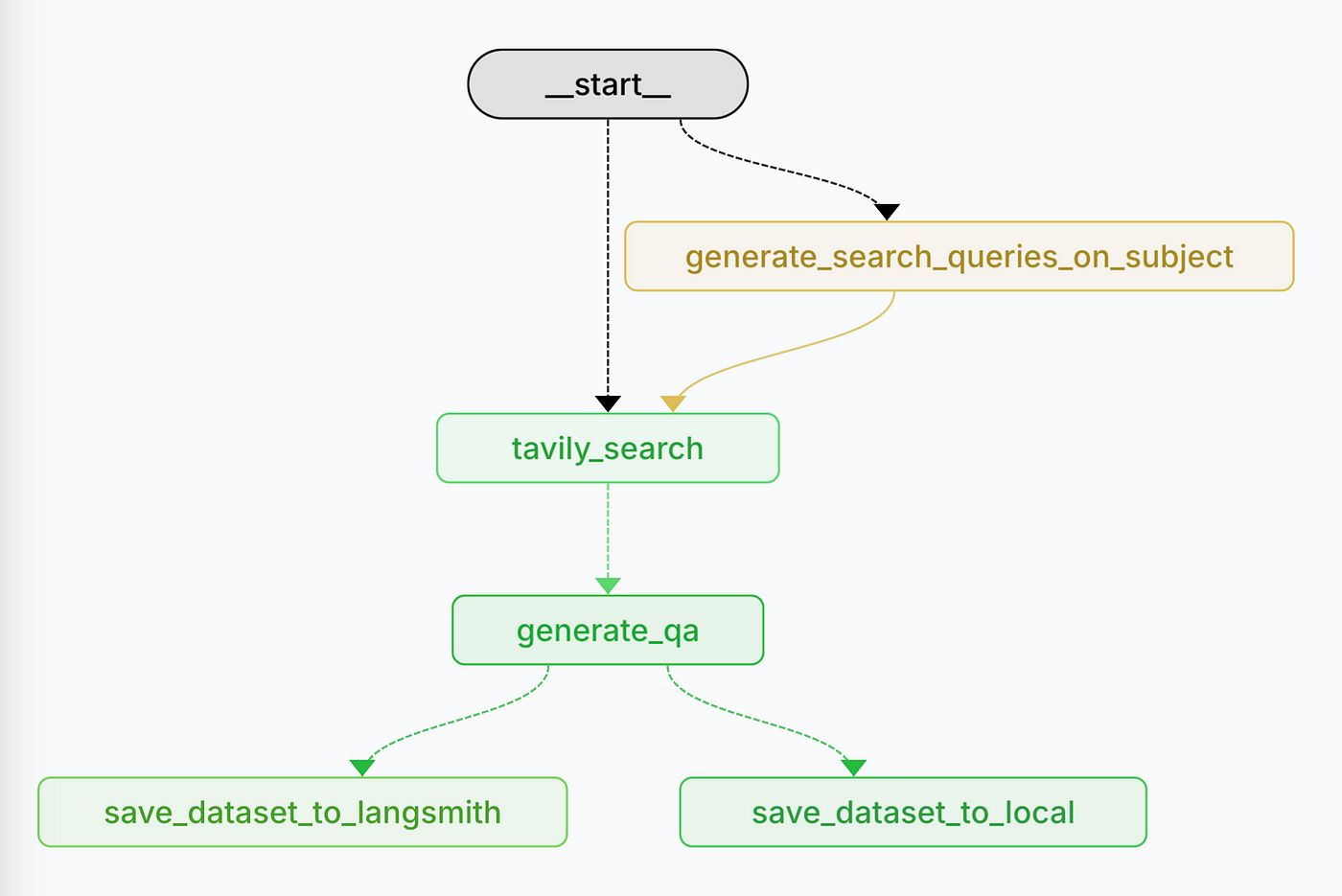
---
# Source: https://docs.tavily.com/documentation/api-reference/endpoint/usage.md
> ## Documentation Index
> Fetch the complete documentation index at: https://docs.tavily.com/llms.txt
> Use this file to discover all available pages before exploring further.
# Usage
> Get API key and account usage details
## OpenAPI
````yaml GET /usage
openapi: 3.0.3
info:
title: Tavily Search and Extract API
description: >-
Our REST API provides seamless access to Tavily Search, a powerful search
engine for LLM agents, and Tavily Extract, an advanced web scraping solution
optimized for LLMs.
version: 1.0.0
servers:
- url: https://api.tavily.com/
security: []
tags:
- name: Search
- name: Extract
- name: Crawl
- name: Map
- name: Research
- name: Usage
paths:
/usage:
get:
summary: Get API key and account usage details
description: Get API key and account usage details
responses:
'200':
description: Usage details returned successfully
content:
application/json:
schema:
type: object
properties:
key:
type: object
properties:
usage:
type: integer
description: >-
Total credits used for this API key during the current
billing cycle
example: 150
limit:
type: integer
description: Usage limit for the API key. Returns null if unlimited
example: 1000
search_usage:
type: integer
description: >-
Search endpoint credits used for this API key during
the current billing cycle
example: 100
extract_usage:
type: integer
description: >-
Extract endpoint credits used for this API key during
the current billing cycle
example: 25
crawl_usage:
type: integer
description: >-
Crawl endpoint credits used for this API key during
the current billing cycle
example: 15
map_usage:
type: integer
description: >-
Map endpoint credits used for this API key during the
current billing cycle
example: 7
research_usage:
type: integer
description: >-
Research endpoint credits used for this API key during
the current billing cycle
example: 3
account:
type: object
description: Account plan and usage information
properties:
current_plan:
type: string
description: The current subscription plan name
example: Bootstrap
plan_usage:
type: integer
description: >-
Total credits used for this plan during the current
billing cycle
example: 500
plan_limit:
type: integer
description: Usage limit for the current plan
example: 15000
paygo_usage:
type: integer
description: Current pay-as-you-go usage count
example: 25
paygo_limit:
type: integer
description: Pay-as-you-go usage limit
example: 100
search_usage:
type: integer
description: >-
Search endpoint credits used for this plan during the
current billing cycle
example: 350
extract_usage:
type: integer
description: >-
Extract endpoint credits used for this plan during the
current billing cycle
example: 75
crawl_usage:
type: integer
description: >-
Crawl endpoint credits used for this plan during the
current billing cycle
example: 50
map_usage:
type: integer
description: >-
Map endpoint credits used for this plan during the
current billing cycle
example: 15
research_usage:
type: integer
description: >-
Research endpoint credits used for this plan during
the current billing cycle
example: 10
'401':
description: Unauthorized - Your API key is wrong or missing.
content:
application/json:
schema:
type: object
properties:
detail:
type: object
properties:
error:
type: string
example:
detail:
error: 'Unauthorized: missing or invalid API key.'
security:
- bearerAuth: []
components:
securitySchemes:
bearerAuth:
type: http
scheme: bearer
bearerFormat: JWT
description: >-
Bearer authentication header in the form Bearer , where
is your Tavily API key (e.g., Bearer tvly-YOUR_API_KEY).
````
---
# Source: https://docs.tavily.com/documentation/integrations/vercel.md
> ## Documentation Index
> Fetch the complete documentation index at: https://docs.tavily.com/llms.txt
> Use this file to discover all available pages before exploring further.
# Vercel AI SDK
> Integrate Tavily with Vercel AI SDK to enhance your AI agents with powerful web search, content extraction, crawling, and site mapping capabilities.
## Introduction
The `@tavily/ai-sdk` package provides pre-built AI SDK tools for Vercel's AI SDK v5, making it easy to add real-time web search, content extraction, intelligent crawling, and site mapping to your AI applications.
## Step-by-Step Integration Guide
### Step 1: Install Required Packages
Install the necessary packages:
```bash theme={null}
npm install ai @ai-sdk/openai @tavily/ai-sdk
```
### Step 2: Set Up API Keys
* **Tavily API Key:** [Get your Tavily API key here](https://app.tavily.com/home)
* **OpenAI API Key:** [Get your OpenAI API key here](https://platform.openai.com/account/api-keys)
Set these as environment variables:
```bash theme={null}
export TAVILY_API_KEY=tvly-your-api-key
export OPENAI_API_KEY=your-openai-api-key
```
### Step 3: Basic Usage
The simplest way to get started with Tavily Search:
```typescript theme={null}
import { tavilySearch } from "@tavily/ai-sdk";
import { generateText, stepCountIs } from "ai";
import { openai } from "@ai-sdk/openai";
const result = await generateText({
model: openai("gpt-5-mini"),
prompt: "What are the latest developments in quantum computing?",
tools: {
tavilySearch: tavilySearch(),
},
stopWhen: stepCountIs(3),
});
console.log(result.text);
```
## Available Tools
### Tavily Search
Real-time web search optimized for AI applications:
```typescript theme={null}
import { tavilySearch } from "@tavily/ai-sdk";
import { generateText, stepCountIs } from "ai";
import { openai } from "@ai-sdk/openai";
const result = await generateText({
model: openai("gpt-5-mini"),
prompt: "Research the latest trends in renewable energy technology",
tools: {
tavilySearch: tavilySearch({
searchDepth: "advanced",
includeAnswer: true,
maxResults: 5,
topic: "general",
}),
},
stopWhen: stepCountIs(3),
});
```
**Key Configuration Options:**
* `searchDepth?: "basic" | "advanced"` - Search depth (default: "basic")
* `topic?: "general" | "news" | "finance"` - Search category
* `includeAnswer?: boolean` - Include AI-generated answer
* `maxResults?: number` - Maximum results to return (default: 5)
* `includeImages?: boolean` - Include images in results
* `timeRange?: "year" | "month" | "week" | "day"` - Time range for results
* `includeDomains?: string[]` - Domains to include
* `excludeDomains?: string[]` - Domains to exclude
### Tavily Extract
Clean, structured content extraction from URLs:
```typescript theme={null}
import { tavilyExtract } from "@tavily/ai-sdk";
import { generateText } from "ai";
import { openai } from "@ai-sdk/openai";
const result = await generateText({
model: openai("gpt-5-mini"),
prompt: "Extract and summarize the content from https://tavily.com",
tools: {
tavilyExtract: tavilyExtract(),
},
});
```
**Key Configuration Options:**
* `extractDepth?: "basic" | "advanced"` - Extraction depth
* `format?: "markdown" | "text"` - Output format (default: "markdown")
* `includeImages?: boolean` - Include images in extracted content
### Tavily Crawl
Intelligent website crawling at scale:
```typescript theme={null}
import { tavilyCrawl } from "@tavily/ai-sdk";
import { generateText } from "ai";
import { openai } from "@ai-sdk/openai";
const result = await generateText({
model: openai("gpt-5-mini"),
prompt: "Crawl tavily.com and tell me about their integrations",
tools: {
tavilyCrawl: tavilyCrawl({
maxDepth: 2,
limit: 50,
}),
},
});
```
**Key Configuration Options:**
* `maxDepth?: number` - Maximum crawl depth (1-5, default: 1)
* `maxBreadth?: number` - Maximum pages per depth level (1-100, default: 20)
* `limit?: number` - Maximum total pages to crawl (default: 50)
* `extractDepth?: "basic" | "advanced"` - Content extraction depth
* `instructions?: string` - Natural language crawling instructions
* `selectPaths?: string[]` - Path patterns to include
* `excludePaths?: string[]` - Path patterns to exclude
* `allowExternal?: boolean` - Allow crawling external domains
### Tavily Map
Website structure discovery and mapping:
```typescript theme={null}
import { tavilyMap } from "@tavily/ai-sdk";
import { generateText, stepCountIs } from "ai";
import { openai } from "@ai-sdk/openai";
const result = await generateText({
model: openai("gpt-5-mini"),
prompt: "Map the structure of tavily.com",
tools: {
tavilyMap: tavilyMap(),
},
stopWhen: stepCountIs(3),
});
```
**Key Configuration Options:**
* `maxDepth?: number` - Maximum mapping depth (1-5, default: 1)
* `maxBreadth?: number` - Maximum pages per depth level (1-100, default: 20)
* `limit?: number` - Maximum total pages to map (default: 50)
* `instructions?: string` - Natural language mapping instructions
* `selectPaths?: string[]` - Path patterns to include
* `excludePaths?: string[]` - Path patterns to exclude
* `allowExternal?: boolean` - Allow mapping external domains
## Using Multiple Tools Together
You can combine multiple Tavily tools in a single AI agent for comprehensive research capabilities:
```typescript theme={null}
import {
tavilySearch,
tavilyExtract,
tavilyCrawl,
tavilyMap
} from "@tavily/ai-sdk";
import { generateText, stepCountIs } from "ai";
import { openai } from "@ai-sdk/openai";
const result = await generateText({
model: openai("gpt-5-mini"),
prompt: "Research the company at tavily.com - search for news, map their site, and extract key pages",
tools: {
tavilySearch: tavilySearch({ searchDepth: "advanced" }),
tavilyExtract: tavilyExtract(),
tavilyCrawl: tavilyCrawl(),
tavilyMap: tavilyMap(),
},
stopWhen: stepCountIs(5),
});
```
## Advanced Examples
### News Research with Time Range
```typescript theme={null}
const newsResult = await generateText({
model: openai("gpt-5-mini"),
prompt: "What are the top technology news stories from this week?",
tools: {
tavilySearch: tavilySearch({
topic: "news",
timeRange: "week",
maxResults: 10,
}),
},
stopWhen: stepCountIs(3),
});
```
### Market Analysis with Advanced Search
```typescript theme={null}
const marketResult = await generateText({
model: openai("gpt-5-mini"),
prompt: "Analyze the current state of the electric vehicle market",
tools: {
tavilySearch: tavilySearch({
searchDepth: "advanced",
topic: "finance",
includeAnswer: true,
maxResults: 10,
}),
},
stopWhen: stepCountIs(5),
});
```
## Benefits of Tavily + Vercel AI SDK
* **Pre-built Tools:** No need to manually create tool definitions - just import and use
* **Type-Safe:** Full TypeScript support with proper type definitions
* **Real-time Information:** Access up-to-date web content for your AI agents
* **Optimized for LLMs:** Search results are specifically formatted for language models
* **Multiple Capabilities:** Search, extract, crawl, and map websites - all in one package
* **Easy Integration:** Works seamlessly with Vercel AI SDK v5
* **Flexible Configuration:** Extensive configuration options for all tools
* **Production-Ready:** Built on the reliable Tavily API infrastructure
---
# Source: https://docs.tavily.com/examples/use-cases/web-eval.md
> ## Documentation Index
> Fetch the complete documentation index at: https://docs.tavily.com/llms.txt
> Use this file to discover all available pages before exploring further.
# RAG evaluation
> Effortless Web-Based RAG Evaluation Using Tavily and LangGraph
# Introduction
Every data science enthusiast knows that a vital first step to building a successful model or algorithm is having a reliable evaluation set to aspire to. In the rapidly evolving landscape of **Retrieval-Augmented Generation (RAG)** and AI-driven search systems, the importance of high-quality eval datasets is crucial.
In this article, we introduce an agentic workflow designed to **generate** subject-specific dynamic **evaluation datasets**, enabling precise validation of web search augmented agents' performance.
**Known RAG evaluation datasets**, such as [HotPotQA](https://hotpotqa.github.io), [CRAG](https://github.com/facebookresearch/CRAG), and [MultiHop-RAG](https://github.com/yixuantt/MultiHop-RAG), have been pivotal in benchmarking and fine-tuning models. However, these datasets primarily focus on evaluating performance with **static, pre-defined document sets**. As a result, they fall short when it comes to evaluating **web-based RAG systems**, where data is dynamic, contextual, and ever-changing.
This gap presents a significant challenge: how do we effectively test and refine RAG systems designed for real-world web search scenarios? **Enter the Real-Time Dataset Generator for RAG Evals** — an agentic tool leveraging [Tavily’s Search Layer](https://tavily.com) and the **LangGraph framework** to create diverse, relevant, and dynamic datasets tailored specifically for web based RAG agents.
# How does it work?
The Real-Time Dataset Generator follows a systematic workflow to create high-quality evaluation datasets:
The workflow begins with user-provided inputs.
If a subject is provided (e.g., “NBA Basketball”), the system **generates a
set of search queries**. This ensures queries are tailored to gather
high-quality, recent, and subject-specific information.
This step guarantees that the dataset reflects **current and relevant
information**, particularly for web search RAG evaluation, where up-to-date
data is crucial.This is the **heart of the RAG Dataset Generator**,
transforming queries into actionable, high-quality data that forms the
foundation of the evaluation set.
For each website returned by Tavily, the system generates question-answer pair
using a **map-reduce paradigm** to ensure efficient processing across multiple
sources. This step is implemented using LangGraph’s Send API.
Finally, the generated dataset is saved either **locally** or to
**Langsmith**, based on the input configuration.
The result is a well-structured, subject-specific evaluation dataset, ready for use in advanced evaluation methods like **LLM-as-a-Judge**.
# Learn More
Want to dive deeper into web-based RAG evaluation? Check out these resources:
Read our detailed blog post about generating dynamic RAG evaluation datasets
`/Eyalbenba/tavily-web-eval-generator`
---
# Source: https://docs.tavily.com/welcome.md
> ## Documentation Index
> Fetch the complete documentation index at: https://docs.tavily.com/llms.txt
> Use this file to discover all available pages before exploring further.
# null
Build with Tavily
Your journey to state-of-the-art web search starts right here.
---
# Source: https://docs.tavily.com/documentation/integrations/zapier.md
> ## Documentation Index
> Fetch the complete documentation index at: https://docs.tavily.com/llms.txt
> Use this file to discover all available pages before exploring further.
# Zapier
> Tavily is now available for no-code integration through Zapier.
## Introduction
No need to write a single line of code to connect Tavily to your business processes. With Tavily's robust search capabilities, you can pull in the latest online information into any application or workflow.
Simply set up [**Tavily in Zapier**](https://zapier.com/apps/tavily/integrations) to automate research, track real-time news, or feed relevant data into your tools of choice.
## How to set up Tavily with Zapier
Create a new Zap and select a trigger event that will start your workflow.
Add an action step with Tavily in your workflow:
Setup: Connect your Tavily account by pasting your API key.
Configure: Enter your search `query` along with optional parameters, such as selecting a `topic` (`general` or `news`), deciding whether to include raw content from the sources or an answer based on the content found, and specifying particular domains to run the search on.
Test: Test your query.
Use the `results` and optionally the `answer` generated by Tavily in the rest of your workflow, such as:
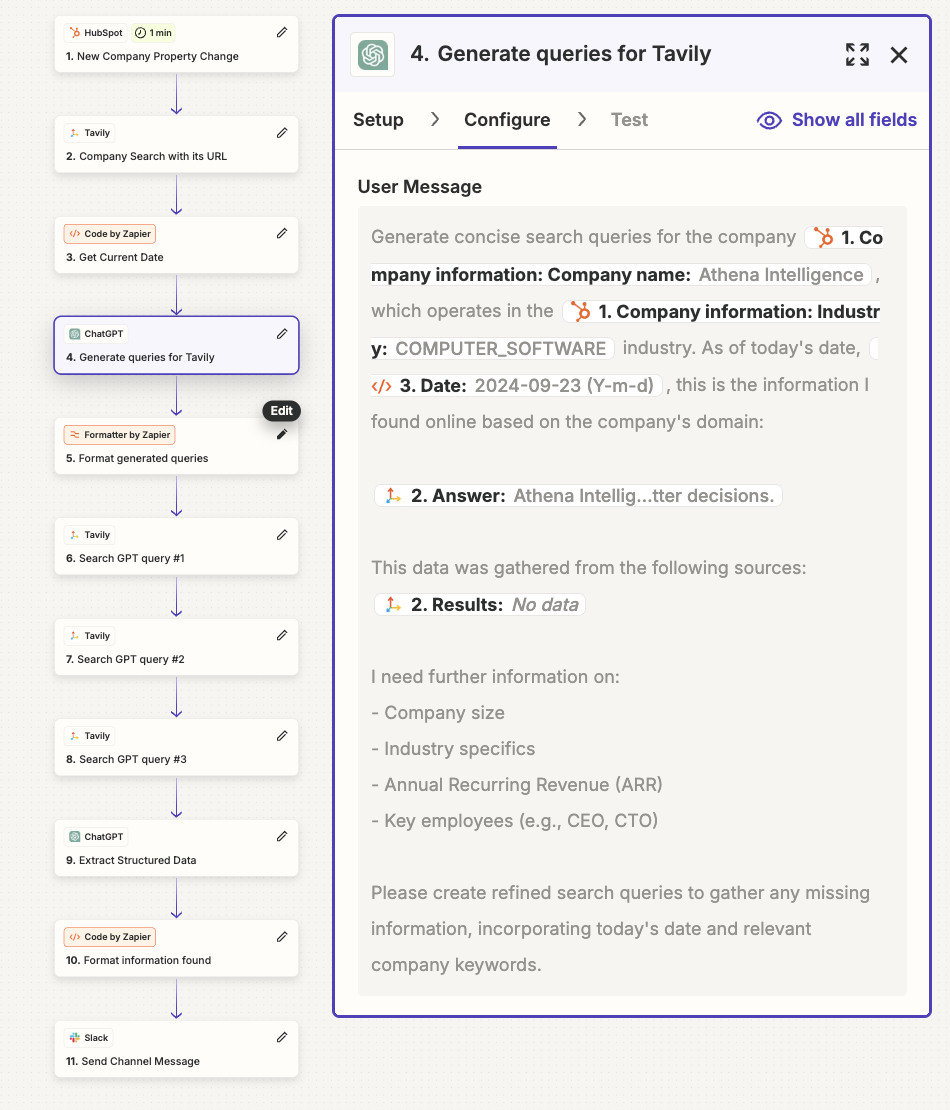
Sending up-to-date research to your CRM.
Feeding real-time content into your language model (e.g., GPT models) for additional applications.
Inserting dynamic info into an email automation tool.
## Use cases for Tavily in Zapier
With Tavily, you can harness the power of Retrieval-Augmented Generation (RAG) to create complex workflows. Here are some examples, for inspiration:
* **Automated Email Generation**: Use Tavily to create tailored emails based on real-time data.
* **Meeting Preparation**: Gather real-time information about meeting participants. For instance, before a client meeting, retrieve their latest news or social media updates and receive a concise summary through your preferred method, ensuring you’re well-informed.
* **Automated Reporting**: Utilize Tavily’s online search data to generate reports. Push this information into tools like **Google Sheets**, **Notion**, or **Slack** to create a weekly digest of industry trends or competitor analysis, keeping your team updated effortlessly.
## Detailed example - company research
We can build an automated workflow that executes brief company research for newly signed-up companies and delivers the report via Slack.
Trigger Event: A new company is created in your CRM.
Conduct Company Search: Use Tavily to perform a general search using the company's domain (provided by the CRM).
Retrieve Current Date: Capture the current date and pass it to the LLM in the next step.
Generate Search Queries: Request the LLM to create 3 concise search queries for Tavily to obtain additional information about the company (e.g., industry, ARR, CEO, CTO). Include the previously gathered data from the company website as context to prevent redundancy. Ask the LLM to incorporate important keywords related to the company to avoid retrieving information about a different company with the same name but in a different industry or domain.
Organize Queries: Format the generated queries into separate fields for use in distinct steps.
Configure Queries: Set up the 3 queries in Tavily across 3 individual steps.
Extract Structured Data: Instruct the LLM to fill in specific details about the company from the gathered data and indicate the sources used for verification. Additionally, instruct the LLM to use the sources extracted from the domain as the ground truth.
Refine Information: Format the information for clarity and professionalism.
Send to Slack: Deliver the final message to Slack for easy access and sharing.
## Best practices
To use Tavily most efficiently in your Zapier workflows, keep the following guidelines in mind when designing your automations:
* Create concise queries for Tavily, and if needed, create multiple Tavily steps.
* If up-to-date news information is required, configure "news" as your topic.
* Add the current date to your queries for relevant, updated information.
* Consider using specific domains to narrow down search results.
* Use an LLM to generate queries for Tavily to enable a more agentic workflow.