# Replit
> ## Documentation Index
---
# Source: https://docs.replit.com/cloud-services/deployments/about-deployments.md
> ## Documentation Index
> Fetch the complete documentation index at: https://docs.replit.com/llms.txt
> Use this file to discover all available pages before exploring further.
# Overview
> Share your Replit Apps with the world in just a few clicks.
export const YouTubeEmbed = ({videoId, title = "YouTube video", startAt}) => {
if (!videoId) {
return null;
}
let url = "https://www.youtube.com/embed/" + videoId;
if (startAt) {
url = url + "?start=" + startAt;
}
return
;
};
Publishing lets you share your Replit App with the world using a simplified process.
The action of making your app live is called "Publishing." This page describes the different types of deployments available.
## What is Publishing?
Publishing is a feature that saves a **snapshot** of your Replit App to the cloud,
where everyone can interact with it. A snapshot captures the current state of the files in your
Replit App.
When you publish your Replit App, you create a **published app**. A published app is a running instance
of your app on Replit's cloud infrastructure. This makes the app reliably available on the internet,
separate from the version in your workspace.
Replit's infrastructure is backed by Google Cloud Platform (GCP). All
published apps are hosted in the United States.
Publishing includes tools to monitor your published app status and view web analytics.
Replit offers the following deployment types:
Automatically adjusts resources based on your app's usage.
Provides an affordable way to host websites that don't change based on user input.
Provides a consistent amount of computing resources for your app to run continuously.
Runs your app at scheduled times that you choose.
## Getting started
Follow the steps below to publish your Replit App:
1. From your Replit App workspace, select  **Publish** at the top.
2. In the **Publishing** tab, select your publishing option.
3. If **Add a payment method** appears, follow the prompts to add a payment method.
Replit automatically selects the best publishing option for your app based on the project type and your needs.
However, to choose a different deployment type, consider the following information.
## Choosing the right publishing option
The following video explains how to choose the right publishing option for your app:
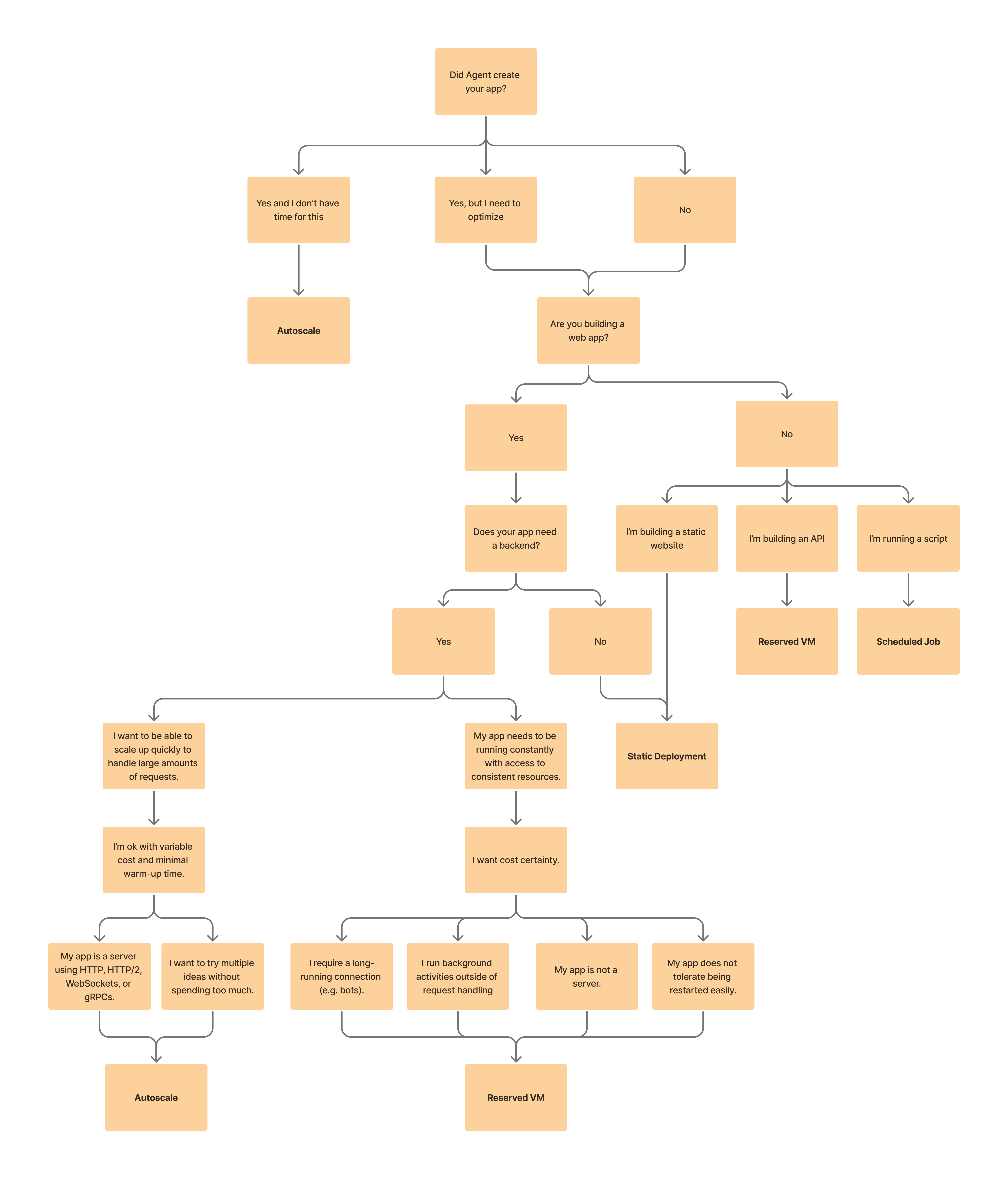
Use the following decision tree featured in the video to help you choose:
**Publish** at the top.
2. In the **Publishing** tab, select your publishing option.
3. If **Add a payment method** appears, follow the prompts to add a payment method.
Replit automatically selects the best publishing option for your app based on the project type and your needs.
However, to choose a different deployment type, consider the following information.
## Choosing the right publishing option
The following video explains how to choose the right publishing option for your app:
Use the following decision tree featured in the video to help you choose:
 ## Key features
Publishing offers the following convenient features:
* **Multiple publishing options**: Select or update a deployment type that meets your needs in a few clicks.
* **Custom domains**: Serve your app from your web domain.
* **Analytics**: Track visitor data and other metrics for your published app.
* **Monitoring tools**: View your published app status and configuration.
* **Access controls**: Control who can see your app with a single click. Available only for **Teams** members.
* **Badge settings**: Core users can manage the "Made with Replit" badge in Publishing settings. If you published an app while on the Starter plan that include the badge, it may take a couple minutes to update your app to remove the badge after you upgrade.
* **Feedback collection**: Enable feedback on your published app to gather insights from your users.
## How it works
When you publish your Replit App, Replit creates a snapshot of your app's files and dependencies.
This snapshot is then sent to Replit's cloud infrastructure, where it runs as a separate instance of your app.
To update your published app with the latest changes, publish again to create a fresh snapshot.
Avoid saving and relying on data written to a published app's filesystem. To
store data, use a storage or database option such as Replit's [Storage and
Database](/category/storage-and-databases) offerings.
## Use cases
The following examples show different types of published apps.
### Autoscale deployment: Typing speed assessment app
Let the cloud scale up resources when users take typing tests and reduce them when not in use.
### Static deployment: Solar system simulation
Learn about the planets in a solar system visualization app on the web.
This visualization renders in the browser and doesn't transfer any user input to a server.
### Reserved VM deployment: Discord bot
Run a Discord bot that helps you moderate and onboard members.
It's always online to chat with users and respond to commands with predictable pricing and performance.
### Scheduled deployment: Home automation triggers
Schedule API calls to start and stop your smart home devices at specific times and days.
## Next steps
To learn more about Replit Publishing, see the following resources:
* [Autoscale Deployment](/cloud-services/deployments/autoscale-deployments/): Learn how to set up applications that scale with traffic
* [Static Deployment](/cloud-services/deployments/static-deployments/): Discover how to publish static websites quickly and efficiently
* [Reserved VM Deployment](/cloud-services/deployments/reserved-vm-deployments/): Explore dedicated VM options for specialized use cases
* [Scheduled Deployment](/cloud-services/deployments/scheduled-deployments/): Set up recurring tasks with simple scheduling
* [Custom Domains](/cloud-services/deployments/custom-domains/): Connect your published app to a custom domain
---
# Source: https://docs.replit.com/billing/about-usage-based-billing.md
> ## Documentation Index
> Fetch the complete documentation index at: https://docs.replit.com/llms.txt
> Use this file to discover all available pages before exploring further.
# Publishing and Database Billing
> Learn how Replit bills for publishing and databases, including outbound data transfer, compute units, requests, and PostgreSQL usage metrics.
There are three types of usage-based billing for publishing:
1. Outbound Data Transfer
2. Autoscale Compute Units
3. Requests
You can view your usage in your account [here](https://replit.com/account#resource-usage). Billing occurs monthly or once your accumulated costs exceed your monthly credits. Replit Core and Teams users receive monthly allowances for these resources.
If you need additional credits beyond your monthly subscription allowance, you can purchase credit packs on your billing page. See [Managing Your Spend](/billing/managing-spend) for more information about credit packs.
# Publishing
## 1. Publishing Outbound Data Transfer
This type of usage is billed per byte with Replit Core users receiving a monthly allowance. Only egress (outgoing) data is counted against this allowance, potentially leading to overages. In contrast, ingress (incoming) data is always free.
| Subscription | Allowance |
| ------------ | --------- |
| Replit Core | 100 GiB |
The allowances apply to [Static](/cloud-services/deployments/static-deployments), [Autoscale](/cloud-services/deployments/autoscale-deployments), [Reserved VM](/cloud-services/deployments/reserved-vm-deployments) and [Scheduled](/cloud-services/deployments/scheduled-deployments) deployments.
See the [pricing page](https://www.replit.com/pricing) for the current price of outbound data transfer.
***
## 2. Compute Units
Autoscale Deployments are billed based on Compute Units, which take into account both CPU and RAM usage over time.
Overages are billed based on Compute Units. The granularity of the billing is down to each individual compute unit. See the [pricing page](https://www.replit.com/pricing) for the current price of compute units.
Here is a breakdown of how RAM and CPU seconds for an Autoscale Deployment translate into Compute Units:
| Resource | Compute Units |
| ------------ | ------------- |
| 1 RAM Second | 2 Units |
| 1 CPU Second | 18 Units |
Static Deployments don't consume Compute Units. Their billing is solely for Outbound Data Transfers beyond a [specified amount](#).
[Learn more about Autoscale Deployments](/cloud-services/deployments/autoscale-deployments).
***
## 3. Requests
Autoscale Deployments also consider the number of requests made.
See the [pricing page](https://www.replit.com/pricing) for the current price of requests.
# Databases
Replit only charges for usage of [production databases](/cloud-services/storage-and-databases/production-databases) -- development databases are always free and included with every Replit App. For details on development databases, see [Development Database](/cloud-services/storage-and-databases/sql-database).
Replit PostgreSQL is fully managed and serverless, providing effortless high availability and zero maintenance. Billing for production databases is based on actual usage, which can lead to significant cost savings.
Production PostgreSQL databases are billed by two usage metrics:
* **[Compute Time](#compute-time)**: The amount of compute resources consumed per hour.
* **[Data Storage](#data-storage)**: The total volume of data (including historical data) stored.
You can view your current resource usage, including production database usage, in your account [here](https://replit.com/account#resource-usage).
## Compute Time
Compute time is determined by number of hours your database remains active during a given billing period. Databases are considered active when they receive requests and for an additional 5-minute period after the last request. If a database remains idle for 5 minutes, it will be suspended and enter an inactive state.
## Data Storage
Data storage is the total volume of data stored across all databases in your account, measured in gibibytes (GiB). Storage is calculated as the maximum amount of storage used per month. Each PostgreSQL database consumes 33MB of storage, even if it doesn't contain any data. This is the default storage footprint of the Postgres server.
The total storage limit for each database is 10 gibibytes (GiB).
# Additional Notes
If there's an issue with your payment method, we'll notify you. Continuous payment failures might lead to the suspension of your published apps. If this happens, please [contact support](https://replit.com/help) and update your payment details to regain access to our services.
---
# Source: https://docs.replit.com/legal-and-security-info/abuse-report.md
> ## Documentation Index
> Fetch the complete documentation index at: https://docs.replit.com/llms.txt
> Use this file to discover all available pages before exploring further.
# Reporting Abuse on Replit
> At Replit, we strive to maintain a safe and welcoming environment for all our users. If you encounter abusive, harmful, or inappropriate content, we encourage you to report it immediately. We have established multiple channels to address various types of concerns efficiently. Here's how you can help
## 1. Use the On-Site reporting feature
Use the on-site reporting feature for a quick and direct way to report content that violates our [Community Standards](https://blog.replit.com/community-standards). This method ensures that your report is immediately sent to our staff members for review. Here's how to use it:
* Navigate to the content you wish to report.
* Look for a report button or link. This is usually located near the content itself, such as under a post or within a user's profile options.
* Select the report button or link and describe the nature of the abusive content.
* Submit your report. Our team will review it as soon as possible and take appropriate action.
For more detailed instructions on using the reporting feature, please read [How to Make Reports](./trust-and-safety.md#how-to-make-reports).
## 2. Report Abuse via email
If you come across phishing attempts or suspect a piece of content is designed to deceive or harm others by pretending to be something it's not, please report it directly to our dedicated email address for abuse reports:
* **Email**: `abuse@replit.com`
* **Subject**: Briefly describe the issue (e.g., "Phishing Attempt Detected").
* **Body**: Include detailed information about the phishing attempt, such as URLs, user account names involved, and a description of the content. Attach any relevant screenshots if possible.
### Additional Resources
For cybersecurity organizations looking to report phishing detections via automation, we invite you to contact us for potential partnership opportunities. Please reach out to the abuse team at [abuse@replit.com](mailto:abuse@replit.com) to discuss further.
## 3. Issue DMCA Takedown Requests
For copyright holders or their authorized representatives, Replit respects your intellectual property rights and follows the Digital Millennium Copyright Act (DMCA) procedures to address your concerns. For detailed instructions on copyright claims on Replit, please read [Copyright claims and takedown requests](./copyright-claims-takedown-requests).
## 4. Report Security vulnerabilities
If you've discovered a security vulnerability within Replit, we highly value your contribution to our community's safety and encourage you to report it to us. Please read our [Security](./security) documentation for instructions on disclosing potential vulnerabilities.
---
# Source: https://docs.replit.com/legal-and-security-info/account-inactivity.md
> ## Documentation Index
> Fetch the complete documentation index at: https://docs.replit.com/llms.txt
> Use this file to discover all available pages before exploring further.
# Account Inactivity
> Learn about Replit's account inactivity policy, when accounts may be terminated, and how paid subscriptions affect account status.
A free Replit account provides access to most Replit features and products. An account is kept active by user actions, including logging in and interacting with the Replit Workspace. An inactive Replit account is one that has not been used within a **1-year** period, meaning the user has not logged in to the account during that period. Replit reserves the right to terminate inactive Replit accounts and delete associated user data. Replit will delete Replit Apps associated with inactive free accounts.
Replit accounts under a paid subscription plan are not subject to termination due to account inactivity.
---
# Source: https://docs.replit.com/additional-resources/add-a-made-with-replit-badge-to-your-app.md
# Add a Replit Badge to your app
> Add, customize, and embed a Replit Badge in your Replit App to showcase your project and link back to your cover page.
The Replit Badge allows you to showcase that you built your app on Replit. When added to your Replit App, it links back to your App's cover page so visitors can learn more about your creations.
## Features
The Replit Badge enhances your app with official Replit branding while providing easy navigation back to your project.
* **Simple integration**: Add the badge to any app with a single line of code
* **Customizable appearance**: Choose from multiple themes and positions
* **Flexible implementation**: Use the script tag or custom HTML/CSS options
* **Markdown support**: Embed badges in your GitHub repository and other Markdown files
## Usage
### Adding the badge
You can add a Badge to any Replit App with an index page. Websites created with the official HTML template have this Badge added by default.
1. **Locate your index.html file**\
Go to your Replit App's file browser and find `index.html`
## Key features
Publishing offers the following convenient features:
* **Multiple publishing options**: Select or update a deployment type that meets your needs in a few clicks.
* **Custom domains**: Serve your app from your web domain.
* **Analytics**: Track visitor data and other metrics for your published app.
* **Monitoring tools**: View your published app status and configuration.
* **Access controls**: Control who can see your app with a single click. Available only for **Teams** members.
* **Badge settings**: Core users can manage the "Made with Replit" badge in Publishing settings. If you published an app while on the Starter plan that include the badge, it may take a couple minutes to update your app to remove the badge after you upgrade.
* **Feedback collection**: Enable feedback on your published app to gather insights from your users.
## How it works
When you publish your Replit App, Replit creates a snapshot of your app's files and dependencies.
This snapshot is then sent to Replit's cloud infrastructure, where it runs as a separate instance of your app.
To update your published app with the latest changes, publish again to create a fresh snapshot.
Avoid saving and relying on data written to a published app's filesystem. To
store data, use a storage or database option such as Replit's [Storage and
Database](/category/storage-and-databases) offerings.
## Use cases
The following examples show different types of published apps.
### Autoscale deployment: Typing speed assessment app
Let the cloud scale up resources when users take typing tests and reduce them when not in use.
### Static deployment: Solar system simulation
Learn about the planets in a solar system visualization app on the web.
This visualization renders in the browser and doesn't transfer any user input to a server.
### Reserved VM deployment: Discord bot
Run a Discord bot that helps you moderate and onboard members.
It's always online to chat with users and respond to commands with predictable pricing and performance.
### Scheduled deployment: Home automation triggers
Schedule API calls to start and stop your smart home devices at specific times and days.
## Next steps
To learn more about Replit Publishing, see the following resources:
* [Autoscale Deployment](/cloud-services/deployments/autoscale-deployments/): Learn how to set up applications that scale with traffic
* [Static Deployment](/cloud-services/deployments/static-deployments/): Discover how to publish static websites quickly and efficiently
* [Reserved VM Deployment](/cloud-services/deployments/reserved-vm-deployments/): Explore dedicated VM options for specialized use cases
* [Scheduled Deployment](/cloud-services/deployments/scheduled-deployments/): Set up recurring tasks with simple scheduling
* [Custom Domains](/cloud-services/deployments/custom-domains/): Connect your published app to a custom domain
---
# Source: https://docs.replit.com/billing/about-usage-based-billing.md
> ## Documentation Index
> Fetch the complete documentation index at: https://docs.replit.com/llms.txt
> Use this file to discover all available pages before exploring further.
# Publishing and Database Billing
> Learn how Replit bills for publishing and databases, including outbound data transfer, compute units, requests, and PostgreSQL usage metrics.
There are three types of usage-based billing for publishing:
1. Outbound Data Transfer
2. Autoscale Compute Units
3. Requests
You can view your usage in your account [here](https://replit.com/account#resource-usage). Billing occurs monthly or once your accumulated costs exceed your monthly credits. Replit Core and Teams users receive monthly allowances for these resources.
If you need additional credits beyond your monthly subscription allowance, you can purchase credit packs on your billing page. See [Managing Your Spend](/billing/managing-spend) for more information about credit packs.
# Publishing
## 1. Publishing Outbound Data Transfer
This type of usage is billed per byte with Replit Core users receiving a monthly allowance. Only egress (outgoing) data is counted against this allowance, potentially leading to overages. In contrast, ingress (incoming) data is always free.
| Subscription | Allowance |
| ------------ | --------- |
| Replit Core | 100 GiB |
The allowances apply to [Static](/cloud-services/deployments/static-deployments), [Autoscale](/cloud-services/deployments/autoscale-deployments), [Reserved VM](/cloud-services/deployments/reserved-vm-deployments) and [Scheduled](/cloud-services/deployments/scheduled-deployments) deployments.
See the [pricing page](https://www.replit.com/pricing) for the current price of outbound data transfer.
***
## 2. Compute Units
Autoscale Deployments are billed based on Compute Units, which take into account both CPU and RAM usage over time.
Overages are billed based on Compute Units. The granularity of the billing is down to each individual compute unit. See the [pricing page](https://www.replit.com/pricing) for the current price of compute units.
Here is a breakdown of how RAM and CPU seconds for an Autoscale Deployment translate into Compute Units:
| Resource | Compute Units |
| ------------ | ------------- |
| 1 RAM Second | 2 Units |
| 1 CPU Second | 18 Units |
Static Deployments don't consume Compute Units. Their billing is solely for Outbound Data Transfers beyond a [specified amount](#).
[Learn more about Autoscale Deployments](/cloud-services/deployments/autoscale-deployments).
***
## 3. Requests
Autoscale Deployments also consider the number of requests made.
See the [pricing page](https://www.replit.com/pricing) for the current price of requests.
# Databases
Replit only charges for usage of [production databases](/cloud-services/storage-and-databases/production-databases) -- development databases are always free and included with every Replit App. For details on development databases, see [Development Database](/cloud-services/storage-and-databases/sql-database).
Replit PostgreSQL is fully managed and serverless, providing effortless high availability and zero maintenance. Billing for production databases is based on actual usage, which can lead to significant cost savings.
Production PostgreSQL databases are billed by two usage metrics:
* **[Compute Time](#compute-time)**: The amount of compute resources consumed per hour.
* **[Data Storage](#data-storage)**: The total volume of data (including historical data) stored.
You can view your current resource usage, including production database usage, in your account [here](https://replit.com/account#resource-usage).
## Compute Time
Compute time is determined by number of hours your database remains active during a given billing period. Databases are considered active when they receive requests and for an additional 5-minute period after the last request. If a database remains idle for 5 minutes, it will be suspended and enter an inactive state.
## Data Storage
Data storage is the total volume of data stored across all databases in your account, measured in gibibytes (GiB). Storage is calculated as the maximum amount of storage used per month. Each PostgreSQL database consumes 33MB of storage, even if it doesn't contain any data. This is the default storage footprint of the Postgres server.
The total storage limit for each database is 10 gibibytes (GiB).
# Additional Notes
If there's an issue with your payment method, we'll notify you. Continuous payment failures might lead to the suspension of your published apps. If this happens, please [contact support](https://replit.com/help) and update your payment details to regain access to our services.
---
# Source: https://docs.replit.com/legal-and-security-info/abuse-report.md
> ## Documentation Index
> Fetch the complete documentation index at: https://docs.replit.com/llms.txt
> Use this file to discover all available pages before exploring further.
# Reporting Abuse on Replit
> At Replit, we strive to maintain a safe and welcoming environment for all our users. If you encounter abusive, harmful, or inappropriate content, we encourage you to report it immediately. We have established multiple channels to address various types of concerns efficiently. Here's how you can help
## 1. Use the On-Site reporting feature
Use the on-site reporting feature for a quick and direct way to report content that violates our [Community Standards](https://blog.replit.com/community-standards). This method ensures that your report is immediately sent to our staff members for review. Here's how to use it:
* Navigate to the content you wish to report.
* Look for a report button or link. This is usually located near the content itself, such as under a post or within a user's profile options.
* Select the report button or link and describe the nature of the abusive content.
* Submit your report. Our team will review it as soon as possible and take appropriate action.
For more detailed instructions on using the reporting feature, please read [How to Make Reports](./trust-and-safety.md#how-to-make-reports).
## 2. Report Abuse via email
If you come across phishing attempts or suspect a piece of content is designed to deceive or harm others by pretending to be something it's not, please report it directly to our dedicated email address for abuse reports:
* **Email**: `abuse@replit.com`
* **Subject**: Briefly describe the issue (e.g., "Phishing Attempt Detected").
* **Body**: Include detailed information about the phishing attempt, such as URLs, user account names involved, and a description of the content. Attach any relevant screenshots if possible.
### Additional Resources
For cybersecurity organizations looking to report phishing detections via automation, we invite you to contact us for potential partnership opportunities. Please reach out to the abuse team at [abuse@replit.com](mailto:abuse@replit.com) to discuss further.
## 3. Issue DMCA Takedown Requests
For copyright holders or their authorized representatives, Replit respects your intellectual property rights and follows the Digital Millennium Copyright Act (DMCA) procedures to address your concerns. For detailed instructions on copyright claims on Replit, please read [Copyright claims and takedown requests](./copyright-claims-takedown-requests).
## 4. Report Security vulnerabilities
If you've discovered a security vulnerability within Replit, we highly value your contribution to our community's safety and encourage you to report it to us. Please read our [Security](./security) documentation for instructions on disclosing potential vulnerabilities.
---
# Source: https://docs.replit.com/legal-and-security-info/account-inactivity.md
> ## Documentation Index
> Fetch the complete documentation index at: https://docs.replit.com/llms.txt
> Use this file to discover all available pages before exploring further.
# Account Inactivity
> Learn about Replit's account inactivity policy, when accounts may be terminated, and how paid subscriptions affect account status.
A free Replit account provides access to most Replit features and products. An account is kept active by user actions, including logging in and interacting with the Replit Workspace. An inactive Replit account is one that has not been used within a **1-year** period, meaning the user has not logged in to the account during that period. Replit reserves the right to terminate inactive Replit accounts and delete associated user data. Replit will delete Replit Apps associated with inactive free accounts.
Replit accounts under a paid subscription plan are not subject to termination due to account inactivity.
---
# Source: https://docs.replit.com/additional-resources/add-a-made-with-replit-badge-to-your-app.md
# Add a Replit Badge to your app
> Add, customize, and embed a Replit Badge in your Replit App to showcase your project and link back to your cover page.
The Replit Badge allows you to showcase that you built your app on Replit. When added to your Replit App, it links back to your App's cover page so visitors can learn more about your creations.
## Features
The Replit Badge enhances your app with official Replit branding while providing easy navigation back to your project.
* **Simple integration**: Add the badge to any app with a single line of code
* **Customizable appearance**: Choose from multiple themes and positions
* **Flexible implementation**: Use the script tag or custom HTML/CSS options
* **Markdown support**: Embed badges in your GitHub repository and other Markdown files
## Usage
### Adding the badge
You can add a Badge to any Replit App with an index page. Websites created with the official HTML template have this Badge added by default.
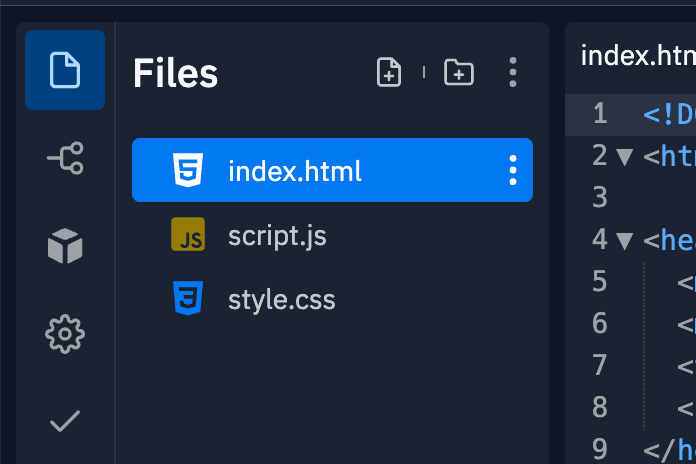
1. **Locate your index.html file**\
Go to your Replit App's file browser and find `index.html`
 2. **Add the badge script**\
Add the following code before the closing `` tag:
```html theme={null}
2. **Add the badge script**\
Add the following code before the closing `` tag:
```html theme={null}