) => {
if (e.target.files && e.target.files.length > 0) {
setFile(e.target.files[0])
}
}
const handleUpload = async () => {
if (!file) return
try {
setUploadStatus('Getting upload URL...')
const urlResponse = await fetch(`${import.meta.env.VITE_SERVER_URL}/presigned_url`, {
method: "GET",
headers: {
// Handle your own server authorization here
}
})
const data = await urlResponse.json()
setUploadStatus('Uploading file...')
const upload = await pinata.upload.public
.file(file)
.url(data.url)
if (upload.cid) {
setUploadStatus('File uploaded successfully!')
const ipfsLink = await pinata.gateways.public.convert(upload.cid)
setLink(ipfsLink)
} else {
setUploadStatus('Upload failed')
}
} catch (error) {
setUploadStatus(`Error: ${error instanceof Error ? error.message : String(error)}`)
}
}
return (
<>
Vite + React + Pinata
Upload to Pinata
{uploadStatus &&
{uploadStatus}
}
{link &&
View File }
Click on the Vite and React logos to learn more
)
}
export default App
```
In our code we have a pretty simple form that will trigger `handleSubmit()`. This function will do the following:
* Make a request to our server for a Presigned URL (you will want to handle any server side auth here)
* Use the returned Presigned URL in a client side upload
* Use the upload response to create a link to the file
To try it out make sure your server is running, then in another terminal Run
```bash theme={null}
npm run dev
```
Open up the site on `http://localhost:5173` and upload a file!
---
# Source: https://docs.pinata.cloud/frameworks/remix.md
> ## Documentation Index
> Fetch the complete documentation index at: https://docs.pinata.cloud/llms.txt
> Use this file to discover all available pages before exploring further.
# Remix
> Get started using Pinata with Remix
This guide will walk you through setting up Pinata in a Remix app.
## Create an API Key and get Gateway URL
To create an API key, visit the [Keys Page](https://app.pinata.cloud/developers/keys) and click the "New Key" button in the top right. Once you do that you can select if you want your key to be admin or if you want to scope the privileges of the keys to certain endpoints or limit the number of uses. Make those selections, then give the key a name at the bottom, and click create key.
If you are just getting started we recommend using Admin privileges, then move
to scope keys as you better understand your needs
The API keys are only shown once, be sure to copy them somewhere safe!
After you have your API key, you will want to get your Gateway domain. When you create a Pinata account, you'll automatically have a Gateway created for you! To see it, simply visit the [Gateways Page](https://app.pinata.cloud/gateway) see it listed there.
();
const navigation = useNavigation();
const isSubmitting = navigation.state === "submitting";
return (
Remix + Pinata
{actionData?.url && (
)}
);
}
```
Let's walk through what's happening here. To start we have our client side markup:
```typescript theme={null}
Remix + Pinata
{actionData?.url && (
)}
```
This is a simple `Form` element provided by Remix which lets us make a submission to a server action. The most important piece to notice here is the `encType="multipart/form-data"`, which is crucial to make file / multipart requests work in Remix!
Then we have our server action:
```typescript theme={null}
export const action = async ({ request }: ActionFunctionArgs) => {
const formData = await request.formData();
const file = formData.get("file") as File;
const { cid } = await pinata.upload.public.file(file);
const url = await pinata.gateways.public.convert(cid);
return json({ url });
};
```
This will be the default endpoint used when we submit our form. It will parse the incoming `formData`, get the `file` attached, and then we upload it to Pinata using `pinata.upload.public.file()`. From that method we deconstruct the result and return the `cid` which we can use in `convert`. This will make a URL we can return to the client and make accessible to the user, and in our case the `` tag that links to the content.
---
# Source: https://docs.pinata.cloud/api-reference/endpoint/remove-file-from-group.md
> ## Documentation Index
> Fetch the complete documentation index at: https://docs.pinata.cloud/llms.txt
> Use this file to discover all available pages before exploring further.
# Remove File From Group
> `org:groups:write`
## OpenAPI
````yaml delete /groups/{network}/{id}/ids/{file_id}
openapi: 3.0.0
info:
title: Pinata V3 API
version: 1.0.0
servers:
- url: https://api.pinata.cloud/v3
security:
- bearerAuth: []
paths:
/groups/{network}/{id}/ids/{file_id}:
delete:
tags:
- Groups
summary: Remove File From Group
description: |
`org:groups:write`
operationId: removeFileFromGroup
parameters:
- name: network
description: Target either the public or private IPFS network
in: path
schema:
type: string
enum:
- public
- private
required: true
example: public
- name: id
in: path
description: The ID of the target group
schema:
type: string
required: true
example: 01919ac8-a6f5-7e8e-a8a2-6cfe00122b90
- name: file_id
in: path
description: The ID of the tart file to remove from the group
schema:
type: string
required: true
example: bc2aad39-2594-4353-9404-f59bc4118e2c
responses:
'200':
description: OK
headers:
Date:
schema:
type: string
example: Thu, 29 Aug 2024 15:17:52 GMT
Content-Type:
schema:
type: string
example: application/json; charset=utf-8
Content-Length:
schema:
type: integer
example: '136'
Connection:
schema:
type: string
example: keep-alive
X-Request-Id:
schema:
type: string
example: 5cee9f024755176365a202b6ce5d29e4
Strict-Transport-Security:
schema:
type: string
example: max-age=15724800; includeSubDomains
content:
application/json:
schema:
type: object
properties:
data:
type: object
example:
data: null
components:
securitySchemes:
bearerAuth:
type: http
scheme: bearer
````
---
# Source: https://docs.pinata.cloud/sdk/groups/public/remove-files.md
# Source: https://docs.pinata.cloud/sdk/groups/private/remove-files.md
> ## Documentation Index
> Fetch the complete documentation index at: https://docs.pinata.cloud/llms.txt
> Use this file to discover all available pages before exploring further.
# removeFiles
> `org:groups:write`
Remove private files from a private group
## Usage
```typescript theme={null}
import { PinataSDK } from "pinata";
const pinata = new PinataSDK({
pinataJwt: process.env.PINATA_JWT!,
pinataGateway: "example-gateway.mypinata.cloud",
});
const group = await pinata.groups.private.removeFiles({
groupId: "3778c10d-452e-4def-8299-ee6bc548bdb0",
files: [
"7e18c4a4-9501-44de-8f81-403db7de0e39",
"a606ef7e-70a0-40ad-9b8a-60563e009655"
],
});
```
## Returns
```typescript theme={null}
type UpdateGroupFilesResponse[] = {
id: string;
status: string;
};
```
## Parameters
### groupId
* Type: `string`
ID of the target Group to remove files from
```typescript {2} theme={null}
const group = await pinata.groups.private.removeFiles({
groupId: "3778c10d-452e-4def-8299-ee6bc548bdb0",
files: [
"7e18c4a4-9501-44de-8f81-403db7de0e39",
"a606ef7e-70a0-40ad-9b8a-60563e009655"
],
});
```
### files
* Type: `string[]`
An array of file IDs as strings that you want to remove from the group
```typescript {3-6} theme={null}
const group = await pinata.groups.private.removeFiles({
groupId: "3778c10d-452e-4def-8299-ee6bc548bdb0",
files: [
"7e18c4a4-9501-44de-8f81-403db7de0e39",
"a606ef7e-70a0-40ad-9b8a-60563e009655"
],
});
```
---
# Source: https://docs.pinata.cloud/api-reference/endpoint/remove-signature-from-cid.md
> ## Documentation Index
> Fetch the complete documentation index at: https://docs.pinata.cloud/llms.txt
> Use this file to discover all available pages before exploring further.
# Remove Signature from CID
> `org:files:write`
## OpenAPI
````yaml delete /files/{network}/signature/{cid}
openapi: 3.0.0
info:
title: Pinata V3 API
version: 1.0.0
servers:
- url: https://api.pinata.cloud/v3
security:
- bearerAuth: []
paths:
/files/{network}/signature/{cid}:
delete:
tags:
- default
summary: Remove Signature from CID
description: |
`org:files:write`
parameters:
- name: network
description: Target either the public or private IPFS network
in: path
schema:
type: string
enum:
- public
- private
required: true
example: public
- name: cid
in: path
schema:
type: string
required: true
example: bafybeidzbfkjjz3ksfvxn7mcj3nuyprx4mhna5jsnfwrncoqbtppi45spe
description: Target CID
responses:
'200':
description: OK
headers:
Date:
schema:
type: string
example: Mon, 22 Jul 2024 17:54:20 GMT
Content-Type:
schema:
type: string
example: application/json; charset=utf-8
Content-Length:
schema:
type: integer
example: '14'
Connection:
schema:
type: string
example: keep-alive
X-Request-Id:
schema:
type: string
example: 96e62eee654b71b0fc4dc66eefb6e999
Strict-Transport-Security:
schema:
type: string
example: max-age=15724800; includeSubDomains
content:
application/json:
schema:
type: object
example:
data: null
components:
securitySchemes:
bearerAuth:
type: http
scheme: bearer
````
---
# Source: https://docs.pinata.cloud/api-reference/endpoint/remove-swap.md
> ## Documentation Index
> Fetch the complete documentation index at: https://docs.pinata.cloud/llms.txt
> Use this file to discover all available pages before exploring further.
# Remove Swap
> `org:files:write`
## OpenAPI
````yaml delete /files/{network}/swap/{cid}
openapi: 3.0.0
info:
title: Pinata V3 API
version: 1.0.0
servers:
- url: https://api.pinata.cloud/v3
security:
- bearerAuth: []
paths:
/files/{network}/swap/{cid}:
delete:
tags:
- Swaps
summary: Remove Swap
description: |
`org:files:write`
operationId: delete-swap
parameters:
- name: network
description: Target either the public or private IPFS network
in: path
schema:
type: string
enum:
- public
- private
required: true
example: public
- name: cid
in: path
schema:
type: string
required: true
description: Target CID to remove swap
example: bafkreiccqfcxwp52uqwd7r5g7kdukgz7jvs6jcusetfnznj5jfch3r6wlm
responses:
'200':
description: OK
headers:
Date:
schema:
type: string
example: Sun, 18 Aug 2024 19:45:11 GMT
Content-Type:
schema:
type: string
example: application/json; charset=utf-8
Content-Length:
schema:
type: integer
example: '14'
Connection:
schema:
type: string
example: keep-alive
X-Request-Id:
schema:
type: string
example: cb4721118316fe9ac2e7ec44a2e25133
Strict-Transport-Security:
schema:
type: string
example: max-age=15724800; includeSubDomains
content:
application/json:
schema:
type: object
example:
data: null
components:
securitySchemes:
bearerAuth:
type: http
scheme: bearer
````
---
# Source: https://docs.pinata.cloud/sdk/x402/cids/remove.md
> ## Documentation Index
> Fetch the complete documentation index at: https://docs.pinata.cloud/llms.txt
> Use this file to discover all available pages before exploring further.
# remove
Remove a CID association from a payment instruction
## Usage
```typescript theme={null}
import { PinataSDK } from "pinata";
const pinata = new PinataSDK({
pinataJwt: process.env.PINATA_JWT!,
pinataGateway: "example-gateway.mypinata.cloud",
});
const result = await pinata.x402.removeCid(
"01234567-89ab-cdef-0123-456789abcdef",
"bafkreih5aznjvttude6c3wbvqeebb6rlx5wkbzyppv7garjiubll2ceym4"
);
```
## Returns
```typescript theme={null}
type CidRemoveResponse = {
data: {};
};
```
## Parameters
### paymentInstructionId (required)
* Type: `string`
The unique identifier of the payment instruction
```typescript theme={null}
const result = await pinata.x402.removeCid(
"01234567-89ab-cdef-0123-456789abcdef",
"bafkreih5aznjvttude6c3wbvqeebb6rlx5wkbzyppv7garjiubll2ceym4"
);
```
### cid (required)
* Type: `string`
The IPFS CID to remove from the payment instruction. Once removed, the content will no longer require payment for access through this instruction.
```typescript theme={null}
const result = await pinata.x402.removeCid(
"01234567-89ab-cdef-0123-456789abcdef",
"bafkreih5aznjvttude6c3wbvqeebb6rlx5wkbzyppv7garjiubll2ceym4"
);
```
---
# Source: https://docs.pinata.cloud/sdk/analytics/requests.md
> ## Documentation Index
> Fetch the complete documentation index at: https://docs.pinata.cloud/llms.txt
> Use this file to discover all available pages before exploring further.
# requests
> `org:analytics:read`
Get analytics on requests for multiple properties
## Usage
The `analytics` class is unique in that it very flexible, but also can require more queries to be used well. Be sure to real the [Parameters](#parameters) in detail to understand how it can be used.
The `requests` method will sort results by highest number of requests, but will also include `bandwidth` values.
```typescript theme={null}
import { PinataSDK } from "pinata";
const pinata = new PinataSDK({
pinataJwt: process.env.PINATA_JWT!,
pinataGateway: "example-gateway.mypinata.cloud",
});
const clicks = await pinata.analytics.requests
.days(30)
.limit(10)
.cid("")
```
## Returns
What is returned in `value` will depend on they property or query used. For instance, using `cid()` will return CIDs, `country()` will return Countries, etc.
```typescript theme={null}
type TopAnalyticsResponse = {
data: TopAnalyticsItem[];
};
type TopAnalyticsItem = {
value: string;
requests: number;
bandwidth: number;
};
```
## Parameters
Filter response with the following additional methods. It does require at least one property, such as `cid`, `fileName`, `userAgent`, `country`, `region`, or `referrer`.
### cid
* Type: `string`
Returns requests for all CIDs
```typescript {3} theme={null}
const files = await pinata.analytics.requests
.days(7)
.cid()
```
Filter by passing an argument
```typescript {3} theme={null}
const files = await pinata.analytics.requests
.days(7)
.cid("bafkreih5aznjvttude6c3wbvqeebb6rlx5wkbzyppv7garjiubll2ceym4")
```
### fileName
* Type: `string`
Returns requests for all file names
```typescript {3} theme={null}
const files = await pinata.analytics.requests
.days(7)
.fileName()
```
Filter by passing an argument
```typescript {3} theme={null}
const files = await pinata.analytics.requests
.days(7)
.fileName("pinnie.png")
```
### userAgent
* Type: `string`
Returns requests for user agents
```typescript {3} theme={null}
const files = await pinata.analytics.requests
.days(7)
.userAgent()
```
Filter by passing an argument
```typescript {3-5} theme={null}
const files = await pinata.analytics.requests
.days(7)
.userAgent(
"Mozilla/5.0 (X11; Linux x86_64; rv:132.0) Gecko/20100101 Firefox/132.0"
)
```
### country
* Type: `string`
Returns requests for countries
```typescript {3} theme={null}
const files = await pinata.analytics.requests
.days(7)
.country()
```
Filter by passing an argument
```typescript {3} theme={null}
const files = await pinata.analytics.requests
.days(7)
.country("us")
```
### region
* Type: `string`
Returns requests for regions inside of countries
```typescript {3} theme={null}
const files = await pinata.analytics.requests
.days(7)
.region()
```
Filter by passing an argument
```typescript {3} theme={null}
const files = await pinata.analytics.requests
.days(7)
.region("us - VA")
```
### referer
* Type: `string`
Returns requests for referers
```typescript {3} theme={null}
const files = await pinata.analytics.requests
.days(7)
.referer()
```
Filter by passing an argument
```typescript {3} theme={null}
const files = await pinata.analytics.requests
.days(7)
.referer("https://docs.pinata.cloud/")
```
### days
* Type: `number`
Number of days to query. Starts with current date and then goes back by provided number.
```typescript {2} theme={null}
const files = await pinata.analytics.requests
.days(7)
.cid()
```
### sort
* Type: `"asc" | "desc"`
Order results either ascending or descending by created date
```typescript {4} theme={null}
const files = await pinata.analytics.requests
.days(7)
.cid()
.sort("asc")
```
### limit
* Type: `number`
Limit the number of results
```typescript {4} theme={null}
const files = await pinata.analytics.requests
.days(7)
.cid()
.limit(10)
```
### customDates
* Type: `string, string`
Custom dates to query using a start and end date with the format `YYYY-MM-DD`
```typescript {2} theme={null}
const files = await pinata.analytics.requests
.customDates("2024-11-01", "2024-11-20")
.cid()
```
### from
* Type: `string`
Provide an alternate Gateway domain to query instead of the default one found in the Pinata SDK Config
```typescript {4} theme={null}
const files = await pinata.analytics.requests
.days(7)
.cid()
.from("example-2.mypinata.cloud")
```
---
# Source: https://docs.pinata.cloud/api-reference/endpoint/x402/retrieve.md
> ## Documentation Index
> Fetch the complete documentation index at: https://docs.pinata.cloud/llms.txt
> Use this file to discover all available pages before exploring further.
# Retrieve a Private File
> Retrieves a private file from IPFS by its CID
## Cost
| Price | Duration |
| -------- | ----------- |
| \$0.0001 | Per request |
## Example Usage
If you upload a file as `private` then it will not be accessible on public IPFS, so in order to access it you need to create a temporary access URL. This flow is similar to the previous one, except you would provide the CID that you uploded previously that you would like to access. After a successful payment the server will return a URL you can access the file with.
```typescript theme={null}
import { wrapFetchWithPayment, decodeXPaymentResponse } from "@x402/fetch";
import { account } from "./viem";
const fetchWithPayment = wrapFetchWithPayment(fetch, account);
const url =
"https://402.pinata.cloud/v1/retrieve/private/bafkreih5aznjvttude6c3wbvqeebb6rlx5wkbzyppv7garjiubll2ceym4";
fetchWithPayment(url, {
method: "GET",
})
.then(async (response) => {
const body = (await response.json()) as { url: string };
console.log(body);
})
.catch((error) => {
console.error(error.response?.data?.error);
});
```
## OpenAPI
````yaml pinata-x402-api-v1.yaml get /retrieve/private/{cid}
openapi: 3.0.0
info:
title: Pinata x402
description: x402 compatible endpoints for uploading and retrieving files on IPFS
version: 1.0.0
servers:
- url: https://402.pinata.cloud/v1
description: Production server
security: []
paths:
/retrieve/private/{cid}:
get:
summary: Retrieve private file
description: Retrieves a private file from IPFS by its CID
operationId: retrievePrivateFile
parameters:
- name: cid
in: path
required: true
schema:
type: string
description: Content Identifier (CID) of the file
responses:
'200':
description: Successful operation
content:
application/json:
schema:
type: object
properties:
url:
type: string
description: URL to access the private file
'400':
description: Bad request
'401':
description: Unauthorized
'500':
description: Server error
security:
- x402Payment: []
components:
securitySchemes:
x402Payment:
type: apiKey
name: X-PAYMENT
in: header
description: Base64 encoded x402 payment payload
````
---
# Source: https://docs.pinata.cloud/gateways/retrieving-files.md
> ## Documentation Index
> Fetch the complete documentation index at: https://docs.pinata.cloud/llms.txt
> Use this file to discover all available pages before exploring further.
# Retrieving Files
Gateways are Pinata's tool to deliver your content with speed and security. They're similar to CDNs but with way more features. When you create a Pinata account, you'll automatically have a Gateway created for you! To see it, simply visit the [Gateways Page](https://app.pinata.cloud/gateway).
By default your gateway will only be able to fetch the files that are pinned to your account. If you want to open your gateway to access any file on IPFS check out our guide for [Access Controls](/gateways/gateway-access-controls).
One of the simplest ways to fetch content is through the [get](/sdk/gateways/private/get) method in the [SDK](/sdk). All content is referenced by the `cid`, a special identifier given to each file based on the cotnent of that file.
```typescript theme={null}
import { PinataSDK } from "pinata";
const pinata = new PinataSDK({
pinataJwt: process.env.PINATA_JWT!,
pinataGateway: "example-gateway.mypinata.cloud",
});
const { data, contentType } = await pinata.gateways.public.get(
"bafkreib4pqtikzdjlj4zigobmd63lig7u6oxlug24snlr6atjlmlza45dq"
)
```
You can also use the SDK to provide a URL for your file using the `pinataGateway` in the config.
```typescript theme={null}
import { PinataSDK } from "pinata";
const pinata = new PinataSDK({
pinataJwt: process.env.PINATA_JWT!,
pinataGateway: "example-gateway.mypinata.cloud",
});
const url = await pinata.gateways.public.convert(
"bafkreib4pqtikzdjlj4zigobmd63lig7u6oxlug24snlr6atjlmlza45dq"
)
```
### Image Optimizations
With public files you can simply append the [Image Optimizations](/gateways/image-optimizations) queries which would look something like this:
```
https://example-gateway.mypinata.cloud/files/{cid}?img-width=500&img-height=500
```
## Adding a Custom Domain
Pinata also allows you to create a custom domain for your Dedicated Gateway. Simply visit the [Gateways Page](https://app.pinata.cloud/gateway), click the menu button on the right side of your gateway, then click Add Custom Domain. You'll need to own the domain you want to use. When you enter your domain, you will be prompted to enter DNS information through your registrar.
## Retrieving Private Files
All content uploaded with Private IPFS is by default private, and there are a few ways you can view it. One of the simplest ways to fetch content is through the [get](/sdk/gateways/private/get) method in the [SDK](/sdk). All content is referenced by the `cid`, a special identifier given to each file based on the cotnent of that file.
```typescript theme={null}
import { PinataSDK } from "pinata";
const pinata = new PinataSDK({
pinataJwt: process.env.PINATA_JWT!,
pinataGateway: "example-gateway.mypinata.cloud",
});
const { data, contentType } = await pinata.gateways.private.get(
"bafkreib4pqtikzdjlj4zigobmd63lig7u6oxlug24snlr6atjlmlza45dq"
)
```
Under the hood this method generates a 30 second access link to access the content with. Alternatively you can also create an access link that can be used to access the content for a specified limited amount of time.
```typescript SDK {8-11} theme={null}
import { PinataSDK } from "pinata";
const pinata = new PinataSDK({
pinataJwt: process.env.PINATA_JWT!,
pinataGateway: "example-gateway.mypinata.cloud",
});
const url = await pinata.gateways.private.createAccessLink({
cid: "bafkreib4pqtikzdjlj4zigobmd63lig7u6oxlug24snlr6atjlmlza45dq",
expires: 30, // Number of seconds link is valid for
});
```
```typescript API {5-10} theme={null}
const JWT = "YOUR_PINATA_JWT";
async function url() {
try {
const payload = JSON.stringify({
url: "https://example.mypinata.cloud/files/bafybeifq444z4b7yqzcyz4a5gspb2rpyfcdxp3mrfpigmllh52ld5tyzwm",
expires: 500000,
date: 1724875300,
method: "GET"
})
const request = await fetch(
`https://api.pinata.cloud/v3/files/download_link`,
{
method: "POST",
headers: {
"Content-Type": "application/json",
Authorization: `Bearer ${JWT}`,
},
body: payload
});
const response = await request.json();
console.log(response);
} catch (error) {
console.log(error);
}
}
```
### Image Optmizations
In order ot use [Image Optmizations](/gateways/image-optimizations) with private files the query parameters must be part of the request of getting a signed url.
```typescript SDK {3-7} theme={null}
const data = await pinata.gateways.private
.createSignedURL("bafkreih5aznjvttude6c3wbvqeebb6rlx5wkbzyppv7garjiubll2ceym4")
.optimizeImage({
width: 500,
height: 500,
format: "webp"
})
```
```typescript API {6} theme={null}
const JWT = "YOUR_PINATA_JWT";
async function url() {
try {
const payload = JSON.stringify({
url: "https://example.mypinata.cloud/files/bafybeifq444z4b7yqzcyz4a5gspb2rpyfcdxp3mrfpigmllh52ld5tyzwm?img-width=500&img-height=500&img-format=webp",
expires: 500000,
date: 1724875300,
method: "GET"
})
const request = await fetch(
`https://api.pinata.cloud/v3/files/download_link`,
{
method: "POST",
headers: {
"Content-Type": "application/json",
Authorization: `Bearer ${JWT}`,
},
body: payload
});
const response = await request.json();
console.log(response);
} catch (error) {
console.log(error);
}
}
```
---
# Source: https://docs.pinata.cloud/api-reference/endpoint/ipfs/revoke-gateway-key.md
> ## Documentation Index
> Fetch the complete documentation index at: https://docs.pinata.cloud/llms.txt
> Use this file to discover all available pages before exploring further.
# Revoke Gateway Key
> `org:gateways:write`
## OpenAPI
````yaml delete /gateways/{id}/access_tokens/{access_token_id}
openapi: 3.0.0
info:
title: Pinata V3 API
version: 1.0.0
servers:
- url: https://api.pinata.cloud/v3
security:
- bearerAuth: []
paths:
/gateways/{id}/access_tokens/{access_token_id}:
delete:
tags:
- default
summary: Revoke Gateway Key
description: |
`org:gateways:write`
parameters:
- name: id
in: path
schema:
type: string
required: true
description: ID of the target Gateway
example: 5eb8b151-77b3-4e46-8243-5b6282131a9e
- name: access_token_id
in: path
schema:
type: string
required: true
description: ID of the target Gateway Key
example: 5cfe30af-1de5-409e-be09-f261445a2df6
responses:
'200':
description: OK
headers:
Date:
schema:
type: string
example: Fri, 12 Jul 2024 18:52:08 GMT
Content-Type:
schema:
type: string
example: application/json; charset=utf-8
Content-Length:
schema:
type: integer
example: '14'
Connection:
schema:
type: string
example: keep-alive
X-Request-Id:
schema:
type: string
example: bef4599a5d0de8322fff20dda15c82f9
Strict-Transport-Security:
schema:
type: string
example: max-age=15724800; includeSubDomains
content:
application/json:
schema:
type: object
example:
data: null
components:
securitySchemes:
bearerAuth:
type: http
scheme: bearer
````
---
# Source: https://docs.pinata.cloud/api-reference/endpoint/ipfs/revoke-host-origin-restriction.md
> ## Documentation Index
> Fetch the complete documentation index at: https://docs.pinata.cloud/llms.txt
> Use this file to discover all available pages before exploring further.
# Revoke Host Origin Restriction
> `org:gateways:write`
## OpenAPI
````yaml delete /gateways/{id}/hosts/{host_id}
openapi: 3.0.0
info:
title: Pinata V3 API
version: 1.0.0
servers:
- url: https://api.pinata.cloud/v3
security:
- bearerAuth: []
paths:
/gateways/{id}/hosts/{host_id}:
delete:
tags:
- default
summary: Revoke Host Origin Restriction
description: |
`org:gateways:write`
parameters:
- name: id
in: path
schema:
type: string
required: true
description: ID of the target Gateway
example: 5eb8b151-77b3-4e46-8243-5b6282131a9e
- name: host_id
in: path
schema:
type: string
required: true
description: ID of the target host restriction
example: b0165cb6-59e2-476e-aa60-b63b9326bcc6
responses:
'200':
description: OK
headers:
Date:
schema:
type: string
example: Fri, 12 Jul 2024 18:59:34 GMT
Content-Type:
schema:
type: string
example: application/json; charset=utf-8
Content-Length:
schema:
type: integer
example: '14'
Connection:
schema:
type: string
example: keep-alive
X-Request-Id:
schema:
type: string
example: 366233a5fc2376b21620a1059e82be38
Strict-Transport-Security:
schema:
type: string
example: max-age=15724800; includeSubDomains
content:
application/json:
schema:
type: object
example:
data: null
components:
securitySchemes:
bearerAuth:
type: http
scheme: bearer
````
---
# Source: https://docs.pinata.cloud/api-reference/endpoint/ipfs/revoke-ip-address-restricton.md
> ## Documentation Index
> Fetch the complete documentation index at: https://docs.pinata.cloud/llms.txt
> Use this file to discover all available pages before exploring further.
# Revoke IP Address Restricton
> `org:gateways:write:
## OpenAPI
````yaml delete /gateways/{id}/ips/{ip_id}
openapi: 3.0.0
info:
title: Pinata V3 API
version: 1.0.0
servers:
- url: https://api.pinata.cloud/v3
security:
- bearerAuth: []
paths:
/gateways/{id}/ips/{ip_id}:
delete:
tags:
- default
summary: Revoke IP Address Restricton
description: |
`org:gateways:write:
parameters:
- name: id
in: path
schema:
type: string
required: true
description: ID of the target Gateway
example: 5eb8b151-77b3-4e46-8243-5b6282131a9e
- name: ip_id
in: path
schema:
type: string
required: true
description: ID of the IP address entry
example: 66b6f3c5-2733-442b-a558-960be4b5a921
responses:
'200':
description: OK
headers:
Date:
schema:
type: string
example: Fri, 12 Jul 2024 18:54:46 GMT
Content-Type:
schema:
type: string
example: application/json; charset=utf-8
Content-Length:
schema:
type: integer
example: '14'
Connection:
schema:
type: string
example: keep-alive
X-Request-Id:
schema:
type: string
example: c70075fc6823ef5234b62d35551be106
Strict-Transport-Security:
schema:
type: string
example: max-age=15724800; includeSubDomains
content:
application/json:
schema:
type: object
example:
data: null
components:
securitySchemes:
bearerAuth:
type: http
scheme: bearer
````
---
# Source: https://docs.pinata.cloud/sdk/keys/revoke.md
> ## Documentation Index
> Fetch the complete documentation index at: https://docs.pinata.cloud/llms.txt
> Use this file to discover all available pages before exploring further.
# revoke
> `org:write`
Revoke an API Key
## Usage
```typescript theme={null}
import { PinataSDK } from "pinata";
const pinata = new PinataSDK({
pinataJwt: process.env.PINATA_JWT!,
pinataGateway: "example-gateway.mypinata.cloud",
});
const revoke = await pinata.keys.revoke([
"94566af5e63833e260be"
]);
```
## Returns
```typescript theme={null}
type RevokeKeyResponse[] = {
key: string;
status: string;
};
```
## Parameters
### keys
* Type: `string[]`
An array of API Keys to revoke. This is the `key` found in the response of `keys.list`
```typescript theme={null}
const revoke = await pinata.keys.revoke([
"94566af5e63833e260be"
]);
```
---
# Source: https://docs.pinata.cloud/sdk/types/signatures.md
# Source: https://docs.pinata.cloud/files/signatures.md
> ## Documentation Index
> Fetch the complete documentation index at: https://docs.pinata.cloud/llms.txt
> Use this file to discover all available pages before exploring further.
# Signatures
> Learn how to use Pinata to cryptographically sign CIDs
In a post-AI world it will become more and more evident that every piece of content will need a cryptographic signature to verify it's authenticity. Pinata is taking steps in this direction with the [Signatures API](/sdk/signatures/public) and the [Content Addressable Gateway Plugin](/gateways/plugins/content-addressable).
## Signature Standard
Pinata is using the EIP-712 signature standard for signing CIDs with the following domain and types.
```typescript theme={null}
export const domain = {
name: "Sign Content",
version: "1.0.0",
chainId: 1,
} as const;
export const types = {
Sign: [
{ name: "address", type: "address" },
{ name: "cid", type: "string" },
{ name: "date", type: "string" },
],
EIP712Domain: [
{
name: "name",
type: "string",
},
{
name: "version",
type: "string",
},
{
name: "chainId",
type: "uint256",
},
],
};
```
### address
* Type: `address`
The wallet address of the user singing the CID
```
0xCD2a3d9F938E13CD947Ec05AbC7FE734Df8DD826
```
### cid
* Type: `string`
The target CID to be signed
```
bafkreih5aznjvttude6c3wbvqeebb6rlx5wkbzyppv7garjiubll2ceym4
```
### date
* Type: `string`
The date the target CID was first uploaded to Pinata
```
2024-07-29T18:29:47.355Z
```
## Creating a Signature
In order to sign a CID you can use any library that support EIP-712 signing, like the example below with [viem](https://viem.sh/docs/actions/wallet/signTypedData).
```typescript example.ts theme={null}
import { account, walletClient } from './config'
import { domain, types } from './data'
const signature = await walletClient.signTypedData({
account,
domain,
types,
primaryType: 'Sign',
message: {
address: '0xCD2a3d9F938E13CD947Ec05AbC7FE734Df8DD826',
cid: 'bafkreih5aznjvttude6c3wbvqeebb6rlx5wkbzyppv7garjiubll2ceym4',
date: "2024-07-29T18:29:47.355Z"
}
})
```
```typescript data.ts theme={null}
export const domain = {
name: "Sign Content",
version: "1.0.0",
chainId: 1,
} as const;
export const types = {
Sign: [
{ name: "address", type: "address" },
{ name: "cid", type: "string" },
{ name: "date", type: "string" },
],
EIP712Domain: [
{
name: "name",
type: "string",
},
{
name: "version",
type: "string",
},
{
name: "chainId",
type: "uint256",
},
],
};
```
```typescript config.ts theme={null}
import { createWalletClient, custom } from 'viem'
import { mainnet } from 'viem/chains'
export const walletClient = createWalletClient({
chain: mainnet,
transport: custom(window.ethereum!),
})
export const [account] = await walletClient.getAddresses()
↑ JSON-RPC Account
// export const account = privateKeyToAccount(...)
↑ Local Account
```
## Adding Signature to CID
In order to attach a signature to a CID the following requirements must be met:
* The CID being signed is owned by the signer
* The CID being signed was first uploaded by the signer
* The CID must not already have an existing signature with Pinata
After creating the signature with the previous step you can add it to the CID with the [add](/sdk/signatures/public/add) method in the SDK.
```typescript theme={null}
import { PinataSDK } from "pinata-web3";
const pinata = new PinataSDK({
pinataJwt: process.env.PINATA_JWT!,
pinataGateway: "example-gateway.mypinata.cloud",
});
const signature = await pinata.signatures.public.add({
cid: "QmXGeVy9dVwfuFJmvbzz8y4dYK1TdxXbDGzwbNuyZ5xXSU",
signature: "0x1b...911b",
address: "0xB3899AA8E13172E48D44CE411b0c4c2f08730Dc6"
});
```
## Getting a Signature for a CID
There are two ways you can an existing signature for a CID: the [get](/sdk/signatures/public/get) method in the SDK or the [Content Addressable Gateway Plugin](/gateways/plugins/content-addressable).
### Content Addressable Gateway Plugin
After [installing the plugin](/gateways/plugins/getting-started#installing-plugins) you can simply request a CID through the Dedicated Gateway and get the signature in the header `pinata-signauture`.
```typescript theme={null}
const signatureReq = await fetch(
`https://.mypinata.cloud/ipfs/`,
{
method: "HEAD",
}
);
const signature = signatureReq.headers.get("pinata-signature");
```
### SDK
You can also use the [get](/sdk/signatures/public/get) method to get a signature for a given CID.
This method will check all CIDs on Pinata and will return a signature if it exists
```typescript theme={null}
import { PinataSDK } from "pinata-web3";
const pinata = new PinataSDK({
pinataJwt: process.env.PINATA_JWT!,
pinataGateway: "example-gateway.mypinata.cloud",
});
const signature = await pinata.signatures.public.get(
"QmXGeVy9dVwfuFJmvbzz8y4dYK1TdxXbDGzwbNuyZ5xXSU"
);
```
## Verifying a Signature
Since the signatures are using the EIP-712 standard you can use a library like [Viem](https://viem.sh/docs/utilities/verifyTypedData) to verify with the same typed data used to create it.
```typescript example.ts theme={null}
import { account, walletClient } from './config'
import { domain, types } from './data'
import { verifyTypedData } from 'viem'
const CID = "bafkreih5aznjvttude6c3wbvqeebb6rlx5wkbzyppv7garjiubll2ceym4"
const signatureReq = await fetch(
`https://example-gateway.mypinata.cloud/ipfs/${CID}`,
{
method: "HEAD",
}
);
const signature = signatureReq.headers.get("pinata-signature");
const valid = await verifyTypedData({
address: account.address,
domain,
types,
primaryType: 'Sign',
message: {
address: '0xCD2a3d9F938E13CD947Ec05AbC7FE734Df8DD826',
cid: 'bafkreih5aznjvttude6c3wbvqeebb6rlx5wkbzyppv7garjiubll2ceym4',
date: "2024-07-29T18:29:47.355Z"
},
signature,
})
```
```typescript data.ts theme={null}
export const domain = {
name: "Sign Content",
version: "1.0.0",
chainId: 1,
} as const;
export const types = {
Sign: [
{ name: "address", type: "address" },
{ name: "cid", type: "string" },
{ name: "date", type: "string" },
],
EIP712Domain: [
{
name: "name",
type: "string",
},
{
name: "version",
type: "string",
},
{
name: "chainId",
type: "uint256",
},
],
};
```
```typescript config.ts theme={null}
import { createWalletClient, custom } from 'viem'
import { mainnet } from 'viem/chains'
export const walletClient = createWalletClient({
chain: mainnet,
transport: custom(window.ethereum!),
})
export const [account] = await walletClient.getAddresses()
↑ JSON-RPC Account
// export const account = privateKeyToAccount(...)
↑ Local Account
```
## Removing a Signature for a CID
To delete an existing signautre for a given CID you can use the [delete](/sdk/signatures/public/delete) method.
```typescript theme={null}
import { PinataSDK } from "pinata-web3";
const pinata = new PinataSDK({
pinataJwt: process.env.PINATA_JWT!,
pinataGateway: "example-gateway.mypinata.cloud",
});
const signature = await pinata.signatures.public.delete(
"QmXGeVy9dVwfuFJmvbzz8y4dYK1TdxXbDGzwbNuyZ5xXSU"
);
```
---
# Source: https://docs.pinata.cloud/frameworks/sveltekit.md
> ## Documentation Index
> Fetch the complete documentation index at: https://docs.pinata.cloud/llms.txt
> Use this file to discover all available pages before exploring further.
# SvelteKit
This guide will walk you through setting up Pinata in a SvelteKit app.
## Create an API Key and get Gateway URL
To create an API key, visit the [Keys Page](https://app.pinata.cloud/developers/keys) and click the "New Key" button in the top right. Once you do that you can select if you want your key to be admin or if you want to scope the privileges of the keys to certain endpoints or limit the number of uses. Make those selections, then give the key a name at the bottom, and click create key.
If you are just getting started we recommend using Admin privileges, then move
to scope keys as you better understand your needs
The API keys are only shown once, be sure to copy them somewhere safe!
After you have your API key, you will want to get your Gateway domain. When you create a Pinata account, you'll automatically have a Gateway created for you! To see it, simply visit the [Gateways Page](https://app.pinata.cloud/gateway) see it listed there.
The use of the `server` directory prevents it being used client side.
```typescript src/lib/server/pinata.ts theme={null}
import { PinataSDK } from "pinata"
import { PINATA_JWT } from "$env/static/private";
import { PUBLIC_GATEWAY_URL } from "$env/static/public";
export const pinata = new PinataSDK({
pinataJwt: `${PINATA_JWT}`,
pinataGateway: `${PUBLIC_GATEWAY_URL}`
})
```
### Create Client Side Form
Next we'll want to add a form on our home page that will allow someone to select a file and upload it.
In the `src/routes/+page.svelte` file take out the boiler plate code and use the following.
Lets also restrict the allowed extensions for the file. (e.g. jpg, jpeg, png, webp).
```typescript src/routes/+page.svelte theme={null}
```
This will take a file from the client side and upload it through a form Action we are going to make next.
### Create Server Action
Create a server file, `src/routes/+page.server.ts`, so that we can add a form action to use.
Since this demo and page only has 1 form, we will keep the `default` action.
```typescript src/routes/+page.server.ts theme={null}
import { fail, json, type Actions } from "@sveltejs/kit";
import { pinata } from "$lib/server/pinata";
export const actions: Actions = {
default: async ({ request }) => {
try {
const formData = await request.formData();
const uploadedFile = (formData?.get('fileToUpload') as File);
if (!uploadedFile.name || uploadedFile.size === 0) {
return fail(400, {
error: true,
message: "You must provide a file to upload"
})
}
const upload = await pinata.upload.public.file(uploadedFile);
const url = await pinata.gateways.public.convert(upload.cid);
return { url, filename: uploadedFile.name, status: 200 };
} catch (error) {
console.log(error);
return json(
{ error: "Internal Server Error" },
{ status: 500 }
);
}
}
}
```
The form action will send an API request to Pinata with the upload, then use the resulting CID to create a URL we can use to see the content.
Once complete, we can define the return data sent to the client.
### Access the Returned value of the Form Action
We can access the returned data by exporting the `form` prop on our `+page.svelte`. Now, after submitting the form,
the `form` prop will be updated and we can conditionally render the image we just uploaded.
```typescript src/routes/+page.svelte theme={null}
{#if form && form.status === 200}
```
And just like that we have uploaded an image to Pinata and recieved a usable URL in return!
Remember that the url for the image is ephemeral, once you refresh the page the url and image will be gone.
---
# Source: https://docs.pinata.cloud/files/nft-backup/sync.md
> ## Documentation Index
> Fetch the complete documentation index at: https://docs.pinata.cloud/llms.txt
> Use this file to discover all available pages before exploring further.
# Sync
> Pin your NFT CIDs to Pinata
After syncing a wallet, backup the IPFS CIDs to your Pinata account. Own multiple NFTs from the same collection? Shared assets are only pinned once, so you won't pay for duplicates.
## Backup All
To backup all CIDs for a wallet:
1. Go to [NFT Backup](https://app.pinata.cloud/nft-backup/wallets)
2. Select a wallet
3. Click **Backup All**
Pinata pins all CIDs in the background. This can take a few minutes.
## Auto-Backup
The V3 Upload endpoint currently does not support folder uploads. Please use the legacy [pinFileToIPFS endpoint](/api-reference/endpoint/ipfs/pin-file-to-ipfs)
## OpenAPI
````yaml post /files
openapi: 3.0.0
info:
title: Private IPFS API
version: 1.0.0
servers:
- url: https://uploads.pinata.cloud/v3
security:
- bearerAuth: []
paths:
/files:
post:
tags:
- default
summary: Upload a File
description: |
`org:files:write`
requestBody:
content:
multipart/form-data:
schema:
type: object
required:
- file
- network
properties:
network:
type: string
enum:
- public
- private
description: >-
Determine if the file should be uploaded to either the
public or private IPFS network. If not designated it will
default to private.
default: private
file:
type: string
format: binary
description: File object you want to upload
name:
type: string
description: Add a custom name for the file
group_id:
type: string
description: ID of the group you would like to upload
keyvalues:
type: object
description: Add additional key value metadata to files upon upload
additionalProperties:
type: string
car:
type: boolean
description: >-
Upload a file as a raw CAR file (only supported for public
network)
responses:
'200':
description: Successful response
content:
application/json:
schema:
type: object
properties:
data:
type: object
properties:
id:
type: string
name:
type: string
cid:
type: string
created_at:
type: string
size:
type: number
number_of_files:
type: number
mime_type:
type: string
user_id:
type: string
group_id:
type: string
is_duplicate:
type: boolean
components:
securitySchemes:
bearerAuth:
type: http
scheme: bearer
````
---
# Source: https://docs.pinata.cloud/files/uploading-files.md
> ## Documentation Index
> Fetch the complete documentation index at: https://docs.pinata.cloud/llms.txt
> Use this file to discover all available pages before exploring further.
# Uploading Files
```typescript SDK theme={null}
import { PinataSDK } from "pinata";
const pinata = new PinataSDK({
pinataJwt: process.env.PINATA_JWT!,
pinataGateway: "example-gateway.mypinata.cloud",
});
const file = new File(["hello"], "Testing.txt", { type: "text/plain" });
const upload = await pinata.upload.public.file(file);
```
```typescript API theme={null}
const JWT = "YOUR_PINATA_JWT";
async function upload() {
try {
const formData = new FormData();
const file = new File(["hello"], "Testing.txt", { type: "text/plain" });
formData.append("file", file);
formData.append("network", "public");
const request = await fetch("https://uploads.pinata.cloud/v3/files", {
method: "POST",
headers: {
Authorization: `Bearer ${JWT}`,
},
body: formData,
});
const response = await request.json();
console.log(response);
} catch (error) {
console.log(error);
}
}
```
This will return the following response
```typescript SDK theme={null}
{
id: "349f1bb2-5d59-4cab-9966-e94c028a05b7",
name: "file.txt",
cid: "bafybeihgxdzljxb26q6nf3r3eifqeedsvt2eubqtskghpme66cgjyw4fra",
size: 4682779,
number_of_files: 1,
mime_type: "text/plain",
group_id: null
}
```
```JSON API theme={null}
{
"data": {
"id": "349f1bb2-5d59-4cab-9966-e94c028a05b7",
"name": "file.txt",
"cid": "bafybeihgxdzljxb26q6nf3r3eifqeedsvt2eubqtskghpme66cgjyw4fra",
"size": 4682779,
"number_of_files": 1,
"mime_type": "text/plain",
"group_id": null
}
}
```
* `id`: The ID of the file used for getting info, updating, or deleting
* `name`: The name of the file or the provided name in the `addMetadata` method
* `cid`: A cryptographic hash based on the contents of the file
* `size`: The size of the file in bytes
* `number_of_files`: The number of files in a reference
* `mime_type`: The mime type of the uploaded file
* `group_id`: The group the file was uploaded to if applicable
### Metadata
When uploading a file you can add additional metadata using the `name` or `keyvalues` methods after the selected upload method. This can include an optional `name` override or `keyvalue` pairs that can be used to searching the file later on
[Check out the Key-Values doc for more info](/files/key-values)
```typescript SDK {3-8} theme={null}
const upload = await pinata.upload.public
.file(file)
.name("hello.txt")
.keyvalues({
env: "prod"
})
```
```typescript API {13,15-19, 21} theme={null}
const JWT = "YOUR_PINATA_JWT";
async function upload() {
try {
const formData = new FormData();
const file = new File(["hello"], "Testing.txt", { type: "text/plain" });
formData.append("file", file);
formData.append("network", "public");
formData.append("name", "hello.txt");
const keyvalues = JSON.stringify({
keyvalues: {
env: "prod"
}
})
formData.append("keyvalues", keyvalues);
const request = await fetch("https://uploads.pinata.cloud/v3/files", {
method: "POST",
headers: {
Authorization: `Bearer ${JWT}`,
},
body: formData,
});
const response = await request.json();
console.log(response);
} catch (error) {
console.log(error);
}
}
```
### Groups
Pinata offers Private IPFS Groups to organize your content. You can upload a file to a group by using the `group` method.
[Check out the Groups doc for more info](/files/file-groups)
```typescript SDK {3} theme={null}
const upload = await pinata.upload.public
.file(file)
.group("b07da1ff-efa4-49af-bdea-9d95d8881103")
```
```typescript API {13} theme={null}
const JWT = "YOUR_PINATA_JWT";
async function upload() {
try {
const formData = new FormData();
const file = new File(["hello"], "Testing.txt", { type: "text/plain" });
formData.append("file", file);
formData.append("network", "public");
formData.append("group", "b07da1ff-efa4-49af-bdea-9d95d8881103");
const request = await fetch("https://uploads.pinata.cloud/v3/files", {
method: "POST",
headers: {
Authorization: `Bearer ${JWT}`,
},
body: formData,
});
const response = await request.json();
console.log(response);
} catch (error) {
console.log(error);
}
}
```
### Client Side Uploads
There are situations where you may need to upload a file client side instead of server side. A great example is in Next.js where there is a 4MB file size restriction for files passed through Next's API routes. To solve this you can create a signed upload URL on the server and then pass it to the client for it to be consumed. This way your admin API key stays safe behind a server. Creating signed upload URLs can be done with either the [SDK](/sdk/upload/public/create-signed-url) or the [API](/api-reference/endpoint/create-signed-upload-url), and you can designate how long the URL is valid for or if there is other infromation you want to include such as metadata or a group ID.
Setting up a server side API endpoint might look something like this:
```typescript SDK theme={null}
import { type NextRequest, NextResponse } from "next/server";
import { pinata } from "@/utils/config"; // Import the Files SDK instance
export const dynamic = "force-dynamic";
export async function GET() {
// Handle your auth here to protect the endpoint
try {
const url = await pinata.upload.public.createSignedURL({
expires: 30, // The only required param
name: "Client File",
group: "my-group-id"
})
return NextResponse.json({ url: url }, { status: 200 }); // Returns the signed upload URL
} catch (error) {
console.log(error);
return NextResponse.json({ text: "Error creating signed URL:" }, { status: 500 });
}
}
```
```typescript API theme={null}
import { type NextRequest, NextResponse } from "next/server";
export const dynamic = "force-dynamic";
export async function GET() {
// Handle your auth here to protect the endpoint
try {
// Prepare payload data for request
const data = JSON.stringify({
network: "public",
expires: 30,
filename: "Client file",
group_id: "my-group-id"
})
// send request and parse response
const urlRequest = await fetch("https://uploads.pinata.cloud/v3/files/sign", {
method: "POST",
headers: {
"Content-Type": "application/json",
Authorization: `Bearer ${process.env.PINATA_JWT}`
},
body: data
})
const urlResponse = await urlRequest.json()
return NextResponse.json({ url: urlResponse.data }, { status: 200 }); // Returns the key data
} catch (error) {
console.log(error);
return NextResponse.json({ text: "Error creating API Key:" }, { status: 500 });
}
}
```
Then back on the client side code, you can upload using the signed URL instead of the regular upload endpoint.
If you're using the SDK you can use the `.url()` parameter on any of the upload methods and pass in the signed upload URL there. If you are using the API you can simply make the upload request using the signed URL as the endpoint.
```typescript SDK {3} theme={null}
const urlRequest = await fetch("/api/url"); // Fetches the temporary upload URL
const urlResponse = await urlRequest.json(); // Parse response
const upload = await pinata.upload.public
.file(file)
.url(urlResponse.url); // Upload the file with the signed URL
```
```typescript API {1-2,13} theme={null}
const urlRequest = await fetch("/api/url"); // Fetches the temporary upload URL
const urlResponse = await urlRequest.json(); // Parse response
async function upload() {
try {
const formData = new FormData();
const file = new File(["hello"], "Testing.txt", { type: "text/plain" });
formData.append("file", file);
formData.append("network", "public")
const request = await fetch(urlResponse.url, {
method: "POST",
body: formData,
});
const response = await request.json();
console.log(response);
} catch (error) {
console.log(error);
}
}
```
For more information on client side uploads check out our [Presigned URLs Guide](/files/presigned-urls)
### Upload Progress
If you happen to use the API as well as local files you can also track the progress of the upload using a library like `got`. Better support for upload progress will come in later versions of the SDK!
```typescript theme={null}
import fs from "fs";
import FormData from "form-data";
import got from "got";
async function upload() {
const url = `https://uploads.pinata.cloud/v3/files`;
try {
let data = new FormData();
data.append(`file`, fs.createReadStream("path/to/file"));
const response = await got(url, {
method: "POST",
headers: {
Authorization: `Bearer ${process.env.PINATA_JWT}`,
},
body: data,
}).on("uploadProgress", (progress) => {
console.log(progress);
});
console.log(JSON.parse(response.body));
} catch (error) {
console.log(error);
}
}
```
If your file is larger than 100MB then a better approach is to follow the [Resumable Upload Guide](#resumable-uploads)
## Common File Recipes
Below are some common recipes for uploading a file.
### Blob
Usually you can pass a Blob directly into the request but to help guarantee success we recommend passing it into a `File` object.
```typescript SDK {8-10} theme={null}
import { PinataSDK } from "pinata";
const pinata = new PinataSDK({
pinataJwt: process.env.PINATA_JWT!,
pinataGateway: "example-gateway.mypinata.cloud",
});
const text = "Hello World!";
const blob = new Blob([text]);
const file = new File([blob], "hello.txt", { type: "text/plain" });
const upload = await pinata.upload.public.file(file);
```
```typescript API {7-9} theme={null}
const JWT = "YOUR_PINATA_JWT";
async function upload() {
try {
const formData = new FormData();
const text = "Hello World!";
const blob = new Blob([text]);
const file = new File([blob], "Testing.txt", { type: "text/plain" });
formData.append("file", file);
formData.append("network", "public");
const request = await fetch("https://uploads.pinata.cloud/v3/files", {
method: "POST",
headers: {
Authorization: `Bearer ${JWT}`,
},
body: formData,
});
const response = await request.json();
console.log(response);
} catch (error) {
console.log(error);
}
}
```
### JSON
Pinata makes it easy to upload JSON objects using the [json](/sdk/upload/public/json) method.
```typescript SDK {8-15} theme={null}
import { PinataSDK } from "pinata";
const pinata = new PinataSDK({
pinataJwt: process.env.PINATA_JWT!,
pinataGateway: "example-gateway.mypinata.cloud",
});
const upload = await pinata.upload.public.json({
id: 2,
name: "Bob Smith",
email: "bob.smith@example.com",
age: 34,
isActive: false,
roles: ["user"],
});
```
```typescript API {7-16} theme={null}
const JWT = "YOUR_PINATA_JWT";
async function upload() {
try {
const formData = new FormData();
const json = JSON.stringify({
id: 2,
name: "Bob Smith",
email: "bob.smith@example.com",
age: 34,
isActive: false,
roles: ["user"],
})
const blob = new Blob([json]);
const file = new File([blob], "bob.json", { type: "application/json" });
formData.append("file", file);
formData.append("network", "public");
const request = await fetch("https://uploads.pinata.cloud/v3/files", {
method: "POST",
headers: {
Authorization: `Bearer ${JWT}`,
},
body: formData,
});
const response = await request.json();
console.log(response);
} catch (error) {
console.log(error);
}
}
```
### Local Files
If you need to upload files from a local file source you can use `fs` to feed a file into a `blob`, then turn that `blob` into a `File`. Due to the buffer limit in Node.js you may have issues going beyond 2GB with this approach. Using [Resumable Uploads](#resumable-uploads) with a client side file picker will help increase this.
Support for file streams will be coming in a later version of the SDK.
```typescript SDK {10-11} theme={null}
const { PinataSDK } = require("pinata");
const fs = require("fs");
const { Blob } = require("buffer");
const pinata = new PinataSDK({
pinataJwt: process.env.PINATA_JWT!,
pinataGateway: "example-gateway.mypinata.cloud",
});
const blob = new Blob([fs.readFileSync("./hello-world.txt")]);
const file = new File([blob], "hello-world.txt", { type: "text/plain" });
const upload = await pinata.upload.public.file(file);
```
```typescript API {9} theme={null}
const JWT = "YOUR_PINATA_JWT";
const fs = require("fs");
const { Blob } = require("buffer");
async function upload() {
try {
const formData = new FormData();
formData.append("file", fs.createReadStream("./hello-world.txt"));
formData.append("network", "public")
const request = await fetch("https://uploads.pinata.cloud/v3/files", {
method: "POST",
headers: {
Authorization: `Bearer ${JWT}`,
},
body: formData,
});
const response = await request.json();
console.log(response);
} catch (error) {
console.log(error);
}
}
```
### Folders
The SDK can accept an array of files using the [fileArray](/sdk/upload/public/file-array) method. Folders can also be uploaded via the API by creating an array of files and mapping over them to add them to the form data. This is different then having a single `file` entry and having multiple files for that one entry, which does not work.
Folder uploads are currently only supported on Public IPFS
```typescript SDK theme={null}
import { PinataSDK } from "pinata-web3";
const pinata = new PinataSDK({
pinataJwt: process.env.PINATA_JWT!,
pinataGateway: "example-gateway.mypinata.cloud",
});
const file1 = new File(["hello world!"], "hello.txt", { type: "text/plain" })
const file2 = new File(["hello world again!"], "hello2.txt", { type: "text/plain" })
const upload = await pinata.upload.public.fileArray([file1, file2])
```
```javascript Node.js theme={null}
import fs from "fs"
import FormData from "form-data"
import rfs from "recursive-fs"
import basePathConverter from "base-path-converter"
import got from 'got'
const pinDirectoryToPinata = async () => {
const url = `https://api.pinata.cloud/pinning/pinFileToIPFS`;
const src = "PATH_TO_FOLDER";
var status = 0;
try {
const { dirs, files } = await rfs.read(src);
let data = new FormData();
for (const file of files) {
data.append(`file`, fs.createReadStream(file), {
filepath: basePathConverter(src, file),
});
}
const response = await got(url, {
method: 'POST',
headers: {
"Authorization": "Bearer PINATA_API_JWT"
},
body: data
})
.on('uploadProgress', progress => {
console.log(progress);
});
console.log(JSON.parse(response.body));
} catch (error) {
console.log(error);
}
};
pinDirectoryToPinata()
```
```javascript React theme={null}
import { useState } from "react";
import { pinata } from "./utils/config"
function App() {
const [selectedFiles, setSelectedFiles] = useState();
const changeHandler = (event: React.ChangeEvent) => {
setSelectedFiles(event.target?.files);
};
const handleSubmission = async () => {
try {
const upload = await pinata.upload.public.fileArray(selectedFiles)
console.log(upload);
} catch (error) {
console.log(error);
}
};
return (
<>
Choose File
Submit
);
}
export default App;
```
```javascript Javascript theme={null}
import FormData from "form-data"
const pinDirectoryToIPFS = async () => {
try {
const folder = "json";
const json1 = { hello: "world" };
const json2 = { hello: "world2" };
const blob1 = new Blob([JSON.stringify(json1, null, 2)], {
type: "application/json",
});
const blob2 = new Blob([JSON.stringify(json2, null, 2)], {
type: "application/json",
});
const files = [
new File([blob1], "hello.json", { type: "application/json" }),
new File([blob2], "hello2.json", { type: "application/json" }),
];
const data = new FormData();
Array.from(files).forEach((file) => {
// If you are not using `fs` you might need to specify the folder path along with the filename
data.append("file", file, `${folder}/${file.name}`);
});
const pinataMetadata = JSON.stringify({
name: `${folder}`,
});
data.append("pinataMetadata", pinataMetadata);
const res = await fetch("https://api.pinata.cloud/pinning/pinFileToIPFS", {
method: "POST",
headers: {
Authorization: `Bearer ${PINATA_JWT}`,
},
body: data,
});
const resData = await res.json();
console.log(resData);
} catch (error) {
console.log(error);
}
};
pinDirectoryToIPFS();
```
We also have other tools like the [Pinata IPFS CLI](/tools/ipfs-cli) which can be used to upload using [API Keys](/account-managemnet/api-keys)!
### URL
To upload a file from an external URL you can stream the contents into an `arrayBuffer`, which then gets passed into a new `Blob` that can then be uploaded to Pinata. This has been abstracted in the SDK using the [url](/sdk/upload/public/url) method.
```typescript SDK {8} theme={null}
import { PinataSDK } from "pinata";
const pinata = new PinataSDK({
pinataJwt: process.env.PINATA_JWT!,
pinataGateway: "example-gateway.mypinata.cloud",
});
const upload = await pinata.upload.public.url("https://i.imgur.com/u4mGk5b.gif");
```
```typescript API {7-10} theme={null}
const JWT = "YOUR_PINATA_JWT";
async function upload() {
try {
const formData = new FormData();
const stream = await fetch("https://i.imgur.com/u4mGk5b.gif")
const arrayBuffer = await stream.arrayBuffer();
const blob = new Blob([arrayBuffer]);
const file = new File([blob], "name.gif");
formData.append("file", file);
formData.append("network", "public");
const request = await fetch("https://uploads.pinata.cloud/v3/files", {
method: "POST",
headers: {
Authorization: `Bearer ${JWT}`,
},
body: formData,
});
const response = await request.json();
console.log(response);
} catch (error) {
console.log(error);
}
}
```
### base64
To upload a file in base64 simply turn the contents into a `buffer` that is passed into a `Blob`. Alternatively you can use the SDK for this as well using the [base64](/sdk/upload/public/base64) method.
```typescript SDK {8} theme={null}
import { PinataSDK } from "pinata";
const pinata = new PinataSDK({
pinataJwt: process.env.PINATA_JWT!,
pinataGateway: "example-gateway.mypinata.cloud",
});
const upload = await pinata.upload.public.base64("SGVsbG8gV29ybGQh");
```
```typescript API {7-11} theme={null}
const JWT = "YOUR_PINATA_JWT";
async function upload() {
try {
const formData = new FormData();
const buffer = Buffer.from("SGVsbG8gV29ybGQh", "base64");
const blob = new Blob([buffer]);
const file = new File([blob], "hello.txt");
formData.append("file", file);
formData.append("network", "public");
const request = await fetch("https://uploads.pinata.cloud/v3/files", {
method: "POST",
headers: {
Authorization: `Bearer ${JWT}`,
},
body: formData,
});
const response = await request.json();
console.log(response);
} catch (error) {
console.log(error);
}
}
```
## Resumable Uploads
The upload endpoint `https://uploads.pinata.cloud/v3/files` is fully [TUS](https://tus.io) compatible, so it can support larger files with the ability to resume uploads. Any file upload larger than 100MB needs to be uploaded through the TUS method, or through the legacy [/pinFileToIPFS](/api-reference/endpoint/ipfs/pin-file-to-ipfs) endpoint. The [SDK](/sdk) handles this automatically when you use `pinata.upload..file()` by checking the file size before uploading.
At this time folder uploads must go through [/pinFileToIPFS](/api-reference/endpoint/ipfs/pin-file-to-ipfs). Read the [Folder Guide](#folders) for more info!
```typescript {6} theme={null}
const pinata = new PinataSDK({
pinataJwt: process.env.PINATA_JWT!,
pinataGateway: "example-gateway.mypinata.cloud",
});
const upload = await pinata.upload.public.file(massiveFile);
```
If you want to take advantage of resumable uploads then we would recommend using one of the [TUS clients](https://tus.io/implementations) and taking note of the following:
* Upload chunk size must be smaller than 50MB
* Instead of using the form data fields for `group_id` or `keyvalues` these can be passed directly into the upload metadata (see example below)
* Headers must include the Authorization with your [Pinata JWT](/account-managemnet/api-keys)
Here is an example of an upload to Pinata using the `tus-js-client`
```typescript tus-js-client [expandable] theme={null}
import * as tus from "tus-js-client";
async function resumeUpload(file) {
try {
const upload = new tus.Upload(file, {
endpoint: "https://uploads.pinata.cloud/v3/files",
chunkSize: 50 * 1024 * 1024, // 50MiB chunk size
retryDelays: [0, 3000, 5000, 10000, 20000],
onUploadUrlAvailable: async function () {
if (upload.url) {
console.log("Upload URL is available! URL: ", upload.url);
}
},
metadata: {
filename: "candyroad-demo.mp4", // name
filetype: "video/mp4",
group_id: "0192868e-6144-7685-9fc5-af68a1e48f29", // group ID
network: "public",
keyvalues: JSON.stringifiy({ env: "prod" }), // keyvalues
},
headers: { Authorization: `Bearer ${process.env.PINATA_JWT}` }, // auth header
uploadSize: fileStats.size,
onError: function (error) {
console.log("Failed because: " + error);
},
onProgress: function (bytesUploaded, bytesTotal) {
const percentage = ((bytesUploaded / bytesTotal) * 100).toFixed(2);
console.log(percentage + "%");
},
onSuccess: function () {
console.log("Upload completed!");
},
});
upload.start();
} catch (error) {
console.log(error);
}
}
```
## Upload by CAR File
You can upload content to Pinata using a raw CAR file. A **CAR (Content Addressed Archive)** file bundles together IPFS blocks in a portable format.
To upload a CAR file, set the `car` parameter to **true** in your upload request. CAR file uploads are supported across all Pinata upload methods.
```typescript SDK {4} theme={null}
const upload = await pinata.upload.public
.file(file)
.name("test.car")
.car()
```
```typescript API {15} theme={null}
const JWT = "YOUR_PINATA_JWT";
async function upload() {
try {
const formData = new FormData();
const file = new File(["test_car"], "test.car", { type: "application/vnd.ipld.car" });
formData.append("file", file);
formData.append("network", "public");
formData.append("name", "test.car");
formData.append("car", "true");
const request = await fetch("https://uploads.pinata.cloud/v3/files", {
method: "POST",
headers: {
Authorization: `Bearer ${JWT}`,
},
body: formData,
});
const response = await request.json();
console.log(response);
} catch (error) {
console.log(error);
}
}
```
Requirements
* Paid plan required - CAR uploads are not available on free plans
* Public network only - CAR files cannot be uploaded as private content
* Valid structure - Files must be properly formatted CAR files with valid IPFS blocks
* Single Root CID - Pinata does not support CAR files with multiple root CIDs
File Availability
CAR file processing is **asynchronous**. After a successful upload, Pinata validates the CAR file structure and IPFS blocks before preparing the file for indexing. A webhook notification is then sent to report the outcome, indicating whether the CAR file was successfully imported or if the process failed.
## Pin by CID
Another way you can upload content to Pinata is by transferring content that is already on IPFS. This could be CIDs that are on your own local IPFS node or another IPFS pinning service! You can do this with the “Import from IPFS” button in the web app, like so:
Filter by the status of the job in the pinning queue (see potential statuses
below)
* `prechecking` Pinata is running preliminary validations on your pin request.
* `searching` Pinata is actively searching for your content on the IPFS network. This may take some time if your content is isolated.
* `retrieving` Pinata has located your content and is now in the process of retrieving it.
* `expired` Pinata wasn't able to find your content after a day of searching the IPFS network. Please make sure your content is hosted on the IPFS network before trying to pin again.
* `backfilled` Pinata can only search 250 files at a time per account, so if you have more than 250 items in your queue then the extra items will sit in a backfilled status. Once the queue goes down it will automatically start working on the next items in the backfill queue.
* `over_free_limit` Pinning this object would put you over the free tier limit. Please add a credit card to continue pinning content.
* `over_max_size` This object is too large of an item to pin. If you're seeing this, please contact us for a more custom solution.
* `invalid_object` The object you're attempting to pin isn't readable by IPFS nodes. Please contact us if you receive this, as we'd like to better understand what you're attempting to pin.
* `bad_host_node` You provided a host node that was either invalid or unreachable. Please make sure all provided host nodes are online and reachable.
## Predetermining the CID
If you find yourself in a position where you want to pre-determine the CID before uploading you can use a combination of the `ipfs-unixfx-importer` and `blockstore-core` libraries.
```typescript theme={null}
import { importer } from "ipfs-unixfs-importer";
import { MemoryBlockstore } from "blockstore-core/memory";
export const predictCID = async (file: File, version: 0 | 1 = 1) => {
try {
const arrayBuffer = await file.arrayBuffer();
const buffer = Buffer.from(arrayBuffer);
const blockstore = new MemoryBlockstore();
let rootCid: any;
for await (const result of importer([{ content: buffer }], blockstore, {
cidVersion: version,
hashAlg: "sha2-256",
rawLeaves: version === 1,
})) {
rootCid = result.cid;
}
return rootCid.toString();
} catch (err) {
return err;
}
};
```
Usage will just require passing in a file object and the version of the CID you want to predict. Here is an example using a local file.
```typescript theme={null}
import fs from "fs"
const file = new File([fs.readFileSync("path/to-file")], "filename.extension");
const cid = await predictCID(file, 1);
console.log(cid);
```
## Peering with Pinata
If you run IPFS infrastructure and would like to peer with Pinata's nodes you can do so with the [Kubo](https://docs.ipfs.tech/reference/kubo/cli/) commands listed below. Rather than using full multiaddresses for our node IDs we use a DNS setup that is more stable and allows our infrastructure to be flexible.
```bash theme={null}
ipfs swarm connect /dnsaddr/bitswap.pinata.cloud
```
```bash theme={null}
ipfs config --json Peering.Peers '[{ "ID": "Qma8ddFEQWEU8ijWvdxXm3nxU7oHsRtCykAaVz8WUYhiKn", "Addrs": ["/dnsaddr/bitswap.pinata.cloud"] }]'
```
If you have any issues feel free to [reach out](mailto:team@pinata.cloud)!
## Web App
You can also use the **[Pinata App](https://app.pinata.cloud/)** to upload files. It’s as simple as clicking the “Add” button in the top right corner of the **[files page](https://app.pinata.cloud/ipfs/files)**. Select your file, give it a name, then upload. Once it's complete you’ll see it listed in the files page.
;
vectorize?: boolean;
};
```
### UploadCIDOptions
```typescript theme={null}
export type UploadCIDOptions = {
metadata?: PinataMetadata;
peerAddresses?: string[];
keys?: string;
groupId?: string;
};
```
### PinByCIDResponse
```typescript theme={null}
export type PinByCIDResponse = {
id: string;
cid: string;
status: "prechecking" | "retrieving";
name: string;
};
```
---
# Source: https://docs.pinata.cloud/sdk/upload/public/url.md
# Source: https://docs.pinata.cloud/sdk/upload/private/url.md
> ## Documentation Index
> Fetch the complete documentation index at: https://docs.pinata.cloud/llms.txt
> Use this file to discover all available pages before exploring further.
# url
> `org:files:write`
Upload the contents of a URL to Private IPFS
## Usage
```typescript theme={null}
import { PinataSDK } from "pinata";
const pinata = new PinataSDK({
pinataJwt: process.env.PINATA_JWT!,
pinataGateway: "example-gateway.mypinata.cloud",
});
const upload = await pinata.upload.private.url("https://i.imgur.com/u4mGk5b.gif")
```
## Returns
```typescript theme={null}
type UploadResponse = {
id: string;
name: string;
cid: string;
size: number;
created_at: string;
number_of_files: number;
mime_type: string;
group_id: string | null;
keyvalues: {
[key: string]: string;
};
vectorized: boolean;
network: string;
};
```
## Parameters
### url
* Type: `string`
Accepts a URL in the form of a string. The mimetype of the URL body provided in the headers typically determines the resulting file.
```typescript theme={null}
const upload = await pinata.upload.private.url("https://i.imgur.com/u4mGk5b.gif")
```
### group (Optional)
* Type: `string`
Upload to a specific group by passing in the `groupId`
```typescript {3} theme={null}
const upload = await pinata.upload.private
.url("https://i.imgur.com/u4mGk5b.gif")
.group("b07da1ff-efa4-49af-bdea-9d95d8881103")
```
### keyvalues (Optional)
* Type: `Record`
Add optional keyvalues to file
```typescript {3-8} theme={null}
const upload = await pinata.upload.private
.url("https://i.imgur.com/u4mGk5b.gif")
.keyvalues({
env: "prod"
})
```
### name (Optional)
* Type: `string`
Add optional name to file
```typescript {3-8} theme={null}
const upload = await pinata.upload.private
.url("https://i.imgur.com/u4mGk5b.gif")
.name("pinnie.gif")
```
### vectorize (Optional)
The file vectors feature is still in beta. Please contact the team at [team@pinata.cloud](mailto:team@pinata.cloud) if you have any issues.
* Type: `null`
Vectorize a file on upload, requires a group to be used as well.
```typescript {4} theme={null}
const upload = await pinata.upload.private
.url("https://i.imgur.com/u4mGk5b.gif")
.group("b07da1ff-efa4-49af-bdea-9d95d8881103")
.vectorize()
```
### url (Optional)
* Type: `string`
Pass in a presigned upload URL created with [createSignedURL](./create-signed-url)
```typescript {3} theme={null}
const upload = await pinata.upload.private
.url(url)
.url(url)
```
### key (Optional)
* Type: `string`
Upload a file using a secondary API key generated through `keys.create()`
```typescript {3} theme={null}
const upload = await pinata.upload.private
.url("https://i.imgur.com/u4mGk5b.gif")
.key("GENERATED_API_JWT")
```
---
# Source: https://docs.pinata.cloud/sdk/v2-migration-guide.md
> ## Documentation Index
> Fetch the complete documentation index at: https://docs.pinata.cloud/llms.txt
> Use this file to discover all available pages before exploring further.
# V2 Migration Guide
The `pinata@1.x` package became a Private IPFS only SDK and the Public IPFS SDK was moved to `pinata-web3`. This was also a result of our APIs being disconnected as well. Due to this problem we've unified our Public and Private IPFS APIs in our V3 API, and we have also unified them in our SDK in a new V2 release. This document will walk you through how to migrate from previous versions of either `pinata` or `pinata-web3`.
## `pinata@1.x`
The `pinata` package was originally just for Private IPFS but now supports both Public and Private IPFS in `pinata@2.x`.
### API Keys
If you happened to be using a scoped API key for [legacy endpoints](/api-reference/endpoint/ipfs/pin-file-to-ipfs) like `pinFileToIPFS` or `pinJSONToIPFS` then you will need to create a new API key for the V2 SDK which uses the new [V3 endpoints](/api-reference/introduction). If you want to scope your endpoint for the new API you can use the [API docs for key creation](/api-reference/endpoint/v3-create-api-key) to do so.
### Installation and Initialization
Install the latest version by running the following command:
```bash theme={null}
npm i pinata@latest
```
Initalizing the SDK works the exact same way in previous versions
```typescript theme={null}
const pinata = new PinataSDK({
pinataJwt: "PINATA_JWT",
pinataGateway: "example-gateway.mypinata.cloud",
});
```
### Public & Private Methods
In `pinata@1.x` all methods were direct. In V2 there are public and private methods for the following classes:
* `upload`
* `files`
* `groups`
* `gateways`
* `signatures`
This means you can simple pass in `public` or `private` after the main class to access those specific networks.
```typescript Before theme={null}
const upload = await pinata.upload.file(file)
```
```typescript After theme={null}
// Public IPFS
const upload = await pinata.upload.public.file(file)
// Private IPFS
const upload = await pinata.upload.private.file(file)
```
### Accessing Private IPFS Files
The method `createSignedURL` for accessing files on Private IPFS has been renamed to `createAccessLink`
```typescript Before theme={null}
const url = await pinata.gateways.createSignedURL({
cid: "bafkreib4pqtikzdjlj4zigobmd63lig7u6oxlug24snlr6atjlmlza45dq",
expires: 30,
});
```
```typescript After theme={null}
const url = await pinata.gateways.private.createAccessLink({
cid: "bafkreib4pqtikzdjlj4zigobmd63lig7u6oxlug24snlr6atjlmlza45dq",
expires: 30,
});
```
### Uploads with Metadata
When uploading files the `addMetadata()` method has been replaced with `name()` and `keyvalues()` to better match querying and listing files with those attributes.
```typescript Before {4-7} theme={null}
const upload = await pinata.upload
.file(file)
.addMetadata({
name: "hello.txt",
keyvalues: {
env: "prod"
}
})
```
```typescript After {3-6} theme={null}
const upload = await pinata.upload.public
.file(file)
.keyvalues({
env: "prod"
})
.name("hello.txt")
```
## `pinata-web3@0.x`
The `pinata-web3` package previously was only supporting Public IPFS, and lacked some of the more natural organization that the `pinata` package had. With `pinata@2.x` the SDK supprts both Public and Private IPFS and is recommended that you migrate to `pinata` instead of continuing to use `pinata-web3`. This guide will walk through the changes that will need to be made.
### API Keys
If you happened to be using a scoped API key for [legacy endpoints](/api-reference/endpoint/ipfs/pin-file-to-ipfs) like `pinFileToIPFS` or `pinJSONToIPFS` then you will need to create a new API key for the V2 SDK which uses the new [V3 endpoints](/api-reference/introduction). If you want to scope your endpoint for the new API you can use the [API docs for key creation](/api-reference/endpoint/v3-create-api-key) to do so.
### Installation and Initialization
Install the latest version by running the following command:
```bash theme={null}
npm i pinata@latest
```
Initalizing the SDK works the exact same way in previous versions, but you will need to change your imports from `pinata-web3` to `pinata`.
```typescript Before theme={null}
import { PinataSDK } from "pinata-web3"
const pinata = new PinataSDK({
pinataJwt: "PINATA_JWT",
pinataGateway: "example-gateway.mypinata.cloud",
});
```
```typescript After theme={null}
import { PinataSDK } from "pinata" // Import changed
const pinata = new PinataSDK({
pinataJwt: "PINATA_JWT",
pinataGateway: "example-gateway.mypinata.cloud",
});
```
### Public & Private Methods
In `pinata-web3@0.x` all methods were direct. In V2 there are public and private methods for the following classes:
* `upload`
* `files`
* `groups`
* `gateways`
* `signatures`
This means you can simple pass in `public` or `private` after the main class to access those specific networks.
```typescript Before theme={null}
const upload = await pinata.upload.file(file)
```
```typescript After theme={null}
// Public IPFS
const upload = await pinata.upload.public.file(file)
// Private IPFS
const upload = await pinata.upload.private.file(file)
```
### File Management
In `pinata-web3` the methods to `listFiles()`, `updateMetadata()`, `unpin()` under the main PinataSDK class have been moved to a separate `files` class for better organization.
#### `listFiles()` -> `files..list()`
```typescript Before theme={null}
const files = await pinata.listFiles()
```
```typescript After theme={null}
// Public IPFS
const files = await pinata.files.public.list()
// Private IPFS
const files = await pinata.files.private.list()
```
#### `updateMetadata()` -> `files..update()`
```typescript Before theme={null}
const update = await pinata.updateMedatadata({
cid: "bafkreih5aznjvttude6c3wbvqeebb6rlx5wkbzyppv7garjiubll2ceym4",
name: "Pinnie V2",
keyValues: {
whimsey: 200
}
})
```
```typescript After theme={null}
// Public IPFS
const update = await pinata.files.public.update({
id: "52681e41-86f4-407b-8f79-33a7e7e5df68",
name: "New File Name",
keyvalues: {
env: "prod"
}
})
// Private IPFS
const update = await pinata.files.private.update({
id: "52681e41-86f4-407b-8f79-33a7e7e5df68",
name: "New File Name",
keyvalues: {
env: "prod"
}
})
```
#### `unpin()` -> `files..delete()`
```typescript Before theme={null}
const unpin = await pinata.unpin([
"bafkreih5aznjvttude6c3wbvqeebb6rlx5wkbzyppv7garjiubll2ceym4"
])
```
```typescript After theme={null}
// Public IPFS
const deletedFiles = await pinata.files.public.delete([
"4ad9d3d1-4ab4-464c-a42a-3027fc39a546"
])
// Private IPFS
const deletedFiles = await pinata.files.private.delete([
"4ad9d3d1-4ab4-464c-a42a-3027fc39a546"
])
```
#### `pinJobs()` -> `files.public.queue()`
To list you pending pin by CID queue you can use the `queue()` method.
```typescript Before theme={null}
const queue = await pinata.pinJobs().status("prechecking")
```
```typescript After theme={null}
const queue = await pinata.files.public.queue().status("prechecking")
```
### Swaps are now under Files
In `pinata-web3` the Hot Swap methods were under the `gateways` class. These have been moved to the `files` class instead. Some of the naming convention has been updated as well.
#### `swapCid()` -> `addSwap()`
```typescript Before theme={null}
const swap = await pinata.gateways.swapCid({
cid: "bafkreibbvdqf5ekc2crouowv7vtjbcmbjoiysegslmmqc6jrxbaa43xske",
swapCid: "bafkreihumyr3bgxulu45ghws33xokwjm5o7xnkkgakaz66ldtylwiecnhu"
})
```
```typescript After theme={null}
const swap = await pinata.files.public.addSwap({
cid: "bafkreibbvdqf5ekc2crouowv7vtjbcmbjoiysegslmmqc6jrxbaa43xske",
swapCid: "bafkreihumyr3bgxulu45ghws33xokwjm5o7xnkkgakaz66ldtylwiecnhu"
})
```
#### `swapHistory()` -> `getSwapHistory()`
```typescript Before theme={null}
const history = await pinata.gateways.swapHistory({
cid: "bafkreibbvdqf5ekc2crouowv7vtjbcmbjoiysegslmmqc6jrxbaa43xske",
domain: "discordpinnie.mypinata.cloud"
})
```
```typescript After theme={null}
const history = await pinata.files.public.getSwapHistory({
cid: "bafkreibbvdqf5ekc2crouowv7vtjbcmbjoiysegslmmqc6jrxbaa43xske",
domain: "discordpinnie.mypinata.cloud"
})
```
### Groups
Groups have been updated to follow the file ID paradigm that is now part of the SDK, and so has the method names for adding or removing files
#### `addCids()` -> `addFiles()`
```typescript Before theme={null}
const group = await pinata.groups.addCids({
groupId: "3778c10d-452e-4def-8299-ee6bc548bdb0",
cids: ["QmVLwvmGehsrNEvhcCnnsw5RQNseohgEkFNN1848zNzdng"],
});
```
```typescript After theme={null}
const group = await pinata.groups.public.addFiles({
groupId: "3778c10d-452e-4def-8299-ee6bc548bdb0",
files: [
"7e18c4a4-9501-44de-8f81-403db7de0e39",
"a606ef7e-70a0-40ad-9b8a-60563e009655"
],
});
```
[See full reference](/sdk/groups/public)
### Analytics
In `pinata-web3` analytics was grouped under the `gateways` class. In `pinata@2.x` it has been moved into it's own class. Additionally the methods inside have been completely rewired to fit needs better.
```typescript Before theme={null}
const analytics = await pinata.gateways.topUsageAnalytics({
domain: "docs.mypinata.cloud",
start: "2024-08-01",
end: "2024-08-15",
sortBy: "requests",
attribute: "cid"
})
.cid("QmVLwvmGehsrNEvhcCnnsw5RQNseohgEkFNN1848zNzdng");
const analytics = await pinata.gateways.dateIntervalAnalytics({
domain: "docs.mypinata.cloud",
start: "2024-08-01",
end: "2024-08-15",
interval: "day"
})
.sort("desc");
```
```typescript After theme={null}
const clicks = await pinata.analytics.requests
.days(30)
.limit(10)
.cid("")
const bandwidth = await pinata.analytics.bandwidth
.days(30)
.limit(10)
.cid("")
```
See [Analytics Reference](/sdk/analytics/requests) for more info
### Usage Class Removed
The `pinata.usage` class in the `pinata-web3` package has been removed in `pinata@2.x`.
---
# Source: https://docs.pinata.cloud/api-reference/endpoint/v3-create-api-key.md
> ## Documentation Index
> Fetch the complete documentation index at: https://docs.pinata.cloud/llms.txt
> Use this file to discover all available pages before exploring further.
# Create API Key
> `org:write`
## OpenAPI
````yaml post /api_keys
openapi: 3.0.0
info:
title: Pinata V3 API
version: 1.0.0
servers:
- url: https://api.pinata.cloud/v3
security:
- bearerAuth: []
paths:
/api_keys:
post:
tags:
- default
summary: Create API Key
description: |
`org:write`
requestBody:
content:
application/json:
schema:
type: object
properties:
keyName:
type: string
description: Name of the API key
permissions:
type: object
properties:
admin:
type: boolean
description: Provides full access to permissions
resources:
type: array
description: >-
Provide an array of scopes in the form
`org::`. Resources include
`files`, `groups`, `gateways`, and `analytics`.
Permissions are either `read` or `write` (`write`
includes `read` permissions)
items:
type: string
endpoints:
type: object
description: >
### Legacy endpoints
These properties are to be used with [legacy
endpoints](/api-reference/endpoint/ipfs/pin-file-to-ipfs),
any V3 endpoints should use `resources` instead
properties:
data:
type: object
properties:
pinList:
type: boolean
userPinnedDataTotal:
type: boolean
pinning:
type: object
properties:
hashMetadata:
type: boolean
hashPinPolicy:
type: boolean
pinByHash:
type: boolean
pinFileToIPFS:
type: boolean
pinJSONToIPFS:
type: boolean
pinJobs:
type: boolean
unpin:
type: boolean
userPinPolicy:
type: boolean
required:
- keyName
example:
keyname: A test
permissions:
admin: true
maxUses: 2
responses:
'200':
description: OK
headers:
Date:
schema:
type: string
example: Tue, 18 Jun 2024 18:52:56 GMT
Content-Type:
schema:
type: string
example: application/json; charset=utf-8
Content-Length:
schema:
type: integer
example: '818'
Connection:
schema:
type: string
example: keep-alive
Strict-Transport-Security:
schema:
type: string
example: max-age=15724800; includeSubDomains
content:
application/json:
schema:
type: object
example:
JWT: JWT
pinata_api_key: key
pinata_api_secret: secret
components:
securitySchemes:
bearerAuth:
type: http
scheme: bearer
````
---
# Source: https://docs.pinata.cloud/api-reference/endpoint/v3-list-api-keys.md
> ## Documentation Index
> Fetch the complete documentation index at: https://docs.pinata.cloud/llms.txt
> Use this file to discover all available pages before exploring further.
# List API Keys
> `org:write`
## OpenAPI
````yaml get /api_keys
openapi: 3.0.0
info:
title: Pinata V3 API
version: 1.0.0
servers:
- url: https://api.pinata.cloud/v3
security:
- bearerAuth: []
paths:
/api_keys:
get:
tags:
- default
summary: List API Keys
description: |
`org:write`
parameters:
- name: revoked
in: query
schema:
type: boolean
description: Returns only API keys that have been revoked
example: 'true'
- name: limitedUse
in: query
schema:
type: boolean
description: Returns only API keys with a max_uses value set
example: 'true'
- name: exhausted
in: query
schema:
type: boolean
description: >-
Can only be used in conjunction with limitedUse query set to true.
Returns only API keys with max_uses that have hit their use limit.
example: 'true'
- name: name
in: query
schema:
type: string
description: Returns API keys that match ilike on the API keys name column
example: 70707d38-d683-4cc5-9e46-162d6f57d320
- name: offset
in: query
schema:
type: number
description: Paginate through list of keys by offsetting number of results
example: 10
responses:
'200':
description: OK
headers:
Date:
schema:
type: string
example: Wed, 12 Jun 2024 15:57:42 GMT
Content-Type:
schema:
type: string
example: application/json; charset=utf-8
Content-Length:
schema:
type: integer
example: '571'
Connection:
schema:
type: string
example: keep-alive
Strict-Transport-Security:
schema:
type: string
example: max-age=15724800; includeSubDomains
content:
application/json:
schema:
type: object
example:
keys:
- id: d4ea5a38-4e0a-4126-8fd4-7534d258a995
name: 5d945010-d9f0-4ef5-a7a9-4eb487dcdf53
key: 6270c5f4ed520756d498effbb6eb4b5f
max_uses: 2
uses: 2
user_id: 32bd7147-51d5-4df2-8771-7aeb9dcac7a2
scopes:
endpoints:
pinning:
pinFileToIPFS: true
pinJSONToIPFS: true
admin: false
revoked: true
createdAt: '2024-06-12T15:34:50.324Z'
updatedAt: '2024-06-12T15:34:51.204Z'
count: 1
components:
securitySchemes:
bearerAuth:
type: http
scheme: bearer
````
---
# Source: https://docs.pinata.cloud/api-reference/endpoint/v3-revoke-api-key.md
> ## Documentation Index
> Fetch the complete documentation index at: https://docs.pinata.cloud/llms.txt
> Use this file to discover all available pages before exploring further.
# Revoke API Key
> `org:write`
## OpenAPI
````yaml delete /api_keys/{key}
openapi: 3.0.0
info:
title: Pinata V3 API
version: 1.0.0
servers:
- url: https://api.pinata.cloud/v3
security:
- bearerAuth: []
paths:
/api_keys/{key}:
delete:
tags:
- default
summary: Revoke API Key
description: |
`org:write`
parameters:
- name: key
in: path
schema:
type: string
required: true
example: 8624b6dd1e6f04
responses:
'200':
description: OK
headers:
Date:
schema:
type: string
example: Tue, 18 Jun 2024 18:26:07 GMT
Content-Type:
schema:
type: string
example: application/json; charset=utf-8
Content-Length:
schema:
type: integer
example: '9'
Connection:
schema:
type: string
example: keep-alive
Strict-Transport-Security:
schema:
type: string
example: max-age=15724800; includeSubDomains
content:
application/json:
schema:
type: object
example: Revoked
components:
securitySchemes:
bearerAuth:
type: http
scheme: bearer
````
---
# Source: https://docs.pinata.cloud/api-reference/endpoint/vectorize-file.md
> ## Documentation Index
> Fetch the complete documentation index at: https://docs.pinata.cloud/llms.txt
> Use this file to discover all available pages before exploring further.
# Vectorize a File
> `org:write`
## OpenAPI
````yaml post /vectorize/files/{file_id}
openapi: 3.0.0
info:
title: Private IPFS API
version: 1.0.0
servers:
- url: https://uploads.pinata.cloud/v3
security:
- bearerAuth: []
paths:
/vectorize/files/{file_id}:
post:
tags:
- Private Files
summary: Vectorize a File
description: |
`org:write`
parameters:
- schema:
type: string
format: uuid
required: true
name: file_id
in: path
responses:
'200':
description: Vectorize File Response
content:
application/json:
schema:
type: object
properties:
success:
type: boolean
required:
- success
components:
securitySchemes:
bearerAuth:
type: http
scheme: bearer
````
---
# Source: https://docs.pinata.cloud/sdk/files/private/vectorize.md
> ## Documentation Index
> Fetch the complete documentation index at: https://docs.pinata.cloud/llms.txt
> Use this file to discover all available pages before exploring further.
# vectorize
> `org:files:write`
The file vectors feature is still in beta. Please contact the team at [team@pinata.cloud](mailto:team@pinata.cloud) if you have any issues.
Vectorize an existing file (must be part of a group)
## Usage
```typescript theme={null}
import { PinataSDK } from "pinata";
const pinata = new PinataSDK({
pinataJwt: process.env.PINATA_JWT!,
pinataGateway: "example.mypinata.cloud",
});
const update = await pinata.files.private
.vectorize("52681e41-86f4-407b-8f79-33a7e7e5df68")
```
## Returns
```typescript theme={null}
type VectorizeFileResponse = {
status: boolean;
};
```
## Parameters
### fileId
* Type: `string`
ID of the target file to vectorize
```typescript {2} theme={null}
const update = await pinata.files.private
.vectorize("52681e41-86f4-407b-8f79-33a7e7e5df68")
```
---
# Source: https://docs.pinata.cloud/files/vectors.md
> ## Documentation Index
> Fetch the complete documentation index at: https://docs.pinata.cloud/llms.txt
> Use this file to discover all available pages before exploring further.
# File Vectors (Beta)
The file vectors feature is still in beta and is only available on Private IPFS. Please contact the team at [team@pinata.cloud](mailto:team@pinata.cloud) if you have any issues.
## Overview
A common nusance when building AI apps is context embeddings. If you use a traditional stack you generall have to store an embedding, vectorize it, store the vector, then when you query a vector you'll get another reference to the file which you then have to fetch again. Pinata's solution is much more elegant. With Pinata's file vectoring you can upload a file and vector it at the same time.
```typescript theme={null}
const upload = await pinata.upload.private
.file(file)
.group("GROUP_ID")
.vectorize()
```
When it comes time to query a vector, you have the option to either list your query results and judge the matching score, or just return the highest scoring file itself.
```typescript theme={null}
const { data, contentType } = await pinata.files.private
.queryVectors({
groupId: "GROUP_ID",
query: "Hello World!",
returnFile: true
})
```
This enables develops to build AI applications faster and with less code!
### Pinata Vector Storage: Public Beta Limits
During the public beta, Pinata Vector Storage has the following limits:
* File Vectorization Limit: You can vectorize up to 10,000 files.
* Index Limit: You can create a maximum of 5 indexes, managed using Pinata Groups.
* Results Limit: You can query a vector and get a max of 20 files returned in one request.
**What this means**
You can organize your vector embeddings into up to 5 searchable indexes using Pinata Groups. Across all these groups, you can store a total of 10,000 vector embeddings corresponding to files stored on Pinata.
## Vectorizing Files
There are two ways you can vectorize file uploads, and with both options **files must be part of a group** in order for vectors and queries to work.
### Vectorize on Upload
If you use the [Files SDK](/sdk/getting-started) you can vectorize a file on upload.
```typescript {4} theme={null}
const upload = await pinata.upload.private
.file(file)
.group("GROUP_ID")
.vectorize()
```
### Vectorize After Upload
If you already have a file that's been uploaded and it's [part of a group](/files/file-groups) then you can vectorize it.
```typescript theme={null}
const update = await pinata.files.private.vectorize("FILE_ID")
```
## Querying Vectors
After a file has been vectorized and it's part of a group, you can query vectors for a given group.
```typescript theme={null}
const results = await pinata.files.private.queryVectors({
groupId: "52681e41-86f4-407b-8f79-33a7e7e5df68",
query: "Hello World"
})
```
This will return the following type:
```typescript theme={null}
type VectorizeQueryResponse = {
count: number;
matches: VectorQueryMatch[];
};
type VectorQueryMatch = {
file_id: string;
cid: string;
score: number;
};
```
### Returning the Top Match File
A unique feature in the SDK is if you pass in the `returnFile` flag then you will get the file and it's contents rather than just the reference to the file.
```typescript {4} theme={null}
const { data, contentType } = await pinata.files.private.queryVectors({
groupId: "52681e41-86f4-407b-8f79-33a7e7e5df68",
query: "Hello World",
returnFile: true
})
```
## Deleting Vectors
If at any point you need to delete vectors for a file you can do so with the `deleteVectors` method in the SDK.
```typescript theme={null}
const update = await pinata.files.private.deleteVectors("FILE_ID")
```
---
# Source: https://docs.pinata.cloud/files/nft-backup/wallets.md
> ## Documentation Index
> Fetch the complete documentation index at: https://docs.pinata.cloud/llms.txt
> Use this file to discover all available pages before exploring further.
# Wallets
> Add wallets to backup your NFT collections
Add your wallet address to Pinata, then sync to fetch your NFT collections.
If you don't have an endpoint for your app or server yet, you can create a test one by clicking on the `Svix Play` link below the URL input.
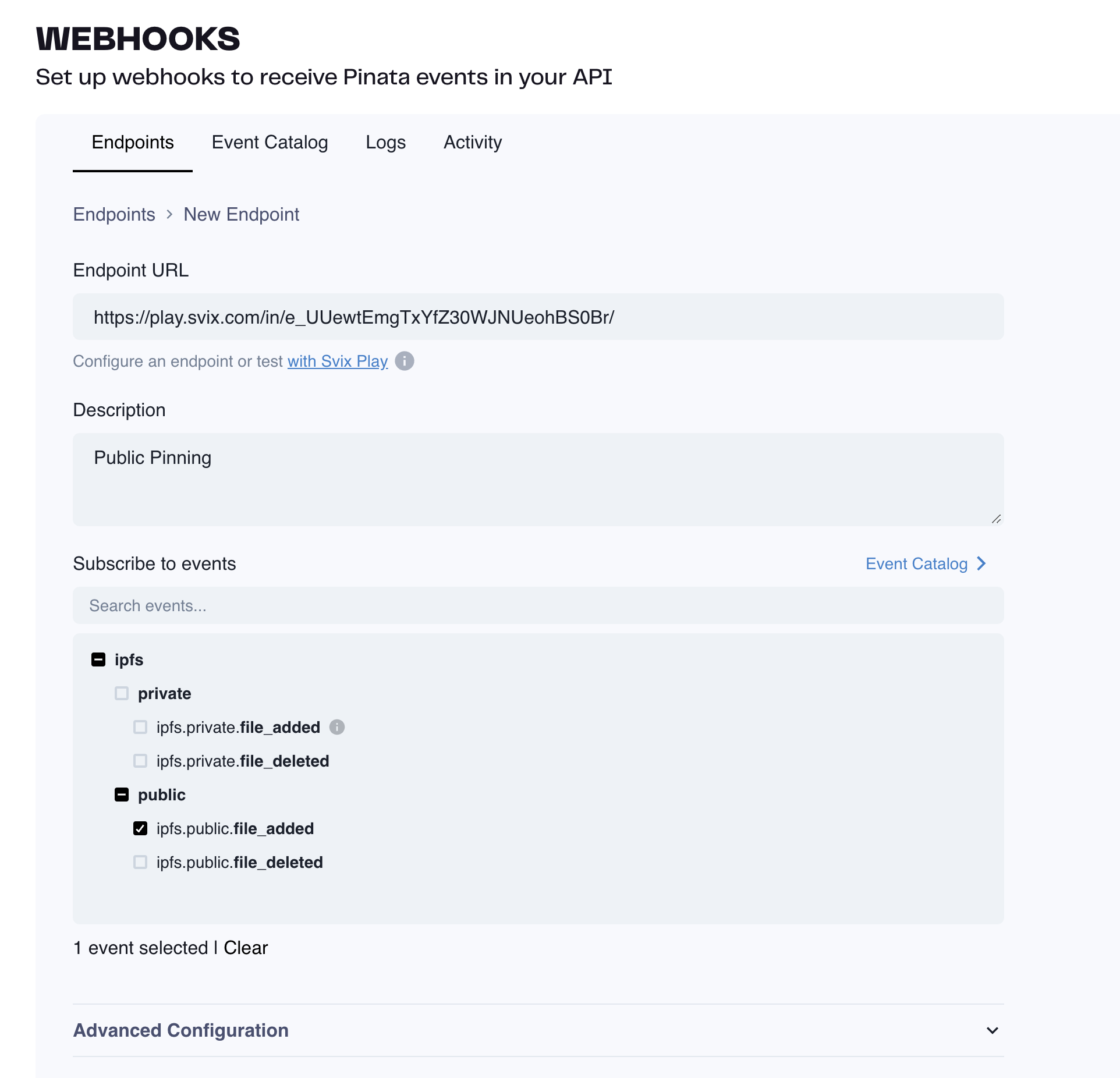
Once your Webhook is created you will be taken to the dashboard where you can see incoming logs and events that are fired. Try triggering one of the events that you've selected for your webhook either from the Pinata App or from the API. Then come back to the dashboard to see the result!
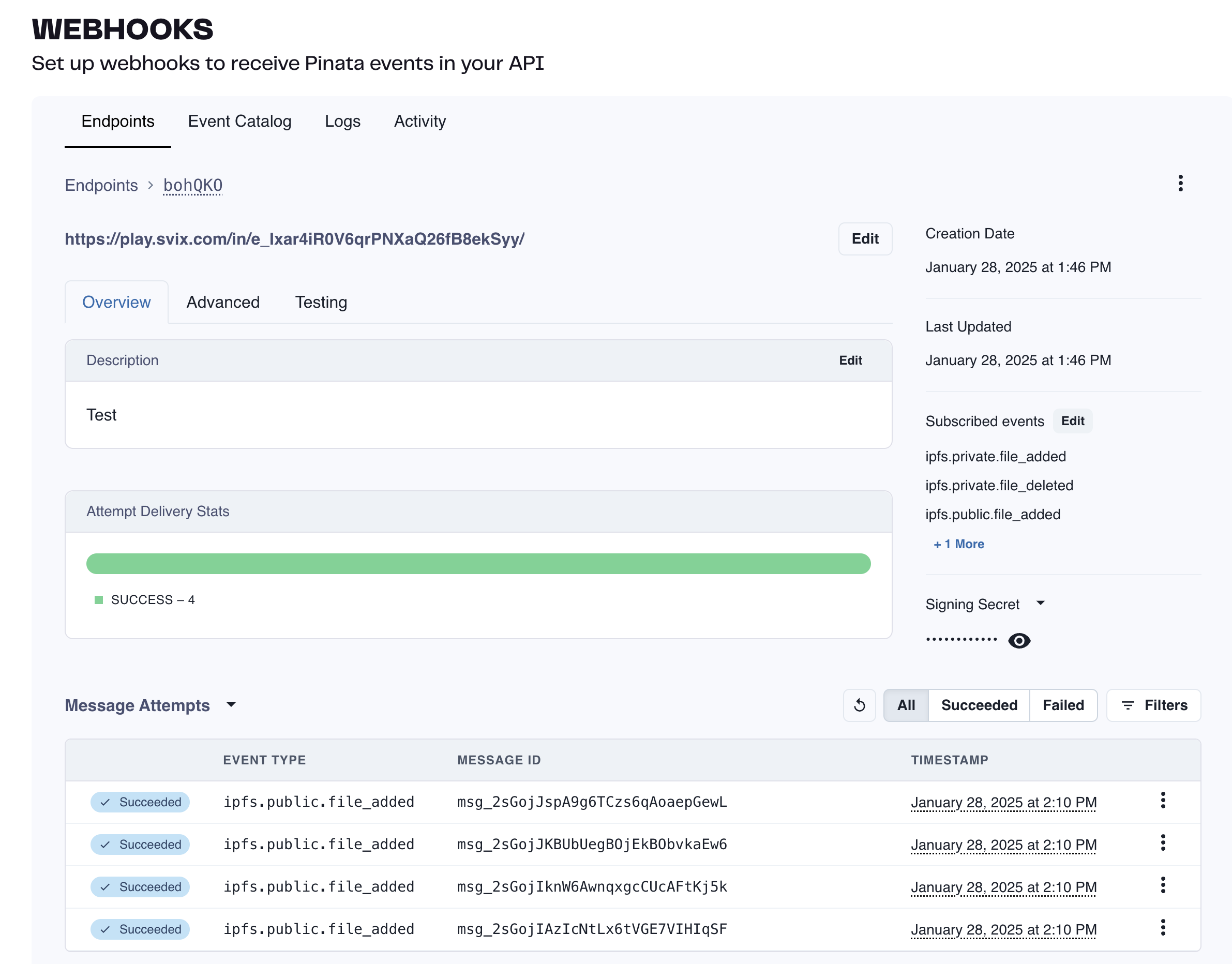
## Event Catalog
Check out the link below to browse all the available webhook events you can subscribe to!
Visit our Svix page for all Pinata Webhook events!
## Signature Verification
Webhook signatures let you verify that webhook messages are actually sent by Pinata and not a malicious actor.
For a more detailed explanation, check out this article on [why you should verify webhooks](https://docs.svix.com/receiving/verifying-payloads/why).
To grab the secret for your Webhook locate it on the Webhook Dashboard on the right sidebar. Click on the reveal icon to view the secret and copy it.
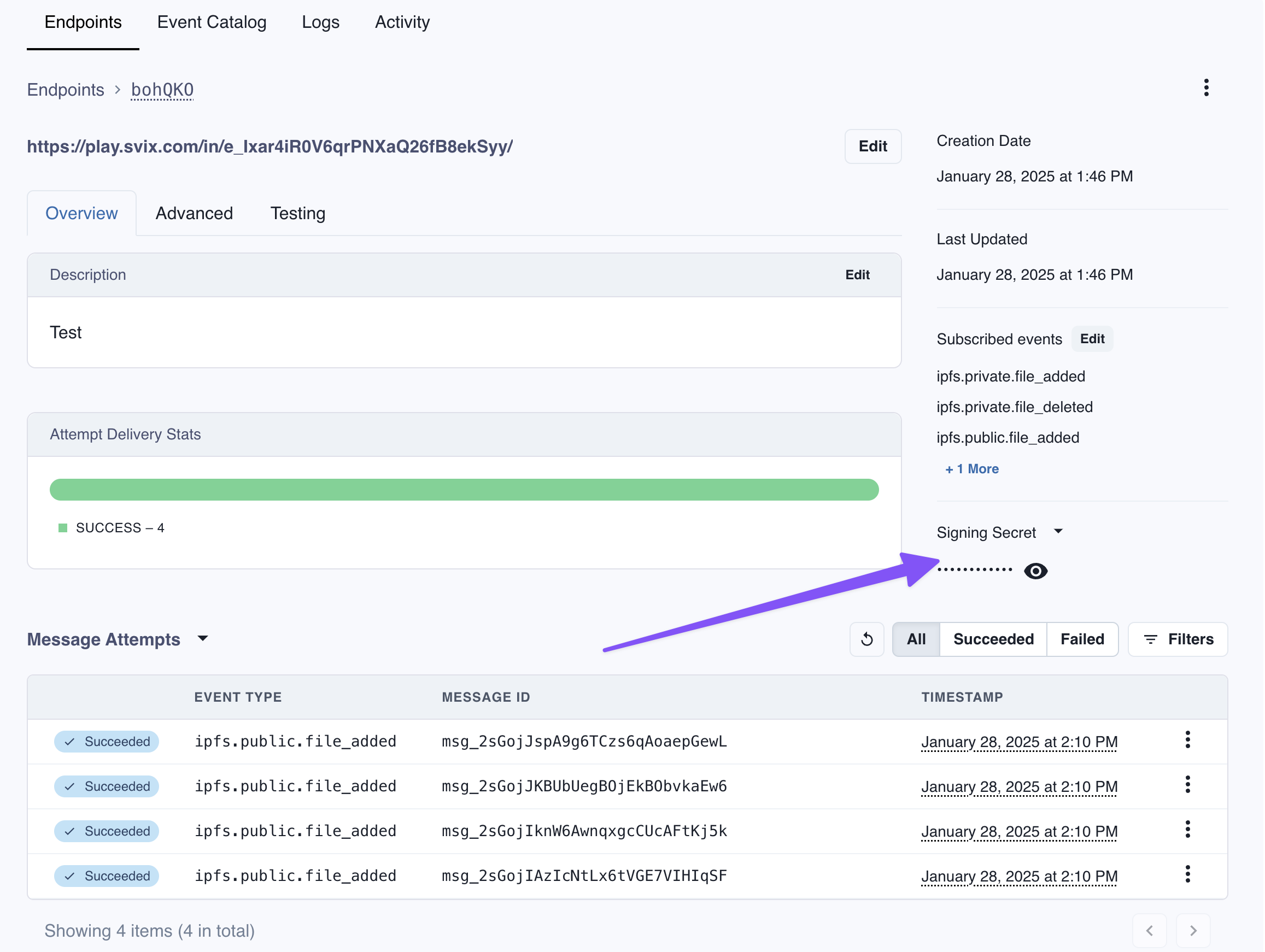
Our webhook partner Svix offers a set of useful libraries that make verifying webhooks very simple. Here is a an example using Javascript:
```typescript theme={null}
import { Webhook } from "svix";
const secret = "whsec_MfKQ9r8GKYqrTwjUPD8ILPZIo2LaLaSw";
// These were all sent from the server
const headers = {
"webhook-id": "msg_p5jXN8AQM9LWM0D4loKWxJek",
"webhook-timestamp": "1614265330",
"webhook-signature": "v1,g0hM9SsE+OTPJTGt/tmIKtSyZlE3uFJELVlNIOLJ1OE=",
};
const payload = '{"test": 2432232314}';
const wh = new Webhook(secret);
// Throws on error, returns the verified content on success
const payload = wh.verify(payload, headers);
```
For more instructions and examples of how to verify signatures, check out their [webhook verification documentation](https://docs.svix.com/receiving/verifying-payloads/how).
---
# Source: https://docs.pinata.cloud/ipfs-101/what-are-cids.md
> ## Documentation Index
> Fetch the complete documentation index at: https://docs.pinata.cloud/llms.txt
> Use this file to discover all available pages before exploring further.
# What are CIDs?
Content Identifiers (CIDs) are one of the most important parts of IPFS. Whenever you share a file through IPFS, that file or folder gets assigned a CID that looks like this:
The CID is determined by the content of the file or folder
Files can be retrieved either with a local IPFS node using a URL like `ipfs://{CID}` or if you don't have an IPFS node, you can use an [IPFS Gateway](/ipfs-101/what-are-ipfs-gateways) like `https://ipfs.io/ipfs/{CID}`. This simple concept of CIDs give them several super powers.
### Verifiability
The CID's uniqueness and dependence on the content it represents make the data inherently verifiable. Suppose a creator shares an image of a digital artwork on the IPFS network: if someone tries to replace the original image with a different one, the CID for the new image will be different. This guarantees that the content cannot be tampered with, reinforcing trust within the network.
### Portability and Addressability
CIDs also facilitate data portability. Because a CID represents the content itself rather than its location, you can move your data across various nodes within the IPFS network without losing access to it. This content-addressed system breaks away from the traditional location-based addressing used in systems like HTTP, leading to a more robust and reliable data sharing network.
### Ownership and Persistence
The CID's capabilities don't stop at verification and portability. They also empower users to take ownership of data they care about. By 'pinning' a CID to a pinning service or their own node, users can ensure the longevity of data, even if the original data owner stops hosting it. This is particularly valuable in the context of non-fungible tokens (NFTs). For instance, if you purchase an NFT, you can pin the CID of the token's metadata and image to a pinning service or a node you control, securing its existence indefinitely. This practice truly underlines the principle of digital ownership.
### Community Preservation
In addition to ownership and persistence, communities can preserve digital content through the practice of pinning much like how traditional art is preserved in museums. CIDs provide an opportunity for groups to maintain access to valuable data, ensuring its longevity.
## V0 & V1
There are two different types of CIDs you might see while using IPFS. The first is V0, which looks something like this:
`QmVLwvmGehsrNEvhcCnnsw5RQNseohgEkFNN1848zNzdng`
This was the first kind of IPFS CID that was used for several years, however over time a new version was developed called the V1. This version was more flexible and future proof, and looks something like this:
`bafkreih5aznjvttude6c3wbvqeebb6rlx5wkbzyppv7garjiubll2ceym4`
Both of these CIDs are the same content, a wonderful picture of Pinnie, however the cryptographic algorithm they were put through was different. Pinata has used the V0 for several years but now uses V1 for the previously mentioned reasons.
## How Do I Reference CIDs?
When it comes to providing an IPFS link, there are a few options to choose from.
### IPFS Protocol URL
An IPFS protocol URL looks like this:
Public Gateways are not meant for production apps, be sure to only use them for testing!
## [Dedicated Gateways](/gateways/dedicated-ipfs-gateways)
Thankfully Pinata has you covered! When you sign up for a free Pinata account, you get your own Dedicated Gateway. Dedicated Gateways are like the toll roads on highways and interstates; it's your own private boulevard to get unmatched speeds. Our Dedicated Gateways are well known in the industry as being fast, reliable, and just plain simple to use, and they do that through a large network of IPFS nodes and a built in global CDN that helps cache content to be much faster on subsequent loads. Check on the next few pages to learn more about how they work!
---
# Source: https://docs.pinata.cloud/ipfs-101/what-is-ipfs-pinning.md
> ## Documentation Index
> Fetch the complete documentation index at: https://docs.pinata.cloud/llms.txt
> Use this file to discover all available pages before exploring further.
# What is Pinning?
IPFS "Pinning" is the foundation to getting content on IPFS. When you upload a file to IPFS, the IPFS node will create a [CID](/ipfs-101/what-are-cids) for that file which will act as the identifier and the address. Then it will "pin" that file to the IPFS network, making it available for other nodes to request it. At that point any other IPFS node can request the content for a CID, and the content will pass through other nodes leaving a cache on that node. This makes it faster to fetch files again if those nodes are used.
Check out the [Quickstart](/quickstart) guide to upload your first file
through the SDK!
We also have other tools like the [Pinata CLI](/tools/ipfs-cli) or [Next.js Starter](/tools/nextjs-starter) which can be used to upload using [API Keys](/account-management/api-keys).
### Web App
If you're non-technical you can use [Pinata App](https://app.pinata.cloud/ipfs/files) to upload files, perfect if you just want to get started with NFTs and IPFS! It's as simple as clicking the "Add" button in the top right corner of the files page, selecting your file, give it a name, then upload. Once its complete, you'll see it listed in the files page!
Start uploading by [signing up for a free
account](https://app.pinata.cloud/register)!
### Pin by CID
Another way you can upload content to Pinata is by transferring content that is already on IPFS. This could be CIDs that are on your own local IPFS node or another IPFS pinning service! You can do this with the "Import from IPFS" button in the web app, like so:
VIDEO
---
# Source: https://docs.pinata.cloud/account-management/workspaces.md
> ## Documentation Index
> Fetch the complete documentation index at: https://docs.pinata.cloud/llms.txt
> Use this file to discover all available pages before exploring further.
# Workspaces
Workspaces is only available on the [Picnic and Fiesta plans](https://pinata.cloud/pricing)
Workspaces is a feature that allows you to add multiple people to your account and collaborate in a natural way. With the Picnic plan, you'll get 3 seats to invite your teammates, and with Fiesta you'll get 5 seats, plus the ability to add more at an extra fee.
VIDEO
## Inviting Members
At this time only Workspace Owners can invite members
To get started, login with a paid account and click on the profile button in the top right, then select "Workspaces."
At this time only Workspace Owners can remove members
If you ever need to remove someone from a Workspace, you can do so from the Workspaces page. Click on the three small dots next to the user's email and click "remove member." You can invite them back at any time!
The content creator provides their dedicated Pinata gateway URL. Replace `your-gateway.mypinata.cloud` in examples with the actual gateway domain provided.
### Step 1: Request the Content
Make a GET request to the x402 gateway URL:
```bash theme={null}
curl https://your-gateway.mypinata.cloud/x402/cid/bafkreih...
```
### Step 2: Receive Payment Requirements (402 Response)
The gateway returns HTTP 402 with payment details:
```json theme={null}
{
"x402Version": 1,
"accepts": [
{
"scheme": "exact",
"network": "base",
"maxAmountRequired": "10000",
"resource": "https://your-gateway.mypinata.cloud/x402/cid/bafkreih...",
"description": "Access fee",
"mimeType": "application/json",
"payTo": "0x6135561038E7C676473431842e586C8248276AED",
"maxTimeoutSeconds": 60,
"asset": "0x833589fCD6eDb6E08f4c7C32D4f71b54bdA02913",
"extra": {
"name": "USD Coin",
"version": "2"
}
}
],
"error": "Provide a valid X-Payment header to access this content"
}
```
**Key Fields:**
* `network`: Blockchain network (e.g., `base`)
* `asset`: Token contract address (USDC on Base)
* `payTo`: Recipient wallet address (content creator receives payment here)
* `maxAmountRequired`: Payment amount in smallest unit (e.g., `10000` = 0.01 USDC)
### Step 3: Access Content with Payment Proof
After successful payment, include the `X-Payment` header in the request:
```bash theme={null}
curl https://your-gateway.mypinata.cloud/x402/cid/bafkreih... \
-H "X-Payment: eyJ4NDAyVmVyc2lvbiI6MSwic2NoZW1lIjoiZXhhY3QiLCJuZXR3b3..."
```
The gateway will:
1. Validate the `X-Payment` header
2. Verify the payment proof
3. Check that amount, recipient, and network match
4. Serve the private content
**Successful Response:**
```
HTTP/200 OK
Content-Type: application/json
{
"your": "content"
}
```
## Using x402 Libraries
The x402 protocol has client libraries that automate the payment flow. First, set up your wallet:
## Setting Up Your Wallet
The x402 libraries require a Viem account or Coinbase Developer Platform wallet:
### Option 1: Viem Local Account
```typescript theme={null}
import { privateKeyToAccount } from "viem/accounts";
const account = privateKeyToAccount("0xYOUR_PRIVATE_KEY");
```
### Option 2: Coinbase CDP Wallet
```typescript theme={null}
import { Coinbase, Wallet } from "@coinbase/coinbase-sdk";
const coinbase = new Coinbase({
apiKeyName: "YOUR_API_KEY_NAME",
privateKey: "YOUR_PRIVATE_KEY",
});
const wallet = await Wallet.create();
const account = await wallet.getDefaultAddress();
```
## Using the Libraries
Once you have your wallet set up, use the x402 libraries to access paid content:
### @x402/fetch
```typescript theme={null}
import { wrapFetchWithPayment } from "@x402/fetch";
import { privateKeyToAccount } from "viem/accounts";
// Set up your wallet
const account = privateKeyToAccount("0xYOUR_PRIVATE_KEY");
const fetchWithPayment = wrapFetchWithPayment(fetch, account);
// Automatically handles 402 response and payment
const response = await fetchWithPayment(
"https://your-gateway.mypinata.cloud/x402/cid/bafkreih..."
);
const content = await response.json();
console.log(content);
```
### @x402/axios
```typescript theme={null}
import { wrapAxiosWithPayment } from "@x402/axios";
import axios from "axios";
import { privateKeyToAccount } from "viem/accounts";
// Set up your wallet
const account = privateKeyToAccount("0xYOUR_PRIVATE_KEY");
const axiosWithPayment = wrapAxiosWithPayment(axios, account);
// Automatically handles 402 response and payment
const response = await axiosWithPayment.get(
"https://your-gateway.mypinata.cloud/x402/cid/bafkreih..."
);
console.log(response.data);
```
## Technical Details (Optional)
Pinata uses Coinbase Facilitator to process x402 payments, which provides access to Coinbase's Discovery Bazaar network for broader content discovery.
## Understanding Payment Amounts
USDC uses 6 decimals, so amounts use the token's smallest unit:
| USD Amount | `maxAmountRequired` | Calculation |
| ---------- | ------------------- | ------------------- |
| \$0.01 | `10000` | \$0.01 × 1,000,000 |
| \$0.10 | `100000` | \$0.10 × 1,000,000 |
| \$1.00 | `1000000` | \$1.00 × 1,000,000 |
| \$10.00 | `10000000` | \$10.00 × 1,000,000 |
**Formula:** USD Amount × 1,000,000 = token amount
## Error Handling
### 402 Payment Required
Payment has not been made yet. Follow the payment flow above.
### 403 Forbidden
Payment proof is invalid or expired. Make a new payment.
### 404 Not Found
The CID doesn't exist or isn't attached to a payment instruction.
### 500 Internal Server Error
Gateway or facilitator error. Contact the content creator.
## Network Support
**USDC is currently the only supported token.**
| Network | Status | Token | Use Case |
| ---------------------- | ----------- | --------------------------------------------------- | ---------- |
| Base (Mainnet) | ✅ Available | USDC (`0x833589fCD6eDb6E08f4c7C32D4f71b54bdA02913`) | Production |
| Base Sepolia (Testnet) | ✅ Available | USDC (`0x036CbD53842c5426634e7929541eC2318f3dCF7e`) | Testing |
## Best Practices
1. **Handle 402 responses gracefully**: Display payment requirements clearly
2. **Use the x402 libraries**: They handle the complex payment flow automatically
3. **Test on Base Sepolia first**: Verify integration before using mainnet
4. **Store payment proofs**: If accessing content multiple times (check expiry)
5. **Monitor USDC balance**: Ensure sufficient funds for payments
## Example: Complete Integration
```typescript theme={null}
import { wrapFetchWithPayment } from "@x402/fetch";
import { privateKeyToAccount } from "viem/accounts";
// Set up your wallet
const account = privateKeyToAccount(process.env.PRIVATE_KEY);
const fetchWithPayment = wrapFetchWithPayment(fetch, account);
// Access paid content
async function accessPaidContent(cid: string) {
try {
const url = `https://your-gateway.mypinata.cloud/x402/cid/${cid}`;
const response = await fetchWithPayment(url);
if (!response.ok) {
throw new Error(`HTTP ${response.status}: ${response.statusText}`);
}
const content = await response.json();
console.log("Content accessed successfully:", content);
return content;
} catch (error) {
console.error("Failed to access content:", error);
throw error;
}
}
// Usage
accessPaidContent("bafkreih5aznjvttude6c3wbvqeebb6rlx5wkbzyppv7garjiubll2ceym4");
```
## Resources
* [@x402/fetch NPM Package](https://www.npmjs.com/package/@x402/fetch)
* [@x402/axios NPM Package](https://www.npmjs.com/package/@x402/axios)
* [Viem Documentation](https://viem.sh)
* [Coinbase Developer Platform](https://docs.cdp.coinbase.com/)
## Support
Need help accessing paid content? Contact the content creator or reach out to [team@pinata.cloud](mailto:team@pinata.cloud).
---
# Source: https://docs.pinata.cloud/files/x402-legacy.md
# Legacy x402
These endpoints represent an early implementation of the x402 protocol. For new implementations, please use the [Payment Instructions API](/files/x402-payment-instructions).
## Overview
The legacy x402 endpoints were Pinata's initial implementation of the x402 protocol for testing crypto-based content monetization. These endpoints use a simplified payment model and require the x402-axios or x402-fetch libraries.
## Endpoints
For detailed API specifications, see the API Reference:
Upload files with payment
Access private files with payment
## Why Use Payment Instructions Instead
The Payment Instructions API offers:
* **Flexible pricing** - Set your own payment requirements
* **Better control** - Manage payment requirements separately from files
* **Standard protocol** - Works with the standard x402 implementation
* **One-to-many** - Attach one payment instruction to multiple files
For new projects, we recommend using the [Payment Instructions API](/files/x402-payment-instructions).
---
# Source: https://docs.pinata.cloud/files/x402/x402-payment-instructions.md
> ## Documentation Index
> Fetch the complete documentation index at: https://docs.pinata.cloud/llms.txt
> Use this file to discover all available pages before exploring further.
# Payment Instructions Guide
Payment Instructions are the core mechanism for monetizing private IPFS content through the x402 protocol. You define payment requirements, attach them to your private files, and receive payments directly to your wallet when requesters access your content.
This guide covers how to create, manage, and use Payment Instructions to monetize your content.
## Prerequisites
* Paid Pinata account
* [Pinata SDK](/sdk/getting-started) installed
* Private files uploaded to Pinata IPFS
## Understanding Payment Instructions
A Payment Instruction is a reusable configuration that defines:
* **Payment requirements** - The amount, token, and recipient for payments
* **Network configuration** - Which blockchain network to use
* **Metadata** - Name and description for organization
The `payment_requirements` field is an array, allowing you to define multiple payment options. Each payment instruction can have multiple requirements, giving requesters flexibility in how they pay.
### Payment Instruction Structure
```typescript theme={null}
type PaymentInstruction = {
id: string;
version: number;
payment_requirements: PaymentRequirement[];
name: string;
description?: string;
created_at: string;
};
type PaymentRequirement = {
asset: string; // USDC token contract address
pay_to: string; // Your wallet address
network: "base" | "base-sepolia" | "eip155:8453" | "eip155:84532";
amount: string; // Amount in USDC smallest units
description?: string;
};
```
The `version` field is automatically managed by Pinata and increments with each update. You don't need to set this field when creating or updating payment instructions.
## Networks and Tokens
Currently supported configurations. **USDC is the only supported token at this time.**
### Base Mainnet (Production)
* **Network**: `base` (or `eip155:8453`)
* **USDC Token Address**: `0x833589fCD6eDb6E08f4c7C32D4f71b54bdA02913`
* **Use for**: Production monetization
### Base Sepolia (Testing)
* **Network**: `base-sepolia` (or `eip155:84532`)
* **USDC Token Address**: `0x036CbD53842c5426634e7929541eC2318f3dCF7e`
* **Use for**: Testing payment flows
## Complete Workflow
```typescript theme={null}
import { PinataSDK } from "pinata";
const pinata = new PinataSDK({
pinataJwt: process.env.PINATA_JWT!,
pinataGateway: "your-gateway.mypinata.cloud",
});
```
### Step 1: Upload Private Content
First, upload your file as private to Pinata:
```typescript theme={null}
const file = new File(["file contents"], "premium-content.pdf", {
type: "application/pdf",
});
const upload = await pinata.upload.private.file(file);
const cid = upload.cid;
```
**Important:** The file must be uploaded to the `private` network to be monetized with x402.
### Step 2: Create Payment Instruction
Create a payment instruction with your desired requirements:
```typescript theme={null}
const instruction = await pinata.x402.createPaymentInstruction({
name: "Premium PDF Access",
description: "One-time payment for PDF access",
payment_requirements: [
{
asset: "0x833589fCD6eDb6E08f4c7C32D4f71b54bdA02913", // USDC on Base
pay_to: "0x6135561038E7C676473431842e586C8248276AED", // YOU receive payments here
network: "base",
description: "Access fee",
amount: "10000", // $0.01 in USDC
},
],
});
const instructionId = instruction.data.id;
```
### Step 3: Attach CID to Payment Instruction
Link your private file to the payment instruction:
```typescript theme={null}
await pinata.x402.addCid(instructionId, cid);
```
### Step 4: Share x402 Gateway URL
Your content is now monetized and accessible at:
```
https://your-gateway.mypinata.cloud/x402/cid/{cid}
```
## Managing Payment Instructions
### Listing Instructions
View all your payment instructions with pagination:
```typescript theme={null}
const instructions = await pinata.x402.listPaymentInstructions({ limit: 20 });
```
Filter by specific criteria:
```typescript theme={null}
// Find instruction for a specific CID
const byCid = await pinata.x402.listPaymentInstructions({ cid: "bafkreih..." });
// Filter by name
const byName = await pinata.x402.listPaymentInstructions({ name: "Premium" });
// Get specific instruction by ID
const byId = await pinata.x402.listPaymentInstructions({ id: "019a2b6a..." });
```
### Getting a Single Instruction
```typescript theme={null}
const instruction = await pinata.x402.getPaymentInstruction(instructionId);
```
### Updating Instructions
Modify payment requirements for all attached CIDs:
```typescript theme={null}
const updated = await pinata.x402.updatePaymentInstruction(instructionId, {
payment_requirements: [
{
asset: "0x833589fCD6eDb6E08f4c7C32D4f71b54bdA02913",
pay_to: "0x6135561038E7C676473431842e586C8248276AED",
network: "base",
amount: "50000", // Updated to $0.05
},
],
});
```
### Deleting Instructions
Before deleting, remove all CID attachments:
```typescript theme={null}
// 1. List attached CIDs
const { data: cidData } = await pinata.x402.listCids(instructionId);
// 2. Remove each CID
for (const cid of cidData.cids) {
await pinata.x402.removeCid(instructionId, cid);
}
// 3. Delete the instruction
await pinata.x402.deletePaymentInstruction(instructionId);
```
## CID Management
### CID and Payment Instruction Relationship
* **One Payment Instruction → Multiple CIDs**: A single payment instruction can be attached to multiple CIDs
* **One CID → One Payment Instruction**: Each CID can only have one payment instruction at a time
* **Multiple Requirements**: A payment instruction can have multiple payment requirements in its `payment_requirements` array
* Updating the instruction affects all attached CIDs
### Managing CID Attachments
```typescript theme={null}
// List all CIDs for an instruction
const cids = await pinata.x402.listCids(instructionId);
// Add a CID
await pinata.x402.addCid(instructionId, cid);
// Remove a CID
await pinata.x402.removeCid(instructionId, cid);
```
## Gateway Behavior
When a requester accesses your x402 gateway URL without payment, the gateway returns payment requirements:
### Without Payment (402 Response)
```json theme={null}
{
"x402Version": 1,
"accepts": [
{
"scheme": "exact",
"network": "base",
"maxAmountRequired": "10000",
"resource": "https://gateway/x402/cid/bafkreig...",
"payTo": "0x6135561038E7C676473431842e586C8248276AED",
"asset": "0x833589fCD6eDb6E08f4c7C32D4f71b54bdA02913",
"extra": {
"name": "USD Coin",
"version": "2"
}
}
],
"error": "Provide a valid X-Payment header to access this content"
}
```
### With Valid Payment
The gateway:
1. Validates the `X-Payment` header
2. Verifies the payment proof
3. Checks amount, recipient, and network match requirements
4. Serves the private content
## Best Practices
### Payment Amounts
The `amount` uses USDC's smallest unit. USDC has 6 decimals, so to convert USD to the token amount, multiply by 1,000,000:
| USD Amount | `amount` | Calculation |
| ---------- | ------------ | ------------------- |
| \$0.01 | `"10000"` | \$0.01 × 1,000,000 |
| \$0.10 | `"100000"` | \$0.10 × 1,000,000 |
| \$1.00 | `"1000000"` | \$1.00 × 1,000,000 |
| \$5.00 | `"5000000"` | \$5.00 × 1,000,000 |
| \$10.00 | `"10000000"` | \$10.00 × 1,000,000 |
**Formula:** USD Amount × 1,000,000 = token amount
**Tips:**
* Consider transaction costs when setting minimum amounts
* Test on Base Sepolia before deploying to mainnet
### Instruction Organization
* Use descriptive names for easy management
* Group similar content under one instruction
* Document your payment requirements clearly
### Security Considerations
* Only private files can be monetized
* Ensure your `pay_to` address is correct. **You receive payments directly to this address.**
* Test payment flows on testnet first
* Monitor your gateway analytics
## Troubleshooting
### Common Issues
**409 Conflict when deleting instruction**
* Solution: Remove all CID attachments first
**400 Bad Request when creating instruction**
* Check `asset` and `pay_to` addresses start with `0x`
* Verify `network` is `base`, `base-sepolia`, `eip155:8453`, or `eip155:84532`
* Ensure `amount` is provided
**404 Not Found when accessing CID**
* Verify the CID exists and is private
* Check the CID is attached to a payment instruction
* Ensure the gateway URL format is correct
## SDK Reference
* [List Payment Instructions](/sdk/x402/payment-instructions/list)
* [Create Payment Instruction](/sdk/x402/payment-instructions/create)
* [Get Payment Instruction](/sdk/x402/payment-instructions/get)
* [Update Payment Instruction](/sdk/x402/payment-instructions/update)
* [Delete Payment Instruction](/sdk/x402/payment-instructions/delete)
* [List CIDs](/sdk/x402/cids/list)
* [Add CID](/sdk/x402/cids/add)
* [Remove CID](/sdk/x402/cids/remove)
## API Reference
For direct API access, see the [x402 API documentation](/api-reference/endpoint/x402/payment-instructions-list).
---
# Source: https://docs.pinata.cloud/files/x402/x402-quick-start.md
> ## Documentation Index
> Fetch the complete documentation index at: https://docs.pinata.cloud/llms.txt
> Use this file to discover all available pages before exploring further.
# Quick Start
Get started monetizing your private IPFS files with x402 in just a few minutes.
With x402, you monetize your private files by setting payment requirements. Payments go directly to your wallet. You control the price and receive the funds.
x402 is available on paid Pinata accounts. [Upgrade your account](https://app.pinata.cloud/billing) to access x402 monetization features.
## Prerequisites
* Paid Pinata account
* [Pinata SDK](/sdk/getting-started) installed
* Ethereum wallet address to receive payments
## Step 1: Upload a Private File
First, upload a file to Private IPFS:
```typescript theme={null}
import { PinataSDK } from "pinata";
const pinata = new PinataSDK({
pinataJwt: process.env.PINATA_JWT!,
pinataGateway: "your-gateway.mypinata.cloud",
});
const file = new File(["file contents"], "your-file.pdf", {
type: "application/pdf",
});
const upload = await pinata.upload.private.file(file);
const cid = upload.cid;
```
Save the returned `cid` for the next step.
## Step 2: Create a Payment Instruction
Define your payment requirements:
```typescript theme={null}
const instruction = await pinata.x402.createPaymentInstruction({
name: "Premium Content Access",
description: "One-time payment for file access",
payment_requirements: [
{
asset: "0x833589fCD6eDb6E08f4c7C32D4f71b54bdA02913", // USDC on Base
pay_to: "YOUR_WALLET_ADDRESS", // YOU receive payments here
network: "base",
description: "Access fee",
amount: "10000", // $0.01 in USDC
},
],
});
const instructionId = instruction.data.id;
```
**Understanding Payment Amounts:** The `amount` uses USDC's smallest unit. USDC has 6 decimals, so to convert USD to the token amount, multiply by 1,000,000:
| USD Amount | `amount` | Calculation |
| ---------- | ------------ | ------------------- |
| \$0.01 | `"10000"` | \$0.01 × 1,000,000 |
| \$0.10 | `"100000"` | \$0.10 × 1,000,000 |
| \$1.00 | `"1000000"` | \$1.00 × 1,000,000 |
| \$5.00 | `"5000000"` | \$5.00 × 1,000,000 |
| \$10.00 | `"10000000"` | \$10.00 × 1,000,000 |
**Formula:** USD Amount × 1,000,000 = token amount
**Networks:**
* Production: Use `"base"` (or `"eip155:8453"`) with `0x833589fCD6eDb6E08f4c7C32D4f71b54bdA02913`
* Testing: Use `"base-sepolia"` (or `"eip155:84532"`) with `0x036CbD53842c5426634e7929541eC2318f3dCF7e`
Save the returned `id` for the next step.
## Step 3: Attach CID to Payment Instruction
Link your private file to the payment instruction:
```typescript theme={null}
await pinata.x402.addCid(instructionId, cid);
```
## Step 4: Share Your Monetized Content
Your file is now monetized! Share this URL with requesters:
```
https://your-gateway.mypinata.cloud/x402/cid/{cid}
```
Replace `your-gateway.mypinata.cloud` with your actual dedicated Pinata gateway domain (e.g., `my-gateway.mypinata.cloud`), and `{cid}` with your file's CID.
## Step 5: Test the Payment Flow
When a requester accesses your URL without payment, the gateway returns a 402 response with payment requirements:
```typescript theme={null}
const response = await fetch(
`https://your-gateway.mypinata.cloud/x402/cid/${cid}`
);
const paymentRequirements = await response.json();
console.log(paymentRequirements);
```
Response:
```json theme={null}
{
"x402Version": 1,
"accepts": [{
"scheme": "exact",
"network": "base",
"maxAmountRequired": "10000",
"asset": "0x833589fCD6eDb6E08f4c7C32D4f71b54bdA02913",
"payTo": "YOUR_WALLET_ADDRESS",
"resource": "https://your-gateway.mypinata.cloud/x402/cid/{cid}"
}],
"error": "Provide a valid X-Payment header to access this content"
}
```
After payment is made, requesters can access the file by including the payment proof in the `X-Payment` header.
## Next Steps
* **Manage Multiple Files**: Attach multiple CIDs to the same payment instruction
* **Update Pricing**: Use [`updatePaymentInstruction`](/sdk/x402/payment-instructions/update)
* **Monitor Access**: Check your gateway analytics to track paid downloads
* **Requester Guide**: Learn how requesters access paid content in the [Accessing Paid Content](/files/x402/x402-accessing-paid-content) guide
## Common Issues
**404 Not Found**: Verify the CID is private and correctly attached to a payment instruction
**403 Forbidden**: Check that your API key has the required permissions
**409 Conflict**: If deleting a payment instruction fails, remove all CID attachments first
Need help? Contact [team@pinata.cloud](mailto:team@pinata.cloud)
## API Reference
For direct API access, see the [x402 API documentation](/api-reference/endpoint/x402/payment-instructions-list).
---
# Source: https://docs.pinata.cloud/files/x402/x402-services.md
> ## Documentation Index
> Fetch the complete documentation index at: https://docs.pinata.cloud/llms.txt
> Use this file to discover all available pages before exploring further.
# x402 Services
## Overview
The x402 Services provide streamlined endpoints for crypto-based content monetization using the @x402/axios or @x402/fetch libraries.
## Endpoints
For detailed API specifications, see the API Reference:
Upload files with payment
Access private files with payment
## See Also
For more granular control over payment configurations, see the [Payment Instructions API](/files/x402/x402-payment-instructions), which offers:
* **Flexible pricing** - Define custom payment requirements
* **Separate management** - Configure payments independently from files
* **One-to-many** - Attach one payment instruction to multiple files
---
# Source: https://docs.pinata.cloud/sdk/types/x402.md
> ## Documentation Index
> Fetch the complete documentation index at: https://docs.pinata.cloud/llms.txt
> Use this file to discover all available pages before exploring further.
# x402
Types for x402 monetization features
## PaymentRequirement
Defines a single payment requirement within a payment instruction.
```typescript theme={null}
type PaymentRequirement = {
asset: string;
pay_to: string;
network: "base" | "base-sepolia" | "eip155:8453" | "eip155:84532";
amount: string;
description?: string;
};
```
| Property | Type | Description |
| ------------- | ------------------------------------------------------------------- | ------------------------------------------------------------------------------------------------------------- |
| `asset` | `string` | The USDC token contract address for the network (e.g., `0x833589fCD6eDb6E08f4c7C32D4f71b54bdA02913` for Base) |
| `pay_to` | `string` | The wallet address to receive payments |
| `network` | `"base"` \| `"base-sepolia"` \| `"eip155:8453"` \| `"eip155:84532"` | The blockchain network for transactions. Accepts friendly names or EIP-155 chain IDs |
| `amount` | `string` | The amount required in USDC smallest units (6 decimals). Example: `"10000"` = \$0.01 |
| `description` | `string` | Optional description for this requirement |
## PaymentInstruction
Represents a complete payment instruction with all its requirements.
```typescript theme={null}
type PaymentInstruction = {
id: string;
version: number;
payment_requirements: PaymentRequirement[];
name: string;
description?: string;
created_at: string;
};
```
| Property | Type | Description |
| ---------------------- | ---------------------- | --------------------------------------------- |
| `id` | `string` | Unique identifier for the payment instruction |
| `version` | `number` | Version number of the instruction |
| `payment_requirements` | `PaymentRequirement[]` | Array of payment requirements |
| `name` | `string` | Name of the payment instruction |
| `description` | `string` | Optional description |
| `created_at` | `string` | ISO timestamp of creation |
## CreatePaymentInstructionRequest
Request body for creating a new payment instruction.
```typescript theme={null}
type CreatePaymentInstructionRequest = {
name: string;
payment_requirements: PaymentRequirement[];
description?: string;
};
```
## UpdatePaymentInstructionRequest
Request body for updating an existing payment instruction.
```typescript theme={null}
type UpdatePaymentInstructionRequest = {
name?: string;
payment_requirements?: PaymentRequirement[];
description?: string;
};
```
## PaymentInstructionListQuery
Query parameters for listing payment instructions.
```typescript theme={null}
type PaymentInstructionListQuery = {
limit?: number;
pageToken?: string;
cid?: string;
name?: string;
id?: string;
};
```
| Property | Type | Description |
| ----------- | -------- | ----------------------------------- |
| `limit` | `number` | Maximum number of results to return |
| `pageToken` | `string` | Pagination token for next page |
| `cid` | `string` | Filter by associated CID |
| `name` | `string` | Filter by instruction name |
| `id` | `string` | Filter by instruction ID |
## PaymentInstructionListResponse
Response structure for listing payment instructions.
```typescript theme={null}
type PaymentInstructionListResponse = {
data: {
payment_instructions: PaymentInstruction[];
next_page_token?: string;
};
};
```
## PaymentInstructionResponse
Response structure for single payment instruction operations.
```typescript theme={null}
type PaymentInstructionResponse = {
data: PaymentInstruction;
};
```
## PaymentInstructionDeleteResponse
Response structure for delete operations.
```typescript theme={null}
type PaymentInstructionDeleteResponse = {
data: {};
};
```
## CidListQuery
Query parameters for listing CIDs associated with a payment instruction.
```typescript theme={null}
type CidListQuery = {
limit?: number;
pageToken?: string;
};
```
## CidListResponse
Response structure for listing CIDs.
```typescript theme={null}
type CidListResponse = {
data: {
cids: string[];
next_page_token?: string;
};
};
```
## CidAssociation
Represents a CID associated with a payment instruction.
```typescript theme={null}
type CidAssociation = {
payment_instruction_id: string;
cid: string;
created_at: string;
};
```
| Property | Type | Description |
| ------------------------ | -------- | ------------------------------------------------- |
| `payment_instruction_id` | `string` | ID of the associated payment instruction |
| `cid` | `string` | The IPFS CID |
| `created_at` | `string` | ISO timestamp of when the association was created |
## CidAssociationResponse
Response structure for adding a CID to a payment instruction.
```typescript theme={null}
type CidAssociationResponse = {
data: CidAssociation;
};
```
## CidRemoveResponse
Response structure for removing a CID from a payment instruction.
```typescript theme={null}
type CidRemoveResponse = {
data: {};
};
```