# Mjml > In this section, you're going to learn how to code a basic email template using MJML. --- # MJML Documentation # Source: https://raw.githubusercontent.com/mjmlio/mjml/master/doc/basic.md # Path: doc/basic.md ## Basic layout example In this section, you're going to learn how to code a basic email template using MJML. Here‘s what we’re building:
Basic email layout

Try it live

### Sections ```html ``` First, we’ll create the basic structure, dividing the email into six sections. #### Company Header ```html My Company ``` The first section of the email consists in a centered banner, containing only the company name. The following markup is the MJML representation of the layout we want to obtain. #### Image Header ```html Slogan here Promotion ``` Next comes a section with a background image and a block of text (representing the company slogan) and a button pointing to a page listing all the company promotions. To add the image header, you will have to replace the section's `background-color` with a `background-url`. Similarly to the first company header, you will have to center the text. The button `href` sets where the button links to. In order to have the background rendered full-width in the column, set the column width to 600px with `width="600px"`. #### Introduction Text ```html My Awesome Text Lorem ipsum dolor sit amet, consectetur adipiscing elit. Proin rutrum enim eget magna efficitur, eu semper augue semper. Aliquam erat volutpat. Cras id dui lectus. Vestibulum sed finibus lectus, sit amet suscipit nibh. Proin nec commodo purus. Sed eget nulla elit. Nulla aliquet mollis faucibus. Learn more ``` The introduction text will consist of a heading, the main text and a button. The title is a regular `mj-text` tag that can be styled as a heading. #### 2 Columns Section ```html Find amazing places Lorem ipsum dolor sit amet, consectetur adipiscing elit. Proin rutrum enim eget magna efficitur, eu semper augue semper. Aliquam erat volutpat. Cras id dui lectus. Vestibulum sed finibus lectus. ``` This section is made up of two columns. One containing an image, the other containing text. For the image, note that when a tag does not have any children, you can use the XML self-closing tag syntax: `` For the text, you are going to use two `mj-text` tags like, as previously; one with a heading style, and the other one styled as regular text. #### Icons ```html ``` This section uses a 3-column layout to display the 3 icons horizontally across the email. #### Social Icons ```html Share ``` MJML has an `mj-social` component as standard. Here, we're going to use `facebook` only, but there are several default social media sites to choose from, or you can add your own bespoke. --- # MJML Documentation # Source: https://raw.githubusercontent.com/mjmlio/mjml/master/doc/body_components.md # Path: doc/body_components.md ## Standard Body components Body components ease your development process by providing ready made responsive layouts that you can use to create your email template. --- # MJML Documentation # Source: https://raw.githubusercontent.com/mjmlio/mjml/master/doc/community-components.md # Path: doc/community-components.md ## Community components In addition to the standard components available in MJML, our awesome community is contributing by creating their own components. To use a community component, proceed as follows: - Install MJML locally with `npm install mjml` in a folder - Install the community component with `npm install {component-name}` in the same folder - Create a `.mjmlconfig` file in the same folder with this code: ```json { "packages": ["component-name/path-to-js-file"] } ``` You can now use the component in an MJML file, for example `index.mjml`, and run MJML locally in your terminal. Ensure that you’re in the folder where you installed MJML and the community component, e.g.: `./node_modules/.bin/mjml index.mjml`. --- # MJML Documentation # Source: https://raw.githubusercontent.com/mjmlio/mjml/master/doc/community-contributions.md # Path: doc/community-contributions.md ## Community Contributions The MJML ecosystem has a dedicated community that we count to help make it grow and provide it with even more awesome tools, always aiming to make development with MJML an efficient and fun process! Getting involved is really easy. If you want to contribute, feel free to [open an issue](https://github.com/mjmlio/mjml/issues) or [submit a pull-request](https://github.com/mjmlio/mjml/pulls)! Here are some tools that utilise MJML: ### Mailjet [Mailjet](https://www.mailjet.com/demo/) offers an integrated MJML workspace designed for creating, previewing, and managing email templates. Its MJML editor supports syntax highlighting, live preview, and validation, helping you move quickly while keeping your markup in good shape. The drag-and-drop editor in Mailjet is also built on MJML, so visually created templates share the same responsive structure as those coded by hand. When your template is ready, you can export it in MJML or HTML, or send emails directly through Mailjet. ### Parcel [Parcel](https://parcel.io) is the code editor built for email. This feature packed tool includes syntax highlighting, Emmet, inline documentation, autocomplete, live preview, screenshots, and full MJML, CSS, and HTML validation. Use Focus Mode to keep the preview aligned with the code you're working on, or Inspect Element to easily find the code that produces specific elements in the preview. Export MJML to HTML with a click. ### IntelliJ IDEA Plugin - MJML Support [IntelliJ IDEA](https://www.jetbrains.com/idea/) is an IDE developed by JetBrains. The plugin provides you with a (near) realtime preview, auto complete, inline documentation and code analysis. It is available on the [JetBrains Marketplace](https://plugins.jetbrains.com/plugin/16418-mjml-support). ### Gradle Plugin - MJML Compilation [Gradle](https://gradle.org/) is a build tool for a various set of languages and environments. The plugin provides an easy way to embed your MJML templates to your Java/Kotlin application in its resources in precompiled form (HTML). It is available through the gradle plugin system [io.freefair.mjml.java](https://plugins.gradle.org/plugin/io.freefair.mjml.java) and documentation is available here [FreeFair User Guide](https://docs.freefair.io/gradle-plugins/current/reference/). ### Neos CMS [Neos CMS](https://www.neos.io/) is a content management system that combines structured content with application. This package adds the helper for compiling MJML markup as well as some prototypes which allow you to use TailwindCSS like classes in your MJML markup. It is available on [packagist](https://packagist.org/packages/garagist/mjml). ### Easy-email [Easy-email](https://github.com/zalify/easy-email) drag-and-drop email editor based on MJML. Transform structured JSON data into HTML that’s compatible with major email clients. ### Email Love The [Email Love Figma plugin](https://www.figma.com/community/plugin/1387891288648822744/email-love-html-email-builder) takes the headache out of the email development process by enabling you to export responsive, production-ready email HTML or MJML directly from Figma. --- # MJML Documentation # Source: https://raw.githubusercontent.com/mjmlio/mjml/master/doc/components_1.md # Path: doc/components_1.md ## Components Components are the core of MJML. A component is an abstraction of a more complex responsive HTML layout. It exposes attributes, enabling you to create bespoke styling. MJML comes out of the box with a set of standard components to help you easily build your first templates without having to reinvent the wheel. For instance, the `mj-button` component is, on the inside, a complex HTML layout: ```html Hello There!
Hello There!
``` ### Which email clients/versions are supported? For full details of component support, [please visit our support matrix](https://mjml.io/compatibility). ### mjml An MJML document starts with an `mjml` tag. It can contain only `mj-head` and `mj-body` tags. Both have the same purpose of `head` and `body` in a HTML document. #### Attributes | attribute | accepts | description | default value | | --------- | ------- | -------------------------------------------------------------------------------------------------------------------------------------------------------------------------------------------------------- | ------------- | | owa | string | if set to `desktop`, this will force the desktop version for older (self-hosted) versions of Outlook.com that don't support media queries (cf. [this issue](https://github.com/mjmlio/mjml/issues/2241)) | `none` | | lang | string | adds a `lang` attribute in the `html` and `body > div` tags | `und` | | dir | string | adds a `dir` attribute in the `html` and `body > div` tags | `auto` | ### mj-head Contains components related to the document head such as style and meta elements (see [head components](#standard-head-components)). --- # MJML Documentation # Source: https://raw.githubusercontent.com/mjmlio/mjml/master/doc/components_2.md # Path: doc/components_2.md ### mj-include The `mjml-core` package allows you to include external `.mjml` files to build your email template. ```xml This is a header ``` You can wrap your external `.mjml` files inside the default `mjml > mj-body` tags to make it easier to preview outside the main template. ```xml ``` The MJML engine will then replace your included files before starting the rendering process. #### Other file types You can include external `.css` files which will be inserted in the same way as using an `mj-style` tag. You need to specify that you're including a CSS file using the attribute `type="css"` attribute. If you want the CSS to be inlined, you can use the `css-inline="inline"` attribute. ```xml ``` You can also include external `html` files. They will be inserted the same way as when using an `mj-raw` tag. You need to specify that you're including an HTML file using the attribute `type="html"`. ```xml ``` --- # MJML Documentation # Source: https://raw.githubusercontent.com/mjmlio/mjml/master/doc/create.md # Path: doc/create.md ## Creating a Component One of the great advantages of MJML is that it's component-based. Components abstract complex patterns and can easily be reused. In addition to the standard library of components, it is also possible to create your own components! We have published [a step-by-step guide](https://medium.com/mjml-making-responsive-email-easy/tutorial-creating-your-own-component-with-mjml-4-1c0e84e97b36) that explains how to create a custom components with MJML. It will introduce you to the [boilerplate repo](https://github.com/mjmlio/mjml-component-boilerplate) hosted on Github, which provides a fast way of getting started with developing your own components. --- # MJML Documentation # Source: https://raw.githubusercontent.com/mjmlio/mjml/master/doc/ending-tags.md # Path: doc/ending-tags.md ### Ending tags Some MJML components are "ending tags". These are mostly the components that will contain text content, like `mj-text` or `mj-button`. These components can contain both text and HTML content, which will remain unprocessed by the MJML engine. You cannot use other MJML components. Since the content is not processed, this means that any text won't be escaped, so if you use characters that are used to define html tags in your text, like `<` or `>`, you should use the encoded characters `<` and `<`. There can also be issues if you use the `minify` option, `mj-html-attributes` or an inline `mj-style`, because these require the HTML to be re-parsed internally. If you're just using the `minify` option, and need to use the `< >` characters, e.g for a templating language, you can also avoid this problem by wrapping the troublesome content between two `` tags. Here is the list of all ending tags : - `mj-accordion-text` - `mj-accordion-title` - `mj-button` - `mj-navbar-link` - `mj-raw` - `mj-social-element` - `mj-text` - `mj-table` --- # MJML Documentation # Source: https://raw.githubusercontent.com/mjmlio/mjml/master/doc/getting_started.md # Path: doc/getting_started.md ## Getting Started This is a responsive email:
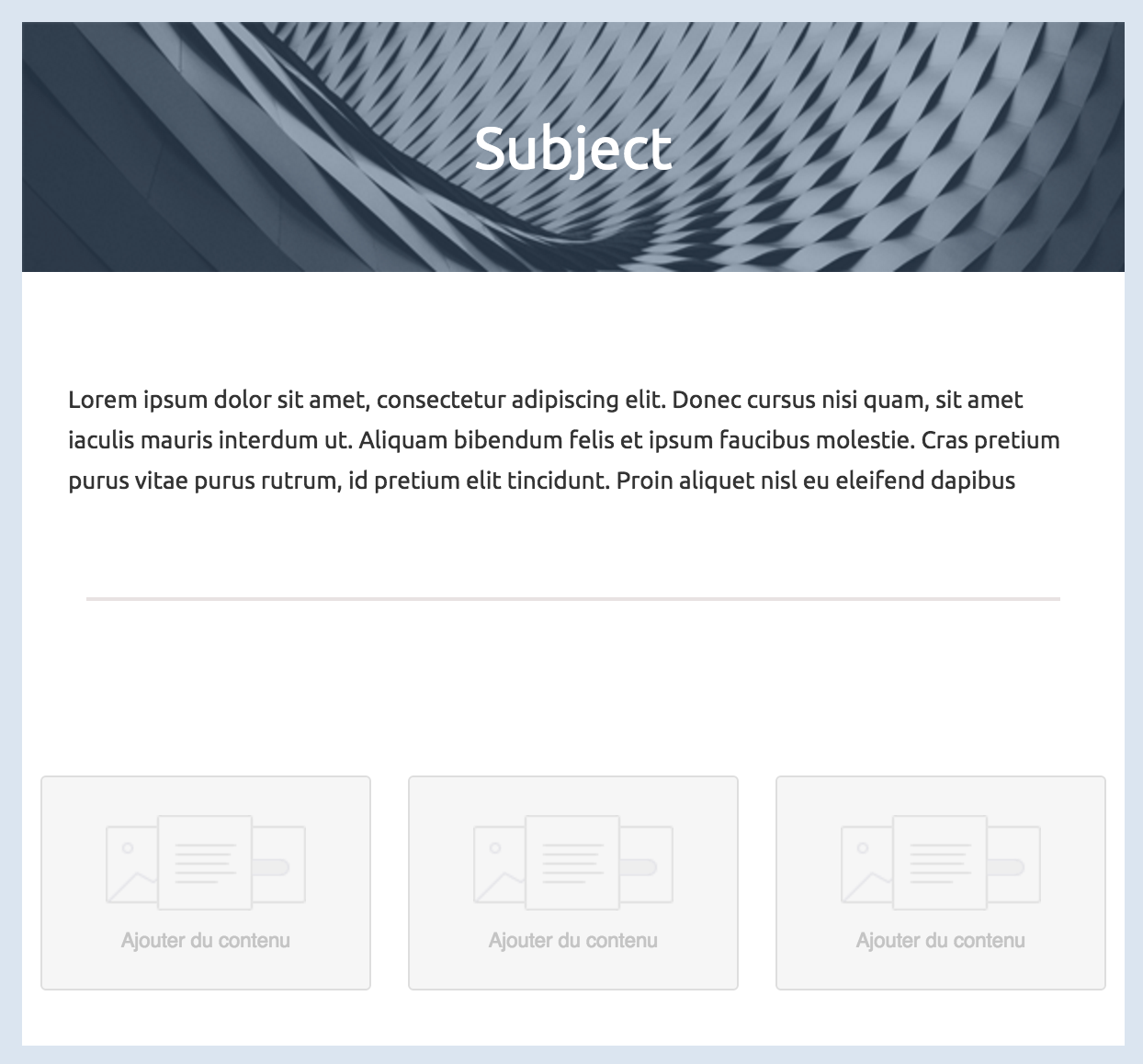
layout
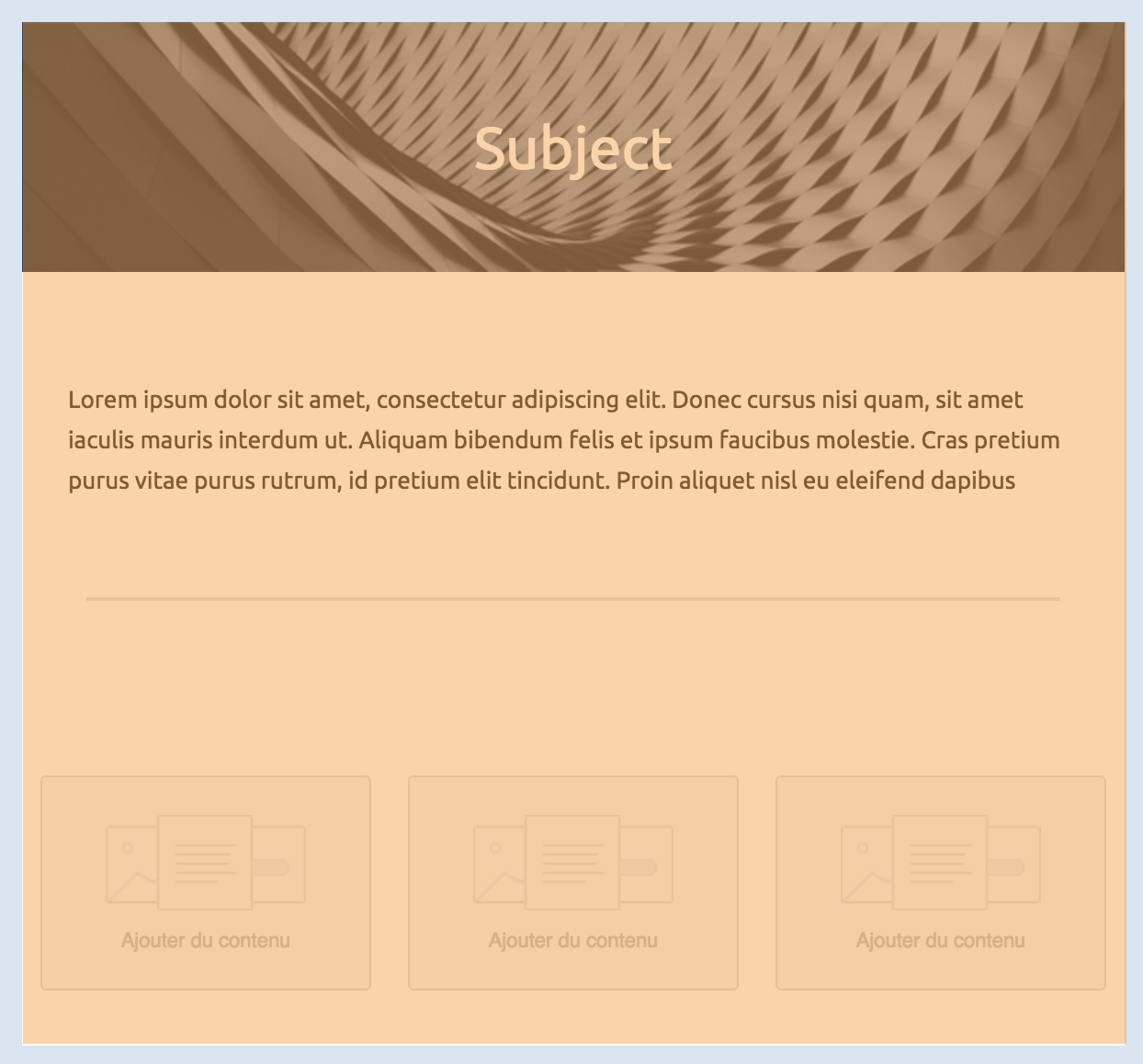
Like a regular HTML template, we can split this one into different parts to fit in a grid. The body of your email, represented by the `mj-body` tag contains the entire content of your document:
the body is overlaid with a semi opaque orange color
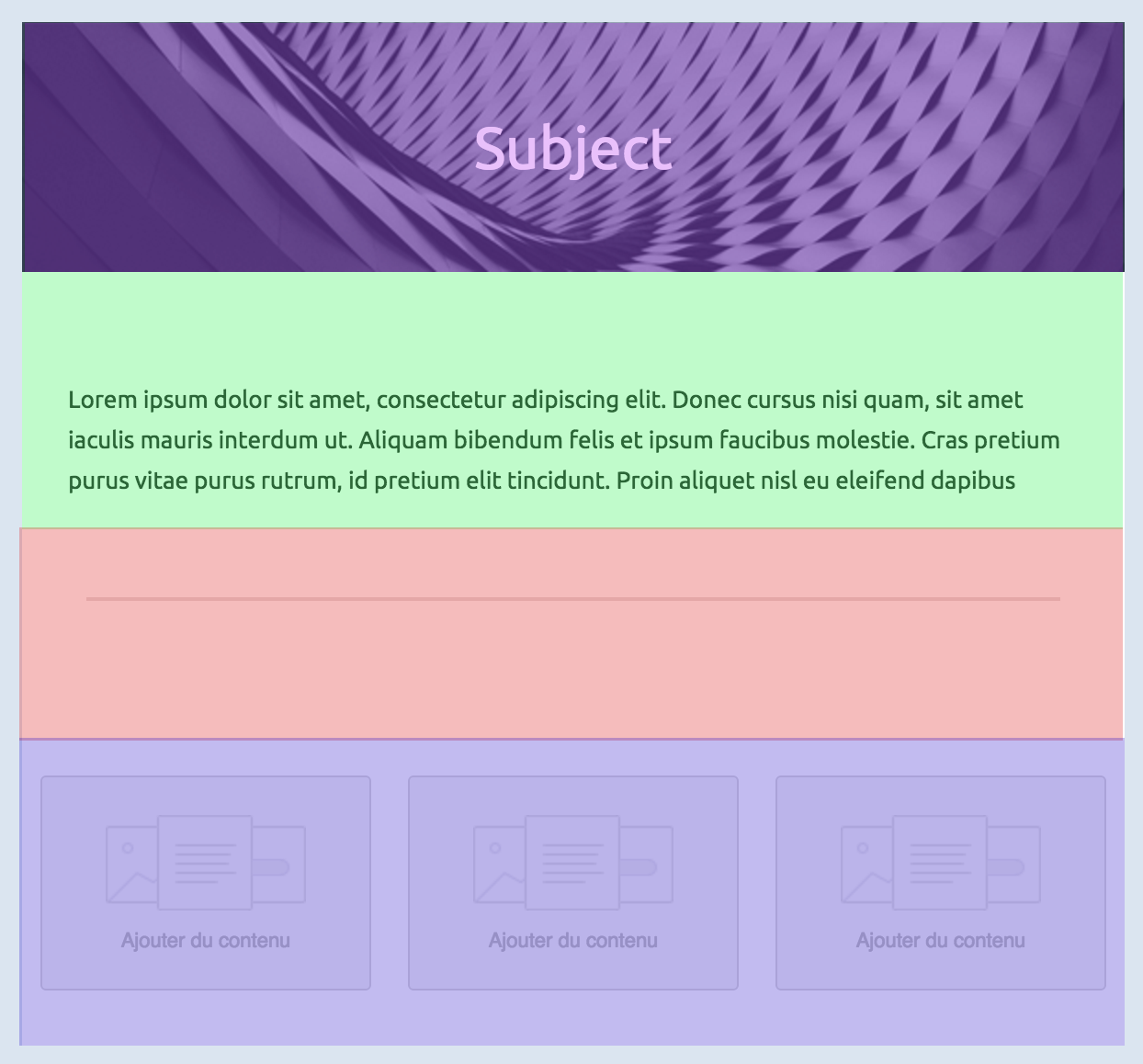
From here, you can first define your sections:
each section is overlaid with various semi opaque colors
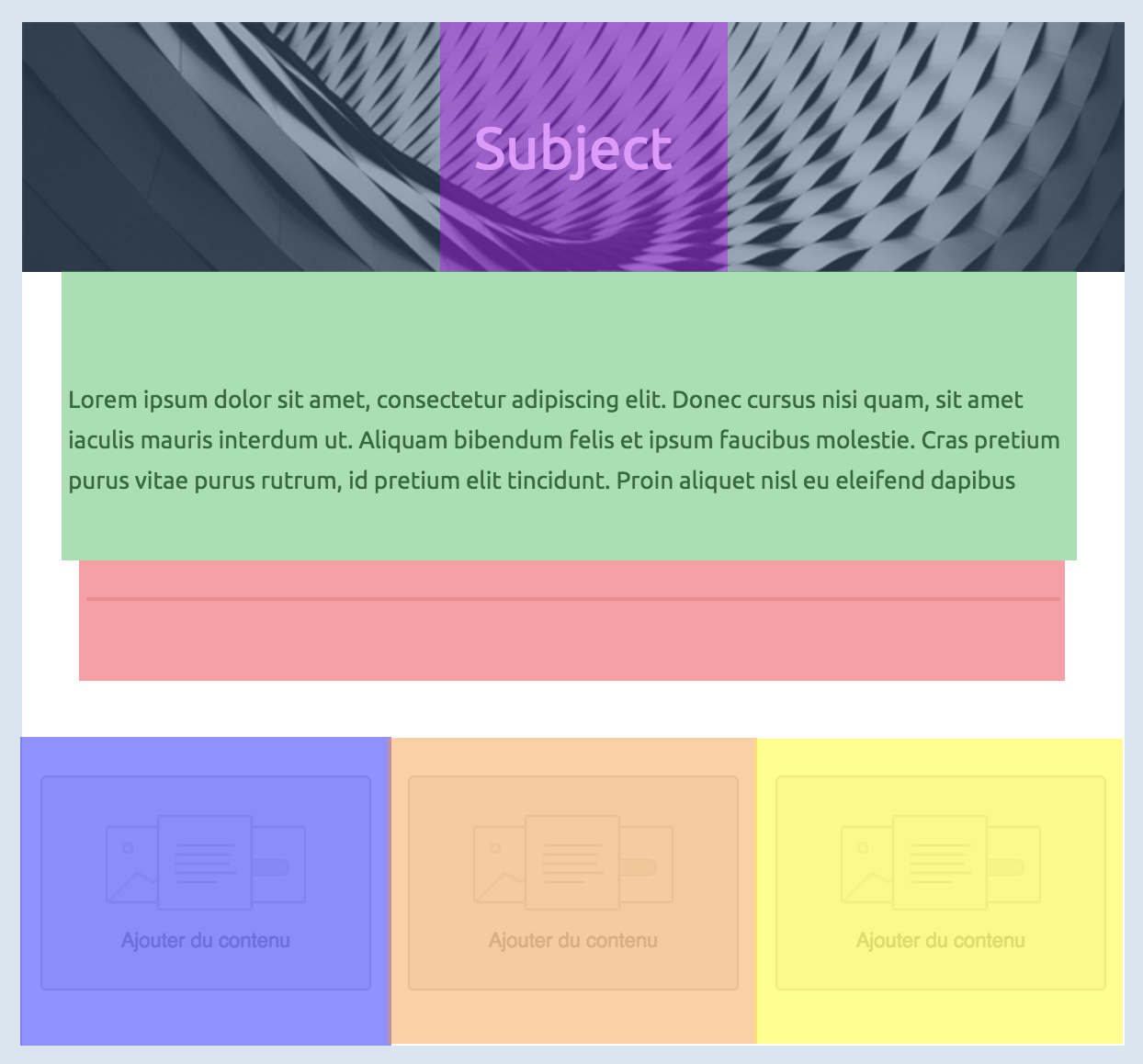
Inside any section, there should be columns (even if you need only one column). Columns are what makes MJML responsive.
each column is overlaid with various semi opaque colors
Below, you'll find some basic rules of MJML to keep in mind for later. We'll remind them when useful but better start learning them early on. ### Column sizing #### Auto sizing The default behavior of the MJML translation engine is to divide the section space (600px by default, but it can be changed with the `width` attribute on `mj-body`) in as many columns as you declare. Let's take the following layout to illustrate this: ```html ``` Since the first section defines only 2 columns, the engine will translate that in a layout where each column takes 50% of the total space (300px each). If we add a third one, it goes down to 33%, and with a fourth one to 25%. #### Manual sizing You can also manually set the size of your columns, in pixels or percentage, by using the `width` attribute on `mj-column`. Let's take the following layout to illustrate this: ```html ``` --- # MJML Documentation # Source: https://raw.githubusercontent.com/mjmlio/mjml/master/doc/guide.md # Path: doc/guide.md --- title: API Reference language_tabs: - html: MJML toc_footers: - Fork me on Github - Submit an Issue search: true --- # MJML Guide MJML (Mailjet Markup Language) is a markup language designed to reduce the pain of coding a responsive email. Its semantic syntax makes it easy and straightforward whilst its rich standard components library speeds up your development time and lightens your email codebase. MJML’s open-source engine generates high quality responsive HTML compliant with best practices. ## Overview MJML rolls up all of what Mailjet has learned about HTML email design and abstracts the whole layer of complexity related to responsive email design. Get your speed and productivity boosted with MJML’s semantic syntax. Say goodbye to endless HTML table nesting or email client specific CSS. Building a responsive email is super easy with tags such as `` and ``. MJML has been designed with responsiveness in mind. The abstraction it offers guarantee that you will always be up-to-date with the industry practices. Email clients update their specs and requirements regularly, but we geek about that stuff - we’ll stay on top of it so you can spend less time reading up on latest email client updates and more time designing beautiful emails. ```html Hello World ```

Try it live

--- # MJML Documentation # Source: https://raw.githubusercontent.com/mjmlio/mjml/master/doc/head_components.md # Path: doc/head_components.md ## Standard Head components Head components ease your development process, for example, enabling you to import fonts, define default styles or create classes for MJML components. --- # MJML Documentation # Source: https://raw.githubusercontent.com/mjmlio/mjml/master/doc/install.md # Path: doc/install.md ## Installation You can [install MJML](https://www.npmjs.com/package/mjml) with NPM to use it with NodeJS or the Command Line Interface. If you're not sure what those are, [head over to Usage](#usage) for other ways to use MJML. ```bash npm install mjml ``` ## Development To work on MJML, make changes and create merge requests, [download and install yarn](https://yarnpkg.com/lang/en/docs/install/) for easy development. ```bash git clone https://github.com/mjmlio/mjml.git && cd mjml yarn yarn build ``` You can also run `yarn build:watch` to rebuild the package as you code. ## Usage ### Online Don't want to install anything? [Use the free online editor](https://mjml.io/try-it-live)!
try it live

Try it live

### Applications and plugins MJML comes with an ecosystem of tools and plugins, check out: - The [MJML App](https://mjmlio.github.io/mjml-app/) (MJML is included) - [Visual Studio Code plugin](https://github.com/mjmlio/vscode-mjml) (MJML is included) - [Sublime Text plugin](https://packagecontrol.io/packages/MJML-syntax) (MJML needs to be installed separately) For more information, [check the Tooling section](#tooling). For more tools, [check the Community page](https://mjml.io/community). ### Command line interface > Compiles the file and outputs the HTML generated in `output.html` ```bash mjml input.mjml -o output.html ``` You can pass optional `arguments` to the CLI and combine them. | argument | description | default value | | ------------------------------------------------------- | -------------------------------------------------------------------------------------------------------------------------------------------------------- | ---------------------------------------------------------------------------------- | | `mjml -m [input]` | Migrates a v3 MJML file to the v4 syntax | | | `mjml [input] -o [output]` | Writes the output to [output] | | | `mjml [input] -s` | Writes the output to `stdout` | | | `mjml [input] -s --noStdoutFileComment` | Writes the output to `stdout` without an comment containing the source file in the first line | the outputs first line contains the file in the format `` | | `mjml -w [input]` | Watches the changes made to `[input]` (file or folder) | | | `mjml [input] --config.beautify` | Beautifies the output (`true` or `false`) | `true` | | `mjml [input] --config.minify` | Minifies the output (`true` or `false`) | `false` | | `mjml [input] --config.juicePreserveTags` | Preserve some tags when inlining css, see [mjml-cli documentation](https://github.com/mjmlio/mjml/blob/master/packages/mjml-cli/README.md) for more info | | | `mjml [input] --config.minifyOptions` | Options for html minifier, see [mjml-cli documentation](https://github.com/mjmlio/mjml/blob/master/packages/mjml-cli/README.md) for more info | | | `mjml [input] --config.mjmlConfigPath [mjmlconfigPath]` | Uses the `.mjmlconfig` file in the specified path or directory to include custom components | _The `.mjmlconfig` file in the current working directory, if any_ | | `mjml [input] --config.useMjmlConfigOptions` | Allows to use the `options` attribute from `.mjmlconfig` file | `false` | | `mjml [input] --config.validationLevel` | [Validation level](https://github.com/mjmlio/mjml/tree/master/packages/mjml-validator#validating-mjml): `strict`, `soft` or `skip` | `soft` | ### Inside Node.js ```javascript import mjml2html from 'mjml' /* Compile an mjml string */ const htmlOutput = mjml2html( ` Hello World! `, options, ) /* Print the responsive HTML generated and MJML errors if any */ console.log(htmlOutput) ``` You can pass optional `options` as an object to the `mjml2html` function: | option | accepts | description | default value | | -------------------- | ------- | ------------------------------------------------------------------------------------------------------------------------------------------------------ | --------------------------------------------------------------------------------------------------------------------------------------------------------------------------------------------------------------------------------------------------------------------------------------------------------------------------------------------------------------------------------- | | fonts | object | Default fonts imported in the HTML rendered by MJML | See in [index.js](https://github.com/mjmlio/mjml/blob/master/packages/mjml-core/src/index.js#L100-L108) | | keepComments | boolean | Option to keep comments in the HTML output | `true` | | beautify | boolean | Option to beautify the HTML output | `false` | | minify | boolean | Option to minify the HTML output | `false` | | validationLevel | string | Available values for the [validator](https://github.com/mjmlio/mjml/tree/master/packages/mjml-validator#validating-mjml): `strict` `soft` `skip` | `soft` | | filePath | string | Full path of the specified file to use when resolving paths from [`mj-include` components](#mj-include) | `.` | | mjmlConfigPath | string | The path or directory of the [`.mjmlconfig` file](#community-components) | `process.cwd()` | | useMjmlConfigOptions | boolean | Allows to use the `options` attribute from `.mjmlconfig` file | `false` | | minifyOptions | object | Options for HTML minifier, see [mjml-cli documentation](https://github.com/mjmlio/mjml/blob/master/packages/mjml-cli/README.md) for more info | `{"collapseWhitespace": true, "minifyCss": false, "removeEmptyAttributes": true}`

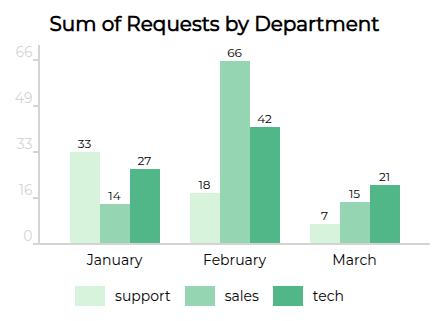
`minifyCss` can take a value of `false` or one of the two preset options `lite` or `default`. Within either preset, you can specify specific options from cssnano, for example `minifyCss: { options: { preset: [ 'default', { minifyFontValues: { removeQuotes: false }, }, ], }, },` | | juicePreserveTags | boolean | Optional setting when inlining CSS, see [mjml-cli documentation](https://github.com/mjmlio/mjml/blob/master/packages/mjml-cli/README.md) for more info | | ### API A free-to-use MJML API is available to make it easy to integrate MJML in your application. Head over here to [learn more about the API](https://mjml.io/api). --- # MJML Documentation # Source: https://raw.githubusercontent.com/mjmlio/mjml/master/doc/mjml-bar-chart.md # Path: doc/mjml-bar-chart.md ### mj-bar-chart An open-source component that allows you to create fully embedded static bar charts in your MJML templates. These bar charts are easily customizable, 100% built with HTML tables, and do not require any external dependencies. The package is available on [GitHub](https://github.com/Freezystem/mjml-bar-chart) and [NPM](https://www.npmjs.com/package/@freezystem/mjml-bar-chart).
Basic mjml-bar-chart rendering
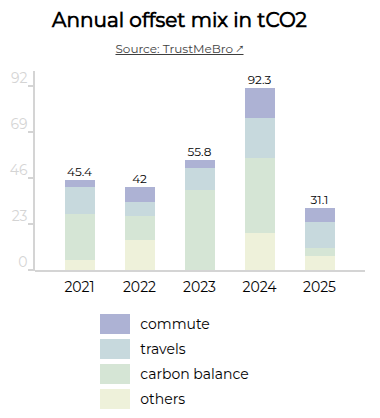
You can also render as stacked bars, add a link to your sources, vertically align labels, and much more:
Stacked rendering with vertically aligned legends
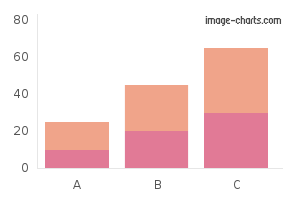
This component is lightweight, written with TypeScript, and is thoroughly tested. It is available as UMD (CJS + AMD), ESM and TS module format. --- # MJML Documentation # Source: https://raw.githubusercontent.com/mjmlio/mjml/master/doc/mjml-chart.md # Path: doc/mjml-chart.md ### mj-chart Displays charts as images in your email. Thanks to [image-charts](https://image-charts.com/) for their contribution with this component. It's available on [Github](https://github.com/image-charts/mjml-charts) and [NPM](https://www.npmjs.com/package/mjml-chart).
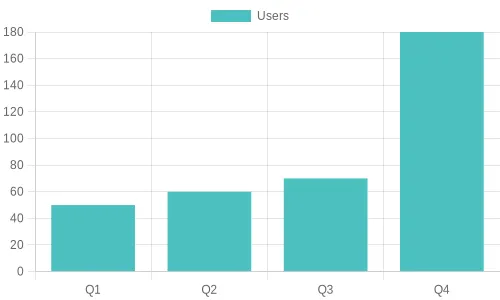
mj-chart demo
--- # MJML Documentation # Source: https://raw.githubusercontent.com/mjmlio/mjml/master/doc/mjml-chartjs.md # Path: doc/mjml-chartjs.md ### mj-chartjs Displays [Chart.js](https://www.chartjs.org/) charts as images in your email. Chart.js is an open-source Javascript charting library. It’s available on [Github](https://github.com/typpo/mjml-chartjs) and [NPM](https://www.npmjs.com/package/mjml-chartjs). By default, it uses the open-source [QuickChart](https://quickchart.io/) API for chart rendering.
mj-chartjs demo
--- # MJML Documentation # Source: https://raw.githubusercontent.com/mjmlio/mjml/master/doc/mjml-mso-button.md # Path: doc/mjml-mso-button.md ### mjml-msobutton A button that uses the [VML](https://docs.microsoft.com/en-us/windows/win32/vml/shape-element--vml) solution for radius, which is supported in Outlook desktop It uses the same attributes as the standard `mj-button` but includes three additional ones: | attribute | accepts | description | default value | | ---------- | ------- | ------------------------------ | ------------- | | mso-proof | boolean | Active the bulletproof mode | `false` | | mso-width | `px` | The width of the VML solution | `200px` | | mso-height | `px` | The height of the VML solution | `40px` | These new attributes allow MJML to generate a “bulletproof button“ which incorporates radius, stroke and alignment, [using this method](https://buttons.cm/), It's available on [Github](https://github.com/adrien-zinger/mjml-mso-button) and [NPM](https://www.npmjs.com/package/mjml-msobutton). **Usage** Use it like a standard `mj-button`: ```html Click ! ``` **Problems that you should know** 1. This cannot be used with an image in background 2. It creates a duplication of code in the HTML 3. The width and the height cannot be used with the auto value. > Sample project on github [here](https://github.com/adrien-zinger/mjml-msobutton-sample) --- # MJML Documentation # Source: https://raw.githubusercontent.com/mjmlio/mjml/master/doc/mjml-qr-code.md # Path: doc/mjml-qr-code.md ### mj-qr-code Displays QR codes in your email. It's available on [Github](https://github.com/typpo/mjml-qr-code) and [NPM](https://www.npmjs.com/package/mjml-qr-code). By default, it uses the open-source QuickChart [QR code API](https://quickchart.io/).
mj-qr-code demo
--- # MJML Documentation # Source: https://raw.githubusercontent.com/mjmlio/mjml/master/doc/ports.md # Path: doc/ports.md ## Ports and Language Bindings MJML is also available for other platforms to use. The community has created ports to these and wrappers for the official Node implementation. Note: These contributions are not directly supported by the MJML team. ### Rust: MRML This project is a reimplementation of the nice MJML markup language in Rust. [https://github.com/jdrouet/mrml](https://github.com/jdrouet/mrml) #### Missing implementations / components: - `mj-style set to inline`: not yet implemented. It requires parsing the generated HTML to apply the inline styles afterward (that's how it's done in MJML) which would kill the performance. Applying it at render time would improve the performance but it would still require it to parse the CSS. ### .NET: MJML.NET A blazingly-fast unofficial port of MJML 4 to .NET 6. [https://github.com/SebastianStehle/mjml-net](https://github.com/SebastianStehle/mjml-net) ### Elixir: MJML (Rust NIFs for Elixir) Native Implemented Function (NIF) bindings for the MJML Rust implementation (mrml). [https://github.com/adoptoposs/mjml_nif](https://github.com/adoptoposs/mjml_nif) ### Ruby: MRML Ruby Ruby wrapper for MRML, the MJML markup language implementation in Rust. [https://github.com/hardpixel/mrml-ruby](https://github.com/hardpixel/mrml-ruby) ### React: mjml-react React components for MJML components. [https://github.com/faire/mjml-react#readme](https://github.com/faire/mjml-react#readme) ### Python: mjml-python Python wrapper for MRML, the MJML markup language implementation in Rust. [https://github.com/mgd020/mjml-python](https://github.com/mgd020/mjml-python) ### Python: mjml-python Python implementation for MJML. [https://github.com/FelixSchwarz/mjml-python](https://github.com/FelixSchwarz/mjml-python) ### Python / Django: django-mjml The simplest way to use MJML in Django templates. [https://github.com/liminspace/django-mjml](https://github.com/liminspace/django-mjml) ### PHP / Laravel: Laravel MJML Build responsive e-mails easily using MJML and Laravel Mailables. - [https://github.com/EvanSchleret/lara-mjml](https://github.com/EvanSchleret/lara-mjml) - [https://github.com/asahasrabuddhe/laravel-mjml](https://github.com/asahasrabuddhe/laravel-mjml) (not maintained) --- # MJML Documentation # Source: https://raw.githubusercontent.com/mjmlio/mjml/master/doc/tooling.md # Path: doc/tooling.md ## Tooling In order to provide you with the best and most efficient experience using MJML, we've developed some tools to integrate it seamlessly into your development workflow: ### Visual Studio Code [Visual Studio Code](https://code.visualstudio.com/) is a free code editor made by [Microsoft](https://www.microsoft.com/). We recommend this package as it is among the most feature-rich MJML plugins for code editors; with live previews, syntax highlighting and linting, as well as export features including HTML and screenshots. It is available [on Github](https://github.com/mjmlio/vscode-mjml) and through the [Visual Studio Marketplace](https://marketplace.visualstudio.com/items?itemName=mjmlio.vscode-mjml). ### Sublime Text [Sublime Text](https://www.sublimetext.com/) is a powerful text editor. We’ve provided you with a package to color MJML tags. It is available [on Github](https://github.com/mjmlio/mjml-syntax) and through the [Sublime Package Control](https://packagecontrol.io/packages/MJML-syntax). ### Gulp [Gulp](https://gulpjs.com/) is a tool designed to help you automate and enhance your workflow. Our plugin enables you to plug the MJML translation engine into your workflow, helping you to streamline your development workflow. It is available here on [Github](https://github.com/mjmlio/gulp-mjml). --- # MJML Documentation # Source: https://raw.githubusercontent.com/mjmlio/mjml/master/doc/using_mjml_in_json.md # Path: doc/using_mjml_in_json.md ## Using MJML in JSON MJML can not only be used as a markup, but also as a JSON object, very useful for programmatic manipulation or with the MJML API. With the JSON format, a MJML component is defined as an `object` with the following properties: - a `tagName` as a `string` - a list of attributes as an `object` - either a `content` as a `string` or a list of `children` tags as an `array`. Exactly like using MJML as a markup, the JSON definition can be passed as an object to the `mjml2html` function. Here is working example: ```javascript var mjml2html = require('mjml') console.log( mjml2html({ tagName: 'mjml', attributes: {}, children: [ { tagName: 'mj-body', attributes: {}, children: [ { tagName: 'mj-section', attributes: {}, children: [ { tagName: 'mj-column', attributes: {}, children: [ { tagName: 'mj-image', attributes: { width: '100px', src: '/assets/img/logo-small.png', }, }, { tagName: 'mj-divider', attributes: { 'border-color': '#F46E43', }, }, { tagName: 'mj-text', attributes: { 'font-size': '20px', color: '#F45E43', 'font-family': 'Helvetica', }, content: 'Hello World', }, ], }, ], }, ], }, ], }), ) ``` --- # MJML Documentation # Source: https://raw.githubusercontent.com/mjmlio/mjml/master/README.md # Path: README.md # MJML 4 If you're looking for MJML 3.3.X check [this branch](https://github.com/mjmlio/mjml/tree/3.3.x)

github actions

| Translated documentation | Introduction | Installation | Usage |

--- # Translated documentation | Language | Link for documentation | | :-: | :-: | | 日本語 | [日本語ドキュメント](https://github.com/mjmlio/mjml/blob/master/readme-ja.md) | # Introduction `MJML` is a markup language created by [Mailjet](https://www.mailjet.com/) and designed to reduce the pain of coding a responsive email. Its semantic syntax makes the language easy and straightforward while its rich standard components library shortens your development time and lightens your email codebase. MJML’s open-source engine takes care of translating the `MJML` you wrote into responsive HTML.

# Installation You can install `MJML` with `NPM` to use it with NodeJS or the Command Line Interface. If you're not sure what those are, head over to Usage for other ways to use MJML. ```bash npm install mjml ``` # Development To work on MJML, make changes and create merge requests, download and install [yarn](https://yarnpkg.com/lang/en/docs/install/) for easy development. ```bash git clone https://github.com/mjmlio/mjml.git && cd mjml yarn yarn build ``` You can also run `yarn build:watch` to rebuild the package as you code. # Usage ## Online Don't want to install anything? Use the free online editor!

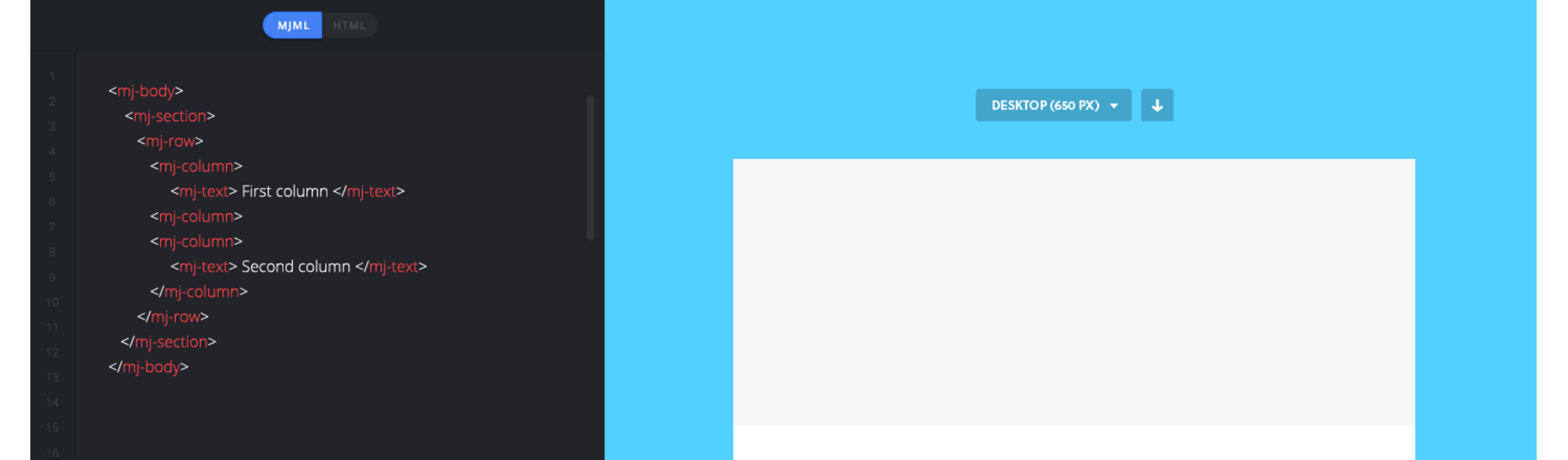
try it live


## Applications and plugins MJML comes with an ecosystem of tools and plugins, check out: - The [MJML App](https://mjmlio.github.io/mjml-app/) (MJML is included) - [Visual Studio Code plugin](https://github.com/mjmlio/vscode-mjml) (MJML is included) - [Sublime Text plugin](https://packagecontrol.io/packages/MJML-syntax) (MJML needs to be installed separately) For more tools, check the [Community](https://mjml.io/community) page. ## Command line interface > Compiles the file and outputs the HTML generated in `output.html` ```bash mjml input.mjml -o output.html ``` You can pass optional `arguments` to the CLI and combine them. argument | description | default value ---------|--------|-------------- `mjml -m [input]` | Migrates a v3 MJML file to the v4 syntax | NA `mjml [input] -o [output]` | Writes the output to [output] | NA `mjml [input] -s` | Writes the output to `stdout` | NA `mjml -w [input]` | Watches the changes made to `[input]` (file or folder) | NA `mjml [input] --config.beautify` | Beautifies the output (`true` or `false`) | true `mjml [input] --config.minify` | Minifies the output (`true` or `false`) | false See [mjml-cli documentation](https://github.com/mjmlio/mjml/blob/master/packages/mjml-cli/README.md) for more information about config options. ## Inside Node.js ```javascript import mjml2html from 'mjml' /* Compile an mjml string */ const htmlOutput = mjml2html(` Hello World! `, options) /* Print the responsive HTML generated and MJML errors if any */ console.log(htmlOutput) ``` You can pass optional `options` as an object to the `mjml2html` function: option | unit | description | default value -------------|--------|--------------|--------------- fonts | object | Default fonts imported in the HTML rendered by MJML | See in [index.js](https://github.com/mjmlio/mjml/blob/master/packages/mjml-core/src/index.js#L100-L108) keepComments | boolean | Option to keep comments in the HTML output | true ignoreIncludes | boolean | Option to ignore mj-includes | false beautify | boolean | Option to beautify the HTML output | false minify | boolean | Option to minify the HTML output | false validationLevel | string | Available values for the [validator](https://github.com/mjmlio/mjml/tree/master/packages/mjml-validator#validating-mjml): 'strict', 'soft', 'skip' | 'soft' filePath | string | Path of file, used for relative paths in mj-includes | '.' preprocessors | array of functions | Preprocessors applied to the xml before parsing. Input must be xml, not json. Functions must be (xml: string) => string | [] juicePreserveTags | Preserve some tags when inlining css, see [mjml-cli documentation](https://github.com/mjmlio/mjml/blob/master/packages/mjml-cli/README.md) for more info | NA minifyOptions | Options for html minifier, see [mjml-cli documentation](https://github.com/mjmlio/mjml/blob/master/packages/mjml-cli/README.md) for more info | NA mjmlConfigPath | string | The path or directory of the `.mjmlconfig` file (for custom components use) | `process.cwd()` useMjmlConfigOptions | Allows to use the `options` attribute from `.mjmlconfig` file | false ## Client-side (in browser) ```javascript var mjml2html = require('mjml-browser') /* Compile a mjml string */ var htmlOutput = mjml2html(` Hello World! `, options) /* Print the responsive HTML generated and MJML errors if any */ console.log(htmlOutput) ``` ## API A free-to-use MJML API is available to make it easy to integrate MJML in your application. Head over [here](https://mjml.io/api) to learn more about the API. # MJML Slack MJML wouldn't be as cool without its amazing community. Head over the [Community Slack](https://join.slack.com/t/mjml/shared_invite/zt-gqmwfwmr-kPBnfuuB7wof5httaTcXxg) to meet fellow MJML'ers. # Contributors - [Maxime](https://github.com/iRyusa) - [Nicolas](https://github.com/ngarnier) - [Cedric](https://github.com/kmcb777) - [Loeck](https://github.com/lohek) - [Robin](https://github.com/robink) - [Guillaume](https://github.com/GuillaumeBadi) - [Meriadec](https://github.com/meriadec) - [Arnaud](https://github.com/arnaudbreton) - [HTeuMeuLeu](https://github.com/hteumeuleu) - [Emmanuel Payet](https://github.com/epayet) - [Matthieu](https://github.com/swibge) - [Rogier](https://github.com/rogierslag) --- # MJML Documentation # Source: https://raw.githubusercontent.com/mjmlio/mjml/master/readme-ja.md # Path: readme-ja.md # MJML 4 もしも、MJML 3.3.Xについて探しているのであれば、[このブランチ](https://github.com/mjmlio/mjml/tree/3.3.x)をご確認ください。

github actions

| 翻訳されたドキュメント | 紹介 | インストール | 使い方 | 貢献 |

--- # 翻訳されたドキュメント | 言語 | ドキュメントのリンク | | :-: | :-: | | 日本語 | [日本語ドキュメント](https://github.com/mjmlio/mjml/blob/master/readme-ja.md) | # 紹介 `MJML`は[Mailjet](https://www.mailjet.com/)によって作成されたマークアップ言語で、レスポンシブemailをコーディングする際に生じる負担を軽減する設計がされています。そのセマンティックな構文は言語を簡単完結にし、その豊富な標準コンポーネントライブラリはあなたの開発時間とコードベースを短縮するでしょう。MJMLのオープンソースエンジンは、あなたの書いたMJMLをレスポンシブHTMLに変換します。

# インストール `MJML`は`NPM`と一緒にインストールすることで、NodeJSやCommand Line Interfaceから使用できます。これらについてわからないの場合は、使い方から他の方法をご確認ください。 ```bash npm install mjml ``` # 開発 MJMLに変更を加えたり、マージリクエストを提出するといった作業をする場合は、[yarn](https://yarnpkg.com/lang/en/docs/install/)をダウンロードして、インストールすることで簡単に開発できるようにしましょう。 ```bash git clone https://github.com/mjmlio/mjml.git && cd mjml yarn yarn build ``` `yarn build:watch`を実行することで、コードを書きながらパッケージを再構築することもできます。 # 使い方 ## オンライン 何もインストールしたくないですか?それならば、無料のオンラインエディターを使いましょう!

try it live


## アプリケーションとプラグイン MJMLにはツールやプラグインといったエコシステムが備わっています。以下をご確認ください: - The [MJML App](https://mjmlio.github.io/mjml-app/) (MJMLが含まれています) - [Visual Studio Code plugin](https://github.com/mjmlio/vscode-mjml) (MJMLが含まれています) - [Atom plugin](https://atom.io/users/mjmlio) (MJMLを別途インストールする必要があります) - [Sublime Text plugin](https://packagecontrol.io/packages/MJML-syntax) (MJMLを別途インストールする必要があります) その他のツールについては[コミュニティ](https://mjml.io/community)ページをご覧ください。 ## Command line interface > ファイルをコンパイルし、HTMLを`output.html`として出力します。 ```bash mjml input.mjml -o output.html ``` 任意の`引数`をCLIに渡すことができます。これらは複数合わせて渡すこともできます。 引数 | 説明 | 初期値 ---------|--------|-------------- `mjml -m [input]` | v3のMJMLファイルをv4の構文にマイグレートする | NA `mjml [input] -o [output]` | 出力を[output]に書き込みます | NA `mjml [input] -s` | 出力を`stdout`に書き込みます | NA `mjml -w [input]` | `[input]`(ファイルまたはフォルダー)の変更を監視します | NA `mjml [input] --config.beautify` | 出力を整えます(`true`または`false`) | true `mjml [input] --config.minify` | 出力をminify化します(`true`または`false`) | false 設定オプションの詳細については[mjml-cli documentation](https://github.com/mjmlio/mjml/blob/master/packages/mjml-cli/README.md)をご覧ください。 ## Node.js ```javascript import mjml2html from 'mjml' /* mjml文字列をコンパイルする */ const htmlOutput = mjml2html(` Hello World! `, options) /* 生成されたレスポンシブHTMLとMJMLのエラーがあれば表示します */ console.log(htmlOutput) ``` 任意でオブジェクト形式の`オプション`を`mjml2html`関数に渡すことができます: オプション | 型 | 説明 | 初期値 -------------|--------|--------------|--------------- fonts | object | 初期フォントをインポートしたHTMLを描画する | 初期フォントについては[index.js](https://github.com/mjmlio/mjml/blob/master/packages/mjml-core/src/index.js#L100-L108)をご覧ください。 keepComments | boolean | 出力されるHTMLにコメントを残すオプション | true ignoreIncludes | boolean | mj-includesを無視するオプション | false beautify | boolean | 出力されるHTMLを整えるオプション | false minify | boolean | 出力されるHTMLをminify化するオプション | false validationLevel | string | [validator](https://github.com/mjmlio/mjml/tree/master/packages/mjml-validator#validating-mjml)で利用する値: 'strict', 'soft', 'skip' | 'soft' filePath | string | mj-includesの相対パスに使われるファイルパス | '.' preprocessors | array of functions | xmlのパース前に適用するプリプロセッサー。入力はjsonではなく、必ずxmlでなければなりません。関数の場合は必ず (xml: string) => string としなければなりません。 | [] juicePreserveTags | cssをインライン化する際にタグを保持する。詳しくは[mjml-cli documentation](https://github.com/mjmlio/mjml/blob/master/packages/mjml-cli/README.md)をご覧ください。 | NA minifyOptions | htmlのminify化に関するオプション。詳しくは[mjml-cli documentation](https://github.com/mjmlio/mjml/blob/master/packages/mjml-cli/README.md)をご覧ください。 | NA mjmlConfigPath | string | `.mjmlconfig`ファイルのパスもしくはディレクトリー(カスタムコンポーネントの場合) | `process.cwd()` useMjmlConfigOptions | `.mjmlconfig`ファイルで`options`属性の使用を許可する | false ## クライアントサイド (ブラウザー) ```javascript var mjml2html = require('mjml-browser') /* mjml文字列をコンパイルする */ var htmlOutput = mjml2html(` Hello World! `, options) /* 生成されたレスポンシブHTMLとMJMLのエラーがあれば表示します */ console.log(htmlOutput) ``` ## API 無料のMJML APIを利用することで、あなたのアプリケーションにMJMLを簡単に統合できます。 APIの詳細については[ここ](https://mjml.io/api)をご覧ください。 # MJML Slack MJMLはその素晴らしいコミュニティなくしてはここまで良いものにならなかったでしょう。[コミュニティ Slack](https://join.slack.com/t/mjml/shared_invite/zt-gqmwfwmr-kPBnfuuB7wof5httaTcXxg)から、MJML'er達に会いにいきましょう。 # 貢献者 - [Maxime](https://github.com/iRyusa) - [Nicolas](https://github.com/ngarnier) - [Cedric](https://github.com/kmcb777) - [Loeck](https://github.com/lohek) - [Robin](https://github.com/robink) - [Guillaume](https://github.com/GuillaumeBadi) - [Meriadec](https://github.com/meriadec) - [Arnaud](https://github.com/arnaudbreton) - [HTeuMeuLeu](https://github.com/hteumeuleu) - [Emmanuel Payet](https://github.com/epayet) - [Matthieu](https://github.com/swibge) - [Rogier](https://github.com/rogierslag)