# Langfuse
> title: A/B Testing of LLM Prompts
---
# Source: https://langfuse.com/docs/prompt-management/features/a-b-testing.md
---
title: A/B Testing of LLM Prompts
sidebarTitle: A/B Testing
description: Use Open Source Prompt Management in Langfuse to systematically test and improve your LLM prompts with A/B testing.
---
# A/B Testing of LLM Prompts
[Langfuse Prompt Management](/docs/prompts/get-started) enables A/B testing by allowing you to label different versions of a prompt (e.g., `prod-a` and `prod-b`). Your application can randomly alternate between these versions, while Langfuse tracks performance metrics like response latency, cost, token usage, and evaluation metrics for each version.
**When to use A/B testing?**
A/B testing helps you see how different prompt versions work in real situations, adding to what you learn from testing on datasets. This works best when:
- Your app has good ways to measure success, deals with many different kinds of user inputs, and can handle some ups and downs in performance. This usually works for consumer apps where mistakes aren't a big deal.
- You've already tested thoroughly on your test data and want to try your changes with a small group of users before rolling out to everyone (also called canary deployment).
## Implementation
### Label your Prompt Versions
Label your prompt versions (e.g., `prod-a` and `prod-b`) to identify different variants for testing.
### Fetch Prompts and Run A/B Test
```python
from langfuse import get_client
import random
from langfuse.openai import openai
# Requires environment variables for initialization
from langfuse import get_client
langfuse = get_client()
# Fetch prompt versions
prompt_a = langfuse.get_prompt("my-prompt-name", label="prod-a")
prompt_b = langfuse.get_prompt("my-prompt-name", label="prod-b")
# Randomly select version
selected_prompt = random.choice([prompt_a, prompt_b])
# Use in LLM call
response = openai.chat.completions.create(
model="gpt-3.5-turbo",
messages=[{"role": "user", "content": selected_prompt.compile(variable="value")}],
# Link prompt to generation for analytics
langfuse_prompt=selected_prompt
)
result_text = response.choices[0].message.content
```
```js
import { LangfuseClient } from "@langfuse/client";
import { observeOpenAI } from "@langfuse/openai";
import OpenAI from "openai";
// Requires environment variables for initialization
const langfuse = new LangfuseClient();
// Create and wrap OpenAI client
const openai = observeOpenAI(new OpenAI());
// Fetch prompt versions
const promptA = await langfuse.prompt.get("my-prompt-name", {
label: "prod-a",
});
const promptB = await langfuse.prompt.get("my-prompt-name", {
label: "prod-b",
});
// Randomly select version
const selectedPrompt = Math.random() < 0.5 ? promptA : promptB;
// Use in LLM call
const completion = await openai.chat.completions.create({
model: "gpt-3.5-turbo",
messages: [
{
role: "user",
content: selectedPrompt.compile({ variable: "value" }),
},
],
// Link prompt to generation for analytics
langfusePrompt: selectedPrompt,
});
const resultText = completion.choices[0].message.content;
```
Refer to [prompt management documentation](/docs/prompts/get-started) for additional examples on how to fetch and use prompts.
### Analyze Results
Compare metrics for each prompt version in the Langfuse UI:
**Key metrics available for comparison:**
- Response latency and token usage
- Cost per request
- Quality evaluation scores
- Custom metrics you define
---
# Source: https://langfuse.com/self-hosting/administration.md
---
title: Administration Overview (self-hosted)
description: Comprehensive overview of administration capabilities for self-hosted Langfuse deployments.
label: "Version: v3"
sidebarTitle: Overview
---
# Administration Overview (self-hosted)
Self-hosted Langfuse provides comprehensive administration capabilities to manage your deployment, users, organizations, and data.
Please familiarize yourself with the [RBAC](/docs/administration/rbac) documentation before using the following features.
Some of these features are only available in the [Enterprise Edition](/pricing-self-host) and are marked with `(EE)`.
## User & Access Management
- **[Automated Access Provisioning](/self-hosting/administration/automated-access-provisioning)**: Auto-assign new users to a default organization/project
- **[Organization Creators](/self-hosting/administration/organization-creators)** (EE): Restrict who can create organizations
- **[Admin API (SCIM)](/docs/administration/scim-and-org-api)**: Enterprise user provisioning and bulk operations
## Organization & Project Management
- **[Headless Initialization](/self-hosting/administration/headless-initialization)**: Automate resource creation (single org, project, user, apikey) via environment variables, e.g., for CI/CD.
- **[Instance Management API](/self-hosting/administration/instance-management-api)** (EE): REST API for programmatic organization management
- **[Admin API](/docs/administration/scim-and-org-api)**: Manage projects via the organization-scoped admin API
## Interface & Branding
- **[UI Customization](/self-hosting/administration/ui-customization)** (EE): Co-branding, custom links, module visibility, LLM API defaults
## Data & Security
- **[Audit Logs](/docs/administration/audit-logs)** (EE): Comprehensive activity tracking for compliance
- **[Data Deletion](/docs/administration/data-deletion)**: Flexible data removal (traces, projects, organizations, users)
- **[Data Retention](/docs/administration/data-retention)**: Automated lifecycle management with configurable policies
## APIs & Monitoring
- **[LLM Connections](/docs/administration/llm-connection)**: Manage connections to OpenAI, Anthropic, Azure, and more. Either via the UI or the API.
---
# Source: https://langfuse.com/docs/observability/sdk/advanced-features.md
---
title: Advanced features of the Langfuse SDKs
description: Configure masking, logging, sampling, multi-project routing, evaluations, and environment-specific behaviors for Python and JS/TS.
category: SDKs
---
# Advanced features
Use these methods to harden your Langfuse instrumentation, protect sensitive data, and adapt the SDKs to your specific environment.
## Filtering by Instrumentation Scope [#filtering-by-instrumentation-scope]
You can configure the SDK to filter out spans from specific instrumentation libraries that expose OTel spans that the Langfuse SDK picks up but you don't want to send to Langfuse.
**How it works:**
When third-party libraries create OpenTelemetry spans (through their instrumentation packages), each span has an associated "instrumentation scope" that identifies which library created it. The Langfuse SDK filters spans at the export level based on these scope names.
You can see the instrumentation scope name for any span in the Langfuse UI under the observation's metadata (`metadata.scope.name`). Use this to identify which scopes you want to filter.
**Cross-Library Span Relationships:**
Filtering spans may break the parent-child relationships in your traces. For
example, if you filter out a parent span but keep its children, you may see
"orphaned" observations in the Langfuse UI.
Provide the `blocked_instrumentation_scopes` parameter to the `Langfuse` client to filter out spans from specific instrumentation libraries.
```python
from langfuse import Langfuse
# Filter out database spans
langfuse = Langfuse(
blocked_instrumentation_scopes=["sqlalchemy", "psycopg"]
)
```
You can provide a predicate function `shouldExportSpan` to the `LangfuseSpanProcessor` to decide on a per-span basis whether it should be exported to Langfuse.
```ts filename="instrumentation.ts" /shouldExportSpan/
import { NodeSDK } from "@opentelemetry/sdk-node";
import { LangfuseSpanProcessor, ShouldExportSpan } from "@langfuse/otel";
// Example: Filter out all spans from the 'express' instrumentation
const shouldExportSpan: ShouldExportSpan = ({ otelSpan }) =>
otelSpan.instrumentationScope.name !== "express";
const sdk = new NodeSDK({
spanProcessors: [new LangfuseSpanProcessor({ shouldExportSpan })],
});
sdk.start();
```
If you want to include only LLM observability related spans, you can configure an allowlist like so:
```ts filename="instrumentation.ts"
import { ShouldExportSpan } from "@langfuse/otel";
const shouldExportSpan: ShouldExportSpan = ({ otelSpan }) =>
["langfuse-sdk", "ai"].includes(otelSpan.instrumentationScope.name);
```
You can read more about using Langfuse with an existing OpenTelemetry setup [here](/faq/all/existing-otel-setup).
## Mask sensitive data
If your trace data (inputs, outputs, metadata) might contain sensitive information (PII, secrets), you can provide a mask function during client initialization. This function will be applied to all relevant data before it’s sent to Langfuse.
The `mask` function should accept data as a keyword argument and return the masked data. The returned data must be JSON-serializable.
```python
from langfuse import Langfuse
import re
def pii_masker(data: any, **kwargs) -> any:
if isinstance(data, str):
return re.sub(r"[a-zA-Z0-9_.+-]+@[a-zA-Z0-9-]+\.[a-zA-Z0-9-.]+", "[EMAIL_REDACTED]", data)
elif isinstance(data, dict):
return {k: pii_masker(data=v) for k, v in data.items()}
elif isinstance(data, list):
return [pii_masker(data=item) for item in data]
return data
langfuse = Langfuse(mask=pii_masker)
```
You can provide a `mask` function to the [`LangfuseSpanProcessor`](https://langfuse-js-git-main-langfuse.vercel.app/classes/_langfuse_otel.LangfuseSpanProcessor.html). This function will be applied to the input, output, and metadata of every observation.
The function receives an object `{ data }`, where `data` is the stringified JSON of the attribute's value. It should return the masked data.
```ts filename="instrumentation.ts" /mask: /
import { NodeSDK } from "@opentelemetry/sdk-node";
import { LangfuseSpanProcessor } from "@langfuse/otel";
const spanProcessor = new LangfuseSpanProcessor({
mask: ({ data }) =>
data.replace(/\b\d{4}[- ]?\d{4}[- ]?\d{4}[- ]?\d{4}\b/g, "***MASKED_CREDIT_CARD***"),
});
const sdk = new NodeSDK({ spanProcessors: [spanProcessor] });
sdk.start();
```
## Logging & debugging
The Langfuse SDK can expose detailed logging and debugging information to help you troubleshoot issues with your application.
**In code:**
The Langfuse SDK uses Python's standard `logging` module. The main logger is named `"langfuse"`.
To enable detailed debug logging, you can either:
1. Set the `debug=True` parameter when initializing the `Langfuse` client.
2. Configure the `"langfuse"` logger manually:
```python
import logging
langfuse_logger = logging.getLogger("langfuse")
langfuse_logger.setLevel(logging.DEBUG)
```
The default log level for the `langfuse` logger is `logging.WARNING`.
**Via environment variable:**
You can also set the log level using the `LANGFUSE_DEBUG` environment variable to enable the debug mode.
```bash
export LANGFUSE_DEBUG="True"
```
You can configure the global SDK logger to control the verbosity of log output. This is useful for debugging.
**In code:**
```typescript /configureGlobalLogger/
import { configureGlobalLogger, LogLevel } from "@langfuse/core";
// Set the log level to DEBUG to see all log messages
configureGlobalLogger({ level: LogLevel.DEBUG });
```
Available log levels are `DEBUG`, `INFO`, `WARN`, and `ERROR`.
**Via environment variable:**
You can also set the log level using the `LANGFUSE_LOG_LEVEL` environment variable to enable the debug mode.
```bash
export LANGFUSE_LOG_LEVEL="DEBUG"
```
## Sampling
Sampling lets send only a subset of traces to Langfuse. This is useful to reduce costs and noise in high-volume applications.
**In code:**
You can configure the SDK to sample traces by setting the `sample_rate` parameter during client initialization. This value should be a float between `0.0` (sample 0% of traces) and `1.0` (sample 100% of traces).
If a trace is not sampled, none of its observations (spans, generations) or associated scores will be sent to Langfuse.
```python
from langfuse import Langfuse
# Sample approximately 20% of traces
langfuse_sampled = Langfuse(sample_rate=0.2)
```
**Via environment variable:**
You can also set the sample rate using the `LANGFUSE_SAMPLE_RATE` environment variable.
```bash
export LANGFUSE_SAMPLE_RATE="0.2"
```
**In code:**
Langfuse respects OpenTelemetry's sampling decisions. Configure a sampler on your OTEL `NodeSDK` to control which traces reach Langfuse and reduce noise/costs in high-volume workloads.
```ts filename="instrumentation.ts" /TraceIdRatioBasedSampler/
import { NodeSDK } from "@opentelemetry/sdk-node";
import { LangfuseSpanProcessor } from "@langfuse/otel";
import { TraceIdRatioBasedSampler } from "@opentelemetry/sdk-trace-base";
const sdk = new NodeSDK({
sampler: new TraceIdRatioBasedSampler(0.2),
spanProcessors: [new LangfuseSpanProcessor()],
});
sdk.start();
```
**Via environment variable:**
You can also set the sample rate using the `LANGFUSE_SAMPLE_RATE` environment variable.
```bash
export LANGFUSE_SAMPLE_RATE="0.2"
```
## Isolated TracerProvider [#isolated-tracer-provider]
You can configure a separate OpenTelemetry TracerProvider for use with Langfuse. This creates isolation between Langfuse tracing and your other observability systems.
Benefits of isolation:
- Langfuse spans won't be sent to your other observability backends (e.g., Datadog, Jaeger, Zipkin)
- Third-party library spans won't be sent to Langfuse
- Independent configuration and sampling rates
While TracerProviders are isolated, they share the same OpenTelemetry context for tracking active spans. This can cause span relationship issues where:
- A parent span from one TracerProvider might have children from another TracerProvider
- Some spans may appear "orphaned" if their parent spans belong to a different TracerProvider
- Trace hierarchies may be incomplete or confusing
Plan your instrumentation carefully to avoid confusing trace structures.
```python {4, 5}
from opentelemetry.sdk.trace import TracerProvider
from langfuse import Langfuse
langfuse_tracer_provider = TracerProvider() # do not set to global tracer provider to keep isolation
langfuse = Langfuse(tracer_provider=langfuse_tracer_provider)
langfuse.start_span(name="myspan").end() # Span will be isolated from remaining OTEL instrumentation
```
Isolate Langfuse spans with a custom provider and avoid sending them to other exporters.
```ts /setLangfuseTracerProvider/
import { NodeTracerProvider } from "@opentelemetry/sdk-trace-node";
import { setLangfuseTracerProvider } from "@langfuse/tracing";
// Create a new TracerProvider and register the LangfuseSpanProcessor
// do not set this TracerProvider as the global TracerProvider
const langfuseTracerProvider = new NodeTracerProvider({
spanProcessors: [new LangfuseSpanProcessor()],
})
// Register the isolated TracerProvider
setLangfuseTracerProvider(langfuseTracerProvider)
```
You can read more about using Langfuse with an existing OpenTelemetry setup [here](/faq/all/existing-otel-setup).
## Multi-project setups [#multi-project-setup-experimental]
Multi-project setups are **experimental** in the Python SDK and have important limitations regarding third-party OpenTelemetry integrations.
The Langfuse Python SDK supports routing traces to different projects within the same application by using multiple public keys. This works because the Langfuse SDK adds a specific span attribute containing the public key to all spans it generates.
**How it works:**
1. **Span Attributes**: The Langfuse SDK adds a specific span attribute containing the public key to spans it creates
2. **Multiple Processors**: Multiple span processors are registered onto the global tracer provider, each with their respective exporters bound to a specific public key
3. **Filtering**: Within each span processor, spans are filtered based on the presence and value of the public key attribute
**Important Limitation with Third-Party Libraries:**
Third-party libraries that emit OpenTelemetry spans automatically (e.g., HTTP clients, databases, other instrumentation libraries) do **not** have the Langfuse public key span attribute. As a result:
- These spans cannot be routed to a specific project
- They are processed by all span processors and sent to all projects
- All projects will receive these third-party spans
**Why is this experimental?**
This approach requires that the `public_key` parameter be passed to all Langfuse SDK executions across all integrations to ensure proper routing, and third-party spans will appear in all projects.
### Initialization
To set up multiple projects, initialize separate Langfuse clients for each project:
```python
from langfuse import Langfuse
# Initialize clients for different projects
project_a_client = Langfuse(
public_key="pk-lf-project-a-...",
secret_key="sk-lf-project-a-...",
base_url="https://cloud.langfuse.com"
)
project_b_client = Langfuse(
public_key="pk-lf-project-b-...",
secret_key="sk-lf-project-b-...",
base_url="https://cloud.langfuse.com"
)
```
### Integration Usage
For all integrations in multi-project setups, you must specify the `public_key` parameter to ensure traces are routed to the correct project.
**Observe Decorator:**
Pass `langfuse_public_key` as a keyword argument to the *top-most* observed function (not the decorator). From Python SDK >= 3.2.2, nested decorated functions will automatically pick up the public key from the execution context they are currently into. Also, calls to `get_client` will be also aware of the current `langfuse_public_key` in the decorated function execution context, so passing the `langfuse_public_key` here again is not necessary.
```python
from langfuse import observe
@observe
def nested():
# get_client call is context aware
# if it runs inside another decorated function that has
# langfuse_public_key passed, it does not need passing here again
@observe
def process_data_for_project_a(data):
# passing `langfuse_public_key` here again is not necessarily
# as it is stored in execution context
nested()
return {"processed": data}
@observe
def process_data_for_project_b(data):
# passing `langfuse_public_key` here again is not necessarily
# as it is stored in execution context
nested()
return {"enhanced": data}
# Route to Project A
# Top-most decorated function needs `langfuse_public_key` kwarg
result_a = process_data_for_project_a(
data="input data",
langfuse_public_key="pk-lf-project-a-..."
)
# Route to Project B
# Top-most decorated function needs `langfuse_public_key` kwarg
result_b = process_data_for_project_b(
data="input data",
langfuse_public_key="pk-lf-project-b-..."
)
```
**OpenAI Integration:**
Add `langfuse_public_key` as a keyword argument to the OpenAI execution:
```python
from langfuse.openai import openai
client = openai.OpenAI()
# Route to Project A
response_a = client.chat.completions.create(
model="gpt-4o",
messages=[{"role": "user", "content": "Hello from Project A"}],
langfuse_public_key="pk-lf-project-a-..."
)
# Route to Project B
response_b = client.chat.completions.create(
model="gpt-4o",
messages=[{"role": "user", "content": "Hello from Project B"}],
langfuse_public_key="pk-lf-project-b-..."
)
```
**Langchain Integration:**
Add `public_key` to the CallbackHandler constructor:
```python
from langfuse.langchain import CallbackHandler
from langchain_openai import ChatOpenAI
from langchain_core.prompts import ChatPromptTemplate
# Create handlers for different projects
handler_a = CallbackHandler(public_key="pk-lf-project-a-...")
handler_b = CallbackHandler(public_key="pk-lf-project-b-...")
llm = ChatOpenAI(model_name="gpt-4o")
prompt = ChatPromptTemplate.from_template("Tell me about {topic}")
chain = prompt | llm
# Route to Project A
response_a = chain.invoke(
{"topic": "machine learning"},
config={"callbacks": [handler_a]}
)
# Route to Project B
response_b = chain.invoke(
{"topic": "data science"},
config={"callbacks": [handler_b]}
)
```
**Important Considerations:**
- Every Langfuse SDK execution across all integrations must include the appropriate public key parameter
- Missing public key parameters may result in traces being routed to the default project or lost
- Third-party OpenTelemetry spans (from HTTP clients, databases, etc.) will appear in all projects since they lack the Langfuse public key attribute
You can configure the SDK to send traces to multiple Langfuse projects. This is useful for multi-tenant applications or for sending traces to different environments. Simply register multiple `LangfuseSpanProcessor` instances, each with its own credentials.
```ts filename="instrumentation.ts"
import { NodeSDK } from "@opentelemetry/sdk-node";
import { LangfuseSpanProcessor } from "@langfuse/otel";
const sdk = new NodeSDK({
spanProcessors: [
new LangfuseSpanProcessor({
publicKey: "pk-lf-public-key-project-1",
secretKey: "sk-lf-secret-key-project-1",
}),
new LangfuseSpanProcessor({
publicKey: "pk-lf-public-key-project-2",
secretKey: "sk-lf-secret-key-project-2",
}),
],
});
sdk.start();
```
This configuration will send every trace to both projects. You can also configure a custom `shouldExportSpan` filter for each processor to control which traces go to which project.
## Time to first token (TTFT)
You can manually set the time to first token (TTFT) of your LLM calls. This is useful for measuring the latency of your LLM calls and for identifying slow LLM calls.
You can use the `completion_start_time` attribute to manually set the time to first token (TTFT) of your LLM calls. This is useful for measuring the latency of your LLM calls and for identifying slow LLM calls.
```python
from langfuse import get_client
import datetime, time
langfuse = get_client()
with langfuse.start_as_current_observation(as_type="generation", name="TTFT-Generation") as generation:
time.sleep(3)
generation.update(
completion_start_time=datetime.datetime.now(),
output="some response",
)
langfuse.flush()
```
You can use the `completionStartTime` attribute to manually set the time to first token (TTFT) of your LLM calls. This is useful for measuring the latency of your LLM calls and for identifying slow LLM calls.
```ts
import { startActiveObservation } from "@langfuse/tracing";
startActiveObservation("llm-call", async (span) => {
span.update({
completionStartTime: new Date().toISOString(),
});
});
```
## Self-signed SSL certificates (self-hosted Langfuse)
If you are [self-hosting](/docs/deployment/self-host) Langfuse and you'd like to use self-signed SSL certificates, you will need to configure the SDK to trust the self-signed certificate:
Changing SSL settings has major security implications depending on your environment. Be sure you understand these implications before you proceed.
**1. Set OpenTelemetry span exporter to trust self-signed certificate**
```bash filename=".env"
OTEL_EXPORTER_OTLP_TRACES_CERTIFICATE="/path/to/my-selfsigned-cert.crt"
```
**2. Set HTTPX to trust certificate for all other API requests to Langfuse instance**
```python filename="main.py"
import os
import httpx
from langfuse import Langfuse
httpx_client = httpx.Client(verify=os.environ["OTEL_EXPORTER_OTLP_TRACES_CERTIFICATE"])
langfuse = Langfuse(httpx_client=httpx_client)
```
## Setup with Sentry
If you’re using both Sentry and Langfuse in your application, you’ll need to configure a custom OpenTelemetry setup since both tools use OpenTelemetry for tracing. [This guide shows how to send error monitoring data to Sentry while simultaneously capturing LLM observability traces in Langfuse](/faq/all/existing-sentry-setup).
## Thread pools and multiprocessing
Use the OpenTelemetry threading instrumentor so context flows across worker threads.
```python
from opentelemetry.instrumentation.threading import ThreadingInstrumentor
ThreadingInstrumentor().instrument()
```
For multiprocessing, follow the [OpenTelemetry guidance](https://github.com/open-telemetry/opentelemetry-python/issues/2765#issuecomment-1158402076). If you use Pydantic Logfire, enable `distributed_tracing=True`.
---
# Source: https://langfuse.com/docs/observability/sdk/typescript/advanced-usage.md
# Source: https://langfuse.com/docs/observability/sdk/python/advanced-usage.md
# Source: https://langfuse.com/docs/observability/sdk/typescript/advanced-usage.md
# Source: https://langfuse.com/docs/observability/sdk/python/advanced-usage.md
# Source: https://langfuse.com/docs/observability/sdk/typescript/advanced-usage.md
# Source: https://langfuse.com/docs/observability/sdk/python/advanced-usage.md
---
title: Advanced usage of the Langfuse Python SDK
description: Advanced usage of the Langfuse Python SDK for data masking, logging, sampling, filtering, and more.
category: SDKs
---
# Advanced Usage
The Python SDK provides advanced usage options for your application. This includes data masking, logging, sampling, filtering, and more.
## Masking Sensitive Data
If your trace data (inputs, outputs, metadata) might contain sensitive information (PII, secrets), you can provide a `mask` function during client initialization. This function will be applied to all relevant data before it's sent to Langfuse.
The `mask` function should accept `data` as a keyword argument and return the masked data. The returned data must be JSON-serializable.
```python
from langfuse import Langfuse
import re
def pii_masker(data: any, **kwargs) -> any:
# Example: Simple email masking. Implement your more robust logic here.
if isinstance(data, str):
return re.sub(r"[a-zA-Z0-9_.+-]+@[a-zA-Z0-9-]+\.[a-zA-Z0-9-.]+", "[EMAIL_REDACTED]", data)
elif isinstance(data, dict):
return {k: pii_masker(data=v) for k, v in data.items()}
elif isinstance(data, list):
return [pii_masker(data=item) for item in data]
return data
langfuse = Langfuse(mask=pii_masker)
# Now, any input/output/metadata will be passed through pii_masker
with langfuse.start_as_current_observation(as_type="span", name="user-query", input={"email": "test@example.com", "query": "..."}) as span:
# The 'email' field in the input will be masked.
pass
```
## Logging
The Langfuse SDK uses Python's standard `logging` module. The main logger is named `"langfuse"`.
To enable detailed debug logging, you can either:
1. Set the `debug=True` parameter when initializing the `Langfuse` client.
2. Set the `LANGFUSE_DEBUG="True"` environment variable.
3. Configure the `"langfuse"` logger manually:
```python
import logging
langfuse_logger = logging.getLogger("langfuse")
langfuse_logger.setLevel(logging.DEBUG)
```
The default log level for the `langfuse` logger is `logging.WARNING`.
## Sampling
You can configure the SDK to sample traces by setting the `sample_rate` parameter during client initialization (or via the `LANGFUSE_SAMPLE_RATE` environment variable). This value should be a float between `0.0` (sample 0% of traces) and `1.0` (sample 100% of traces).
If a trace is not sampled, none of its observations (spans, generations) or associated scores will be sent to Langfuse.
```python
from langfuse import Langfuse
# Sample approximately 20% of traces
langfuse_sampled = Langfuse(sample_rate=0.2)
```
## Filtering by Instrumentation Scope
You can configure the SDK to filter out spans from specific instrumentation libraries by using the `blocked_instrumentation_scopes` parameter. This is useful when you want to exclude infrastructure spans while keeping your LLM and application spans.
```python
from langfuse import Langfuse
# Filter out database spans
langfuse = Langfuse(
blocked_instrumentation_scopes=["sqlalchemy", "psycopg"]
)
```
**How it works:**
When third-party libraries create OpenTelemetry spans (through their instrumentation packages), each span has an associated "instrumentation scope" that identifies which library created it. The Langfuse SDK filters spans at the export level based on these scope names.
You can see the instrumentation scope name for any span in the Langfuse UI under the span's metadata (`metadata.scope.name`). Use this to identify which scopes you want to filter.
**Cross-Library Span Relationships**
When filtering instrumentation scopes, be aware that blocking certain libraries may break trace tree relationships if spans from blocked and non-blocked libraries are nested together.
For example, if you block parent spans but keep child spans from a separate library, you may see "orphaned" LLM spans whose parent spans were filtered out. This can make traces harder to interpret.
Consider the impact on trace structure when choosing which scopes to filter.
## Isolated TracerProvider
You can configure a separate OpenTelemetry TracerProvider for use with Langfuse. This creates isolation between Langfuse tracing and your other observability systems.
**Benefits of isolation:**
- Langfuse spans won't be sent to your other observability backends (e.g., Datadog, Jaeger, Zipkin)
- Third-party library spans won't be sent to Langfuse
- Independent configuration and sampling rates
While TracerProviders are isolated, they share the same OpenTelemetry context for tracking active spans. This can cause span relationship issues where:
- A parent span from one TracerProvider might have children from another TracerProvider
- Some spans may appear "orphaned" if their parent spans belong to a different TracerProvider
- Trace hierarchies may be incomplete or confusing
Plan your instrumentation carefully to avoid confusing trace structures.
```python
from opentelemetry.sdk.trace import TracerProvider
from langfuse import Langfuse
langfuse_tracer_provider = TracerProvider() # do not set to global tracer provider to keep isolation
langfuse = Langfuse(tracer_provider=langfuse_tracer_provider)
langfuse.start_span(name="myspan").end() # Span will be isolated from remaining OTEL instrumentation
```
## Using `ThreadPoolExecutors`
Please use the [OpenTelemetry ThreadingInstrumentor](https://opentelemetry-python-contrib.readthedocs.io/en/latest/instrumentation/threading/threading.html) to ensure that the OpenTelemetry context is correctly propagated to all threads.
```python filename="main.py"
from opentelemetry.instrumentation.threading import ThreadingInstrumentor
ThreadingInstrumentor().instrument()
```
## Distributed tracing
To maintain the trace context across service / process boundaries, please rely on the OpenTelemetry native [context propagation](https://opentelemetry.io/docs/concepts/context-propagation/) across service / process boundaries as much as possible.
Using the `trace_context` argument to 'force' the parent child relationship may lead to unexpected trace updates as the resulting span will be treated as a root span server side.
- If you are using multiprocessing, [see here for details on how to propagate the OpenTelemetry context](https://github.com/open-telemetry/opentelemetry-python/issues/2765#issuecomment-1158402076).
- If you are using Pydantic Logfire, please set `distributed_tracing` to `True`.
## Multi-Project Setup (Experimental)
Multi-project setups are **experimental** and have important limitations regarding third-party OpenTelemetry integrations.
The Langfuse Python SDK supports routing traces to different projects within the same application by using multiple public keys. This works because the Langfuse SDK adds a specific span attribute containing the public key to all spans it generates.
**How it works:**
1. **Span Attributes**: The Langfuse SDK adds a specific span attribute containing the public key to spans it creates
2. **Multiple Processors**: Multiple span processors are registered onto the global tracer provider, each with their respective exporters bound to a specific public key
3. **Filtering**: Within each span processor, spans are filtered based on the presence and value of the public key attribute
**Important Limitation with Third-Party Libraries:**
Third-party libraries that emit OpenTelemetry spans automatically (e.g., HTTP clients, databases, other instrumentation libraries) do **not** have the Langfuse public key span attribute. As a result:
- These spans cannot be routed to a specific project
- They are processed by all span processors and sent to all projects
- All projects will receive these third-party spans
**Why is this experimental?**
This approach requires that the `public_key` parameter be passed to all Langfuse SDK executions across all integrations to ensure proper routing, and third-party spans will appear in all projects.
### Initialization
To set up multiple projects, initialize separate Langfuse clients for each project:
```python
from langfuse import Langfuse
# Initialize clients for different projects
project_a_client = Langfuse(
public_key="pk-lf-project-a-...",
secret_key="sk-lf-project-a-...",
base_url="https://cloud.langfuse.com"
)
project_b_client = Langfuse(
public_key="pk-lf-project-b-...",
secret_key="sk-lf-project-b-...",
base_url="https://cloud.langfuse.com"
)
```
### Integration Usage
For all integrations in multi-project setups, you must specify the `public_key` parameter to ensure traces are routed to the correct project.
**Observe Decorator:**
Pass `langfuse_public_key` as a keyword argument to the *top-most* observed function (not the decorator). From Python SDK >= 3.2.2, nested decorated functions will automatically pick up the public key from the execution context they are currently into. Also, calls to `get_client` will be also aware of the current `langfuse_public_key` in the decorated function execution context, so passing the `langfuse_public_key` here again is not necessary.
```python
from langfuse import observe
@observe
def nested():
# get_client call is context aware
# if it runs inside another decorated function that has
# langfuse_public_key passed, it does not need passing here again
@observe
def process_data_for_project_a(data):
# passing `langfuse_public_key` here again is not necessarily
# as it is stored in execution context
nested()
return {"processed": data}
@observe
def process_data_for_project_b(data):
# passing `langfuse_public_key` here again is not necessarily
# as it is stored in execution context
nested()
return {"enhanced": data}
# Route to Project A
# Top-most decorated function needs `langfuse_public_key` kwarg
result_a = process_data_for_project_a(
data="input data",
langfuse_public_key="pk-lf-project-a-..."
)
# Route to Project B
# Top-most decorated function needs `langfuse_public_key` kwarg
result_b = process_data_for_project_b(
data="input data",
langfuse_public_key="pk-lf-project-b-..."
)
```
**OpenAI Integration:**
Add `langfuse_public_key` as a keyword argument to the OpenAI execution:
```python
from langfuse.openai import openai
client = openai.OpenAI()
# Route to Project A
response_a = client.chat.completions.create(
model="gpt-4o",
messages=[{"role": "user", "content": "Hello from Project A"}],
langfuse_public_key="pk-lf-project-a-..."
)
# Route to Project B
response_b = client.chat.completions.create(
model="gpt-4o",
messages=[{"role": "user", "content": "Hello from Project B"}],
langfuse_public_key="pk-lf-project-b-..."
)
```
**Langchain Integration:**
Add `public_key` to the CallbackHandler constructor:
```python
from langfuse.langchain import CallbackHandler
from langchain_openai import ChatOpenAI
from langchain_core.prompts import ChatPromptTemplate
# Create handlers for different projects
handler_a = CallbackHandler(public_key="pk-lf-project-a-...")
handler_b = CallbackHandler(public_key="pk-lf-project-b-...")
llm = ChatOpenAI(model_name="gpt-4o")
prompt = ChatPromptTemplate.from_template("Tell me about {topic}")
chain = prompt | llm
# Route to Project A
response_a = chain.invoke(
{"topic": "machine learning"},
config={"callbacks": [handler_a]}
)
# Route to Project B
response_b = chain.invoke(
{"topic": "data science"},
config={"callbacks": [handler_b]}
)
```
**Important Considerations:**
- Every Langfuse SDK execution across all integrations must include the appropriate public key parameter
- Missing public key parameters may result in traces being routed to the default project or lost
- Third-party OpenTelemetry spans (from HTTP clients, databases, etc.) will appear in all projects since they lack the Langfuse public key attribute
## Passing `completion_start_time` for TTFT tracking
If you are using the Python SDK to manually create generations, you can pass the `completion_start_time` parameter. This allows langfuse to calculate the time to first token (TTFT) for you.
```python
from langfuse import get_client
import datetime
import time
langfuse = get_client()
# Start observation with specific type
with langfuse.start_as_current_observation(
as_type="generation",
name="TTFT-Generation"
) as generation:
# simulate LLM time to first token
time.sleep(3)
# Update the generation with the time the model started to generate
generation.update(
completion_start_time=datetime.datetime.now(),
output="some response",
)
# Flush events in short-lived applications
langfuse.flush()
```
## Self-signed SSL certificates (self-hosted Langfuse)
If you are [self-hosting](/docs/deployment/self-host) Langfuse and you'd like to use self-signed SSL certificates, you will need to configure the SDK to trust the self-signed certificate:
Changing SSL settings has major security implications depending on your environment. Be sure you understand these implications before you proceed.
**1. Set OpenTelemetry span exporter to trust self-signed certificate**
```bash filename=".env"
OTEL_EXPORTER_OTLP_TRACES_CERTIFICATE="/path/to/my-selfsigned-cert.crt"
```
**2. Set HTTPX to trust certificate for all other API requests to Langfuse instance**
```python filename="main.py"
import os
import httpx
from langfuse import Langfuse
httpx_client = httpx.Client(verify=os.environ["OTEL_EXPORTER_OTLP_TRACES_CERTIFICATE"])
langfuse = Langfuse(httpx_client=httpx_client)
```
## Observation Types
Langfuse supports multiple observation types to provide context for different components of LLM applications.
The full list of the observation types is document here: [Observation types](/docs/observability/features/observation-types).
### Setting observation types with the `@observe` decorator
By setting the `as_type` parameter in the `@observe` decorator, you can specify the observation type for a method:
```python /as_type="tool"/
from langfuse import observe
# Tool calls to external services
@observe(as_type="tool")
def retrieve_context(query):
results = vector_store.get(query)
return results
```
### Setting observation types with client methods and context manager
With the Langfuse client, you can directly create an observation with a defined type:
```python /as_type="embedding"/
from langfuse import get_client()
langfuse = get_client()
def process_with_manual_tracing():
trace = langfuse.trace(name="document-processing")
# Create different observation types
embedding_obs = trace.start_observation(
as_type="embedding",
name="document-embedding",
input={"document": "text content"}
)
embeddings = generate_embeddings("text content")
embedding_obs.update(output={"embeddings": embeddings})
embedding_obs.end()
```
The context manager approach provides automatic resource cleanup:
```python /as_type="chain"/
from langfuse import get_client
langfuse = get_client()
def process_with_context_managers():
with langfuse.start_as_current_observation(
as_type="chain",
name="retrieval-pipeline",
) as chain:
# Retrieval step
with langfuse.start_as_current_observation(
as_type="retriever",
name="vector-search",
) as retriever:
search_results = perform_vector_search("user question")
retriever.update(output={"results": search_results})
```
---
# Source: https://langfuse.com/docs/observability/features/agent-graphs.md
---
title: Agent Graphs
description: Visualize and analyze complex agent workflows with Langfuse's agent graph view.
sidebarTitle: Agent Graphs
---
import { GhDiscussionsPreview } from "@/components/gh-discussions/GhDiscussionsPreview";
# Agent Graphs
Agent graphs in Langfuse provide a visual representation of complex AI agent workflows, helping you understand and debug multi-step reasoning processes and agent interactions.
_Example trace with agent graph view ([public link](https://cloud.langfuse.com/project/cloramnkj0002jz088vzn1ja4/traces/8ed12d68-353f-464f-bc62-720984c3b6a0))_
## Get Started
The graph view is currently in beta, please feel free to share feedback.
There are currently two ways to display the graph.
First, have an observation with any observation type except for `span`, `event` or `generation` in your trace. Then, Langfuse interprets the trace as agentic and will show a graph. The graph is automatically inferred from the observation timings as well as their nesting.
Second, when you use the LangGraph integration the graph automatically shows in Langfuse.
**Observation Types**: See all available [Observation Types](/docs/observability/features/observation-types) and how to set them.
**LangGraph**: See the [LangGraph integration guide](/guides/cookbook/integration_langgraph) for an end-to-end example on how to natively integrate LangGraph with Langfuse for LLM Agent tracing.
## GitHub Discussions
---
# Source: https://langfuse.com/docs/evaluation/evaluation-methods/annotation-queues.md
---
title: Annotation Queues
description: Manage your annotation tasks with ease using our new workflow tooling. Create queues, add traces to them, and get a simple UI to review and label LLM application traces in Langfuse.
---
# Annotation Queues [#annotation-queues]
Annotation Queues are a manual [evaluation method](/docs/evaluation/core-concepts#evaluation-methods) which is build for domain experts to add [scores](/docs/evaluation/evaluation-methods/data-model) and comments to traces, observations or sessions.
## Why use Annotation Queues?
- Manually explore application results and add scores and comments to them
- Allow domain experts to add scores and comments to a subset of traces
- Add [corrected outputs](/docs/observability/features/corrections) to capture what the model should have generated
- Align your LLM-as-a-Judge evaluation with human annotation
## Set up step-by-step
### Create a new Annotation Queue
- Click on `New Queue` to create a new queue.
- Select the [`Score Configs`](/docs/evaluation/experiments/data-model#score-config) you want to use for this queue.
- Set the `Queue name` and `Description` (optional).
- Assign users to the queue (optional).
An Annotation Queue requires a score config that defines the scoring dimensions for the annotation tasks. See [how to create and manage Score Configs](/faq/all/manage-score-configs#create-a-score-config) for details.
### Add Traces, Observations or Sessions to the Queue
Once you have created annotation queues, you can assign traces, observations or sessions to them.
To add multiple traces, sessions or observations to a queue:
1. Select Traces, Observations or Sessions via the checkboxes.
2. Click on the "Actions" dropdown menu
3. Click on `Add to queue` to add the selected traces, sessions or observations to the queue.
4. Select the queue you want to add the traces, sessions or observations to.

To add single traces, sessions or observations:
1. Click on the `Annotate` dropdown
2. Select the queue you want to add the trace, session or observation to

### Process Annotation Queue
You will see an annotation task for each item in the queue.
1. On the `Annotate` Card add scores on the defined dimensions
2. Click on `Complete + next` to move to the next annotation task or finish the queue
## Manage Annotation Queues via API
You can manage annotation queues via the [API](https://api.reference.langfuse.com/#tag/annotationqueues/GET/api/public/annotation-queues). This allows for scaling and automating your annotation workflows or using Langfuse as the backbone for a [custom vibe coded annotation tool](/blog/2025-11-25-vibe-coding-custom-annotation-ui).
---
# Source: https://langfuse.com/docs/evaluation/evaluation-methods/annotation.md
---
title: Human Annotation for LLM apps
description: Annotate traces and observations with scores in the Langfuse UI to record human-in-the-loop evaluations.
sidebarTitle: Human Annotation
---
# Human Annotation
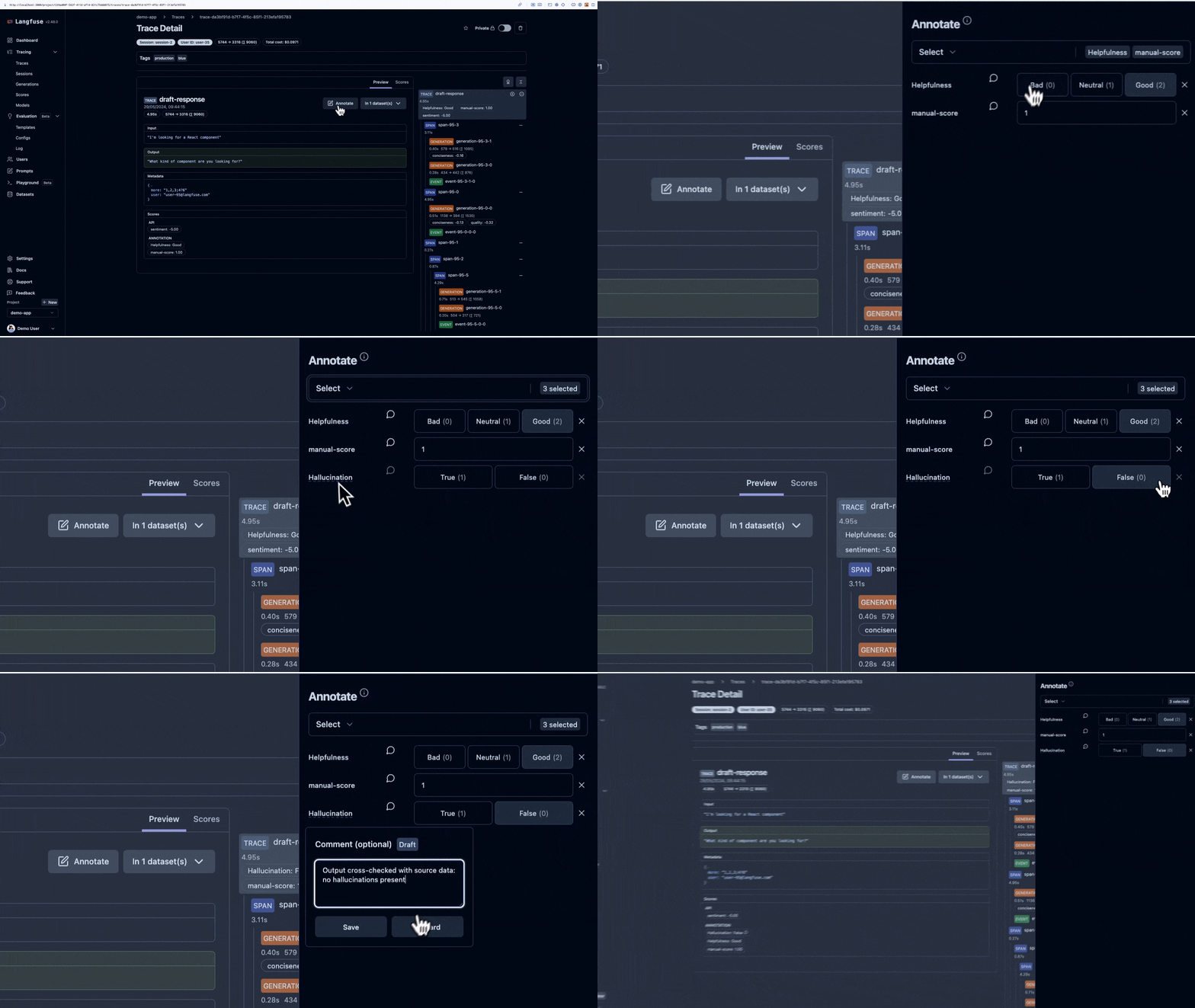
Human Annotation is a manual evaluation method. It is used to collaboratively annotate traces, sessions and observations with scores.
In Langfuse you can use [Annotation Queues](#annotation-queues) to streamline working through reviewing larger batches of of [single interactions (trace-level)](#single-object), [multiple interactions (session-level)](#single-object) or even [single observations](#single-object), below the trace level.
## Why use Human Annotation?
- **Collaboration**: Enable team collaboration by inviting other internal members to annotate a subset of traces and observations. This manual evaluation can enhance the overall accuracy and reliability of your results by incorporating diverse perspectives and expertise.
- **Annotation data consistency**: Create score configurations for annotation workflows to ensure that all team members are using standardized scoring criteria. Hereby configure categorical, numerical or binary score types to capture different aspects of your data.
- **Evaluation of new product features**: This feature can be useful for new use cases where no other scores have been allocated yet.
- **Benchmarking of other scores**: Establish a human baseline score that can be used as a benchmark to compare and evaluate other scores. This can provide a clear standard of reference and enhance the objectivity of your performance evaluations.
- **Curate evaluation data**: Flag high-quality examples from production logs or experiment runs to include in future evaluations and test datasets.
## Annotation of Single Traces, Sessions and Observations [#single-object]
Human Annotation of single traces, sessions and observations is available in the trace, session and observation detail view.
#### Prerequisite: Create a Score Config
To use Human Annotation, you **need to have at least one score configuration (Score Config) set up**. See [how to create and manage Score Configs](/faq/all/manage-score-configs) for details.
#### Trigger Annotation on a Trace, Session or Observation
On a Trace, Session or Observation detail view **click on** `Annotate` to open the annotation form.

#### Select Score Configs to use

#### Set Score values

#### See newly added Scores
To see your newly added scores on traces or observations, **click on** the `Scores` tab on the trace or observation detail view.

To see your newly added scores on sessions, **click on** the `Scores` tab on the session detail view.

All scores are also available in the traces, sessions and observations table views respectively.
## Annotation Queues [#annotation-queues]
Annotation queues allow you to manage and prioritize your annotation tasks in a structured way. This feature is particularly useful for large-scale projects that benefit of human-in-the-loop evaluation at some scale. Queues streamline this process by allowing for specifying which traces, sessions or observations you'd like to annotate on which dimensions.
### Create Annotation Queues
#### Prerequisite: Create a Score Config
To use Human Annotation, you **need to have at least one score configuration (Score Config) set up**. See [how to create and manage Score Configs](/faq/all/manage-score-configs#create-a-score-config) for details.
#### Go to Annotation Queues View
- **Navigate to** `Your Project` > `Human Annotation` to see all your annotation queues.
- **Click on** `New queue` to create a new queue.

#### Fill out Create Queue Form
- **Select** the `Score Configs` you want to use for this queue.
- **Set** the `Queue name` and `Description` (optional).

- **Click on** `Create queue` to create the queue.
### Assign Users to Annotation Queues
#### Go to Annotation Queues View
- **Navigate to** `Your Project` > `Human Annotation` to see all your annotation queues.
- **Click on** `New queue` to assign users to a new queue or click the three dots on the right of an existing queue to assign users to it.

#### Assign Users to the Queue
- **Expand** the `User Assignment` section under the `Advanced settings` section.
- **Search** for the users you want to assign to the queue.
- **Click on** the user to assign them to the queue. You can also assign multiple users at once by selecting them in the search results.
- **Review** the users you have selected to be assigned to the queue.

- **Click on** `Save` to save the queue.
#### Manage Assignments
- **Click on** the three dots on the right of the queue or the `Edit queue` button in the queue detail view to manage the assignments.
- **View** the users assigned to the queue by expanding the `User Assignment` section.
- **Assign** new users by clicking the `Assign users` button and searching for the users you want to assign.
- **Unassign** current users by clicking the `X` icon on the right of the user.

### Run Annotation Queues
#### Populate Annotation Queues
Once you have created annotation queues, you can assign traces, sessions or observations to them.
To add multiple traces, sessions or observations to a queue:
1. **Navigate to the respective table view** and optionally adjust the filters
2. **Select** Traces, Sessions or Observations via the checkboxes.
3. **Click on** the "Actions" dropdown menu
4. **Click on** `Add to queue` to add the selected traces, sessions or observations to the queue.
5. **Select** the queue you want to add the traces, sessions or observations to.

To add single traces, sessions or observations to a queue:
1. **Navigate** to the trace, session or observation detail view
2. **Click on** the `Annotate` dropdown
3. **Select** the queue you want to add the trace, session or observation to

#### Navigate to Annotation Queue
1. **Navigate to** `Your Project` > `Human Annotation`
2. Option 1: **Click on** the queue name to view the associated annotation tasks
3. Option 2: **Click on** "Process queue" to start processing the queue

#### Process Annotation Tasks
You will see an annotation task for each item in the queue.
1. On the `Annotate` Card **add scores** on the defined dimensions
2. **Click on** `Complete + next` to move to the next annotation task or finish the queue

### Manage Annotation Queues via API
You can enqueue, manage and dequeue annotation tasks via the [API](/docs/api). This allows for scaling and automating your annotation workflows.
## Annotate from Experiment Compare View [#annotate-experiments]
When running [experiments via UI](/docs/evaluation/experiments/experiments-via-ui) or via [SDK](/docs/evaluation/experiments/experiments-via-sdk), you can annotate results directly from the experiment compare view. This workflow integrates experiment evaluation with human feedback collection.
**Benefits**
- **Seamless workflow**: Run experiments, review results side-by-side, and add human annotations without switching views
- **Full context**: Annotate while viewing experiment inputs, outputs, and automated scores together
- **Efficient review**: Navigate through all experiment items systematically to ensure complete coverage
- **Optimistic updates**: UI reflects your annotations immediately while data persists in the background
**How to Annotate Experiments**
### Prerequisites
1. **Create score configs**: Set up [score configurations](/faq/all/manage-score-configs) for the dimensions you want to evaluate
2. **Run an experiment**: Execute an [experiment via UI](/docs/evaluation/experiments/experiments-via-ui) or [SDK](/docs/evaluation/experiments/experiments-via-sdk) to generate results to review
### Navigate to Compare View
1. **Go to** `Your Project` > `Datasets`
2. **Select** your dataset
3. **Click on** the experiment run(s) you want to review
4. **Open** the compare view to see results side-by-side
### Annotate Experiment Items
1. **Select a row** in the compare view to open the trace detail view
2. **Click** `Annotate` to open the annotation form
3. **Assign scores** based on your configured score dimensions
4. **Add comments** (optional) to provide context for your team
5. **Navigate** to the next item by clicking `Annotate` on another row
The compare view maintains full experiment context—inputs, outputs, and automated scores—while you review each item. Summary metrics update as you add annotation scores, allowing you to track progress across the experiment.
## GitHub Discussions
import { GhDiscussionsPreview } from "@/components/gh-discussions/GhDiscussionsPreview";
---
# Source: https://langfuse.com/docs/ask-ai.md
---
title: Ask AI
description: Ask AI
---
# Ask AI
The Langfuse AI assistant helps you find answers about Langfuse's features, integrations, and best practices. It's trained on our documentation, GitHub discussions/issues, and API.
_If you are looking for the interactive Langfuse example project, please visit [langfuse.com/docs/demo](/docs/demo). The same context is also available programmatically via the [Langfuse Docs MCP Server](/docs/docs-mcp)._
import InkeepEmbeddedChat from "@/components/inkeep/InkeepEmbeddedChat";
---
# Source: https://langfuse.com/docs/administration/audit-logs.md
---
description: Comprehensive audit logging in Langfuse tracks all system activities with detailed state capture and user attribution for enterprise security and compliance requirements.
sidebarTitle: Audit Logs
---
# Audit Logs
Langfuse's audit logging system provides comprehensive tracking of all system activities, capturing detailed information about who performed what actions, when they occurred, and what changes were made.
This feature is essential for enterprise security, compliance requirements, and incident investigation.
## What are Audit Logs?
Audit logs are immutable records of all significant activities within your Langfuse organization and projects.
They capture:
- **Who**: User or API key that performed the action
- **What**: The specific action taken (create, update, delete)
- **When**: Precise timestamp of the action
- **Where**: Organization and project context
- **Details**: Complete before/after state for modifications
These logs provide a complete audit trail for security monitoring, compliance reporting, and forensic analysis.
## Viewing Audit Logs
The audit log viewer is available in the Enterprise Edition and provides:

### Access Control
- Available to users with `auditLogs:read` permission
- Typically accessible to project OWNERs and ADMINs
- Controlled through Langfuse's role-based access control system
### Filtering and Navigation
- **Time-based filtering**: View logs for specific time periods
- **Project filtering**: Focus on specific project activities
- **Pagination**: Efficient browsing of large audit trails
## Exporting Audit Logs
You can export audit logs directly from the UI. Thereby you can analyze your data externally or create backups of important information.
**How to use:**
- Navigate to your audit logs table
- Click the export button on the top right
## Event Types and Data Capture
### Auditable Resources
Langfuse tracks specific actions across all system resources.
The following table shows the exact resource types and actions that are logged:
| Resource | Actions |
| ---------------------------- | ----------------------------------------------------- |
| **Annotation Queue** | create, delete, update |
| **Annotation Queue Item** | complete, create, delete |
| **API Key** | create, delete, update |
| **Batch Action** | create, delete |
| **Batch Export** | create |
| **Blob Storage Integration** | update |
| **Comment** | create, delete |
| **Dataset** | create, delete, update |
| **Dataset Item** | create, delete, update |
| **Dataset Run** | delete |
| **Evaluation Template** | create |
| **Job** | create, delete, update |
| **LLM API Key** | create, delete |
| **Membership** | create, delete |
| **Membership Invitation** | create, delete |
| **Model** | create, delete, update |
| **Organization** | create, delete, update |
| **Organization Membership** | create, delete, update |
| **PostHog Integration** | delete, update |
| **Project** | create, delete, transfer, update |
| **Project Membership** | create, delete, update |
| **Prompt** | create, delete, promote, setLabel, update, updateTags |
| **Prompt Protected Label** | create |
| **Score** | create, delete, update |
| **Score Config** | create, update |
| **Session** | bookmark, publish |
| **Stripe Checkout Session** | create |
| **Trace** | bookmark, delete, publish, updateTags |
### State Capture
For update operations, Langfuse captures:
- **Before State**: Complete resource state prior to modification
- **After State**: Complete resource state after modification
States are stored as JSON, providing full context for any modifications made to your data.
### User Attribution
#### Identity Sources
Audit logs distinguish between different types of actors:
- **User Actions** (`USER` type): Actions performed by authenticated users through the web interface
- **API Key Actions** (`API_KEY` type): Programmatic actions via API keys
#### Context Information
Each entry includes:
- **User ID**: For user-initiated actions
- **API Key ID**: For programmatic actions
- **Organization ID**: Organizational context
- **Role Context**: User's organizational and project roles at the time of action
## GitHub Discussions
import { GhDiscussionsPreview } from "@/components/gh-discussions/GhDiscussionsPreview";
---
# Source: https://langfuse.com/self-hosting/security/authentication-and-sso.md
# Source: https://langfuse.com/docs/administration/authentication-and-sso.md
---
title: Single Sign-On (SSO)
sidebarTitle: Authentication & SSO
description: Overview of Single Sign-On (SSO) methods in Langfuse
---
# Authentication & SSO
By default, Langfuse supports email/password and social logins (Sign in with Google, GitHub, Microsoft).
For increased security, you can also configure Enterprise SSO (e.g. Okta, Authentik, OneLogin, Azure AD, Keycloak, JumpCloud etc.) via OIDC.
For more details on authorization, please refer to the [RBAC docs](/docs/administration/rbac).
For self-hosted instances, please refer to the [Self-hosted Authentication and SSO guide](/self-hosting/security/authentication-and-sso).
## Email/Password authentication
By default, Langfuse uses email and password authentication. Langfuse enforces standard password complexity requirements.
If you signed up with a social login, you can add a password via the "reset password" link in the login page.
## Social Logins
For simplified access, users can sign in using their existing social accounts:
- Google
- GitHub
- Azure AD (Entra ID)
For security reasons, Langfuse does not support switching between social logins or signing up with a social login after signing up with email/password.
## Enterprise SSO & SSO Enforcement [#sso]
Langfuse supports **Enterprise SSO** (e.g. Okta, Authentik, OneLogin, Azure AD, Keycloak, JumpCloud etc.) via OIDC. Please reach out to [support](/support) to enable this feature.
Details:
- **Migration:** Existing users who signed up with an email/password or social logins are automatically migrated to the Enterprise SSO provider once it is set up.
- **Authorization:** Enterprise SSO does not automatically provision [roles](/docs/administration/rbac) for new users upon signup. Users must be invited to an organization, either through the UI (settings > members) or the [SCIM API](/docs/administration/scim-and-org-api).
- **Signing in:** To sign in with an Enterprise SSO provider, please (1) enter your email address, and (2) press "Continue". You will be redirected to the Enterprise SSO provider to authenticate.

---
# Source: https://langfuse.com/self-hosting/administration/automated-access-provisioning.md
---
title: Automated Access Provisioning (self-hosted)
description: Optionally, you can configure automated access provisioning for new users when self-hosting Langfuse.
label: "Version: v3"
sidebarTitle: "Automated Access Provisioning"
---
# Automated Access Provisioning
Optionally, you can configure automated access provisioning for new users.
Thereby, they will be added to a default organization and project with specific roles upon signup.
See [RBAC documentation](/docs/rbac) for details on the available roles, scopes, and organizations/projects.
For more programmatic control over the user provisioning process, you can also use the [Admin API (SCIM)](/docs/admin-api).
## Configuration
Set up the following environment variables on the application containers:
| Variable | Required / Default | Description |
| ------------------------------- | ------------------ | ----------------------------------------------------------------------------------------------------------------------------------------------------- |
| `LANGFUSE_DEFAULT_ORG_ID` | | Configure optional default organization for new users. When users create an account they will be automatically added to this organization. |
| `LANGFUSE_DEFAULT_ORG_ROLE` | `VIEWER` | Role of the user in the default organization (if set). Possible values are `OWNER`, `ADMIN`, `MEMBER`, `VIEWER` and `NONE`. See [roles](/docs/rbac) for details. |
| `LANGFUSE_DEFAULT_PROJECT_ID` | | Configure optional default project for new users. When users create an account they will be automatically added to this project. |
| `LANGFUSE_DEFAULT_PROJECT_ROLE` | `VIEWER` | Role of the user in the default project (if set). Possible values are `OWNER`, `ADMIN`, `MEMBER`, `VIEWER`. See [roles](/docs/rbac) for details. |
---
# Source: https://langfuse.com/self-hosting/deployment/aws.md
---
title: Deploy Langfuse on AWS with Terraform
description: Step-by-step guide to run Langfuse on AWS via Terraform.
label: "Version: v3"
sidebarTitle: "AWS (Terraform)"
---
# Deploy Langfuse on AWS with Terraform
This guide will walk you through the steps to deploy Langfuse on AWS using the official Terraform module ([langfuse/langfuse-terraform-aws](https://github.com/langfuse/langfuse-terraform-aws)).
You will need access to an AWS account and the Terraform CLI installed on your local machine.
By default, the Terraform module will provision the necessary infrastructure for the Langfuse application containers and data stores ([architecture overview](/self-hosting#architecture)).
You can optionally configure the module to use existing AWS resources. See the Readme for more details.
Alternatively, you can deploy Langfuse on Kubernetes using the [Helm chart](/self-hosting/deployment/kubernetes-helm).
If you are interested in contributing to our Terraform deployment guides or
modules, please create an issue on the [GitHub
Repository](https://github.com/langfuse/langfuse-terraform-aws).
## Readme
Source: [langfuse/langfuse-terraform-aws](https://github.com/langfuse/langfuse-terraform-aws)
import { useData } from "nextra/hooks";
import { Playground } from "nextra/components";
import { Callout } from "nextra/components";
export const getStaticProps = async () => {
const res = await fetch(
"https://raw.githubusercontent.com/langfuse/langfuse-terraform-aws/refs/heads/main/README.md"
);
const readmeContent = await res.text();
return {
props: {
ssg: {
terraformReadme: readmeContent,
},
},
};
};
export function TerraformReadme() {
const { terraformReadme } = useData();
// Basic check to prevent errors if fetching failed or content is empty
if (!terraformReadme) {
return
## Support
If you experience any issues when self-hosting Langfuse, please:
1. Check out [Troubleshooting & FAQ](/self-hosting/troubleshooting-and-faq) page.
2. Use [Ask AI](/ask-ai) to get instant answers to your questions.
3. Ask the maintainers on [GitHub Discussions](/gh-support).
4. Create a bug report or feature request on [GitHub](/issues).
---
# Source: https://langfuse.com/self-hosting/deployment/azure.md
---
title: Deploy Langfuse on Azure with Terraform
description: Step-by-step guide to run Langfuse on Azure via Terraform.
label: "Version: v3"
sidebarTitle: "Azure (Terraform)"
---
# Deploy Langfuse on Azure with Terraform
This guide will walk you through the steps to deploy Langfuse on Azure using the official Terraform module ([langfuse/langfuse-terraform-azure](https://github.com/langfuse/langfuse-terraform-azure)).
You will need access to an Azure account and the Terraform CLI installed on your local machine.
By default, the Terraform module will provision the necessary infrastructure for the Langfuse application containers and data stores ([architecture overview](/self-hosting#architecture)).
You can optionally configure the module to use existing Azure resources. See the Readme for more details.
Alternatively, you can deploy Langfuse on Kubernetes using the [Helm chart](/self-hosting/deployment/kubernetes-helm).
If you are interested in contributing to our Terraform deployment guides or
modules, please create an issue on the [GitHub
Repository](https://github.com/langfuse/langfuse-terraform-azure).
## Readme
Source: [langfuse/langfuse-terraform-azure](https://github.com/langfuse/langfuse-terraform-azure)
import { useData } from "nextra/hooks";
import { Playground } from "nextra/components";
import { Callout } from "nextra/components";
export const getStaticProps = async () => {
const res = await fetch(
"https://raw.githubusercontent.com/langfuse/langfuse-terraform-azure/main/README.md" // Updated URL for Azure README
);
const readmeContent = await res.text();
return {
props: {
ssg: {
terraformReadme: readmeContent,
},
},
};
};
export function TerraformReadme() {
const { terraformReadme } = useData();
// Basic check to prevent errors if fetching failed or content is empty
if (!terraformReadme) {
return
---
# Source: https://langfuse.com/self-hosting/upgrade/background-migrations.md
---
title: Background Migrations (self-hosted)
description: Langfuse uses background migrations to perform long-running changes within the storage components when upgrading the application.
label: "Version: v3"
sidebarTitle: "Background Migrations"
---
# Background Migrations
Langfuse uses background migrations to perform long-running changes within the storage components when [upgrading](/self-hosting/upgrade) the application.
These may include the addition and backfilling of new columns or the migration of data between storages.
Background migrations are executed on startup of the worker container and run in the background until completion or failure.
Next to background migrations, fast migrations are applied directly to the database on startup of the web container.
## Monitoring
You can monitor the progress of background migrations within the Langfuse UI.
Click on the Langfuse version tag and select "Background Migrations".
You see all migrations that ever ran and their status.
You can also monitor the progress of background migrations via the worker container logs.
If migrations are running or have failed, we show a status indicator within the UI to guide users towards the background migrations overview.
## Deployment stops
Langfuse does not require deployment stops between minor releases as of now.
However, we recommend that you monitor the progress of background migrations after each update to ensure that all migrations have completed successfully before attempting another update.
We will highlight within the changelog if a deployment stop becomes required.
## Configuration
Background migrations are enabled by default and can be disabled by setting `LANGFUSE_ENABLE_BACKGROUND_MIGRATIONS=false`. This is not recommended as it may leave the application in an inconsistent state where the UI and API does not reflect the current state of the data correctly.
## Troubleshooting
### Failed to convert rust String into napi string
If you are seeing the message above for the traces, observations, or scores background migration, it is usually due to large blob data within the rows.
The error happens, because the postgres database client tries to concatenate all the data into a single string, before parsing it in Node.js.
If the string exceeds the maximum Node.js string size, the error is thrown.
We can circumvent the issue by loading fewer rows at the same time.
To do so, adjust the batchSize of your migration by editing the `background_migrations` table.
Add `{ "batchSize": 2500 }` to the `args` column of the migration you want to adjust.
Afterward, restart the migration via the UI.
### Migrations Stuck on Single Date
If you observe repeated log lines that refer to the same date, e.g.
```
langfuse-worker-1 | 2025-06-03T08:38:21.918Z info [Background Migration] Acquired lock for background migration 20241024_1730_migrate_traces_from_pg_to_ch
langfuse-worker-1 | 2025-06-03T08:38:21.949Z info Migrating traces from postgres to clickhouse with {}
langfuse-worker-1 | 2025-06-03T08:38:22.429Z info Got 1000 records from Postgres in 475ms
langfuse-worker-1 | 2025-06-03T08:38:22.914Z info Inserted 1000 traces into Clickhouse in 485ms
langfuse-worker-1 | 2025-06-03T08:38:22.919Z info Processed batch in 965ms. Oldest record in batch: 2025-06-03T08:34:15.231Z
langfuse-worker-1 | 2025-06-03T08:38:23.391Z info Got 1000 records from Postgres in 472ms
langfuse-worker-1 | 2025-06-03T08:38:23.811Z info Inserted 1000 traces into Clickhouse in 420ms
langfuse-worker-1 | 2025-06-03T08:38:23.815Z info Processed batch in 896ms. Oldest record in batch: 2025-06-03T08:34:15.231Z
langfuse-worker-1 | 2025-06-03T08:38:24.256Z info Got 1000 records from Postgres in 441ms
langfuse-worker-1 | 2025-06-03T08:38:24.638Z info Inserted 1000 traces into Clickhouse in 382ms
```
this might be due to a couple of reasons:
- You have many events that were created at exactly the same time.
- Your instance was created before 2024-05-03 and rarely updated since.
In both cases, you can try to adjust the `batchSize` as described above.
If this does not resolve the problem, you can customize the migration scripts (see langfuse-repo `/worker/src/backgroundMigrations/`) to use the `timestamp` or `start_time` instead of `created_at` as a cursor.
---
# Source: https://langfuse.com/self-hosting/configuration/backups.md
---
title: Backup Strategies for Langfuse
description: Comprehensive guide to backing up your self-hosted Langfuse deployment including ClickHouse, Postgres, and MinIO.
label: "Version: v3"
sidebarTitle: "Backups"
---
# Backup Strategies
This guide covers backup strategies for self-hosted Langfuse deployments.
Follow one of the [deployment guides](/self-hosting#deployment-options) to get started.
Proper backup strategies are essential for protecting your Langfuse data and ensuring business continuity.
This guide covers backup approaches for all components of your self-hosted Langfuse deployment.
## ClickHouse
ClickHouse stores your observability data including traces, observations, and scores.
Backup strategies vary depending on whether you use a managed service or self-hosted deployment.
### ClickHouse Cloud (Managed Service)
**Automatic Backups**: ClickHouse Cloud automatically manages backups for you with:
- Continuous incremental backups
- Point-in-time recovery capabilities
- Cross-region replication options
- Enterprise-grade durability guarantees
**No Action Required**: If you're using ClickHouse Cloud, backups are handled automatically.
Refer to the [ClickHouse Cloud documentation](https://clickhouse.com/docs/en/cloud/manage/backups) for backup retention policies and recovery procedures.
### Self-Hosted ClickHouse
For self-hosted ClickHouse instances, you need to implement your own backup strategy.
#### Kubernetes Deployments
**1. Volume Snapshots (Recommended)**
Most cloud providers support volume snapshots for persistent volumes.
Ensure that you're also adding snapshots for the clickhouse zookeeper volumes.
```bash
# Create a VolumeSnapshot for each ClickHouse replica
kubectl apply -f - < /backup/langfuse-backup-$TIMESTAMP.sql
# Upload to S3 (optional)
aws s3 cp /backup/langfuse-backup-$TIMESTAMP.sql s3://langfuse-backups/postgres/
# Clean up local files older than 3 days
find /backup -name "langfuse-backup-*.sql" -mtime +3 -delete
volumeMounts:
- name: backup-storage
mountPath: /backup
volumes:
- name: backup-storage
persistentVolumeClaim:
claimName: postgres-backup-pvc
restartPolicy: OnFailure
```
**2. Volume Snapshots**
```bash
# Create snapshot of Postgres PVC
kubectl apply -f - < "$BACKUP_DIR/langfuse-backup-$TIMESTAMP.sql"
# Compress backup
gzip "$BACKUP_DIR/langfuse-backup-$TIMESTAMP.sql"
# Upload to cloud storage (optional)
aws s3 cp "$BACKUP_DIR/langfuse-backup-$TIMESTAMP.sql.gz" s3://langfuse-backups/postgres/
# Clean up old backups
find "$BACKUP_DIR" -name "langfuse-backup-*.sql.gz" -mtime +7 -delete
```
## MinIO
**MinIO is Obsolete with Cloud Storage**: If you're using cloud storage services like AWS S3, Azure Blob Storage, or Google Cloud Storage, MinIO is not needed and backup strategies should focus on your cloud storage provider's native backup features.
MinIO is only relevant for self-hosted deployments that don't use cloud storage services.
For most production deployments, we recommend using managed cloud storage instead.
### When MinIO is Used
MinIO is typically used in:
- Air-gapped environments
- On-premises deployments without cloud access
- Development environments
- Specific compliance requirements
### MinIO Backup Strategies
#### Cloud Storage Replication (Recommended)
Configure MinIO to replicate to cloud storage:
```bash
# Configure MinIO client
mc alias set myminio http://localhost:9000 minio miniosecret
mc alias set s3backup https://s3.amazonaws.com ACCESS_KEY SECRET_KEY
# Set up bucket replication
mc replicate add myminio/langfuse --remote-bucket s3backup/langfuse-backup
```
#### Kubernetes MinIO Backups
**1. Volume Snapshots**
```bash
# Snapshot MinIO data volumes
kubectl apply -f - <
This is a deep dive into the configuration of S3. Follow one of the [deployment guides](/self-hosting#deployment-options) to get started.
Langfuse uses S3 or another S3-compatible blob storage (referred to as S3 going forward) to store raw events, multi-modal inputs, batch exports, and other files.
In addition, we have dedicated implementations for [Azure Blob Storage](#azure-blob-storage) and [Google Cloud Storage](#google-cloud-storage).
You can use a managed service on AWS, or CloudFlare, or host it yourself using MinIO.
We use it as a scalable and durable storage solution for large files with strong read-after-write guarantees.
This guide covers how to configure S3 within Langfuse and how to connect your own S3-compatible storage.
## Configuration
Langfuse has multiple use-cases for S3 and allows you to configure them individually.
That way, you can use separate buckets for each case, or combine information in a single bucket using prefixes.
### Mandatory Configuration
Langfuse needs an S3 bucket to upload raw event information.
The following environment variables are mandatory for every deployment.
They need to be provided for the Langfuse Web and Langfuse Worker containers.
| Variable | Required / Default | Description |
| -------------------------------------------- | ------------------ | --------------------------------------------------------------------------------------------------------------------- |
| `LANGFUSE_S3_EVENT_UPLOAD_BUCKET` | Required | Name of the bucket in which event information should be uploaded. |
| `LANGFUSE_S3_EVENT_UPLOAD_PREFIX` | `""` | Prefix to store events within a subpath of the bucket. Defaults to the bucket root. If provided, must end with a `/`. |
| `LANGFUSE_S3_EVENT_UPLOAD_REGION` | | Region in which the bucket resides. |
| `LANGFUSE_S3_EVENT_UPLOAD_ENDPOINT` | | Endpoint to use to upload events. |
| `LANGFUSE_S3_EVENT_UPLOAD_ACCESS_KEY_ID` | | Access key for the bucket. Must have List, Get, and Put permissions. |
| `LANGFUSE_S3_EVENT_UPLOAD_SECRET_ACCESS_KEY` | | Secret access key for the bucket. |
| `LANGFUSE_S3_EVENT_UPLOAD_FORCE_PATH_STYLE` | | Whether to force path style on requests. Required for MinIO. |
### Optional Configuration
Langfuse also uses S3 for batch exports and for multi-modal tracing.
Those use-cases are opt-in and can be configured separately.
Use the following information to enable them.
Langfuse uses the credentials to generate short-lived, pre-signed URLs that allow SDKs to upload media assets or to download batch exports.
#### Multi-Modal Tracing
| Variable | Required / Default | Description |
| ----------------------------------------------- | ------------------ | -------------------------------------------------------------------------------------------------------------------- |
| `LANGFUSE_S3_MEDIA_UPLOAD_BUCKET` | Required | Name of the bucket in which media files should be uploaded. |
| `LANGFUSE_S3_MEDIA_UPLOAD_PREFIX` | `""` | Prefix to store media within a subpath of the bucket. Defaults to the bucket root. If provided, must end with a `/`. |
| `LANGFUSE_S3_MEDIA_UPLOAD_REGION` | | Region in which the bucket resides. |
| `LANGFUSE_S3_MEDIA_UPLOAD_ENDPOINT` | | Endpoint to use to upload media files. |
| `LANGFUSE_S3_MEDIA_UPLOAD_ACCESS_KEY_ID` | | Access key for the bucket. Must have List, Get, and Put permissions. |
| `LANGFUSE_S3_MEDIA_UPLOAD_SECRET_ACCESS_KEY` | | Secret access key for the bucket. |
| `LANGFUSE_S3_MEDIA_UPLOAD_FORCE_PATH_STYLE` | | Whether to force path style on requests. Required for MinIO. |
| `LANGFUSE_S3_MEDIA_MAX_CONTENT_LENGTH` | `1_000_000_000` | Maximum file size in bytes that is allowed for upload. Default is 1GB. |
| `LANGFUSE_S3_MEDIA_DOWNLOAD_URL_EXPIRY_SECONDS` | `3600` | Presigned download URL expiry in seconds. Defaults to 1h. |
#### Batch Exports
Langfuse allows you to export table data via batch exports.
We upload intermediate results to S3 and provide a presigned URL for users to download their exports in CSV or JSON format.
To configure batch exports in your environment, configure the following environment variables:
| Variable | Required / Default | Description |
| -------------------------------------------- | ------------------ | ---------------------------------------------------------------------------------------------------------------------------------------------------------------------------------- |
| `LANGFUSE_S3_BATCH_EXPORT_ENABLED` | `false` | Whether to enable Langfuse S3 batch exports. This must be set to `true` to enable batch exports. |
| `LANGFUSE_S3_BATCH_EXPORT_BUCKET` | Required | Name of the bucket in which batch exports should be uploaded. |
| `LANGFUSE_S3_BATCH_EXPORT_PREFIX` | `""` | Prefix to store batch exports within a subpath of the bucket. Defaults to the bucket root. If provided, must end with a `/`. |
| `LANGFUSE_S3_BATCH_EXPORT_REGION` | | Region in which the bucket resides. |
| `LANGFUSE_S3_BATCH_EXPORT_ENDPOINT` | | Endpoint to use to upload batch exports. |
| `LANGFUSE_S3_BATCH_EXPORT_ACCESS_KEY_ID` | | Access key for the bucket. Must have List, Get, and Put permissions. |
| `LANGFUSE_S3_BATCH_EXPORT_SECRET_ACCESS_KEY` | | Secret access key for the bucket. |
| `LANGFUSE_S3_BATCH_EXPORT_FORCE_PATH_STYLE` | | Whether to force path style on requests. Required for MinIO. |
| `LANGFUSE_S3_BATCH_EXPORT_EXTERNAL_ENDPOINT` | | Optional external endpoint for generating presigned URLs. If not provided, the main endpoint is used. Useful, if langfuse traffic to the blobstorage should remain within the VPC. |
| `BATCH_EXPORT_PAGE_SIZE` | `500` | Optional page size for streaming exports to S3 to avoid memory issues. The page size can be adjusted if needed to optimize performance. |
| `BATCH_EXPORT_ROW_LIMIT` | `1_500_000` | Maximum amount of rows that can be exported in a single batch export. |
## Deployment Options
This section covers different deployment options and provides example environment variables.
We will focus on the EVENT_UPLOAD case, as the other cases are similar.
### Amazon S3
[Amazon S3](https://aws.amazon.com/s3/) is a globally available object storage.
Langfuse uses the AWS SDK internally to connect to blob storages, as most providers provide an S3-compatible interface.
If Langfuse is running on an AWS instance, we recommend to use an IAM role on the Langfuse container to access S3.
Otherwise, create an IAM user and generate an Access Key pair for Langfuse.
Ensure that both entities have the necessary permissions to access the bucket:
```json
{
"Version": "2012-10-17",
"Statement": [
{
"Action": ["s3:PutObject", "s3:ListBucket", "s3:GetObject"],
"Effect": "Allow",
"Resource": [
"arn:aws:s3:::/*",
"arn:aws:s3:::"
],
"Sid": "EventBucketAccess"
}
]
}
```
To use the [Data Retention](/docs/data-retention) feature in a self-hosted environment, you need to grant `s3:DeleteObject` to the Langfuse IAM role on all buckets.
Note that Langfuse only issues delete statements on the API.
If you use versioned buckets, delete markers and non-current versions need to be removed manually or with a lifecycle rule.
#### Using AWS KMS Encryption
Amazon S3 provides server-side encryption (SSE) options to encrypt your data at rest.
Langfuse supports AWS KMS encryption for all S3 interactions through the following environment variables:
| Variable | Required / Default | Description |
| ----------------------------------------- | ------------------ | ------------------------------------------------------------------------------------------------------------------- |
| `LANGFUSE_S3_EVENT_UPLOAD_SSE` | | Server-side encryption algorithm to use. Set to `aws:kms` to use AWS KMS or `AES256` to use server-side encryption. |
| `LANGFUSE_S3_EVENT_UPLOAD_SSE_KMS_KEY_ID` | | ID of the KMS key to use for encryption. Required when `LANGFUSE_S3_EVENT_UPLOAD_SSE` is set to `aws:kms`. |
| `LANGFUSE_S3_MEDIA_UPLOAD_SSE` | | Server-side encryption algorithm to use. Set to `aws:kms` to use AWS KMS or `AES256` to use server-side encryption. |
| `LANGFUSE_S3_MEDIA_UPLOAD_SSE_KMS_KEY_ID` | | ID of the KMS key to use for encryption. Required when `LANGFUSE_S3_MEDIA_UPLOAD_SSE` is set to `aws:kms`. |
| `LANGFUSE_S3_BATCH_EXPORT_SSE` | | Server-side encryption algorithm to use. Set to `aws:kms` to use AWS KMS or `AES256` to use server-side encryption. |
| `LANGFUSE_S3_BATCH_EXPORT_SSE_KMS_KEY_ID` | | ID of the KMS key to use for encryption. Required when `LANGFUSE_S3_BATCH_EXPORT_SSE` is set to `aws:kms`. |
When using AWS KMS for encryption, ensure your IAM role or user has the necessary permissions to use the specified KMS key:
```json
{
"Version": "2012-10-17",
"Statement": [
{
"Action": ["kms:GenerateDataKey", "kms:Decrypt"],
"Effect": "Allow",
"Resource": "arn:aws:kms:region:account-id:key/key-id",
"Sid": "AllowUseOfKMSKey"
}
]
}
```
#### Example Configuration
Set the following environment variables if you authenticate using an IAM role:
```yaml
LANGFUSE_S3_EVENT_UPLOAD_BUCKET=my-bucket-name
```
If you authenticate using an Access Key pair:
```yaml
LANGFUSE_S3_EVENT_UPLOAD_BUCKET=my-bucket-name
LANGFUSE_S3_EVENT_UPLOAD_REGION=my-bucket-region
LANGFUSE_S3_EVENT_UPLOAD_ACCESS_KEY_ID=AKIAIOSFODNN7EXAMPLE
LANGFUSE_S3_EVENT_UPLOAD_SECRET_ACCESS_KEY=wJalrXUtnFEMI/K7MDENG/bPxRfiCYEXAMPLEKEY
```
### MinIO
[MinIO](https://min.io/) is an open-source object storage server that is compatible with the S3 API.
It is a popular choice for on-premise deployments and local development.
Langfuse uses it for local development and as a default in our [Docker Compose](/self-hosting/deployment/docker-compose) and [Kubernetes (Helm)](/self-hosting/deployment/kubernetes-helm) deployment options.
#### Example Configuration
Start a local MinIO container with Docker using:
```bash
docker run --name minio \
-p 9000:9000 \
-p 9001:9001 \
-e MINIO_ROOT_USER=minio \
-e MINIO_ROOT_PASSWORD=miniosecret \
minio/minio server /data --console-address ":9001"
```
Navigate to `http://localhost:9001` to access the MinIO console and create a bucket named `langfuse`.
Now, you can start Langfuse using the following environment variables:
```yaml
LANGFUSE_S3_EVENT_UPLOAD_BUCKET=langfuse
LANGFUSE_S3_EVENT_UPLOAD_REGION=us-east-1
LANGFUSE_S3_EVENT_UPLOAD_ACCESS_KEY_ID=minio
LANGFUSE_S3_EVENT_UPLOAD_SECRET_ACCESS_KEY=miniosecret
LANGFUSE_S3_EVENT_UPLOAD_ENDPOINT=http://minio:9000
LANGFUSE_S3_EVENT_UPLOAD_FORCE_PATH_STYLE=true
LANGFUSE_S3_EVENT_UPLOAD_PREFIX=events/
```
This example setup uses an ephemeral volume, i.e. on restarts MinIO will discard all event data.
Please follow the MinIO documentation or use a cloud provider managed blob store for persistent data storage.
#### Configuring Minio for Media Uploads [#minio-media-uploads]
To enable multimodal tracing, presigned URLs allow SDK clients and browsers outside the Docker network to directly upload and download media assets. Therefore, the `LANGFUSE_S3_MEDIA_UPLOAD_ENDPOINT` must resolve to the Docker host's address.
**Development Environment:** When running `docker compose` locally, set `LANGFUSE_S3_MEDIA_UPLOAD_ENDPOINT` to `http://localhost:9090` to ensure presigned URLs correctly loop back to the local instance.
**Production Environment:** In a production environment, configure `LANGFUSE_S3_MEDIA_UPLOAD_ENDPOINT` with a publicly accessible hostname or IP address that is reachable by your SDK clients and browsers.
### Cloudflare R2
[Cloudflare R2](https://www.cloudflare.com/developer-platform/products/r2/) is globally available, S3 compatible object storage by Cloudflare.
Create a new bucket within the Cloudflare UI and generate an Access Key pair.
Ensure that the Access Key pair has the necessary permissions to access the bucket.
#### Example Configuration
Set the following environment variables to connect Langfuse with your Cloudflare R2 bucket:
```yaml
LANGFUSE_S3_EVENT_UPLOAD_BUCKET=my-bucket-name
LANGFUSE_S3_EVENT_UPLOAD_REGION=auto
LANGFUSE_S3_EVENT_UPLOAD_ACCESS_KEY_ID=
LANGFUSE_S3_EVENT_UPLOAD_SECRET_ACCESS_KEY=
LANGFUSE_S3_EVENT_UPLOAD_ENDPOINT=https://${ACCOUNT_ID}.r2.cloudflarestorage.com
```
### Azure Blob Storage [#azure-blob-storage]
[Azure Blob Storage](https://azure.microsoft.com/en-us/products/storage/blobs/) is a globally available object storage by Microsoft Azure.
It does not offer an S3-compatible API and requires slightly different configurations.
To use our dedicated Azure Blob Storage setup, follow the configuration steps below.
#### Example Configuration
You will need an Azure Blob Storage container and a static account key with the necessary permissions.
Set the following environment variables to connect Langfuse with your Azure Blob Storage container.
This example uses sample credentials from [Azurite](https://github.com/Azure/Azurite).
```yaml
# Special flag to enable the Azure Blob Storage interface
LANGFUSE_USE_AZURE_BLOB=true
LANGFUSE_S3_EVENT_UPLOAD_BUCKET=langfuse # Container name - If it does not exists, Langfuse will attempt to create it
LANGFUSE_S3_EVENT_UPLOAD_ACCESS_KEY_ID=devstoreaccount1 # ABS Account
LANGFUSE_S3_EVENT_UPLOAD_SECRET_ACCESS_KEY=Eby8vdM02xNOcqFlqUwJPLlmEtlCDXJ1OUzFT50uSRZ6IFsuFq2UVErCz4I6tq/K1SZFPTOtr/KBHBeksoGMGw== # ABS Account Key
LANGFUSE_S3_EVENT_UPLOAD_ENDPOINT=http://localhost:10000/devstoreaccount1 # URL, e.g. `https://${account}.blob.core.windows.net`
```
### Google Cloud Storage (Native) [#google-cloud-storage]
[Google Cloud Storage](https://cloud.google.com/storage) is a globally available object storage by Google Cloud.
To configure the native Google Cloud Storage integration, create a new bucket within Google Cloud Storage.
Configure the following settings to use the bucket with Langfuse.
#### Example Configuration
Set the following environment variables to connect Langfuse with your Google Cloud Storage bucket:
```yaml
LANGFUSE_USE_GOOGLE_CLOUD_STORAGE=true
LANGFUSE_S3_EVENT_UPLOAD_BUCKET=langfuse # Bucket name
LANGFUSE_GOOGLE_CLOUD_STORAGE_CREDENTIALS= # JSON key or path to JSON key file. Optional. Will fallback to environment credentials
LANGFUSE_S3_EVENT_UPLOAD_PREFIX=events/ # Optional prefix to store events within a subpath of the bucket
```
### Google Cloud Storage (Compatibility Mode)
[Google Cloud Storage](https://cloud.google.com/storage) is a globally available object storage by Google Cloud.
It offers S3-compatibility through its interoperability interface.
To get started, create a new bucket within Google Cloud Storage.
Navigate to `Settings > Interoperability` to create a service account HMAC key.
Ensure that the HMAC key has the necessary permissions to access the bucket.
Please note that GCS does not implement all functions of the S3 API.
We are aware of issues around DeleteObject requests that may cause errors in your application.
This will have no effect on most operations within Langfuse, but may limit your ability to delete data.
#### Example Configuration
Set the following environment variables to connect Langfuse with your Google Cloud Storage bucket:
```yaml
LANGFUSE_S3_EVENT_UPLOAD_BUCKET=my-bucket-name
LANGFUSE_S3_EVENT_UPLOAD_REGION=auto
LANGFUSE_S3_EVENT_UPLOAD_ACCESS_KEY_ID=
LANGFUSE_S3_EVENT_UPLOAD_SECRET_ACCESS_KEY=
LANGFUSE_S3_EVENT_UPLOAD_ENDPOINT=https://storage.googleapis.com
LANGFUSE_S3_EVENT_UPLOAD_FORCE_PATH_STYLE=true
LANGFUSE_S3_EVENT_UPLOAD_PREFIX=events/
```
### Other Providers
Langfuse supports any S3-compatible storage provider.
Please refer to the provider's documentation on how to create a bucket and generate Access Key pairs.
Ensure that the Access Key pair has the necessary permissions to access the bucket.
If you believe that other providers should be documented here, please open an [issue](https://github.com/langfuse/langfuse-docs/issues)
or a [pull request](https://github.com/langfuse/langfuse-docs/pulls) to contribute to this documentation.
---
# Source: https://langfuse.com/self-hosting/deployment/infrastructure/cache.md
---
title: Cache (Redis/Valkey) (self-hosted)
description: Langfuse uses Redis/Valkey as a caching layer and queue.
label: "Version: v3"
---
# Cache (Redis/Valkey)
This is a deep dive into Redis/Valkey configuration. Follow one of the [deployment guides](/self-hosting#deployment-options) to get started.
Langfuse uses Redis/Valkey as a caching layer and queue.
It is used to accept new events quickly on the API and defer their processing and insertion.
This allows Langfuse to handle request peaks gracefully.
You can use a managed service on AWS, Azure, or GCP, or host it yourself.
At least version 7 is required and the instance must have `maxmemory-policy=noeviction` configured.
This guide covers how to configure Redis within Langfuse and what to keep in mind when bringing your own Redis.
## Configuration
Langfuse accepts the following environment variables to fine-tune your Redis usage.
They need to be provided for the Langfuse Web and Langfuse Worker containers.
| Variable | Required / Default | Description |
| ------------------------- | ------------------ | -------------------------------------------------------------------------------------------------- |
| `REDIS_CONNECTION_STRING` | Required | Redis connection string with format `redis[s]://[[username][:password]@][host][:port][/db-number]` |
### Cache Configuration Options
Langfuse supports caching for API keys and prompts to improve performance. The following environment variables control caching behavior:
| Variable | Required / Default | Description |
| ------------------------------------ | ------------------ | ----------------------------------------------------------------------------------------------------------------------------------------------------------- |
| `LANGFUSE_CACHE_API_KEY_ENABLED` | `true` | Enable or disable API key caching. Set to `false` to disable caching of API keys. Plain-text keys are never stored in Redis, only hashed or encrypted keys. |
| `LANGFUSE_CACHE_API_KEY_TTL_SECONDS` | `300` | Time-to-live (TTL) in seconds for cached API keys. Determines how long API keys remain in the cache before being refreshed. |
| `LANGFUSE_CACHE_PROMPT_ENABLED` | `true` | Enable or disable prompt caching. Set to `false` to disable caching of prompts. |
| `LANGFUSE_CACHE_PROMPT_TTL_SECONDS` | `300` | Time-to-live (TTL) in seconds for cached prompts. Determines how long prompts remain in the cache before being refreshed. |
OR
| Variable | Required / Default | Description |
| ----------------------- | ------------------ | ----------------------------------------------------------------------------------------------------------------------- |
| `REDIS_HOST` | Required | Redis host name. |
| `REDIS_PORT` | `6379` | Port of the Redis instance. |
| `REDIS_USERNAME` | | Username for Redis authentication. |
| `REDIS_AUTH` | | Authentication string for the Redis instance. |
| `REDIS_TLS_ENABLED` | `false` | Enable TLS for the Redis connection. Alternatively, enable tls via `rediss://` connection string. |
| `REDIS_TLS_CA_PATH` | | Path to the CA certificate for the Redis connection. |
| `REDIS_TLS_CERT_PATH` | | Path to the certificate for the Redis connection. |
| `REDIS_TLS_KEY_PATH` | | Path to the private key for the Redis connection. |
| `REDIS_TLS_SERVERNAME` | | Server name for SNI (Server Name Indication). Useful when connecting to Redis through a proxy or with custom certificates. |
| `REDIS_TLS_REJECT_UNAUTHORIZED` | `true` | Set to `false` to disable certificate validation. Not recommended for production. When not set, defaults to Node.js secure behavior. |
| `REDIS_TLS_CHECK_SERVER_IDENTITY` | | Set to `false` to bypass server identity checking. Use with caution in enterprise environments with custom certificate setups. |
| `REDIS_TLS_SECURE_PROTOCOL` | | TLS protocol version specification (e.g., `TLSv1_2_method`, `TLSv1_3_method`). Uses Node.js defaults when not specified. |
| `REDIS_TLS_CIPHERS` | | Custom cipher suite configuration. Allows specification of allowed TLS ciphers for enhanced security requirements. |
| `REDIS_TLS_HONOR_CIPHER_ORDER` | | Set to `true` to use server's cipher order preference instead of client's. Useful for enforcing security policies. |
| `REDIS_TLS_KEY_PASSPHRASE` | | Passphrase for encrypted private keys. Required if your TLS private key is password-protected. |
| `REDIS_KEY_PREFIX` | `` | Optional prefix for all Redis keys to avoid key collisions with other applications. Should end with `:`. |
| `REDIS_CLUSTER_ENABLED` | `false` | Set to `true` to enable Redis cluster mode. When enabled, you must also provide `REDIS_CLUSTER_NODES`. |
| `REDIS_CLUSTER_NODES` | | Comma-separated list of Redis cluster nodes in the format `host:port`. Required when `REDIS_CLUSTER_ENABLED` is `true`. |
| `REDIS_SENTINEL_ENABLED` | `false` | Set to `true` to enable Redis Sentinel mode. Cannot be enabled simultaneously with cluster mode. |
| `REDIS_SENTINEL_NODES` | | Comma-separated list of Redis Sentinel nodes in the format `host:port`. Required when `REDIS_SENTINEL_ENABLED` is `true`. |
| `REDIS_SENTINEL_MASTER_NAME` | | Name of the Redis Sentinel master. Required when `REDIS_SENTINEL_ENABLED` is `true`. |
| `REDIS_SENTINEL_USERNAME` | | Username for Redis Sentinel authentication (optional). |
| `REDIS_SENTINEL_PASSWORD` | | Password for Redis Sentinel authentication (optional). |
## Deployment Options
This section covers different deployment options and provides example environment variables.
### Managed Redis/Valkey by Cloud Providers
[Amazon ElastiCache](https://aws.amazon.com/de/elasticache/redis/), [Azure Cache for Redis](https://azure.microsoft.com/de-de/products/cache/), and [GCP Memorystore](https://cloud.google.com/memorystore/?hl=en) are fully managed Redis services.
Langfuse handles failovers between read-replicas and supports Redis cluster mode for horizontal scaling.
For **standalone Redis instances**, use the standard configuration:
```bash
REDIS_CONNECTION_STRING=redis://username:password@your-redis-endpoint:6379
```
For **Redis cluster mode**, enable cluster support:
```bash
REDIS_CLUSTER_ENABLED=true
REDIS_CLUSTER_NODES=your-cluster-endpoint:6379
REDIS_AUTH=your-redis-password # if authentication is enabled
```
Ensure that your Langfuse container can reach your Redis instance within the VPC.
You must set the parameter `maxmemory-policy` to `noeviction` to ensure that the queue jobs are not evicted from the cache.
### Redis on Kubernetes (Helm)
Bitnami offers Helm Charts for [Redis](https://github.com/bitnami/charts/tree/main/bitnami/redis) and [Valkey](https://github.com/bitnami/charts/tree/main/bitnami/valkey).
We use the Valkey chart as a dependency for [Langfuse K8s](https://github.com/bitnami/charts/tree/main/bitnami/clickhouse).
See [Langfuse on Kubernetes (Helm)](/self-hosting/deployment/kubernetes-helm) for more details on how to deploy Langfuse on Kubernetes.
#### Example Configuration
For a minimum production setup, we recommend to use the following values.yaml overwrites when deploying the Clickhouse Helm chart:
```yaml
valkey:
deploy: true
architecture: standalone
primary:
extraFlags:
- "--maxmemory-policy noeviction" # Necessary to handle queue jobs correctly
auth:
password: changeme
```
Set the following environment variables to connect to your Redis instance:
```yaml
REDIS_CONNECTION_STRING=redis://default:changeme@-valkey-master:6379/0
```
### Docker
You can run Redis in a single [Docker](https://hub.docker.com/_/redis/) container.
As there is no redundancy, this is **not recommended for production workloads**.
#### Example Configuration
Start the container with
```bash
docker run --name redis \
-p 6379:6379 \
redis --requirepass myredissecret --maxmemory-policy noeviction
```
Set the following environment variables to connect to your Redis instance:
```yaml
REDIS_HOST=localhost
REDIS_PORT=6379
REDIS_AUTH=myredissecret
```
## Redis Cluster Mode
Redis cluster mode enables horizontal scaling by distributing data across multiple Redis nodes.
Langfuse supports Redis cluster mode for high-availability and increased throughput scenarios.
### Configuration
To enable Redis cluster mode, set the following environment variables:
```bash
REDIS_CLUSTER_ENABLED=true
REDIS_CLUSTER_NODES=redis-node1:6379,redis-node2:6379,redis-node3:6379,redis-node4:6379,redis-node5:6379,redis-node6:6379
REDIS_AUTH=your-redis-password # if authentication is enabled
```
For production deployments, we recommend using 3 master nodes with 1 replica each (6 nodes total) for high availability.
### Example Configurations
#### AWS ElastiCache Redis Cluster
```bash
REDIS_CLUSTER_ENABLED=true
REDIS_CLUSTER_NODES=clustercfg.my-redis-cluster.abc123.cache.amazonaws.com:6379
REDIS_AUTH=your-auth-token
REDIS_TLS_ENABLED=true
REDIS_TLS_SERVERNAME=clustercfg.my-redis-cluster.abc123.cache.amazonaws.com
```
#### Self-hosted Redis Cluster
```bash
REDIS_CLUSTER_ENABLED=true
REDIS_CLUSTER_NODES=10.0.1.10:6379,10.0.1.11:6379,10.0.1.12:6379,10.0.1.13:6379,10.0.1.14:6379,10.0.1.15:6379
REDIS_AUTH=your-cluster-password
```
#### Enterprise Redis with Custom CA Certificates
For enterprise environments with custom certificate authorities and specific TLS requirements:
```bash
REDIS_CONNECTION_STRING=redis://username:password@redis.example.com:6379
REDIS_TLS_ENABLED=true
REDIS_TLS_CA_PATH=/app/ca/cacertbundle.pem
REDIS_TLS_CERT_PATH=/app/redis-certs/tls.crt
REDIS_TLS_KEY_PATH=/app/redis-certs/tls.key
REDIS_TLS_SERVERNAME=redis.example.com
REDIS_TLS_REJECT_UNAUTHORIZED=true
```
This configuration enables:
- Proper certificate validation against a custom CA
- SNI support via `REDIS_TLS_SERVERNAME` for proxied connections
- Secure certificate verification without global workarounds
For encrypted private keys, add:
```bash
REDIS_TLS_KEY_PASSPHRASE=your-key-passphrase
```
When using Redis cluster mode:
- Ensure all cluster nodes are accessible from your Langfuse containers
- Use the same authentication credentials across all cluster nodes
- Monitor cluster health and handle node failures appropriately
- Set `maxmemory-policy=noeviction` on all cluster nodes to prevent queue job eviction
- Set `LANGFUSE_INGESTION_QUEUE_SHARD_COUNT` to a positive integer to enable sharding of the ingestion queue across cluster nodes. We recommend 2-3x of your Redis shards.
- Set `LANGFUSE_TRACE_UPSERT_QUEUE_SHARD_COUNT` to a positive integer to enable sharding of the trace upsert queue across cluster nodes. We recommend 2-3x of your Redis shards.
## Redis Sentinel Mode
Redis Sentinel provides high availability for Redis deployments without the complexity of full cluster mode.
It automatically monitors Redis master and replica instances, handles failover, and provides service discovery.
This makes it ideal for deployments that need automatic failover but don't require horizontal scaling across multiple shards.
### Configuration
To enable Redis Sentinel mode, set the following environment variables:
```bash
REDIS_SENTINEL_ENABLED=true
REDIS_SENTINEL_NODES=sentinel1:26379,sentinel2:26379,sentinel3:26379
REDIS_SENTINEL_MASTER_NAME=mymaster
REDIS_AUTH=your-redis-password # if authentication is enabled on Redis
REDIS_SENTINEL_PASSWORD=your-sentinel-password # if authentication is enabled on Sentinels (optional)
```
### Example Configurations
#### Self-hosted Redis with Sentinel
```bash
REDIS_SENTINEL_ENABLED=true
REDIS_SENTINEL_NODES=10.0.1.10:26379,10.0.1.11:26379,10.0.1.12:26379
REDIS_SENTINEL_MASTER_NAME=langfuse-master
REDIS_AUTH=your-redis-password
```
When using Redis Sentinel mode:
- Ensure all Sentinel nodes are accessible from your Langfuse containers
- The `REDIS_SENTINEL_MASTER_NAME` must match the master name configured in your Sentinel setup
- Set `maxmemory-policy=noeviction` on the Redis master and replicas to prevent queue job eviction
- TLS configuration (if enabled) applies to connections to both Sentinels and Redis instances
## Sizing Recommendations
Langfuse uses Redis mainly for queuing event metadata that should be processed by the worker.
In most cases, the worker can process the queue quickly to keep events from piling up.
For every ~100000 events per minute we recommend about 1GB of memory for the Redis instance.
## Redis Permissions
Redis allows users to restrict the keys and commands that a given user can access [Redis ACL Docs](https://redis.io/docs/latest/operate/oss_and_stack/management/security/acl/).
Langfuse expects that the provided user has access to all keys and commands within the given database, i.e. the access control should be defined as `on ~* +@all`.
## Valkey vs Redis
[Valkey](https://github.com/valkey-io/valkey) was created as an open source (BSD) alternative to Redis.
It is a drop-in replacement for Redis and is compatible with the Redis protocol.
According to the maintainers their major version 8.0.0 retains compatibility to Redis v7 in most instances.
We do not extensively test new Langfuse releases with Valkey, but have not encountered any issues in internal experiments using it.
Therefore, you can consider Valkey as an option, but you may hit compatibility issues in case its behaviour diverges from Redis.
---
# Source: https://langfuse.com/self-hosting/configuration/caching.md
# Source: https://langfuse.com/docs/prompt-management/features/caching.md
---
title: Caching in Client SDKs
sidebarTitle: Caching
description: Langfuse prompts are cached client-side in the SDKs, so there's no latency impact after the first use.
---
# Caching of Prompts in Client SDKs
Langfuse prompts are cached client-side in the SDKs, so **there's no latency impact after the first use** and no availability risk. You can also pre-fetch prompts on startup to populate the cache or provide a fallback prompt.
When the SDK cache contains a fresh prompt, it's returned **immediately** without any network requests.
```mermaid
sequenceDiagram
participant App as Application
participant SDK as Langfuse SDK
participant Cache as SDK Cache
App->>SDK: getPrompt("my-prompt")
SDK->>Cache: Check cache
Cache-->>SDK: ✅ Fresh prompt found
SDK-->>App: Return cached prompt
```
When the cache TTL has expired, stale prompts are served **immediately** while it **revalidates in the background**.
```mermaid
sequenceDiagram
participant App as Application
participant SDK as Langfuse SDK
participant Cache as SDK Cache
participant API as Langfuse API
participant Redis as Redis Cache
App->>SDK: getPrompt("my-prompt")
SDK->>Cache: Check cache
Cache-->>SDK: ⚠️ Stale prompt found
SDK-->>App: Return stale prompt (instant)
par Background refresh
SDK->>API: GET /api/public/prompts/:name
API->>Redis: Check Redis cache
Redis-->>API: ✅ Prompt found
API-->>SDK: Return prompt
SDK->>Cache: Update cache
end
```
This ensures **high availability** - users never wait for network requests while the cache stays fresh.
When no cached prompt exists (e.g., first application startup), the prompt is fetched from the API. The API caches prompts in a Redis cache to ensure low latency.
```mermaid
sequenceDiagram
participant App as Application
participant SDK as Langfuse SDK
participant Cache as SDK Cache
participant API as Langfuse API
participant Redis as Redis Cache
participant DB as PostgreSQL
App->>SDK: getPrompt("my-prompt")
SDK->>Cache: Check cache
Cache-->>SDK: ❌ No prompt found
SDK->>API: GET /api/public/prompts/:name
API->>Redis: Check Redis cache
alt Redis Cache Hit
Redis-->>API: ✅ Prompt found
API-->>SDK: Return prompt
else Redis Cache Miss
API->>DB: Query prompt
DB-->>API: Return prompt data
API->>Redis: Store in cache
API-->>SDK: Return prompt
end
SDK->>Cache: Store in cache
SDK-->>App: Return prompt
```
Multiple fallback layers ensure **resilience** - if Redis is unavailable, the database serves as backup.
Pre-fetching prompts during application startup ensures that the cache is populated before runtime requests.
This step is optional and often unnecessary. Typically, the minimal latency experienced during the first use after a service starts is acceptable. See examples below on how to set this up.
```mermaid
sequenceDiagram
participant App as Application
participant SDK as Langfuse SDK
participant Cache as SDK Cache
participant API as Langfuse API
participant Redis as Redis Cache
App->>SDK: Prefetch prompts
SDK->>API: GET /api/public/prompts/:name
API->>Redis: Check/populate cache
Redis-->>API: Cached prompt
API-->>SDK: Return prompt
SDK->>Cache: Populate cache
Note over Cache: Cache now warm for runtime
```
When both the local cache is empty and the Langfuse API is unavailable, a fallback prompt can be used to ensure 100% availability.
This is rarely necessary because the prompts API is highly available, and we closely monitor its performance ([status page](https://status.langfuse.com)). In the event of a brief service disruption, the SDK-level prompt cache typically ensures that applications remain unaffected.
```mermaid
sequenceDiagram
participant App as Application
participant SDK as Langfuse SDK
participant Cache as SDK Cache
participant API as Langfuse API
App->>SDK: getPrompt("my-prompt", fallback="fallback prompt")
SDK->>Cache: Check cache
Cache-->>SDK: ❌ No prompt found
SDK->>API: GET /api/public/prompts/:name
API-->>SDK: ❌ Network error / API unavailable
Note over SDK: Use fallback prompt
SDK-->>App: Return fallback prompt
Note over App: Application continues with fallback
```
## Optional: Customize caching duration (TTL)
The caching duration is configurable if you wish to reduce network overhead of the Langfuse Client. The default cache TTL (Time To Live) is 60 seconds. After the TTL expires, the SDKs will refetch the prompt in the background and update the cache. Refetching is done asynchronously and does not block the application.
```python
# Get current `production` prompt version and cache for 5 minutes
prompt = langfuse.get_prompt("movie-critic", cache_ttl_seconds=300)
```
```ts
import { LangfuseClient } from "@langfuse/client";
const langfuse = new LangfuseClient();
// Get current `production` version and cache prompt for 5 minutes
const prompt = await langfuse.prompt.get("movie-critic", {
cacheTtlSeconds: 300,
});
```
## Optional: Disable caching [#disable-caching]
You can disable caching by setting the `cacheTtlSeconds` to `0`. This will ensure that the prompt is fetched from the Langfuse API on every call. This is recommended for non-production use cases where you want to ensure that the prompt is always up to date with the latest version in Langfuse.
```python
prompt = langfuse.get_prompt("movie-critic", cache_ttl_seconds=0)
# Common in non-production environments, no cache + latest version
prompt = langfuse.get_prompt("movie-critic", cache_ttl_seconds=0, label="latest")
```
```ts
const prompt = await langfuse.prompt.get("movie-critic", {
cacheTtlSeconds: 0,
});
// Common in non-production environments, no cache + latest version
const prompt = await langfuse.prompt.get("movie-critic", {
cacheTtlSeconds: 0,
label: "latest",
});
```
## Optional: Guaranteed availability of prompts [#guaranteed-availability]
While usually not necessary, you can ensure 100% availability of prompts by pre-fetching them on application startup and providing a fallback prompt. Please follow this [guide](/docs/prompt-management/features/guaranteed-availability) for more information.
## Performance measurement of inital fetch
We measured the execution time of the following snippet with fully disabled caching. You can run [this notebook](/guides/cookbook/prompt_management_performance_benchmark) yourself to verify the results.
```python
prompt = langfuse.get_prompt("perf-test", cache_ttl_seconds=0)
prompt.compile(input="test")
```
Results from 1000 sequential executions using Langfuse Cloud (includes network latency):

```
count 1000.000000
mean 0.039335 sec
std 0.014172 sec
min 0.032702 sec
25% 0.035387 sec
50% 0.037030 sec
75% 0.041111 sec
99% 0.068914 sec
max 0.409609 sec
```
---
# Source: https://langfuse.com/self-hosting/deployment/infrastructure/clickhouse.md
---
title: ClickHouse (self-hosted)
description: Langfuse uses ClickHouse as the main OLAP storage solution for traces, observations, and scores.
label: "Version: v3"
---
# ClickHouse
This is a deep dive into ClickHouse configuration. Follow one of the [deployment guides](/self-hosting#deployment-options) to get started.
[ClickHouse](https://github.com/ClickHouse/ClickHouse) is the main OLAP storage solution within Langfuse for our Trace, Observation, and Score entities.
It is optimized for high write throughput and fast analytical queries.
This guide covers how to configure ClickHouse within Langfuse and what to keep in mind when (optionally) bringing your own ClickHouse.
Langfuse supports ClickHouse versions >= 24.3.
## Configuration
Langfuse accepts the following environment variables to fine-tune your ClickHouse usage.
They need to be provided for the Langfuse Web and Langfuse Worker containers.
| Variable | Required / Default | Description |
| --------------------------------------------- | ------------------ | -------------------------------------------------------------------------------------------------------- |
| `CLICKHOUSE_MIGRATION_URL` | Required | Migration URL (TCP protocol) for the ClickHouse instance. Pattern: `clickhouse://:(9000/9440)` |
| `CLICKHOUSE_MIGRATION_SSL` | `false` | Set to true to establish an SSL connection to ClickHouse for the database migration. |
| `CLICKHOUSE_URL` | Required | Hostname of the ClickHouse instance. Pattern: `http(s)://:(8123/8443)` |
| `CLICKHOUSE_USER` | Required | Username of the ClickHouse database. Needs SELECT, ALTER, INSERT, CREATE, DELETE grants. |
| `CLICKHOUSE_PASSWORD` | Required | Password of the ClickHouse user. |
| `CLICKHOUSE_DB` | `default` | Name of the ClickHouse database to use. |
| `CLICKHOUSE_CLUSTER_ENABLED` | `true` | Whether to run ClickHouse commands `ON CLUSTER`. Set to `false` for single-container setups. |
| `LANGFUSE_AUTO_CLICKHOUSE_MIGRATION_DISABLED` | `false` | Whether to disable automatic ClickHouse migrations. |
Langfuse uses `default` as the cluster name if CLICKHOUSE_CLUSTER_ENABLED is set to `true`.
You can overwrite this by setting `CLICKHOUSE_CLUSTER_NAME` to a different value.
In that case, the database migrations will not apply correctly as they cannot run dynamically for different clusters.
You must set `LANGFUSE_AUTO_CLICKHOUSE_MIGRATION_DISABLED = true` and run ClickHouse migrations manually.
Clone the Langfuse repository, adjust the cluster name in `./packages/shared/clickhouse/migrations/clustered/*.sql` and run `cd ./packages/shared && sh ./clickhouse/scripts/up.sh`
to manually apply the migrations.
### Timezones
Langfuse expects that its infrastructure components default to UTC.
Especially Postgres and ClickHouse settings that overwrite the UTC default are not supported and may lead to unexpected behavior.
Please vote on this [GitHub Discussion](https://github.com/orgs/langfuse/discussions/5046) if you would like us to consider supporting other timezones.
## User Permissions
The ClickHouse user specified in `CLICKHOUSE_USER` must have the following grants to allow Langfuse to operate correctly:
```sql
GRANT INSERT ON default.* TO 'user';
GRANT SELECT ON default.* TO 'user';
GRANT ALTER UPDATE, ALTER DELETE ON default.* TO 'user';
GRANT CREATE ON default.* TO 'user';
GRANT DROP TABLE ON default.* TO 'user';
```
Replace `'user'` with your actual ClickHouse username and adjust the database name if you're using a different database than `default`.
## Deployment Options
This section covers different deployment options and provides example environment variables.
### ClickHouse Cloud
ClickHouse Cloud is a scalable and fully managed deployment option for ClickHouse.
You can provision it directly from [ClickHouse](https://clickhouse.cloud/) or through one of the cloud provider marketplaces:
- [AWS Marketplace](https://aws.amazon.com/marketplace/pp/prodview-jettukeanwrfc)
- [Google Cloud Marketplace](https://console.cloud.google.com/marketplace/product/clickhouse-public/clickhouse-cloud)
- [Azure Marketplace](https://azuremarketplace.microsoft.com/en-us/marketplace/apps/clickhouse.clickhouse_cloud?tab=Overview)
ClickHouse Cloud clusters will be provisioned outside your cloud environment and your VPC, but Clickhouse offers [private links](https://clickhouse.com/docs/en/cloud/security/private-link-overview) for AWS, GCP, and Azure.
If you need assistance or want to talk to the ClickHouse team, you can reach out to them [here](https://clickhouse.com/company/contact).
#### Example Configuration
Set the following environment variables to connect to your ClickHouse instance:
```yaml
CLICKHOUSE_URL=https://..aws.clickhouse.cloud:8443
CLICKHOUSE_MIGRATION_URL=clickhouse://..aws.clickhouse.cloud:9440
CLICKHOUSE_USER=default
CLICKHOUSE_PASSWORD=changeme
CLICKHOUSE_MIGRATION_SSL=true
```
#### Troubleshooting
- **'error: driver: bad connection in line 0' during migration**: If you see the previous error message during startup of your web container, ensure that the `CLICKHOUSE_MIGRATION_SSL` flag is set and that Langfuse Web can access your ClickHouse environment. Review the IP whitelisting if applicable and whether the instance has access to the Private Link.
- **Code: 80. DB::Exception: It's not initial query. ON CLUSTER is not allowed for Replicated database. (INCORRECT_QUERY)** (on ClickHouse Cloud Azure): ClickHouse Cloud Azure does not seem to handle the ON CLUSTER and Replicated settings well. We recommend to set `CLICKHOUSE_CLUSTER_ENABLED=false` for now. This should not make any difference on performance or high availability.
### ClickHouse on Kubernetes (Helm)
The [Bitnami ClickHouse Helm Chart](https://github.com/bitnami/charts/tree/main/bitnami/clickhouse) provides a production ready deployment of ClickHouse using a given Kubernetes cluster.
We use it as a dependency for [Langfuse K8s](https://github.com/bitnami/charts/tree/main/bitnami/clickhouse).
See [Langfuse on Kubernetes (Helm)](/self-hosting/deployment/kubernetes-helm) for more details on how to deploy Langfuse on Kubernetes.
#### Example Configuration
For a minimum production setup, we recommend to use the following values.yaml overwrites when deploying the Clickhouse Helm chart:
```yaml
clickhouse:
deploy: true
shards: 1 # Fixed: Langfuse does not support multi-shard clusters
replicaCount: 3
resourcesPreset: large # or more
persistence:
size: 100Gi # Start with a large volume to prevent early resizing. Alternatively, consider a blob storage backed disked.
auth:
username: default
password: changeme
```
- **shards**: Shards are used for horizontally scaling ClickHouse. A single ClickHouse shard can handle multiple Terabytes of data. Today, Langfuse does not support a multi-shard cluster, i.e. this value _must_ be set to 1. Please get in touch with us if you hit scaling limits of a single shard cluster.
- **replicaCount**: The number of replicas for each shard. ClickHouse counts the all instances towards the number of replicas, i.e. a replica count of 1 means no redundancy at all. We recommend a minimum of 3 replicas for production setups. The number of replicas cannot be increased at runtime without manual intervention or downtime.
- **resourcesPreset**: ClickHouse is CPU and memory intensive for analytical and highly concurrent requests. We recommend at least the `large` resourcesPreset and more for larger deployments.
- **auth**: The username and password for the ClickHouse database. Overwrite those values according to your preferences, or mount them from a secret.
- **disk**: The ClickHouse Helm chart uses the default storage class to create volumes for each replica. Ensure that the storage class has `allowVolumeExpansion = true` as observability workloads tend to be very disk heavy. For cloud providers like AWS, GCP, and Azure this should be the default.
Langfuse assumes that certain parameters are set in the ClickHouse configurations.
To perform our database migrations, the following values must be provided:
```xml
```
`macros` and `default_replica_*` configuration should be covered by the Helm chart without any further configuration.
Set the following environment variables to connect to your ClickHouse instance assuming that Langfuse runs within the same Cluster and Namespace:
```yaml
CLICKHOUSE_URL=http://-clickhouse:8123
CLICKHOUSE_MIGRATION_URL=clickhouse://-clickhouse:9000
CLICKHOUSE_USER=default
CLICKHOUSE_PASSWORD=changeme
```
#### Troubleshooting
- **NOT_ENOUGH_SPACE error**: This error occurs when ClickHouse runs out of disk space. In Kubernetes environments, this typically means the persistent volume claims (PVCs) need to be expanded. Here's how to resolve it:
**1. Check current disk usage:**
```bash
# Check PVC status
kubectl get pvc -l app.kubernetes.io/name=clickhouse
# Check disk usage inside ClickHouse pods
kubectl exec -it -- df -h /var/lib/clickhouse
```
**2. Expand the PVC (requires storage class with allowVolumeExpansion: true):**
```bash
# Edit the PVC directly
kubectl edit pvc data--clickhouse-0
# Or patch all ClickHouse PVCs at once
kubectl patch pvc data--clickhouse-0 -p '{"spec":{"resources":{"requests":{"storage":"200Gi"}}}}'
kubectl patch pvc data--clickhouse-1 -p '{"spec":{"resources":{"requests":{"storage":"200Gi"}}}}'
kubectl patch pvc data--clickhouse-2 -p '{"spec":{"resources":{"requests":{"storage":"200Gi"}}}}'
```
**3. Monitor expansion progress:**
```bash
# Watch PVC status
kubectl get pvc -w
# Check if pods recognize the new space
kubectl exec -it -- df -h /var/lib/clickhouse
```
**4. Restart StatefulSet:**
```bash
# Restart all pods individually to make use of the larger volumes
kubectl rollout restart statefulset -clickhouse
```
**Prevention tips:**
- Set up monitoring alerts for disk usage (recommend alerting at 80% capacity)
- Use storage classes with `allowVolumeExpansion: true` (default for most cloud providers)
- Consider implementing automatic PVC expansion using tools like [volume-autoscaler](https://github.com/DevOps-Nirvana/Kubernetes-Volume-Autoscaler)
- For high-growth environments, consider using [blob storage as disk](#blob-storage-as-disk) for automatic scaling
### Docker
You can run ClickHouse in a single [Docker](https://hub.docker.com/r/clickhouse/clickhouse-server) container for development purposes.
As there is no redundancy, this is **not recommended for production workloads**.
#### Example Configuration
Start the container with
```bash
docker run --name clickhouse-server \
-e CLICKHOUSE_DB=default \
-e CLICKHOUSE_USER=clickhouse \
-e CLICKHOUSE_PASSWORD=clickhouse \
-d --ulimit nofile=262144:262144 \
-p 8123:8123 \
-p 9000:9000 \
-p 9009:9009 \
clickhouse/clickhouse-server
```
Set the following environment variables to connect to your ClickHouse instance:
```yaml
CLICKHOUSE_URL=http://localhost:8123
CLICKHOUSE_MIGRATION_URL=clickhouse://localhost:9000
CLICKHOUSE_USER=clickhouse
CLICKHOUSE_PASSWORD=clickhouse
CLICKHOUSE_CLUSTER_ENABLED=false
```
## Encryption
ClickHouse supports disk encryption for data at rest, providing an additional layer of security for sensitive data.
### Automatic Encryption with Blob Storage
When using [blob storage as disk](#blob-storage-as-disk) (AWS S3, Azure Blob Storage, Google Cloud Storage), data is automatically encrypted at rest using the cloud provider's default encryption:
- **AWS S3**: Uses AES-256 encryption by default
- **Azure Blob Storage**: Uses AES-256 encryption by default
- **Google Cloud Storage**: Uses AES-256 encryption by default
### Manual Disk Encryption
For local disk storage or additional encryption layers, ClickHouse supports configurable disk encryption using the AES_128_CTR algorithm.
#### Kubernetes Configuration
For Kubernetes deployments using the Bitnami ClickHouse Helm chart, you can configure disk encryption by creating a custom configuration file:
```yaml
# values.yaml
clickhouse:
extraConfigmaps:
- name: encryption-config
mountPath: /etc/clickhouse-server/config.d/encrypted_storage.xml
data:
encryption.xml: |
encrypteddefaultencrypted/AES_128_CTRencrypted_diskencrypted_policy
```
Set the encryption key as an environment variable:
```yaml
# values.yaml
clickhouse:
extraEnvVars:
- name: CLICKHOUSE_ENCRYPTION_KEY
valueFrom:
secretKeyRef:
name: clickhouse-encryption-key
key: key
```
Create the encryption key secret:
```bash
kubectl create secret generic clickhouse-encryption-key \
--from-literal=key="00112233445566778899aabbccddeeff"
```
## Blob Storage as Disk
ClickHouse supports blob storages (AWS S3, Azure Blob Storage, Google Cloud Storage) as disks.
This is useful for auto-scaling storages that live outside the container orchestrator and increases availability und durability of the data.
For a full overview of the feature, see the [ClickHouse External Disks documentation](https://clickhouse.com/docs/en/operations/storing-data).
Below, we give a config.xml example to use S3 and Azure Blob Storage as disks for ClickHouse Docker containers using Docker Compose.
Keep in mind that metadata is still stored on local disk, i.e. you need to use a persistent volume for the ClickHouse container or risk loosing access to your tables.
We recommend the following settings when using Blob Storage as a disk for your ClickHouse deployment:
- **Do not enable bucket versioning**: ClickHouse will write and update many files within its merge processing. Having versioned buckets will retain the full history and quickly grow your storage consumption.
- **Do not enable lifecycle policies for deletion**: Avoid deletion lifecycle policies as this may break ClickHouse's internal consistency model. Instead, delete data via the Langfuse application or using ClickHouse TTLs.
- **Enable lifecycle policies for aborted multi-part uploads**: If ClickHouse attempts an upload, but aborts it before completion undesirable artifacts may remain.
This is being derived from this [ClickHouse issue](https://github.com/ClickHouse/clickhouse-docs/issues/1385).
### S3 Example
Create a config.xml file with the following contents in your local working directory:
```xml
s3object_storages3localhttps://s3.eu-central-1.amazonaws.com/example-bucket-name/data/ACCESS_KEYACCESS_KEY_SECRETs3
```
Replace the Access Key Id and Secret Access key with appropriate AWS credentials and change the bucket name within the `endpoint` element.
Alternatively, you can replace the credentials with `1` to automatically retrieve AWS credentials from environment variables.
Now, you can start ClickHouse with the following Docker Compose file:
```yaml
services:
clickhouse:
image: clickhouse/clickhouse-server
user: "101:101"
container_name: clickhouse
hostname: clickhouse
environment:
CLICKHOUSE_DB: default
CLICKHOUSE_USER: clickhouse
CLICKHOUSE_PASSWORD: clickhouse
volumes:
- ./config.xml:/etc/clickhouse-server/config.d/s3disk.xml:ro
- langfuse_clickhouse_data:/var/lib/clickhouse
- langfuse_clickhouse_logs:/var/log/clickhouse-server
ports:
- "8123:8123"
- "9000:9000"
volumes:
langfuse_clickhouse_data:
driver: local
langfuse_clickhouse_logs:
driver: local
```
### Azure Blob Storage Example
Create a config.xml file with the following contents in your local working directory.
The credentials below are the default [Azurite](https://github.com/Azure/Azurite) credentials and considered public.
```xml
blob_storage_diskobject_storageazure_blob_storagelocalhttp://azurite:10000/devstoreaccount1langfusedevstoreaccount1Eby8vdM02xNOcqFlqUwJPLlmEtlCDXJ1OUzFT50uSRZ6IFsuFq2UVErCz4I6tq/K1SZFPTOtr/KBHBeksoGMGw==blob_storage_disk
```
You can start ClickHouse together with an Azurite service using the following Docker Compose file:
```yaml
services:
clickhouse:
image: clickhouse/clickhouse-server
user: "101:101"
container_name: clickhouse
hostname: clickhouse
environment:
CLICKHOUSE_DB: default
CLICKHOUSE_USER: clickhouse
CLICKHOUSE_PASSWORD: clickhouse
volumes:
- ./config.xml:/etc/clickhouse-server/config.d/azuredisk.xml:ro
- langfuse_clickhouse_data:/var/lib/clickhouse
- langfuse_clickhouse_logs:/var/log/clickhouse-server
ports:
- "8123:8123"
- "9000:9000"
depends_on:
- azurite
azurite:
image: mcr.microsoft.com/azure-storage/azurite
container_name: azurite
command: azurite-blob --blobHost 0.0.0.0
ports:
- "10000:10000"
volumes:
- langfuse_azurite_data:/data
volumes:
langfuse_clickhouse_data:
driver: local
langfuse_clickhouse_logs:
driver: local
langfuse_azurite_data:
driver: local
```
This will store ClickHouse data within the Azurite bucket.
## FAQ
### Is ClickHouse required for self-hosting Langfuse?
Yes, ClickHouse is currently a required component for self-hosting Langfuse. There is no alternative OLAP database supported at this time. Langfuse cannot be self-hosted without using ClickHouse as the main storage solution for traces, observations, and scores.
All self-hosted deployments must include a ClickHouse instance.
---
# Source: https://langfuse.com/docs/observability/features/comments.md
---
title: Comments
description: Add contextual comments to traces, observations, sessions, and prompts in Langfuse for team collaboration.
sidebarTitle: Comments
---
# Comments
Comments enable teams to add contextual notes and discussions directly to traces, observations, sessions, and prompts within Langfuse. This feature facilitates collaboration by allowing team members to:
- Flag issues or anomalies in specific traces
- Share insights about particular model outputs
- Document edge cases and debugging notes
- Coordinate on prompt improvements
- Leave feedback during development and review cycles

## Supported Object Types
Comments can be added to the following Langfuse objects:
- **Traces** - Comment on complete execution flows
- **Observations** - Add notes to specific LLM calls, spans, or events
- **Sessions** - Discuss user interaction patterns
- **Prompts** - Collaborate on prompt versions and improvements
## Adding Comments
Each supported object page displays a comment button in the interface. The button shows:
- The current comment count (capped at "99+" for readability)
- A disabled state if you don't have read permissions
- An active state when comments are available or you can create them
Clicking the comment button opens a side drawer containing:
1. **Comment Thread** - All existing comments displayed chronologically
2. **Composer** - Text area for writing new comments (if you have write permissions)
3. **Markdown** - Support basic markdown formatting
4. **@Mentions** - Tag team members in comments using @mentions
5. **Reactions** - Add emoji reactions to comments
Comment authors can only delete their own comments. Project admins cannot
delete other users' comments through the UI.
The Comments API allows programmatic access to create and retrieve comments. All endpoints follow the standard Langfuse API patterns.
```http
GET /api/public/comments
GET /api/public/comments/{commentId}
POST /api/public/comments
```
**[API Reference](https://api.reference.langfuse.com/#tag/comments/post/api/public/comments)**
## @Mentions
You can tag team members in comments using @mentions to notify them about important findings or discussions. This is especially useful when you need someone's attention on a specific trace, observation, or issue.
### How to Use @Mentions
1. Start typing `@` in the comment composer
2. An autocomplete menu appears showing all project members
3. Select a team member from the list or continue typing to filter
4. The mention is inserted into your comment as a clickable badge
### Email Notifications
When you mention someone in a comment:
- They receive an email notification with the comment content and context
- The email includes a direct link to the object (trace, observation, session, or prompt)
- Users can manage their notification preferences per project
### Managing Notification Preferences
Team members can control when they receive email notifications for mentions:
- Navigate to project settings to configure notification preferences
- Choose to enable or disable mention notifications per project
- Preferences apply to all future mentions in that project
Only project members can be mentioned in comments. The autocomplete menu
automatically filters to show only users who have access to the current
project.
## Reactions
Add emoji reactions to comments for quick acknowledgments without writing a full response. Reactions are a lightweight way to show agreement, appreciation, or simply acknowledge that you've seen a comment.
### How to Add Reactions
- Hover over any comment to reveal the reaction button
- Click to select an emoji from the reaction picker
- Your reaction appears next to the comment with your name
- Click your existing reaction again to remove it
Reactions help keep comment threads focused while still allowing team members to provide quick feedback and show engagement with the discussion.
## Commenting on Specific Text
You can also add comments anchored to specific text within trace and observation input, output, or metadata fields - similar to Google Docs.
1. Use the "JSON Beta" view of a trace or observation
2. Select the text you want to comment on
3. Click the comment button that appears
4. Your comment will be anchored to that exact selection and shown on hover
This makes it easier to discuss specific parts of LLM responses or flag exact issues with teammates.
Note: if the trace or observation data is updated after a comment was created, the comment becomes "detached" with a visual indicator showing the reference may have changed.
---
# Source: https://langfuse.com/docs/prompt-management/features/composability.md
---
title: Prompt Composability
sidebarTitle: Prompt Composability
description: Reference other prompts in your prompts using a simple tag format.
---
import { FaqPreview } from "@/components/faq/FaqPreview";
# Prompt Composability
As you create more prompts, you will often find yourself using the same snippets of text or instructions in multiple prompts. To avoid duplication, you can compose prompts by referencing other prompts.
## Why Use Composed Prompts?
- Create modular **prompt components** that can be reused across multiple prompts
- **Maintain** common instructions, examples, or context in a single place
- **Update dependent prompts** automatically when base prompts change
## Get started
When creating the prompt via the Langfuse UI, you can use the `Add prompt reference` button to insert a prompt reference into your prompt.
You can reference other **text** prompts in your prompts the following format:
```bash
@@@langfusePrompt:name=PromptName|version=1@@@
```
You can also use a label instead of a specific version for dynamic resolution:
```bash
@@@langfusePrompt:name=PromptName|label=production@@@
```
Not exactly what you need? Consider these similar features:
- [Variables](/docs/prompt-management/features/variables) for inserting dynamic text into prompts
- [Message placeholders](/docs/prompt-management/features/message-placeholders) for inserting arrays of complete messages instead of strings
Or related FAQ pages:
---
# Source: https://langfuse.com/docs/evaluation/concepts.md
---
title: Langfuse Evaluation Concepts
description: This page describes the data model of the Langfuse Score object used for LLM evaluation.
---
# Evaluation Concepts
- [**Scores**](#scores) are a flexible data object that can be used to store any evaluation metric and link it to other objects in Langfuse.
- [**Evaluation Methods**](#evaluation-methods) are functions or tools to assign scores to other objects.
- [**Datasets**](#datasets) are a collection of inputs and, optionally, expected outputs that can be used during Experiments.
- [**Experiments**](#experiments) loop over your dataset, trigger your application on each item and optionally apply evaluation methods to the results.
## Scores [#scores]
`Scores` serve as objects for storing evaluation metrics in Langfuse. Here are its core properties:
- Scores reference a `Trace`, `Observation`, `Session`, or `DatasetRun`
- Each Score references **exactly one** of the above objects.
- Scores are either **numeric**, **categorical**, or **boolean**.
- Scores can **optionally be linked to a `ScoreConfig`** to ensure they comply with a specific schema.
```mermaid
classDiagram
namespace Observability {
class Trace
class Observation
class Session
}
Score --> Session: sessionId
Score --> DatasetRun: datasetRunId
Score --> Trace: traceId
Score --> Observation: observationId
```
Common Use
| Level | Description |
| ----------- | --------------------------------------------------------------------------------------------------------------------- |
| Trace | Used for evaluation of a single interaction. (most common) |
| Observation | Used for evaluation of a single observation below the trace level. |
| Session | Used for comprehensive evaluation of outputs across multiple interactions. |
| Dataset Run | Used for performance scores of a Dataset Run. [See Dataset Runs for context.](/docs/datasets/dataset-runs/data-model) |
Score object
| Attribute | Type | Description |
| --------------- | ------ | --------------------------------------------------------------------------------------------------------------------------------------------------------------------------------------------------------- |
| `name` | string | Name of the score, e.g. user_feedback, hallucination_eval |
| `value` | number | Optional: Numeric value of the score. Always defined for numeric and boolean scores. Optional for categorical scores. |
| `stringValue` | string | Optional: String equivalent of the score's numeric value for boolean and categorical data types. Automatically set for categorical scores based on the config if the `configId` is provided. |
| `traceId` | string | Optional: Id of the trace the score relates to |
| `observationId` | string | Optional: Observation (e.g. LLM call) the score relates to |
| `sessionId` | string | Optional: Id of the session the score relates to |
| `datasetRunId` | string | Optional: Id of the dataset run the score relates to |
| `comment` | string | Optional: Evaluation comment, commonly used for user feedback, eval reasoning output or internal notes |
| `id` | string | Unique identifier of the score. Auto-generated by SDKs. Optionally can also be used as an idempotency key to update scores. |
| `source` | string | Automatically set based on the source of the score. Can be either `API`, `EVAL`, or `ANNOTATION` |
| `dataType` | string | Automatically set based on the config data type when the `configId` is provided. Otherwise can be defined manually as `NUMERIC`, `CATEGORICAL` or `BOOLEAN` |
| `configId` | string | Optional: Score config id to ensure that the score follows a specific schema. Can be defined in the Langfuse UI or via API. When provided the score's `dataType` is automatically set based on the config |
### Score Configs [#score-configs]
Score configs are used to ensure that your scores follow a specific schema.
Using score configs allows you to standardize your scoring schema across your team and ensure that scores are consistent and comparable for future analysis.
You can define a `scoreConfig` in the Langfuse UI or via our API (how to guide [here](/faq/all/manage-score-configs)) Configs are immutable but can be archived (and restored anytime).
A score config includes:
- **Score name**
- **Data type:** `NUMERIC`, `CATEGORICAL`, `BOOLEAN`
- **Constraints on score value range** (Min/Max for numerical, Custom categories for categorical data types
Score Config object
| Attribute | Type | Description |
| ------------- | ------- | ----------------------------------------------------------------------------------------------- |
| `id` | string | Unique identifier of the score config. |
| `name` | string | Name of the score config, e.g. user_feedback, hallucination_eval |
| `dataType` | string | Can be either `NUMERIC`, `CATEGORICAL` or `BOOLEAN` |
| `isArchived` | boolean | Whether the score config is archived. Defaults to false |
| `minValue` | number | Optional: Sets minimum value for numerical scores. If not set, the minimum value defaults to -∞ |
| `maxValue` | number | Optional: Sets maximum value for numerical scores. If not set, the maximum value defaults to +∞ |
| `categories` | list | Optional: Defines categories for categorical scores. List of objects with label value pairs |
| `description` | string | Optional: Provides further description of the score configuration |
## Evaluation Methods [#evaluation-methods]
Evaluation methods let you assign evaluation `scores` to `traces`, `observations`, `sessions`, or `dataset runs`.
You can use the following evaluation methods to add `scores`:
- [LLM-as-a-Judge](/docs/evaluation/evaluation-methods/llm-as-a-judge)
- [Scores via UI](/docs/evaluation/evaluation-methods/scores-via-ui)
- [Annotation Queues](/docs/evaluation/evaluation-methods/annotation-queues)
- [Scores via API/SDK](/docs/evaluation/evaluation-methods/scores-via-sdk)
## Experiments [#experiments]
Experiments are used to loop your LLM application through [Datasets](/docs/evaluation/experiments/datasets) (local or hosted on Langfuse) and optionally apply [Evaluation Methods](/docs/evaluation/evaluation-methods/overview) to the results. This lets you strategically evaluate your application and compare the performance of different inputs, prompts, models, or other parameters side-by-side against controlled conditions.
Langfuse supports [Experiments via SDK](/docs/evaluation/experiments/experiments-via-sdk) and [Experiments via UI](/docs/evaluation/experiments/experiments-via-ui). Experiments via UI rely on Dataset, Prompts and optionally LLM-as-a-Judge Evaluators all being on the Langfuse platform and can be thus triggered and executed directly on the platform. Experiments via SDK are fully flexible and can be triggered from any external system.
- [Create a Dataset](/docs/evaluation/experiments/datasets)
- [Experiments via SDK](/docs/evaluation/experiments/experiments-via-sdk)
- [Experiments via UI](/docs/evaluation/experiments/experiments-via-ui)
Learn more about the [Experiments Data Model](/docs/evaluation/experiments/data-model).
---
# Source: https://langfuse.com/docs/prompt-management/features/config.md
---
title: Prompt Config
sidebarTitle: Config
description: The prompt config in Langfuse is an optional JSON object attached to each prompt that stores structured data such as model parameters (like model name, temperature), function/tool parameters, or JSON schemas.
---
# Prompt Config
The prompt `config` in Langfuse is an **optional arbitrary JSON object** attached to each prompt, that can be used by code executing the LLM call. Common use cases include:
- [storing model parameters](#using-the-config) (`model`, `temperature`, `max_tokens`)
- [storing structured output schemas](#structured-outputs) (`response_format`)
- [storing function/tool definitions](#function-calling) (`tools`, `tool_choice`)
Because the config is **versioned together with the prompt**, you can manage all parameters in one place. This makes it easy to switch models, update schemas, or tune behavior without touching your application code.

## Setting the config
Setting the config can be done both via the Langfuse prompt UI and via the SDKs.
To add or edit a config for your prompt:
1. Navigate to **Prompt Management** in the Langfuse UI
2. Select or create a prompt
3. In the prompt editor, find the **Config** field (JSON editor)
4. Enter your config as a valid JSON object
5. Save the prompt — the config is now versioned with this prompt version
Pass the `config` parameter when creating or updating a prompt:
```python
from langfuse import get_client
langfuse = get_client()
# example config with a model and temperature
config = {
"model": "gpt-4o",
"temperature": 0
}
langfuse.create_prompt(
name="invoice-extractor",
type="chat",
prompt=[
{
"role": "system",
"content": "Extract structured data from invoices."
}
],
config=config
)
```
Pass the `config` parameter when creating or updating a prompt:
```typescript
import { LangfuseClient } from "@langfuse/client";
const langfuse = new LangfuseClient();
// example config with a model and temperature
const config = {
model: "gpt-4o",
temperature: 0
}
await langfuse.prompt.create({
name: "invoice-extractor",
type: "chat",
prompt: [
{ role: "system", content: "Extract structured data from invoices." }
],
config: config
});
```
You can test your prompt with its config directly in the [Playground](/docs/prompt-management/features/playground).
## Using the config [#using-the-config]
The example below retrieves the AI model and temperature from the prompt config.
After fetching a prompt, access the config via the `config` property and pass the values to your LLM call.
This example uses the [Langfuse OpenAI integration](/docs/integrations/openai/python/get-started) for tracing, but this is optional.
You can use any method to call your LLM (e.g., OpenAI SDK directly, other providers, etc.).
```python
from langfuse import get_client
# Initialize Langfuse OpenAI client for this example.
from langfuse.openai import OpenAI
client = OpenAI()
langfuse = get_client()
# Fetch prompt
prompt = langfuse.get_prompt("invoice-extractor")
# Access config values
cfg = prompt.config
model = cfg.get("model")
temperature = cfg.get("temperature")
# Use in your LLM call
client.chat.completions.create(
model=model,
temperature=temperature,
messages=prompt.prompt
)
```
This example uses the [Langfuse OpenAI integration](/docs/integrations/openai/js/get-started) for tracing, but this is optional.
You can use any method to call your LLM (e.g., OpenAI SDK directly, other providers, etc.) and still use the config.
```typescript
import { LangfuseClient } from "@langfuse/client";
// Initialize OpenAI client for this example.
import OpenAI from "openai";
import { observeOpenAI } from "@langfuse/openai";
const client = observeOpenAI(new OpenAI());
const langfuse = new LangfuseClient();
// Fetch prompt
const prompt = await langfuse.prompt.get("invoice-extractor");
// Access config values
const cfg = prompt.config;
const model = cfg.model;
const temperature = cfg.temperature;
// Use in your LLM call
client.chat.completions.create({
model,
temperature,
messages: prompt.prompt
});
```
## Example use cases
### Structured Outputs [#structured-outputs]
When you need your LLM to return data in a specific JSON format, store the schema in your prompt config. This keeps the schema versioned alongside your prompt and lets you update it without code changes.
**Best practice:** Use `response_format` with `type: "json_schema"` and `strict: true` to enforce the schema. This ensures the model's output exactly matches your expected structure. If you're using Pydantic models, convert them with `type_to_response_format_param` — see the [OpenAI Structured Outputs guide](/docs/integrations/openai/python/structured-outputs).
```python
from langfuse import get_client
from langfuse.openai import OpenAI
langfuse = get_client()
client = OpenAI()
# Fetch prompt with config containing response_format
prompt = langfuse.get_prompt("invoice-extractor")
system_message = prompt.compile()
# Extract parameters from config
cfg = prompt.config
# Example config:
# {
# "response_format": {
# "type": "json_schema",
# "json_schema": {
# "name": "invoice_schema",
# "schema": {
# "type": "object",
# "properties": {
# "invoice_number": { "type": "string" },
# "total": { "type": "number" }
# },
# "required": ["invoice_number", "total"],
# "additionalProperties": false
# },
# "strict": true
# }
# }
# }
response_format = cfg.get("response_format")
res = client.chat.completions.create(
model="gpt-4o",
messages=[
{"role": "system", "content": system_message},
{"role": "user", "content": "Extract invoice number and total from: ..."},
],
response_format=response_format,
langfuse_prompt=prompt, # Links this generation to the prompt version in Langfuse
)
# Response is guaranteed to match your schema
content = res.choices[0].message.content
```
### Function Calling [#function-calling]
For agents and tool-using applications, store your function definitions in the prompt config. This allows you to version and update your available tools alongside your prompts.
**Best practice:** Store `tools` (function definitions with JSON Schema parameters) and `tool_choice` in your config. This keeps your function signatures versioned and lets you add, modify, or remove tools without deploying code changes.
```python
from langfuse import get_client
from langfuse.openai import OpenAI
langfuse = get_client()
client = OpenAI()
# Fetch prompt with config containing tools
prompt = langfuse.get_prompt("weather-agent")
system_message = prompt.compile()
# Extract parameters from config
cfg = prompt.config
# Example config:
# {
# "tools": [
# {
# "type": "function",
# "function": {
# "name": "get_current_weather",
# "description": "Get the current weather in a given location",
# "parameters": {
# "type": "object",
# "properties": {
# "location": { "type": "string", "description": "City and country" },
# "unit": { "type": "string", "enum": ["celsius", "fahrenheit"] }
# },
# "required": ["location"],
# "additionalProperties": false
# }
# }
# }
# ],
# "tool_choice": { "type": "auto" }
# }
tools = cfg.get("tools", [])
tool_choice = cfg.get("tool_choice")
res = client.chat.completions.create(
model="gpt-4o",
messages=[
{"role": "system", "content": system_message},
{"role": "user", "content": "What's the weather in Berlin?"},
],
tools=tools,
tool_choice=tool_choice,
langfuse_prompt=prompt, # Links this generation to the prompt version in Langfuse
)
```
For complete end-to-end examples, see the [OpenAI Functions cookbook](/guides/cookbook/prompt_management_openai_functions) and the [Structured Outputs cookbook](/guides/cookbook/integration_openai_structured_output).
---
# Source: https://langfuse.com/self-hosting/configuration.md
---
title: Configuration via Environment Variables (self-hosted)
description: Langfuse has extensive configuration options via environment variables.
label: "Version: v3"
sidebarTitle: "Environment Variables"
---
# Environment Variables
Langfuse (self-hosted) has extensive configuration options via environment variables. These need to be passed to all application containers.
| Variable | Required / Default | Description |
| ----------------------------------------------- | ------------------ | ----------------------------------------------------------------------------------------------------------------------------------------------------------------------------------------------------------------------------------------------------------------------------------------------------------------------------------------------------------------------------------------------------- |
| `DATABASE_URL` | Required | Connection string of your Postgres database. Instead of `DATABASE_URL`, you can also use `DATABASE_HOST`, `DATABASE_USERNAME`, `DATABASE_PASSWORD`, `DATABASE_NAME`, and `DATABASE_ARGS`. |
| `DIRECT_URL` | `DATABASE_URL` | Connection string of your Postgres database used for database migrations. Use this if you want to use a different user for migrations or use connection pooling on `DATABASE_URL`. **For large deployments**, configure the database user with long timeouts as migrations might need a while to complete. |
| `SHADOW_DATABASE_URL` | | If your database user lacks the `CREATE DATABASE` permission, you must create a shadow database and configure the "SHADOW_DATABASE_URL". This is often the case if you use a Cloud database. Refer to the [Prisma docs](https://www.prisma.io/docs/orm/prisma-migrate/understanding-prisma-migrate/shadow-database#cloud-hosted-shadow-databases-must-be-created-manually) for detailed instructions. |
| `CLICKHOUSE_MIGRATION_URL` | Required | Migration URL (TCP protocol) for the clickhouse instance. Pattern: `clickhouse://:(9000/9440)` |
| `CLICKHOUSE_MIGRATION_SSL` | `false` | Set to true to establish an SSL connection to Clickhouse for the database migration. |
| `CLICKHOUSE_URL` | Required | Hostname of the clickhouse instance. Pattern: `http(s)://:(8123/8443)` |
| `CLICKHOUSE_USER` | Required | Username of the clickhouse database. Needs SELECT, ALTER, INSERT, CREATE, DELETE grants. |
| `CLICKHOUSE_PASSWORD` | Required | Password of the clickhouse user. |
| `CLICKHOUSE_DB` | `default` | Name of the ClickHouse database to use. |
| `CLICKHOUSE_CLUSTER_ENABLED` | `true` | Whether to run ClickHouse commands `ON CLUSTER`. Set to `false` for single-container setups. |
| `LANGFUSE_AUTO_CLICKHOUSE_MIGRATION_DISABLED` | `false` | Whether to disable automatic ClickHouse migrations on startup. |
| `REDIS_CONNECTION_STRING` | Required | Connection string of your redis instance. Instead of `REDIS_CONNECTION_STRING`, you can also use `REDIS_HOST`, `REDIS_PORT`, `REDIS_USERNAME` and `REDIS_AUTH`. To configure TLS check the detailed [Cache Configuration Documentation](/self-hosting/deployment/infrastructure/cache#configuration). |
| `REDIS_CLUSTER_ENABLED` | `false` | Set to `true` to enable Redis cluster mode. When enabled, you must also provide `REDIS_CLUSTER_NODES`. |
| `REDIS_CLUSTER_NODES` | | Comma-separated list of Redis cluster nodes in the format `host:port`. Required when `REDIS_CLUSTER_ENABLED` is `true`. Example: `redis-node1:6379,redis-node2:6379,redis-node3:6379`. |
| `REDIS_SENTINEL_ENABLED` | `false` | Set to `true` to enable Redis Sentinel mode. Cannot be enabled simultaneously with cluster mode. When enabled, you must also provide `REDIS_SENTINEL_NODES` and `REDIS_SENTINEL_MASTER_NAME`. |
| `REDIS_SENTINEL_NODES` | | Comma-separated list of Redis Sentinel nodes in the format `host:port`. Required when `REDIS_SENTINEL_ENABLED` is `true`. Example: `sentinel1:26379,sentinel2:26379,sentinel3:26379`. |
| `REDIS_SENTINEL_MASTER_NAME` | | Name of the Redis Sentinel master. Required when `REDIS_SENTINEL_ENABLED` is `true`. This must match the master name configured in your Sentinel setup. |
| `REDIS_SENTINEL_USERNAME` | | Username for Redis Sentinel authentication (optional). Used when Sentinels require authentication. |
| `REDIS_SENTINEL_PASSWORD` | | Password for Redis Sentinel authentication (optional). Used when Sentinels require authentication. |
| `REDIS_AUTH` | | Authentication string for the Redis instance or cluster. |
| `NEXTAUTH_URL` | Required | URL of your Langfuse web deployment, e.g. `https://yourdomain.com` or `http://localhost:3000`. Required for successful authentication via OAUTH and sending valid Links via Slack integration. |
| `NEXTAUTH_SECRET` | Required | Used to validate login session cookies, generate secret with at least 256 entropy using `openssl rand -base64 32`. |
| `SALT` | Required | Used to salt hashed API keys, generate secret with at least 256 entropy using `openssl rand -base64 32`. |
| `ENCRYPTION_KEY` | Required | Used to encrypt sensitive data. Must be 256 bits, 64 string characters in hex format, generate via: `openssl rand -hex 32`. |
| `LANGFUSE_CSP_ENFORCE_HTTPS` | `false` | Set to `true` to set CSP headers to only allow HTTPS connections. |
| `PORT` | `3000` / `3030` | Port the server listens on. 3000 for web, 3030 for worker. |
| `HOSTNAME` | `localhost` | In some environments it needs to be set to `0.0.0.0` to be accessible from outside the container (e.g. Google Cloud Run). |
| `LANGFUSE_CACHE_API_KEY_ENABLED` | `true` | Enable or disable API key caching. Set to `false` to disable caching of API keys. Plain-text keys are never stored in Redis, only hashed or encrypted keys. |
| `LANGFUSE_CACHE_API_KEY_TTL_SECONDS` | `300` | Time-to-live (TTL) in seconds for cached API keys. Determines how long API keys remain in the cache before being refreshed. |
| `LANGFUSE_CACHE_PROMPT_ENABLED` | `true` | Enable or disable prompt caching. Set to `false` to disable caching of prompts. |
| `LANGFUSE_CACHE_PROMPT_TTL_SECONDS` | `300` | Time-to-live (TTL) in seconds for cached prompts. Determines how long prompts remain in the cache before being refreshed. |
| `LANGFUSE_S3_EVENT_UPLOAD_BUCKET` | Required | Name of the bucket in which event information should be uploaded. |
| `LANGFUSE_S3_EVENT_UPLOAD_PREFIX` | `""` | Prefix to store events within a subpath of the bucket. Defaults to the bucket root. If provided, must end with a `/`. |
| `LANGFUSE_S3_EVENT_UPLOAD_REGION` | | Region in which the bucket resides. |
| `LANGFUSE_S3_EVENT_UPLOAD_ENDPOINT` | | Endpoint to use to upload events. |
| `LANGFUSE_S3_EVENT_UPLOAD_ACCESS_KEY_ID` | | Access key for the bucket. Must have List, Get, and Put permissions. |
| `LANGFUSE_S3_EVENT_UPLOAD_SECRET_ACCESS_KEY` | | Secret access key for the bucket. |
| `LANGFUSE_S3_EVENT_UPLOAD_FORCE_PATH_STYLE` | | Whether to force path style on requests. Required for MinIO. |
| `LANGFUSE_S3_BATCH_EXPORT_ENABLED` | `false` | Whether to enable Langfuse S3 batch exports. This must be set to `true` to enable batch exports. |
| `LANGFUSE_S3_BATCH_EXPORT_BUCKET` | Required | Name of the bucket in which batch exports should be uploaded. |
| `LANGFUSE_S3_BATCH_EXPORT_PREFIX` | `""` | Prefix to store batch exports within a subpath of the bucket. Defaults to the bucket root. If provided, must end with a `/`. |
| `LANGFUSE_S3_BATCH_EXPORT_REGION` | | Region in which the bucket resides. |
| `LANGFUSE_S3_BATCH_EXPORT_ENDPOINT` | | Endpoint to use to upload batch exports. |
| `LANGFUSE_S3_BATCH_EXPORT_ACCESS_KEY_ID` | | Access key for the bucket. Must have List, Get, and Put permissions. |
| `LANGFUSE_S3_BATCH_EXPORT_SECRET_ACCESS_KEY` | | Secret access key for the bucket. |
| `LANGFUSE_S3_BATCH_EXPORT_FORCE_PATH_STYLE` | | Whether to force path style on requests. Required for MinIO. |
| `LANGFUSE_S3_BATCH_EXPORT_EXTERNAL_ENDPOINT` | | Optional external endpoint for generating presigned URLs. If not provided, the main endpoint is used. Useful, if langfuse traffic to the blobstorage should remain within the VPC. |
| `BATCH_EXPORT_PAGE_SIZE` | `500` | Optional page size for streaming exports to S3 to avoid memory issues. The page size can be adjusted if needed to optimize performance. |
| `BATCH_EXPORT_ROW_LIMIT` | `1_500_000` | Maximum amount of rows that can be exported in a single batch export. |
| `LANGFUSE_S3_MEDIA_UPLOAD_BUCKET` | Required | Name of the bucket in which media files should be uploaded. |
| `LANGFUSE_S3_MEDIA_UPLOAD_PREFIX` | `""` | Prefix to store media within a subpath of the bucket. Defaults to the bucket root. If provided, must end with a `/`. |
| `LANGFUSE_S3_MEDIA_UPLOAD_REGION` | | Region in which the bucket resides. |
| `LANGFUSE_S3_MEDIA_UPLOAD_ENDPOINT` | | Endpoint to use to upload media files. |
| `LANGFUSE_S3_MEDIA_UPLOAD_ACCESS_KEY_ID` | | Access key for the bucket. Must have List, Get, and Put permissions. |
| `LANGFUSE_S3_MEDIA_UPLOAD_SECRET_ACCESS_KEY` | | Secret access key for the bucket. |
| `LANGFUSE_S3_MEDIA_UPLOAD_FORCE_PATH_STYLE` | | Whether to force path style on requests. Required for MinIO. |
| `LANGFUSE_S3_MEDIA_MAX_CONTENT_LENGTH` | `1_000_000_000` | Maximum file size in bytes that is allowed for upload. Default is 1GB. |
| `LANGFUSE_S3_MEDIA_DOWNLOAD_URL_EXPIRY_SECONDS` | `3600` | Presigned download URL expiry in seconds. Defaults to 1h. |
| `LANGFUSE_S3_CONCURRENT_WRITES` | `50` | Maximum number of concurrent writes to S3. Useful for errors like `@smithy/node-http-handler:WARN - socket usage at capacity=50`. |
| `LANGFUSE_S3_CONCURRENT_READS` | `50` | Maximum number of concurrent reads from S3. Useful for errors like `@smithy/node-http-handler:WARN - socket usage at capacity=50`. |
| `LANGFUSE_AUTO_POSTGRES_MIGRATION_DISABLED` | `false` | Set to `true` to disable automatic database migrations on docker startup. Not recommended. |
| `LANGFUSE_LOG_LEVEL` | `info` | Set the log level for the application. Possible values are `trace`, `debug`, `info`, `warn`, `error`, `fatal`. |
| `LANGFUSE_LOG_FORMAT` | `text` | Set the log format for the application. Possible values are `text`, `json`. |
| `LANGFUSE_LOG_PROPAGATED_HEADERS` | | Comma-separated list of HTTP header names to propagate through logs via OpenTelemetry baggage. Header names are case-insensitive and will be normalized to lowercase. Useful for debugging and observability. Example: `x-request-id,x-user-id`. |
### Additional Features
There are additional features that can be enabled and configured via environment variables.
import {
Lock,
Shield,
Network,
Users,
Brush,
Workflow,
UserCog,
Route,
Mail,
ServerCog,
Activity,
Eye,
Zap,
} from "lucide-react";
import { Cards } from "nextra/components";
}
title="Authentication & SSO"
href="/self-hosting/security/authentication-and-sso"
arrow
/>
}
title="Automated Access Provisioning"
href="/self-hosting/administration/automated-access-provisioning"
arrow
/>
}
title="Caching"
href="/self-hosting/configuration/caching"
arrow
/>
}
title="Custom Base Path"
href="/self-hosting/configuration/custom-base-path"
arrow
/>
}
title="Encryption"
href="/self-hosting/configuration/encryption"
arrow
/>
}
title="Headless Initialization"
href="/self-hosting/administration/headless-initialization"
arrow
/>
}
title="Networking"
href="/self-hosting/security/networking"
arrow
/>
}
title="Organization Creators (EE)"
href="/self-hosting/administration/organization-creators"
arrow
/>
}
title="Instance Management API (EE)"
href="/self-hosting/administration/instance-management-api"
arrow
/>
}
title="Health and Readiness Check"
href="/self-hosting/configuration/health-readiness-endpoints"
arrow
/>
}
title="Observability via OpenTelemetry"
href="/self-hosting/configuration/observability"
arrow
/>
}
title="Transactional Emails"
href="/self-hosting/configuration/transactional-emails"
arrow
/>
}
title="UI Customization (EE)"
href="/self-hosting/administration/ui-customization"
arrow
/>
---
# Source: https://langfuse.com/self-hosting/deployment/infrastructure/containers.md
---
title: Application Containers (self-hosted)
description: Langfuse uses Docker to containerize the application. The application is split into two containers (Langfuse Web and Langfuse Worker).
label: "Version: v3"
---
# Application Containers
This is a deep dive into the configuration of the application containers. Follow one of the [deployment guides](/self-hosting#deployment-options) to get started.
Langfuse uses Docker to containerize the application. The application is split into two containers:
- **Langfuse Web**: The web server that serves the Langfuse Console and API.
- **Langfuse Worker**: The worker that handles background tasks such as sending emails or processing events.
## Recommended sizing
For production environments, we recommend to use at least 2 CPUs and 4 GB of RAM for all containers.
You should have at least two instances of the Langfuse Web container for high availability.
For auto-scaling, we recommend to add instances once the CPU utilization exceeds 50% on either container.
## Node.js memory settings
The Node.js applications in Langfuse containers need to be configured with appropriate memory limits to operate efficiently. By default, Node.js uses a maximum heap size of 1.7 GiB, which may be less than the actual container memory allocation. For example, if your container has 4 GiB of memory allocated but Node.js is limited to 1.7 GiB, you may encounter memory issues.
To properly configure memory limits, set the `max-old-space-size` via the `NODE_OPTIONS` environment variable on both the Langfuse Web and Worker containers:
```bash filename=".env"
NODE_OPTIONS=--max-old-space-size=${var.memory}
```
## Build container from source [#build-from-source]
While we recommend using the prebuilt docker image, you can also build the image yourself from source.
```bash
# clone repo
git clone https://github.com/langfuse/langfuse.git
cd langfuse
# checkout production branch
# main branch includes unreleased changes that might be unstable
git checkout production
# build web image
docker build -t langfuse/langfuse -f ./web/Dockerfile .
# build worker image
docker build -t langfuse/langfuse-worker -f ./worker/Dockerfile .
```
## Run Langfuse Web
See [configuration](/self-hosting/configuration) for more details on the environment variables.
```bash
docker run --name langfuse-web \
-e DATABASE_URL=postgresql://hello \
-e NEXTAUTH_URL=http://localhost:3000 \
-e NEXTAUTH_SECRET=mysecret \
-e SALT=mysalt \
-e ENCRYPTION_KEY=0000000000000000000000000000000000000000000000000000000000000000 \ # generate via: openssl rand -hex 32
-e CLICKHOUSE_URL=http://clickhouse:8123 \
-e CLICKHOUSE_USER=clickhouse \
-e CLICKHOUSE_PASSWORD=clickhouse \
-e CLICKHOUSE_MIGRATION_URL=clickhouse://clickhouse:9000 \
-e REDIS_HOST=localhost \
-e REDIS_PORT=6379 \
-e REDIS_AUTH=redis \
-e LANGFUSE_S3_EVENT_UPLOAD_BUCKET=my-bucket \
-e LANGFUSE_S3_EVENT_UPLOAD_REGION=us-east-1 \
-e LANGFUSE_S3_EVENT_UPLOAD_ACCESS_KEY_ID=AKIAIOSFODNN7EXAMPLE \
-e LANGFUSE_S3_EVENT_UPLOAD_SECRET_ACCESS_KEY=bPxRfiCYEXAMPLEKEY \
-p 3000:3000 \
-a STDOUT \
langfuse/langfuse:3
```
## Run Langfuse Worker
See [configuration](/self-hosting/configuration) for more details on the environment variables.
```bash
docker run --name langfuse-worker \
-e DATABASE_URL=postgresql://hello \
-e NEXTAUTH_URL=http://localhost:3000 \
-e SALT=mysalt \
-e ENCRYPTION_KEY=0000000000000000000000000000000000000000000000000000000000000000 \ # generate via: openssl rand -hex 32
-e CLICKHOUSE_URL=http://clickhouse:8123 \
-e CLICKHOUSE_USER=clickhouse \
-e CLICKHOUSE_PASSWORD=clickhouse \
-e REDIS_HOST=localhost \
-e REDIS_PORT=6379 \
-e REDIS_AUTH=redis \
-e LANGFUSE_S3_EVENT_UPLOAD_BUCKET=my-bucket \
-e LANGFUSE_S3_EVENT_UPLOAD_REGION=us-east-1 \
-e LANGFUSE_S3_EVENT_UPLOAD_ACCESS_KEY_ID=AKIAIOSFODNN7EXAMPLE \
-e LANGFUSE_S3_EVENT_UPLOAD_SECRET_ACCESS_KEY=bPxRfiCYEXAMPLEKEY \
-p 3030:3030 \
-a STDOUT \
langfuse/langfuse-worker:3
```
---
# Source: https://langfuse.com/docs/evaluation/core-concepts.md
---
title: Concepts
description: Learn the fundamental concepts behind LLM evaluation in Langfuse - Scores, Evaluation Methods, Datasets, and Experiments.
---
# Core Concepts
This page digs into the different concepts of evaluations, and what's available in Langfuse.
Ready to start?
- [Create a dataset](/docs/evaluation/experiments/datasets) to measure your LLM application's performance consistently
- [Run an experiment](/docs/evaluation/core-concepts#experiments) to get an overview of how your application is doing
- [Set up LLM-as-a-Judge](/docs/evaluation/evaluation-methods/llm-as-a-judge) to evaluate your live traces
## The Evaluation Loop
LLM applications often have a constant loop of testing and monitoring.
**Offline evaluation** lets you test your application against a fixed dataset before you deploy. You run your new prompt or model against test cases, review the scores, iterate until the results look good, then deploy your changes. In Langfuse, you can do that by running [Experiments](/docs/evaluation/core-concepts#experiments).
**Online evaluation** scores live traces to catch issues in real traffic. When you find edge cases your dataset didn't cover, you add them back to your dataset so future experiments will catch them.
> **Here's an example workflow** for building a customer support chatbot
> 1. You update your prompt to make responses less formal.
> 2. Before deploying, you run an **experiment**: test the new prompt against your dataset of customer questions **(offline evaluation)**.
> 3. You review the scores and outputs. The tone improved, but responses are longer and some miss important links.
> 4. You refine the prompt and run the experiment again.
> 5. The results look good now. You deploy the new prompt to production.
> 6. You monitor with **online evaluation** to catch any new edge cases.
> 7. You notice that a customer asked a question in French, but the bot responded in English.
> 8. You add this French query to your dataset so future experiments will catch this issue.
> 9. You update your prompt to support French responses and run another experiment.
>
> Over time, your dataset grows from a couple of examples to a diverse, representative set of real-world test cases.
## Evaluation Methods [#evaluation-methods]
Evaluation methods are the functions that score traces, observations, sessions, or dataset runs. You can use a variety of evaluation methods to add [scores](/docs/evaluation/experiments/data-model#scores).
| Method | What | Use when |
| --- | --- | --- |
| [LLM-as-a-Judge](/docs/evaluation/evaluation-methods/llm-as-a-judge) | Use an LLM to evaluate outputs based on custom criteria | Subjective assessments at scale (tone, accuracy, helpfulness) |
| [Scores via UI](/docs/evaluation/evaluation-methods/scores-via-ui) | Manually add scores to traces directly in the Langfuse UI | Quick quality spot checks, reviewing individual traces |
| [Annotation Queues](/docs/evaluation/evaluation-methods/annotation-queues) | Structured human review workflows with customizable queues | Building ground truth, systematic labeling, team collaboration |
| [Scores via API/SDK](/docs/evaluation/evaluation-methods/scores-via-sdk) | Programmatically add scores using the Langfuse API or SDK | Custom evaluation pipelines, deterministic checks, automated workflows |
When setting up new evaluation methods, you can use [Score Analytics](/docs/evaluation/evaluation-methods/score-analytics) to analyze or sense-check the scores you produce.
## Experiments [#experiments]
An experiment runs your application against a dataset and evaluates the outputs. This is how you test changes before deploying to production.
### Definitions
Before diving into experiments, it's helpful to understand the building blocks in Langfuse: datasets, dataset items, tasks, scores, and experiments.
| Object | Definition |
| --- | --- |
| **Dataset** | A collection of test cases (dataset items). You can run experiments on a dataset. |
| **Dataset item** | One item in a dataset. Each dataset item contains an input (the scenario to test) and optionally an expected output. |
| **Task** | The application code that you want to test in an experiment. This will be performed on each dataset item, and you will score the output.
| **Evaluation Method** | A function that scores experiment results. In the context of a Langfuse experiment, this can be a [deterministic check](/docs/evaluation/evaluation-methods/custom-scores), or [LLM-as-a-Judge](/docs/evaluation/evaluation-methods/llm-as-a-judge). |
| **Score** | The output of an evaluation. This can be numeric, categorical, or boolean. See [Scores](/docs/evaluation/experiments/data-model#scores) for more details.|
| **Experiment Run** | A single execution of your task against all items in a dataset, producing outputs (and scores). |
You can find the data model for these objects [here](/docs/evaluation/experiments/data-model).
### How these work together
This is what happens conceptually:
When you run an experiment on a given **dataset**, each of the **dataset items** will be passed to the **task function** you defined. The task function is generally an LLM call that happens in your application, that you want to test. The task function produces an output for each dataset item. This process is called an **experiment run**. The resulting collection of outputs linked to the dataset items are the **experiment results**.
Often, you want to score these experiment results. You can use various [evaluation methods](#evaluation-methods) that take in the dataset item and the output produced by the task function, and produce a score based on criteria you define. Based on these scores, you can then get a complete picture of how your application performs across all test cases.

You can compare experiment runs to see if a new prompt version improves scores, or identify specific inputs where your application struggles. Based on these experiment results, you can decide whether the change is ready to be deployed to production.
You can find more details on how these objects link together under the hood on the [data model page](/docs/evaluation/experiments/data-model).
### Two ways to run experiments
You can **run experiments programmatically using the Langfuse SDK**. This gives you full control over the task, evaluation logic, and more. [Learn more about running experiments via SDK](/docs/evaluation/experiments/experiments-via-sdk).
Another way is to **run experiments directly from the Langfuse interface** by selecting a dataset and prompt version. This is useful for quick iterations on prompts without writing code. [Learn more about running experiments via UI](/docs/evaluation/experiments/experiments-via-ui).
{/* Header row */}
**Langfuse Execution**
**Local/CI Execution**
{/* Langfuse Data row */}
**Langfuse Dataset**
[Experiments via UI](/docs/evaluation/experiments/experiments-via-ui)
[Experiments via SDK](/docs/evaluation/experiments/experiments-via-sdk)
{/* Local Data row */}
**Local Dataset**
Not supported
[Experiments via SDK](/docs/evaluation/experiments/experiments-via-sdk)
*While it's optional, we recommend managing the underlying [Datasets](/docs/evaluation/experiments/datasets) in Langfuse as it allows for [1] In-UI comparison tables of different experiments on the same data and [2] Iteratively improve dataset based on production/staging traces.*
## Online Evaluation [#online-evaluation]
For online evaluation, you can configure evaluation methods to automatically score production traces. This helps you catch issues immediately.
Langfuse currently supports LLM-as-a-Judge and human annotation checks for online evaluation. [Deterministic checks are on the roadmap](https://github.com/orgs/langfuse/discussions/6087).
### Monitoring with dashboards
Langfuse offers dashboards to monitor your application performance in real-time. You can also monitor scores in dashboards. You can find more details on how to use dashboards [here](/docs/metrics/features/custom-dashboards).
---
# Source: https://langfuse.com/docs/observability/features/corrections.md
---
title: Corrected Outputs
description: Capture improved versions of LLM outputs directly in traces and observations to build better datasets and drive continuous improvement.
sidebarTitle: Corrections
---
# Corrected Outputs
Corrections allow you to capture improved versions of LLM outputs directly in trace and observation views. Domain experts can document what the model should have generated, creating a foundation for fine-tuning datasets and continuous improvement.

## Why Use Corrections?
- **Domain expert feedback**: Subject matter experts provide what the model should have output based on their expertise
- **Fine-tuning datasets**: Export corrected outputs alongside original inputs to create high-quality training data from production traces
- **Quality benchmarking**: Compare actual vs expected outputs across your production traces to identify systematic issues
- **Human-in-the-loop workflows**: Capture corrections during review processes, especially useful in [annotation queues](/docs/evaluation/evaluation-methods/annotation-queues)
## How It Works
Add corrected outputs to any trace or observation through the UI or API. Corrections appear alongside the original output with a diff view showing what changed. Each trace or observation can have one corrected output.
## Adding Corrections
### Via the UI
Navigate to any trace or observation detail page:
1. Find the **"Corrected Output"** field below the original output
2. Click to add or edit the correction
3. Enter the improved version of the output
4. Toggle between **JSON validation mode** and **plain text mode** to match your data format
5. View the **diff** to compare original vs corrected output

The editor auto-saves as you type and provides real-time validation feedback in JSON mode.
### Via API/SDK
Corrections are created as scores with `dataType: "CORRECTION"` and `name: "output"`.
```python
from langfuse import Langfuse
langfuse = Langfuse()
# Add correction to a trace
langfuse.create_score(
trace_id="trace-123",
name="output",
value="The corrected output text here",
data_type="CORRECTION"
)
# Add correction to an observation
langfuse.create_score(
trace_id="trace-123",
observation_id="obs-456",
name="output",
value="The corrected output text here",
data_type="CORRECTION"
)
```
```typescript
import { Langfuse } from "langfuse";
const langfuse = new Langfuse();
// Add correction to a trace
langfuse.score.create({
traceId: "trace-123",
name: "output",
value: "The corrected output text here",
dataType: "CORRECTION"
});
// Add correction to an observation
langfuse.score.create({
traceId: "trace-123",
observationId: "obs-456",
name: "output",
value: "The corrected output text here",
dataType: "CORRECTION"
});
```
```bash
curl -X POST https://cloud.langfuse.com/api/public/scores \
-H "Content-Type: application/json" \
-H "Authorization: Basic " \
-d '{
"traceId": "trace-123",
"observationId": "obs-456",
"name": "output",
"value": "The corrected output text here",
"dataType": "CORRECTION"
}'
```
## Fetching Corrections
Corrections are stored as scores and can be fetched programmatically to build datasets or analyze model performance.
Coming soon: Fetch corrections via the SDK.
Coming soon: Fetch corrections via the SDK.
```bash
curl -X GET "https://cloud.langfuse.com/api/public/scores?dataType=CORRECTION" \
-H "Authorization: Basic "
```
---
# Source: https://langfuse.com/self-hosting/configuration/custom-base-path.md
---
title: Custom Base Path (self-hosted)
description: Follow this guide to deploy Langfuse on a custom base path, e.g. https://yourdomain.com/langfuse.
label: "Version: v3"
sidebarTitle: "Custom Base Path"
---
# Custom Base Path
By default, Langfuse is served on the root path of a domain, e.g. `https://langfuse.yourdomain.com`, `https://yourdomain.com`.
In some circumstances, you might want to deploy Langfuse on a custom base path, e.g. `https://yourdomain.com/langfuse`, when integrating Langfuse into existing infrastructure.
## Setup
As this base path is inlined in static assets, you cannot use the prebuilt
docker image for the **web container** (langfuse/langfuse). **You need to
build the image from source** with the `NEXT_PUBLIC_BASE_PATH` environment
variable set at build time. The worker container (langfuse/langfuse-worker)
can be run with the prebuilt image.
### Update environment variables
When using a custom base path, `NEXTAUTH_URL` must be set to the full URL including the base path and `/api/auth`. For example, if you are deploying Langfuse at `https://yourdomain.com/langfuse-base-path`, you need to set:
```bash filename=".env"
NEXT_PUBLIC_BASE_PATH="/langfuse-base-path"
NEXTAUTH_URL="https://yourdomain.com/langfuse-base-path/api/auth"
```
### Build Langfuse Web image from source
Build image for the Langfuse Web container (`langfuse/langfuse`) from source with `NEXT_PUBLIC_BASE_PATH` as build argument:
```bash /NEXT_PUBLIC_BASE_PATH/
# clone repo
git clone https://github.com/langfuse/langfuse.git
cd langfuse
# checkout production branch
# main branch includes unreleased changes that might be unstable
git checkout production
# build image with NEXT_PUBLIC_BASE_PATH
docker build -t langfuse/langfuse --build-arg NEXT_PUBLIC_BASE_PATH=/langfuse-base-path -f ./web/Dockerfile .
```
### Run Langfuse
When Deploying Langfuse according to one of the deployment guides, replace the prebuilt image for the web container (`langfuse/langfuse`) with the image you built from source.
**Kubernetes/Helm deployments:** When using a custom base path with
Kubernetes/Helm, you must update the liveness and readiness probe paths to
include the custom base path. Update these in your Helm
`values.yaml` file under `langfuse.web.livenessProbe.path` and
`langfuse.web.readinessProbe.path`.
### Connect to Langfuse
Once your Langfuse instance is running, you can access both the API and console through your configured custom base path. When connecting via SDKs, make sure to include the custom base path in the hostname.
## Support
If you experience any issues when self-hosting Langfuse, please:
1. Check out [Troubleshooting & FAQ](/self-hosting/troubleshooting-and-faq) page.
2. Use [Ask AI](/ask-ai) to get instant answers to your questions.
3. Ask the maintainers on [GitHub Discussions](/gh-support).
4. Create a bug report or feature request on [GitHub](/issues).
---
# Source: https://langfuse.com/docs/metrics/features/custom-dashboards.md
---
title: Custom Dashboards
sidebarTitle: Custom Dashboards
description: Create powerful, customizable dashboards to visualize, monitor, and share insights from your LLM application data with flexible metrics, rich filtering, and dynamic layouts.
---
# Custom Dashboards
Transform your LLM application data into actionable insights with Langfuse custom dashboards.
Create personalized views that track the metrics that matter most to your team - from latency and cost optimization to quality monitoring and user behavior analysis.
Custom dashboards provide a flexible, self-service analytics solution built on a powerful query engine that supports multi-level aggregations across your [tracing data](/docs/tracing-data-model).
Whether you're monitoring production performance, analyzing user feedback trends, or correlating costs with quality metrics, dashboards give you the visualization tools to make data-driven decisions.
## Key Capabilities
- **Flexible Query Engine**: Built on the [Langfuse data model](/docs/tracing-data-model) with support for complex aggregations across traces, observations, users, sessions, and scores
- **Rich Visualization Options**: Multiple chart types including line charts, bar charts, and time series with customizable layouts
- **Advanced Filtering**: Filter by metadata, timestamps, user properties, model parameters, and more
- **Multi-Level Aggregations**: Aggregate data at trace, user, or session levels to answer complex analytical questions
- **Real-Time Updates**: Dashboards reflect live data from your LLM applications
- **Team Collaboration**: Share dashboards across your project for unified monitoring and insights
- **Langfuse Curated Dashboards**: A set of pre-built dashboards focused on Latency, Cost, and Langfuse usage to quickly get started
## Quick Start
Get started with custom dashboards in two simple steps or use Langfuse's curated dashboards right away.
### Create Your First Widget
Widgets are individual visualization components that display specific metrics from your LLM application data.
1. Navigate to the **Dashboards** section in your Langfuse project
2. Select the **Widgets** tab
3. Click **New Widget**
4. Configure your widget:
- **Data Source**: Choose from traces, observations, or evaluation scores
- **Metrics**: Select what to measure (count, latency, cost, scores, etc.)
- **Dimensions**: Group by user, model, time, trace name, etc.
- **Filters**: Narrow down to specific data subsets
- **Chart Type**: Pick the best visualization for your data
5. Click **Save** to store your widget
### Build Your Dashboard
Combine multiple widgets into comprehensive dashboards that tell the story of your LLM application performance.
1. Navigate to the **Dashboards** tab
2. Click **New Dashboard**
3. Give your dashboard a descriptive name (e.g., "Production Monitoring", "Cost Analysis", "Quality Metrics")
4. Add widgets by selecting from your existing widgets or creating new ones
5. Arrange widgets using the drag-and-drop interface
6. Resize widgets to emphasize important metrics
### Leverage Curated Dashboards
Jump-start your analytics with Langfuse-curated dashboards that focus on common LLM application monitoring needs:
- **Latency Dashboard**: Monitor response times across models and user segments
- **Cost Dashboard**: Track token usage and associated costs over time
- **Usage Dashboard**: Understand your Langfuse platform utilization
These pre-built dashboards can be used as-is or cloned and customized to match your specific requirements.
## Advanced Features
### Advanced Filtering and Grouping
Create precise data views using Langfuse's powerful filtering capabilities:
- **Metadata Filters**: Filter by custom metadata attached to traces and observations
- **Time-Based Filters**: Analyze specific time periods or compare time ranges
- **User Properties**: Segment by user characteristics and behavior patterns
- **Model Parameters**: Filter by specific model configurations or versions
- **Tags and Labels**: Use [trace tags](/docs/tracing-features/tags) for categorical filtering
- **Score Thresholds**: Filter by quality score ranges or feedback ratings
### Chart Types and Visualization
Choose the right visualization for your data:
- **Line Charts**: Perfect for tracking trends over time (latency, cost, usage)
- **Bar Charts**: Compare values across categories (models, users, features)
- **Time Series**: Monitor real-time metrics with temporal granularity
- **Pie Charts**: Display proportions of categorical data (e.g., feedback ratings)
### Dynamic Layout and Responsiveness
- **Drag-and-Drop Interface**: Easily rearrange widgets to create logical groupings
- **Responsive Design**: Dashboards adapt to different screen sizes and devices
- **Widget Resizing**: Emphasize important metrics with larger visualizations
- **Grid System**: Maintain clean, organized layouts automatically
### Data Export and Integration
Export your dashboard data for further analysis or integration with external tools. See the [Export Data](/docs/api-and-data-platform/overview) guide for comprehensive export options including:
- CSV export of dashboard data
- Integration with external analytics tools
- Programmatic access via the [Metrics API](/docs/metrics/features/metrics-api)
## Use Cases and Examples
### Production Monitoring Dashboard
Monitor the health and performance of your LLM application in real-time:
- **Error Rate Tracking**: Monitor failed requests and error patterns
- **Latency Analysis**: Track P95 and P99 response times across different endpoints
- **Throughput Monitoring**: Visualize request volume and capacity utilization
- **Model Performance**: Compare accuracy and quality metrics across model versions
- **Tool Usage & Latency**: Track how often each external tool (e.g. API calls, database queries) is invoked and its latency
### Cost Optimization Dashboard
Understand and optimize your LLM usage costs:
- **Token Usage Trends**: Track input/output token consumption over time
- **Cost per User**: Identify high-usage users and optimize pricing strategies
- **Model Cost Comparison**: Compare costs across different LLM providers and models
- **Feature Cost Analysis**: Understand which application features drive the highest costs
### Quality and User Experience Dashboard
Monitor the quality and user satisfaction of your LLM application:
- **User Feedback Trends**: Track thumbs up/down ratings and detailed feedback
- **Score Distribution**: Visualize the distribution of quality scores over time
- **User Behavior Analysis**: Understand how users interact with different features
- **A/B Test Results**: Compare quality metrics between different model versions or prompts
## GitHub Discussions
import { GhDiscussionsPreview } from "@/components/gh-discussions/GhDiscussionsPreview";
---
# Source: https://langfuse.com/docs/evaluation/evaluation-methods/custom-scores.md
---
description: Ingest custom scores via the Langfuse SDKs or API.
sidebarTitle: Custom Scores (API/SDK)
---
# Custom Scores
Custom Scores are the most flexible way to implement evaluation workflows using Langfuse. As any other evaluation method the purpose of custom scores is to assign evaluations metrics to `Traces`, `Observations`, `Sessions`, or `DatasetRuns` via the `Score` object (see [Scores Data Model](/docs/evaluation/evaluation-methods/data-model)).
This is achieved by ingesting scores via the Langfuse SDKs or API.
## Common Use Cases
- **Collecting user feedback**: collect in-app feedback from your users on application quality or performance. Can be captured in the frontend via our Browser SDK.
-> [Example Notebook](/guides/cookbook/user-feedback)
- **Custom evaluation data pipeline**: continuously monitor the quality by fetching traces from Langfuse, running custom evaluations, and ingesting scores back into Langfuse.
-> [Example Notebook](/guides/cookbook/example_external_evaluation_pipelines)
- **Guardrails and security checks**: check if output contains a certain keyword, adheres to a specified structure/format or if the output is longer than a certain length.
-> [Example Notebook](/guides/cookbook/security-and-guardrails)
- **Custom internal workflow tooling**: build custom internal tooling that helps you manage human-in-the-loop workflows. Ingest scores back into Langfuse, optionally following your custom schema by referencing a config.
- **Custom run-time evaluations**: e.g. track whether the generated SQL code actually worked, or if the structured output was valid JSON.
## Ingesting Scores via API/SDKs
You can add scores via the Langfuse SDKs or API. Scores can take one of three data types: **Numeric**, **Categorical** or **Boolean**.
If a score is ingested manually using a `trace_id` to link the score to a trace, it is not necessary to wait until the trace has been created. The score will show up in the scores table and will be linked to the trace once the trace with the same `trace_id` is created.
Here are examples by `Score` data types
Numeric score values must be provided as float.
```python
from langfuse import get_client
langfuse = get_client()
# Method 1: Score via low-level method
langfuse.create_score(
name="correctness",
value=0.9,
trace_id="trace_id_here",
observation_id="observation_id_here", # optional
session_id="session_id_here", # optional, Id of the session the score relates to
data_type="NUMERIC", # optional, inferred if not provided
comment="Factually correct", # optional
)
# Method 2: Score current span/generation (within context)
with langfuse.start_as_current_observation(as_type="span", name="my-operation") as span:
# Score the current span
span.score(
name="correctness",
value=0.9,
data_type="NUMERIC",
comment="Factually correct"
)
# Score the trace
span.score_trace(
name="overall_quality",
value=0.95,
data_type="NUMERIC"
)
# Method 3: Score via the current context
with langfuse.start_as_current_observation(as_type="span", name="my-operation"):
# Score the current span
langfuse.score_current_span(
name="correctness",
value=0.9,
data_type="NUMERIC",
comment="Factually correct"
)
# Score the trace
langfuse.score_current_trace(
name="overall_quality",
value=0.95,
data_type="NUMERIC"
)
```
Categorical score values must be provided as strings.
```python
from langfuse import get_client
langfuse = get_client()
# Method 1: Score via low-level method
langfuse.create_score(
name="accuracy",
value="partially correct",
trace_id="trace_id_here",
observation_id="observation_id_here", # optional
data_type="CATEGORICAL", # optional, inferred if not provided
comment="Some factual errors", # optional
)
# Method 2: Score current span/generation (within context)
with langfuse.start_as_current_observation(as_type="span", name="my-operation") as span:
# Score the current span
span.score(
name="accuracy",
value="partially correct",
data_type="CATEGORICAL",
comment="Some factual errors"
)
# Score the trace
span.score_trace(
name="overall_quality",
value="partially correct",
data_type="CATEGORICAL"
)
# Method 3: Score via the current context
with langfuse.start_as_current_observation(as_type="span", name="my-operation"):
# Score the current span
langfuse.score_current_span(
name="accuracy",
value="partially correct",
data_type="CATEGORICAL",
comment="Some factual errors"
)
# Score the trace
langfuse.score_current_trace(
name="overall_quality",
value="partially correct",
data_type="CATEGORICAL"
)
```
Boolean scores must be provided as a float. The value's string equivalent will be automatically populated and is accessible on read. See [API reference](/docs/api) for more details on POST/GET scores endpoints.
```python
from langfuse import get_client
langfuse = get_client()
# Method 1: Score via low-level method
langfuse.create_score(
name="helpfulness",
value=0, # 0 or 1
trace_id="trace_id_here",
observation_id="observation_id_here", # optional
data_type="BOOLEAN", # required, numeric values without data type would be inferred as NUMERIC
comment="Incorrect answer", # optional
)
# Method 2: Score current span/generation (within context)
with langfuse.start_as_current_observation(as_type="span", name="my-operation") as span:
# Score the current span
span.score(
name="helpfulness",
value=1, # 0 or 1
data_type="BOOLEAN",
comment="Very helpful response"
)
# Score the trace
span.score_trace(
name="overall_quality",
value=1, # 0 or 1
data_type="BOOLEAN"
)
# Method 3: Score via the current context
with langfuse.start_as_current_observation(as_type="span", name="my-operation"):
# Score the current span
langfuse.score_current_span(
name="helpfulness",
value=1, # 0 or 1
data_type="BOOLEAN",
comment="Very helpful response"
)
# Score the trace
langfuse.score_current_trace(
name="overall_quality",
value=1, # 0 or 1
data_type="BOOLEAN"
)
```
Numeric score values must be provided as float.
```ts
import { LangfuseClient } from "@langfuse/client";
const langfuse = new LangfuseClient();
langfuse.score.create({
id: "unique_id", // optional, can be used as an idempotency key to update the score subsequently
traceId: message.traceId,
observationId: message.generationId, // optional
name: "correctness",
value: 0.9,
dataType: "NUMERIC", // optional, inferred if not provided
comment: "Factually correct", // optional
});
// Flush the scores in short-lived environments
await langfuse.flush();
```
Categorical score values must be provided as strings.
```ts
import { LangfuseClient } from "@langfuse/client";
const langfuse = new LangfuseClient();
langfuse.score.create({
id: "unique_id", // optional, can be used as an idempotency key to update the score subsequently
traceId: message.traceId,
observationId: message.generationId, // optional
name: "accuracy",
value: "partially correct",
dataType: "CATEGORICAL", // optional, inferred if not provided
comment: "Factually correct", // optional
});
// Flush the scores in short-lived environments
await langfuse.flush();
```
Boolean scores must be provided as a float. The value's string equivalent will be automatically populated and is accessible on read. See [API reference](/docs/api) for more details on POST/GET scores endpoints.
```ts
import { LangfuseClient } from "@langfuse/client";
const langfuse = new LangfuseClient();
langfuse.score.create({
id: "unique_id", // optional, can be used as an idempotency key to update the score subsequently
traceId: message.traceId,
observationId: message.generationId, // optional
name: "helpfulness",
value: 0, // 0 or 1
dataType: "BOOLEAN", // required, numeric values without data type would be inferred as NUMERIC
comment: "Incorrect answer", // optional
});
// Flush the scores in short-lived environments
await langfuse.flush();
```
→ More details in [Python SDK docs](/docs/observability/sdk/python/evaluation#create-scores) and [JS/TS SDK docs](/docs/sdk/typescript/guide#score). See [API reference](/docs/api) for more details on POST/GET score configs endpoints.
### Preventing Duplicate Scores
By default, Langfuse allows for multiple scores of the same `name` on the same trace. This is useful if you'd like to track the evolution of a score over time or if e.g. you've received multiple user feedback scores on the same trace.
In some cases, you want to prevent this behavior or update an existing score. This can be achieved by creating an **idempotency key** on the score and add this as an `id` (JS/TS) / `score_id` (Python) when creating the score, e.g. `-`.
### Enforcing a Score Config
Score configs are helpful when you want to standardize your scores for future analysis.
To enforce a score config, you can provide a `configId` when creating a score to reference a `ScoreConfig` that was previously created. `Score Configs` can be defined in the Langfuse UI or via our API. [See our guide on how to create and manage score configs](/faq/all/manage-score-configs).
Whenever you provide a `ScoreConfig`, the score data will be validated against the config. The following rules apply:
- **Score Name**: Must equal the config's name
- **Score Data Type**: When provided, must match the config's data type
- **Score Value when Type is numeric**: Value must be within the min and max values defined in the config (if provided, min and max are optional and otherwise are assumed as -∞ and +∞ respectively)
- **Score Value when Type is categorical**: Value must map to one of the categories defined in the config
- **Score Value when Type is boolean**: Value must equal `0` or `1`
When ingesting numeric scores, you can provide the value as a float. If you provide a configId, the score value will be validated against the config's numeric range, which might be defined by a minimum and/or maximum value.
```python
from langfuse import get_client
langfuse = get_client()
# Method 1: Score via low-level method
langfuse.create_score(
trace_id="trace_id_here",
observation_id="observation_id_here", # optional
session_id="session_id_here", # optional, Id of the session the score relates to
name="accuracy",
value=0.9,
comment="Factually correct", # optional
score_id="unique_id", # optional, can be used as an idempotency key to update the score subsequently
config_id="78545-6565-3453654-43543", # optional, to ensure that the score follows a specific min/max value range
data_type="NUMERIC" # optional, possibly inferred
)
# Method 2: Score within context
with langfuse.start_as_current_observation(as_type="span", name="my-operation") as span:
span.score(
name="accuracy",
value=0.9,
comment="Factually correct",
config_id="78545-6565-3453654-43543",
data_type="NUMERIC"
)
```
Categorical scores are used to evaluate data that falls into specific categories. When ingesting categorical scores, you can provide the value as a string. If you provide a configId, the score value will be validated against the config's categories.
```python
from langfuse import get_client
langfuse = get_client()
# Method 1: Score via low-level method
langfuse.create_score(
trace_id="trace_id_here",
observation_id="observation_id_here", # optional
name="correctness",
value="correct",
comment="Factually correct", # optional
score_id="unique_id", # optional, can be used as an idempotency key to update the score subsequently
config_id="12345-6565-3453654-43543", # optional, to ensure that the score maps to a specific category defined in a score config
data_type="CATEGORICAL" # optional, possibly inferred
)
# Method 2: Score within context
with langfuse.start_as_current_observation(as_type="span", name="my-operation") as span:
span.score(
name="correctness",
value="correct",
comment="Factually correct",
config_id="12345-6565-3453654-43543",
data_type="CATEGORICAL"
)
```
When ingesting boolean scores, you can provide the value as a float. If you provide a configId, the score's name and config's name must match as well as their data types.
```python
from langfuse import get_client
langfuse = get_client()
# Method 1: Score via low-level method
langfuse.create_score(
trace_id="trace_id_here",
observation_id="observation_id_here", # optional
name="helpfulness",
value=1,
comment="Factually correct", # optional
score_id="unique_id", # optional, can be used as an idempotency key to update the score subsequently
config_id="93547-6565-3453654-43543", # optional, can be used to infer the score data type and validate the score value
data_type="BOOLEAN" # optional, possibly inferred
)
# Method 2: Score within context
with langfuse.start_as_current_observation(as_type="span", name="my-operation") as span:
span.score(
name="helpfulness",
value=1,
comment="Factually correct",
config_id="93547-6565-3453654-43543",
data_type="BOOLEAN"
)
```
When ingesting numeric scores, you can provide the value as a float. If you provide a configId, the score value will be validated against the config's numeric range, which might be defined by a minimum and/or maximum value.
```ts
import { LangfuseClient } from "@langfuse/client";
const langfuse = new LangfuseClient();
langfuse.score.create({
traceId: message.traceId,
observationId: message.generationId, // optional
name: "accuracy",
value: 0.9,
comment: "Factually correct", // optional
id: "unique_id", // optional, can be used as an idempotency key to update the score subsequently
configId: "78545-6565-3453654-43543", // optional, to ensure that the score follows a specific min/max value range
dataType: "NUMERIC", // optional, possibly inferred
});
// Flush the scores in short-lived environments
await langfuse.flush();
```
Categorical scores are used to evaluate data that falls into specific categories. When ingesting categorical scores, you can provide the value as a string. If you provide a configId, the score value will be validated against the config's categories.
```ts
import { LangfuseClient } from "@langfuse/client";
const langfuse = new LangfuseClient();
langfuse.score.create({
traceId: message.traceId,
observationId: message.generationId, // optional
name: "correctness",
value: "correct",
comment: "Factually correct", // optional
id: "unique_id", // optional, can be used as an idempotency key to update the score subsequently
configId: "12345-6565-3453654-43543", // optional, to ensure that a score maps to a specific category defined in a score config
dataType: "CATEGORICAL", // optional, possibly inferred
});
// Flush the scores in short-lived environments
await langfuse.flush();
```
When ingesting boolean scores, you can provide the value as a float. If you provide a configId, the score's name and config's name must match as well as their data types.
```ts
import { LangfuseClient } from "@langfuse/client";
const langfuse = new LangfuseClient();
langfuse.score.create({
traceId: message.traceId,
observationId: message.generationId, // optional
name: "helpfulness",
value: 1,
comment: "Factually correct", // optional
id: "unique_id", // optional, can be used as an idempotency key to update the score subsequently
configId: "93547-6565-3453654-43543", // optional, can be used to infer the score data type and validate the score value
dataType: "BOOLEAN", // optional, possibly inferred
});
// Flush the scores in short-lived environments
await langfuse.flush();
```
→ More details in [Python SDK docs](/docs/observability/sdk/python/evaluation#create-scores) and [JS/TS SDK docs](/docs/sdk/typescript/guide#score). See [API reference](/docs/api) for more details on POST/GET score configs endpoints.
### Inferred Score Properties
Certain score properties might be inferred based on your input:
- **If you don't provide a score data type** it will always be inferred. See tables below for details.
- **For boolean and categorical scores**, we will provide the score value in both numerical and string format where possible. The score value format that is not provided as input, i.e. the translated value is referred to as the inferred value in the tables below.
- **On read for boolean scores both** numerical and string representations of the score value will be returned, e.g. both 1 and True.
- **For categorical scores**, the string representation is always provided and a numerical mapping of the category will be produced only if a `ScoreConfig` was provided.
Detailed Examples:
For example, let's assume you'd like to ingest a numeric score to measure **accuracy**. We have included a table of possible score ingestion scenarios below.
| Value | Data Type | Config Id | Description | Inferred Data Type | Valid |
| ------- | --------- | --------- | ----------------------------------------------------------- | ------------------ | -------------------------------- |
| `0.9` | `Null` | `Null` | Data type is inferred | `NUMERIC` | Yes |
| `0.9` | `NUMERIC` | `Null` | No properties inferred | | Yes |
| `depth` | `NUMERIC` | `Null` | Error: data type of value does not match provided data type | | No |
| `0.9` | `NUMERIC` | `78545` | No properties inferred | | Conditional on config validation |
| `0.9` | `Null` | `78545` | Data type inferred | `NUMERIC` | Conditional on config validation |
| `depth` | `NUMERIC` | `78545` | Error: data type of value does not match provided data type | | No |
For example, let's assume you'd like to ingest a categorical score to measure **correctness**. We have included a table of possible score ingestion scenarios below.
| Value | Data Type | Config Id | Description | Inferred Data Type | Inferred Value representation | Valid |
| --------- | ------------- | --------- | ----------------------------------------------------------- | ------------------ | ----------------------------------- | -------------------------------- |
| `correct` | `Null` | `Null` | Data type is inferred | `CATEGORICAL` | | Yes |
| `correct` | `CATEGORICAL` | `Null` | No properties inferred | | | Yes |
| `1` | `CATEGORICAL` | `Null` | Error: data type of value does not match provided data type | | | No |
| `correct` | `CATEGORICAL` | `12345` | Numeric value inferred | | `4` numeric config category mapping | Conditional on config validation |
| `correct` | `NULL` | `12345` | Data type inferred | `CATEGORICAL` | | Conditional on config validation |
| `1` | `CATEGORICAL` | `12345` | Error: data type of value does not match provided data type | | | No |
For example, let's assume you'd like to ingest a boolean score to measure **helpfulness**. We have included a table of possible score ingestion scenarios below.
| Value | Data Type | Config Id | Description | Inferred Data Type | Inferred Value representation | Valid |
| ------- | --------- | --------- | ----------------------------------------------------------- | ------------------ | ----------------------------- | -------------------------------- |
| `1` | `BOOLEAN` | `Null` | Value's string equivalent inferred | | `True` | Yes |
| `true` | `BOOLEAN` | `Null` | Error: data type of value does not match provided data type | | | No |
| `3` | `BOOLEAN` | `Null` | Error: boolean data type expects `0` or `1` as input value | | | No |
| `0.9` | `Null` | `93547` | Data type and value's string equivalent inferred | `BOOLEAN` | `True` | Conditional on config validation |
| `depth` | `BOOLEAN` | `93547` | Error: data type of value does not match provided data type | | | No |
## Update Existing Scores via API/SDKs [#update]
When creating a score, you can provide an optional `id` (JS/TS) / `score_id` (Python) parameter. This will update the score if it already exists within your project.
If you want to update a score without needing to fetch the list of existing scores from Langfuse, you can set your own `id` parameter as an idempotency key when initially creating the score.
---
# Source: https://langfuse.com/docs/administration/data-deletion.md
---
description: Delete data from Langfuse
sidebarTitle: Data Deletion
---
# Data Deletion
There may be use-cases where you want to remove selected data from Langfuse, like erroneously created traces in a development flow, user data for PII, or your whole project.
In case you want to retain only recent data, you can use our [Data Retention](/docs/data-retention) feature.
You can delete unwanted data from Langfuse by:
- Deleting a single trace;
- Deleting a batch of traces;
- Deleting all traces that match a query filter;
- Deleting a project;
- Deleting an organization; or
- Deleting a user account.
Below, we will walk through each of the options and their guarantees.
## Deleting Traces
Note that all trace deletions will delete related entities like scores and observations across all data storages.
### Single Trace
To delete a single trace, open its detail view and hit the `Delete` button.
Confirm that you want to delete the given trace.

```
DELETE /api/public/traces/{traceId}
```
See [reference](https://api.reference.langfuse.com/#tag/trace/DELETE/api/public/traces/%7BtraceId%7D).
### Batch of Traces
To delete a batch of traces, select them in the trace list and select `Delete` in the `Actions` dropdown.

```
DELETE /api/public/traces
```
See [reference](https://api.reference.langfuse.com/#tag/trace/DELETE/api/public/traces).
### Delete by Query
To delete all traces that match a query filter, configure your desired filter in the traces list.
Select all items on the current page and change that to all items in the top bar.
Then select `Delete` in the `Actions` dropdown.

### Limitations
Most deletions in Langfuse happen instantly, but the deletion of tracing data does not.
Removing those records from our data warehouse is a resource intensive operation and, therefore, we rate limit
how many deletions we process at any point in time.
Usually, trace data is deleted from our system within 15 minutes of the delete call and there is no confirmation, i.e.
To verify that your data got deleted, you will have to query it again.
## Deleting a Project
To delete a project, navigate to the project settings and scroll to the `Danger Zone` within the `General` section.
Confirm that you want to delete your project.
This action immediately revokes all API keys and schedules the project for deletion.
Within the next minutes, all related data is irreversibly removed from our system.
Deleting a project is irreversible and all data will be removed. Be cautious
when executing this action. After confirming the deletion, it will take up to
5 minutes for the project to be deleted.
## Deleting an Organization
If there are no projects left in an organization, you can delete the organization in the organization settings.
Navigate to the organization settings and scroll to the `Danger Zone` within the `General` section.
Confirm that you want to delete your organization.
The organization and all associated user information will be removed from our system.
## Deleting a User Account (Cloud)
Users can delete their own account from the Account Settings page. Navigate to Account Settings from the user menu in the bottom right.
If you are the sole owner of an organization, you must first transfer ownership to another user or delete the organization before you can delete your account.

## Deleting a User Account (Self-Host)
Remove the corresponding user record from the `users` table and drop all foreign keys to it using cascade.
---
# Source: https://langfuse.com/docs/prompt-management/data-model.md
# Source: https://langfuse.com/docs/observability/data-model.md
# Source: https://langfuse.com/docs/evaluation/experiments/data-model.md
---
title: Evaluation Data Model
description: This page describes the evaluation data model including Datasets, DatasetItems, DatasetRuns, DatasetRunItems, Scores, Score Configs, and function definitions for Tasks and Evaluators.
sidebarTitle: Data Model
---
This page describes the data model for evaluation-related objects in Langfuse. For an overview of how these objects work together, see the [Concepts](/docs/evaluation/core-concepts) page.
For detailed reference please refer to
- the [Python SDK reference](https://python.reference.langfuse.com)
- the [JS/TS SDK reference](https://js.reference.langfuse.com)
- the [API reference](https://api.reference.langfuse.com)
The following objects are covered in this page:
| Object/Function definition | Description |
| ------ | ----------- |
| [Dataset](#datasets) | A collection of dataset items to run experiments on. |
| [Dataset Item](#datasetitem-object) | An individual item in a dataset. |
| [Dataset Run](#experiment-objects) | Or experiment run. The object linking the results of an experiment. |
| [Dataset Run Item](#experiment-objects) | Or experiment run item. |
| [Score](#scores) | The output of an evaluator. |
| [Score Config](#score-configs) | Configuration defining how a score is calculated and interpreted. |
| [Task Function](#task-function-definitions) |Function definition of the task to run on dataset items for a specific experiment. |
| [Evaluator Function](#evaluator-function-definitions) | Function definition for an evaluator. |
## Objects
### Datasets
Datasets are a collection of inputs and, optionally, expected outputs that can be used during Dataset runs.
`Dataset`s are a collection of `DatasetItem`s.
```mermaid
classDiagram
direction LR
class Dataset {
name
description
metadata
}
class DatasetItem {
datasetName
input
expectedOutput
metadata
sourceTraceId
sourceObservationId
id
status
}
Dataset "1" --> "n" DatasetItem
```
#### Dataset object
| Attribute | Type | Required | Description |
| ------------------------- | ------ | -------- | --------------------------------------------------------------------------- |
| `id` | string | Yes | Unique identifier for the dataset |
| `name` | string | Yes | Name of the dataset |
| `description` | string | No | Description of the dataset |
| `metadata` | object | No | Additional metadata for the dataset |
| `remoteExperimentUrl` | string | No | Webhook endpoint for triggering experiments |
| `remoteExperimentPayload` | object | No | Payload for triggering experiments |
#### DatasetItem object
| Attribute | Type | Required | Description |
| ----------------------- | -------------- | -------- | --------------------------------------------------------------------------------------------------------------------------------------------------------------------------------------------------------- |
| `id` | string | Yes | Unique identifier for the dataset item. Dataset items are upserted on their id. Id needs to be unique (project-level) and cannot be reused across datasets. |
| `datasetId` | string | Yes | ID of the dataset this item belongs to |
| `input` | object | No | Input data for the dataset item |
| `expectedOutput` | object | No | Expected output data for the dataset item |
| `metadata` | object | No | Additional metadata for the dataset item |
| `sourceTraceId` | string | No | ID of the source trace to link this dataset item to |
| `sourceObservationId` | string | No | ID of the source observation to link this dataset item to |
| `status` | DatasetStatus | No | Status of the dataset item. Defaults to ACTIVE for newly created items. Possible values: `ACTIVE`, `ARCHIVED` |
### DatasetRun (Experiment Run)
Dataset runs are used to run a dataset through your LLM application and optionally apply evaluation methods to the results. This is often referred to as Experiment run.
```mermaid
classDiagram
direction LR
class DatasetRun {
id
name
description
metadata
datasetId
}
DatasetRun "1" --> "n" DatasetRunItem
class DatasetRunItem {
id
datasetRunId
datasetItemId
traceId
observationId
}
```
#### DatasetRun object
| Attribute | Type | Required | Description |
| -------------- | ------ | -------- | --------------------------------------------------------------------------- |
| `id` | string | Yes | Unique identifier for the dataset run |
| `name` | string | Yes | Name of the dataset run |
| `description` | string | No | Description of the dataset run |
| `metadata` | object | No | Additional metadata for the dataset run |
| `datasetId` | string | Yes | ID of the dataset this run belongs to |
#### DatasetRunItem object
| Attribute | Type | Required | Description |
| ---------------- | ------ | -------- | --------------------------------------------------------------------------------------------------------------------------------------------------------------------------------------------------------- |
| `id` | string | Yes | Unique identifier for the dataset run item |
| `datasetRunId` | string | Yes | ID of the dataset run this item belongs to |
| `datasetItemId` | string | Yes | ID of the dataset item to link to this run |
| `traceId` | string | Yes | ID of the trace to link to this run |
| `observationId` | string | No | ID of the observation to link to this run |
Most of the time, we recommend that DatasetRunItems reference TraceIDs directly. The reference to ObservationID exists for backwards compatibility with older SDK versions.
### Scores
Scores are the data object to store evaluation results. They are used to assign evaluation scores to traces, observations, sessions, or dataset runs. Scores can be added manually via annotations, programmatically via the SDK/API, or automatically via LLM-as-a-Judge evaluators.
```mermaid
classDiagram
direction LR
class Score {
id
name
value
stringValue
dataType
source
comment
configId
}
Score --> Trace: traceId
Score --> Observation: observationId
Score --> Session: sessionId
Score --> DatasetRun: datasetRunId
```
Scores have the following properties:
- Each Score references **exactly one** of `Trace`, `Observation`, `Session`, or `DatasetRun`
- Scores are either **numeric**, **categorical**, or **boolean**
- Scores can **optionally be linked to a `ScoreConfig`** to ensure they comply with a specific schema
#### Score object
| Attribute | Type | Required | Description |
| --------------- | ------ | -------- | --------------------------------------------------------------------------------------------------------------------------------------------------------------------------------------------------------- |
| `id` | string | Yes | Unique identifier of the score. Auto-generated by SDKs. Optionally can also be used as an idempotency key to update scores. |
| `name` | string | Yes | Name of the score, e.g. user_feedback, hallucination_eval |
| `value` | number | No | Numeric value of the score. Always defined for numeric and boolean scores. Optional for categorical scores. |
| `stringValue` | string | No | String equivalent of the score's numeric value for boolean and categorical data types. Automatically set for categorical scores based on the config if the `configId` is provided. |
| `dataType` | string | No | Automatically set based on the config data type when the `configId` is provided. Otherwise can be defined manually as `NUMERIC`, `CATEGORICAL` or `BOOLEAN` |
| `source` | string | Yes | Automatically set based on the source of the score. Can be either `API`, `EVAL`, or `ANNOTATION` |
| `comment` | string | No | Evaluation comment, commonly used for user feedback, eval reasoning output or internal notes |
| `traceId` | string | No | Id of the trace the score relates to |
| `observationId` | string | No | Id of the observation (e.g. LLM call) the score relates to |
| `sessionId` | string | No | Id of the session the score relates to |
| `datasetRunId` | string | No | Id of the dataset run the score relates to |
| `configId` | string | No | Score config id to ensure that the score follows a specific schema. Can be defined in the Langfuse UI or via API. |
#### Common Use Cases
| Level | Description |
| ----------- | --------------------------------------------------------------------------------------------------------------------- |
| Trace | Used for evaluation of a single interaction. (most common) |
| Observation | Used for evaluation of a single observation below the trace level. |
| Session | Used for comprehensive evaluation of outputs across multiple interactions. |
| Dataset Run | Used for performance scores of a Dataset Run. |
### Score Config
Score configs are used to ensure that your scores follow a specific schema. Using score configs allows you to standardize your scoring schema across your team and ensure that scores are consistent and comparable for future analysis.
You can define a `ScoreConfig` in the Langfuse UI or via our API. Configs are immutable but can be archived (and restored anytime).
A score config includes:
- **Score name**
- **Data type:** `NUMERIC`, `CATEGORICAL`, `BOOLEAN`
- **Constraints on score value range** (Min/Max for numerical, Custom categories for categorical data types)
#### ScoreConfig object
| Attribute | Type | Required | Description |
| ------------- | ------- | -------- | ----------------------------------------------------------------------------------------------- |
| `id` | string | Yes | Unique identifier of the score config. |
| `name` | string | Yes | Name of the score config, e.g. user_feedback, hallucination_eval |
| `dataType` | string | Yes | Can be either `NUMERIC`, `CATEGORICAL` or `BOOLEAN` |
| `isArchived` | boolean | No | Whether the score config is archived. Defaults to false |
| `minValue` | number | No | Sets minimum value for numerical scores. If not set, the minimum value defaults to -∞ |
| `maxValue` | number | No | Sets maximum value for numerical scores. If not set, the maximum value defaults to +∞ |
| `categories` | list | No | Defines categories for categorical scores. List of objects with label value pairs |
| `description` | string | No | Provides further description of the score configuration |
### End to end data relations
An experiment can combine a few Langfuse objects:
- `DatasetRuns` (or Experiment runs) are created by looping through all or selected `DatasetItem`s of a `Dataset` with your LLM application.
- For each `DatasetItem` passed into the LLM application as an Input a `DatasetRunItem` & a `Trace` are created.
- Optionally `Score`s can be added to the `Trace`s to evaluate the output of the LLM application during the `DatasetRun`.
```mermaid
classDiagram
direction LR
namespace Datasets {
class Dataset {
}
class DatasetItem {
}
}
namespace DatasetRuns {
class DatasetRun {
}
class DatasetRunItem {
}
}
namespace Observability {
class Trace {
}
class Observation {
}
}
namespace Evals {
class Score {
}
}
class DatasetRun {
}
class DatasetRunItem {
}
class Dataset {
}
class DatasetItem {
}
class Trace {
input
output
}
class Observation {
input
output
}
class Score {
name
value
comment
}
Dataset "1" --> "n" DatasetItem
Dataset "1" --> "n" DatasetRun
DatasetRun "1" --> "n" DatasetRunItem
DatasetRunItem "1" --> "1" DatasetItem
Trace "1" --> "n" Observation
DatasetRunItem "1" --> "1" Trace
DatasetRunItem "1" --> "0..1" Observation
Observation "1" --> "n" Score
Trace "1" --> "n" Score
```
See the [Concepts page](/docs/evaluation/core-concepts) for more information on how these objects work together conceptually.
See the [observability core concepts page](/docs/observability/data-model) for more details on traces and observations.
## Function Definitions
When running experiments via the SDK, you define **task** and **evaluator** functions. These are user-defined functions that the experiment runner calls for each dataset item. For more information on how experiments work conceptually, see the [Concepts page](/docs/evaluation/core-concepts).
### Task
A task is a function that takes a dataset item and returns an output during an experiment run.
See SDK references for function signatures and parameters:
- [Python SDK: `TaskFunction`](https://python.reference.langfuse.com/langfuse/experiment#TaskFunction)
- [JS/TS SDK: `ExperimentTask`](https://js.reference.langfuse.com/types/_langfuse_client.ExperimentTask.html)
### Evaluator
An evaluator is a function that scores the output of a task for a single dataset item. Evaluators receive the input, output, expected output, and metadata, and return an `Evaluation` object that becomes a Score in Langfuse.
See SDK references for function signatures and parameters:
- [Python SDK: `EvaluatorFunction`](https://python.reference.langfuse.com/langfuse/experiment#EvaluatorFunction)
- [JS/TS SDK: `Evaluator`](https://js.reference.langfuse.com/types/_langfuse_client.Evaluator.html)
### Run Evaluator
A run evaluator is a function that assesses the full experiment results and computes aggregate metrics. When run on Langfuse datasets, the resulting scores are attached to the dataset run.
See SDK references for function signatures and parameters:
- [Python SDK: `RunEvaluatorFunction`](https://python.reference.langfuse.com/langfuse/experiment#RunEvaluatorFunction)
- [JS/TS SDK: `RunEvaluator`](https://js.reference.langfuse.com/types/_langfuse_client.RunEvaluator.html)
For detailed usage examples of tasks and evaluators, see [Experiments via SDK](/docs/evaluation/experiments/experiments-via-sdk).
## Local Datasets
Currently, if an [Experiment via SDK](/docs/evaluation/experiments/experiments-via-sdk) is used to run experiments on local datasets, only traces are created in Langfuse - no dataset runs are generated. Each task execution creates an individual trace for observability and debugging.
We have improvements on our roadmap to support similar functionality such as run overviews, comparison views, and more for experiments on local datasets as for Langfuse datasets.
---
# Source: https://langfuse.com/docs/administration/data-retention.md
---
description: Control Data Retention in Langfuse
sidebarTitle: Data Retention
---
# Data Retention
With Langfuse's Data Retention feature, you can control how long your event data (Traces, Observations, Scores, and Media Assets) is stored in Langfuse.
## Configuration
Data retention is configured on a project level, and we accept a number of days with a minimum of 3 days.
Project owners and administrators can change the data retention setting within the Project Settings view.
By default, Langfuse stores event data (Traces, Observations, Scores, and
Media Assets) indefinitely.

Data retention can also be configured via the [projects API](/docs/administration/scim-and-org-api).
## Details
On a nightly basis, Langfuse selects traces, observations, scores, and media assets that are older than the configured retention period and deletes them.
We use the following properties per entity to decide whether they are outside the retention window:
- **Traces**: `timestamp`
- **Observations**: `start_time`
- **Scores**: `timestamp`
- **Media Assets**: `created_at`
Deleted assets cannot be recovered.
The retention policy applies to the respective data, independent of any references.
For example, if a dataset references a trace but the trace is e.g. deleted after 30 days, the dataset run item will point to a non-existent trace.
## Self-hosted Instances
To use the Data Retention feature in a self-hosted environment, you need to grant `s3:DeleteObject` to the Langfuse IAM role on all buckets (see [Blob Storage (S3) docs](/self-hosting/deployment/infrastructure/blobstorage)).
Note that Langfuse only issues delete statements on the API.
If you use versioned buckets, delete markers and non-current versions need to be removed manually or with a lifecycle rule.
---
# Source: https://langfuse.com/docs/evaluation/experiments/datasets.md
---
title: Datasets
description: Use Langfuse Datasets to create structured experiments to test and benchmark LLM applications.
sidebarTitle: Datasets
---
# Datasets
A dataset is a collection of inputs and expected outputs and is used to test your application. Both [UI-based](/docs/evaluation/experiments/experiments-via-ui) and [SDK-based](/docs/evaluation/experiments/experiments-via-sdk) experiments support Langfuse Datasets.
_Langfuse Dataset View_

## Why use datasets?
- Create test cases for your application with real production traces
- Collaboratively create and collect dataset items with your team
- Have a single source of truth for your test data
## Get Started
### Creating a dataset
Datasets have a name which is unique within a project.
```python
langfuse.create_dataset(
name="",
# optional description
description="My first dataset",
# optional metadata
metadata={
"author": "Alice",
"date": "2022-01-01",
"type": "benchmark"
}
)
```
_See [Python SDK](/docs/sdk/python/sdk-v3) docs for details on how to initialize the Python client._
```ts
import { LangfuseClient } from "@langfuse/client"
const langfuse = new LangfuseClient()
await langfuse.api.datasets.create({
name: "",
// optional description
description: "My first dataset",
// optional metadata
metadata: {
author: "Alice",
date: "2022-01-01",
type: "benchmark",
},
});
```
1. **Navigate to** `Your Project` > `Datasets`
2. **Click on** `+ New dataset` to create a new dataset.

### Upload or create new dataset items
Dataset items can be added to a dataset by providing the input and optionally the expected output. If preferred, dataset items can be imported using the CSV uploader in the Langfuse UI.
```python
langfuse.create_dataset_item(
dataset_name="",
# any python object or value, optional
input={
"text": "hello world"
},
# any python object or value, optional
expected_output={
"text": "hello world"
},
# metadata, optional
metadata={
"model": "llama3",
}
)
```
_See [Python SDK](/docs/sdk/python/sdk-v3) docs for details on how to initialize the Python client._
```ts
import { LangfuseClient } from "@langfuse/client";
const langfuse = new LangfuseClient();
await langfuse.api.datasetItems.create({
datasetName: "",
// any JS object or value
input: {
text: "hello world",
},
// any JS object or value, optional
expectedOutput: {
text: "hello world",
},
// metadata, optional
metadata: {
model: "llama3",
},
});
```
_See [JS/TS SDK](/docs/sdk/typescript/guide) docs for details on how to initialize the JS/TS client._
_Dataset uploads are meant to upload the input and expected output. If you already have generated outputs, please use the [Experiments SDK](/docs/evaluation/experiments/experiments-via-sdk)._
Select multiple observations from the **Observations** table, then click **Actions** → **Add to dataset**. You can create a new dataset or add to an existing one, with flexible field mapping options to control how observation data maps to dataset items. See [Batch add observations to datasets](/docs/datasets#batch-add-observations-to-datasets) for details.
## Dataset Folders
Datasets can be organized into virtual folders to group datasets serving similar use cases.
To create a folder, add slashes (`/`) to a dataset name. The UI shows every segment ending with a `/` as a folder automatically.
### Create and fetch a dataset in a folder
Use the Langfuse UI or SDK to create and fetch a dataset in a folder by adding a slash (`/`) to a dataset name.
```python
dataset_name = "evaluation/qa-dataset"
# When creating a dataset, use the full dataset name
langfuse.create_dataset(
name=dataset_name,
)
# When fetching a dataset in a folder, use the full dataset name
langfuse.get_dataset(
name=dataset_name
)
```
This creates and fetches a dataset named `qa-dataset` in a folder named `evaluation`. The full dataset name remains `evaluation/qa-dataset`.
```ts
import { LangfuseClient } from "@langfuse/client";
const langfuse = new LangfuseClient();
const datasetName = "evaluation/qa-dataset";
const encodedName = encodeURIComponent(datasetName); // "evaluation%2Fqa-dataset"
// When creating a dataset, use the full dataset name
await langfuse.dataset.create(datasetName);
// When fetching a dataset in a folder, use the encoded name
await langfuse.dataset.get(encodedName);
```
This creates and fetches a dataset named `qa-dataset` in a folder named `evaluation`. The full dataset name remains `evaluation/qa-dataset`.
In the UI, create a dataset and use a slash (`/`) in the name field to organize it into a folder. Fetch it by navigating to the folder, clicking on the folder name and clicking on the dataset name in the list.
**URL Encoding**: When using dataset names with slashes as path parameters in
the API or JS/TS SDK, use URL encoding. For example, in TypeScript: `encodeURIComponent(name)`.
## Versioning
To access Dataset Versions via the Langfuse UI, navigate to: **Datasets** > **Navigate to a specific dataset** > **Select Items Tab**. On this page you can toggle the version view.
Every `add`, `update`, `delete`, or `archive` of dataset items produces a new dataset version. Versions track changes over time using timestamps.
`GET` APIs return the latest version at query time by default. Support for fetching datasets at specific version timestamps via API will be added shortly.
Versioning applies to dataset items only, not dataset schemas. Dataset schema changes do not create new versions.
## Schema Enforcement
Optionally add JSON Schema validation to your datasets to ensure all dataset items conform to a defined structure. This helps maintain data quality, catch errors early, and ensure consistency across your team.
You can define JSON schemas for `input` and/or `expectedOutput` fields when creating or updating a dataset. Once set, all dataset items are automatically validated against these schemas. Valid items are accepted, invalid items are rejected with detailed error messages showing the validation issue.
```python
langfuse.create_dataset(
name="qa-conversations",
input_schema={
"type": "object",
"properties": {
"messages": {
"type": "array",
"items": {
"type": "object",
"properties": {
"role": {"type": "string", "enum": ["user", "assistant", "system"]},
"content": {"type": "string"}
},
"required": ["role", "content"]
}
}
},
"required": ["messages"]
},
expected_output_schema={
"type": "object",
"properties": {"response": {"type": "string"}},
"required": ["response"]
}
)
```
```typescript
await langfuse.createDataset({
name: "qa-conversations",
inputSchema: {
type: "object",
properties: {
messages: {
type: "array",
items: {
type: "object",
properties: {
role: { type: "string", enum: ["user", "assistant", "system"] },
content: { type: "string" }
},
required: ["role", "content"]
}
}
},
required: ["messages"]
},
expectedOutputSchema: {
type: "object",
properties: { response: { type: "string" } },
required: ["response"]
}
});
```
Navigate to **Datasets** → **New Dataset** or edit an existing dataset → Expand **Schema Validation** section → Add your JSON schemas → Click **Save**.
## Create synthetic datasets
Frequently, you want to create synthetic examples to test your application to bootstrap your dataset. LLMs are great at generating these by prompting for common questions/tasks.
To get started have a look at this cookbook for examples on how to generate synthetic datasets:
import { FileCode } from "lucide-react";
}
/>
## Create items from production data
A common workflow is to select production traces where the application did not perform as expected. Then you let an expert add the expected output to test new versions of your application on the same data.
```python
langfuse.create_dataset_item(
dataset_name="",
input={ "text": "hello world" },
expected_output={ "text": "hello world" },
# link to a trace
source_trace_id="",
# optional: link to a specific span, event, or generation
source_observation_id=""
)
```
```ts
import { LangfuseClient } from "@langfuse/client";
const langfuse = new LangfuseClient();
await langfuse.api.datasetItems.create({
datasetName: "",
input: { text: "hello world" },
expectedOutput: { text: "hello world" },
// link to a trace
sourceTraceId: "",
// optional: link to a specific span, event, or generation
sourceObservationId: "",
});
```
In the UI, use `+ Add to dataset` on any observation (span, event, generation) of a production trace.
## Batch add observations to datasets
You can batch add multiple observations to a dataset directly from the observations table. This is useful for quickly building test datasets from production data.
The field mapping system gives you control over how observation data is transformed into dataset items. You can use the entire field as-is (e.g., map the full observation input to the dataset item input), extract specific values using JSON path expressions or build custom objects from multiple fields.
1. Navigate to the **Observations** table
2. Use filters to find relevant observations
3. Select observations using the checkboxes
4. Click **Actions** → **Add to dataset**
5. Choose to create a new dataset or select an existing one
6. Configure field mapping to control how observation data maps to dataset item fields
7. Preview the mapping and confirm
Batch operations run in the background with support for partial success. If some observations fail validation against a dataset schema, valid items are still added and errors are logged for review. You can monitor progress in **Settings** → **Batch Actions**.
## Edit/archive dataset items
You can edit or archive dataset items. Archiving items will remove them from future experiment runs.
You can upsert items by providing the `id` of the item you want to update.
```python
langfuse.create_dataset_item(
id="",
# example: update status to "ARCHIVED"
status="ARCHIVED"
)
```
You can upsert items by providing the `id` of the item you want to update.
```ts
import { LangfuseClient } from "@langfuse/client";
const langfuse = new LangfuseClient();
await langfuse.api.datasetItems.create({
id: "",
// example: update status to "ARCHIVED"
status: "ARCHIVED",
});
```
In the UI, you can edit the item by clicking on the item id. To archive or delete the item, click on the dots next to the item and select `Archive` or `Delete`.

## Dataset runs
Once you created a dataset, you can test and evaluate your application based on it.
import { Table, WandSparkles, CodeXml, Database } from "lucide-react";
}
title="Experiments via SDK"
href="/docs/evaluation/experiments/experiments-via-sdk"
arrow
/>
}
title="Experiments via UI"
href="/docs/evaluation/experiments/experiments-via-ui"
arrow
/>
Learn more about the [Experiments data model](/docs/evaluation/experiments/data-model).
---
# Source: https://langfuse.com/docs/demo.md
---
description: Try Langfuse in action with a live example project for free. Interact with the chatbot to see new traces and user feedback (👍/👎) in Langfuse. No credit card required.
---
# Example Project
import { Button } from "@/components/ui/button";
import { ToAppButton } from "@/components/ToAppButton";
The Langfuse example project is a **live, shared project** that lets you explore Langfuse's features with real data before setting up your own account. Think of it as a hands-on walkthrough where you can see how teams use Langfuse for LLM observability, prompt management, and evaluation.
The example project provides **view-only access**.
Prefer videos? [**Watch end-to-end walkthroughs**](/watch-demo) of all Langfuse features.
## Getting Started with the Example Project
### Step 1: Access the Example Project
Create a free account (no credit card required) to access the example project.
### Step 2: Understand What You're Seeing
When you first open the example project, you'll land on the **Traces** page. Here's what you're looking at:
- Each row represents one interaction with the example chatbot
- You'll see traces from all users (not just yours). This is intentional so you can explore diverse examples
- The traces show: timing, costs, input/output, and any scores assigned by evaluations
**Try this:**
1. Click on any trace to see detailed execution steps
2. Notice the graph view showing how the chatbot's components work together
3. Look for traces with scores to see how evaluation works
**Explore all features:** Browse the left navigation to explore [Tracing](/docs/tracing), [Sessions](/docs/tracing/sessions), [Prompts](/docs/prompts), [Scores](/docs/scores), and [Datasets](/docs/datasets). Each area shows how Langfuse works in a complete LLM application.
## Interact with the Example Chatbot
The chatbot below generates all the traces you see in the example project. Every question creates a new trace that you can inspect in Langfuse.
import { Chat } from "@/components/qaChatbot";
_Interested in implementation details of this RAG chat? Check out the [blog post about how the chatbot was built](/blog/qa-chatbot-for-langfuse-docs) (code is fully open source)._
## Next Steps
Ready to set up your own project?
1. **[Get Started with Tracing](/docs/observability/get-started)**: Add observability to your LLM application
2. **[Set Up Prompt Management](/docs/prompt-management/get-started)**: Move prompts out of your code
3. **[Create Your First Evaluation](/docs/evaluation/overview)**: Start measuring quality systematically
---
# Source: https://langfuse.com/self-hosting/v2/deployment-guide.md
---
title: Self-hosting Langfuse v2
description: Self-host Langfuse in your infrastructure using Docker.
label: "Version: v2"
---
# Deployment Guide (v2)
This guide covers Langfuse v2. For Langfuse v3, see the [v3
documentation](/self-hosting). Langfuse v2 receives security updates until end of Q1 2025. If you have any questions while upgrading, please refer to the [v3 upgrade guide](/self-hosting/upgrade/upgrade-guides/upgrade-v2-to-v3) or open a thread on [GitHub Discussions](/gh-support).
Langfuse Server, which includes the API and Web UI, is open-source and can be self-hosted using Docker.
For a detailed component and architecture diagram, refer to [CONTRIBUTING.md](https://github.com/langfuse/langfuse/blob/main/CONTRIBUTING.md).
Looking for a managed solution? Consider [Langfuse
Cloud](https://cloud.langfuse.com) maintained by the Langfuse team.
## Prerequisites: Postgres Database
Langfuse requires a persistent Postgres database to store its state. You can use a managed service on AWS, Azure, or GCP, or host it yourself. Once the database is ready, keep the connection string handy. At least version 12 is required.
## Deploying the Application
Deploy the application container to your infrastructure. You can use managed services like AWS ECS, Azure Container Instances, or GCP Cloud Run, or host it yourself.
During the container startup, all database migrations will be applied automatically. This can be optionally disabled via environment variables.
```bash
docker pull langfuse/langfuse:2
```
```bash
docker run --name langfuse \
-e DATABASE_URL=postgresql://hello \
-e NEXTAUTH_URL=http://localhost:3000 \
-e NEXTAUTH_SECRET=mysecret \
-e SALT=mysalt \
-e ENCRYPTION_KEY=0000000000000000000000000000000000000000000000000000000000000000 \ # generate via: openssl rand -hex 32
-p 3000:3000 \
-a STDOUT \
langfuse/langfuse
```
import { ProductUpdateSignup } from "@/components/productUpdateSignup";
We follow _semantic versioning_ for Langfuse releases, i.e. breaking changes are only introduced in a new major version.
- We recommend [automated updates](#update) within a major version to benefit from the latest features, bug fixes, and security patches (`docker pull langfuse/langfuse:2`).
- Subscribe to our mailing list to get notified about new releases and new major versions.
### Recommended Instance Size
For production environments, we suggest using a configuration of 2 CPU cores and 3 GB of RAM for the Langfuse container. On AWS, this would equate to a `t3.medium` instance. The container is stateless, allowing you to autoscale it based on actual resource usage.
### Configuring Environment Variables
Langfuse can be configured using environment variables ([.env.prod.example](https://github.com/langfuse/langfuse/blob/main/.env.prod.example)). Some are mandatory as defined in the table below:
| Variable | Required / Default | Description |
| ----------------------------------------------------------------------------------------------------------------------------------------------------------------------------------------------------------------------------------------------------------------------------------------------------------------------------------------------------------------------------------------------------------------------------------------- | ------------------------------------------------------------------------------------------------- | ------------------------------------------------------------------------------------------------------------------------------------------------------------------------------------------------------------------------------------------------------------------------------------------------------------------------------------------------------------------------------------------------------------------------------- |
| `DATABASE_URL` | Required | Connection string of your Postgres database. Instead of `DATABASE_URL`, you can also use `DATABASE_HOST`, `DATABASE_USERNAME`, `DATABASE_PASSWORD` and `DATABASE_NAME`. |
| `DIRECT_URL` | `DATABASE_URL` | Connection string of your Postgres database used for database migrations. Use this if you want to use a different user for migrations or use connection pooling on `DATABASE_URL`. **For large deployments**, configure the database user with long timeouts as migrations might need a while to complete. |
| `SHADOW_DATABASE_URL` | | If your database user lacks the `CREATE DATABASE` permission, you must create a shadow database and configure the "SHADOW_DATABASE_URL". This is often the case if you use a Cloud database. Refer to the [Prisma docs](https://www.prisma.io/docs/orm/prisma-migrate/understanding-prisma-migrate/shadow-database#cloud-hosted-shadow-databases-must-be-created-manually) for detailed instructions. |
| `NEXTAUTH_URL` | Required | URL of your deployment, e.g. `https://yourdomain.com` or `http://localhost:3000`. Required for successful authentication via OAUTH. |
| `NEXTAUTH_SECRET` | Required | Used to validate login session cookies, generate secret with at least 256 entropy using `openssl rand -base64 32`. |
| `SALT` | Required | Used to salt hashed API keys, generate secret with at least 256 entropy using `openssl rand -base64 32`. |
| `ENCRYPTION_KEY` | Required | Used to encrypt sensitive data. Must be 256 bits, 64 string characters in hex format, generate via: `openssl rand -hex 32`. |
| `LANGFUSE_CSP_ENFORCE_HTTPS` | `false` | Set to `true` to set CSP headers to only allow HTTPS connections. |
| `PORT` | `3000` | Port the server listens on. |
| `HOSTNAME` | `localhost` | In some environments it needs to be set to `0.0.0.0` to be accessible from outside the container (e.g. Google Cloud Run). |
| `LANGFUSE_DEFAULT_ORG_ID` | | Configure optional default organization for new users. When users create an account they will be automatically added to this organization. |
| `LANGFUSE_DEFAULT_ORG_ROLE` | `VIEWER` | Role of the user in the default organization (if set). Possible values are `OWNER`, `ADMIN`, `MEMBER`, `VIEWER`. See [roles](/docs/rbac) for details. |
| `LANGFUSE_DEFAULT_PROJECT_ID` | | Configure optional default project for new users. When users create an account they will be automatically added to this project. |
| `LANGFUSE_DEFAULT_PROJECT_ROLE` | `VIEWER` | Role of the user in the default project (if set). Possible values are `OWNER`, `ADMIN`, `MEMBER`, `VIEWER`. See [roles](/docs/rbac) for details. |
| `SMTP_CONNECTION_URL` | | Configure optional SMTP server connection for transactional email. Connection URL is passed to Nodemailer ([docs](https://nodemailer.com/smtp)). |
| `EMAIL_FROM_ADDRESS` | | Configure from address for transactional email. Required if `SMTP_CONNECTION_URL` is set. |
| `S3_ENDPOINT` `S3_ACCESS_KEY_ID` `S3_SECRET_ACCESS_KEY` `S3_BUCKET_NAME` `S3_REGION` | | Optional S3 configuration for enabling large exports from the UI. `S3_BUCKET_NAME` is required to enable exports. The other variables are optional and will use the default provider credential chain if not specified. |
| `LANGFUSE_S3_MEDIA_UPLOAD_ENABLED` `LANGFUSE_S3_MEDIA_UPLOAD_BUCKET` `LANGFUSE_S3_MEDIA_UPLOAD_REGION` `LANGFUSE_S3_MEDIA_UPLOAD_ACCESS_KEY_ID` `LANGFUSE_S3_MEDIA_UPLOAD_SECRET_ACCESS_KEY` `LANGFUSE_S3_MEDIA_UPLOAD_ENDPOINT` `LANGFUSE_S3_MEDIA_UPLOAD_FORCE_PATH_STYLE` `LANGFUSE_S3_MEDIA_UPLOAD_PREFIX` `LANGFUSE_S3_MEDIA_MAX_CONTENT_LENGTH` `LANGFUSE_S3_MEDIA_DOWNLOAD_URL_EXPIRY_SECONDS` | `false` ` ` ` ` ` ` ` ` ` ` ` ` ` ` `1_000_000_000` `3600` | S3 configuration for enabling [multi-modal attachments](/docs/tracing-features/multi-modality). All variables are optional and will use the default values shown if not specified. Set `LANGFUSE_S3_MEDIA_UPLOAD_ENABLED=true` to enable multi-modal attachments. Configured storage bucket must have a publicly resolvable hostname to support direct uploads via our SDKs and media asset fetching directly from the browser. |
| `DB_EXPORT_PAGE_SIZE` | `1000` | Optional page size for streaming exports to S3 to avoid memory issues. The page size can be adjusted if needed to optimize performance. |
| `LANGFUSE_AUTO_POSTGRES_MIGRATION_DISABLED` | `false` | Set to `true` to disable automatic database migrations on docker startup. |
| `LANGFUSE_LOG_LEVEL` | `info` | Set the log level for the application. Possible values are `trace`, `debug`, `info`, `warn`, `error`, `fatal`. |
| `LANGFUSE_LOG_FORMAT` | `text` | Set the log format for the application. Possible values are `text`, `json`. |
| `NEXT_PUBLIC_BASE_PATH` | | Set the base path for the application. This is useful if you want to deploy Langfuse on a subpath, especially when integrating Langfuse into existing infrastructure. Refer to the [section](#custom-base-path) below for details. |
### Authentication
#### Email/Password [#auth-email-password]
Email/password authentication is enabled by default. Users can sign up and log in using their email and password.
To disable email/password authentication, set `AUTH_DISABLE_USERNAME_PASSWORD=true`. In this case, you need to set up [SSO](#sso) instead.
If you want to provision a default user for your Langfuse instance, you can use the [`LANGFUSE_INIT_*`](#initialization) environment variables.
**Password Reset**
- **If transactional emails are configured** on your instance via the `SMTP_CONNECTION_URL` and `EMAIL_FROM_ADDRESS` environments, users can reset their password by using the "Forgot password" link on the login page.
- **If transactional emails are not set up**, passwords can be reset by following these steps:
1. Update the email associated with your user account in database, such as by adding a prefix.
2. You can then sign up again with a new password.
3. Reassign any organizations you were associated with via the `organization_memberships` table in database.
4. Finally, remove the old user account from the `users` table in database.
#### SSO
To enable OAuth/SSO provider sign-in for Langfuse, add the following environment variables:
| Provider | Variables | OAuth Redirect URL |
| -------------------------------------------------------------------------------------------------------------------------------------------------------------------------------- | ---------------------------------------------------------------------------------------------------------------------------------------------------------------------------------------------------------------------------------------------------------------------------------------------------------------------------------------- | -------------------------------------- |
| [Google](https://next-auth.js.org/providers/google) | `AUTH_GOOGLE_CLIENT_ID` `AUTH_GOOGLE_CLIENT_SECRET`
`AUTH_GOOGLE_ALLOW_ACCOUNT_LINKING=true` (optional) `AUTH_GOOGLE_ALLOWED_DOMAINS=langfuse.com,google.com`(optional, list of allowed domains based on [`hd` OAuth claim](https://developers.google.com/identity/openid-connect/openid-connect#an-id-tokens-payload)) | `/api/auth/callback/google` |
| [GitHub](https://next-auth.js.org/providers/github) | `AUTH_GITHUB_CLIENT_ID` `AUTH_GITHUB_CLIENT_SECRET`
`AUTH_CUSTOM_SCOPE` (optional, defaults to `"openid email profile"`) | `/api/auth/callback/custom` |
Use `*_ALLOW_ACCOUNT_LINKING` to allow merging accounts with the same email address. This is useful when users sign in with different providers or email/password but have the same email address. You need to be careful with this setting as it can lead to security issues if the emails are not verified.
Need another provider? Langfuse uses Auth.js, which integrates with [many providers](https://next-auth.js.org/providers/). Add a [feature request on GitHub](/ideas) if you want us to add support for a specific provider.
#### Additional configuration
| Variable | Description |
| ----------------------------------- | -------------------------------------------------------------------------------------------------------------------------------------------------------------------------------------------------------- |
| `AUTH_DOMAINS_WITH_SSO_ENFORCEMENT` | Comma-separated list of domains that are only allowed to sign in using SSO. Email/password sign in is disabled for these domains. E.g. `domain1.com,domain2.com` |
| `AUTH_DISABLE_SIGNUP` | Set to `true` to disable sign up for new users. Only existing users can sign in. This affects all new users that try to sign up, also those who received an invite to a project and have no account yet. |
| `AUTH_SESSION_MAX_AGE` | Set the maximum age of the session (JWT) in minutes. The default is 30 days (`43200`). The value must be greater than 5 minutes, as the front-end application refreshes its session every 5 minutes. |
### Headless Initialization [#initialization]
By default, you need to create a user account, organization and project via the Langfuse UI before being able to use the API. You can find the API keys in the project settings within the UI.
If you want to automatically initialize these resources, you can optionally use the following `LANGFUSE_INIT_*` environment variables. When these variables are set, Langfuse will automatically create the specified resources on startup if they don't already exist. This allows for easy integration with infrastructure-as-code and automated deployment pipelines.
| Environment Variable | Description | Required to Create Resource | Example |
| ---------------------------------- | -------------------------------------- | --------------------------- | ------------------ |
| `LANGFUSE_INIT_ORG_ID` | Unique identifier for the organization | Yes | `my-org` |
| `LANGFUSE_INIT_ORG_NAME` | Name of the organization | No | `My Org` |
| `LANGFUSE_INIT_PROJECT_ID` | Unique identifier for the project | Yes | `my-project` |
| `LANGFUSE_INIT_PROJECT_NAME` | Name of the project | No | `My Project` |
| `LANGFUSE_INIT_PROJECT_PUBLIC_KEY` | Public API key for the project | Yes | `lf_pk_1234567890` |
| `LANGFUSE_INIT_PROJECT_SECRET_KEY` | Secret API key for the project | Yes | `lf_sk_1234567890` |
| `LANGFUSE_INIT_USER_EMAIL` | Email address of the initial user | Yes | `user@example.com` |
| `LANGFUSE_INIT_USER_NAME` | Name of the initial user | No | `John Doe` |
| `LANGFUSE_INIT_USER_PASSWORD` | Password for the initial user | Yes | `password123` |
The different resources depend on each other in the following way. You can e.g. initialize an organization and a user without having to also initialize a project and API keys, but you cannot initialize a project without also initializing an organization.
```
Organization
├── Project (part of organization)
│ └── API Keys (set for project)
└── User (owner of organization)
```
Troubleshooting:
- If you use `LANGFUSE_INIT_*` in Docker Compose, do not double-quote the values ([GitHub issue](https://github.com/langfuse/langfuse/issues/3398)).
- The resources depend on one another (see note above). For example, you must create an organization to initialize a project.
### Configuring the Enterprise Edition [#ee]
The Enterprise Edition ([compare versions](/pricing-self-host)) of Langfuse includes additional optional configuration options that can be set via environment variables.
| Variable | Description |
| ------------------------------------------------------------------------ | ------------------------------------------------------------------------------------------------------------------------------------------------------------------------------------------------------------------------------------------------------------------------------------------------------------ |
| `LANGFUSE_ALLOWED_ORGANIZATION_CREATORS` | Comma-separated list of allowlisted users that can create new organizations. By default, all users can create organizations. E.g. `user1@langfuse.com,user2@langfuse.com`. |
| `LANGFUSE_UI_API_HOST` | Customize the hostname that is referenced in the settings. Defaults to `window.origin`. |
| `LANGFUSE_UI_DOCUMENTATION_HREF` | Customize the documentation link reference in the menu and settings. |
| `LANGFUSE_UI_SUPPORT_HREF` | Customize the support link reference in the menu and settings. |
| `LANGFUSE_UI_FEEDBACK_HREF` | Replace the default feedback widget with your own feedback link. |
| `LANGFUSE_UI_LOGO_DARK_MODE_HREF` `LANGFUSE_UI_LOGO_LIGHT_MODE_HREF` | Co-brand the Langfuse interface with your own logo. Langfuse adapts to the logo width, with a maximum aspect ratio of 1:3. Narrower ratios (e.g., 2:3, 1:1) also work. The logo is fitted into a bounding box, so there are no specific pixel constraints. For reference, the example logo is 160px x 400px. |
| `LANGFUSE_UI_DEFAULT_MODEL_ADAPTER` | Set the default model adapter for the LLM playground and evals. Options: `OpenAI`, `Anthropic`, `Azure`. Example: `Anthropic` |
| `LANGFUSE_UI_DEFAULT_BASE_URL_OPENAI` | Set the default base URL for OpenAI API in the LLM playground and evals. Example: `https://api.openai.com/v1` |
| `LANGFUSE_UI_DEFAULT_BASE_URL_ANTHROPIC` | Set the default base URL for Anthropic API in the LLM playground and evals. Example: `https://api.anthropic.com` |
| `LANGFUSE_UI_DEFAULT_BASE_URL_AZURE_OPENAI` | Set the default base URL for Azure OpenAI API in the LLM playground and evals. Example: `https://{instanceName}.openai.azure.com/openai/deployments` |
### Health and Readiness Check Endpoint
Langfuse includes a health check endpoint at `/api/public/health` and a readiness check endpoint at `/api/public/ready`.
The health check endpoint checks the API functionality and indicates if the application is alive.
The readiness check endpoint indicates if the application is ready to serve traffic.
Access the health and readiness check endpoints:
```bash
curl http://localhost:3000/api/public/health
curl http://localhost:3000/api/public/ready
```
The potential responses from the health check endpoint are:
- `200 OK`: Both the API is functioning normally and a successful connection to the database was made.
- `503 Service Unavailable`: Either the API is not functioning or it couldn't establish a connection to the database.
The potential responses from the readiness check endpoint are:
- `200 OK`: The application is ready to serve traffic.
- `500 Internal Server Error`: The application received a SIGTERM or SIGINT and should not receive traffic.
Applications and monitoring services can call this endpoint periodically for health updates.
Per default, the healthcheck endpoint does not validate if the database is reachable, as there are cases where the
database is unavailable, but the application still serves traffic.
If you want to run database healthchecks, you can add `?failIfDatabaseUnavailable=true` to the healthcheck endpoint.
### Encryption
#### Encryption in transit (HTTPS) [#https]
For encryption in transit, HTTPS is strongly recommended. Langfuse itself does not handle HTTPS directly. Instead, HTTPS is typically managed at the infrastructure level. There are two main approaches to handle HTTPS for Langfuse:
1. Load Balancer Termination:
In this approach, HTTPS is terminated at the load balancer level. The load balancer handles the SSL/TLS certificates and encryption, then forwards the decrypted traffic to the Langfuse container over HTTP. This is a common and straightforward method, especially in cloud environments.
- Pros: Simplifies certificate management as it is usually a fully managed service (e.g. AWS ALB), offloads encryption overhead from application servers.
- Cons: Traffic between load balancer and Langfuse container is unencrypted (though typically within a secure network).
2. Service Mesh Sidecar:
This method involves using a service mesh like Istio or Linkerd. A sidecar proxy is deployed alongside each Langfuse container, handling all network traffic including HTTPS.
- Pros: Provides end-to-end encryption (mutual TLS), offers advanced traffic management and observability.
- Cons: Adds complexity to the deployment, requires understanding of service mesh concepts.
Once HTTPS is enabled, you can configure add `LANGFUSE_CSP_ENFORCE_HTTPS=true` to ensure browser only allow HTTPS connections when using Langfuse.
#### Encryption at rest (database) [#encryption-at-rest]
All Langfuse data is stored in your Postgres database. Database-level encryption is recommended for a secure production deployment and available across cloud providers.
The Langfuse team has implemented this for Langfuse Cloud and it is fully ISO27001, SOC2 Type 2, HIPAA, and GDPR compliant ([security center](/docs/security)).
#### Additional application-level encryption [#application-level-encryption]
In addition to in-transit and at-rest encryption, sensitive data is also encrypted or hashed at the application level.
| Data | Encryption |
| ----------------------------------------- | ------------------------------------------------------------------------------------ |
| API keys | Hashed using `SALT` |
| Langfuse Console JWTs | Encrypted via `NEXTAUTH_SECRET` |
| LLM API credentials stored in Langfuse | Encrypted using `ENCRYPTION_KEY` |
| Integration credentials (e.g. PostHog) | Encrypted using `ENCRYPTION_KEY` |
| Input/Outputs of LLM Calls, Traces, Spans | Work in progress, reach out to enterprise@langfuse.com if you are interested in this |
### Build Langfuse from source [#build-from-source]
While we recommend using the prebuilt docker image, you can also build the image yourself from source.
The repo includes multiple `Dockerfile` files. You only need to build the `web` Dockerfile as shown below.
```bash
# clone repo
git clone https://github.com/langfuse/langfuse.git
cd langfuse
# checkout v2 branch
# main branch includes unreleased changes that might be unstable
git checkout v2
# build image
docker build -t langfuse/langfuse -f ./web/Dockerfile .
```
### Custom Base Path [#custom-base-path]
If you want to deploy Langfuse behind a custom base path (e.g. `https://yourdomain.com/langfuse`), you can set the `NEXT_PUBLIC_BASE_PATH` environment variable. This is useful if you want to deploy Langfuse on a subpath, especially when integrating Langfuse into existing infrastructure.
As this base path is inlined in static assets, you cannot use the prebuilt docker image. **You need to build the image from source** with the `NEXT_PUBLIC_BASE_PATH` environment variable set at build time.
When using a custom base path, `NEXTAUTH_URL` must be set to the full URL including the base path and `/api/auth`. For example, if you are deploying Langfuse at `https://yourdomain.com/langfuse-base-path`, you need to set:
```bash filename=".env"
NEXT_PUBLIC_BASE_PATH="/langfuse-base-path"
NEXTAUTH_URL="https://yourdomain.com/langfuse-base-path/api/auth"
```
Build image with `NEXT_PUBLIC_BASE_PATH` as build argument:
```bash /NEXT_PUBLIC_BASE_PATH/
# clone repo
git clone https://github.com/langfuse/langfuse.git
cd langfuse
# checkout v2 branch
# main branch includes unreleased changes that might be unstable
git checkout v2
# build image with NEXT_PUBLIC_BASE_PATH
docker build -t langfuse/langfuse --build-arg NEXT_PUBLIC_BASE_PATH=/langfuse-base-path -f ./web/Dockerfile .
```
Once your Langfuse instance is running, you can access both the API and console through your configured custom base path. When connecting via SDKs, make sure to include the custom base path in the hostname.
### Troubleshooting
If you encounter issues, ensure the following:
- `NEXTAUTH_URL` exactly matches the URL you're accessing Langfuse with. Pay attention to the protocol (http vs https) and the port (e.g., 3000 if you do not expose Langfuse on port 80).
- Set `HOSTNAME` to `0.0.0.0` if you cannot access Langfuse.
- Encode special characters in `DATABASE_URL`, see this StackOverflow [answer](https://stackoverflow.com/a/68213745) for details.
- If you use the SDKs to connect with Langfuse, use `auth_check()` to verify that the connection works.
- Make sure you are at least on Postgres 12.
- When using Docker Compose / Kubernetes, your application needs to connect to the Langfuse container at the docker internal network address that you specified, e.g. `http://langfuse:3000`/`http://langfuse.docker.internal:3000`. Learn more: [docker compose networking documentation](https://docs.docker.com/compose/how-tos/networking/), [kubernetes networking documentation](https://kubernetes.io/docs/concepts/services-networking/dns-pod-service/)
- SSO
- Ensure that the OAuth provider is configured correctly. The return path needs to match the `NEXTAUTH_URL`, and the OAuth client needs to be configured with the correct callback URL.
- Langfuse uses NextAuth.js. Please refer to the [NextAuth.js documentation](https://next-auth.js.org) for more information.
## Updating the Application [#update]
We recommend enabling automated updates within the current major version to
benefit from the latest features, bug fixes, and security patches.
Coming from Langfuse v1? Please refer to the [upgrade
guide](/self-hosting/upgrade-guides/upgrade-v1-to-v2) for more details.
To update the application:
1. Stop the container.
2. Pull the latest container.
3. Restart the application.
During container startup, any necessary database migrations will be applied automatically if the database schema has changed. This can be optionally disabled via environment variables.
Langfuse is released through tagged semver releases. Check [GitHub releases](https://github.com/langfuse/langfuse/releases) for information about the changes in each version.
_Watch the repository on GitHub to get notified about new releases_
## Kubernetes deployments
Kubernetes is a popular choice for deploying Langfuse when teams maintain the rest of their infrastructure using Kubernetes. You can find community-maintained templates and Helm Charts in the [langfuse/langfuse-k8s](https://github.com/langfuse/langfuse-k8s) repository.
If you encounter any bugs or have suggestions for improvements, please contribute to the repository by submitting issues or pull requests.
## Platform-specific information
This section is work in progress and relies on community contributions. The
Langfuse team/maintainers do not have the capacity to maintain or test this
section. If you have successfully deployed Langfuse on a specific platform,
consider contributing a guide either via a GitHub
[PR/Issue](https://github.com/langfuse/langfuse-docs) or by [reaching
out](#contact) to the maintainers. Please also let us know if one of these
guides does not work anymore or if you have a better solution.
### Railway
[](https://railway.app/template/gmbqa_)
### Porter.run
If you use [Porter](https://porter.run) to deploy your application, you can easily add a Langfuse instance to your cluster via the "Add-ons". The add-on will automatically configure the necessary environment variables, inject your database credentials, and deploy and autoscale the Langfuse container. Learn more about this in our [changelog](/changelog/2024-08-15-deployment-as-porter-add-on).
### AWS
We recommend deploying Langfuse on AWS using the Elastic Container Service (ECS) and Fargate for a scalable and low-maintenance container deployment. Note: you can use AWS Cognito for SSO.
Have a look at this configuration template: [aws-samples/deploy-langfuse-on-ecs-with-fargate](https://github.com/aws-samples/deploy-langfuse-on-ecs-with-fargate)
### Azure
Deploy Langfuse to Azure using the Azure Container Instances service for a flexible and low-maintenance container deployment. Note: you can use Azure AD for SSO.
You can deploy Langfuse to Azure via the Azure Developer CLI using this template: [Azure-Samples/langfuse-on-azure](https://github.com/Azure-Samples/langfuse-on-azure).
### Google Cloud Platform (Cloud Run & Cloud SQL)
The simplest way to deploy Langfuse on Google Cloud Platform is to use Cloud Run for the containerized application and Cloud SQL for the database.
#### Option 1: UI Deployment
**Create Cloud SQL Instance:**
1. Open Google Cloud SQL.
2. Click on Create Instance.
3. Choose PostgreSQL and configure the instance according to your requirements.
4. You'll need the following details:
- default > user: postgres
- default > database schema: public
- setup > password: ``
- connection > connection name: `::`
**Optionally: Create OAuth Credentials for sign-in with Google**
1. Open [API Credentials](https://console.cloud.google.com/apis/credentials)
2. Click "Create Credentials" and then "OAuth Client ID"
3. Choose "Web Application" and then give it an appropriate name
4. Click Create
**Create Secrets:**
1. Open [Secret Manager](https://console.cloud.google.com/security/secret-manager)
2. For each secret needed (at least `AUTH_GOOGLE_CLIENT_ID, AUTH_GOOGLE_CLIENT_SECRET, DATABASE_URL, DIRECT_URL, NEXTAUTH_SECRET, NEXTAUTH_URL,` and `SALT`), click "Create Secret" and fill in the name and value.
Notes:
- `DATABASE_URL` is the connection string to the Cloud SQL instance. `postgresql://:@localhost//?host=/cloudsql/::&sslmode=none&pgbouncer=true`
- `DIRECT_URL` is for database migrations, without `&pgbouncer=true`, the value should look like this: `postgresql://:@localhost//?host=/cloudsql/::&sslmode=none`
- Set `NEXTAUTH_URL` to `http://localhost:3000`. This is a placeholder, we'll update it later.
**Deploy on Cloud Run:**
1. Open Google Cloud Run.
2. Click on Create Service.
3. Enter the following container image URL: `docker.io/langfuse/langfuse:2`. We use tag `2` to pin the major version.
4. Configure the service name and region according to your requirements.
5. Select authentication as 'Allow unauthenticated invocations', as Langfuse will have its own built-in Authentication that you can use.
6. Choose 'CPU Allocation and Pricing' as "CPU is only allocated during request processing" to scale down the instance to 0 when there are no requests.
7. Configure ingress control according to your needs. For most cases, 'All' should suffice.
8. "Container(s), Volumes, Networking & Security":
- Specify container port as `3000`.
- On "Variables & Secrets" tab, add the required environment variables (see table above): `SALT`, `NEXTAUTH_URL`, `NEXTAUTH_SECRET`, and `DATABASE_URL`, etc.
9. Scroll all the way down to enable the Cloud SQL connections. Select the created Cloud SQL instance in the dropdown. Context: Your Cloud Run service won't be assigned a static IP, so you can't whitelist the ingress IP in Cloud SQL or any other hosted databases. Instead, we use the Google Cloud SQL Proxy.
10. Finally, you can finish deploying the application.
11. While the application is deployed for the first time, you can see how the database migrations are applied in the logs.
12. Once the application is up and running, you can find the Cloud Run service URL on top of the page. Now, choose "Edit and deploy new revision" to update the `NEXTAUTH_URL` environment variable to the Cloud Run service URL ending in `.run.app`.
13. Optionally, configure a custom domain for the Cloud Run service.
**Troubleshooting: Cloud SQL Connection Issues**
If you encounter an error like "Error 403: boss::NOT_AUTHORIZED: Not authorized to access resource" or "Possibly missing permission cloudsql.instances.connect" when deploying the Langfuse container, you may need to grant 'Cloud SQL Client' permissions to the relevant service accounts. Here's how to resolve this:
1. In the Google Cloud search box, search for and select "Service Accounts".
2. Find the service accounts with names ending in `@appspot.gserviceaccount.com` and `-compute@developer.gserviceaccount.com`.
3. In the Google Cloud search box, search for and select "IAM & Admin".
4. Click "Grant Access", then "Add Principals".
5. Enter the name of the first service account you found.
6. Select the "Cloud SQL Client" role and save.
7. Repeat steps 4-6 for the second service account.
After granting these permissions, try redeploying your Cloud Run service. This should resolve any authorization issues related to connecting to your Cloud SQL instance.
#### Option 2: Cloud Build
Google Cloud Build is GCP's continuous integration and continuous deployment (CI/CD) service that automates the building, testing, and deployment of your applications. To deploy Langfuse, you can specify your workflow in a cloudbuild.yaml file. Additionally, GCP's Secret Manager can be used to securely handle sensitive information like DATABASE_URL and NEXTAUTH_SECRET. Below is an example of how to set up a Cloud Build configuration:
```yaml
# Deployment configuration for Langfuse on Google Cloud Run
substitutions:
_SERVICE_NAME: langfuse
_REGION: europe-west1 # Change to your desired region
_PROJECT_ID: your-project-id # Change to your Google Cloud project ID
_SQL_INSTANCE_ID: my-cool-db # the name of the cloud sql database you create
tags: ["${_PROJECT_ID}", "${_SERVICE_NAME}"]
steps:
# Step to deploy the Docker image to Google Cloud Run
- name: "gcr.io/cloud-builders/gcloud"
id: deploy-cloud-run
entrypoint: bash
args:
- "-c"
- |
gcloud run deploy ${_SERVICE_NAME} --image docker.io/langfuse/langfuse:2 \
--region ${_REGION} \
--project ${_PROJECT_ID} \
--platform managed \
--port 3000 \
--allow-unauthenticated \
--memory 2Gi \
--cpu 1 \
--min-instances 0 \
--max-instances 3 \
--set-env-vars HOSTNAME=0.0.0.0 \
--add-cloudsql-instances=${_PROJECT_ID}:${_REGION}:${_SQL_INSTANCE_ID} \
--update-secrets AUTH_GOOGLE_CLIENT_ID=AUTH_GOOGLE_CLIENT_ID:latest,AUTH_GOOGLE_CLIENT_SECRET=AUTH_GOOGLE_CLIENT_SECRET:latest,SALT=SALT:latest,NEXTAUTH_URL=NEXTAUTH_URL:latest,NEXTAUTH_SECRET=NEXTAUTH_SECRET:latest,DATABASE_URL=DATABASE_URL:latest,DIRECT_URL=DIRECT_URL:latest
```
You can submit this build using [`gcloud build submit`](https://cloud.google.com/sdk/gcloud/reference/builds/submit) in your local console by issuing the below in the same folder as the `cloudbuild.yaml` file.
To submit this build, use the following command in your local console, in the directory containing the `cloudbuild.yaml` file:
```
gcloud builds submit .
```
For automatic rebuilds upon new commits, set up a [Cloud Build Trigger](https://cloud.google.com/build/docs/automating-builds/create-manage-triggers) linked to your repository holding the `cloudbuild.yaml` file. This will redeploy Langfuse whenever changes are pushed to the repository.
#### Note on AlloyDB
[AlloyDB](https://cloud.google.com/alloydb) is a fully-managed postgres compatible database offered by Google Cloud Platform that is tuned for better performance for tasks such as analytical queries and in-database embeddings. It is recommend you use it within a [Shared VPC](https://cloud.google.com/vpc/docs/shared-vpc) with your Cloud Run runtime, which will expose AlloyDB's private ip address to your application. If you are using it the DB connection string changes slightly:
```
# ALLOYDB_CONNECTION_STRING
postgresql://:@:5432//?sslmode=none&pgbouncer=true
```
```
# ALLOYDB_DIRECT_URL
postgresql://:@:5432//?sslmode=none
```
### Heroku
To deploy this image on heroku you have to run through the steps in the following deployment guide:
1. **Pull the docker image. This can be achieved by running the following command in your terminal:**
```
docker pull langfuse/langfuse:2
```
2. **Get the ID of the pulled image**
_Linux / MacOS_:
Running the following command should result in directly printing the image ID
```
docker images | grep langfuse/langfuse | awk '[print $3]'
```
Following this tutorial, you will always have to insert this image ID when [IMAGE_ID] is written.
_Windows_:
On windows you can print the full information of the pulled image using:
```
docker images | findstr /S "langfuse/langfuse"
```
This will result in something like:
```
langfuse/langfuse 2 cec90c920468 28 hours ago 595MB
```
Here you have to manually retrieve the image ID which in this case is `cec90c920468`. It should be located between the tag `2` and the created `28 hours ago` in this example.
3. **Prepare your terminal and docker image**
First of all, you will have to be logged in to heroku using
```
heroku login
```
If this is not working, please visit the [heroku CLI setup](https://devcenter.heroku.com/articles/heroku-cli).
If you succeeded in logging in to heroku via the CLI, you can continue by following the next steps:
Tag the docker image (Insert your image ID into the command). You will also have to insert the name of your heroku app/dyno into [HEROKU_APP_NAME]:
```
docker tag [IMAGE_ID] registry.heroku.com/[HEROKU_APP_NAME]/web
```
4. **Setup a database for your heroku app**
In the dashboard of your heroku app, add the `Heroku Postgres`-AddOn. This will add a PostgreSQL database to your application.
5. **Set the environment variables**
For the minimum deployment in heroku, you will have to set the following environment variables (see table above). The `DATABASE_URL` is your database connection string starting with `postgres://` in the configuration of your added PostgreSQL database.
```
DATABASE_URL=
NEXTAUTH_SECRET=
NEXTAUTH_URL=
SALT=
```
Have a look at the other optional environment variables in the table above and set them if needed to configure your deployment.
6. **Push to heroku container registry**
In this step you will push the docker image to the heroku container registry: (Insert the name of your heroku app/dyno)
```
docker push registry.heroku.com/[HEROKU_APP_NAME]/web
```
7. **Deploy the docker image from the heroku registry**
In the last step you will have to execute the following command to finally deploy the image. Again insert the name of your heroku app:
```
heroku container:release web --app=[HEROKU_APP_NAME]
```
## Support
If you experience any issues when self-hosting Langfuse, please:
1. Check out [Troubleshooting & FAQ](/self-hosting/troubleshooting-and-faq) page.
2. Use [Ask AI](/ask-ai) to get instant answers to your questions.
3. Ask the maintainers on [GitHub Discussions](/gh-support).
4. Create a bug report or feature request on [GitHub](/issues).
## FAQ
import { FaqPreview } from "@/components/faq/FaqPreview";
## GitHub Discussions
import { GhDiscussionsPreview } from "@/components/gh-discussions/GhDiscussionsPreview";
---
# Source: https://langfuse.com/self-hosting/security/deployment-strategies.md
---
title: Deployment Strategies (self-hosted)
description: Learn how to manage Langfuse effectively. It covers strategies for handling multiple projects and environments.
label: "Version: v3"
sidebarTitle: "Deployment Strategies"
---
# Deployment Strategies
Use this guide to learn how to manage Langfuse effectively. It covers strategies for handling multiple projects and environments.
When self-hosting Langfuse, there are several strategies you can use to manage projects and environments. This guide outlines the different approaches, their trade-offs, and implementation details to help you decide which strategy best suits your use case.
In most cases, a single Langfuse deployment is the best approach. It leverages RBAC (role-based access control) to separate data by organizations, projects, and user roles. However, certain use cases might require multiple deployments based on specific architectural or organizational needs.
## Single Langfuse Deployment
A single Langfuse deployment is the standard and recommended setup. It centralizes management, scales efficiently across projects and environments, and takes full advantage of Langfuse's built-in RBAC features.
```mermaid
graph TB
subgraph AppVPC1["App/Env VPC 1"]
App1[Application 1]
end
subgraph AppVPC2["App/Env VPC 2"]
App2[Application 2]
end
subgraph AppVPCn["App/Env VPC N"]
AppN[Application N]
end
subgraph CentralVPC["Langfuse VPC"]
LF["Langfuse Service (logical separation of data)"]
end
App1 -- VPC Peering --> LF
App2 -- VPC Peering --> LF
AppN -- VPC Peering --> LF
User["User/API/SDK"]
LF -- Public Hostname and SSO --> User
```
### When to Use
- Your team can rely on Langfuse's RBAC to enforce data isolation.
- You want to minimize infrastructure complexity and operational overhead.
### Implementation Steps
1. Deploy Langfuse following the [self-hosting guide](/self-hosting).
2. Configure organizations and projects for each logical unit (e.g., team, client, or department).
3. Optional: Use [organization creators](/self-hosting/administration/organization-creators) and [project-level RBAC](/docs/rbac) roles to optimize permission management across teams and environments.
### Additional Considerations
- RBAC is critical to ensure proper data isolation. Plan your access control policies carefully.
- Langfuse is designed to be exposed publicly (see networking documentation). This approach simplifies access for stakeholders and eliminates complex network configurations, making it easier to integrate seamlessly across teams and projects.
- VPC peering can be used to access Langfuse privately across projects and environments, enhancing security and connectivity in centralized deployments.
## Langfuse Deployment for Each Service or Project
In this approach, you run a separate Langfuse deployment for each service, project, or environment. This provides complete isolation at the infrastructure level but comes with additional complexity.
Langfuse can be deployed via infrastructure as code (IaC) tools like Terraform or Helm, making this approach more manageable.
```mermaid
graph TB
subgraph AppVPC1["App/Env VPC 1"]
App1[Application 1]
LF1["Langfuse Service"]
App1 -- Within VPC --> LF1
end
subgraph AppVPC2["App/Env VPC 2"]
App2[Application 2]
LF2["Langfuse Service"]
App2 -- Within VPC --> LF2
end
subgraph AppVPCn["App/Env VPC N"]
AppN[Application N]
LFn["Langfuse Service"]
AppN -- Within VPC --> LFn
end
User["User/API/SDK"]
LF1 -- VPN --> User
LF2 -- VPN --> User
LFn -- VPN --> User
```
### When to Use
- Compliance or regulatory requirements mandate strict data separation.
### Implementation Steps
1. Deploy Langfuse instances for each project or service by following the [self-hosting guide](/self-hosting). For example, you can use a Helm chart to seamlessly integrate Langfuse into your application stack.
2. Use [headless initialization](/self-hosting/administration/headless-initialization) to provision default organizations, projects, and API keys in each Langfuse instance when deploying it together with an application stack.
3. Provision access for users of each individual deployment and educate them about which Langfuse instances are available to them.
### Considerations
- **Higher Costs:** Each deployment requires dedicated resources, including infrastructure, maintenance, and updates.
- **Operational Complexity:** Managing multiple deployments can increase overhead for DevOps teams to scale and continuously [upgrade](/self-hosting/upgrade).
- **More difficult to adopt**: New teams cannot just get started but need to request deployment of an instance for the project or environment.
- **Cross-Project Visibility:** There is no shared view across projects or environments unless you build an external aggregation solution. Separating environments makes prompt deployment across instances more complex. It also makes it harder to sync datasets between production, staging, and development, limiting the ability to test edge cases and learn from production data.
- **Confusion of non-engineering teams:** Non-engineering teams might not understand the difference between Langfuse instances and how to use them.
## Choosing the Right Strategy
| Factor | Single Deployment | Multiple Deployments |
| ----------------------- | --------------------------------------------- | ------------------------------------------------------------ |
| **Ease of Maintenance** | Centralized and simplified management | Complex management with higher operational overhead |
| **Ease of Adoption** | Quick self-service via project creation in UI | Requires deployment requests and infrastructure provisioning |
| **Cost Efficiency** | Optimized costs through shared infrastructure | Higher costs from duplicated infrastructure and maintenance |
| **Data Isolation** | Project-level isolation through RBAC controls | Complete physical and logical separation between deployments |
| **Scalability** | Unified scaling of centralized infrastructure | Independent but duplicated scaling for each deployment |
| **Compliance Needs** | Suitable for standard compliance requirements | Required for strict regulatory isolation requirements |
| **User Experience** | Single interface with seamless project access | Multiple interfaces requiring additional user training |
### General Recommendation
Start with a single Langfuse deployment and evaluate its scalability and data isolation capabilities. If specific needs arise that require isolated environments, consider moving to a multi-deployment approach for those cases. However, this is usually not recommended.
Please [reach out](/support) in case you have any questions on how to best architect your Langfuse deployment.
---
# Source: https://langfuse.com/self-hosting/v2/docker-compose.md
# Source: https://langfuse.com/self-hosting/deployment/docker-compose.md
---
title: Docker Compose (self-hosted)
description: Step-by-step guide to run Langfuse on a VM using docker compose.
label: "Version: v3"
sidebarTitle: "Local/VM (Docker Compose)"
---
# Docker Compose
This guide will walk you through deploying Langfuse locally or on a VM using Docker Compose.
We will use the [`docker-compose.yml`](https://github.com/langfuse/langfuse/blob/main/docker-compose.yml) file.
This is the simplest way to run Langfuse to give it a try.
If you use a cloud provider like AWS, GCP, or Azure, you will need permissions to deploy virtual machines.
For high-availability and high-throughput, we recommend using Kubernetes ([deployment guide](/self-hosting/deployment/kubernetes-helm)).
The docker compose setup lacks high-availability, scaling capabilities, and backup functionality.
Coming from docker-compose v2? See our upgrade guide for [docker
compose](/self-hosting/upgrade-guides/upgrade-v2-to-v3#docker-compose).
## Walkthrough
Watch this 2:15 minute walkthrough for a step-by-step guide on running Langfuse locally with Docker Compose.
## Get Started
### Requirements
- git
- docker & docker compose -> use [Docker Desktop](https://www.docker.com/products/docker-desktop/) on Mac or Windows
### Clone Langfuse Repository
Get a copy of the latest Langfuse repository:
```bash
git clone https://github.com/langfuse/langfuse.git
cd langfuse
```
### Start the application
Update the secrets in the docker-compose.yml and then run the langfuse docker compose using:
```bash
docker compose up
```
Watch the containers being started and the logs flowing in.
After about 2-3 minutes, the langfuse-web-1 container should log "Ready".
At this point you can proceed to the next step.
### Done
And you are ready to go! Open `http://localhost:3000` in your browser to access the Langfuse UI.
### Start a new instance and SSH into it
Enter your cloud provider interface and navigate to the VM instance section.
This is EC2 on AWS, Compute Engine on GCP, and Virtual Machines on Azure.
Create a new instance.
We recommend that you use at least 4 cores and 16 GiB of memory, e.g. a t3.xlarge on AWS.
Assign a public IP address in case you want to send traces from external sources.
As observability data tends to be large in volume, choose a sufficient amount of storage, e.g. 100GiB.
The rest of this guide will assume that you have an Ubuntu OS running on your VM and are connected via SSH.
### Install Docker and Docker Compose
Install docker (see [official guide](https://docs.docker.com/engine/install/ubuntu/) as well). Setup Docker's apt repository:
```bash
# Add Docker's official GPG key:
sudo apt-get update
sudo apt-get install ca-certificates curl
sudo install -m 0755 -d /etc/apt/keyrings
sudo curl -fsSL https://download.docker.com/linux/ubuntu/gpg -o /etc/apt/keyrings/docker.asc
sudo chmod a+r /etc/apt/keyrings/docker.asc
# Add the repository to Apt sources:
echo \
"deb [arch=$(dpkg --print-architecture) signed-by=/etc/apt/keyrings/docker.asc] https://download.docker.com/linux/ubuntu \
$(. /etc/os-release && echo "$VERSION_CODENAME") stable" | \
sudo tee /etc/apt/sources.list.d/docker.list > /dev/null
sudo apt-get update
```
Install Docker packages:
```bash
sudo apt-get install docker-ce docker-ce-cli containerd.io docker-buildx-plugin docker-compose-plugin
```
Verify installation:
```bash
sudo docker run hello-world
```
### Clone Langfuse Repository
Get a copy of the latest Langfuse repository:
```bash
git clone https://github.com/langfuse/langfuse.git
cd langfuse
```
### Update Secrets
We strongly recommend that you update the secrets in the docker-compose file.
All sensitive lines are marked with `# CHANGEME`.
Make sure to select long, random passwords for all secrets.
### Update network parameters (optional)
Only the langfuse-web container and minio must be accessible from outside the instance.
Therefore, we recommend to add a security group or firewall to your instance that restricts incoming traffic to port :3000 and :9090.
### Start the application
```bash
docker compose up
```
Watch the containers being started and the logs flowing in.
After about 2-3 minutes, the langfuse-web-1 container should log "Ready".
At this point you can proceed to the next step.
### Done
And you are ready to go! Open `http://:3000` in your browser to access the Langfuse UI.
Depending on your configuration, you might need to open an SSH tunnel to your VM to access the IP. Please refer to your cloud provider's documentation for how to do this.
## Features
Langfuse supports many configuration options and self-hosted features.
For more details, please refer to the [configuration guide](/self-hosting/configuration).
import {
Lock,
Shield,
Network,
Users,
Brush,
Workflow,
UserCog,
Route,
Mail,
ServerCog,
Activity,
Eye,
Zap,
} from "lucide-react";
import { Cards } from "nextra/components";
}
title="Authentication & SSO"
href="/self-hosting/security/authentication-and-sso"
arrow
/>
}
title="Automated Access Provisioning"
href="/self-hosting/administration/automated-access-provisioning"
arrow
/>
}
title="Caching"
href="/self-hosting/configuration/caching"
arrow
/>
}
title="Custom Base Path"
href="/self-hosting/configuration/custom-base-path"
arrow
/>
}
title="Encryption"
href="/self-hosting/configuration/encryption"
arrow
/>
}
title="Headless Initialization"
href="/self-hosting/administration/headless-initialization"
arrow
/>
}
title="Networking"
href="/self-hosting/security/networking"
arrow
/>
}
title="Organization Creators (EE)"
href="/self-hosting/administration/organization-creators"
arrow
/>
}
title="Instance Management API (EE)"
href="/self-hosting/administration/instance-management-api"
arrow
/>
}
title="Health and Readiness Check"
href="/self-hosting/configuration/health-readiness-endpoints"
arrow
/>
}
title="Observability via OpenTelemetry"
href="/self-hosting/configuration/observability"
arrow
/>
}
title="Transactional Emails"
href="/self-hosting/configuration/transactional-emails"
arrow
/>
}
title="UI Customization (EE)"
href="/self-hosting/administration/ui-customization"
arrow
/>
## Scaling
Docker compose does not support horizontal scaling without an additional Load Balancer component.
We recommend to use one of the other deployment options if your load exceeds single-instance scale or requires high availability.
To add more throughput on a docker compose setup, you can usually use a larger virtual machine, i.e. scale vertically.
## Shutdown
You can stop the containers by hitting `Ctrl+C` in the terminal.
If you started docker-compose in the background (`-d` flag), you can stop all instance using:
```bash
docker compose down
```
Adding the `-v` flag will also remove the volumes.
Ensure to stop the VM instance in your cloud provider interface to avoid unnecessary costs.
## Troubleshooting
- Multimodal tracing is not working: This docker compose setup by default uses MinIO for blob storage which is not accessible from outside the Docker network for direct uploads. Please refer to the [blob storage guide](/self-hosting/deployment/infrastructure/blobstorage#minio-media-uploads) for more details on how to configure MinIO for media uploads.
- Make sure that the VM has enough disk space for accumulating traces.
## How to Upgrade
To upgrade Langfuse, you can stop the containers and run `docker compose up --pull always`.
For more details on upgrading, please refer to the [upgrade guide](/self-hosting/upgrade).
---
# Source: https://langfuse.com/docs/docs-mcp.md
# Langfuse Docs MCP Server
The Langfuse Docs MCP server exposes the Langfuse docs to AI agents.
Core use case: Use Cursor (or other AI Coding Agent) to automatically integrate Langfuse Tracing into your codebase, see [get started](/docs/get-started) for detailed instructions and an example prompt.
This is the public MCP server for the Langfuse documentation. There is also an authenticated MCP server to integrate with the rest of the Langfuse data platform ([docs](/docs/api-and-data-platform/features/mcp-server)).
## Install
import { Button } from "@/components/ui/button";
import Link from "next/link";
Add Langfuse Docs MCP to Cursor via the one-click install:
Manual configuration
Add the following to your `mcp.json`:
```json
{
"mcpServers": {
"langfuse-docs": {
"url": "https://langfuse.com/api/mcp"
}
}
}
```
Add Langfuse Docs MCP to Copilot in VSCode via the one-click install:
Manual configuration
Add Langfuse Docs MCP to Copilot in VSCode via the following steps:
1. Open Command Palette (⌘+Shift+P)
2. Open "MCP: Add Server..."
3. Select `HTTP`
4. Paste `https://langfuse.com/api/mcp`
5. Select name (e.g. `langfuse-docs`) and whether to save in user or workspace settings
6. You're all set! The MCP server is now available in Agent mode
Add Langfuse Docs MCP to Claude Code via the CLI:
```bash
claude mcp add \
--transport http \
langfuse-docs \
https://langfuse.com/api/mcp \
--scope user
```
Manual configuration
Alternatively, add the following to your settings file:
- **User scope**: `~/.claude/settings.json`
- **Project scope**: `your-repo/.claude/settings.json`
- **Local scope**: `your-repo/.claude/settings.local.json`
```json
{
"mcpServers": {
"langfuse-docs": {
"transportType": "http",
"url": "https://langfuse.com/api/mcp",
"verifySsl": true
}
}
}
```
**One-liner JSON import**
```bash
claude mcp add-json langfuse-docs \
'{"type":"http","url":"https://langfuse.com/api/mcp"}'
```
Once added, start a Claude Code session (`claude`) and type `/mcp` to confirm the connection.
Add Langfuse Docs MCP to Windsurf via the following steps:
1. Open Command Palette (⌘+Shift+P)
2. Open "MCP Configuration Panel"
3. Select `Add custom server`
4. Add the following configuration:
```json
{
"mcpServers": {
"langfuse-docs": {
"command": "npx",
"args": ["mcp-remote", "https://langfuse.com/api/mcp"]
}
}
}
```
Langfuse uses the `streamableHttp` protocol to communicate with the MCP server. This is supported by most clients.
```json
{
"mcpServers": {
"langfuse-docs": {
"url": "https://langfuse.com/api/mcp"
}
}
}
```
If you use a client that does not support `streamableHttp` (e.g. Windsurf), you can use the `mcp-remote` command as a local proxy.
```json
{
"mcpServers": {
"langfuse-docs": {
"command": "npx",
"args": ["mcp-remote", "https://langfuse.com/api/mcp"]
}
}
}
```
## About
- Endpoint: `https://langfuse.com/api/mcp`
- Transport: `streamableHttp`
- Authentication: None
- Tools:
- `searchLangfuseDocs`: Semantic search (RAG) over the Langfuse documentation. Returns a concise answer synthesized from relevant docs. Use for broader questions; prefer getLangfuseDocsPage for specific pages. Powered by [Inkeep RAG API](https://docs.inkeep.com/ai-api/rag-mode/http-request).
- `getLangfuseDocsPage`: Fetch the raw Markdown for a specific Langfuse docs page. Accepts a docs path (e.g., `/docs/observability/overview`) or a full `https://langfuse.com` URL. Use for specific pages, integrations, or code samples.
- `getLangfuseOverview`: Get a high-level index by fetching [llms.txt](https://langfuse.com/llms.txt). Use at the start of a session to discover key docs endpoints. Avoid repeated calls.
## References
- Implementation of the MCP server: [mcp.ts](https://github.com/langfuse/langfuse-docs/blob/main/pages/api/mcp.ts)
- [Agentic Onboarding](/docs/get-started) powered by the MCP server
- [Ask AI](/docs/ask-ai): RAG chat with the Langfuse docs to get answers to your questions
- [langfuse.com/llms.txt](https://langfuse.com/llms.txt): overview of all relevant links from the Langfuse docs
---
# Source: https://langfuse.com/docs.md
---
title: Langfuse Documentation
description: Langfuse is an open source LLM engineering platform. It includes observability, analytics, and experimentation features.
---
# Langfuse Overview
Langfuse is an **open-source LLM engineering platform** ([GitHub](https://github.com/langfuse/langfuse)) that helps teams collaboratively debug, analyze, and iterate on their LLM applications. All platform features are natively integrated to accelerate the development workflow. Langfuse is open, self-hostable, and extensible ([_why langfuse?_](/why)).
import { FeatureOverview } from "@/components/FeatureOverview";
import {
TextQuote,
GitPullRequestArrow,
ThumbsUp,
FlaskConical,
} from "lucide-react";
## Observability [#observability]
[Observability](/docs/observability/overview) is essential for understanding and debugging LLM applications. Unlike traditional software, LLM applications involve complex, non-deterministic interactions that can be challenging to monitor and debug. Langfuse provides comprehensive tracing capabilities that help you understand exactly what's happening in your application.
- Traces include all LLM and non-LLM calls, including retrieval, embedding, API calls, and more
- Support for tracking multi-turn conversations as sessions and user tracking
- Agents can be represented as graphs
- Capture traces via our native SDKs for Python/JS, 50+ library/framework integrations, OpenTelemetry, or via an LLM Gateway such as LiteLLM
- Based on OpenTelemetry to increase compatibility and reduce vendor lock-in
Want to see an example? Play with the [interactive demo](/docs/demo).
Want to learn more? [**Watch end-to-end walkthrough**](/watch-demo) of Langfuse Observability and how to integrate it with your application.
Traces allow you to track every LLM call and other relevant logic in your app.
Sessions allow you to track multi-step conversations or agentic workflows.
Debug latency issues by inspecting the timeline view.
Add your own `userId` to monitor costs and usage for each user. Optionally, create a deep link to this view in your systems.
LLM agents can be visualized as a graph to illustrate the flow of complex agentic workflows.
See quality, cost, and latency metrics in the dashboard to monitor your LLM application.
## Prompt Management [#prompts]
[Prompt Management](/docs/prompt-management/overview) is critical in building effective LLM applications. Langfuse provides tools to help you manage, version, and optimize your prompts throughout the development lifecycle.
- [Get started](/docs/prompt-management/get-started) with prompt management
- Manage, version, and optimize your prompts throughout the development lifecycle
- Test prompts interactively in the [LLM Playground](/docs/prompt-management/features/playground)
- Run [Experiments](/docs/evaluation/features/prompt-experiments) against datasets to test new prompt versions directly within Langfuse
Want to learn more? [**Watch end-to-end walkthrough**](/watch-demo?tab=prompt) of Langfuse Prompt Management and how to integrate it with your application.
Create a new prompt via UI, SDKs, or API.
Collaboratively version and edit prompts via UI, API, or SDKs.
Deploy prompts to production or any environment via labels - without any code changes.
Compare latency, cost, and evaluation metrics across different versions of your prompts.
Instantly test your prompts in the playground.
Link prompts with traces to understand how they perform in the context of your LLM application.
Track changes to your prompts to understand how they evolve over time.
## Evaluation [#evaluation]
[Evaluation](/docs/evaluation/overview) is crucial for ensuring the quality and reliability of your LLM applications. Langfuse provides flexible evaluation tools that adapt to your specific needs, whether you're testing in development or monitoring production performance.
- Get started with different [evaluation methods](/docs/evaluation/overview): LLM-as-a-judge, user feedback, manual labeling, or custom
- Identify issues early by running evaluations on production traces
- Create and manage [Datasets](/docs/evaluation/features/datasets) for systematic testing in development that ensure your application performs reliably across different scenarios
- Run [Experiments](/docs/evaluation/core-concepts#experiments) to systematically test your LLM application
Want to learn more? [**Watch end-to-end walkthrough**](/watch-demo?tab=evaluation) of Langfuse Evaluation and how to use it to improve your LLM application.
Plot evaluation results in the Langfuse Dashboard.
Collect feedback from your users. Can be captured in the frontend via our Browser SDK, server-side via the SDKs or API. Video includes example application.
Run fully managed LLM-as-a-judge evaluations on production or development traces. Can be applied to any step within your application for step-wise evaluations.
Evaluate prompts and models on datasets directly in the user interface. No custom code is needed.
Baseline your evaluation workflow with human annotations via Annotation Queues.
Add custom evaluation results, supports numeric, boolean and categorical values.
```bash
POST /api/public/scores
```
Add scores via Python or JS SDK.
```python filename="Example (Python)"
langfuse.score(
trace_id="123",
name="my_custom_evaluator",
value=0.5,
)
```
## Where to start?
Setting up the full process of online tracing, prompt management, production evaluations to identify issues, and offline evaluations on datasets requires some time. This guide is meant to help you figure out what is most important for your use case.
_Simplified lifecycle from PoC to production:_


## Quickstarts
Get up and running with Langfuse in minutes. Choose the path that best fits your current needs:
}
title="Integrate LLM Application/Agent Tracing"
href="/docs/observability/get-started"
arrow
/>
}
title="Integrate Prompt Management"
href="/docs/prompt-management/get-started"
arrow
/>
}
title="Setup Evaluations"
href="/docs/evaluation/overview"
arrow
/>
## Why Langfuse?
- **Open source:** Fully open source with public API for custom integrations
- **Production optimized:** Designed with minimal performance overhead
- **Best-in-class SDKs:** Native SDKs for Python and JavaScript
- **Framework support:** Integrated with popular frameworks like OpenAI SDK, LangChain, and LlamaIndex
- **Multi-modal:** Support for tracing text, images and other modalities
- **Full platform:** Suite of tools for the complete LLM application development lifecycle
## Community & Contact
We actively develop Langfuse in [open source](/open-source) together with our community:
- Contribute and vote on the Langfuse [roadmap](/docs/roadmap).
- Ask questions on [GitHub Discussions](/gh-support) or private [support channels](/support).
- Report bugs via [GitHub Issues](/issue).
- Chat with the community on [Discord](/discord).
- [Why people choose Langfuse?](/why)
Langfuse evolves quickly, check out the [changelog](/changelog) for the latest updates. Subscribe to the **mailing list** to get notified about new major features:
import { ProductUpdateSignup } from "@/components/productUpdateSignup";
---
# Source: https://langfuse.com/self-hosting/configuration/encryption.md
---
title: Encryption (self-hosted)
description: Learn how to encrypt your self-hosted Langfuse deployment. This guide covers encryption in transit (HTTPS), at rest (database) and application-level encryption.
label: "Version: v3"
sidebarTitle: "Encryption"
---
# Encryption
Security and privacy are core design objectives at Langfuse. The Langfuse Team runs Langfuse in production on Langfuse Cloud which is ISO27001, SOC2 Type 2, HIPAA, and GDPR compliant ([Langfuse Cloud security page](/security), [Form to request reports](/request-security-docs)).
This guide covers the different encryption methods and considerations.
It is assumed that you are familiar with the [architecture](/self-hosting#architecture) of Langfuse.
## Encryption in transit (HTTPS) [#https]
For encryption in transit, HTTPS is strongly recommended.
Langfuse itself does not handle HTTPS directly.
Instead, HTTPS is typically managed at the infrastructure level.
There are two main approaches to handle HTTPS for Langfuse:
1. Load Balancer Termination:
In this approach, HTTPS is terminated at the load balancer level.
The load balancer handles the SSL/TLS certificates and encryption, then forwards the decrypted traffic to the Langfuse container over HTTP.
This is a common and straightforward method, especially in cloud environments.
- Pros: Simplifies certificate management as it is usually a fully managed service (e.g. AWS ALB), offloads encryption overhead from application servers.
- Cons: Traffic between load balancer and Langfuse container is unencrypted (though typically within a secure network).
2. Service Mesh Sidecar:
This method involves using a service mesh like Istio or Linkerd.
A sidecar proxy is deployed alongside each Langfuse container, handling all network traffic including HTTPS.
- Pros: Provides end-to-end encryption (mutual TLS), offers advanced traffic management and observability.
- Cons: Adds complexity to the deployment, requires understanding of service mesh concepts.
Once HTTPS is enabled, you can configure add `LANGFUSE_CSP_ENFORCE_HTTPS=true` to ensure browser only allow HTTPS connections when using Langfuse.
## Encryption at rest (database) [#encryption-at-rest]
All Langfuse data is stored in your Postgres database, Clickhouse, Redis, or S3/Blob Store.
Database-level encryption is recommended for a secure production deployment and available across cloud providers.
On Langfuse Cloud, we use AES-256 across all databases.
See [ClickHouse encryption documentation](/self-hosting/deployment/infrastructure/clickhouse#encryption) for details on how to enable encryption at rest for ClickHouse.
For Postgres, Redis, and S3/Blob Storage, we recommend to use managed services by your cloud provider, which typically offer built-in encryption at rest.
For self-managed, containerized deployments, refer to the documentation of the respective database system.
## Additional application-level encryption [#application-level-encryption]
In addition to in-transit and at-rest encryption, sensitive data is also encrypted or hashed at the application level.
| Data | Encryption |
| -------------------------------------- | -------------------------------- |
| API keys | Hashed using `SALT` |
| Langfuse Console JWTs | Encrypted via `NEXTAUTH_SECRET` |
| LLM API credentials stored in Langfuse | Encrypted using `ENCRYPTION_KEY` |
| Integration credentials (e.g. PostHog) | Encrypted using `ENCRYPTION_KEY` |
---
# Source: https://langfuse.com/docs/observability/features/environments.md
---
description: Configure environments to organize your traces, observations, and scores.
sidebarTitle: Environments
---
# Environments
Environments allow you to organize your traces, observations, and scores from different contexts such as production, staging, or development. This helps you:
- Keep your development and production data separate while using the same project
- Filter and analyze data by environment
- Reuse datasets and prompts across environments
You can configure the environment by setting the `LANGFUSE_TRACING_ENVIRONMENT` environment variable (recommended) or by using the `environment` parameter in the client initialization.
If both are specified, the initialization parameter takes precedence.
If nothing is specified, the default environment is `default`.
## Data Model
The `environment` attribute is available on all events in Langfuse:
- Traces
- Observations (spans, events, generations)
- Scores
- Sessions
See [Data Model](/docs/tracing-data-model) for more details.
The environment must be a string that follows this regex pattern: `^(?!langfuse)[a-z0-9-_]+$` with at most 40 characters.
This means:
- Cannot start with "langfuse"
- Can only contain lowercase letters, numbers, hyphens, and underscores
## Usage
```python
from langfuse import get_client, observe
import os
# Set the environment variable
# Alternatively, set via .env file and load via dotenv
os.environ["LANGFUSE_TRACING_ENVIRONMENT"] = "production"
# Get the client (will use environment variable)
langfuse = get_client()
# All operations will now be associated with the "production" environment
with langfuse.start_as_current_observation(as_type="span", name="my-operation") as span:
# Your code here
pass
@observe
def main():
return "Hello"
main()
```
Set the Langfuse Environment via environment variable:
```bash
export LANGFUSE_TRACING_ENVIRONMENT=production
```
When using [OpenTelemetry](/docs/opentelemetry/get-started), you can set the environment using any of these attributes:
- `langfuse.environment`
- `deployment.environment.name`
- `deployment.environment`
To set an environment property globally, you can use resource attributes: `os.environ["OTEL_RESOURCE_ATTRIBUTES"] = "langfuse.environment=staging"`.
Alternatively, you can set the environment on a per-span basis:
```python
from opentelemetry import trace
from opentelemetry.trace import Status, StatusCode
tracer = trace.get_tracer(__name__)
with tracer.start_as_current_observation("my-operation") as span:
# Set environment using Langfuse-specific attribute
span.set_attribute("langfuse.environment", "staging")
# Or using OpenTelemetry convention
span.set_attribute("deployment.environment.name", "staging")
```
When using the **Python SDK**, the environment provided on client initialization will apply to all event inputs and outputs regardless of the Langfuse-maintained integration you are using.
See the Python SDK tab for more details.
When using the [OpenAI SDK Integration](/integrations/model-providers/openai-py)
```python
from langfuse import Langfuse
from langfuse.openai import openai
# Either set the environment variable or configure the Langfuse client
os.environ["LANGFUSE_TRACING_ENVIRONMENT"] = "production"
langfuse = Langfuse(environment="production")
# the integration will use the instantiated client under the hood
completion = openai.chat.completions.create(
model="gpt-3.5-turbo",
messages=[
{"role": "system", "content": "You are a calculator."},
{"role": "user", "content": "1 + 1 = "}],
)
```
```bash filename=".env"
LANGFUSE_TRACING_ENVIRONMENT=production
```
```ts
import OpenAI from "openai";
import { observeOpenAI } from "@langfuse/openai";
const openai = observeOpenAI(new OpenAI());
```
See [OpenAI Integration (JS/TS)](/integrations/model-providers/openai-js) for more details.
When using the **Python SDK**, the environment provided on client initialization will apply to all event inputs and outputs regardless of the Langfuse-maintained integration you are using.
See the Python SDK tab for more details.
```python
from langfuse.callback import CallbackHandler
# Either set the environment variable or the constructor parameter. The latter takes precedence.
os.environ["LANGFUSE_TRACING_ENVIRONMENT"] = "production"
handler = CallbackHandler()
```
```ts
import { CallbackHandler } from "langfuse-langchain";
const handler = new CallbackHandler({
environment: "production",
});
```
See [Langchain Integration (JS/TS)](/integrations/frameworks/langchain) for more details.
When using the [Vercel AI SDK Integration](/integrations/frameworks/vercel-ai-sdk)
```ts filename="instrumentation.ts" {/environment: "production"/}
import { registerOTel } from "@vercel/otel";
import { LangfuseExporter } from "langfuse-vercel";
export function register() {
registerOTel({
serviceName: "langfuse-vercel-ai-nextjs-example",
traceExporter: new LangfuseExporter({ environment: "production" }),
});
}
```
## Filtering
In the Langfuse UI, you can filter events by environment using the environment filter in the navigation bar. This filter applies across all views in Langfuse.
See our [API Reference](/docs/api) for details on how to filter by environment on our API.
## Managing Environments
Environments are created the first time data is ingested with a given `environment` value and are persistent. They cannot currently be deleted or renamed via the UI.
For guidance on how to structure, separate, and work with multiple environments across projects and stages, see the FAQ: [Managing different environments](/faq/all/managing-different-environments).
## Best Practices
1. **Consistent Environment Names**: Use consistent environment names across your application to make filtering and analysis easier.
2. **Environment-Specific Analysis**: Use environments to analyze and compare metrics across different deployment stages.
3. **Testing**: Use separate environments for testing to avoid polluting production data.
## GitHub Discussions
import { GhDiscussionsPreview } from "@/components/gh-discussions/GhDiscussionsPreview";
---
# Source: https://langfuse.com/docs/observability/sdk/python/evaluation.md
---
title: Evaluations with the Langfuse Python SDK
description: Evaluate your application with the Langfuse Python SDK.
category: SDKs
---
# Evaluations
The Python SDK provides ways to evaluate your application. You can add custom scores to your traces and observations, or use the SDK to execute Dataset Runs.
This page shows the evaluation methods that are supported by the Python SDK. Please refer to the [Evaluation documentation](/docs/evaluation/overview) for more information on how to evaluate your application in Langfuse.
## Create Scores
- `span_or_generation_obj.score()`: Scores the specific observation object.
- `span_or_generation_obj.score_trace()`: Scores the entire trace to which the object belongs.
```python
from langfuse import get_client
langfuse = get_client()
with langfuse.start_as_current_observation(as_type="generation", name="summary_generation") as gen:
# ... LLM call ...
gen.update(output="summary text...")
# Score this specific generation
gen.score(name="conciseness", value=0.8, data_type="NUMERIC")
# Score the overall trace
gen.score_trace(name="user_feedback_rating", value="positive", data_type="CATEGORICAL")
```
- `langfuse.score_current_span()`: Scores the currently active observation in the context.
- `langfuse.score_current_trace()`: Scores the trace of the currently active observation.
```python
from langfuse import get_client
langfuse = get_client()
with langfuse.start_as_current_observation(as_type="span", name="complex_task") as task_span:
# ... perform task ...
langfuse.score_current_span(name="task_component_quality", value=True, data_type="BOOLEAN")
# ...
if task_is_fully_successful:
langfuse.score_current_trace(name="overall_success", value=1.0, data_type="NUMERIC")
```
- Creates a score for a specified `trace_id` and optionally `observation_id`.
- Useful when IDs are known, or for scoring after the trace/observation has completed.
```python
from langfuse import get_client
langfuse = get_client()
langfuse.create_score(
name="fact_check_accuracy",
value=0.95, # Can be float for NUMERIC/BOOLEAN, string for CATEGORICAL
trace_id="abcdef1234567890abcdef1234567890",
observation_id="1234567890abcdef", # Optional: if scoring a specific observation
session_id="session_123", # Optional: if scoring a specific session
data_type="NUMERIC", # "NUMERIC", "BOOLEAN", "CATEGORICAL"
comment="Source verified for 95% of claims."
)
```
**Score Parameters:**
| Parameter | Type | Description |
| :--------------- | :------------------------ | :--------------------------------------------------------------------------------------------------------------------- |
| `name` | `str` | Name of the score (e.g., "relevance", "accuracy"). **Required.** |
| `value` | `Union[float, str]` | Score value. Float for `NUMERIC`/`BOOLEAN`, string for `CATEGORICAL`. **Required.** |
| `trace_id` | `str` | ID of the trace to associate with (for `create_score`). **Required.** |
| `observation_id` | `Optional[str]` | ID of the specific observation to score (for `create_score`). |
| `session_id` | `Optional[str]` | ID of the specific session to score (for `create_score`). |
| `score_id` | `Optional[str]` | Custom ID for the score (auto-generated if None). |
| `data_type` | `Optional[ScoreDataType]` | `"NUMERIC"`, `"BOOLEAN"`, or `"CATEGORICAL"`. Inferred if not provided based on value type and score config on server. |
| `comment` | `Optional[str]` | Optional comment or explanation for the score. |
| `config_id` | `Optional[str]` | Optional ID of a pre-defined score configuration in Langfuse. |
See [Scoring](/docs/scores/overview) for more details.
## Dataset Runs
[Langfuse Datasets](/docs/datasets/overview) are essential for evaluating and testing your LLM applications by allowing you to manage collections of inputs and their expected outputs.
### Create a Dataset
- **Creating**: You can programmatically create new datasets with `langfuse.create_dataset(...)` and add items to them using `langfuse.create_dataset_item(...)`.
- **Fetching**: Retrieve a dataset and its items using `langfuse.get_dataset(name: str)`. This returns a `DatasetClient` instance, which contains a list of `DatasetItemClient` objects (accessible via `dataset.items`). Each `DatasetItemClient` holds the `input`, `expected_output`, and `metadata` for an individual data point.
```python
from langfuse import get_client
langfuse = get_client()
# Fetch an existing dataset
dataset = langfuse.get_dataset(name="my-eval-dataset")
for item in dataset.items:
print(f"Input: {item.input}, Expected: {item.expected_output}")
# Briefly: Creating a dataset and an item
new_dataset = langfuse.create_dataset(name="new-summarization-tasks")
langfuse.create_dataset_item(
dataset_name="new-summarization-tasks",
input={"text": "Long article..."},
expected_output={"summary": "Short summary."}
)
```
### Run experiment on dataset
After fetching your dataset, you can execute a run against it. This will create a new trace for each item in the dataset. Please refer to the [Experiments via SDK documentation](/docs/evaluation/experiments/experiments-via-sdk) for more details.
---
# Source: https://langfuse.com/docs/evaluation/experiments/experiments-via-sdk.md
---
title: Experiments via SDK
description: Start experiments via the Langfuse SDK to programmatically test your application
---
# Experiments via SDK
Experiments via SDK are used to programmatically loop your applications or prompts through a dataset and optionally apply Evaluation Methods to the results. You can use a dataset hosted on Langfuse or a local dataset as the foundation for your experiment.
See also the [JS/TS SDK reference](https://js.reference.langfuse.com/classes/_langfuse_client.ExperimentManager.html) and the [Python SDK reference](https://python.reference.langfuse.com/langfuse#Langfuse.run_experiment) for more details on running experiments via the SDK.
## Why use Experiments via SDK?
- Full flexibility to use your own application logic
- Use custom scoring functions to evaluate the outputs of a single item and the full run
- Run multiple experiments on the same dataset in parallel
- Easy to integrate with your existing evaluation infrastructure
## Experiment runner SDK
Both the Python and JS/TS SDKs provide a high-level abstraction for running an experiment on a dataset. The dataset can be both local or hosted on Langfuse. Using the Experiment runner is the recommended way to run an experiment on a dataset with our SDK.
The experiment runner automatically handles:
- **Concurrent execution** of tasks with configurable limits
- **Automatic tracing** of all executions for observability
- **Flexible evaluation** with both item-level and run-level evaluators
- **Error isolation** so individual failures don't stop the experiment
- **Dataset integration** for easy comparison and tracking
The experiment runner SDK supports both datasets hosted on Langfuse and datasets hosted locally. If you are using a dataset hosted on Langfuse for your experiment, the SDK will automatically create a dataset run for you that you can inspect and compare in the Langfuse UI. For locally hosted datasets not on Langfuse, only traces and scores (if evaluations are used) are tracked in Langfuse.
### Basic Usage
Start with the simplest possible experiment to test your task function on local data. If you already have a dataset in Langfuse, [see here](#usage-with-langfuse-datasets).
{/* PYTHON SDK */}
```python
from langfuse import get_client
from langfuse.openai import OpenAI
# Initialize client
langfuse = get_client()
# Define your task function
def my_task(*, item, **kwargs):
question = item["input"]
response = OpenAI().chat.completions.create(
model="gpt-4.1", messages=[{"role": "user", "content": question}]
)
return response.choices[0].message.content
# Run experiment on local data
local_data = [
{"input": "What is the capital of France?", "expected_output": "Paris"},
{"input": "What is the capital of Germany?", "expected_output": "Berlin"},
]
result = langfuse.run_experiment(
name="Geography Quiz",
description="Testing basic functionality",
data=local_data,
task=my_task,
)
# Use format method to display results
print(result.format())
```
{/* JS/TS SDK */}
Make sure that OpenTelemetry is properly set up for traces to be delivered to Langfuse. See the [tracing setup documentation](/docs/observability/sdk/overview#initialize-tracing) for configuration details. Always flush the span processor at the end of execution to ensure all traces are sent.
```typescript
import { OpenAI } from "openai";
import { NodeSDK } from "@opentelemetry/sdk-node";
import {
LangfuseClient,
ExperimentTask,
ExperimentItem,
} from "@langfuse/client";
import { observeOpenAI } from "@langfuse/openai";
import { LangfuseSpanProcessor } from "@langfuse/otel";
// Initialize OpenTelemetry
const otelSdk = new NodeSDK({ spanProcessors: [new LangfuseSpanProcessor()] });
otelSdk.start();
// Initialize client
const langfuse = new LangfuseClient();
// Run experiment on local data
const localData: ExperimentItem[] = [
{ input: "What is the capital of France?", expectedOutput: "Paris" },
{ input: "What is the capital of Germany?", expectedOutput: "Berlin" },
];
// Define your task function
const myTask: ExperimentTask = async (item) => {
const question = item.input;
const response = await observeOpenAI(new OpenAI()).chat.completions.create({
model: "gpt-4.1",
messages: [
{
role: "user",
content: question,
},
],
});
return response;
};
// Run the experiment
const result = await langfuse.experiment.run({
name: "Geography Quiz",
description: "Testing basic functionality",
data: localData,
task: myTask,
});
// Print formatted result
console.log(await result.format());
// Important: shut down OTEL SDK to deliver traces
await otelSdk.shutdown();
```
**Note for JS/TS SDK**: OpenTelemetry must be properly set up for traces to be delivered to Langfuse. See the [tracing setup documentation](/docs/observability/sdk/overview#initialize-tracing) for configuration details. Always flush the span processor at the end of execution to ensure all traces are sent.
When running experiments on local data, only traces are created in Langfuse - no dataset runs are generated. Each task execution creates an individual trace for observability and debugging.
### Usage with Langfuse Datasets
Run experiments directly on datasets stored in Langfuse for automatic tracing and comparison.
{/* PYTHON SDK */}
```python
from langfuse import get_client
from langfuse.openai import OpenAI
# Initialize client
langfuse = get_client()
# Define your task function
def my_task(*, item, **kwargs):
question = item.input # `run_experiment` passes a `DatasetItemClient` to the task function. The input of the dataset item is available as `item.input`.
response = OpenAI().chat.completions.create(
model="gpt-4.1", messages=[{"role": "user", "content": question}]
)
return response.choices[0].message.content
# Get dataset from Langfuse
dataset = langfuse.get_dataset("my-evaluation-dataset")
# Run experiment directly on the dataset
result = dataset.run_experiment(
name="Production Model Test",
description="Monthly evaluation of our production model",
task=my_task # see above for the task definition
)
# Use format method to display results
print(result.format())
```
{/* JS/TS SDK */}
```typescript
// Get dataset from Langfuse
const dataset = await langfuse.dataset.get("my-evaluation-dataset");
// Run experiment directly on the dataset
const result = await dataset.runExperiment({
name: "Production Model Test",
description: "Monthly evaluation of our production model",
task: myTask, // see above for the task definition
});
// Use format method to display results
console.log(await result.format());
// Important: shut down OpenTelemetry to ensure traces are sent to Langfuse
await otelSdk.shutdown();
```
When using Langfuse datasets, dataset runs are automatically created in Langfuse and are available for comparison in the UI. This enables tracking experiment performance over time and comparing different approaches on the same dataset.
Experiments always run on the latest dataset version at experiment time. Support for running experiments on specific dataset versions will be added to the SDK shortly.
### Advanced Features
Enhance your experiments with evaluators and advanced configuration options.
#### Evaluators
Evaluators assess the quality of task outputs at the item level. They receive the input, metadata, output, and expected output for each item and return evaluation metrics that are reported as scores on the traces in Langfuse.
{/* PYTHON SDK */}
```python
from langfuse import Evaluation
# Define evaluation functions
def accuracy_evaluator(*, input, output, expected_output, metadata, **kwargs):
if expected_output and expected_output.lower() in output.lower():
return Evaluation(name="accuracy", value=1.0, comment="Correct answer found")
return Evaluation(name="accuracy", value=0.0, comment="Incorrect answer")
def length_evaluator(*, input, output, **kwargs):
return Evaluation(name="response_length", value=len(output), comment=f"Response has {len(output)} characters")
# Use multiple evaluators
result = langfuse.run_experiment(
name="Multi-metric Evaluation",
data=test_data,
task=my_task,
evaluators=[accuracy_evaluator, length_evaluator]
)
print(result.format())
```
{/* JS/TS SDK */}
```typescript
// Define evaluation functions
const accuracyEvaluator = async ({ input, output, expectedOutput }) => {
if (
expectedOutput &&
output.toLowerCase().includes(expectedOutput.toLowerCase())
) {
return {
name: "accuracy",
value: 1.0,
comment: "Correct answer found",
};
}
return {
name: "accuracy",
value: 0.0,
comment: "Incorrect answer",
};
};
const lengthEvaluator = async ({ input, output }) => {
return {
name: "response_length",
value: output.length,
comment: `Response has ${output.length} characters`,
};
};
// Use multiple evaluators
const result = await langfuse.experiment.run({
name: "Multi-metric Evaluation",
data: testData,
task: myTask,
evaluators: [accuracyEvaluator, lengthEvaluator],
});
console.log(await result.format());
```
#### Run-level Evaluators
Run-level evaluators assess the full experiment results and compute aggregate metrics. When run on Langfuse datasets, these scores are attached to the full dataset run for tracking overall experiment performance.
{/* PYTHON SDK */}
```python
from langfuse import Evaluation
def average_accuracy(*, item_results, **kwargs):
"""Calculate average accuracy across all items"""
accuracies = [
eval.value for result in item_results
for eval in result.evaluations
if eval.name == "accuracy"
]
if not accuracies:
return Evaluation(name="avg_accuracy", value=None)
avg = sum(accuracies) / len(accuracies)
return Evaluation(name="avg_accuracy", value=avg, comment=f"Average accuracy: {avg:.2%}")
result = langfuse.run_experiment(
name="Comprehensive Analysis",
data=test_data,
task=my_task,
evaluators=[accuracy_evaluator],
run_evaluators=[average_accuracy]
)
print(result.format())
```
{/* JS/TS SDK */}
```typescript
const averageAccuracy = async ({ itemResults }) => {
// Calculate average accuracy across all items
const accuracies = itemResults
.flatMap((result) => result.evaluations)
.filter((evaluation) => evaluation.name === "accuracy")
.map((evaluation) => evaluation.value as number);
if (accuracies.length === 0) {
return { name: "avg_accuracy", value: null };
}
const avg = accuracies.reduce((sum, val) => sum + val, 0) / accuracies.length;
return {
name: "avg_accuracy",
value: avg,
comment: `Average accuracy: ${(avg * 100).toFixed(1)}%`,
};
};
const result = await langfuse.experiment.run({
name: "Comprehensive Analysis",
data: testData,
task: myTask,
evaluators: [accuracyEvaluator],
runEvaluators: [averageAccuracy],
});
console.log(await result.format());
```
#### Async Tasks and Evaluators
Both task functions and evaluators can be asynchronous.
{/* PYTHON SDK */}
```python
import asyncio
from langfuse.openai import AsyncOpenAI
async def async_llm_task(*, item, **kwargs):
"""Async task using OpenAI"""
client = AsyncOpenAI()
response = await client.chat.completions.create(
model="gpt-4",
messages=[{"role": "user", "content": item["input"]}]
)
return response.choices[0].message.content
# Works seamlessly with async functions
result = langfuse.run_experiment(
name="Async Experiment",
data=test_data,
task=async_llm_task,
max_concurrency=5 # Control concurrent API calls
)
print(result.format())
```
{/* JS/TS SDK */}
```typescript
import OpenAI from "openai";
const asyncLlmTask = async (item) => {
// Async task using OpenAI
const client = new OpenAI();
const response = await client.chat.completions.create({
model: "gpt-4",
messages: [{ role: "user", content: item.input }],
});
return response.choices[0].message.content;
};
// Works seamlessly with async functions
const result = await langfuse.experiment.run({
name: "Async Experiment",
data: testData,
task: asyncLlmTask,
maxConcurrency: 5, // Control concurrent API calls
});
console.log(await result.format());
```
#### Configuration Options
Customize experiment behavior with various configuration options.
{/* PYTHON SDK */}
```python
result = langfuse.run_experiment(
name="Configurable Experiment",
run_name="Custom Run Name", # will be dataset run name if dataset is used
description="Experiment with custom configuration",
data=test_data,
task=my_task,
evaluators=[accuracy_evaluator],
run_evaluators=[average_accuracy],
max_concurrency=10, # Max concurrent executions
metadata={ # Attached to all traces
"model": "gpt-4",
"temperature": 0.7,
"version": "v1.2.0"
}
)
print(result.format())
```
{/* JS/TS SDK */}
```typescript
const result = await langfuse.experiment.run({
name: "Configurable Experiment",
runName: "Custom Run Name", // will be dataset run name if dataset is used
description: "Experiment with custom configuration",
data: testData,
task: myTask,
evaluators: [accuracyEvaluator],
runEvaluators: [averageAccuracy],
maxConcurrency: 10, // Max concurrent executions
metadata: {
// Attached to all traces
model: "gpt-4",
temperature: 0.7,
version: "v1.2.0",
},
});
console.log(await result.format());
```
#### Testing in CI Environments
Integrate the experiment runner with testing frameworks like Pytest and Vitest to run automated evaluations in your CI pipeline. Use evaluators to create assertions that can fail tests based on evaluation results.
{/* PYTHON SDK */}
```python
# test_geography_experiment.py
import pytest
from langfuse import get_client, Evaluation
from langfuse.openai import OpenAI
# Test data for European capitals
test_data = [
{"input": "What is the capital of France?", "expected_output": "Paris"},
{"input": "What is the capital of Germany?", "expected_output": "Berlin"},
{"input": "What is the capital of Spain?", "expected_output": "Madrid"},
]
def geography_task(*, item, **kwargs):
"""Task function that answers geography questions"""
question = item["input"]
response = OpenAI().chat.completions.create(
model="gpt-4",
messages=[{"role": "user", "content": question}]
)
return response.choices[0].message.content
def accuracy_evaluator(*, input, output, expected_output, **kwargs):
"""Evaluator that checks if the expected answer is in the output"""
if expected_output and expected_output.lower() in output.lower():
return Evaluation(name="accuracy", value=1.0)
return Evaluation(name="accuracy", value=0.0)
def average_accuracy_evaluator(*, item_results, **kwargs):
"""Run evaluator that calculates average accuracy across all items"""
accuracies = [
eval.value for result in item_results
for eval in result.evaluations if eval.name == "accuracy"
]
if not accuracies:
return Evaluation(name="avg_accuracy", value=None)
avg = sum(accuracies) / len(accuracies)
return Evaluation(name="avg_accuracy", value=avg, comment=f"Average accuracy: {avg:.2%}")
@pytest.fixture
def langfuse_client():
"""Initialize Langfuse client for testing"""
return get_client()
def test_geography_accuracy_passes(langfuse_client):
"""Test that passes when accuracy is above threshold"""
result = langfuse_client.run_experiment(
name="Geography Test - Should Pass",
data=test_data,
task=geography_task,
evaluators=[accuracy_evaluator],
run_evaluators=[average_accuracy_evaluator]
)
# Access the run evaluator result directly
avg_accuracy = next(
eval.value for eval in result.run_evaluations
if eval.name == "avg_accuracy"
)
# Assert minimum accuracy threshold
assert avg_accuracy >= 0.8, f"Average accuracy {avg_accuracy:.2f} below threshold 0.8"
def test_geography_accuracy_fails(langfuse_client):
"""Example test that demonstrates failure conditions"""
# Use a weaker model or harder questions to demonstrate test failure
def failing_task(*, item, **kwargs):
# Simulate a task that gives wrong answers
return "I don't know"
result = langfuse_client.run_experiment(
name="Geography Test - Should Fail",
data=test_data,
task=failing_task,
evaluators=[accuracy_evaluator],
run_evaluators=[average_accuracy_evaluator]
)
# Access the run evaluator result directly
avg_accuracy = next(
eval.value for eval in result.run_evaluations
if eval.name == "avg_accuracy"
)
# This test will fail because the task gives wrong answers
with pytest.raises(AssertionError):
assert avg_accuracy >= 0.8, f"Expected test to fail with low accuracy: {avg_accuracy:.2f}"
```
{/* JS/TS SDK */}
```typescript
// test/geography-experiment.test.ts
import { describe, it, expect, beforeAll, afterAll } from "vitest";
import { OpenAI } from "openai";
import { NodeSDK } from "@opentelemetry/sdk-node";
import { LangfuseClient, ExperimentItem } from "@langfuse/client";
import { observeOpenAI } from "@langfuse/openai";
import { LangfuseSpanProcessor } from "@langfuse/otel";
// Test data for European capitals
const testData: ExperimentItem[] = [
{ input: "What is the capital of France?", expectedOutput: "Paris" },
{ input: "What is the capital of Germany?", expectedOutput: "Berlin" },
{ input: "What is the capital of Spain?", expectedOutput: "Madrid" },
];
let otelSdk: NodeSDK;
let langfuse: LangfuseClient;
beforeAll(async () => {
// Initialize OpenTelemetry
otelSdk = new NodeSDK({ spanProcessors: [new LangfuseSpanProcessor()] });
otelSdk.start();
// Initialize Langfuse client
langfuse = new LangfuseClient();
});
afterAll(async () => {
// Clean shutdown
await otelSdk.shutdown();
});
const geographyTask = async (item: ExperimentItem) => {
const question = item.input;
const response = await observeOpenAI(new OpenAI()).chat.completions.create({
model: "gpt-4",
messages: [{ role: "user", content: question }],
});
return response.choices[0].message.content;
};
const accuracyEvaluator = async ({ input, output, expectedOutput }) => {
if (
expectedOutput &&
output.toLowerCase().includes(expectedOutput.toLowerCase())
) {
return { name: "accuracy", value: 1 };
}
return { name: "accuracy", value: 0 };
};
const averageAccuracyEvaluator = async ({ itemResults }) => {
// Calculate average accuracy across all items
const accuracies = itemResults
.flatMap((result) => result.evaluations)
.filter((evaluation) => evaluation.name === "accuracy")
.map((evaluation) => evaluation.value as number);
if (accuracies.length === 0) {
return { name: "avg_accuracy", value: null };
}
const avg = accuracies.reduce((sum, val) => sum + val, 0) / accuracies.length;
return {
name: "avg_accuracy",
value: avg,
comment: `Average accuracy: ${(avg * 100).toFixed(1)}%`,
};
};
describe("Geography Experiment Tests", () => {
it("should pass when accuracy is above threshold", async () => {
const result = await langfuse.experiment.run({
name: "Geography Test - Should Pass",
data: testData,
task: geographyTask,
evaluators: [accuracyEvaluator],
runEvaluators: [averageAccuracyEvaluator],
});
// Access the run evaluator result directly
const avgAccuracy = result.runEvaluations.find(
(eval) => eval.name === "avg_accuracy"
)?.value as number;
// Assert minimum accuracy threshold
expect(avgAccuracy).toBeGreaterThanOrEqual(0.8);
}, 30_000); // 30 second timeout for API calls
it("should fail when accuracy is below threshold", async () => {
// Task that gives wrong answers to demonstrate test failure
const failingTask = async (item: ExperimentItem) => {
return "I don't know";
};
const result = await langfuse.experiment.run({
name: "Geography Test - Should Fail",
data: testData,
task: failingTask,
evaluators: [accuracyEvaluator],
runEvaluators: [averageAccuracyEvaluator],
});
// Access the run evaluator result directly
const avgAccuracy = result.runEvaluations.find(
(eval) => eval.name === "avg_accuracy"
)?.value as number;
// This test will fail because the task gives wrong answers
expect(() => {
expect(avgAccuracy).toBeGreaterThanOrEqual(0.8);
}).toThrow();
}, 30_000);
});
```
These examples show how to use the experiment runner's evaluation results to create meaningful test assertions in your CI pipeline. Tests can fail when accuracy drops below acceptable thresholds, ensuring model quality standards are maintained automatically.
### Autoevals Integration
Access pre-built evaluation functions through the [autoevals library](https://github.com/braintrustdata/autoevals) integration.
{/* PYTHON SDK */}
The Python SDK supports AutoEvals evaluators through direct integration:
```python
from langfuse.experiment import create_evaluator_from_autoevals
from autoevals.llm import Factuality
evaluator = create_evaluator_from_autoevals(Factuality())
result = langfuse.run_experiment(
name="Autoevals Integration Test",
data=test_data,
task=my_task,
evaluators=[evaluator]
)
print(result.format())
```
{/* JS/TS SDK */}
The JS SDK provides seamless integration with the AutoEvals library for pre-built evaluation functions:
```typescript
import { Factuality, Levenshtein } from "autoevals";
import { createEvaluatorFromAutoevals } from "@langfuse/client";
// Convert AutoEvals evaluators to Langfuse-compatible format
const factualityEvaluator = createEvaluatorFromAutoevals(Factuality());
const levenshteinEvaluator = createEvaluatorFromAutoevals(Levenshtein());
// Use with additional parameters
const customFactualityEvaluator = createEvaluatorFromAutoevals(
Factuality,
{ model: "gpt-4o" } // Additional AutoEvals parameters
);
const result = await langfuse.experiment.run({
name: "AutoEvals Integration Test",
data: testDataset,
task: myTask,
evaluators: [
factualityEvaluator,
levenshteinEvaluator,
customFactualityEvaluator,
],
});
console.log(await result.format());
```
## Low-level SDK methods
If you need more control over the dataset run, you can use the low-level SDK methods in order to loop through the dataset items and execute your application logic.
### Load the dataset
Use the Python or JS/TS SDK to load the dataset.
{/* PYTHON SDK */}
```python
from langfuse import get_client
dataset = get_client().get_dataset("")
```
{/* JS/TS SDK */}
```ts
import { LangfuseClient } from "@langfuse/client";
const langfuse = new LangfuseClient();
const dataset = await langfuse.dataset.get("");
```
### Instrument your application
First we create our application runner helper function. This function will be called for every dataset item in the next step. If you use Langfuse for production observability, you do not need to change your application code.
For a dataset run, it is important that your application creates Langfuse
traces for each execution so they can be linked to the dataset item. Please
refer to the [integrations](/docs/integrations/overview) page for details on
how to instrument the framework you are using.
{/* PYTHON SDK*/}
Assume you already have a Langfuse-instrumented LLM-app:
```python filename="app.py"
from langfuse import get_client, observe
from langfuse.openai import OpenAI
@observe
def my_llm_function(question: str):
response = OpenAI().chat.completions.create(
model="gpt-4o", messages=[{"role": "user", "content": question}]
)
output = response.choices[0].message.content
# Update trace input / output
get_client().update_current_trace(input=question, output=output)
return output
```
_See [Python SDK](/docs/sdk/python/sdk-v3) docs for more details._
{/* JS/TS SDK */}
Please make sure you have [the Langfuse SDK](/docs/observability/sdk/overview#initialize-tracing) set up for tracing of your application. If you use Langfuse for [observability](/docs/observability/overview), this is the same setup.
Example:
```ts filename="app.ts"
import { OpenAI } from "openai"
import { LangfuseClient } from "@langfuse/client";
import { startActiveObservation } from "@langfuse/tracing";
import { observeOpenAI } from "@langfuse/openai";
const myLLMApplication = async (input: string) => {
return startActiveObservation("my-llm-application", async (span) => {
const output = await observeOpenAI(new OpenAI()).chat.completions.create({
model: "gpt-4o",
messages: [{ role: "user", content: input }],
});
span.update({ input, output: output.choices[0].message.content });
// return reference to span and output
// will be simplified in a future version of the SDK
return [span, output] as const;
}
};
```
{/* LANGCHAIN (PYTHON) */}
```python filename="app.py" /config={"callbacks": [langfuse_handler]}/
from langchain_openai import ChatOpenAI
from langchain_core.prompts import ChatPromptTemplate
def my_langchain_chain(question, langfuse_handler):
llm = ChatOpenAI(model_name="gpt-4o")
prompt = ChatPromptTemplate.from_template("Answer the question: {question}")
chain = prompt | llm
response = chain.invoke(
{"question": question},
config={"callbacks": [langfuse_handler]})
return response
```
{/* LANGCHAIN (JS/TS) */}
```ts filename="app.ts" /callbacks: [langfuseHandler]/
import { CallbackHandler } from "@langfuse/langchain";
const myLLMApplication = async (input: string) => {
return startActiveObservation('my_llm_application', async (span) => {
// ... your Langchain code ...
const langfuseHandler = new CallbackHandler();
const output = await chain.invoke({ input }, { callbacks: [langfuseHandler] });
span.update({ input, output });
// return reference to span and output
// will be simplified in a future version of the SDK
return [span, output] as const;
}
}
```
{/* Vercel AI SDK */}
Please refer to the [Vercel AI SDK](/integrations/frameworks/vercel-ai-sdk) docs for details on how to use the Vercel AI SDK with Langfuse.
```ts filename="app.ts"
const runMyLLMApplication = async (input: string, traceId: string) => {
return startActiveObservation("my_llm_application", async (span) => {
const output = await generateText({
model: openai("gpt-4o"),
maxTokens: 50,
prompt: input,
experimental_telemetry: {
isEnabled: true,
functionId: "vercel-ai-sdk-example-trace",
},
});
span.update({ input, output: output.text });
// return reference to span and output
// will be simplified in a future version of the SDK
return [span, output] as const;
}
};
```
{/* OTHER FRAMEWORKS */}
Please refer to the [integrations](/docs/integrations/overview) page for details on how to instrument the framework you are using.
}
title="Vercel AI SDK"
href="/integrations/frameworks/vercel-ai-sdk"
arrow
/>
}
title="Llamaindex"
href="/integrations/frameworks/llamaindex"
arrow
/>
}
title="CrewAI"
href="/integrations/frameworks/crewai"
arrow
/>
}
title="Ollama"
href="/integrations/model-providers/ollama"
arrow
/>
}
title="LiteLLM"
href="/integrations/gateways/litellm"
arrow
/>
}
title="AutoGen"
href="/integrations/frameworks/autogen"
arrow
/>
}
title="Google ADK"
href="/integrations/frameworks/google-adk"
arrow
/>
### Run experiment on dataset
When running an experiment on a dataset, the application that shall be tested is executed for each item in the dataset. The execution trace is then linked to the dataset item. This allows you to compare different runs of the same application on the same dataset. Each experiment is identified by a `run_name`.
You may then execute that LLM-app for each dataset item to create a dataset run:
```python filename="execute_dataset.py" /for item in dataset.items:/
from langfuse import get_client
from .app import my_llm_application
# Load the dataset
dataset = get_client().get_dataset("")
# Loop over the dataset items
for item in dataset.items:
# Use the item.run() context manager for automatic trace linking
with item.run(
run_name="",
run_description="My first run",
run_metadata={"model": "llama3"},
) as root_span:
# Execute your LLM-app against the dataset item input
output = my_llm_application.run(item.input)
# Optionally: Add scores computed in your experiment runner, e.g. json equality check
root_span.score_trace(
name="",
value=my_eval_fn(item.input, output, item.expected_output),
comment="This is a comment", # optional, useful to add reasoning
)
# Flush the langfuse client to ensure all data is sent to the server at the end of the experiment run
get_client().flush()
```
_See [Python SDK](/docs/sdk/python/sdk-v3) docs for details on the new OpenTelemetry-based SDK._
```ts /for (const item of dataset.items)/
import { LangfuseClient } from "@langfuse/client";
const langfuse = new LangfuseClient();
for (const item of dataset.items) {
// execute application function and get langfuseObject (trace/span/generation/event, and other observation types: see /docs/observability/features/observation-types)
// output also returned as it is used to evaluate the run
// you can also link using ids, see sdk reference for details
const [span, output] = await myLlmApplication.run(item.input);
// link the execution trace to the dataset item and give it a run_name
await item.link(span, "", {
description: "My first run", // optional run description
metadata: { model: "llama3" }, // optional run metadata
});
// Optionally: Add scores
langfuse.score.trace(span, {
name: "",
value: myEvalFunction(item.input, output, item.expectedOutput),
comment: "This is a comment", // optional, useful to add reasoning
});
}
// Flush the langfuse client to ensure all score data is sent to the server at the end of the experiment run
await langfuse.flush();
```
```python /for item in dataset.items:/
from langfuse import get_client
from langfuse.langchain import CallbackHandler
#from .app import my_llm_application
# Load the dataset
dataset = get_client().get_dataset("")
# Initialize the Langfuse handler
langfuse_handler = CallbackHandler()
# Loop over the dataset items
for item in dataset.items:
# Use the item.run() context manager for automatic trace linking
with item.run(
run_name="",
run_description="My first run",
run_metadata={"model": "llama3"},
) as root_span:
# Execute your LLM-app against the dataset item input
output = my_langchain_chain(item.input, langfuse_handler)
# Update top-level trace input and output
root_span.update_trace(input=item.input, output=output.content)
# Optionally: Add scores computed in your experiment runner, e.g. json equality check
root_span.score_trace(
name="",
value=my_eval_fn(item.input, output, item.expected_output),
comment="This is a comment", # optional, useful to add reasoning
)
# Flush the langfuse client to ensure all data is sent to the server at the end of the experiment run
get_client().flush()
```
```typescript /item.link/ /langfuseHandler/ /for (const item of dataset.items)/
import { LangfuseClient } from "@langfuse/client";
import { CallbackHandler } from "@langfuse/langchain";
...
const langfuse = new LangfuseClient()
const runName = "my-dataset-run";
for (const item of dataset.items) {
const [span, output] = await startActiveObservation('my_llm_application', async (span) => {
// ... your Langchain code ...
const langfuseHandler = new CallbackHandler();
const output = await chain.invoke({ input: item.input }, { callbacks: [langfuseHandler] });
span.update({ input: item.input, output });
return [span, output] as const;
});
await item.link(span, runName)
// Optionally: Add scores
langfuse.score.trace(span, {
name: "test-score",
value: 0.5,
});
}
await langfuse.flush();
```
```typescript /for (const item of dataset.items)/
import { LangfuseClient } from "@langfuse/client";
const langfuse = new LangfuseClient();
// iterate over the dataset items
for (const item of dataset.items) {
// run application on the dataset item input
const [span, output] = await runMyLLMApplication(item.input, trace.id);
// link the execution trace to the dataset item and give it a run_name
await item.link(span, "", {
description: "My first run", // optional run description
metadata: { model: "gpt-4o" }, // optional run metadata
});
// Optionally: Add scores
langfuse.score.trace(span, {
name: "",
value: myEvalFunction(item.input, output, item.expectedOutput),
comment: "This is a comment", // optional, useful to add reasoning
});
}
// Flush the langfuse client to ensure all score data is sent to the server at the end of the experiment run
await langfuse.flush();
```
{/* OTHER FRAMEWORKS */}
Please refer to the [integrations](/docs/integrations/overview) page for details on how to instrument the framework you are using.
If you want to learn more about how adding evaluation scores from the code works, please refer to the docs:
import { SquarePercent } from "lucide-react";
}
title="Add custom scores"
href="/docs/evaluation/evaluation-methods/custom-scores"
arrow
/>
### Optionally: Run Evals in Langfuse
In the code above, we show how to add scores to the dataset run from your experiment code.
Alternatively, you can run evals in Langfuse. This is useful if you want to use the [LLM-as-a-judge](/docs/evaluation/evaluation-methods/llm-as-a-judge) feature to evaluate the outputs of the dataset runs. We have recorded a [10 min walkthrough](/guides/videos/llm-as-a-judge-eval-on-dataset-experiments) on how this works end-to-end.
import { Lightbulb } from "lucide-react";
}
title="Set up LLM-as-a-judge"
href="/docs/evaluation/evaluation-methods/llm-as-a-judge"
arrow
/>
### Compare dataset runs
After each experiment run on a dataset, you can check the aggregated score in the dataset runs table and compare results side-by-side.
## Optional: Trigger SDK Experiment from UI
When setting up Experiments via SDK, it can be useful to allow triggering the experiment runs from the Langfuse UI.
You need to set up a webhook to receive the trigger request from Langfuse.
### Navigate to the dataset
- **Navigate to** `Your Project` > `Datasets`
- **Click on** the dataset you want to set up a remote experiment trigger for

### Open the setup page
**Click on** `Start Experiment` to open the setup page

**Click on** `⚡` below `Custom Experiment`

### Configure the webhook
**Enter** the URL of your external evaluation service that will receive the webhook when experiments are triggered.
**Specify** a default config that will be sent to your webhook. Users can modify this when triggering experiments.

### Trigger experiments
Once configured, team members can trigger remote experiments via the `Run` button under the **Custom Experiment** option. Langfuse will send the dataset metadata (ID and name) along with any custom configuration to your webhook.

**Typical workflow**: Your webhook receives the request, fetches the dataset from Langfuse, runs your application against the dataset items, evaluates the results, and ingests the scores back into Langfuse as a new Experiment run.
---
# Source: https://langfuse.com/docs/evaluation/experiments/experiments-via-ui.md
---
title: Experiments via UI
description: Experiment with different prompt versions and models on a dataset and compare the results side-by-side directly from the Langfuse UI.
---
# Experiments via UI (Prompt Experiments)
You can execute Experiments via UI (also called Prompt Experiments) in the Langfuse UI to test different prompt versions from [Prompt Management](/docs/prompt-management) or language models and compare the results side-by-side.
Optionally, you can use [LLM-as-a-Judge Evaluators](/docs/evaluation/evaluation-methods/llm-as-a-judge) to automatically score the responses based on the expected outputs to further analyze the results on an aggregate level.
## Why use Prompt Experiments?
- Quickly test different prompt versions or models
- Structure your prompt testing by using a dataset to test different prompt versions and models
- Quickly iterate on prompts through Prompt Experiments
- Optionally use LLM-as-a-Judge Evaluators to score the responses based on the expected outputs from the dataset
- Prevent regressions by running tests when making prompt changes
Experiments always run on the latest dataset version at experiment time. Support for running experiments on specific dataset versions will be added shortly.
## Prerequisites
### Create a usable prompt
Create a prompt that you want to test and evaluate. [How to create a prompt?](/docs/prompt-management/get-started)
**A prompt is usable when:** your prompt has variables that match the dataset
item keys in the dataset that will be used for the Dataset Run. See the
example below.
Example: Prompt Variables & Dataset Item Keys Mapping
**Prompt:**
```bash You are a Langfuse expert. Answer based on:
{{ documentation }}
Question: {{question}}
```
**Dataset Item:**
```json
{
"documentation": "Langfuse is an LLM Engineering Platform",
"question": "What is Langfuse?"
}
```
In this example:
- The prompt variable `{{documentation}}` maps to the JSON key `"documentation"`
- The prompt variable `{{question}}` maps to the JSON key `"question"`
- Both keys must exist in the dataset item's input JSON for the experiment to run successfully
Example: Chat Message Placeholder Mapping
In addition to variables, you can also map placeholders in chat message prompts to dataset item keys.
This is useful when the dataset item also contains for example a chat message history to use.
Your chat prompt needs to contain a placeholder with a name. Variables within placeholders are not resolved.
**Chat Prompt:**
Placeholder named: `message_history`
**Dataset Item:**
```json
{
"message_history": [
{
"role": "user",
"content": "What is Langfuse?"
},
{
"role": "assistant",
"content": "Langfuse is a tool for tracking and analyzing the performance of language models."
}
],
"question": "What is Langfuse?"
}
```
In this example:
- The chat prompt placeholder `message_history` maps to the JSON key `"message_history"`.
- The prompt variable `{{question}}` maps to the JSON key `"question"` in a variable not within a placeholder message.
- Both keys must exist in the dataset item's input JSON for the experiment to run successfully
### Create a usable dataset
Create a dataset with the inputs and expected outputs you want to use for your prompt experiments. [How to create a dataset?](/docs/evaluation/dataset-runs/datasets)
**A dataset is usable when:** [1] the dataset items have JSON objects as input
and [2] these objects have JSON keys that match the prompt variables of the
prompt(s) you will use. See the example below.
Example: Prompt Variables & Dataset Item Keys Mapping
**Prompt:**
```bash You are a Langfuse expert. Answer based on:
{{ documentation }}
Question: {{question}}
```
**Dataset Item:**
```json
{
"documentation": "Langfuse is an LLM Engineering Platform",
"question": "What is Langfuse?"
}
```
In this example:
- The prompt variable `{{documentation}}` maps to the JSON key `"documentation"`
- The prompt variable `{{question}}` maps to the JSON key `"question"`
- Both keys must exist in the dataset item's input JSON for the experiment to run successfully
### Configure LLM connection
As your prompt will be executed for each dataset item, you need to configure an LLM connection in the project settings. [How to configure an LLM connection?](/docs/administration/llm-connection)
### Optional: Set up LLM-as-a-judge
You can set up an LLM-as-a-judge evaluator to score the responses based on the expected outputs. Make sure to set the target of the LLM-as-a-Judge to "Experiment runs" and filter for the dataset you want to use. [How to set up LLM-as-a-judge?](/docs/evaluation/evaluation-methods/llm-as-a-judge)
## Trigger an Experiment via UI (Prompt Experiment)
### Navigate to the dataset
Dataset Runs are currently started from the detail page of a dataset.
- **Navigate to** `Your Project` > `Datasets`
- **Click on** the dataset you want to start a Dataset Run for

### Open the setup page
**Click on** `Start Experiment` to open the setup page

**Click on** `Create` below `prompt Experiment`

### Configure the Dataset run
1. **Set** a Dataset Run name
2. **Select** the prompt you want to use
- If you only have one piece of dynamic content, we recommend a chat prompt with a static system prompt and a dynamic user message (e.g., full user message as a variable). This ensures you can map your dynamic content as the user message.
- If you have multiple pieces of dynamic content, we recommend creating a variable in the prompt for each piece of dynamic content. This ensures you can map your dynamic content to the corresponding variable.
3. **Set up or select** the LLM connection you want to use
4. **Select** the dataset you want to use
5. **Optionally configure structured output** - Toggle on to enforce a JSON schema response format
- Select an existing schema from your project or create a new one
- Schemas can be created and saved in the [Playground](/docs/playground) and reused here
- View/edit schemas using the eye icon next to the schema selector
6. **Optionally select** the evaluator you want to use
7. **Click on** `Create` to trigger the Dataset Run

**Structured output** ensures that LLM responses conform to a specific JSON
schema. This is useful when you need consistent, parseable outputs for
evaluation or downstream processing. The same schemas you define in the
Playground are available for use in experiments.
This will trigger the Dataset Run and you will be redirected to the Dataset Runs page. The run might take a few seconds or minutes to complete depending on the prompt complexity and dataset size.
### Compare runs
After each experiment run, you can check the aggregated score in the Dataset Runs table and compare results side-by-side.
## GitHub Discussions
import { GhDiscussionsPreview } from "@/components/gh-discussions/GhDiscussionsPreview";
---
# Source: https://langfuse.com/docs/api-and-data-platform/features/export-from-ui.md
---
title: Export Data from UI
sidebarTitle: Export from UI
description: Export your Langfuse observability data from the UIfor analysis, fine-tuning, and integration with external tools.
---
# Export Data from UI
Langfuse is [open-source](/open-source) and data tracked with Langfuse is open. Export your observability data for analysis, fine-tuning, model training, or integration with external tools.
Most tables in Langfuse support batch-exports. All filters applied to the table will be applied to the export.
Custom column configuration in the frontend does not affect the exported data, all columns are always exported.
Available export formats:
- CSV
- JSON
## Alternatives
You can also export data via:
- [Blob Storage](/docs/api-and-data-platform/features/export-to-blob-storage) - Scheduled automated exports to cloud storage
- [SDKs/API](/docs/api-and-data-platform/features/public-api) - Programmatic access using Langfuse SDKs or API
---
# Source: https://langfuse.com/docs/api-and-data-platform/features/export-to-blob-storage.md
---
title: Export via Blob Storage Integration
description: Export traces, observations, and scores to a Blob Storage, e.g. S3, GCS, or Azure Blob Storage.
sidebarTitle: Export to Blob Storage
---
# Export via Blob Storage Integration
You can create schedule exports to a Blob Storage, e.g. S3, GCS, or Azure Blob Storage, for `traces`, `observations`, and `scores`.
Those exports can run on an `hourly`, `daily`, or `weekly` schedule.
Navigate to your project settings and select `Integrations > Blob Storage` to set up a new export.
Select whether you want to use S3, a S3 compatible storage, Google Cloud Storage, or Azure Blob Storage.
## Start exporting via Blob Storage
To set up the export navigate to `Your Project` > `Settings` > `Integrations` > `Blob Storage`.
Fill in the settings to authenticate with your vendor, enable the integration, and press save.
Within an hour an initial export should start and continue based on the schedule you have selected.
The export supports CSV, JSON, and JSONL file formats.
Read [our blob storage documentation](/self-hosting/deployment/infrastructure/blobstorage) for more information on how to get credentials for your specific vendor.

## Alternatives
You can also export data via:
- [UI](/docs/api-and-data-platform/features/export-from-ui) - Manual batch-exports from the Langfuse UI
- [SDKs/API](/docs/api-and-data-platform/features/public-api) - Programmatic access using Langfuse SDKs or API
---
# Source: https://langfuse.com/docs/api-and-data-platform/features/fine-tuning.md
---
title: Export for Fine-Tuning
sidebarTitle: Export for Fine-Tuning
description: Use Langfuse observability data to train and fine-tune models for your specific use cases.
---
# Fine-Tuning
Langfuse is [open-source](/open-source) and data tracked with Langfuse is open. You can easily [trace](/docs/tracing) your application, collect user feedback, and then use the data to fine-tune a model for your specific use case.
## Export Data for Fine-Tuning
To export generations and training data for fine-tuning, see the comprehensive [Export Data](/docs/api-and-data-platform/overview) guide which includes:
- Export generations in OpenAI JSONL format for fine-tuning
- Filter by quality scores to export high-performing examples
- Multiple export formats (CSV, JSON, JSONL)
- Programmatic access via SDKs and APIs
## SDKs/API
All data collected in Langfuse is also available programmatically via the API and SDKs (Python, JS/TS). Refer to the [API reference](https://api.reference.langfuse.com/) and [Export Data](/docs/api-and-data-platform/overview) for more information.
---
# Source: https://langfuse.com/docs/prompt-management/features/folders.md
---
title: Prompt Folders
sidebarTitle: Folders
description: Organize prompts into virtual folders to group prompts with similar purposes.
---
# Prompt Folders
Prompts can be organized into virtual folders to group prompts with similar purposes.
To create a folder, add slashes (`/`) to a prompt name. The UI shows every segment ending with a `/` as a folder automatically.
**Note**: accessing prompts in folders via the Python SDK requires `langfuse >= 3.0.2`.
## Create a folder
Use the Langfuse UI to create a folder by adding a slash (`/`) to a prompt name.
---
# Source: https://langfuse.com/self-hosting/deployment/gcp.md
---
title: Deploy Langfuse on GCP with Terraform
description: Step-by-step guide to run Langfuse on GCP via Terraform.
label: "Version: v3"
sidebarTitle: "GCP (Terraform)"
---
# Deploy Langfuse on GCP with Terraform
This guide will walk you through the steps to deploy Langfuse on GCP using the official Terraform module ([langfuse/langfuse-terraform-gcp](https://github.com/langfuse/langfuse-terraform-gcp)).
You will need access to a GCP account and the Terraform CLI installed on your local machine.
By default, the Terraform module will provision the necessary infrastructure for the Langfuse application containers and data stores ([architecture overview](/self-hosting#architecture)).
You can optionally configure the module to use existing GCP resources. See the Readme for more details.
Alternatively, you can deploy Langfuse on Kubernetes using the [Helm chart](/self-hosting/deployment/kubernetes-helm).
If you are interested in contributing to our Terraform deployment guides or
modules, please create an issue on the [GitHub
Repository](https://github.com/langfuse/langfuse-terraform-gcp).
## Readme
Source: [langfuse/langfuse-terraform-gcp](https://github.com/langfuse/langfuse-terraform-gcp)
import { useData } from "nextra/hooks";
import { Playground } from "nextra/components";
import { Callout } from "nextra/components";
export const getStaticProps = async () => {
const res = await fetch(
"https://raw.githubusercontent.com/langfuse/langfuse-terraform-gcp/main/README.md" // Updated URL for GCP README
);
const readmeContent = await res.text();
return {
props: {
ssg: {
terraformReadme: readmeContent,
},
},
};
};
export function TerraformReadme() {
const { terraformReadme } = useData();
// Basic check to prevent errors if fetching failed or content is empty
if (!terraformReadme) {
return
---
# Source: https://langfuse.com/docs/prompt-management/get-started.md
# Source: https://langfuse.com/docs/observability/get-started.md
---
description: Get started with LLM observability with Langfuse in minutes before diving into all platform features.
---
# Get Started with Tracing
This guide walks you through ingesting your first trace into Langfuse. If you're looking to understand what tracing is and why it matters, check out the [Observability Overview](/docs/observability/overview) first. For details on how traces are structured in Langfuse and how it works in the background, see [Core Concepts](/docs/observability/data-model).
## Get API keys
1. [Create Langfuse account](https://cloud.langfuse.com/auth/sign-up) or [self-host Langfuse](/self-hosting).
2. Create new API credentials in the project settings.
## Ingest your first trace
import { BookOpen, Code } from "lucide-react";
If you're using one of our supported integrations, following their specific guide will be the fastest way to get started with minimal code changes. For more control, you can instrument your application directly using the Python or JS/TS SDKs.
{/* PYTHON - OPENAI*/}
Langfuse’s OpenAI SDK is a drop-in replacement for the OpenAI client that automatically records your model calls without changing how you write code. If you already use the OpenAI python SDK, you can start using Langfuse with minimal changes to your code.
Start by installing the Langfuse OpenAI SDK. It includes the wrapped OpenAI client and sends traces in the background.
```bash
pip install langfuse
```
Set your Langfuse credentials as environment variables so the SDK knows which project to write to.
```bash filename=".env"
LANGFUSE_SECRET_KEY = "sk-lf-..."
LANGFUSE_PUBLIC_KEY = "pk-lf-..."
LANGFUSE_BASE_URL = "https://cloud.langfuse.com" # 🇪🇺 EU region
# LANGFUSE_BASE_URL = "https://us.cloud.langfuse.com" # 🇺🇸 US region
```
Swap the regular OpenAI import to Langfuse’s OpenAI drop-in. It behaves like the regular OpenAI client while also recording each call for you.
```python
from langfuse.openai import openai
```
Use the OpenAI SDK as you normally would. The wrapper captures the prompt, model and output and forwards everything to Langfuse.
```python
completion = openai.chat.completions.create(
name="test-chat",
model="gpt-4o",
messages=[
{"role": "system", "content": "You are a very accurate calculator. You output only the result of the calculation."},
{"role": "user", "content": "1 + 1 = "}],
metadata={"someMetadataKey": "someValue"},
)
```
}
title="Full OpenAI SDK documentation"
href="/integrations/model-providers/openai-py"
arrow
/>
}
title="Notebook example"
href="https://colab.research.google.com/github/langfuse/langfuse-docs/blob/main/cookbook/integration_openai_sdk.ipynb"
arrow
/>
{/* JS/TS - OpenAI */}
Langfuse’s JS/TS OpenAI SDK wraps the official client so your model calls are automatically traced and sent to Langfuse. If you already use the OpenAI JavaScript SDK, you can start using Langfuse with minimal changes to your code.
First install the Langfuse OpenAI wrapper. It extends the official client to send traces in the background.
**Install package**
```sh
npm install @langfuse/openai
```
**Add credentials**
Add your Langfuse credentials to your environment variables so the SDK knows which project to write to.
```bash filename=".env"
LANGFUSE_SECRET_KEY = "sk-lf-..."
LANGFUSE_PUBLIC_KEY = "pk-lf-..."
LANGFUSE_BASE_URL = "https://cloud.langfuse.com" # 🇪🇺 EU region
# LANGFUSE_BASE_URL = "https://us.cloud.langfuse.com" # 🇺🇸 US region
```
**Initialize OpenTelemetry**
Install the OpenTelemetry SDK, which the Langfuse integration uses under the hood to capture the data from each OpenAI call.
```bash
npm install @opentelemetry/sdk-node
```
Next is initializing the Node SDK. You can do that either in a dedicated instrumentation file or directly at the top of your main file.
The inline setup is the simplest way to get started. It works well for projects where your main file is executed first and import order is straightforward.
We can now initialize the `LangfuseSpanProcessor` and start the SDK. The `LangfuseSpanProcessor` is the part that takes that collected data and sends it to your Langfuse project.
Important: start the SDK before initializing the logic that needs to be traced to avoid losing data.
```ts
import { NodeSDK } from "@opentelemetry/sdk-node";
import { LangfuseSpanProcessor } from "@langfuse/otel";
const sdk = new NodeSDK({
spanProcessors: [new LangfuseSpanProcessor()],
});
sdk.start();
```
The instrumentation file often preferred when you're using frameworks that have complex startup order (Next.js, serverless, bundlers) or if you want a clean, predictable place where tracing is always initialized first.
Create an `instrumentation.ts` file, which sets up the _collector_ that gathers data about each OpenAI call. The `LangfuseSpanProcessor` is the part that takes that collected data and sends it to your Langfuse project.
```ts filename="instrumentation.ts" /LangfuseSpanProcessor/
import { NodeSDK } from "@opentelemetry/sdk-node";
import { LangfuseSpanProcessor } from "@langfuse/otel";
const sdk = new NodeSDK({
spanProcessors: [new LangfuseSpanProcessor()],
});
sdk.start();
```
Import the `instrumentation.ts` file first so all later imports run with tracing enabled.
```ts filename="index.ts"
import "./instrumentation"; // Must be the first import
```
Wrap your normal OpenAI client. From now on, each OpenAI request is automatically collected and forwarded to Langfuse.
**Wrap OpenAI client**
```ts
import OpenAI from "openai";
import { observeOpenAI } from "@langfuse/openai";
const openai = observeOpenAI(new OpenAI());
const res = await openai.chat.completions.create({
messages: [{ role: "system", content: "Tell me a story about a dog." }],
model: "gpt-4o",
max_tokens: 300,
});
```
}
title="Full OpenAI SDK documentation"
href="/integrations/model-providers/openai-js"
arrow
/>
}
title="Notebook"
href="/guides/cookbook/js_integration_openai"
arrow
/>
{/* VERCEL AI SDK */}
Langfuse's Vercel AI SDK integration uses OpenTelemetry to automatically trace your AI calls. If you already use the Vercel AI SDK, you can start using Langfuse with minimal changes to your code.
**Install packages**
Install the Vercel AI SDK, OpenTelemetry, and the Langfuse integration packages.
```bash
npm install ai @ai-sdk/openai @langfuse/tracing @langfuse/otel @opentelemetry/sdk-node
```
**Add credentials**
Set your Langfuse credentials as environment variables so the SDK knows which project to write to.
```bash filename=".env"
LANGFUSE_SECRET_KEY = "sk-lf-..."
LANGFUSE_PUBLIC_KEY = "pk-lf-..."
LANGFUSE_BASE_URL = "https://cloud.langfuse.com" # 🇪🇺 EU region
# LANGFUSE_BASE_URL = "https://us.cloud.langfuse.com" # 🇺🇸 US region
```
**Initialize OpenTelemetry with Langfuse**
Set up the OpenTelemetry SDK with the Langfuse span processor. This captures telemetry data from the Vercel AI SDK and sends it to Langfuse.
```typescript
import { NodeSDK } from "@opentelemetry/sdk-node";
import { LangfuseSpanProcessor } from "@langfuse/otel";
const sdk = new NodeSDK({
spanProcessors: [new LangfuseSpanProcessor()],
});
sdk.start();
```
**Enable telemetry in your AI SDK calls**
Pass `experimental_telemetry: { isEnabled: true }` to your AI SDK functions. The AI SDK automatically creates telemetry spans, which the `LangfuseSpanProcessor` captures and sends to Langfuse.
```typescript
import { generateText } from "ai";
import { openai } from "@ai-sdk/openai";
const { text } = await generateText({
model: openai("gpt-4o"),
prompt: "What is the weather like today?",
experimental_telemetry: { isEnabled: true },
});
```
}
title="Full Vercel AI SDK documentation"
href="/integrations/frameworks/vercel-ai-sdk"
arrow
/>
{/* LANGCHAIN (PYTHON) */}
Langfuse's LangChain integration uses a callback handler to record and send traces to Langfuse. If you already use LangChain, you can start using Langfuse with minimal changes to your code.
First install the Langfuse SDK and your LangChain SDK.
```bash
pip install langfuse langchain-openai
```
Add your Langfuse credentials as environment variables so the callback handler knows which project to write to.
```bash filename=".env"
LANGFUSE_SECRET_KEY = "sk-lf-..."
LANGFUSE_PUBLIC_KEY = "pk-lf-..."
LANGFUSE_BASE_URL = "https://cloud.langfuse.com" # 🇪🇺 EU region
# LANGFUSE_BASE_URL = "https://us.cloud.langfuse.com" # 🇺🇸 US region
```
Initialize the Langfuse callback handler. LangChain has its own callback system, and Langfuse listens to those callbacks to record what your chains and LLMs are doing.
```python
from langfuse.langchain import CallbackHandler
langfuse_handler = CallbackHandler()
```
Add the Langfuse callback handler to your chain. The Langfuse callback handler plugs into LangChain’s event system. Every time the chain runs or the LLM is called, LangChain emits events, and the handler turns those into traces and observations in Langfuse.
```python {10}
from langchain_openai import ChatOpenAI
from langchain_core.prompts import ChatPromptTemplate
llm = ChatOpenAI(model_name="gpt-4o")
prompt = ChatPromptTemplate.from_template("Tell me a joke about {topic}")
chain = prompt | llm
response = chain.invoke(
{"topic": "cats"},
config={"callbacks": [langfuse_handler]})
```
}
title="Full LangChain SDK documentation"
href="/integrations/frameworks/langchain"
arrow
/>
}
title="Notebook"
href="https://colab.research.google.com/github/langfuse/langfuse-docs/blob/main/cookbook/integration_langchain.ipynb"
arrow
/>
{/* LANGCHAIN (JS/TS) */}
Langfuse's LangChain integration uses a callback handler to record and send traces to Langfuse. If you already use LangChain, you can start using Langfuse with minimal changes to your code.
First install the Langfuse core SDK and the LangChain integration.
```bash
npm install @langfuse/core @langfuse/langchain
```
Add your Langfuse credentials as environment variables so the integration knows which project to send your traces to.
```bash filename=".env"
LANGFUSE_SECRET_KEY = "sk-lf-..."
LANGFUSE_PUBLIC_KEY = "pk-lf-..."
LANGFUSE_BASE_URL = "https://cloud.langfuse.com" # 🇪🇺 EU region
# LANGFUSE_BASE_URL = "https://us.cloud.langfuse.com" # 🇺🇸 US region
```
**Initialize OpenTelemetry**
Install the OpenTelemetry SDK, which the Langfuse integration uses under the hood to capture the data from each OpenAI call.
```bash
npm install @opentelemetry/sdk-node
```
Next is initializing the Node SDK. You can do that either in a dedicated instrumentation file or directly at the top of your main file.
The inline setup is the simplest way to get started. It works well for projects where your main file is executed first and import order is straightforward.
We can now initialize the `LangfuseSpanProcessor` and start the SDK. The `LangfuseSpanProcessor` is the part that takes that collected data and sends it to your Langfuse project.
Important: start the SDK before initializing the logic that needs to be traced to avoid losing data.
```ts
import { NodeSDK } from "@opentelemetry/sdk-node";
import { LangfuseSpanProcessor } from "@langfuse/otel";
const sdk = new NodeSDK({
spanProcessors: [new LangfuseSpanProcessor()],
});
sdk.start();
```
The instrumentation file often preferred when you're using frameworks that have complex startup order (Next.js, serverless, bundlers) or if you want a clean, predictable place where tracing is always initialized first.
Create an `instrumentation.ts` file, which sets up the _collector_ that gathers data about each OpenAI call. The `LangfuseSpanProcessor` is the part that takes that collected data and sends it to your Langfuse project.
```ts filename="instrumentation.ts" /LangfuseSpanProcessor/
import { NodeSDK } from "@opentelemetry/sdk-node";
import { LangfuseSpanProcessor } from "@langfuse/otel";
const sdk = new NodeSDK({
spanProcessors: [new LangfuseSpanProcessor()],
});
sdk.start();
```
Import the `instrumentation.ts` file first so all later imports run with tracing enabled.
```ts filename="index.ts"
import "./instrumentation"; // Must be the first import
```
Finally, initialize the Langfuse `CallbackHandler` and add it to your chain. The `CallbackHandler` listens to the LangChain agent's actions and prepares that information to be sent to Langfuse.
```typescript
import { CallbackHandler } from "@langfuse/langchain";
// Initialize the Langfuse CallbackHandler
const langfuseHandler = new CallbackHandler();
```
The line `{ callbacks: [langfuseHandler] }` is what attaches the `CallbackHandler` to the agent.
```typescript /{ callbacks: [langfuseHandler] }/
import { createAgent, tool } from "@langchain/core/agents";
import * as z from "zod";
const getWeather = tool(
(input) => `It's always sunny in ${input.city}!`,
{
name: "get_weather",
description: "Get the weather for a given city",
schema: z.object({
city: z.string().describe("The city to get the weather for"),
}),
}
);
const agent = createAgent({
model: "openai:gpt-5-mini",
tools: [getWeather],
});
console.log(
await agent.invoke(
{ messages: [{ role: "user", content: "What's the weather in San Francisco?" }] },
{ callbacks: [langfuseHandler] }
)
);
```
}
title="Full Langchain SDK documentation"
href="/integrations/frameworks/langchain"
arrow
/>
}
title="Notebook"
href="/guides/cookbook/js_integration_langchain"
arrow
/>
{/* PYTHON SDK */}
The Langfuse Python SDK gives you full control over how you instrument your application and can be used with any other framework.
**1. Install package:**
```bash
pip install langfuse
```
**2. Add credentials:**
```bash filename=".env"
LANGFUSE_SECRET_KEY = "sk-lf-..."
LANGFUSE_PUBLIC_KEY = "pk-lf-..."
LANGFUSE_BASE_URL = "https://cloud.langfuse.com" # 🇪🇺 EU region
# LANGFUSE_BASE_URL = "https://us.cloud.langfuse.com" # 🇺🇸 US region
```
**3. Instrument your application:**
Instrumentation means adding code that records what’s happening in your application so it can be sent to Langfuse. There are three main ways of instrumenting your code with the Python SDK.
In this example we will use the [context manager](/docs/observability/sdk/instrumentation#context-manager). You can also use the [decorator](/docs/observability/sdk/instrumentation#observe-wrapper) or create [manual observations](/docs/observability/sdk/instrumentation#manual-observations).
```python
from langfuse import get_client
langfuse = get_client()
# Create a span using a context manager
with langfuse.start_as_current_observation(as_type="span", name="process-request") as span:
# Your processing logic here
span.update(output="Processing complete")
# Create a nested generation for an LLM call
with langfuse.start_as_current_observation(as_type="generation", name="llm-response", model="gpt-3.5-turbo") as generation:
# Your LLM call logic here
generation.update(output="Generated response")
# All spans are automatically closed when exiting their context blocks
# Flush events in short-lived applications
langfuse.flush()
```
_[When should I call `langfuse.flush()`?](/docs/observability/data-model#background-processing)_
**4. Run your application and see the trace in Langfuse:**

See the [trace in Langfuse](https://cloud.langfuse.com/project/cloramnkj0002jz088vzn1ja4/traces/b8789d62464dc7627016d9748a48ad0d?observation=5c7c133ec919ded7×tamp=2025-12-03T14:56:19.285Z).
}
title="Full Python SDK documentation"
href="/docs/sdk/python/sdk-v3"
arrow
/>
{/* JS/TS SDK */}
Use the Langfuse JS/TS SDK to wrap any LLM or Agent
**Install packages**
Install the Langfuse tracing SDK, the Langfuse OpenTelemetry integration, and the OpenTelemetry Node SDK.
```sh
npm install @langfuse/tracing @langfuse/otel @opentelemetry/sdk-node
```
**Add credentials**
Add your Langfuse credentials to your environment variables so the tracing SDK knows which Langfuse project it should send your recorded data to.
```bash filename=".env"
LANGFUSE_SECRET_KEY = "sk-lf-..."
LANGFUSE_PUBLIC_KEY = "pk-lf-..."
LANGFUSE_BASE_URL = "https://cloud.langfuse.com" # 🇪🇺 EU region
# LANGFUSE_BASE_URL = "https://us.cloud.langfuse.com" # 🇺🇸 US region
```
**Initialize OpenTelemetry**
Install the OpenTelemetry SDK, which the Langfuse integration uses under the hood to capture the data from each OpenAI call.
```bash
npm install @opentelemetry/sdk-node
```
Next is initializing the Node SDK. You can do that either in a dedicated instrumentation file or directly at the top of your main file.
The inline setup is the simplest way to get started. It works well for projects where your main file is executed first and import order is straightforward.
We can now initialize the `LangfuseSpanProcessor` and start the SDK. The `LangfuseSpanProcessor` is the part that takes that collected data and sends it to your Langfuse project.
Important: start the SDK before initializing the logic that needs to be traced to avoid losing data.
```ts
import { NodeSDK } from "@opentelemetry/sdk-node";
import { LangfuseSpanProcessor } from "@langfuse/otel";
const sdk = new NodeSDK({
spanProcessors: [new LangfuseSpanProcessor()],
});
sdk.start();
```
The instrumentation file often preferred when you're using frameworks that have complex startup order (Next.js, serverless, bundlers) or if you want a clean, predictable place where tracing is always initialized first.
Create an `instrumentation.ts` file, which sets up the _collector_ that gathers data about each OpenAI call. The `LangfuseSpanProcessor` is the part that takes that collected data and sends it to your Langfuse project.
```ts filename="instrumentation.ts" /LangfuseSpanProcessor/
import { NodeSDK } from "@opentelemetry/sdk-node";
import { LangfuseSpanProcessor } from "@langfuse/otel";
const sdk = new NodeSDK({
spanProcessors: [new LangfuseSpanProcessor()],
});
sdk.start();
```
Import the `instrumentation.ts` file first so all later imports run with tracing enabled.
```ts filename="index.ts"
import "./instrumentation"; // Must be the first import
```
**Instrument application**
Instrumentation means adding code that records what’s happening in your application so it can be sent to Langfuse. Here, OpenTelemetry acts as the system that collects those recordings.
```ts filename="server.ts"
import { startActiveObservation, startObservation } from "@langfuse/tracing";
// startActiveObservation creates a trace for this block of work.
// Everything inside automatically becomes part of that trace.
await startActiveObservation("user-request", async (span) => {
span.update({
input: { query: "What is the capital of France?" },
});
// This generation will automatically be a child of "user-request" because of the startObservation function.
const generation = startObservation(
"llm-call",
{
model: "gpt-4",
input: [{ role: "user", content: "What is the capital of France?" }],
},
{ asType: "generation" },
);
// ... your real LLM call would happen here ...
generation
.update({
output: { content: "The capital of France is Paris." }, // update the output of the generation
})
.end(); // mark this nested observation as complete
// Add final information about the overall request
span.update({ output: "Successfully answered." });
});
```
}
title="Full JS/TS SDK documentation"
href="/docs/sdk/typescript/guide"
arrow
/>
}
title="Notebook"
href="/docs/sdk/typescript/example-notebook"
arrow
/>
{/* AUTO INSTALL */}
Use the agent mode of your editor to integrate Langfuse into your existing codebase.
import { CopyAgentOnboardingPrompt } from "@/components/agentic-onboarding/CopyAgentOnboardingPrompt";
This feature is experimental. Please share feedback or issues on [GitHub](/issues).
**Install the Langfuse Docs MCP Server (optional)**
The agent will use the Langfuse `searchLangfuseDocs` tool ([docs](/docs/docs-mcp)) to find the correct documentation for the integration. This is optional—the agent can also use its native web search capabilities.
import { Button } from "@/components/ui/button";
import Link from "next/link";
Add Langfuse Docs MCP to Cursor via the one-click install:
Manual configuration
Add the following to your `mcp.json`:
```json
{
"mcpServers": {
"langfuse-docs": {
"url": "https://langfuse.com/api/mcp"
}
}
}
```
Add Langfuse Docs MCP to Copilot in VSCode via the one-click install:
Manual configuration
Add Langfuse Docs MCP to Copilot in VSCode via the following steps:
1. Open Command Palette (⌘+Shift+P)
2. Open "MCP: Add Server..."
3. Select `HTTP`
4. Paste `https://langfuse.com/api/mcp`
5. Select name (e.g. `langfuse-docs`) and whether to save in user or workspace settings
6. You're all set! The MCP server is now available in Agent mode
Add Langfuse Docs MCP to Claude Code via the CLI:
```bash
claude mcp add \
--transport http \
langfuse-docs \
https://langfuse.com/api/mcp \
--scope user
```
Manual configuration
Alternatively, add the following to your settings file:
- **User scope**: `~/.claude/settings.json`
- **Project scope**: `your-repo/.claude/settings.json`
- **Local scope**: `your-repo/.claude/settings.local.json`
```json
{
"mcpServers": {
"langfuse-docs": {
"transportType": "http",
"url": "https://langfuse.com/api/mcp",
"verifySsl": true
}
}
}
```
**One-liner JSON import**
```bash
claude mcp add-json langfuse-docs \
'{"type":"http","url":"https://langfuse.com/api/mcp"}'
```
Once added, start a Claude Code session (`claude`) and type `/mcp` to confirm the connection.
Add Langfuse Docs MCP to Windsurf via the following steps:
1. Open Command Palette (⌘+Shift+P)
2. Open "MCP Configuration Panel"
3. Select `Add custom server`
4. Add the following configuration:
```json
{
"mcpServers": {
"langfuse-docs": {
"command": "npx",
"args": ["mcp-remote", "https://langfuse.com/api/mcp"]
}
}
}
```
Langfuse uses the `streamableHttp` protocol to communicate with the MCP server. This is supported by most clients.
```json
{
"mcpServers": {
"langfuse-docs": {
"url": "https://langfuse.com/api/mcp"
}
}
}
```
If you use a client that does not support `streamableHttp` (e.g. Windsurf), you can use the `mcp-remote` command as a local proxy.
```json
{
"mcpServers": {
"langfuse-docs": {
"command": "npx",
"args": ["mcp-remote", "https://langfuse.com/api/mcp"]
}
}
}
```
**Run the agent**
Copy and execute the following prompt in your editor's agent mode:
}
title="Full MCP Server documentation"
href="/docs/docs-mcp"
arrow
/>
{/* MORE INTEGRATIONS */}
Explore all integrations and frameworks that Langfuse supports.
}
title="Vercel AI SDK"
href="/integrations/frameworks/vercel-ai-sdk"
arrow
/>
}
title="Llamaindex"
href="/integrations/frameworks/llamaindex"
arrow
/>
}
title="CrewAI"
href="/integrations/frameworks/crewai"
arrow
/>
}
title="Ollama"
href="/integrations/model-providers/ollama"
arrow
/>
}
title="LiteLLM"
href="/integrations/gateways/litellm"
arrow
/>
}
title="AutoGen"
href="/integrations/frameworks/autogen"
arrow
/>
}
title="Google ADK"
href="/integrations/frameworks/google-adk"
arrow
/>
## See your trace in Langfuse
After running your application, visit the Langfuse interface to view the trace you just created. _[(Example LangGraph trace in Langfuse)](https://cloud.langfuse.com/project/cloramnkj0002jz088vzn1ja4/traces/7d5f970573b8214d1ca891251e42282c)_
#### Not seeing what you expected?
import { FaqPreview } from "@/components/faq/FaqPreview";
## Next steps
Now that you've ingested your first trace, you can start adding on more functionality to your traces. We recommend starting with the following:
- [Group traces into sessions for multi-turn applications](/docs/observability/features/sessions)
- [Split traces into environments for different stages of your application](/docs/observability/features/environments)
- [Add attributes to your traces so you can filter them in the future](/docs/observability/features/tags)
Already know what you want? Take a look under _Features_ for guides on specific topics.
---
# Source: https://langfuse.com/docs/prompt-management/features/github-integration.md
---
description: Integrate Langfuse prompts with GitHub using webhooks for version control, CI/CD workflows, and automated synchronization
---
# GitHub Integration for Langfuse Prompts
There are two methods to integrate Langfuse prompts with GitHub:
- [**GitHub Repository Dispatch**](#trigger-github-actions) - Trigger CI/CD workflows when prompts change. This does not require additional infrastructure.
- [**Sync Langfuse Prompts to a repository**](#sync-langfuse-prompts-to-a-repository) - Store prompts in a specific file in your repository. This involves a webhook server that listens for prompt version changes and commits them to the repository.
---
## Trigger GitHub Actions [#trigger-github-actions]
Trigger GitHub Actions workflows when Langfuse prompts change using `repository_dispatch` events.
```mermaid
sequenceDiagram
participant User as User/Team
participant LF as Langfuse
participant GH as GitHub API
participant Actions as GitHub Actions
User->>LF: Update prompt in Langfuse
LF->>GH: POST /repos/owner/repo/dispatches
GH->>Actions: Trigger repository_dispatch event
Actions->>Actions: Run CI workflow (tests, deploy, etc.)
Note over User,Actions: Prompt changes trigger automated workflows
```
### 1. Create GitHub Workflow
`.github/workflows/langfuse-ci.yml`:
```yaml
name: Langfuse Prompt CI
on:
repository_dispatch:
types: [langfuse-prompt-update]
workflow_dispatch:
jobs:
test:
runs-on: ubuntu-latest
steps:
- uses: actions/checkout@v4
- name: Run tests
run: |
echo "Testing prompt: ${{ github.event.client_payload.prompt.name }} v${{ github.event.client_payload.prompt.version }}"
# Add your test commands
# npm test
# python -m pytest
deploy:
needs: test
runs-on: ubuntu-latest
if: contains(github.event.client_payload.prompt.labels, 'production')
steps:
- uses: actions/checkout@v4
- name: Deploy to production
run: |
echo "Deploying ${{ github.event.client_payload.prompt.name }} v${{ github.event.client_payload.prompt.version }}"
# Your deployment commands
```
**Accessing webhook data:** Use `github.event.client_payload.*` to access prompt data:
```yaml
# Example: Access webhook data in your workflow
- name: Process prompt data
run: |
echo "Action: ${{ github.event.client_payload.action }}"
echo "Prompt: ${{ github.event.client_payload.prompt.name }}"
echo "Version: ${{ github.event.client_payload.prompt.version }}"
echo "Labels: ${{ github.event.client_payload.prompt.labels }}"
- name: Deploy only production prompts
if: contains(github.event.client_payload.prompt.labels, 'production')
run: echo "Deploying production prompt"
```
### 2. Create GitHub Token for Actions
**Steps:**
1. **GitHub Settings > Developer settings > Personal access tokens**
2. **Generate new token (classic or fine-grained)**
3. **Select scope** (see table below)
| Token Type | Required Permissions |
|------------|-------------------|
| Personal Access Token (classic) | `repo` scope (public repos) or `public_repo` scope (private repos) |
| Fine-grained PAT or GitHub App | `read` and `write` to `actions` |
### 3. Configure GitHub Action in Langfuse
1. Go to **Prompts > Automations** in your Langfuse project.
2. Click **Create Automation**.
3. Select **GitHub Repository Dispatch**.
4. Configure the automation:
- **Dispatch URL**: `https://api.github.com/repos/{owner}/{repo}/dispatches` (replace `{owner}` and `{repo}` with your values)
- **Event Type**: `langfuse-prompt-update` (must match the type in your GitHub workflow)
- **GitHub Token**: Enter your GitHub Personal Access Token. It will be stored securely.
### 4. Test GitHub Actions Integration
1. **Update a prompt** in Langfuse with the `production` label
2. **Check GitHub Actions** tab for triggered workflow
3. **Verify** that both test and deploy jobs run successfully
---
## Sync Langfuse Prompts to a repository [#sync-langfuse-prompts-to-a-repository]
Automatically sync prompt changes from Langfuse to GitHub using [Prompt Version Webhooks](/docs/prompt-management/features/webhooks). This enables version control for prompts and can trigger CI/CD workflows.
### Overview of the Sync Workflow
Whenever you save a new prompt version in Langfuse, it's automatically committed to your GitHub repository. With this setup, you can also trigger CI/CD workflows when prompts change.
```mermaid
sequenceDiagram
participant User as User/Team
participant LF as Langfuse
participant FastAPI as FastAPI Server
participant GitHub as GitHub
User->>LF: Set up webhooks
User->>LF: Modify a prompt
LF->>FastAPI: POST /webhook/prompt (JSON payload)
FastAPI->>GitHub: GET file SHA (if exists)
GitHub-->>FastAPI: Return current file SHA
FastAPI->>GitHub: PUT /repos/:owner/:repo/contents/:path
GitHub->>GitHub: Create/update commit with prompt
GitHub-->>FastAPI: ✅ Commit successful
FastAPI-->>LF: 201 Created response
Note over User,GitHub: Prompt changes now version-controlled in GitHub
```
### Prerequisites for Sync
1. **Langfuse Project:** [Prompt setup](/docs/prompts/get-started) with Project Owner access
2. **GitHub Repository:** Public or private repo to store prompts
3. **GitHub PAT:** Personal Access Token with minimum required permissions (see Step 2 for details)
4. **Python 3.9+ (for the example below, can be any language)** with FastAPI, Uvicorn, httpx, Pydantic
5. **Public HTTPS endpoint** for your webhook server (Render, Fly.io, Heroku, etc.)
### Step 1: Configure a Prompt Webhook in Langfuse
1. Go to **Prompts > Webhooks** in your Langfuse project
2. Click **Create Webhook**
3. (optional) filter events: filter by which prompt version events to receive webhooks (default: `created`, `updated`, `deleted`)
4. Set endpoint URL: `https:///webhook/prompt`
5. Save and copy the **Signing Secret**
**Note:** Your endpoint must return 2xx status codes. Langfuse retries failed webhooks with exponential backoff.
#### Sample Webhook Payload
Sample webhook payload:
```json
{
"id": "550e8400-e29b-41d4-a716-446655440000",
"timestamp": "2024-07-10T10:30:00Z",
"type": "prompt-version",
"action": "created",
"prompt": {
"id": "prompt_abc123",
"name": "movie-critic",
"version": 3,
"projectId": "xyz789",
"labels": ["production", "latest"],
"prompt": "As a {{criticLevel}} movie critic, rate {{movie}} out of 10.",
"type": "text",
"config": { "...": "..." },
"commitMessage": "Improved critic persona",
"tags": ["entertainment"],
"createdAt": "2024-07-10T10:30:00Z",
"updatedAt": "2024-07-10T10:30:00Z"
}
}
```
### Step 2: Prepare Your GitHub Repo and Token for Sync
Create a `.env` file with your GitHub credentials:
```bash
GITHUB_TOKEN=
GITHUB_REPO_OWNER=
GITHUB_REPO_NAME=
# (Optional) GITHUB_FILE_PATH=langfuse_prompt.json
# (Optional) GITHUB_BRANCH=main
# (Optional) REQUIRED_LABEL=production
```
Replace placeholders with your actual values. The server will commit prompts to `langfuse_prompt.json` on the `main` branch by default. If `REQUIRED_LABEL` is set, only prompts with that specific label will be synced to GitHub.
#### GitHub PAT Permissions for Sync
For the webhook to work, your GitHub Personal Access Token needs **minimal permissions**:
| Permission Type | Required Permissions |
| -------------------- | ------------------------------------------------------------------------------------ |
| Required Permissions | Contents: Read and write, Metadata: Read-only |
| Legacy Token Scopes | For public repositories: `public_repo` scope, For private repositories: `repo` scope |
### Step 3: Implement the FastAPI Webhook Server
Create `main.py` with this FastAPI server:
```python
from typing import Any, Dict
from uuid import UUID
import json
import base64
import httpx
from pydantic import BaseModel, Field
from pydantic_settings import BaseSettings, SettingsConfigDict
from fastapi import FastAPI, HTTPException, Body
class GitHubSettings(BaseSettings):
"""GitHub repository configuration."""
GITHUB_TOKEN: str
GITHUB_REPO_OWNER: str
GITHUB_REPO_NAME: str
GITHUB_FILE_PATH: str = "langfuse_prompt.json"
GITHUB_BRANCH: str = "main"
REQUIRED_LABEL: str = "" # Optional: only sync prompts with this label
model_config = SettingsConfigDict(
env_file=".env",
env_file_encoding="utf-8",
case_sensitive=True
)
config = GitHubSettings()
class LangfuseEvent(BaseModel):
"""Langfuse webhook event structure."""
id: UUID = Field(description="Event identifier")
timestamp: str = Field(description="Event timestamp")
type: str = Field(description="Event type")
action: str = Field(description="Performed action")
prompt: Dict[str, Any] = Field(description="Prompt content")
async def sync(event: LangfuseEvent) -> Dict[str, Any]:
"""Synchronize prompt data to GitHub repository."""
# Check if prompt has required label (if specified)
if config.REQUIRED_LABEL:
prompt_labels = event.prompt.get("labels", [])
if config.REQUIRED_LABEL not in prompt_labels:
return {"skipped": f"Prompt does not have required label '{config.REQUIRED_LABEL}'"}
api_endpoint = f"https://api.github.com/repos/{config.GITHUB_REPO_OWNER}/{config.GITHUB_REPO_NAME}/contents/{config.GITHUB_FILE_PATH}"
request_headers = {
"Authorization": f"Bearer {config.GITHUB_TOKEN}",
"Accept": "application/vnd.github.v3+json"
}
content_json = json.dumps(event.prompt, indent=2)
encoded_content = base64.b64encode(content_json.encode("utf-8")).decode("utf-8")
name = event.prompt.get("name", "unnamed")
version = event.prompt.get("version", "unknown")
message = f"{event.action}: {name} v{version}"
payload = {
"message": message,
"content": encoded_content,
"branch": config.GITHUB_BRANCH
}
async with httpx.AsyncClient() as http_client:
try:
existing = await http_client.get(api_endpoint, headers=request_headers, params={"ref": config.GITHUB_BRANCH})
if existing.status_code == 200:
payload["sha"] = existing.json().get("sha")
except Exception:
pass
try:
response = await http_client.put(api_endpoint, headers=request_headers, json=payload)
response.raise_for_status()
return response.json()
except Exception as e:
raise HTTPException(status_code=500, detail=f"Repository sync failed: {str(e)}")
app = FastAPI(title="Langfuse GitHub Sync", version="1.0")
@app.post("/webhook/prompt", status_code=201)
async def receive_webhook(event: LangfuseEvent = Body(...)):
"""Process Langfuse webhook and sync to GitHub."""
result = await sync(event)
return {
"status": "synced",
"commit_info": result.get("commit", {}),
"file_info": result.get("content", {})
}
@app.get("/status")
async def health_status():
"""Service health check."""
return {"healthy": True}
```
The server validates webhook payloads, retrieves existing file SHAs if needed, and commits prompt changes to GitHub with descriptive commit messages.
#### Dependencies
Install dependencies:
```bash
pip install fastapi uvicorn pydantic-settings httpx
```
#### Running Locally
Run locally:
```bash
uvicorn main:app --reload --port 8000
```
Test the health endpoint at `http://localhost:8000/health`. Use ngrok or similar to expose localhost for webhook testing.
### Step 4: Deploy and Connect the Server
1. **Deploy:** Use Render, Fly.io, Heroku, or similar. Set environment variables and ensure HTTPS is enabled.
2. **Update Webhook:** In Langfuse, edit your webhook and set the URL to `https://your-domain.com/webhook/prompt`.
3. **Test:** Update a prompt in Langfuse and verify a new commit appears in your GitHub repository.
### Security Considerations
- **Verify signatures:** Use the signing secret and `x-langfuse-signature` header to validate requests
- **Limit PAT scope:** Use fine-grained tokens restricted to specific repositories
- **Handle retries:** The implementation is idempotent - duplicate events won't create conflicting commits
---
# Source: https://langfuse.com/docs/glossary.md
---
title: Glossary
description: A comprehensive glossary of key terms and concepts used in Langfuse documentation.
---
import { Glossary } from "@/components/Glossary";
# Glossary
This glossary provides definitions for key terms and concepts used throughout the Langfuse documentation. Use the filters below to browse by category or search for specific terms.
---
# Source: https://langfuse.com/docs/prompt-management/features/guaranteed-availability.md
---
title: Guaranteed Availability of Prompts
sidebarTitle: Guaranteed Availability
description: Ensure 100% availability of prompts by pre-fetching them on application startup and providing a fallback prompt.
---
# Guaranteed Availability
Implementing this is usually not necessary as it adds complexity to your application. The Langfuse Prompt Management is highly available due to multiple [caching layers](/docs/prompt-management/features/caching) and we closely monitor its performance ([status page](https://status.langfuse.com)). However, if you require 100% availability, you can use the following options.
The Langfuse API has high uptime and prompts are [cached locally](/docs/prompt-management/features/caching) in the SDKs to prevent network issues from affecting your application.
However, `get_prompt()`/`getPrompt()` will throw an exception if:
- No local (fresh or stale) cached prompt is available -> new application instance fetching prompt for the first time
- _and_ network request fails -> networking or Langfuse API issue (after retries)
To guarantee 100% availability, there are two options:
1. Pre-fetch prompts on application startup and exit the application if the prompt is not available.
2. Provide a `fallback` prompt that will be used in these cases.
## Option 1: Pre-fetch prompts
Pre-fetch prompts on application startup and exit the application if the prompt is not available.
```python
from flask import Flask, jsonify
from langfuse import Langfuse
# Initialize the Flask app and Langfuse client
app = Flask(__name__)
langfuse = Langfuse()
def fetch_prompts_on_startup():
try:
# Fetch and cache the production version of the prompt
langfuse.get_prompt("movie-critic")
except Exception as e:
print(f"Failed to fetch prompt on startup: {e}")
sys.exit(1) # Exit the application if the prompt is not available
# Call the function during application startup
fetch_prompts_on_startup()
@app.route('/get-movie-prompt/', methods=['GET'])
def get_movie_prompt(movie):
prompt = langfuse.get_prompt("movie-critic")
compiled_prompt = prompt.compile(criticlevel="expert", movie=movie)
return jsonify({"prompt": compiled_prompt})
if __name__ == '__main__':
app.run(debug=True)
```
```ts
import express from "express";
import { LangfuseClient } from "@langfuse/client";
// Initialize the Express app and Langfuse client
const app = express();
const langfuse = new LangfuseClient();
async function fetchPromptsOnStartup() {
try {
// Fetch and cache the production version of the prompt
await langfuse.prompt.get("movie-critic");
} catch (error) {
console.error("Failed to fetch prompt on startup:", error);
process.exit(1); // Exit the application if the prompt is not available
}
}
// Call the function during application startup
fetchPromptsOnStartup();
app.get("/get-movie-prompt/:movie", async (req, res) => {
const movie = req.params.movie;
const prompt = await langfuse.prompt.get("movie-critic");
const compiledPrompt = prompt.compile({ criticlevel: "expert", movie });
res.json({ prompt: compiledPrompt });
});
app.listen(3000, () => {
console.log("Server is running on port 3000");
});
```
## Option 2: Fallback [#fallback]
Provide a fallback prompt that will be used in these cases:
```python /fallback="Do you like {{movie}}?"/ /fallback=[{"role": "system", "content": "You are an expert on {{movie}}"}]/
from langfuse import Langfuse
langfuse = Langfuse()
# Get `text` prompt with fallback
prompt = langfuse.get_prompt(
"movie-critic",
fallback="Do you like {{movie}}?"
)
# Get `chat` prompt with fallback
chat_prompt = langfuse.get_prompt(
"movie-critic-chat",
type="chat",
fallback=[{"role": "system", "content": "You are an expert on {{movie}}"}]
)
# True if the prompt is a fallback
prompt.is_fallback
```
```ts /fallback: "Do you like {{movie}}?"/ /fallback: [{ role: "system", content: "You are an expert on {{movie}}" }]/
import { LangfuseClient } from "@langfuse/client";
const langfuse = new LangfuseClient();
// Get `text` prompt with fallback
const prompt = await langfuse.prompt.get("movie-critic", {
fallback: "Do you like {{movie}}?",
});
// Get `chat` prompt with fallback
const chatPrompt = await langfuse.prompt.get("movie-critic-chat", {
type: "chat",
fallback: [{ role: "system", content: "You are an expert on {{movie}}" }],
});
// True if the prompt is a fallback
prompt.isFallback;
```
---
# Source: https://langfuse.com/self-hosting/administration/headless-initialization.md
---
title: Headless Initialization (self-hosted)
description: Learn how to automatically initialize Langfuse resources via environment variables.
label: "Version: v3"
sidebarTitle: "Headless Initialization"
---
# Headless Initialization
By default, you need to create a user account, organization and project via the Langfuse UI before being able to use the API. You can find the API keys in the project settings within the UI.
If you want to automatically initialize these resources, you can optionally use the following `LANGFUSE_INIT_*` environment variables. When these variables are set, Langfuse will automatically create the specified resources on startup if they don't already exist. This allows for easy integration with infrastructure-as-code and automated deployment pipelines.
For more programmatic control over the provisioning process, you can also use the [Instance Management API](/self-hosting/administration/instance-management-api).
## Resource Dependencies
The different resources depend on each other.
You can e.g. initialize an organization and a user without having to also initialize a project and API keys, but you cannot initialize a project or user without also initializing an organization.
```
Organization
├── Project (part of organization)
│ └── API Keys (set for project)
└── User (owner of organization)
```
## Environment Variables
| Environment Variable | Description | Required to Create Resource | Example |
| ---------------------------------- | ---------------------------------------------------------------------------------------------- | --------------------------- | ------------------ |
| `LANGFUSE_INIT_ORG_ID` | Unique identifier for the organization | Yes | `my-org` |
| `LANGFUSE_INIT_ORG_NAME` | Name of the organization | No | `My Org` |
| `LANGFUSE_INIT_PROJECT_ID` | Unique identifier for the project | Yes | `my-project` |
| `LANGFUSE_INIT_PROJECT_NAME` | Name of the project | No | `My Project` |
| `LANGFUSE_INIT_PROJECT_RETENTION` | [Data Retention](/docs/data-retention) in days for project. Leave blank to retain data forever | No | `30` |
| `LANGFUSE_INIT_PROJECT_PUBLIC_KEY` | Public API key for the project | Yes | `lf_pk_1234567890` |
| `LANGFUSE_INIT_PROJECT_SECRET_KEY` | Secret API key for the project | Yes | `lf_sk_1234567890` |
| `LANGFUSE_INIT_USER_EMAIL` | Email address of the initial user | Yes | `user@example.com` |
| `LANGFUSE_INIT_USER_NAME` | Name of the initial user | No | `John Doe` |
| `LANGFUSE_INIT_USER_PASSWORD` | Password for the initial user | Yes | `password123` |
## Troubleshooting
- If you use `LANGFUSE_INIT_*` in Docker Compose, do not double-quote the values ([GitHub issue](https://github.com/langfuse/langfuse/issues/3398)).
- The resources depend on one another (see note above). For example, you must create an organization to initialize a project.
---
# Source: https://langfuse.com/self-hosting/configuration/health-readiness-endpoints.md
---
title: Health and Readiness Check Endpoints
description: Monitor the health and readiness of your Langfuse self-hosted deployment
sidebarTitle: "Health and Readiness Check"
---
# Health and Readiness Check Endpoints
Langfuse provides monitoring endpoints to check the health and readiness of your self-hosted deployment. These endpoints are essential for load balancers, orchestration systems, and monitoring tools.
## Overview
| Container | Endpoint | Purpose |
| ------------------- | -------------------- | ---------------------------------------------------- |
| **langfuse-web** | `/api/public/health` | Check if the web service is healthy |
| **langfuse-web** | `/api/public/ready` | Check if the web service is ready to receive traffic |
| **langfuse-worker** | `/api/health` | Check if the worker service is healthy |
## Health Check Endpoints
Health checks verify that the application is running and operational.
### Web Container Health Check
```bash
curl http://localhost:3000/api/public/health
```
**Default Behavior:**
- By default, this endpoint only checks if the API is running
- It does **not** validate database connectivity to allow serving traffic even when the database is temporarily unavailable
- To include database connectivity in the health check, add the query parameter:
```bash
curl http://localhost:3000/api/public/health?failIfDatabaseUnavailable=true
```
**Response Codes:**
- `200 OK` - API is functioning normally (and database is reachable if parameter is used)
- `503 Service Unavailable` - API is not functioning or database is unreachable (when parameter is used)
### Worker Container Health Check
```bash
curl http://localhost:3030/api/health
```
**Response Codes:**
- `200 OK` - Worker service is functioning normally and database connection is successful
- `503 Service Unavailable` - Worker service is not functioning or cannot connect to the database
## Readiness Check Endpoint
The readiness check indicates whether the web application is ready to receive traffic, particularly useful during graceful shutdowns.
```bash
curl http://localhost:3000/api/public/ready
```
**Response Codes:**
- `200 OK` - Application is ready to serve traffic
- `500 Internal Server Error` - Application has received a shutdown signal (SIGTERM or SIGINT) and should not receive new traffic
---
# Source: https://langfuse.com/self-hosting/administration/instance-management-api.md
---
title: Manage Organizations via API
description: Learn how to create, update, and delete organizations via the Langfuse API on self-hosted installations.
label: "Version: v3"
sidebarTitle: "Management API (EE)"
---
# Instance Management API
This is only available in the Enterprise Edition. Please add your [license key](/self-hosting/license-key) to activate it.
## Overview
The Instance Management API allows administrators to programmatically manage organizations in a self-hosted Langfuse instance.
This API is not available on Langfuse Cloud.
| Resource | Description |
| --------------------- | ----------------------------------------------- |
| Organizations | Create, update, and delete organizations |
| Organization API Keys | Generate and manage organization-level API keys |
Via the Organization API Keys, you can use the org-scoped routes to provision projects, users (SCIM), and permissions. Learn more here: [Admin API](/docs/administration/scim-and-org-api).
## Authentication
### Configure an `ADMIN_API_KEY`
Configure an `ADMIN_API_KEY` in your environment configuration:
```bash filename="Environment"
ADMIN_API_KEY=your-admin-api-key
```
### Authenticate with the API
Then, authenticate with the API by setting the Authorization header:
```bash
Authorization: Bearer $ADMIN_API_KEY
```
## API Reference
The API provides endpoints for creating, retrieving, updating, and deleting organizations.
In addition, you can create, list, and delete API keys with an organization scope.
Those can be used to authenticate with the Langfuse API and use management routes for projects and users ([Admin API](/docs/admin-api)).
References:
- API Reference: https://instance-management-api.reference.langfuse.com
- OpenAPI spec: https://cloud.langfuse.com/generated/organizations-api/openapi.yml
---
# Source: https://langfuse.com/docs/observability/sdk/instrumentation.md
---
title: Instrument your application with the Langfuse SDKs
description: Use native integrations or custom instrumentation patterns in Python and JavaScript/TypeScript to capture rich traces.
category: SDKs
---
import { PropagationRestrictionsCallout } from "@/components/PropagationRestrictionsCallout";
# Instrumentation
There are two main ways to instrument your application with the Langfuse SDKs:
- Using our **[native integrations](/integrations)** for popular LLM and agent libraries such as OpenAI, LangChain or the Vercel AI SDK. They automatically create observations and traces and capture prompts, responses, usage, and errors.
- Manually instrumenting your application with the Langfuse SDK. The SDKs provide 3 ways to create observations:
- **[Context manager](#context-manager)**
- **[Observe wrapper](#observe-wrapper)**
- **[Manual observations](#manual-observations)**
All approaches are interoperable. You can nest a decorator-created observation inside a context manager or mix manual spans with our [native integrations](/integrations).
## Custom instrumentation [#custom]
Instrument your application with the Langfuse SDK using the following methods:
### Context manager [#context-manager]
The context manager allows you to create a new span and set it as the currently active observation in the OTel context for its duration. All new observations created within this block will automatically be its children.
[`start_as_current_observation()`](https://python.reference.langfuse.com/langfuse#Langfuse.start_as_current_observation) is the primary way to create observations while ensuring the active OpenTelemetry context is updated. Any child observations created inside the `with` block inherit the parent automatically.
Observations can have different [types](/docs/observability/features/observation-types) by setting the `as_type` parameter.
```python
from langfuse import get_client, propagate_attributes
langfuse = get_client()
with langfuse.start_as_current_observation(
as_type="span",
name="user-request-pipeline",
input={"user_query": "Tell me a joke"},
) as root_span:
with propagate_attributes(user_id="user_123", session_id="session_abc"):
with langfuse.start_as_current_observation(
as_type="generation",
name="joke-generation",
model="gpt-4o",
) as generation:
generation.update(output="Why did the span cross the road?")
root_span.update(output={"final_joke": "..."})
```
[`startActiveObservation`](https://langfuse-js-git-main-langfuse.vercel.app/functions/_langfuse_tracing.startActiveObservation.html) accepts a callback, makes the new span active for the callback scope, and ends it automatically, even across async boundaries.
Observations can have different [types](/docs/observability/features/observation-types) by setting the `asType` parameter.
```ts /startActiveObservation/
import { startActiveObservation, startObservation } from "@langfuse/tracing";
await startActiveObservation("user-request", async (span) => {
span.update({ input: { query: "Capital of France?" } });
const generation = startObservation(
"llm-call",
{ model: "gpt-4", input: [{ role: "user", content: "Capital of France?" }] },
{ asType: "generation" }
);
generation.update({ output: { content: "Paris." } }).end();
span.update({ output: "Answered." });
});
```
### Observe wrapper [#observe-wrapper]
The observe decorator is an easy way to automatically capture inputs, outputs, timings, and errors of a wrapped function without modifying the function's internal logic.
Use [`observe()`](https://python.reference.langfuse.com/langfuse#observe) to decorate a function and automatically capture inputs, outputs, timings, and errors.
Observations can have different [types](/docs/observability/features/observation-types) by setting the `as_type` parameter.
```python /@observe/
from langfuse import observe
@observe()
def my_data_processing_function(data, parameter):
return {"processed_data": data, "status": "ok"}
@observe(name="llm-call", as_type="generation")
async def my_async_llm_call(prompt_text):
return "LLM response"
```
Capturing large inputs/outputs may add overhead. Disable IO capture per decorator (`capture_input=False`, `capture_output=False`) or via the `LANGFUSE_OBSERVE_DECORATOR_IO_CAPTURE_ENABLED` env var.
Use [`observe()`](https://langfuse-js-git-main-langfuse.vercel.app/functions/_langfuse_tracing.observe.html) to wrap a function and automatically capture inputs, outputs, timings, and errors.
Observations can have different [types](/docs/observability/features/observation-types) by setting the `asType` parameter.
```ts /observe/ /updateActiveObservation/
import { observe, updateActiveObservation } from "@langfuse/tracing";
async function fetchData(source: string) {
updateActiveObservation({ metadata: { source: "API" } });
return { data: `some data from ${source}` };
}
const tracedFetchData = observe(fetchData, {
name: "fetch-data",
asType: "span",
});
const result = await tracedFetchData("API");
```
Capturing large inputs/outputs may add overhead. Disable IO capture per decorator (`captureInput=False`, `captureOutput=False`) or via the `LANGFUSE_OBSERVE_DECORATOR_IO_CAPTURE_ENABLED` env var.
### Manual observations [#manual-observations]
You can also manually create observations. This is useful when you need to:
- Record work that is self-contained or happens in parallel to the main execution flow but should still be part of the same overall trace (e.g., a background task initiated by a request).
- Manage the observation's lifecycle explicitly, perhaps because its start and end are determined by non-contiguous events.
- Obtain an observation object reference before it's tied to a specific context block.
Use [`start_observation()`](https://python.reference.langfuse.com/langfuse#Langfuse.start_observation) when you need manual control without changing the active context.
You can pass the `as_type` parameter to specify the [type of observation](/docs/observability/features/observation-types) to create.
```python
from langfuse import get_client
langfuse = get_client()
span = langfuse.start_observation(name="manual-span")
span.update(input="Data for side task")
child = span.start_observation(name="child-span", as_type="generation")
child.end()
span.end()
```
If you use [`start_observation()`](https://python.reference.langfuse.com/langfuse#Langfuse.start_observation), you are
responsible for calling `.end()` on the returned observation object. Failure
to do so will result in incomplete or missing observations in Langfuse. Their
`start_as_current_...` counterparts used with a `with` statement handle this
automatically.
**Key Characteristics:**
- **No Context Shift**: Unlike their `start_as_current_...` counterparts, these methods **do not** set the new observation as the active one in the OpenTelemetry context. The previously active span (if any) remains the current context for subsequent operations in the main execution flow.
- **Parenting**: The observation created by `start_observation()` will still be a child of the span that was active in the context at the moment of its creation.
- **Manual Lifecycle**: These observations are not managed by a `with` block and therefore **must be explicitly ended** by calling their `.end()` method.
- **Nesting Children**:
- Subsequent observations created using the global `langfuse.start_as_current_observation()` (or similar global methods) will _not_ be children of these "manual" observations. Instead, they will be parented by the original active span.
- To create children directly under a "manual" observation, you would use methods _on that specific observation object_ (e.g., `manual_span.start_as_current_observation(...)`).
**Example with more complex nesting:**
```python
from langfuse import get_client
langfuse = get_client()
# This outer span establishes an active context.
with langfuse.start_as_current_observation(as_type="span", name="main-operation") as main_operation_span:
# 'main_operation_span' is the current active context.
# 1. Create a "manual" span using langfuse.start_observation().
# - It becomes a child of 'main_operation_span'.
# - Crucially, 'main_operation_span' REMAINS the active context.
# - 'manual_side_task' does NOT become the active context.
manual_side_task = langfuse.start_observation(name="manual-side-task")
manual_side_task.update(input="Data for side task")
# 2. Start another operation that DOES become the active context.
# This will be a child of 'main_operation_span', NOT 'manual_side_task',
# because 'manual_side_task' did not alter the active context.
with langfuse.start_as_current_observation(as_type="span", name="core-step-within-main") as core_step_span:
# 'core_step_span' is now the active context.
# 'manual_side_task' is still open but not active in the global context.
core_step_span.update(input="Data for core step")
# ... perform core step logic ...
core_step_span.update(output="Core step finished")
# 'core_step_span' ends. 'main_operation_span' is the active context again.
# 3. Complete and end the manual side task.
# This could happen at any point after its creation, even after 'core_step_span'.
manual_side_task.update(output="Side task completed")
manual_side_task.end() # Manual end is crucial for 'manual_side_task'
main_operation_span.update(output="Main operation finished")
# 'main_operation_span' ends automatically here.
# Expected trace structure in Langfuse:
# - main-operation
# |- manual-side-task
# |- core-step-within-main
# (Note: 'core-step-within-main' is a sibling to 'manual-side-task', both children of 'main-operation')
```
[`startObservation`](https://langfuse-js-git-main-langfuse.vercel.app/classes/_langfuse_tracing.LangfuseSpan.html#startobservation) gives you full control over creating observations.
You can pass the `asType` parameter to specify the [type of observation](/docs/observability/features/observation-types) to create.
When you call one of these functions, the new observation is automatically linked as a child of the currently active operation in the OpenTelemetry context. However, it does **not** make this new observation the active one. This means any further operations you trace will still be linked to the _original_ parent, not the one you just created.
To create nested observations manually, use the methods on the returned object (e.g., `parentSpan.startObservation(...)`).
```typescript /startObservation/ /end/ /asType/
import { startObservation } from "@langfuse/tracing";
// Start a root span for a user request
const span = startObservation(
// name
"user-request",
// params
{
input: { query: "What is the capital of France?" },
}
);
// Create a nested span for, e.g., a tool call
const toolCall = span.startObservation(
// name
"fetch-weather",
// params
{
input: { city: "Paris" },
},
// Specify observation type in asType
// This will type the attributes argument accordingly
// Default is 'span'
{ asType: "tool" }
);
// Simulate work and end the tool call span
await new Promise((resolve) => setTimeout(resolve, 100));
toolCall.update({ output: { temperature: "15°C" } }).end();
// Create a nested generation for the LLM call
const generation = span.startObservation(
"llm-call",
{
model: "gpt-4",
input: [{ role: "user", content: "What is the capital of France?" }],
},
{ asType: "generation" }
);
generation.update({
usageDetails: { input: 10, output: 5 },
output: { content: "The capital of France is Paris." },
});
generation.end();
// End the root span
span.update({ output: "Successfully answered user request." }).end();
```
If you use [`startObservation()`](https://langfuse-js-git-main-langfuse.vercel.app/functions/_langfuse_tracing.startObservation.html), you are responsible for calling [`.end()`](https://langfuse-js-git-main-langfuse.vercel.app/classes/_langfuse_tracing.LangfuseSpan.html#end) on
the returned observation object. Failure to do so will result in incomplete or
missing observations in Langfuse.
## Nesting observations [#nesting-observations]
The Langfuse SDKs methods automatically handle the nesting of observations.
**Observe Decorator**
If you use the [observe wrapper](#observe-wrapper), the function call hierarchy is automatically captured and reflected in the trace.
```python
from langfuse import observe
@observe
def my_data_processing_function(data, parameter):
# ... processing logic ...
return {"processed_data": data, "status": "ok"}
@observe
def main_function(data, parameter):
return my_data_processing_function(data, parameter)
```
**Context Manager**
If you use the [context manager](#context-manager), nesting is handled automatically by OpenTelemetry's context propagation. When you create a new observation using [`start_as_current_observation()`](https://python.reference.langfuse.com/langfuse#Langfuse.start_as_current_observation), it becomes a child of the observation that was active in the context when it was created.
```python
from langfuse import get_client
langfuse = get_client()
with langfuse.start_as_current_observation(as_type="span", name="outer-process") as outer_span:
# outer_span is active
with langfuse.start_as_current_observation(as_type="generation", name="llm-step-1") as gen1:
# gen1 is active, child of outer_span
gen1.update(output="LLM 1 output")
with outer_span.start_as_current_span(name="intermediate-step") as mid_span:
# mid_span is active, also a child of outer_span
# This demonstrates using the yielded span object to create children
with mid_span.start_as_current_observation(as_type="generation", name="llm-step-2") as gen2:
# gen2 is active, child of mid_span
gen2.update(output="LLM 2 output")
mid_span.update(output="Intermediate processing done")
outer_span.update(output="Outer process finished")
```
**Manual Observations**
If you are creating [observations manually](#manual-observations), you can use the methods on the parent [`LangfuseSpan`](https://python.reference.langfuse.com/langfuse#LangfuseSpan) or [`LangfuseGeneration`](https://python.reference.langfuse.com/langfuse#LangfuseGeneration) object to create children. These children will _not_ become the current context unless their `_as_current_` variants are used (see [context manager](#context-manager)).
```python
from langfuse import get_client
langfuse = get_client()
parent = langfuse.start_observation(name="manual-parent")
child_span = parent.start_observation(name="manual-child-span")
# ... work ...
child_span.end()
child_gen = parent.start_observation(name="manual-child-generation", as_type="generation")
# ... work ...
child_gen.end()
parent.end()
```
Nesting happens automatically via OpenTelemetry context propagation. When you create a new observation with [`startActiveObservation`](https://langfuse-js-git-main-langfuse.vercel.app/functions/_langfuse_tracing.startActiveObservation.html), it becomes a child of whatever was active at the time.
```ts
import { startActiveObservation } from "@langfuse/tracing";
await startActiveObservation("outer-process", async () => {
await startActiveObservation("llm-step-1", async (span) => {
span.update({ output: "LLM 1 output" });
});
await startActiveObservation("intermediate-step", async (span) => {
await startActiveObservation("llm-step-2", async (child) => {
child.update({ output: "LLM 2 output" });
});
span.update({ output: "Intermediate processing done" });
});
});
```
## Update observations [#update-observations]
You can update observations with new information as your code executes.
- For observations created via [context managers](#context-manager) or assigned to variables: use the [`.update()`](https://python.reference.langfuse.com/langfuse#LangfuseEvent.update) method on the object.
- To update the _currently active_ observation in the context (without needing a direct reference to it): use [`langfuse.update_current_span()`](https://python.reference.langfuse.com/langfuse#Langfuse.update_current_span) or [`langfuse.update_current_generation()`](https://python.reference.langfuse.com/langfuse#Langfuse.update_current_generation).
```python /update_current_span/ /update/
from langfuse import get_client
langfuse = get_client()
with langfuse.start_as_current_observation(as_type="generation", name="llm-call", model="gpt-5-mini") as gen:
gen.update(input={"prompt": "Why is the sky blue?"})
# ... make LLM call ...
response_text = "Rayleigh scattering..."
gen.update(
output=response_text,
usage_details={"input_tokens": 5, "output_tokens": 50},
metadata={"confidence": 0.9}
)
# Alternatively, update the current observation in context:
with langfuse.start_as_current_observation(as_type="span", name="data-processing"):
# ... some processing ...
langfuse.update_current_span(metadata={"step1_complete": True})
# ... more processing ...
langfuse.update_current_span(output={"result": "final_data"})
```
Update the active observation with [`observation.update()`](https://langfuse-js-git-main-langfuse.vercel.app/classes/_langfuse_tracing.LangfuseSpan.html#update).
```ts /update/
import { startActiveObservation } from "@langfuse/tracing";
await startActiveObservation("user-request", async (span) => {
span.update({
input: { path: "/api/process" },
output: { status: "success" },
});
});
```
## Add attributes to observations [#add-attributes]
You can add attributes to observations to help you better understand your application and to correlate observations in Langfuse:
- [`userId`](/docs/observability/features/users)
- [`sessionId`](/docs/observability/features/sessions)
- [`metadata`](/docs/observability/features/metadata)
- [`version`](/docs/observability/features/releases-and-versioning)
- [`tags`](/docs/observability/features/tags)
- `traceName` (trace name)
To update the input and output of the trace, see [trace-level inputs/outputs](#trace-inputoutput-behavior).
Use [`propagate_attributes()`](https://python.reference.langfuse.com/langfuse#propagate_attributes) to add attributes to observations.
```python /propagate_attributes/
from langfuse import get_client, propagate_attributes
langfuse = get_client()
with langfuse.start_as_current_observation(as_type="span", name="user-workflow"):
with propagate_attributes(
user_id="user_123",
session_id="session_abc",
metadata={"experiment": "variant_a"},
version="1.0",
trace_name="user-workflow",
):
with langfuse.start_as_current_observation(as_type="generation", name="llm-call"):
pass
```
When using the `@observe()` decorator:
```python /propagate_attributes/
from langfuse import observe, propagate_attributes
@observe()
def my_llm_pipeline(user_id: str, session_id: str):
# Propagate early in the trace
with propagate_attributes(
user_id=user_id,
session_id=session_id,
metadata={"pipeline": "main"}
):
# All nested @observe functions inherit these attributes
result = call_llm()
return result
@observe()
def call_llm():
# This automatically has user_id, session_id, metadata from parent
pass
```
Use [`propagateAttributes()`](https://langfuse-js-git-main-langfuse.vercel.app/functions/_langfuse_tracing.propagateAttributes.html) to add attributes to observations.
```ts /propagateAttributes/
import { startActiveObservation, propagateAttributes, startObservation } from "@langfuse/tracing";
await startActiveObservation("user-workflow", async () => {
await propagateAttributes(
{
userId: "user_123",
sessionId: "session_abc",
metadata: { experiment: "variant_a", env: "prod" },
version: "1.0",
traceName: "user-workflow",
},
async () => {
const generation = startObservation("llm-call", { model: "gpt-4" }, { asType: "generation" });
generation.end();
}
);
});
```
### Cross-service propagation
For distributed tracing across multiple services, use the `as_baggage` parameter (see [OpenTelemetry documentation for more details](https://opentelemetry.io/docs/concepts/signals/baggage/)) to propagate attributes via HTTP headers.
```python /as_baggage=True/
from langfuse import get_client, propagate_attributes
import requests
langfuse = get_client()
with langfuse.start_as_current_observation(as_type="span", name="api-request"):
with propagate_attributes(
user_id="user_123",
session_id="session_abc",
as_baggage=True,
):
requests.get("https://service-b.example.com/api")
```
```ts /asBaggage/
import { propagateAttributes, startActiveObservation } from "@langfuse/tracing";
await startActiveObservation("api-request", async () => {
await propagateAttributes(
{
userId: "user_123",
sessionId: "session_abc",
asBaggage: true,
},
async () => {
await fetch("https://service-b.example.com/api");
}
);
});
```
**Security Warning**: When baggage propagation is enabled, attributes are added to **all** outbound HTTP headers. Only use it for non-sensitive values needed for distributed tracing.
## Update trace [#trace-inputoutput-behavior]
By default, trace input/output mirror whatever you set on the **root observation**, the first observation in your trace. You can customize the trace level information if you need to for LLM-as-a-Judge, AB-tests, or UI clarity.
[LLM-as-a-Judge](/docs/evaluation/evaluation-methods/llm-as-a-judge) workflows in Langfuse might rely on trace-level inputs/outputs. Make sure to set them deliberately rather than relying on the root observation if your evaluation payload differs.
**Default Behavior**
```python
from langfuse import get_client
langfuse = get_client()
# Using the context manager
with langfuse.start_as_current_observation(
as_type="span",
name="user-request",
input={"query": "What is the capital of France?"} # This becomes the trace input
) as root_span:
with langfuse.start_as_current_observation(
as_type="generation",
name="llm-call",
model="gpt-4o",
input={"messages": [{"role": "user", "content": "What is the capital of France?"}]}
) as gen:
response = "Paris is the capital of France."
gen.update(output=response)
# LLM generation input/output are separate from trace input/output
root_span.update(output={"answer": "Paris"}) # This becomes the trace output
```
**Override Default Behavior**
Use [`observation.update_trace()`](https://python.reference.langfuse.com/langfuse#LangfuseEvent.update_trace) or [`langfuse.update_current_trace()`](https://python.reference.langfuse.com/langfuse#Langfuse.update_current_trace) if you need different trace inputs/outputs than the root observation:
```python /update_current_trace/ /update_trace/
from langfuse import get_client
langfuse = get_client()
with langfuse.start_as_current_observation(as_type="span", name="complex-pipeline") as root_span:
# Root span has its own input/output
root_span.update(input="Step 1 data", output="Step 1 result")
# But trace should have different input/output (e.g., for LLM-as-a-judge)
root_span.update_trace(
input={"original_query": "User's actual question"},
output={"final_answer": "Complete response", "confidence": 0.95}
)
# Now trace input/output are independent of root span input/output
# Using the observe decorator
@observe()
def process_user_query(user_question: str):
# LLM processing...
answer = call_llm(user_question)
# Explicitly set trace input/output for evaluation features
langfuse.update_current_trace(
input={"question": user_question},
output={"answer": answer}
)
return answer
```
Use [`updateTrace`](https://langfuse-js-git-main-langfuse.vercel.app/classes/_langfuse_tracing.LangfuseSpan.html#updatetrace) to update the trace-level fields.
```ts /updateTrace/
import { startObservation } from "@langfuse/tracing";
const rootSpan = startObservation("data-processing");
// ... some initial steps ...
const userId = "user-123";
const sessionId = "session-abc";
rootSpan.updateTrace({
userId: userId,
sessionId: sessionId,
tags: ["authenticated-user"],
metadata: { plan: "premium" },
});
const generation = rootSpan.startObservation(
"llm-call",
{},
{ asType: "generation" }
);
generation.end();
rootSpan.end();
```
## Trace and observation IDs [#trace-ids]
Langfuse follows the [W3C Trace Context standard](https://www.w3.org/TR/trace-context/):
- trace IDs are 32-character lowercase hex strings (16 bytes)
- observation IDs are 16-character lowercase hex strings (8 bytes)
You cannot set arbitrary observation IDs, but you can generate deterministic trace IDs to correlate with external systems.
See [Trace IDs & Distributed Tracing](/docs/observability/features/trace-ids-and-distributed-tracing) for more information on correlating traces across services.
Use [`create_trace_id()`](https://python.reference.langfuse.com/langfuse#Langfuse.create_trace_id) to generate a trace ID. If a `seed` is provided, the ID is deterministic. Use the same seed to get the same ID. This is useful for correlating external IDs with Langfuse traces.
```python /create_trace_id/
from langfuse import get_client, Langfuse
langfuse = get_client()
external_request_id = "req_12345"
deterministic_trace_id = langfuse.create_trace_id(seed=external_request_id)
```
Use [`get_current_trace_id()`](https://python.reference.langfuse.com/langfuse#Langfuse.get_current_trace_id) to get the current trace ID and [`get_current_observation_id`](https://python.reference.langfuse.com/langfuse#Langfuse.get_current_observation_id) to get the current observation ID.
You can also use `observation.trace_id` and `observation.id` to access the trace and observation IDs directly from a LangfuseSpan or LangfuseGeneration object.
```python /create_trace_id/ /get_current_trace_id/ /get_current_observation_id/
from langfuse import get_client, Langfuse
langfuse = get_client()
with langfuse.start_as_current_observation(as_type="span", name="my-op") as current_op:
trace_id = langfuse.get_current_trace_id()
observation_id = langfuse.get_current_observation_id()
print(trace_id, observation_id)
```
Use [`createTraceId`](https://langfuse-js-git-main-langfuse.vercel.app/functions/_langfuse_tracing.createTraceId.html) to generate a deterministic trace ID from a seed.
```ts /createTraceId/ /getActiveTraceId/
import { createTraceId, startObservation } from "@langfuse/tracing";
const externalId = "support-ticket-54321";
const langfuseTraceId = await createTraceId(externalId);
const rootSpan = startObservation(
"process-ticket",
{},
{
parentSpanContext: {
traceId: langfuseTraceId,
spanId: "0123456789abcdef",
traceFlags: 1,
},
}
);
```
Use [`getActiveTraceId`](https://langfuse-js-git-main-langfuse.vercel.app/functions/_langfuse_tracing.getActiveTraceId.html) to get the active trace ID and [`getActiveSpanId`](https://langfuse-js-git-main-langfuse.vercel.app/functions/_langfuse_tracing.getActiveSpanId.html) to get the current observation ID.
```ts /getActiveTraceId/
import { startObservation, getActiveTraceId } from "@langfuse/tracing";
await startObservation("run", async (span) => {
const traceId = getActiveTraceId();
console.log(`Current trace ID: ${traceId}`);
});
```
**Link to existing traces**
When integrating with upstream services that already have trace IDs, supply the W3C trace context so Langfuse spans join the existing tree rather than creating a new one.
Use the `trace_context` parameter to set custom trace context information.
```python {11-14}
from langfuse import get_client
langfuse = get_client()
existing_trace_id = "abcdef1234567890abcdef1234567890"
existing_parent_span_id = "fedcba0987654321"
with langfuse.start_as_current_observation(
as_type="span",
name="process-downstream-task",
trace_context={
"trace_id": existing_trace_id,
"parent_span_id": existing_parent_span_id,
},
):
pass
```
Use the `parentSpanContext` parameter to set custom trace context information.
```ts {7-11}
import { startObservation } from "@langfuse/tracing";
const span = startObservation(
"downstream-task",
{},
{
parentSpanContext: {
traceId: "abcdef1234567890abcdef1234567890",
spanId: "fedcba0987654321",
traceFlags: 1,
},
}
);
span.end();
```
## Client lifecycle & flushing
As the Langfuse SDKs are [asynchronous](/docs/observability/data-model#background-processing), they buffer spans in the background. Always [`flush()`](https://python.reference.langfuse.com/langfuse#Langfuse.flush) or [`shutdown()`](https://python.reference.langfuse.com/langfuse#Langfuse.shutdown) the client in short-lived processes (scripts, serverless functions, workers) to avoid losing data.
**[`flush()`](https://python.reference.langfuse.com/langfuse#Langfuse.flush)**
Manually triggers the sending of all buffered observations (spans, generations, scores, media metadata) to the Langfuse API. This is useful in short-lived scripts or before exiting an application to ensure all data is persisted.
```python
from langfuse import get_client
langfuse = get_client()
# ... create traces and observations ...
langfuse.flush() # Ensures all pending data is sent
```
The `flush()` method blocks until the queued data is processed by the respective background threads.
**[`shutdown()`](https://python.reference.langfuse.com/langfuse#Langfuse.shutdown)**
Gracefully shuts down the Langfuse client. This includes:
1. Flushing all buffered data (similar to `flush()`).
2. Waiting for background threads (for data ingestion and media uploads) to finish their current tasks and terminate.
It's crucial to call `shutdown()` before your application exits to prevent data loss and ensure clean resource release. The SDK automatically registers an `atexit` hook to call `shutdown()` on normal program termination, but manual invocation is recommended in scenarios like:
- Long-running daemons or services when they receive a shutdown signal.
- Applications where `atexit` might not reliably trigger (e.g., certain serverless environments or forceful terminations).
```python
from langfuse import get_client
langfuse = get_client()
# ... application logic ...
# Before exiting:
langfuse.shutdown()
```
{/* Generic serverless */}
Export the processor from your OTEL SDK setup file in order to call [`forceFlush()`](https://langfuse-js-git-main-langfuse.vercel.app/classes/_langfuse_otel.LangfuseSpanProcessor.html#forceflush) later.
```ts filename="instrumentation.ts" /langfuseSpanProcessor/ /forceFlush/ /exportMode: "immediate"/
import { NodeSDK } from "@opentelemetry/sdk-node";
import { LangfuseSpanProcessor } from "@langfuse/otel";
// Export the processor to be able to flush it
export const langfuseSpanProcessor = new LangfuseSpanProcessor({
exportMode: "immediate" // optional: configure immediate span export in serverless environments
});
const sdk = new NodeSDK({
spanProcessors: [langfuseSpanProcessor],
});
sdk.start();
```
In your serverless function handler, call [`forceFlush()`](https://langfuse-js-git-main-langfuse.vercel.app/classes/_langfuse_otel.LangfuseSpanProcessor.html#forceflush) on the [`LangfuseSpanProcessor`](https://langfuse-js-git-main-langfuse.vercel.app/classes/_langfuse_otel.LangfuseSpanProcessor.html) before the function exits.
```ts filename="handler.ts" /forceFlush/
import { langfuseSpanProcessor } from "./instrumentation";
export async function handler(event, context) {
// ... your application logic ...
// Flush before exiting
await langfuseSpanProcessor.forceFlush();
}
```
{/* Vercel Cloud Functions */}
Export the processor from your `instrumentation.ts` file in order to flush it later.
```ts filename="instrumentation.ts" /langfuseSpanProcessor/ /forceFlush/ /exportMode: "immediate"/
import { NodeSDK } from "@opentelemetry/sdk-node";
import { LangfuseSpanProcessor } from "@langfuse/otel";
// Export the processor to be able to flush it
export const langfuseSpanProcessor = new LangfuseSpanProcessor();
const sdk = new NodeSDK({
spanProcessors: [langfuseSpanProcessor],
});
sdk.start();
```
In Vercel Cloud Functions, please use the `after` utility to schedule a flush after the request has completed.
```ts filename="route.ts" /after/ /forceFlush/
import { after } from "next/server";
import { langfuseSpanProcessor } from "./instrumentation.ts";
export async function POST() {
// ... existing request logic ...
// Schedule flush after request has completed
after(async () => {
await langfuseSpanProcessor.forceFlush();
});
// ... send response ...
}
```
---
# Source: https://langfuse.com/self-hosting/deployment/kubernetes-helm.md
---
title: Kubernetes (Helm) (self-hosted)
description: Step-by-step guide to run Langfuse on Kubernetes via Helm.
label: "Version: v3"
sidebarTitle: "Kubernetes (Helm)"
---
# Kubernetes (Helm)
This guide will walk you through the steps to deploy Langfuse on Kubernetes using the Helm package manager.
You will need access to a Kubernetes cluster and Helm installed on your local machine.
For the purposes of this guide, we will use a local minikube instance, but each step should extend to a managed Kubernetes service like GKE, EKS, or AKS.
By default, the chart will deploy the Langfuse application containers and data stores ([architecture overview](/self-hosting#architecture)).
You can optionally point to an existing PostgreSQL, Clickhouse and Redis instance.
See [Readme](https://github.com/langfuse/langfuse-k8s/blob/main/README.md) for more details.
If you are interested in contributing to our Kubernetes deployment guide or
Helm chart, please create an issue on the [GitHub
Discussion](https://github.com/orgs/langfuse/discussions/1902).
Alternatively, you can use one of the following cloud-specific deployment guides:
- [AWS (Terraform)](/self-hosting/deployment/aws)
- [Azure (Terraform)](/self-hosting/deployment/azure)
- [GCP (Terraform)](/self-hosting/deployment/gcp)
- [Railway](/self-hosting/deployment/railway)
## Fetch the Helm chart and customize values
Fetch the `langfuse-k8s` Helm chart.
```bash
helm repo add langfuse https://langfuse.github.io/langfuse-k8s
helm repo update
```
For local experimentation, the pre-configured variables in the values.yaml file are usually sufficient.
If you send _any_ kind of sensitive data to the application or intend to keep it up for longer, we recommend that
you modify the values.yaml file according to your needs
For a comprehensive overview of all available environment variables and configuration options, please refer to the [configuration guide](/self-hosting/configuration) and the [Readme](https://github.com/langfuse/langfuse-k8s/blob/main/README.md).
## Deploy the helm chart
Create a new namespace for the Langfuse deployment (optional), e.g.:
```bash
kubectl create namespace langfuse
```
Install the Helm chart into your namespace:
```bash
helm install langfuse langfuse/langfuse -n langfuse
```
Our chart assumes that it's installed as `langfuse`.
If you want to install it with a different name, you will have to adjust the Redis hostname in the `values.yaml` accordingly.
At this point, Kubernetes will start to deploy the Langfuse application and its dependencies.
This can take up to 5 minutes.
You can monitor the progress by checking `kubectl get pods -n langfuse` - we expect all pods to be running eventually.
The langfuse-web and langfuse-worker container will restart a couple of times while the databases are being provisioned.
## Smoke test UI
The Langfuse UI will be served on a ClusterIP service by default.
Use `kubectl get services -n langfuse` and search for `langfuse-web` to see the port mapping.
Create a port-forward via `kubectl port-forward svc/langfuse-web -n langfuse :` and access the UI via `http://localhost:` in your browser.
Go ahead and register, create a new organization, project, and explore Langfuse.
## Readme
Source: [langfuse/langfuse-k8s](https://github.com/langfuse/langfuse-k8s)
import { useData } from "nextra/hooks";
import { Playground } from "nextra/components";
import { Callout } from "nextra/components";
export const getStaticProps = async () => {
const res = await fetch(
"https://raw.githubusercontent.com/langfuse/langfuse-k8s/refs/heads/main/README.md"
);
const readmeContent = await res.text();
return {
props: {
ssg: {
helmReadme: readmeContent,
},
},
};
};
export function HelmReadme() {
const { helmReadme } = useData();
// Basic check to prevent errors if fetching failed or content is empty
if (!helmReadme) {
return
## Features
Langfuse supports many configuration options and self-hosted features.
For more details, please refer to the [configuration guide](/self-hosting/configuration).
import {
Lock,
Shield,
Network,
Users,
Brush,
Workflow,
UserCog,
Route,
Mail,
ServerCog,
Activity,
Eye,
Zap,
} from "lucide-react";
import { Cards } from "nextra/components";
}
title="Authentication & SSO"
href="/self-hosting/security/authentication-and-sso"
arrow
/>
}
title="Automated Access Provisioning"
href="/self-hosting/administration/automated-access-provisioning"
arrow
/>
}
title="Caching"
href="/self-hosting/configuration/caching"
arrow
/>
}
title="Custom Base Path"
href="/self-hosting/configuration/custom-base-path"
arrow
/>
}
title="Encryption"
href="/self-hosting/configuration/encryption"
arrow
/>
}
title="Headless Initialization"
href="/self-hosting/administration/headless-initialization"
arrow
/>
}
title="Networking"
href="/self-hosting/security/networking"
arrow
/>
}
title="Organization Creators (EE)"
href="/self-hosting/administration/organization-creators"
arrow
/>
}
title="Instance Management API (EE)"
href="/self-hosting/administration/instance-management-api"
arrow
/>
}
title="Health and Readiness Check"
href="/self-hosting/configuration/health-readiness-endpoints"
arrow
/>
}
title="Observability via OpenTelemetry"
href="/self-hosting/configuration/observability"
arrow
/>
}
title="Transactional Emails"
href="/self-hosting/configuration/transactional-emails"
arrow
/>
}
title="UI Customization (EE)"
href="/self-hosting/administration/ui-customization"
arrow
/>
## Shutdown
You can delete the Helm release and the namespace to clean up the resources:
```bash
helm uninstall langfuse -n langfuse
kubectl delete namespace langfuse
```
## How to Upgrade
Run the following commands to upgrade the Helm chart to the latest version:
```bash
helm repo update
helm upgrade langfuse langfuse/langfuse -n langfuse
```
For more details on upgrading, please refer to the [upgrade guide](/self-hosting/upgrade).
---
# Source: https://langfuse.com/self-hosting/license-key.md
---
title: Enterprise License Key (self-hosted)
description: Learn how to activate a license key for your self-hosted Langfuse deployment.
label: "Version: v3"
---
# Enterprise License Key
All core Langfuse features and APIs are available in Langfuse OSS (MIT licensed) without any limits.
When running Langfuse self-hosted, you use the same deployment infrastructure as Langfuse Cloud. There are no scalability limitations between the different versions.
Some additional Enterprise features require a license key:
- [Project-level RBAC Roles](/docs/rbac)
- [Protected Prompt Labels](/docs/prompt-management/features/prompt-version-control#protected-prompt-labels)
- [Data Retention Policies](/docs/data-retention)
- [Audit Logs](/changelog/2025-01-21-audit-logs)
- [UI Customization](/self-hosting/administration/ui-customization)
- [Organization Creators](/self-hosting/administration/organization-creators)
- [Org Management API and SCIM](/docs/administration/scim-and-org-api)
- [Instance Management API](/self-hosting/administration/instance-management-api)
See [pricing page](/pricing-self-host) for more details on Langfuse Enterprise.
## Activating a License Key
After purchasing a license key, you can activate it by adding the following environment variable to your Langfuse deployment (both langfuse containers):
```bash
LANGFUSE_EE_LICENSE_KEY=
```
## Questions?
If you have any questions about licensing, please [contact us](/support).
---
# Source: https://langfuse.com/docs/prompt-management/features/link-to-traces.md
---
title: Link to Traces
sidebarTitle: Link to Traces
description: Link Langfuse Prompts to Traces.
---
# Link Prompts to Traces
Linking prompts to [traces](/docs/observability) enables tracking of metrics and evaluations per prompt version. It's the foundation of improving prompt quality over time.
After linking prompts and traces, navigating to a generation span in Langfuse will highlight the prompt that was used to generate the response. To access the metrics, navigate to your prompt and click on the `Metrics` tab.
## How to Link Prompts to Traces
There are three ways to create traces with the Langfuse Python SDK. For more information, see the [SDK documentation](/docs/observability/sdk/python/instrumentation).
**Decorators**
```python
from langfuse import observe, get_client
langfuse = get_client()
@observe(as_type="generation")
def nested_generation():
prompt = langfuse.get_prompt("movie-critic")
langfuse.update_current_generation(
prompt=prompt,
)
@observe()
def main():
nested_generation()
main()
```
**Context Managers**
```python
from langfuse import get_client
langfuse = get_client()
prompt = langfuse.get_prompt("movie-critic")
with langfuse.start_as_current_observation(
as_type="generation",
name="movie-generation",
model="gpt-4o",
prompt=prompt
) as generation:
# Your LLM call here
generation.update(output="LLM response")
```
**Manual observations**
```python
from langfuse import get_client
langfuse = get_client()
prompt = langfuse.get_prompt("movie-critic")
generation = langfuse.start_generation(
name="movie-generation",
model="gpt-4o",
prompt=prompt
)
# Your LLM call here
generation.update(output="LLM response")
generation.end() # Important: manually end the generation
```
There are three ways to create traces with the Langfuse JS/TS SDK. For more information, see the [SDK documentation](/docs/observability/sdk/typescript/instrumentation).
**Observe wrapper**
```ts
import { LangfuseClient } from "@langfuse/client";
import { observe, startObservation } from "@langfuse/tracing";
const langfuse = new LangfuseClient();
const callLLM = async (input: string) => {
const prompt = langfuse.prompt.get("my-prompt");
updateActiveObservation({ prompt }, { asType: "generation" });
return await invokeLLM(input);
};
export const observedCallLLM = observe(callLLM);
```
**Context manager**
```ts
import { LangfuseClient } from "@langfuse/client";
import { updateActiveObservation } from "@langfuse/tracing";
const langfuse = new LangfuseClient();
startActiveObservation(
"llm",
async (generation) => {
const prompt = langfuse.prompt.get("my-prompt");
generation.update({ prompt });
},
{ asType: "generation" },
);
```
**Manual observations**
```ts
import { LangfuseClient } from "@langfuse/client";
import { startObservation } from "@langfuse/tracing";
const prompt = new LangfuseClient().prompt.get("my-prompt");
startObservation(
"llm",
{
prompt,
},
{ asType: "generation" },
);
```
```python /langfuse_prompt=prompt/
from langfuse.openai import openai
from langfuse import get_client
langfuse = get_client()
prompt = langfuse.get_prompt("calculator")
openai.chat.completions.create(
model="gpt-4o",
messages=[
{"role": "system", "content": prompt.compile(base=10)},
{"role": "user", "content": "1 + 1 = "}],
langfuse_prompt=prompt
)
```
Please make sure you have [OpenTelemetry already set up](/docs/observability/sdk/overview#initialize-tracing) for tracing.
```ts /langfusePrompt,/
import { observeOpenAI } from "@langfuse/openai";
import OpenAI from "openai";
const langfusePrompt = await langfuse.prompt.get("prompt-name"); // Fetch a previously created prompt
const res = await observeOpenAI(new OpenAI(), {
langfusePrompt,
}).completions.create({
prompt: langfusePrompt.prompt,
model: "gpt-4o",
max_tokens: 300,
});
```
```python
from langfuse import get_client
from langfuse.langchain import CallbackHandler
from langchain_core.prompts import ChatPromptTemplate, PromptTemplate
from langchain_openai import ChatOpenAI, OpenAI
langfuse = get_client()
# Initialize the Langfuse handler
langfuse_handler = CallbackHandler()
```
**Text prompts**
```python /"langfuse_prompt"/
langfuse_text_prompt = langfuse.get_prompt("movie-critic")
## Pass the langfuse_text_prompt to the PromptTemplate as metadata to link it to generations that use it
langchain_text_prompt = PromptTemplate.from_template(
langfuse_text_prompt.get_langchain_prompt(),
metadata={"langfuse_prompt": langfuse_text_prompt},
)
## Use the text prompt in a Langchain chain
llm = OpenAI()
completion_chain = langchain_text_prompt | llm
completion_chain.invoke({"movie": "Dune 2", "criticlevel": "expert"}, config={"callbacks": [langfuse_handler]})
```
**Chat prompts**
```python /"langfuse_prompt"/
langfuse_chat_prompt = langfuse.get_prompt("movie-critic-chat", type="chat")
## Manually set the metadata on the langchain_chat_prompt to link it to generations that use it
langchain_chat_prompt = ChatPromptTemplate.from_messages(
langfuse_chat_prompt.get_langchain_prompt()
)
langchain_chat_prompt.metadata = {"langfuse_prompt": langfuse_chat_prompt}
## or use the ChatPromptTemplate constructor directly.
## Note that using ChatPromptTemplate.from_template led to issues in the past
## See: https://github.com/langfuse/langfuse/issues/5374
langchain_chat_prompt = ChatPromptTemplate(
langfuse_chat_prompt.get_langchain_prompt(),
metadata={"langfuse_prompt": langfuse_chat_prompt}
)
## Use the chat prompt in a Langchain chain
chat_llm = ChatOpenAI()
chat_chain = langchain_chat_prompt | chat_llm
chat_chain.invoke({"movie": "Dune 2", "criticlevel": "expert"}, config={"callbacks": [langfuse_handler]})
```
If you use the `with_config` method on the PromptTemplate to create a new
Langchain Runnable with updated config, please make sure to pass the
`langfuse_prompt` in the `metadata` key as well.
Set the `langfuse_prompt` metadata key only on PromptTemplates and not
additionally on the LLM calls or elsewhere in your chains.
Please make sure you have [OpenTelemetry already set up](/docs/observability/sdk/overview#initialize-tracing) for tracing.
```ts
import { LangfuseClient } from "@langfuse/client";
import { CallbackHandler } from "@langfuse/langchain";
import { PromptTemplate } from "@langchain/core/prompts";
import { ChatOpenAI, OpenAI } from "@langchain/openai";
const langfuseHandler = new CallbackHandler({
secretKey: "sk-lf-...",
publicKey: "pk-lf-...",
baseUrl: "https://cloud.langfuse.com", // 🇪🇺 EU region
// baseUrl: "https://us.cloud.langfuse.com", // 🇺🇸 US region
});
const langfuse = new Langfuse();
```
**Text prompts**
```ts /metadata: { langfusePrompt:/
const langfuseTextPrompt = await langfuse.prompt.get("movie-critic"); // Fetch a previously created text prompt
// Pass the langfuseTextPrompt to the PromptTemplate as metadata to link it to generations that use it
const langchainTextPrompt = PromptTemplate.fromTemplate(
langfuseTextPrompt.getLangchainPrompt()
).withConfig({
metadata: { langfusePrompt: langfuseTextPrompt },
});
const model = new OpenAI();
const chain = langchainTextPrompt.pipe(model);
await chain.invoke({ movie: "Dune 2", criticlevel: "expert" }, { callbacks: [langfuseHandler] });
```
**Chat prompts**
```ts /metadata: { langfusePrompt:/
const langfuseChatPrompt = await langfuse.prompt.get(
"movie-critic-chat",
{
type: "chat",
}
); // type option infers the prompt type as chat (default is 'text')
const langchainChatPrompt = ChatPromptTemplate.fromMessages(
langfuseChatPrompt.getLangchainPrompt().map((m) => [m.role, m.content])
).withConfig({
metadata: { langfusePrompt: langfuseChatPrompt },
});
const chatModel = new ChatOpenAI();
const chatChain = langchainChatPrompt.pipe(chatModel);
await chatChain.invoke({ movie: "Dune 2", criticlevel: "expert" }, { callbacks: [langfuseHandler] });
```
Link Langfuse prompts to Vercel AI SDK generations by setting the `langfusePrompt` property in the `metadata` field:
```typescript /langfusePrompt: fetchedPrompt.toJSON()/
import { generateText } from "ai";
import { LangfuseClient } from "@langfuse/client";
const langfuse = new LangfuseClient();
const fetchedPrompt = await langfuse.prompt.get("my-prompt");
const result = await generateText({
model: openai("gpt-4o"),
prompt: fetchedPrompt.prompt,
experimental_telemetry: {
isEnabled: true,
metadata: {
langfusePrompt: fetchedPrompt.toJSON(),
},
},
});
```
If a [fallback
prompt](/docs/prompt-management/features/guaranteed-availability#fallback) is
used, no link will be created.
## Metrics Reference
{/* TODO: add screenshot of metrics page which shows various scores and cost metrics for versions of a prompt from langfuse-docs project */}
Once prompts are linked to traces, Langfuse automatically aggregates the following metrics per prompt version. You can compare them across prompt versions in the Metrics tab in the Langfuse UI:
- Median generation latency
- Median generation input tokens
- Median generation output tokens
- Median generation costs
- Generation count
- Median [score](/docs/evaluation/experiments/data-model#scores) value
- First and last generation timestamp
---
# Source: https://langfuse.com/self-hosting/deployment/infrastructure/llm-api.md
---
title: LLM API / Gateway (self-hosted)
description: Optionally, you can configure Langfuse to use an external LLM API or gateway for add-on features. Langfuse tracing does not need access to the LLM API as traces are captured client-side.
label: "Version: v3"
---
# LLM API / Gateway
Optionally, you can configure Langfuse to use an external LLM API or gateway for add-on features. Langfuse tracing does not need access to the LLM API as traces are captured client-side.
## Supported LLM APIs
Langfuse supports:
- OpenAI
- Azure OpenAI
- Anthropic
- Google Vertex
- Amazon Bedrock
Via the OpenAI API, many other LLM services and proxies can be used.
## Features powered by LLM API
- [Playground](/docs/playground)
- [LLM-as-a-Judge Evaluation](/docs/scores/model-based-evals)
- [Prompt Experiments](/docs/datasets/prompt-experiments)
---
# Source: https://langfuse.com/docs/evaluation/evaluation-methods/llm-as-a-judge.md
---
title: LLM-as-a-Judge Evaluation
sidebarTitle: LLM-as-a-Judge
description: Configure, run, and monitor LLM-powered evaluators on observations, traces, and experiments.
---
# LLM-as-a-Judge
Use an LLM to automatically score your application outputs. For this evaluation method, the LLM is presented with an observation, trace or experiment item and asked to score and reason about the output. It will then produce a [`score`](/docs/evaluation/core-concepts#scores) including a comment with chain-of-thought reasoning.
## Why use LLM-as-a-judge?
- **Scalable:** Judge thousands of outputs quickly versus human annotators.
- **Human‑like:** Captures nuance (e.g. helpfulness, toxicity, relevance) better than simple metrics, especially when rubric‑guided.
- **Repeatable:** With a fixed rubric, you can rerun the same prompts to get consistent scores.
## Set up step-by-step
### Create a new LLM-as-a-Judge evaluator
Navigate to the Evaluators page and click on the `+ Set up Evaluator` button.

### Set the default model
Next, define the default model used for the evaluations. This step requires an LLM Connection to be set up. Please see [LLM Connections](/docs/administration/llm-connection) for more information.
It's crucial that the chosen default model supports structured output. This is
essential for our system to correctly interpret the evaluation results from
the LLM judge.
### Pick an Evaluator

Next, select an evaluator. There are two main ways:
Langfuse ships a growing catalog of evaluators built and maintained by us and partners like **Ragas**. Each evaluator captures best-practice evaluation prompts for a specific quality dimension—e.g. _Hallucination_, _Context-Relevance_, _Toxicity_, _Helpfulness_.
- **Ready to use**: no prompt writing required.
- **Continuously expanded**: by adding OSS partner-maintained evaluators and more evaluator types in the future (e.g. regex-based).
When the library doesn't fit your specific needs, add your own:
1. Draft an evaluation prompt with `{{variables}}` placeholders (`input`, `output`, `ground_truth` …).
2. Optional: Customize the **score** (0-1) and **reasoning** prompts to guide the LLM in scoring.
3. Optional: Pin a custom dedicated model for this evaluator. If no custom model is specified, it will use the default evaluation model (see Section 2).
4. Save → the evaluator can now be reused across your project.
### Choose which Data to Evaluate
With your evaluator and model selected, you now specify which data to run the evaluations on. You can choose between scoring **live tracing data** or **offline experiments**.
Evaluating live production traffic allows you to monitor the performance of your LLM application in real-time.
**Live Observations (Recommended)**
Run evaluators on individual observations such as LLM calls, tool invocations, or agent steps. This provides:
- **Granular control**: Target specific observations in your trace
- **Performant system**: Optimized architecture for high-volume evaluation
- **Flexible filtering**: Apply a combination of trace and observation filters
**SDK Requirements**
| Requirement | Python | JS/TS |
|-------------|--------|-------|
| **Minimum SDK version** | v3+ (OTel-based) | v4+ (OTel-based) |
| **Migration guide** | [Python v2 → v3](/docs/observability/sdk/upgrade-path#python-sdk-v2--v3) | [JS/TS v3 → v4](/docs/observability/sdk/upgrade-path#jsts-sdk-v3--v4) |
**Filtering by trace attributes**: To filter observations by trace-level attributes (`userId`, `sessionId`, `version`, `tags`, `metadata`, `trace_name`), you must use [`propagate_attributes()`](/docs/observability/sdk/instrumentation#add-attributes-to-observations) in your instrumentation code. Without this, trace attributes will not be available on observations.
**How it works**:
1. Select "Live Observations" as your evaluation target
2. Narrow down the evaluation to a specific subset of data you're interested in (`observation type`, `trace name`, `trace tags`, `userId`, `sessionId`, `metadata` etc.)
3. To manage costs and evaluation throughput, you can configure the evaluator to run on a percentage (e.g., 5%) of the matched observations.
**Live Traces (Deprecated)**
**Deprecated**: We recommend using evaluators on observations for better performance and reliability. Evaluators running on traces will continue to work but won't receive new features.
**When to use**:
- You're on a legacy SDK version (Python v2 or JS/TS v3) and cannot upgrade
- You have existing trace-level evals that work for your use case
- You need to evaluate aggregate trace-level data
**Important**: If you're using the OTel-based SDKs (Python v3+ or JS/TS v4+), you must call `update_trace()` to populate trace input/output, or migrate to observation-level evaluators.
**Migration Path**: Use our [migration guide](/faq/all/llm-as-a-judge-migration) to upgrade your evaluators to run on observations.
Run evaluators on complete traces. This legacy approach:
- Evaluates entire trace execution
- Limited to trace-level filtering
**How it works**:
1. Select "Live Traces" as your evaluation target
2. Narrow down the evaluation to a specific subset of data you're interested in. You can filter by trace name, tags, `userId` and more. Combine filters freely.
3. Choose whether to run on _new_ traces only and/or _existing_ traces once (for backfilling). When in doubt, we recommend running on _new_ traces.
4. To manage costs and evaluation throughput, you can configure the evaluator to run on a percentage (e.g., 5%) of the matched traces.
5. Langfuse shows a sample of traces from the last 24 hours that match your current filters, allowing you to sanity-check your selection.

LLM-as-a-Judge evaluators can score the results of your Experiments.
**[Experiments via UI](/docs/evaluation/experiments/experiments-via-ui)**: When running Experiments via UI, you can simply select which evaluators you want to run. These selected evaluators will then automatically execute on the data generated by your next run.
**[Experiments via SDK](/docs/evaluation/experiments/experiments-via-sdk)**: You can configure evaluators directly in the code by using the [Experiment Runner SDK](/docs/evaluation/experiments/experiments-via-sdk#advanced-features).
**SDK Requirements for Experiments via SDK**
| Requirement | Python | JS/TS |
|-------------|--------|-------|
| **Minimum SDK version** | >= 3.9.0 | >= 4.4.0 |
| **Required function** | [`run_experiment()`](/docs/evaluation/experiments/experiments-via-sdk) | [`experiment.run()`](/docs/evaluation/experiments/experiments-via-sdk) |
You must use the experiment runner SDK functions listed above. Simply having the correct SDK version is not sufficient.
### Map Variables & preview Evaluation Prompt
You now need to teach Langfuse _which properties_ of your observation, trace, or experiment item represent the actual data to populate these variables for a sensible evaluation. For instance, you might map your system's logged observation input to the prompt's `{{input}}` variable, and the LLM response (observation output) to the prompt's `{{output}}` variable. This mapping is crucial for ensuring the evaluation is sensible and relevant.
- **Prompt Preview**: As you configure the mapping, Langfuse shows a **live preview of the evaluation prompt populated with actual data**. This preview uses historical data from the last 24 hours that matched your filters. You can navigate through several examples to see how their respective data fills the prompt, helping you build confidence that the mapping is correct.
- **JSONPath**: If the data is nested (e.g., within a JSON object), you can use a JSONPath expression (like `$.choices[0].message.content`) to precisely locate it.

- **Suggested mappings**: The system will often be able to autocomplete common mappings based on typical field names in experiments. For example, if you're evaluating for correctness, and your prompt includes `{{input}}`, `{{output}}`, and `{{ground_truth}}` variables, we would likely suggest mapping these to the experiment item's input, output, and expected_output respectively.
- **Edit mappings**: You can easily edit these suggestions if your experiment schema differs. You can map any properties of your experiment item (e.g., `input`, `expected_output`). Further, as experiments create traces under the hood, using the trace input/output as the evaluation input/output is a common pattern. Think of the trace output as your experiment run's output.
### Trigger the evaluation
To see your evaluator in action, you need to either [send traces](/docs/observability/get-started) (fastest) or trigger an experiment run (takes longer to setup) via the [UI](/docs/evaluation/experiments/experiments-via-ui) or [SDK](/docs/evaluation/experiments/experiments-via-sdk). Make sure to set the correct target data in the evaluator settings according to how you want to trigger the evaluation.
✨ Done! You have successfully set up an evaluator which will run on your data.
Need custom logic? Use the SDK instead—see [Custom
Scores](/docs/evaluation/evaluation-methods/custom-scores) or an [external
pipeline example](/docs/scores/external-evaluation-pipelines).
## Debug LLM-as-a-Judge Executions
Every LLM-as-a-Judge evaluator execution creates a full trace, giving you complete visibility into the evaluation process. This allows you to debug prompt issues, inspect model responses, monitor token usage, and trace evaluation history.
You can show the LLM-as-a-Judge execution traces by filtering for the environment `langfuse-llm-as-a-judge` in the tracing table:

LLM-as-a-Judge Execution Status
- **Completed**: Evaluation finished successfully.
- **Error**: Evaluation failed (click execution trace ID for details).
- **Delayed**: Evaluation hit rate limits by the LLM provider and is being retried with exponential backoff.
- **Pending**: Evaluation is queued and waiting to run.
## Advanced Topics
### Migrating from Trace-Level to Observation-Level Evaluators
If you have existing evaluators running on traces and want to upgrade to running on observations for better performance and reliability, check out our comprehensive [Evaluator Migration Guide](/faq/all/llm-as-a-judge-migration).
## GitHub Discussions
import { GhDiscussionsPreview } from "@/components/gh-discussions/GhDiscussionsPreview";
---
# Source: https://langfuse.com/docs/administration/llm-connection.md
---
title: LLM Connections
description: How to set up an LLM connection in Langfuse to use in the Playground or for LLM-as-a-Judge evaluations.
sidebarTitle: LLM Connections
---
# LLM Connections
LLM connections are used to call models in the Langfuse Playground or for LLM-as-a-Judge evaluations.
## Setup
Navigate to your `Project Settings` > `LLM Connections` and **click on** `Add new LLM API key`.
Alternatively, you can use the API
You can use the [API](/docs/api-and-data-platform/features/public-api) to manage LLM connections:
```bash
GET /api/public/llm-connections
PUT /api/public/llm-connections
```

Enter the name of the LLM connection and the API key for the model you want to use.
## Supported providers
The Langfuse platform is currently supporting the following LLM providers:
- OpenAI
- Azure OpenAI
- Anthropic
- Google AI Studio
- Google Vertex AI
- Amazon Bedrock
Supported models
Currently the playground supports the following models by default. You may configure additional custom model names when adding your LLM API Key in the Langfuse project settings, e.g. when using a custom model or proxy.
export function ModelList() {
const openAIModels = [
"o3",
"o3-2025-04-16",
"o4-mini",
"o4-mini-2025-04-16",
"gpt-4.1",
"gpt-4.1-2025-04-14",
"gpt-4.1-mini-2025-04-14",
"gpt-4.1-nano-2025-04-14",
"gpt-4o",
"gpt-4o-2024-08-06",
"gpt-4o-2024-05-13",
"gpt-4o-mini",
"gpt-4o-mini-2024-07-18",
"o3-mini",
"o3-mini-2025-01-31",
"o1-preview",
"o1-preview-2024-09-12",
"o1-mini",
"o1-mini-2024-09-12",
"gpt-4-turbo-preview",
"gpt-4-1106-preview",
"gpt-4-0613",
"gpt-4-0125-preview",
"gpt-4",
"gpt-3.5-turbo-16k-0613",
"gpt-3.5-turbo-16k",
"gpt-3.5-turbo-1106",
"gpt-3.5-turbo-0613",
"gpt-3.5-turbo-0301",
"gpt-3.5-turbo-0125",
"gpt-3.5-turbo",
];
const anthropicModels = [
"claude-3-7-sonnet-20250219",
"claude-3-5-sonnet-20241022",
"claude-3-5-sonnet-20240620",
"claude-3-opus-20240229",
"claude-3-sonnet-20240229",
"claude-3-5-haiku-20241022",
"claude-3-haiku-20240307",
"claude-2.1",
"claude-2.0",
"claude-instant-1.2",
];
const vertexAIModels = [
"gemini-2.5-pro-exp-03-25",
"gemini-2.0-pro-exp-02-05",
"gemini-2.0-flash-001",
"gemini-2.0-flash-lite-preview-02-05",
"gemini-2.0-flash-exp",
"gemini-1.5-pro",
"gemini-1.5-flash",
"gemini-1.0-pro",
];
const googleAIStudioModels = [
"gemini-2.5-pro-exp-03-25",
"gemini-2.0-flash",
"gemini-2.0-flash-lite-preview-02-05",
"gemini-2.0-flash-thinking-exp-01-21",
"gemini-1.5-pro",
"gemini-1.5-flash",
"gemini-1.5-flash-8b",
];
return (
Any model that supports the OpenAI API schema: The
Playground and LLM-as-a-Judge evaluations can be used by any framework
that supports the OpenAI API schema such as Groq, OpenRouter, Vercel
AI Gateway, LiteLLM, Hugging Face, and more. Just replace the API Base
URL with the appropriate endpoint for the model you want to use and
add the providers API keys for authentication.
OpenAI / Azure OpenAI: {openAIModels.join(", ")}
Anthropic: {anthropicModels.join(", ")}
Google Vertex AI: {vertexAIModels.join(", ")}. You
may also add additional model names supported by Google Vertex AI
platform and enabled in your GCP account through the `Custom model
names` section in the LLM API Key creation form.
Google AI Studio: {vertexAIModels.join(", ")}
Amazon Bedrock: All Amazon Bedrock models are
supported. The required permission on AWS is `bedrock:InvokeModel` and `bedrock:InvokeModelWithResponseStream`.
);
}
You may connect to third party LLM providers if their API schema implements the schema of one of our supported provider adapters. For example, you may connect to Mistral by using the OpenAI adapter in Langfuse to connect to Mistral's OpenAI compliant API.
## Advanced configurations
### Additional provider options
Provider options are **not set up in the Project Settings > LLM Connections**
page but either when selecting a LLM Connection on the
[Playground](/docs/prompt-management/features/playground) or during
[LLM-as-a-Judge](/docs/evaluation/evaluation-methods/llm-as-a-judge) Evaluator
setup.
LLM calls from a created LLM connection can be configured with a specific set of parameters, such as `temperature`, `top_p`, and `max_tokens`.
However, many LLM providers allow for additional parameters, including `reasoning_effort`, `service_tier`, and others when invoking a model. These parameters often differ between providers.
You can provide additional configurations as a JSON object for all LLM invocations. In the model parameters settings, you will find a "provider options" field at the bottom. This field allows you to enter specific key-value pairs accepted by your LLM provider's API endpoint.
Please see your providers API reference for what additional fields are supported:
- [Anthropic Messages API Reference](https://docs.anthropic.com/en/api/messages)
- [OpenAI Chat Completions API Reference](https://platform.openai.com/docs/api-reference/chat/create)
This feature is currently available for the adapters for:
- Anthropic
- OpenAI
- AWS (Amazon Bedrock)
Example for forcing reasoning effort `minimal` on a OpenAI gpt-5 invocation:
import { Frame } from "@/components/Frame";
import Image from "next/image";
### Connecting via proxies
You can use an LLM proxy to power LLM-as-a-judge or the Playground in Langfuse. Please create an LLM API Key in the project settings and set the base URL to resolve to your proxy's host. The proxy must accept the API format of one of our adapters and support tool calling.
For OpenAI compatible proxies, here is an example tool calling request that must be handled by the proxy in OpenAI format to support LLM-as-a-judge in Langfuse:
```bash // // // //
curl -X POST 'https:///chat/completions' \
-H 'accept: application/json' \
-H 'content-type: application/json' \
-H 'authorization: Bearer ' \
-H 'x-test-header-1: ' \
-H 'x-test-header-2: ' \
-d '{
"model": "",
"temperature": 0,
"top_p": 1,
"frequency_penalty": 0,
"presence_penalty": 0,
"max_tokens": 256,
"n": 1,
"stream": false,
"tools": [
{
"type": "function",
"function": {
"name": "extract",
"parameters": {
"type": "object",
"properties": {
"score": {
"type": "string"
},
"reasoning": {
"type": "string"
}
},
"required": [
"score",
"reasoning"
],
"additionalProperties": false,
"$schema": "http://json-schema.org/draft-07/schema#"
}
}
}
],
"tool_choice": {
"type": "function",
"function": {
"name": "extract"
}
},
"messages": [
{
"role": "user",
"content": "Evaluate the correctness of the generation on a continuous scale from 0 to 1. A generation can be considered correct (Score: 1) if it includes all the key facts from the ground truth and if every fact presented in the generation is factually supported by the ground truth or common sense.\n\nExample:\nQuery: Can eating carrots improve your vision?\nGeneration: Yes, eating carrots significantly improves your vision, especially at night. This is why people who eat lots of carrots never need glasses. Anyone who tells you otherwise is probably trying to sell you expensive eyewear or does not want you to benefit from this simple, natural remedy. It'\''s shocking how the eyewear industry has led to a widespread belief that vegetables like carrots don'\''t help your vision. People are so gullible to fall for these money-making schemes.\nGround truth: Well, yes and no. Carrots won'\''t improve your visual acuity if you have less than perfect vision. A diet of carrots won'\''t give a blind person 20/20 vision. But, the vitamins found in the vegetable can help promote overall eye health. Carrots contain beta-carotene, a substance that the body converts to vitamin A, an important nutrient for eye health. An extreme lack of vitamin A can cause blindness. Vitamin A can prevent the formation of cataracts and macular degeneration, the world'\''s leading cause of blindness. However, if your vision problems aren'\''t related to vitamin A, your vision won'\''t change no matter how many carrots you eat.\nScore: 0.1\nReasoning: While the generation mentions that carrots can improve vision, it fails to outline the reason for this phenomenon and the circumstances under which this is the case. The rest of the response contains misinformation and exaggerations regarding the benefits of eating carrots for vision improvement. It deviates significantly from the more accurate and nuanced explanation provided in the ground truth.\n\n\n\nInput:\nQuery: {{query}}\nGeneration: {{generation}}\nGround truth: {{ground_truth}}\n\n\nThink step by step."
}
]
}'
```
---
# Source: https://langfuse.com/docs/observability/features/log-levels.md
---
description: Use Log Levels to control the verbosity of your logs and highlight errors and warnings.
sidebarTitle: Log Levels
---
# Log Levels
Traces can have a lot of observations ([data model](/docs/tracing#introduction-to-traces-in-langfuse)). You can differentiate the importance of observations with the `level` attribute to control the verbosity of your traces and highlight errors and warnings. Available `levels`: `DEBUG`, `DEFAULT`, `WARNING`, `ERROR`.
In addition to the level, you can also include a `statusMessage` to provide additional context.

When using the [`@observe()` decorator](/docs/sdk/python/decorators):
```python
from langfuse import observe, get_client
@observe()
def my_function():
langfuse = get_client()
# ... processing logic ...
# Update the current span with a warning level
langfuse.update_current_span(
level="WARNING",
status_message="This is a warning"
)
```
When creating spans or generations directly:
```python
from langfuse import get_client
langfuse = get_client()
# Using context managers (recommended)
with langfuse.start_as_current_observation(as_type="span", name="my-operation") as span:
# Set level and status message on creation
with span.start_as_current_observation(
name="potentially-risky-operation",
level="WARNING",
status_message="Operation may fail"
) as risky_span:
# ... do work ...
# Or update level and status message later
risky_span.update(
level="ERROR",
status_message="Operation failed with unexpected input"
)
# You can also update the currently active span without a direct reference
with langfuse.start_as_current_observation(as_type="span", name="another-operation"):
# ... some processing ...
langfuse.update_current_span(
level="DEBUG",
status_message="Processing intermediate results"
)
```
Levels can also be set when creating generations:
```python
langfuse = get_client()
with langfuse.start_as_current_observation(
as_type="generation",
name="llm-call",
model="gpt-4o",
level="DEFAULT" # Default level
) as generation:
# ... make LLM call ...
if error_detected:
generation.update(
level="ERROR",
status_message="Model returned malformed output"
)
```
When using the context manager:
```ts
import { startActiveObservation, startObservation } from "@langfuse/tracing";
await startActiveObservation("context-manager", async (span) => {
span.update({
input: { query: "What is the capital of France?" },
});
updateActiveObservation({
level: "WARNING",
statusMessage: "This is a warning",
});
});
```
When using the `observe` wrapper:
```ts
import { observe, updateActiveObservation } from "@langfuse/tracing";
// An existing function
async function fetchData(source: string) {
updateActiveObservation({
level: "WARNING",
statusMessage: "This is a warning",
});
// ... logic to fetch data
return { data: `some data from ${source}` };
}
// Wrap the function to trace it
const tracedFetchData = observe(fetchData, {
name: "observe-wrapper",
});
const result = await tracedFetchData("API");
```
When creating observations manually:
```ts
import { startObservation } from "@langfuse/tracing";
const span = startObservation("manual-observation", {
input: { query: "What is the capital of France?" },
});
span.update({
level: "WARNING",
statusMessage: "This is a warning",
});
span.update({ output: "Paris" }).end();
```
See [JS/TS SDK docs](/docs/sdk/typescript/guide) for more details.
When using the [OpenAI SDK Integration](/integrations/model-providers/openai-py), `level` and `statusMessage` are automatically set based on the OpenAI API response. See [example](/integrations/model-providers/openai-py).
When using the [LangChain Integration](/integrations/frameworks/langchain), `level` and `statusMessage` are automatically set for each step in the LangChain pipeline.
## Filter Trace by Log Level
When viewing a single trace, you can filter the observations by log level.
## GitHub Discussions
import { GhDiscussionsPreview } from "@/components/gh-discussions/GhDiscussionsPreview";
---
# Source: https://langfuse.com/docs/observability/features/masking.md
---
description: Configure masking to redact sensitive information from inputs and outputs sent to the Langfuse server.
sidebarTitle: Masking
---
# Masking of Sensitive LLM Data
Masking is a feature that allows precise control over the [tracing](/docs/tracing/overview) data sent to the Langfuse server. With custom masking functions, you can control and sanitize the data that gets traced and sent to the server. Whether it's for **compliance reasons** or to protect **user privacy**, masking sensitive data is a crucial step in responsible application development. It enables you to:
1. Redact sensitive information from trace or observation inputs and outputs.
2. Customize the content of events before transmission.
3. Implement fine-grained data filtering based on your specific requirements.
Learn more about Langfuse's data security and privacy measures concerning the stored data in our [security and compliance overview](/security).
## How it works
1. You define a custom masking function and pass it to the Langfuse client constructor.
2. All event inputs and outputs are processed through this function.
3. The masked data is then sent to the Langfuse server.
This approach ensures that you have complete control over the event input and output data traced by your application.
Define a masking function. The masking function will apply to all event inputs and outputs regardless of the Langfuse-maintained integration you are using.
```python
def masking_function(data: any, **kwargs) -> any:
"""Function to mask sensitive data before sending to Langfuse."""
if isinstance(data, str) and data.startswith("SECRET_"):
return "REDACTED"
# For more complex data structures
elif isinstance(data, dict):
return {k: masking_function(v) for k, v in data.items()}
elif isinstance(data, list):
return [masking_function(item) for item in data]
return data
```
Apply the masking function when initializing the Langfuse client:
```python
from langfuse import Langfuse
# Initialize with masking function
langfuse = Langfuse(mask=masking_function)
# Then get the client
from langfuse import get_client
langfuse = get_client()
```
With the decorator:
```python
from langfuse import observe
langfuse = Langfuse(mask=masking_function)
@observe()
def my_function():
# This data will be masked before being sent to Langfuse
return "SECRET_DATA"
result = my_function()
print(result) # Original: "SECRET_DATA"
# The trace output in Langfuse will have the output masked as "REDACTED"
```
Using context managers:
```python
from langfuse import Langfuse
langfuse = Langfuse(mask=masking_function)
with langfuse.start_as_current_observation(
as_type="span",
name="sensitive-operation",
input="SECRET_INPUT_DATA"
) as span:
# ... processing ...
span.update(output="SECRET_OUTPUT_DATA")
# Both input and output will be masked as "REDACTED" in Langfuse
```
To prevent sensitive data from being sent to Langfuse, you can provide a `mask` function to the `LangfuseSpanProcessor`. This function will be applied to the `input`, `output`, and `metadata` of every observation.
The function receives an object `{ data }`, where `data` is the stringified JSON of the attribute's value. It should return the masked data.
```ts filename="instrumentation.ts" /mask:/
import { NodeSDK } from "@opentelemetry/sdk-node";
import { LangfuseSpanProcessor } from "@langfuse/otel";
const spanProcessor = new LangfuseSpanProcessor({
mask: ({ data }) => {
// A simple regex to mask credit card numbers
const maskedData = data.replace(
/\b\d{4}[- ]?\d{4}[- ]?\d{4}[- ]?\d{4}\b/g,
"***MASKED_CREDIT_CARD***"
);
return maskedData;
},
});
const sdk = new NodeSDK({
spanProcessors: [spanProcessor],
});
sdk.start();
```
See [JS/TS SDK docs](/docs/sdk/typescript/guide) for more details.
When using the [CallbackHandler](/integrations/frameworks/langchain), you can pass `mask` to the constructor:
```typescript
import { CallbackHandler } from "langfuse-langchain";
function maskingFunction(params: { data: any }) {
if (typeof params.data === "string" && params.data.startsWith("SECRET_")) {
return "REDACTED";
}
return params.data;
}
const handler = new CallbackHandler({
mask: maskingFunction,
});
```
## Examples
Now, we'll show you examples how to use the masking feature. We'll use the Langfuse decorator for this, but you can also use the low-level SDK or the JS/TS SDK analogously.
### Example 1: Redacting Credit Card Numbers
In this example, we'll demonstrate how to redact credit card numbers from strings using a [regular expression](https://docs.python.org/3/library/re.html). This helps in complying with PCI DSS by ensuring that credit card numbers are not transmitted or stored improperly.
Langfuse's masking feature allows you to define a custom masking function with parameters, which you then pass to the Langfuse client constructor. This function is applied to **all event inputs and outputs**, processing each piece of data to mask or redact sensitive information according to your specifications. By ensuring that all events are processed through your masking function before being sent, Langfuse guarantees that only the masked data is transmitted to the Langfuse server.
**Steps:**
1. **Import necessary modules**.
2. **Define a masking function** that uses a regular expression to detect and replace credit card numbers.
3. **Configure the masking function** in Langfuse.
4. **Create a sample function** to simulate processing sensitive data.
5. **Observe the trace** to see the masked output.
```python
import re
from langfuse import Langfuse, observe, get_client
# Step 2: Define the masking function
def masking_function(data, **kwargs):
if isinstance(data, str):
# Regular expression to match credit card numbers (Visa, MasterCard, AmEx, etc.)
pattern = r'\b(?:\d[ -]*?){13,19}\b'
data = re.sub(pattern, '[REDACTED CREDIT CARD]', data)
return data
# Step 3: Configure the masking function
langfuse = Langfuse(mask=masking_function)
# Step 4: Create a sample function with sensitive data
@observe()
def process_payment():
# Simulated sensitive data containing a credit card number
transaction_info = "Customer paid with card number 4111 1111 1111 1111."
return transaction_info
# Step 5: Observe the trace
result = process_payment()
print(result)
# Output: Customer paid with card number [REDACTED CREDIT CARD].
# Flush events in short-lived applications
langfuse.flush()
```

[Link to the trace in Langfuse](https://cloud.langfuse.com/project/cloramnkj0002jz088vzn1ja4/traces/540eb0a1-77dd-42e9-b27f-03cfee9feb12?timestamp=2025-01-17T09%3A13%3A18.335Z)
### Example 2: Using the `llm-guard` library
In this example, we'll use the `Anonymize` scanner from `llm-guard` to remove personal names and other PII from the data. This is useful for anonymizing user data and protecting privacy.
Find our more about the `llm-guard` library in their [documentation](https://llm-guard.com/).
**Steps:**
1. **Install the `llm-guard` library**.
2. **Import necessary modules**.
3. **Initialize the Vault and configure the Anonymize scanner**.
4. **Define a masking function** that uses the Anonymize scanner.
5. **Configure the masking function** in Langfuse.
6. **Create a sample function** to simulate processing data with PII.
7. **Observe the trace** to see the masked output.
```bash
pip install llm-guard
```
```python
from langfuse import Langfuse, observe, get_client
from llm_guard.vault import Vault
from llm_guard.input_scanners import Anonymize
from llm_guard.input_scanners.anonymize_helpers import BERT_LARGE_NER_CONF
# Step 3: Initialize the Vault and configure the Anonymize scanner
vault = Vault()
def create_anonymize_scanner():
scanner = Anonymize(
vault,
recognizer_conf=BERT_LARGE_NER_CONF,
language="en"
)
return scanner
# Step 4: Define the masking function
def masking_function(data, **kwargs):
if isinstance(data, str):
scanner = create_anonymize_scanner()
# Scan and redact the data
sanitized_data, is_valid, risk_score = scanner.scan(data)
return sanitized_data
return data
# Step 5: Configure the masking function
langfuse = Langfuse(mask=masking_function)
# Step 6: Create a sample function with PII
@observe()
def generate_report():
# Simulated data containing personal names
report = "John Doe met with Jane Smith to discuss the project."
return report
# Step 7: Observe the trace
result = generate_report()
print(result)
# Output: [REDACTED_PERSON] met with [REDACTED_PERSON] to discuss the project.
# Flush events in short-lived applications
langfuse.flush()
```

[Link to the trace in Langfuse 2](https://cloud.langfuse.com/project/cloramnkj0002jz088vzn1ja4/traces/4abb206f-f8fd-4492-86b9-801602513afd?timestamp=2025-01-17T09%3A30%3A04.127Z)
### Example 3: Masking Email and Phone Numbers
You can extend the masking function to redact other types of PII such as email addresses and phone numbers using regular expressions.
```python
import re
from langfuse import Langfuse, observe, get_client
def masking_function(data, **kwargs):
if isinstance(data, str):
# Mask email addresses
data = re.sub(r'\b[\w.-]+?@\w+?\.\w+?\b', '[REDACTED EMAIL]', data)
# Mask phone numbers
data = re.sub(r'\b\d{3}[-. ]?\d{3}[-. ]?\d{4}\b', '[REDACTED PHONE]', data)
return data
langfuse = Langfuse(mask=masking_function)
@observe()
def contact_customer():
info = "Please contact John at john.doe@example.com or call 555-123-4567."
return info
result = contact_customer()
print(result)
# Output: Please contact John at [REDACTED EMAIL] or call [REDACTED PHONE].
# Flush events in short-lived applications
langfuse.flush()
```

[Link to the trace in Langfuse](https://cloud.langfuse.com/project/cloramnkj0002jz088vzn1ja4/traces/dcc4d640-492e-47a6-b419-922c8b9e0f0f?timestamp=2025-01-17T09%3A38%3A06.814Z)
## GitHub Discussions
import { GhDiscussionsPreview } from "@/components/gh-discussions/GhDiscussionsPreview";
---
# Source: https://langfuse.com/docs/prompt-management/features/mcp-server.md
# Source: https://langfuse.com/docs/api-and-data-platform/features/mcp-server.md
---
title: Langfuse MCP Server
sidebarTitle: MCP Server
description: Native Model Context Protocol (MCP) server for Langfuse, enabling AI assistants to interact with your Langfuse data programmatically.
---
# Langfuse MCP Server
Langfuse includes a native [Model Context Protocol](https://modelcontextprotocol.io) (MCP) server that enables AI assistants and agents to interact with your Langfuse data programmatically.
Currently, the MCP server is available for [Prompt Management](/docs/prompt-management/overview) and will be extended to the rest of the Langfuse data platform in the future. If you have feedback or ideas for new tools, please [share them on GitHub](https://github.com/orgs/langfuse/discussions/10605).
This is the authenticated MCP server for the Langfuse data platform. There is also a public MCP server for the Langfuse documentation ([docs](/docs/docs-mcp)).
## Configuration
The Langfuse MCP server uses a stateless architecture where each API key is scoped to a specific project. Use the following configuration to connect to the MCP server:
- Endpoint: `https://cloud.langfuse.com/api/public/mcp`
- Transport: `streamableHttp`
- Authentication: Basic Auth via authorization header
- Endpoint: `https://us.cloud.langfuse.com/api/public/mcp`
- Transport: `streamableHttp`
- Authentication: Basic Auth via authorization header
- Endpoint: `https://hipaa.cloud.langfuse.com/api/public/mcp`
- Transport: `streamableHttp`
- Authentication: Basic Auth via authorization header
- Endpoint: `https://your-domain.com/api/public/mcp`
- Transport: `streamableHttp`
- Authentication: Basic Auth via authorization header
## Available Tools
The MCP server provides five tools for comprehensive prompt management.
**Both read and write tools are available by default.** If you only want to
use read-only tools, configure your MCP client with an allowlist to restrict
access to write operations (`createTextPrompt`, `createChatPrompt`,
`updatePromptLabels`).
### Read Operations
- **`getPrompt`** - Fetch a specific prompt by name with optional label or version
- Supports filtering by production/staging labels
- Returns compiled prompt with metadata
- Read-only operation (auto-approved by clients)
- **`listPrompts`** - List all prompts in the project
- Optional filtering by name, tag, or label
- Cursor-based pagination support
- Returns prompt metadata and available versions
### Write Operations
- **`createTextPrompt`** - Create a new text prompt version
- Supports template variables with `{{variable}}` syntax
- Optional labels, config, tags, and commit message
- Automatic version incrementing
- **`createChatPrompt`** - Create a new chat prompt version
- OpenAI-style message format (role + content)
- Supports system, user, and assistant roles
- Template variables in message content
- **`updatePromptLabels`** - Manage labels across prompt versions
- Add or move labels between versions
- Labels are unique (auto-removed from other versions)
- Cannot modify the auto-managed `latest` label
## Set up
### Get Authentication Header
1. Navigate to your project settings and create or copy a **project-scoped API key**:
- Public Key: `pk-lf-...`
- Secret Key: `sk-lf-...`
2. Encode the credentials to base64 format:
```bash filename="your-base64-token"
echo -n "pk-lf-your-public-key:sk-lf-your-secret-key" | base64
```
### Client Setup
1. Register the Langfuse MCP server with a single command, replace `{your-base64-token}` with your encoded credentials:
```bash filename="terminal" /{your-base64-token}/
# Langfuse Cloud (EU)
claude mcp add --transport http langfuse https://cloud.langfuse.com/api/public/mcp \
--header "Authorization: Basic {your-base64-token}"
# Langfuse Cloud (US)
claude mcp add --transport http langfuse https://us.cloud.langfuse.com/api/public/mcp \
--header "Authorization: Basic {your-base64-token}"
# Langfuse Cloud (HIPAA)
claude mcp add --transport http langfuse https://hipaa.cloud.langfuse.com/api/public/mcp \
--header "Authorization: Basic {your-base64-token}"
# Self-Hosted (HTTPS required)
claude mcp add --transport http langfuse https://your-domain.com/api/public/mcp \
--header "Authorization: Basic {your-base64-token}"
# Local Development
claude mcp add --transport http langfuse http://localhost:3000/api/public/mcp \
--header "Authorization: Basic {your-base64-token}"
```
2. Verify the connection by asking Claude Code to `list all prompts in the project`. Claude Code should use the `listPrompts` tool to return the list of prompts.
1. Open Cursor Settings (`Cmd/Ctrl + Shift + J`)
2. Navigate to **Tools & Integrations** tab
3. Click **"Add Custom MCP"**
4. Add your Langfuse MCP server configuration, replace `{your-base64-token}` with your encoded credentials:
```json filename="mcp.json" /{your-base64-token}/
{
"mcp": {
"servers": {
"langfuse": {
"url": "https://cloud.langfuse.com/api/public/mcp",
"headers": {
"Authorization": "Basic {your-base64-token}"
}
}
}
}
}
```
```json filename="mcp.json" /{your-base64-token}/
{
"mcp": {
"servers": {
"langfuse": {
"url": "https://us.cloud.langfuse.com/api/public/mcp",
"headers": {
"Authorization": "Basic {your-base64-token}"
}
}
}
}
}
```
```json filename="mcp.json" /{your-base64-token}/
{
"mcp": {
"servers": {
"langfuse": {
"url": "https://hipaa.cloud.langfuse.com/api/public/mcp",
"headers": {
"Authorization": "Basic {your-base64-token}"
}
}
}
}
}
```
```json filename="mcp.json" /{your-base64-token}/
{
"mcp": {
"servers": {
"langfuse": {
"url": "https://your-domain.com/api/public/mcp",
"headers": {
"Authorization": "Basic {your-base64-token}"
}
}
}
}
}
```
5. Save the file and restart Cursor
6. The server should appear in the MCP settings with a green dot indicating it's active
- Endpoint: `/api/public/mcp`
- EU: `https://cloud.langfuse.com/api/public/mcp`
- US: `https://us.langfuse.com/api/public/mcp`
- HIPAA: `https://hipaa.langfuse.com/api/public/mcp`
- Self-Hosted: `https://your-domain.com/api/public/mcp`
- Transport: `streamableHttp`
- Authentication: Basic Auth via authorization header
- `Authorization: Basic {your-base64-token}`
## Use Cases
The MCP server enables powerful workflows for AI-assisted prompt management:
- **Prompt Creation**: "Create a new chat prompt for customer support with system instructions and example messages"
- **Version Management**: "Update the staging label to point to version 3 of the email-generation prompt"
- **Prompt Discovery**: "List all prompts tagged with 'production' and show their latest versions"
- **Iterative Development**: "Create a new version of the code-review prompt with improved instructions"
## Feedback
We'd love to hear about your experience with the Langfuse MCP server. Share your feedback, ideas, and use cases in our [GitHub Discussion](https://github.com/orgs/langfuse/discussions/10605).
## Related Documentation
- [Prompt Management with MCP](/docs/prompt-management/features/mcp-server) - Prompt-specific workflows and examples
- [Prompt Management Overview](/docs/prompt-management/overview) - Learn about Langfuse prompt management
- [Public API](/docs/api-and-data-platform/features/public-api) - REST API for programmatic access
---
# Source: https://langfuse.com/docs/observability/features/mcp-tracing.md
---
title: MCP Tracing
description: End-to-end tracing of MCP clients and servers with Langfuse.
sidebarTitle: MCP Tracing
---
# MCP Tracing
[Model Context Protocol (MCP)](https://modelcontextprotocol.io/) enables AI agents to interact with external tools and data sources. When tracing MCP applications, client and server operations produce separate traces by default, which can be useful for establishing service boundaries.
However, you can link these traces together by propagating trace metadata from client to server, creating a unified view of the entire request flow.
## Separate vs. Linked Traces
**Separate traces**: MCP client and server generate independent traces. Useful when you need clear service boundaries or when client and server are managed by different teams.
**Linked traces**: Propagate trace context from client to server using MCP's `_meta` field. This creates a single, connected trace showing the complete request flow from client through server to external APIs.
## Propagating Trace Context
MCP supports context propagation through its `_meta` field convention. By injecting OpenTelemetry context (W3C Trace Context format) into tool calls, you can link client and server traces:
1. Extract the current trace context on the client side
2. Inject it into the MCP tool call's `_meta` field
3. Extract and restore the context on the server side
4. All server operations inherit the client's trace context

[Link to example trace in Langfuse](https://cloud.langfuse.com/project/cloramnkj0002jz088vzn1ja4/traces/a7706e389c0f8d7f2f71d8d187bdf22c?timestamp=2025-10-15T12%3A32%3A49.362Z&observation=a4a1419ad946722c)
## Implementation
See a complete implementation in the [langfuse-examples repository](https://github.com/langfuse/langfuse-examples/tree/main/applications/mcp-tracing) demonstrating end-to-end MCP tracing with OpenAI, Exa API, and Langfuse.
---
# Source: https://langfuse.com/docs/prompt-management/features/message-placeholders.md
---
title: Message Placeholders in Chat Prompts
sidebarTitle: Message Placeholders
description: Use message placeholders in chat prompts to insert a list of chat messages at specific positions within a chat prompt.
---
# Message Placeholders in Chat Prompts
Message Placeholders allow you to insert a list of chat messages (`[{role: "...", content: "..."}]`) at specific positions within a chat prompt.
You can define multiple placeholders in a prompt and resolve them with different values at runtime.
Message Placeholders are also supported in the [Playground](/docs/playground) and [Prompt Experiments](/docs/datasets/prompt-experiments).
To use placeholders in your application, you need at least `langfuse >= 3.1.0`
(python) or `langfuse >= 3.38.0` (js).
## Create prompt with placeholders

1. Create a placeholder in any prompt by using the `Add message placeholder` button.
2. Select a `name` for the placeholder that will be used to reference it in your application.
```python
from langfuse import get_client
langfuse = get_client()
langfuse.create_prompt(
name="movie-critic-chat",
type="chat",
prompt=[
{ "role": "system", "content": "You are an {{criticlevel}} movie critic" },
{ "type": "placeholder", "name": "chat_history" },
{ "role": "user", "content": "What should I watch next?" },
],
labels=["production"], # directly promote to production
)
```
```typescript
import { LangfuseClient } from "@langfuse/client";
const langfuse = new LangfuseClient();
await langfuse.prompt.create({
name: "movie-critic-chat",
type: "chat",
prompt: [
{ role: "system", content: "You are an {{criticlevel}} movie critic" },
{ type: "placeholder", name: "chat_history" },
{ role: "user", content: "What should I watch next?" },
],
labels: ["production"], // directly promote to production
});
```
## Resolve placeholders at runtime
In the SDKs, use the `.compile(variables, placeholders)` method on a `ChatPromptClient` to set the values to be filled in for the placeholders.
The filled in messages should be of the `ChatMessage` format with a `role` and `content` property, but custom formats are also accepted as `compile` does not validate the format of the messages.
```python
from langfuse import get_client
langfuse = get_client()
# Use prompt with placeholders in your application
prompt = langfuse.get_prompt("movie-critic-chat")
# Compile the variable and resolve the placeholder with a list of messages.
compiled_prompt = prompt.compile(criticlevel="expert", chat_history=[
{"role": "user", "content": "I love Ron Fricke movies like Baraka"},
{"role": "user", "content": "Also, the Korean movie Memories of a Murderer"}
])
# -> compiled_prompt = [
# { "role": "system", "content": "You are an expert movie critic" },
# { "role": "user", "content": "I love Ron Fricke movies like Baraka" },
# { "role": "user", "content": "Also, the Korean movie Memories of a Murderer" },
# { "role": "user", "content": "What should I watch next?" },
# ]
```
```typescript
import { LangfuseClient } from "@langfuse/client";
const langfuse = new LangfuseClient();
const prompt = await langfuse.prompt.get("movie-critic-chat", {
type: "chat",
});
// Compile the variable and resolve the placeholder with a list of messages.
const compiledPrompt = prompt.compile(
// variables
{ criticlevel: "expert" },
// placeholders
{
chat_history: [
{ role: "user", content: "I love Ron Fricke movies like Baraka" },
{
role: "user",
content: "Also, the Korean movie Memories of a Murderer",
},
],
}
);
// -> compiledPrompt = [
// { role: "system", content: "You are an expert movie critic" },
// { role: "user", content: "I love Ron Fricke movies like Baraka" },
// { role: "user", content: "Also, the Korean movie Memories of a Murderer" },
// { role: "user", content: "What should I watch next?" },
// ]
```
```python
from langfuse import get_client
from langchain_core.prompts import ChatPromptTemplate
langfuse = get_client()
langfuse_prompt = langfuse.get_prompt("movie-critic-chat")
# Using langchain, you can obtain a MessagesPlaceholder object for unresolved placeholders
langchain_prompt = ChatPromptTemplate.from_template(langfuse_prompt.get_langchain_prompt())
# -> langchain_prompt = [
# SystemMessage(content="You are an expert movie critic"),
# MessagesPlaceholder(name="chat_history"),
# HumanMessage(content="What should I watch next?"),
# ]
```
```typescript
import { LangfuseClient } from "@langfuse/client";
import { ChatPromptTemplate } from "@langchain/core/prompts";
const langfuse = new LangfuseClient();
// Get current `production` version
const langfusePrompt = await langfuse.prompt.get("movie-critic-chat", {
type: "chat",
});
// Using langchain, you can obtain a ChatPromptTemplate with MessagesPlaceholder objects for unresolved placeholders
const langchainPrompt = ChatPromptTemplate.fromTemplate(
langfusePrompt.getLangchainPrompt()
);
// -> langchainPrompt = [
// SystemMessage(content="You are an expert movie critic"),
// MessagesPlaceholder(name="chat_history"),
// HumanMessage(content="What should I watch next?"),
// ]
```
Not exactly what you need? Consider these similar features:
- [Variables](/docs/prompt-management/features/variables) for inserting dynamic text into prompts
- [Prompt references](/docs/prompt-management/features/composability) for reusing sub-prompts
---
# Source: https://langfuse.com/docs/observability/features/metadata.md
---
description: Add custom metadata to your observations to better understand and correlate your observations
sidebarTitle: Metadata
---
import { PropagationRestrictionsCallout } from "@/components/PropagationRestrictionsCallout";
# Metadata
Observations (see [Langfuse Data Model](/docs/tracing-data-model)) can be enriched with metadata to help you better understand your application and to correlate observations in Langfuse.
You can filter by metadata keys in the Langfuse UI and API.
## Propagated Metadata
Use `propagate_attributes()` to ensure metadata is automatically applied to all observations within a context. Propagated metadata are key-value pairs with values limited to max 200 characters strings. Keys are limited to alphanumeric characters only. If a metadata value exceeds 200 characters, it will be dropped.
When using the `@observe()` decorator:
```python /propagate_attributes/
from langfuse import observe, propagate_attributes
@observe()
def process_data():
# Propagate metadata to all child observations
with propagate_attributes(
metadata={"source": "api", "region": "us-east-1", "user_tier": "premium"}
):
# All nested observations automatically inherit this metadata
result = perform_processing()
return result
```
When creating observations directly:
```python /propagate_attributes(metadata={"request_id": "req_12345", "region": "us-east-1"})/
from langfuse import get_client, propagate_attributes
langfuse = get_client()
with langfuse.start_as_current_observation(as_type="span", name="process-request") as root_span:
# Propagate metadata to all child observations
with propagate_attributes(metadata={"request_id": "req_12345", "region": "us-east-1"}):
# All observations created here automatically have this metadata
with root_span.start_as_current_observation(
as_type="generation",
name="generate-response",
model="gpt-4o"
) as gen:
# This generation automatically has the metadata
pass
```
When using the context manager:
```ts /propagateAttributes/
import { startActiveObservation, propagateAttributes } from "@langfuse/tracing";
await startActiveObservation("context-manager", async (span) => {
span.update({
input: { query: "What is the capital of France?" },
});
// Propagate metadata to all child observations
await propagateAttributes(
{
metadata: { source: "api", region: "us-east-1", userTier: "premium" },
},
async () => {
// All observations created here automatically have this metadata
// ... your logic ...
}
);
});
```
When using the `observe` wrapper:
```ts /propagateAttributes/
import { observe, propagateAttributes } from "@langfuse/tracing";
const processData = observe(
async (data: string) => {
// Propagate metadata to all child observations
return await propagateAttributes(
{ metadata: { source: "api", region: "us-east-1" } },
async () => {
// All nested observations automatically inherit this metadata
const result = await performProcessing(data);
return result;
}
);
},
{ name: "process-data" }
);
const result = await processData("input");
```
See [JS/TS SDK docs](/docs/sdk/typescript/guide) for more details.
```python /propagate_attributes/
from langfuse import get_client, propagate_attributes
from langfuse.openai import openai
langfuse = get_client()
with langfuse.start_as_current_observation(as_type="span", name="openai-call"):
# Propagate metadata to all observations including OpenAI generation
with propagate_attributes(
metadata={"source": "api", "region": "us-east-1"}
):
completion = openai.chat.completions.create(
name="test-chat",
model="gpt-3.5-turbo",
messages=[
{"role": "system", "content": "You are a calculator."},
{"role": "user", "content": "1 + 1 = "}
],
temperature=0,
)
```
```ts /propagateAttributes/
import OpenAI from "openai";
import { observeOpenAI } from "@langfuse/openai";
import { startActiveObservation, propagateAttributes } from "@langfuse/tracing";
await startActiveObservation("openai-call", async () => {
// Propagate metadata to all observations
await propagateAttributes(
{
metadata: { source: "api", region: "us-east-1" },
},
async () => {
const res = await observeOpenAI(new OpenAI()).chat.completions.create({
messages: [{ role: "system", content: "Tell me a story about a dog." }],
model: "gpt-3.5-turbo",
max_tokens: 300,
});
}
);
});
```
```python /propagate_attributes/
from langfuse import get_client, propagate_attributes
from langfuse.langchain import CallbackHandler
langfuse = get_client()
langfuse_handler = CallbackHandler()
with langfuse.start_as_current_observation(as_type="span", name="langchain-call"):
# Propagate metadata to all child observations
with propagate_attributes(
metadata={"foo": "bar", "baz": "qux"}
):
response = chain.invoke(
{"topic": "cats"},
config={"callbacks": [langfuse_handler]}
)
```
```ts /propagateAttributes/
import { startActiveObservation, propagateAttributes } from "@langfuse/tracing";
import { CallbackHandler } from "langfuse-langchain";
const langfuseHandler = new CallbackHandler();
// Propagate metadata to all child observations
await propagateAttributes(
{
metadata: { key: "value" },
},
async () => {
await chain.invoke(
{ input: "" },
{ callbacks: [langfuseHandler] }
);
}
);
```
You can set the `metadata` via the override configs, see the [Flowise Integration docs](/docs/flowise) for more details.
## Non-Propagated Metadata
You can also add metadata to specific observations only:
```python
# Python SDK
from langfuse import get_client
langfuse = get_client()
with langfuse.start_as_current_observation(as_type="span", name="process-request") as root_span:
# Add metadata to this specific observation only
root_span.update(metadata={"stage": "parsing"})
# ... or access span via the current context
langfuse.update_current_span(metadata={"stage": "parsing"})
```
```typescript
// TypeScript SDK
import {
startActiveObservation,
updateActiveObservation,
} from "@langfuse/tracing";
await startActiveObservation("process-request", async (span) => {
// Add metadata to this specific observation only
span.update({
metadata: { stage: "parsing" },
})
// ... or access span via the current context
updateActiveObservation({
metadata: { stage: "parsing" },
});
});
```
## GitHub Discussions
import { GhDiscussionsPreview } from "@/components/gh-discussions/GhDiscussionsPreview";
---
# Source: https://langfuse.com/docs/metrics/features/metrics-api.md
---
title: Metrics API
sidebarTitle: Metrics API
description: Retrieve custom metrics from Langfuse for flexible analytics and reporting.
---
# Metrics API
```
GET /api/public/metrics
```
The **Metrics API** enables you to retrieve customized analytics from your Langfuse data.
This endpoint allows you to specify dimensions, metrics, filters, and time granularity to build powerful custom reports and dashboards for your LLM applications.
## Metrics API v2 (Beta) [#v2]
The v2 Metrics API is currently in **beta**. The API is stable for production use, but some parameters and behaviors may change based on user feedback before general availability.
**Cloud-only (Beta):** The v2 Metrics API is only available on Langfuse Cloud and currently in beta. We are working on a robust migration path for self-hosted deployments.
**Data availability note:** When using current SDK versions, data may take approximately 5 minutes to appear on v2 endpoints. We will be releasing updated SDK versions soon that will make data available immediately.
```
GET /api/public/v2/metrics
```
The v2 Metrics API provides significant performance improvements through an optimized data architecture built on a new events table schema that minimizes database work per query.
### Key Changes from v1
**The `traces` view is no longer available in v2.** Instead, use the `observations` view which is both faster and more powerful compared to v1.
### Available Views in v2
| View | Description |
| -------------------- | ------------------------------------------------------------------- |
| `observations` | Query observation-level data with optional trace-level aggregations |
| `scores-numeric` | Query numeric and boolean scores |
| `scores-categorical` | Query categorical (string) scores |
### Row Limit
The v2 Metrics API enforces a default `rowLimit` of 100 rows per query to ensure consistent performance. You can specify a custom `rowLimit` in your query to override this default.
### High Cardinality Dimensions
Certain dimensions like `id`, `traceId`, `userId`, and `sessionId` cannot be used for grouping in the v2 Metrics API. Grouping by these high cardinality fields is extremely expensive and rarely useful in practice. These dimensions remain available for filtering.
### Example: Most expensive models used in observations
```bash
curl \
-H "Authorization: Basic " \
-G \
--data-urlencode 'query={
"view": "observations",
"metrics": [{"measure": "totalCost", "aggregation": "sum"}],
"dimensions": [{"field": "providedModelName"}],
"filters": [],
"fromTimestamp": "2025-12-01T00:00:00Z",
"toTimestamp": "2025-12-16T00:00:00Z",
"orderBy": [{"field": "totalCost_sum", "direction": "desc"}]
}' \
https://cloud.langfuse.com/api/public/v2/metrics
```
**API Reference:** See the full [v2 Metrics API Reference](https://api.reference.langfuse.com/#tag/metricsv2/GET/api/public/v2/metrics) for all available parameters, response schemas, and interactive examples.
## Metrics API v1 [#v1]
The Metrics API supports querying across different views (traces, observations, scores) and allows you to:
- Select specific dimensions to group your data
- Apply multiple metrics with different aggregation methods
- Filter data based on metadata, timestamps, and other properties
- Analyze data across time with customizable granularity
- Order results according to your needs
## Query Parameters
The API accepts a JSON query object passed as a URL-encoded parameter:
| Parameter | Type | Description |
| --------- | ----------- | ---------------------------------------------------------- |
| `query` | JSON string | The encoded query object defining what metrics to retrieve |
### Query Object Structure
| Field | Type | Required | Description |
| --------------- | ------ | -------- | ------------------------------------------------------------------------------------------------------------------------------------------------------------------------ |
| `view` | string | Yes | The data view to query: `"traces"`, `"observations"`, `"scores-numeric"`, or `"scores-categorical"` |
| `dimensions` | array | No | Array of dimension objects to group by, e.g. `[{ "field": "name" }]` |
| `metrics` | array | Yes | Array of metric objects to calculate, e.g. `[{ "measure": "latency", "aggregation": "p95" }]` |
| `filters` | array | No | Array of filter objects to narrow results, e.g. `[{ "column": "metadata", "operator": "contains", "key": "customKey", "value": "customValue", "type": "stringObject" }]` |
| `timeDimension` | object | No | Configuration for time-based analysis, e.g. `{ "granularity": "day" }` |
| `fromTimestamp` | string | Yes | ISO timestamp for the start of the query period |
| `toTimestamp` | string | Yes | ISO timestamp for the end of the query period |
| `orderBy` | array | No | Specification for result ordering, e.g. `[{ "field": "name", "direction": "asc" }]` |
### Dimension Object Structure
```json
{ "field": "name" }
```
### Metric Object Structure
```json
{ "measure": "count", "aggregation": "count" }
```
Common measure types include:
- `count` - Count of records
- `latency` - Duration/latency metrics
Aggregation types include:
- `sum` - Sum of values
- `avg` - Average of values
- `count` - Count of records
- `max` - Maximum value
- `min` - Minimum value
- `p50` - 50th percentile
- `p75` - 75th percentile
- `p90` - 90th percentile
- `p95` - 95th percentile
- `p99` - 99th percentile
### Filter Object Structure
```json
{
"column": "metadata",
"operator": "contains",
"key": "customKey",
"value": "customValue",
"type": "stringObject"
}
```
### Time Dimension Object
```json
{
"granularity": "day"
}
```
Supported granularities include: `hour`, `day`, `week`, `month`, and `auto`.
## Example
Here's an example of querying the number of traces grouped by name:
```bash
curl \
-H "Authorization: Basic " \
-G \
--data-urlencode 'query={
"view": "traces",
"metrics": [{"measure": "count", "aggregation": "count"}],
"dimensions": [{"field": "name"}],
"filters": [],
"fromTimestamp": "2025-05-01T00:00:00Z",
"toTimestamp": "2025-05-13T00:00:00Z"
}' \
https://cloud.langfuse.com/api/public/metrics
```
```python
query = """
{
"view": "traces",
"metrics": [{"measure": "count", "aggregation": "count"}],
"dimensions": [{"field": "name"}],
"filters": [],
"fromTimestamp": "2025-05-01T00:00:00Z",
"toTimestamp": "2025-05-13T00:00:00Z"
}
"""
langfuse.api.metrics.metrics(query = query)
```
Response:
```json
{
"data": [
{ "name": "trace-test-2", "count_count": "10" },
{ "name": "trace-test-3", "count_count": "5" },
{ "name": "trace-test-1", "count_count": "3" }
]
}
```
## Data Model
The Metrics API provides access to several data views, each with its own set of dimensions and metrics you can query. This section outlines the available options for each view.
### Available Views
| View | Description |
| -------------------- | ----------------------------------- |
| `traces` | Query data at the trace level |
| `observations` | Query data at the observation level |
| `scores-numeric` | Query numeric and boolean scores |
| `scores-categorical` | Query categorical (string) scores |
### Trace Dimensions
| Dimension | Type | Description |
| ----------------- | -------- | --------------------------------------- |
| `id` | string | Trace ID |
| `name` | string | Trace name |
| `tags` | string[] | Trace tags |
| `userId` | string | User ID associated with the trace |
| `sessionId` | string | Session ID associated with the trace |
| `release` | string | Release tag |
| `version` | string | Version tag |
| `environment` | string | Environment (e.g., production, staging) |
| `observationName` | string | Name of related observations |
| `scoreName` | string | Name of related scores |
### Trace Metrics
| Metric | Description |
| ------------------- | ----------------------------------- |
| `count` | Count of traces |
| `observationsCount` | Count of observations within traces |
| `scoresCount` | Count of scores within traces |
| `latency` | Trace duration in milliseconds |
| `totalTokens` | Total tokens used in the trace |
| `totalCost` | Total cost of the trace |
### Observation Dimensions
| Dimension | Type | Description |
| --------------------- | ------ | --------------------------------------- |
| `id` | string | Observation ID |
| `traceId` | string | Associated trace ID |
| `traceName` | string | Name of the parent trace |
| `environment` | string | Environment (e.g., production, staging) |
| `parentObservationId` | string | ID of parent observation |
| `type` | string | Observation type |
| `name` | string | Observation name |
| `level` | string | Log level |
| `version` | string | Version |
| `providedModelName` | string | Model name |
| `promptName` | string | Prompt name |
| `promptVersion` | string | Prompt version |
| `userId` | string | User ID from parent trace |
| `sessionId` | string | Session ID from parent trace |
| `traceRelease` | string | Release from parent trace |
| `traceVersion` | string | Version from parent trace |
| `scoreName` | string | Related score name |
### Observation Metrics
| Metric | Description |
| ------------------ | ------------------------------------ |
| `count` | Count of observations |
| `latency` | Observation duration in milliseconds |
| `totalTokens` | Total tokens used |
| `totalCost` | Total cost |
| `timeToFirstToken` | Time to first token in milliseconds |
| `countScores` | Count of related scores |
### Score Dimensions (Common)
| Dimension | Type | Description |
| -------------------------- | ------ | ------------------------------------------ |
| `id` | string | Score ID |
| `name` | string | Score name |
| `environment` | string | Environment |
| `source` | string | Score source |
| `dataType` | string | Data type |
| `traceId` | string | Related trace ID |
| `traceName` | string | Related trace name |
| `userId` | string | User ID from trace |
| `sessionId` | string | Session ID from trace |
| `observationId` | string | Related observation ID |
| `observationName` | string | Related observation name |
| `observationModelName` | string | Model used in related observation |
| `observationPromptName` | string | Prompt name used in related observation |
| `observationPromptVersion` | string | Prompt version used in related observation |
| `configId` | string | Configuration ID |
### Score Metrics
#### Numeric Scores
| Metric | Description |
| ------- | ------------------- |
| `count` | Count of scores |
| `value` | Numeric score value |
#### Categorical Scores
| Metric | Description |
| ------- | --------------- |
| `count` | Count of scores |
Categorical scores have an additional dimension:
| Dimension | Type | Description |
| ------------- | ------ | ------------------------------------- |
| `stringValue` | string | String value of the categorical score |
## Daily Metrics API (Legacy) [#daily-metrics]
This API is a legacy API. For new use cases, please use the [Metrics API](/docs/analytics/metrics-api) instead.
It has higher rate-limits and offers more flexibility.
```
GET /api/public/metrics/daily
```
Via the **Daily Metrics API**, you can retrieve aggregated daily usage and cost metrics from Langfuse for downstream use, e.g., in analytics, billing, and rate-limiting. The API allows you to filter by application type, user, or tags for tailored data retrieval.
See [API reference](https://api.reference.langfuse.com/#tag/metrics/GET/api/public/metrics/daily) for more details.
### Overview
Returned data includes daily timeseries of:
- [Cost](/docs/model-usage-and-cost) in USD
- Trace and observation count
- Break down by model name
- Usage (e.g. tokens) broken down by input and output usage
- [Cost](/docs/model-usage-and-cost) in USD
- Trace and observation count
Optional filters:
- `traceName` to commonly filter by the application type, depending on how you use `name` in your traces
- `userId` to filter by [user](/docs/tracing-features/users)
- `tags` to filter by [tags](/docs/tracing-features/tags)
- `fromTimestamp`
- `toTimestamp`
Missing a key metric or filter? Request it via our [idea board](/ideas).
### Example
```
GET /api/public/metrics/daily?traceName=my-copilot&userId=john&limit=2
```
```json
{
"data": [
{
"date": "2024-02-18",
"countTraces": 1500,
"countObservations": 3000,
"totalCost": 102.19,
"usage": [
{
"model": "llama2",
"inputUsage": 1200,
"outputUsage": 1300,
"totalUsage": 2500,
"countTraces": 1000,
"countObservations": 2000,
"totalCost": 50.19
},
{
"model": "gpt-4",
"inputUsage": 500,
"outputUsage": 550,
"totalUsage": 1050,
"countTraces": 500,
"countObservations": 1000,
"totalCost": 52.0
}
]
},
{
"date": "2024-02-17",
"countTraces": 1250,
"countObservations": 2500,
"totalCost": 250.0,
"usage": [
{
"model": "llama2",
"inputUsage": 1000,
"outputUsage": 1100,
"totalUsage": 2100,
"countTraces": 1250,
"countObservations": 2500,
"totalCost": 250.0
}
]
}
],
"meta": {
"page": 1,
"limit": 2,
"totalItems": 60,
"totalPages": 30
}
}
```
---
# Source: https://langfuse.com/docs/observability/features/multi-modality.md
---
title: Multi-Modality & Attachments
description: Langfuse fully supports multi-modal LLM traces, including text, images, audio, and attachments.
sidebarTitle: Multi-Modality
---
# Multi-Modality and Attachments
Langfuse supports multi-modal traces including **text, images, audio, and other attachments**.
By default, **[base64 encoded data URIs](https://developer.mozilla.org/en-US/docs/Web/URI/Schemes/data#syntax) are handled automatically by the Langfuse SDKs**. They are extracted from the payloads commonly used in multi-modal LLMs, uploaded to Langfuse's object storage, and linked to the trace.
This also works if you:
1. Reference media files via external URLs.
2. Customize the handling of media files in the SDKs via the `LangfuseMedia` class.
3. Integrate via the Langfuse API directly.
Learn more on how to get started and how this works under the hood below.
_Examples_


## Availability
### Langfuse Cloud
Multi-modal attachments on Langfuse Cloud are currently free on Langfuse Cloud. We reserve the option to roll out a new pricing metric to account for the additional storage and compute costs associated with large multi-modal traces in the near-term future.
### Self-hosting
Multi-modal attachments are available today. You need to configure your own object storage bucket via the Langfuse environment variables (`LANGFUSE_S3_MEDIA_UPLOAD_*`). See self-hosting documentation for details on these environment variables. S3-compatible APIs are supported across all major cloud providers and can be self-hosted via minio. Note that the configured storage bucket must have a publicly resolvable hostname to support direct uploads via our SDKs and media asset fetching directly from the browser.
## Supported media formats
Langfuse supports:
- **Images**: .png, .jpg, .webp
- **Audio files**: .mpeg, .mp3, .wav
- **Other attachments**: .pdf, plain text
If you require support for additional file types, please let us know in our [GitHub Discussion](https://github.com/orgs/langfuse/discussions/3004) where we're actively gathering feedback on multi-modal support.
## Get Started
### Base64 data URI encoded media
If you use base64 encoded images, audio, or other files in your LLM applications, upgrade to the latest version of the Langfuse SDKs. The Langfuse SDKs automatically detect and handle base64 encoded media by extracting it, uploading it separately as a Langfuse Media file, and including a reference in the trace.
This works with standard Data URI ([MDN](https://developer.mozilla.org/en-US/docs/Web/URI/Schemes/data#syntax)) formatted media (like those used by OpenAI and other LLMs).
This [notebook](/guides/cookbook/example_multi_modal_traces) includes a couple of examples using the OpenAI SDK and LangChain.
### External media (URLs)
Langfuse supports in-line rendering of media files via URLs if they follow common formats. In this case, the media file is not uploaded to Langfuse's object storage but simply rendered in the UI directly from the source.
Supported formats:
```md

```
```json
{
"content": [
{
"role": "system",
"content": "You are an AI trained to describe and interpret images. Describe the main objects and actions in the image."
},
{
"role": "user",
"content": [
{
"type": "text",
"text": "What's happening in this image?"
},
{
"type": "image_url",
"image_url": {
"url": "https://example.com/image.jpg"
}
}
]
}
]
}
```
### Custom attachments
If you want to have more control or your media is not base64 encoded, you can upload arbitrary media attachments to Langfuse via the SDKs using the new `LangfuseMedia` class. Wrap media with LangfuseMedia before including it in trace inputs, outputs, or metadata. See the multi-modal documentation for examples.
```python
from langfuse import get_client, observe
from langfuse.media import LangfuseMedia
# Create a LangfuseMedia object from a file
with open("static/bitcoin.pdf", "rb") as pdf_file:
pdf_bytes = pdf_file.read()
# Wrap media in LangfuseMedia class
pdf_media = LangfuseMedia(content_bytes=pdf_bytes, content_type="application/pdf")
# Using with the decorator
@observe()
def process_document():
langfuse = get_client()
# Update the current trace with the media file
langfuse.update_current_trace(
metadata={"document": pdf_media}
)
# Or update the current span
langfuse.update_current_span(
input={"document": pdf_media}
)
# Using with context managers
langfuse = get_client()
with langfuse.start_as_current_observation(as_type="span", name="analyze-document") as span: # Include media in the span input, output, or metadata
span.update(
input={"document": pdf_media},
metadata={"file_size": len(pdf_bytes)}
)
# Process document...
# Add results with media to the output
span.update(output={
"summary": "This document explains Bitcoin...",
"original": pdf_media
})
````
```typescript
import fs from "fs";
import { LangfuseMedia } from "@langfuse/core";
// Wrap media in LangfuseMedia class
const wrappedMedia = new LangfuseMedia({
source: "bytes",
contentBytes: fs.readFileSync(new URL("./bitcoin.pdf", import.meta.url)),
contentType: "application/pdf",
});
// Optionally, access media via wrappedMedia.obj
console.log(wrappedMedia.obj);
// Include media in any trace or observation
const span3 = startObservation("media-pdf-generation");
const generation3 = span3.startObservation('llm-call', {
model: 'gpt-4',
input: wrappedMedia,
}, {asType: "generation"});
generation3.end();
span3.end();
```
### API
If you use the API directly to log traces to Langfuse, you need to follow these steps:
### Upload media to Langfuse
1. If you use base64 encoded media: you need to extract it from the trace payloads similar to how the Langfuse SDKs do it.
2. Initialize the upload and get a `mediaId` and `presignedURL`: [`POST /api/public/media`](https://api.reference.langfuse.com/#tag/media/post/api/public/media).
3. Upload media file: `PUT [presignedURL]`.
See this [end-to-end example](/guides/cookbook/example_multi_modal_traces#custom-via-api) (Python) on how to use the API directly to upload media files.
### Add reference to mediaId in trace/observation
Use the [Langfuse Media Token](#media-token) to reference the `mediaId` in the trace or observation `input`, `output`, or `metadata`.
## How does it work?
When using media files (that are not referenced via external URLs), Langfuse handles them in the following way:
### 1. Media Upload Process
#### Detection and Extraction
- Langfuse supports media files in traces and observations on `input`, `output`, and `metadata` fields
- SDKs separate media from tracing data client-side for performance optimization
- Media files are uploaded directly to object storage (AWS S3 or compatible)
- Original media content is replaced with a reference string
#### Security and Optimization
- Uploads use presigned URLs with content validation (content length, content type, content SHA256 hash)
- Deduplication: Files are simply replaced by their `mediaId` reference string if already uploaded
- File uniqueness determined by project, content type, and content SHA256 hash
#### Implementation Details
- Python SDK: Background thread handling for non-blocking execution
- JS/TS SDKs: Asynchronous, non-blocking implementation
- API support for direct uploads (see [guide](/guides/cookbook/example_multi_modal_traces#custom-via-api))
### 2. Media Reference System [#media-reference]
The base64 data URIs and the wrapped `LangfuseMedia` objects in Langfuse traces are replaced by references to the `mediaId` in the following standardized token format, which helps reconstruct the original payload if needed:
```
@@@langfuseMedia:type={MIME_TYPE}|id={LANGFUSE_MEDIA_ID}|source={SOURCE_TYPE}@@@
```
- `MIME_TYPE`: MIME type of the media file, e.g., `image/jpeg`
- `LANGFUSE_MEDIA_ID`: ID of the media file in Langfuse's object storage
- `SOURCE_TYPE`: Source type of the media file, can be `base64_data_uri`, `bytes`, or `file`
Based on this token, the Langfuse UI can automatically detect the `mediaId` and render the media file inline. The `LangfuseMedia` class provides utility functions to extract the `mediaId` from the reference string.
### 3. Resolving Media References
When dealing with traces, observations, or dataset items that include media references, you can convert them back to their base64 data URI format using the `resolve_media_references` utility method provided by the Langfuse client. This is particularly useful for reinserting the original content during fine-tuning, dataset runs, or replaying a generation. The utility method traverses the parsed object and returns a deep copy with all media reference strings replaced by the corresponding base64 data URI representations.
```python
from langfuse import get_client
# Initialize Langfuse client
langfuse = get_client()
# Example object with media references
obj = {
"image": "@@@langfuseMedia:type=image/jpeg|id=some-uuid|source=bytes@@@",
"nested": {
"pdf": "@@@langfuseMedia:type=application/pdf|id=some-other-uuid|source=bytes@@@"
}
}
# Resolve media references to base64 data URIs
resolved_obj = langfuse.resolve_media_references(
obj=obj,
resolve_with="base64_data_uri"
)
# Result:
# {
# "image": "data:image/jpeg;base64,/9j/4AAQSkZJRg...",
# "nested": {
# "pdf": "data:application/pdf;base64,JVBERi0xLjcK..."
# }
# }
```
```python
from langfuse import Langfuse
# Initialize Langfuse client
langfuse = Langfuse()
# Example object with media references
obj = {
"image": "@@@langfuseMedia:type=image/jpeg|id=some-uuid|source=bytes@@@",
"nested": {
"pdf": "@@@langfuseMedia:type=application/pdf|id=some-other-uuid|source=bytes@@@"
}
}
# Resolve media references to base64 data URIs
resolved_trace = langfuse.resolve_media_references(
obj=obj,
resolve_with="base64_data_uri"
)
# Result:
# {
# "image": "data:image/jpeg;base64,/9j/4AAQSkZJRg...",
# "nested": {
# "pdf": "data:application/pdf;base64,JVBERi0xLjcK..."
# }
# }
```
```typescript
import { LangfuseClient } from "@langfuse/client";
const langfuse = new LangfuseClient()
// Example object with media references
const obj = {
image: "@@@langfuseMedia:type=image/jpeg|id=some-uuid|source=bytes@@@",
nested: {
pdf: "@@@langfuseMedia:type=application/pdf|id=some-other-uuid|source=bytes@@@",
},
};
// Resolve media references to base64 data URIs
const resolvedTrace = await langfuse.resolveMediaReferences({
obj: obj,
resolveWith: "base64DataUri",
});
// Result:
// {
// image: "data:image/jpeg;base64,/9j/4AAQSkZJRg...",
// nested: {
// pdf: "data:application/pdf;base64,JVBERi0xLjcK..."
// }
// }
```
## GitHub Discussions
import { GhDiscussionsPreview } from "@/components/gh-discussions/GhDiscussionsPreview";
---
# Source: https://langfuse.com/docs/prompt-management/features/n8n-node.md
---
title: Open Source Prompt Management for n8n
sidebarTitle: n8n Node
description: Community-maintained n8n node that enables seamless integration of Langfuse prompt management capabilities into n8n workflows.
---
# n8n Node for Langfuse Prompt Management
import { Callout } from "nextra/components";
The Langfuse n8n node enables seamless integration of [Langfuse's Prompt Management](/docs/prompts/get-started) with n8n workflows. This community-maintained node allows you to fetch and use prompts directly from your Langfuse project within n8n workflows.
> **What is n8n?** [n8n](https://github.com/n8n-io/n8n) is an open‑source, node‑based workflow automation platform that lets you visually connect and orchestrate APIs, apps, and data without writing full code.
**Langfuse Node in example n8n workflow:**

Interested in tracing of n8n workflows? Check out the [n8n/langfuse integration page](/integrations/no-code/n8n).
## Installation
Self-hosted n8n: Install via **Settings** > **Community Nodes** using package name: [`@langfuse/n8n-nodes-langfuse`](https://www.npmjs.com/package/@langfuse/n8n-nodes-langfuse)
n8n Cloud: Use the node directly in your workflows by searching for `Langfuse`.
## GitHub Readme
import { useData } from "nextra/hooks";
import { Playground } from "nextra/components";
export const getStaticProps = async () => {
const res = await fetch(
"https://raw.githubusercontent.com/langfuse/n8n-nodes-langfuse/refs/heads/master/README.md"
);
const readmeContent = await res.text();
return {
props: {
ssg: {
n8nReadme: readmeContent,
},
},
};
};
export function N8nNodeReadme() {
const { n8nReadme } = useData();
// Basic check to prevent errors if fetching failed or content is empty
if (!n8nReadme) {
return
Source: [langfuse/n8n-nodes-langfuse](https://github.com/langfuse/n8n-nodes-langfuse)
---
# Source: https://langfuse.com/self-hosting/security/networking.md
---
title: Networking (self-hosted)
description: Learn how to configure networking for your self-hosted Langfuse deployment. Langfuse can be run without internet access.
label: "Version: v3"
sidebarTitle: "Networking"
---
# Networking
Langfuse can be deployed in a VPC or on-premises in high-security environments. This guide covers the networking requirements and considerations.
Architecture diagram (from [architecture overview](/self-hosting#architecture)):
```mermaid
flowchart TB
User["UI, API, SDKs"]
subgraph vpc["VPC"]
Web["Web Server (langfuse/langfuse)"]
Worker["Async Worker (langfuse/worker)"]
Postgres@{ img: "/images/logos/postgres_icon.svg", label: "Postgres - OLTP\n(Transactional Data)", pos: "b", w: 60, h: 60, constraint: "on" }
Cache@{ img: "/images/logos/redis_icon.png", label: "Redis\n(Cache, Queue)", pos: "b", w: 60, h: 60, constraint: "on" }
Clickhouse@{ img: "/images/logos/clickhouse_icon.svg", label: "Clickhouse - OLAP\n(Observability Data)", pos: "b", w: 60, h: 60, constraint: "on" }
S3@{ img: "/images/logos/s3_icon.svg", label: "S3 / Blob Storage\n(Raw events, multi-modal attachments)", pos: "b", w: 60, h: 60, constraint: "on" }
end
LLM["LLM API/Gateway (optional; BYO; can be same VPC or VPC-peered)"]
User --> Web
Web --> S3
Web --> Postgres
Web --> Cache
Web --> Clickhouse
Web -..->|"optional for playground"| LLM
Cache --> Worker
Worker --> Clickhouse
Worker --> Postgres
Worker --> S3
Worker -..->|"optional for evals"| LLM
```
## Network Exposure & Service Configuration
Only the `langfuse/langfuse` (web) container needs to be accessible by users, via API, and SDKs.
Optionally, this can be behind a firewall, proxy, or VPN.
By default `PORT=3000` is used for the Langfuse Web container. This can be configured using the `PORT` environment variable ([docs](/self-hosting/configuration)). Usually a network load balancer is used to expose the service and handle ssl termination ([docs](/self-hosting/configuration/encryption)).
Langfuse is designed to be exposed publicly as a web service.
This is penetration tested and secure by design as the Langfuse Team runs the same container for the managed Langfuse Cloud Offering.
See [security documentation](/security) of Langfuse Cloud for more details.
## Internet Access
Langfuse does not require internet access.
Some optional components, like the LLM Playground and LLM-evals require access to an [LLM API/Gateway](/self-hosting/deployment/infrastructure/llm-api).
This can be deployed in the same VPC or peered with the VPC.
Langfuse pings a cached version of the GitHub API to check for updates to the Langfuse Server. If internet access is not available, this check will fail gracefully.
---
# Source: https://langfuse.com/self-hosting/configuration/observability.md
---
title: Observability via OpenTelemetry
description: You can use OpenTelemetry for observability into the Langfuse application.
sidebarTitle: "Observability"
---
# Observability via OpenTelemetry
Langfuse uses OpenTelemetry to provide observability into the application.
If you want to include Langfuse into your own tracing setup, you can configure the following environment variables to send spans to your own collector:
| Variable | Required / Default | Description |
| ----------------------------- | ----------------------- | ------------------------------------------------------------------------------------------------- |
| `OTEL_EXPORTER_OTLP_ENDPOINT` | `http://localhost:4318` | The OTLP collector endpoint Langfuse should send traces to. Path is /v1/traces. |
| `OTEL_SERVICE_NAME` | `web/worker` | Name of the service within your APM tool. |
| `OTEL_TRACE_SAMPLING_RATIO` | `1` | The sampling ratio for traces. A value of `1` means all traces are sent. Must be between 0 and 1. |
---
# Source: https://langfuse.com/docs/observability/features/observation-types.md
---
title: Observation Types
description: Structured tracing with observation types in Langfuse
---
# Observation Types
Langfuse supports different observation types to provide more context to your spans and allow efficient filtering.
## Available Types
import {
CircleDot,
MoveHorizontal,
Fan,
Bot,
Wrench,
Link,
Search,
WandSparkles,
Layers3,
ShieldCheck,
} from "lucide-react";
- `event` is the
basic building block. An event is used to track discrete events in a trace.
- `span` represents
durations of units of work in a trace.
- `generation` logs
generations of AI models incl. prompts, [token usage and costs](/docs/observability/features/token-and-cost-tracking).
- `agent` decides on the
application flow and can for example use tools with the guidance of a LLM.
- `tool` represents
a tool call, for example to a weather API.
- `chain` is a link between
different application steps, like passing context from a retriever to a LLM call.
- `retriever` represents
data retrieval steps, such as a call to a vector store or a database.
- `evaluator`
represents functions that assess relevance/correctness/helpfulness of a LLM's outputs.
- `embedding` is a call
to a LLM to generate embeddings and can include model, [token usage and costs](/docs/observability/features/token-and-cost-tracking)
- `guardrail` is a
component that protects against malicious content or jailbreaks.
## How to Use Observation Types
The [integrations with agent frameworks](/docs/integrations) automatically set the observation types. For example, marking a method with `@tool` in langchain will automatically set the Langfuse observation type to `tool`.
You can also manually set the observation types for your application within the Langfuse SDK. Set the `as_type` parameter (Python) or `asType` parameter (TypeScript) to the desired observation type when creating an observation.
Observation types require Python SDK `version>=3.3.1`.
Using `@observe` decorator:
```python /as_type="agent"/ /as_type="tool"/
from langfuse import observe
# Agent workflow
@observe(as_type="agent")
def run_agent_workflow(query):
# Agent reasoning and tool orchestration
return process_with_tools(query)
# Tool calls
@observe(as_type="tool")
def call_weather_api(location):
# External API call
return weather_service.get_weather(location)
```
Calling the `start_as_current_observation` or `start_observation` method:
```python /as_type="embedding"/ /as_type="chain"/
from langfuse import get_client
langfuse = get_client()
# Start observation with specific type
with langfuse.start_as_current_observation(
as_type="embedding",
name="embedding-generation"
) as obs:
embeddings = model.encode(["text to embed"])
obs.update(output=embeddings)
# Start observation with specific type
transform_span = langfuse.start_observation(
as_type="chain",
name="transform-text"
)
transformed_text = transform_text(["text to transform"])
transform_span.update(output=transformed_text)
```
Observation types are available since Typescript SDK `version>=4.0.0`.
Use `startActiveObservation` with the `asType` option to specify observation types in context managers:
```typescript /asType: "agent"/ /asType: "tool"/ /asType: "chain"/ /asType: "generation"/ /asType: "embedding"/ /asType: "retriever"/ /asType: "evaluator"/ /asType: "guardrail"/
import { startActiveObservation } from "@langfuse/tracing";
// Agent workflow
await startActiveObservation(
"agent-workflow",
async (agentObservation) => {
agentObservation.update({
input: { query: "What's the weather in Paris?" },
metadata: { strategy: "tool-calling" }
});
// Agent reasoning and tool orchestration
const result = await processWithTools(query);
agentObservation.update({ output: result });
},
{ asType: "agent" }
);
// Tool call
await startActiveObservation(
"weather-api-call",
async (toolObservation) => {
toolObservation.update({
input: { location: "Paris", units: "metric" },
});
const weather = await weatherService.getWeather("Paris");
toolObservation.update({ output: weather });
},
{ asType: "tool" }
);
// Chain operation
await startActiveObservation(
"retrieval-chain",
async (chainObservation) => {
chainObservation.update({
input: { query: "AI safety principles" },
});
const docs = await retrieveDocuments(query);
const context = await processDocuments(docs);
chainObservation.update({ output: { context, documentCount: docs.length } });
},
{ asType: "chain" }
);
```
Examples for other observation types:
```typescript /asType: "generation"/ /asType: "embedding"/ /asType: "retriever"/
// LLM Generation
await startActiveObservation(
"llm-completion",
async (generationObservation) => {
generationObservation.update({
input: [{ role: "user", content: "Explain quantum computing" }],
model: "gpt-4",
});
const completion = await openai.chat.completions.create({
model: "gpt-4",
messages: [{ role: "user", content: "Explain quantum computing" }],
});
generationObservation.update({
output: completion.choices[0].message.content,
usageDetails: {
input: completion.usage.prompt_tokens,
output: completion.usage.completion_tokens,
},
});
},
{ asType: "generation" }
);
// Embedding generation
await startActiveObservation(
"text-embedding",
async (embeddingObservation) => {
const texts = ["Hello world", "How are you?"];
embeddingObservation.update({
input: texts,
model: "text-embedding-ada-002",
});
const embeddings = await openai.embeddings.create({
model: "text-embedding-ada-002",
input: texts,
});
embeddingObservation.update({
output: embeddings.data.map(e => e.embedding),
usageDetails: { input: embeddings.usage.prompt_tokens },
});
},
{ asType: "embedding" }
);
// Document retrieval
await startActiveObservation(
"vector-search",
async (retrieverObservation) => {
retrieverObservation.update({
input: { query: "machine learning", topK: 5 },
});
const results = await vectorStore.similaritySearch(query, 5);
retrieverObservation.update({
output: results,
metadata: { vectorStore: "pinecone", similarity: "cosine" },
});
},
{ asType: "retriever" }
);
```
Use the `observe` wrapper with the `asType` option to automatically trace functions:
```typescript /asType: "agent"/ /asType: "tool"/ /asType: "evaluator"/
import { observe, updateActiveObservation } from "@langfuse/tracing";
// Agent function
const runAgentWorkflow = observe(
async (query: string) => {
updateActiveObservation({
metadata: { strategy: "react", maxIterations: 5 }
});
// Agent logic here
return await processQuery(query);
},
{
name: "agent-workflow",
asType: "agent"
}
);
// Tool function
const callWeatherAPI = observe(
async (location: string) => {
updateActiveObservation({
metadata: { provider: "openweather", version: "2.5" }
});
return await weatherService.getWeather(location);
},
{
name: "weather-tool",
asType: "tool"
}
);
// Evaluation function
const evaluateResponse = observe(
async (question: string, answer: string) => {
updateActiveObservation({
metadata: { criteria: ["relevance", "accuracy", "completeness"] }
});
const score = await llmEvaluator.evaluate(question, answer);
return { score, feedback: "Response is accurate and complete" };
},
{
name: "response-evaluator",
asType: "evaluator"
}
);
```
More examples with different observation types:
```typescript /asType: "generation"/ /asType: "chain"/ /asType: "guardrail"/
// Generation wrapper
const generateCompletion = observe(
async (messages: any[], model: string = "gpt-4") => {
updateActiveObservation({
model,
metadata: { temperature: 0.7, maxTokens: 1000 }
}, { asType: "generation" });
const completion = await openai.chat.completions.create({
model,
messages,
temperature: 0.7,
max_tokens: 1000,
});
updateActiveObservation({
usageDetails: {
input: completion.usage.prompt_tokens,
output: completion.usage.completion_tokens,
}
}, { asType: "generation" });
return completion.choices[0].message.content;
},
{
name: "llm-completion",
asType: "generation"
}
);
// Chain wrapper
const processDocumentChain = observe(
async (documents: string[]) => {
updateActiveObservation({
metadata: { documentCount: documents.length }
});
const summaries = await Promise.all(
documents.map(doc => summarizeDocument(doc))
);
return await combineAndRank(summaries);
},
{
name: "document-processing-chain",
asType: "chain"
}
);
// Guardrail wrapper
const contentModerationCheck = observe(
async (content: string) => {
updateActiveObservation({
metadata: { provider: "openai-moderation", version: "stable" }
});
const moderation = await openai.moderations.create({
input: content,
});
const flagged = moderation.results[0].flagged;
updateActiveObservation({
output: { flagged, categories: moderation.results[0].categories }
});
if (flagged) {
throw new Error("Content violates usage policies");
}
return { safe: true, content };
},
{
name: "content-guardrail",
asType: "guardrail"
}
);
```
Use `startObservation` with the `asType` option for manual observation management:
```typescript /asType: "agent"/ /asType: "tool"/ /asType: "generation"/
import { startObservation } from "@langfuse/tracing";
// Agent observation
const agentSpan = startObservation(
"multi-step-agent",
{
input: { task: "Book a restaurant reservation" },
metadata: { agentType: "planning", tools: ["search", "booking"] }
},
{ asType: "agent" }
)
// Nested tool calls within the agent
const searchTool = agentSpan.startObservation(
"restaurant-search",
{
input: { location: "New York", cuisine: "Italian", date: "2024-01-15" }
},
{ asType: "tool" }
);
searchTool.update({
output: { restaurants: ["Mario's", "Luigi's"], count: 2 }
});
searchTool.end();
const bookingTool = agentSpan.startObservation(
"make-reservation",
{
input: { restaurant: "Mario's", time: "7:00 PM", party: 4 }
},
{ asType: "tool" }
);
bookingTool.update({
output: { confirmed: true, reservationId: "RES123" }
});
bookingTool.end();
agentSpan.update({
output: { success: true, reservationId: "RES123" }
});
agentSpan.end();
```
Examples with other observation types:
```typescript /asType: "embedding"/ /asType: "retriever"/ /asType: "evaluator"/
// Embedding observation
const embeddingObs = startObservation(
"document-embedding",
{
input: ["Document 1 content", "Document 2 content"],
model: "text-embedding-ada-002"
},
{ asType: "embedding" }
);
const embeddings = await generateEmbeddings(documents);
embeddingObs.update({
output: embeddings,
usageDetails: { input: 150 }
});
embeddingObs.end();
// Retriever observation
const retrieverObs = startObservation(
"semantic-search",
{
input: { query: "What is machine learning?", topK: 10 },
metadata: { index: "knowledge-base", similarity: "cosine" }
},
{ asType: "retriever" }
);
const searchResults = await vectorDB.search(query, 10);
retrieverObs.update({
output: { documents: searchResults, scores: searchResults.map(r => r.score) }
});
retrieverObs.end();
// Evaluator observation
const evalObs = startObservation(
"hallucination-check",
{
input: {
context: "The capital of France is Paris.",
response: "The capital of France is London."
},
metadata: { evaluator: "llm-judge", model: "gpt-4" }
},
{ asType: "evaluator" }
);
const evaluation = await checkHallucination(context, response);
evalObs.update({
output: {
score: 0.1,
reasoning: "Response contradicts the provided context",
verdict: "hallucination_detected"
}
});
evalObs.end();
// Guardrail observation
const guardrailObs = startObservation(
"safety-filter",
{
input: { userMessage: "How to make explosives?" },
metadata: { policy: "content-safety-v2" }
},
{ asType: "guardrail" }
);
const safetyCheck = await contentFilter.check(userMessage);
guardrailObs.update({
output: {
blocked: true,
reason: "harmful_content",
category: "dangerous_instructions"
}
});
guardrailObs.end();
```
---
# Source: https://langfuse.com/docs/api-and-data-platform/features/observations-api.md
---
title: Observations API
sidebarTitle: Observations API
description: Retrieve observations from Langfuse with high-performance v2 endpoints featuring cursor-based pagination and selective field retrieval.
---
# Observations API
The Observations API allows you to retrieve observation data (spans, generations, events) from Langfuse for use in custom workflows, evaluation pipelines, and analytics.
For general information about API authentication, base URLs, and SDK access, see the [Public API documentation](/docs/api-and-data-platform/features/public-api).
## Observations API v2 (Beta) [#v2]
The v2 Observations API is currently in **beta**. The API is stable for production use, but some parameters and behaviors may change based on user feedback before general availability.
**Cloud-only (Beta):** The v2 Observations API is only available on Langfuse Cloud and currently in beta. We are working on a robust migration path for self-hosted deployments.
**Data availability note:** When using current SDK versions, data may take approximately 5 minutes to appear on v2 endpoints. We will be releasing updated SDK versions soon that will make data available immediately.
```
GET /api/public/v2/observations
```
The v2 Observations API is a redesigned endpoint optimized for high-performance data retrieval. It addresses the performance bottlenecks of the v1 API by minimizing the work Langfuse has to perform per query.
### Key Improvements
**1. Selective Field Retrieval**
The v1 API returns complete rows with all fields (input/output, usage, metadata, etc.), forcing the database to scan every column even when you only need a subset. The v2 API lets you specify which field groups you need as a comma-separated string:
```
?fields=core,basic,usage
```
#### Available Field Groups
| Group | Fields |
| ---------- | --------------------------------------------------------------------------------------- |
| `core` | Always included: id, traceId, startTime, endTime, projectId, parentObservationId, type |
| `basic` | name, level, statusMessage, version, environment, bookmarked, public, userId, sessionId |
| `time` | completionStartTime, createdAt, updatedAt |
| `io` | input, output |
| `metadata` | metadata |
| `model` | providedModelName, internalModelId, modelParameters |
| `usage` | usageDetails, costDetails, totalCost |
| `prompt` | promptId, promptName, promptVersion |
| `metrics` | latency, timeToFirstToken |
If `fields` is not specified, `core` and `basic` field groups are returned by default.
**2. Cursor-Based Pagination**
The v1 API uses offset-based pagination (page numbers) which becomes increasingly slow for large datasets. The v2 API uses cursor-based pagination for better and more consistent performance.
**How it works:**
1. Make your initial request with a `limit` parameter
2. If more results exist, the response includes a `cursor` in the `meta` object
3. Pass this cursor via the `cursor` parameter in your next request to continue where you left off
4. Repeat until no cursor is returned (you've reached the end)
Results are always sorted by `startTime` descending (newest first).
**Example response with cursor:**
```json
{
"data": [
{"id": "obs-1", "traceId": "trace-1", "name": "llm-call", ...},
{"id": "obs-2", "traceId": "trace-1", "name": "embedding", ...}
],
"meta": {
"cursor": "eyJsYXN0U3RhcnRUaW1lIjoiMjAyNS0xMi0xNVQxMDozMDowMFoiLCJsYXN0SWQiOiJvYnMtMTAwIn0="
}
}
```
When the response has no `cursor` in `meta` (or `meta.cursor` is `null`), you've retrieved all matching observations.
**3. Optimized I/O Handling**
The v1 API always attempts to parse input/output as JSON which can be expensive. The v2 API returns I/O as strings by default. Set `parseIoAsJson: true` only when you need parsed JSON.
**4. Stricter Limits**
| Feature | v1 | v2 |
| ------------- | --------- | ----- |
| Default limit | 1000 | 50 |
| Maximum limit | Unlimited | 1,000 |
### Common Use Cases
**Polling for recent observations:**
```bash
curl \
-H "Authorization: Basic " \
"https://cloud.langfuse.com/api/public/v2/observations?fromStartTime=2025-12-15T00:00:00Z&toStartTime=2025-12-16T00:00:00Z&limit=10"
```
**Getting observations for a specific trace:**
```bash
curl \
-H "Authorization: Basic " \
"https://cloud.langfuse.com/api/public/v2/observations?fields=core,basic,usage&traceId=your-trace-id"
```
**Paginating through results:**
```bash
# First request
curl \
-H "Authorization: Basic " \
"https://cloud.langfuse.com/api/public/v2/observations?fromStartTime=2025-12-01T00:00:00Z&limit=100"
# Response includes: "meta": { "cursor": "eyJsYXN0..." }
# Next request with cursor
curl \
-H "Authorization: Basic " \
"https://cloud.langfuse.com/api/public/v2/observations?fromStartTime=2025-12-01T00:00:00Z&limit=100&cursor=eyJsYXN0..."
```
### Parameters
| Parameter | Type | Description |
| --------------------- | -------- | ------------------------------------------------------------------------- |
| `fields` | string | Comma-separated list of field groups to include. Defaults to `core,basic` |
| `limit` | integer | Number of items per page. Defaults to 50, max 1,000 |
| `cursor` | string | Base64-encoded cursor for pagination (from previous response) |
| `fromStartTime` | datetime | Retrieve observations with startTime on or after this datetime |
| `toStartTime` | datetime | Retrieve observations with startTime before this datetime |
| `traceId` | string | Filter by trace ID |
| `name` | string | Filter by observation name |
| `type` | string | Filter by observation type (GENERATION, SPAN, EVENT) |
| `userId` | string | Filter by user ID |
| `level` | string | Filter by log level (DEBUG, DEFAULT, WARNING, ERROR) |
| `parentObservationId` | string | Filter by parent observation ID |
| `environment` | string | Filter by environment |
| `version` | string | Filter by version tag |
| `parseIoAsJson` | boolean | Parse input/output as JSON (default: false) |
| `filter` | string | JSON array of filter conditions (takes precedence over query params) |
### Sample Response
With all fields included
```json
{
"data": [
{
"id": "support-chat-7-950dc53a-gen",
"traceId": "support-chat-7-950dc53a",
"startTime": "2025-12-17T16:09:00.875Z",
"projectId": "7a88fb47-b4e2-43b8-a06c-a5ce950dc53a",
"parentObservationId": null,
"type": "GENERATION",
"endTime": "2025-12-17T16:09:01.456Z",
"name": "llm-generation",
"level": "DEFAULT",
"statusMessage": "",
"version": "",
"environment": "default",
"completionStartTime": "2025-12-17T16:09:00.995Z",
"createdAt": "2025-12-17T16:09:00.875Z",
"updatedAt": "2025-12-17T16:09:01.456Z",
"input": "{\"messages\":[{\"role\":\"user\",\"content\":\"Perfect.\"}]}",
"output": "{\"role\":\"assistant\",\"content\":\"You're all set. Have a great day!\"}",
"metadata": {},
"model": "gpt-4o",
"internalModelId": "",
"modelParameters": {
"temperature": 0.2
},
"usageDetails": {
"input": 98,
"output": 68,
"total": 166
},
"inputUsage": 98,
"outputUsage": 68,
"totalUsage": 166,
"costDetails": {
"input": 0.000196,
"output": 0.000204,
"total": 0.00083
},
"inputCost": 0.000196,
"outputCost": 0.000204,
"totalCost": 0.00083,
"promptId": "",
"promptName": "",
"promptVersion": null,
"latency": 0.581,
"timeToFirstToken": 0.12,
"userId": "",
"sessionId": "support-chat-session",
"modelId": null,
"inputPrice": null,
"outputPrice": null,
"totalPrice": null
}
],
"meta": {
"cursor": "eyJsYXN0U3RhcnRUaW1lVG8iOiIyMDI1LTEyLTE3VDE2OjA5OjAwLjg3NVoiLCJsYXN0VHJhY2VJZCI6InN1cHBvcnQtY2hhdC03LTk1MGRjNTNhIiwibGFzdElkIjoic3VwcG9ydC1jaGF0LTctOTUwZGM1M2EtZ2VuIn0="
}
}
```
**API Reference:** See the full [v2 Observations API Reference](https://api.reference.langfuse.com/#tag/observationsv2/GET/api/public/v2/observations) for all available parameters, response schemas, and interactive examples.
## Observations API v1 [#v1]
```
GET /api/public/observations
```
The v1 Observations API remains available for existing integrations. For new implementations, we recommend using the v2 API for better performance.
See the [API Reference](https://api.reference.langfuse.com/#tag/observation/GET/api/public/observations) for v1 documentation.
---
# Source: https://langfuse.com/self-hosting/administration/organization-creators.md
---
title: Allowlist of organization creators (self-hosted)
description: Learn how to restrict organization creation to a specific set of users in your self-hosted Langfuse deployment.
label: "Version: v3"
sidebarTitle: "Organization Creators (EE)"
---
# Allowlist of organization creators
This is only available in the Enterprise Edition. Please add your [license key](/self-hosting/license-key) to activate it.
By default, all users who have access to a Langfuse instance can create new organizations.
If you want to restrict organization creation to a specific set of users, you can use the `LANGFUSE_ALLOWED_ORGANIZATION_CREATORS` environment variable. In some organizations, there is a certain set of users who create new organizations and then provision access to the single organization or project via [RBAC](/docs/rbac).
```bash filename=".env"
LANGFUSE_ALLOWED_ORGANIZATION_CREATORS=user1@langfuse.com,user2@langfuse.com
```
## Support
If you experience any issues when self-hosting Langfuse, please:
1. Check out [Troubleshooting & FAQ](/self-hosting/troubleshooting-and-faq) page.
2. Use [Ask AI](/ask-ai) to get instant answers to your questions.
3. Ask the maintainers on [GitHub Discussions](/gh-support).
4. Create a bug report or feature request on [GitHub](/issues).
---
# Source: https://langfuse.com/self-hosting/administration/organization-management-api.md
---
title: Manage Organizations via API
description: Learn how to create, update, and delete organizations via the Langfuse API on self-hosted installations.
label: "Version: v3"
sidebarTitle: "Management API (EE)"
---
# Organization Management API
This is only available in the Enterprise Edition. Please add your [license key](/self-hosting/license-key) to activate it.
## Overview
The Organization Management API allows administrators to programmatically manage organizations in a self-hosted Langfuse instance.
This API is not available on Langfuse Cloud.
| Resource | Description |
| --------------------- | ----------------------------------------------- |
| Organizations | Create, update, and delete organizations |
| Organization API Keys | Generate and manage organization-level API keys |
Via the Organization API Keys, you can use the org-scoped routes to provision projects, users (SCIM), and permissions. Learn more here: [Admin API](/docs/administration/scim-and-org-api).
## Authentication
### Configure an `ADMIN_API_KEY`
Configure an `ADMIN_API_KEY` in your environment configuration:
```bash filename="Environment"
ADMIN_API_KEY=your-admin-api-key
```
### Authenticate with the API
Then, authenticate with the API by setting the Authorization header:
```bash
Authorization: Bearer $ADMIN_API_KEY
```
## API Reference
The API provides endpoints for creating, retrieving, updating, and deleting organizations.
In addition, you can create, list, and delete API keys with an organization scope.
Those can be used to authenticate with the Langfuse API and use management routes for projects and users ([Admin API](/docs/admin-api)).
References:
- API Reference: https://organizations-api.reference.langfuse.com
- OpenAPI spec: https://cloud.langfuse.com/generated/organizations-api/openapi.yml
---
# Source: https://langfuse.com/docs/prompt-management/overview.md
# Source: https://langfuse.com/docs/observability/sdk/overview.md
# Source: https://langfuse.com/docs/observability/overview.md
# Source: https://langfuse.com/docs/metrics/overview.md
# Source: https://langfuse.com/docs/evaluation/overview.md
# Source: https://langfuse.com/docs/api-and-data-platform/overview.md
---
title: Open Source LLM API & Data Platform
description: Langfuse is designed to be extensible and flexible. People using Langfuse are building all kinds of workflows and customizations on top of it. This is powered by our open data platform.
---
# API & Data Platform
**Langfuse is designed to be open, extensible and flexible** (see [_why langfuse?_](/why)). People using Langfuse are building all kinds of workflows and customizations on top of it. This is powered by our open data platform.
Example use cases:
- Billing based on LLM costs tracked in Langfuse
- Reporting of online evaluations in external dashboards
- Fine-tuning based on raw exports of traces
- Correlation of LLM Evals with observed user behavior in Data Warehouse
## Features
import {
Globe,
Code,
LayoutDashboard,
Activity,
Download,
Cloud,
Blocks,
} from "lucide-react";
}
arrow
/>
}
arrow
/>
}
arrow
/>
}
arrow
/>
}
arrow
/>
}
arrow
/>
}
arrow
/>
---
# Source: https://langfuse.com/docs/prompt-management/features/playground.md
---
description: Test, iterate, and compare different prompts and models within the LLM Playground.
sidebarTitle: Playground
---
# LLM Playground
Test and iterate on your prompts directly in the Langfuse Prompt Playground. Tweak the prompt and model parameters to see how different models respond to these input changes. This allows you to quickly iterate on your prompts and optimize them for the best results in your LLM app without having to switch between tools or use any code.

## Core features
### Side-by-Side Comparison View
Compare multiple prompt variants alongside each other. Execute them all at once or focus on a single variant. Each variant keeps its own LLM settings, variables, tool definitions, and placeholders so you can immediately see the impact of every change.
### Open your prompt in the playground
You can open a prompt you created with [Langfuse Prompt Management](/docs/prompt-management/get-started) in the playground.
### Save your prompt to Prompt Management
When you're satisfied with your prompt, you can save it to Prompt Management by clicking the save button.
### Open a generation in the playground
You can open a generation from [Langfuse Observability](/docs/observability) in the playground by clicking the `Open in Playground` button in the generation details page.
### Tool calling and structured outputs
The Langfuse Playground supports tool calling and structured output schemas, enabling you to define, test, and validate LLM executions that rely on tool calls and enforce specific response formats.
Currently, Langfuse supports opening tool-type observations in the playground
only when they are in the OpenAI ChatML format. If you’d like to see support
for additional formats, feel free to add your request to our [public
roadmap](https://langfuse.com/ideas).
**Tool Calling**
- Define custom tools with JSON schema definitions
- Test prompts relying on tools in real-time by mocking tool responses
- Save tool definitions to your project
**Structured Output**
- Enforce response formats using JSON schemas
- Save schemas to your project
- Jump into the playground from your OpenAI generation using structured output
### Add prompt variables
You can add prompt variables in the playground to simulate different inputs to your prompt.

### Use your favorite model
You can use your favorite model by adding the API key for the model you want to use in the Langfuse project settings. You can learn how to set up an LLM connection [here](/docs/administration/llm-connection).

Optionally, many LLM providers allow for additional parameters when invoking a model. You can pass these parameters in the playground when toggling "Additional Options" in the model selection dropdown. [Read this documentation about additional provider options](/docs/administration/llm-connection#advanced-configurations) for more information.
## GitHub Discussions
import { GhDiscussionsPreview } from "@/components/gh-discussions/GhDiscussionsPreview";
---
# Source: https://langfuse.com/self-hosting/deployment/infrastructure/postgres.md
---
title: Postgres Database (self-hosted)
description: Langfuse requires a persistent Postgres database to store its state.
label: "Version: v3"
---
# Postgres Database
Follow one of the [deployment guides](/self-hosting#deployment-options) to get started.
Langfuse requires a persistent Postgres database to store its state.
You can use a managed service on AWS, Azure, or GCP, or host it yourself.
Langfuse supports Postgres versions >= 12 and uses the `public` schema in the selected database.
## Use Cases
Postgres is used for all transactional data, including:
- Users
- Organizations
- Projects
- Datasets
- Encrypted API keys
- Settings
## Configuration
### Timezones
Langfuse expects that its infrastructure components default to UTC.
Especially Postgres and ClickHouse settings that overwrite the UTC default are not supported and may lead to unexpected behavior.
Please vote on this [GitHub Discussion](https://github.com/orgs/langfuse/discussions/5046) if you would like us to consider supporting other timezones.
---
# Source: https://langfuse.com/docs/prompt-management/features/prompt-version-control.md
---
title: Prompt Version Control
sidebarTitle: Version Control
description: Use prompt labels to fetch specific prompt versions in the SDKs.
---
# Prompt Version Control
In Langfuse, version control & deployment of prompts is managed via `versions` and `labels`.
## Versions & Labels
Each prompt version is automatically assigned a `version ID`. Additionally, you can assign `labels` to follow your own versioning scheme.
Labels can be used to assign prompts to environments (staging, production), tenants (tenant-1, tenant-2), or experiments (prod-a, prod-b).
Use the Langfuse UI to assign labels to a prompt.
Use the Python SDK to assign labels to a prompt when creating a new prompt version.
```python {5}
langfuse.create_prompt(
name="movie-critic",
type="text",
prompt="As a {{criticlevel}} movie critic, do you like {{movie}}?",
labels=["production"], # add the label "production" to the prompt version
)
```
Alternatively, you can also update the labels of an existing prompt version using the Python SDK:
```python {5}
langfuse = Langfuse()
langfuse.update_prompt(
name="movie-critic",
version=1,
new_labels=["john", "doe"], # assign these labels to the prompt version
)
```
Use the JS/TS SDK to assign labels to a prompt when creating a new prompt version.
```ts {5}
import { LangfuseClient } from "@langfuse/client";
const langfuse = new LangfuseClient();
await langfuse.prompt.create({
name: "movie-critic",
type: "text",
prompt: "As a {{criticlevel}} critic, do you like {{movie}}?",
labels: ["production"], // add the label "production" to the prompt version
});
```
Alternatively, you can also update the labels of an existing prompt version using the JS/TS SDK:
```ts {5}
await langfuse.prompt.update({
name: "movie-critic",
version: 1,
newLabels: ["john", "doe"],
});
```
## Fetching by Label or Version
When fetching prompts to use them in your application you can either do you by fetching a specific version or label.
Here are code examples for fetching prompts by label or version.
**To "deploy" a prompt version**, you have to assign the label `production` or any environment label you created to that prompt version.
Some notes on fetching prompts:
- The `latest` label points to the most recently created version.
- When using a prompt without specifying a label, Langfuse will serve the version with the `production` label.
```python
from langfuse import get_client
# Initialize Langfuse client
langfuse = get_client()
# Get specific version
prompt = langfuse.get_prompt("movie-critic", version=1)
# Get specific label
prompt = langfuse.get_prompt("movie-critic", label="staging")
# Get latest prompt version. The 'latest' label is automatically maintained by Langfuse.
prompt = langfuse.get_prompt("movie-critic", label="latest")
```
```ts
import { LangfuseClient } from "@langfuse/client";
const langfuse = new LangfuseClient();
// Get specific version of a prompt (here version 1)
const prompt = await langfuse.prompt.get("movie-critic", {
version: 1,
});
// Get specific label
const prompt = await langfuse.prompt.get("movie-critic", {
label: "staging",
});
// Get latest prompt version. The 'latest' label is automatically maintained by Langfuse.
const prompt = await langfuse.prompt.get("movie-critic", {
label: "latest",
});
```
## Rollbacks
When a prompt has a `production` label, then that version will be served by default in the SDKs. You can quickly rollback to a previous version by setting the `production` label to that previous version in the Langfuse UI.
## Prompt Diffs
The prompt version diff view shows you the changes you made to the prompt over time. This helps you understand how the prompt has evolved and what changes have been made to debug issues or understand the impact of changes.
## Protected prompt labels
Protected prompt labels give project admins and owners ([RBAC docs](/docs/rbac)) the ability to prevent labels from being modified or deleted, ensuring better control over prompt deployment.
Once a label such as `production` is marked as protected:
- `viewer` and `member` roles cannot modify or delete the label from prompts, preventing changes to the `production` prompt version. This also blocks the deletion of the prompt.
- `admin` and `owner` roles can still modify or delete the label, effectively changing the `production` prompt version.
Admins and owners can update a label's protection status in the project settings.
---
# Source: https://langfuse.com/docs/api-and-data-platform/features/public-api.md
---
title: Public API
sidebarTitle: Public API
description: All Langfuse data and features are available via the API. Follow this guide to get started.
---
# Public API
Langfuse is open and meant to be extended via custom workflows and integrations. All Langfuse data and features are available via the API.
```
/api/public
```
```
https://us.cloud.langfuse.com/api/public
```
```
https://cloud.langfuse.com/api/public
```
```
https://hipaa.cloud.langfuse.com/api/public
```
References:
- API Reference: https://api.reference.langfuse.com
- OpenAPI spec: https://cloud.langfuse.com/generated/api/openapi.yml
- Postman collection: https://cloud.langfuse.com/generated/postman/collection.json
There are 3 different groups of APIs:
- This page -> Project-level APIs: CRUD traces/evals/prompts/configuration within a project
- [Organization-level APIs](/docs/administration/scim-and-org-api): provision projects, users (SCIM), and permissions
- [Instance Management API](/self-hosting/administration/instance-management-api): administer organizations on self-hosted installations
## Authentication
Authenticate with the API using [Basic Auth](https://en.wikipedia.org/wiki/Basic_access_authentication).
The API keys are available in the Langfuse project settings.
- Username: Langfuse Public Key
- Password: Langfuse Secret Key
Example:
```bash
curl -u public-key:secret-key https://cloud.langfuse.com/api/public/projects
```
## Access via SDKs
Both the Langfuse [Python SDK](/docs/sdk/python/decorators) and the [JS/TS SDK](/docs/sdk/typescript/guide) provide a strongly-typed wrapper around our public REST API for your convenience. The API methods are accessible via the `api` property on the Langfuse client instance in both SDKs.
You can use your editor's Intellisense to explore the API methods and their parameters.
When fetching [prompts](/docs/prompts/get-started#use-prompt), please use the `get_prompt` (Python) / `getPrompt` (JS/TS) methods on the Langfuse client to benefit from client-side caching, automatic retries, and fallbacks.
When using the [Python SDK](/docs/sdk/python/sdk-v3):
```python
from langfuse import get_client
langfuse = get_client()
...
# fetch a trace
langfuse.api.trace.get(trace_id)
# async client via asyncio
await langfuse.async_api.trace(trace_id)
# explore more endpoints via Intellisense
langfuse.api.*
await langfuse.async_api.*
```
```ts
import { LangfuseClient } from '@langfuse/client';
const langfuse = new LangfuseClient();
...
// fetch a trace
await langfuse.api.trace.get(traceId);
// explore more endpoints via Intellisense
langfuse.api.*
```
Install Langfuse by adding the following to your `pom.xml`:
```xml
com.langfuselangfuse-java0.0.1-SNAPSHOTgithubGitHub Package Registryhttps://maven.pkg.github.com/langfuse/langfuse-java
```
Instantiate and use the Java SDK via:
```java
import com.langfuse.client.LangfuseClient;
import com.langfuse.client.resources.prompts.types.PromptMetaListResponse;
import com.langfuse.client.core.LangfuseClientApiException;
LangfuseClient client = LangfuseClient.builder()
.url("https://cloud.langfuse.com") // 🇪🇺 EU data region
// .url("https://us.cloud.langfuse.com") // 🇺🇸 US data region
// .url("http://localhost:3000") // 🏠 Local deployment
.credentials("pk-lf-...", "sk-lf-...")
.build();
try {
PromptMetaListResponse prompts = client.prompts().list();
} catch (LangfuseClientApiException error) {
System.out.println(error.getBody());
System.out.println(error.getStatusCode());
}
```
## Ingest Traces via the API
The OpenTelemetry Endpoint will replace the Ingestion API in the future. Therefore, it is strongly recommended to switch to the OpenTelemetry Endpoint for trace ingestion. Please refer to the [OpenTelemetry docs](/integrations/native/opentelemetry) for more information.
- [OpenTelemetry Traces Ingestion Endpoint](https://api.reference.langfuse.com/#tag/opentelemetry/POST/api/public/otel/v1/traces) implements the OTLP/HTTP specification for trace ingestion, providing native OpenTelemetry integration for Langfuse Observability.
- (Legacy) [Ingestion API](https://api.reference.langfuse.com/#tag/ingestion/POST/api/public/ingestion) allows trace ingestion using an API.
## Retrieve Data via the API
- [Observations API](/docs/api-and-data-platform/features/observations-api) - Retrieve observation data (spans, generations, events) from Langfuse for use in custom workflows, evaluation pipelines, and analytics. The v2 API offers high-performance data retrieval with cursor-based pagination and selective field retrieval.
- [Metrics API](/docs/metrics/features/metrics-api) - Retrieve aggregated analytics and metrics from your Langfuse data. Query across different views (observations, scores) with customizable dimensions, metrics, filters, and time granularity for powerful custom reports and dashboards.
## Alternatives
You can also export data via:
- [UI](/docs/api-and-data-platform/features/export-from-ui) - Manual batch-exports from the Langfuse UI
- [Blob Storage](/docs/api-and-data-platform/features/export-to-blob-storage) - Scheduled automated exports to cloud storage
## FAQ
import { FaqPreview } from "@/components/faq/FaqPreview";
## GitHub Discussions
import { GhDiscussionsPreview } from "@/components/gh-discussions/GhDiscussionsPreview";
---
# Source: https://langfuse.com/docs/api-and-data-platform/features/query-via-sdk.md
---
title: Query Data via SDKs
sidebarTitle: Query via SDKs
description: Conveniently fetch your LLM Observability traces via the SDKs for few-shotting, fine-tuning or further analysis.
---
# Query Data via SDKs
Langfuse is [open-source](/open-source) and data tracked with Langfuse is open. You can query data via: [SDKs](#sdks) and [API](#api). For export functionality, see [Export Data](/docs/api-and-data-platform/overview).
Common use cases:
- Train or fine-tune models on the production traces in Langfuse. E.g. to create a small model after having used a large model in production for a specific use case.
- Collect few-shot examples to improve quality of output.
- Programmatically create [datasets](/docs/evaluation/features/datasets).
If you are new to Langfuse, we recommend familiarizing yourself with the [Langfuse data model](/docs/tracing-data-model).
New data is typically available for querying within 15-30 seconds of ingestion, though processing times may vary at times. Please visit [status.langfuse.com](https://status.langfuse.com) if you encounter any issues.
## SDKs [#sdks]
Via the [SDKs](/docs/sdk/overview) for Python and JS/TS you can easily query the API without having to write the HTTP requests yourself.
If you need aggregated metrics (e.g., counts, costs, usage) rather than individual entities, consider the [Metrics API](/docs/metrics/features/metrics-api). It is optimized for aggregate queries and higher rate limits.
```bash
pip install langfuse
```
```python
from langfuse import get_client
langfuse = get_client() # uses environment variables to authenticate
```
The `api` namespace is auto-generated from the Public API (OpenAPI). Method names mirror REST resources and support filters and pagination.
### Traces
```python
traces = langfuse.api.trace.list(limit=100, user_id="user_123", tags=["production"]) # pagination via cursor
trace = langfuse.api.trace.get("traceId")
```
### Observations
```python
# v2 API (recommended) - cursor-based pagination, selective field retrieval
observations = langfuse.api.observations_v_2.get_many(
trace_id="abcdef1234",
type="GENERATION",
limit=100,
fields="core,basic,usage"
)
# v1 API
observations = langfuse.api.observations.get_many(trace_id="abcdef1234", type="GENERATION", limit=100)
observation = langfuse.api.observations.get("observationId")
```
### Sessions
```python
sessions = langfuse.api.sessions.list(limit=50)
```
### Scores
```python
langfuse.api.score_v_2.get(score_ids = "ScoreId")
```
### Prompts
Please refer to the [prompt management documentation](/docs/prompt-management/get-started) on fetching prompts.
### Datasets
```python
# Namespaces:
# - langfuse.api.datasets.*
# - langfuse.api.dataset_items.*
# - langfuse.api.dataset_run_items.*
```
### Metrics
```python
# v2 API (recommended) - optimized performance, observations view only
query_v2 = """
{
"view": "observations",
"metrics": [{"measure": "totalCost", "aggregation": "sum"}],
"dimensions": [{"field": "providedModelName"}],
"filters": [],
"fromTimestamp": "2025-05-01T00:00:00Z",
"toTimestamp": "2025-05-13T00:00:00Z"
}
"""
langfuse.api.metrics_v_2.get(query = query_v2)
# v1 API
query_v1 = """
{
"view": "traces",
"metrics": [{"measure": "count", "aggregation": "count"}],
"dimensions": [{"field": "name"}],
"filters": [],
"fromTimestamp": "2025-05-01T00:00:00Z",
"toTimestamp": "2025-05-13T00:00:00Z"
}
"""
langfuse.api.metrics.metrics(query = query_v1)
```
#### Async equivalents
```python
# All endpoints are also available as async under `async_api`:
trace = await langfuse.async_api.trace.get("traceId")
traces = await langfuse.async_api.trace.list(limit=100)
```
#### Common filtering & pagination
- limit, cursor (pagination)
- time range filters (e.g., start_time, end_time)
- entity filters: user_id, session_id, trace_id, type, name, tags, level, etc.
See the Public API for the exact parameters per resource.
The methods on the `langfuse.api` are auto-generated from the API reference and cover all entities. You can explore more entities via Intellisense
```bash
npm install @langfuse/client
```
```ts
import { LangfuseClient } from "@langfuse/client";
const langfuse = new LangfuseClient();
// Fetch list of traces, supports filters and pagination
const traces = await langfuse.api.trace.list();
// Fetch a single trace by ID
const trace = await langfuse.api.trace.get("traceId");
// Fetch list of observations (v2 API recommended)
const observationsV2 = await langfuse.api.observationsV2.getMany({
traceId: "abcdef1234",
type: "GENERATION",
limit: 100,
fields: "core,basic,usage"
});
// Fetch list of observations (v1 API)
const observations = await langfuse.api.observations.getMany();
// Fetch a single observation by ID
const observation = await langfuse.api.observations.get("observationId");
// Fetch list of sessions
const sessions = await langfuse.api.sessions.list();
// Fetch a single session by ID
const session = await langfuse.api.sessions.get("sessionId");
// Fetch list of scores
const scores = await langfuse.api.scoreV2.get();
// Fetch a single score by ID
const score = await langfuse.api.scoreV2.getById("scoreId");
// Fetch metrics (v2 API recommended)
const metricsV2 = await langfuse.api.metricsV2.get({
query: JSON.stringify({
view: "observations",
metrics: [{ measure: "totalCost", aggregation: "sum" }],
dimensions: [{ field: "providedModelName" }],
filters: [],
fromTimestamp: "2025-05-01T00:00:00Z",
toTimestamp: "2025-05-13T00:00:00Z"
})
});
// Explore more entities via Intellisense
```
The above examples show the current JavaScript SDK API methods. All methods support filters and pagination as shown in the code examples.
---
# Source: https://langfuse.com/docs/observability/features/queuing-batching.md
---
title: Event queuing/batching
description: Queuing/batching configuration for Langfuse Tracing.
---
# Event Queuing/Batching
Langfuse's client SDKs and integrations are all designed to queue and batch requests in the background to optimize API calls and network time. Batches are determined by a combination of time and size (number of events and size of batch).
### Configuration
All integrations have a sensible default configuration, but you can customize the batching behaviour to suit your needs.
| Option (Python) [SDK constructor, Environment] | Option (JS) | Description |
| ----------------------------------------------- | -------------------- | -------------------------------------------------------- |
| `flush_at`, `LANGFUSE_FLUSH_AT` | `flushAt` | The maximum number of events to batch up before sending. |
| `flush_interval`, `LANGFUSE_FLUSH_INTERVAL` (s) | `flushInterval` (seconds) | The maximum time to wait before sending a batch in seconds. |
You can e.g. set `flushAt=1` to send every event immediately, or `flushInterval=1` to send every second.
### Manual flushing
In short-lived environments like serverless functions (e.g., Vercel Functions, AWS Lambda), you should explicitly flush the traces before the process exits or the runtime environment is frozen. If you do not flush the client, you may lose events.
If you want to send a batch immediately, you can call the `flush` method on the client. In case of network issues, flush will log an error and retry the batch, it will never throw an exception.
{/* Python SDK */}
```python
from langfuse import get_client
# access the client directly
langfuse = get_client()
# Flush all pending observations
langfuse.flush()
```
If you exit the application, use `shutdown` method to make sure all requests are flushed and pending requests are awaited before the process exits. On success of this function, no more events will be sent to Langfuse API.
```python
from langfuse import get_client
langfuse = get_client()
langfuse.shutdown()
```
{/* JS/TS */}
The `LangfuseSpanProcessor` buffers events and sends them in batches, so a final flush ensures no data is lost.
You can export the processor from your OTEL SDK setup file.
```ts filename="instrumentation.ts" /langfuseSpanProcessor/ /forceFlush/
import { NodeSDK } from "@opentelemetry/sdk-node";
import { LangfuseSpanProcessor } from "@langfuse/otel";
// Export the processor to be able to flush it
export const langfuseSpanProcessor = new LangfuseSpanProcessor();
const sdk = new NodeSDK({
spanProcessors: [langfuseSpanProcessor],
});
sdk.start();
```
Then, in your serverless function handler, call `forceFlush()` before the function exits.
```ts filename="handler.ts"
import { langfuseSpanProcessor } from "./instrumentation";
export async function handler(event, context) {
// ... your application logic ...
// Flush before exiting
await langfuseSpanProcessor.forceFlush();
}
```
{/* OpenAI SDK (Python) */}
```python
from langfuse import get_client
# access the client directly
langfuse = get_client()
# Flush all pending observations
langfuse.flush()
```
{/* Langchain (Python) */}
```python
from langfuse import get_client
langfuse = get_client()
langfuse.flush()
# access the client directly
langfuse_handler.client.flush()
```
{/* Langchain (JS) */}
```javascript
await langfuseHandler.flushAsync();
```
If you exit the application, use `shutdownAsync` method to make sure all requests are flushed and pending requests are awaited before the process exits.
```javascript
await langfuseHandler.shutdownAsync();
```
---
# Source: https://langfuse.com/self-hosting/deployment/railway.md
---
title: Deploy Langfuse v3 on Railway
description: Use this guide to deploy Langfuse v3 on Railway via the prebuilt template.
label: "Version: v3"
sidebarTitle: "Railway"
---
# Railway
You can deploy Langfuse v3 on [Railway](https://railway.app/) via the prebuilt template.
The template contains all the necessary services and configurations to get you started.
See [architecture overview](/self-hosting#architecture) for more details.
## Deploy
Use the following button to deploy the Langfuse v3 template on Railway:
[](https://railway.app/template/exma_H?referralCode=513qqz)
Recording of 1-click deployment on Railway:
## Features
Langfuse supports many configuration options and self-hosted features.
For more details, please refer to the [configuration guide](/self-hosting/configuration).
import {
Lock,
Shield,
Network,
Users,
Brush,
Workflow,
UserCog,
Route,
Mail,
ServerCog,
Activity,
Eye,
Zap,
} from "lucide-react";
import { Cards } from "nextra/components";
}
title="Authentication & SSO"
href="/self-hosting/security/authentication-and-sso"
arrow
/>
}
title="Automated Access Provisioning"
href="/self-hosting/administration/automated-access-provisioning"
arrow
/>
}
title="Caching"
href="/self-hosting/configuration/caching"
arrow
/>
}
title="Custom Base Path"
href="/self-hosting/configuration/custom-base-path"
arrow
/>
}
title="Encryption"
href="/self-hosting/configuration/encryption"
arrow
/>
}
title="Headless Initialization"
href="/self-hosting/administration/headless-initialization"
arrow
/>
}
title="Networking"
href="/self-hosting/security/networking"
arrow
/>
}
title="Organization Creators (EE)"
href="/self-hosting/administration/organization-creators"
arrow
/>
}
title="Instance Management API (EE)"
href="/self-hosting/administration/instance-management-api"
arrow
/>
}
title="Health and Readiness Check"
href="/self-hosting/configuration/health-readiness-endpoints"
arrow
/>
}
title="Observability via OpenTelemetry"
href="/self-hosting/configuration/observability"
arrow
/>
}
title="Transactional Emails"
href="/self-hosting/configuration/transactional-emails"
arrow
/>
}
title="UI Customization (EE)"
href="/self-hosting/administration/ui-customization"
arrow
/>
---
# Source: https://langfuse.com/docs/administration/rbac.md
---
description: Langfuse offers extensive RBAC capabilities to manage project sharing and permissions across different organizations and projects.
sidebarTitle: Access Control (RBAC)
---
# Role-Based Access Controls in Langfuse
The role-based access control (RBAC) in Langfuse is based on users, organizations, projects, and roles:
- `Users` are [authenticated](/docs/administration/authentication-and-sso) individuals who access Langfuse
- `Organizations` are the top-level entities that contain projects.
- `Projects` group all Langfuse data to allow for fine-grained role-based access control (RBAC).
- `Roles` define the permissions of users within an organization and project:
- By default, users get assigned a role on the organizational level.
- For more fine-grained control, users can be assigned project-roles. This is useful when you want to differentiate permissions for different projects within the same organization.
`API Keys` are used to authenticate with the Langfuse API. They are associated with a project and can be used to access the project's data programmatically. API keys are not tied to a user.
```mermaid
graph LR
A["User (via UI)"] -->|role| B[Organization]
B -->|1:n| C[Projects]
A -.->|optional: project-role| C
D[API Keys] -->|n:1| C
```
## Access Organizations and Projects
You can easily switch between organizations and projects using the dropdowns in the top navigation bar.
## Roles and Scopes
- `Owner`: has all permissions
- `Admin`: can edit the project settings and grant access to other users
- `Member`: can view all metrics & create scores, but cannot configure the project
- `Viewer`: view-only access to the project and organization, most of the configuration is hidden
- `None`: no default access to the organization, to be used when user should have access to a single project only
import {
Accordion,
AccordionContent,
AccordionItem,
AccordionTrigger,
} from "@/components/ui/accordion";
export function RolePermissionTable({ roleScopes }) {
return (
{scopes
.sort((a, b) => a.localeCompare(b))
.map((scope) => (
{scope}
))}
))}
);
}
Organization-level scopesProject-level scopes
## Managing users
### Add a new user to an organization
In the organization settings, you can add users via their email address and assign them a role. They will receive an email notification and will be able to access the organization once they log in. Users who do not have a Langfuse account yet, will be listed as pending invites until they sign up.
### Changing user roles
Any user with the `members:CUD` permission can change the role of a user in the organization settings. This will affect the user's permissions across all projects in the organization. Users can only assign roles that are lower or equal to their own role.
## Managing Projects
### Add a new project
Any user with the `projects:create` permission can create a new project within a Langfuse organization.
### Transfer a project to another organization
Only users with the `projects:transfer_organization` permission can transfer a project to another organization. This will remove the project from the current organization and add it to the new one. Access to the project will depend on the roles configured in the new organization.
During this process, no data will be lost, all project settings, data, and configurations will be transferred to the new organization. The project remains fully operational as API keys, settings (except for access management), and data will remain unchanged and associated with the project. All features (e.g. tracing, prompt management) will continue to work without any interruption.
## Project-level roles
Users by default inherit the role of the organization they are part of. For more fine-grained control, you can assign a user a role on the project level. This is useful when you want to differentiate permissions for different projects within the same organization.
If a project-level role is assigned, it will override the organization-level role for that project.
If you want to give a user access to only certain projects within an organization, you can set their role to `None` on the organization level and then assign them a role on the project level.
## GitHub Discussions
import { GhDiscussionsPreview } from "@/components/gh-discussions/GhDiscussionsPreview";
---
# Source: https://langfuse.com/docs/observability/features/releases-and-versioning.md
---
title: Releases & Versioning
description: Langfuse allows for rapid iteration on LLM applications by providing insights into the effect of experiments such as A/B tests on LLM costs, latencies and quality.
sidebarTitle: Releases & Versioning
---
import { PropagationRestrictionsCallout } from "@/components/PropagationRestrictionsCallout";
# Releases & Versioning
You can track the effect of changes to your LLM app on metrics in Langfuse. This allows you to:
- **Run experiments (A/B tests)** in production and measure the impact on costs, latencies and quality.
- _Example_: "What is the impact of switching to a new model?"
- **Explain changes to metrics** over time.
- _Example:_ "Why did latency in this chain increase?"
## Releases
```mermaid
flowchart LR
A1[LLM application release:v2.1.23]
A2[LLM application release:v2.1.24]
A1 --> A2
```
A `release` tracks the overall version of your application. Commonly it is set to the _semantic version_ or _git commit hash_ of your application.
The SDKs look for a `release` in the following order:
1. SDK initialization
2. Environment variable
3. Automatically set release identifiers on popular deployment platforms
### Initialization
The Python SDK allows you to set the release when initializing the client:
```python
from langfuse import Langfuse
# Set the release when initializing the client
langfuse = Langfuse(release="v2.1.24")
```
The JS/TS SDK will look for a `LANGFUSE_RELEASE` environment variable. Use it to configure the release e.g. in your CI/CD pipeline.
```bash
LANGFUSE_RELEASE = "" # <- github sha or other identifier
```
The SDKs will look for a `LANGFUSE_RELEASE` environment variable. Use it to configure the release e.g. in your CI/CD pipeline.
```bash
LANGFUSE_RELEASE = "" # <- github sha or other identifier
```
**Automatically on popular platforms**
If no other `release` is set, the Langfuse SDKs default to a set of known release environment variables.
Supported platforms include: Vercel, Heroku, Netlify. See the full list of support environment variables for [JS/TS](https://github.com/langfuse/langfuse-js/blob/v3-stable/langfuse-core/src/release-env.ts) and [Python](https://github.com/langfuse/langfuse-python/blob/main/langfuse/_utils/environment.py).
## Versions
```mermaid
flowchart LR
A1[Generation name:guess-countries version:1.0]
A2[Generation name:guess-countries version:1.1]
A1 --> A2
```
The `version` parameter can be added to all observation types (e.g., `span`, `generation`, `event`, and [other observation types](/docs/observability/features/observation-types)). Thereby, you can track the effect of a new `version` on the metrics of an object with a specific `name` using [Langfuse analytics](/docs/analytics).
**Set Version on all observations within a context:**
```python /propagate_attributes(version="1.0")/
from langfuse import observe, propagate_attributes
@observe()
def process_data():
# Propagate version to all child observations
with propagate_attributes(version="1.0"):
# All nested operations automatically inherit version
result = perform_processing()
return result
```
When creating observations directly:
```python /propagate_attributes(version="1.0")/
from langfuse import get_client, propagate_attributes
langfuse = get_client()
with langfuse.start_as_current_observation(as_type="span", name="process-data") as span:
# Propagate version to all child observations
with propagate_attributes(version="1.0"):
# All observations created here automatically have version="1.0"
with span.start_as_current_observation(
as_type="generation",
name="guess-countries",
model="gpt-4o"
) as generation:
# This generation automatically has version="1.0"
pass
```
**Version on a specific observation:**
```python
from langfuse import get_client
langfuse = get_client()
with langfuse.start_as_current_observation(as_type="span", name="process-data", version="1.0") as span:
# This span has version="1.0"
pass
```
**Propagating version to all observations within a context:**
```ts /propagateAttributes/
import { startActiveObservation, propagateAttributes } from "@langfuse/tracing";
await startActiveObservation("process-data", async (span) => {
// Propagate version to all child observations
await propagateAttributes(
{
version: "1.0",
},
async () => {
// All observations created here automatically have version="1.0"
const generation = startObservation(
"guess-countries",
{ model: "gpt-4" },
{ asType: "generation" }
);
// This generation automatically has version="1.0"
generation.end();
}
);
});
```
**Version on a specific observation:**
```ts
import { startObservation } from "@langfuse/tracing";
const generation = startObservation(
"guess-countries",
{ model: "gpt-4" },
{ asType: "generation" }
);
generation.update({ version: "1.0" });
generation.end();
```
```python /version="1.0"/
from langfuse.callback import CallbackHandler
handler = CallbackHandler(version="1.0")
```
```ts /version: "1.0"/
import { CallbackHandler } from "langfuse-langchain";
const handler = new CallbackHandler({
version: "1.0",
});
```
_Version parameter in Langfuse interface_

---
# Source: https://langfuse.com/docs/roadmap.md
---
description: Sneak peak into upcoming new features and changes in Langfuse. This page is updated regularly.
---
# Langfuse Roadmap
Langfuse is [open source](/open-source) and we want to be fully transparent what we're working on and what's next. This roadmap is a living document and we'll update it as we make progress.
import { Callout } from "nextra/components";
**Your feedback is highly appreciated**. Feel like something is missing? Add
new [ideas on GitHub](/ideas) or vote on existing ones. Both are a great way
to contribute to Langfuse and help us understand what is important to you.
## 🚀 Released
import { getPagesUnderRoute } from "nextra/context";
import Link from "next/link";
export const ChangelogList = () => (
{getPagesUnderRoute("/changelog")
.sort(
(a, b) =>
new Date(b.frontMatter.date).getTime() -
new Date(a.frontMatter.date).getTime()
)
.slice(0, 10)
.map((page, i) => (
);
10 most recent [changelog](/changelog) items:
import { ProductUpdateSignup } from "@/components/productUpdateSignup";
Subscribe to our mailing list to get occasional email updates about new features.
## Active Development
### Agent Observability
- Improve Langfuse to dig into complex, long running agents more intuitively
### Evals
- Introduce experiments as a first class citizen, remove the dependency on datasets to allow for more bespoke unit-tests
- Overhaul experiment (dataset run) comparison views to make it easier to work with experiment results
- Dataset management: bulk add traces to datasets
- Improve comments across the product to allow for more qualitative evaluation workflows and collaboration
### Playground
- Experiment with prompts/models in playground based on logged traces and datasets with reference inputs
- Langfuse model input/output data schema to increase model interoperability for structured outputs and tool calls
- Make Playground stateful and collaborative
### UI/UX
- Improve onboarding experience
- Improve core screens, especially for new and non-technical users
- Increase UI performance for extremely large traces and datasets
### Infrastructure / Data Platform
- We strongly increase ingestion throughput, response times, and error rates across APIs by simplifying the core data model.
- Move to an observation-only and immutable data model as it better aligns with complex agents and allows us to scale our platform. Thereby, we remove traces as a first class citizen.
- Improvements across our tracing UI to make it easier to find relevant spans for complex agents.
- Webhooks for observability and evaluation events, useful for routing and alerting
## 🙏 Feature requests and bug reports
The best way to support Langfuse is to share your feedback, report bugs, and upvote on ideas suggested by others.
### Feature requests
import { GhDiscussionsPreview } from "@/components/gh-discussions/GhDiscussionsPreview";
### Bug reports
import { Bug } from "lucide-react";
} />
---
# Source: https://langfuse.com/docs/observability/features/sampling.md
---
description: Configure sampling to control the volume of traces collected by the Langfuse server.
sidebarTitle: Sampling
---
# Sampling
Sampling can be used to control the volume of traces collected by Langfuse. Sampling is handled client-side.
You can configure the sample rate by setting the `LANGFUSE_SAMPLE_RATE` environment variable or by using the `sample_rate`/`sampleRate` constructor parameter. The value has to be between 0 and 1.
The default value is 1, meaning that all traces are collected. A value of 0.2 means that only 20% of the traces are collected. The SDK samples on the trace level meaning that if a trace is sampled, all observations and scores within that trace will be sampled as well.
With the Python SDK, you can configure sampling when initializing the client:
```python
from langfuse import Langfuse, get_client
import os
# Method 1: Set environment variable
os.environ["LANGFUSE_SAMPLE_RATE"] = "0.5" # As string in env var
langfuse = get_client()
# Method 2: Initialize with constructor parameter then get client
Langfuse(sample_rate=0.5) # 50% of traces will be sampled
langfuse = get_client()
```
When using the `@observe()` decorator:
```python
from langfuse import observe, Langfuse, get_client
# Initialize the client with sampling
Langfuse(sample_rate=0.3) # 30% of traces will be sampled
@observe()
def process_data():
# Only ~30% of calls to this function will generate traces
# The decision is made at the trace level (first span)
pass
```
If a trace is not sampled, none of its observations (spans or generations) or associated scores will be sent to Langfuse, which can significantly reduce data volume for high-traffic applications.
Langfuse respects OpenTelemetry's sampling decisions. You can configure a sampler in your OTEL SDK to control which traces are sent to Langfuse. This is useful for managing costs and reducing noise in high-volume applications.
Here is an example of how to configure a `TraceIdRatioBasedSampler` to send only 20% of traces:
```ts filename="instrumentation.ts" /new TraceIdRatioBasedSampler(0.2)/
import { NodeSDK } from "@opentelemetry/sdk-node";
import { LangfuseSpanProcessor } from "@langfuse/otel";
import { TraceIdRatioBasedSampler } from "@opentelemetry/sdk-trace-base";
const sdk = new NodeSDK({
// Sample 20% of all traces
sampler: new TraceIdRatioBasedSampler(0.2),
spanProcessors: [new LangfuseSpanProcessor()],
});
```
See [JS/TS SDK docs](/docs/sdk/typescript/guide#sampling) for more details.
Langfuse respects OpenTelemetry's sampling decisions. You can configure a sampler in your OTEL SDK to control which traces are sent to Langfuse. This is useful for managing costs and reducing noise in high-volume applications.
Here is an example of how to configure a `TraceIdRatioBasedSampler` to send only 20% of traces:
```ts filename="instrumentation.ts" /new TraceIdRatioBasedSampler(0.2)/
import { NodeSDK } from "@opentelemetry/sdk-node";
import { LangfuseSpanProcessor } from "@langfuse/otel";
import { TraceIdRatioBasedSampler } from "@opentelemetry/sdk-trace-base";
const sdk = new NodeSDK({
// Sample 20% of all traces
sampler: new TraceIdRatioBasedSampler(0.2),
spanProcessors: [new LangfuseSpanProcessor()],
});
```
Initialize the OpenAI integration as usual:
```ts
import OpenAI from "openai";
import { observeOpenAI } from "@langfuse/openai";
const openai = observeOpenAI(new OpenAI());
```
See [OpenAI Integration (JS/TS)](/integrations/model-providers/openai-js) for more details.
```ts
import { CallbackHandler } from "langfuse-langchain";
const handler = new CallbackHandler({
sampleRate: 0.5,
});
```
See [Langchain Integration (JS/TS)](/integrations/frameworks/langchain) for more details.
When using the [Vercel AI SDK Integration](/integrations/frameworks/vercel-ai-sdk)
```ts filename="instrumentation.ts" {/sampleRate: 0.5/}
import { registerOTel } from "@vercel/otel";
import { LangfuseExporter } from "langfuse-vercel";
export function register() {
registerOTel({
serviceName: "langfuse-vercel-ai-nextjs-example",
traceExporter: new LangfuseExporter({ sampleRate: 0.5 }),
});
}
```
## GitHub Discussions
import { GhDiscussionsPreview } from "@/components/gh-discussions/GhDiscussionsPreview";
---
# Source: https://langfuse.com/self-hosting/configuration/scaling.md
---
title: Scaling Langfuse Deployments
description: Learn how to scale your self-hosted Langfuse deployment to handle more traffic and data.
label: "Version: v3"
sidebarTitle: "Sizing & Scaling"
---
# Scaling
This guide covers how you can operate your Langfuse deployment at scale and includes best practices and tweaks to get the best performance.
## Minimum Infrastructure Requirements
| Service | Minimum Requirements |
| ------------------------------------------------------------------------------- | ------------------------------------------------------------ |
| [Langfuse Web Container](/self-hosting/deployment/infrastructure/containers) | 2 CPU, 4 GiB Memory |
| [Langfuse Worker Container](/self-hosting/deployment/infrastructure/containers) | 2 CPU, 4 GiB Memory |
| [PostgreSQL Database](/self-hosting/deployment/infrastructure/postgres) | 2 CPU, 4 GiB Memory |
| [Redis/Valkey Instance](/self-hosting/deployment/infrastructure/cache) | 1 CPU, 1.5 GiB Memory |
| [ClickHouse](/self-hosting/deployment/infrastructure/clickhouse) | 2 CPU, 8 GiB Memory |
| [Blob Storage](/self-hosting/deployment/infrastructure/blobstorage) | Serverless (S3 or compatible) or MinIO (2 CPU, 4 GiB Memory) |
## Ingestion Throughput
Langfuse is designed to handle a large amount and volume of ingested data.
On very high loads, it may become necessary to apply additional settings that influence the throughput.
### Scaling the worker containers
For most environments, we recommend to scale the worker containers by their CPU load as this is a straightforward metric to measure.
A load above 50% for a 2 CPU container is an indicator that the instance is saturated and that the throughput should increase by adding more containers.
In addition, the Langfuse worker also publishes queue length metrics via statsd that can be used to scale the worker containers.
`langfuse.queue.ingestion.length` is the main metric that we use to make scaling decisions.
The queue metrics can also be published to AWS CloudWatch by setting `ENABLE_AWS_CLOUDWATCH_METRIC_PUBLISHING=true` to configure auto-scalers based on AWS metrics.
### Reducing ClickHouse reads within the ingestion processing
Per default, the Langfuse worker reads the existing event from ClickHouse and merges it with any incoming data.
This increases the load on ClickHouse and may limit the total throughput.
For projects that were not migrated from a previous version of Langfuse, this is optional as the full event history is available in S3.
You can set `LANGFUSE_SKIP_INGESTION_CLICKHOUSE_READ_MIN_PROJECT_CREATE_DATE` to a date in the past before your first project was created, e.g. `2025-01-01`.
Please note that any S3/blob storage deletion lifecycle rules in combination with late updates to events may cause duplicates in the event history.
If you use the default integration methods with the Langfuse SDKs or OpenTelemetry this should not affect you.
### Separating ingestion and user interface
When the ingestion load is high, the Langfuse web interface and API calls may become slow or unresponsive.
In this case, splitting the langfuse-web deployment into one ingestion handling and one user interface handling deployment can help to keep the user interface responsive.
You can create a new identical replica of the langfuse-web deployment and route all traffic to `/api/public/ingestion*`, `/api/public/media*`, and `/api/public/otel*` to the new deployment.
### Increasing S3 (Blobstorage) Write Concurrency
The blob storage backend is used to store raw events, multi-modal inputs, batch exports, and other files.
In very high throughput scenarios the number of allowed sockets from the S3 client library may be exhausted and requests are being throttled.
If this happens, we usually observe an increase in memory usage on the web container that processes ingestion and media workloads.
The corresponding log message looks like this: `@smithy/node-http-handler:WARN - socket usage at capacity=150 and 387 additional requests are enqueued.`.
In this situation, we recommend to increase the number of concurrent writes by setting `LANGFUSE_S3_CONCURRENT_WRITES` to a value larger than 50 (the default).
Each additional write socket comes with a small memory overhead, so we recommend to increase the value gradually and observe the behaviour of your service.
## Slow UI queries or API calls
If you notice long-loading screens within the UI or slow API calls, it is usually related to insufficient resources on the ClickHouse database or missing time filters.
The tracing data is indexed by projectId and time, i.e. adding filter conditions on those should significantly improve performance.
If all filters are in place, a larger ClickHouse instance may increase the observed performance.
ClickHouse is designed to scale vertically, i.e. adding more memory to the instance should yield faster response times.
You can check the [ClickHouse Docs](https://clickhouse.com/docs/operations/tips#using-less-than-16gb-of-ram) on which memory size to choose for your workloads.
In general, we recommend at least 16 GiB of memory for larger deployments.
## Increasing Disk Usage
LLM tracing data may contain large payloads due to inputs and outputs being tracked.
In addition, ClickHouse stores observability data within its system tables.
If you notice that your disk space is increasing significantly on S3/Blob Storage or ClickHouse, we can recommend the following.
In general, the most effective way to free disk space is to configure a [data retention](/docs/data-retention) policy.
If this is not available in your plan, consider the options below.
### S3 / Blob Storage Disk Usage
You can implement lifecycle rules to automatically remove old files from your blob storage.
We recommend to keep events for as long as you want to access them within the UI or you want to update them.
For most customers, a default of 30 days is a good choice.
However, this does not apply to the media bucket used for storing uploaded media files. Setting a retention policy on this bucket is not recommended because:
1. Referenced media files in traces would break
2. Future uploads of the same file would fail since file upload status is tracked by hash in Postgres
Instead, we recommend using the [Langfuse data-retention feature](/docs/data-retention) to manage media files properly and avoid broken references across the product.
### ClickHouse Disk Usage
To automatically remove data within ClickHouse, you can use the [TTL](https://clickhouse.com/docs/guides/developer/ttl) feature.
See the ClickHouse documentation for more details on how to configure it.
This is applicable for the `traces`, `observations`, `scores`, and `event_log` table within ClickHouse.
In addition, the `system.trace_log` and `system.text_log` tables within ClickHouse may grow large, even on smaller deployments.
You can modify your ClickHouse settings to set a TTL on both tables.
It is also safe to manually prune them from time to time.
Check the [ClickHouse documentation](https://clickhouse.com/docs/operations/server-configuration-parameters/settings#trace_log) for details on how to configure a TTL on those tables.
The following query helps to identify the largest tables in Clickhouse:
```sql
SELECT table, formatReadableSize(size) as size, rows FROM (
SELECT
table,
database,
sum(bytes) AS size,
sum(rows) AS rows
FROM system.parts
WHERE active
GROUP BY table, database
ORDER BY size DESC
)
```
## High Redis CPU Load
If you observe high Redis Engine CPU utilization (above 90%), we recommend to check the following:
- Use an instance with at least 4 CPUs. This will allow Redis to schedule networking and background tasks on separate CPUs.
- Ensure that you have [Redis Cluster mode](/self-hosting/deployment/infrastructure/cache#redis-cluster-mode) enabled.
If the high CPU utilization persists, it is possible to shard the queues that Langfuse uses across multiple nodes.
Set `LANGFUSE_INGESTION_QUEUE_SHARD_COUNT` and `LANGFUSE_TRACE_UPSERT_QUEUE_SHARD_COUNT` to a value greater than 1 to enable sharding.
We recommend a value that is approximately 2-3 times the number of shards you have within your Redis cluster to ensure
an equal distribution among the nodes, as each queue-shard will be allocated to a random slot in Redis
(see [Redis Cluster](https://redis.io/docs/latest/operate/oss_and_stack/management/scaling/) docs for more details).
Sharding the queues is an advanced feature and should only be used if you have a high Redis CPU load and have followed the above recommendations.
Once you have sharded your queue, do _not_ reduce the number of Shards.
Make sure to scale `LANGFUSE_INGESTION_QUEUE_PROCESSING_CONCURRENCY` and `LANGFUSE_TRACE_UPSERT_WORKER_CONCURRENCY` accordingly as it counts _per shard_.
Per default, we target a concurrency of 20 per worker, i.e. set it to 2 if you have 10 queue-shards.
## FAQ
import { FaqPreview } from "@/components/faq/FaqPreview";
## GitHub Discussions
import { GhDiscussionsPreview } from "@/components/gh-discussions/GhDiscussionsPreview";
---
# Source: https://langfuse.com/docs/administration/scim-and-org-api.md
---
title: Organization-Key Scoped API Routes
sidebarTitle: SCIM and Org API
description: Langfuse is open and meant to be extended via custom workflows and integrations. You can use these endpoints to automate project and user management on your Langfuse organization.
---
# SCIM & Organization-Key Scoped API Routes
Via organization-scoped API keys, you can administer projects, users, and project/organization memberships (see [RBAC docs](/docs/administration/rbac)).
Langfuse is open and meant to be extended via custom workflows and integrations.
You can use these endpoints to automate project and user management on your Langfuse organization.
This documentation covers organization management APIs, SCIM-compliant user provisioning endpoints, and includes a comprehensive guide for setting up Okta authentication and user provisioning with Langfuse.
If you self-host Langfuse, you can use the [Instance Management API](/self-hosting/administration/instance-management-api) to administer organizations across an instance.
## Authentication
Authenticate with the API using [Basic Auth](https://en.wikipedia.org/wiki/Basic_access_authentication).
Organization scoped API keys can be created via the [Instance Management API](/self-hosting/administration/instance-management-api) or in the Organization Settings within the Langfuse UI.
Example:
```bash
curl -u public-key:secret-key https://cloud.langfuse.com/api/public/projects/{projectId}/apiKeys
```
## Organization Management
All applicable endpoints are marked with `(requires organization-scoped API key)`.
Those include the following routes:
- `POST /api/public/projects`
- `PUT /api/public/projects/{projectId}`
- `DELETE /api/public/projects/{projectId}`
- `GET /api/public/projects/{projectId}/apiKeys`
- `POST /api/public/projects/{projectId}/apiKeys`
- `DELETE /api/public/projects/{projectId}/apiKeys/{apiKeyId}`
- `PUT /api/public/organizations/memberships`
- `GET /api/public/organizations/memberships`
- `PUT /api/public/projects/{projectId}/memberships`
- `DELETE /api/public/projects/{projectId}/memberships`
See [API Reference](https://api.reference.langfuse.com) for more details.
## User Management via SCIM
In addition, we implement the following [SCIM](https://datatracker.ietf.org/doc/html/rfc7642) compliant endpoints.
Use `/api/public/scim` as the base URI for them.
To create a new user within Langfuse, you can use the SCIM-style endpoints and `POST /Users`.
This will create a new user if the email does not exist yet.
Then it will add the user to the organization with role `NONE`.
Afterward, the role can be updated using the membership endpoints either on an organization or a project level (see above).
To remove a user from an organization, call the `DELETE /Users/{id}` endpoint.
This will not delete the user itself, only its membership with the organization.
You can either supply an initial password for users via the API and share it with them, or use Single Sign-On (SSO) to authenticate users.
In the latter case, you need to:
- Langfuse Cloud: configure an Enterprise SSO provider ([docs](/security/auth)).
- Self-hosted: configure `AUTH__ALLOW_ACCOUNT_LINKING` for your SSO provider to ensure that the user accounts are linked correctly [SSO Docs](/self-hosting/security/authentication-and-sso#additional-configuration).
The following SCIM endpoints are available:
- `GET /ServiceProviderConfig`
- `GET /ResourceTypes`
- `GET /Schemas`
- `GET /Users`
- `POST /Users`
- `GET /Users/{id}`
- `DELETE /Users/{id}`
### SCIM Vendor Guides
#### Okta
This guide will cover how to setup Okta user provisioning for Langfuse. First, you will need to setup [authentication via OIDC](/docs/administration/authentication-and-sso).
For user provisioning, Langfuse supports the SCIM 2.0 protocol.
To setup user provisioning in Okta, follow these steps:
1. **Create a SAML/SCIM Application**:
- Log in to your Okta admin console.
- Navigate to **Applications** > **Create App Integration**.
- Choose **SAML 2.0** as the sign-in method and click **Next**.
- Fill in the application settings. Use your self-hosted domain or one of the Langfuse Cloud domains.
- **App name**: `Langfuse SCIM`
- **Single sign-on URL**: `https://your-langfuse-domain.com` (langfuse uses OIDC for authentication, see above, this will not be used)
- **Audience URI**: `langfuse`
- Click **Next** and then **Finish**.
2. **Configure SCIM Settings**:
- In the **General** tab, set `Provisioning` to SCIM.
- In the **Provisioning** tab, edit your **SCIM Connection**.
- Enter your credentials:
- **SCIM connector base URL**: `https://your-langfuse-domain.com/api/public/scim`
- **Unique identifier field for users**: `userName`
- **Supported provisioning actions**: `Import new Users and Profile Updates`, `Push New Users`, `Push Profile Updates`
- **Basic Auth - Username**: Use a public key from your Organization settings.
- **Basic Auth - Password**: Use a private key from your Organization settings.
- Test the API credentials and press **Save**.
3. **Configure Provisioning**:
- In the **Provisioning** tab, enable the following options:
- **Create Users**
- **Update User Attributes**
- **Deactivate Users**
- Click **Save**.
4. **Add Default User Permissions** (Optional):
- In the **Provisioning** tab, go to the Profile Editor and add a new `roles` attribute:
- **Data type**: `string array`
- **Display Name**: Langfuse Roles
- **Variable Name**: `roles`
- **External Name**: `roles`
- **External Namespace**: `urn:ietf:params:scim:schemas:core:2.0:User`
- **Attribute members**: `NONE`, `VIEWER`, `MEMBER`, `ADMIN`
- **Attribute type**: `Personal`
- In the **Provisioning** tab, modify the `roles` attribute to set default permissions for new users.
- You can set it for all users of the application to provide a default. Set it to "NONE", "VIEWER", "MEMBER", or "ADMIN".
5. **Assign Users**:
- Navigate to the **Assignments** tab.
- Click **Assign** > **Assign to People**.
- Select the users you want to assign to the Langfuse SCIM application. You can overwrite the role here.
- Click **Done** and then **Save**.
- Users should appear as Member within your Langfuse Organization.
##### Troubleshooting
- **Users are provisioned with NONE/VIEWER permissions instead of their intended `role`**: This usually happens if the `roles` attribute has an attribute type `Group` instead of `Personal`.
---
# Source: https://langfuse.com/docs/evaluation/evaluation-methods/score-analytics.md
---
title: Score Analytics
description: Analyze and compare evaluation scores to validate reliability, uncover insights, and track quality trends in your LLM application. Visualize score distributions, measure agreement between evaluation methods, and monitor scores over time.
sidebarTitle: Score Analytics
---
# Score Analytics
Score Analytics provides a lightweight, zero-configuration way to analyze your evaluation data out of the box. Whether you're validating that different LLM judges produce consistent results, checking if human annotations align with automated evaluations, or exploring score distributions and trends, Score Analytics helps you build confidence in your evaluation process.
## Why use Score Analytics?
Score Analytics complements Langfuse's [experiment SDK](/docs/evaluation/overview) and [self-serve dashboards](/docs/metrics/features/custom-dashboards) by offering instant, zero-configuration score analysis:
- **Lightweight Setup**: No configuration needed—start analyzing scores immediately after they're ingested
- **Quick Validation**: Compare scores from different sources (e.g., GPT-4 vs Gemini as judges) to measure agreement and ensure reliability
- **Out-of-the-Box Insights**: Visualize distributions, track trends, and discover correlations without custom dashboard configuration
- **Statistical Rigor**: Access metrics like Pearson correlation, Cohen's Kappa, and F1 scores with built-in interpretation
For advanced analyses requiring custom metrics or complex comparisons, use the [experiment SDK](/docs/evaluation/overview) for deeper investigation.
## Getting Started
### Prerequisites
Ensure you have [score data](/docs/evaluation/overview) in your Langfuse project from any evaluation method:
- [Human annotations](/docs/evaluation/evaluation-methods/annotation)
- [LLM-as-a-Judge evaluations](/docs/evaluation/evaluation-methods/llm-as-a-judge)
- Custom scores ingested via [SDK](/docs/evaluation/evaluation-methods/custom-scores) or [API](/docs/api)
### Navigate to Score Analytics
1. **Go to** your project in Langfuse
2. **Click on** `Scores` in the navigation menu
3. **Select** the `Analytics` tab
### Analyze a Single Score
1. **Select a score** from the first dropdown menu
2. **Choose** an object type to analyze (Traces, Observations, Sessions, or Dataset Run Items)
3. **Set** a time range using the date picker (e.g., Past 90 days)
4. **Review** the Statistics card showing total count, mean/mode, and standard deviation
5. **Explore** the Distribution chart to see how score values are spread
6. **Examine** the Trend Over Time chart to track temporal patterns

### Compare Two Scores
1. **Select a second score** from the second dropdown menu (must be the same data type)
2. **Review** the comparison metrics in the Statistics card:
- Matched count (scores attached to the same parent object)
- Correlation metrics (Pearson, Spearman)
- Error metrics (MAE, RMSE for numeric scores)
- Agreement metrics (Cohen's Kappa, F1, Overall Agreement for categorical/boolean)
3. **Examine** the Score Comparison Heatmap:
- Strong diagonal patterns indicate good agreement
- Anti-diagonal patterns reveal negative correlations
- Scattered patterns suggest low alignment
4. **Compare** distributions in the matched vs all tabs
5. **Track** how both scores trend together over time

## Key Features
### Multi-Data Type Support
Score Analytics automatically adapts visualizations and metrics based on score data types:
**Numeric Scores** (continuous values like 1-10 ratings)
- **Distribution**: Histogram with 10 bins showing value ranges
- **Comparison**: 10×10 heatmap showing correlation patterns
- **Metrics**: Pearson correlation, Spearman correlation, MAE (Mean Absolute Error), RMSE (Root Mean Square Error)
**Categorical Scores** (discrete categories like "good/bad/neutral")
- **Distribution**: Bar chart showing count per category
- **Comparison**: N×M confusion matrix showing how categories align
- **Metrics**: Cohen's Kappa, F1 Score, Overall Agreement
**Boolean Scores** (true/false binary values)
- **Distribution**: Bar chart with 2 categories
- **Comparison**: 2×2 confusion matrix
- **Metrics**: Cohen's Kappa, F1 Score, Overall Agreement
### Matched vs All Data Analysis
Score Analytics provides two views for understanding your data:
**Matched Data** (default tab)
- Shows only parent objects (traces, observations, sessions, or dataset run items) that have both selected scores attached
- Enables valid comparison between evaluation methods
- A match exists when two scores relate to the same parent object
- Use this view to measure agreement and correlation
**All Data** (individual score tabs)
- Shows complete distribution of each score independently
- Reveals evaluation coverage (how many parent objects have each score)
- Helps identify gaps in your evaluation strategy
### Time-Based Analysis
The Trend Over Time chart helps you monitor score patterns with:
- **Configurable intervals**: From minutes to years (5m, 30m, 1h, 3h, 1d, 7d, 30d, 90d, 1y)
- **Automatic interval selection**: Smart defaults based on your selected time range
- **Gap filling**: Missing time periods are filled with zeros for consistent visualization
- **Average calculations**: Subtitle shows overall average for the time period
### Statistical Metrics
Score Analytics provides industry-standard statistical metrics with interpretation guidance:
**Correlation Metrics** (for numeric scores)
**Pearson Correlation**: Measures linear relationship between scores. Values range from -1 (perfect negative) to 1 (perfect positive).
- 0.9-1.0: Very Strong correlation
- 0.7-0.9: Strong correlation
- 0.5-0.7: Moderate correlation
- Below 0.5: Weak correlation
**Spearman Correlation**: Measures monotonic relationship (rank-based). More robust to outliers than Pearson.
**Error Metrics** (for numeric scores)
**MAE (Mean Absolute Error)**: Average absolute difference between scores. Lower is better.
**RMSE (Root Mean Square Error)**: Square root of average squared differences. Penalizes larger errors more than MAE.
**Agreement Metrics** (for categorical/boolean scores)
**Cohen's Kappa**: Measures agreement adjusted for chance. Values range from -1 to 1.
- 0.81-1.0: Almost Perfect agreement
- 0.61-0.80: Substantial agreement
- 0.41-0.60: Moderate agreement
- Below 0.41: Fair to Slight agreement
**F1 Score**: Harmonic mean of precision and recall. Values range from 0 to 1, with 1 being perfect.
**Overall Agreement**: Simple percentage of matching classifications. Not adjusted for chance agreement.
## Example Use Cases
### Validate LLM Judge Reliability
**Scenario**: You use both GPT-4 and Gemini to evaluate helpfulness. Are they producing consistent results?
**Workflow**:
1. Select "helpfulness_gpt4-NUMERIC-EVAL" as score 1
2. Select "helpfulness_gemini-NUMERIC-EVAL" as score 2
3. Review Statistics card: Pearson correlation of 0.984 with "Very Strong" badge
4. Examine heatmap: Strong diagonal pattern confirms alignment
5. **Result**: Both judges agree strongly, your evaluation is reliable
### Human vs AI Annotation Agreement
**Scenario**: You have human annotations and AI evaluations for quality. Should you trust the AI?
**Workflow**:
1. Select "quality-CATEGORICAL-ANNOTATION" as score 1
2. Select "quality-CATEGORICAL-EVAL" as score 2
3. Check confusion matrix: Strong diagonal indicates good agreement
4. Review Cohen's Kappa: 0.85 shows "Almost Perfect" agreement
5. **Result**: AI evaluations align well with human judgment
### Identify Negative Correlations
**Scenario**: Understanding relationships between different application behaviors
**Workflow**:
1. Select "has_tool_use-BOOLEAN-EVAL" as score 1
2. Select "has_hallucination-BOOLEAN-EVAL" as score 2
3. Observe confusion matrix: Anti-diagonal pattern
4. **Result**: When your agent uses tools, it hallucinates less frequently
### Track Evaluation Coverage
**Scenario**: How complete is your evaluation data?
**Workflow**:
1. Select any score
2. Compare the "all" tab vs "matched" tab in Distribution
3. Check total counts: 1,143 individual score 1 vs 567 matched pairs
4. **Result**: Identify that ~50% of parent objects have both scores
### Detect Quality Regressions
**Scenario**: Did your model quality drop after a recent deployment?
**Workflow**:
1. Select a quality or performance score
2. Set time range to include pre and post-deployment periods
3. Review Trend Over Time chart for any dips or changes
4. **Result**: Quickly spot quality regressions and investigate root causes
## Current Limitations
**Beta Feature**: Score Analytics is currently in beta. Please report any issues or feedback.
**Current Constraints**:
- **Two scores maximum**: Currently supports comparing up to two scores at a time. For multi-way comparisons, perform pairwise analyses.
- **Same data type only**: You can only compare scores of the same data type (numeric with numeric, categorical with categorical, boolean with boolean).
- **Sampling**: For performance optimization, queries expecting >100k scores (for either score1 or score2) automatically apply random sampling. This sampling approximates true random sampling and maintains statistical properties of your data. A visible indicator will show when sampling is active, and you can use time range or object type filters to narrow your analysis if you need the complete dataset.
## Tips and Best Practices
**Choosing Scores to Compare**
- Only scores of the same data type can be compared
- Scores with different scales can be compared, but error metrics (MAE, RMSE) will be affected by scale differences
- Choose scores that evaluate similar dimensions for meaningful comparisons
**Interpreting Heatmaps**
- **Diagonal patterns**: Indicate agreement (both scores assign similar values)
- **Anti-diagonal patterns**: Indicate negative correlation (high values in one score correspond to low values in the other)
- **Scattered patterns**: Indicate low correlation or noisy data
- **Cell intensity**: Darker cells represent more data points in that bin combination
**Understanding Matched Data**
- Scores are always attached to one parent object (trace, observation, session, or dataset run item)
- A match between scores exists when they relate to the same parent object
- If matched count is much lower than individual counts, you have coverage gaps
- Some evaluation methods may be selective (e.g., only annotating edge cases)
## GitHub Discussions
import { GhDiscussionsPreview } from "@/components/gh-discussions/GhDiscussionsPreview";
---
# Source: https://langfuse.com/docs/evaluation/evaluation-methods/scores-via-sdk.md
---
description: Ingest custom scores via the Langfuse SDKs or API.
sidebarTitle: Scores via API/SDK
---
# Scores via API/SDK
You can use the Langfuse SDKs or API to add scores to traces, observations, sessions and dataset runs. This is an evaluation method that allows to set up custom evaluation workflows and extend the scoring capabilities of Langfuse. See [Scores](/docs/evaluation/core-concepts#scores) for the data model.
## Common Use Cases
- **Collecting user feedback**: collect in-app feedback from your users on application quality or performance. Can be captured in the frontend via our Browser SDK.
-> [Example Notebook](/guides/cookbook/user-feedback)
- **Custom evaluation data pipeline**: continuously monitor the quality by fetching traces from Langfuse, running custom evaluations, and ingesting scores back into Langfuse.
-> [Example Notebook](/guides/cookbook/example_external_evaluation_pipelines)
- **Guardrails and security checks**: check if output contains a certain keyword, adheres to a specified structure/format or if the output is longer than a certain length.
-> [Example Notebook](/guides/cookbook/security-and-guardrails)
- **Custom internal workflow tooling**: build custom internal tooling that helps you manage human-in-the-loop workflows. Ingest scores back into Langfuse, optionally following your custom schema by referencing a config.
- **Custom run-time evaluations**: e.g. track whether the generated SQL code actually worked, or if the structured output was valid JSON.
## Ingesting Scores via API/SDKs
You can add scores via the Langfuse SDKs or API. Scores can take one of three data types: **Numeric**, **Categorical** or **Boolean**.
If a score is ingested manually using a `trace_id` to link the score to a trace, it is not necessary to wait until the trace has been created. The score will show up in the scores table and will be linked to the trace once the trace with the same `trace_id` is created.
Here are examples by `Score` data types
Numeric score values must be provided as float.
```python
from langfuse import get_client
langfuse = get_client()
# Method 1: Score via low-level method
langfuse.create_score(
name="correctness",
value=0.9,
trace_id="trace_id_here",
observation_id="observation_id_here", # optional
session_id="session_id_here", # optional, Id of the session the score relates to
data_type="NUMERIC", # optional, inferred if not provided
comment="Factually correct", # optional
)
# Method 2: Score current span/generation (within context)
with langfuse.start_as_current_observation(as_type="span", name="my-operation") as span:
# Score the current span
span.score(
name="correctness",
value=0.9,
data_type="NUMERIC",
comment="Factually correct"
)
# Score the trace
span.score_trace(
name="overall_quality",
value=0.95,
data_type="NUMERIC"
)
# Method 3: Score via the current context
with langfuse.start_as_current_observation(as_type="span", name="my-operation"):
# Score the current span
langfuse.score_current_span(
name="correctness",
value=0.9,
data_type="NUMERIC",
comment="Factually correct"
)
# Score the trace
langfuse.score_current_trace(
name="overall_quality",
value=0.95,
data_type="NUMERIC"
)
```
Categorical score values must be provided as strings.
```python
from langfuse import get_client
langfuse = get_client()
# Method 1: Score via low-level method
langfuse.create_score(
name="accuracy",
value="partially correct",
trace_id="trace_id_here",
observation_id="observation_id_here", # optional
data_type="CATEGORICAL", # optional, inferred if not provided
comment="Some factual errors", # optional
)
# Method 2: Score current span/generation (within context)
with langfuse.start_as_current_observation(as_type="span", name="my-operation") as span:
# Score the current span
span.score(
name="accuracy",
value="partially correct",
data_type="CATEGORICAL",
comment="Some factual errors"
)
# Score the trace
span.score_trace(
name="overall_quality",
value="partially correct",
data_type="CATEGORICAL"
)
# Method 3: Score via the current context
with langfuse.start_as_current_observation(as_type="span", name="my-operation"):
# Score the current span
langfuse.score_current_span(
name="accuracy",
value="partially correct",
data_type="CATEGORICAL",
comment="Some factual errors"
)
# Score the trace
langfuse.score_current_trace(
name="overall_quality",
value="partially correct",
data_type="CATEGORICAL"
)
```
Boolean scores must be provided as a float. The value's string equivalent will be automatically populated and is accessible on read. See [API reference](/docs/api) for more details on POST/GET scores endpoints.
```python
from langfuse import get_client
langfuse = get_client()
# Method 1: Score via low-level method
langfuse.create_score(
name="helpfulness",
value=0, # 0 or 1
trace_id="trace_id_here",
observation_id="observation_id_here", # optional
data_type="BOOLEAN", # required, numeric values without data type would be inferred as NUMERIC
comment="Incorrect answer", # optional
)
# Method 2: Score current span/generation (within context)
with langfuse.start_as_current_observation(as_type="span", name="my-operation") as span:
# Score the current span
span.score(
name="helpfulness",
value=1, # 0 or 1
data_type="BOOLEAN",
comment="Very helpful response"
)
# Score the trace
span.score_trace(
name="overall_quality",
value=1, # 0 or 1
data_type="BOOLEAN"
)
# Method 3: Score via the current context
with langfuse.start_as_current_observation(as_type="span", name="my-operation"):
# Score the current span
langfuse.score_current_span(
name="helpfulness",
value=1, # 0 or 1
data_type="BOOLEAN",
comment="Very helpful response"
)
# Score the trace
langfuse.score_current_trace(
name="overall_quality",
value=1, # 0 or 1
data_type="BOOLEAN"
)
```
Numeric score values must be provided as float.
```ts
import { LangfuseClient } from "@langfuse/client";
const langfuse = new LangfuseClient();
langfuse.score.create({
id: "unique_id", // optional, can be used as an idempotency key to update the score subsequently
traceId: message.traceId,
observationId: message.generationId, // optional
name: "correctness",
value: 0.9,
dataType: "NUMERIC", // optional, inferred if not provided
comment: "Factually correct", // optional
});
// Flush the scores in short-lived environments
await langfuse.flush();
```
Categorical score values must be provided as strings.
```ts
import { LangfuseClient } from "@langfuse/client";
const langfuse = new LangfuseClient();
langfuse.score.create({
id: "unique_id", // optional, can be used as an idempotency key to update the score subsequently
traceId: message.traceId,
observationId: message.generationId, // optional
name: "accuracy",
value: "partially correct",
dataType: "CATEGORICAL", // optional, inferred if not provided
comment: "Factually correct", // optional
});
// Flush the scores in short-lived environments
await langfuse.flush();
```
Boolean scores must be provided as a float. The value's string equivalent will be automatically populated and is accessible on read. See [API reference](/docs/api) for more details on POST/GET scores endpoints.
```ts
import { LangfuseClient } from "@langfuse/client";
const langfuse = new LangfuseClient();
langfuse.score.create({
id: "unique_id", // optional, can be used as an idempotency key to update the score subsequently
traceId: message.traceId,
observationId: message.generationId, // optional
name: "helpfulness",
value: 0, // 0 or 1
dataType: "BOOLEAN", // required, numeric values without data type would be inferred as NUMERIC
comment: "Incorrect answer", // optional
});
// Flush the scores in short-lived environments
await langfuse.flush();
```
You can also create scores directly via the [REST API](https://api.reference.langfuse.com/#tag/score/POST/api/public/scores). Authenticate using HTTP Basic Auth with your Langfuse Public Key as username and Secret Key as password.
Numeric score values must be provided as float.
```bash
curl -X POST https://cloud.langfuse.com/api/public/scores \
-u "pk-lf-...":"sk-lf-..." \
-H "Content-Type: application/json" \
-d '{
"traceId": "trace_id_here",
"observationId": "observation_id_here",
"name": "correctness",
"value": 0.9,
"dataType": "NUMERIC",
"comment": "Factually correct"
}'
```
Categorical score values must be provided as strings.
```bash
curl -X POST https://cloud.langfuse.com/api/public/scores \
-u "pk-lf-...":"sk-lf-..." \
-H "Content-Type: application/json" \
-d '{
"traceId": "trace_id_here",
"observationId": "observation_id_here",
"name": "accuracy",
"value": "partially correct",
"dataType": "CATEGORICAL",
"comment": "Some factual errors"
}'
```
Boolean scores must be provided as a float (`0` or `1`). The value's string equivalent will be automatically populated and is accessible on read.
```bash
curl -X POST https://cloud.langfuse.com/api/public/scores \
-u "pk-lf-...":"sk-lf-..." \
-H "Content-Type: application/json" \
-d '{
"traceId": "trace_id_here",
"observationId": "observation_id_here",
"name": "helpfulness",
"value": 0,
"dataType": "BOOLEAN",
"comment": "Incorrect answer"
}'
```
See [API reference](/docs/api) for more details on POST/GET score configs endpoints.
### Preventing Duplicate Scores
By default, Langfuse allows for multiple scores of the same `name` on the same trace. This is useful if you'd like to track the evolution of a score over time or if e.g. you've received multiple user feedback scores on the same trace.
In some cases, you want to prevent this behavior or update an existing score. This can be achieved by creating an **idempotency key** on the score and add this as an `id` (JS/TS) / `score_id` (Python) when creating the score, e.g. `-`.
Note that if you expect API calls for the same score to be 60+ days apart, you should also use the same timestamp. See [How to update traces, observations, and scores](/faq/all/tracing-data-updates#updating-traces-observations-and-scores) for more details.
### Enforcing a Score Config
Score configs are helpful when you want to standardize your scores for future analysis.
To enforce a score config, you can provide a `configId` when creating a score to reference a `ScoreConfig` that was previously created. `Score Configs` can be defined in the Langfuse UI or via our API. [See our guide on how to create and manage score configs](/faq/all/manage-score-configs).
Whenever you provide a `ScoreConfig`, the score data will be validated against the config. The following rules apply:
- **Score Name**: Must equal the config's name
- **Score Data Type**: When provided, must match the config's data type
- **Score Value when Type is numeric**: Value must be within the min and max values defined in the config (if provided, min and max are optional and otherwise are assumed as -∞ and +∞ respectively)
- **Score Value when Type is categorical**: Value must map to one of the categories defined in the config
- **Score Value when Type is boolean**: Value must equal `0` or `1`
When ingesting numeric scores, you can provide the value as a float. If you provide a configId, the score value will be validated against the config's numeric range, which might be defined by a minimum and/or maximum value.
```python
from langfuse import get_client
langfuse = get_client()
# Method 1: Score via low-level method
langfuse.create_score(
trace_id="trace_id_here",
observation_id="observation_id_here", # optional
session_id="session_id_here", # optional, Id of the session the score relates to
name="accuracy",
value=0.9,
comment="Factually correct", # optional
score_id="unique_id", # optional, can be used as an idempotency key to update the score subsequently
config_id="78545-6565-3453654-43543", # optional, to ensure that the score follows a specific min/max value range
data_type="NUMERIC" # optional, possibly inferred
)
# Method 2: Score within context
with langfuse.start_as_current_observation(as_type="span", name="my-operation") as span:
span.score(
name="accuracy",
value=0.9,
comment="Factually correct",
config_id="78545-6565-3453654-43543",
data_type="NUMERIC"
)
```
Categorical scores are used to evaluate data that falls into specific categories. When ingesting categorical scores, you can provide the value as a string. If you provide a configId, the score value will be validated against the config's categories.
```python
from langfuse import get_client
langfuse = get_client()
# Method 1: Score via low-level method
langfuse.create_score(
trace_id="trace_id_here",
observation_id="observation_id_here", # optional
name="correctness",
value="correct",
comment="Factually correct", # optional
score_id="unique_id", # optional, can be used as an idempotency key to update the score subsequently
config_id="12345-6565-3453654-43543", # optional, to ensure that the score maps to a specific category defined in a score config
data_type="CATEGORICAL" # optional, possibly inferred
)
# Method 2: Score within context
with langfuse.start_as_current_observation(as_type="span", name="my-operation") as span:
span.score(
name="correctness",
value="correct",
comment="Factually correct",
config_id="12345-6565-3453654-43543",
data_type="CATEGORICAL"
)
```
When ingesting boolean scores, you can provide the value as a float. If you provide a configId, the score's name and config's name must match as well as their data types.
```python
from langfuse import get_client
langfuse = get_client()
# Method 1: Score via low-level method
langfuse.create_score(
trace_id="trace_id_here",
observation_id="observation_id_here", # optional
name="helpfulness",
value=1,
comment="Factually correct", # optional
score_id="unique_id", # optional, can be used as an idempotency key to update the score subsequently
config_id="93547-6565-3453654-43543", # optional, can be used to infer the score data type and validate the score value
data_type="BOOLEAN" # optional, possibly inferred
)
# Method 2: Score within context
with langfuse.start_as_current_observation(as_type="span", name="my-operation") as span:
span.score(
name="helpfulness",
value=1,
comment="Factually correct",
config_id="93547-6565-3453654-43543",
data_type="BOOLEAN"
)
```
When ingesting numeric scores, you can provide the value as a float. If you provide a configId, the score value will be validated against the config's numeric range, which might be defined by a minimum and/or maximum value.
```ts
import { LangfuseClient } from "@langfuse/client";
const langfuse = new LangfuseClient();
langfuse.score.create({
traceId: message.traceId,
observationId: message.generationId, // optional
name: "accuracy",
value: 0.9,
comment: "Factually correct", // optional
id: "unique_id", // optional, can be used as an idempotency key to update the score subsequently
configId: "78545-6565-3453654-43543", // optional, to ensure that the score follows a specific min/max value range
dataType: "NUMERIC", // optional, possibly inferred
});
// Flush the scores in short-lived environments
await langfuse.flush();
```
Categorical scores are used to evaluate data that falls into specific categories. When ingesting categorical scores, you can provide the value as a string. If you provide a configId, the score value will be validated against the config's categories.
```ts
import { LangfuseClient } from "@langfuse/client";
const langfuse = new LangfuseClient();
langfuse.score.create({
traceId: message.traceId,
observationId: message.generationId, // optional
name: "correctness",
value: "correct",
comment: "Factually correct", // optional
id: "unique_id", // optional, can be used as an idempotency key to update the score subsequently
configId: "12345-6565-3453654-43543", // optional, to ensure that a score maps to a specific category defined in a score config
dataType: "CATEGORICAL", // optional, possibly inferred
});
// Flush the scores in short-lived environments
await langfuse.flush();
```
When ingesting boolean scores, you can provide the value as a float. If you provide a configId, the score's name and config's name must match as well as their data types.
```ts
import { LangfuseClient } from "@langfuse/client";
const langfuse = new LangfuseClient();
langfuse.score.create({
traceId: message.traceId,
observationId: message.generationId, // optional
name: "helpfulness",
value: 1,
comment: "Factually correct", // optional
id: "unique_id", // optional, can be used as an idempotency key to update the score subsequently
configId: "93547-6565-3453654-43543", // optional, can be used to infer the score data type and validate the score value
dataType: "BOOLEAN", // optional, possibly inferred
});
// Flush the scores in short-lived environments
await langfuse.flush();
```
You can also enforce score configs via the [REST API](https://api.reference.langfuse.com/#tag/score/POST/api/public/scores) by providing a `configId`.
When ingesting numeric scores, you can provide the value as a float. If you provide a configId, the score value will be validated against the config's numeric range.
```bash
curl -X POST https://cloud.langfuse.com/api/public/scores \
-u "pk-lf-...":"sk-lf-..." \
-H "Content-Type: application/json" \
-d '{
"id": "unique_id",
"traceId": "trace_id_here",
"observationId": "observation_id_here",
"name": "accuracy",
"value": 0.9,
"dataType": "NUMERIC",
"configId": "78545-6565-3453654-43543",
"comment": "Factually correct"
}'
```
Categorical scores are used to evaluate data that falls into specific categories. If you provide a configId, the score value will be validated against the config's categories.
```bash
curl -X POST https://cloud.langfuse.com/api/public/scores \
-u "pk-lf-...":"sk-lf-..." \
-H "Content-Type: application/json" \
-d '{
"id": "unique_id",
"traceId": "trace_id_here",
"observationId": "observation_id_here",
"name": "correctness",
"value": "correct",
"dataType": "CATEGORICAL",
"configId": "12345-6565-3453654-43543",
"comment": "Factually correct"
}'
```
When ingesting boolean scores, you can provide the value as a float. If you provide a configId, the score's name and config's name must match as well as their data types.
```bash
curl -X POST https://cloud.langfuse.com/api/public/scores \
-u "pk-lf-...":"sk-lf-..." \
-H "Content-Type: application/json" \
-d '{
"id": "unique_id",
"traceId": "trace_id_here",
"observationId": "observation_id_here",
"name": "helpfulness",
"value": 1,
"dataType": "BOOLEAN",
"configId": "93547-6565-3453654-43543",
"comment": "Factually correct"
}'
```
See [API reference](/docs/api) for more details on POST/GET score configs endpoints.
### Inferred Score Properties
Certain score properties might be inferred based on your input:
- **If you don't provide a score data type** it will always be inferred. See tables below for details.
- **For boolean and categorical scores**, we will provide the score value in both numerical and string format where possible. The score value format that is not provided as input, i.e. the translated value is referred to as the inferred value in the tables below.
- **On read for boolean scores both** numerical and string representations of the score value will be returned, e.g. both 1 and True.
- **For categorical scores**, the string representation is always provided and a numerical mapping of the category will be produced only if a `ScoreConfig` was provided.
Detailed Examples:
For example, let's assume you'd like to ingest a numeric score to measure **accuracy**. We have included a table of possible score ingestion scenarios below.
| Value | Data Type | Config Id | Description | Inferred Data Type | Valid |
| ------- | --------- | --------- | ----------------------------------------------------------- | ------------------ | -------------------------------- |
| `0.9` | `Null` | `Null` | Data type is inferred | `NUMERIC` | Yes |
| `0.9` | `NUMERIC` | `Null` | No properties inferred | | Yes |
| `depth` | `NUMERIC` | `Null` | Error: data type of value does not match provided data type | | No |
| `0.9` | `NUMERIC` | `78545` | No properties inferred | | Conditional on config validation |
| `0.9` | `Null` | `78545` | Data type inferred | `NUMERIC` | Conditional on config validation |
| `depth` | `NUMERIC` | `78545` | Error: data type of value does not match provided data type | | No |
For example, let's assume you'd like to ingest a categorical score to measure **correctness**. We have included a table of possible score ingestion scenarios below.
| Value | Data Type | Config Id | Description | Inferred Data Type | Inferred Value representation | Valid |
| --------- | ------------- | --------- | ----------------------------------------------------------- | ------------------ | ----------------------------------- | -------------------------------- |
| `correct` | `Null` | `Null` | Data type is inferred | `CATEGORICAL` | | Yes |
| `correct` | `CATEGORICAL` | `Null` | No properties inferred | | | Yes |
| `1` | `CATEGORICAL` | `Null` | Error: data type of value does not match provided data type | | | No |
| `correct` | `CATEGORICAL` | `12345` | Numeric value inferred | | `4` numeric config category mapping | Conditional on config validation |
| `correct` | `NULL` | `12345` | Data type inferred | `CATEGORICAL` | | Conditional on config validation |
| `1` | `CATEGORICAL` | `12345` | Error: data type of value does not match provided data type | | | No |
For example, let's assume you'd like to ingest a boolean score to measure **helpfulness**. We have included a table of possible score ingestion scenarios below.
| Value | Data Type | Config Id | Description | Inferred Data Type | Inferred Value representation | Valid |
| ------- | --------- | --------- | ----------------------------------------------------------- | ------------------ | ----------------------------- | -------------------------------- |
| `1` | `BOOLEAN` | `Null` | Value's string equivalent inferred | | `True` | Yes |
| `true` | `BOOLEAN` | `Null` | Error: data type of value does not match provided data type | | | No |
| `3` | `BOOLEAN` | `Null` | Error: boolean data type expects `0` or `1` as input value | | | No |
| `0.9` | `Null` | `93547` | Data type and value's string equivalent inferred | `BOOLEAN` | `True` | Conditional on config validation |
| `depth` | `BOOLEAN` | `93547` | Error: data type of value does not match provided data type | | | No |
## Update Existing Scores via API/SDKs [#update]
When creating a score, you can provide an optional `id` (JS/TS) / `score_id` (Python) parameter. This will update the score if it already exists within your project.
If you want to update a score without needing to fetch the list of existing scores from Langfuse, you can set your own `id` parameter as an idempotency key when initially creating the score.
---
# Source: https://langfuse.com/docs/evaluation/evaluation-methods/scores-via-ui.md
---
title: Add scores to traces via the UI
description: Annotate traces and observations with scores in the Langfuse UI to record human-in-the-loop evaluations.
sidebarTitle: Scores via UI
---
# Manual Scores via UI
Adding scores via the UI is a manual [evaluation method](/docs/evaluation/core-concepts#evaluation-methods). It is used to collaboratively annotate traces, sessions and observations with evaluation scores.
You can also use [Annotation Queues](docs/evaluation/evaluation-methods/annotation-queues) to streamline working through reviewing larger batches of of traces, sessions and observations.
## Why manually adding scores via UI?
- Allow multiple team members to manually review data and improve accuracy through diverse expertise.
- Standardized score configurations and criteria ensure consistent data labeling across different workflows and scoring types.
- Human baselines provide a reference point for benchmarking other scores and curating high-quality datasets from production logs.
## Set up step-by-step
### Create a Score Config
To add scores in the UI, you need to have at least one Score Config set up. See [how to create and manage Score Configs](/faq/all/manage-score-configs) for details.
### Add Scores
On a Trace, Session or Observation detail view click on `Annotate` to open the annotation form.

### Select Score Configs to use

### Set Score values

### See the Scores
To see your newly added scores on traces or observations, **click on** the `Scores` tab on the trace or observation detail view.

## Add scores to experiments
When running [experiments via UI](/docs/evaluation/experiments/experiments-via-ui) or via [SDK](/docs/evaluation/experiments/experiments-via-sdk), you can annotate results directly from the experiment compare view.
**Prerequisites:**
- Set up [score configurations](/faq/all/manage-score-configs) for the dimensions you want to evaluate
- Execute an [experiment via UI](/docs/evaluation/experiments/experiments-via-ui) or [SDK](/docs/evaluation/experiments/experiments-via-sdk) to generate results to review

The compare view maintains full experiment context: Inputs, outputs, and automated scores, while you review each item. Summary metrics update as you add annotation scores, allowing you to track progress across the experiment.
## GitHub Discussions
import { GhDiscussionsPreview } from "@/components/gh-discussions/GhDiscussionsPreview";
---
# Source: https://langfuse.com/docs/security-and-guardrails.md
---
description: Survey of common security problems facing LLM-based applications and how to use Langfuse to trace, prevent, and evaluate LLM safety risks.
sidebarTitle: LLM Security & Guardrails
---
# LLM Security & Guardrails
There are a host of potential safety risks involved with LLM-based applications. These include prompt injection, leakage of personally identifiable information (PII), or harmful prompts. Langfuse can be used to monitor and protect against these security risks, and investigate incidents when they occur.
## What is LLM Security?
LLM Security involves implementing protective measures to safeguard LLMs and their infrastructure from unauthorized access, misuse, and adversarial attacks, ensuring the integrity and confidentiality of both the model and data. This is crucial in AI/ML systems to maintain ethical usage, prevent security risks like prompt injections, and ensure reliable operation under safe conditions.
## How does LLM Security work?
LLM Security can be addressed with a combination of
- LLM Security libraries for run-time security measures
- Langfuse for the ex-post evaluation of the effectiveness of these measures
### 1. Run-time security measures
There are several popular security libraries that can be used to mitigate security risks in LLM-based applications. These include: [LLM Guard](https://llm-guard.com), [Prompt Armor](https://promptarmor.com), [NeMo Guardrails](https://github.com/NVIDIA/NeMo-Guardrails), [Microsoft Azure AI Content Safety](https://azure.microsoft.com/en-us/products/ai-services/ai-content-safety), [Lakera](https://www.lakera.ai). These libraries help with security measures in the following ways:
1. Catching and blocking a potentially harmful or inappropriate prompt before sending to the model
2. Redacting sensitive PII before being sending into the model and then un-redacting in the response
3. Evaluating prompts and completions on toxicity, relevance, or sensitive material at run-time and blocking the response if necessary
### 2. Monitoring and evaluation of security measures with Langfuse
Use Langfuse [tracing](/docs/tracing) to gain visibility and confidence in each step of the security mechanism. These are common workflows:
1. Manually inspect traces to investigate security issues.
2. Monitor security scores over time in the Langfuse Dashboard.
3. Validate security checks. You can use Langfuse [scores](/docs/scores) to evaluate the effectiveness of security tools. Integrating Langfuse into your team's workflow can help teams identify which security risks are most prevalent and build more robust tools around those specific issues. There are two main workflows to consider:
- [Annotations (in UI)](/docs/scores/annotation). If you establish a baseline by annotating a share of production traces, you can compare the security scores returned by the security tools with these annotations.
- [Automated evaluations](/docs/scores/model-based-evals). Langfuse's model-based evaluations will run asynchronously and can scan traces for things such as toxicity or sensitivity to flag potential risks and identify any gaps in your LLM security setup. Check out the docs to learn more about how to set up these evaluations.
4. Track Latency. Some LLM security checks need to be awaited before the model can be called, others block the response to the user. Thus they quickly are an essential driver of overall latency of an LLM application. Langfuse can help dissect the latencies of these checks within a trace to understand whether the checks are worth the wait.
## Getting Started
> Example: Anonymizing Personally Identifiable Information (PII)
Exposing PII to LLMs can pose serious security and privacy risks, such as violating contractual obligations or regulatory compliance requirements, or mitigating the risks of data leakage or a data breach.
Personally Identifiable Information (PII) includes:
- Credit card number
- Full name
- Phone number
- Email address
- Social Security number
- IP Address
The example below shows a simple application that summarizes a given court transcript. For privacy reasons, the application wants to anonymize PII before the information is fed into the model, and then un-redact the response to produce a coherent summary.
To read more about other security risks, including prompt injection, banned topics, or malicious URLs, please check out the docs of the various libraries or read our [security cookbook](/docs/security/example-python) which includes more examples.
### Install packages
In this example we use the open source library [LLM Guard](https://protectai.github.io/llm-guard/) for run-time security checks. All examples easily translate to other libraries such as [Prompt Armor](https://promptarmor.com), [NeMo Guardrails](https://github.com/NVIDIA/NeMo-Guardrails), [Microsoft Azure AI Content Safety](https://azure.microsoft.com/en-us/products/ai-services/ai-content-safety), and [Lakera](https://www.lakera.ai).
First, import the security packages and Langfuse tools.
```bash
pip install llm-guard langfuse openai
```
```python
from llm_guard.input_scanners import Anonymize
from llm_guard.input_scanners.anonymize_helpers import BERT_LARGE_NER_CONF
from langfuse.openai import openai # OpenAI integration
from langfuse import observe
from llm_guard.output_scanners import Deanonymize
from llm_guard.vault import Vault
```
### Anonymize and deanonymize PII and trace with Langfuse
We break up each step of the process into its own function so we can track each step separately in Langfuse.
By decorating the functions with `@observe()`, we can trace each step of the process and monitor the risk scores returned by the security tools. This allows us to see how well the security tools are working and whether they are catching the PII as expected.
```python
vault = Vault()
@observe()
def anonymize(input: str):
scanner = Anonymize(vault, preamble="Insert before prompt", allowed_names=["John Doe"], hidden_names=["Test LLC"],
recognizer_conf=BERT_LARGE_NER_CONF, language="en")
sanitized_prompt, is_valid, risk_score = scanner.scan(prompt)
return sanitized_prompt
@observe()
def deanonymize(sanitized_prompt: str, answer: str):
scanner = Deanonymize(vault)
sanitized_model_output, is_valid, risk_score = scanner.scan(sanitized_prompt, answer)
return sanitized_model_output
```
### Instrument LLM call
In this example, we use the native OpenAI SDK integration, to instrument the LLM call. Thereby, we can automatically collect token counts, model parameters, and the exact prompt that was sent to the model.
Note: Langfuse [natively integrates](/integrations) with a number of frameworks (e.g. LlamaIndex, LangChain, Haystack, ...) and you can easily instrument any LLM via the [SDKs](/docs/sdk).
```python
@observe()
def summarize_transcript(prompt: str):
sanitized_prompt = anonymize(prompt)
answer = openai.chat.completions.create(
model="gpt-3.5-turbo",
max_tokens=100,
messages=[
{"role": "system", "content": "Summarize the given court transcript."},
{"role": "user", "content": sanitized_prompt}
],
).choices[0].message.content
sanitized_model_output = deanonymize(sanitized_prompt, answer)
return sanitized_model_output
```
### Execute the application
Run the function. In this example, we input a section of a court transcript. Applications that handle sensitive information will often need to use anonymize and deanonymize functionality to comply with data privacy policies such as HIPAA or GDPR.
```python
prompt = """
Plaintiff, Jane Doe, by and through her attorneys, files this complaint
against Defendant, Big Corporation, and alleges upon information and belief,
except for those allegations pertaining to personal knowledge, that on or about
July 15, 2023, at the Defendant's manufacturing facility located at 123 Industrial Way, Springfield, Illinois, Defendant negligently failed to maintain safe working conditions,
leading to Plaintiff suffering severe and permanent injuries. As a direct and proximate
result of Defendant's negligence, Plaintiff has endured significant physical pain, emotional distress, and financial hardship due to medical expenses and loss of income. Plaintiff seeks compensatory damages, punitive damages, and any other relief the Court deems just and proper.
"""
summarize_transcript(prompt)
```
### Inspect trace in Langfuse
In this trace ([public link](https://cloud.langfuse.com/project/cloramnkj0002jz088vzn1ja4/traces/43213866-3038-4706-ae3a-d39e9df459a2)), we can see how the name of the plaintiff is anonymized before being sent to the model, and then un-redacted in the response. We can now evaluate run evaluations in Langfuse to control for the effectiveness of these measures.
## More Examples
Find more examples of LLM security monitoring in our cookbook.
import { FileCode, BookOpen } from "lucide-react";
}
/>
## GitHub Discussions
import { GhDiscussionsPreview } from "@/components/gh-discussions/GhDiscussionsPreview";
---
# Source: https://langfuse.com/self-hosting.md
---
title: Self-host Langfuse (Open Source LLM Observability)
description: Self-host Langfuse - This guide shows you how to deploy open-source LLM observability with Docker, Kubernetes, or VMs on your own infrastructure.
label: "Version: v3"
---
import { Callout } from "nextra/components";
# Self-host Langfuse
Looking for a managed solution? Consider [Langfuse
Cloud](https://cloud.langfuse.com) maintained by the Langfuse team.
Langfuse is open source and can be self-hosted using Docker.
This section contains guides for different deployment scenarios.
Some add-on features require a [license key](/self-hosting/license-key).
When self-hosting Langfuse, you run the same infrastructure that powers Langfuse Cloud. Read ["Why Langfuse?"](/why) to learn more about why this is important to us.
## Deployment Options [#deployment-options]
### Langfuse Cloud
[Langfuse Cloud](https://cloud.langfuse.com) is a fully managed version of Langfuse that is hosted and maintained by the Langfuse team. Generally, it is the easiest and fastest way to get started with Langfuse at affordable [pricing](/pricing).
### Low-scale deployments
You can [run Langfuse on a VM or locally using Docker Compose](/self-hosting/deployment/docker-compose).
This is recommended for testing and low-scale deployments and lacks high-availability, scaling capabilities, and backup functionality.
### Production-scale deployments
For production and high-availability deployments, we recommend one of the following options:
- [Kubernetes (Helm)](/self-hosting/deployment/kubernetes-helm)
- [AWS (Terraform)](/self-hosting/deployment/aws)
- [Azure (Terraform)](/self-hosting/deployment/azure)
- [GCP (Terraform)](/self-hosting/deployment/gcp)
- [Railway](/self-hosting/deployment/railway)
## Architecture
Langfuse only depends on open source components and can be deployed locally, on cloud infrastructure, or on-premises.
```mermaid
flowchart TB
User["UI, API, SDKs"]
subgraph vpc["VPC"]
Web["Web Server (langfuse/langfuse)"]
Worker["Async Worker (langfuse/worker)"]
Postgres@{ img: "/images/logos/postgres_icon.svg", label: "Postgres - OLTP\n(Transactional Data)", pos: "b", w: 60, h: 60, constraint: "on" }
Cache@{ img: "/images/logos/redis_icon.png", label: "Redis\n(Cache, Queue)", pos: "b", w: 60, h: 60, constraint: "on" }
Clickhouse@{ img: "/images/logos/clickhouse_icon.svg", label: "Clickhouse - OLAP\n(Observability Data)", pos: "b", w: 60, h: 60, constraint: "on" }
S3@{ img: "/images/logos/s3_icon.svg", label: "S3 / Blob Storage\n(Raw events, multi-modal attachments)", pos: "b", w: 60, h: 60, constraint: "on" }
end
LLM["LLM API/Gateway (optional; BYO; can be same VPC or VPC-peered)"]
User --> Web
Web --> S3
Web --> Postgres
Web --> Cache
Web --> Clickhouse
Web -..->|"optional for playground"| LLM
Cache --> Worker
Worker --> Clickhouse
Worker --> Postgres
Worker --> S3
Worker -..->|"optional for evals"| LLM
```
Langfuse consists of two application containers, storage components, and an optional LLM API/Gateway.
- [**Application Containers**](/self-hosting/deployment/infrastructure/containers)
- Langfuse Web: The main web application serving the Langfuse UI and APIs.
- Langfuse Worker: A worker that asynchronously processes events.
- **Storage Components**:
- [Postgres](/self-hosting/deployment/infrastructure/postgres): The main database for transactional workloads.
- [Clickhouse](/self-hosting/deployment/infrastructure/clickhouse): High-performance OLAP database which stores traces, observations, and scores.
- [Redis/Valkey cache](/self-hosting/deployment/infrastructure/cache): A fast in-memory data structure store. Used for queue and cache operations.
- [S3/Blob Store](/self-hosting/deployment/infrastructure/blobstorage): Object storage to persist all incoming events, multi-modal inputs, and large exports.
- [**LLM API / Gateway**](/self-hosting/deployment/infrastructure/llm-api): Some features depend on an external LLM API or gateway.
Langfuse can be deployed within a VPC or on-premises in high-security environments.
Internet access is optional.
See [networking](/self-hosting/security/networking) documentation for more details.
## Optimized for performance, reliability, and uptime
Langfuse self-hosted is optimized for production environments. It is the exact same codebase as Langfuse Cloud, just deployed on your own infrastructure. The Langfuse teams serves thousands of teams with Langfuse Cloud with high availability ([status page](https://status.langfuse.com)) and performance.
Some of the optimizations include:
- **Queued trace ingestion**: All traces are received in batches by the Langfuse Web container and immediately written to S3. Only a reference is persisted in Redis for queueing. Afterwards, the Langfuse Worker will pick up the traces from S3 and ingest them into Clickhouse. This ensures that high spikes in request load do not lead to timeouts or errors constrained by the database.
- **Caching of API keys**: API keys are cached in-memory in Redis. Thereby, the database is not hit on every API call and unauthorized requests can be rejected with very low resource usage.
- **Caching of prompts (SDKs and API)**: Even though prompts are cached client-side by the Langfuse SDKs and only revalidated in the background ([docs](/docs/prompts)), they need to be fetched from the Langfuse on first use. Thus, API response times are very important. Prompts are cached in a read-through cache in Redis. Thereby, hot prompts can be fetched from Langfuse without hitting a database.
- **OLAP database**: All read-heavy analytical operations are offloaded to an OLAP database (Clickhouse) for fast query performance.
- **Multi-modal traces in S3**: Multi-modal traces can include large videos or arbitrary files. To enable support for these, they are directly uploaded to S3/Blob Storage from the client SDKs. Learn more [here](/docs/tracing-features/multi-modality).
- **Recoverability of events**: All incoming tracing and evaluation events are persisted in S3/Blob Storage first. Only after successful processing, the events are written to the database. This ensures that even if the database is temporarily unavailable, the events are not lost and can be processed later.
- **Background migrations**: Long-running migrations that are required by an upgrade but not blocking for regular operations are offloaded to a background job. This massively reduces the downtime during an upgrade. Learn more [here](/self-hosting/upgrade/background-migrations).
If you have any feedback or questions regarding the architecture, please reach out to us.
## Features
Langfuse supports many configuration options and self-hosted features.
For more details, please refer to the [configuration guide](/self-hosting/configuration).
import {
Lock,
Shield,
Network,
Users,
Brush,
Workflow,
UserCog,
Route,
Mail,
ServerCog,
Activity,
Eye,
Zap,
} from "lucide-react";
import { Cards } from "nextra/components";
}
title="Authentication & SSO"
href="/self-hosting/security/authentication-and-sso"
arrow
/>
}
title="Automated Access Provisioning"
href="/self-hosting/administration/automated-access-provisioning"
arrow
/>
}
title="Caching"
href="/self-hosting/configuration/caching"
arrow
/>
}
title="Custom Base Path"
href="/self-hosting/configuration/custom-base-path"
arrow
/>
}
title="Encryption"
href="/self-hosting/configuration/encryption"
arrow
/>
}
title="Headless Initialization"
href="/self-hosting/administration/headless-initialization"
arrow
/>
}
title="Networking"
href="/self-hosting/security/networking"
arrow
/>
}
title="Organization Creators (EE)"
href="/self-hosting/administration/organization-creators"
arrow
/>
}
title="Instance Management API (EE)"
href="/self-hosting/administration/instance-management-api"
arrow
/>
}
title="Health and Readiness Check"
href="/self-hosting/configuration/health-readiness-endpoints"
arrow
/>
}
title="Observability via OpenTelemetry"
href="/self-hosting/configuration/observability"
arrow
/>
}
title="Transactional Emails"
href="/self-hosting/configuration/transactional-emails"
arrow
/>
}
title="UI Customization (EE)"
href="/self-hosting/administration/ui-customization"
arrow
/>
## Subscribe to updates
import { ProductUpdateSignup } from "@/components/productUpdateSignup";
Release notes are published on [GitHub](https://github.com/langfuse/langfuse/releases). Langfuse uses tagged semver releases ([versioning policy](/self-hosting/upgrade/versioning)).
You can subscribe to our mailing list to get notified about new releases and new major versions.
You can also watch the GitHub releases to get notified about new releases:

## Support
If you experience any issues when self-hosting Langfuse, please:
1. Check out [Troubleshooting & FAQ](/self-hosting/troubleshooting-and-faq) page.
2. Use [Ask AI](/ask-ai) to get instant answers to your questions.
3. Ask the maintainers on [GitHub Discussions](/gh-support).
4. Create a bug report or feature request on [GitHub](/issues).
---
# Source: https://langfuse.com/docs/observability/features/sessions.md
---
title: Sessions (Chats, Threads, etc.)
description: Track LLM chat conversations or threads across multiple observations and traces into a single session. Replay the entire interaction to debug or analyze the conversation.
sidebarTitle: Sessions
---
import { PropagationRestrictionsCallout } from "@/components/PropagationRestrictionsCallout";
# Sessions
Many interactions with LLM applications span multiple traces and observations. `Sessions` in Langfuse are a special way to group these observations across traces together and see a simple **session replay** of the entire interaction. Get started by propagating the `sessionId` attribute across observations.
```mermaid
graph LR
A(Session) -->|1:n, sessionId| B(Trace)
```
Propagate a `sessionId` across observations that span multiple traces. The `sessionId` can be any US-ASCII character string less than 200 characters that you use to identify the session. All observations with the same `sessionId` will be grouped together including their enclosing traces. If a session ID exceeds 200 characters, it will be dropped.
When using the `@observe()` decorator:
```python /propagate_attributes(session_id="your-session-id")/
from langfuse import observe, propagate_attributes
@observe()
def process_request():
# Propagate session_id to all child observations
with propagate_attributes(session_id="your-session-id"):
# All nested observations automatically inherit session_id
result = process_chat_message()
return result
```
When creating observations directly:
```python /propagate_attributes(session_id="chat-session-123")/
from langfuse import get_client, propagate_attributes
langfuse = get_client()
with langfuse.start_as_current_observation(
as_type="span",
name="process-chat-message"
) as root_span:
# Propagate session_id to all child observations
with propagate_attributes(session_id="chat-session-123"):
# All observations created here automatically have session_id
with root_span.start_as_current_observation(
as_type="generation",
name="generate-response",
model="gpt-4o"
) as gen:
# This generation automatically has session_id
pass
```
When using the context manager:
```ts /propagateAttributes/
import { startActiveObservation, propagateAttributes } from "@langfuse/tracing";
await startActiveObservation("context-manager", async (span) => {
span.update({
input: { query: "What is the capital of France?" },
});
// Propagate sessionId to all child observations
await propagateAttributes(
{
sessionId: "session-123",
},
async () => {
// All observations created here automatically have sessionId
// ... your logic ...
}
);
});
```
When using the `observe` wrapper:
```ts /propagateAttributes/
import { observe, propagateAttributes } from "@langfuse/tracing";
const processChatMessage = observe(
async (message: string) => {
// Propagate sessionId to all child observations
return await propagateAttributes({ sessionId: "session-123" }, async () => {
// All nested observations automatically inherit sessionId
const result = await processMessage(message);
return result;
});
},
{ name: "process-chat-message" }
);
const result = await processChatMessage("Hello!");
```
See [JS/TS SDK docs](/docs/sdk/typescript/guide) for more details.
```python /propagate_attributes(session_id="your-session-id")/
from langfuse import get_client, propagate_attributes
from langfuse.openai import openai
langfuse = get_client()
with langfuse.start_as_current_observation(as_type="span", name="openai-call"):
# Propagate session_id to all observations including OpenAI generation
with propagate_attributes(session_id="your-session-id"):
completion = openai.chat.completions.create(
name="test-chat",
model="gpt-3.5-turbo",
messages=[
{"role": "system", "content": "You are a calculator."},
{"role": "user", "content": "1 + 1 = "}
],
temperature=0,
)
```
```python /propagate_attributes(session_id="your-session-id")/
from langfuse import get_client, propagate_attributes
from langfuse.langchain import CallbackHandler
langfuse = get_client()
handler = CallbackHandler()
with langfuse.start_as_current_observation(as_type="span", name="langchain-call"):
# Propagate session_id to all observations
with propagate_attributes(session_id="your-session-id"):
# Pass handler to the chain invocation
chain.invoke(
{"animal": "dog"},
config={"callbacks": [handler]},
)
```
Use `propagateAttributes()` with the CallbackHandler:
```ts /propagateAttributes/
import { startActiveObservation, propagateAttributes } from "@langfuse/tracing";
import { CallbackHandler } from "langfuse-langchain";
const langfuseHandler = new CallbackHandler();
await startActiveObservation("langchain-call", async () => {
// Propagate sessionId to all observations
await propagateAttributes(
{
sessionId: "your-session-id",
},
async () => {
// Pass handler to the chain invocation
await chain.invoke(
{ input: "" },
{ callbacks: [langfuseHandler] }
);
}
);
});
```
The [Flowise Integration](/docs/flowise) automatically maps the Flowise chatId to the Langfuse sessionId. Flowise 1.4.10 or higher is required.
## Example
Try this feature using the public [example project](/docs/demo).
_Example session spanning multiple traces_

## Other features
- Publish a session to share with others as a public link ([example](https://cloud.langfuse.com/project/clkpwwm0m000gmm094odg11gi/sessions/lf.docs.conversation.TL4KDlo))
- Bookmark a session to easily find it later
- Annotate sessions by adding `scores` via the Langfuse UI to record human-in-the-loop evaluations
- How to [evaluate sessions](/faq/all/evaluating-sessions-conversations) in Langfuse?
## GitHub Discussions
import { GhDiscussionsPreview } from "@/components/gh-discussions/GhDiscussionsPreview";
---
# Source: https://langfuse.com/docs/observability/sdk/typescript/setup.md
# Source: https://langfuse.com/docs/observability/sdk/python/setup.md
# Source: https://langfuse.com/docs/observability/sdk/typescript/setup.md
# Source: https://langfuse.com/docs/observability/sdk/python/setup.md
# Source: https://langfuse.com/docs/observability/sdk/typescript/setup.md
# Source: https://langfuse.com/docs/observability/sdk/python/setup.md
---
title: Setup of the Langfuse Python SDK
description: Setup the Langfuse Python SDK for tracing your application and ingesting data into Langfuse.
category: SDKs
---
# Setup
To get started with the Langfuse Python SDK, you need to install the SDK and initialize the client.
## Installation
To install the Langfuse Python SDK, run:
```bash
pip install langfuse
```
## Initialize Client
Begin by initializing the `Langfuse` client. You must provide your Langfuse public and secret keys. These can be passed as constructor arguments or set as environment variables (recommended).
If you are self-hosting Langfuse or using a data region other than the default (EU, `https://cloud.langfuse.com`), ensure you configure the `host` argument or the `LANGFUSE_BASE_URL` environment variable (recommended).
```bash filename=".env"
LANGFUSE_PUBLIC_KEY="pk-lf-..."
LANGFUSE_SECRET_KEY="sk-lf-..."
LANGFUSE_BASE_URL="https://cloud.langfuse.com" # US region: https://us.cloud.langfuse.com
```
```python filename="Initialize client"
from langfuse import Langfuse
# Initialize with constructor arguments
langfuse = Langfuse(
public_key="YOUR_PUBLIC_KEY",
secret_key="YOUR_SECRET_KEY",
base_url="https://cloud.langfuse.com" # US region: https://us.cloud.langfuse.com
)
```
If you are reinstantiating Langfuse client with different constructor arguments but the same `public_key`, the client will reuse the same instance and ignore the new arguments.
Verify connection with `langfuse.auth_check()`
You can also verify your connection to the Langfuse server using `langfuse.auth_check()`. We do not recommend using this in production as this adds latency to your application.
```python
from langfuse import get_client
langfuse = get_client()
# Verify connection, do not use in production as this is a synchronous call
if langfuse.auth_check():
print("Langfuse client is authenticated and ready!")
else:
print("Authentication failed. Please check your credentials and host.")
```
Key configuration options:
| Constructor Argument | Environment Variable | Description | Default value |
| --------------------------- | ------------------------------------ | ------------------------------------------------------------------------------------------------------------------------------------- | ------------------------------ |
| `public_key` | `LANGFUSE_PUBLIC_KEY` | Your Langfuse project's public API key. **Required.** | |
| `secret_key` | `LANGFUSE_SECRET_KEY` | Your Langfuse project's secret API key. **Required.** | |
| `base_url` | `LANGFUSE_BASE_URL` | The API host for your Langfuse instance. | `"https://cloud.langfuse.com"` |
| `timeout` | `LANGFUSE_TIMEOUT` | Timeout in seconds for API requests. | `5` |
| `httpx_client` | - | Custom `httpx.Client` for making non-tracing HTTP requests. | |
| `debug` | `LANGFUSE_DEBUG` | Enables debug mode for more verbose logging. Set to `True` or `"True"`. | `False` |
| `tracing_enabled` | `LANGFUSE_TRACING_ENABLED` | Enables or disables the Langfuse client. If `False`, all observability calls become no-ops. | `True` |
| `flush_at` | `LANGFUSE_FLUSH_AT` | Number of spans to batch before sending to the API. | `512` |
| `flush_interval` | `LANGFUSE_FLUSH_INTERVAL` | Time in seconds between batch flushes. | `5` |
| `environment` | `LANGFUSE_TRACING_ENVIRONMENT` | Environment name for tracing (e.g., "development", "staging", "production"). Must be lowercase alphanumeric with hyphens/underscores. | `"default"` |
| `release` | `LANGFUSE_RELEASE` | [Release](/docs/tracing-features/releases-and-versioning) version/hash of your application. Used for grouping analytics. | |
| `media_upload_thread_count` | `LANGFUSE_MEDIA_UPLOAD_THREAD_COUNT` | Number of background threads for handling media uploads. | `1` |
| `sample_rate` | `LANGFUSE_SAMPLE_RATE` | [Sampling](/docs/tracing-features/sampling) rate for traces (float between 0.0 and 1.0). `1.0` means 100% of traces are sampled. | `1.0` |
| `mask` | - | A function `(data: Any) -> Any` to [mask](/docs/tracing-features/masking) sensitive data in traces before sending to the API. | |
| | `LANGFUSE_MEDIA_UPLOAD_ENABLED` | Whether to upload media files to Langfuse S3. In self-hosted environments this might be useful to disable. | `True` |
## Accessing the Client Globally
The Langfuse client is a singleton. It can be accessed anywhere in your application using the `get_client` function.
Optionally, you can initialize the client via `Langfuse()` to pass in configuration options (see above). Otherwise, it is created automatically when you call `get_client()` based on environment variables.
```python
from langfuse import get_client
# Optionally, initialize the client with configuration options
# langfuse = Langfuse(public_key="pk-lf-...", secret_key="sk-lf-...")
# Get the default client
client = get_client()
```
---
# Source: https://langfuse.com/docs/administration/spend-alerts.md
---
title: Spend Alerts
sidebarTitle: Spend Alerts
description: Get notified when your organization's spend exceeds predefined monetary thresholds to better manage your Langfuse Cloud costs.
---
# Spend Alerts
Configure spend alerts to receive email notifications when your organization's spending exceeds a predefined monetary threshold. This helps you monitor costs and take action before unexpected charges occur.
Navigate to your organization settings and the **Billing** tab to configure spend alerts.

## How it works
Spend alerts monitor your organization's total spending on Langfuse Cloud. You can set custom thresholds in your organization's billing currency and receive email notifications when spending crosses these limits.
**Threshold calculation:** Spend is evaluated against the total expected invoice, including base fees, usage-based fees, discounts, and taxes.
**Monitoring frequency:** We check each organization's usage every 60-90 minutes to ensure timely notifications.
**Notifications:** Email alerts are sent to all organization members with **Owner** or **Admin** roles. Each configured alert triggers at most once per billing cycle to avoid notification fatigue.
---
# Source: https://langfuse.com/docs/observability/features/tags.md
---
title: Add tags to observations and traces in Langfuse
description: Tags help to filter and organize traces and observations in Langfuse based on use case, functions/apis used, environment and other criteria.
sidebarTitle: Tags
---
import { PropagationRestrictionsCallout } from "@/components/PropagationRestrictionsCallout";
# Tags
Tags allow you to categorize and filter observations and traces in Langfuse.
Tags are strings (max 200 characters each) and an observation may have multiple tags. The full set of tags applied across all observations in a trace are automatically aggregated and added to the trace object in Langfuse. If a tag exceeds 200 characters, it will be dropped.
## Propagating Tags to Observations
Use `propagate_attributes()` to apply tags to a group of observations within a context.
When using the `@observe()` decorator:
```python /propagate_attributes/
from langfuse import observe, propagate_attributes
@observe()
def my_function():
# Apply tags to all child observations
with propagate_attributes(
tags=["tag-1", "tag-2"]
):
# All nested observations automatically have these tags
result = process_data()
return result
```
When creating observations directly:
```python /propagate_attributes(tags=["tag-1", "tag-2"])/
from langfuse import get_client, propagate_attributes
langfuse = get_client()
with langfuse.start_as_current_observation(as_type="span", name="my-operation") as root_span:
# Apply tags to all child observations
with propagate_attributes(tags=["tag-1", "tag-2"]):
# All observations created here automatically have these tags
with root_span.start_as_current_observation(
as_type="generation",
name="llm-call",
model="gpt-4o"
) as gen:
# This generation automatically has the tags
pass
```
When using the context manager:
```ts /propagateAttributes/
import { startActiveObservation, propagateAttributes } from "@langfuse/tracing";
await startActiveObservation("context-manager", async (span) => {
span.update({
input: { query: "What is the capital of France?" },
});
// Apply tags to all child observations
await propagateAttributes(
{
tags: ["tag-1", "tag-2"],
},
async () => {
// All observations created here automatically have these tags
// ... your logic ...
}
);
});
```
When using the `observe` wrapper:
```ts /propagateAttributes/
import { observe, propagateAttributes } from "@langfuse/tracing";
const processData = observe(
async (data: string) => {
// Apply tags to all child observations
return await propagateAttributes(
{ tags: ["tag-1", "tag-2"] },
async () => {
// All nested observations automatically have these tags
const result = await performProcessing(data);
return result;
}
);
},
{ name: "process-data" }
);
const result = await processData("input");
```
See [JS/TS SDK docs](/docs/sdk/typescript/guide) for more details.
```python /propagate_attributes/
from langfuse import get_client, propagate_attributes
from langfuse.openai import openai
langfuse = get_client()
with langfuse.start_as_current_observation(as_type="span", name="openai-call"):
# Apply tags to all observations including OpenAI generation
with propagate_attributes(
tags=["tag-1", "tag-2"]
):
completion = openai.chat.completions.create(
name="test-chat",
model="gpt-3.5-turbo",
messages=[
{"role": "system", "content": "You are a calculator."},
{"role": "user", "content": "1 + 1 = "}
],
temperature=0,
)
```
Alternatively, when using OpenAI without an enclosing span:
```python
from langfuse.openai import openai
completion = openai.chat.completions.create(
name="test-chat",
model="gpt-3.5-turbo",
messages=[
{"role": "system", "content": "You are a calculator."},
{"role": "user", "content": "1 + 1 = "}],
temperature=0,
metadata={"langfuse_tags": ["tag-1", "tag-2"]}
)
```
```ts /propagateAttributes/
import OpenAI from "openai";
import { observeOpenAI } from "@langfuse/openai";
import { startActiveObservation, propagateAttributes } from "@langfuse/tracing";
await startActiveObservation("openai-call", async () => {
// Apply tags to all observations
await propagateAttributes(
{
tags: ["tag-1", "tag-2"],
},
async () => {
const res = await observeOpenAI(new OpenAI()).chat.completions.create({
messages: [{ role: "system", content: "Tell me a story about a dog." }],
model: "gpt-3.5-turbo",
max_tokens: 300,
});
}
);
});
```
```python /propagate_attributes/
from langfuse import get_client, propagate_attributes
from langfuse.langchain import CallbackHandler
langfuse = get_client()
langfuse_handler = CallbackHandler()
with langfuse.start_as_current_observation(as_type="span", name="langchain-call"):
# Apply tags to all child observations
with propagate_attributes(
tags=["tag-1", "tag-2"]
):
response = chain.invoke(
{"topic": "cats"},
config={"callbacks": [langfuse_handler]}
)
```
Alternatively, use metadata in chain invocation:
```python
from langfuse.langchain import CallbackHandler
handler = CallbackHandler()
chain.invoke(
{"animal": "dog"},
config={
"callbacks": [handler],
"metadata": {"langfuse_tags": ["tag-1", "tag-2"]},
},
)
```
```ts /propagateAttributes/
import { startActiveObservation, propagateAttributes } from "@langfuse/tracing";
import { CallbackHandler } from "langfuse-langchain";
const langfuseHandler = new CallbackHandler();
// Apply tags to all child observations
await propagateAttributes(
{
tags: ["tag-1", "tag-2"],
},
async () => {
await chain.invoke(
{ input: "" },
{ callbacks: [langfuseHandler] }
);
}
);
```
Alternatively, when using the [CallbackHandler](/integrations/frameworks/langchain), you can pass `tags` to the constructor:
```ts
const handler = new CallbackHandler({
tags: ["tag-1", "tag-2"],
});
```
Or set tags dynamically via the runnable configuration in the chain invocation:
```ts
const langfuseHandler = new CallbackHandler()
const tags = ["tag-1", "tag-2"];
// Pass config to the chain invocation to be parsed as Langfuse trace attributes
await chain.invoke({ input: "" }, { callbacks: [langfuseHandler], tags: tags });
```
When using the integration with the JS SDK (see [interop docs](/integrations/frameworks/langchain#interoperability)), set tags via `langfuse.trace()`:
```ts
import { CallbackHandler, Langfuse } from "langfuse-langchain";
const langfuse = new Langfuse();
const trace = langfuse.trace({
tags: ["tag-1", "tag-2"],
});
const langfuseHandler = new CallbackHandler({ root: trace });
// Add Langfuse handler as callback to your langchain chain/agent
await chain.invoke({ input: "" }, { callbacks: [langfuseHandler] });
```
## GitHub Discussions
import { GhDiscussionsPreview } from "@/components/gh-discussions/GhDiscussionsPreview";
---
# Source: https://langfuse.com/docs/observability/features/token-and-cost-tracking.md
---
title: Model Usage & Cost Tracking for LLM applications (open source)
description: Langfuse tracks usage and cost of LLM generations for various models (incl OpenAI, Anthropic, Google, and more). You can always add your own models.
sidebarTitle: Token & Cost Tracking
---
# Model Usage & Cost Tracking

Langfuse tracks the usage and costs of your LLM generations and provides breakdowns by usage types. Usage and cost can be tracked on observations of [type](/docs/observability/features/observation-types) `generation` and `embedding`.
- **Usage details**: number of units consumed per usage type
- **Cost details**: USD cost per usage type
Usage types can be arbitrary strings and differ by LLM provider. At the highest level, they can be simply `input` and `output`. As LLMs grow more sophisticated, additional usage types are necessary, such as `cached_tokens`, `audio_tokens`, `image_tokens`.
In the UI, Langfuse summarizes all usage types that include the string `input` as input usage types, similarly`output` as output usage types. If no `total` usage type is ingested, Langfuse sums up all usage type units to a total.
Both usage details and cost details can be either
- [**ingested**](#ingest) via API, SDKs or integrations
- or [**inferred**](#infer) based on the `model` parameter of the generation. Langfuse comes with a list of predefined popular models and their tokenizers including OpenAI, Anthropic, and Google models. You can also add your own [custom model definitions](#custom-model-definitions) or request official support for new models via [GitHub](/issue). Inferred cost are calculated at the time of ingestion with the model and price information available at that point in time.
Ingested usage and cost are prioritized over inferred usage and cost:
```mermaid
flowchart LR
A[Ingested Observation]
B["Usage (tokens or other unit)"]
C["Cost (in USD)"]
A --> D{Includes usage?}
D -->|Yes| B
D -->|No| E(Use tokenizer) --> B
A --> F{Includes cost?}
F -->|Yes| C
F -->|No| G(Use model price/unit) --> C
B -->|use usage| G
```
Via the [Daily Metrics API](/docs/analytics/daily-metrics-api), you can retrieve aggregated daily usage and cost metrics from Langfuse for downstream use in analytics, billing, and rate-limiting. The API allows you to filter by application type, user, or tags.
## Ingest usage and/or cost [#ingest]
If available in the LLM response, ingesting usage and/or cost is the most accurate and robust way to track usage in Langfuse.
Many of the Langfuse integrations automatically capture usage details and cost details data from the LLM response. If this does not work as expected, please create an [issue](/issue) on GitHub.
When using the `@observe()` decorator:
```python
from langfuse import observe, get_client
import anthropic
langfuse = get_client()
anthropic_client = anthropic.Anthropic()
@observe(as_type="generation")
def anthropic_completion(**kwargs):
# optional, extract some fields from kwargs
kwargs_clone = kwargs.copy()
input = kwargs_clone.pop('messages', None)
model = kwargs_clone.pop('model', None)
langfuse.update_current_generation(
input=input,
model=model,
metadata=kwargs_clone
)
response = anthropic_client.messages.create(**kwargs)
langfuse.update_current_generation(
usage_details={
"input": response.usage.input_tokens,
"output": response.usage.output_tokens,
"cache_read_input_tokens": response.usage.cache_read_input_tokens
# "total": int, # if not set, it is derived from input + cache_read_input_tokens + output
},
# Optionally, also ingest usd cost. Alternatively, you can infer it via a model definition in Langfuse.
cost_details={
# Here we assume the input and output cost are 1 USD each and half the price for cached tokens.
"input": 1,
"cache_read_input_tokens": 0.5,
"output": 1,
# "total": float, # if not set, it is derived from input + cache_read_input_tokens + output
}
)
# return result
return response.content[0].text
@observe()
def main():
return anthropic_completion(
model="claude-3-opus-20240229",
max_tokens=1024,
messages=[
{"role": "user", "content": "Hello, Claude"}
]
)
main()
```
When creating manual generations:
```python
from langfuse import get_client
import anthropic
langfuse = get_client()
anthropic_client = anthropic.Anthropic()
with langfuse.start_as_current_observation(
as_type="generation",
name="anthropic-completion",
model="claude-3-opus-20240229",
input=[{"role": "user", "content": "Hello, Claude"}]
) as generation:
response = anthropic_client.messages.create(
model="claude-3-opus-20240229",
max_tokens=1024,
messages=[{"role": "user", "content": "Hello, Claude"}]
)
generation.update(
output=response.content[0].text,
usage_details={
"input": response.usage.input_tokens,
"output": response.usage.output_tokens,
"cache_read_input_tokens": response.usage.cache_read_input_tokens
# "total": int, # if not set, it is derived from input + cache_read_input_tokens + output
},
# Optionally, also ingest usd cost. Alternatively, you can infer it via a model definition in Langfuse.
cost_details={
# Here we assume the input and output cost are 1 USD each and half the price for cached tokens.
"input": 1,
"cache_read_input_tokens": 0.5,
"output": 1,
# "total": float, # if not set, it is derived from input + cache_read_input_tokens + output
}
)
```
When using the context manager:
```ts /usageDetails/, /costDetails/
import {
startActiveObservation,
startObservation,
updateActiveTrace,
updateActiveObservation,
} from "@langfuse/tracing";
await startActiveObservation("context-manager", async (span) => {
span.update({
input: { query: "What is the capital of France?" },
});
// This generation will automatically be a child of "user-request"
const generation = startObservation(
"llm-call",
{
model: "gpt-4",
input: [{ role: "user", content: "What is the capital of France?" }],
},
{ asType: "generation" }
);
// ... LLM call logic ...
generation.update({
usageDetails: {
input: 10,
output: 5,
cache_read_input_tokens: 2,
some_other_token_count: 10,
total: 17, // optional, it is derived from input + cache_read_input_tokens + output
},
costDetails: {
// If you don't want the costs to be calculated based on model definitions, you can pass the costDetails manually.
input: 1,
output: 1,
cache_read_input_tokens: 0.5,
some_other_token_count: 1,
total: 3.5,
},
output: { content: "The capital of France is Paris." },
});
generation.end();
});
```
When using the `observe` wrapper:
```ts /usageDetails/, /costDetails/
import { observe, updateActiveObservation } from "@langfuse/tracing";
// An existing function
async function fetchData(source: string) {
updateActiveObservation(
{
usageDetails: {
input: 10,
output: 5,
cache_read_input_tokens: 2,
some_other_token_count: 10,
total: 17, // optional, it is derived from input + cache_read_input_tokens + output
},
costDetails: {
// If you don't want the costs to be calculated based on model definitions, you can pass the costDetails manually.
input: 1,
output: 1,
cache_read_input_tokens: 0.5,
some_other_token_count: 1,
total: 3.5,
},
},
{ asType: "generation" }
);
// ... logic to fetch data
return { data: `some data from ${source}` };
}
// Wrap the function to trace it
const tracedFetchData = observe(fetchData, {
name: "observe-wrapper",
asType: "generation",
});
const result = await tracedFetchData("API");
```
When creating observations manually:
```ts /usageDetails/, /costDetails/
const span = startObservation("manual-observation", {
input: { query: "What is the capital of France?" },
});
const generation = span.startObservation(
"llm-call",
{
model: "gpt-4",
input: [{ role: "user", content: "What is the capital of France?" }],
output: { content: "The capital of France is Paris." },
},
{ asType: "generation" }
);
generation.update({
usageDetails: {
input: 10,
output: 5,
cache_read_input_tokens: 2,
some_other_token_count: 10,
total: 17, // optional, it is derived from input + cache_read_input_tokens + output
},
costDetails: {
// If you don't want the costs to be calculated based on model definitions, you can pass the costDetails manually.
input: 1,
output: 1,
cache_read_input_tokens: 0.5,
some_other_token_count: 1,
total: 3.5,
},
});
generation
.update({
output: { content: "The capital of France is Paris." },
})
.end();
span.update({ output: "Successfully answered user request." }).end();
```
You can also update the usage and cost via `generation.update()`.
### Compatibility with OpenAI
For increased compatibility with OpenAI, you can also use the OpenAI Usage schema. `prompt_tokens` will be mapped to `input`, `completion_tokens` will be mapped to `output`, and `total_tokens` will be mapped to `total`. The keys nested in `prompt_tokens_details` will be flattened with an `input_` prefix and `completion_tokens_details` will be flattened with an `output_` prefix.
```python
from langfuse import get_client
langfuse = get_client()
with langfuse.start_as_current_observation(
as_type="generation",
name="openai-style-generation",
model="gpt-4o"
) as generation:
# Simulate LLM call
# response = openai_client.chat.completions.create(...)
generation.update(
usage_details={
# usage (OpenAI-style schema)
"prompt_tokens": 10,
"completion_tokens": 25,
"total_tokens": 35,
"prompt_tokens_details": {
"cached_tokens": 5,
"audio_tokens": 2,
},
"completion_tokens_details": {
"reasoning_tokens": 15,
},
}
)
```
```ts
const generation = langfuse.generation({
// ...
usage: {
// usage
prompt_tokens: integer,
completion_tokens: integer,
total_tokens: integer,
prompt_tokens_details: {
cached_tokens: integer,
audio_tokens: integer,
},
completion_tokens_details: {
reasoning_tokens: integer,
},
},
// ...
});
```
You can also ingest OpenAI-style usage via `generation.update()` and `generation.end()`.
## Infer usage and/or cost [#infer]
If either usage or cost are not ingested, Langfuse will attempt to infer the missing values based on the `model` parameter of the generation at the time of ingestion. This is especially useful for some model providers or self-hosted models which do not include usage or cost in the response.
Langfuse comes with a **list of predefined popular models and their tokenizers** including **OpenAI, Anthropic, Google**. Check out the [full list](https://cloud.langfuse.com/project/clkpwwm0m000gmm094odg11gi/models) (you need to sign-in).
You can also add your own **custom model definitions** (see [below](#custom-model-definitions)) or request official support for new models via [GitHub](/issue).
### Usage
If a tokenizer is specified for the model, Langfuse automatically calculates token amounts for ingested generations.
The following tokenizers are currently supported:
| Model | Tokenizer | Used package | Comment |
| --------- | ------------- | ---------------------------------------------------------------------------------- | ------------------------------------------------------------------------------------------------------------------------------------- |
| `gpt-4o` | `o200k_base` | [`tiktoken`](https://www.npmjs.com/package/tiktoken) | |
| `gpt*` | `cl100k_base` | [`tiktoken`](https://www.npmjs.com/package/tiktoken) | |
| `claude*` | `claude` | [`@anthropic-ai/tokenizer`](https://www.npmjs.com/package/@anthropic-ai/tokenizer) | According to Anthropic, their tokenizer is not accurate for Claude 3 models. If possible, send us the tokens from their API response. |
### Cost
Model definitions include prices per usage type. Usage types must match exactly with the keys in the `usage_details` object of the generation.
Langfuse automatically calculates cost for ingested generations at the time of ingestion if (1) usage is ingested or inferred, (2) and a matching model definition includes prices.
### Pricing Tiers [#pricing-tiers]
Some model providers charge different rates depending on the number of input tokens used. For example, Anthropic's Claude Sonnet 4.5 and Google's Gemini 2.5 Pro apply higher pricing when more than 200K input tokens are used.
Langfuse supports **pricing tiers** for models, enabling accurate cost calculation for these context-dependent pricing structures.
#### How tier matching works
Each model can have multiple pricing tiers, each with:
- **Name**: A descriptive name (e.g., "Standard", "Large Context")
- **Priority**: Evaluation order (0 is reserved for default tier)
- **Conditions**: Rules that determine when the tier applies
- **Prices**: Cost per usage type for this tier
When calculating cost, Langfuse evaluates tiers in priority order (excluding the default tier). The first tier whose conditions are satisfied is used. If no conditional tier matches, the default tier is applied.
**Condition format:**
- `usageDetailPattern`: A regex pattern to match usage detail keys (e.g., `input` matches `input_tokens`, `input_cached_tokens`, etc.)
- `operator`: Comparison operator (`gt`, `gte`, `lt`, `lte`, `eq`, `neq`)
- `value`: The threshold value to compare against
- `caseSensitive`: Whether the pattern matching is case-sensitive (default: false)
For example, the "Large Context" tier for Claude Sonnet 4.5 has a condition: `input > 200000`, meaning it applies when the sum of all usage details matching the pattern "input" exceeds 200,000 tokens.
### Custom model definitions [#custom-model-definitions]
You can flexibly add your own model definitions (incl. [pricing tiers](#pricing-tiers)) to Langfuse. This is especially useful for self-hosted or fine-tuned models which are not included in the list of Langfuse maintained models.
To add a custom model definition in the Langfuse UI, you can either click on the "+" sign next to the model name or navigate to the **Project Settings > Models** to add a new model definition.
Then you can add the prices per token type and save the model definition. Now all **new traces** with this model will have the correct token usage and cost inferred.
Model definitions can also be managed programmatically via the Models [API](/docs/api):
```bash
GET /api/public/models
POST /api/public/models
GET /api/public/models/{id}
DELETE /api/public/models/{id}
```
Models are matched to generations based on:
| Generation Attribute | Model Attribute | Notes |
| -------------------- | --------------- | ----------------------------------------------------------------------------------------- |
| `model` | `match_pattern` | Uses regular expressions, e.g. `(?i)^(gpt-4-0125-preview)$` matches `gpt-4-0125-preview`. |
User-defined models take priority over models maintained by Langfuse.
**Further details**
When using the `openai` tokenizer, you need to specify the following tokenization config. You can also copy the config from the list of predefined OpenAI models. See the OpenAI [documentation](https://github.com/openai/openai-cookbook/blob/main/examples/How_to_count_tokens_with_tiktoken.ipynb) for further details. `tokensPerName` and `tokensPerMessage` are required for chat models.
```json
{
"tokenizerModel": "gpt-3.5-turbo", // tiktoken model name
"tokensPerName": -1, // OpenAI Chatmessage tokenization config
"tokensPerMessage": 4 // OpenAI Chatmessage tokenization config
}
```
### Cost inference for reasoning models
Cost inference by tokenizing the LLM input and output is not supported for reasoning models such as the OpenAI o1 model family. That is, if no token counts are ingested, Langfuse cannot infer cost for reasoning models.
Reasoning models take multiple steps to arrive at a response. The result from each step generates reasoning tokens that are billed as output tokens. So the cost-effective output token count is the sum of all reasoning tokens and the token count for the final completion. Since Langfuse does not have visibility into the reasoning tokens, it cannot infer the correct cost for generations that have no token usage provided.
To benefit from Langfuse cost tracking, please provide the token usage when ingesting o1 model generations. When utilizing the [Langfuse OpenAI wrapper](/integrations/model-providers/openai-py) or integrations such as for [Langchain](/integrations/frameworks/langchain), [LlamaIndex](/integrations/frameworks/llamaindex) or [LiteLLM](/integrations/gateways/litellm), token usage is collected and provided automatically for you.
For more details, see [the OpenAI guide](https://platform.openai.com/docs/guides/reasoning) on how reasoning models work.
## Troubleshooting
- If you change the model definition, the updated costs will only be applied to new generations logged to Langfuse.
- Only observations of type `generation` and `embedding` can track costs and usage.
- If you use OpenRouter, Langfuse can directly capture the OpenRouter cost information. Learn more [here](/integrations/gateways/openrouter#cost-tracking).
- If you use LiteLLM, Langfuse directly captures the cost information returned in each LiteLLM response.
## GitHub Discussions
import { GhDiscussionsPreview } from "@/components/gh-discussions/GhDiscussionsPreview";
---
# Source: https://langfuse.com/docs/observability/features/trace-ids-and-distributed-tracing.md
---
title: Trace IDs & Distributed Tracing
description: Bring your own trace IDs for distributed tracing and linking traces across services.
sidebarTitle: Trace IDs & Distributed Tracing
---
# Trace IDs & Distributed Tracing
Langfuse allows you to bring your own trace IDs (e.g., messageId, traceId, correlationId) for
- distributed tracing
- and linking traces across services for lookups between services.
By default, Langfuse assigns random IDs (uuid, cuid) to all logged events. For the OTEL-based SDKs, Langfuse assigns random 32 hexchar trace IDs and 16 hexchar observation IDs.
It is recommended to use your own domain specific IDs (e.g., messageId, traceId, correlationId) as it helps with downstream use cases like:
- [deeplinking](/docs/tracing-features/url) to the trace from your own ui or logs
- [evaluating](/docs/scores) and adding custom metrics to the trace
- [fetching](/docs/api) the trace from the API
## Data Model
Trace IDs in Langfuse:
- Must be unique within a project
- Are used to identify and group related observations
- Can be used for distributed tracing across services
- Support upsert operations (creating or updating based on ID)
- For the OTEL-based SDKs, trace IDs are 32 hexchar lowercase strings and observation IDs are 16 hexchar lowercase strings
## Usage
The Python SDK uses W3C Trace Context IDs by default, which are:
- 32-character lowercase hexadecimal string for trace IDs
- 16-character lowercase hexadecimal string for observation (span) IDs
### Using the Decorator
```python
from langfuse import observe, get_client
import uuid
@observe()
def process_user_request(user_id, request_data):
# Function logic here
pass
# Use custom trace ID by passing it as special keyword argument
external_trace_id = "custom-" + str(uuid.uuid4())
# Get a consistent trace ID for the same user
langfuse = get_client()
trace_id = langfuse.create_trace_id(seed=external_trace_id) # 32 hexchar lowercase string, deterministic with seed
process_user_request(
user_id="user_123",
request_data={"query": "hello"},
langfuse_trace_id=trace_id
)
```
### Deterministic Trace IDs
You can generate deterministic trace IDs from any string using `create_trace_id()`:
```python
from langfuse import get_client
langfuse = get_client()
# Generate deterministic trace ID from an external ID
external_id = "request_12345"
trace_id = langfuse.create_trace_id(seed=external_id)
# Use this trace ID in a span
with langfuse.start_as_current_observation(
as_type="span",
name="process-request",
trace_context={"trace_id": trace_id}
) as span:
# Your code here
pass
```
### Manually Creating Spans with Custom Trace Context
```python
from langfuse import get_client
langfuse = get_client()
# Use a predefined trace ID with trace_context parameter
with langfuse.start_as_current_observation(
as_type="span",
name="my-operation",
trace_context={
"trace_id": "abcdef1234567890abcdef1234567890", # Must be 32 hex chars
"parent_span_id": "fedcba0987654321" # Optional, 16 hex chars
}
) as span:
print(f"This span has trace_id: {span.trace_id}")
# Your code here
```
### Accessing Current Trace ID
```python
from langfuse import get_client
langfuse = get_client()
with langfuse.start_as_current_observation(as_type="span", name="outer-operation") as span:
# Access the trace ID of the current span
current_trace_id = langfuse.get_current_trace_id()
current_span_id = langfuse.get_current_observation_id()
print(f"Current trace ID: {current_trace_id}")
```
The Python SDK uses W3C Trace Context IDs by default, which are:
- 32-character lowercase hexadecimal string for trace IDs
- 16-character lowercase hexadecimal string for observation (span) IDs
### Accessing the current trace ID
You may access the current active trace ID via the `getActiveTraceId` function:
```ts
import { startObservation, getActiveTraceId } from "@langfuse/tracing";
await startObservation("run", async (span) => {
const traceId = getActiveTraceId();
console.log(`Current trace ID: ${traceId}`);
});
```
### Deterministic trace IDs
When starting a new trace with a predetermined `traceId`, you must also provide an arbitrary parent-`spanId` for the parent observation. The parent span ID value is irrelevant as long as it is a valid 16-hexchar string as the span does not actually exist within the trace but is only used for trace ID inheritance of the created observation.
You can create valid, deterministic trace IDs from a seed string using `createTraceId`. This is useful for correlating Langfuse traces with IDs from external systems, like a support ticket ID.
```typescript
import { createTraceId, startObservation } from "@langfuse/tracing";
const externalId = "support-ticket-54321";
// Generate a valid, deterministic traceId from the external ID
const langfuseTraceId = await createTraceId(externalId);
// You can now start a new trace with this ID
const rootSpan = startObservation(
"process-ticket",
{},
{
parentSpanContext: {
traceId: langfuseTraceId,
spanId: "0123456789abcdef", // A valid 16 hexchar string; value is irrelevant as parent span does not exist but only used for inheritance
traceFlags: 1, // mark trace as sampled
},
}
);
// Later, you can regenerate the same traceId to score or retrieve the trace
const scoringTraceId = await createTraceId(externalId);
// scoringTraceId will be the same as langfuseTraceId
```
Setting a parentSpanContext will detach the created span from the active span context as it no longer inherits from the current active span in the context.
Learn more in the [Langfuse SDK instrumentation docs](/docs/observability/sdk/instrumentation#managing-trace-and-observation-ids).
When using [OpenTelemetry](/docs/opentelemetry/get-started), trace IDs are handled automatically by the OpenTelemetry SDK. You can access and set trace IDs using the OpenTelemetry context:
```python
from opentelemetry import trace
from opentelemetry.trace import Status, StatusCode
tracer = trace.get_tracer(__name__)
with tracer.start_as_current_span("my-operation") as span:
# Get the trace ID
trace_id = format(span.get_span_context().trace_id, "032x")
# Set custom attributes
span.set_attribute("custom.trace_id", trace_id)
```
When using the [OpenAI SDK Integration](/integrations/model-providers/openai-py), you have two options for working with trace IDs:
1. Directly set the trace_id in the completion call:
```python
from langfuse.openai import openai
# Set trace_id directly in the completion call
completion = openai.chat.completions.create(
name="test-chat",
model="gpt-4o",
messages=[
{"role": "system", "content": "You are a calculator."},
{"role": "user", "content": "1 + 1 = "}
],
trace_id="my-custom-trace-id" # Set your custom trace ID
)
```
2. Use the [`@observe()` decorator](/docs/sdk/python/decorators) for automatic trace management:
```python
from langfuse import observe, get_client
from langfuse.openai import openai
import uuid
@observe()
def process_user_request(user_id, request_data):
completion = openai.chat.completions.create(
name="calculator",
model="gpt-4o",
messages=[
{"role": "system", "content": "You are a calculator. Only output the numeric result."},
{"role": "user", "content": f"{a} + {b} = "}
]
)
return completion.choices[0].message.content
# Use custom trace ID by passing it as special keyword argument
external_trace_id = "custom-" + str(uuid.uuid4())
# Get a consistent trace ID for the same user
langfuse = get_client()
trace_id = langfuse.create_trace_id(seed=external_trace_id) # 32 hexchar lowercase string, deterministic with seed
process_user_request(
user_id="user_123",
request_data={"query": "hello"},
langfuse_trace_id=trace_id
)
```
The decorator approach is recommended when you want to:
- Group multiple OpenAI calls into a single trace
- Add additional context or metadata to the trace
- Track the entire function execution, not just the OpenAI call
```ts
import OpenAI from "openai";
import { observeOpenAI } from "@langfuse/openai";
// Create a trace with custom ID
const trace = langfuse.trace({
id: "custom-trace-id",
name: "openai-chat",
});
const openai = observeOpenAI(new OpenAI(), {
parent: trace, // Link OpenAI calls to the trace
});
const completion = await openai.chat.completions.create({
model: "gpt-3.5-turbo",
messages: [{ role: "user", content: "Hello!" }],
});
```
To pass a custom trace ID to a Langchain execution, you can wrap the execution in a span that sets a predefined trace ID. You can also retrieve the last trace ID a callback handler has created via `langfuse_handler.last_trace_id`.
```python
from langfuse import get_client, Langfuse
from langfuse.langchain import CallbackHandler
langfuse = get_client()
# Generate deterministic trace ID from external system
external_request_id = "req_12345"
predefined_trace_id = Langfuse.create_trace_id(seed=external_request_id)
langfuse_handler = CallbackHandler()
# Use the predefined trace ID with trace_context
with langfuse.start_as_current_observation(
as_type="span",
name="langchain-request",
trace_context={"trace_id": predefined_trace_id}
) as span:
with propagate_attributes(
span.update_trace(
input={"person": "Ada Lovelace"}
)
# LangChain execution will be part of this trace
response = chain.invoke(
{"person": "Ada Lovelace"},
config={"callbacks": [langfuse_handler]}
)
span.update_trace(output={"response": response})
print(f"Trace ID: {predefined_trace_id}") # Use this for scoring later
print(f"Trace ID: {langfuse_handler.last_trace_id}") # Care needed in concurrent environments where handler is reused
```
```ts
import { CallbackHandler, Langfuse } from "langfuse-langchain";
const langfuse = new Langfuse();
// Create a trace with custom ID
const trace = langfuse.trace({ id: "special-id" });
// CallbackHandler will use the trace with the specified ID
const langfuseHandler = new CallbackHandler({ root: trace });
// Use the handler in your chain
const chain = new LLMChain({
llm: model,
prompt,
callbacks: [langfuseHandler],
});
```
When using [LiteLLM](/integrations/frameworks/litellm-sdk):
```python
from litellm import completion
# Set custom trace ID and other parameters
response = completion(
model="gpt-3.5-turbo",
messages=[
{"role": "user", "content": "Hi 👋"}
],
metadata={
"generation_name": "test-generation",
"generation_id": "gen-id",
"trace_id": "trace-id",
"trace_user_id": "user-id",
"session_id": "session-id",
"tags": ["tag1", "tag2"]
},
)
```
---
# Source: https://langfuse.com/self-hosting/configuration/transactional-emails.md
---
title: Transactional Emails (self-hosted)
description: Learn how to configure transactional emails for your self-hosted Langfuse deployment.
label: "Version: v3"
sidebarTitle: "Transactional Emails"
---
# Transactional Email
Optionally, you can configure an SMTP server to send transactional emails.
These are used for password resets, project/organization invitations, and notifications when a batch export is completed.
## Configuration
To enable transactional emails, set the following environment variables on the application containers:
| Variable | Description |
| --------------------- | ------------------------------------------------------------------------------------------------------------------------------------------------ |
| `SMTP_CONNECTION_URL` | Configure optional SMTP server connection for transactional email. Connection URL is passed to Nodemailer ([docs](https://nodemailer.com/smtp)). |
| `EMAIL_FROM_ADDRESS` | Configure from address for transactional email. Required if `SMTP_CONNECTION_URL` is set. |
## FAQ
- **Which SMTP service to use?** It is recommended to use a reputable SMTP service for transactional emails to ensure delivery and prevent abuse. If you do not have a preferred service from your cloud provider, try [Resend](https://resend.com/) or [Postmark](https://postmarkapp.com/). Both are easy to set up and have generous free tiers.
- **Can I use my private inbox?** No, private inboxes (like GMail) are generally not recommended and difficult to configure correctly.
---
# Source: https://langfuse.com/self-hosting/troubleshooting-and-faq.md
# Source: https://langfuse.com/docs/prompt-management/troubleshooting-and-faq.md
# Source: https://langfuse.com/docs/observability/troubleshooting-and-faq.md
# Source: https://langfuse.com/docs/observability/sdk/troubleshooting-and-faq.md
# Source: https://langfuse.com/docs/evaluation/troubleshooting-and-faq.md
# Source: https://langfuse.com/docs/administration/troubleshooting-and-faq.md
---
title: Troubleshooting and FAQ for Langfuse Administration
sidebarTitle: Troubleshooting and FAQ
description: Troubleshooting and FAQ for administering Langfuse.
---
# Troubleshooting and FAQ
This page addresses frequently asked questions and common troubleshooting topics when administering Langfuse.
If you don't find a solution to your issue here, try using [Ask AI](/docs/ask-ai) for instant answers. For bug reports, please open a ticket on [GitHub Issues](/issues). For general questions or support, visit our [support page](/support).
## FAQ
import { FaqPreview } from "@/components/faq/FaqPreview";
---
# Source: https://langfuse.com/self-hosting/administration/ui-customization.md
---
title: UI Customization (self-hosted)
description: Learn how to customize the Langfuse UI for your organization.
label: "Version: v3"
sidebarTitle: "UI Customization (EE)"
---
# UI Customization
This is only available in the Enterprise Edition. Please add your [license key](/self-hosting/license-key) to activate it.
To help with large-scale deployments, Langfuse allows you to customize some key parts of the UI to fit an organization's environment.
## Links
You can customize the links highlighted in the screenshot below:

| Number | Variable | Description |
| ------ | -------------------------------- | -------------------------------------------------------------------------------------------------------------------------------------------------------------------------------- |
| 1 | `LANGFUSE_UI_FEEDBACK_HREF` | Replace the default _feature request_ and _bug report_ links with your internal feedback links. |
| 2 | `LANGFUSE_UI_DOCUMENTATION_HREF` | Customize the documentation link reference in the menu and settings to point to your internal documentation. |
| 3 | `LANGFUSE_UI_SUPPORT_HREF` | Customize the support link reference in the menu and settings to point to your internal support. |
| 4 | `LANGFUSE_UI_API_HOST` | Customize the hostname that is referenced in the Langfuse project settings. Defaults to `window.origin`. Useful if Langfuse is deployed behind a reverse proxy for API requests. |
## Co-branding
Co-brand the Langfuse interface with your own logo.

Langfuse adapts to the logo width, with a maximum aspect ratio of 1:3. Narrower ratios (e.g., 2:3, 1:1) also work. The logo is fitted into a bounding box, so there are no specific pixel constraints. For reference, the example logo shown above is 160px x 400px.
| Variable | Description | Example |
| ---------------------------------- | ------------------------------ | ---------------------------------------------------------------------- |
| `LANGFUSE_UI_LOGO_LIGHT_MODE_HREF` | URL to the logo in light mode. | `https://static.langfuse.com/langfuse-dev/example-logo-light-mode.png` |
| `LANGFUSE_UI_LOGO_DARK_MODE_HREF` | URL to the logo in dark mode. | `https://static.langfuse.com/langfuse-dev/example-logo-dark-mode.png` |
## LLM API/Gateway Connection defaults
LLM connections are configured in the Langfuse project settings. You can customize the default values via the following environment variables.
| Variable | Description |
| ------------------------------------------- | ---------------------------------------------------------------------------------------------------------------------------------------------------- |
| `LANGFUSE_UI_DEFAULT_MODEL_ADAPTER` | Set the default model adapter for the LLM playground and evals. Options: `OpenAI`, `Anthropic`, `Azure`. Example: `Anthropic` |
| `LANGFUSE_UI_DEFAULT_BASE_URL_OPENAI` | Set the default base URL for OpenAI API in the LLM playground and evals. Example: `https://api.openai.com/v1` |
| `LANGFUSE_UI_DEFAULT_BASE_URL_ANTHROPIC` | Set the default base URL for Anthropic API in the LLM playground and evals. Example: `https://api.anthropic.com` |
| `LANGFUSE_UI_DEFAULT_BASE_URL_AZURE_OPENAI` | Set the default base URL for Azure OpenAI API in the LLM playground and evals. Example: `https://{instanceName}.openai.azure.com/openai/deployments` |
## Product Module Visibility [#visibility]
Control which product modules are visible in the main menu. You can either specify which modules should be visible or which ones should be hidden.
| Variable | Description |
| ------------------------------------- | ----------------------------------------------------------------------------------------------------------------------------------------- |
| `LANGFUSE_UI_VISIBLE_PRODUCT_MODULES` | Comma-separated list of modules that should be visible. All other modules will be hidden. Example: `tracing,evaluation,prompt-management` |
| `LANGFUSE_UI_HIDDEN_PRODUCT_MODULES` | Comma-separated list of modules that should be hidden. All other modules will be visible. Example: `playground,datasets` |
Available modules:
- `dashboards`: Dashboards except for the default dashboard which is always visible
- `tracing`: Traces and users
- `evaluation`: Evaluations and scores
- `prompt-management`: Prompt management
- `playground`: LLM playground
- `datasets`: Datasets
If both variables are set, `LANGFUSE_UI_VISIBLE_PRODUCT_MODULES` takes precedence. If neither is set, all modules are visible by default.
---
# Source: https://langfuse.com/docs/observability/sdk/upgrade-path.md
---
title: Langfuse SDK upgrade paths
description: Migrate from Python SDK v2 → v3 and TypeScript SDK v3 → v4 with side-by-side guides.
category: SDKs
---
# Upgrade paths
This page shows the migration guides to the latest versions of the Langfuse SDKs. Pick your SDK to follow the relevant migration steps.
## Python SDK v2 → v3
The Python SDK v3 introduces significant improvements and changes compared to the legacy v2 SDK. It is **not fully backward compatible**. This comprehensive guide will help you migrate based on your current integration.
You can find a snapshot of the v2 SDK documentation [here](https://python-sdk-v2.docs-snapshot.langfuse.com/docs/observability/sdk/python/decorators).
**Core Changes to SDK v2:**
- **OpenTelemetry Foundation**: v3 is built on OpenTelemetry standards
- **Trace Input/Output**: Now derived from root observation by default
- **Trace Attributes** (`user_id`, `session_id`, etc.) Can be set via enclosing spans OR directly on integrations using metadata fields (OpenAI call, Langchain invocation)
- **Context Management**: Automatic OTEL [context propagation](https://opentelemetry.io/docs/concepts/context-propagation/)
### Migration Path by Integration Type
#### `@observe` Decorator Users
**v2 Pattern:**
```python
from langfuse.decorators import langfuse_context, observe
@observe()
def my_function():
# This was the trace
langfuse_context.update_current_trace(user_id="user_123")
return "result"
```
**v3 Migration:**
```python
from langfuse import observe, get_client # new import
@observe()
def my_function():
# This is now the root span, not the trace
langfuse = get_client()
# Update trace explicitly
langfuse.update_current_trace(user_id="user_123")
return "result"
```
#### OpenAI Integration
**v2 Pattern:**
```python
from langfuse.openai import openai
response = openai.chat.completions.create(
model="gpt-4o",
messages=[{"role": "user", "content": "Hello"}],
# Trace attributes directly on the call
user_id="user_123",
session_id="session_456",
tags=["chat"],
metadata={"source": "app"}
)
```
**v3 Migration:**
If you do not set additional trace attributes, no changes are needed.
If you set additional trace attributes, you have two options:
**Option 1: Use metadata fields (simplest migration):**
```python
from langfuse.openai import openai
response = openai.chat.completions.create(
model="gpt-4o",
messages=[{"role": "user", "content": "Hello"}],
metadata={
"langfuse_user_id": "user_123",
"langfuse_session_id": "session_456",
"langfuse_tags": ["chat"],
"source": "app" # Regular metadata still works
}
)
```
**Option 2: Use enclosing span (for more control):**
```python
from langfuse import get_client, propagate_attributes
from langfuse.openai import openai
langfuse = get_client()
with langfuse.start_as_current_observation(as_type="span", name="chat-request") as span:
with propagate_attributes(
user_id="user_123",
session_id="session_456",
tags=["chat"],
):
response = openai.chat.completions.create(
model="gpt-4o",
messages=[{"role": "user", "content": "Hello"}],
metadata={"source": "app"}
)
# Set trace input and output explicitly
span.update_trace(
output={"response": response.choices[0].message.content},
input={"query": "Hello"},
)
```
#### LangChain Integration
**v2 Pattern:**
```python
from langfuse.callback import CallbackHandler
handler = CallbackHandler(
user_id="user_123",
session_id="session_456",
tags=["langchain"]
)
response = chain.invoke({"input": "Hello"}, config={"callbacks": [handler]})
```
**v3 Migration:**
You have two options for setting trace attributes:
**Option 1: Use metadata fields in chain invocation (simplest migration):**
```python
from langfuse.langchain import CallbackHandler
handler = CallbackHandler()
response = chain.invoke(
{"input": "Hello"},
config={
"callbacks": [handler],
"metadata": {
"langfuse_user_id": "user_123",
"langfuse_session_id": "session_456",
"langfuse_tags": ["langchain"]
}
}
)
```
**Option 2: Use enclosing span (for more control):**
```python
from langfuse import get_client, propagate_attributes
from langfuse.langchain import CallbackHandler
langfuse = get_client()
with langfuse.start_as_current_observation(as_type="span", name="langchain-request") as span:
with propagate_attributes(
user_id="user_123",
session_id="session_456",
tags=["langchain"],
):
handler = CallbackHandler()
response = chain.invoke({"input": "Hello"}, config={"callbacks": [handler]})
# Set trace input and output explicitly
span.update_trace(
input={"query": "Hello"},
output={"response": response}
)
```
#### LlamaIndex Integration Users
**v2 Pattern:**
```python
from langfuse.llama_index import LlamaIndexCallbackHandler
handler = LlamaIndexCallbackHandler()
Settings.callback_manager = CallbackManager([handler])
response = index.as_query_engine().query("Hello")
```
**v3 Migration:**
```python
from langfuse import get_client, propagate_attributes
from openinference.instrumentation.llama_index import LlamaIndexInstrumentor
# Use third-party OTEL instrumentation
LlamaIndexInstrumentor().instrument()
langfuse = get_client()
with langfuse.start_as_current_observation(as_type="span", name="llamaindex-query") as span:
with propagate_attributes(
user_id="user_123",
):
response = index.as_query_engine().query("Hello")
span.update_trace(
input={"query": "Hello"},
output={"response": str(response)}
)
```
#### Low-Level SDK Users
**v2 Pattern:**
```python
from langfuse import Langfuse
langfuse = Langfuse()
trace = langfuse.trace(
name="my-trace",
user_id="user_123",
input={"query": "Hello"}
)
generation = trace.generation(
name="llm-call",
model="gpt-4o"
)
generation.end(output="Response")
```
**v3 Migration:**
In v3, all spans / generations must be ended by calling `.end()` on the returned object.
```python
from langfuse import get_client, propagate_attributes
langfuse = get_client()
# Use context managers instead of manual objects
with langfuse.start_as_current_observation(
as_type="span",
name="my-trace",
input={"query": "Hello"} # Becomes trace input automatically
) as root_span:
# Propagate trace attributes to all child observations
with propagate_attributes(
user_id="user_123",
):
with langfuse.start_as_current_observation(
as_type="generation",
name="llm-call",
model="gpt-4o"
) as generation:
generation.update(output="Response")
# If needed, override trace output
root_span.update_trace(
input={"query": "Hello"},
output={"response": "Response"}
)
```
### Key Migration Checklist
1. **Update Imports**:
- Use `from langfuse import get_client` to access global client instance configured via environment variables
- Use `from langfuse import Langfuse` to create a new client instance configured via constructor parameters
- Use `from langfuse import observe` to import the observe decorator
- Update integration imports: `from langfuse.langchain import CallbackHandler`
2. **Trace Attributes Pattern**:
- **Option 1**: Use metadata fields (`langfuse_user_id`, `langfuse_session_id`, `langfuse_tags`) directly in integration calls
- **Option 2**: Move `user_id`, `session_id`, `tags` to `propagate_attributes()`
3. **Trace Input/Output**:
- **Critical for LLM-as-a-judge**: Explicitly set trace input/output
- Don't rely on automatic derivation from root observation if you need specific values
4. **Context Managers**:
- Replace manual `langfuse.trace()`, `trace.span()` with context managers if you want to use them
- Use [`with langfuse.start_as_current_observation()`](https://python.reference.langfuse.com/langfuse#Langfuse.start_as_current_observation) instead
5. **LlamaIndex Migration**:
- Replace Langfuse callback with third-party OTEL instrumentation
- Install: `pip install openinference-instrumentation-llama-index`
6. **ID Management**:
- **No Custom Observation IDs**: v3 uses W3C Trace Context standard - you cannot set custom observation IDs
- **Trace ID Format**: Must be 32-character lowercase hexadecimal (16 bytes)
- **External ID Correlation**: Use [`Langfuse.create_trace_id(seed=external_id)`](https://python.reference.langfuse.com/langfuse#Langfuse.create_trace_id) to generate deterministic trace IDs from external systems
```python
from langfuse import Langfuse, observe
# v3: Generate deterministic trace ID from external system
external_request_id = "req_12345"
trace_id = Langfuse.create_trace_id(seed=external_request_id)
@observe(langfuse_trace_id=trace_id)
def my_function():
# This trace will have the deterministic ID
pass
```
7. **Initialization**:
- Replace constructor parameters:
- `enabled` → `tracing_enabled`
- `threads` → `media_upload_thread_count`
8. **Datasets**
The `link` method on the dataset item objects has been replaced by a context manager that can be accessed via the `run` method on the dataset items. This is a higher level abstraction that manages trace creation and linking of the dataset item with the resulting trace.
See the [datasets documentation](/docs/evaluation/dataset-runs/remote-run) for more details.
### Detailed Change Summary
1. **Core Change: OpenTelemetry Foundation**
- Built on OpenTelemetry standards for better ecosystem compatibility
2. **Trace Input/Output Behavior**
- **v2**: Integrations could set trace input/output directly
- **v3**: Trace input/output derived from root observation by default
- **Migration**: Explicitly set via `span.update_trace(input=..., output=...)`
3. **Trace Attributes Location**
- **v2**: Could be set directly on integration calls
- **v3**: Must be set on enclosing spans
- **Migration**: Wrap integration calls with [`langfuse.start_as_current_observation()`](https://python.reference.langfuse.com/langfuse#Langfuse.start_as_current_observation)
4. **Creating Observations**:
- **v2**: `langfuse.trace()`, `langfuse.span()`, `langfuse.generation()`
- **v3**: `langfuse.start_as_current_observation()`
- **Migration**: Use context managers, ensure `.end()` is called or use `with` statements
5. **IDs and Context**:
- **v3**: W3C Trace Context format, automatic [context propagation](https://opentelemetry.io/docs/concepts/context-propagation/)
- **Migration**: Use [`langfuse.get_current_trace_id()`](https://python.reference.langfuse.com/langfuse#Langfuse.get_current_trace_id) instead of `get_trace_id()`
6. **Event Size Limitations**:
- **v2**: Events were limited to 1MB in size
- **v3**: No size limits enforced on the SDK-side for events
### Future support for v2
We will continue to support the v2 SDK for the foreseeable future with critical bug fixes and security patches. We will not be adding any new features to the v2 SDK. You can find a snapshot of the v2 SDK documentation [here](https://python-sdk-v2.docs-snapshot.langfuse.com/docs/observability/sdk/python/decorators).
## JS/TS SDK v3 → v4
Please follow each section below to upgrade your application from v3 to v4.
If you encounter any questions or issues while upgrading, please raise an [issue](/issues) on GitHub.
### Initialization
The Langfuse base URL environment variable is now `LANGFUSE_BASE_URL` and no longer `LANGFUSE_BASEURL`. For backward compatibility however, the latter will still work in v4 but not in future versions.
### Tracing
The v4 SDK tracing is a major rewrite based on OpenTelemetry and introduces several breaking changes.
1. **OTEL-based Architecture**: The SDK is now built on top of OpenTelemetry. An OpenTelemetry Setup is required now and done by registering the [`LangfuseSpanProcessor`](https://langfuse-js-git-main-langfuse.vercel.app/classes/_langfuse_otel.LangfuseSpanProcessor.html) with an OpenTelemetry `NodeSDK`.
2. **New Tracing Functions**: The `langfuse.trace()`, `langfuse.span()`, and `langfuse.generation()` methods have been replaced by [`startObservation`](https://langfuse-js-git-main-langfuse.vercel.app/functions/_langfuse_tracing.startObservation.html), [`startActiveObservation`](https://langfuse-js-git-main-langfuse.vercel.app/functions/_langfuse_tracing.startActiveObservation.html), etc., from the `@langfuse/tracing` package.
3. **Separation of Concerns**:
- The **`@langfuse/tracing`** and **`@langfuse/otel`** packages are for tracing.
- The **`@langfuse/client`** package and the [`LangfuseClient`](https://langfuse-js-git-main-langfuse.vercel.app/classes/_langfuse_client.LangfuseClient.html) class are now only for non-tracing features like scoring, prompt management, and datasets.
See the [SDK v4 docs](/docs/observability/sdk/overview) for details on each.
### Prompt Management
- **Import**: The import of the Langfuse client is now:
```typescript
import { LangfuseClient } from "@langfuse/client";
```
- **Usage**: The usage of the Langfuse client is now:
```typescript
const langfuse = new LangfuseClient();
const prompt = await langfuse.prompt.get("my-prompt");
const compiledPrompt = prompt.compile({ topic: "developers" });
const response = await openai.chat.completions.create({
model: "gpt-4o",
messages: [{ role: "user", content: compiledPrompt }],
});
```
- `version` is now an optional property of the options object of `langfuse.prompt.get()` instead of a positional argument.
```typescript
const prompt = await langfuse.prompt.get("my-prompt", { version: "1.0" });
```
### OpenAI integration
- **Import**: The import of the OpenAI integration is now:
```typescript
import { observeOpenAI } from "@langfuse/openai";
```
- You can set the `environment` and `release` now via the `LANGFUSE_TRACING_ENVIRONMENT` and `LANGFUSE_TRACING_RELEASE` environment variables.
### Vercel AI SDK
Works very similarly to v3, but replaces `LangfuseExporter` from `langfuse-vercel` with the regular `LangfuseSpanProcessor` from `@langfuse/otel`.
Please see [full example on usage with the AI SDK](/docs/observability/sdk/instrumentation#framework-third-party-telemetry) for more details.
Please note that provided tool definitions to the LLM are now mapped to `metadata.tools` and no longer in `input.tools`. This is relevant in case you are running evaluations on your generations.
### Langchain integration
- **Import**: The import of the Langchain integration is now:
```typescript
import { CallbackHandler } from "@langfuse/langchain";
```
- You can set the `environment` and `release` now via the `LANGFUSE_TRACING_ENVIRONMENT` and `LANGFUSE_TRACING_RELEASE` environment variables.
### `langfuseClient.getTraceUrl`
- method is now asynchronous and returns a promise
```typescript
const traceUrl = await langfuseClient.getTraceUrl(traceId);
```
### Scoring
- **Import**: The import of the Langfuse client is now:
```typescript
import { LangfuseClient } from "@langfuse/client";
```
- **Usage**: The usage of the Langfuse client is now:
```typescript
const langfuse = new LangfuseClient();
await langfuse.score.create({
traceId: "trace_id_here",
name: "accuracy",
value: 0.9,
});
```
See [custom scores documentation](/docs/evaluation/evaluation-methods/custom-scores) for new scoring methods.
### Datasets
See [datasets documentation](/docs/evaluation/dataset-runs/remote-run#setup--run-via-sdk) for new dataset methods.
---
# Source: https://langfuse.com/self-hosting/upgrade/upgrade-guides/upgrade-v1-to-v2.md
---
title: Migrate Langfuse v1 to v2 (self-hosted)
description: A guide to upgrade a Langfuse v1 setup to v2.
---
# Migrate Langfuse v1 to v2
Langfuse v2 ([released](https://github.com/langfuse/langfuse/releases/tag/v2.0.0) Jan 30, 2024) is a major release of Langfuse that introduces a rebuilt usage and cost tracking system for LLM generations. The update requires running a one-off migration script on historical data to ensure accurate LLM costs of existing traces.
## Changes
### What has changed?
- Completely rebuilt usage/cost tracking system for LLM generations
- New model definition abstraction that enables:
- Quick support for new emerging models
- Tracking of model price changes over time
- Custom models/prices at the project level
- Added ability to set usage and cost via API when ingesting traces
- Usage and cost information available on all UI tables and APIs
### What has not changed?
Everything else, including APIs and infrastructure components, remains the same. No breaking changes.
## Who needs to take action during the upgrade?
- **No action required** if you:
- Use Langfuse Cloud
- Only care about newly ingested traces
- Don't use the cost tracking features
- **Action required** if you:
- Self-host Langfuse
- Want accurate cost data for historical traces
## Migration Steps
This process is non-blocking and does not impact the availability of your
Langfuse deployment.
### Update Langfuse to v2
Follow the deployment guide to upgrade your Langfuse deployment to v2.
- For production deployments, see the [upgrade guide](/self-hosting/v2/deployment-guide#update)
- If you use docker compose, see the [upgrade guide](/self-hosting/v2/docker-compose)
### Apply new model logic and prices to existing data
Langfuse includes a list of supported models for [usage and cost tracking](/docs/model-usage-and-cost). If a Langfuse update includes support for new models, these will only be applied to newly ingested traces/generations.
Optionally, you can apply the new model definitions to existing data using the following steps. During the migration, the database remains available (non-blocking).
1. Clone the repository and create an `.env` file:
```bash
# Clone the Langfuse repository
git clone https://github.com/langfuse/langfuse.git
# Navigate to the Langfuse directory
cd langfuse
# Checkout the Langfuse v2 branch
git checkout v2
# Install all dependencies
pnpm i
# Create an .env file
cp .env.dev.example .env
```
2. Edit the `.env` to connect to your database from your machine:
```bash filename=".env"
NODE_ENV=production
# Replace with your database connection string
DATABASE_URL=postgresql://postgres:postgres@localhost:5432/postgres
```
3. Execute the migration. Depending on the size of your database, this might take a while.
```bash
pnpm run models:migrate
```
4. Clean up: remove the `.env` file to avoid connecting to the production database from your local machine.
## Support
If you experience any issues, please create an [issue on GitHub](/issues) or contact the maintainers ([support](/support)).
For support with production deployments, the Langfuse team provides dedicated enterprise support. To learn more, reach out to enterprise@langfuse.com or [talk to us](/talk-to-us).
Alternatively, you may consider using [Langfuse Cloud](/docs/deployment/cloud), which is a fully managed version of Langfuse. You can find more information about its security and privacy [here](/security).
---
# Source: https://langfuse.com/self-hosting/upgrade/upgrade-guides/upgrade-v2-to-v3.md
---
title: Migrate Langfuse v2 to v3 (self-hosted)
description: A guide to upgrade a Langfuse v2 setup to v3.
---
# Migrate Langfuse v2 to v3
This is a big upgrade and we tried to make it as seamless as possible. Please create a [GitHub Issue](/issues) or contact [support](/support) in case you have any questions while upgrading to v3.
Langfuse v3 (released on Dec. 6th, 2024) introduces a new backend architecture that unlocks many new features and performance improvements.
Follow this guide to:
1. Understand the architectural changes and reasoning behind them.
2. Learn about the other breaking changes.
3. Follow the upgrade steps to successfully migrate to Langfuse v3.
## Architecture Changes
This section dives into the reasoning behind the architectural changes we made for Langfuse v3.
To learn more about the architecture of Langfuse v3, jump to the [architecture overview](/self-hosting#architecture-overview).
Langfuse has gained significant traction over the last months, both in our Cloud environment and in self-hosted setups.
With Langfuse v3 we introduce changes that allow our backend to handle hundreds of events per second with higher reliability.
To achieve this scale, we introduce a second Langfuse container and additional storage services like S3/Blob store, Clickhouse, and Redis which are better suited for the required workloads than our previous Postgres-based setup.
In short, Langfuse v3 adds:
- A new worker container that processes events asynchronously.
- A new S3/Blob store for storing large objects.
- A new Clickhouse instance for storing traces, observations, and scores.
- Redis/Valkey for queuing events and caching data.
### Comparison of the architectures
Architecture Diagram
```mermaid
flowchart TB
User["UI, API, SDKs"]
subgraph vpc["VPC"]
Web["Web Server (langfuse/langfuse)"]
Worker["Async Worker (langfuse/worker)"]
Postgres@{ img: "/images/logos/postgres_icon.svg", label: "Postgres - OLTP\n(Transactional Data)", pos: "b", w: 60, h: 60, constraint: "on" }
Cache@{ img: "/images/logos/redis_icon.png", label: "Redis\n(Cache, Queue)", pos: "b", w: 60, h: 60, constraint: "on" }
Clickhouse@{ img: "/images/logos/clickhouse_icon.svg", label: "Clickhouse - OLAP\n(Observability Data)", pos: "b", w: 60, h: 60, constraint: "on" }
S3@{ img: "/images/logos/s3_icon.svg", label: "S3 / Blob Storage\n(Raw events, multi-modal attachments)", pos: "b", w: 60, h: 60, constraint: "on" }
end
LLM["LLM API/Gateway (optional; BYO; can be same VPC or VPC-peered)"]
User --> Web
Web --> S3
Web --> Postgres
Web --> Cache
Web --> Clickhouse
Web -..->|"optional for playground"| LLM
Cache --> Worker
Worker --> Clickhouse
Worker --> Postgres
Worker --> S3
Worker -..->|"optional for evals"| LLM
```
Langfuse consists of two application containers, storage components, and an optional LLM API/Gateway.
- [**Application Containers**](/self-hosting/deployment/infrastructure/containers)
- Langfuse Web: The main web application serving the Langfuse UI and APIs.
- Langfuse Worker: A worker that asynchronously processes events.
- **Storage Components**:
- [Postgres](/self-hosting/deployment/infrastructure/postgres): The main database for transactional workloads.
- [Clickhouse](/self-hosting/deployment/infrastructure/clickhouse): High-performance OLAP database which stores traces, observations, and scores.
- [Redis/Valkey cache](/self-hosting/deployment/infrastructure/cache): A fast in-memory data structure store. Used for queue and cache operations.
- [S3/Blob Store](/self-hosting/deployment/infrastructure/blobstorage): Object storage to persist all incoming events, multi-modal inputs, and large exports.
- [**LLM API / Gateway**](/self-hosting/deployment/infrastructure/llm-api): Some features depend on an external LLM API or gateway.
Langfuse can be deployed within a VPC or on-premises in high-security environments.
Internet access is optional.
See [networking](/self-hosting/security/networking) documentation for more details.
Architecture Diagram
```mermaid
flowchart TB
User["UI, API, SDKs"]
subgraph vpc["VPC"]
Web["Web Server (langfuse/langfuse)"]
Postgres@{ img: "/images/logos/postgres_icon.svg", label: "Postgres Database", pos: "b", w: 60, h: 60, constraint: "on" }
end
LLM["LLM API/Gateway (optional; BYO; can be same VPC or VPC-peered)"]
User --> Web
Web --> Postgres
Web -.->|"optional for playground"| LLM
```
### Reasoning for the architectural changes [#reasoning]
Learn more about the v2 to v3 evolution and architectural decisions in our [technical blog post](/blog/2024-12-langfuse-v3-infrastructure-evolution).
1. Why Clickhouse
We made the strategic decision to migrate our traces, observations, and scores table from Postgres to Clickhouse.
Both us and our self-hosters observed bottlenecks in Postgres when dealing with millions of rows of tracing data,
both on ingestion and retrieval of information.
Our core requirement was a database that could handle massive volumes of trace and event data with exceptional query speed and efficiency
while also being available for free to self-hosters.
**Limitations of Postgres**
Initially, Postgres was an excellent choice due to its robustness, flexibility, and the extensive tooling available.
As our platform grew, we encountered performance bottlenecks with complex aggregations and time-series data.
The row-based storage model of PostgreSQL becomes increasingly inefficient when dealing with billions of rows of tracing data,
leading to slow query times and high resource consumption.
**Our requirements**
- Analytical queries: all queries for our dashboards (e.g. sum of LLM tokens consumed over time)
- Table queries: Finding tracing data based on filtering and ordering selected via tables in our UI.
- Select by ID: Quickly locating a specific trace by its ID.
- High write throughput while allowing for updates. Our tracing data can be updated from the SKDs. Hence, we need an option to update rows in the database.
- Self-hosting: We needed a database that is free to use for self-hosters, avoiding dependencies on specific cloud providers.
- Low operational effort: As a small team, we focus on building features for our users. We try to keep operational efforts as low as possible.
**Why Clickhouse is great**
- Optimized for Analytical Queries: ClickHouse is a modern OLAP database capable of ingesting data at high rates and querying it with low latency. It handles billions of rows efficiently.
- Rich feature-set: Clickhouse offers different Table Engines, Materialized views, different types of Indices, and many integrations which helps us to build fast and achieve low latency read queries.
- Our self-hosters can use the official Clickhouse Helm Charts and Docker Images for deploying in the cloud infrastructure of their choice.
- Clickhouse Cloud: Clickhouse Cloud is a database as a SaaS service which allows us to reduce operational efforts on our side.
When talking to other companies and looking at their code bases, we learned that Clickhouse is a popular choice these days for analytical workloads.
Many modern observability tools, such as [Signoz](https://signoz.io/) or [Posthog](https://posthog.com/), as well as established companies like [Cloudflare](https://blog.cloudflare.com/http-analytics-for-6m-requests-per-second-using-clickhouse/), use Clickhouse for their analytical workloads.
**Clickhouse vs. others**
We think there are many great OLAP databases out there and are sure that we could have chosen an alternative and would also succeed with it. However, here are some thoughts on alternatives:
- Druid: Unlike Druid's [modular architecture](https://posthog.com/blog/clickhouse-vs-druid), ClickHouse provides a more straightforward, unified instance approach. Hence, it is easier for teams to manage Clickhouse in production as there are fewer moving parts. This reduces the operational burden especially for our self-hosters.
- StarRocks: We think StarRocks is great but early. The vast amount of features in Clickhouse help us to remain flexible with our requirements while benefiting from the performance of an OLAP database.
**Building an adapter and support multiple databases**
We explored building a multi-database adapter to support Postgres for smaller self-hosted deployments.
After talking to engineers and reviewing some of PostHog's [Clickhouse implementation](https://github.com/PostHog/posthog),
we decided against this path due to its complexity and maintenance overhead.
This allows us to focus our resources on building user features instead.
2. Why Redis
We added a Redis instance to serve cache and queue use-cases within our stack.
With its open source license, broad native support my major cloud vendors, and ubiquity in the industry, Redis was a natural choice for us.
3. Why S3/Blob Store
Observability data for LLM application tends to contain large, semi-structured bodies of data to represent inputs and outputs.
We chose S3/Blob Store as a scalable, secure, and cost-effective solution to store these large objects.
It allows us to store all incoming events for further processing and acts as a native backup solution, as the full state
can be restored based on the events stored there.
4. Why Worker Container
When processing observability data for LLM applications, there are many CPU-heavy operations which block the main loop in our Node.js backend,
e.g. tokenization and other parsing of event bodies.
To achieve high availability and low latencies across client applications, we decided to move the heavy processing into an asynchronous worker container.
It accepts events from a Redis queue and ensures that they are eventually being upserted into Clickhouse.
## Other Breaking Changes
If you use Langfuse SDKs above version 2.0.0 (released Dec 2023), these changes will not affect you. The Langfuse Team has already upgraded Langfuse Cloud to v3 without any issues after helping a handful of teams (less than 1% of users) to upgrade the Langfuse SDKs.
### SDK Requirements
**SDK v1.x.x is no longer supported**. While we aim to keep our SDKs and APIs fully backwards compatible, we have to introduce backwards incompatible changes with our update to Langfuse Server v3. Certain APIs in SDK versions below version 2.0.0 are not compatible with our new backend architecture.
#### Release dates of SDK v2
- Langfuse Python SDK v2 was [released](https://github.com/langfuse/langfuse-python/releases/tag/v2.0.1) on Dec 17, 2023,
- Langfuse JavaScript SDK v2 was [released](https://github.com/langfuse/langfuse-js/releases/tag/v2.0.0) on Dec 18, 2023.
#### Upgrade options if you are on SDK version 1.x.x
- Default SDK upgrade: Follow the 1.x.x to 2.x.x upgrade path ([Python](/docs/sdk/python/low-level-sdk#upgrading-from-v1xx-to-v2xx), [JavaScript](/docs/sdk/typescript/guide#upgrade1to2)). For the JavaScript SDK, consider an upgrade [from 2.x.x to 3.x.x](/docs/sdk/typescript/guide#upgrade2to3) as well. The upgrade is straightforward and should not take much time.
- Optionally switch to our [new integrations](/docs/get-started): Since the first major version, we built many new ways to integrate your code with Langfuse such as [Decorators](/docs/sdk/python/decorators) for Python. We would recommend to check out our [quickstart](/docs/get-started) to see whether there is a more convenient integration available for you.
#### Background of this change
Langfuse v3 relies on an event driven backend architecture.
This means, that we acknowledge HTTP requests from the SDKs, queue the HTTP bodies in the backend, and process them asynchronously.
This allows us to scale the backend more easily and handle more requests without overloading the database.
The SDKs below 2.0.0 send the events to our server and expect a synchronous response containing the database representation of the event.
If you rely on this data and access it in the code, your SDK will break as of Nov. 11th, 2024 for the cloud version and post-upgrade to Langfuse v3 when self-hosting.
### API Changes
#### POST /api/public/ingestion
The `/api/public/ingestion` endpoint is now asynchronous.
It will accept all events as they come in and queue them for processing before returning a 207 status code.
This means that events will _not_ be available immediately after acceptance by the backend and instead will appear
eventually in subsequent read requests.
As we switched our data store from Postgres to Clickhouse, we also had to remove the updating behavior for some fields. All of the listed fields below are not updatable anymore and new records are only written to the database, if the field was set in any event for the same `id`.
- `observation.startTime`
- `observation.type`
- `observation.traceId`
- `trace.timestamp`
- `score.timestamp`
- `score.traceId`
The individual events accepted a `metadata` property within their body of type `string | string[] | Record`.
Only the `Record` type is supported within our UI and endpoints to perform queries and filter events.
Therefore, we enforce an object type for `metadata` going forward.
All incoming events with `{ metadata: string | string[] }` will have their metadata mapped to an object with key `metadata`,
i.e. `{ event: { body: { metadata: "test" } } }` will be transformed to `{ event: { body: { metadata: { metadata: "test" } } } }`.
#### POST /api/public/scores
The `/api/public/scores` endpoint is now asynchronous.
It behaves exactly as the `/api/public/ingestion` endpoint, but will return a 200 status code with a body of `{ id: string }` type.
Before, the endpoint returned the created score object directly.
This change is inline with our [API reference](https://api.reference.langfuse.com/#tag/score/post/api/public/scores) and therefore not considered breaking.
#### Deprecated endpoints
The following endpoints are deprecated since our v2 release and thereby have not been used by the Langfuse SDKs since Feb 2024.
Langfuse v3 continues to accept requests to these endpoints.
Their API behavior changes to be asynchronous and the endpoints will only return the id of the created object instead of the full updated record.
Please note that these endpoints will be removed in a future release.
- POST /api/public/events
- POST /api/public/generations
- PATCH /api/public/generations
- POST /api/public/spans
- PATCH /api/public/spans
- POST /api/public/traces
### UI Behavioral Changes
#### Trace Deletion
Deleting traces within the Langfuse UI was a synchronous operation and traces got removed immediately.
Going forward, all traces will be scheduled for deletion, but may still be visible in the UI for a short period of time.
#### Project Deletion
Deleting projects within Langfuse was a synchronous operation and projects got removed immediately.
Projects will be marked as deleted within Langfuse v3 and will not be accessible using the standard UI navigation options.
We immediately revoke access keys for projects, but all remaining data will be removed in the background.
Information will not be deleted from the [S3/Blob Store](/self-hosting/deployment/infrastructure/blobstorage).
This action needs to be performed manually by an administrator.
This process will be automated in a future release.
## Migration Steps
We tried to make the version upgrade as seamless as possible.
If you encounter any issues please reach out to [support](/support) or open an [issue on GitHub](/issues).
By following this guide, you can upgrade your Langfuse v2 deployment to v3 without prolonged downtime.
### Video Walkthrough
### Before you start the upgrade
Before starting your upgrade, make sure you are familiar with the contents of the respective [v3 deployment guide](/self-hosting).
In addition, we recommend that you perform a backup of your Postgres database before you start the upgrade.
Also, ensure that you run a recent version of Langfuse, ideally a version later than v2.92.0.
For a zero-downtime upgrade, we recommend that you provision new instances of the Langfuse web and worker containers
and move your traffic after validating that the new instances are working as expected.
If you go for the zero-downtime upgrade, we recommend to disable background
migrations until you shift traffic to the new instances. Otherwise, the
migration may miss events that are ingested after the new instances were
started. Set `LANGFUSE_ENABLE_BACKGROUND_MIGRATIONS=false` in the environment
variables of the new Langfuse web and worker containers until traffic is shifted. Afterwards, remove the overwrite or set to `true`.
In addition, the upgrade is known to work well between v2.92.0 and v3.29.0.
Newer versions of v3 remove database entities that v2 still depends on.
Therefore, we recommend to use v3.29.0 for parallel operations and upgrade to the latest v3 once the migration is complete.
### Upgrade Steps
#### 1. Provision new infrastructure
Ensure that you deploy all required storage components ([Clickhouse](/self-hosting/deployment/infrastructure/clickhouse), [Redis](/self-hosting/deployment/infrastructure/cache), [S3/Blob Store](/self-hosting/deployment/infrastructure/blobstorage)) and have the connection information handy.
You can reuse your existing Postgres instance for the new deployment.
Ensure that you also have your Postgres connection details ready.
The following new environment variables are required for the new Langfuse web and worker containers.
If you do not provide them, the deployment will fail.
- `CLICKHOUSE_URL`
- `CLICKHOUSE_USER`
- `CLICKHOUSE_PASSWORD`
- `CLICKHOUSE_MIGRATION_URL`
- `REDIS_CONNECTION_STRING` (or its alternatives)
- `LANGFUSE_S3_EVENT_UPLOAD_BUCKET`
#### 2. Start new Langfuse containers.
Deploy the Langfuse web and worker containers with the settings from our self-hosting guide.
Ensure that you set the environment variables for the new storage components and the Postgres connection details.
At this point, you can start to test the new Langfuse instance.
The UI should load as expected, but there should not be any traces, observations, or scores.
This is expected, as data is being read from Clickhouse while those elements still reside in Postgres.
#### 3. Shift traffic from v2 to v3
Point the traffic to the new Langfuse instance by updating your DNS records or your Loadbalancer configuration.
All new events will be stored in Clickhouse and should appear within the UI within a few seconds of being ingested.
#### 4. Wait for historic data migration to complete
We have introduced [background migrations](/self-hosting/upgrade/background-migrations) as part of the migration to v3.
Those allow Langfuse to schedule longer-running migrations without impacting the availability of the service.
As part of the v3 release, we have introduced four migrations that will run once you deploy the new stack.
1. **Cost backfill**: We calculate costs for all events and store them in the Postgres database. Before, those were calculated on read which had a negative impact on read performance.
2. **Traces migration**: We migrate all traces in batches from Postgres to Clickhouse. We start with most recent traces, i.e. those should show within your dashboard soon after starting the migration.
3. **Observations migration**: We migrate all observations in batches from Postgres to Clickhouse. We start with most recent observations, i.e. those should show within your dashboard soon after starting the migration.
4. **Scores migration**: We migrate all scores in batches from Postgres to Clickhouse. We start with most recent scores, i.e. those should show within your dashboard soon after starting the migration.
Each migration has to finish, before the next one starts.
Depending on the size of your event tables, this process may take multiple hours.
In case of any issues, please review the troubleshooting section in the [background migrations guide](/self-hosting/upgrade/background-migrations#troubleshooting).
#### 5. Stop the old Langfuse containers
After you have verified that new events are being stored in Clickhouse and are shown in the UI, you can stop the old Langfuse containers.
## Deployment Specific Guides
In this section, we collect deployment-specific guides to help you with the upgrade process.
Feel free to contribute guides or create GitHub issues if you encounter any issues or are missing guidelines.
### Docker Compose
For the docker compose upgrade we assume that a short downtime is acceptable while services are restarting.
If you want to perform a zero-downtime upgrade, you can follow the steps outlined in the general upgrade guide.
In case you use an external Postgres instance, you should follow the general guide as well and just start a new v3 deployment which points to your Postgres instance.
#### 1. Note the volume name for the Postgres instance
We assume that you have deployed Langfuse v2 using the docker-compose.yml from the [Langfuse repository](https://github.com/langfuse/langfuse/blob/v2/docker-compose.yml).
Take a note of the volume configuration for your database, e.g. `database_data` in the example below.
```yaml
volumes:
database_data:
driver: local
```
#### 2. Create a copy of the docker-compose.yml from v3
Create a copy of the Langfuse v3 [docker-compose file](https://github.com/langfuse/langfuse/blob/main/docker-compose.yml) on your local machine.
Replace the `langfuse_postgres_data` volume name with the one you noted in step 1.
Make sure to update the `volumes` and the `postgres` section.
#### 3. Stop the Langfuse v2 deployment (Beginning of downtime)
Run `docker compose down` to stop your Langfuse v2 deployment.
Make sure to _not_ add `-v` as we want to retain all volumes.
#### 4. Start the Langfuse v3 deployment (End of downtime)
Run `docker compose -f docker-compose.v3.yml up -d` to start the Langfuse v3 deployment.
Make sure to replace `docker-compose.v3.yml` with the name of the file you created in step 2.
You can start to ingest traces and use other features as soon as the new containers are up and running.
The deployment will migrate data from your v2 deployment in the background, so you may see some data missing in the UI for a while.
## Support
If you experience any issues, please create an [issue on GitHub](/issues) or contact the maintainers ([support](/support)).
For support with production deployments, the Langfuse team provides dedicated enterprise support. To learn more, reach out to enterprise@langfuse.com or [talk to us](/talk-to-us).
Alternatively, you may consider using Langfuse Cloud, which is a fully managed version of Langfuse. You can find information about its security and privacy [here](/security).
---
# Source: https://langfuse.com/self-hosting/upgrade.md
---
title: How to upgrade a self-hosted Langfuse deployment
description: Use this guide to keep your Langfuse deployment up to date. Updates between minor/patch versions can be applied automatically. For major versions, please refer to the migration guides.
label: "Version: v3"
sidebarTitle: "How to Upgrade"
---
# Upgrading a Self-Hosted Langfuse Deployment
Langfuse evolves quickly ([changelog](/changelog)) and keeping your deployment up to date is key to benefit from security, performance, and feature updates.
The Langfuse versioning and upgrade process is optimized for minimal complexity and disruption. If you ever experience any issues, please create an [issue on GitHub](/issues) or contact the maintainers ([support](/support)).
## How to upgrade
It is recommended to be familiar with our [versioning](/self-hosting/upgrade/versioning) policy before upgrading existing deployments.
### Minor/Patch Versions
Updates within a major version are designed to be non-disruptive and are automatically applied. On start of the application, all migrations are automatically applied to the databases.
You can automatically use the latest version of a major release by using `langfuse/langfuse:3` and `langfuse/langfuse-worker:3` as the image tags in your deployment.
To update deployments, follow the update section in our deployment guides:
- [Local](/self-hosting/deployment/docker-compose#how-to-upgrade)
- [VM](/self-hosting/deployment/docker-compose#how-to-upgrade)
- [Docker](/self-hosting/deployment/docker-compose#how-to-upgrade)
- [Kubernetes (Helm)](/self-hosting/deployment/kubernetes-helm#how-to-upgrade)
### Major Versions
If you upgrade between major versions, please follow our migration guides:
- [v2.x.x to v3.x.x](/self-hosting/upgrade/upgrade-guides/upgrade-v2-to-v3)
- [v1.x.x to v2.x.x](/self-hosting/upgrade/upgrade-guides/upgrade-v1-to-v2)
## Release Notes
Subscribe to our mailing list to get notified about new releases and new major versions.
You can also watch the [GitHub releases](https://github.com/langfuse/langfuse/releases) for information about the changes in each version.

_Watch the repository on GitHub to get notified about new releases_
import { ProductUpdateSignup } from "@/components/productUpdateSignup";
## Support
If you experience any issues, please create an [issue on GitHub](/issues) or consider other [support options](/support) as part of our Enterprise offering.
Alternatively, you may consider using [Langfuse Cloud](/docs/deployment/cloud), which is a fully managed version of Langfuse. If you have questions, learn more about its security and privacy [here](/security).
---
# Source: https://langfuse.com/docs/observability/features/url.md
---
title: Trace URLs
description: Each trace has a unique URL that you can use to share it with others or to access it directly.
sidebarTitle: Trace URLs
---
# Trace URLs
Each trace has a unique URL that you can use to share it with others or to access it directly.
## Get trace url
Sometimes, it is useful to get the trace URL directly in the SDK. E.g. to add it to your logs or interactively look at it when running experiments in notebooks.
When using the `@observe()` decorator:
```python
from langfuse import observe, get_client
@observe()
def process_data():
langfuse = get_client()
# Get the URL of the current trace
trace_url = langfuse.get_trace_url()
print(f"View trace at: {trace_url}")
# or pass the trace id
trace_id = langfuse.get_current_trace_id()
trace_url = langfuse.get_trace_url(trace_id=trace_id)
```
When using context managers:
```python
from langfuse import get_client
langfuse = get_client()
with langfuse.start_as_current_observation(as_type="span", name="process-request") as span:
# Get the URL of this trace
trace_url = langfuse.get_trace_url()
print(f"View trace at: {trace_url}")
# or pass the trace id
trace_id = langfuse.get_current_trace_id()
trace_url = langfuse.get_trace_url(trace_id=trace_id)
```
```ts
import { LangfuseClient } from "@langfuse/client";
import { startObservation } from "@langfuse/tracing";
const langfuse = new LangfuseClient();
const rootSpan = startObservation("my-trace");
const traceUrl = await langfuse.getTraceUrl(rootSpan.traceId);
console.log("Trace URL: ", traceUrl);
```
Use the interoperability of the Langfuse SDK with the Langchain integration to get the URL of a trace ([interop docs](/integrations/frameworks/langchain#interoperability)).
```ts
// Initialize Langfuse Client
import { CallbackHandler, Langfuse } from "langfuse-langchain";
const langfuse = new Langfuse();
// Create a Langfuse trace for an execution of your application
const trace = langfuse.trace();
// Get Langchain handler for this trace
const langfuseHandler = new CallbackHandler({ root: trace });
// Get the trace URL
langfuseHandler.getTraceUrl();
```
**Deprecated:** flaky in cases of concurrent requests as it depends on the state of the handler.
```ts
handler.getTraceUrl();
```
## Share trace via url
By default, only members of your Langfuse project can view a trace.
You can make a trace `public` to share it via a public link. This allows others to view the trace without needing to log in or be members of your Langfuse project.
_Example: https://cloud.langfuse.com/project/clkpwwm0m000gmm094odg11gi/traces/2d6b96f2-0a4d-4366-99a5-1ad558c66e99_
When using the `@observe()` decorator:
```python
from langfuse import observe, get_client
@observe()
def process_data():
langfuse = get_client()
# Make the current trace public
langfuse.update_current_trace(public=True)
```
When using context managers:
```python
from langfuse import get_client
langfuse = get_client()
with langfuse.start_as_current_observation(as_type="span", name="process-request") as span:
# Make this trace public
span.update_trace(public=True)
# Get the URL to share
trace_id = langfuse.get_current_trace_id()
trace_url = langfuse.get_trace_url(trace_id=trace_id)
print(f"Share this trace at: {trace_url}")
```
```ts /public: true/
import { startObservation, updateTrace } from "@langfuse/tracing";
const rootSpan = startObservation("my-trace");
rootSpan.updateTrace({
public: true,
});
rootSpan.end();
```
---
# Source: https://langfuse.com/docs/observability/features/user-feedback.md
---
title: Collect User Feedback in Langfuse
description: Collect user feedback on LLM or agent outputs to improve model performance and user satisfaction.
sidebarTitle: User Feedback
---
# User Feedback
User feedback measures whether your AI actually helped users. Use it to find quality issues, build better evaluation datasets, and prioritize improvements based on real user experiences. In Langfuse, feedback is captured as [scores](/docs/scores) and linked to traces.
## Feedback Types
### Explicit Feedback
Users directly rate responses through thumbs up/down, star ratings, or comments.
| Pros | Cons |
|------|------|
| Clear signal about satisfaction | Low response rates |
| Simple to implement | Unhappy users more likely to respond |
| Easy to act on | Requires user action |
### Implicit Feedback
Derived from user behavior like time spent reading, copying output, accepting suggestions, or retrying queries.
| Pros | Cons |
|------|------|
| High volume on every interaction | Harder to implement |
| No user effort required | Ambiguous signals |
| Reflects actual usage | Requires interpretation |
Both work as [scores](/docs/scores) in Langfuse. Filter traces by score, build [annotation queues](/docs/scores/annotation), or use feedback as ground truth for automated evaluations.
## Quick Start
This example shows how to collect explicit user feedback from a chatbot built with Next.js and AI SDK. You can find the full implementation in the [Langfuse Example](https://github.com/langfuse/langfuse-examples/tree/main/applications/user-feedback) repository.
### 1. Return trace ID to frontend
Your backend sends the trace ID so frontend can link feedback to the trace.
```typescript
// app/api/chat/route.ts
import { getActiveTraceId } from "@Langfuse/tracing";
export const POST = observe(async (req: Request) => {
const result = streamText({
model: openai('gpt-4o-mini'),
messages: convertToModelMessages(messages),
});
return result.toUIMessageStreamResponse({
generateMessageId: () => getActiveTraceId() || "",
});
});
```
### 2. Collect feedback in frontend
Use Langfuse Web SDK to send feedback as a score.
```typescript
import { LangfuseWeb } from "langfuse";
const langfuse = new LangfuseWeb({
publicKey: process.env.NEXT_PUBLIC_LANGFUSE_PUBLIC_KEY,
baseUrl: process.env.NEXT_PUBLIC_LANGFUSE_HOST,
});
function FeedbackButtons({ messageId }: { messageId: string }) {
const handleFeedback = (value: number, comment?: string) => {
langfuse.score({
traceId: messageId,
name: "user-feedback",
value: value, // 1 for positive, 0 for negative
comment: comment,
});
};
return (
);
}
```
### 3. View feedback in Langfuse
Feedback appears as scores on traces. You can filter by `user-feedback < 1` to find low-rated responses.

## Server-side Feedback
Record feedback from your backend when needed, such as after a user survey or follow-up interaction. You could also use this to log implicit feedback signals such as ticket closures or successful task completions.
```python
from langfuse import get_client
langfuse = get_client()
# Check if customer support ticket was resolved successfully
ticket_status = checkIfTicketClosed(ticket_id="ticket-456")
if ticket_status.is_closed:
langfuse.create_score(
trace_id=ticket_status.trace_id,
name="ticket-resolution",
value=1,
comment=f"Ticket closed successfully after {ticket_status.resolution_time}"
)
else:
langfuse.create_score(
trace_id=ticket_status.trace_id,
name="ticket-resolution",
value=0,
comment=f"Ticket escalated to human agent"
)
```
## Implicit Feedback with LLM-as-a-Judge
Automatically evaluate every response for qualities like user sentiment, satisfaction, or engagement using LLMs as judges. This lets you gather large-scale feedback without user intervention.

See [LLM-as-a-Judge Evaluators](/docs/scores/model-based-evals) for implementation patterns and examples.
## Example App
The [user-feedback example](https://github.com/langfuse/langfuse-examples/tree/main/applications/user-feedback) shows a complete Next.js implementation with:
- OpenTelemetry tracing
- Thumbs up/down with optional comments
- Session tracking across conversations
---
# Source: https://langfuse.com/docs/observability/features/users.md
---
description: User-level LLM observability to track token usage, usage volume and individual user feedback.
sidebarTitle: User Tracking
---
import { PropagationRestrictionsCallout } from "@/components/PropagationRestrictionsCallout";
# User Tracking
The Users view provides an overview of all users. It also offers an in-depth look into individual users. It's easy to map data in Langfuse to individual users. Just propagate the `userId` attribute across observations. This can be a username, email, or any other unique identifier. The `userId` is optional, but using it helps you get more from Langfuse aggregating metrics such as LLM usage cost by `userId`. See the integration docs to learn more.
When using the `@observe()` decorator:
```python /propagate_attributes(user_id="user_12345")/
from langfuse import observe, propagate_attributes
@observe()
def process_user_request(user_query):
# Propagate user_id to all child observations
with propagate_attributes(user_id="user_12345"):
# All nested observations automatically inherit user_id
result = process_query(user_query)
return result
```
When creating observations directly:
```python /propagate_attributes(user_id="user_12345")/
from langfuse import get_client, propagate_attributes
langfuse = get_client()
with langfuse.start_as_current_observation(
as_type="span",
name="process-user-request"
) as root_span:
# Propagate user_id to all child observations
with propagate_attributes(user_id="user_12345"):
# All observations created here automatically have user_id
with root_span.start_as_current_observation(
as_type="generation",
name="generate-response",
model="gpt-4o"
) as gen:
# This observation automatically has user_id
pass
```
When using the context manager:
```ts /propagateAttributes/
import { startActiveObservation, propagateAttributes } from "@langfuse/tracing";
await startActiveObservation("context-manager", async (span) => {
span.update({
input: { query: "What is the capital of France?" },
});
// Propagate userId to all child observations
await propagateAttributes(
{
userId: "user-123",
},
async () => {
// All observations created here automatically have userId
// ... your logic ...
}
);
});
```
When using the `observe` wrapper:
```ts /propagateAttributes/
import { observe, propagateAttributes } from "@langfuse/tracing";
// An existing function
const processUserRequest = observe(
async (userQuery: string) => {
// Propagate userId to all child observations
return await propagateAttributes({ userId: "user-123" }, async () => {
// All nested observations automatically inherit userId
const result = await processQuery(userQuery);
return result;
});
},
{ name: "process-user-request" }
);
const result = await processUserRequest("some query");
```
See [JS/TS SDK docs](/docs/sdk/typescript/guide) for more details.
```python /propagate_attributes(user_id="user_12345")/
from langfuse import get_client, propagate_attributes
from langfuse.openai import openai
langfuse = get_client()
with langfuse.start_as_current_observation(as_type="span", name="openai-call"):
# Propagate user_id to all observations including OpenAI generation
with propagate_attributes(user_id="user_12345"):
completion = openai.chat.completions.create(
name="test-chat",
model="gpt-3.5-turbo",
messages=[
{"role": "system", "content": "You are a calculator."},
{"role": "user", "content": "1 + 1 = "}
],
temperature=0,
)
```
Use `propagate_attributes()` with the CallbackHandler:
```python /propagate_attributes(user_id="user_12345")/
from langfuse import get_client, propagate_attributes
from langfuse.langchain import CallbackHandler
langfuse = get_client()
handler = CallbackHandler()
with langfuse.start_as_current_observation(as_type="span", name="langchain-call"):
# Propagate user_id to all observations
with propagate_attributes(user_id="user_12345"):
# Pass handler to the chain invocation
chain.invoke(
{"animal": "dog"},
config={"callbacks": [handler]},
)
```
Use `propagateAttributes()` with the CallbackHandler:
```ts /propagateAttributes/
import { startActiveObservation, propagateAttributes } from "@langfuse/tracing";
import { CallbackHandler } from "langfuse-langchain";
const langfuseHandler = new CallbackHandler();
await startActiveObservation("langchain-call", async () => {
// Propagate userId to all observations
await propagateAttributes(
{
userId: "user-123",
},
async () => {
// Pass handler to the chain invocation
await chain.invoke(
{ input: "" },
{ callbacks: [langfuseHandler] }
);
}
);
});
```
## View all users
The user list provides an overview of all users that have been tracked by Langfuse. It makes it simple to segment by overall token usage, number of traces, and user feedback.

## Individual user view
The individual user view provides an in-depth look into a single user. Explore aggregated metrics or view all traces and feedback for a user.

You can deep link to this view via the following URL format: `https:///project/{projectId}/users/{userId}`
## GitHub Discussions
import { GhDiscussionsPreview } from "@/components/gh-discussions/GhDiscussionsPreview";
---
# Source: https://langfuse.com/self-hosting/v2.md
---
title: Self-host Langfuse v2
description: Langfuse is open source and can be self-hosted using Docker. This section contains guides for different deployment scenarios.
label: "Version: v2"
---
# Self-host Langfuse v2
This guide covers Langfuse v2. For Langfuse v3, see the [v3
documentation](/self-hosting). Langfuse v2 receives security updates until end
of Q1 2025. If you have any questions while upgrading, please refer to the [v3
upgrade guide](/self-hosting/upgrade-guides/upgrade-v2-to-v3) or open a thread
on [GitHub Discussions](/gh-support).
Langfuse is open source and can be self-hosted using Docker. This section contains guides for different deployment scenarios.
## Deployment Options [#deployment-options]
The following options are available:
- Langfuse Cloud: A fully managed version of Langfuse that is hosted and maintained by the Langfuse team.
- Self-host Langfuse: Run Langfuse on your own infrastructure.
- Production via Docker. Please follow the [deployment guide](/self-hosting/v2/deployment-guide) for more details and detailed instructions on how to deploy Langfuse on various cloud providers.
- Locally or on a single VM via [Docker Compose](/self-hosting/v2/docker-compose).
## Architecture
Langfuse only depends on open source components and can be deployed locally, on cloud infrastructure, or on-premises.
```mermaid
flowchart TB
User["UI, API, SDKs"]
subgraph vpc["VPC"]
Web["Web Server (langfuse/langfuse)"]
Postgres@{ img: "/images/logos/postgres_icon.svg", label: "Postgres Database", pos: "b", w: 60, h: 60, constraint: "on" }
end
LLM["LLM API/Gateway (optional; BYO; can be same VPC or VPC-peered)"]
User --> Web
Web --> Postgres
Web -.->|"optional for playground"| LLM
```
## Upgrade to Langfuse v2
If you are upgrading from Langfuse v1, please refer to the [upgrade guide](/self-hosting/upgrade/upgrade-guides/upgrade-v1-to-v2).
---
# Source: https://langfuse.com/docs/prompt-management/features/variables.md
---
title: Variables in Prompts
sidebarTitle: Variables
description: Insert dynamic text into prompts using variables that are resolved at runtime.
---
import { FaqPreview } from "@/components/faq/FaqPreview";
# Variables in Prompts
Variables are placeholders for dynamic strings in your prompts. They allow you to create flexible prompt templates that can be customized at runtime without changing the prompt definition itself.
All prompts support variables using the `{{variable}}` syntax. When you fetch a prompt from Langfuse and compile it, you provide values for these variables that get inserted into the prompt template.
## Get started
## Create prompt with variables
When creating a prompt in the Langfuse UI, simply use double curly braces `{{variable_name}}` to define a variable anywhere in your prompt text.

Variables work in both **text prompts** and **chat prompts**. You can use them in any message content.
```python
from langfuse import get_client
langfuse = get_client()
# Text prompt with variables
langfuse.create_prompt(
name="movie-critic",
type="text",
prompt="As a {{criticLevel}} movie critic, do you like {{movie}}?",
labels=["production"],
)
# Chat prompt with variables
langfuse.create_prompt(
name="movie-critic-chat",
type="chat",
prompt=[
{
"role": "system",
"content": "You are a {{criticLevel}} movie critic."
},
{
"role": "user",
"content": "What do you think about {{movie}}?"
}
],
labels=["production"],
)
```
```typescript
import { LangfuseClient } from "@langfuse/client";
const langfuse = new LangfuseClient();
// Text prompt with variables
await langfuse.prompt.create({
name: "movie-critic",
type: "text",
prompt: "As a {{criticLevel}} movie critic, do you like {{movie}}?",
labels: ["production"],
});
// Chat prompt with variables
await langfuse.prompt.create({
name: "movie-critic-chat",
type: "chat",
prompt: [
{
role: "system",
content: "You are a {{criticLevel}} movie critic.",
},
{
role: "user",
content: "What do you think about {{movie}}?",
},
],
labels: ["production"],
});
```
## Compile variables at runtime
In your application, use the `.compile()` method to replace variables with actual values. Pass the variables as keyword arguments (Python) or an object (JavaScript/TypeScript).
```python
from langfuse import get_client
langfuse = get_client()
# Get the prompt
prompt = langfuse.get_prompt("movie-critic")
# Compile with variable values
compiled_prompt = prompt.compile(
criticLevel="expert",
movie="Dune 2"
)
# -> compiled_prompt = "As an expert movie critic, do you like Dune 2?"
# Use with your LLM
response = openai.chat.completions.create(
model="gpt-4",
messages=[{"role": "user", "content": compiled_prompt}]
)
```
```typescript
import { LangfuseClient } from "@langfuse/client";
const langfuse = new LangfuseClient();
// Get the prompt
const prompt = await langfuse.prompt.get("movie-critic", {
type: "text",
});
// Compile with variable values
const compiledPrompt = prompt.compile({
criticLevel: "expert",
movie: "Dune 2",
});
// -> compiledPrompt = "As an expert movie critic, do you like Dune 2?"
// Use with your LLM
const response = await openai.chat.completions.create({
model: "gpt-4",
messages: [{ role: "user", content: compiledPrompt }],
});
```
```python
from langfuse import get_client
from langchain_core.prompts import PromptTemplate, ChatPromptTemplate
langfuse = get_client()
# For text prompts
langfuse_prompt = langfuse.get_prompt("movie-critic")
langchain_prompt = PromptTemplate.from_template(langfuse_prompt.get_langchain_prompt())
# Compile with variables
compiled = langchain_prompt.format(criticLevel="expert", movie="Dune 2")
# -> "As an expert movie critic, do you like Dune 2?"
# For chat prompts
langfuse_chat_prompt = langfuse.get_prompt("movie-critic-chat")
langchain_chat_prompt = ChatPromptTemplate.from_template(
langfuse_chat_prompt.get_langchain_prompt()
)
# Compile with variables
compiled_messages = langchain_chat_prompt.format_messages(
criticLevel="expert",
movie="Dune 2"
)
```
```typescript
import { LangfuseClient } from "@langfuse/client";
import { PromptTemplate, ChatPromptTemplate } from "@langchain/core/prompts";
const langfuse = new LangfuseClient();
// For text prompts
const langfusePrompt = await langfuse.prompt.get("movie-critic", {
type: "text",
});
const langchainPrompt = PromptTemplate.fromTemplate(
langfusePrompt.getLangchainPrompt()
);
// Compile with variables
const compiled = await langchainPrompt.format({
criticLevel: "expert",
movie: "Dune 2",
});
// -> "As an expert movie critic, do you like Dune 2?"
// For chat prompts
const langfuseChatPrompt = await langfuse.prompt.get("movie-critic-chat", {
type: "chat",
});
const langchainChatPrompt = ChatPromptTemplate.fromTemplate(
langfuseChatPrompt.getLangchainPrompt()
);
// Compile with variables
const compiledMessages = await langchainChatPrompt.formatMessages({
criticLevel: "expert",
movie: "Dune 2",
});
```
Not exactly what you need? Consider these similar features:
- [Prompt references](/docs/prompt-management/features/composability) for reusing sub-prompts
- [Message placeholders](/docs/prompt-management/features/message-placeholders) for inserting arrays of complete messages instead of strings
Or related FAQ pages:
---
# Source: https://langfuse.com/self-hosting/upgrade/versioning.md
---
label: "Version: v3"
sidebarTitle: "Versioning"
---
# Versioning
Versioning is key to ensure compatibility between Langfuse Server, SDKs, and custom integrations via the Public API. Thus, we take [semantic versioning](https://semver.org/) seriously.
## Scope of semantic versioning
The following changes **result in a major version bump** as they are considered breaking:
- Infrastructure changes
- Removal of existing Public APIs or removal/changes of existing parameters from Public APIs
The following changes **do not result in a major version bump** as they are considered internal implementation details:
- Database schemas
- Frontend APIs
## Compatibility between Langfuse Server and SDKs
Langfuse Server and SDKs are versioned independently to allow for more flexibility in upgrading components:
- **Server**: Can be upgraded independently of SDK versions, unless explicitly noted in release notes
- **SDKs**: Can remain on older versions while running newer server versions
- **Compatibility**: New SDK features may require recent server versions
We recommend keeping the Langfuse Server up to date to ensure access to all features and security updates.
## Release Notes
Release notes are published on GitHub:
- [Langfuse Server](https://github.com/langfuse/langfuse/releases)
- [Langfuse Python SDK](https://github.com/langfuse/langfuse-python/releases)
- [Langfuse JS/TS SDK](https://github.com/langfuse/langfuse-js/releases)
You can watch the GitHub releases to get notified about new releases:

Also, you can subscribe to our mailing list to get notified about new releases and new major versions:
import { ProductUpdateSignup } from "@/components/productUpdateSignup";
---
# Source: https://langfuse.com/docs/prompt-management/features/webhooks-slack-integrations.md
---
title: Webhooks & Slack Integration
sidebarTitle: Webhooks
description: Use webhooks to receive real‑time notifications whenever a prompt version is created, updated, or deleted in Langfuse.
---
# Webhooks & Slack Integration
Use webhooks to receive real‑time notifications whenever a prompt version is created, updated, or deleted in Langfuse. This lets you trigger CI/CD pipelines, sync prompt catalogues, or audit changes without polling the API.
## Why use webhooks?
- **Production Monitoring**: Get alerted when production prompts are updated
- **Team Coordination**: Keep everyone informed about prompt changes
- **Syncing**: Sync prompt catalogues with other systems
## Get started
Navigate to `Prompts` and click on `Automations`.

Click on `Create Automation`.

Select events to watch.

Choose the prompt‑version actions that should fire the webhook:
- **Created:** a new version is added.
- **Updated:** labels or tags change (two events fire: one for the version that gains a label/tag, one for the version that loses it).
- **Deleted:** a version is removed.
(Optional) filter to only trigger on specific prompts.
### Configure the request

- **URL**: HTTPS endpoint that accepts POST requests.
- **Headers**: Default headers include:
- `Content-Type: application/json`
- `User-Agent: Langfuse/1.0`
- `x-langfuse-signature: ` (see note on HMAC signature verification below)
- **Add custom static headers if required.**
### Inspect the payload
Your endpoint receives a JSON body like:
```json filename="webhook-payload.json"
{
"id": "550e8400-e29b-41d4-a716-446655440000",
"timestamp": "2024-07-10T10:30:00Z",
"type": "prompt-version",
"apiVersion": "v1",
"action": "created",
"prompt": {
"id": "prompt_abc123",
"name": "movie-critic",
"version": 3,
"projectId": "xyz789",
"labels": ["production", "latest"],
"prompt": "As a {{criticLevel}} movie critic, rate {{movie}} out of 10.",
"type": "text",
"config": { "key": "value" },
"commitMessage": "Improved critic persona",
"tags": ["entertainment"],
"createdAt": "2024-07-10T10:30:00Z",
"updatedAt": "2024-07-10T10:30:00Z"
}
}
```
### Acknowledge delivery
Your handler must:
- Return an HTTP 2xx status to confirm receipt.
- Be idempotent—Langfuse may retry (exponential back‑off) until it receives a success response.
### Verify authenticity (recommended)
Each request carries an HMAC SHA‑256 signature in `x-langfuse-signature`.
Retrieve the secret when you create the webhook (you can regenerate it later).
```python
import hmac
import hashlib
from typing import Optional
def verify_langfuse_signature(
raw_body: str,
signature_header: str,
secret: str,
) -> bool:
"""
Validate a Langfuse webhook/event signature.
Parameters
----------
raw_body : str
The request body exactly as received (no decoding or reformatting).
signature_header : str
The value of the `Langfuse-Signature` header, e.g. "t=1720701136,s=0123abcd...".
secret : str
Your Langfuse signing secret.
Returns
-------
bool
True if the signature is valid, otherwise False.
"""
# Split "t=timestamp,s=signature" into the two expected key/value chunks
try:
ts_pair, sig_pair = signature_header.split(",", 1)
except ValueError: # wrong format / missing comma
return False
# Extract values (everything after the first "=")
if "=" not in ts_pair or "=" not in sig_pair:
return False
timestamp = ts_pair.split("=", 1)[1]
received_sig_hex = sig_pair.split("=", 1)[1]
# Recreate the message and compute the expected HMAC-SHA256 hex digest
message = f"{timestamp}.{raw_body}".encode("utf-8")
expected_sig_hex = hmac.new(
secret.encode("utf-8"), message, hashlib.sha256
).hexdigest()
# Use constant-time comparison on the *decoded* byte strings
try:
return hmac.compare_digest(
bytes.fromhex(received_sig_hex), bytes.fromhex(expected_sig_hex)
)
except ValueError: # received_sig_hex isn't valid hex
return False
```
```ts
import crypto from "crypto";
export function verifyLangfuseSignature(
rawBody: string,
signatureHeader: string,
secret: string
): boolean {
const [tsPair, sigPair] = signatureHeader.split(",");
if (!tsPair || !sigPair) return false;
const timestamp = tsPair.split("=")[1];
const receivedSig = sigPair.split("=")[1];
const expectedSig = crypto
.createHmac("sha256", secret)
.update(`${timestamp}.${rawBody}`, "utf8")
.digest("hex");
return crypto.timingSafeEqual(
Buffer.from(receivedSig, "hex"),
Buffer.from(expectedSig, "hex")
);
}
```
### Authenticate Slack with Langfuse

- Langfuse connects to Slack via OAuth.
- We store secrets to Slack encrypted in our database.
### Select channels to send notifications to

- You can select a channel where you want to send notifications.
- You can run a dry run to see that messages arrive in your channel.
### See the message in Slack

 }
title="Vercel AI SDK"
href="/integrations/frameworks/vercel-ai-sdk"
arrow
/>
}
title="Vercel AI SDK"
href="/integrations/frameworks/vercel-ai-sdk"
arrow
/>
 }
title="Llamaindex"
href="/integrations/frameworks/llamaindex"
arrow
/>
}
title="Llamaindex"
href="/integrations/frameworks/llamaindex"
arrow
/>
 }
title="CrewAI"
href="/integrations/frameworks/crewai"
arrow
/>
}
title="CrewAI"
href="/integrations/frameworks/crewai"
arrow
/>
 }
title="Ollama"
href="/integrations/model-providers/ollama"
arrow
/>
}
title="Ollama"
href="/integrations/model-providers/ollama"
arrow
/>
 }
title="LiteLLM"
href="/integrations/gateways/litellm"
arrow
/>
}
title="LiteLLM"
href="/integrations/gateways/litellm"
arrow
/>
 }
title="AutoGen"
href="/integrations/frameworks/autogen"
arrow
/>
}
title="AutoGen"
href="/integrations/frameworks/autogen"
arrow
/>
 }
title="Google ADK"
href="/integrations/frameworks/google-adk"
arrow
/>
}
title="Google ADK"
href="/integrations/frameworks/google-adk"
arrow
/>
 }
title="Notebook example"
href="https://colab.research.google.com/github/langfuse/langfuse-docs/blob/main/cookbook/integration_openai_sdk.ipynb"
arrow
/>
}
title="Notebook example"
href="https://colab.research.google.com/github/langfuse/langfuse-docs/blob/main/cookbook/integration_openai_sdk.ipynb"
arrow
/>
 ## Features
import {
Globe,
Code,
LayoutDashboard,
Activity,
Download,
Cloud,
Blocks,
} from "lucide-react";
## Features
import {
Globe,
Code,
LayoutDashboard,
Activity,
Download,
Cloud,
Blocks,
} from "lucide-react";
 }
arrow
/>
}
arrow
/>
 }
arrow
/>
}
arrow
/>