# Golangci Lint
> import ResponsiveContainer from "components/ResponsiveContainer";
---
# Source: https://github.com/golangci/golangci-lint/blob/master/docs/src/docs/contributing/architecture.mdx
---
title: Architecture
---
import ResponsiveContainer from "components/ResponsiveContainer";
There are the following `golangci-lint` execution steps:
```mermaid
graph LR
init[Init]
loadPackages[Load packages]
runLinters[Run linters]
postprocess[Postprocess issues]
print[Print issues]
init --> loadPackages --> runLinters --> postprocess --> print
```
## Init
The configuration is loaded from file and flags by `config.Loader` inside `PersistentPreRun` (or `PreRun`) of the commands that require configuration.
The linter database (`linterdb.Manager`) is fill based on the configuration:
- The linters ("internals" and plugins) are built by `linterdb.LinterBuilder` and `linterdb.PluginBuilder` builders.
- The configuration is validated by `linterdb.Validator`.
## Load Packages
Loading packages is listing all packages and their recursive dependencies for analysis.
Also, depending on the enabled linters set some parsing of the source code can be performed at this step.
Packages loading starts here:
```go title=pkg/lint/load.go
func (cl *ContextLoader) Load(ctx context.Context, linters []*linter.Config) (*linter.Context, error) {
loadMode := cl.findLoadMode(linters)
pkgs, err := cl.loadPackages(ctx, loadMode)
if err != nil {
return nil, fmt.Errorf("failed to load packages: %w", err)
}
// ...
ret := &linter.Context{
// ...
}
return ret, nil
}
```
First, we find a load mode as union of load modes for all enabled linters.
We use [go/packages](https://pkg.go.dev/golang.org/x/tools/go/packages) for packages loading and use it's enum `packages.Need*` for load modes.
Load mode sets which data does a linter needs for execution.
A linter that works only with AST need minimum of information: only filenames and AST. There is no need for
packages dependencies or type information. AST is built during `go/analysis` execution to reduce memory usage.
Such AST-based linters are configured with the following code:
```go title=pkg/lint/linter/config.go
func (lc *Config) WithLoadFiles() *Config {
lc.LoadMode |= packages.NeedName | packages.NeedFiles | packages.NeedCompiledGoFiles
return lc
}
```
If a linter uses `go/analysis` and needs type information, we need to extract more data by `go/packages`:
```go title=pkg/lint/linter/config.go
func (lc *Config) WithLoadForGoAnalysis() *Config {
lc = lc.WithLoadFiles()
lc.LoadMode |= packages.NeedImports | packages.NeedDeps | packages.NeedExportFile | packages.NeedTypesSizes
lc.IsSlow = true
return lc
}
```
After finding a load mode, we run `go/packages`: the library get list of dirs (or `./...` as the default value) as input
and outputs list of packages and requested information about them: filenames, type information, AST, etc.
## Run Linters
First, we need to find all enabled linters. All linters are registered here:
```go title=pkg/lint/lintersdb/builder_linter.go
func (b LinterBuilder) Build(cfg *config.Config) []*linter.Config {
// ...
return []*linter.Config{
// ...
linter.NewConfig(golinters.NewBodyclose()).
WithSince("v1.18.0").
WithLoadForGoAnalysis().
WithPresets(linter.PresetPerformance, linter.PresetBugs).
WithURL("https://github.com/timakin/bodyclose"),
// ...
linter.NewConfig(golinters.NewGovet(govetCfg)).
WithEnabledByDefault().
WithSince("v1.0.0").
WithLoadForGoAnalysis().
WithPresets(linter.PresetBugs, linter.PresetMetaLinter).
WithAlternativeNames("vet", "vetshadow").
WithURL("https://pkg.go.dev/cmd/vet"),
// ...
}
}
```
We filter requested in config and command-line linters in `EnabledSet`:
```go title=pkg/lint/lintersdb/manager.go
func (m *Manager) GetEnabledLintersMap() (map[string]*linter.Config, error)
```
We merge enabled linters into one `MetaLinter` to improve execution time if we can:
```go titlepkg/lint/lintersdb/manager.go
// GetOptimizedLinters returns enabled linters after optimization (merging) of multiple linters into a fewer number of linters.
// E.g. some go/analysis linters can be optimized into one metalinter for data reuse and speed up.
func (m *Manager) GetOptimizedLinters() ([]*linter.Config, error) {
// ...
m.combineGoAnalysisLinters(resultLintersSet)
// ...
}
```
The `MetaLinter` just stores all merged linters inside to run them at once:
```go title=pkg/golinters/goanalysis/metalinter.go
type MetaLinter struct {
linters []*Linter
analyzerToLinterName map[*analysis.Analyzer]string
}
```
Currently, all linters except `unused` can be merged into this meta linter.
The `unused` isn't merged because it has high memory usage.
Linters execution starts in `runAnalyzers`.
It's the most complex part of the `golangci-lint`.
We use custom [go/analysis](https://pkg.go.dev/golang.org/x/tools/go/analysis) runner there.
It runs as much as it can in parallel. It lazy-loads as much as it can to reduce memory usage.
Also, it sets all heavyweight data to `nil` as becomes unneeded to save memory.
We don't use existing [multichecker](https://pkg.go.dev/golang.org/x/tools/go/analysis/multichecker) because
it doesn't use caching and doesn't have some important performance optimizations.
All found by linters issues are represented with `result.Issue` struct:
```go title=pkg/result/issue.go
type Issue struct {
FromLinter string
Text string
Severity string
// Source lines of a code with the issue to show
SourceLines []string
// If we know how to fix the issue we can provide replacement lines
Replacement *Replacement
// Pkg is needed for proper caching of linting results
Pkg *packages.Package `json:"-"`
LineRange *Range `json:",omitempty"`
Pos token.Position
// HunkPos is used only when golangci-lint is run over a diff
HunkPos int `json:",omitempty"`
// If we are expecting a nolint (because this is from nolintlint), record the expected linter
ExpectNoLint bool
ExpectedNoLintLinter string
}
```
## Postprocess Issues
We have an abstraction of `result.Processor` to postprocess found issues:
```sh
$ tree -L 1 ./pkg/result/processors/
./pkg/result/processors/
./pkg/result/processors/
├── autogenerated_exclude.go
├── autogenerated_exclude_test.go
├── base_rule.go
├── cgo.go
├── diff.go
├── exclude.go
├── exclude_rules.go
├── exclude_rules_test.go
├── exclude_test.go
├── filename_unadjuster.go
├── fixer.go
├── identifier_marker.go
├── identifier_marker_test.go
├── issues.go
├── max_from_linter.go
├── max_from_linter_test.go
├── max_per_file_from_linter.go
├── max_per_file_from_linter_test.go
├── max_same_issues.go
├── max_same_issues_test.go
├── nolint.go
├── nolint_test.go
├── path_prefixer.go
├── path_prefixer_test.go
├── path_prettifier.go
├── path_shortener.go
├── processor.go
├── processor_test.go
├── severity_rules.go
├── severity_rules_test.go
├── skip_dirs.go
├── skip_files.go
├── skip_files_test.go
├── sort_results.go
├── sort_results_test.go
├── source_code.go
├── testdata
├── uniq_by_line.go
└── uniq_by_line_test.go
```
The abstraction is simple:
```go title=pkg/result/processors/processor.go
type Processor interface {
Process(issues []result.Issue) ([]result.Issue, error)
Name() string
Finish()
}
```
A processor can hide issues (`nolint`, `exclude`) or change issues (`path_shortener`).
## Print Issues
We have an abstraction for printing found issues.
```sh
$ tree -L 1 ./pkg/printers/
./pkg/printers/
├── checkstyle.go
├── checkstyle_test.go
├── codeclimate.go
├── codeclimate_test.go
├── github.go
├── github_test.go
├── html.go
├── html_test.go
├── json.go
├── json_test.go
├── junitxml.go
├── junitxml_test.go
├── printer.go
├── tab.go
├── tab_test.go
├── teamcity.go
├── teamcity_test.go
├── text.go
└── text_test.go
```
Needed printer is selected by command line option `--out-format`.
---
# Source: https://github.com/golangci/golangci-lint/blob/master/docs/src/docs/contributing/debug.mdx
---
title: Debugging
---
You can see a verbose output of linter by using `-v` option.
```bash
golangci-lint run -v
```
If you would like to see more detailed logs you can use the environment variable `GL_DEBUG`.
Its value is a list of debug tags.
The existing debug tags are documented in the following file: https://github.com/golangci/golangci-lint/blob/HEAD/pkg/logutils/logutils.go
For example:
```bash
GL_DEBUG="loader,gocritic" golangci-lint run
```
```bash
GL_DEBUG="loader,env" golangci-lint run
```
---
# Source: https://github.com/golangci/golangci-lint/blob/master/docs/src/docs/contributing/faq.mdx
---
title: Contributing FAQ
---
## How to add a new open-source linter to `golangci-lint`
See [there](/contributing/new-linters#how-to-add-a-public-linter-to-golangci-lint).
## How to add a new private linter to `golangci-lint`
See [there](/contributing/new-linters#how-to-add-a-private-linter-to-golangci-lint).
## How to update an existing linter
We use [Dependabot](https://github.com/golangci/golangci-lint/blob/HEAD/.github/dependabot.yml) to update dependencies, including linters.
The updates happen at least automatically once a week (Sunday 11am UTC).
No pull requests to update a linter will be accepted unless you are the author of the linter and specific changes are required.
## How to add a configuration option to an existing linter
Add a new field to the [linter settings struct](https://github.com/golangci/golangci-lint/blob/HEAD/pkg/config/linters_settings.go).
Document it in [.golangci.next.reference.yml](https://github.com/golangci/golangci-lint/blob/HEAD/.golangci.next.reference.yml).
Pass it to the linter.
## How to see `INFO` or `DEBUG` logs
See [tutorial about debugging](/contributing/debug/).
---
# Source: https://github.com/golangci/golangci-lint/blob/master/docs/src/docs/contributing/new-linters.mdx
---
title: New linters
---
## How to write a linter
Use `go/analysis` and take a look at [this tutorial](https://disaev.me/p/writing-useful-go-analysis-linter/):
it shows how to write `go/analysis` linter from scratch and integrate it into `golangci-lint`.
## How to add a public linter to `golangci-lint`
You need to implement a new linter using `go/analysis` API.
We don't accept non `go/analysis` linters.
After that:
1. Implement functional tests for the linter:
- Add one file into directory `pkg/golinters/{yourlintername}/testdata/`.
2. Add a new file `pkg/golinters/{yourlintername}/{yourlintername}.go`.
Other linters implementation can help you.
3. Add the new struct for the linter (which you've implemented in `pkg/golinters/{yourlintername}/{yourlintername}.go`) to the
list of all supported linters in [`pkg/lint/lintersdb/builder_linter.go`](https://github.com/golangci/golangci-lint/blob/HEAD/pkg/lint/lintersdb/builder_linter.go)
to the method `LinterBuilder.Build`.
- Add `WithSince("next_version")`, where `next_version` must be replaced by the next minor version. (ex: v1.2.0 if the current version is v1.1.0)
4. Find out what options do you need to configure for the linter.
For example, `nakedret` has only 1 option: [`max-func-lines`](https://github.com/golangci/golangci-lint/blob/HEAD/.golangci.reference.yml).
Choose default values to not being annoying for users of golangci-lint. Add configuration options to:
- [.golangci.next.reference.yml](https://github.com/golangci/golangci-lint/blob/HEAD/.golangci.next.reference.yml): the example of a configuration file.
You can also add them to [.golangci.yml](https://github.com/golangci/golangci-lint/blob/HEAD/.golangci.yml)
if you think that this project needs not default values.
- [config struct](https://github.com/golangci/golangci-lint/blob/HEAD/pkg/config/config.go):
don't forget about `mapstructure` tags for proper configuration files parsing.
5. Take a look at the example of [pull requests with new linter support](https://github.com/golangci/golangci-lint/pulls?q=is%3Apr+is%3Amerged+label%3A%22linter%3A+new%22).
6. Run the tests:
```bash
go run ./cmd/golangci-lint/ run --no-config --disable-all --enable={yourlintername} ./pkg/golinters/{yourlintername}/testdata/{yourlintername}.go
```
## How to add a private linter to `golangci-lint`
Some people and organizations may choose to have custom-made linters run as a part of `golangci-lint`.
Typically, these linters can't be open-sourced or too specific.
Such linters can be added through 2 plugin systems:
1. [Module Plugin System](/plugins/module-plugins)
2. [Go Plugin System](/plugins/go-plugins)
---
# Source: https://github.com/golangci/golangci-lint/blob/master/docs/src/docs/contributing/quick-start.mdx
---
title: Contributing Quick Start
---
1. [Contributing workflow](/contributing/workflow/): about our workflow and environment setup.
2. [Architecture of golangci-lint](/contributing/architecture/)
3. [How to add new linters](/contributing/new-linters/)
4. [Debugging golangci-lint](/contributing/debug/)
5. [Contributing FAQ](/contributing/faq/)
6. [Contributing to the website](/contributing/website/)
---
# Source: https://github.com/golangci/golangci-lint/blob/master/docs/src/docs/contributing/website.mdx
---
title: Website architecture
---
## Technology
We use [Gatsby](https://www.gatsbyjs.org/) for static site generation because sites built with it are very fast.
This framework uses React and JavaScript/TypeScript.
## Source Code
The website lives in `docs/` directory of [golangci-lint repository](https://github.com/golangci/golangci-lint).
## Theme
Initially the site is based on [@rocketseat](https://github.com/jpedroschmitz/rocketdocs) theme.
Later we've merged its code into `src/@rocketseat` because we needed too much changes
and [gatsby shadowing](https://www.gatsbyjs.org/docs/themes/shadowing/) doesn't allow shadowing `gatsby-node.js` or `gatsby-config.js`.
## Navigation
Left menu is configured in `src/config/sidebar.yml`.
## Articles
Articles are located in `src/docs/` in `*.mdx` files. [MDX](https://mdxjs.com/getting-started/gatsby) is Markdown
allowing to use `React` components.
## Templating
We use templates like `{.SomeField}` inside our `mdx` files.
There templates are expanded by running `make website_expand_templates` in the root of the repository.
It runs script `scripts/website/expand_templates/` that rewrites `mdx` files with replaced templates.
## Hosting
We use GitHub Pages as static website hosting and CD.
GitHub deploys the website to production after merging anything to a `master` branch.
## Local Testing
Install Node.js (v20 or newer).
Run:
```sh
npm install --legacy-peer-deps
npm run start
```
And navigate to `http://localhost:8000` after successful Gatsby build.
There is no need to restart Gatsby server almost for all changes: it supports hot reload.
Also, there is no need to refresh a webpage: hot reload updates changed content on the open page.
## Website Build
To do it run:
```sh
go run ./scripts/website/expand_templates/
```
---
# Source: https://github.com/golangci/golangci-lint/blob/master/docs/src/docs/contributing/workflow.mdx
---
title: Contributing Workflow
---
# Contributing
By participating in this project, you agree to abide our [code of conduct](https://github.com/golangci/golangci-lint?tab=coc-ov-file).
## Set up your machine
`golangci-lint` is written in [Go](https://go.dev).
Prerequisites:
- `make`
- [Go](https://go.dev/doc/install)
Fork and clone [golangci-lint](https://github.com/golangci/golangci-lint) repository.
A good way of making sure everything is all right is running the following:
```sh
make build
./golangci-lint run -v
```
## Test your change
When you are satisfied with the changes, we suggest you run:
```sh
$ make test
```
Which runs all the linters and tests.
## Create or update parameters for docs
Add your new or updated parameters to `.golangci.next.reference.yml` so they will be shown in the docs
## Submit a pull request
Push your branch to your `golangci-lint` fork and open a pull request against the
`master` branch.
## Pull request checks
First, please, accept [CLA](https://gist.github.com/jirfag/26a39fd375da84b2d5ad4296fecb0668) - [CLA assistant](https://cla-assistant.io/) will make a comment on the pull request about it.
Also, we run a few checks in CI by using GitHub Actions, you can see them [here](https://github.com/golangci/golangci-lint/blob/HEAD/.github/workflows/pr.yml).
## New releases
First, see [our versioning policy](/product/roadmap/#versioning-policy).
To make a new release create a tag `vx.y.z`. Don't forget to add zero patch version for a new minor release, e.g. `v1.99.0`.
A GitHub Action [workflow](https://github.com/golangci/golangci-lint/blob/HEAD/.github/workflows/tag.yml) will start building and publishing release after that.
After making a release you need to update
GitHub [Action config](https://github.com/golangci/golangci-lint/blob/HEAD/assets/github-action-config.json) by running:
```sh
make assets/github-action-config.json
```
---
# Source: https://github.com/golangci/golangci-lint/blob/master/docs/src/docs/index.mdx
---
title: Introduction
---
import { FaTwitter, FaSlack } from "react-icons/fa";
import { IconContainer } from "lib/icons";
[](https://github.com/golangci/golangci-lint/blob/HEAD/LICENSE)
[](https://github.com/golangci/golangci-lint/releases/latest)
[](https://hub.docker.com/r/golangci/golangci-lint)
[](https://somsubhra.github.io/github-release-stats/?username=golangci&repository=golangci-lint)
`golangci-lint` is a fast linters runner for Go.
It runs linters in parallel, uses caching, supports YAML configuration,
integrates with all major IDEs, and includes over a hundred linters.
Join our slack channel by [joining Gophers workspace](https://invite.slack.golangbridge.org/)
and then [joining](https://gophers.slack.com/archives/CS0TBRKPC) channel [`#golangci-lint`](https://gophers.slack.com/archives/CS0TBRKPC).
Follow the news and releases:
[](https://fosstodon.org/@golangcilint)
[](https://twitter.com/golangci)
## Features
- ⚡ [Very fast](/product/performance): runs linters in parallel, reuses Go build cache and caches analysis results.
- ⚙️ YAML-based [configuration](/usage/configuration).
- 🖥 [Integrations](/welcome/integrations) with VS Code, Sublime Text, GoLand, GNU Emacs, Vim, GitHub Actions.
- 🥇 [A lot of linters](/usage/linters) included, no need to install them.
- 📈 Minimum number of [false positives](/usage/false-positives) because of tuned default settings.
- 🔥 Nice output with colors, source code lines and marked `identifiers`.
[Get started now!](/welcome/install)
## Supporting Us
[](https://opencollective.com/golangci-lint)
[](https://github.com/sponsors/golangci)
[](https://golangci-lint.run/product/thanks/)
`golangci-lint` is a free and open-source project built by volunteers.
If you value it, consider supporting us, we appreciate it! ❤️
## Demo

[Get started now!](/welcome/install)
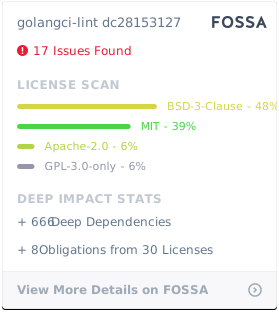
## License Scan
[](https://app.fossa.io/projects/git%2Bgithub.com%2Fgolangci%2Fgolangci-lint?ref=badge_large)
## Contributors
This project exists thanks to all the people who contribute. [How to contribute](/contributing/workflow/).
[](https://github.com/golangci/golangci-lint/graphs/contributors)
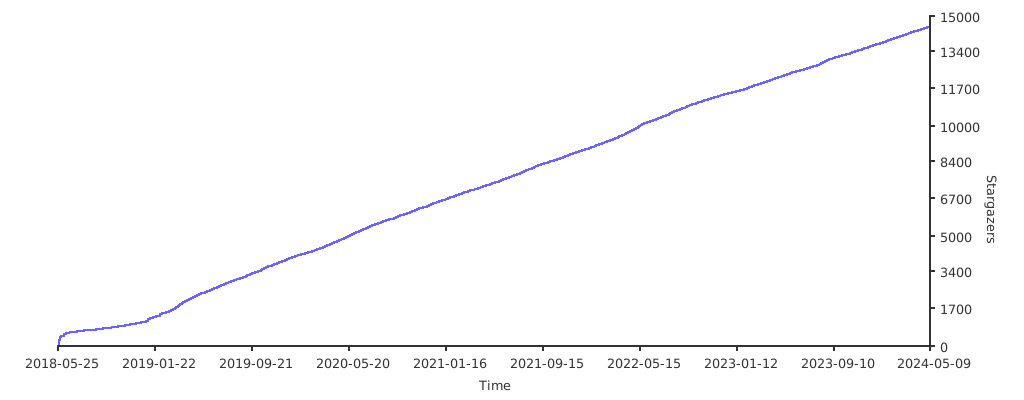
## Stargazers over time
[](https://starchart.cc/golangci/golangci-lint)
---
# Source: https://github.com/golangci/golangci-lint/blob/master/docs/src/docs/plugins/go-plugins.mdx
---
title: Go Plugin System
---
Private linters can be added through [Go's plugin system](https://pkg.go.dev/plugin).
For a private linter (which acts as a plugin) to work properly,
the plugin as well as the golangci-lint binary **needs to be built for the same environment**.
`CGO_ENABLED` is another requirement.
This means that `golangci-lint` needs to be built for whatever machine you intend to run it on
(cloning the golangci-lint repository and running a `CGO_ENABLED=1 make build` should do the trick for your machine).
## Create a Plugin
Your linter must provide one or more `golang.org/x/tools/go/analysis.Analyzer` structs.
Your project should also use `go.mod`.
All versions of libraries that overlap `golangci-lint` (including replaced libraries) MUST be set to the same version as `golangci-lint`.
You can see the versions by running `go version -m golangci-lint`.
You'll also need to create a Go file like `plugin/example.go`.
This file MUST be in the package `main`, and MUST define an exposed function called `New` with the following signature:
```go
func New(conf any) ([]*analysis.Analyzer, error) {
// ...
}
```
See [plugin/example.go](https://github.com/golangci/example-plugin-linter/blob/HEAD/plugin/example.go) for more info.
To build the plugin, from the root project directory, run:
```bash
go build -buildmode=plugin plugin/example.go
```
This will create a plugin `*.so` file that can be copied into your project or another well known location for usage in `golangci-lint`.
## Configure a Plugin
If you already have a linter plugin available, you can follow these steps to define its usage in a projects `.golangci.yml` file.
An example linter can be found at [here](https://github.com/golangci/example-plugin-linter).
If you're looking for instructions on how to configure your own custom linter, they can be found further down.
1. If the project you want to lint does not have one already, copy the [.golangci.yml](https://github.com/golangci/golangci-lint/blob/HEAD/.golangci.yml) to the root directory.
2. Adjust the YAML to appropriate `linters-settings.custom` entries as so:
```yaml title=.golangci.yml
linters-settings:
custom:
example:
path: /example.so
description: The description of the linter
original-url: github.com/golangci/example-linter
settings: # Settings are optional.
one: Foo
two:
- name: Bar
three:
name: Bar
```
That is all the configuration that is required to run a custom linter in your project.
Custom linters are enabled by default, but abide by the same rules as other linters.
If the disable all option is specified either on command line or in `.golang.yml` files `linters.disable-all: true`, custom linters will be disabled;
they can be re-enabled by adding them to the `linters.enable` list,
or providing the enabled option on the command line, `golangci-lint run -Eexample`.
The configuration inside the `settings` field of linter have some limitations (there are NOT related to the plugin system itself):
we use Viper to handle the configuration but Viper put all the keys in lowercase, and `.` cannot be used inside a key.
---
# Source: https://github.com/golangci/golangci-lint/blob/master/docs/src/docs/plugins/module-plugins.mdx
---
title: Module Plugin System
---
An example linter can be found at [here](https://github.com/golangci/example-plugin-module-linter).
## The Automatic Way
- Define your building configuration into `.custom-gcl.yml`.
- Run the command `golangci-lint custom` (or `golangci-lint custom -v` to have logs).
- Define the plugin inside the `linters-settings.custom` section with the type `module`.
- Run your custom version of golangci-lint.
Requirements:
- Go
- git
### Configuration Example
```yaml title=.custom-gcl.yml
version: {.LatestVersion}
plugins:
# a plugin from a Go proxy
- module: 'github.com/golangci/plugin1'
import: 'github.com/golangci/plugin1/foo'
version: v1.0.0
# a plugin from local source
- module: 'github.com/golangci/plugin2'
path: /my/local/path/plugin2
```
```yaml title=.golangci.yml
linters-settings:
custom:
foo:
type: "module"
description: This is an example usage of a plugin linter.
settings:
message: hello
linters:
disable-all: true
enable:
- foo
```
## The Manual Way
- Add a blank-import of your module inside `cmd/golangci-lint/plugins.go`.
- Run `go mod tidy` (the module containing the plugin will be imported).
- Run `make build`.
- Define the plugin inside the configuration `linters-settings.custom` section with the type `module`.
- Run your custom version of golangci-lint.
### Configuration Example
```yaml title=.golangci.yml
linters-settings:
custom:
foo:
type: "module"
description: This is an example usage of a plugin linter.
settings:
message: hello
linters:
disable-all: true
enable:
- foo
```
## Reference
The configuration file can be validated with the JSON Schema: https://golangci-lint.run/jsonschema/custom-gcl.jsonschema.json
```yml
{ .CustomGCLReference }
```
---
# Source: https://github.com/golangci/golangci-lint/blob/master/docs/src/docs/product/changelog.mdx
---
title: Changelog
---
## Changelog
{.ChangeLog}
---
# Source: https://github.com/golangci/golangci-lint/blob/master/docs/src/docs/product/performance.mdx
---
title: Performance
---
## Memory Usage
A trade-off between memory usage and execution time can be controlled by [`GOGC`](https://pkg.go.dev/runtime#hdr-Environment_Variables) environment variable.
Less `GOGC` values trigger garbage collection more frequently and golangci-lint consumes less memory and more CPU. Below is the trade-off table for running on this repo:
| `GOGC` | Peak Memory, GB | Execution Time, s |
| --------------- | --------------- | ----------------- |
| `5` | 1.1 | 60 |
| `10` | 1.1 | 34 |
| `20` | 1.3 | 25 |
| `30` | 1.6 | 20.2 |
| `50` | 2.0 | 17.1 |
| `80` | 2.2 | 14.1 |
| `100` (default) | 2.2 | 13.8 |
| `off` | 3.2 | 9.3 |
## Why `golangci-lint` is so fast
1. Work sharing
During operation, `golangci-lint` shares work between specific linters (like `govet`, `ineffassign`, etc.).
We don't fork to call a specific linter, but instead use its API.
For small and medium projects 50-90% of work between linters can be reused.
- load `[]*packages.Package` by `go/packages` once
We load program (parsing all files and type-checking) only once for all linters. For the most of linters
it's the most heavy operation: it takes 5 seconds on 8 kLoC repo and 11 seconds on `$GOROOT/src`.
- build `ssa.Program` once
Some linters (megacheck, interfacer, unparam) work on SSA representation.
Building of this representation takes 1.5 seconds on 8 kLoC repo and 6 seconds on `$GOROOT/src`.
- parse source code and build AST once
Parsing one source file takes 200 us on average. Parsing of all files in `$GOROOT/src` takes 2 seconds.
Currently we parse each file more than once because it's not the bottleneck. But we already save a lot of
extra parsing. We're planning to parse each file only once.
- walk files and directories once
It takes 300-1000 ms for `$GOROOT/src`.
2. Smart linters scheduling
We schedule linters by a special algorithm which takes estimated execution time into account. It allows
to save 10-30% of time when one of heavy linters (megacheck etc) is enabled.
3. Don't fork to run shell commands
All linters has their version fixed with go modules, they are builtin
and you don't need to install them separately.
---
# Source: https://github.com/golangci/golangci-lint/blob/master/docs/src/docs/product/roadmap.mdx
---
title: Roadmap
---
## 💡 Feature Requests
Please file an issue to suggest new features. Vote on feature requests by adding a 👍. This helps maintainers prioritize what to work on.
[See Feature Requests](https://github.com/golangci/golangci-lint/issues?utf8=✓&q=is%3Aissue+is%3Aopen+sort%3Areactions-%2B1-desc+label%3Aenhancement)
## 🐛 Bugs
Please file an issue for bugs, missing documentation, or unexpected behavior.
[See Bugs](https://github.com/golangci/golangci-lint/issues?utf8=✓&q=is%3Aissue+is%3Aopen+label%3A%22bug%22+sort%3Acreated-desc)
## Versioning Policy
`golangci-lint` follows [semantic versioning](https://semver.org). However, due to the nature of `golangci-lint` as a code quality tool,
it's not always clear when a minor or major version bump occurs. To help clarify this for everyone, we've defined the following semantic versioning policy:
- Patch release (intended to not break your lint build)
- A patch version update in a specific linter that results in `golangci-lint` reporting fewer errors.
- A bug fix to the CLI or core (packages loading, runner, postprocessors, etc).
- Improvements to documentation.
- Non-user-facing changes such as refactoring code, adding, deleting, or modifying tests, and increasing test coverage.
- Re-releasing after a failed release (i.e., publishing a release that doesn't work for anyone).
- Minor release (might break your lint build because of newly found issues)
- A major or minor version update of a specific linter that results in `golangci-lint` reporting more errors.
- A new linter is added.
- An existing configuration option or linter is deprecated.
- A new CLI command is created.
- Backward incompatible change of configuration with extremely low impact, e.g. adding validation of a list of enabled `go-critic` checkers.
- Major release (likely to break your lint build)
- Backward incompatible change of configuration with huge impact, e.g. removing excluding issues about missed comments from `golint` by default.
- A linter is removed.
According to our policy, any minor update may report more errors than the previous release (ex: from a bug fix).
As such, we recommend using the fixed minor version and fixed or the latest patch version to guarantee the results of your builds.
For example, in our [GitHub Action](https://github.com/golangci/golangci-lint-action) we require users to explicitly set the minor version of `golangci-lint`
and we always use the latest patch version.
## Linter Deprecation Cycle
A linter can be deprecated for various reasons, e.g. the linter stops working with a newer version of Go or the author has abandoned its linter.
The deprecation of a linter will follow 3 phases:
1. **Display of a warning message**: The linter can still be used (unless it's completely non-functional),
but it's recommended to remove it from your configuration.
2. **Display of an error message**: At this point, you should remove the linter.
The original implementation is replaced by a placeholder that does nothing.
The linter is NOT enabled when using `enable-all` and should be removed from the `disable` option.
3. **Removal of the linter** from golangci-lint.
Each phase corresponds to a minor version:
- v1.0.0 -> warning message
- v1.1.0 -> error message
- v1.2.0 -> linter removed
The deprecated linters are removed from presets immediately when they are deprecated (phase 1).
We will provide clear information about those changes on different supports: changelog, logs, social network, etc.
We consider the removal of a linter as non-breaking changes for golangci-lint itself.
No major version will be created when a linter is removed.
## Future Plans
1. Upstream all changes of forked linters.
2. Make it easy to write own linter/checker: it should take a minimum code, have perfect documentation, debugging and testing tooling.
3. Speed up SSA loading: on-disk cache and existing code profiling-optimizing.
4. Analyze (don't only filter) only new code: analyze only changed files and dependencies, make incremental analysis, caches.
5. Smart new issues detector: don't print existing issues on changed lines.
6. Minimize false-positives by fixing linters and improving testing tooling.
7. Automatic issues fixing (code rewrite, refactoring) where it's possible.
8. Documentation for every issue type.
---
# Source: https://github.com/golangci/golangci-lint/blob/master/docs/src/docs/product/thanks.mdx
---
title: Thanks
---
## ❤️
Thanks to all [contributors](https://github.com/golangci/golangci-lint/graphs/contributors)!
Thanks to [alecthomas/gometalinter](https://github.com/alecthomas/gometalinter) for inspiration and amazing work.
Thanks to [bradleyfalzon/revgrep](https://github.com/bradleyfalzon/revgrep) for cool diff tool.
Thanks to developers and authors of used linters:
{.ThanksList}
---
# Source: https://github.com/golangci/golangci-lint/blob/master/docs/src/docs/usage/configuration.mdx
---
title: Configuration
---
The config file has lower priority than command-line options. If the same bool/string/int option is provided on the command-line
and in the config file, the option from command-line will be used.
Slice options (e.g. list of enabled/disabled linters) are combined from the command-line and config file.
To see a list of linters enabled by your configuration use:
```sh
golangci-lint linters
```
## Config File
GolangCI-Lint looks for config files in the following paths from the current working directory:
- `.golangci.yml`
- `.golangci.yaml`
- `.golangci.toml`
- `.golangci.json`
GolangCI-Lint also searches for config files in all directories from the directory of the first analyzed path up to the root.
If no configuration file has been found, GolangCI-Lint will try to find one in your home directory.
To see which config file is being used and where it was sourced from run golangci-lint with `-v` option.
Config options inside the file are identical to command-line options.
You can configure specific linters' options only within the config file (not the command-line).
There is a [`.golangci.reference.yml`](https://github.com/golangci/golangci-lint/blob/HEAD/.golangci.reference.yml) file with all supported options, their description, and default values.
This file is neither a working example nor a recommended configuration, it's just a reference to display all the configuration options.
The configuration file can be validated with the JSON Schema: https://golangci-lint.run/jsonschema/golangci.jsonschema.json
{ .ConfigurationExample }
## Command-Line Options
```sh
golangci-lint run -h
{.RunHelpText}
```
When the `--cpu-profile-path` or `--mem-profile-path` arguments are specified, `golangci-lint` writes runtime profiling data
in the format expected by the [pprof](https://github.com/google/pprof) visualization tool.
When the `--trace-path` argument is specified, `golangci-lint` writes runtime tracing data in the format expected by
the `go tool trace` command and visualization tool.
## Cache
GolangCI-Lint stores its cache in the subdirectory `golangci-lint` inside the [default user cache directory](https://pkg.go.dev/os#UserCacheDir).
You can override the default cache directory with the environment variable `GOLANGCI_LINT_CACHE`; the path must be absolute.
---
# Source: https://github.com/golangci/golangci-lint/blob/master/docs/src/docs/usage/false-positives.mdx
---
title: False Positives
---
False positives are inevitable, but we did our best to reduce their count.
For example, we have a default enabled set of [exclude patterns](/usage/configuration#command-line-options).
If a false positive occurred, you have the several choices.
## Specific Linter Excludes
Most of the linters has a configuration, sometimes false-positives can be related to a bad configuration of a linter.
So it's recommended to check the linters configuration.
Otherwise, some linters have dedicated configuration to exclude or disable rules.
An example with `staticcheck`:
```yml
linters-settings:
staticcheck:
checks:
- all
- '-SA1000' # disable the rule SA1000
- '-SA1004' # disable the rule SA1004
```
## Exclude or Skip
### Exclude Issue by Text
Exclude issue by text using command-line option `-e` or config option `issues.exclude`.
It's helpful when you decided to ignore all issues of this type.
Also, you can use `issues.exclude-rules` config option for per-path or per-linter configuration.
In the following example, all the reports that contains the sentences defined in `exclude` are excluded:
```yml
issues:
exclude:
- "Error return value of .((os\\.)?std(out|err)\\..*|.*Close|.*Flush|os\\.Remove(All)?|.*printf?|os\\.(Un)?Setenv). is not checked"
- "exported (type|method|function) (.+) should have comment or be unexported"
- "ST1000: at least one file in a package should have a package comment"
```
In the following example, all the reports from the linters (`linters`) that contains the text (`text`) are excluded:
```yml
issues:
exclude-rules:
- linters:
- mnd
text: "Magic number: 9"
```
In the following example, all the reports from the linters (`linters`) that originated from the source (`source`) are excluded:
```yml
issues:
exclude-rules:
- linters:
- lll
source: "^//go:generate "
```
In the following example, all the reports that contains the text (`text`) in the path (`path`) are excluded:
```yml
issues:
exclude-rules:
- path: path/to/a/file.go
text: "string `example` has (\\d+) occurrences, make it a constant"
```
### Exclude Issues by Path
Exclude issues in path by `issues.exclude-dirs`, `issues.exclude-files` or `issues.exclude-rules` config options.
Beware that the paths that get matched here are relative to the current working directory.
When the configuration contains path patterns that check for specific directories,
the `--path-prefix` parameter can be used to extend the paths before matching.
In the following example, all the reports from the linters (`linters`) that concerns the path (`path`) are excluded:
```yml
issues:
exclude-rules:
- path: '(.+)_test\.go'
linters:
- funlen
- goconst
```
The opposite, excluding reports **except** for specific paths, is also possible.
In the following example, only test files get checked:
```yml
issues:
exclude-rules:
- path-except: '(.+)_test\.go'
linters:
- funlen
- goconst
```
In the following example, all the reports related to the files (`exclude-files`) are excluded:
```yml
issues:
exclude-files:
- path/to/a/file.go
```
In the following example, all the reports related to the directories (`exclude-dirs`) are excluded:
```yml
issues:
exclude-dirs:
- path/to/a/dir/
```
## Nolint Directive
To exclude issues from all linters use `//nolint:all`.
For example, if it's used inline (not from the beginning of the line) it excludes issues only for this line.
```go
var bad_name int //nolint:all
```
To exclude issues from specific linters only:
```go
var bad_name int //nolint:golint,unused
```
To exclude issues for the block of code use this directive on the beginning of a line:
```go
//nolint:all
func allIssuesInThisFunctionAreExcluded() *string {
// ...
}
//nolint:govet
var (
a int
b int
)
```
Also, you can exclude all issues in a file by:
```go
//nolint:unparam
package pkg
```
You may add a comment explaining or justifying why `//nolint` is being used on the same line as the flag itself:
```go
//nolint:gocyclo // This legacy function is complex but the team too busy to simplify it
func someLegacyFunction() *string {
// ...
}
```
You can see more examples of using `//nolint` in [our tests](https://github.com/golangci/golangci-lint/tree/HEAD/pkg/result/processors/testdata) for it.
Use `//nolint` instead of `// nolint` because machine-readable comments should have no space by Go convention.
## Default Exclusions
Some exclusions are considered as common, to help golangci-lint users those common exclusions are used as default exclusions.
If you don't want to use it you can set `issues.exclude-use-default` to `false`.
{.DefaultExclusions}
### Default Directory Exclusions
By default, the reports from directory names, that match the following regular expressions, are excluded:
- `third_party$`
- `examples$`
- `Godeps$`
- `builtin$`
This option has been defined when Go modules was not existed and when the golangci-lint core was different, this is not something we still recommend.
At some point, we will remove all those obsolete exclusions, but as it's a breaking changes it will only happen inside a major version.
So we recommend setting `issues.exclude-dirs-use-default` to `false`.
---
# Source: https://github.com/golangci/golangci-lint/blob/master/docs/src/docs/usage/linters.mdx
---
title: Linters
---
import { FaGithub, FaGitlab, FaArrowUp, FaCog } from "react-icons/fa";
To see a list of supported linters and which linters are enabled/disabled:
```sh
golangci-lint help linters
```
## Enabled by Default
{.EnabledByDefaultLinters}
## Disabled by Default
{.DisabledByDefaultLinters}
## Linters Configuration
{ .LintersExample }
---
# Source: https://github.com/golangci/golangci-lint/blob/master/docs/src/docs/welcome/faq.mdx
---
title: FAQ
---
## Which Go versions are supported
The same as the Go team (the 2 latest minor versions).
Basically, golangci-lint supports Go versions lower or equal to the Go version used to compile it.
New versions of Go are not automatically supported because, in addition of the Go version used to build it,
some linters and/or internal pieces of golangci-lint could need to be adapted to support this new Go version.
## How to use `golangci-lint` in CI
Run `golangci-lint` in CI and check the exit code. If it's non-zero - fail the build.
See [how to properly install `golangci-lint` in CI](/welcome/install/#ci-installation)
## `golangci-lint` doesn't work
1. Please, ensure you are using the latest binary release.
2. Run it with `-v` option and check the output.
3. If it doesn't help create a [GitHub issue](https://github.com/golangci/golangci-lint/issues/new/choose) with the output from the error and #2 above.
## Why do you have `typecheck` errors?
`typecheck` is like a front-end for the Go compiler errors.
Compilation errors are identified/labeled as reports of `typecheck` but they are not produced by a linter called `typecheck`.
`typecheck` is not a linter, it doesn't perform any analysis,
it's just a way to identify, parse, and display compiling errors (produced by the `types.Checker`) and some linter errors.
It cannot be disabled because of that.
Of course, this is just as good as the compiler itself and a lot of compilation issues will not properly show where in the code your error lies.
As a consequence, the code to analyze should compile.
It means that if you try to run an analysis on a single file or a group of files or a package or a group of packages,
with dependencies on other files or packages of your project, as it doesn't compile (because of the missing pieces of code),
it also cannot be analyzed.
If there are `typecheck` errors, golangci-lint will not be able to produce other reports because that kind of error doesn't allow it to perform any analysis.
How to troubleshoot:
- [ ] Ensure the version of `golangci-lint` is built with a compatible version of Go.
- [ ] Ensure dependencies are up-to-date with `go mod tidy`.
- [ ] Ensure building works with `go run ./...`/`go build ./...` - whole package.
- [ ] Ensure you are not running an analysis on code that depends on files/packages outside the scope of the analyzed elements.
- [ ] If using CGO, ensure all require system libraries are installed.
## Why is it not possible to skip/ignore `typecheck` errors?
For mainly the same reasons that you cannot compile when you have a compiler error.
`typecheck` errors are reported in the same style as linter reports/issues,
but are completely different because they are related to problems that block the analysis (`typecheck` is not a linter).
When there are `typecheck` errors,
most linters are not able to perform the analysis,
and they simply do not produce any reports,
so it's not possible to skip/ignore `typecheck` errors.
## Why running with `--fast` is slow on the first run?
Because the first run caches type information. All subsequent runs will be fast.
Usually this options is used during development on local machine and compilation was already performed.
## How do you add a custom linter?
You can integrate it yourself, see this [manual](/contributing/new-linters/).
Or you can create a [GitHub Issue](https://github.com/golangci/golangci-lint/issues/new?assignees=&labels=enhancement&projects=&template=feature_request.yml) and we will integrate when time permits.
## How to integrate `golangci-lint` into large project with thousands of issues
We are sure that every project can easily integrate `golangci-lint`, even the large one.
The idea is to not fix all existing issues.
Fix only newly added issue: issues in new code.
To do this setup CI to run `golangci-lint` with options `--new-from-merge-base=main` or `--new-from-rev=HEAD~1`.
Also, take a look at option `--new`,
but consider that CI scripts that generate unstaged files will make `--new` only point out issues in those files and not in the last commit.
In that regard `--new-from-merge-base=main` or `--new-from-rev=HEAD~1` are safer.
By doing this you won't create new issues in your code and can choose fix existing issues (or not).
## Why `--new-from-xxx` don't seem to be working in some cases?
The options `--new-from-merge-base`, `--new-from-rev`, and `--new-from-patch` work by comparing `git diff` output and issues.
If an issue is not reported as the same line as the changes then the issue will be skipped.
This is the line of the issue is not inside the lines changed.
To fix that you have to use the option `--whole-files`.
The side effect is the issues inside file that contains changes but not directly related to the changes themselves will be reported.
---
# Source: https://github.com/golangci/golangci-lint/blob/master/docs/src/docs/welcome/install.mdx
---
title: "Install"
---
## CI installation
Most installations of `golangci-lint` are performed for CI.
It's important to have reproducible CI: don't start to fail all builds at the same time.
With golangci-lint this can happen if you use option `--enable-all` and a new linter is added
or even without `--enable-all` when one upstream linter is upgraded.
**IMPORTANT**: It's highly recommended installing a specific version of golangci-lint available on the [releases page](https://github.com/golangci/golangci-lint/releases).
### GitHub Actions
We recommend using [our GitHub Action](https://github.com/golangci/golangci-lint-action) for running `golangci-lint` in CI for GitHub projects.
It's [fast and uses smart caching](https://github.com/golangci/golangci-lint-action#performance) inside,
and it can be much faster than the simple binary installation.

Also, the action creates GitHub annotations for found issues (you don't need to dig into build log to see found by `golangci-lint` issues):

### GitLab CI
GitLab provides a [guide for integrating golangci-lint into the Code Quality widget](https://docs.gitlab.com/ci/testing/code_quality/#golangci-lint).
A simple quickstart is their [CI component](https://gitlab.com/explore/catalog/components/code-quality-oss/codequality-os-scanners-integration), which can be used like this:
```yaml .gitlab-ci.yml
include:
- component: $CI_SERVER_FQDN/components/code-quality-oss/codequality-os-scanners-integration/golangci@1.0.1
```
Note that you [can only reference components in the same GitLab instance as your project](https://docs.gitlab.com/ci/components/#use-a-component)
### Other CI
Here is the other way to install golangci-lint:
```sh
# binary will be $(go env GOPATH)/bin/golangci-lint
curl -sSfL https://raw.githubusercontent.com/golangci/golangci-lint/HEAD/install.sh | sh -s -- -b $(go env GOPATH)/bin {.LatestVersion}
# or install it into ./bin/
curl -sSfL https://raw.githubusercontent.com/golangci/golangci-lint/HEAD/install.sh | sh -s {.LatestVersion}
# In Alpine Linux (as it does not come with curl by default)
wget -O- -nv https://raw.githubusercontent.com/golangci/golangci-lint/HEAD/install.sh | sh -s {.LatestVersion}
golangci-lint --version
```
It is advised that you periodically update the version of `golangci-lint` as the project is under active development
and is constantly being improved. For any problems with `golangci-lint`, check out recent [GitHub issues](https://github.com/golangci/golangci-lint/issues) and update if needed.
## Local Installation
[](https://repology.org/project/golangci-lint/versions)
### Binaries
```sh
# binary will be $(go env GOPATH)/bin/golangci-lint
curl -sSfL https://raw.githubusercontent.com/golangci/golangci-lint/HEAD/install.sh | sh -s -- -b $(go env GOPATH)/bin {.LatestVersion}
golangci-lint --version
```
On Windows, you can run the above commands with Git Bash, which comes with [Git for Windows](https://git-scm.com/download/win).
### Linux
Golangci-lint is available inside the majority of the package managers.
### macOS
#### Brew
Note: brew can use a non-expected version of Go to build the binary,
so we recommend either using our binaries or be sure of the version of Go used to build.
You can install a binary release on macOS using [brew](https://brew.sh/):
```sh
brew install golangci-lint
brew upgrade golangci-lint
```
Note: Previously we used a [Homebrew tap](https://github.com/golangci/homebrew-tap). We recommend using official formula instead of the tap, but sometimes the most recent release
isn't immediately available via Homebrew core due to manual updates that need to occur from Homebrew core maintainers. In this case, the tap formula, which is updated automatically,
can be used to install the latest version of `golangci-lint`:
```sh
brew tap golangci/tap
brew install golangci/tap/golangci-lint
```
#### MacPorts
It can also be installed through [MacPorts](https://www.macports.org/)
The MacPorts installation mode is community driven, and not officially maintained by golangci team.
```sh
sudo port install golangci-lint
```
### Windows
#### Chocolatey
You can install a binary on Windows using [chocolatey](https://community.chocolatey.org/packages/golangci-lint).
```sh
choco install golangci-lint
```
#### Scoop
You can install a binary on Windows using [scoop](https://scoop.sh).
```sh
scoop install main/golangci-lint
```
The scoop package is not officially maintained by golangci team.
### Docker
```sh
docker run --rm -v $(pwd):/app -w /app golangci/golangci-lint:{.LatestVersion} golangci-lint run -v
```
Preserving cache between consecutive runs:
```sh
docker run --rm -v $(pwd):/app -v ~/.cache/golangci-lint/{.LatestVersion}:/root/.cache -w /app golangci/golangci-lint:{.LatestVersion} golangci-lint run -v
```
Colored output:
```sh
docker run -t --rm -v $(pwd):/app -w /app golangci/golangci-lint:{.LatestVersion} golangci-lint run -v
```
### Install from Sources
Using `go install`/`go get`, "tools pattern", and `tool` command/directives installations aren't guaranteed to work.
We recommend using binary installation.
These installations aren't recommended because of the following points:
1. These installations compile golangci-lint locally. The Go version used to build will depend on your local Go version.
2. Some users use the `-u` flag for `go get`, which upgrades our dependencies. The resulting binary was not tested and is not guaranteed to work.
3. When using the "tools pattern" or `tool` command/directives, the dependencies of a tool can modify the dependencies of another tool or your project. The resulting binary was not tested and is not guaranteed to work.
4. We've encountered issues with Go module hashes due to the unexpected recreation of dependency tags.
5. `go.mod` replacement directives don't apply transitively. It means a user will be using a patched version of `golangci-lint` if we use such replacements.
6. It allows installation from the main branch, which can't be considered stable.
7. It's slower than binary installation.
```sh
go install github.com/golangci/golangci-lint/cmd/golangci-lint@{.LatestVersion}
```
## Next
[Quick Start: how to use `golangci-lint`](/welcome/quick-start/).
---
# Source: https://github.com/golangci/golangci-lint/blob/master/docs/src/docs/welcome/integrations.mdx
---
title: Integrations
---
## Editor Integration
### [Go for Visual Studio Code](https://marketplace.visualstudio.com/items?itemName=ms-vscode.Go).
Recommended settings for VS Code are:
```json
"go.lintTool": "golangci-lint",
"go.lintFlags": [
"--fast"
]
```
Using it in an editor without `--fast` can freeze your editor.
Golangci-lint automatically discovers `.golangci.yml` config for edited file: you don't need to configure it in VS Code settings.
### Sublime Text
There is a [plugin](https://github.com/SublimeLinter/SublimeLinter-golangcilint) for SublimeLinter.
### GoLand
How to configure:
- Install [plugin](https://plugins.jetbrains.com/plugin/12496-go-linter).
- Add [File Watcher](https://www.jetbrains.com/help/go/settings-tools-file-watchers.html) using existing `golangci-lint` template.
- If your version of GoLand does not have the `golangci-lint` [File Watcher](https://www.jetbrains.com/help/go/settings-tools-file-watchers.html) template you can configure your own and use arguments `run --disable=typecheck $FileDir$`.
### GNU Emacs
There are available plugins:
- [Spacemacs](https://github.com/syl20bnr/spacemacs/blob/develop/layers/+lang/go/README.org#linting)
- [Flycheck checker](https://github.com/weijiangan/flycheck-golangci-lint)
### Vim
The following plugins support `golangci-lint`:
- [vim-go](https://github.com/fatih/vim-go)
- [ALE](https://github.com/w0rp/ale)
### LSP Server
- [golangci-lint-langserver](https://github.com/nametake/golangci-lint-langserver) (NeoVim, Vim, Emacs, ...)
## Shell Completion
`golangci-lint` can generate Bash, fish, PowerShell, and Zsh completion files.
See the instructions on `golangci-lint completion --help` (replace `` with your favorite one).
Bash & macOS
There are two versions of `bash-completion`, v1 and v2. V1 is for Bash 3.2 (which is the default on macOS), and v2 is for Bash 4.1+.
The `golangci-lint` completion script doesn’t work correctly with bash-completion v1 and Bash 3.2. It requires bash-completion v2 and Bash 4.1+.
Thus, to be able to correctly use `golangci-lint` completion on macOS, you have to install and use Bash 4.1+ ([instructions](https://itnext.io/upgrading-bash-on-macos-7138bd1066ba)).
The following instructions assume that you use Bash 4.1+ (that is, any Bash version of 4.1 or newer).
Install `bash-completion v2`:
```bash
brew install bash-completion@2
echo 'export BASH_COMPLETION_COMPAT_DIR="/usr/local/etc/bash_completion.d"' >>~/.bashrc
echo '[[ -r "/usr/local/etc/profile.d/bash_completion.sh" ]] && . "/usr/local/etc/profile.d/bash_completion.sh"' >>~/.bashrc
exec bash # reload and replace (if it was updated) shell
type _init_completion && echo "completion is OK" # verify that bash-completion v2 is correctly installed
```
Add `golangci-lint` bash completion:
```bash
echo 'source <(golangci-lint completion bash)' >>~/.bashrc
source ~/.bashrc
```