# Embednotionpages
> Embedding a Notion form into your website lets you collect responses directly in your Notion workspace, simplifying data collection and improving visitor interaction with your content.
---
# Source: https://embednotionpages.com/blog/embed-notion-form-on-website
# How to Embed a Notion Form on Your Website
Embedding a Notion form into your website lets you collect responses directly in your Notion workspace, simplifying data collection and improving visitor interaction with your content.
## How It Works:
Notion forms provide a powerful way to collect data directly within your workflow. When embedded on your website using an HTML `
```
## Option 2: Use a customized iframe
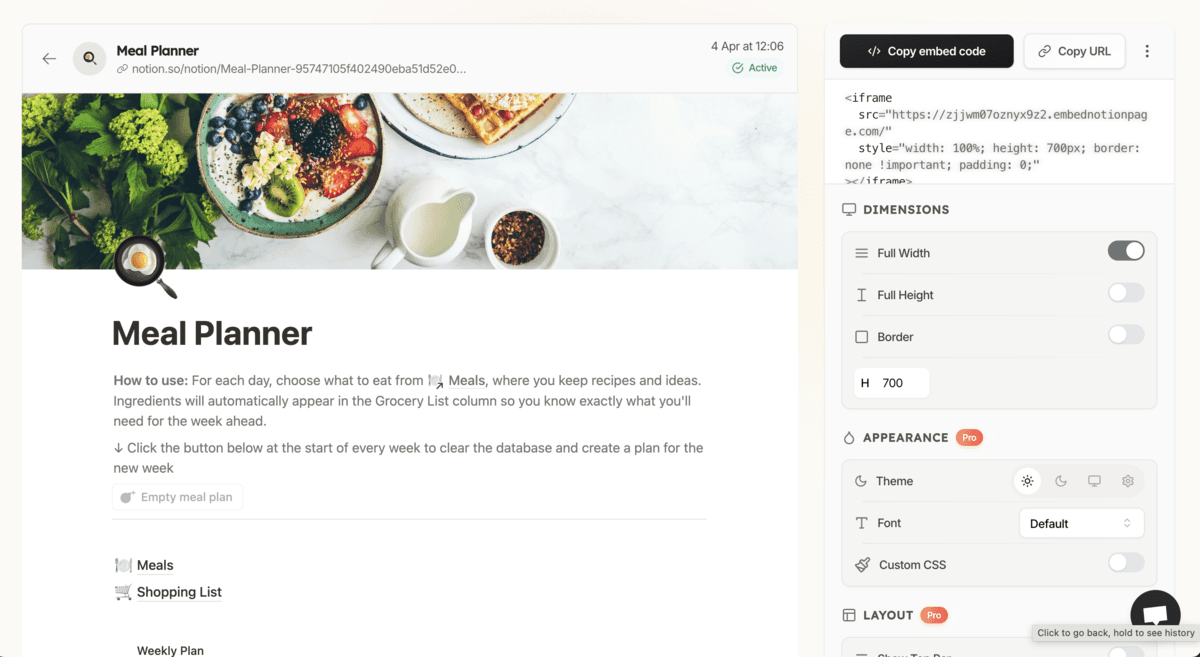
The Notion iframe works but it's basicâyou can't customize it or define who can access it.
This is solved with [EmbedNotionPages](https://www.embednotionpages.com/), a simple tool to create highly customized Notion iframes.
- Sign up.
- Add your Notion page to the tool.
- Paste your Notion link into the tool.
- Customize the look and feel and access control.
- Copy the iframe code.
## Add the iframe to your site
Now you just need to paste the iframe HTML code into the website page of your choice.
- **For HTML sites:** Paste the iframe code right into your page.
- **For WordPress, Webflow, Squarespace, or Framer:** Drop it into a custom HTML block.
## Things to watch out for
- **Privacy first:** Make sure you're not sharing anything sensitive.
- **Performance check:** Embeds can slow pages slightlyâalways test after adding.
## Frequently asked questions
### Can I embed a private Notion page?
No â you must publish your Notion page to the web to embed it.
### Will updates in Notion show up automatically on my site?
Yes â any edits you make in Notion will reflect live on your website.
### Can I change the size of the embedded page?
Yes â you can adjust the width and height in the iframe code to fit your design.
### Is using a tool like EmbedNotionPages secure?
EmbedNotionPages uses secure methods to display your page, but always review privacy settings before embedding.
---
# Source: https://embednotionpages.com/blog/notion-cover-sizes
# Notion Cover Size & Dimensions
Choosing the right size makes your Notion page clean and sharp.

## Recommended Notion cover image sizes by device
- **Desktop**: 1500×600 px (5:2 aspect ratio) – Best for desktops and laptops.
- **Tablet**: 1170×290 px (~4:1 aspect ratio) – Good for tablets like iPads.
- **Mobile**: 1170×445 px (~2.6:1 aspect ratio) – Fits smartphones.
Use a 1500×600 px cover for all devices. Keep key parts within 1170×230 px.
## How to add and customize a cover image in Notion

Adding a cover makes your page look polished and lively.
1. Open your Notion page.
2. Click "Add Cover."
3. Hover and click "Change Cover."
4. Pick an image from:
- Notion's gallery
- Your own uploads
- A pasted link
- [Unsplash](https://unsplash.com/)
5. Click "Reposition" to move the image.
6. Click "Save Position" when done.
## Tips for creating custom Notion covers
Custom covers let you match your style and needs.
- Use [Canva](https://www.canva.com/) to design covers.
- Or try [Notion Cover Generator](https://notioncovergenerator.com/).
- Match canvas size to device.
- Keep files under 150 KB.
- Use 72 DPI for screens.
## Displaying cover images in gallery view

Showing covers in [gallery view](https://www.notion.com/help/galleries) gives your workspace a neat look.
1. Create a gallery view in Notion.
2. Add a cover image to each page.
3. Click the three dots (â¢â¢â¢ ).
4. Set "Card Preview" to "Page Cover."
Covers will now show in the gallery.
## Downloading banners, headers, and covers
Finding the right banner, header, or cover boosts your page style.
You can download high-quality covers on [Unsplash](https://unsplash.com/) or [Notion Headers](https://www.notionheaders.com/).
- Search by style or color.
- Pick images that match the size guide.
- Download and upload them to your Notion page.
This way, you can get great Notion covers without needing to design from scratch.
## Frequently Asked Questions
### What is the ideal aspect ratio?
Use 5:2, e.g., 6000x2400 px, 3000x1200 px, or 1500×600 px.
### Why is my cover blurry?
It is likely too small. Use at least 1500 px wide.
### Can I resize a cover in Notion?
No. Resize before uploading.
Follow these easy steps to make your Notion pages clear and bright.
---
# Source: https://embednotionpages.com/blog/notion-feature-iframe-embed
# The New Notion Embed & iFrame Feature
In February 2025, Notion launched a new feature: you can now embed Notion pages and forms into websites using iframes.
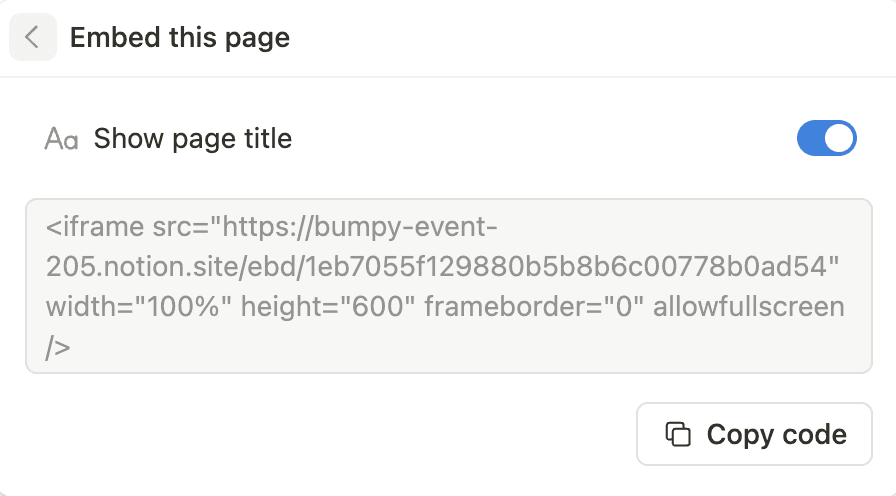
## How Notion iframe works
Here's what you can now do in Notion:
- Get an iframe embed code from any public Notion page.
- Show Notion pages on your own site.
- Share live-updating content without extra tools.
Now, visitors can view and use your Notion content—like a portfolio or feedback form—without leaving your website.
## How to use Notion iframe
Follow these steps:
### Make Your Notion Page Public
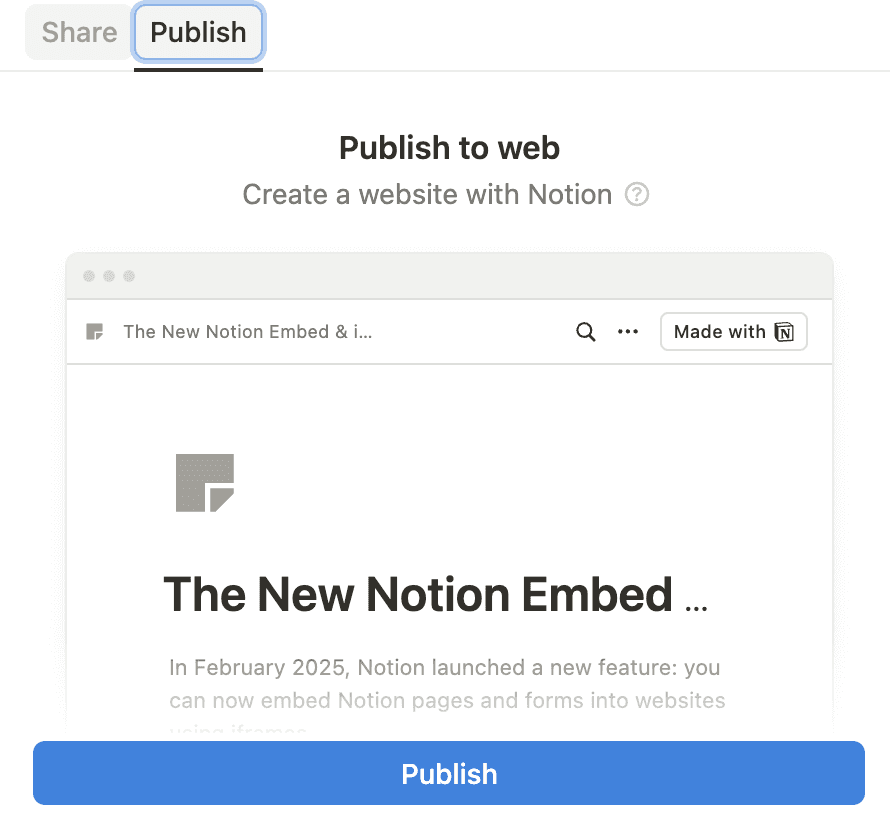
Click “Share” in the top right corner of Notion, then “Publish” twice.
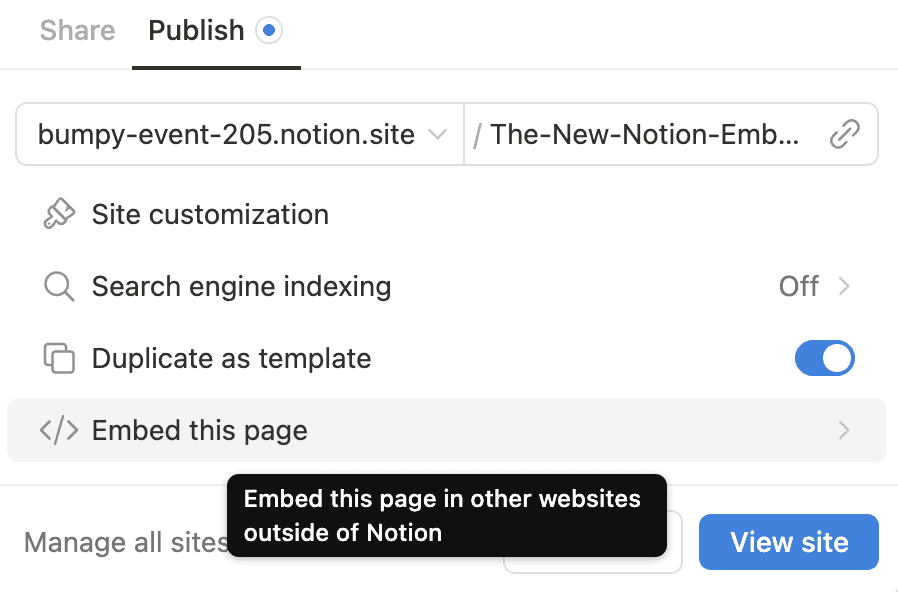
### Get the Embed Code
Click “Embed this page,” then “Copy code” to get the iframe code.
### Add to Your Website
Paste it into your HTML where you want it (this is an example in Framer).
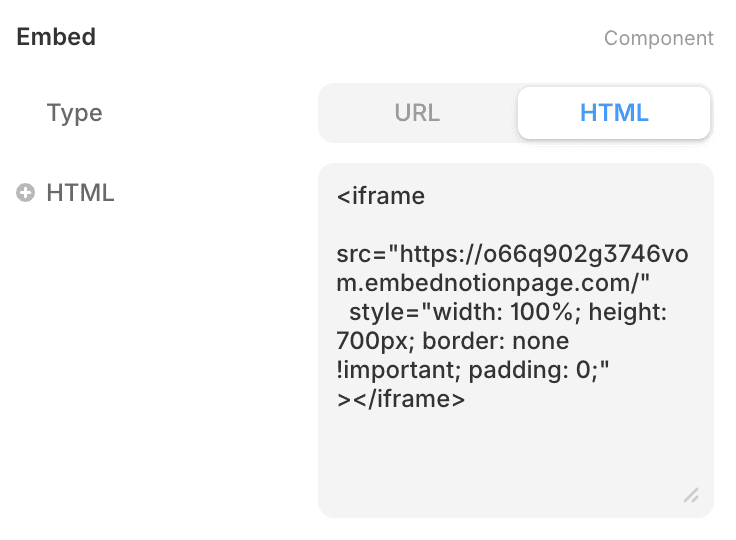
Or create the iframe manually:
```html
```
Replace `NOTION_PUBLIC_PAGE_URL` with your Notion page link.
## Why embed Notion pages?
Embedding can help in many ways:
- **Portfolios**: Show your work in style.
- **Docs**: Share guides or notes that auto-update.
- **Forms**: Gather feedback right from your site.
- **Dashboards**: Display real-time updates.
## Things to remember
- **Public pages only**: The page must be set to “Share to web.”
- **Responsive design**: Make sure it looks good on desktops and phones.
- **Auto updates**: Any changes to the Notion page will show up live.
## Limitation to Notion iframe features
This new embed feature is handy, but there are a few things to watch out for:
- **You can’t customise much**: What you see is pretty much what you get. You can't change how it looks beyond basic size settings.
- **No control over who sees it**: If the page is public, anyone with the link or iframe can view it. There’s no way to restrict access.
- **No way to hide parts of the page**: Once it’s embedded, everything is visible. You can’t limit what people interact with.
- **It relies on Notion**: If your Notion page isn’t live and working, the embed on your site won’t work.
If you’re looking for more customisation & access control, you can use [EmbedNotionPages](https://embednotionpages.com/). With it, you can create more ‘advanced’ Notion iframes that you can embed on any website.
---
# Source: https://embednotionpages.com/blog/notion-for-teams-best-practices-for-enhancing-teamwork-and-streamlining-projects
# Notion for Teams: Best Practices for Enhancing Teamwork and Streamlining Projects
Notion has emerged as a powerful productivity tool that transforms the way teams collaborate and manage projects. It combines notes, tasks, wikis, and databases into a versatile and modular platform that can be customized to suit the specific needs of any team. The strength of Notion lies in its flexibility, enabling both individual team members and collective workforces to align their workflows and streamline their organizational processes.

For teams looking to enhance their project management and collaborative efforts, establishing best practices within Notion is paramount. From setting up well-organized workspaces that make information immediately accessible to fostering a culture of collaboration where team members feel a sense of ownership over their contributions, Notion offers various features to facilitate these practices. Building out databases, using templates effectively, and creating views for particular workstreams are just some of the ways teams can leverage Notion for optimal efficiency.
Effective use of Notion in teams is not just about the technical setup; it's also about embracing a mindset where collaboration is at the forefront. In this environment, Notion is not just a tool but a partner in project management that promotes transparency and productivity. Understanding how to bring teams into the fold and encourage active participation in the platform is as crucial as any feature Notion provides. Whether a team is co-located or distributed across the globe, Notion can serve as the central hub for all project-related activities, ensuring that every team member is on the same page and driving toward common goals.
## Getting Started with Notion for Teams
### Creating Your Team Workspace
Creating a **workspace** is the foundation for your team's collaboration in Notion. Start by [getting organized in Notion](https://www.notion.so/help/guidesnotion-101-getting-started-for-teams) and setting up a **hierarchy** that reflects your organization's structure. This includes creating **pages**, **sub-pages**, and **folders** to ensure that information is categorized logically. Utilize **templates** to establish uniform **pages** and structures that save time and provide a clear format for your team's activities.
### Setting Up the First Project
When beginning your first project, it's essential to lay out a clear **workflow**. In Notion, setting up a **Kanban board** is an efficient way to visualize progress across different stages of the project lifecycle. Consider designing project **templates** with predefined **tasks** and **milestones** to streamline the setup of new projects. Importantly, be sure to utilize the **share menu** to manage **visibility** and access control, ensuring the right team members can view and edit the project.
### Optimizing the Notion Interface
To make the most out of Notion for Teams, tailor the **interface** for ease of use and enhanced **customization**. By configuring the **sidebar** and creating **dashboards**, teams can access the most relevant and frequently used information quickly. The customization of these elements improves overall efficiency and helps maintain a clean **workspace** where collaboration can flourish. It is also beneficial to establish forms and databases within Notion to capture and organize data pertinent to projects and workflows.
## Mastering Team Collaboration in Notion
In Notion, team collaboration thrives on seamless communication and the ability to work together in real-time. The platform is designed to enhance team communication through integrated tools that foster clarity and coordination among members.
### Communication and Coordination
Proper **communication** channels within Notion are essential for project success. They start with meticulously organized **pages** and **blocks** that convey information transparently. For instance, team members can create a **centralized hub** for all communications, where updates and decisions are logged. Leveraging **@mentions** in the comments field allows team members to directly engage with specific individuals, ensuring that notifications are received and nothing falls through the cracks. Every task can be assigned a **status**, enabling at-a-glance progress tracking.
- **Organized Pages:** Team members create a systematic structure for pages.
- **@Mentions:** Utilize direct tagging to alert relevant team members.
- **Status Updates:** Use custom status indicators to reflect task progress.
### Real-Time Collaboration Features
Notion is equipped for **real-time collaboration**, making it possible for multiple users to edit **blocks** simultaneously. This ensures that brainstorming or document editing can happen collaboratively and efficiently. Notion's editing interface acts as a dynamic work canvas, with changes being visible to all contributors instantaneously. This live interaction creates a transparent environment where ideas and content are developed collectively.
- **Simultaneous Editing:** Enables multiple team members to work on the same page at once.
- **Immediate Updates:** Reflect changes and edits in real-time to keep everyone on the same page.
## Enhancing Project Management with Notion
In the realm of project management, Notion provides a versatile platform that caters to organizing workflow, task management, and database customization. Employing Notion streamlines collaboration and efficiency, ensuring project goals and deadlines are met with precision.
### Building Effective Workflows
To construct effective workflows, teams must first identify the stages necessary for project completion. **Notion’s board view**, akin to a Kanban board, allows for a visual workflow where tasks can be categorized by status. It is beneficial to implement a **consistent naming convention** for stages across all projects to maintain clarity. A Notion workflow can be enhanced by setting up **filter options** to display only the tasks that are due within a specific timeframe or are of a particular priority.
### Task Management Techniques
Task management is pivotal, and assigning the **right properties** to tasks in Notion such as status, priority, and deadlines is crucial. These properties help in categorizing and filtering tasks, making it easier for team members to stay informed. **Dependencies** between tasks can be managed by creating **relational databases**. This functionality establishes links between different databases to track how tasks are interconnected, offering a means to understand the broad project structure. Moreover, by leveraging **database views**, team members can access a project’s information in a manner that best suits their workflow, whether it’s through a table, board, or calendar.
### Utilizing Notion's Database Functionality
Notion’s database feature is a powerful tool that aids in **organizing complex projects**. Each **database entry** can represent a task, and the **properties** of these entries can be customized to include data such as responsible team members or related documents. **Relationships** can be built between different databases to track how tasks are interconnected, offering a means to understand the broad project structure. Moreover, by leveraging **database views**, team members can access a project’s information in a manner that best suits their workflow, whether it’s through a table, board, or calendar.
## Integrating External Tools and Services
When managing projects in Notion, the power of collaboration is often amplified by the strategic incorporation of **external tools and services**. This integration streamlines workflows and ensures all team resources are centralized.
### Leveraging Productivity Integrations
Notion provides a platform that can seamlessly connect with various productivity tools like **Trello** and **Asana**. To incorporate these services, one might use Notion's integration features, which allow users to view and manage Trello boards or Asana projects directly within Notion pages. This can significantly reduce the need for switching contexts and consolidate project management into a single, cohesive environment.
| Integration | Description |
|-------------|-------------|
| Trello | Cards and boards can be embedded within Notion, providing an overview of project tasks and statuses. |
| Asana | Tasks and milestones from Asana can be displayed in Notion, ensuring the team is aware of upcoming deadlines and responsibilities. |
| Excel | import Excel files to manage data analytics within Notion. |
| Typeform | Embed Typeform forms for surveys or reports directly into a Notion page. |
**Google Calendar** integration also plays a key role in keeping schedules aligned. Team members can sync their calendars to display deadlines and events alongside their project tasks in Notion. This helps in maintaining a clear timeline for project deliverables.
**Integrations** with communication tools like **Slack** allow for real-time updates and notifications about changes within Notion, bridging the gap between documentation and communication.
### Incorporating Design and Development Tools
For product teams, notably those involved in design and engineering, integrating specialized tools is essential. **Figma** files can be linked or embedded directly into Notion, allowing designers to present mockups and prototypes alongside their project documentation. This facilitates immediate feedback and discussion, keeping the iteration process agile.
In the realm of **engineering and development**, code repositories and documentation are critical. By integrating supported development tools, engineering teams can access repositories, track version control, and manage documentation all from within Notion. This centralized approach supports an efficient development cycle and encourages transparency across the team.
- **Development Tools:** Embed code snippets and Github gists for reference.
- **Integrate with development platforms:** Keep track of issues and code changes.
Utilizing these integrations effectively within Notion transforms it from a mere documentation tool to a comprehensive project management solution, encouraging a more **productive** and **collaborative** work environment.
## Managing Content in Notion
Effective content management in Notion hinges on organizing pages and databases to foster team collaboration and efficient project management. This includes creating dynamic documents that serve various purposes—such as meeting notes, onboarding materials, and documentation—and establishing a robust knowledge base using wikis.
### Creating Dynamic Documents
In Notion, _dynamic documents_ are more than static text. They serve as living pages that evolve with a project's lifecycle. Teams can utilize a **content calendar** to track publishing schedules, deadlines, and themes. For example, their content calendar can be a table with columns for each stage of content creation—ideation, drafting, editing, and publishing.
Additionally, a **meeting notes database** allows for structured and searchable notes. Each entry can have properties, such as date, participants, and topics discussed, with the ability to link related documents and tasks. To optimize these databases, teams utilize Notion's rich **formatting options**, such as toggles, callouts, and code blocks, enhancing clarity and comprehension.
### Knowledge Sharing with Wikis
**Wikis** in Notion act as powerful **knowledge bases**, centralizing important information such as company procedures, project guidelines, and **documentation**. They are foundational for **onboarding materials**, ensuring new team members can quickly get up to speed.
An effective **team wiki** is categorized for easy navigation, often using nested pages to group related information. Each page within the wiki can be a detailed doc embedded with multimedia, code snippets, or external content. Notion's **editing and formatting options** are invaluable here, allowing for the creation of intuitive and engaging documentation that facilitates knowledge sharing and collaboration.
## Optimizing Collaboration Strategies
Effective collaboration in teams necessitates a meticulous approach to workflow management and a commitment to transparency. These strategies not only streamline project management but also amplify overall productivity.
### Best Practices for Team Workflow
Creating an efficient **team workflow** is central to collaboration. The workflow should clearly define each team member's responsibilities and deadlines. A recommended approach is to utilize Notion's organizational tools to create a shared workspace where tasks are visibly delineated. For instance, teams can [enhance collaboration](https://justnotion.io/work/enhance-collaboration-with-notion-boost-team-productivity-with-team-dashboards) by using Notion's customizable templates to manage projects and document collaboration in real-time.
- **To-Do Lists:** Break down projects into tasks and subtasks, each with its own assignee and due date.
- **Kanban Boards:** Visualize progress with a board that holds cards for different phases of work.
- **Calendars:** Maintain deadlines and keep track of important dates.
- **Databases:** Store all project-related information in a centralized place.
By establishing these systems, teams can foster a culture where **best practices** become routine.
### Improving Organization and Transparency
**Organization** and **transparency** are critical for any team aiming for peak performance. With tools like Notion, providing team members with full **visibility** into ongoing projects is straightforward. Teams should develop a habit of documenting meeting notes, project updates, and decision-making processes. This can be achieved by setting up dedicated pages within Notion for minutes and updates, which are accessible to all relevant parties.
- **Shared Documents:** Keep all team documentation in one accessible location.
- **Regular Updates:** Schedule consistent intervals for team members to report on progress.
- **Accessible Analytics:** Use Notion's integration capabilities to link to data sources, giving insight into performance metrics.
Following these **guidelines** ensures that every member is on the same page, paving the way for a cooperative and informed work environment.
## Advanced Notion Features for Complex Projects
Notion's versatility becomes particularly advantageous when managing complex projects. Detailed views, robust filters, and comprehensive progress tracking tools empower teams to maintain clarity and focus on goals and priorities.
### Utilizing Advanced Views and Filters
The **board view** in Notion is pivotal for visualizing workflow akin to Kanban boards, allowing teams to categorize tasks by status. This view, along with the **list, calendar,** and **timeline views**, enables project managers to sort information that aligns with project priorities and goals. Advanced filters further refine this process, enabling team members to focus on specific facets of a project, such as tasks with impending deadlines or high priority levels.
- **List view:** For straightforward task cataloging.
- **Calendar view:** For tracking important dates.
- **Timeline view:** For visualizing project phases and dependencies.
- **Board view:** For a Kanban style workflow.
By using filters to sort tasks by properties like deadline, status, or assignee, teams can quickly identify what needs immediate attention. Complex filters will also allow for displaying only the tasks that match certain criteria, which is instrumental when dealing with large volumes of tasks.
### Project Progress Tracking and Reporting
Effective project management hinges on the ability to track progress and report on status. Notion facilitates this through customizable **status updates** and **roadmaps** that teams can tailor to their specific needs. Utilizing the **timeline view**, project managers get a visual representation of a project’s milestones and deadlines, providing a clear-cut **roadmap**.
- Define **statuses** such as "Not Started," "In Progress," "In Review," and "Completed."
- Customize **reporting templates** to summarize progress and analyze data.
**Calendars** and **timelines** offer temporal insights into project progression, and the **sort** function helps in prioritizing tasks and goals. Integrating these tools into regular **reporting** allows for transparent communication about project health and can be critical for timely adjustments to the **roadmap**.
## Streamlining Notion Administration

When managing a team in Notion, it's crucial to optimize the workspace to foster efficient collaboration. Streamlining Notion administration involves setting up team access correctly and ensuring communication flows smoothly.
### Customizing Team Access and Permissions
In Notion, customizing team access begins with defining **permissions**. It is essential to allocate the appropriate level of access to team members based on their roles. **Workspace** owners can manage these settings by specifying who can view, edit, share, or manage various sections of the workspace. A structured approach to **permissions** ensures team members only have access to relevant parts of the **shared workspace**, protecting sensitive information and reducing clutter.
- **Email Addresses Verification:** Ensure each team member's email address is verified for secure access.
- **Role-Based Permissions:** Assign roles such as Admin, Member, or Guest to align access with responsibilities.
- **Private Pages:** Utilize private pages for sensitive work that shouldn't be shared with the entire team.
### Maintaining a Unified Communication System
An effective **communication system** is the backbone of any collaborative workspace. Notion allows teams to integrate their communication channels within the platform, ensuring that all conversations are centralized and accessible.
- **Integration with Communication Tools:** Integrate third-party tools if needed, so the team can communicate without leaving the workspace.
- **Mention System:** Use the `@mention` feature to alert team members within the workspace and keep conversations relevant.
A streamlined **communication system** within Notion helps keep everyone on the same page, reduces miscommunication, and enhances overall productivity.
## Fostering a Culture of Collaboration
Creating a culture of collaboration within teams involves clarifying organizational goals and providing the necessary training to ensure every member can contribute effectively. By leveraging specialist tools like Notion and focusing on the collective objectives, an organization can enhance its project management and collaborative efforts.
### Developing Collaborative Goals and Objectives
Organizations should _clearly_ define their goals and objectives to ensure team alignment. They should set **quarterly goals** that are specific, measurable, relevant, and time-bound. Prioritizing these goals helps teams to focus their efforts on tasks that offer the most significant impact to their organization's success.
1. **Identify:** Collaborative goals related to project management and marketing initiatives.
2. **Prioritize:** Decide which objectives will drive the most value for the organization.
3. **Communicate:** Ensure that every team member understands these goals and how their work contributes to achieving them.
### Enhancing Onboarding and Continuous Training
Effective onboarding and continuous training are pivotal for fostering a culture of collaboration. Providing a comprehensive introduction to **Notion** and other specialist tools equips new team members with the knowledge they need to integrate smoothly into their teams.
#### Onboarding:
- Introduce new employees to the organization's culture and tools with a structured program.
- Use Notion for creating interactive checklists and resource libraries as part of onboarding.
#### Training:
- Facilitate ongoing learning opportunities through workshops and webinars.
- Encourage flexibility and adaptability within teams as tools and strategies evolve.
By investing in these key areas, organizations can foster a collaborative environment where all team members are empowered to contribute to their fullest potential.
---
# Source: https://embednotionpages.com/notion-password-protect
# Keep Notion Pages Private with Password Protection
## Restrict access to Your Notion Pages
If you need to embed Notion pages while keeping them private, Embed Notion Pages makes it easy. Add password protection to control who can view your embedded content while ensuring a seamless user experience.
### One-Click Protection
Add a password to your Notion embed in seconds.
### Simple User Experience
Your embedded Notion pages remain easy to access—just enter the password and go.
### Not Just Passwords
Limit access to only specific email addresses or email domains.
## Protect any Notion page with a password
Secure access isn't just a feature—it's a powerful tool for creators, teams, and businesses alike. Here are some of the most popular ways people are using password-protected Notion embeds.
### Online Course
Share the password with only your students.
### Client Portals
Share secure Notion content with your clients.
### Internal Company Docs
Make sure only the right people can view them.
### Member-Only Content
Restrict content to your paying users.
## Simple pricing, for everyone.
### Free
Good for anyone who is just getting started with short living content.
- Create and manage embeds
- Auto update embeds
- All Notion blocks
- One week expiration
- One embed
[Start Embedding for Free](/register)
### Pro
Perfect for small / medium sized businesses.
- Remove watermark
- Advanced customisation
- Password & email protection
- No expiration
- Up to 20 embeds
Get Started
### Unbound
For even the biggest enterprise companies.
- Custom CSS
- Bulk import
- Unlimited number of embeds
- [API access](https://docs.embednotionpages.com)
Get Started
## Frequently asked questions
If you can’t find what you’re looking for, contact us.
### What is Embed Notion Pages' password protection?
It’s a simple way to add a password gate to any Notion page you embed on your website. Once enabled, visitors will need to enter the correct password to view your content—adding an extra layer of privacy and control.
### Why should I password-protect my Notion embeds?
Password protection ensures that sensitive content like client dashboards, internal docs, or exclusive content isn't accessible to just anyone with a link. It's a lightweight but powerful way to control access without needing a full login system.
### Who should use password protection for Notion embeds?
Anyone who shares Notion content publicly but wants to limit access—for freelancers, agencies, educators, or teams. Whether you're managing a client portal, sharing paid resources, or organizing team materials, password protection helps you keep it private and professional.
### How does password protection work?
When enabled, anyone accessing your embedded Notion page will need to enter the correct password before viewing the content.
### Can I change or remove the password later?
Yes! You can update or remove the password anytime from your dashboard.
### Is password protection included in the free plan?
No, password protection is available in the Pro and Unbound plans.
---
# Source: https://embednotionpages.com/blog/password-protect-notion-page
# How to Add a Password to a Notion Page
Notion doesn't let you add passwords to pages yet.
To protect your content, you'll need a workaround. Here are the main options:
## 1. Use an iframe

This is probably the easiest option if you need to protect individual Notion pages.
You just embed your Notion page on your own website using an iframe.
You can use [EmbedNotionPages.com](https://embednotionpages.com/) for this.
Pop your public Notion link into the tool, and it generates the iframe code for your site.
Then you can set a password to control who gets access.
Perfect if you already have a website and want a quick solution.
## 2. Set up a reverse Proxy

A reverse proxy basically sits between users and your Notion page, asking for a password before letting anyone through.
You can build this with Sotion, Nginx, or Vercel – and it gives you the bonus of cleaner links and custom styling.
## 3. Turn Notion into a website

For a more complete solution, [Super.so](https://super.so/) turns your Notion pages into a full website.
Beyond just password protection, you get custom domains, SEO tools, and a professional-looking site.
This makes sense if the entire website content could be in Notion.
## Frequently asked questions
### Can I password protect a Notion page directly within Notion?
Notion doesn't offer password protection for pages yet. It might come in the future but it hasn't been announced.
### What are some third-party tools to password protect Notion pages?
- EmbedNotionPages
- Sotion
- Super
### Can I use Notion's sharing settings to restrict access to a page?
Notion lets you control who sees your pages with sharing settings.
You can share pages with specific people by email and choose what they can do:
- View only
- Comment
- Edit
## Final words
Even though Notion doesn't have built-in password tools yet, you still have good ways to protect your content.
You can embed your page with EmbedNotionPages.com, set up a reverse proxy, or build a full site with Super.so.
Pick the method that fits your project–and stay in control of who sees your work.
---
# Source: https://embednotionpages.com/blog/templates-to-run-your-life-with-notion
# Use these Notion Templates to Run Your Life
Notion is a versatile tool that can be used for a variety of purposes, from taking notes and tracking to-dos to managing a blog editorial calendar. And while it's great for more traditional uses, there are also many unconventional ways to use Notion.

Notion can be used for a lot more than taking notes or tracking to-dos. Here are some of our favorite ways to use it that you might not have thought of before. You can use it to plan your next vacation, track your fitness goals, or even run your household. Here are some of our favorite Notion templates to get your creative juices flowing.
## ð® Recipe Box
[Use this template](https://www.notion.so/97bde3f0a4bf4c469a6d3e06ac445560?duplicate=true) and turn Notion into a personal recipe book. Create a database of your favorite recipes, add photos and notes, and even share recipes with friends and family.
**Created by** [@kyliestew](https://twitter.com/kyliestew)
## æª Ultimate Workout System
[Use this template](https://www.notion.so/2ac974d9da7942af8498c367372f614e?duplicate=true)
The template allows individuals to organize their workouts in one place. It empowers them to break down their fitness goal into smaller, achievable steps.
It provides knowledge on fitness training, nutrition, lifestyle improvement based on the current scientific evidence.
**Created by** [@SimoneSmerilli](https://twitter.com/SimoneSmerilli)
## æ Student Dashboard
[Use this template](https://www.notion.so/ed474b8b118c4c02beeb414356a50c8b?duplicate=true)
How about using Notion as a student dashboard? Create a database of your classes, assignments, and grades, and use it to keep track of your progress.
**Created by** [@NotionHQ](https://twitter.com/NotionHQ)
## æ Book Tracker
[Use this template](https://www.notion.so/e5f700ce2a1e40c0accf9b825ad0dfbb?duplicate=true)
Keep track of the books you've read and the ones you want to read. Add notes and quotes, and even share your reading list with friends. This template is a great way to keep track of your reading progress and discover new books. You can also use it to keep track of the movies you've watched. Just replace the "Book" field with "Movie" and you're good to go.
**Created by** [@whizzzoe](https://twitter.com/whizzzoe)
## æ Family Management
[Use this template](https://www.notion.so/d838017e0a2549159a2cc44733819774?duplicate=true)
Or, use Notion as a family dashboard you share with your significant other to keep track of your chores, dreams, and everything in between. Start planning your next vacation already!
**Created by** [@spicyhappy](https://twitter.com/spicyhappy)
## Conclusion
These are just a few of our favorite unconventional uses for Notion. If you have your own ideas, be sure to share them in the comments or on Twitter. We'd love to hear from you.
## Learn More
- [More Notion Templates](https://www.notion.so/templates)
- [Notion Blog](https://www.notion.so/blog)
- [Follow Us on Twitter](https://twitter.com/EmbedNotionPage)
---
# Source: https://embednotionpages.com/blog/use-notion-for-academic-research-and-study-planning
# How to Use Notion for Academic Research and Study Planning: A Step-by-Step Guide
Notion has become a versatile tool for students and academics who seek an organized approach to manage their research and study schedules. Its multipurpose functionality allows users to create structured databases, manage tasks, and consolidate notes, making it particularly useful for academic research. Adapting Notion for educational purposes can streamline processes, offer clarity in organizing research materials, and foster a productive learning environment.

Developing an effective study plan within Notion begins with setting clear, actionable goals and arranging resources efficiently. Users can prioritize their subjects, break down complex projects into approachable tasks, and monitor their progress, ensuring a steady path toward their academic objectives. With Notion's flexible platform, custom templates can be designed to cater to the unique demands of various research projects.
In addition, Notion's capabilities extend to literature management, which is an essential component of graduate studies. By creating a dedicated workspace for literature review, researchers can effectively curate and reference a comprehensive database of articles, books, and papers. This centralized hub simplifies the process of locating and annotating key materials, which in turn saves time and enhances the quality of academic research.
To explore structured Notion templates for academic research, visit [Best Academic Research Templates from Notion](https://www.notion.so/templates/category/academic-research). For more on using Notion to manage literature and notes for graduate studies, consider reading further at [Girl Knows Tech](https://girlknowstech.com/academic-research-notion/).
## Getting Started with Notion
Entering the world of Notion equips students and researchers with a powerful productivity tool to manage their academic workflows efficiently. This comprehensive guide will detail the initial steps to harness Notion's capabilities fully.
### Understanding the Notion Workspace
Notion's workspace is where all the content lives— it's the digital equivalent of a physical desk. Users can create multiple workspaces, each tailored for different projects or subjects. To optimize the workspace, utilize **tags** to organize content and **tasks** to prioritize work effectively.
### Setting Up Your First Notion Page
A Notion page serves as a container for various types of content including **notes** and databases. To begin, click on the **New Page** button, name the page with a relevant **title**, and start adding content. Pages can be nested within each other to create a structured hierarchy.
### Utilizing Notion Templates for Academic Use
Notion offers a variety of **templates** designed to boost productivity. Students can access preset templates for a variety of uses like a **student dashboard** or project management. These templates provide a starting point, which can be customized according to personal academic needs.
### Exploring Notion's Basic and Advanced Features
Notion combines the simplicity of basic note-taking with advanced database functionality. Users can start with simple **notes** and lists, and gradually explore more complex features such as relational databases and linked records to manage information dynamically in **real-time**.
### Learning Markdown and Formatting Options in Notion
Understanding **Markdown** and formatting options enhances the clarity and visual appeal of notes. Notion supports Markdown which allows users to format text using simple syntax quickly. This includes the use of **bold**, _italic_, and bullet points for emphasis and structure.
### Importing and Exporting Content to and from Notion
For those migrating from other platforms, Notion facilitates easy **import** of data in various formats including **HTML**, Word, and CSV. Similarly, users can **export** pages and databases as PDF, HTML, Markdown, and CSV files to ensure seamless sharing and backup.
### Integrating with Other Tools
Notion's strength also lies in its ability to **integrate** with popular tools such as **Google Drive**, **Slack**, and **Trello**. These integrations enable users to streamline their academic workflow by connecting with the services they already use.
### Managing Notion's Offline Capabilities
While Notion is a cloud-based platform, it also offers an **offline mode**. Students can continue their work without an internet connection, making it possible to be productive in any environment. Changes made offline sync once they reconnect, ensuring no progress is lost.
## Note-Taking and Organization
Note-taking and organization are pivotal for managing academic research and streamlining study planning. Notion offers versatile tools and features that cater to these needs, facilitating a structured and efficient approach to handling research materials and ideas.
### Creating a Dedicated Research Database
Creating a **dedicated research database** in Notion is a fundamental step in academic research. By setting up a new Notion page or database, researchers can centralize their research materials. The database can contain _tables_ with columns tailored to track details like **book titles**, **article authors**, and publication years. This **structured database** becomes the foundation for all subsequent research activities.
### Using Notion for Effective Note-Taking
Notion’s versatile editor supports **effective note-taking** with features like _Markdown_ for formatting and organizing content under clear **headings**. Researchers can directly take and store notes in their database, making it easy to revisit and revise _ideas_ as the research evolves. Cards and full-page notes offer flexibility in how one captures and reviews research insights.
### Organizing Notes and Research Materials
Within Notion, organization of **notes** and **research materials** is a clean process. Users can organize resources into pages and nest pages within each other, mirroring a physical binder system. Options to view pages as a _list_, _table_, or _gallery_ ensure that one can choose the most appropriate layout for their study materials.
### Implementing Tags and Connections for Enhanced Searchability
Using **tags and connections** greatly enhances the searchability within the database. Notion allows the addition of _tags_ to notes and research materials, making it simple to filter and retrieve related content. Creating relations between different data points helps in establishing a web of interconnected _ideas_.
### Developing a Customized System for Content Categorization
Lastly, Notion provides the tools to develop a **customized system for content categorization**. Users can utilize properties and _filters_ to build a personalized framework that aligns with their research approach. Sorting features and customizable views in **databases** enable researchers to categorize content methodically— whether by theme, priority, or any other relevant criterion.
## Academic Research and Management
In the realm of academic research, efficient organization is paramount. Notion provides a dynamic platform for scholars to effectively manage their research projects, literature reviews, and progress tracking with the added benefit of facilitating teamwork.
### Managing Literature Review and References
Researchers can optimize their literature review process using Notion's **table databases** to catalog key papers, including important details like authors, publication years, and **topics**. By adding **tags** for themes and methodologies, they swiftly organize and retrieve literature. Notion allows for the **collaboration** among team members to review and discuss pertinent studies, streamlining the creation of a comprehensive **bibliography**.
### Tracking Research Progress and Experiments
Notion's customizable **dashboards** are invaluable for monitoring research milestones and **experimentation**. Researchers can utilize **checklists** to follow up on tasks and **tables** to note down results and updates on ongoing **experiments**. By integrating **figures** and outcomes within the same workspace, teams establish an accessible and up-to-date visual **progress tracking** system.
### Building a Database for Books and Academic Papers
Collecting and organizing books and academic papers becomes straightforward with Notion's database capabilities. Researchers build and tailor their database, incorporating **custom fields** for abstracts, **citations**, and access links, thereby enhancing their personal library. Advanced filtration and search functions equip users to access required materials promptly.
### Designing a Notion Dashboard for Research Projects
A well-structured **dashboard** for each research project can centralize all necessary information, from research questions to methodology. Through the strategic use of **linked databases**, one can display recent **papers**, pending tasks, or upcoming deadlines. Notion's interface supports the integration of timelines, fostering clear visualization of a project's trajectory.
### Cataloging and Managing Citations
For successful **reference management**, Notion's templates can be harnessed to craft a personalized **citation** database. Each entry can delineate information such as the title, author, year, and a brief summary. The referencing process is made efficient as users can quickly capture **bibliography** details and access them during the writing phase, ensuring accurate and easy **citations**.
## Task and Project Management
Effective task and project management in Notion involves leveraging the app's features to organize tasks, track progress, and collaborate in real-time. This enhances productivity and ensures that all project deadlines are met efficiently.
### Creating a Personalized Task List in Notion
Creating a personalized task list within Notion allows researchers and students to track their day-to-day activities alongside their academic goals. Utilizing **tables** or **to-do lists**, one can organize tasks by priority, subject, or deadline, offering a clear viewpoint on what needs to be addressed promptly.
### Utilizing Calendar and Reminders for Deadlines
Notion's calendar function acts as a visual reminder for project deadlines and upcoming tasks. Integrating **reminders** with these calendar events ensures that no deadline is overlooked, and students maintain a productive rhythm in their studies and research projects.
### Developing a Project Timeline with Milestones
Developing a project timeline in Notion is crucial for long-term planning. A timeline can be shown as a simple list with **due dates** or a more complex **Gantt chart**, marking key **milestones** to visually assess progress towards the final goal, aiding in better time management.
### Customizing Kanban Boards for Workflow Management
Customizing **Kanban boards** in Notion is effective for workflow management. By dragging **cards** across columns like 'To Do', 'In Progress', and 'Done', users maintain a clear view of their workflow stages, which bolsters focus and drives completion of tasks.
### Creating a Productive Environment with Collaborative Features
Notion’s collaborative features facilitate a productive environment where teams can work together on projects in **real-time**. Shared pages, **collaborative** editing, and comment functions keep all team members aligned on the project's status and next steps.
### Setting up a Comprehensive Task Database
A comprehensive task database in Notion holds all tasks and their details. It can be filtered by various properties like status, due date, or assignee, making it a powerful tool for comprehensive **task management** and ensuring that both individual and collaborative efforts are smoothly coordinated.
## Studying and Personal Development
Notion offers a flexible framework for students to enhance their academic experience. By leveraging Notion's organizational tools, students can plan study sessions, track progress, build a professional portfolio, and maintain a comprehensive lab notebook.
### Planning Study Sessions with Notion
Students can use Notion to devise a structured **study schedule** that aligns with their academic objectives. Setting up a **table** with columns for subjects, topics, and deadlines, provides a clear overview of what needs to be studied and when. Each session can be tagged based on priority and tied to specific goals. Incorporating **to-do lists** beside each topic allows for ticking off tasks upon completion, which instills a sense of achievement and keeps motivation levels high.
### Keeping Track of Academic Progress
Notion's progress tracking is ideal for monitoring academic milestones. A **kanban board** can visually represent different stages of study or project completion. Students can drag and drop tasks as they move from _to do_, to _doing_, to _done_. Recording **grades** and **feedback** in a dedicated database helps analyze performance over time, allowing for timely interventions and strategy adjustments.
### Compiling a Portfolio for Professional Development
Creating a **digital portfolio** on Notion is a strategic way for students to showcase their work for internships, jobs, or further studies. Compiling projects, research papers, extracurricular activities, and any recognitions or awards under one page with detailed descriptions and relevant dates serves as a comprehensive display of the student's body of work.
### Creating a STEM Lab Notebook
For students in the STEM fields, Notion can be transformed into a detailed **lab notebook**. Here they can document **experiments**, **protocols**, and results in an organized manner. A typical entry might include the **publication date** of the experiment, a detailed account of the methodology, and observations. This digital format ensures that all data is easily accessible and can be updated with new findings or annotations.
## Collaboration and Sharing
Utilizing Notion effectively can revolutionize the way scholars collaborate on various projects and share vital research materials. With tools designed to facilitate real-time cooperation and knowledge sharing, Notion is optimized to support academic endeavors on multiple fronts.
### Collaborating on Group Projects
In Notion, **collaborative features** allow team members to work concurrently on the same page or database. They can assign tasks, discuss in the comments, and monitor the progress of the project through a shared workspace. **Real-time updates** ensure that each change is instantly reflected, keeping everyone on the same page.
### Sharing Research and Ideas with Peers
Notion simplifies the **sharing of research materials** and ideas via shareable links or direct invites to colleagues. One can organize materials in **databases** or **docs** and adjust the privacy settings, allowing for selective sharing with peers or for obtaining feedback on ongoing work.
### Utilizing Notion as a Knowledge Base for Teams
Teams can centralize their **resources** and **research** in Notion, creating a comprehensive **knowledge base**. Customizable **databases**, equipped with tags, filters, and sorting options, provide a structured repository of articles, papers, and other **research materials** that is accessible to all team members.
### Using the Bookmark Feature for Team Resources
The **bookmark feature** in Notion is particularly useful for quickly accessing frequently used **resources** and external content. It allows teams to compile a **gallery** of relevant links, which can be categorized and retrieved effortlessly, ensuring that everyone has access to the same pool of information.
## Advanced Notion Techniques

In this section, the reader will explore how to elevate their study and research productivity within Notion by automating tasks, integrating APIs for complex workflows, and refining their workspace with customizable filters and views.
### Automating Tasks with Notion AI
With **Notion AI**, users can automate repetitive tasks to streamline their academic studies. By setting **reminders** and **tasks**, the AI can prompt users when to study or alert them of approaching deadlines. Notion AI can also suggest relevant content, draft outlines, and help with the initial stages of research.
### Leveraging API Connections for Advanced Workflows
**API connections** markedly enhance Notion's capabilities as a productivity tool, allowing the users to create _advanced workflows_. By integrating with third-party services, academic researchers can seamlessly import data, connect to citation tools, or sync with other apps they use, such as calendar or email services, directly within their Notion workspace.
### Mastering Filters and Views for Custom Dashboards
Effective use of **filters** and **views** is critical for developing personalized **dashboards** in Notion. Users can design complex filters to display only the most relevant information and employ different views like Kanban Board, Table, or Calendar to suit the specific needs of a research project or study session. Personalized views ensure that the dashboard acts as a centralized, efficient command center for all academic endeavors.
## Conclusion

In enhancing **academic productivity**, Notion proves to be an indispensable tool. Its flexible environment facilitates comprehensive **planning** and organization of **research** materials. Scholars can create custom templates that align with their specific requirements, streamlining their study process. Examples of how Notion can aid in study planning include establishing clear goals and creating structured schedules.
Effective utilization of Notion's features leads to a systematic approach towards academic research. It allows them to prioritize tasks, track reading statuses, and improve document management. Notion's capacity to harbor databases, take dynamic notes, and manage tasks all in one place empowers students and researchers to maintain focus and continuity in their study endeavors.
The adaptability of Notion ensures that it meets the varying needs of individuals. Whether they are outlining a thesis or managing a plethora of documents, Notion's user-friendly platform enhances their academic journey. For those embarking on higher-level studies, such as a PhD, templates tailored to their field can reduce the time spent on organization, granting them more time for actual research.
In conclusion, Notion stands out as a comprehensive solution for academia. It encourages effective planning and execution of research-related tasks, fostering a culture of productivity and progress within the educational sphere.