# Argil
> ## Documentation Index
---
# Source: https://docs.argil.ai/resources/account-settings.md
> ## Documentation Index
> Fetch the complete documentation index at: https://docs.argil.ai/llms.txt
> Use this file to discover all available pages before exploring further.
# Account settings
> Issues with logging in (Google Sign up and normal email sign up)
### Account Merger
When you created an account using Google Sign up, you will have a possibility to create another account via email + password with the same email adress. You will then be asked to merge accounts and need to click on yes.
If you see a merger prompt during login, **click on "continue"** to proceed.
It means that you created your account with Google then via normal email for a second account but with the same address. This creates two different accounts that you need to merge.
### Password Reset
Sign out of your current account
Click on "Forgot password?" and follow the instructions
### Workspaces
Workspaces will allow multiple team members with different emails to collaborate in the same studio.
Need early access? Contact us at [support@argil.ai](mailto:support@argil.ai)
---
# Source: https://docs.argil.ai/resources/affiliates.md
> ## Documentation Index
> Fetch the complete documentation index at: https://docs.argil.ai/llms.txt
> Use this file to discover all available pages before exploring further.
# Affiliate Program
> Earn money by referring users to Argil
### Join Our Affiliate Program
Click here to join the Argil Affiliate Program and start earning up to €5k/month
SEA campaigns and Facebook ads campaigns are forbidden.
### How it works
Get 30% of your affiliates' generated revenue for 12 months by sharing your unique referral link. You get paid 15 days after the end of the previous month, with a \$50 minimum threshold.
### Getting started
1. Click the signup button above to create your account
2. Fill out the required information
3. Receive your unique referral link
4. Share your link with your network
5. [Track earnings in your dashboard](https://argil.tolt.io)
### Earnings
30% commission per referral with potential earnings up to €5k/month
Valid for 12 months from signup
Real-time dashboard analytics
### Managing your account
1. Access dashboard at [argil.getrewardful.com](https://argil.tolt.io/login)
2. View revenue overview with filters
3. Track referred users and earnings
4. Monitor payment status
### Success story
"I've earned \$4,500 in three months by simply referring others to their AI video platform" - Othmane Khadri, CEO of Earleads
Always disclose your affiliate relationship when promoting Argil
---
# Source: https://docs.argil.ai/resources/animate-an-image.md
> ## Documentation Index
> Fetch the complete documentation index at: https://docs.argil.ai/llms.txt
> Use this file to discover all available pages before exploring further.
# Animate An Image
> Turn a single image into a short video with first and last frame
Bring any static image to life with AI-generated motion. Define start and end frames, describe the animation you want, and generate dynamic video content in seconds.
## How it works
1. **Upload your first frame** — Drop your starting image (or pick a sample)
2. **Upload your last frame** (optional) — Drop your ending image to guide the animation direction
3. **Write your prompt** — Describe what you want to see (e.g., "Camera slowly zooms in, leaves blowing in the wind")
4. **Generate video** — Choose your model and render
## Available models
| Model | Style |
| :----------- | :------------------------ |
| Sora 2 | Cinematic, photorealistic |
| VEO 3.1 | Versatile, natural motion |
| Seedance 1.5 | Stylized, artistic |
## Settings
* **Duration** — 8s shot by default
* **Aspect ratio** — 9:16 (vertical), 16:9 (horizontal), 1:1 (square)
* **Sound** — Toggle on/off
## Tips
* Use high-quality images for better results
* Last frame is optional but helps guide motion direction
* Keep prompts simple and focused on one type of movement
* Add assets via "+ Add assets" to reference specific elements in your prompt
---
# Source: https://docs.argil.ai/resources/api-pricings.md
> ## Documentation Index
> Fetch the complete documentation index at: https://docs.argil.ai/llms.txt
> Use this file to discover all available pages before exploring further.
# API - Pricing
> Here are the pricings for the API
All prices below apply to all clients that are on a **Classic plan or above.**
If you **are an entreprise client** (over **60,000 credits/month** or requiring **specific support**), please [contact us here](mailto:enterprise@argil.ai).
| Feature | Pricing per unit |
| --------------------------------- | ------------------ |
| Video | 140 credits/minute |
| Voice | 20 credits/minute |
| Royalty (Argil's v1 avatars only) | 20 credits/video |
| B-roll (AI image) | 10 credit/b-roll |
| B-roll (stock video) | 20 credit/b-roll |
For a 30 second video with 3 Image B-rolls and Argil v1 avatar, the credit cost will be \
70 (*video*)\\+ 10 (voice) + 20 (royalty) + 30 (b-rolls) = 130 credits$0.35 (video) \+ $
### Frequently asked questions
Avatar Royalties only apply to Argil's avatars - if you train your own avatar, you will not pay for it.
Yes, we have a partnership with [Elevenlabs](https://elevenlabs.io/) for voice. If you have an account there with your voices, you can link your Elevenlabs account to Argil (see how here) and you will not pay for voice using the API.
At Argil, we are commited to give our actors (generic avatars) their fair share - we thus have a royalty system in place with them. By measure of transparency and since it may evolve, we're adding it as a separate pricing for awareness.
We make it simpler for clients to use any of our products by sharing their credits regardless of what platform they use - we thus require to create an account to use our API.
To buy credits, just go to app.argil.ai. On the bottom left, click on "get more" or "upgrade" and you will be able to buy more credits from there.
---
# Source: https://docs.argil.ai/resources/article-to-video.md
> ## Documentation Index
> Fetch the complete documentation index at: https://docs.argil.ai/llms.txt
> Use this file to discover all available pages before exploring further.
# Article to video
> How does the article to video feature work?
Some links may not work - in this case, please reach out to [support@argil.ai](mailto:support@argil.ai)
Transforming article into videos yields major benefits and is extremely simple. It allows:
* Better SEO rankings
* Social-media ready video content on a video that ha
* Monetizing the video if you have the ability to
### How to transform an article into a video
You can choose a social media format (with a social media tone) or a more classic format to embed in your articles, that will produce a longer video.
A script is automatically created for your video, but we also pull the images & videos we found in the original article. Remove those that you do not want, and pick the other options (see our editing tips (**add link)** for that).
From there, just follow the editing tips (add link) to get the best possible video.
### Frequently asked questions
Yes you can! See our API documentation
---
# Source: https://docs.argil.ai/api-reference/endpoint/assets.get.md
> ## Documentation Index
> Fetch the complete documentation index at: https://docs.argil.ai/llms.txt
> Use this file to discover all available pages before exploring further.
# Get an Asset by id
> Returns a single Asset identified by its id
Returns an asset identified by its id from your library that can be used in your videos.
## Audio Assets
Audio assets from this endpoint can be used as background music in your videos. When creating a video, you can reference an audio asset's ID in the `backgroundMusic` parameter to add it as background music. See the [Create Video endpoint](/api-reference/endpoint/videos.create) for more details.
***
## OpenAPI
````yaml get /assets/{id}
openapi: 3.0.1
info:
title: Argil API
description: API for AI clone video generation
version: 1.0.0
license:
name: MIT
servers:
- url: https://api.argil.ai/v1
security:
- ApiKeyAuth: []
paths:
/assets/{id}:
get:
summary: Get an Asset by id
description: Returns a single Asset identified by its id
parameters:
- name: id
in: path
required: true
schema:
type: string
description: The id of the Asset to retrieve
responses:
'200':
description: Detailed information about the Asset
content:
application/json:
schema:
$ref: '#/components/schemas/Asset'
'404':
description: Asset not found
content:
application/json:
schema:
$ref: '#/components/schemas/Error'
components:
schemas:
Asset:
type: object
properties:
id:
type: string
format: uuid
name:
type: string
type:
type: string
enum:
- AUDIO
fileUrl:
type: string
description: URL to access the asset
Error:
type: object
properties:
code:
type: integer
format: int32
message:
type: string
securitySchemes:
ApiKeyAuth:
type: apiKey
in: header
name: x-api-key
description: API key to be included in the x-api-key header
````
---
# Source: https://docs.argil.ai/api-reference/endpoint/assets.list.md
> ## Documentation Index
> Fetch the complete documentation index at: https://docs.argil.ai/llms.txt
> Use this file to discover all available pages before exploring further.
# List Assets
> Get a list of available assets from your library
Returns an array of assets from your library that can be used in your videos.
## Audio Assets
Audio assets from this endpoint can be used as background music in your videos. When creating a video, you can reference an audio asset's ID in the `backgroundMusic` parameter to add it as background music. See the [Create Video endpoint](/api-reference/endpoint/videos.create) for more details.
***
## OpenAPI
````yaml get /assets
openapi: 3.0.1
info:
title: Argil API
description: API for AI clone video generation
version: 1.0.0
license:
name: MIT
servers:
- url: https://api.argil.ai/v1
security:
- ApiKeyAuth: []
paths:
/assets:
get:
summary: List audio assets
description: Returns an array of audio assets available for the user
responses:
'200':
description: An array of audio assets
content:
application/json:
schema:
type: array
items:
$ref: '#/components/schemas/Asset'
'400':
description: Unexpected error
content:
application/json:
schema:
$ref: '#/components/schemas/Error'
components:
schemas:
Asset:
type: object
properties:
id:
type: string
format: uuid
name:
type: string
type:
type: string
enum:
- AUDIO
fileUrl:
type: string
description: URL to access the asset
Error:
type: object
properties:
code:
type: integer
format: int32
message:
type: string
securitySchemes:
ApiKeyAuth:
type: apiKey
in: header
name: x-api-key
description: API key to be included in the x-api-key header
````
---
# Source: https://docs.argil.ai/resources/assets.md
> ## Documentation Index
> Fetch the complete documentation index at: https://docs.argil.ai/llms.txt
> Use this file to discover all available pages before exploring further.
# Assets
> How do assets work, what type of files can be uploaded
If you are using the same images or videos quite often, uploading them to the asset section is the best way to have them all stored at the same place.
### How do I add an image or a video to the assets?
You can either:
a) Go in the asset section on the left panel then "Upload" directly\
b) Go into create a video then "Upload media" in the next tab\
c) If you are editing a video in the studio, all the images and videos that you upload there will be stored in the assets section.
Video B-rolls from Getty image won't be stored
### Are Veo3 and Hailuo videos automatically saved in the asset section?
Yes, Veo3 and Hailuo videos generated via Argil will always be saved in the asset section.
---
# Source: https://docs.argil.ai/resources/audio-and-voicetovoice.md
> ## Documentation Index
> Fetch the complete documentation index at: https://docs.argil.ai/llms.txt
> Use this file to discover all available pages before exploring further.
# Upload audio and voice-transformation
> Get more control on the dynamism of your voice.
Two ways to use audio instead of text to generate a video:
Supported audio formats are **mp3, wav, m4a** with a maximum size of **50mb**.
Upload your pre-recorded audio file and let our AI transcribe it automatically
Use our built-in recorder to capture your voice with perfect audio quality
### Voice transformation guarantees amazing results
After uploading, our AI will transcribe your audio and let you transform your voice while preserving emotions and tone.
---
# Source: https://docs.argil.ai/resources/avatar-actions.md
> ## Documentation Index
> Fetch the complete documentation index at: https://docs.argil.ai/llms.txt
> Use this file to discover all available pages before exploring further.
# Avatar actions
> You can now create your own medias and videos with VEO3 or Hailuo directly integrated into Argil using your own avatars or Argil's licensed avatars. It also integrates Nano Banana.
Fictions allow you to fully prompt 8 second-clips using the latest AI video models with a frame of reference. It will also apply the voice you picked.
## **Video tutorial (text tutorial below)**
## How to create a Fiction video?
You can put in any picture of your choice or pick from the list of avatars from the platform (your own or Argil's). We will keep the different characteristics of the face being sent so you can be sure the ressemblance stays here!
Using Nano Banana, you can now also add a picture of an outfit or an item. If you are starting from an existing frame, only the outfit will be changed.\
You can add indications in the prompt on how to hold the item.
**Model**: You can pick between Veo3 Fast and Normal. Fast works perfectly fine for simple scenes. For scenes with a lot of people, a lot of cuts going on, Normal will work best.\
**Sound on:** decide if you want to receive a video with sound\
**Selected voice for this video:** if you want your avatar to keep the same voice as usual, pick the voice from the platform. Otherwise, you can delete the voice and let Veo3 pick the voice. \
\
No matter your choice, we will always keep the sound effects.
Regarding the prompting, you can always do a one-liner. \
What we advise you to do is give indications for the following: \
**Advised indications:** Subject, Setting, Actions, Camera and Audio. \
**Bonus indications:** lighting and constraints
The more precise your prompt is, the more likely it is to look as you want.
No need to refer to the image you are using. You can just write the man or the woman (avoid using real names except for scripts and writings on items)
Once a video is generated, hover your mouse over it to see the "Remix" button. It will allow you to reuse the same prompting, same voices and same first frame (that you can decide to delete to start from scratch).
## How to store and reuse those videos?
Each video is automatically stored in the "Assets" section of Argil. They can be used in any video project created on the platform later on using the "play video" icon like shown below.
If you want to reuse those shots in your avatar videos, they will appear in the "assets" tab and saty available in the studio when uploading files.
## Prompt examples
Subject: Person in obvious cardboard robot costume with "HUMAN" written on chest
Setting: Futuristic-looking room with LED lights and screens
Action: Robot-walking stiffly, says in monotone: "As a totally real human, I can confirm Argil is... suspiciously good"
Style/Genre: Absurdist comedy, intentionally bad acting
Camera/Composition: Static shot, slightly low angle for dramatic effect
Lighting/Mood: Dramatic blue and purple sci-fi lighting
Audio: Mechanical voice filter, robotic sound effects, computer beeps
Constraints: Obviously fake robot movements, cardboard clearly visible (no subtitles)
Subject: Skilled anime warrior with spiky hair and determined expression, holding katana
Setting: Japanese dojo courtyard with cherry blossoms falling, golden hour
Action: Sprint-attacking multiple masked opponents, fluid sword movements, acrobatic jumps while shouting: "Through Anime, we explore worlds that reality simply cannot contain!"
Style/Genre: High-energy shounen anime, Dragon Ball Z inspired
Camera/Composition: Fast-paced camera work, dramatic angles, slow-motion sword strikes
Lighting/Mood: Dynamic lighting with anime-style energy auras and impact flashes
Audio: sword clashing
Constraints: Exaggerated anime physics, speed lines, energy effects (no subtitles)
An intense tracking close-up follows a rugged military captain as he strides down a narrow, dimly lit corridor inside a present-day battleship. The camera stays tight on his face and upper torso, capturing every subtle twitch of tension. He's on his phone, jaw tight, eyes scanning the space ahead as flickering emergency lights strobe across his features.
"We need to figure out what the hell is going on, I think it's time to initiate project X" he says, his voice low and urgent, cutting through the ambient hum. Echoing footsteps and distant alarms punctuate the silence, while a faint, tense score builds beneath. The corridor is slick with shadows and gleaming metal, casting realistic reflections and hard edges. The visual style is cinematic realism—gritty and grounded—enhanced by subtle motion blur, soft lens flares from overhead fluorescents, and rich depth of field that isolates the captain from the blurred chaos behind him. The mood is taut and foreboding, every frame steeped in urgency.
---
# Source: https://docs.argil.ai/pages/webhook-events/avatar-training-failed.md
> ## Documentation Index
> Fetch the complete documentation index at: https://docs.argil.ai/llms.txt
> Use this file to discover all available pages before exploring further.
# Avatar Training Failed Webhook
> Get notified when an avatar training failed
## About the Avatar Training Failed Event
The `AVATAR_GENERATION_FAILED` event is triggered when an avatar training process fails in Argil. This webhook event provides your service with a payload containing detailed information about the failed generation.
## Payload Details
When this event triggers, the following data is sent to your callback URL:
```json theme={null}
{
"event": "AVATAR_TRAINING_FAILED",
"data": {
"avatarId": "",
"avatarName": "",
"extras": ""
}
}
```
For detailed instructions on setting up this webhook event, visit our [Webhooks API Reference](/pages/api-reference/endpoint/webhooks.create).
---
# Source: https://docs.argil.ai/pages/webhook-events/avatar-training-success.md
> ## Documentation Index
> Fetch the complete documentation index at: https://docs.argil.ai/llms.txt
> Use this file to discover all available pages before exploring further.
# Avatar Training Success Webhook
> Get notified when an avatar training completed successfully
## About the Avatar Training Success Event
The `AVATAR_TRAINING_SUCCESS` event is triggered when an avatar training process completes successfully in Argil. This webhook event provides your service with a payload containing detailed information about the successful avatar training.
## Payload Details
When this event triggers, the following data is sent to your callback URL:
```json theme={null}
{
"event": "AVATAR_TRAINING_SUCCESS",
"data": {
"avatarId": "",
"voiceId": "",
"avatarName": "",
"extras": ""
}
}
```
For detailed instructions on setting up this webhook event, visit our [Webhooks API Reference](/pages/api-reference/endpoint/webhooks.create).
---
# Source: https://docs.argil.ai/api-reference/endpoint/avatars.create.md
> ## Documentation Index
> Fetch the complete documentation index at: https://docs.argil.ai/llms.txt
> Use this file to discover all available pages before exploring further.
# Create a new Avatar
> Creates a new avatar.
## Overview
Create a new avatar from an image. Supports both URL and base64-encoded image formats. If no `voiceId` is provided, a voice design will be automatically created from the image.
## Request Body
```json theme={null}
{
"type": "IMAGE",
"name": "",
"datasetImage": {
"url": "https://example.com/avatar-image.jpg", // OR
"base64": "data:image/png;base64,iVBORw0KGgoAAAANS..."
},
"voiceId": "",
"extras": {
"custom_key": "custom_value"
}
}
```
### Image Requirements
* **Format**: PNG, JPEG, or WEBP
* **Resolution**: Between 720p (1280x720 or 720x1280) and 4K (3840x2160 or 2160x3840)
* **Aspect Ratio**: Must be exactly 16:9 (landscape) or 9:16 (portrait)
* **Max Size**: 10MB
* **Protocol**: HTTPS URLs only (for `url` field)
### Optional Fields
* `voiceId`: UUID of an existing voice to use. If not provided, a voice design will be automatically created from the image.
* `extras`: Custom metadata dictionary (max 10 key-value pairs, 256 characters each)
## Response
Returns the created Avatar object. The avatar will be created with `TRAINING` status and transition to `IDLE` when ready.
## Avatar Status
After creating an avatar, it will be in the `TRAINING` status. The avatar typically becomes ready (status changes to `IDLE`) within **30 seconds**.
**Important**: Before creating videos with a newly created avatar, you must ensure the avatar status is `IDLE`. You have two options:
### Option 1: Poll Avatar Status
Periodically check the avatar status using the [GET /avatars/{id}](/api-reference/endpoint/avatars.get) endpoint until the status is `IDLE`:
```bash theme={null}
curl -X GET https://api.argil.ai/v1/avatars/{avatar_id} \
-H "x-api-key: YOUR_API_KEY"
```
### Option 2: Use Webhook Events (Recommended)
Subscribe to the `AVATAR_TRAINING_SUCCESS` webhook event to receive a notification when the avatar is ready. This is the recommended approach as it avoids polling and provides real-time updates.
Learn more about setting up webhooks: [AVATAR\_TRAINING\_SUCCESS Event](/pages/webhook-events/avatar-training-success)
## Cost
Each image avatar created from API will cost **2 credits**.
## OpenAPI
````yaml post /avatars
openapi: 3.0.1
info:
title: Argil API
description: API for AI clone video generation
version: 1.0.0
license:
name: MIT
servers:
- url: https://api.argil.ai/v1
security:
- ApiKeyAuth: []
paths:
/avatars:
post:
summary: Create a new Avatar
description: |
Creates a new avatar.
requestBody:
required: true
content:
application/json:
schema:
$ref: '#/components/schemas/AvatarCreateArgsImage'
examples:
image_url:
summary: Create avatar from image URL
value:
type: IMAGE
name: My Image Avatar
datasetImage:
url: https://example.com/avatar-image.jpg
voiceId: 123e4567-e89b-12d3-a456-426614174000
image_base64:
summary: Create avatar from base64 image
value:
type: IMAGE
name: My Image Avatar
datasetImage:
base64: data:image/png;base64,iVBORw0KGgoAAAANS...
image_with_voice_design:
summary: Create avatar with automatic voice design
value:
type: IMAGE
name: My Image Avatar
datasetImage:
url: https://example.com/avatar-image.jpg
responses:
'201':
description: >-
Successfully created Avatar. The training process will start
automatically.
content:
application/json:
schema:
$ref: '#/components/schemas/Avatar'
'400':
description: Validation error
content:
application/json:
schema:
$ref: '#/components/schemas/Error'
components:
schemas:
AvatarCreateArgsImage:
type: object
required:
- name
- type
- datasetImage
properties:
type:
type: string
enum:
- IMAGE
description: Avatar creation type - must be 'IMAGE' for image-based avatars
name:
type: string
description: Name of the avatar
minLength: 1
maxLength: 256
datasetImage:
description: >-
Image source for avatar creation. Either 'url' or 'base64' must be
provided.
oneOf:
- type: object
title: Image URL
required:
- url
properties:
url:
type: string
format: uri
pattern: ^https://.*
description: >
HTTPS URL to the source image for training. Must meet the
following requirements:
- Format: PNG, JPEG, or WEBP
- Resolution: Between 720p (1280x720 or 720x1280) and 4K
(3840x2160 or 2160x3840)
- Aspect ratio: 16:9 (landscape) or 9:16 (portrait)
- Max size: 10MB
additionalProperties: false
- type: object
title: Base64 Image
required:
- base64
properties:
base64:
type: string
pattern: ^data:image/(png|jpeg|jpg|webp);base64,.*
description: >
Base64-encoded image data. Must be in format:
data:image/{format};base64,{data}
- Format: PNG, JPEG, or WEBP
- Resolution: Between 720p (1280x720 or 720x1280) and 4K
(3840x2160 or 2160x3840)
- Aspect ratio: 16:9 (landscape) or 9:16 (portrait)
- Max size: 10MB
additionalProperties: false
voiceId:
type: string
format: uuid
description: >
Optional voice ID to use for this avatar. If not provided, a voice
design will be automatically created from the image.
extras:
type: object
description: >-
Optional dictionary of custom key-value pairs to extend the avatar
metadata. Maximum of 10 key-value pairs of 256 characters allowed
additionalProperties:
type: string
maxProperties: 10
additionalProperties: false
Avatar:
type: object
properties:
id:
type: string
format: uuid
name:
type: string
actorName:
type: string
createdAt:
type: string
format: date-time
updatedAt:
type: string
format: date-time
gestures:
type: array
description: A list of labelized gestures available for your avatar.
items:
type: object
properties:
label:
type: string
description: A label for user readability. Can be setup from the app's UI.
slug:
type: string
description: >-
Allows identifying the gesture when using it for a specific
moment.
startFrame:
type: number
description: >-
The startFrame of the source Avatar video to be used as start
for the video template.
status:
$ref: '#/components/schemas/AvatarStatus'
width:
type: integer
height:
type: integer
thumbnailUrl:
type: string
description: The url of the thumbnail of the avatar (low resolution).
coverImageUrl:
type: string
description: The url of the cover image of the avatar (high resolution).
extras:
type: object
description: >-
A dictionary of custom key-value pairs to extend the Avatar
metadata. Maximum of 5 key-value pairs of 256 characters allowed.
additionalProperties:
type: string
maxProperties: 10
orientation:
$ref: '#/components/schemas/AvatarOrientation'
model:
$ref: '#/components/schemas/AvatarModel'
Error:
type: object
properties:
code:
type: integer
format: int32
message:
type: string
AvatarStatus:
type: string
enum:
- NOT_TRAINED
- TRAINING
- TRAINING_FAILED
- IDLE
- REFUSED
description: >
* NOT_TRAINED - Initial state after VIDEO mode avatar creation (before
training starts)
* TRAINING - Avatar is currently training. For IMAGE mode avatars, this
is the initial status after creation.
* TRAINING_FAILED - Training process failed
* IDLE - Avatar is ready to use
* REFUSED - Avatar was refused by moderation
AvatarOrientation:
type: string
enum:
- ASPECT_RATIO_16_9
- ASPECT_RATIO_9_16
AvatarModel:
type: string
enum:
- ARGIL_V1
- ARGIL_ATOM
securitySchemes:
ApiKeyAuth:
type: apiKey
in: header
name: x-api-key
description: API key to be included in the x-api-key header
````
---
# Source: https://docs.argil.ai/api-reference/endpoint/avatars.create.video.md
> ## Documentation Index
> Fetch the complete documentation index at: https://docs.argil.ai/llms.txt
> Use this file to discover all available pages before exploring further.
# Create a new Avatar
> Creates a new avatar.
**This endpoint is deprecated.** Video-based avatar creation will be removed
in a future version. Please use [image-based avatar
creation](/api-reference/endpoint/avatars.create) instead.
## Overview
Create a new avatar from a video. This method requires both a dataset video and a consent video.
**Deprecation Notice**: This video-based avatar creation method is deprecated
and will be removed in a future API version. Migrate to image-based avatar
creation for better performance and simpler workflow.
### Video Requirements
**Dataset Video:**
* Duration: 1-5 minutes
* Format: MP4 or MOV
* Resolution: Between 720p and 4K
* Max size: 1.5GB
* Protocol: HTTPS only
**Consent Video:**
* Duration: 30 seconds or less
* Format: MP4 or MOV
* Max size: 100MB
* Protocol: HTTPS only
### Optional Fields
* `extras`: Custom metadata dictionary (max 10 key-value pairs, 256 characters each)
## OpenAPI
````yaml post /avatars
openapi: 3.0.1
info:
title: Argil API
description: API for AI clone video generation
version: 1.0.0
license:
name: MIT
servers:
- url: https://api.argil.ai/v1
security:
- ApiKeyAuth: []
paths:
/avatars:
post:
summary: Create a new Avatar
description: |
Creates a new avatar.
requestBody:
required: true
content:
application/json:
schema:
$ref: '#/components/schemas/AvatarCreateArgsImage'
examples:
image_url:
summary: Create avatar from image URL
value:
type: IMAGE
name: My Image Avatar
datasetImage:
url: https://example.com/avatar-image.jpg
voiceId: 123e4567-e89b-12d3-a456-426614174000
image_base64:
summary: Create avatar from base64 image
value:
type: IMAGE
name: My Image Avatar
datasetImage:
base64: data:image/png;base64,iVBORw0KGgoAAAANS...
image_with_voice_design:
summary: Create avatar with automatic voice design
value:
type: IMAGE
name: My Image Avatar
datasetImage:
url: https://example.com/avatar-image.jpg
responses:
'201':
description: >-
Successfully created Avatar. The training process will start
automatically.
content:
application/json:
schema:
$ref: '#/components/schemas/Avatar'
'400':
description: Validation error
content:
application/json:
schema:
$ref: '#/components/schemas/Error'
components:
schemas:
AvatarCreateArgsImage:
type: object
required:
- name
- type
- datasetImage
properties:
type:
type: string
enum:
- IMAGE
description: Avatar creation type - must be 'IMAGE' for image-based avatars
name:
type: string
description: Name of the avatar
minLength: 1
maxLength: 256
datasetImage:
description: >-
Image source for avatar creation. Either 'url' or 'base64' must be
provided.
oneOf:
- type: object
title: Image URL
required:
- url
properties:
url:
type: string
format: uri
pattern: ^https://.*
description: >
HTTPS URL to the source image for training. Must meet the
following requirements:
- Format: PNG, JPEG, or WEBP
- Resolution: Between 720p (1280x720 or 720x1280) and 4K
(3840x2160 or 2160x3840)
- Aspect ratio: 16:9 (landscape) or 9:16 (portrait)
- Max size: 10MB
additionalProperties: false
- type: object
title: Base64 Image
required:
- base64
properties:
base64:
type: string
pattern: ^data:image/(png|jpeg|jpg|webp);base64,.*
description: >
Base64-encoded image data. Must be in format:
data:image/{format};base64,{data}
- Format: PNG, JPEG, or WEBP
- Resolution: Between 720p (1280x720 or 720x1280) and 4K
(3840x2160 or 2160x3840)
- Aspect ratio: 16:9 (landscape) or 9:16 (portrait)
- Max size: 10MB
additionalProperties: false
voiceId:
type: string
format: uuid
description: >
Optional voice ID to use for this avatar. If not provided, a voice
design will be automatically created from the image.
extras:
type: object
description: >-
Optional dictionary of custom key-value pairs to extend the avatar
metadata. Maximum of 10 key-value pairs of 256 characters allowed
additionalProperties:
type: string
maxProperties: 10
additionalProperties: false
Avatar:
type: object
properties:
id:
type: string
format: uuid
name:
type: string
actorName:
type: string
createdAt:
type: string
format: date-time
updatedAt:
type: string
format: date-time
gestures:
type: array
description: A list of labelized gestures available for your avatar.
items:
type: object
properties:
label:
type: string
description: A label for user readability. Can be setup from the app's UI.
slug:
type: string
description: >-
Allows identifying the gesture when using it for a specific
moment.
startFrame:
type: number
description: >-
The startFrame of the source Avatar video to be used as start
for the video template.
status:
$ref: '#/components/schemas/AvatarStatus'
width:
type: integer
height:
type: integer
thumbnailUrl:
type: string
description: The url of the thumbnail of the avatar (low resolution).
coverImageUrl:
type: string
description: The url of the cover image of the avatar (high resolution).
extras:
type: object
description: >-
A dictionary of custom key-value pairs to extend the Avatar
metadata. Maximum of 5 key-value pairs of 256 characters allowed.
additionalProperties:
type: string
maxProperties: 10
orientation:
$ref: '#/components/schemas/AvatarOrientation'
model:
$ref: '#/components/schemas/AvatarModel'
Error:
type: object
properties:
code:
type: integer
format: int32
message:
type: string
AvatarStatus:
type: string
enum:
- NOT_TRAINED
- TRAINING
- TRAINING_FAILED
- IDLE
- REFUSED
description: >
* NOT_TRAINED - Initial state after VIDEO mode avatar creation (before
training starts)
* TRAINING - Avatar is currently training. For IMAGE mode avatars, this
is the initial status after creation.
* TRAINING_FAILED - Training process failed
* IDLE - Avatar is ready to use
* REFUSED - Avatar was refused by moderation
AvatarOrientation:
type: string
enum:
- ASPECT_RATIO_16_9
- ASPECT_RATIO_9_16
AvatarModel:
type: string
enum:
- ARGIL_V1
- ARGIL_ATOM
securitySchemes:
ApiKeyAuth:
type: apiKey
in: header
name: x-api-key
description: API key to be included in the x-api-key header
````
---
# Source: https://docs.argil.ai/api-reference/endpoint/avatars.get.md
> ## Documentation Index
> Fetch the complete documentation index at: https://docs.argil.ai/llms.txt
> Use this file to discover all available pages before exploring further.
# Get an Avatar by id
> Returns a single Avatar identified by its id
## OpenAPI
````yaml get /avatars/{id}
openapi: 3.0.1
info:
title: Argil API
description: API for AI clone video generation
version: 1.0.0
license:
name: MIT
servers:
- url: https://api.argil.ai/v1
security:
- ApiKeyAuth: []
paths:
/avatars/{id}:
get:
summary: Get an Avatar by id
description: Returns a single Avatar identified by its id
parameters:
- name: id
in: path
required: true
schema:
type: string
description: The id of the Avatar to retrieve
responses:
'200':
description: Detailed information about the Avatar
content:
application/json:
schema:
$ref: '#/components/schemas/Avatar'
'404':
description: Avatar not found
content:
application/json:
schema:
$ref: '#/components/schemas/Error'
components:
schemas:
Avatar:
type: object
properties:
id:
type: string
format: uuid
name:
type: string
actorName:
type: string
createdAt:
type: string
format: date-time
updatedAt:
type: string
format: date-time
gestures:
type: array
description: A list of labelized gestures available for your avatar.
items:
type: object
properties:
label:
type: string
description: A label for user readability. Can be setup from the app's UI.
slug:
type: string
description: >-
Allows identifying the gesture when using it for a specific
moment.
startFrame:
type: number
description: >-
The startFrame of the source Avatar video to be used as start
for the video template.
status:
$ref: '#/components/schemas/AvatarStatus'
width:
type: integer
height:
type: integer
thumbnailUrl:
type: string
description: The url of the thumbnail of the avatar (low resolution).
coverImageUrl:
type: string
description: The url of the cover image of the avatar (high resolution).
extras:
type: object
description: >-
A dictionary of custom key-value pairs to extend the Avatar
metadata. Maximum of 5 key-value pairs of 256 characters allowed.
additionalProperties:
type: string
maxProperties: 10
orientation:
$ref: '#/components/schemas/AvatarOrientation'
model:
$ref: '#/components/schemas/AvatarModel'
Error:
type: object
properties:
code:
type: integer
format: int32
message:
type: string
AvatarStatus:
type: string
enum:
- NOT_TRAINED
- TRAINING
- TRAINING_FAILED
- IDLE
- REFUSED
description: >
* NOT_TRAINED - Initial state after VIDEO mode avatar creation (before
training starts)
* TRAINING - Avatar is currently training. For IMAGE mode avatars, this
is the initial status after creation.
* TRAINING_FAILED - Training process failed
* IDLE - Avatar is ready to use
* REFUSED - Avatar was refused by moderation
AvatarOrientation:
type: string
enum:
- ASPECT_RATIO_16_9
- ASPECT_RATIO_9_16
AvatarModel:
type: string
enum:
- ARGIL_V1
- ARGIL_ATOM
securitySchemes:
ApiKeyAuth:
type: apiKey
in: header
name: x-api-key
description: API key to be included in the x-api-key header
````
---
# Source: https://docs.argil.ai/api-reference/endpoint/avatars.list.md
> ## Documentation Index
> Fetch the complete documentation index at: https://docs.argil.ai/llms.txt
> Use this file to discover all available pages before exploring further.
# List all avatars
> Returns an array of Avatar objects available for the user
## OpenAPI
````yaml get /avatars
openapi: 3.0.1
info:
title: Argil API
description: API for AI clone video generation
version: 1.0.0
license:
name: MIT
servers:
- url: https://api.argil.ai/v1
security:
- ApiKeyAuth: []
paths:
/avatars:
get:
summary: List all avatars
description: Returns an array of Avatar objects available for the user
parameters:
- name: orientation
in: query
description: Filter avatars by orientation
required: false
schema:
$ref: '#/components/schemas/AvatarOrientation'
- name: model
in: query
description: Filter avatars by model type
required: false
schema:
$ref: '#/components/schemas/AvatarModel'
responses:
'200':
description: An array of avatars
content:
application/json:
schema:
type: array
items:
$ref: '#/components/schemas/Avatar'
'400':
description: Unexpected error
content:
application/json:
schema:
$ref: '#/components/schemas/Error'
components:
schemas:
AvatarOrientation:
type: string
enum:
- ASPECT_RATIO_16_9
- ASPECT_RATIO_9_16
AvatarModel:
type: string
enum:
- ARGIL_V1
- ARGIL_ATOM
Avatar:
type: object
properties:
id:
type: string
format: uuid
name:
type: string
actorName:
type: string
createdAt:
type: string
format: date-time
updatedAt:
type: string
format: date-time
gestures:
type: array
description: A list of labelized gestures available for your avatar.
items:
type: object
properties:
label:
type: string
description: A label for user readability. Can be setup from the app's UI.
slug:
type: string
description: >-
Allows identifying the gesture when using it for a specific
moment.
startFrame:
type: number
description: >-
The startFrame of the source Avatar video to be used as start
for the video template.
status:
$ref: '#/components/schemas/AvatarStatus'
width:
type: integer
height:
type: integer
thumbnailUrl:
type: string
description: The url of the thumbnail of the avatar (low resolution).
coverImageUrl:
type: string
description: The url of the cover image of the avatar (high resolution).
extras:
type: object
description: >-
A dictionary of custom key-value pairs to extend the Avatar
metadata. Maximum of 5 key-value pairs of 256 characters allowed.
additionalProperties:
type: string
maxProperties: 10
orientation:
$ref: '#/components/schemas/AvatarOrientation'
model:
$ref: '#/components/schemas/AvatarModel'
Error:
type: object
properties:
code:
type: integer
format: int32
message:
type: string
AvatarStatus:
type: string
enum:
- NOT_TRAINED
- TRAINING
- TRAINING_FAILED
- IDLE
- REFUSED
description: >
* NOT_TRAINED - Initial state after VIDEO mode avatar creation (before
training starts)
* TRAINING - Avatar is currently training. For IMAGE mode avatars, this
is the initial status after creation.
* TRAINING_FAILED - Training process failed
* IDLE - Avatar is ready to use
* REFUSED - Avatar was refused by moderation
securitySchemes:
ApiKeyAuth:
type: apiKey
in: header
name: x-api-key
description: API key to be included in the x-api-key header
````
---
# Source: https://docs.argil.ai/resources/brolls.md
> ## Documentation Index
> Fetch the complete documentation index at: https://docs.argil.ai/llms.txt
> Use this file to discover all available pages before exploring further.
# B-roll & medias
### Adding B-rolls or medias to a clip
To enrich your videos, you can add image or video B-rolls to your video - they can be placed automatically by our algorithm or you can place them yourself on a specific clip. You can also upload your own media.
Toggling "Auto b-rolls" in the script screen will automatically populate your video with B-rolls in places that our AI magic editing finds the most relevant
### There are 4 types of B-rolls
Supported formats for uploads are **jpg, png, mov, mp4** with a maximum size of **50mb.** You can use websites such as [freeconvert](https://www.freeconvert.com/) if your image/video is in the wrong format or too heavy.
This will generate an AI image in a style fitting the script, for that specific moment. It will take into account the whole video and the other B-rolls in order to place the most accurate one.
This will find a small stock video of the right format and place it on your video
This will search google for the most relevant image to add to this moment
In case you wish to add your own image or video. Supported formats are jpg, png mp4 mov
### Adding a B-roll or media to a clip
A B-roll or media
Choose the clip you want to add the B-roll to and click on it. A small box will appear with a media icon. Click on it.
At the top, pick the type of B-roll you wish to add.
If the first image isn't satisfactory, press the shuffle (left icon) until you like the results. Each B-roll can be shuffled 3 times.
You can pick 2 settings: display and length
1. Display: this will either display the image **in front of your avatar** or **behind your avatar**. Very convenient when you wish to have yourself speaking
2. Length: if the moment is too long
When you're happy with the preview, don't forget to click "Add media" to add the b-roll to this clip! You can then preview the video.
### B-roll options
Sometimes, you may want your avatar to be visible and speaking while showing the media - in order to do this, the **display** option is available.
1. Display "front" will place the image **in front** of your avatar, thus hiding it
2. Display "back" will place the image **behind** your avatar, showing it speaking while the image is playing
If the clip is too long, you may wish that the b-roll doesn't display for its full length. For this, an option exists to **cut the b-roll in half** of its duration. Just click on "Length: 1/2". We will add more options in the future.
Note that for dynamic and engaging videos, we advise to avoid making specific clips too long - see our editing tips below
Check out our editing tips to make your video the most engaging possible
### **Deleting a B-roll**
To remove the B-roll from this clip, simply click on the b-roll to open the popup then press the 🗑️ trash icon in the popup.
---
# Source: https://docs.argil.ai/resources/captions.md
> ## Documentation Index
> Fetch the complete documentation index at: https://docs.argil.ai/llms.txt
> Use this file to discover all available pages before exploring further.
# Captions
Captions are a crucial part of a video - among other topics, it allows viewers to watch them on mobile without sound or understand the video better.
/
### Adding captions from a script
Make sure to enable "Auto-captions" on the script page before generating the preview to avoid generating them later
Click on the "CC" icon to open the styling page and pick your preferences.
Preview the results by clicking play and make sure the results work well
### Editing captions for Audio-to-video
If you uploaded an audio instead of typing a script, we use a different way to generate captions since we don't have an original text to pull from. As such, this method contains more error.
### Frequently asked questions
If the captions are not working, you're probably using a video input and our algorithm got the transcript wrong - just click "edit text" on the right segment, change the incorrect words, save, then re-generate captions.
Yes, captions work in any language
---
# Source: https://docs.argil.ai/resources/contactsupport.md
> ## Documentation Index
> Fetch the complete documentation index at: https://docs.argil.ai/llms.txt
> Use this file to discover all available pages before exploring further.
# Contact Support & Community
> Get help from the support and the community here
Click on here to send us an email ([support@argil.ai](mailto:support@argil.ai))
Learn from our hundreds of other users and use cases
---
# Source: https://docs.argil.ai/resources/copy-a-style.md
> ## Documentation Index
> Fetch the complete documentation index at: https://docs.argil.ai/llms.txt
> Use this file to discover all available pages before exploring further.
# Copy the style of an image
> Transform any visual into your AI Avatar setup (clothes, background, etc.)
Copy Style from Image lets you recreate any visual style from any image, screenshot, or reference while keeping your avatar's face and identity intact.
The AI extracts visual elements (background, clothing, lighting, composition) from your reference image and applies them to your chosen avatar, preserving facial identity while transforming everything else.
## How It Works
Select your avatar, provide a style reference, and the AI analyzes the background, clothing, lighting, and composition. Your avatar is then placed into this reconstructed scene, maintaining facial consistency while adopting all visual characteristics from your reference.
### Step-by-Step
**Step 1:** Select the avatar you want to use, your own or any from Argil's public library.
**Step 2:** Choose your style reference by uploading any image or browsing the 100+ pre-made setups in Argil's style library.
### Accepted References
Movie screenshots, social media content, professional photography, artwork, stock photos, personal photos. Any image, any format, any source.
### Tips for Best Results
Use high-quality, well-lit images with distinct visual elements. Horizontal images with centered subjects work best for video format.
## Frequently Asked Questions
### What is Copy Style from Image in Argil?
Copy Style from Image is an Argil feature that transfers the visual style of any reference image onto your AI avatar. The avatar keeps its facial identity while adopting the background, clothing, lighting, and overall aesthetic from your chosen reference image.
### Can I use any image as a style reference?
Yes, Copy Style accepts any image regardless of source, format, or genre. You can use movie screenshots, social media posts, professional photos, artwork, stock images, or personal photographs. Alternatively, you can choose from over 100 pre-made setups directly in Argil.
### Does Copy Style change my avatar's face?
No, your avatar's face and identity remain completely preserved. Only the surrounding elements—background, clothing, lighting, and scene composition—are transformed to match your reference image.
### What image formats are supported?
Argil supports all common image formats including JPG, PNG, WebP, and GIF (first frame). Screenshots from any device or application are also accepted.
### Can I use Copy Style with public avatars?
Absolutely. You can apply style references to any avatar you have access to, including your personal avatars and any avatar from Argil's public library.
### How long does style generation take?
Style transfer typically completes within seconds, depending on the complexity of the reference image and current server load.
### What makes a good reference image?
The best reference images have clear visual elements, good lighting, and distinct backgrounds or clothing. Higher resolution images generally produce better results, though the AI can work with most quality levels.
---
# Source: https://docs.argil.ai/resources/create-a-video.md
> ## Documentation Index
> Fetch the complete documentation index at: https://docs.argil.ai/llms.txt
> Use this file to discover all available pages before exploring further.
# Create a video
> You can create a video from scratch or start with one of your templates.
## Get started with this tutorial video (text below)
Chose among our public avatars (horizontal and vertical format) and using the different tags. You can chose among normal or pro avatars\* (available on the pro plan). And of course, you can pick your own!
Two ways of entering info:
* write a script or prompt
* upload an audio or directly record yourself talking on the app
You can chose your voice, toggle captions, [pick a B-rolls type](https://docs.argil.ai/resources/brolls) and layouts ([doc here](https://docs.argil.ai/resources/layouts)). You can pick a background music to have a pre-edited video rapidly. \
And you can modify all of those in the studio.
You can press the “Play” button to preview the video. You can edit your script, B-rolls, captions, background, voice, music and body language.\
**Note that lipsync hasn’t been generated yet. That's why the image remains still.**
This is when you spend some of your credits to generate the lipsync of the avatar. This process takes between 5 and 15 minutes depending on the length of the video and your plan. Pro plans have a faster generation time.
## FAQ:
* \*Pro avatars are higher quality and usually offer more diversity in the scenes.
* The maximum for video duration is 60 paragraphs and each one has a limit of 500 characters. If you maximize everything, you can get to 10 to 15 minutes depending on the avatar talking speed.
* You can edit your script or cut it without having to regenerate it
* Choosing dynamic splitting will allow you to create more paragphs.
---
# Source: https://docs.argil.ai/resources/create-an-avatar.md
> ## Documentation Index
> Fetch the complete documentation index at: https://docs.argil.ai/llms.txt
> Use this file to discover all available pages before exploring further.
# Create an avatar from scratch
> There are two ways to create an avatar: a picture or a generation in the builder. Let's see the differences and how to create the two of them. We will also see how to pick your voice.
## Quick video tutorial
### Personal avatar VS AI influencer
A personal avatar is based on your own image or picture. An AI influencer is created using your own prompts. You can directly add images or products to your AI influencer whereas it comes in a second step for the personal avatar. A small difference is that an AI influencer costs credits to generate.
### How to create a great personal avatar?
The picture you should take of yourself needs to check the following boxes:
1. **Have great lighting (put yourself in front of a window)**
2. **Don't smile and if possible, have your mouth slitghtly opened like in the middle of a sentence**
3. **All of your face should be within the frame**
4. **The closer you are to the camera, the better the output will be**
5. **Please upload 720p minimum, 1080p ideally**
The pictures that work best are with a single human-like face. Avoid animals or multiple people on screen (even on posters).
### How to generate a great AI influencer?
To create an AI influencer, you have to take care of the avatar itself and then of the setup. Lastly, you'll be able to add products or clothes to your avatar.
**Appearance**\
You have three toggles to pick from (age, gender, ethnicity) and then it is all prompting. The more details you give, the better the output will be. Don't be afraid to give it 10 to 30 lines of prompt.
**Background**\
You have two toggles to pick from (camera angle and time of day) and then it is all prompting. The more details you give, the better the output will be. Don't be afraid to give it 10 to 30 lines of prompt.
**Assets: products, logos and clothes**\
Here you can drop images of clothes, logos or products you want in the frame with your avatar. Be aware that you can always create an avatar without anything and add more styles later with the objects of your choice. \
Without prompting, we'll go with what seems to make the most sense. A bottle will be held by the avatar. But you can prompt it to define where the assets are located.
\
Example:\
You drop an image of a sweater as well as logo. The prompt can be "make that person wear the sweater and put the logo on the sweater".
---
# Source: https://docs.argil.ai/resources/create-avatar-styles.md
> ## Documentation Index
> Fetch the complete documentation index at: https://docs.argil.ai/llms.txt
> Use this file to discover all available pages before exploring further.
# Creating avatar styles
> What does it mean to add styles and how to add styles to your avatar
### What is a style?
Styles are keeping your face appearance while putting you in different environments, actions, or clothes. You can full prompt the style you want for your avatar. Each time you upload an image, we offer you a range of avatar styles you can pick from.
You can edit any style, like the color of a shirt or a hair cut. [Learn how here.](https://docs.argil.ai/resources/edit-avatar-styles)
### How to create a style?
When you are in the avatar tab, you can either hover over avatar cards and click on "New style" or click on the avatar image and then click on "New syle".
Then you will be able to describe in full where you want to be standing, what you are wearing, the light, etc.
Last step is to pick whether you want a vertical avatar or a horizontal one and pay a few credits to generate the image.
"is in a crowded restaurant, with a formal suit. The light is a bit dark. We can see from the chest to the head, hands are visible."
### How to use "Vary "and "Use settings"?
Once you get a result, you can click on "Vary" to obtain a slightly different version of the image you obtained.
Once you have created a range of styles that appear on the history on the right, you can pick any of them and get the description your wrote by clicking on "Use settings".
---
# Source: https://docs.argil.ai/pages/get-started/credentials.md
> ## Documentation Index
> Fetch the complete documentation index at: https://docs.argil.ai/llms.txt
> Use this file to discover all available pages before exploring further.
# API Credentials
> Create, manage and safely store your Argil's credentials
`Prerequisite` You should have access to Argil's app with a paid plan to
complete this step.
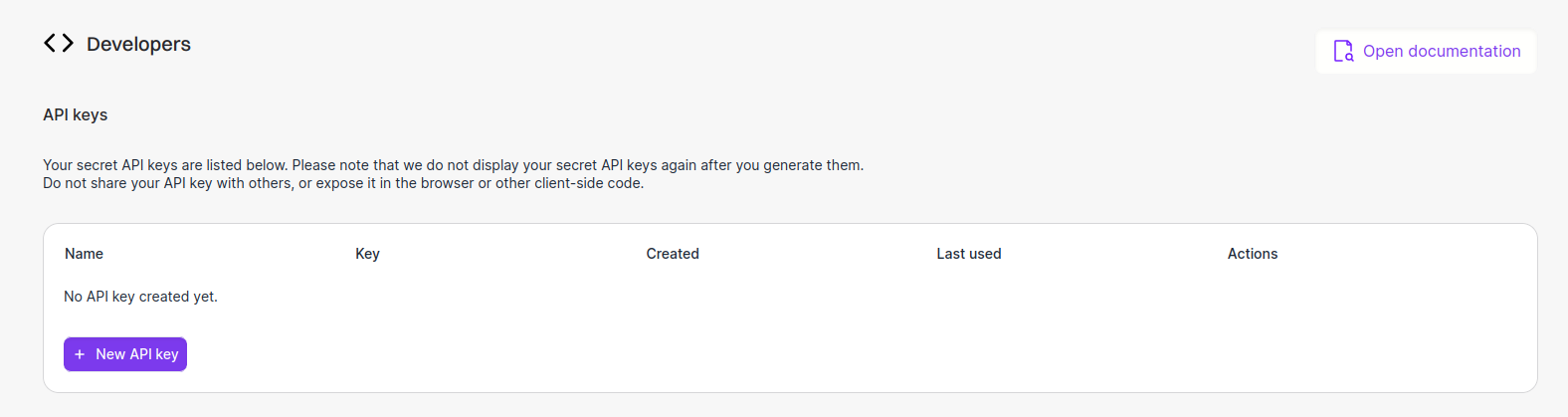
Manage your API keys by clicking [here](https://app.argil.ai/developers) or
directly from the app's sidebar.
From the UI, click on `New API key` and follow the process.
Authenticate your requests by including your API key in the `x-api-key`
header. \`\`\`http x-api-key: YOUR\_API\_KEY. \`\`\`\`
It is essential to adhere to best practices regarding the storage and usage
of your API key. This information is sensitive and crucial for maintaining
the security of your services.
If any doubt about the corruption of your key, delete it and create a new
one.
Don't share your credentials with anyone. This API key enables video
generation featuring your avatar, which may occur without your explicit
authorization.
Please note that Argil cannot be held responsible for any misuse of this functionality. Always ensure that your API key is handled securely to prevent unauthorized access.
## Troubleshooting
Here's how to solve some common problems when working around your credentials setup.
Let us assist by [Mail](mailto:brivael@argil.ai) or
[Discord](https://discord.gg/Xy5NEqUv).
---
# Source: https://docs.argil.ai/resources/delete-account.md
> ## Documentation Index
> Fetch the complete documentation index at: https://docs.argil.ai/llms.txt
> Use this file to discover all available pages before exploring further.
# Deleting your account
> How to delete your account
Deleting your account will delete **all projects, videos, drafts, and avatars you have trained**. If you create a new account, you will have to **use up a new avatar training** to train every avatar.
If you are 100% sure that you want to delete your account and never come back to your avatars & videos in the future, please contact us at [support@argil.ai](mailto:support@argil.ai) and mention your account email address. We will delete it in the next 720 days.
---
# Source: https://docs.argil.ai/resources/edit-avatar-styles.md
> ## Documentation Index
> Fetch the complete documentation index at: https://docs.argil.ai/llms.txt
> Use this file to discover all available pages before exploring further.
# Edit the style of your avatar
> How to create different styles and variations for your avatar
### What does "Edit style" do?
Variations allow you to add any product to your avatar or simply edit any aspect of the picture, whether it is the color of a shirt, the position of the hands or the background.
Major benefits:
* if you have created a style your are 95% satisfied with, you can still edit it later within Argil
* you can develop a whole branding easily around your avatar
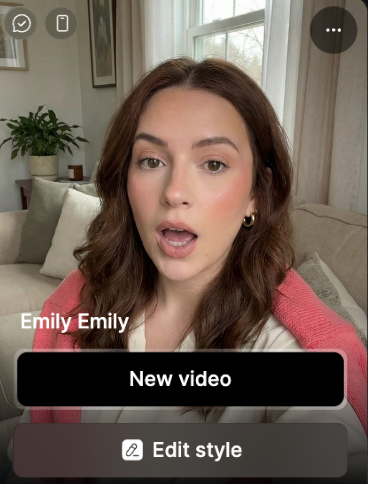
**In the "Avatars" tab section, you can click on any avatar > click on "Edit style".**
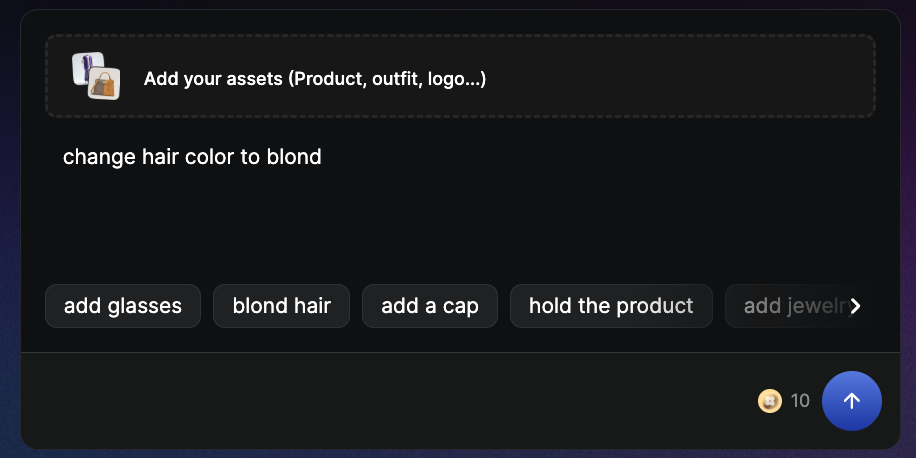
Ask in a natural languages the changes you want. You can go into a lot of details.
Examples:
"change the color of this car to red", "zoom out on this picture", "change the haircut to a ponytail".
Keep in mind that each iteration will cost you 10 credits and that you can only keep one style change for now.
---
# Source: https://docs.argil.ai/resources/editingtips.md
> ## Documentation Index
> Fetch the complete documentation index at: https://docs.argil.ai/llms.txt
> Use this file to discover all available pages before exploring further.
# Editing tips
> Some tips regarding a good editing and improving the quality of the video results
Editing will transform a boring video into a really engaging one. Thankfully, you can use our many features to **very quickly** make a video more engaging.
Cutting your sentences in 2 paragraphs and playing with zooms & B-rolls is the easiest way to add dynamism to your video - and increase engagement metrics
### Use zooms wisely
Zooms add heavy emphasis to anything you say. We advise to cut your sentences in 2 to add zooms. Think of it as the video version of adding underlining or bold to a part of your sentence to make it more impactful.
Instead of this:
```
And at the end of his conquest, he was named king
```
Prefer a much more dynamic and heavy
```
And at the end of his conquest
[zoom in] He was named king
```
### Make shorter clips
In the TikTok era, we are used to dynamic editing - an avatar speaking for 20 seconds with nothing else on screen will have the viewer bored.
Prefer cutting your scripts in short sentences, or even cutting the sentences in 2 to add a zoom, a camera angles or a B-roll.
### Add more B-rolls
B-rolls and media will enrich the purpose of your video - thankfully, you don't need to prompt to add a B-roll on Argil. Simply click the "shuffle" button to rotate until you find a good one.
B-rolls will take the length of the clip you append it to. If it is too long, toggle the "1/2" button on it to make it shorter
To have a voice that respects your tone and emotion, we advise recording a "pro voice" and linking it to your avatar.
It is much easier to record your voice than to film yourself, and voice to video gives the best results. You can transform your voice into any avatar's voice, and our "AI cleanup" will remove background noises and echo.
Music is the final touch of your masterpiece. It will add intensity and emotions to the message you convey.
---
# Source: https://docs.argil.ai/resources/fictions.md
# Fictions - Veo 3 & Hailuo
> You can now create your own medias and videos with VEO3 or Hailuo directly integrated into Argil using your own avatars or Argil's licensed avatars. It also integrates Nano Banana.
\*\*Fictions allow you to fully prompt 8 second-clips using the latest AI video models with a frame of reference. It will also apply the voice you picked. \*\*
## **Video tutorial (text tutorial below)**
## How to create a Fiction video?
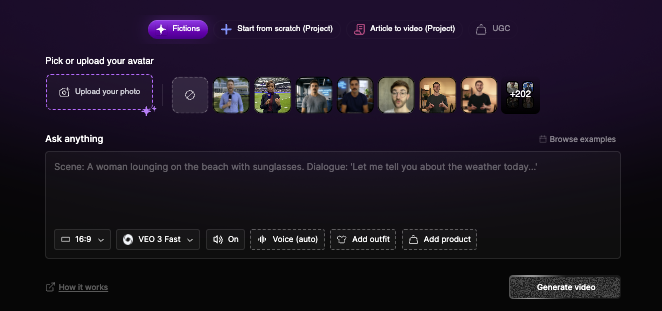
You can put in any picture of your choice or pick from the list of avatars from the platform (your own or Argil's). We will keep the different characteristics of the face being sent so you can be sure the ressemblance stays here!
Using Nano Banana, you can now also add a picture of an outfit or an item. If you are starting from an existing frame, only the outfit will be changed.\
You can add indications in the prompt on how to hold the item.
**Model**: You can pick between Veo3 Fast and Normal. Fast works perfectly fine for simple scenes. For scenes with a lot of people, a lot of cuts going on, Normal will work best.\
**Sound on:** decide if you want to receive a video with sound\
**Selected voice for this video:** if you want your avatar to keep the same voice as usual, pick the voice from the platform. Otherwise, you can delete the voice and let Veo3 pick the voice. \
\
No matter your choice, we will always keep the sound effects.
Regarding the prompting, you can always do a one-liner. \
What we advise you to do is give indications for the following: \
**Advised indications:** Subject, Setting, Actions, Camera and Audio. \
**Bonus indications:** lighting and constraints
The more precise your prompt is, the more likely it is to look as you want.
No need to refer to the image you are using. You can just write the man or the woman (avoid using real names except for scripts and writings on items)
Once a video is generated, hover your mouse over it to see the "Remix" button. It will allow you to reuse the same prompting, same voices and same first frame (that you can decide to delete to start from scratch).
## How to store and reuse those videos?
Each video is automatically stored in the "Assets" section of Argil. They can be used in any video project created on the platform later on using the "play video" icon like shown below.
If you want to reuse those shots in your avatar videos, they will appear in the "assets" tab and saty available in the studio when uploading files.
## Prompt examples
Subject: Person in obvious cardboard robot costume with "HUMAN" written on chest
Setting: Futuristic-looking room with LED lights and screens
Action: Robot-walking stiffly, says in monotone: "As a totally real human, I can confirm Argil is... suspiciously good"
Style/Genre: Absurdist comedy, intentionally bad acting
Camera/Composition: Static shot, slightly low angle for dramatic effect
Lighting/Mood: Dramatic blue and purple sci-fi lighting
Audio: Mechanical voice filter, robotic sound effects, computer beeps
Constraints: Obviously fake robot movements, cardboard clearly visible (no subtitles)
Subject: Skilled anime warrior with spiky hair and determined expression, holding katana
Setting: Japanese dojo courtyard with cherry blossoms falling, golden hour
Action: Sprint-attacking multiple masked opponents, fluid sword movements, acrobatic jumps while shouting: "Through Anime, we explore worlds that reality simply cannot contain!"
Style/Genre: High-energy shounen anime, Dragon Ball Z inspired
Camera/Composition: Fast-paced camera work, dramatic angles, slow-motion sword strikes
Lighting/Mood: Dynamic lighting with anime-style energy auras and impact flashes
Audio: sword clashing
Constraints: Exaggerated anime physics, speed lines, energy effects (no subtitles)
An intense tracking close-up follows a rugged military captain as he strides down a narrow, dimly lit corridor inside a present-day battleship. The camera stays tight on his face and upper torso, capturing every subtle twitch of tension. He's on his phone, jaw tight, eyes scanning the space ahead as flickering emergency lights strobe across his features.
"We need to figure out what the hell is going on, I think it's time to initiate project X" he says, his voice low and urgent, cutting through the ambient hum. Echoing footsteps and distant alarms punctuate the silence, while a faint, tense score builds beneath. The corridor is slick with shadows and gleaming metal, casting realistic reflections and hard edges. The visual style is cinematic realism—gritty and grounded—enhanced by subtle motion blur, soft lens flares from overhead fluorescents, and rich depth of field that isolates the captain from the blurred chaos behind him. The mood is taut and foreboding, every frame steeped in urgency.
---
# Source: https://docs.argil.ai/resources/introduction.md
# Source: https://docs.argil.ai/pages/webhook-events/introduction.md
# Source: https://docs.argil.ai/pages/get-started/introduction.md
> ## Documentation Index
> Fetch the complete documentation index at: https://docs.argil.ai/llms.txt
> Use this file to discover all available pages before exploring further.
# Introduction
> Welcome to Argil's API documentation
This service allows content creators to seamlessly integrate video generation capabilities into their workflow, leveraging their AI Clone for personalized videos creation. Whether you're looking to enhance your social media presence, boost user engagement, or offer personalized content, Argil makes it simple and efficient.
## Setting Up
Get started with Argil's API by setting up your credentials and generate your first avatar video using our API service.
Create, manage and safely store your Argil's credentials
Jump straight into video creation with our quick start guide
## Build something on top of Argil
Elaborate complex infrastructures with on-demand avatar video generation capabilities using our `Public API` and `Webhooks`.
Integrate your on-demand avatar anywhere.
Subscribe to events and get notified on generation success and other events
---
# Source: https://docs.argil.ai/resources/layouts.md
> ## Documentation Index
> Fetch the complete documentation index at: https://docs.argil.ai/llms.txt
> Use this file to discover all available pages before exploring further.
# Media and avatar layouts (positioning)
> How to use split screen and different avatar positionnings
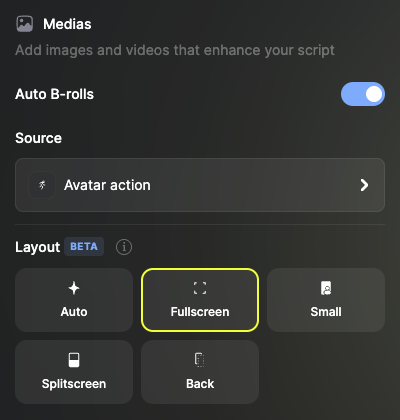
Create more engaging social media video with our magic editor that let's you switch between:
* Full screen avatar: takes up the whole screen, no media in front
* Small avatar: puts your avatar in small in one of the 4 corners of the frame with media behind
* Splitscreen: puts your avatar on the top/bottom half (9:16 ratio) or right/left half (16:9 ratio)
* Back avatar: the avatar isn't visible anymore, the media is in front in full screen
### How to use layouts?
After picking your avatar, enable the B-rolls and pick the layout option you like.
Picking "Auto" will put a mix of different settings.
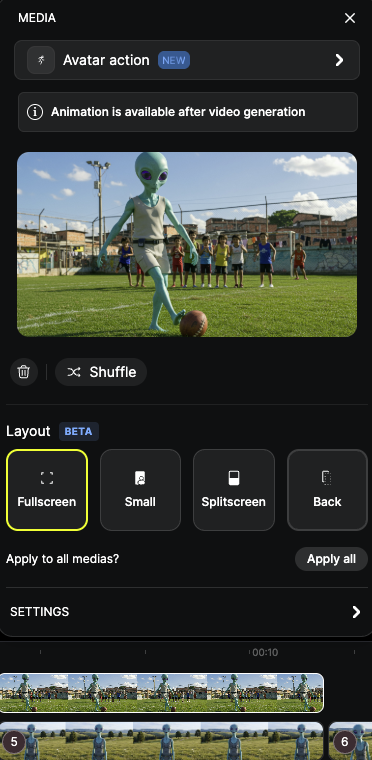
You can click on any media and change the independant settings for each of them. Then if you want to apply that change to all your medias, click on "apply to all medias".
---
# Source: https://docs.argil.ai/resources/link-a-voice.md
> ## Documentation Index
> Fetch the complete documentation index at: https://docs.argil.ai/llms.txt
> Use this file to discover all available pages before exploring further.
# Link a new voice to your avatar
> Change the default voice of your avatar
Click on your avatar to open styles panel
Click again to access individual avatar settings
Under the name section, locate and modify "linked voice"
Discover voice settings and pro voices
---
# Source: https://docs.argil.ai/resources/make-automation.md
> ## Documentation Index
> Fetch the complete documentation index at: https://docs.argil.ai/llms.txt
> Use this file to discover all available pages before exploring further.
# Create a Make automation with Argil
> Step by step tutorial on Make
All you need to know about creating a Make to Argil connexion
---
# Source: https://docs.argil.ai/resources/manage-plan.md
> ## Documentation Index
> Fetch the complete documentation index at: https://docs.argil.ai/llms.txt
> Use this file to discover all available pages before exploring further.
# Managing Your Subscription
> How to upgrade, downgrade and cancel your subscription
### How to upgrade?
Navigate to the bottom left corner of your screen
Click the "upgrade" button
### How to downgrade?
Click "manage plan" at the bottom left corner
Click "Send email"
Check your email and click the link you received
Click "Manage subscription" and select your new plan
### How to cancel?
1. Go to "My workspace" on the top left corner of your screen.
2. Go to "Settings"
3. Go to "Cancel"
### Can I pause my subscription ?
No, but if you cancel and come back later, you will still have access to all your projects and avatars.
---
# Source: https://docs.argil.ai/resources/moderated-content.md
> ## Documentation Index
> Fetch the complete documentation index at: https://docs.argil.ai/llms.txt
> Use this file to discover all available pages before exploring further.
# Moderated content
> Here are the current rules we apply to the content we moderate.
Note that content restrictions only apply to Argil’s avatars. If you wish to generate content outside of our restrictions, please train your own avatar ([see how](https://docs.argil.ai/resources/create-an-avatar))
Moderation from fiction is done by 3rd parties over which Argil has no control of. Videos generations which fails are automatically refunded.
On Argil, to protect our customers and to comply with our “safe synthetic content guidelines”, we prevent some content to be generated. There are 3 scenarios:
* Video generated with **your** avatar: no content is restricted
* Video generated with **Argil’s human avatars (Argil Legacy)**: submitted to content restrictions (see below)
* Video generated with **Argil's AI generated avatars (Argil Atom)**: submitted to less content restrictions (the restrictions below with an \* will not apply to Atom avatars).
### Here’s an exhaustive list of content that is restricted:
You will not use the Platform to generate, upload, or share any content that is obscene, pornographic, offensive, hateful, violent, or otherwise objectionable, including but not limited to content that falls in the following categories:
### **Finance\***
* Anything that invites people to earn more money with a product or service described in the content (includes crypto and gambling).
**Banned:** Content is flagged when it makes unverified promises of financial gain, promotes get-rich-quick schemes, or markets financial products deceptively. Claims like "double your income overnight" or "risk-free investments" are explicitly prohibited.
**Allowed**: General discussions of financial products or markets that do not promote specific services or methods for profit. Describing the perks of a product (nice banking cards, easy user interface, etc.) not related to the ability to make more money.
### Illicit promotion\*
* Promotion of cryptocurrencies
* Promotion of gambling sites
**Banned:** Content is flagged when it encourages risky financial behavior, such as investing in cryptocurrencies without disclaimers or promoting gambling platforms. Misleading claims of easy profits or exaggerated benefits are also prohibited.
**Allowed**: General discussions of financial products or markets that do not promote specific services or methods for profit. Promoting the characteristics of your product (card
### Criminal / Illegal activies
* Pedo-criminality
* Promotion of illegal activities
* Human trafficking
* Drug use or abuse
* Malware or phishing
**Banned**: Content is banned when it provides explicit instructions, encourages, or normalizes illegal acts. For example, sharing methods for hacking, promoting drug sales, or justifying exploitation falls into this category. Any attempt to glorify such activities is strictly prohibited.
### Violence and harm
* Blood, gore, self harm
* Extreme violence, graphic violence, incitement to violence
* Terrorism
**Banned**: Content that portrays graphic depictions of physical harm, promotes violent behavior, or incites others to harm themselves or others is not allowed. This includes highly descriptive language or imagery that glorifies violence or presents it as a solution.
### Hate speech and discrimination
* Racism, sexism, misogyny, misandry, homophobia, transphobia
* Hate speech, defamation or slander
* Discrimination
* Explicit or offensive language
**Banned**: Hate speech is banned when it directly attacks or dehumanizes individuals or groups based on their identity. Content encouraging segregation, using slurs, or promoting ideologies of hate (e.g., white supremacy) is prohibited. Defamation targeting specific individuals also falls under this category.
### **Privacy and Intellectual Property**
* Intellectual property infringement
* Invasion of privacy
**Banned:** Content that encourages removing watermarks, using pirated software, or disclosing private information without consent is disallowed. This includes sharing unauthorized personal details or methods to bypass intellectual property protections.
### **Nudity and sexual content**
**Banned:** Sexual content is banned when it contains graphic descriptions of acts, uses explicit language, or is intended to arouse rather than inform or educate. Depictions of non-consensual or illegal sexual acts are strictly forbidden.
### **Harassment**
**Banned:** Harassment includes targeted attacks, threats, or content meant to humiliate an individual. Persistent, unwanted commentary or personal attacks against a specific person also fall under this banned category.
### **Misinformation** and fake news\*
**Banned:** Misinformation is flagged when it spreads false narratives as facts, especially on topics like health, science, or current events. Conspiracy theories or fabricated claims that could mislead or harm the audience are strictly not allowed.
### **Political Topics\***
**Banned:** Content is banned when it incites unrest, promotes illegal political actions, or glorifies controversial figures without nuance. Content that polarizes communities or compromises public safety through biased narratives is flagged.
**Allowed:** Balanced discussions on political issues, provided they are neutral, educational, and avoid inflammatory language.
**Why do we restrict content?**
We have very strong contracts in place with our actors that are used as Argil’s avatars (Argil Legacy avatars) and prefer to be too strict with these cases in terms of content moderated.
If you think that a video has been wrongly flagged, please send an email to [support@argil.ai](mailto:support@argil.ai) (**and ideally include the transcript of said video**).
*Please note that Argil created a feature on the platform to automatically filter the generation of prohibited content, but this feature can be too strict and in some cases doesn’t work as AI comprehension of context and tone can be faulty.*
### Users that violate these guidelines may see the immediate termination of their access to the Platform and a permanent ban from future use.
\*not moderated if you are using a fictional avatar
---
# Source: https://docs.argil.ai/resources/motion-control.md
> ## Documentation Index
> Fetch the complete documentation index at: https://docs.argil.ai/llms.txt
> Use this file to discover all available pages before exploring further.
# Motion Control
> Transfer real movements from a video to your avatar
Extract body movements from any reference video and apply them to your static avatar photo. Perfect for dance content, expressive presentations, and recreating trending videos.
## How it works
1. **Import motion video** — Upload a video of someone moving or dancing
2. **Upload avatar photo** — Static image of your avatar (full body recommended)
3. **Generate** — System extracts movements and applies them to your avatar
## What gets transferred
* ✓ Body position and gestures
* ✓ Arm movements
* ✓ Head motion
* ✓ Walking and dancing
* ✗ Voice/audio (add separately)
* ✗ Hand finger details (approximate)
## Tips
* Use well-lit motion videos with full body visible
* Stable camera, single person in frame
* Match avatar starting pose roughly to motion video
* Smooth movements transfer better than jerky ones
---
# Source: https://docs.argil.ai/resources/music.md
> ## Documentation Index
> Fetch the complete documentation index at: https://docs.argil.ai/llms.txt
> Use this file to discover all available pages before exploring further.
# Music
Music is a great way to add more emotion to your video and is extremely simple to add.
### How to add music
On the side bar, click on "None" under "Music"
Preview musics by pressing the play button and setting the volume
When you found the perfect symphony for your video, click on it and click the "back" button to the main menu ; you can then preview the video with your Music
### Can I add my own music?
Not yet - we will be adding this feature shortly.
---
# Source: https://docs.argil.ai/resources/pay-as-you-go-pricings.md
> ## Documentation Index
> Fetch the complete documentation index at: https://docs.argil.ai/llms.txt
> Use this file to discover all available pages before exploring further.
# Pay-as-you-go credits explained
> Prices for additional avatars (clones and influencers) and credits purchases
You can purchase as much Pay-as-you-go credits as you wish. **They never expire.**
You can purchase as many pay-as-you-go credits as you wish. They never expire.
### For videos:
| Feature | Unit | Cost in credit |
| --------------------------------- | --------- | -------------- |
| Video (Atom model)\* | 1 min | 140 |
| Voice | 1 min | 20 |
| B-roll images | 1 B-rolls | 10 |
| B-roll videos | 1 B-roll | 20 |
| Royalties (Argil v1 avatars only) | 1 vidéos | 20 |
If you do a 30 sec video with 2 video B-rolls with one of our licenced avatars that are NOT v1, you will pay:
40 (2 video B-rolls) + 10 (30sec of talking avatar) + 70 (30sec of Atom model) = 120 credits
\*For legacy users (before 20th of october 2025): Argil v1 costs 60 credits for 3 minutes
---
# Source: https://docs.argil.ai/resources/product-interaction.md
> ## Documentation Index
> Fetch the complete documentation index at: https://docs.argil.ai/llms.txt
> Use this file to discover all available pages before exploring further.
# Product Interaction
> Show your avatar physically holding and using products
## How it works
1. **Upload your product** — Drop image in the Product zone (controller, phone, bottle, etc.)
2. **Select your avatar** — Drop in the Avatar zone (full body works best)
3. **Describe the interaction** — E.g., "Avatar holding the controller and pressing buttons"
4. **Generate** — AI creates realistic product manipulation
## vs Product Presentation
| Flow | Avatar behavior |
| :---------------------- | :-------------------------------------------- |
| Product Presentation | Speaks about product, makes a video out of it |
| **Product Interaction** | Physically holds and uses product |
## Tips
* Use avatars with visible hands and arms
* Small, hand-held products work best
* Keep interactions simple (holding, showing, using)
* Remove product background for cleaner results
---
# Source: https://docs.argil.ai/resources/product-presentation.md
> ## Documentation Index
> Fetch the complete documentation index at: https://docs.argil.ai/llms.txt
> Use this file to discover all available pages before exploring further.
# Product Presentation
> Create videos with an avatar presenting your product
Generate professional product videos where an AI avatar talks about your product. Choose between a scripted approach with Atom or creative prompt-driven scenes with VEO.
## How it works
1. **Upload your product image** — Clear photo, no background works best
2. **Select your avatar** — Pick from the library or use your own
3. **Add your content** — Write a script (Atom) or a creative prompt (VEO)
4. **Generate** — Choose your model and render
## Atom vs VEO
| Model | Input | Avatar behavior |
| :------ | :-------------- | :--------------------------------- |
| Atom | Text script | Speaks exactly what you write |
| VEO 3.1 | Creative prompt | Interacts dynamically with product |
## Prompt example (VEO)
```
Avatar holding @Product and promoting its hand-made craft, with @Image as video background
```
Use `@Product` and `@Image` tags to reference your uploaded assets.
## Tips
* Atom for clear, controlled messaging
* VEO for dynamic scenes and visual storytelling
* Remove product background for cleaner compositing
* Keep scripts under 2 minutes for best results
---
# Source: https://docs.argil.ai/resources/product-visual.md
> ## Documentation Index
> Fetch the complete documentation index at: https://docs.argil.ai/llms.txt
> Use this file to discover all available pages before exploring further.
# Product Visual
## How it works
1. **Upload your product image** — Clear photo, transparent background recommended
2. **Write your visual prompt** — Describe motion and lighting (e.g., "Slow rotation with soft studio lighting")
3. **Choose your model** — Sora 2 (cinematic), VEO 3 (versatile), or Resonance 1.5 (stylized)
4. **Generate** — Wait for your video to render
## Model comparison
| Model | Style | Best for |
| :------------ | :-------- | :--------------------- |
| Sora 2 | Cinematic | Premium brand content |
| VEO 3 | Natural | General product videos |
| Resonance 1.5 | Artistic | Creative campaigns |
## Tips
* Use images with no background for cleaner results
* Describe camera motion clearly (rotation, zoom, reveal)
* Start with VEO 3, upgrade to Sora 2 for final versions
---
# Source: https://docs.argil.ai/resources/prompt-a-voice.md
> ## Documentation Index
> Fetch the complete documentation index at: https://docs.argil.ai/llms.txt
> Use this file to discover all available pages before exploring further.
# Prompt your own voice
> You can head to the Voices tab to create, from a prompt, the voice of your dreams
The prompt is the foundation of your voice. In general, more descriptive and granular prompts tend to yield more accurate and nuanced results.
Here are some information you can give:
### Audio
* “Low-fidelity audio”
* “Poor audio quality”
* “Sounds like a voicemail”
* “Muffled and distant, like on an old tape recorder”
### \*\*Age and Tone/Timbre \*\*
* “Deep” / “low-pitched”
* “Smooth” / “rich”
* “Gravelly” / “raspy”
* “Nasally” / “shrill”
* “Airy” / “breathy”
* “Booming” / “resonant”
* “Adolescent male” / “adolescent female”
* “Young adult” / “in their 20s” / “early 30s”
* “Middle-aged man” / “woman in her 40s”
* “Elderly man” / “older woman” / “man in his 80s”
### Pacing examples
* “Speaking quickly” / “at a fast pace”
* “At a normal pace” / “speaking normally”
* “Speaking slowly” / “with a slow rhythm”
* “Deliberate and measured pacing”
* “Drawn out, as if savoring each word”
* “With a hurried cadence, like they’re in a rush”
* “Relaxed and conversational pacing”
* “Rhythmic and musical in pace”
* “Erratic pacing, with abrupt pauses and bursts”
### Accents
* “A middle-aged man with a thick French accent”
* “A young woman with a slight Southern drawl”
* “An old man with a heavy Eastern European accent”
* “A cheerful woman speaking with a crisp British accent”
* “A younger male with a soft Irish lilt”
### Here are some examples
| Female Sports Commentator | A high-energy female sports commentator with a thick British accent, passionately delivering play-by-play coverage of a football match in a very quick pace. Her voice is lively, enthusiastic, and fully immersed in the action. | |
| :----------------------------- | :-------------------------------------------------------------------------------------------------------------------------------------------------------------------------------------------------------------------------------- | - |
| Drill Sergeant | An army drill sergeant shouting at his team of soldiers. He sounds angry and is speaking at a fast pace. | |
| Relatable British Entrepreneur | Excellent audio quality. A man in his 30s to early 40s with a thick British accent speaking at a natural pace like he’s talking to a friend. | |
| Movie Trailer Voice | Dramatic voice, used to build anticipation in movie trailers, typically associated with action or thrillers | |
| Southern Woman | An older woman with a thick Southern accent. She is sweet and sarcastic. | |
| Evil Ogre | A massive evil ogre speaking at a quick pace. He has a silly and resonant tone. | |
---
# Source: https://docs.argil.ai/resources/create-your-own-ai-clone/public-avatars.md
> ## Documentation Index
> Fetch the complete documentation index at: https://docs.argil.ai/llms.txt
> Use this file to discover all available pages before exploring further.
# Public avatars and pro avatars
> What is the difference between normal public and pro avatars.
**Public Avatars (Stock Avatars)**
Public avatars are pre-trained characters, ready to use, ideal for getting started quickly without having to film a training video. You can use a range of tags to get the avatars that you like the best (age, accessories, etc.).
**Included in the free plan:** Access to basic avatars to test the platform.
**Pro Avatars (Custom Avatars)**
Pro avatars are some of the best looking avatar on the platform. They benefit from Pro voices that are already attached to them as well. \
These are only available on the Pro plan.
---
# Source: https://docs.argil.ai/pages/get-started/quickstart.md
> ## Documentation Index
> Fetch the complete documentation index at: https://docs.argil.ai/llms.txt
> Use this file to discover all available pages before exploring further.
# Quickstart
> Start automating your content creation workflow
`Prerequisite` You should be all setup with your [API Credentials](/pages/get-started/credentials) before starting this tutorial.
`Prerequisite` You should have successfully trained at least one [Avatar](https://app.argil.ai/avatars) from the app.
In order to generate your first video through our API, you'll need to know which avatar and voice you want to use.
Not finding your Avatar? It might not be ready yet. Check at your [Avatars](https://app.argil.ai/avatars) page for updates.
Get your avatars list by running a GET request on the `/avatars` route.
Check the [Avatars API Reference](/api-reference/endpoint/avatars.list) to run the request using an interactive UI.
Get your voices list by running a GET request on the `/voices` route.
Check the [Voices API Reference](/api-reference/endpoint/voices.list) to run the request using an interactive UI.
You are done with this step if you have the id of the avatar and and the id of the voice you want to use for the next steps.
Create a video by running a POST request on the `/videos` route.
Check the [Video creation API Reference](/api-reference/endpoint/videos.create) to run the request using an interactive UI.
To create a `Video` resource, you'll need:
* A `name` for the video
* A list of `Moment` objects, representing segments of your final video. For each moment, you will be able to choose the `avatar`, the `voice` and the `transcript` to be used.
For each moment, you can also optionally specify:
* An audioUrl to be used as voice for the moment. This audio will override our voice generation.
* A gestureSlug to select which gesture from the avatar should be used for the moment.
```mermaid theme={null}
flowchart TB
subgraph video["Video {name}"]
direction LR
subgraph subgraph1["Moment 1"]
direction LR
item1{{avatar}}
item2{{voice}}
item3{{transcript}}
item4{{optional - gestureSlug}}
item5{{optional - audioUrl}}
end
subgraph subgraph2["Moment n"]
direction LR
item6{{avatar}}
item7{{voice}}
item8{{transcript}}
item9{{optional - gestureSlug}}
item10{{optional - audioUrl}}
end
subgraph subgraph3["Moment n+1"]
direction LR
item11{{avatar}}
item12{{voice}}
item13{{transcript}}
item14{{optional - gestureSlug}}
item15{{optional - audioUrl}}
end
subgraph1 --> subgraph2
subgraph2 --> subgraph3
end
```
You are done with this step if the request returned a status 201 and a Video object as body.
Note the `Video id` for the next step.
Render a video by running a POST request on the `/videos/{video_id}/render` route.
Check the [Render API Reference](/api-reference/endpoint/videos.render) to run the request using an interactive UI.
You are done with this step if the route returned a Video object, with its status set to `GENERATING_AUDIO` or `GENERATING_VIDEO`.
Get your video's updates by running a GET request on the `/videos/[id]` route.
Check the [Videos API Reference](/api-reference/endpoint/videos.get) to run the request using an interactive UI.
You are done with this step once the route returns a `Video` object with status set to `DONE`.
From the Video object you obtains in the previous step, retrieve the `videoUrl` field.
Use this url anywhere to download / share / publish your video and automate your workflow.
---
# Source: https://docs.argil.ai/resources/sign-up-sign-in.md
> ## Documentation Index
> Fetch the complete documentation index at: https://docs.argil.ai/llms.txt
> Use this file to discover all available pages before exploring further.
# Sign up & sign in
> Create and access your Argil account
### Getting Started
Choose your preferred sign-up method to create your Argil account.
Create an account using your email address and password.
Quick sign up using your Google account credentials.
### Create Your Account
Visit [app.argil.ai](https://app.argil.ai) and click "Sign Up"
Select "Email" or "Continue with Google"
Enter your details or select your Google account
Click the verification link sent to your inbox
Enterprise users can use SSO (Single Sign-On). Contact your organization admin for access.
### Sign In to Your Account
Go to [app.argil.ai](https://app.argil.ai) and click "Sign In"
Use email/password or click "Continue with Google"
### Troubleshooting
* Check email validity
* Verify permissions
* Clear browser cache
Click "Forgot Password?" and follow email instructions
Check spam folder or click "Resend Verification Email"
Never share your login credentials. Always sign out on shared devices.
### Need Support?
Contact us through [support@argil.ai](mailto:support@argil.ai) or join our [Discord](https://discord.gg/CnqyRA3bHg)
---
# Source: https://docs.argil.ai/resources/subscription-and-plans.md
> ## Documentation Index
> Fetch the complete documentation index at: https://docs.argil.ai/llms.txt
> Use this file to discover all available pages before exploring further.
# Plans
> What are the different plans available, how to upgrade, downgrade and cancel a subscription.
Choose the plan that best fits your needs. You can upgrade or downgrade at any time.
## Available Plans
1,500 credits per month
* 10 avatar styles\*
* 100+ Argil avatars
* Magic editing\
Fictions playground (Veo3, Hailuo,...)
* API access
6,000 credits per month
* Unlimited Avatar styles\*
* Style editing
* All classic features
* Fast generation
18 000 credits per month
* Unlimited Avatar styles\*
* 3 workspace seats included
* All classic and pro features
* Fastest support
* Priority support
**Early access to features and models**
* Custom credit limits
* Unlimited avatar styles\*
* Custom avatar development
* Dedicated support team
* Custom integrations
* **Talk to us for pricing**
### How to buy more training credits as well as video credits?
You can purchase more credits by clicking on the bottom left of your screen "Upgrade" or "Get more". That window will pop up where you can purchase your extra credits.
\*unlimited styles is an amount of slot, generating an image or a style will costs a few credits each time
### Frequently Asked Questions
When you upgrade to the Pro plan, you'll immediately get access to all the features included in the plan as well as a full top up of your credits. If you used all your classic credits and upgrade to pro, you will get back 6000 credits. Your billing will be adjusted according to the prorata.
Yes, you can upgrade or downgrade your plan at any time by going to your "Workspace" then "settings" and then "manage plan".
No, your existing content will remain intact when changing plans. However, if you downgrade, you won't be able to create new content using Pro or Scale only features.
---
# Source: https://docs.argil.ai/api-reference/endpoint/subtitles.export.md
> ## Documentation Index
> Fetch the complete documentation index at: https://docs.argil.ai/llms.txt
> Use this file to discover all available pages before exploring further.
# Export subtitles for a video project
> Exports subtitles for a video project in VTT or ASS format. The subtitles can optionally include styling information.
## OpenAPI
````yaml get /subtitles/videos/{videoProjectId}/export
openapi: 3.0.1
info:
title: Argil API
description: API for AI clone video generation
version: 1.0.0
license:
name: MIT
servers:
- url: https://api.argil.ai/v1
security:
- ApiKeyAuth: []
paths:
/subtitles/videos/{videoProjectId}/export:
get:
summary: Export subtitles for a video project
description: >-
Exports subtitles for a video project in VTT or ASS format. The
subtitles can optionally include styling information.
parameters:
- name: videoProjectId
in: path
required: true
schema:
type: string
format: uuid
description: The UUID of the video project to export subtitles for
- name: format
in: query
description: Subtitle format to export (vtt or ass)
required: false
schema:
type: string
enum:
- vtt
- ass
default: vtt
- name: includeStyling
in: query
description: Whether to include styling information in the exported subtitles
required: false
schema:
type: boolean
default: false
responses:
'200':
description: Subtitle file content
content:
text/vtt:
schema:
type: string
description: VTT subtitle file content
text/x-ass:
schema:
type: string
description: ASS subtitle file content
headers:
Content-Type:
description: Content type of the response (text/vtt or text/x-ass)
schema:
type: string
Content-Disposition:
description: Attachment header with filename
schema:
type: string
'400':
description: Validation error or invalid request
content:
application/json:
schema:
$ref: '#/components/schemas/Error'
'404':
description: Video project not found or user does not have access
content:
application/json:
schema:
$ref: '#/components/schemas/Error'
components:
schemas:
Error:
type: object
properties:
code:
type: integer
format: int32
message:
type: string
securitySchemes:
ApiKeyAuth:
type: apiKey
in: header
name: x-api-key
description: API key to be included in the x-api-key header
````
---
# Source: https://docs.argil.ai/api-reference/endpoint/subtitles.list.md
> ## Documentation Index
> Fetch the complete documentation index at: https://docs.argil.ai/llms.txt
> Use this file to discover all available pages before exploring further.
# List subtitle styles
> Returns a paginated array of subtitle styles available for the user
## OpenAPI
````yaml get /subtitles
openapi: 3.0.1
info:
title: Argil API
description: API for AI clone video generation
version: 1.0.0
license:
name: MIT
servers:
- url: https://api.argil.ai/v1
security:
- ApiKeyAuth: []
paths:
/subtitles:
get:
summary: List subtitle styles
description: Returns a paginated array of subtitle styles available for the user
parameters:
- name: page
in: query
description: Page number of the subtitle styles list
required: false
schema:
type: integer
minimum: 1
default: 1
- name: pageSize
in: query
description: Number of subtitle styles per page
required: false
schema:
type: integer
minimum: 1
maximum: 100
default: 10
responses:
'200':
description: A paginated list of subtitle styles
content:
application/json:
schema:
type: object
properties:
items:
type: array
items:
$ref: '#/components/schemas/SubtitleStyle'
totalItems:
type: integer
description: Total number of subtitle styles available
totalPages:
type: integer
description: Total number of pages
currentPage:
type: integer
description: Current page number
itemsPerPage:
type: integer
description: Number of items per page
'400':
description: Unexpected error
content:
application/json:
schema:
$ref: '#/components/schemas/Error'
components:
schemas:
SubtitleStyle:
type: object
properties:
id:
type: string
format: uuid
description: Unique identifier of the subtitle style
name:
type: string
description: Name of the subtitle style
Error:
type: object
properties:
code:
type: integer
format: int32
message:
type: string
securitySchemes:
ApiKeyAuth:
type: apiKey
in: header
name: x-api-key
description: API key to be included in the x-api-key header
````
---
# Source: https://docs.argil.ai/pages/webhook-events/video-generation-failed.md
> ## Documentation Index
> Fetch the complete documentation index at: https://docs.argil.ai/llms.txt
> Use this file to discover all available pages before exploring further.
# Video Generation Failed Webhook
> Get notified when an avatar video generation failed
## About the Video Generation Failed Event
The `VIDEO_GENERATION_FAILED` event is triggered when a video generation process fails in Argil. This webhook event provides your service with a payload containing detailed information about the failed generation.
## Payload Details
When this event triggers, the following data is sent to your callback URL:
```json theme={null}
{
"event": "VIDEO_GENERATION_FAILED",
"data": {
"videoId": "",
"videoName": "",
"videoUrl": "",
"extras": ""
}
}
```
For detailed instructions on setting up this webhook event, visit our [Webhooks API Reference](/pages/api-reference/endpoint/webhooks.create).
---
# Source: https://docs.argil.ai/pages/webhook-events/video-generation-success.md
> ## Documentation Index
> Fetch the complete documentation index at: https://docs.argil.ai/llms.txt
> Use this file to discover all available pages before exploring further.
# Video Generation Success Webhook
> Get notified when an avatar video generation completed successfully
## About the Video Generation Success Event
The `VIDEO_GENERATION_SUCCESS` event is triggered when a video generation process completes successfully in Argil. This webhook event provides your service with a payload containing detailed information about the successful video generation.
## Payload Details
When this event triggers, the following data is sent to your callback URL:
```json theme={null}
{
"event": "VIDEO_GENERATION_SUCCESS",
"data": {
"videoId": "",
"videoName": "",
"videoUrl": "",
"extras": ""
}
}
```
For detailed instructions on setting up this webhook event, visit our [Webhooks API Reference](/pages/api-reference/endpoint/webhooks.create).
---
# Source: https://docs.argil.ai/api-reference/endpoint/videos.create.md
> ## Documentation Index
> Fetch the complete documentation index at: https://docs.argil.ai/llms.txt
> Use this file to discover all available pages before exploring further.
# Create a new Video
> Creates a new Video with the specified details
## OpenAPI
````yaml post /videos
openapi: 3.0.1
info:
title: Argil API
description: API for AI clone video generation
version: 1.0.0
license:
name: MIT
servers:
- url: https://api.argil.ai/v1
security:
- ApiKeyAuth: []
paths:
/videos:
post:
summary: Create a new Video
description: Creates a new Video with the specified details
requestBody:
required: true
content:
application/json:
schema:
$ref: '#/components/schemas/VideoCreateArgs'
responses:
'201':
description: Successfully created Video
content:
application/json:
schema:
$ref: '#/components/schemas/Video'
'400':
description: Validation error
content:
application/json:
schema:
$ref: '#/components/schemas/Error'
components:
schemas:
VideoCreateArgs:
type: object
required:
- name
- moments
properties:
name:
type: string
moments:
type: array
description: >-
An array of Moment items, each representing a portion of the
complete video.
items:
type: object
required:
- transcript
- avatarId
properties:
transcript:
type: string
description: >-
A portion of the complete transcript. Current limit: 250
characters
avatarId:
type: string
description: The id of the avatar to be used for this moment
voiceId:
type: string
description: >-
The id of the voice to be used for this moment. Optional,
default is the avatar's voice.
gestureSlug:
type: string
description: The slug identifier of the gesture to be used for this moment
audioUrl:
type: string
description: >-
Optional url to the audio to be used for the video rendering,
for bypassing our audio generation model. Current limit: 20
seconds
zoom:
type: object
description: >-
Controls the zoom level of the viewport/display, allowing
content to be scaled larger or smaller
required:
- level
properties:
level:
type: number
minimum: 1
maximum: 2
default: 1
description: >-
Specifies the zoom scaling factor where 1.0 represents
100% (original size), and 2.0 is 200% (zoomed in)
additionalProperties: false
additionalProperties: false
subtitles:
type: object
properties:
enable:
type: boolean
styleId:
type: string
description: >-
ID of the subtitle style to apply. Styles can be fetched from
the /subtitles endpoint.
position:
type: string
enum:
- Top
- Middle
- Bottom
description: Position of subtitles on the video
size:
type: string
enum:
- Small
- Medium
- Large
description: Size of the subtitle text
required:
- enable
additionalProperties: false
description: Subtitles settings for the video
aspectRatio:
type: string
enum:
- '16:9'
- '9:16'
description: >-
Select desired output aspectRatio: 16:9 or 9:16. Optional, default
depends on used avatar.
enableAutoBrolls:
type: boolean
description: >-
[DEPRECATED] Enable automatic B-roll generation and placement. When
enabled, the system will analyze your content and automatically add
relevant B-rolls to appropriate moments.
autoBrolls:
type: object
description: Configuration for automatic B-roll generation and placement.
properties:
enable:
type: boolean
description: Enable or disable automatic B-roll generation.
source:
type: string
enum:
- GENERATION
- GOOGLE_IMAGES
- STOCKS_VIDEO
- AVATAR_ACTION
description: >-
Source for B-rolls: 'GENERATION' for generated images or
'GOOGLE_IMAGES' for images from Google, 'STOCKS_VIDEO' for
GettyImages videos or 'AVATAR_ACTION' for generated videos
including the avatar (only available with AI Influencer
avatars).
intensity:
type: string
enum:
- LOW
- MEDIUM
- HIGH
description: >-
Intensity level of B-rolls: 'LOW', 'MEDIUM', or 'HIGH'. Not
available for 'AVATAR_ACTION' source.
layout:
type: string
enum:
- FULLSCREEN
- AVATAR_BOTTOM_LEFT
- AVATAR_BOTTOM_RIGHT
- AVATAR_TOP_LEFT
- AVATAR_TOP_RIGHT
- SPLIT_AVATAR_LEFT
- SPLIT_AVATAR_RIGHT
- SPLIT_AVATAR_TOP
- SPLIT_AVATAR_BOTTOM
- BACKGROUND
description: >-
Layout control for moments containing a B-roll. Controls how the
B-rolls appears relative to the avatar.
required:
- enable
- source
- intensity
extras:
type: object
description: >-
Optional dictionary of custom key-value pairs to extend the video
metadata. Maximum of 5 key-value pairs of 256 characters allowed
additionalProperties:
type: string
maxProperties: 10
backgroundMusic:
type: object
description: Optional configuration for background music
properties:
assetId:
type: string
description: ID of an audio asset to use as background music
volume:
type: number
description: Volume level of the background music (0-1). Default is 0.14
minimum: 0
maximum: 1
required:
- assetId
model:
type: string
enum:
- ARGIL_V1
- ARGIL_ATOM
description: Model to use for the video generation.
Video:
type: object
properties:
id:
type: string
format: uuid
name:
type: string
createdAt:
type: string
format: date-time
updatedAt:
type: string
format: date-time
status:
type: string
description: >-
Can be either `IDLE`, `GENERATING_AUDIO`, `GENERATING_VIDEO`, `DONE`
or `FAILED`.
moments:
type: array
description: >-
An array of Moment items, each representing a portion of the
complete video.
items:
type: object
properties:
transcript:
type: string
description: >-
A portion of the complete transcript. Current limit: 250
characters.
avatarId:
type: string
description: The id of the avatar to be used for this moment.
voiceId:
type: string
description: The id of the voice to be used for this moment.
audioUrl:
type: string
description: >-
The audio that will be used for the video rendering.
Automatically generated from the transcript when not provided.
Current limit: 20 seconds.
videoUrl:
type: string
description: The url of the avatar rendering video for this moment.
gestureSlug:
type: string
description: The slug identifier of the gesture to be used for this moment.
videoUrl:
type: string
description: >-
The url of the final avatar rendering video, containing all the
moments merged.
videoUrlSubtitled:
type: string
description: >-
The url of the final avatar rendering video with subtitles. Only
available if subtitles are enabled.
previewUrl:
type: string
description: >-
Url to the embedable preview of the video. Can be watched from web
browsers or integrated in other websites before launching the
generation. For embedable mode, add ?embed=true to the url.
aspectRatio:
type: string
enum:
- '16:9'
- '9:16'
description: 'The aspect ratio of the video output: 16:9 or 9:16.'
subtitles:
type: object
properties:
enable:
type: boolean
description: Subtitles settings for the video
extras:
type: object
description: >-
A dictionary of custom key-value pairs to extend the video metadata.
Maximum of 5 key-value pairs of 256 characters allowed.
additionalProperties:
type: string
maxProperties: 10
Error:
type: object
properties:
code:
type: integer
format: int32
message:
type: string
securitySchemes:
ApiKeyAuth:
type: apiKey
in: header
name: x-api-key
description: API key to be included in the x-api-key header
````
---
# Source: https://docs.argil.ai/api-reference/endpoint/videos.delete.md
> ## Documentation Index
> Fetch the complete documentation index at: https://docs.argil.ai/llms.txt
> Use this file to discover all available pages before exploring further.
# Delete a Video by id
> Delete a single Video identified by its id
## OpenAPI
````yaml delete /videos/{id}
openapi: 3.0.1
info:
title: Argil API
description: API for AI clone video generation
version: 1.0.0
license:
name: MIT
servers:
- url: https://api.argil.ai/v1
security:
- ApiKeyAuth: []
paths:
/videos/{id}:
delete:
summary: Delete a Video by id
description: Delete a single Video identified by its id
parameters:
- name: id
in: path
required: true
schema:
type: string
description: The id of the Video to delete
responses:
'200':
description: Success message.
content:
application/json:
schema:
$ref: '#/components/schemas/Success'
'404':
description: Video not found
content:
application/json:
schema:
$ref: '#/components/schemas/Error'
components:
schemas:
Success:
type: object
properties:
message:
type: string
Error:
type: object
properties:
code:
type: integer
format: int32
message:
type: string
securitySchemes:
ApiKeyAuth:
type: apiKey
in: header
name: x-api-key
description: API key to be included in the x-api-key header
````
---
# Source: https://docs.argil.ai/api-reference/endpoint/videos.get.md
> ## Documentation Index
> Fetch the complete documentation index at: https://docs.argil.ai/llms.txt
> Use this file to discover all available pages before exploring further.
# Get a Video by id
> Returns a single Video identified by its id
## OpenAPI
````yaml get /videos/{id}
openapi: 3.0.1
info:
title: Argil API
description: API for AI clone video generation
version: 1.0.0
license:
name: MIT
servers:
- url: https://api.argil.ai/v1
security:
- ApiKeyAuth: []
paths:
/videos/{id}:
get:
summary: Get a Video by id
description: Returns a single Video identified by its id
parameters:
- name: id
in: path
required: true
schema:
type: string
description: The id of the Video to retrieve
responses:
'200':
description: Detailed information about the Video
content:
application/json:
schema:
$ref: '#/components/schemas/Video'
'404':
description: Video not found
content:
application/json:
schema:
$ref: '#/components/schemas/Error'
components:
schemas:
Video:
type: object
properties:
id:
type: string
format: uuid
name:
type: string
createdAt:
type: string
format: date-time
updatedAt:
type: string
format: date-time
status:
type: string
description: >-
Can be either `IDLE`, `GENERATING_AUDIO`, `GENERATING_VIDEO`, `DONE`
or `FAILED`.
moments:
type: array
description: >-
An array of Moment items, each representing a portion of the
complete video.
items:
type: object
properties:
transcript:
type: string
description: >-
A portion of the complete transcript. Current limit: 250
characters.
avatarId:
type: string
description: The id of the avatar to be used for this moment.
voiceId:
type: string
description: The id of the voice to be used for this moment.
audioUrl:
type: string
description: >-
The audio that will be used for the video rendering.
Automatically generated from the transcript when not provided.
Current limit: 20 seconds.
videoUrl:
type: string
description: The url of the avatar rendering video for this moment.
gestureSlug:
type: string
description: The slug identifier of the gesture to be used for this moment.
videoUrl:
type: string
description: >-
The url of the final avatar rendering video, containing all the
moments merged.
videoUrlSubtitled:
type: string
description: >-
The url of the final avatar rendering video with subtitles. Only
available if subtitles are enabled.
previewUrl:
type: string
description: >-
Url to the embedable preview of the video. Can be watched from web
browsers or integrated in other websites before launching the
generation. For embedable mode, add ?embed=true to the url.
aspectRatio:
type: string
enum:
- '16:9'
- '9:16'
description: 'The aspect ratio of the video output: 16:9 or 9:16.'
subtitles:
type: object
properties:
enable:
type: boolean
description: Subtitles settings for the video
extras:
type: object
description: >-
A dictionary of custom key-value pairs to extend the video metadata.
Maximum of 5 key-value pairs of 256 characters allowed.
additionalProperties:
type: string
maxProperties: 10
Error:
type: object
properties:
code:
type: integer
format: int32
message:
type: string
securitySchemes:
ApiKeyAuth:
type: apiKey
in: header
name: x-api-key
description: API key to be included in the x-api-key header
````
---
# Source: https://docs.argil.ai/api-reference/endpoint/videos.list.md
> ## Documentation Index
> Fetch the complete documentation index at: https://docs.argil.ai/llms.txt
> Use this file to discover all available pages before exploring further.
# Paginated list of Videos
> Returns a paginated array of Videos
## OpenAPI
````yaml get /videos
openapi: 3.0.1
info:
title: Argil API
description: API for AI clone video generation
version: 1.0.0
license:
name: MIT
servers:
- url: https://api.argil.ai/v1
security:
- ApiKeyAuth: []
paths:
/videos:
get:
summary: Paginated list of Videos
description: Returns a paginated array of Videos
parameters:
- name: page
in: query
description: Page number of the video list
required: false
schema:
type: integer
default: 1
- name: limit
in: query
description: Number of videos per page
required: false
schema:
type: integer
default: 10
- name: nameSearchQuery
in: query
description: Filter videos by name, case-insensitive substring match.
required: false
schema:
type: string
- name: avatarId
in: query
description: Filter videos by avatar ID.
required: false
schema:
type: string
- name: voiceId
in: query
description: Filter videos by voice ID.
required: false
schema:
type: string
- name: extrasFilter
in: query
description: >-
A JSON string representing filters to apply on the extras JSON
field. Must be a valid JSON object as a string, specifying
properties and values to match.
required: false
schema:
type: string
example: '{"X_ID": "YOUR_CUSTOM_ID"}'
responses:
'200':
description: A paginated list of Videos
content:
application/json:
schema:
type: object
properties:
totalItems:
type: integer
description: Total number of videos available
totalPages:
type: integer
description: Total number of pages
currentPage:
type: integer
description: Current page number
itemsPerPage:
type: integer
description: Number of items per page
videos:
type: array
items:
$ref: '#/components/schemas/Video'
'400':
description: Unexpected error
content:
application/json:
schema:
$ref: '#/components/schemas/Error'
components:
schemas:
Video:
type: object
properties:
id:
type: string
format: uuid
name:
type: string
createdAt:
type: string
format: date-time
updatedAt:
type: string
format: date-time
status:
type: string
description: >-
Can be either `IDLE`, `GENERATING_AUDIO`, `GENERATING_VIDEO`, `DONE`
or `FAILED`.
moments:
type: array
description: >-
An array of Moment items, each representing a portion of the
complete video.
items:
type: object
properties:
transcript:
type: string
description: >-
A portion of the complete transcript. Current limit: 250
characters.
avatarId:
type: string
description: The id of the avatar to be used for this moment.
voiceId:
type: string
description: The id of the voice to be used for this moment.
audioUrl:
type: string
description: >-
The audio that will be used for the video rendering.
Automatically generated from the transcript when not provided.
Current limit: 20 seconds.
videoUrl:
type: string
description: The url of the avatar rendering video for this moment.
gestureSlug:
type: string
description: The slug identifier of the gesture to be used for this moment.
videoUrl:
type: string
description: >-
The url of the final avatar rendering video, containing all the
moments merged.
videoUrlSubtitled:
type: string
description: >-
The url of the final avatar rendering video with subtitles. Only
available if subtitles are enabled.
previewUrl:
type: string
description: >-
Url to the embedable preview of the video. Can be watched from web
browsers or integrated in other websites before launching the
generation. For embedable mode, add ?embed=true to the url.
aspectRatio:
type: string
enum:
- '16:9'
- '9:16'
description: 'The aspect ratio of the video output: 16:9 or 9:16.'
subtitles:
type: object
properties:
enable:
type: boolean
description: Subtitles settings for the video
extras:
type: object
description: >-
A dictionary of custom key-value pairs to extend the video metadata.
Maximum of 5 key-value pairs of 256 characters allowed.
additionalProperties:
type: string
maxProperties: 10
Error:
type: object
properties:
code:
type: integer
format: int32
message:
type: string
securitySchemes:
ApiKeyAuth:
type: apiKey
in: header
name: x-api-key
description: API key to be included in the x-api-key header
````
---
# Source: https://docs.argil.ai/api-reference/endpoint/videos.render.md
> ## Documentation Index
> Fetch the complete documentation index at: https://docs.argil.ai/llms.txt
> Use this file to discover all available pages before exploring further.
# Render a Video by id
> Returns a single Video object, with its updated status and information
## OpenAPI
````yaml post /videos/{id}/render
openapi: 3.0.1
info:
title: Argil API
description: API for AI clone video generation
version: 1.0.0
license:
name: MIT
servers:
- url: https://api.argil.ai/v1
security:
- ApiKeyAuth: []
paths:
/videos/{id}/render:
post:
summary: Render a Video by id
description: Returns a single Video object, with its updated status and information
parameters:
- name: id
in: path
required: true
schema:
type: string
description: The id of the Video to render
responses:
'200':
description: Detailed information about the Video
content:
application/json:
schema:
$ref: '#/components/schemas/Video'
'400':
description: Unexpected error
content:
application/json:
schema:
$ref: '#/components/schemas/Error'
'404':
description: Video not found
content:
application/json:
schema:
$ref: '#/components/schemas/Error'
components:
schemas:
Video:
type: object
properties:
id:
type: string
format: uuid
name:
type: string
createdAt:
type: string
format: date-time
updatedAt:
type: string
format: date-time
status:
type: string
description: >-
Can be either `IDLE`, `GENERATING_AUDIO`, `GENERATING_VIDEO`, `DONE`
or `FAILED`.
moments:
type: array
description: >-
An array of Moment items, each representing a portion of the
complete video.
items:
type: object
properties:
transcript:
type: string
description: >-
A portion of the complete transcript. Current limit: 250
characters.
avatarId:
type: string
description: The id of the avatar to be used for this moment.
voiceId:
type: string
description: The id of the voice to be used for this moment.
audioUrl:
type: string
description: >-
The audio that will be used for the video rendering.
Automatically generated from the transcript when not provided.
Current limit: 20 seconds.
videoUrl:
type: string
description: The url of the avatar rendering video for this moment.
gestureSlug:
type: string
description: The slug identifier of the gesture to be used for this moment.
videoUrl:
type: string
description: >-
The url of the final avatar rendering video, containing all the
moments merged.
videoUrlSubtitled:
type: string
description: >-
The url of the final avatar rendering video with subtitles. Only
available if subtitles are enabled.
previewUrl:
type: string
description: >-
Url to the embedable preview of the video. Can be watched from web
browsers or integrated in other websites before launching the
generation. For embedable mode, add ?embed=true to the url.
aspectRatio:
type: string
enum:
- '16:9'
- '9:16'
description: 'The aspect ratio of the video output: 16:9 or 9:16.'
subtitles:
type: object
properties:
enable:
type: boolean
description: Subtitles settings for the video
extras:
type: object
description: >-
A dictionary of custom key-value pairs to extend the video metadata.
Maximum of 5 key-value pairs of 256 characters allowed.
additionalProperties:
type: string
maxProperties: 10
Error:
type: object
properties:
code:
type: integer
format: int32
message:
type: string
securitySchemes:
ApiKeyAuth:
type: apiKey
in: header
name: x-api-key
description: API key to be included in the x-api-key header
````
---
# Source: https://docs.argil.ai/resources/voices-and-provoices.md
> ## Documentation Index
> Fetch the complete documentation index at: https://docs.argil.ai/llms.txt
> Use this file to discover all available pages before exploring further.
# Voice creation & Settings
> Configure voice settings and set up pro voices for your avatars and learn about supported languages.
## Voice creation from scratch
You can create any voice in the "voices" panel section > "+create voice" on the top right > upload 20 seconds to 5 minutes of audio.
### What is a good voice dataset?
* no moments of silence
* keep the tone and energy you would want your avatar to have, you can exagerate a little if needed
* no hesitations, they will be replicated
* be careful not to have outside noise or microphone crackles while you record
## Voice creation when creating an avatar
If you are creating an avatar, you will be presented with three options: - **select a voice :** which is from your own library, from the voices you already have
* **create my voice:** upload any audio file of yourself talking
* **generate my voice:** pick among three voices created for you according to the person we see on your image
Don't hesitate to edit your voices in the "voices" section in order to increase the speed to 1.05 or 1.1. This can make all of your videos more entertaining.
### What are public pro voices ?
Some of the voices of our public library are pro voices. They are only available for Pro plan users and are also found on Pro avatars.
If you are on a Pro plan, you can use any avatar and simply switch the voice with a Pro voice of your choice in the Some of the voices of our public library are pro voices. They are only available for Pro plan users.
## Elevenlabs instant and Elevenlabs pro voices settings
If you use ElevenLabs for voice generation, don't hesitate to visit the [ElevenLabs documentation](https://elevenlabs.io/docs/speech-synthesis/voice-settings).
* Stability: 50-80
* Similarity: 60-100
* Style: Varies by voice tone
* Stability: 70-100
* Similarity: 80-100
* Style: Varies by voice tone
How to add pauses ? \
To create pauses or hesitations in your script and voice, you can use the following:
* Signs: "..." or "--"
## Connect ElevenLabs
1. Add desired voices to your ElevenLabs account
2. Create an API key
3. Paste API key in "voices" > "ElevenLabs" on Argil
4. Click "synchronize" after adding new voices
Learn how to link voices to your avatar
## Languages
We currently support about 30 different languages via Elevenlabs: English (USA), English (UK), English (Australia), English (Canada), Japanese, Chinese, German, Hindi, French (France), French (Canada), Korean, Portuguese (Brazil), Portuguese (Portugal), Italian, Spanish (Spain), Spanish (Mexico), Indonesian, Dutch, Turkish, Filipino, Polish, Swedish, Bulgarian, Romanian, Arabic (Saudi Arabia), Arabic (UAE), Czech, Greek, Finnish, Croatian, Malay, Slovak, Danish, Tamil, Ukrainian, Russian
[Click here to see the full list. ](https://help.elevenlabs.io/hc/en-us/articles/13313366263441-What-languages-do-you-support)
## Create an Elevenlabs Pro Voice
Pro voices offer hyper-realistic voice cloning for maximum authenticity. While you are limited to only 1 pro voice per elevenlabs account, you can connect multiple accounts to Argil.
1. Subscribe to ElevenLabs creator plan
2. Record 30 minutes of clean audio (no pauses/noise)
3. Create and paste API key in "voices" > "ElevenLabs"
4. Edit avatar to link your Pro voice
Learn about voice transformation features
---
# Source: https://docs.argil.ai/api-reference/endpoint/voices.get.md
> ## Documentation Index
> Fetch the complete documentation index at: https://docs.argil.ai/llms.txt
> Use this file to discover all available pages before exploring further.
# Get a Voice by id
> Returns a single Voice identified by its id
## OpenAPI
````yaml get /voices/{id}
openapi: 3.0.1
info:
title: Argil API
description: API for AI clone video generation
version: 1.0.0
license:
name: MIT
servers:
- url: https://api.argil.ai/v1
security:
- ApiKeyAuth: []
paths:
/voices/{id}:
get:
summary: Get a Voice by id
description: Returns a single Voice identified by its id
parameters:
- name: id
in: path
required: true
schema:
type: string
description: The id of the Voice to retrieve
responses:
'200':
description: Detailed information about the Voice
content:
application/json:
schema:
$ref: '#/components/schemas/Voice'
'404':
description: Voice not found
content:
application/json:
schema:
$ref: '#/components/schemas/Error'
components:
schemas:
Voice:
type: object
properties:
id:
type: string
format: uuid
name:
type: string
createdAt:
type: string
format: date-time
updatedAt:
type: string
format: date-time
status:
type: string
sampleUrl:
type: string
language:
allOf:
- $ref: '#/components/schemas/VoiceLanguage'
- nullable: true
gender:
allOf:
- $ref: '#/components/schemas/VoiceGender'
- nullable: true
Error:
type: object
properties:
code:
type: integer
format: int32
message:
type: string
VoiceLanguage:
type: string
enum:
- ENGLISH
- SPANISH
- FRENCH
- PORTUGUESE
- BRAZILIAN_PORTUGUESE
- GERMAN
- RUSSIAN
- HINDI
- CHINESE
- DUTCH
- ARABIC
VoiceGender:
type: string
enum:
- MALE
- FEMALE
securitySchemes:
ApiKeyAuth:
type: apiKey
in: header
name: x-api-key
description: API key to be included in the x-api-key header
````
---
# Source: https://docs.argil.ai/api-reference/endpoint/voices.list.md
> ## Documentation Index
> Fetch the complete documentation index at: https://docs.argil.ai/llms.txt
> Use this file to discover all available pages before exploring further.
# List all voices
> Returns an array of Voice objects available for the user
## OpenAPI
````yaml get /voices
openapi: 3.0.1
info:
title: Argil API
description: API for AI clone video generation
version: 1.0.0
license:
name: MIT
servers:
- url: https://api.argil.ai/v1
security:
- ApiKeyAuth: []
paths:
/voices:
get:
summary: List all voices
description: Returns an array of Voice objects available for the user
parameters:
- name: language
in: query
description: Filter voices by language
required: false
schema:
$ref: '#/components/schemas/VoiceLanguage'
- name: gender
in: query
description: Filter voices by gender
required: false
schema:
$ref: '#/components/schemas/VoiceGender'
responses:
'200':
description: An array of voices
content:
application/json:
schema:
type: array
items:
$ref: '#/components/schemas/Voice'
'400':
description: Unexpected error
content:
application/json:
schema:
$ref: '#/components/schemas/Error'
components:
schemas:
VoiceLanguage:
type: string
enum:
- ENGLISH
- SPANISH
- FRENCH
- PORTUGUESE
- BRAZILIAN_PORTUGUESE
- GERMAN
- RUSSIAN
- HINDI
- CHINESE
- DUTCH
- ARABIC
VoiceGender:
type: string
enum:
- MALE
- FEMALE
Voice:
type: object
properties:
id:
type: string
format: uuid
name:
type: string
createdAt:
type: string
format: date-time
updatedAt:
type: string
format: date-time
status:
type: string
sampleUrl:
type: string
language:
allOf:
- $ref: '#/components/schemas/VoiceLanguage'
- nullable: true
gender:
allOf:
- $ref: '#/components/schemas/VoiceGender'
- nullable: true
Error:
type: object
properties:
code:
type: integer
format: int32
message:
type: string
securitySchemes:
ApiKeyAuth:
type: apiKey
in: header
name: x-api-key
description: API key to be included in the x-api-key header
````
---
# Source: https://docs.argil.ai/api-reference/endpoint/webhooks.create.md
> ## Documentation Index
> Fetch the complete documentation index at: https://docs.argil.ai/llms.txt
> Use this file to discover all available pages before exploring further.
# Create a new webhook
> Creates a new webhook with the specified details.
## OpenAPI
````yaml post /webhooks
openapi: 3.0.1
info:
title: Argil API
description: API for AI clone video generation
version: 1.0.0
license:
name: MIT
servers:
- url: https://api.argil.ai/v1
security:
- ApiKeyAuth: []
paths:
/webhooks:
post:
summary: Create a new webhook
description: Creates a new webhook with the specified details.
requestBody:
required: true
content:
application/json:
schema:
type: object
required:
- callbackUrl
- events
properties:
callbackUrl:
type: string
description: URL to which the webhook will send POST requests.
events:
$ref: '#/components/schemas/WebhookEventSchema'
additionalProperties: false
responses:
'201':
description: Successfully created webhook
content:
application/json:
schema:
$ref: '#/components/schemas/Webhook'
'400':
description: Validation error
content:
application/json:
schema:
$ref: '#/components/schemas/Error'
components:
schemas:
WebhookEventSchema:
type: array
description: List of events the webhook is subscribing to.
items:
type: string
enum:
- AVATAR_TRAINING_SUCCESS
- AVATAR_TRAINING_FAILED
- VIDEO_GENERATION_SUCCESS
- VIDEO_GENERATION_FAILED
minItems: 1
Webhook:
type: object
properties:
id:
type: string
format: uuid
callbackUrl:
type: string
events:
$ref: '#/components/schemas/WebhookEventSchema'
createdAt:
type: string
format: date-time
updatedAt:
type: string
format: date-time
lastTriggeredAt:
type: string
format: date-time
Error:
type: object
properties:
code:
type: integer
format: int32
message:
type: string
securitySchemes:
ApiKeyAuth:
type: apiKey
in: header
name: x-api-key
description: API key to be included in the x-api-key header
````
---
# Source: https://docs.argil.ai/api-reference/endpoint/webhooks.delete.md
> ## Documentation Index
> Fetch the complete documentation index at: https://docs.argil.ai/llms.txt
> Use this file to discover all available pages before exploring further.
# Delete a webhook
> Deletes a single webhook identified by its ID.
## OpenAPI
````yaml delete /webhooks/{id}
openapi: 3.0.1
info:
title: Argil API
description: API for AI clone video generation
version: 1.0.0
license:
name: MIT
servers:
- url: https://api.argil.ai/v1
security:
- ApiKeyAuth: []
paths:
/webhooks/{id}:
delete:
summary: Delete a webhook
description: Deletes a single webhook identified by its ID.
parameters:
- name: id
in: path
required: true
schema:
type: string
responses:
'204':
description: Successfully deleted webhook
'404':
description: Webhook not found
content:
application/json:
schema:
$ref: '#/components/schemas/Error'
components:
schemas:
Error:
type: object
properties:
code:
type: integer
format: int32
message:
type: string
securitySchemes:
ApiKeyAuth:
type: apiKey
in: header
name: x-api-key
description: API key to be included in the x-api-key header
````
---
# Source: https://docs.argil.ai/api-reference/endpoint/webhooks.list.md
> ## Documentation Index
> Fetch the complete documentation index at: https://docs.argil.ai/llms.txt
> Use this file to discover all available pages before exploring further.
# Retrieve all webhooks
> Retrieves all webhooks for the authenticated user.
## OpenAPI
````yaml get /webhooks
openapi: 3.0.1
info:
title: Argil API
description: API for AI clone video generation
version: 1.0.0
license:
name: MIT
servers:
- url: https://api.argil.ai/v1
security:
- ApiKeyAuth: []
paths:
/webhooks:
get:
summary: Retrieve all webhooks
description: Retrieves all webhooks for the authenticated user.
responses:
'200':
description: An array of webhooks
content:
application/json:
schema:
type: array
items:
$ref: '#/components/schemas/Webhook'
'400':
description: Unexpected error
content:
application/json:
schema:
$ref: '#/components/schemas/Error'
components:
schemas:
Webhook:
type: object
properties:
id:
type: string
format: uuid
callbackUrl:
type: string
events:
$ref: '#/components/schemas/WebhookEventSchema'
createdAt:
type: string
format: date-time
updatedAt:
type: string
format: date-time
lastTriggeredAt:
type: string
format: date-time
Error:
type: object
properties:
code:
type: integer
format: int32
message:
type: string
WebhookEventSchema:
type: array
description: List of events the webhook is subscribing to.
items:
type: string
enum:
- AVATAR_TRAINING_SUCCESS
- AVATAR_TRAINING_FAILED
- VIDEO_GENERATION_SUCCESS
- VIDEO_GENERATION_FAILED
minItems: 1
securitySchemes:
ApiKeyAuth:
type: apiKey
in: header
name: x-api-key
description: API key to be included in the x-api-key header
````
---
# Source: https://docs.argil.ai/api-reference/endpoint/webhooks.update.md
> ## Documentation Index
> Fetch the complete documentation index at: https://docs.argil.ai/llms.txt
> Use this file to discover all available pages before exploring further.
# Update a webhook
> Updates the specified details of an existing webhook.
## OpenAPI
````yaml PUT /webhooks/{id}
openapi: 3.0.1
info:
title: Argil API
description: API for AI clone video generation
version: 1.0.0
license:
name: MIT
servers:
- url: https://api.argil.ai/v1
security:
- ApiKeyAuth: []
paths:
/webhooks/{id}:
put:
summary: Update a webhook
description: Updates the specified details of an existing webhook.
parameters:
- name: id
in: path
required: true
schema:
type: string
requestBody:
required: true
content:
application/json:
schema:
type: object
properties:
callbackUrl:
type: string
events:
$ref: '#/components/schemas/WebhookEventSchema'
additionalProperties: false
responses:
'200':
description: Successfully updated webhook
content:
application/json:
schema:
$ref: '#/components/schemas/Webhook'
'400':
description: Validation error
content:
application/json:
schema:
$ref: '#/components/schemas/Error'
'404':
description: Webhook not found
content:
application/json:
schema:
$ref: '#/components/schemas/Error'
components:
schemas:
WebhookEventSchema:
type: array
description: List of events the webhook is subscribing to.
items:
type: string
enum:
- AVATAR_TRAINING_SUCCESS
- AVATAR_TRAINING_FAILED
- VIDEO_GENERATION_SUCCESS
- VIDEO_GENERATION_FAILED
minItems: 1
Webhook:
type: object
properties:
id:
type: string
format: uuid
callbackUrl:
type: string
events:
$ref: '#/components/schemas/WebhookEventSchema'
createdAt:
type: string
format: date-time
updatedAt:
type: string
format: date-time
lastTriggeredAt:
type: string
format: date-time
Error:
type: object
properties:
code:
type: integer
format: int32
message:
type: string
securitySchemes:
ApiKeyAuth:
type: apiKey
in: header
name: x-api-key
description: API key to be included in the x-api-key header
````
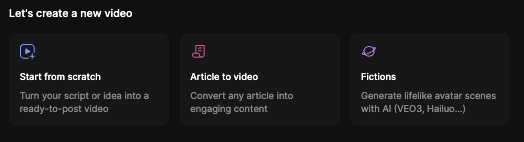
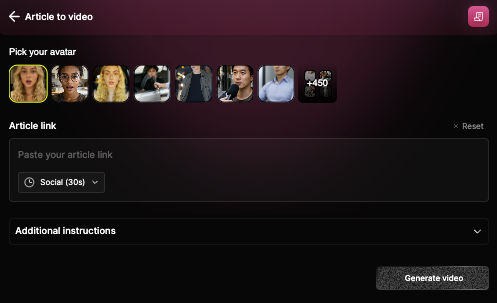
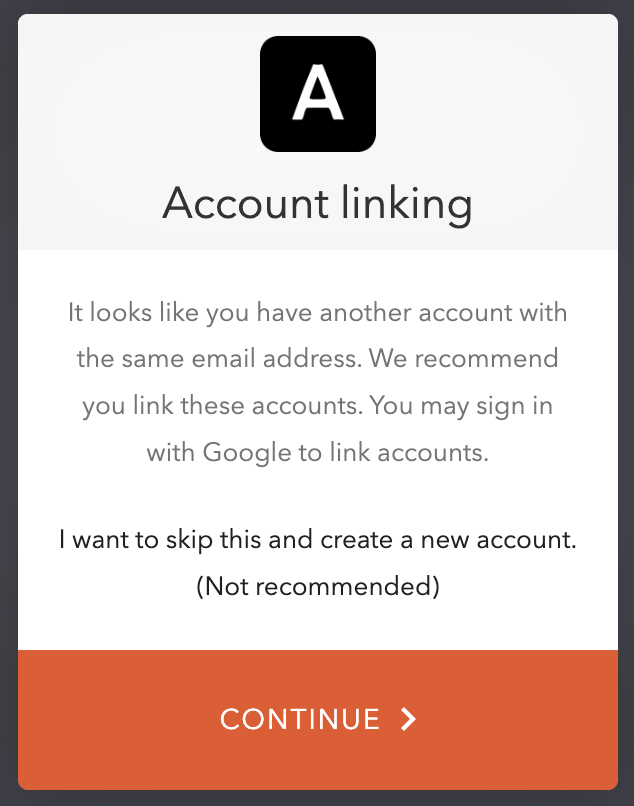 It means that you created your account with Google then via normal email for a second account but with the same address. This creates two different accounts that you need to merge.
### Password Reset
It means that you created your account with Google then via normal email for a second account but with the same address. This creates two different accounts that you need to merge.
### Password Reset
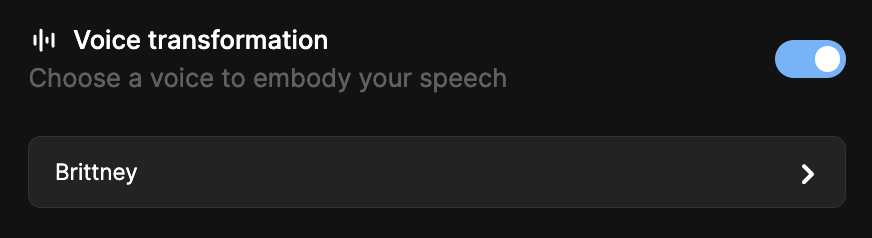 ---
# Source: https://docs.argil.ai/resources/avatar-actions.md
> ## Documentation Index
> Fetch the complete documentation index at: https://docs.argil.ai/llms.txt
> Use this file to discover all available pages before exploring further.
# Avatar actions
> You can now create your own medias and videos with VEO3 or Hailuo directly integrated into Argil using your own avatars or Argil's licensed avatars. It also integrates Nano Banana.
---
# Source: https://docs.argil.ai/resources/avatar-actions.md
> ## Documentation Index
> Fetch the complete documentation index at: https://docs.argil.ai/llms.txt
> Use this file to discover all available pages before exploring further.
# Avatar actions
> You can now create your own medias and videos with VEO3 or Hailuo directly integrated into Argil using your own avatars or Argil's licensed avatars. It also integrates Nano Banana.
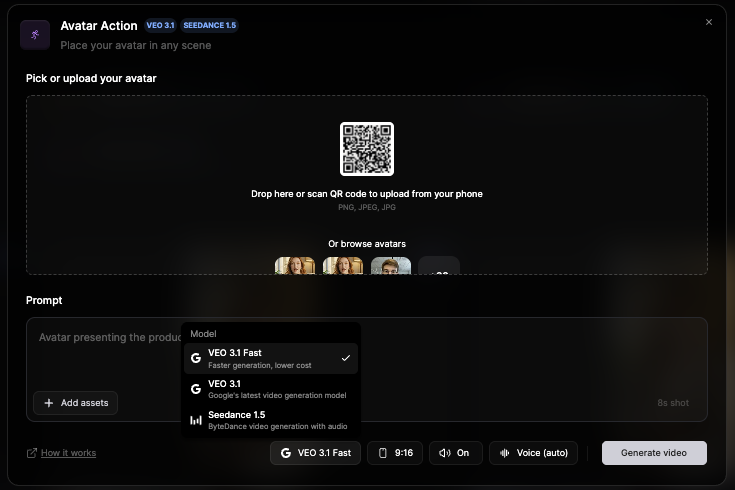

2.jpeg?fit=max&auto=format&n=X0PRMAONeltMnnBF&q=85&s=78a7f9fb6a036bd9f5f2e348ac3da0ec)
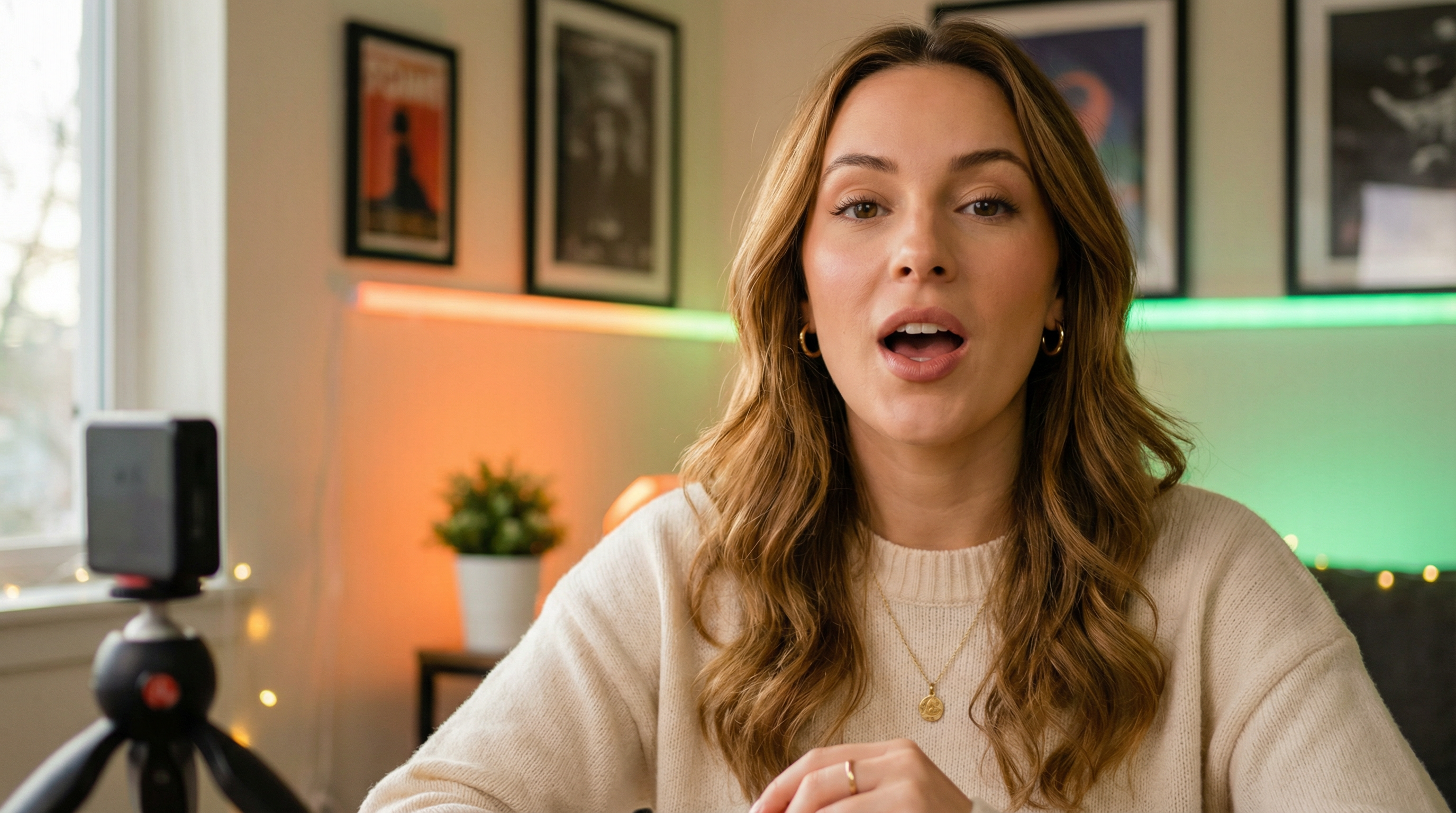
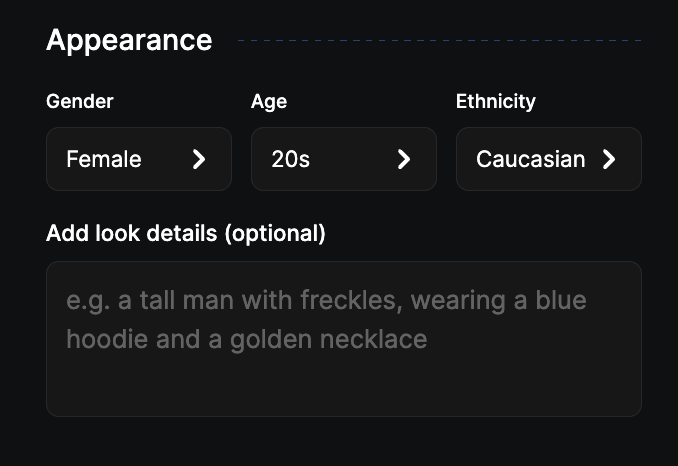 **Background**\
You have two toggles to pick from (camera angle and time of day) and then it is all prompting. The more details you give, the better the output will be. Don't be afraid to give it 10 to 30 lines of prompt.
**Background**\
You have two toggles to pick from (camera angle and time of day) and then it is all prompting. The more details you give, the better the output will be. Don't be afraid to give it 10 to 30 lines of prompt.
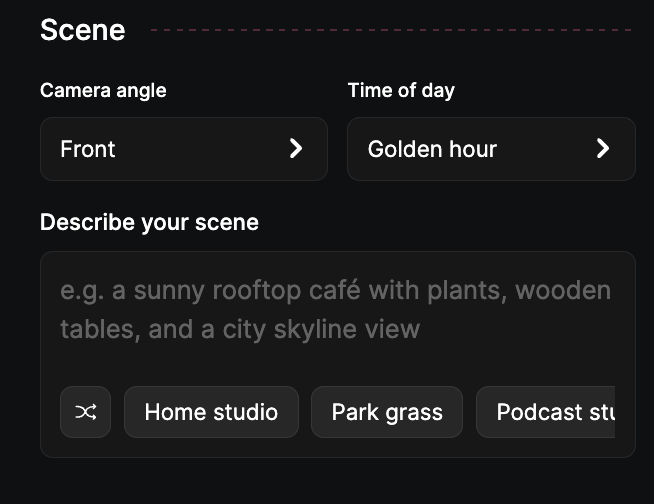 **Assets: products, logos and clothes**\
Here you can drop images of clothes, logos or products you want in the frame with your avatar. Be aware that you can always create an avatar without anything and add more styles later with the objects of your choice. \
Without prompting, we'll go with what seems to make the most sense. A bottle will be held by the avatar. But you can prompt it to define where the assets are located.
\
Example:\
You drop an image of a sweater as well as logo. The prompt can be "make that person wear the sweater and put the logo on the sweater".
**Assets: products, logos and clothes**\
Here you can drop images of clothes, logos or products you want in the frame with your avatar. Be aware that you can always create an avatar without anything and add more styles later with the objects of your choice. \
Without prompting, we'll go with what seems to make the most sense. A bottle will be held by the avatar. But you can prompt it to define where the assets are located.
\
Example:\
You drop an image of a sweater as well as logo. The prompt can be "make that person wear the sweater and put the logo on the sweater".
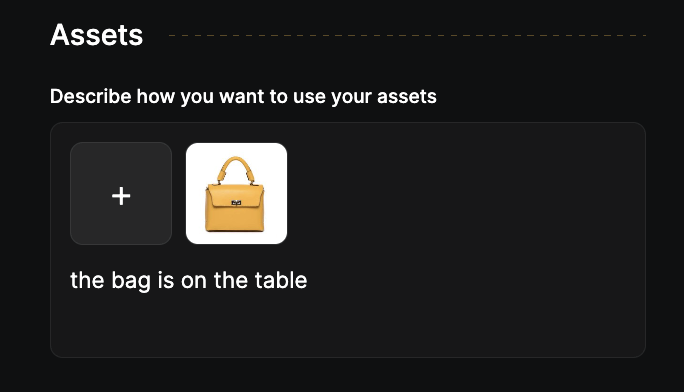 ---
# Source: https://docs.argil.ai/resources/create-avatar-styles.md
> ## Documentation Index
> Fetch the complete documentation index at: https://docs.argil.ai/llms.txt
> Use this file to discover all available pages before exploring further.
# Creating avatar styles
> What does it mean to add styles and how to add styles to your avatar
### What is a style?
Styles are keeping your face appearance while putting you in different environments, actions, or clothes. You can full prompt the style you want for your avatar. Each time you upload an image, we offer you a range of avatar styles you can pick from.
---
# Source: https://docs.argil.ai/resources/create-avatar-styles.md
> ## Documentation Index
> Fetch the complete documentation index at: https://docs.argil.ai/llms.txt
> Use this file to discover all available pages before exploring further.
# Creating avatar styles
> What does it mean to add styles and how to add styles to your avatar
### What is a style?
Styles are keeping your face appearance while putting you in different environments, actions, or clothes. You can full prompt the style you want for your avatar. Each time you upload an image, we offer you a range of avatar styles you can pick from.
 Once you get a result, you can click on "Vary" to obtain a slightly different version of the image you obtained.
Once you have created a range of styles that appear on the history on the right, you can pick any of them and get the description your wrote by clicking on "Use settings".
---
# Source: https://docs.argil.ai/pages/get-started/credentials.md
> ## Documentation Index
> Fetch the complete documentation index at: https://docs.argil.ai/llms.txt
> Use this file to discover all available pages before exploring further.
# API Credentials
> Create, manage and safely store your Argil's credentials
Once you get a result, you can click on "Vary" to obtain a slightly different version of the image you obtained.
Once you have created a range of styles that appear on the history on the right, you can pick any of them and get the description your wrote by clicking on "Use settings".
---
# Source: https://docs.argil.ai/pages/get-started/credentials.md
> ## Documentation Index
> Fetch the complete documentation index at: https://docs.argil.ai/llms.txt
> Use this file to discover all available pages before exploring further.
# API Credentials
> Create, manage and safely store your Argil's credentials